In Short
Lost Messages Routing is an Odoo 19 Discuss app. The tool to make sure you have not lost any incoming messages.
Lost Messages Routing makes sure incoming emails do not disappear when Odoo cannot attach them to a document thread. Unrouted messages are collected in a dedicated Lost Messages menu where authorized managers can inspect, search, delete, or manually attach one or many emails to the correct Odoo record. Restrict the target models, notify responsible users as soon as a message is lost, and let administrators reroute ordinary Odoo messages when a conversation was attached to the wrong thread.
Perfect for
Email-driven sales and support teams
Perfect for teams that receive customer replies through catchall addresses and need every request, quote change, complaint, or follow-up email attached to the right Odoo document.
Companies recovering mail routing failures
Ideal when fetchmail, catchall aliases, or reply matching sometimes fail and managers need a reliable queue for reviewing and routing messages before customers are left waiting.
Odoo administrators needing controlled routing
Useful for admins who want model restrictions, manager-only access, notification rules, and the option to reroute stored messages when conversations end up on the wrong thread.
Ready to evaluate?
Start with a free demo request or purchase in the Odoo Apps Store.
Free personalized demo. No phone number or credit card required. Free life-time updates and expert support within the major Odoo version.
Why teams choose it
Key benefits before you dive into the details
Catch lost incoming emails
Stop catchall and fetch failures from disappearing. When Odoo cannot match an incoming email to a thread, the app marks it as a lost message instead of letting it go unnoticed.
Review one clear queue
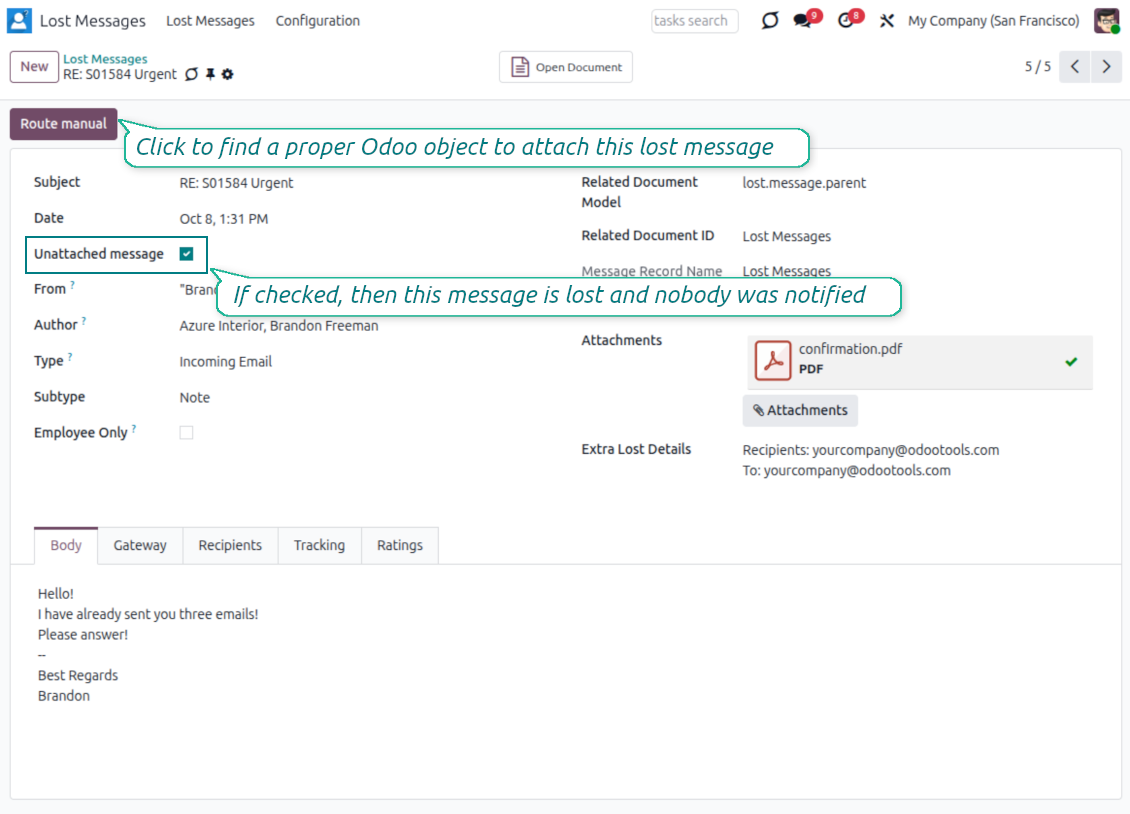
Give managers a focused workspace. Unattached messages appear in the Lost Messages menu with sender, subject, date, body, and search tools to identify the right destination.
Attach messages to records
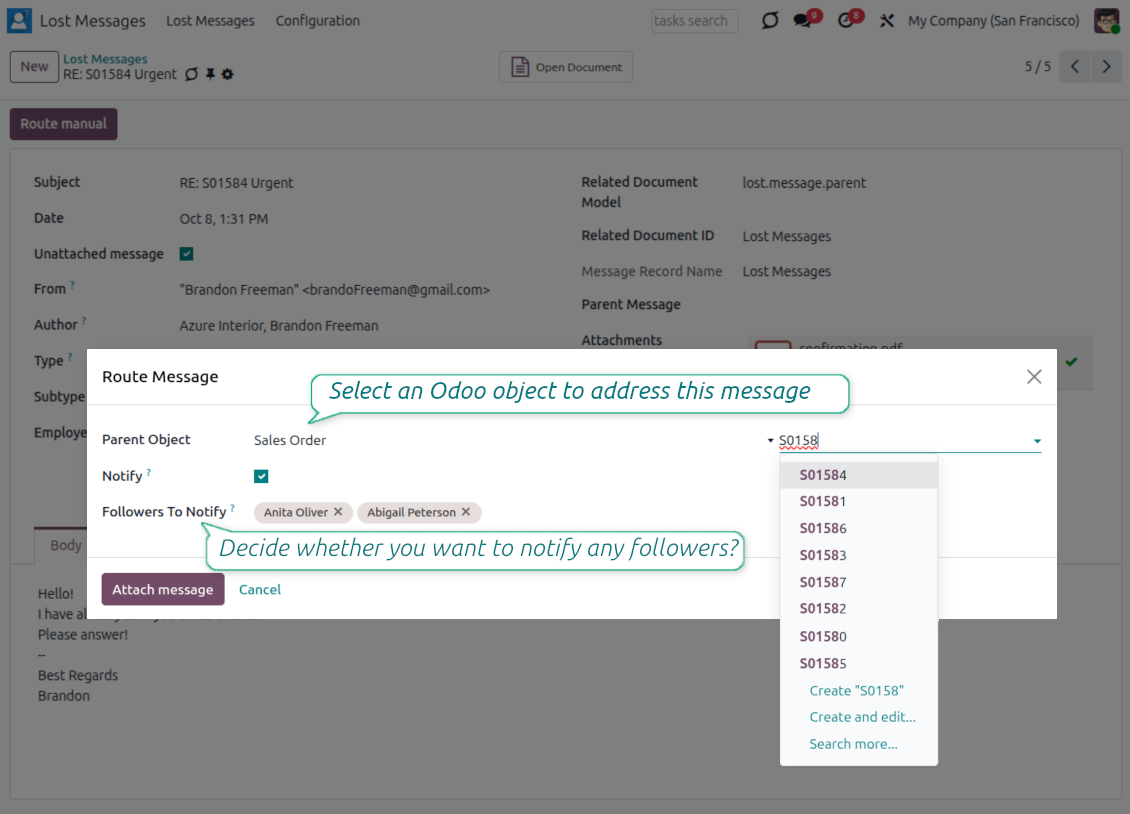
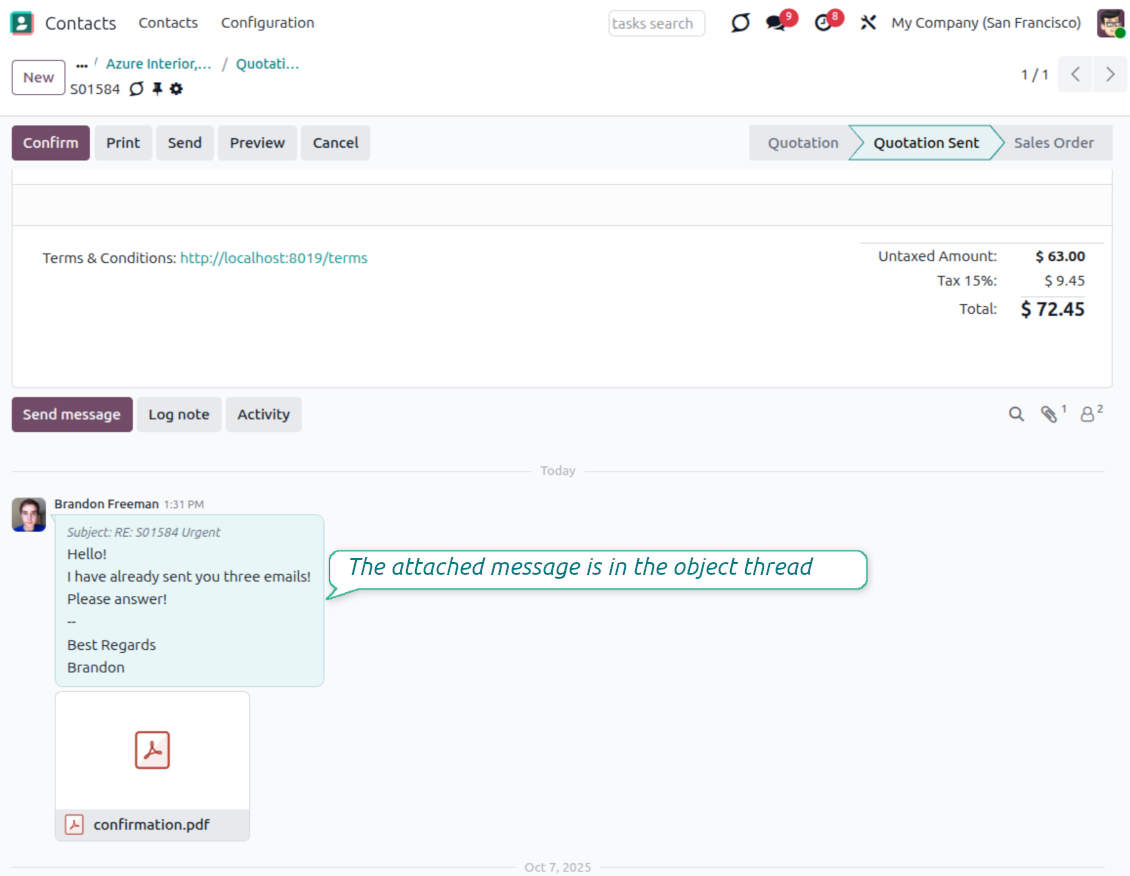
Route each email to the proper Odoo thread. Select the target model and record, attach the message, and keep the customer conversation where your team expects it.
Process messages in bulk
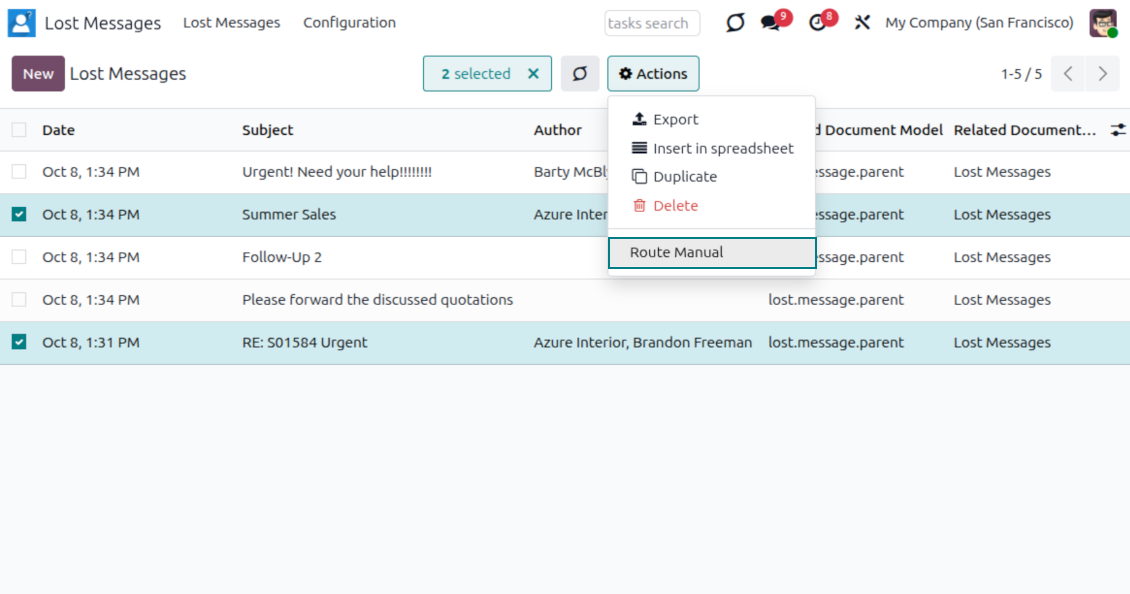
Clean the queue faster. Select several lost messages from the list and route them together to the same Odoo document through the mass action wizard.
Control allowed destinations
Keep manual routing disciplined. Restrict routing to selected mail-thread models, or leave the setting empty when managers may use any accessible threaded object.
Notify the right users
React before customers wait. Enable lost-message notifications and choose the internal users who should receive an email as soon as a new unattached message appears.
Odoo Store feedback
What customers say about the app
Amazing App and fantastic support
I bought the addon for v10. At the beginnig the addon did not work well. Then I requested an improvement feature, they did it in just A FEW HOURS. I am very happy, the addon is working perfectly, is just what I was looking for. Very excelent support Thanks a lot Odoo Tools Team
Jesus Astuvilca
A must have
With the help of this app you will never lose any messages again. We are very happy with the functionality and also with the responsive and quick support! They take our ideas and wishes serious. This is the way it should! Thumbs up!
David Fuchs
Awesome app! MUST BUY if you use Odoo!!!
The app helped us alot. Some our customers send us an email and got lost in the process. with Lost messages routing the messages got stored and we can place the mail into the correct corresponding process. plus excellent support from Odoo Tools with adding a new feature to send an e-mail to selected users whenever a lost message is found. 10/10!!
Okan Hollander
It does his job
All previously lost messages are monitored and a convenient notification is received.
Josep Anton Belchi Riera
It works very well
It is very useful, it helps us to efficiently serve our customers.
Oriana Maita
Ready to evaluate?
Start with a free demo request or purchase in the Odoo Apps Store.
Free personalized demo. No phone number or credit card required. Free life-time updates and expert support within the major Odoo version.
Control every lost message
A dedicated workspace for emails Odoo could not attach automatically
One queue for unattached emails
- Catch routing failures. Messages Odoo cannot match to an existing thread are marked as lost instead of being ignored.
- Use a dedicated menu. Lost Messages Managers get a clear place to review and clean the queue.
- Keep ordinary messages separate. Once routed, the message leaves the lost queue and remains available in Odoo messages.
Inspect before routing
- Review the message body. Open a lost email to check the content and understand which customer document it belongs to.
- Keep Extra Lost Details. The app preserves technical routing clues such as Recipients, To, CC, and In Reply To when Odoo provides them.
- Search by useful fields. Navigate by content, subject, and author to find the message that needs attention.
- Handle spam deliberately. Delete irrelevant records or simply untick the unattached flag when a message is not truly lost.
Route emails to the right document
Attach one message or many messages to the correct Odoo thread
Manual route wizard
- Open Route Manual. Launch the wizard from a message form or from the list mass action.
- Select the parent object. Choose the target model and record, then attach the message to that document thread.
- Recover the conversation. The email becomes part of the selected record history for future follow-up.
Batch routing for the same record
- Select several messages. Route one, several, or all visible lost messages from the tree view.
- Attach in one action. Add a batch of related emails to the same sales order, lead, contact, or other threaded object.
- Keep attachments with the message. Related attachments are moved to the selected record together with the routed email.
Restrict where messages can be routed
Let managers route only to approved Odoo models
Allowed Models setting
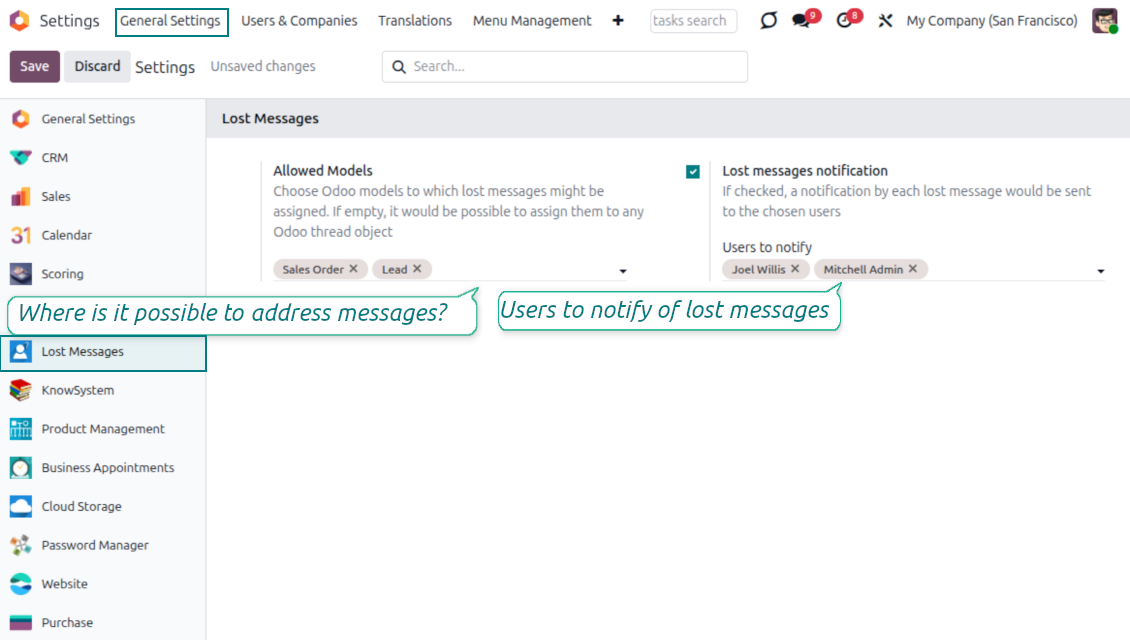
- Define routing destinations. Choose the models that may receive manually routed messages.
- Support real business flows. Use sales orders, opportunities, contacts, or any custom model with an Odoo communication thread.
- Stay flexible. Leave the list empty when managers should be able to route to any accessible threaded object.
Respect object access
- Do not bypass record rules. Users still need access to the target object before it appears in the wizard.
- Reduce wrong choices. Managers see only destinations that are both allowed for routing and visible to them.
- Keep administration simple. The configuration lives in the Lost Messages settings area.
Ready to evaluate?
Start with a free demo request or purchase in the Odoo Apps Store.
Free personalized demo. No phone number or credit card required. Free life-time updates and expert support within the major Odoo version.
Get notified the moment a message is lost
Warn responsible users before an unanswered email becomes a customer issue
Configurable alerts
- Enable notifications. Turn on lost-message alerts in the app configuration.
- Choose recipients. Select the internal users who should be warned about every newly lost message.
- Focus on action. The notification points users to the message that needs to be routed.
Useful notification content
- See the subject. The email subject identifies which message needs review.
- Read the body. The alert includes the message content so users can judge urgency quickly.
- Open and route. A direct link brings the manager to the lost message form for the next step.
Secure lost-message administration
Give routing rights only to the people who should manage unattached emails
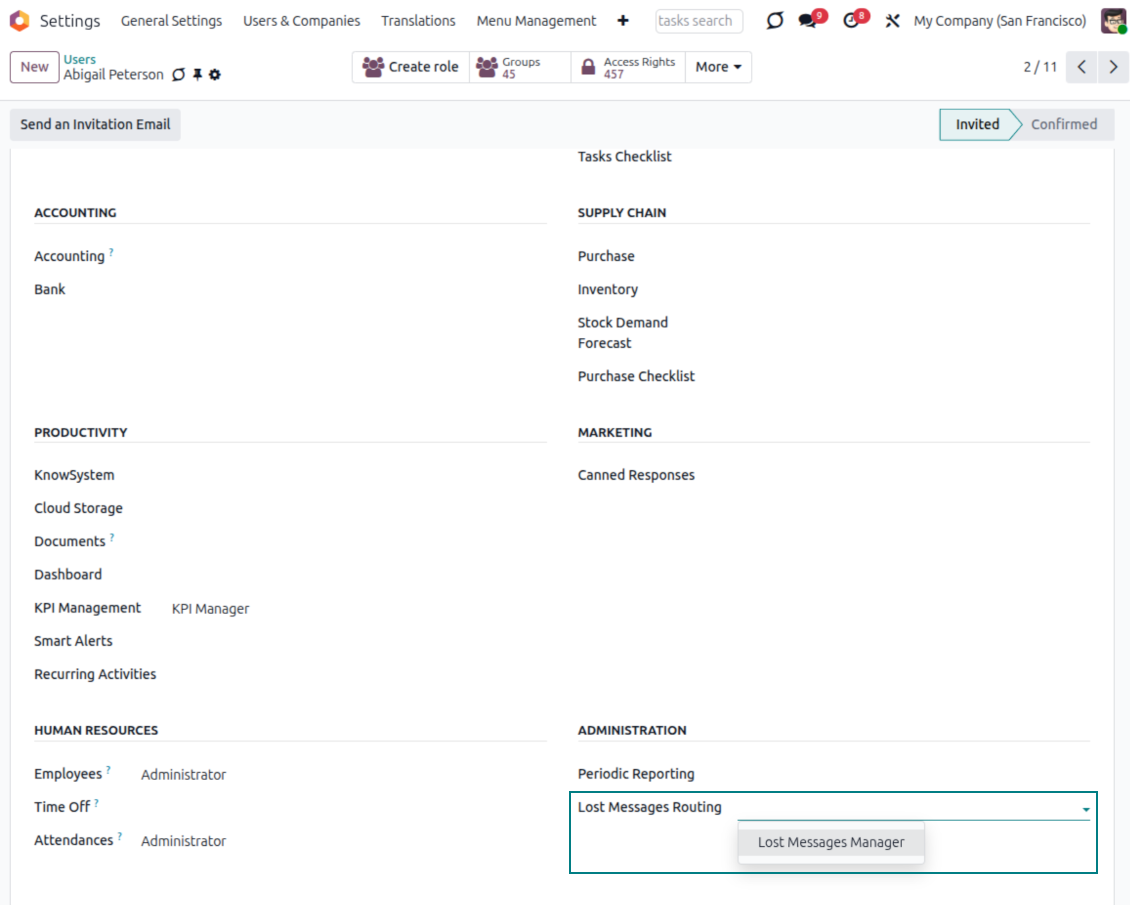
Lost Messages Manager group
- Dedicated access right. Only users in the Lost Messages Manager group can open and manage the app menu.
- Available without developer mode. Assigned managers get a normal operational menu for daily processing.
- Assign carefully. Lost-message managers can see unattached emails, so the group should be limited to trusted users.
Rights still matter
- Target records stay protected. A user cannot route to a document they are not allowed to access.
- Admins keep technical control. System administrators can also route from the technical Messages menu in developer mode.
- Operational and secure. Daily managers get the queue while Odoo access rules continue to govern destination records.
Reroute messages when threads change
Move already stored Odoo messages to the correct conversation when needed
Not only lost messages
- Route ordinary messages too. Administrators can use the same manual routing action from the technical Messages menu.
- Fix wrong threads. Move a message when it was originally attached to the wrong order, lead, contact, or other document.
- Keep history usable. Place the existing message where the next user will naturally look for the conversation.
Useful for complex customer flows
- Multiple documents, one customer. Correct conversations when a client has several open records and an email lands on the wrong one.
- Same controlled wizard. Available destinations still follow configured models and Odoo access rights.
- Cleaner communication records. Keep message history meaningful for sales, support, and administration teams.
Ready to evaluate?
Start with a free demo request or purchase in the Odoo Apps Store.
Free personalized demo. No phone number or credit card required. Free life-time updates and expert support within the major Odoo version.
Odoo demonstration databases (live previews)
For this app, we might provide a free personalized demo database.
You do not need a phone number or credit card to contact us. You should only pass a short email sign-up, which does not take more than 30 seconds.
By your request, we will prepare an individual live preview database, where you can apply any tests and check assumptions for about two weeks.
Bug reporting
If you encounter bugs or inconsistent behavior, do not hesitate to contact us. We guarantee to provide fixes within 60 days of purchase and are intensely interested in improving our tools even after this period.
You do not need a phone number or credit card to contact us. You should only pass a short email sign-up, which does not take more than 30 seconds.
Please include as many details as possible in your request: screenshots, Odoo server logs, a full description of how to reproduce your problem, and so on. Usually, it takes a few business days to prepare a working plan for an issue (if a bug is confirmed) or provide you with guidelines on what should be done (otherwise).
Public features requests and module ideas (free development)
We are strongly motivated to improve our tools and would be grateful for any feedback. If your requirements are of public use and might be efficiently implemented, the team will include those in our to-do list.
Such a to-do list is processed regularly and does not assume extra fees. Although we cannot promise deadlines and final design, it might be a good way to get desired features without investments and risks.
You do not need a phone number or credit card to contact us. You should only pass a short email sign-up, which does not take more than 30 seconds.
19.0.1.2.15
- Fixed the scenario of the false-positive bounce emails.
19.0.1.2.14
- The module is optimized to select documents using advanced search rather than simple selection.
19.0.1.2.13
- The code has been refactored to distinguish between discarded and lost messages.
- The follow-ups for lost messages are also treated as lost messages.
19.0.1.2.12
- The feature to optionally allow notifying internal followers has been added.
19.0.1.2.11
- The issue with bounced messages, which cause lost messages to be created, has been fixed.
19.0.1.2.10
- The issue with unavailable models while routing has been fixed.
19.0.1.2.9
- Security checks are avoided during routing to improve performance
19.0.1.2.8
- The app is adapted to the newest "invisible" test requirements.
19.0.1.2.7
- The app is published to version 19.
18.0.1.2.7
- The issue with non-existent records resulting from the active_id search has been resolved.
18.0.1.2.6
- The app is published to version 18.
17.0.1.2.6
- The message details "Recipients", "To", "CC", and "In Reply To" (if any) are saved to the newly introduced field "Extra Lost Details".

The tool to flexibly structure Odoo attachments in folders and synchronize directories with cloud clients: Google Drive, OneDrive/SharePoint, Nextcloud/ownCloud, Dropbox, Amazon S3, Box, and NAS. DMS. File Manager. Document management system
398€

The tool to build a deep and structured knowledge base for internal and external use. Knowledge System. KMS. Wiki-like revisions.
398€
The tool to automatically synchronize Odoo attachments with OneDrive files in both ways
487€
The tool to manage your Odoo from your favorite AI chats through MCP. Claude. Any MCP-supporting AI.
198€
The tool to set up KPI targets and control their fulfillment by periods. KPI dashboards. Dashboard designer. KPI charts
198€
The tool for time-based service management from booking appointments to sales and reviews
398€

The tool for private communication without interrupting followers. Confidential messaging
38€