In Short
Password Manager is an Odoo 19 Extra Tools app. The tool to safely keep passwords in Odoo for shared use. Shared vaults.
Securely manage team passwords inside Odoo with encrypted shared vaults, role-based access, password generation, portal sharing, duplicate control, and optional access logging.
Perfect for
Internal teams sharing credentials
Sales, support, IT, product, and operations teams can keep shared passwords in structured Odoo vaults while controlling who may view, copy, update, or administer each bundle.
Agencies and service providers
Consultants, MSPs, and outsourcing teams can safely share selected passwords with customers through protected portal vaults without exposing the whole internal password bundle.
Security-conscious Odoo databases
Organizations that need encrypted credential storage, password generation, duplicate control, rotation reminders, and optional access logs can manage the process without leaving Odoo.
Ready to evaluate?
Start with a free demo request or purchase in the Odoo Apps Store.
Free personalized demo. No phone number or credit card required. Free life-time updates and expert support within the major Odoo version.
Why teams choose it
Key benefits before you dive into the details
Shared team password vaults
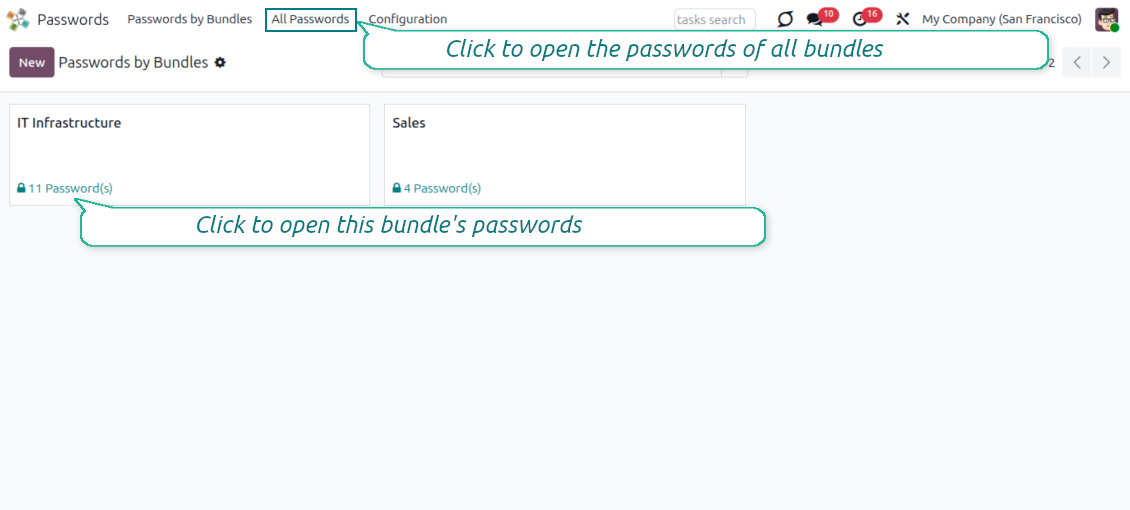
Group credentials into bundles for a department, project, or customer and grant access to selected Odoo users or user groups.
Single-view workspace
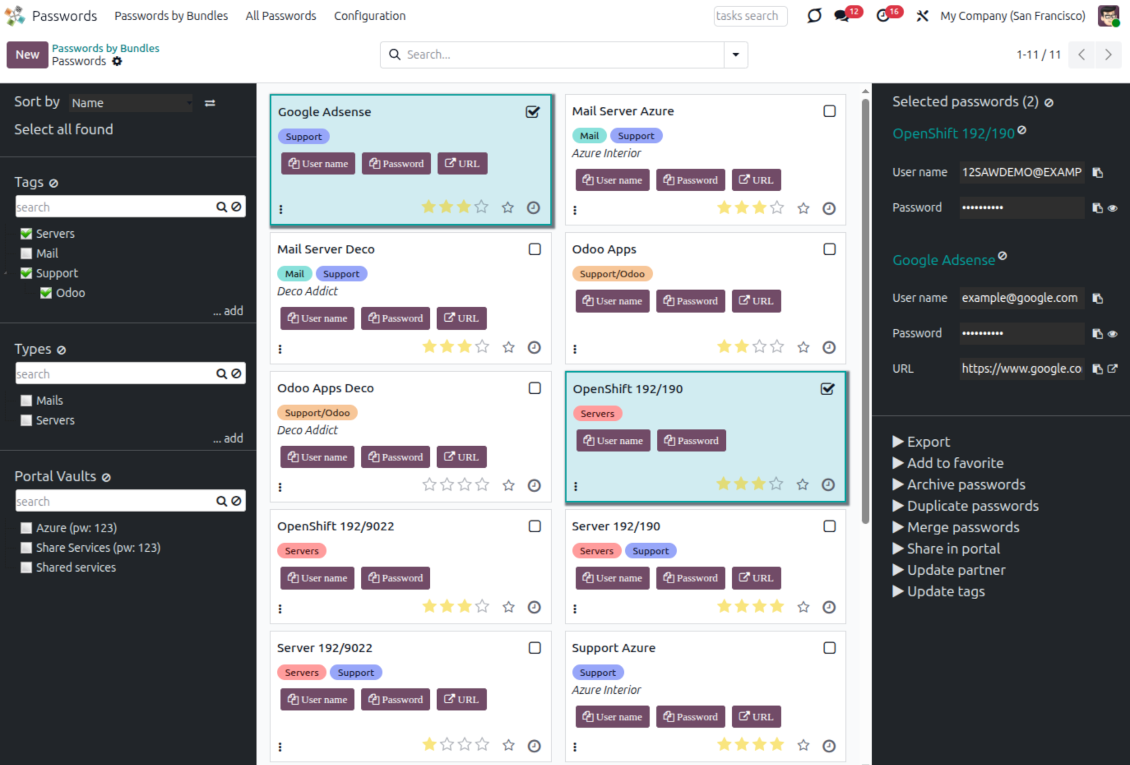
Find, sort, tag, select, open, and copy credentials from one password manager interface without jumping between forms.
Encrypted security layers
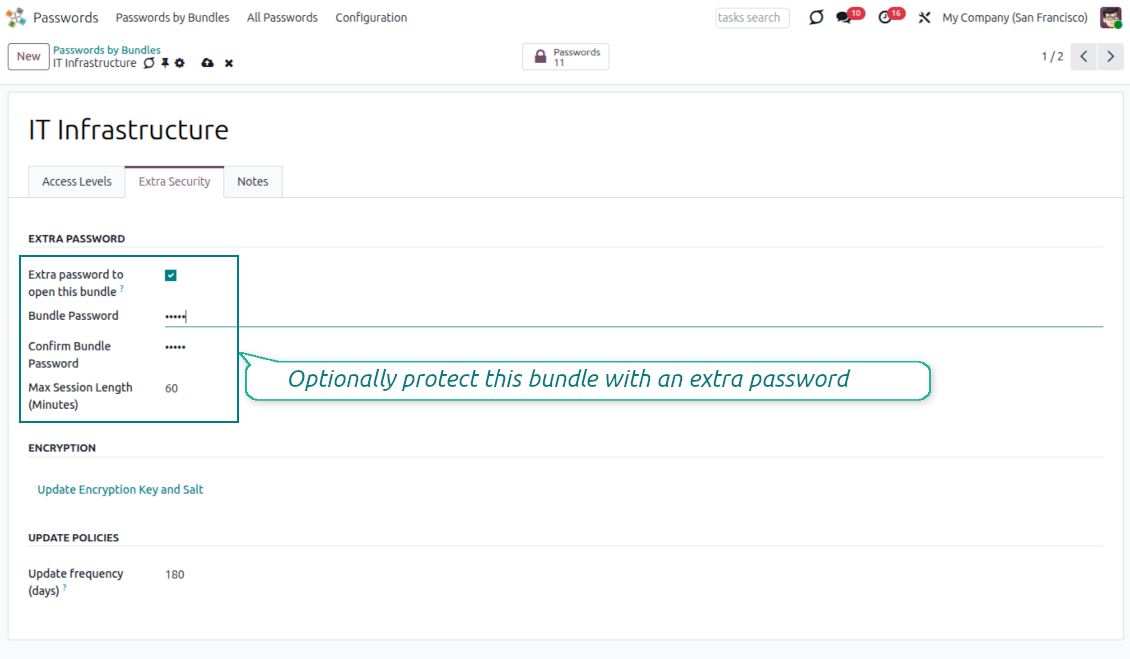
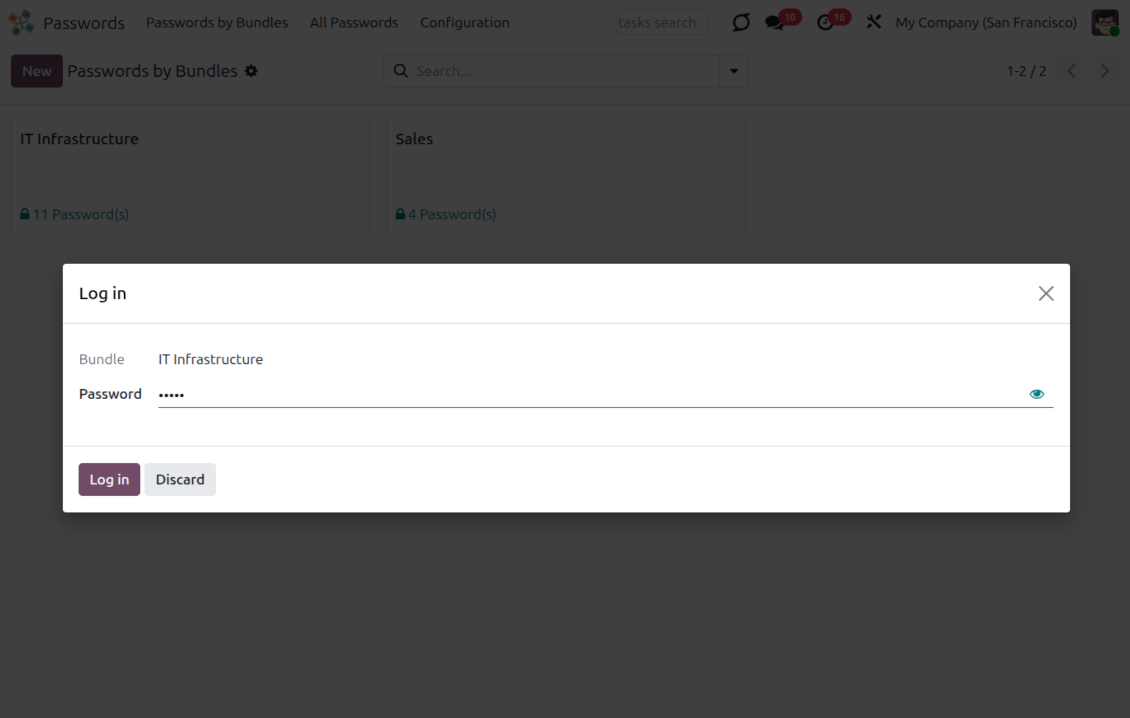
Store password keys encrypted, protect selected vaults with an extra password, and limit sessions before users must confirm access again.
Portal password sharing
Share selected credentials with Odoo portal contacts through separate protected portal vaults instead of exposing the full internal bundle.
Password generator
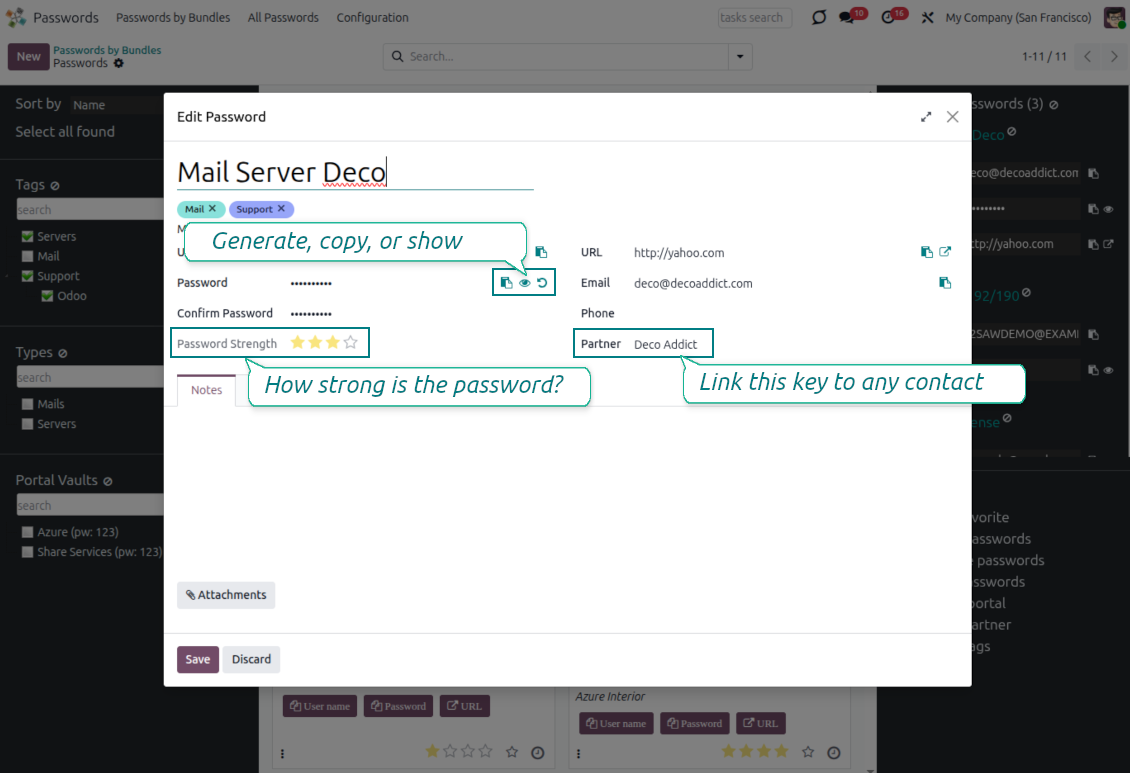
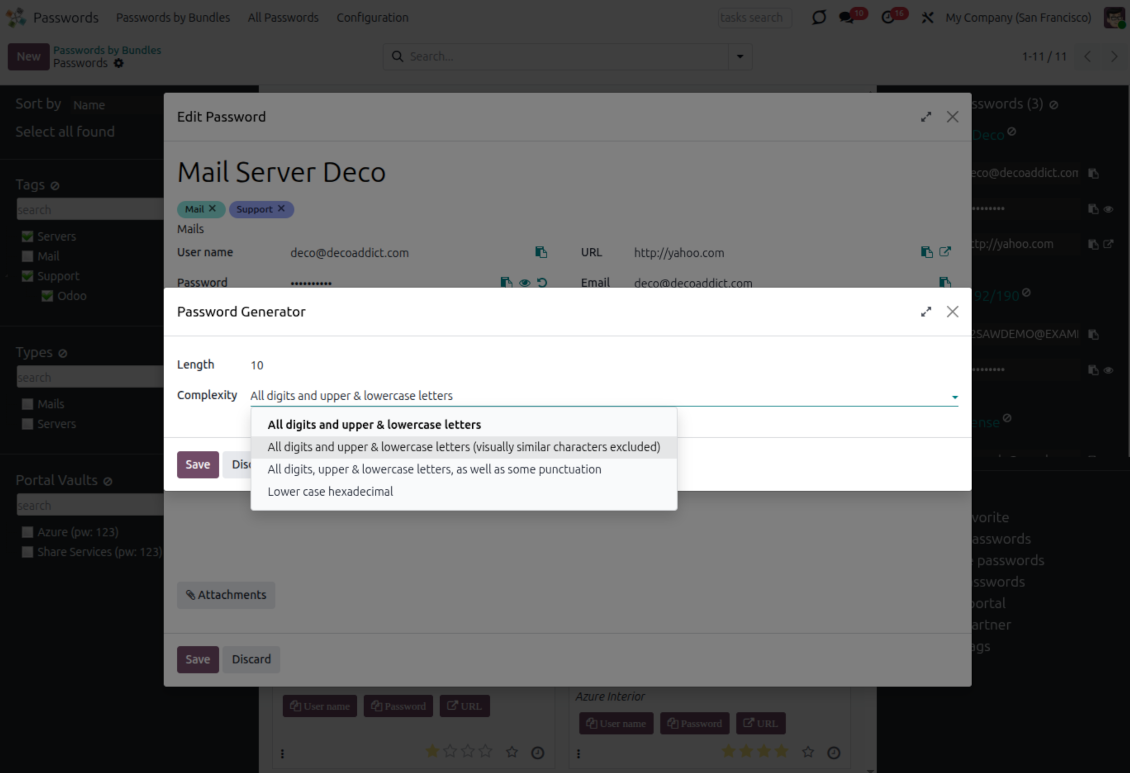
Generate new passwords manually or automatically with configurable length and character rules, then evaluate their strength in real time.
Quality and duplicate control
Spot weak passwords, configure duplicate criteria, warn users before saving repeated keys, and merge duplicate records when needed.
Batch actions and export
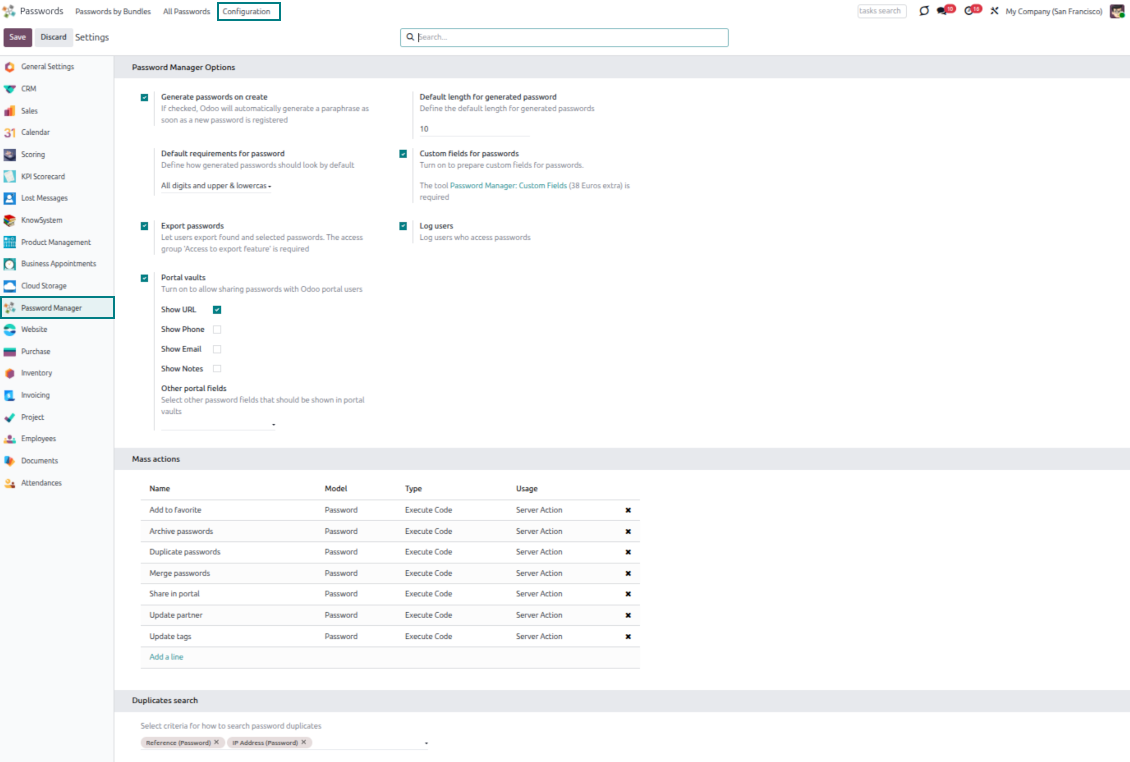
Configure mass actions to export selected passwords, update tags or partners, duplicate, merge, archive, restore, delete, or mark favorites.
Custom fields
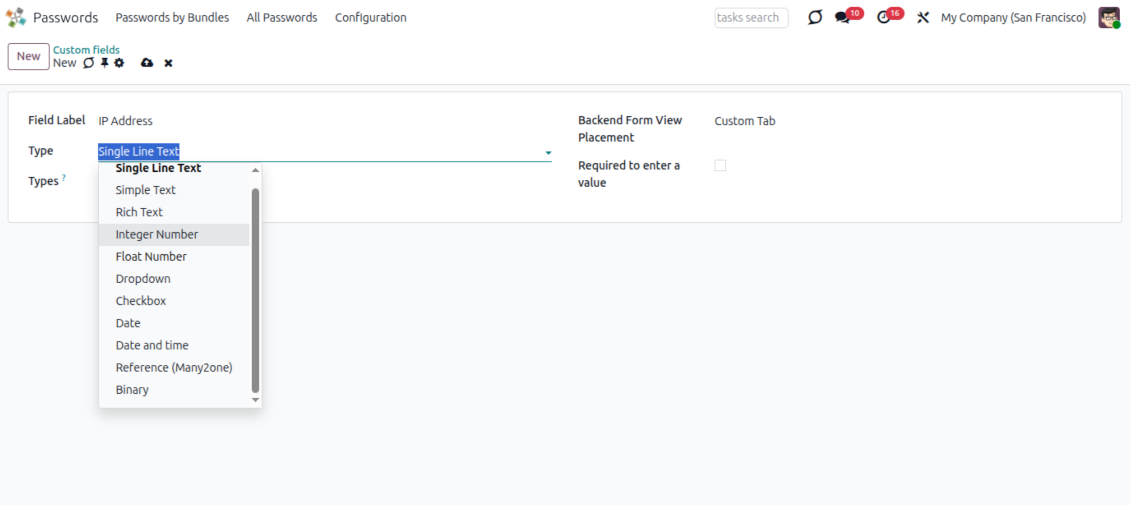
With the optional extension, add password types and custom fields so each credential category stores the details it really needs.
Access logging
Enable user logging to see who viewed or copied a password in the backend or portal and when the latest access happened.
Odoo contact links
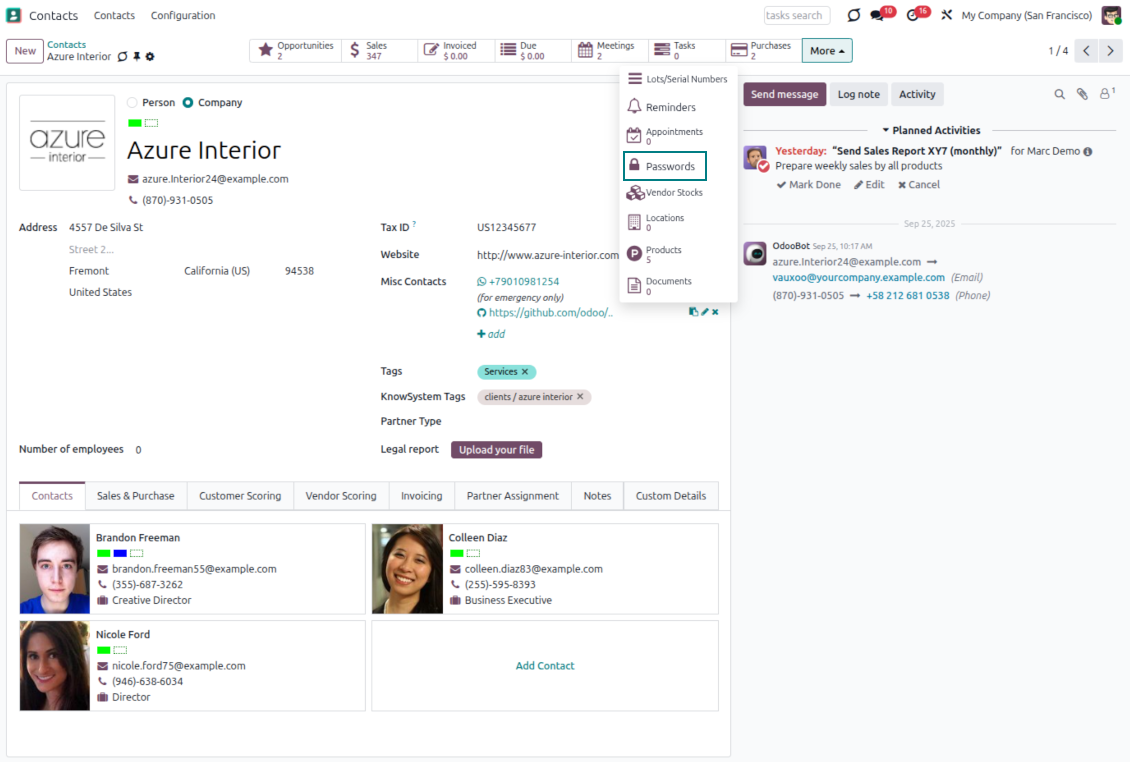
Link passwords to Odoo partners, open related credentials from contact records, and still control sharing through portal vault access.
Password rotation reminders
Define update periods and responsible users so Odoo creates activities when important credentials should be changed.
Favorites and quick access
Mark key passwords as favorites, open related sites quickly, and keep frequently used credentials easy to find.
Odoo Store feedback
What customers say about the app
Very good password management module
Easy installation and quick setup
Charline Heurtault
Ready to evaluate?
Start with a free demo request or purchase in the Odoo Apps Store.
Free personalized demo. No phone number or credit card required. Free life-time updates and expert support within the major Odoo version.
Shared encrypted vaults and team access control
Give the right people the right password access, with extra protection for sensitive bundles.
Role-based sharing policies
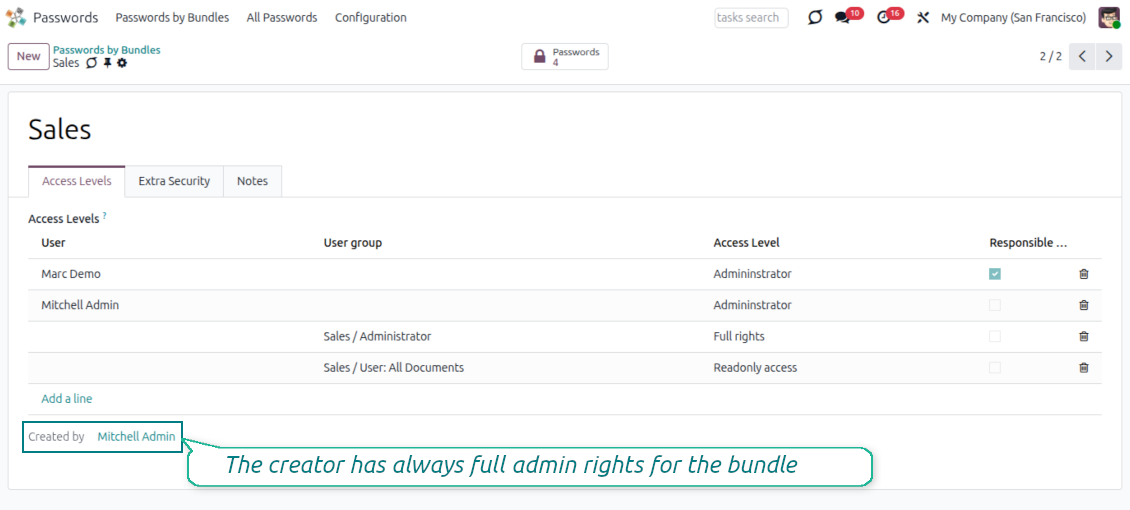
- Create as many password bundles as your teams, departments, projects, or customers need.
- Grant bundle access to individual Odoo users or whole user groups from the access levels table.
- Use administrator rights for users who should manage the vault, its passwords, tags, update policies, access levels, and extra password.
- Use full rights for users who may work with passwords and tags but should not change the vault settings.
- Use readonly rights when users may see permitted passwords but must not modify bundle objects.
- Restrict individual password keys further by allowed users or groups; empty restrictions keep the key visible to all users who can read the bundle.
Security layers for sensitive credentials
- Store password keys symmetrically encrypted, so database access alone is not enough to reveal credentials.
- Protect selected bundles with an extra password and set how long a successful session remains valid.
- Re-encrypt password keys when a bundle password changes, and let bundle administrators refresh encryption key and salt when needed.
- Define password update periods and assign responsible users or groups so Odoo creates activities when keys should be rotated.
- Enable user logging to record backend and portal password views or copies, including the user and latest access date.
Secure portal password vaults for customers
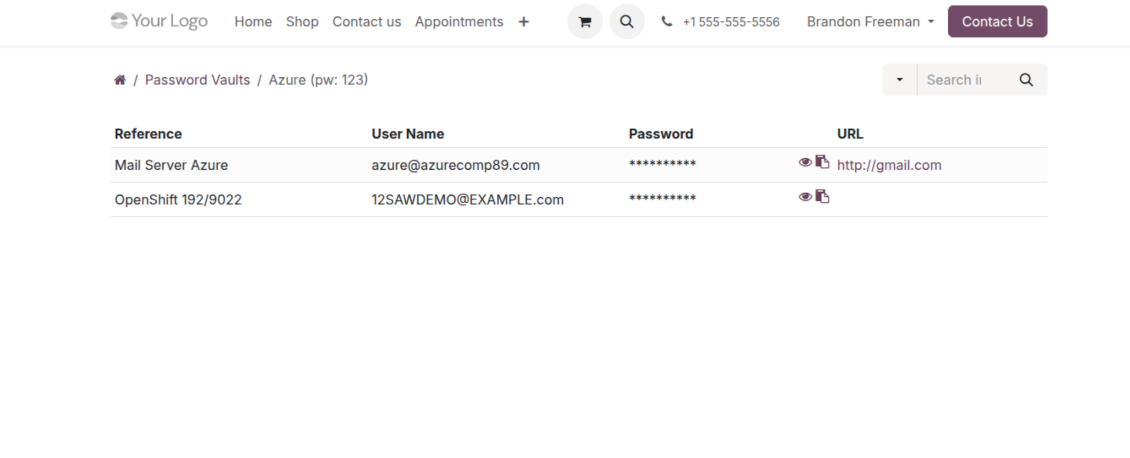
Share only the selected credentials with each customer, protected by portal vault passwords and access rules.
Controlled sharing from the backend
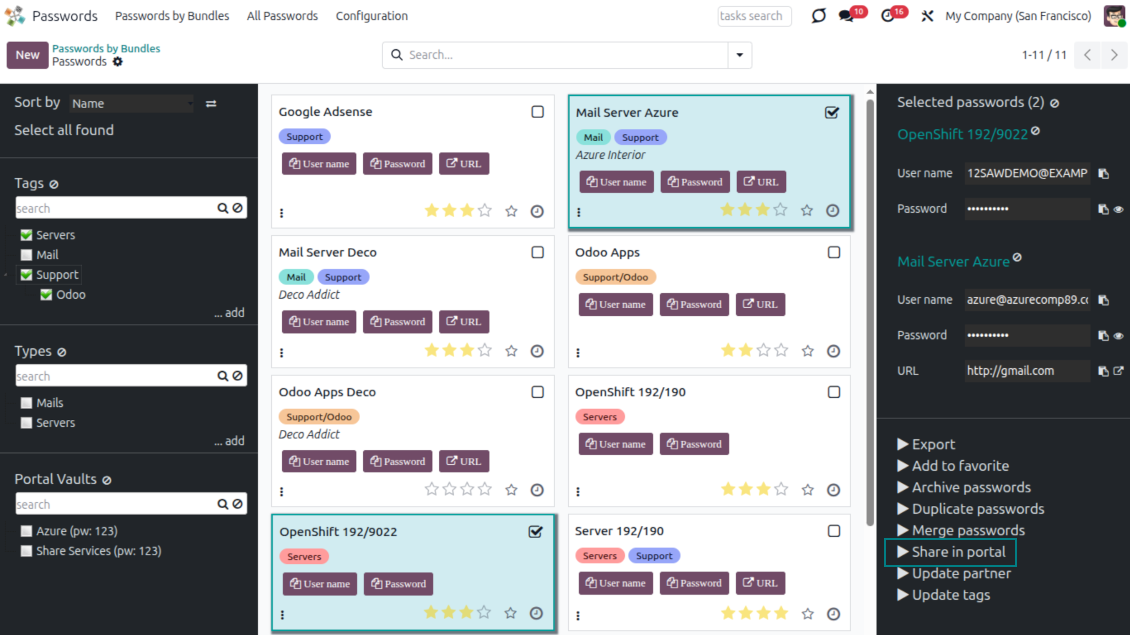
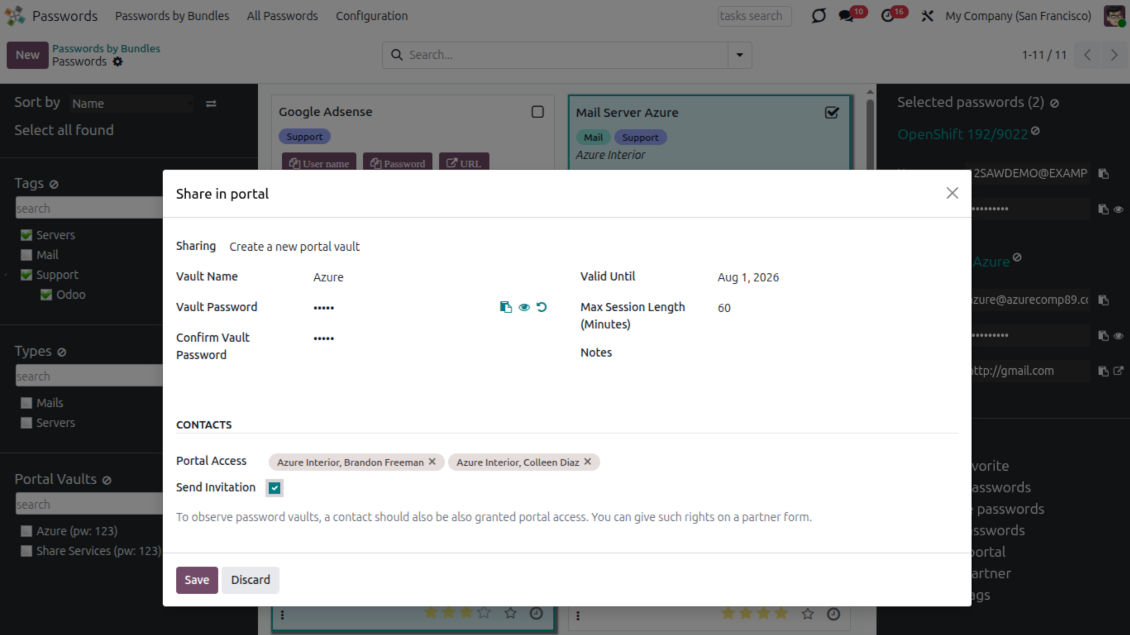
- Turn on portal vaults in settings and add the Share in portal mass action to share selected keys from a bundle.
- Create unlimited portal vaults inside a password bundle and share each one with selected Odoo partners.
- Add passwords by drag and drop from the backend navigation panel or through the sharing wizard.
- Send invitation emails during sharing when portal access is already granted to the customer contact.
- Set a validity date for temporary sharing so portal vaults can be archived automatically.
Protected portal experience
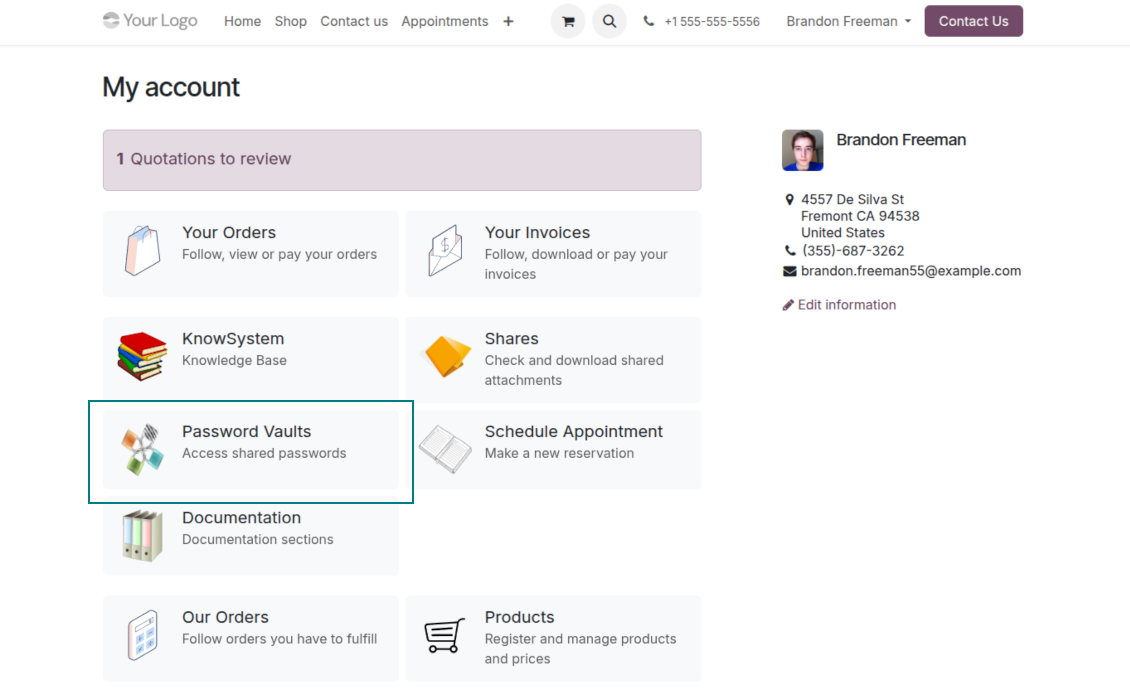
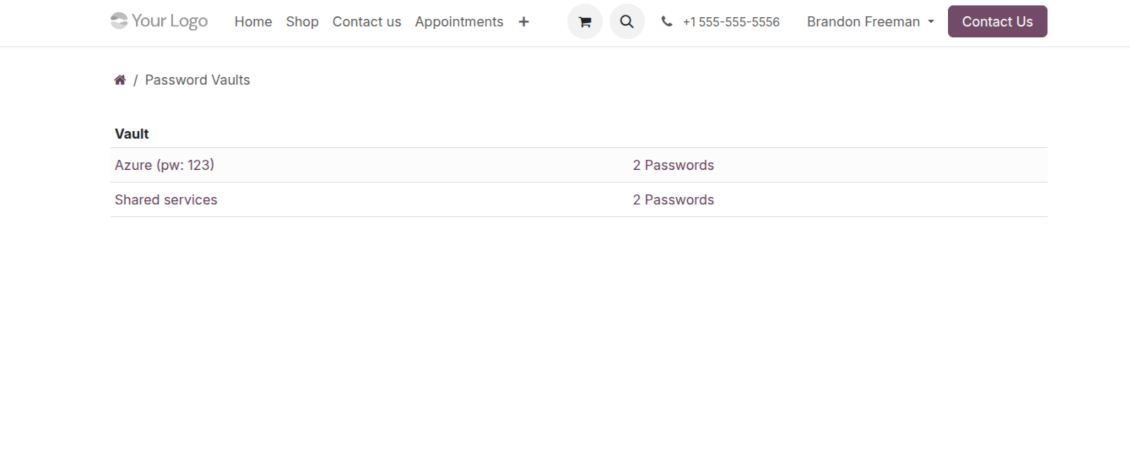
- Portal users open shared credentials from the Password Vaults entry on their Odoo portal home page.
- A contact can access vaults assigned to that partner or to the partner's parent company, provided portal rights are granted.
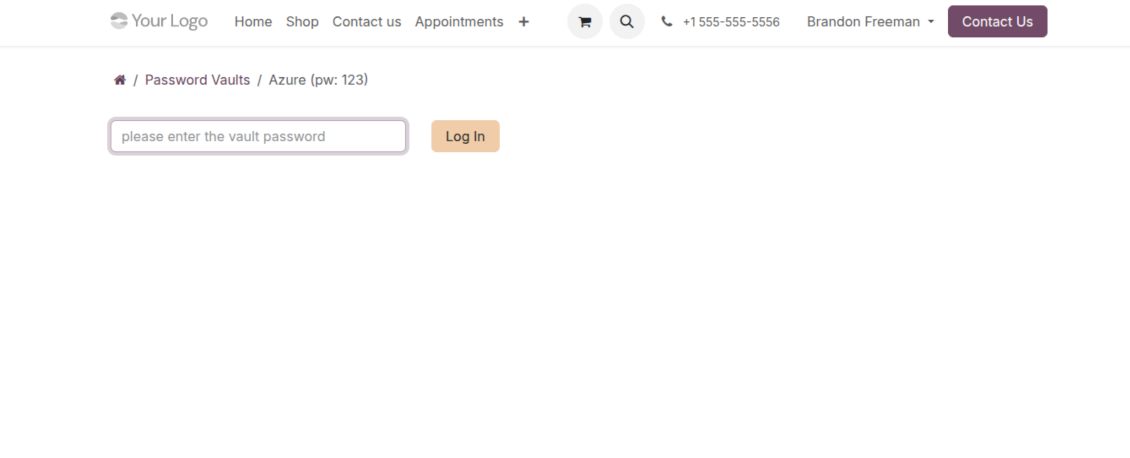
- Each portal vault has its own required password and session timeout before credentials can be shown again.
- Choose which columns are visible in the portal: reference, username, password, URL, email, phone, notes, and selected extra fields.
- When user logging is enabled, portal password views and copies are recorded on the password card logging tab.
Custom password fields and types
Adapt password records to your real credential categories without custom development.
Fields that match each credential
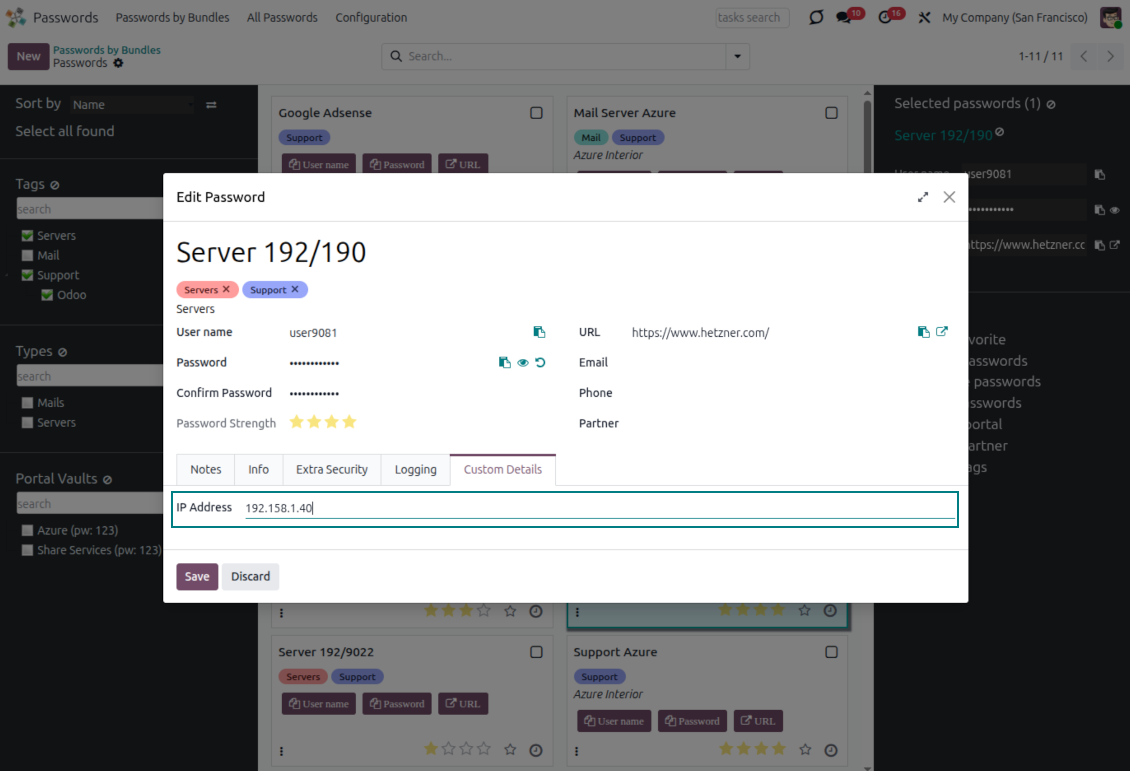
- Add custom password attributes from the interface instead of asking a developer to change the form.
- Use the field types your process needs: text, rich text, numbers, selections, booleans, dates, files, and references to Odoo records.
- Choose where each field appears: a custom tab, the left column, the right column, or after notes.
- Mark fields as required when a password type must always capture a specific detail.
Password types for cleaner vaults
- Create a typology of passwords, including hierarchies, so users can navigate credentials by type.
- Show fields only for the relevant password types, for example different properties for virtual servers and email servers.
- Assign or change password types in bulk from the single-view interface with drag and drop.
- Keep field management under administrator control while users benefit from clearer forms, imports, and exports.
Duplicate detection and password merging
Prevent repeated credentials and clean up existing duplicates without losing useful details.
Find possible duplicates before they spread
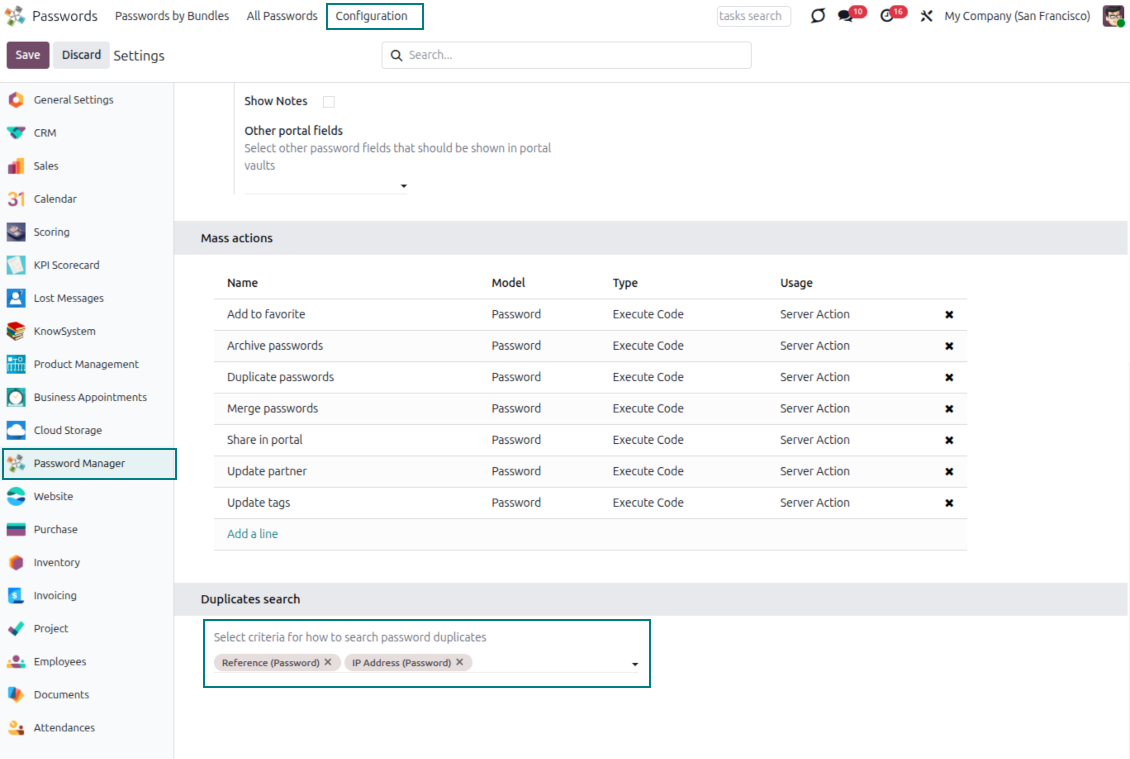
- Define your own duplicate criteria from the app settings instead of relying on one fixed rule.
- Compare stored fields such as reference, username, email, phone, notes, linked partner, dates, numbers, and selected custom fields.
- Use exact matching for most fields and case-insensitive comparison for character fields.
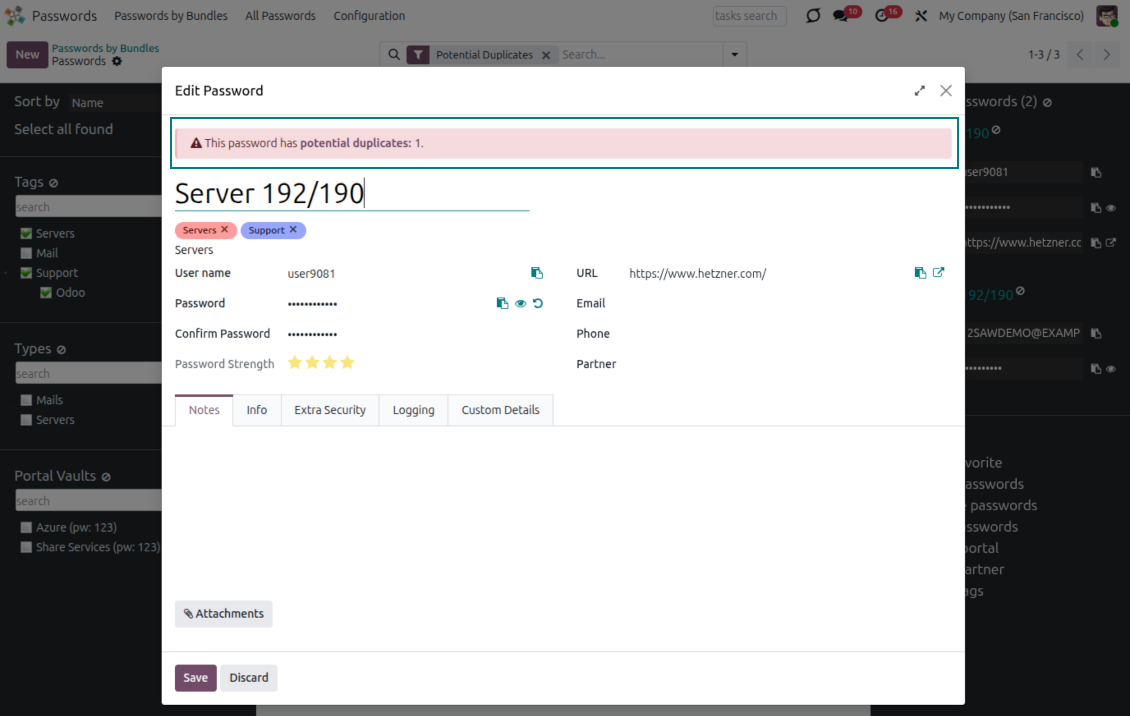
- Warn users during password creation when the new key may duplicate an existing record.
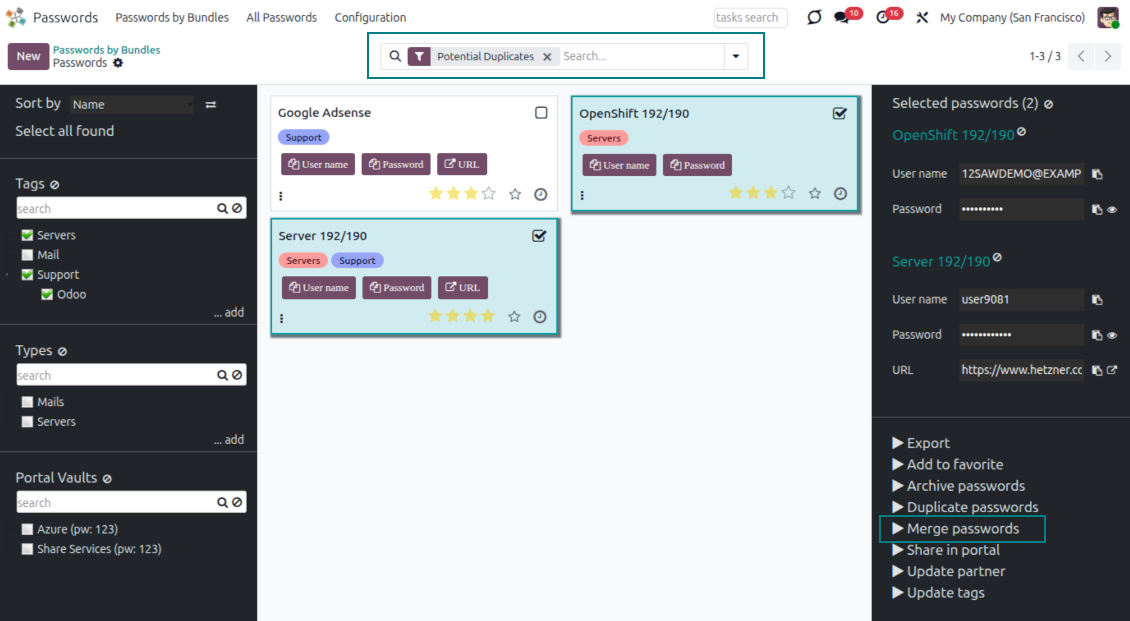
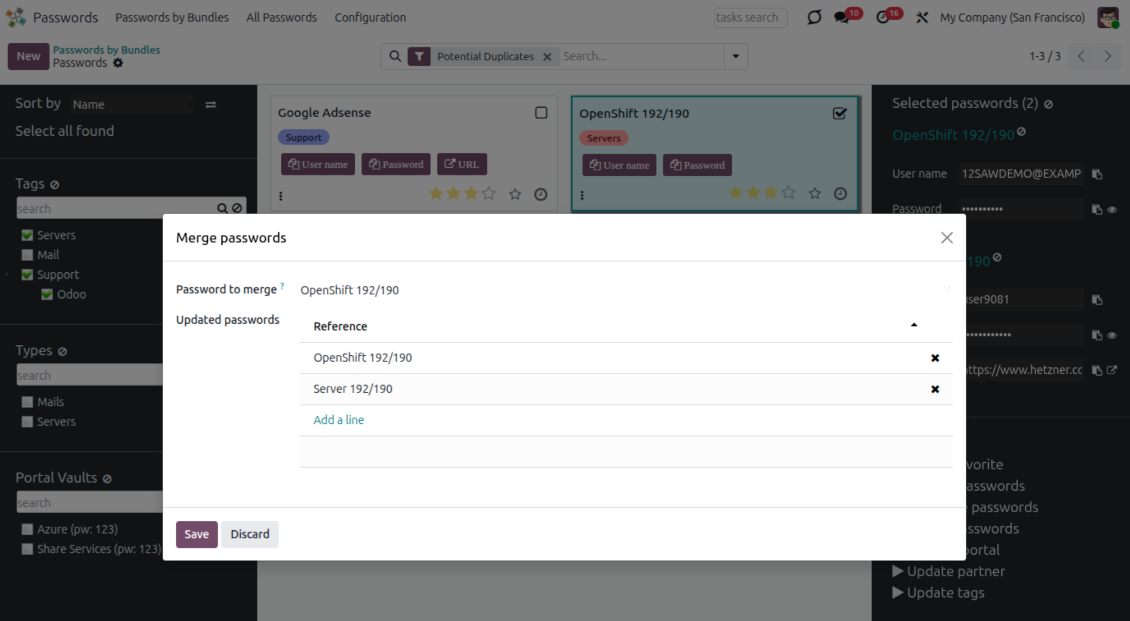
- Apply the Potential duplicates filter inside one bundle or across all passwords to review candidates quickly.
Merge records while keeping useful data
- Add the Merge passwords mass action and select the records that should become one clean password card.
- Choose the main password as the priority source when values conflict.
- Let the wizard fill missing reference, bundle, username, email, URL, phone, last update date, and partner values from the merged records.
- Accumulate notes, attachments, and tags from all merged password records.
- Archive the merged records after consolidation while the main password card keeps the enriched data.
Ready to evaluate?
Start with a free demo request or purchase in the Odoo Apps Store.
Free personalized demo. No phone number or credit card required. Free life-time updates and expert support within the major Odoo version.
Configuration and Installation Tips for Password Manager Odoo v.19
Python dependencies
To guarantee tool correct work you would need a number of Python libraries: zxcvbn, cryptography:
pip3 install zxcvbn cryptography
Odoo demonstration databases (live previews)
For this app, we might provide a free personalized demo database.
You do not need a phone number or credit card to contact us. You should only pass a short email sign-up, which does not take more than 30 seconds.
By your request, we will prepare an individual live preview database, where you can apply any tests and check assumptions for about two weeks.
Bug reporting
If you encounter bugs or inconsistent behavior, do not hesitate to contact us. We guarantee to provide fixes within 60 days of purchase and are intensely interested in improving our tools even after this period.
You do not need a phone number or credit card to contact us. You should only pass a short email sign-up, which does not take more than 30 seconds.
Please include as many details as possible in your request: screenshots, Odoo server logs, a full description of how to reproduce your problem, and so on. Usually, it takes a few business days to prepare a working plan for an issue (if a bug is confirmed) or provide you with guidelines on what should be done (otherwise).
Public features requests and module ideas (free development)
We are strongly motivated to improve our tools and would be grateful for any feedback. If your requirements are of public use and might be efficiently implemented, the team will include those in our to-do list.
Such a to-do list is processed regularly and does not assume extra fees. Although we cannot promise deadlines and final design, it might be a good way to get desired features without investments and risks.
You do not need a phone number or credit card to contact us. You should only pass a short email sign-up, which does not take more than 30 seconds.
19.0.1.3.21
- The UI responsiveness of the Kanban has been refactored and optimized.
- The navigation panels got support for resizing and collapsing.
19.0.1.3.20
- The issue with proceeding frozendict in mass actions has been fixed.
19.0.1.3.19
- Attachments are not searched during the passwords read
19.0.1.3.18
- The app is adapted to the newest "invisible" test requirements.
19.0.1.3.17
- The app is published to version 19.
18.0.1.3.17
- The feature for generating default passwords has been updated from passlib to Python's secrets module.
18.0.1.3.16
- The issue with the untranslated warnings has been fixed.
18.0.1.3.15
- The issue with creating keys when passwords are opened from a contact is fixed.
18.0.1.3.14
- The issue with password copying in the iOS environment has been fixed.
18.0.1.3.13
- The optional feature to log user access has been added.
18.0.1.3.12
- The kanban views are adapted to the new Odoo 18 XML principles.
- The archived ribbon for inactive records is added keys kanban and form views, bundles kanban and form views, and form views of tags and shares.
18.0.1.3.11
- Focus the bundle login wizard automatically.
18.0.1.3.10
- The issue with cut portal password fields is fixed.
18.0.1.3.9
- The app is published to version 18.
17.0.1.3.8
- Page refreshing keeps the currently selected bundle.
- Duplicates' number is calculated in the current bundle context.
- The issue with missing password keys on the first load is fixed.
17.0.1.3.9
- The issue with the order of custom fields in the portal is fixed.
17.0.1.3.7
- The default activity view for passwords now is kanban.
17.0.1.3.6
- The issue of the invalid escape sequence during app update is fixed.
17.0.1.3.5
- Access to the app configuration is restricted to the group Administration > Settings.
17.0.1.3.4
- Password key and portal bundle forms are reorganized depending on whether a linked bundle is selected.
17.0.1.3.3
- The drag-and-drop features to mass update passwords are introduced: add a tag, update type, and share to portal vault all currently selected keys.
17.0.1.3.2
- Basic drag&drop features are optimized.
17.0.1.3.1
- Basic drag&drop features are introduced.
- The selected parent of the navigation trees is highlighted correctly.
17.0.1.2.9
- The kanban view of password keys is adapted to the newest Odoo v.17 approaches.
17.0.1.2.8
- Portal password interfaces and portal keys' computation are optimized.
17.0.1.2.7
- Custom fields' visibility is fixed.
- Backend sorting, export, and archived records selection are fixed.
17.0.1.2.6
- The app is published to version 17.

The tool to flexibly structure Odoo attachments in folders and synchronize directories with cloud clients: Google Drive, OneDrive/SharePoint, Nextcloud/ownCloud, Dropbox, Amazon S3, Box, and NAS. DMS. File Manager. Document management system
398€
The tool to automatically synchronize Odoo attachments with OneDrive files in both ways
487€
The tool to automatically synchronize Odoo attachments with Google Drive files in both ways
487€
The tool to build a deep and structured knowledge base for internal and external use. Knowledge System. KMS. Wiki-like revisions.

The tool to set up KPI targets and control their fulfillment by periods. KPI dashboards. Dashboard designer. KPI charts

The tool to manage your Odoo from your favorite AI chats through MCP. Claude. Any MCP-supporting AI.
198€
The tool for time-based service management from booking appointments to sales and reviews

The tool to translate URL addresses of Odoo website pages
