In Short
OneDrive / SharePoint Odoo Integration is an Odoo 20 Document Management app. The tool to automatically synchronize Odoo attachments with OneDrive files in both ways.
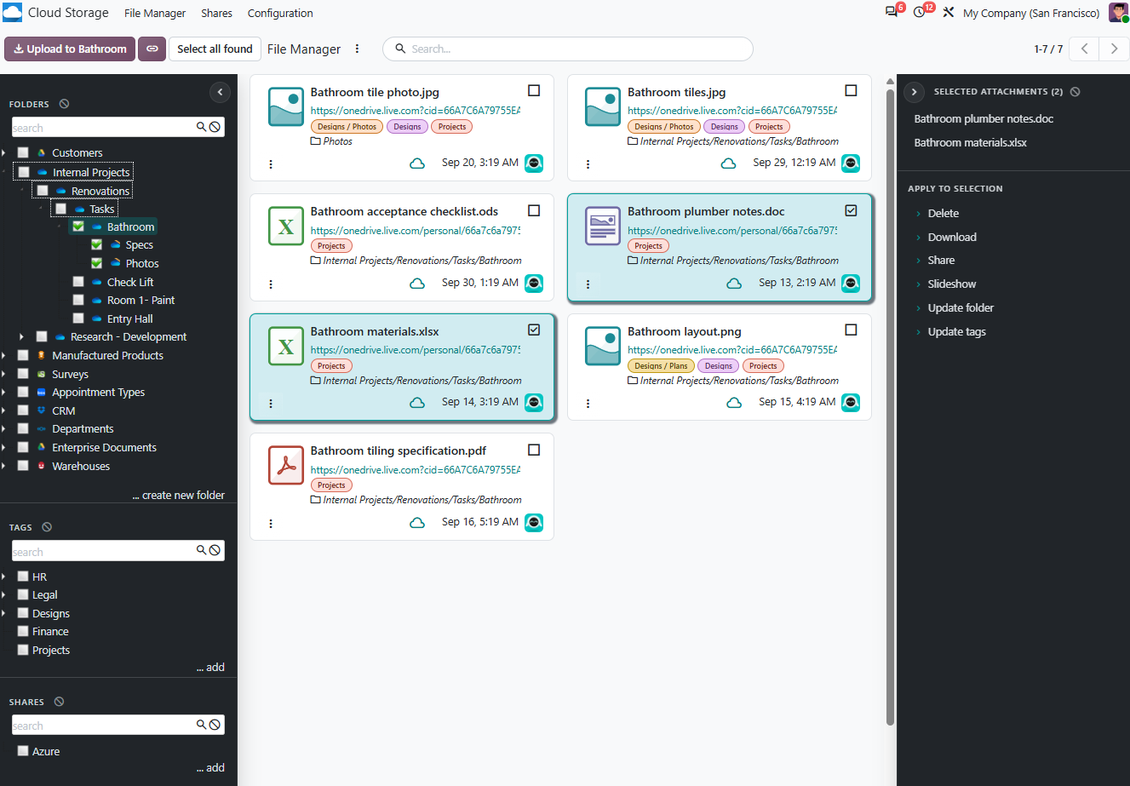
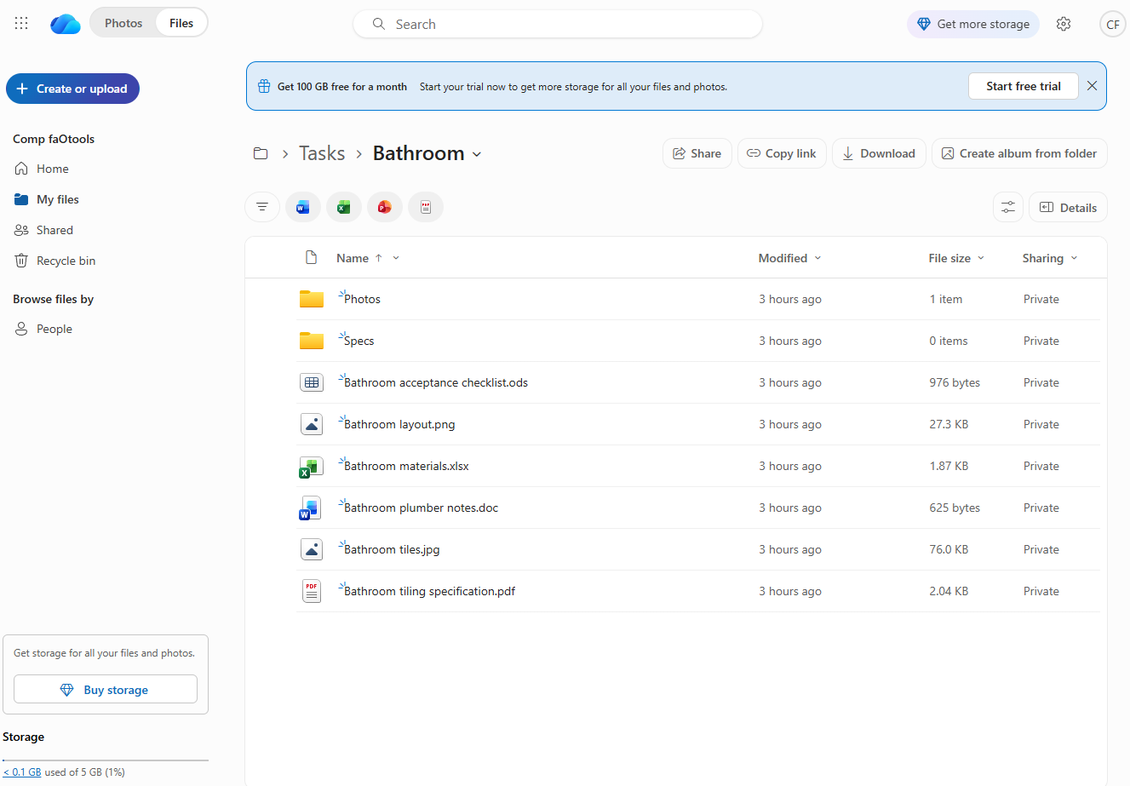
OneDrive / SharePoint Odoo Integration connects Cloud Storage Solutions with Microsoft 365 storage. It synchronizes Odoo folders and attachments with personal OneDrive drives, business drives, and SharePoint locations in both directions, while Odoo keeps URL attachments, record context, and File Manager navigation.
Perfect for
Microsoft 365 teams
Use OneDrive or SharePoint as the file storage layer while Odoo remains the business workflow hub.
SharePoint document libraries
Route Odoo folders to the Microsoft drive or SharePoint location that matches department and project ownership.
Automated document sync
Let scheduled jobs create Microsoft cloud folders, upload Odoo attachments, and reflect cloud-side changes back.
Why teams choose it
Key benefits of the app
Microsoft cloud storage
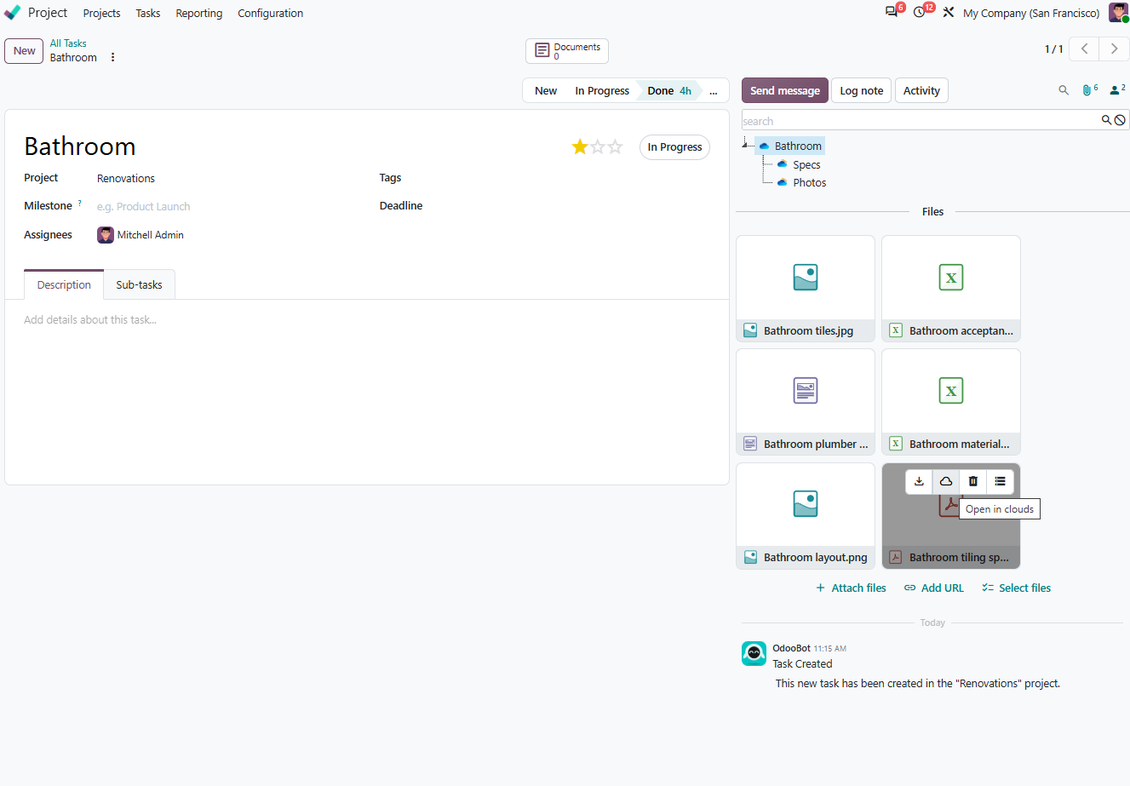
Store synced Odoo document binaries in OneDrive or SharePoint while Odoo keeps URL attachments and record links.
Personal or SharePoint drives
Connect Odoo folder rules to personal, business, or SharePoint storage locations configured in Microsoft 365.
Odoo-driven folders
Generate Microsoft cloud folders from Odoo object rules, manual folders, and attachment boxes.
Bilateral sync
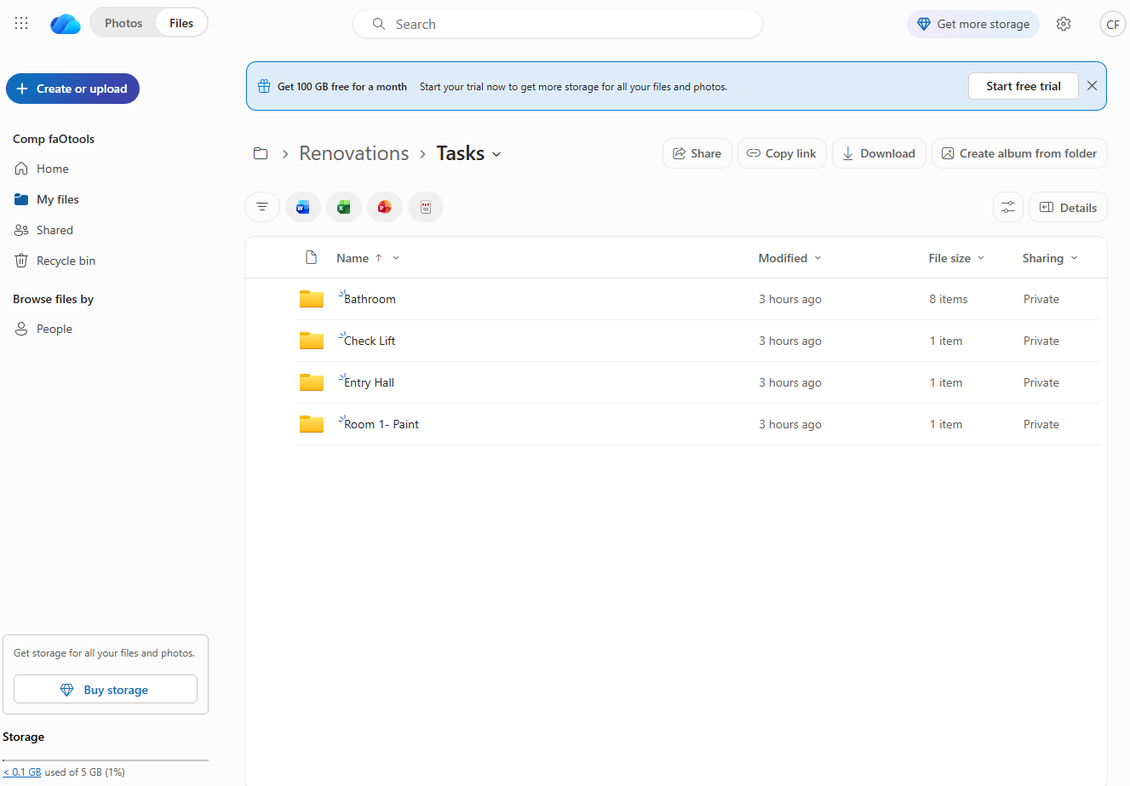
Push Odoo attachments to OneDrive/SharePoint and reflect cloud-side files and folders back in Odoo.
Odoo File Manager
Browse, search, upload, download, move, and tag Microsoft-cloud-synced attachments from Odoo.
Logs and recovery
Monitor sync jobs, handle Microsoft connection issues, and reverse files back to Odoo if needed.
Odoo Apps Store feedback
What customers say about the app
Works well with SharePoint. Supportive team
We've been using this with SharePoint and it's been working great. One of the best things is having everything, including logs right in Odoo's interface, so you can actually see what's going on. It's also super convenient that you can view or download synced files from the attachment box without having to leave the page or even log in to Sharepoint.
Setup was pretty smooth for us. When we had a few questions about setting up the folder hierarchy and priorities, the developer team got back to us in just a couple of hours and helped us figure it out. Great support and great extension!
nino.khale@outlook.com
Great support, assistance and very good connector!
We are very happy with the support we received when configuring the Sharepoint - Odoo connector. The connector has great functionalities.
All our questions were answered very fast (within one day).
FaOtools helped us optimising our connector and assisted us with future improvements.
We really recommend this connector.
Max Vandeputte
very professional app, excellen t customer service
This app is very well programmed and does its job very well. But the best is the excellent customer service who also helps when the problem lies somewhere else. You receive a lot for your money.
Florian Quis
An impressive app and world-class support
I have been very impressed by the way the OneDrive / SharePoint Odoo Integration module synchronises content in both directions and allows me to share documents in Odoo with my SharePoint site. Above all the technical support is top-notch, which greatly increases the value of this product. I highly recommend this product for anyone considering synchronising Odoo with SharePoint/OneDrive.
Amir Hassan
Works fine, good support
The first experience with the module is excellent. I had some trouble to configure things right on the Microsoft-side, but the team provided quick and good support.
Marc
How OneDrive / SharePoint Synchronization Works
Scheduled sync keeps Odoo and Microsoft cloud folders aligned in both directions.
Odoo to Microsoft cloud
- Direct sync creates OneDrive or SharePoint folders and uploads attachments from synced Odoo folders.
- Synced binaries become Microsoft-cloud URL attachments in Odoo to reduce server storage.
- Scheduled jobs process the queue and keep logs for administrators.
Microsoft cloud to Odoo
- Backward sync creates Odoo URL attachments and subfolders for new OneDrive or SharePoint items.
- Moves, updates, and deletions in the cloud are reflected in linked Odoo folders where possible.
- Reverse sync can bring files back to Odoo when a connection is reset or changed.
Ready to evaluate?
Start with a free demo request or purchase in the Odoo Apps Store.
Free personalized demo database. No phone number or credit card required. Free life-time updates and expert support within the major Odoo version.
Configuration and Installation Tips for OneDrive / SharePoint Odoo Integration Odoo v.20
Python dependency
The tool depends on the external library 'microsoftgraph'. Install this library for your Odoo server through the command:
pip3 install microsoftgraph-pythonConfiguration and log in
- Turn on the option 'OneDrive / SharePoint Sync' (cloud Storage > Configuration > Configuration). The optional add-on OneDrive / SharePoint Odoo Integration is required
- Make sure your Microsoft user has full admin rights for OneDrive / SharePoint you want to connect to Odoo. This user is required only to grant permissions, the user data would not be kept in Odoo, and will not be used afterward. Besides, make sure the Microsoft email address you use does not have a redirection (usually happens when you configure your domain name, while the prime address is still one of Microsoft domains like @outlook.com, @office365, etc.)
- Go to your Azure Portal: https://portal.azure.com/#blade/Microsoft_AAD_RegisteredApps/ApplicationsListBlade
The app must be registered inside a directory (tenant). Microsoft no longer allows creating a new app outside one.
- If you already have a company Microsoft 365 / Azure directory, switch the portal (top right) to it and continue.
- If you only have a personal account (@outlook.com, @hotmail.com, @live.com) and see "these applications are associated with the account ... but are not contained within any directory", you do not have a directory yet. Sign up for a free Azure account with the same Microsoft account: https://azure.microsoft.com/free/ - Try Azure for free. This creates a Default Directory for you at no cost.
- Microsoft asks for a card for identity verification only; a temporary ~1 USD hold is placed and reversed. You are not charged for the directory or for the app registration.
- The directory (Microsoft Entra ID Free) and any app registered in it keep working independently of the 30-day / $200 Azure trial credit. That credit is for paid Azure resources you are not using here. No payment is required for our app.
- If the whole directory sits completely unused for a very long time (Microsoft's own threshold is around 200 days of no activity at all), Microsoft may email a warning and eventually retire it. Since Odoo calls this app every time it syncs, an active connection keeps the directory active - this only matters if you stop syncing entirely for months.
- Once you are in a real directory (not "Microsoft Services"), open App registrations there.
- Click 'New registration'
- Introduce a new name for the application and assign the redirect URI as [YOURODOOSITENAME]/one_drive_token (e.g. https://odootools.com/one_drive_token). As the supported account types choose 'Accounts in any organizational directory (Any Azure ID directory - Multitenant) and personal Microsoft accounts (e.g. Skype, Xbox)'.
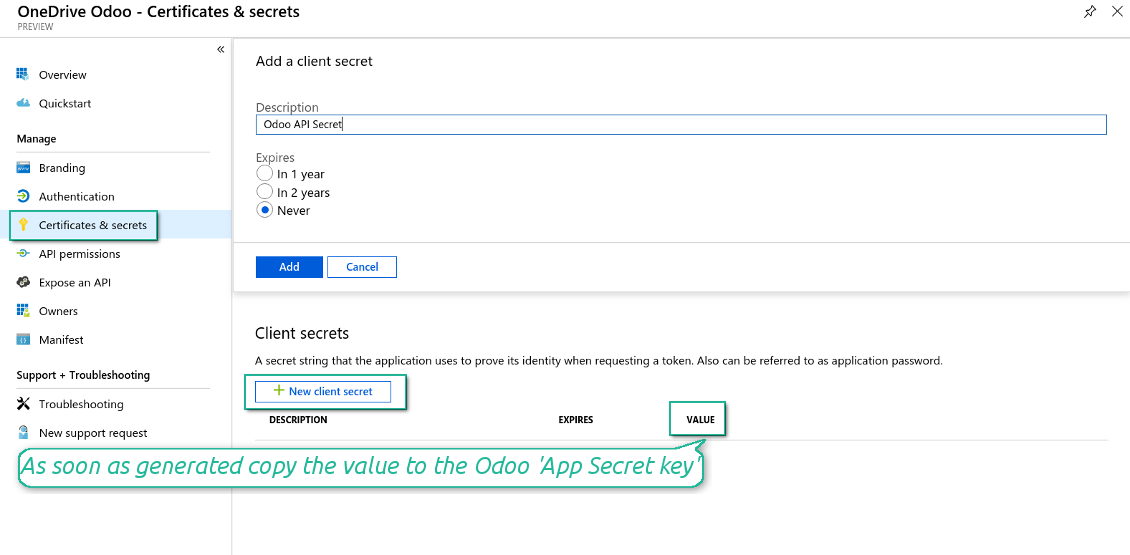
- Go to Certificates & secrets - Click 'New Client Secret'. Save somewhere the secret value
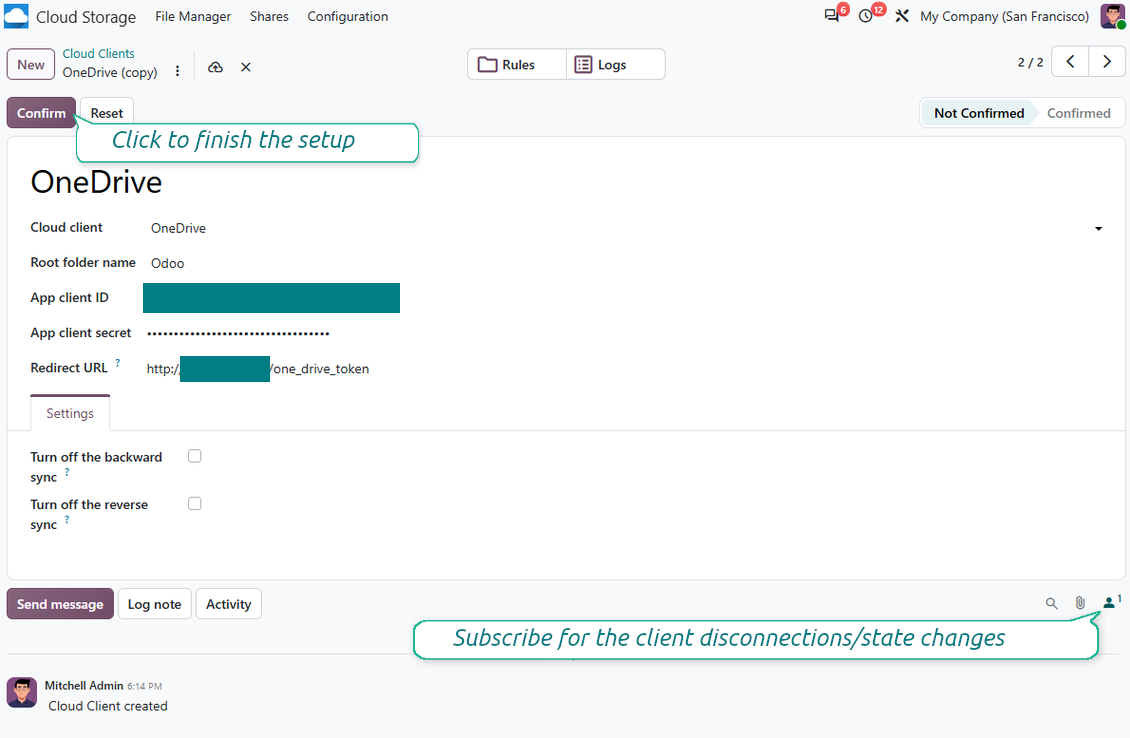
- Go to Odoo Cloud Storage > Configuration > Cloud Clients press 'Create'
- As a reference, introduce any name which would be clear to all users
- As a cloud client, choose 'OneDrive' or 'SharePoint' depending on the software you are using
- As a root folder name, enter a title that will be used as the parent OneDrive directory for all synced folders. For example, 'Odoo' or 'OdooERP'
- Copy 'Application Client ID' to the 'App client ID'
- Copy the secret value into the field 'App client secret'
- Insert previously generated redirect URL
- If you use SharePoint:
- Go to your SharePoint site and prepare a new documents library (drive). You might use one of the existing ones, e.g. 'Documents'. Odoo folder would be put there afterward, and it would be impossible to move it to another library
- The SharePoint URL should be of the type https://[URL]/. The last '/' is required - the site name should not be included. For example, https://odootools.sharepoint.com/
- SharePoint site should be either root (the very root SharePoint site), my_site_name (in that case it is considered as sites/my_site_name) or sites/my_site_name (instead of 'sites' it might be 'teams' and so on). There should be no '/' at the beginning or at the end. For example, sites/odootools
- As the Documents Library, use one created in SharePoint
- Press 'Confirm'. Odoo redirects you to the Microsoft login page. Check in the system, agree with all conditions, and grant all permissions asked. If Microsoft shows an account already signed in and says it does not exist in tenant 'Microsoft Services' (or any other unrelated tenant), do not click that row. Click 'Use another account' and sign in with the Microsoft account that owns the app's directory
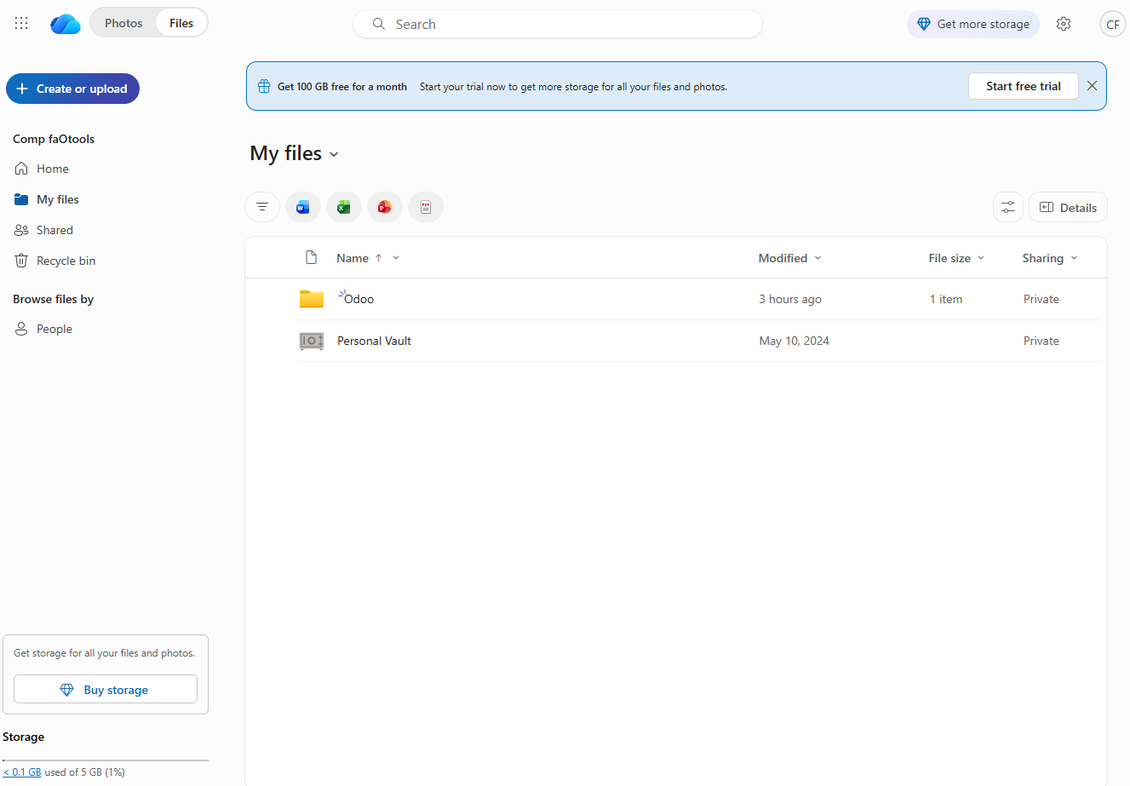
- After login, OneDrive redirects you back to Odoo. OneDrive - Odoo synchronization is ready to be done
- Apply the newly created cloud client to folder rules and/or manual folders which should be synced to that OneDrive or SharePoint instance
- Await the sync scheduled job to be started. For testing purposes only: trigger integration manually from Cloud Storage > Configuration > Configuration > the button 'Launch sync'.
Watch also the configuration video
Register a new Azure application
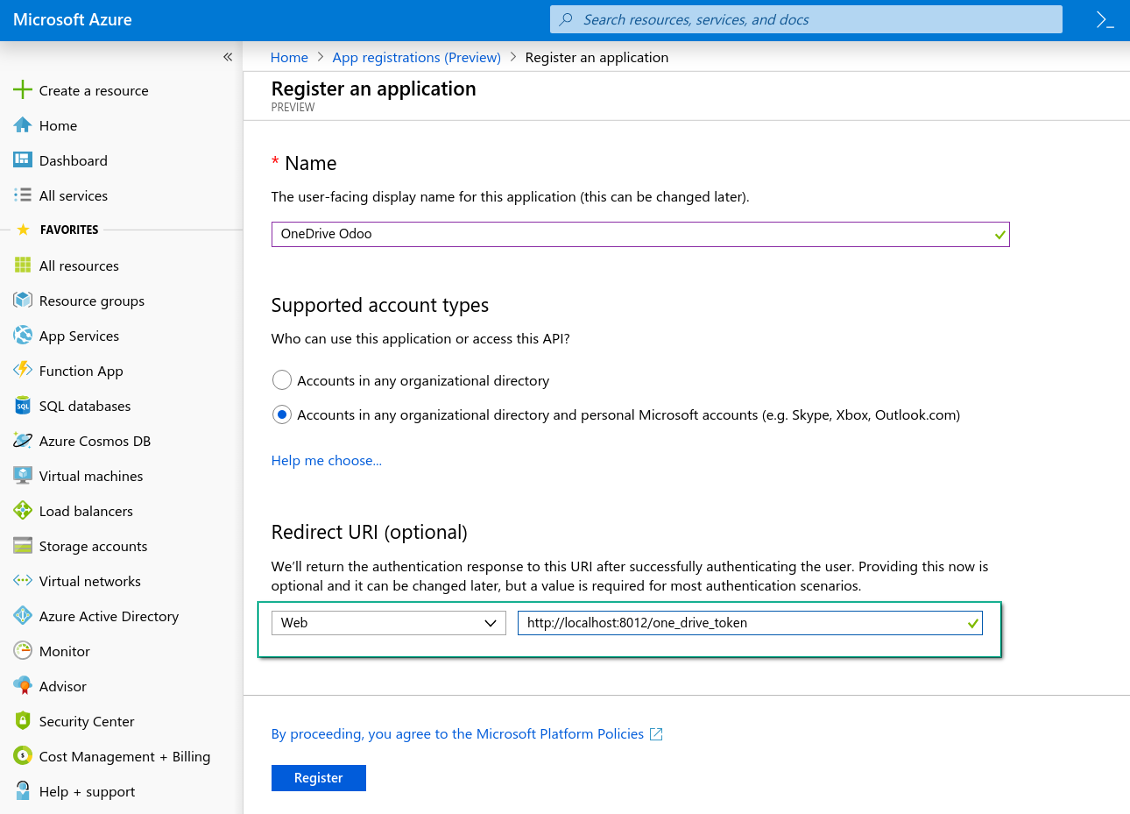
New OneDrive Web platform and the redirect URL
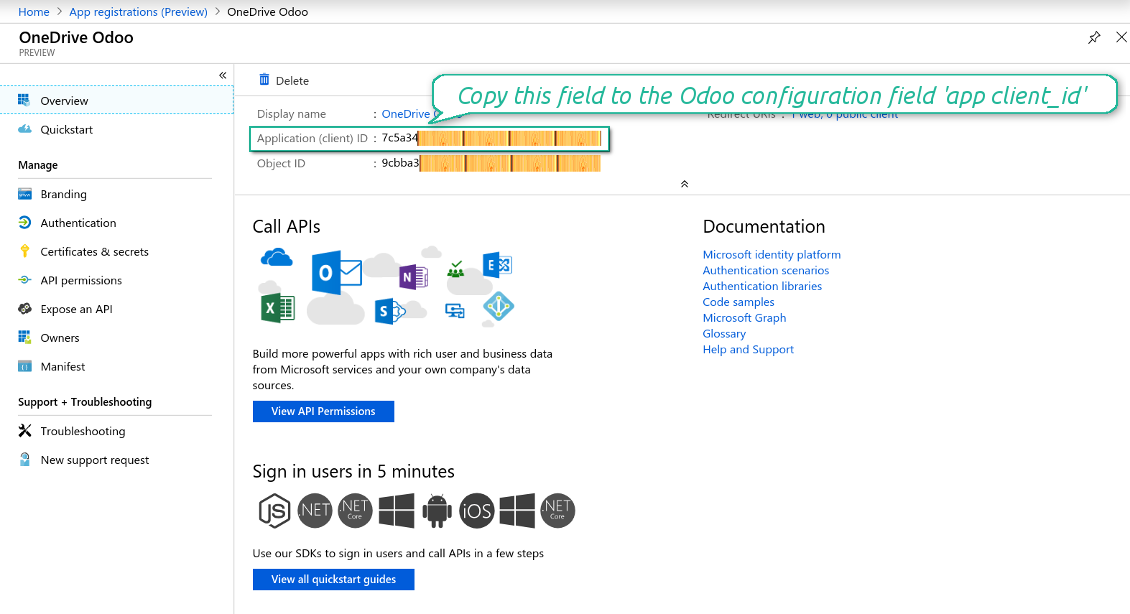
Generate a new secret for the Azure application
Enter the configuration keys in Odoo
Frequently Asked Questions about OneDrive / SharePoint Odoo Integration Odoo v.20
I see an error when click on the synced image cloud link
The error "This item might have been deleted, expired, or you might not have permission to access it. Contact the owner of this item for more information." indicates that you are not logged in to the service photos.onedrive.com.
Where would be synced fields stored? Are they duplicated to Odoo and clouds?
The app assumes that the binary content of attachments is kept in Cloud Client instead of the Odoo server. So, such attachments in Odoo become of the URL type, and you may any time access them either from the attachments box or from the Cloud Client.
After the setup, no manual actions are required, as the synchronization is fully automatic. Just decide which Odoo document types should be synced and set up a related model to sync for each of those (Customers, Sale or Purchase Orders, Tasks, Projects, etc.).
Can I have a few folders for the the same document type? For example, internal projects and customer projects?
Yes, you can. To that goal, prepare a rule for each, and then those apply filters: for example by type of a project.
Try to make filters self-exclusive in order a document can be definitely assigned. For instance, 'customer but not supplier', 'supplier but not customer'. Otherwise, a specific document folder would jump from one model to another.
Is it possible to make synchronization real-time?
No. We have strong reasons to avoid real time sync:
Performance issues. In case a sync is real time, each file upload will result in the loading screen.
Conflict issues. If 2 users simultaneously change an item, it might lead to unresolved situations. In case of regular jobs we can fix it afterwards, while in case of real time we would need to save it as some queue, and it will be even more misleading for users.
Functionality issues. In particular, renaming and restructuring of items. In the backward sync the tool strictly relies upon directories' logic, and during each sync 100% of items are checked. In case it is done after each update, it will be thousands of requests per second. If not: changes would be lost.
May I change default folders' name in clouds?
You may assign your name for models' directories (sale orders, opportunities, suppliers, etc.) for any document type.
For objects' folders (SO-001, John Smith, etc.), the tool relies upon the Odoo method to construct a display name for this document type. However, you can change that by defining the name expression. The exact syntax for Odoo email templates is used.
May I change frequency of sync jobs?
No, starting from version 15, you should not change scheduled jobs. They are optimized to run every 15 minutes to guarantee the most stable and quick connection.
Ensure that your Odoo server timeouts are set for at least 15 minutes (900 seconds).
If you need to stop sync for a while, do that on a particular cloud client form.
May I sync attachments to a few cloud clients
Yes, starting from version 15, you can set up multiple connections. In this way, it is possible to sync some folders to one cloud client and others - to another.
Take into account that it is not any way possible to sync the same folder for a few cloud storages simultaneously.
We use a special editor in our clouds (e.g. OnlyOffice, Office 365, etc.). Would files be opened in that editor?
Yes, depending on your cloud client configuration.
Do I need only the Cloud Storage Solution app?
Starting from version 15, the app might be used stand-alone to structure attachments in folders and to provide a file manager interface.
However, if your goal is to establish a connection with one of its cloud clients, you would need at least one optional client-related app to be installed.
What happens when I change a folder rule?
When a folder rule changes, the list of folders also changes. So, if a folder no longer matches the conditions of the folder rules - it is removed. If the files have been synced, the reversed sync returns them to Odoo and deletes them from the Cloud Client.
If a document's object doesn't match the conditions of a folder rule, then its folder will not be created. However, if it matches the conditions later, the related folder will be generated.
Can I keep only the direct sync, or turn off the backward sync?
Yes. On the cloud client, open the Settings page and turn on Turn off the backward sync.
The sync stays one-way. Changes made in Odoo are still pushed to the cloud storage. Files and folders created, renamed, or deleted in the cloud storage are not reflected in Odoo, and folders deleted there are not restored.
Turn the option off again to apply those accumulated changes, including deletions, on the next sync.
This setting is available from version 18. Unlinking, resetting, or deactivating the client still runs the reverse sync, unless you also turn that off.
What are the update policies of your tools?
According to the current Odoo Apps Store policies:
- Every module bought for version 12.0 and prior gives you access to all versions up to 12.0.
- Starting from version 13.0, every module version should be purchased separately.
- Disregarding the version, purchasing a tool grants you a right to all updates and bug fixes within a major version.
Please note that the faOtools team does not control those policies. For all questions, please contact the Odoo Apps Store representatives directly.
How can I install your app on Odoo.sh?
The most straightforward approach is to use the Odoo store's built-in workflow:
1. Open the module's page and click the button Deploy on odoo.sh
2. After that, you will be redirected to the GitHub page. Log in to your account, then click 'Create a new repo' or use an existing one. Please ensure your repository is private. It is not permitted to publish the apps under the OPL-1 license. If necessary, create a new repo for your Odoo.sh project
3. Then, go to odoo.sh and click the Deploy button. In the pop-up window, submit the decision and click 'Continue.' This action will trigger the installation process.
These steps will install the app for your project's production branch. If you want to deploy the apps for other branches or update the module, you should undertake the following actions:
1. Upload the source code for the app from the Odoo store
2. Commit the module to a required GitHub repository. Ensure none of the app folders/files are ignored (i.e., not included in your repo's .gitignore). Repositories are automatically created by odoo.sh and may include some crucial items by default (e.g., /lib). You should upload all module directories, subdirectories, and files without exceptions
3. Deploy a target branch of the odoo.sh project or, if your settings assume that, wait until it is automatically built.
How should I install your app on my own server?
2. Re-start the Odoo server;
3. Turn on developer mode (technical settings);
4. Update the apps' list (the apps' menu);
5. Find the app and push the button 'Activate'/'Install';
6. Follow the guidelines on the app's page if those exist.
I noticed that your app has extra add-ons. May I purchase them afterwards?
Yes, sure. Simultaneously, Odoo automatically adds all dependencies to a cart, so you should exclude previously purchased tools to avoid double payment.
I deployed your app on Odoo.sh and see warning/error in tests
A red/orange warning does not influence the app's features. Regretfully, sometimes our modules do not pass standard automatic tests since the latter assume behavior that conflicts with our app's goals. For example, we change the price calculation, while the standard Odoo module tests compare the final price to a standard algorithm.
So, first of all, please check the deployed database features. Does everything work correctly?
If you still assume that the warning influences real features, please contact us and forward full installation logs and the full list of deployed modules (including core and third-party ones).
May I buy your app from your company directly?
No, we only distribute the tools through the official Odoo apps store.
I would like to get a discount
Regretfully, we do not have the technical means to provide individual prices.
May I install the app on my Odoo Online (SaaS) database?
No, third-party apps can not be used on Odoo Online. Unfortunately, Odoo SaaS blocks such a possibility.
Your tool has dependencies on other app(s). Should I purchase those?
Yes, our tool requires all modules marked in dependencies to work correctly. The price marked on the app page already includes all necessary dependencies.
What is the price for the module in US Dollars? Why did it change?
The price for our modules is set in euros. The Odoo store converts prices to other currencies according to its internal exchange rate. Thus, the price in US Dollars may change when the exchange rate is updated.
Odoo demonstration databases (live previews)
For this app, we might provide a free personalized demo database.
You do not need a phone number or credit card to contact us. You should only pass a short email sign-up, which does not take more than 30 seconds.
By your request, we will prepare an individual live preview database, where you can apply any tests and check assumptions for about two weeks.
Bug reporting
If you encounter bugs or inconsistent behavior, do not hesitate to contact us. We guarantee to provide fixes within 60 days of purchase and are intensely interested in improving our tools even after this period.
You do not need a phone number or credit card to contact us. You should only pass a short email sign-up, which does not take more than 30 seconds.
Please include as many details as possible in your request: screenshots, Odoo server logs, a full description of how to reproduce your problem, and so on. Usually, it takes a few business days to prepare a working plan for an issue (if a bug is confirmed) or provide you with guidelines on what should be done (otherwise).
Public features requests and module ideas (free development)
We are strongly motivated to improve our tools and would be grateful for any feedback. If your requirements are of public use and might be efficiently implemented, the team will include those in our to-do list.
Such a to-do list is processed regularly and does not assume extra fees. Although we cannot promise deadlines and final design, it might be a good way to get desired features without investments and risks.
You do not need a phone number or credit card to contact us. You should only pass a short email sign-up, which does not take more than 30 seconds.
20.0.1.2.8
- The app is published to version 20.
19.0.1.2.8
- The AI-assisted translations for 25 languages have been introduced.
19.0.1.2.7
- The feature to neutralize cloud clients for backups has been added.
19.0.1.2.6
- The app is published to version 19.
18.0.1.2.6
- The API method to make backups has been added.
- The method to upload large files in chunks has been optimized.
18.0.1.2.5
- The root SharePoint site is now supported.
18.0.1.2.4
- The synced attachments' URLs are precalculated.
18.0.1.2.3
- The issue with non-selected cloud client is fixed.
18.0.1.2.2
- The app is published to version 18.


The tool to build a deep and structured knowledge base for internal and external use. Knowledge System. KMS. Wiki-like revisions.
398€
The tool to set up KPI targets and control their fulfillment by periods. KPI dashboards. Dashboard designer. KPI charts
198€
The tool for time-based service management from booking appointments to sales and reviews
398€
The tool to manage your Odoo from your favorite AI chats through MCP. Claude. Any MCP-supporting AI.
198€
The tool to flexibly structure Odoo attachments in folders and synchronize directories with cloud clients: Google Drive, OneDrive/SharePoint, Nextcloud/ownCloud, Dropbox, Amazon S3, Box, and NAS. DMS. File Manager. Document management system
398€
The tool to automatically synchronize Odoo attachments with Google Drive files in both ways
487€
The tool to automatically synchronize Odoo attachments with ownCloud/Nextcloud files in both ways
487€
The tool to automatically synchronize Odoo attachments with DropBox files in both ways
487€