Box Odoo Integration v.17
The tool to automatically synchronize Odoo attachments with Box files in both ways
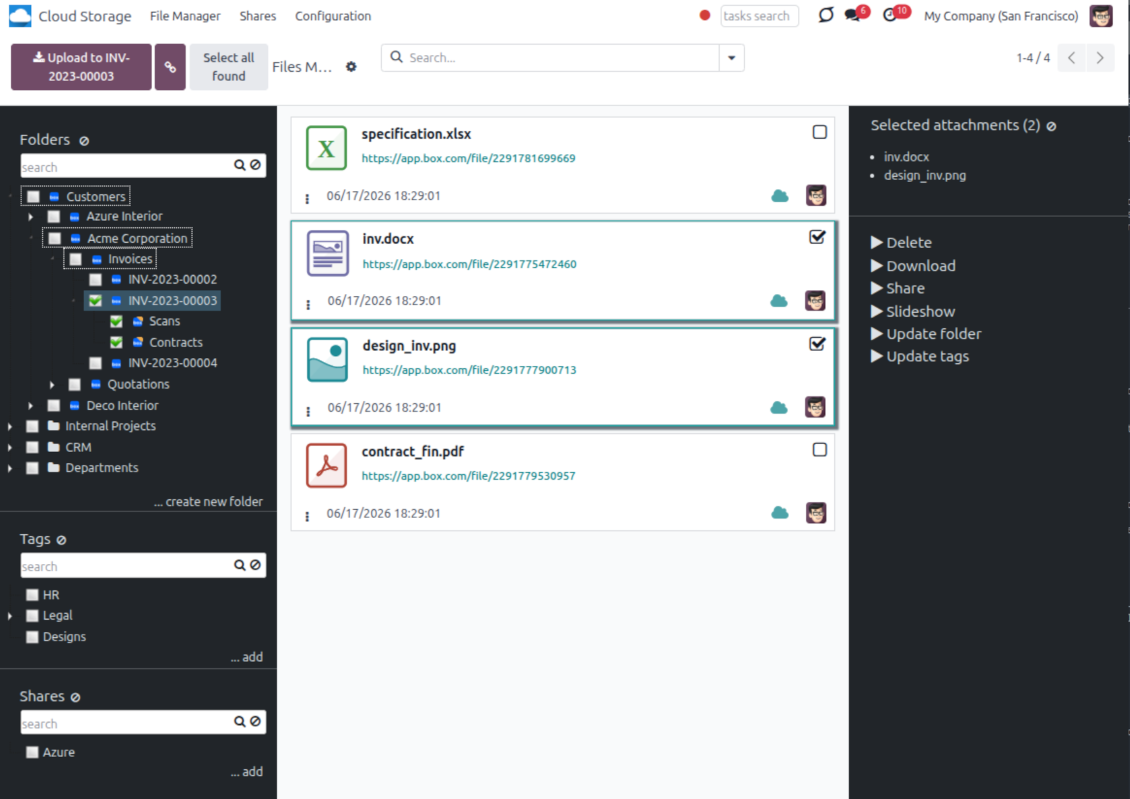
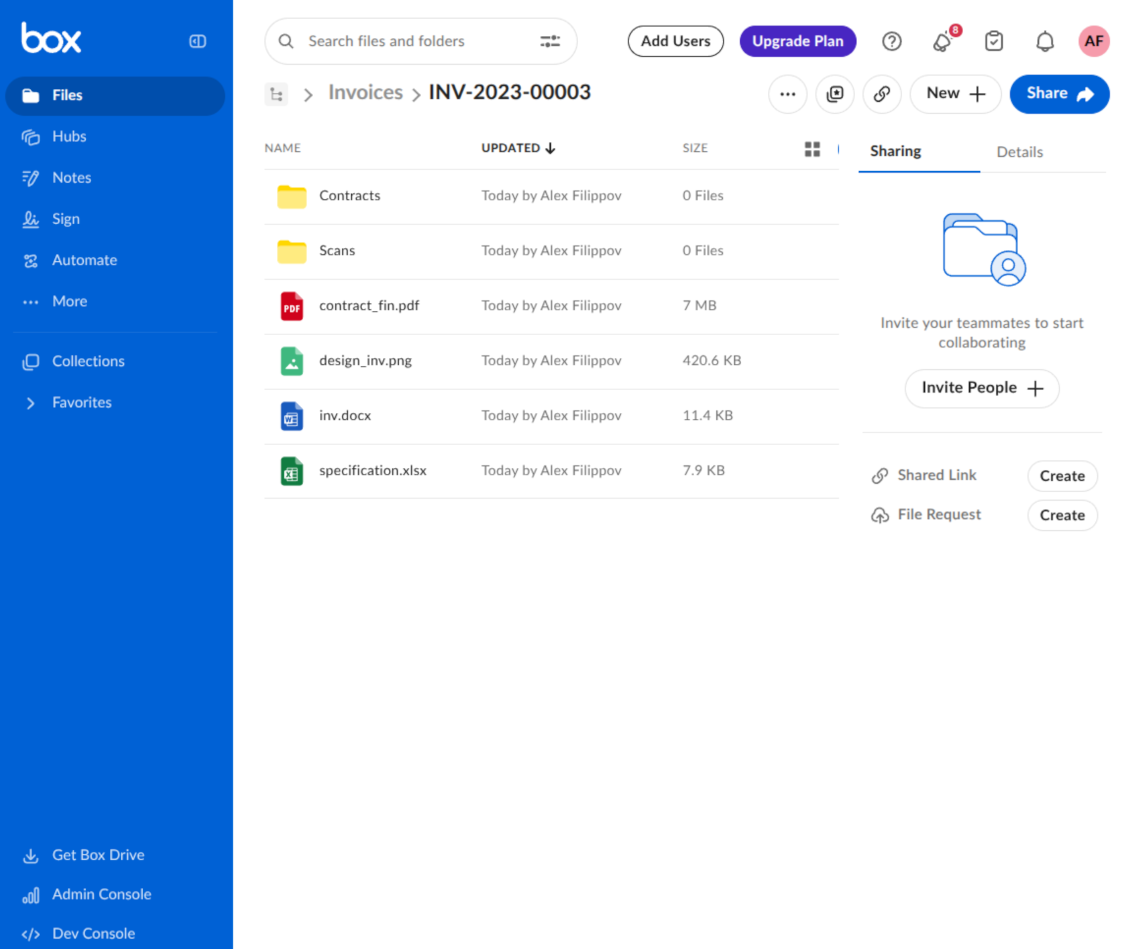
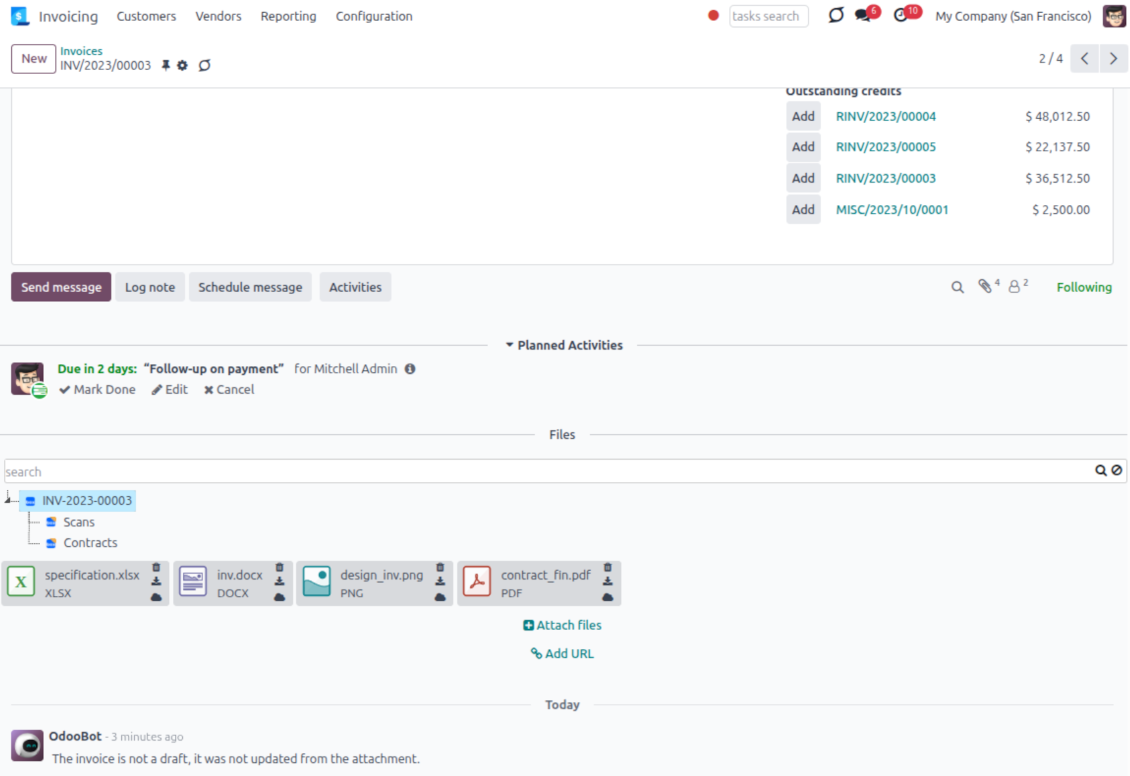
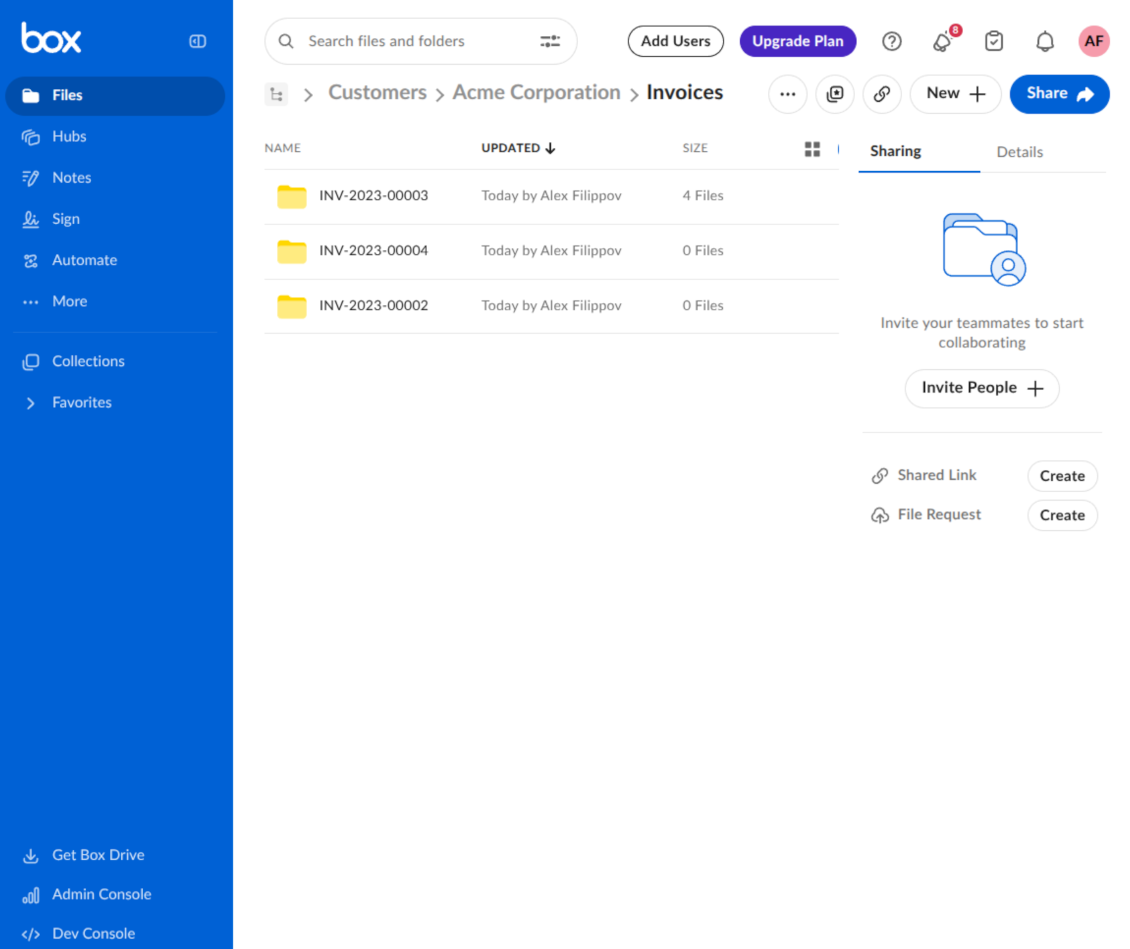
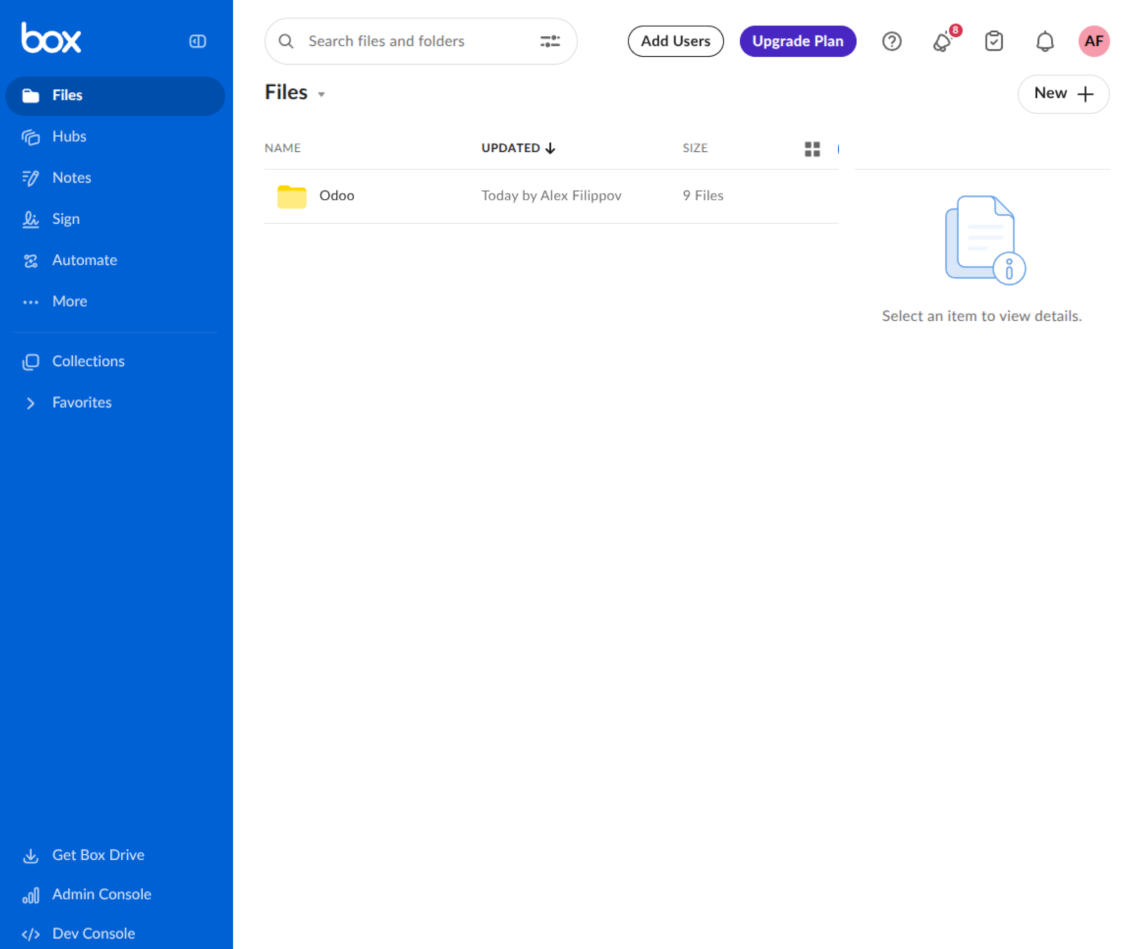
This is the tool to integrate Box features with Odoo folders and files. The app automatically stores Odoo attachments and directories in Box and provides instant access to them through Box web links.
Automatic folders' structure
Decide which Odoo document types should have their own folders trees and synchronize those to Box
Automatic regular sync
Rely on auto-synchronization between Odoo and Box based on scheduled jobs. No manual interaction is required
Bilateral sync
Odoo sends attachments to Box and retrieves files from there. Binary content is kept in clouds, while Odoo provides direct access to synced items
Cloud synchronization history
Control Box sync logs right in Odoo. Export and share those in case of any issues. Be notified of any client disconnections
File manager interface
Manage synced folders and attachments from a single Odoo view. Comfortably navigate by directories. Search, download, upload, and move files
Attachment box
Organize files of any Odoo object in a set of subfolders. Instantly access folders and files in the attachment box and in Box
How synchronization works
Automatic two-sided sync
- Configure sync for one or multiple Box accounts
- Integration is based on scheduled jobs and is fully automatized. The app regularly checks changes in Odoo and Box and runs sync operations
- Synchronization is bilateral. Updates in Odoo are reflected in Box (direct sync); changes in Box modify Odoo folders and attachments (backward sync)
- Cloud connection with Box might be reset. In this way, the app assumes getting all items back to Odoo (reverse sync)
Queue-based synchronization
- Once in 15 minutes, the app examines updates in Odoo and Box to prepare a synchronization queue
- Folders' checks follow the First-In-First-Out (FIFO) principle. Directories that have not been examined for the longest are processed first
- If the app faces sync failures, it will retry operations afterward. Sync queue processing is not stopped by non-blocking failures
Odoo attachments for Box: direct sync
- Direct sync prepares the folders' hierarchy and uploads Odoo attachments to Box
- Folder and file renames or moves keep stable Box IDs, so synced Odoo records stay linked to the same cloud item
- Uploaded attachments become URL records in Odoo, while binary content is stored in Box
Box files and folders for Odoo: backward sync
- Backward sync checks whether files or subfolders are added to Box folders. If so, the app creates URL attachments/subdirectories inside linked Odoo directories
- Updates in Box are reflected in Odoo, including moves and renames based on stable Box item IDs
- In case of conflicts, direct sync changes are in general considered more important than backward updates
Box URLs
Box provides internal web links for files and folders, for example links of the type https://app.box.com/file/[ID] and https://app.box.com/folder/[ID]. Such links are stable, but only Box users with access rights to the related item can open them.
By default, the connector uses those internal Box links. It is the safest and fastest option, since the synchronization does not have to create shared links for every synced item.
If shared links are enabled, Odoo will try to generate Box shared URLs for files and folders. Be cautious with this option: although the links are hardly known by external users, they might become available as a result of some user actions. Besides, shared link generation is slower and might make the synchronization process longer.
Mẹo cấu hình và cài đặt cho Box Odoo Integration Odoo v.17
Python dependency
The tool depends on the external library 'box_sdk_gen'. Install this library for your Odoo server through the command:
pip3 install boxsdkConfiguration and log in
- Turn on the option 'Box Sync' (cloud Storage > Configuration > Configuration). The optional add-on Box Odoo Integration is required
- Create or open a Box developer account and go to the Box Developer Console: https://app.box.com/developers/console
- Create a Custom App and choose OAuth 2.0 (Authorization Code Grant) as the authentication method
- Add the redirect URI as [YOURODOOSITENAME]/box_token (e.g. https://faotools.com/box_token). A valid SSL certificate (https) is required
- Grant the app access to read and write files and folders. Avoid assigning unrelated permissions
- Go to Odoo Cloud Storage > Configuration > Cloud Clients and press 'Create'
- As a reference, introduce any name which would be clear to all users
- As a Cloud client, choose 'Box'
- As a Root folder name, enter a title that will be used as the parent Box directory for all synced folders. For example, 'Odoo' or 'OdooERP'
- Copy Box Client ID to the field 'Client ID'
- Copy Box Client Secret to the field 'Client Secret'
- Insert previously generated redirect URL
- Press 'Confirm'. Odoo redirects you to the Box login page. Check in the system, agree with all conditions, and grant all permissions asked
- After login, Box redirects you back to Odoo. Box - Odoo synchronization is ready to be done
- Apply the newly created cloud client to folder rules and/or manual folders which should be synced to that Box account
- Await the sync scheduled job to be started. For testing purposes only: trigger integration manually from Cloud Storage > Configuration > Configuration > the button 'Launch sync'.
Create a new Box developer app

Copy Box OAuth credentials

Configure the Box cloud client in Odoo

Grant Odoo access to Box

Câu hỏi thường gặp về Box Odoo Integration Odoo v.17
Trường đã đồng bộ lưu ở đâu? Có bị nhân đôi sang Odoo và clouds không?
Ứng dụng giả định nội dùng nhị phân của tệp đính kèm được lưu trong Cloud Client thay vì trên máy chủ Odoo. Những tệp đính kèm đó trong Odoo trở thành kiểu URL và bạn có thể mở chúng bất cứ lúc nào từ hộp đính kèm hoặc từ Cloud Client.
Sau khi thiết lập, không cần thao tác thủ công vì đồng bộ hoàn toàn tự động. Hãy chọn loại chứng từ Odoo cần đồng bộ và thiết lập model liên quan cho từng loại (Khách hàng, đơn bán hoặc đơn mua, Nhiệm vụ, Dự án, v.v.).
Tôi có thể có vài thư mục cho cùng một loại chứng từ không? Ví dụ dự án nội bộ và dự án khách hàng?
Có. Hãy chuẩn bị một quy tắc cho từng loại, rồi áp bộ lọc: ví dụ theo kiểu dự án.
Hãy làm bộ lọc loại trừ lẫn nhau để một chứng từ được gán chắc chắn. Ví dụ 'khách hàng nhưng không phải nhà cung cấp', 'nhà cung cấp nhưng không phải khách hàng'. Nếu không, thư mục của một chứng từ sẽ nhảy từ model này sang model khác.
Có thể đồng bộ theo thời gian thực không?
Không. Chúng tôi có lý do vững chắc để tránh đồng bộ thời gian thực:
Vấn đề hiệu năng. Nếu đồng bộ theo thời gian thực, mỗi lần tải tệp lên sẽ hiện màn hình chờ.
Vấn đề xung đột. Nếu 2 người dùng cùng lúc sửa một mục, có thể dẫn đến tình huống không giải quyết được. Với tác vụ định kỳ ta sửa sau được; còn thời gian thực phải lưu thành hàng đợi, càng khiến người dùng bối rối.
Vấn đề chức năng. Đặc biệt là đổi tên và tổ chức lại mục. Ở chiều đồng bộ ngược, công cụ dựa chặt vào logic thư mục và mỗi lần đồng bộ kiểm tra 100% mục. Nếu làm sau mỗi lần cập nhật, sẽ có hàng nghìn yêu cầu mỗi giây. Nếu không: thay đổi sẽ bị mất.
Tôi có thể đổi tên thư mục mặc định trên các đám mây không?
Bạn có thể đặt tên riêng cho thư mục mô hình (đơn bán, cơ hội, nhà cung cấp, v.v.) với mọi loại chứng từ.
Với thư mục đối tượng (SO-001, John Smith, v.v.), công cụ dựa trên phương thức Odoo để dựng tên hiển thị của loại chứng từ này. Tuy nhiên bạn có thể đổi bằng cách định nghĩa biểu thức tên. Cú pháp đúng như mẫu email Odoo được dùng.
Tôi có thể đổi tần suất công việc đồng bộ không?
Không, từ phiên bản 15 bạn không nên đổi các job đã lên lịch. Chúng được tối ưu chạy mỗi 15 phút để kết nối ổn định và nhanh nhất.
Bảo đảm thời gian chờ máy chủ Odoo đặt ít nhất 15 phút (900 giây).
Nếu cần tạm dừng đồng bộ, hãy làm trên form cloud client tương ứng.
Tôi có thể đồng bộ tệp đính kèm với vài máy khách đám mây
Có, từ phiên bản 15 bạn có thể thiết lập nhiều kết nối. Như vậy một số thư mục đồng bộ với một cloud client, số khác với client khác.
Lưu ý rằng không thể đồng bộ cùng một thư mục với nhiều cloud storages cùng lúc.
Chúng tôi dùng trình soạn thảo đặc biệt trên đám mây (ví dụ OnlyOffice, Office 365…). Tệp có mở trong trình đó không?
Có, tùy cấu hình cloud client của bạn.
Tôi có chỉ cần ứng dụng Cloud Storage Solution không?
Từ phiên bản 15, ứng dụng có thể dùng độc lập để sắp xếp tệp đính kèm theo thư mục và cung cấp giao diện trình quản lý tệp.
Tuy nhiên, nếu mục tiêu là kết nối với một máy khách đám mây, bạn cần cài ít nhất một ứng dụng tùy chọn liên quan máy khách.
Điều gì xảy ra khi tôi đổi quy tắc thư mục?
Khi quy tắc thư mục thay đổi, danh sách thư mục cũng đổi. Nếu thư mục không còn khớp điều kiện quy tắc thì bị gỡ. Nếu tệp đã đồng bộ, đồng bộ ngược trả chúng về Odoo và xóa khỏi Cloud Client.
Nếu đối tượng của tài liệu không khớp điều kiện quy tắc thư mục thì thư mục của nó sẽ không được tạo. Nếu sau đó khớp, thư mục liên quan sẽ được tạo.
Lời ứng dụng và trang web ở ngôn ngữ khác tiếng Anh được hỗ trợ bởi AI và khớp với bản dịch Odoo chính thức. Nếu bạn thấy sai, gửi phiếu hỗ trợ về đúng bản dịch và chúng tôi sẽ sửa.
Cơ sở trình diễn Odoo (xem trước trực tiếp)
Với ứng dụng này, chúng tôi có thể cung cấp cơ sở demo cá nhân miễn phí.
Bạn không cần số điện thoại hay thẻ tín dụng để liên hệ. Chỉ cần đăng ký email ngắn, không quá 30 giây.
Theo yêu cầu, chúng tôi sẽ chuẩn bị cơ sở xem trước trực tiếp riêng, nơi bạn có thể thử nghiệm và kiểm tra giả định khoảng hai tuần.
Báo lỗi
Nếu gặp lỗi hoặc hành vi không nhất quán, hãy liên hệ. Chúng tôi cam kết sửa trong 60 ngày kể từ khi mua và vẫn muốn cải thiện công cụ sau giai đoạn đó.
Bạn không cần số điện thoại hay thẻ tín dụng để liên hệ. Chỉ cần đăng ký email ngắn, không quá 30 giây.
Hãy nêu càng nhiều chi tiết càng tốt trong yêu cầu: ảnh chụp màn hình, nhật ký máy chủ Odoo, mô tả đầy đủ cách tái hiện sự cố, v.v. Thường mất vài ngày làm việc để chuẩn bị kế hoạch xử lý (nếu xác nhận lỗi) hoặc hướng dẫn việc cần làm (nếu không).
Yêu cầu tính năng công khai và ý tưởng module (phát triển miễn phí)
Chúng tôi rất muốn cải thiện công cụ và biết ơn mọi phản hồi. Nếu yêu cầu của bạn hữu ích cho mọi người và có thể triển khai hiệu quả, nhóm sẽ đưa vào danh sách việc cần làm.
Danh sách việc cần làm như vậy được xử lý đều đặn và không phát sinh phí thêm. Dù chúng tôi không hứa hạn chót và thiết kế cuối, đây có thể là cách tốt để có tính năng mong muốn mà không đầu tư và rủi ro.
Bạn không cần số điện thoại hay thẻ tín dụng để liên hệ. Chỉ cần đăng ký email ngắn, không quá 30 giây.


The tool to build a deep and structured knowledge base for internal and external use. Knowledge System. KMS. Wiki-like revisions.
398€
The tool to set up KPI targets and control their fulfillment by periods. KPI dashboards. Dashboard designer. KPI charts

The tool for time-based service management from booking appointments to sales and reviews
398€
The tool to manage your Odoo from your favorite AI chats through MCP. Claude. Any MCP-supporting AI.

The tool to flexibly structure Odoo attachments in folders and synchronize directories with cloud clients: Google Drive, OneDrive/SharePoint, Nextcloud/ownCloud, Dropbox, Amazon S3, Box, and NAS. DMS. File Manager. Document management system
398€
The tool to automatically synchronize Odoo attachments with OneDrive files in both ways
487€
The tool to automatically synchronize Odoo attachments with Google Drive files in both ways
487€
The tool to automatically synchronize Odoo attachments with ownCloud/Nextcloud files in both ways
487€