Box Odoo Integration v.17
The tool to automatically synchronize Odoo attachments with Box files in both ways
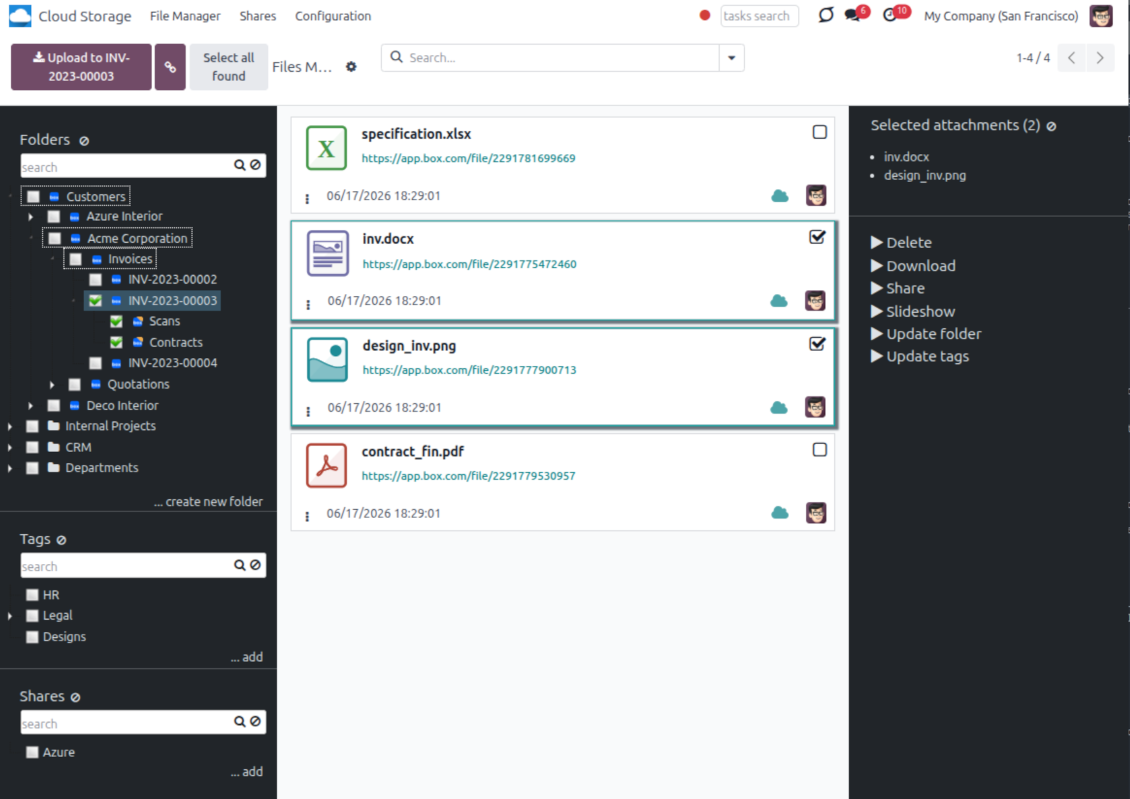
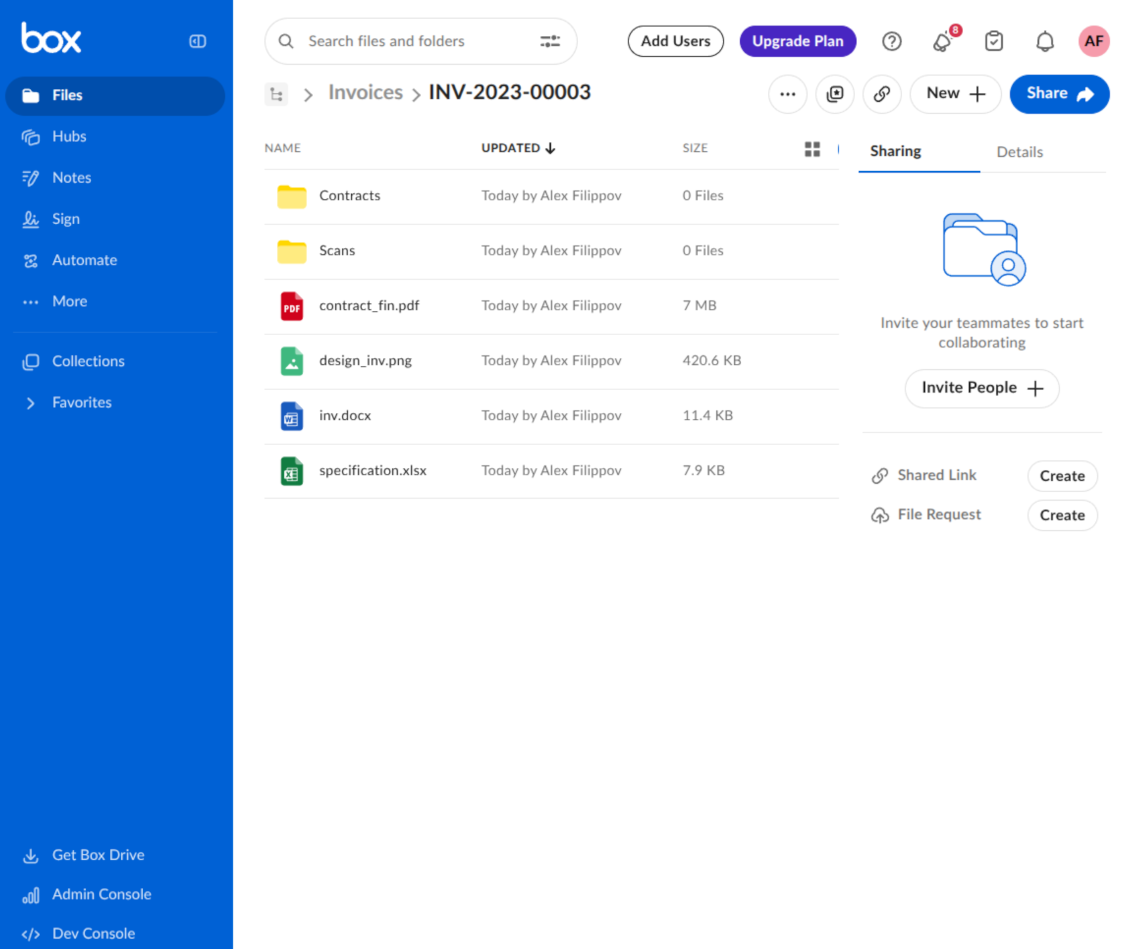
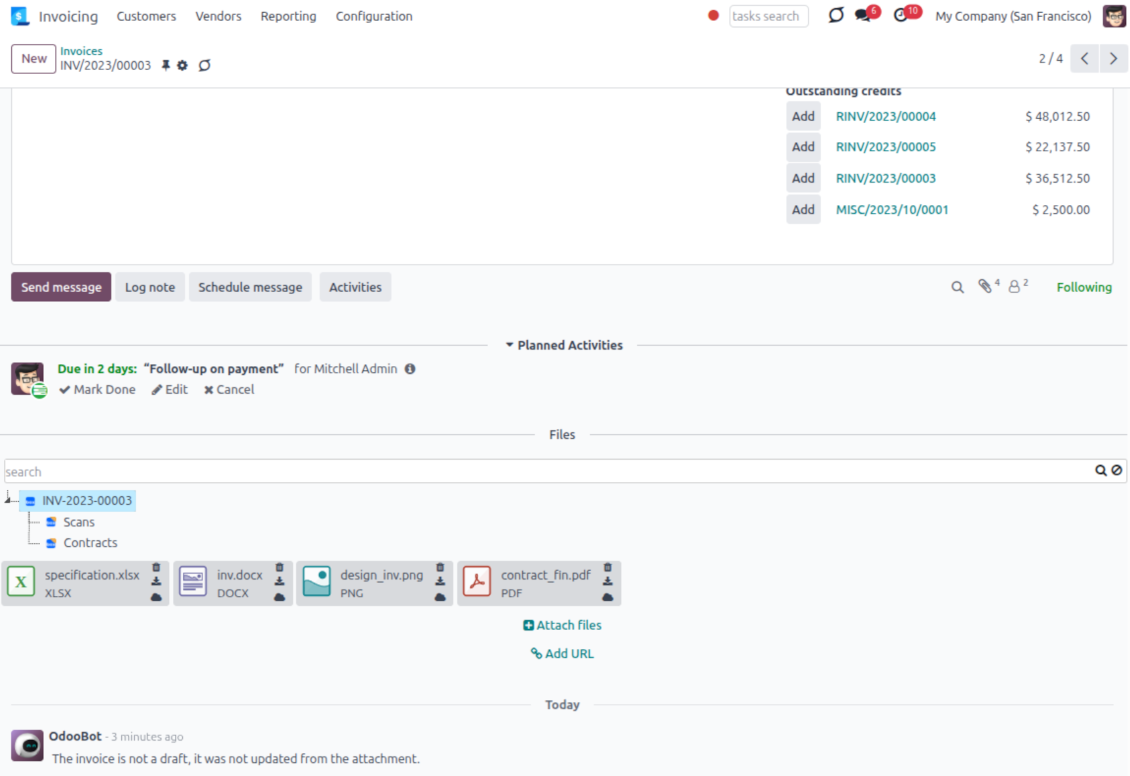
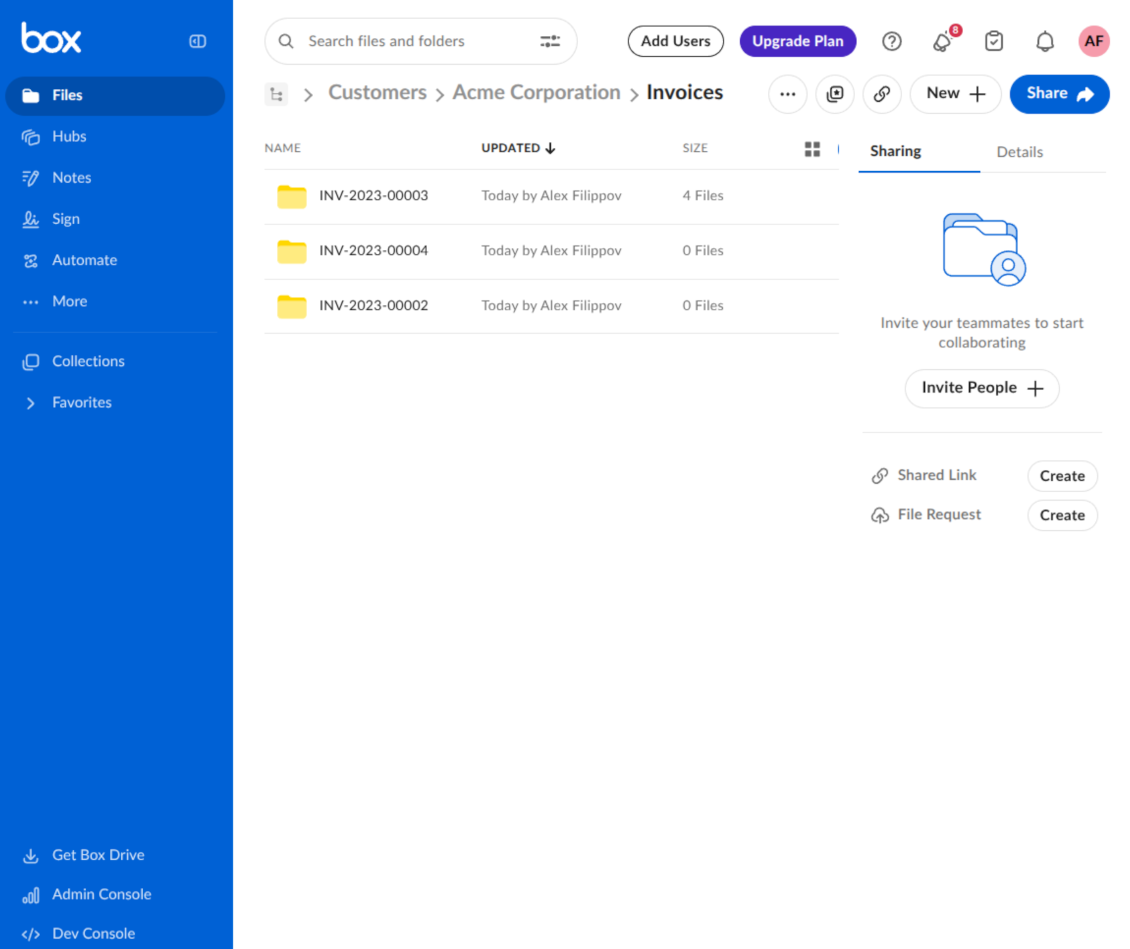
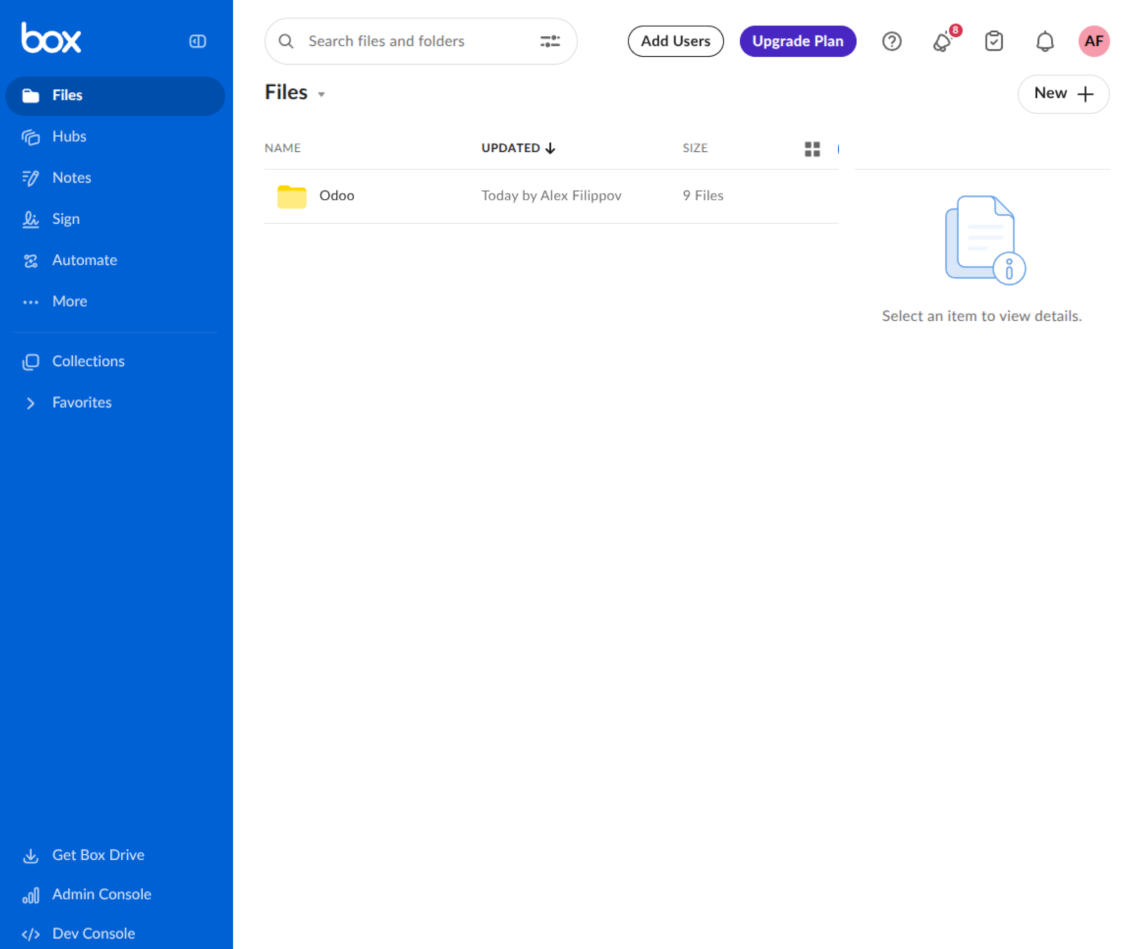
This is the tool to integrate Box features with Odoo folders and files. The app automatically stores Odoo attachments and directories in Box and provides instant access to them through Box web links.
Automatic folders' structure
Decide which Odoo document types should have their own folders trees and synchronize those to Box
Automatic regular sync
Rely on auto-synchronization between Odoo and Box based on scheduled jobs. No manual interaction is required
Bilateral sync
Odoo sends attachments to Box and retrieves files from there. Binary content is kept in clouds, while Odoo provides direct access to synced items
Cloud synchronization history
Control Box sync logs right in Odoo. Export and share those in case of any issues. Be notified of any client disconnections
File manager interface
Manage synced folders and attachments from a single Odoo view. Comfortably navigate by directories. Search, download, upload, and move files
Attachment box
Organize files of any Odoo object in a set of subfolders. Instantly access folders and files in the attachment box and in Box
How synchronization works
Automatic two-sided sync
- Configure sync for one or multiple Box accounts
- Integration is based on scheduled jobs and is fully automatized. The app regularly checks changes in Odoo and Box and runs sync operations
- Synchronization is bilateral. Updates in Odoo are reflected in Box (direct sync); changes in Box modify Odoo folders and attachments (backward sync)
- Cloud connection with Box might be reset. In this way, the app assumes getting all items back to Odoo (reverse sync)
Queue-based synchronization
- Once in 15 minutes, the app examines updates in Odoo and Box to prepare a synchronization queue
- Folders' checks follow the First-In-First-Out (FIFO) principle. Directories that have not been examined for the longest are processed first
- If the app faces sync failures, it will retry operations afterward. Sync queue processing is not stopped by non-blocking failures
Odoo attachments for Box: direct sync
- Direct sync prepares the folders' hierarchy and uploads Odoo attachments to Box
- Folder and file renames or moves keep stable Box IDs, so synced Odoo records stay linked to the same cloud item
- Uploaded attachments become URL records in Odoo, while binary content is stored in Box
Box files and folders for Odoo: backward sync
- Backward sync checks whether files or subfolders are added to Box folders. If so, the app creates URL attachments/subdirectories inside linked Odoo directories
- Updates in Box are reflected in Odoo, including moves and renames based on stable Box item IDs
- In case of conflicts, direct sync changes are in general considered more important than backward updates
Box URLs
Box provides internal web links for files and folders, for example links of the type https://app.box.com/file/[ID] and https://app.box.com/folder/[ID]. Such links are stable, but only Box users with access rights to the related item can open them.
By default, the connector uses those internal Box links. It is the safest and fastest option, since the synchronization does not have to create shared links for every synced item.
If shared links are enabled, Odoo will try to generate Box shared URLs for files and folders. Be cautious with this option: although the links are hardly known by external users, they might become available as a result of some user actions. Besides, shared link generation is slower and might make the synchronization process longer.
Konfigurations- och installationstips för Box Odoo Integration Odoo v.17
Python dependency
The tool depends on the external library 'box_sdk_gen'. Install this library for your Odoo server through the command:
pip3 install boxsdkConfiguration and log in
- Turn on the option 'Box Sync' (cloud Storage > Configuration > Configuration). The optional add-on Box Odoo Integration is required
- Create or open a Box developer account and go to the Box Developer Console: https://app.box.com/developers/console
- Create a Custom App and choose OAuth 2.0 (Authorization Code Grant) as the authentication method
- Add the redirect URI as [YOURODOOSITENAME]/box_token (e.g. https://faotools.com/box_token). A valid SSL certificate (https) is required
- Grant the app access to read and write files and folders. Avoid assigning unrelated permissions
- Go to Odoo Cloud Storage > Configuration > Cloud Clients and press 'Create'
- As a reference, introduce any name which would be clear to all users
- As a Cloud client, choose 'Box'
- As a Root folder name, enter a title that will be used as the parent Box directory for all synced folders. For example, 'Odoo' or 'OdooERP'
- Copy Box Client ID to the field 'Client ID'
- Copy Box Client Secret to the field 'Client Secret'
- Insert previously generated redirect URL
- Press 'Confirm'. Odoo redirects you to the Box login page. Check in the system, agree with all conditions, and grant all permissions asked
- After login, Box redirects you back to Odoo. Box - Odoo synchronization is ready to be done
- Apply the newly created cloud client to folder rules and/or manual folders which should be synced to that Box account
- Await the sync scheduled job to be started. For testing purposes only: trigger integration manually from Cloud Storage > Configuration > Configuration > the button 'Launch sync'.
Create a new Box developer app

Copy Box OAuth credentials

Configure the Box cloud client in Odoo

Grant Odoo access to Box

Vanliga frågor om Box Odoo Integration Odoo v.17
Var lagras synkade filer? Dupliceras de till Odoo och molnen?
Appen utgår från att bilagornas binära innehåll ligger i Cloud Client i stället för på Odoo-servern. Sådana bilagor blir därför av typen URL i Odoo, och du kan när som helst nå dem antingen från bilagefältet eller från Cloud Client.
Efter installationen krävs inga manuella åtgärder, eftersom synkroniseringen är helt automatisk. Bestäm bara vilka Odoo-dokumenttyper som ska synkas och sätt upp en relaterad modell att synka för var och en (kunder, försäljnings- eller inköpsorder, uppgifter, projekt osv.).
Kan jag ha flera mappar för samma dokumenttyp? Till exempel interna projekt och kundprojekt?
Ja, det går. Skapa en regel för varje och applicera filter: till exempel efter projekttyp.
Gör filtren ömsesidigt uteslutande så att ett dokument kan tilldelas entydigt. Till exempel: «kund men inte leverantör», «leverantör men inte kund». Annars hoppar dokumentmappen från en modell till en annan.
Går det att göra synkroniseringen i realtid?
Nej. Vi har starka skäl att undvika realtidssynk:
Prestanda. Vid realtidssynk ger varje filuppladdning en laddningsskärm.
Konflikter. Om 2 användare ändrar ett objekt samtidigt kan det bli olösligt. Med vanliga jobb kan vi rätta efteråt; i realtid behövs en kö, ännu mer vilseledande.
Funktion. Särskilt namnbyte och omstrukturering. Bakåtsynken bygger strikt på kataloglogiken och vid varje synk kontrolleras 100 % av objekten. Efter varje uppdatering skulle det bli tusentals anrop per sekund. Annars går ändringar förlorade.
Kan jag ändra standardnamnen på mappar i molnen?
Du kan ge modellkatalogerna (säljordrar, möjligheter, leverantörer osv.) ett eget namn för varje dokumenttyp.
För objektmappar (SO-001, John Smith osv.) använder verktyget Odoos metod för visningsnamn. Du kan ändra det med ett namnuttryck. Syntaxen är densamma som i Odoos e-postmallar.
Kan jag ändra frekvensen för synkroniseringsjobb?
Nej, från och med version 15 ska du inte ändra schemalagda jobb. De är optimerade att köras var 15:e minut för att ge den mest stabila och snabba anslutningen.
Se till att Odoo-serverns timeouts är minst 15 minuter (900 sekunder).
Om du behöver stoppa synkroniseringen ett tag gör du det på formuläret för den aktuella molnklienten.
Kan jag synka bilagor till flera molnklienter
Ja, från version 15 kan du sätta upp flera anslutningar. Då kan vissa mappar synkas till en molnklient och andra till en annan.
Observera att det inte går att synka samma mapp till flera molnlagringar samtidigt.
Vi använder en särskild redigerare i våra moln (t.ex. OnlyOffice, Office 365 osv.). Skulle filerna öppnas i den redigeraren?
Ja, beroende på din molnklients konfiguration.
Behöver jag bara appen Cloud Storage Solution?
Från version 15 kan appen användas fristående för att strukturera bilagor i mappar och ge ett filhanterargränssnitt.
Om målet är anslutning till någon av molnklienterna måste minst en valfri klientapp installeras.
Vad händer när jag ändrar en mappregel?
När en mappregel ändras ändras också listan över mappar. Matchar en mapp inte längre villkoren tas den bort. Har filerna synkats återför bakåtsynken dem till Odoo och tar bort dem från Cloud Client.
Matchar dokumentobjektet inte en mappregel skapas ingen mapp. Matchar det senare skapas den relaterade mappen.
App- och webbplatsformuleringar på andra språk än engelska är AI-assisterade och anpassade till officiella Odoo-översättningar. Om du upptäcker ett fel, skicka ett ärende om översättningskorrekthet så åtgärdar vi det.
Odoo-demodatabaser (liveförhandsvisningar)
För den här appen kan vi erbjuda en gratis personlig demodatabas.
Du behöver varken telefonnummer eller kreditkort för att kontakta oss. Det räcker med en kort e-postregistrering som tar högst 30 sekunder.
På din begäran förbereder vi en individuell liveförhandsvisningsdatabas där du kan göra tester och kontrollera antaganden i cirka två veckor.
Felrapportering
Om du stöter på fel eller inkonsekvent beteende, kontakta oss. Vi garanterar rättningar inom 60 dagar efter köpet och vill förbättra verktygen även efter det.
Du behöver varken telefonnummer eller kreditkort för att kontakta oss. Det räcker med en kort e-postregistrering som tar högst 30 sekunder.
Ta med så många detaljer som möjligt: skärmbilder, Odoo-serverloggar och en fullständig beskrivning av hur problemet återskapas. Det tar vanligtvis några arbetsdagar att ta fram en arbetsplan (om felet bekräftas) eller riktlinjer (annars).
Offentliga funktionsönskemål och modulidéer (gratis utveckling)
Vi är starkt motiverade att förbättra våra verktyg och tackar för all feedback. Om kraven är av allmänt intresse och kan implementeras effektivt tar teamet med dem i att-göra-listan.
En sådan att göra-lista behandlas regelbundet och innebär inga extraavgifter. Även om vi inte kan lova tidsfrister och slutlig design kan det vara ett bra sätt att få önskade funktioner utan investeringar och risker.
Du behöver varken telefonnummer eller kreditkort för att kontakta oss. Det räcker med en kort e-postregistrering som tar högst 30 sekunder.


The tool to build a deep and structured knowledge base for internal and external use. Knowledge System. KMS. Wiki-like revisions.
398€
The tool to set up KPI targets and control their fulfillment by periods. KPI dashboards. Dashboard designer. KPI charts

The tool for time-based service management from booking appointments to sales and reviews
398€
The tool to manage your Odoo from your favorite AI chats through MCP. Claude. Any MCP-supporting AI.

The tool to flexibly structure Odoo attachments in folders and synchronize directories with cloud clients: Google Drive, OneDrive/SharePoint, Nextcloud/ownCloud, Dropbox, Amazon S3, Box, and NAS. DMS. File Manager. Document management system
398€
The tool to automatically synchronize Odoo attachments with OneDrive files in both ways
487€
The tool to automatically synchronize Odoo attachments with Google Drive files in both ways
487€
The tool to automatically synchronize Odoo attachments with ownCloud/Nextcloud files in both ways
487€