Box Odoo Integration v.17
The tool to automatically synchronize Odoo attachments with Box files in both ways
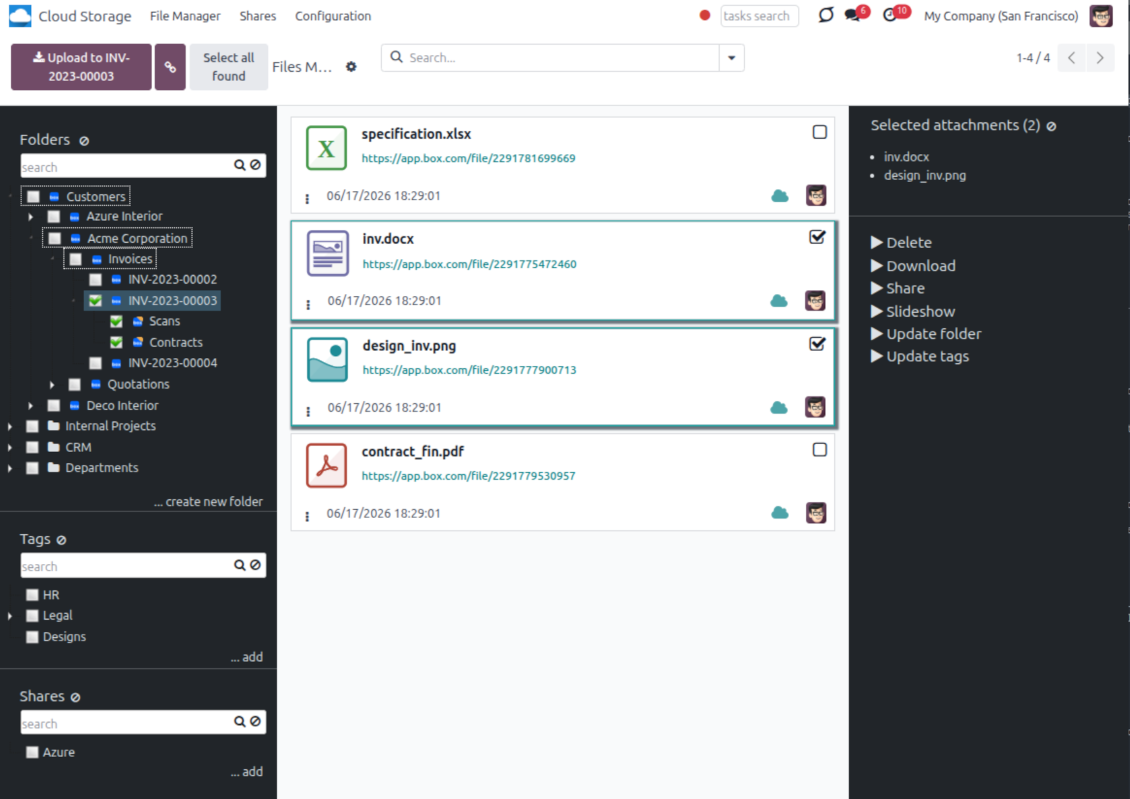
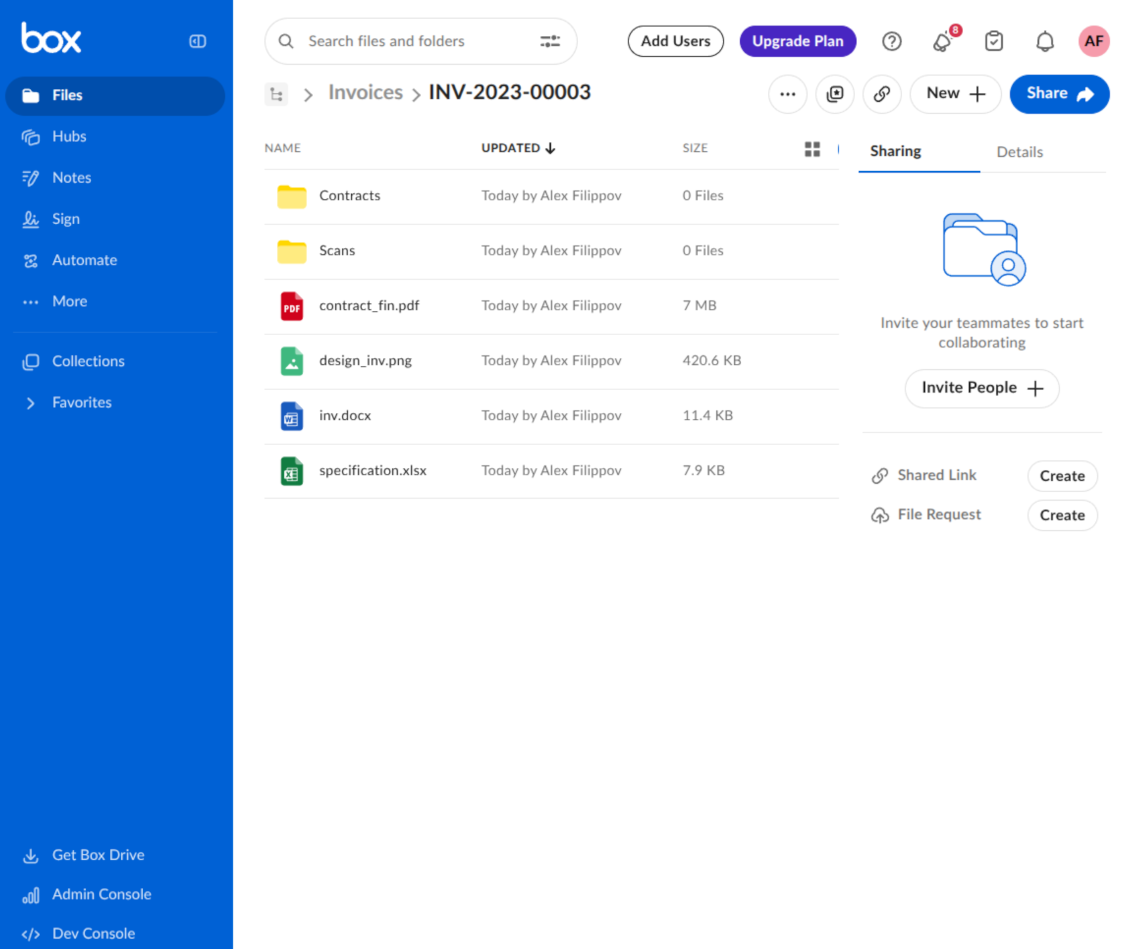
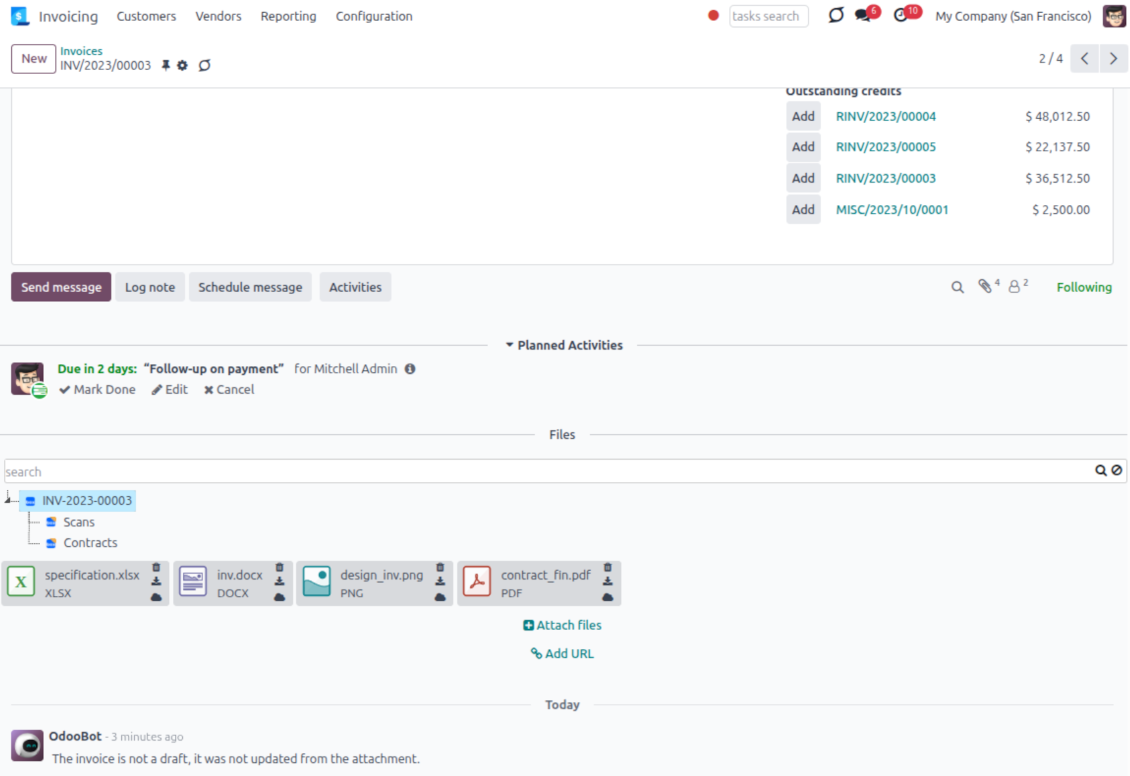
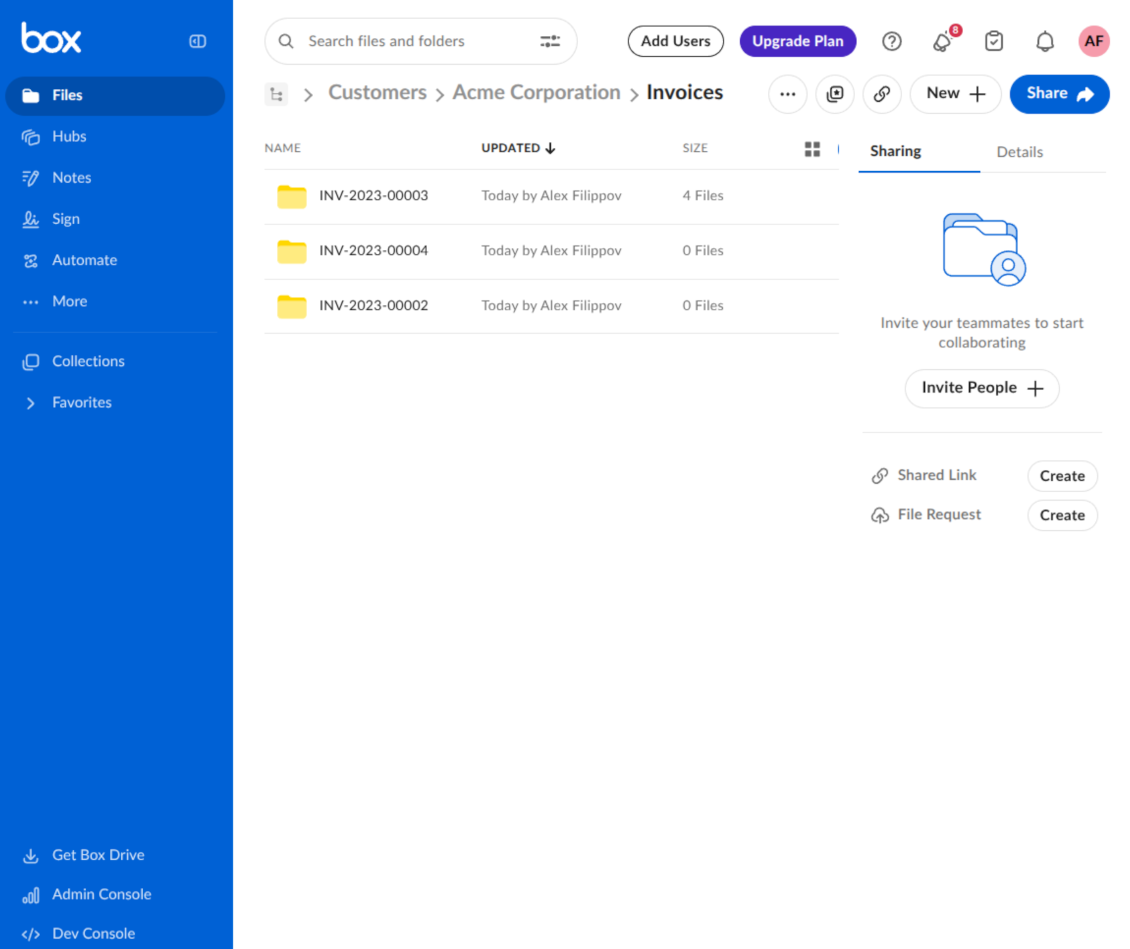
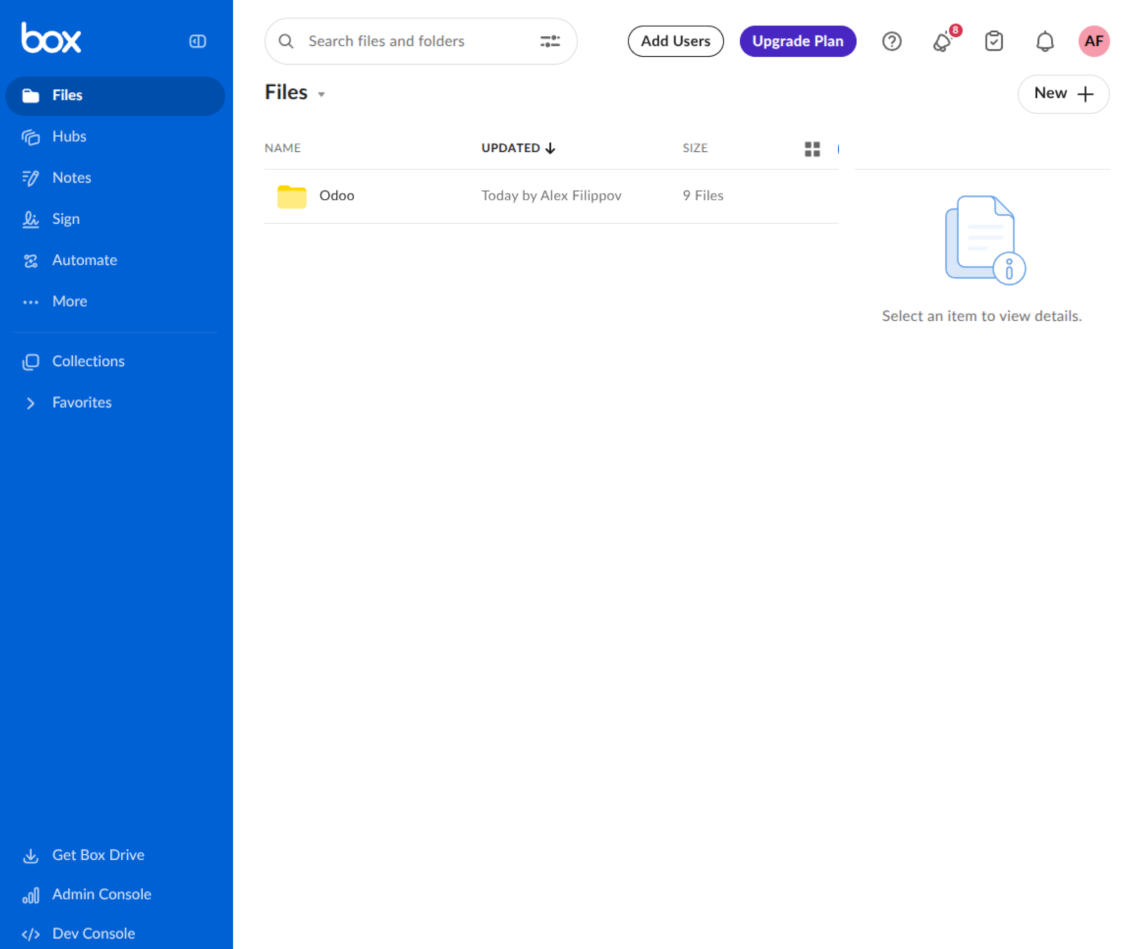
This is the tool to integrate Box features with Odoo folders and files. The app automatically stores Odoo attachments and directories in Box and provides instant access to them through Box web links.
Automatic folders' structure
Decide which Odoo document types should have their own folders trees and synchronize those to Box
Automatic regular sync
Rely on auto-synchronization between Odoo and Box based on scheduled jobs. No manual interaction is required
Bilateral sync
Odoo sends attachments to Box and retrieves files from there. Binary content is kept in clouds, while Odoo provides direct access to synced items
Cloud synchronization history
Control Box sync logs right in Odoo. Export and share those in case of any issues. Be notified of any client disconnections
File manager interface
Manage synced folders and attachments from a single Odoo view. Comfortably navigate by directories. Search, download, upload, and move files
Attachment box
Organize files of any Odoo object in a set of subfolders. Instantly access folders and files in the attachment box and in Box
How synchronization works
Automatic two-sided sync
- Configure sync for one or multiple Box accounts
- Integration is based on scheduled jobs and is fully automatized. The app regularly checks changes in Odoo and Box and runs sync operations
- Synchronization is bilateral. Updates in Odoo are reflected in Box (direct sync); changes in Box modify Odoo folders and attachments (backward sync)
- Cloud connection with Box might be reset. In this way, the app assumes getting all items back to Odoo (reverse sync)
Queue-based synchronization
- Once in 15 minutes, the app examines updates in Odoo and Box to prepare a synchronization queue
- Folders' checks follow the First-In-First-Out (FIFO) principle. Directories that have not been examined for the longest are processed first
- If the app faces sync failures, it will retry operations afterward. Sync queue processing is not stopped by non-blocking failures
Odoo attachments for Box: direct sync
- Direct sync prepares the folders' hierarchy and uploads Odoo attachments to Box
- Folder and file renames or moves keep stable Box IDs, so synced Odoo records stay linked to the same cloud item
- Uploaded attachments become URL records in Odoo, while binary content is stored in Box
Box files and folders for Odoo: backward sync
- Backward sync checks whether files or subfolders are added to Box folders. If so, the app creates URL attachments/subdirectories inside linked Odoo directories
- Updates in Box are reflected in Odoo, including moves and renames based on stable Box item IDs
- In case of conflicts, direct sync changes are in general considered more important than backward updates
Box URLs
Box provides internal web links for files and folders, for example links of the type https://app.box.com/file/[ID] and https://app.box.com/folder/[ID]. Such links are stable, but only Box users with access rights to the related item can open them.
By default, the connector uses those internal Box links. It is the safest and fastest option, since the synchronization does not have to create shared links for every synced item.
If shared links are enabled, Odoo will try to generate Box shared URLs for files and folders. Be cautious with this option: although the links are hardly known by external users, they might become available as a result of some user actions. Besides, shared link generation is slower and might make the synchronization process longer.
Konfigurations- und Installationstipps für Box Odoo Integration Odoo v.17
Python dependency
The tool depends on the external library 'box_sdk_gen'. Install this library for your Odoo server through the command:
pip3 install boxsdkConfiguration and log in
- Turn on the option 'Box Sync' (cloud Storage > Configuration > Configuration). The optional add-on Box Odoo Integration is required
- Create or open a Box developer account and go to the Box Developer Console: https://app.box.com/developers/console
- Create a Custom App and choose OAuth 2.0 (Authorization Code Grant) as the authentication method
- Add the redirect URI as [YOURODOOSITENAME]/box_token (e.g. https://faotools.com/box_token). A valid SSL certificate (https) is required
- Grant the app access to read and write files and folders. Avoid assigning unrelated permissions
- Go to Odoo Cloud Storage > Configuration > Cloud Clients and press 'Create'
- As a reference, introduce any name which would be clear to all users
- As a Cloud client, choose 'Box'
- As a Root folder name, enter a title that will be used as the parent Box directory for all synced folders. For example, 'Odoo' or 'OdooERP'
- Copy Box Client ID to the field 'Client ID'
- Copy Box Client Secret to the field 'Client Secret'
- Insert previously generated redirect URL
- Press 'Confirm'. Odoo redirects you to the Box login page. Check in the system, agree with all conditions, and grant all permissions asked
- After login, Box redirects you back to Odoo. Box - Odoo synchronization is ready to be done
- Apply the newly created cloud client to folder rules and/or manual folders which should be synced to that Box account
- Await the sync scheduled job to be started. For testing purposes only: trigger integration manually from Cloud Storage > Configuration > Configuration > the button 'Launch sync'.
Create a new Box developer app

Copy Box OAuth credentials

Configure the Box cloud client in Odoo

Grant Odoo access to Box

Häufig gestellte Fragen zu Box Odoo Integration Odoo v.17
Wo werden die synchronisierten Dateien gespeichert? Werden sie in Odoo und in den Clouds dupliziert?
Die App geht davon aus, dass der Binärinhalt der Anhänge im Cloud Client statt auf dem Odoo-Server liegt. Solche Anhänge werden in Odoo vom Typ URL, und Sie können jederzeit aus der Anhangsbox oder aus dem Cloud Client darauf zugreifen.
Nach der Einrichtung sind keine manuellen Schritte nötig, die Synchronisierung läuft vollautomatisch. Legen Sie fest, welche Odoo-Dokumenttypen synchronisiert werden, und richten Sie für jeden ein zugehöriges Modell ein (Kunden, Verkaufs- oder Einkaufsaufträge, Aufgaben, Projekte usw.).
Kann ich mehrere Ordner für denselben Dokumenttyp anlegen? Zum Beispiel interne Projekte und Kundenprojekte?
Ja, das geht. Legen Sie dazu für jede Variante eine Regel an und setzen Sie Filter, zum Beispiel nach Projekttyp.
Machen Sie die Filter einander ausschliessend, damit ein Dokument eindeutig zugeordnet wird. Zum Beispiel: „Kunde, aber nicht Lieferant“, „Lieferant, aber nicht Kunde“. Sonst springt der Dokumentordner von einem Modell zum anderen.
Ist eine Echtzeit-Synchronisierung möglich?
Nein. Es gibt starke Gründe gegen Echtzeit-Sync:
Leistung. Bei Echtzeit-Sync führt jeder Datei-Upload zum Ladebildschirm.
Konflikte. Ändern 2 Benutzer gleichzeitig ein Element, kann das unlösbar werden. Bei regulären Jobs können wir das danach beheben; in Echtzeit müsste eine Warteschlange her, das wäre noch verwirrender.
Funktion. Besonders Umbenennen und Umstrukturieren. Der Rückwärts-Sync stützt sich strikt auf die Verzeichnisslogik und prüft bei jedem Lauf 100 % der Elemente. Nach jeder Änderung wären das Tausende Anfragen pro Sekunde. Sonst gingen Änderungen verloren.
Kann ich die Standardnamen der Ordner in den Clouds ändern?
Sie können den Modellverzeichnissen (Verkaufsaufträge, Chancen, Lieferanten usw.) für jeden Dokumenttyp einen eigenen Namen geben.
Für Objektordner (SO-001, John Smith usw.) nutzt das Tool die Odoo-Methode für den Anzeigenamen. Sie können das mit einem Namensausdruck ändern. Es gilt die Syntax der Odoo-E-Mail-Vorlagen.
Kann ich die Häufigkeit der Synchronisierungsjobs ändern?
Nein, ab Version 15 sollten Sie geplante Aktionen nicht ändern. Sie sind auf einen Lauf alle 15 Minuten optimiert, damit die Verbindung möglichst stabil und schnell bleibt.
Die Timeouts des Odoo-Servers müssen mindestens 15 Minuten (900 Sekunden) betragen.
Um den Sync vorübergehend zu stoppen, tun Sie das im Formular des jeweiligen Cloud-Clients.
Kann ich Anhänge mit mehreren Cloud-Clients synchronisieren
Ja, ab Version 15 können Sie mehrere Verbindungen einrichten. So lassen sich einige Ordner mit einem Cloud-Client und andere mit einem anderen synchronisieren.
Denselben Ordner können Sie keinesfalls gleichzeitig mit mehreren Cloud-Speichern synchronisieren.
Wir nutzen einen speziellen Editor in unseren Clouds (z. B. OnlyOffice, Office 365 usw.). Würden Dateien in diesem Editor geöffnet?
Ja, abhängig von der Konfiguration Ihres Cloud-Clients.
Brauche ich nur die App Cloud Storage Solution?
Ab Version 15 kann die App allein genutzt werden, um Anhänge in Ordnern zu strukturieren und eine Dateimanager-Oberfläche bereitzustellen.
Soll eine Verbindung zu einem der Cloud-Clients hergestellt werden, muss mindestens eine optionale Client-App installiert sein.
Was passiert, wenn ich eine Ordnerregel ändere?
Ändert sich eine Ordnerregel, ändert sich auch die Ordnerliste. Passt ein Ordner nicht mehr zu den Bedingungen, wird er entfernt. Waren die Dateien bereits synchronisiert, bringt der Rückwärts-Sync sie nach Odoo zurück und löscht sie im Cloud Client.
Passt das Dokumentobjekt nicht zur Ordnerregel, wird kein Ordner angelegt. Passt es später, wird der zugehörige Ordner erzeugt.
Die Texte der App und Website in anderen Sprachen als Englisch werden KI-gestützt erstellt und an die offiziellen Odoo-Übersetzungen angeglichen. Wenn Sie einen Fehler entdecken, ein Uebersetzungs-Ticket senden und wir korrigieren es.
Odoo-Demo-Datenbanken (Vorschauen)
Für diese App können wir eine kostenlose personalisierte Demo-Datenbank bereitstellen.
Sie benötigen keine Telefonnummer oder Kreditkarte, um mit uns Kontakt aufzunehmen. Sie sollten nur eine kurze E-Mail-Anmeldung durchführen, die nicht länger als 30 Sekunden dauert.
Auf Anfrage richten wir eine eigene Vorschau-Datenbank ein, in der Sie rund zwei Wochen lang beliebig testen und Ihre Annahmen prüfen können.
Fehlermeldung
Wenn Sie auf Fehler oder inkonsistentes Verhalten stossen, zögern Sie nicht, uns zu kontaktieren. Wir garantieren eine Reparatur innerhalb von 60 Tagen nach dem Kauf und sind auch nach diesem Zeitraum stark daran interessiert, unsere Werkzeuge zu verbessern.
Sie benötigen keine Telefonnummer oder Kreditkarte, um mit uns Kontakt aufzunehmen. Sie sollten nur eine kurze E-Mail-Anmeldung durchführen, die nicht länger als 30 Sekunden dauert.
Bitte nehmen Sie moglichst viele Details in Ihre Anfrage auf: Screenshots, Odoo-Serverprotokolle, eine vollständige Beschreibung zur Reproduktion Ihres Problems usw. Normalerweise dauert es einige Werktage, einen Arbeitsplan fur ein Problem zu erstellen (wenn ein Fehler bestätigt wird) oder Ihnen Hinweise zum weiteren Vorgehen zu geben (andernfalls).
Öffentliche Funktionsanfragen und Modulideen (kostenlose Entwicklung)
Wir sind stark motiviert, unsere Tools zu verbessern und wären für jedes Feedback dankbar. Wenn Ihre Anforderungen von öffentlichem Nutzen sind und effizient umgesetzt werden könnten, nimmt das Team diese in unsere To-Do-Liste auf.
Eine solche To-Do-Liste wird regelmässig bearbeitet und erfordert keine zusätzlichen Gebühren. Obwohl wir keine Fristen und keinen endgültigen Entwurf versprechen können, könnte dies eine gute Möglichkeit sein, die gewünschten Funktionen ohne Investitionen und Risiken zu erhalten.
Sie benötigen keine Telefonnummer oder Kreditkarte, um mit uns Kontakt aufzunehmen. Sie sollten nur eine kurze E-Mail-Anmeldung durchführen, die nicht länger als 30 Sekunden dauert.


The tool to build a deep and structured knowledge base for internal and external use. Knowledge System. KMS. Wiki-like revisions.
398€
The tool to set up KPI targets and control their fulfillment by periods. KPI dashboards. Dashboard designer. KPI charts

The tool for time-based service management from booking appointments to sales and reviews
398€
The tool to manage your Odoo from your favorite AI chats through MCP. Claude. Any MCP-supporting AI.

The tool to flexibly structure Odoo attachments in folders and synchronize directories with cloud clients: Google Drive, OneDrive/SharePoint, Nextcloud/ownCloud, Dropbox, Amazon S3, Box, and NAS. DMS. File Manager. Document management system
398€
The tool to automatically synchronize Odoo attachments with OneDrive files in both ways
487€
The tool to automatically synchronize Odoo attachments with Google Drive files in both ways
487€
The tool to automatically synchronize Odoo attachments with ownCloud/Nextcloud files in both ways
487€