KnowSystem: Knowledge Base System v.17
The tool to build a deep and structured knowledge base for internal and external use. Knowledge System. KMS. Wiki-like revisions.
This is a full-featured Odoo knowledge management tool to be used in any industry and by any firm. The app serves to accumulate, curate, utilize, and share organizational knowledge within your company and outside it.
- a core of knowledge management. It might be used stand-alone as a complete internal knowledge base system. Sein Preis ist 398€.
- an optional module, which lets you publish articles to the website, share them with portal users, and use the website builder to update articles. The features assumed by this add-on are marked by the icon . Sein Preis ist 40€.
- an optional extension to KnowSystem: Website and Portal to design website documentation pages based on knowledge base articles. The features assumed by this add-on are marked by the icon . Read the full description on the related page. Sein Preis ist 60€.
- an optional module, which lets you add and show custom fields for articles (backend). The features assumed by this add-on are marked by the icon . Sein Preis ist 48€.
- an optional free module, which shows custom fields on website and portal pages (frontend). The features assumed by this add-on are also marked by the icon .
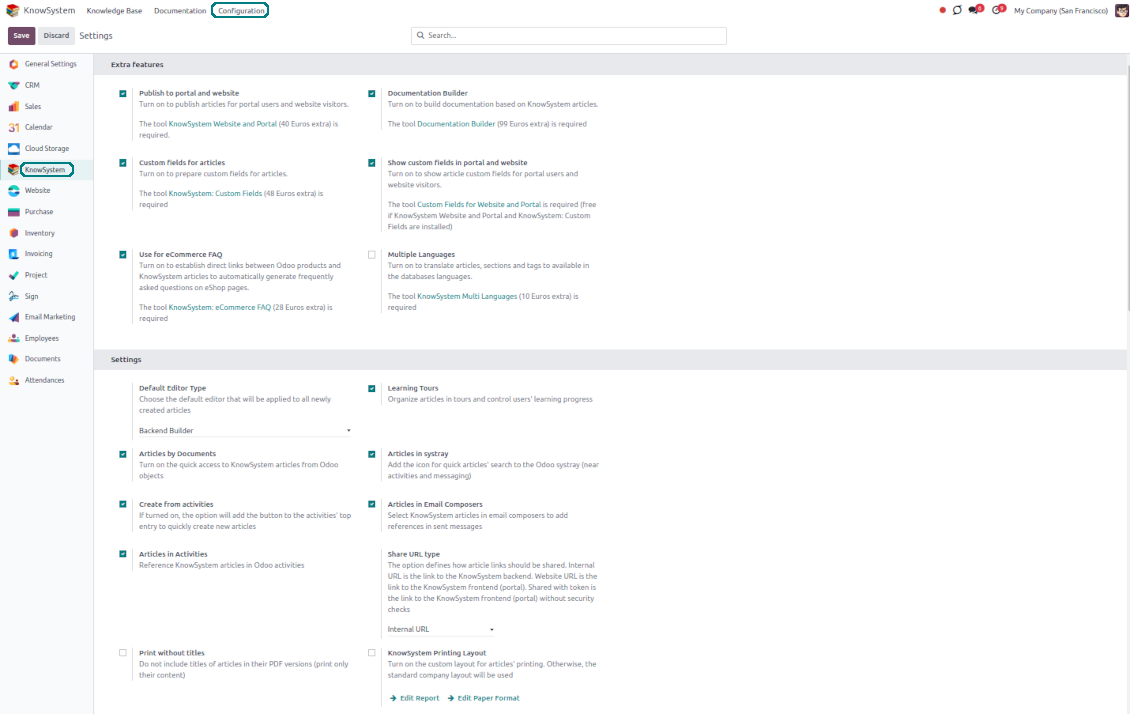
- an optional extension to KnowSystem: Website and Portal to prepare FAQ/documentation for Odoo eCommerce product pages. The features assumed by this add-on are marked by the icon . Read the full description on the related page. Sein Preis ist 28€.
- an optional module, which lets you translate articles, sections, and tags to installed in Odoo languages. The features assumed by this add-on are marked by the icon . Sein Preis ist 10€.
Record and keep knowledge
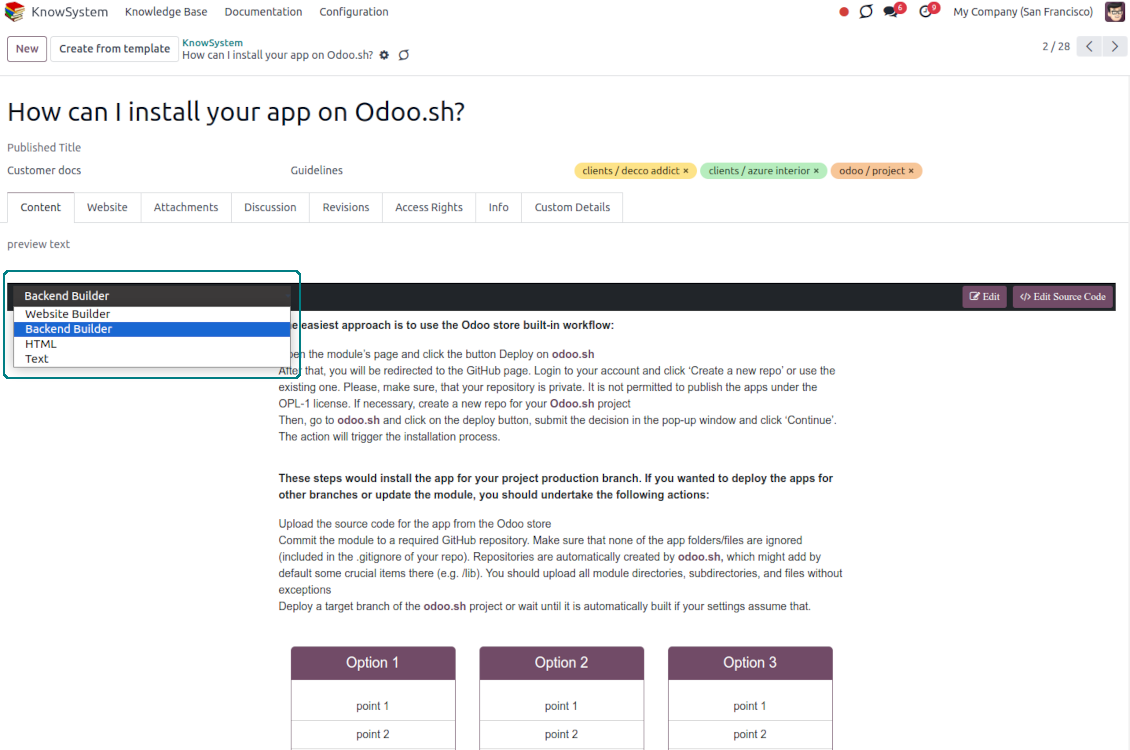
Drag and drop building blocks of the backend or website editors to construct professional-looking articles. Use simple text or HTML editors. Switch to the raw code when needed. Create and use knowledge templates.
Single view KMS navigation
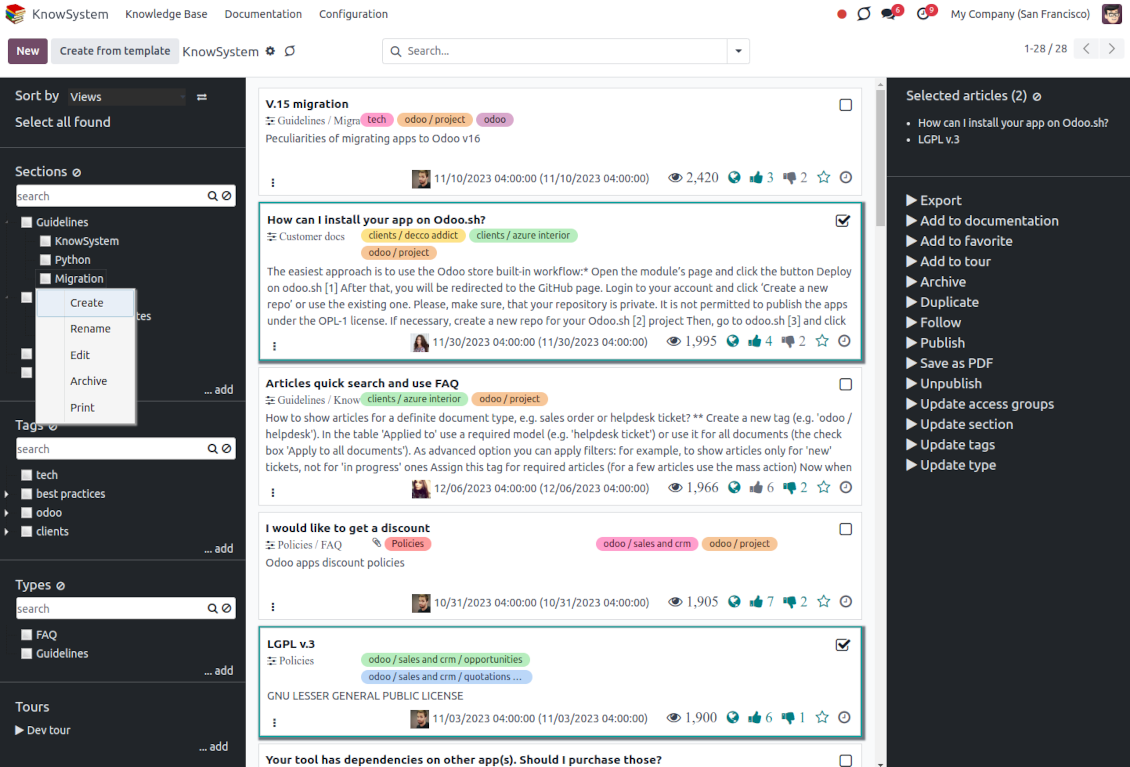
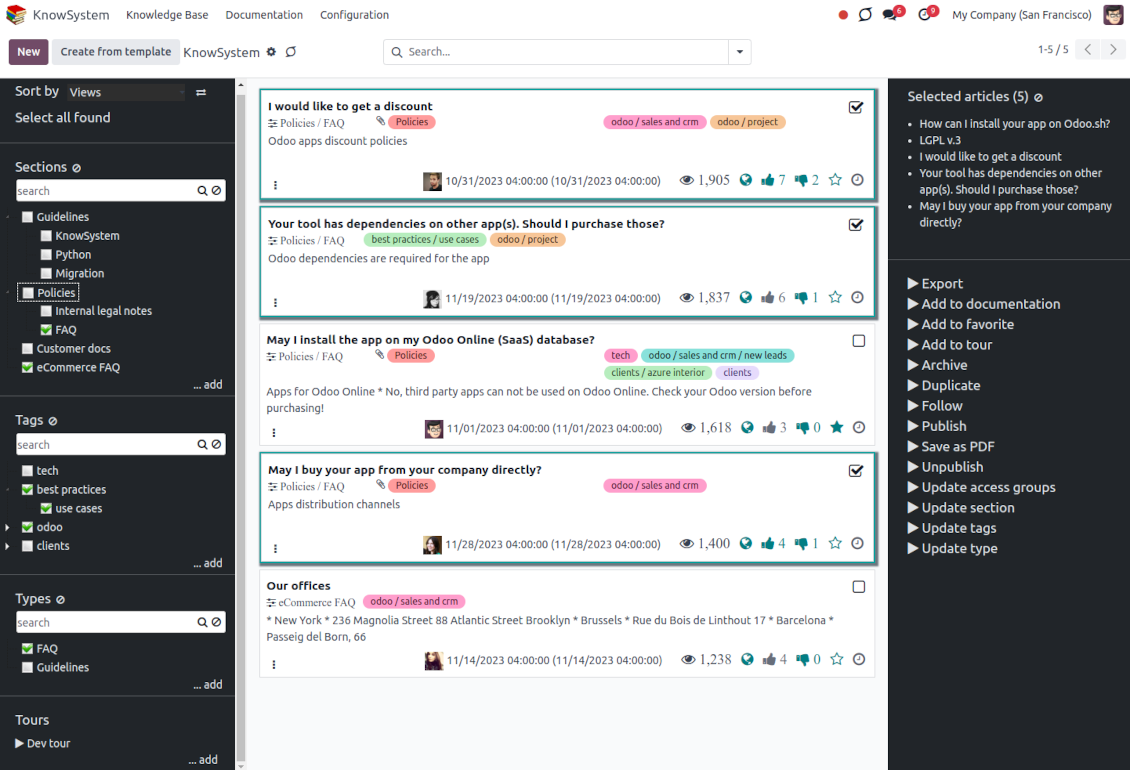
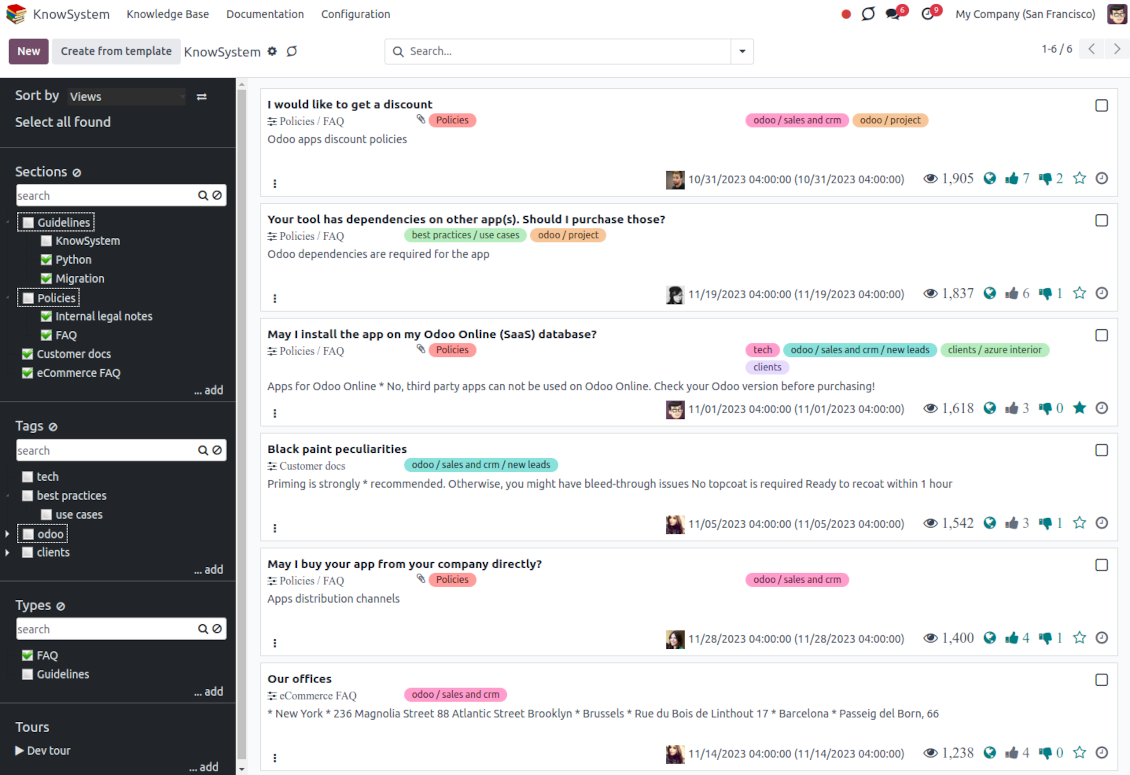
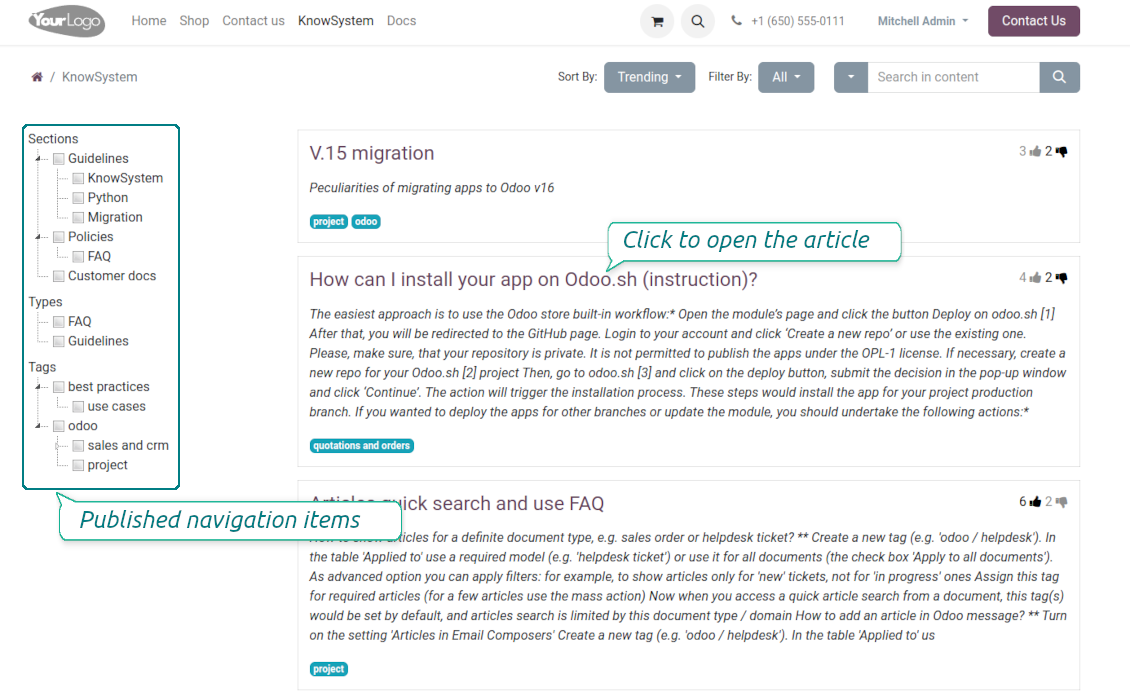
Filter articles by the hierarchy of sections, by the tree of tags, or by knowledge types. Select articles step by step and proceed with mass actions. Sort and search in seconds
Get benefit of knowledge
Instantly access the knowledge base from any Odoo documents. Reference articles in messages and activities. Organize learning tours. Prepare instructions, guidelines, or eCommerce FAQs. Print or share knowledge
Wiki-like revisions
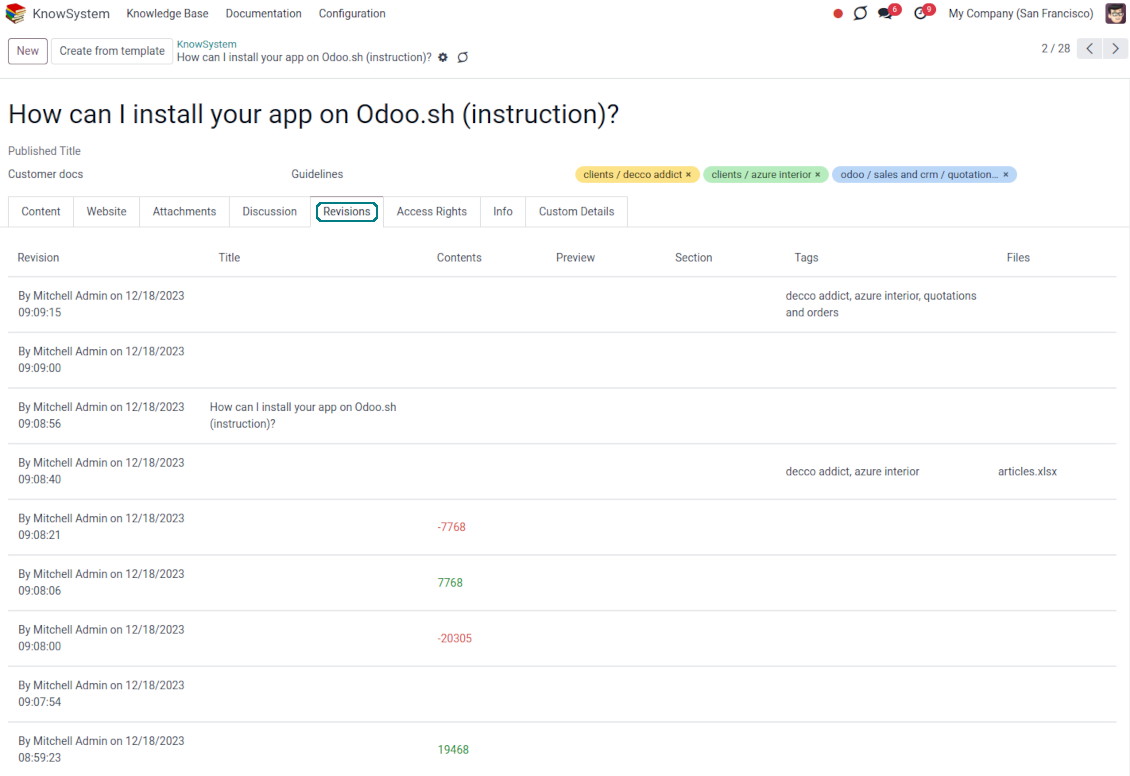
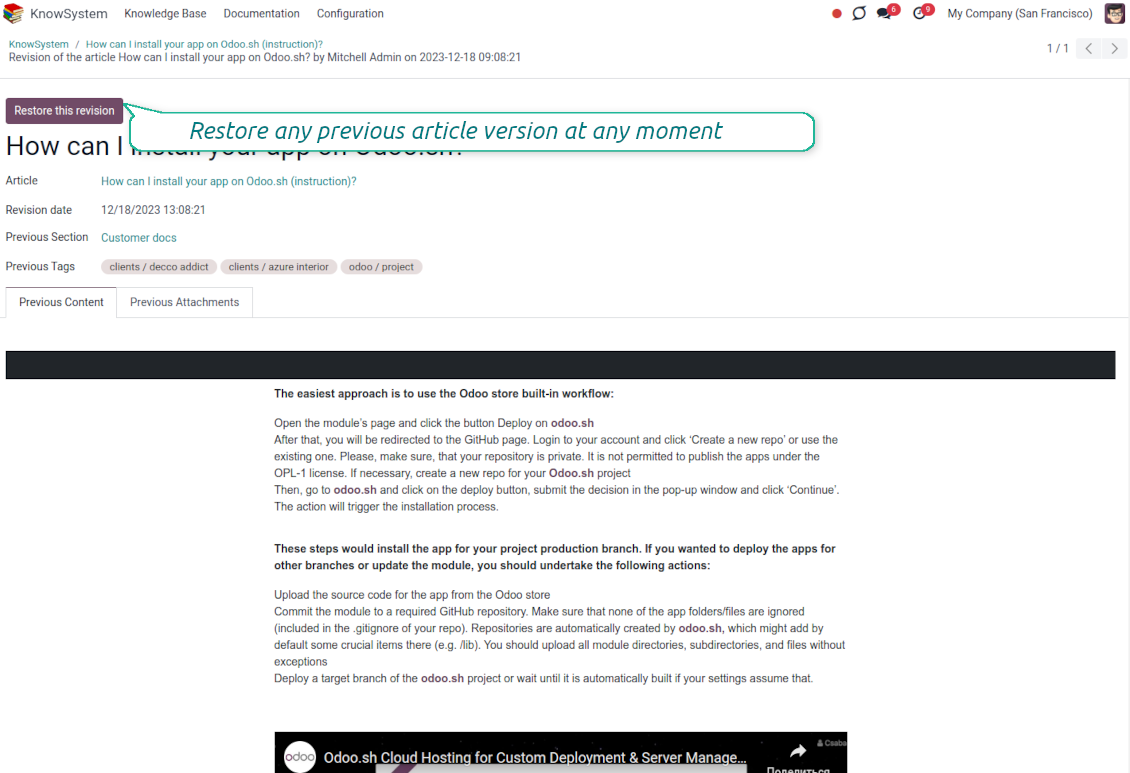
Restore any article version at any moment: the app keeps the history of knowledge updates. Breaking becomes harder than restoring
Portal or public knowledge base
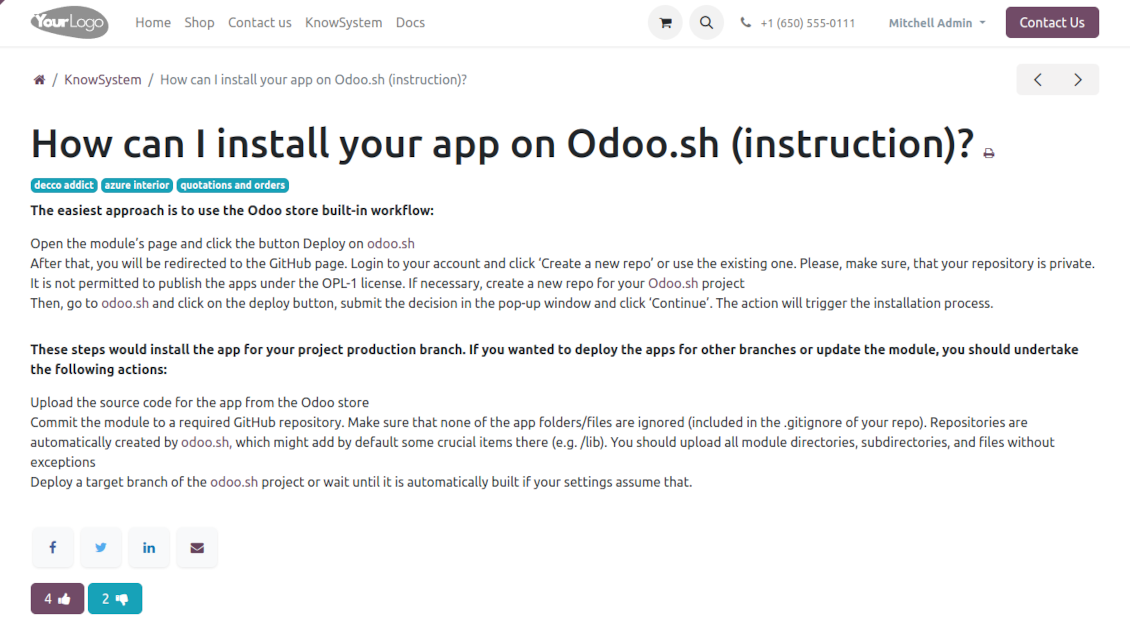
Share articles with your partners or publish knowledge for any website visitor
Website documentation builder
Combine organizational knowledge into advanced documentation with comfortable navigation and search
Knowledge system statistics
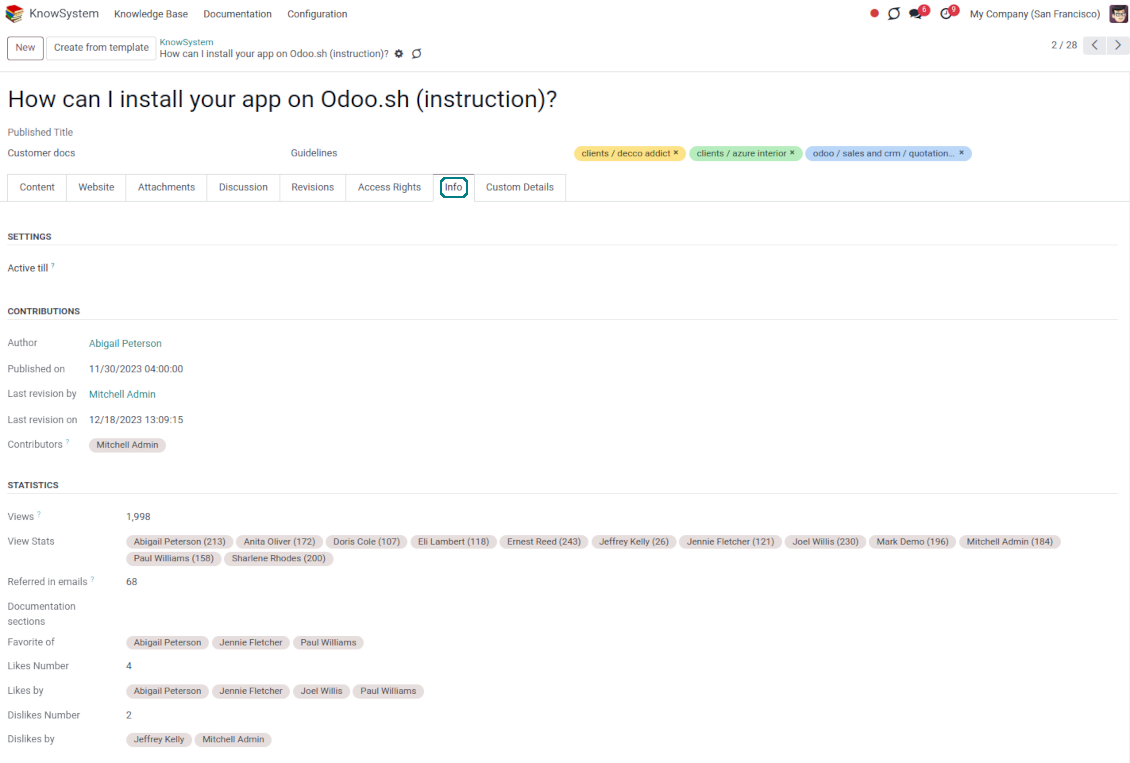
Control views of articles, likes, dislikes, and contributions. Motivate discussions
Applied in any functional area
Use the app for any knowledge management business goal and for any set of Odoo apps.
Best knowledge base system for Odoo!
Excellent app and exceptional after-sales support.
Really well thought-out product and one of the best features is the contextual help by means of the tags. Really a game changer for us.
Keep up the great work FaOtools!
Outstanding app! Tremendous value for money, an absolute must have!
One of the features sorely lacking from Odoo has been a robust Wiki/documentation system. Using third party platforms is a massive headache: yet another system to maintain, users get distracted switching back-and-forth, and errors get made. Then you have to worry about training, additional logins, etc.
KnowSystem feels like a native/core app, is very well-polished, and extremely fast. It's accessible from any screen, and the search results are instant (none of the latency inherent with most apps).The interface is elegant yet powerful, with robust access control, rich editing features, and version control. It's simple to revert to previous entries, view audit trails, etc. It's very intuitive for anyone familiar with Odoo; onboarding takes just a few minutes. The user guides are excellent.
This is invaluable for any organisation with a lot of documented information, SOPs, ISO compliance, or similar. If you're using eLearning, it's great for creating a help system / reminders. For example, noting key takeaways or specific instructions. The user can be in MRP, Sales, or any other function, and instantly lookup a guide. Since it overlays whichever screen you're in, it doesn't interrupt the workflow.
This dramatically increases efficiency, minimises questions, and helps keep everyone on the same page.
Oh, and customer service is excellent, faOtools stands behind their product. Thank you!
KnowSystem is excellent - OdooTools offer great support, are very helpful and responsive
Our company needed the ability to add a Knowledge Base to our Odoo portal website for our customers to access article content on a membership-only basis. KnowSystem provided this and much more, along with ability to add search by section, set permissions to allow only certain partners access to articles by tag etc. OdooTools have been very helpful and implemented several features we suggested including automatic redirect upon login, customisable filters and a social sharing capability on articles. Overall a great app by a great company, something that massively adds to Odoo's capabilities and is something that everyone could benefit from using.
Very functional application and responsive support
Our company produces medical laser equipment and we use KnowSystem to streamline the knowledge base of our company. Convenient search system and classification of content, as well as access rules for groups and even for individual users.
Great app and professional team
The app is great the the team is very professional in both response timing and problem solving.
Highly recommended.
Marco from ALO.zone.
Excellent system
Excellent system.
A great tool from some very nice developers!
KnowSystem is a great tool and a game changer for us. Finally a place to put all our company know-how. I highly recommend it. And also important to us: We got great support from FaOtools too. A rare thing in this busy world. thx!
Excellent app and support.
Great app and a very helpfull support. Openess to improve their products is outstanding.
Single-view knowledge navigation
-
Prepare the hierarchy of knowledge sections to instantly switch between knowledge areas
-
Define the tree of tags for quick navigation and deeper knowledge structuring
-
Introduce knowledge base typology to distinguish kinds of articles in a single click
-
Create, update, and reorder tags, sections, or types right from the KnowSystem interface. Print all articles related to a certain tag or a section
-
Instantly search KMS sections and tags right on the navigation panel
-
Manage and launch learning tours
-
Sort knowledge articles by views, a score of likes, title, author, section, and create and write dates
-
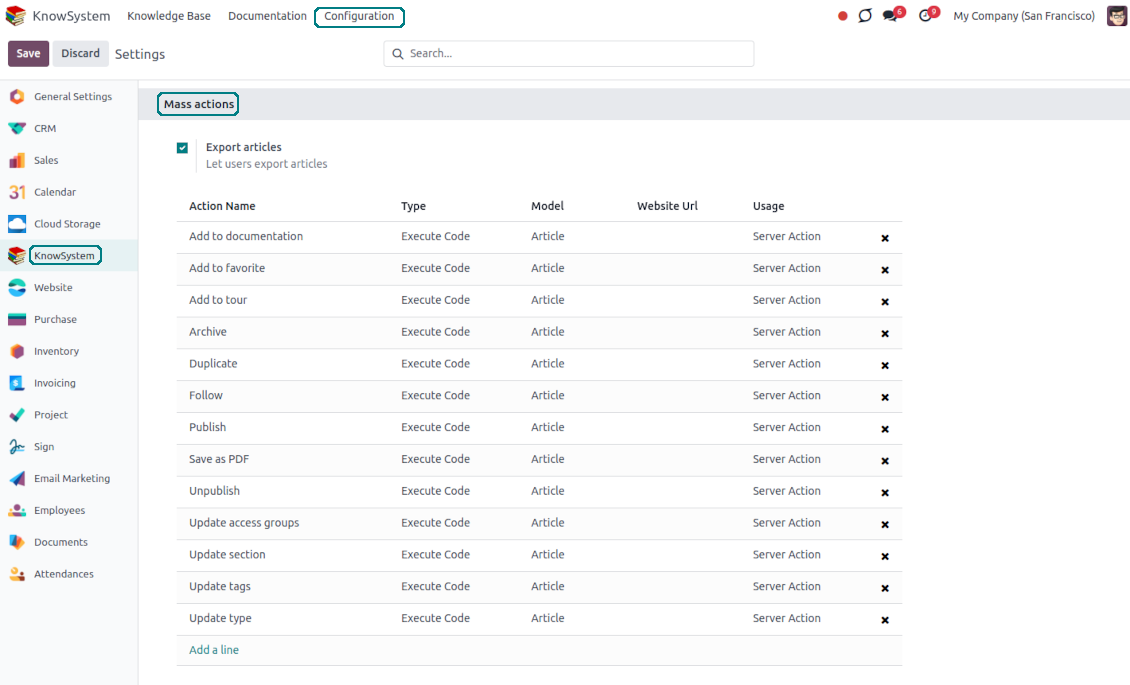
Pick articles up step by step: the selection is not cleared with a new search or when you opened a record. Proceed mass action(s) for all chosen items
-
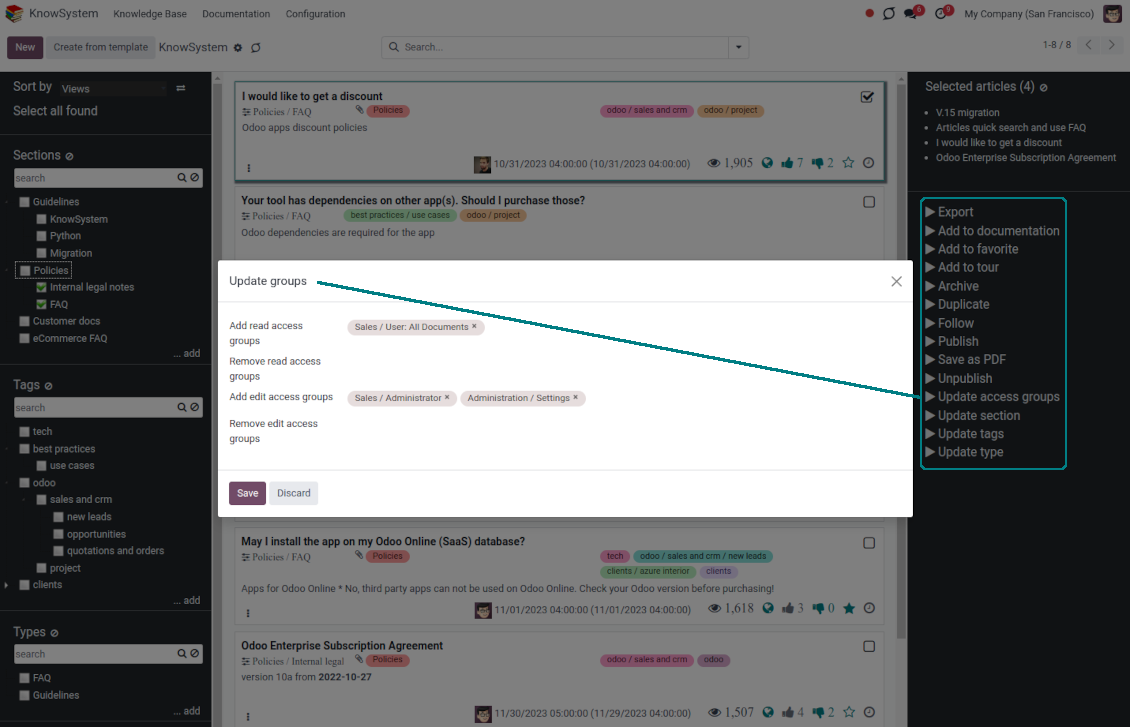
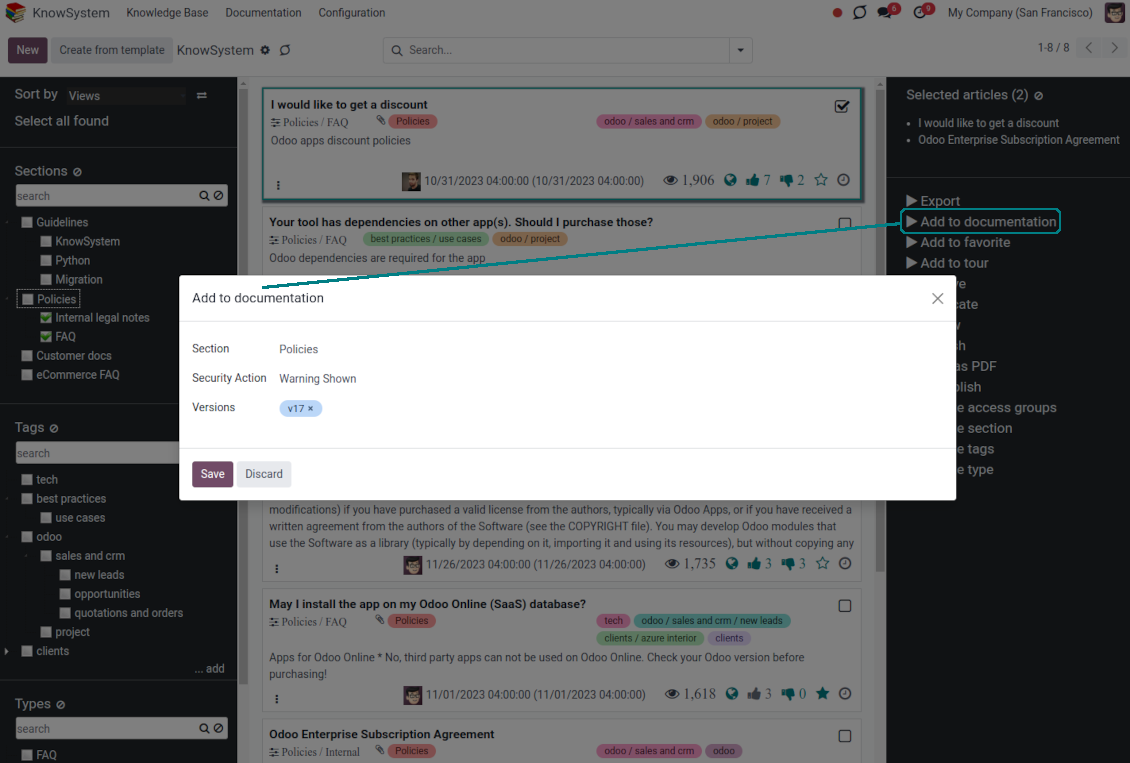
Update knowledge in batch: assign new section (incl. dropping articles to the left navigation panel), change or remove tags, print multiple articles as a single PDF, follow/unfollow discussions, publish/unpublish articles, export articles to an Excel table, archive or restore items, add articles to learning tours and documentations, mark knowledge records as favorite, duplicate articles.
Fast, comfortable, and professional knowledge recording
Safe backend editor
-
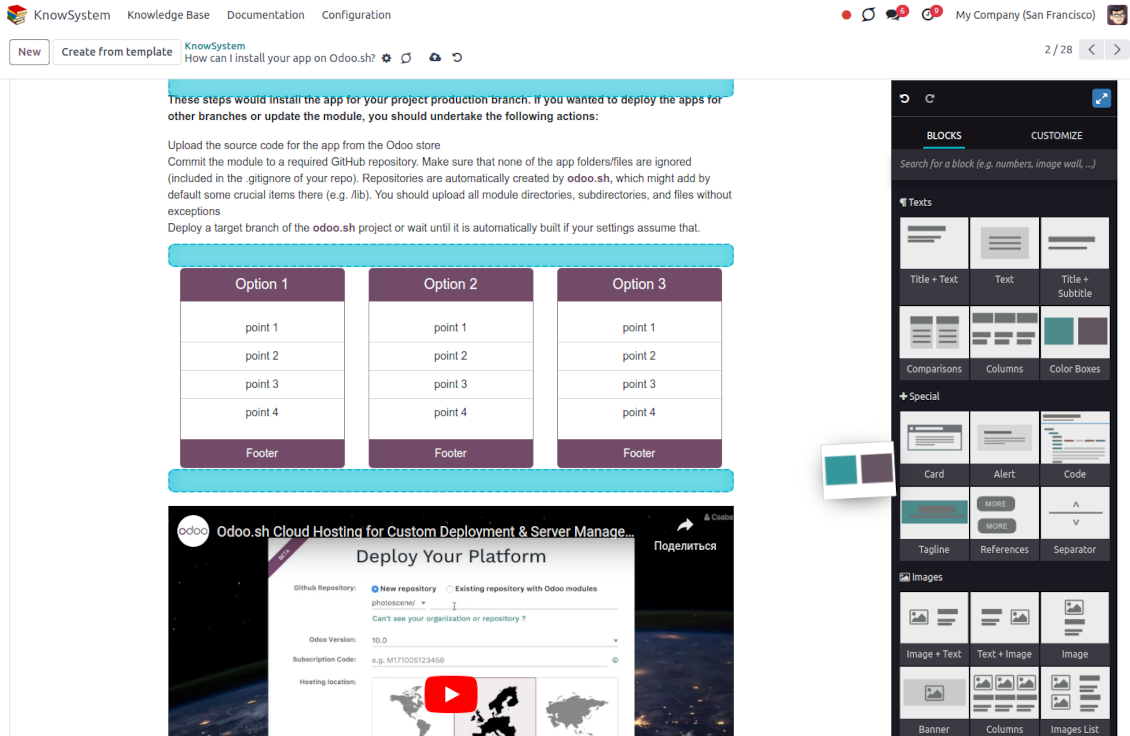
Drag and drop building blocks to write a new article right in the Odoo backend interface. The process is simple while the result is professional looking
-
Edit blocks styles, re-order Knowledge elements, change the width and height of items
-
KnowSystem editor relies upon strict HTML structures which are in most cases compatible with printing and messaging layouts
Advanced website builder
-
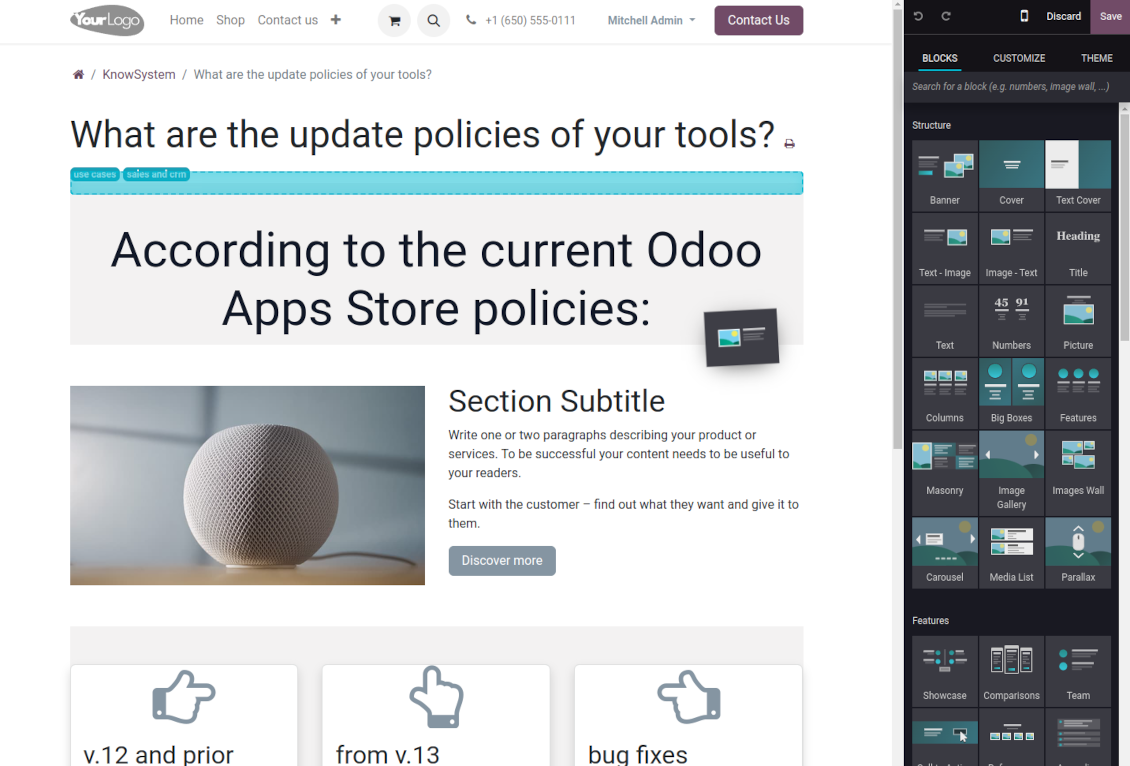
Apply advanced styles and complex widgets by using Odoo's built-in website editor
-
Exploit Odoo website know-how: numerous snippets and animations, style templates, and options
-
Rely upon the website editor to prepare nice-looking portal knowledge pages. Avoid using that for internal or printing purposes: advanced styles often contradict printing and composer layouts
Simple text articles
-
Make certain articles as simple texts with unlimited compatibility with printings and emails
-
Copy knowledge texts to a clipboard for quick sharing
Standard HTML editor
-
Use the familiar Odoo HTML editor to prepare inline knowledge pieces
-
Get the benefit of the Odoo editor's built-in commands
Raw HTML interface
-
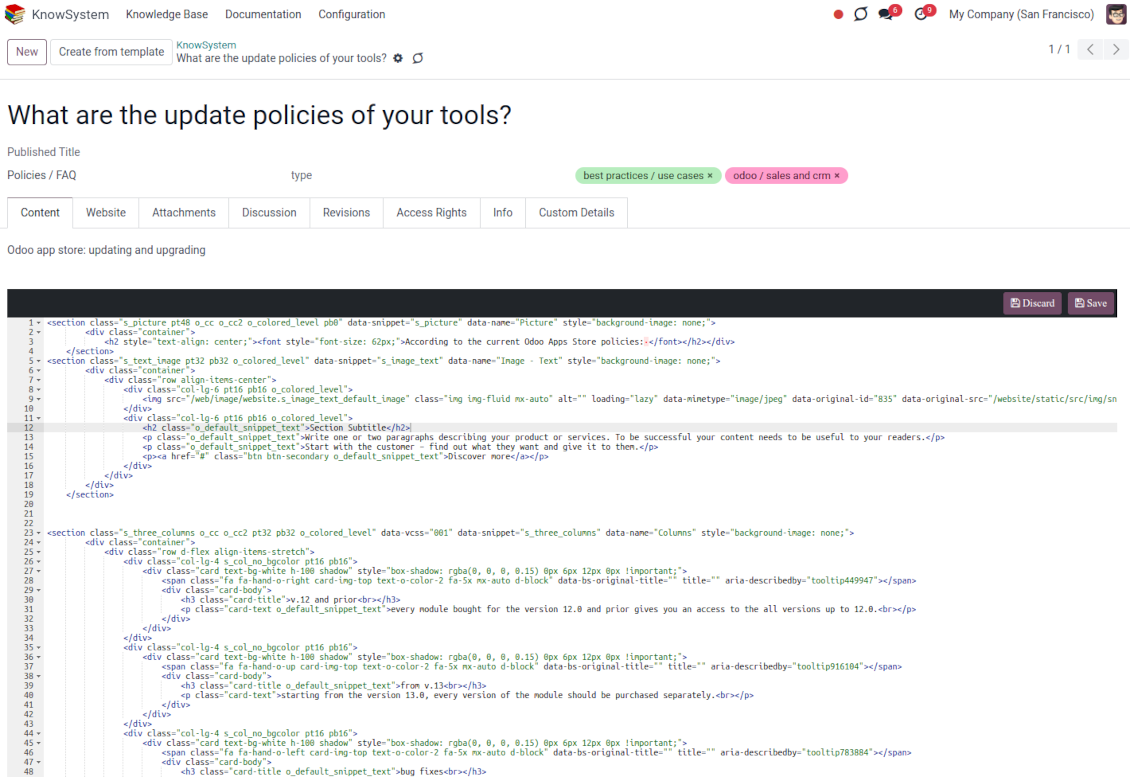
At any moment switch to the raw code editor to update the articles' HTML
-
Introduce any HTML tags and styles, including Bootstrap-ready elements and iframes
Knowledge templates
-
Prepare new knowledge templates or save any existing article as a template
-
Use templates to create new articles to save time or keep uniform styles.
Get benefit from your knowledge
Knowledge system for any Odoo document
-
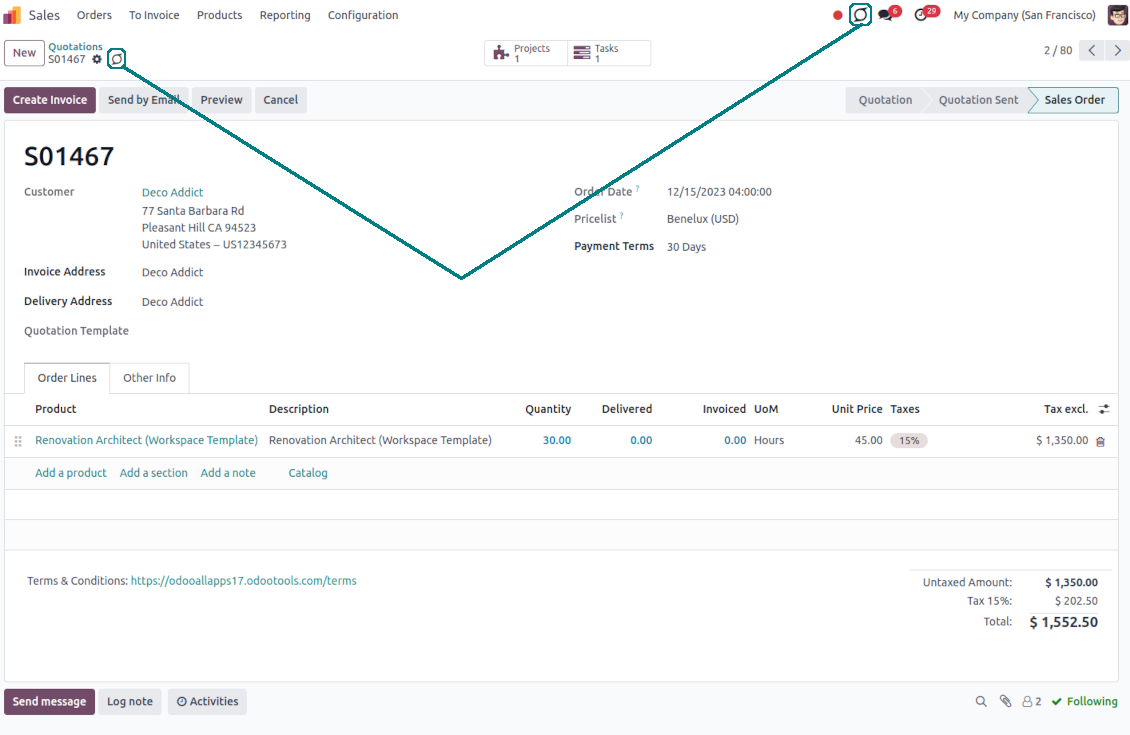
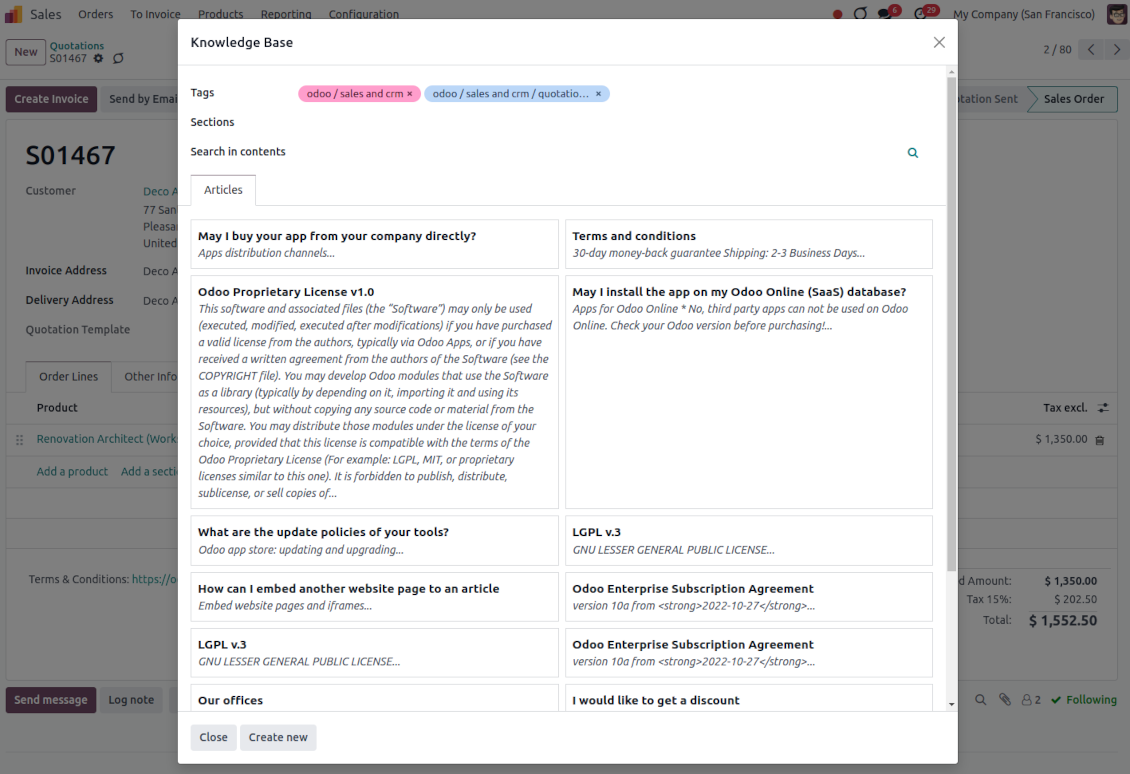
Turn on the setting 'Articles by Documents' to add a quick entry for the Knowledge base from any Odoo form view
-
Search articles by tags, section, or content in a few clicks for a quick overview
-
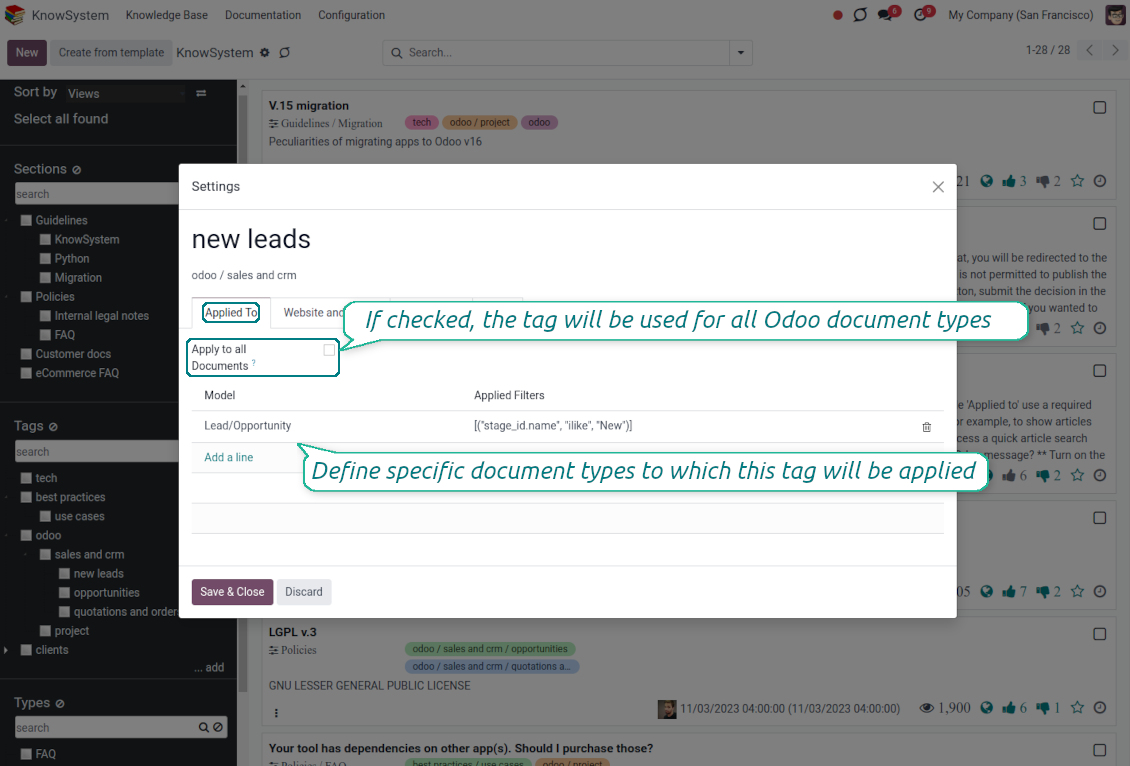
Link knowledge tags with Odoo document types to simplify the search of articles. For example, assign helpdesk tickets to the tag 'odoo/helpdesk': the latter would be entered by default for support requests objects
-
Observe article content right from any Odoo object: there is no need to always switch to the KnowSystem advanced interface
-
Turn on also the option 'KnowSystem in systray' to access knowledge from the Odoo systray disregarding the active interface
Apply knowledge in communication
-
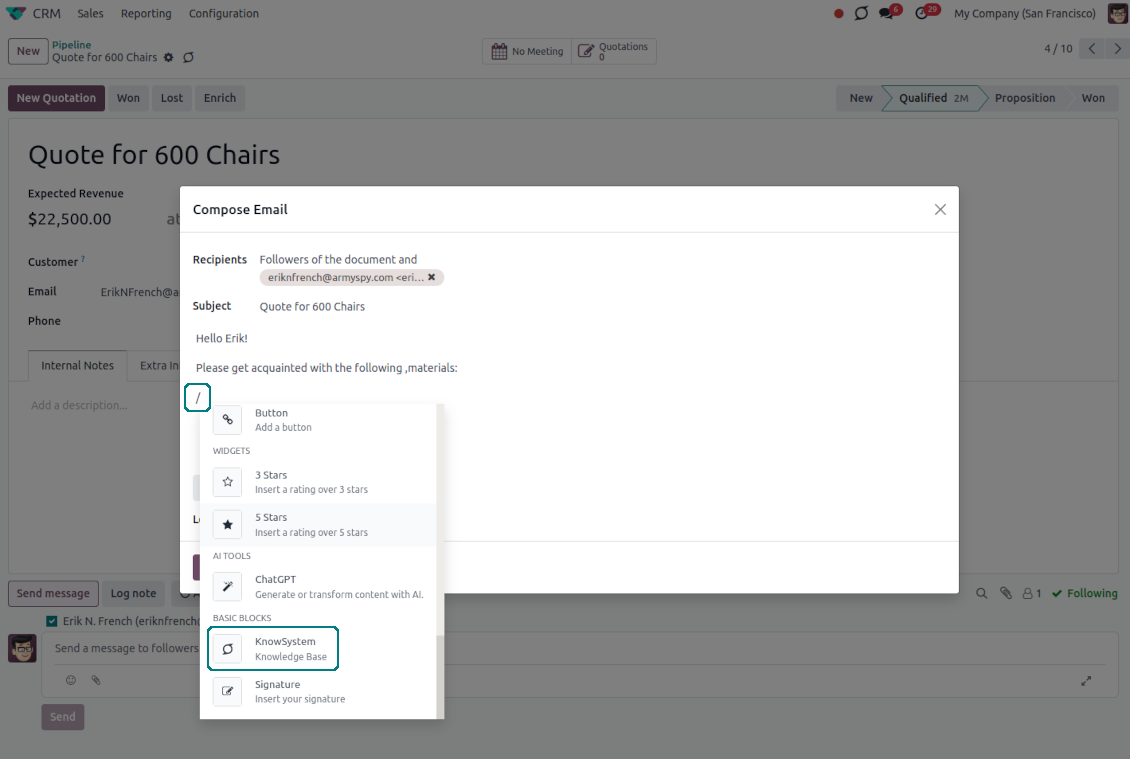
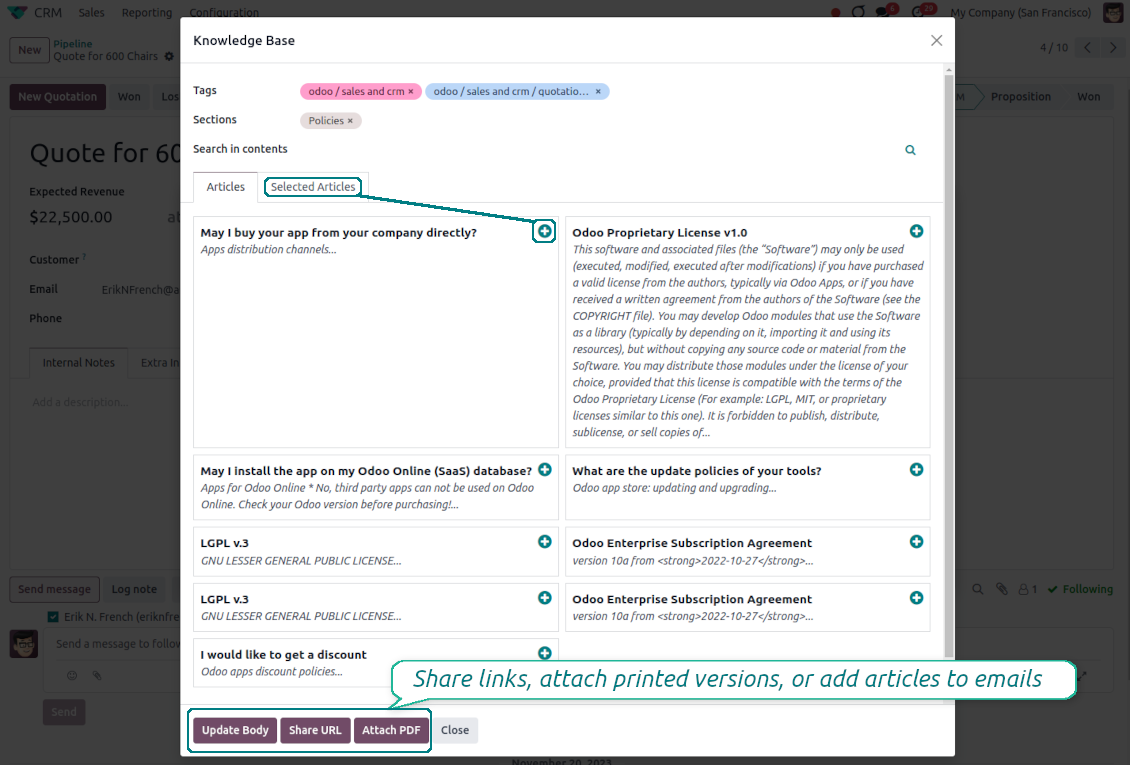
Turn on the option 'Articles in Email Composers' to let users reference or cite Knowledge records in Odoo messages
-
Quickly observe articles related to a current document discussion. Instantly reference those by applying the Odoo editor command '/' > KnowSystem
-
Update message body with knowledge content (it would be added to the end of a current message)
-
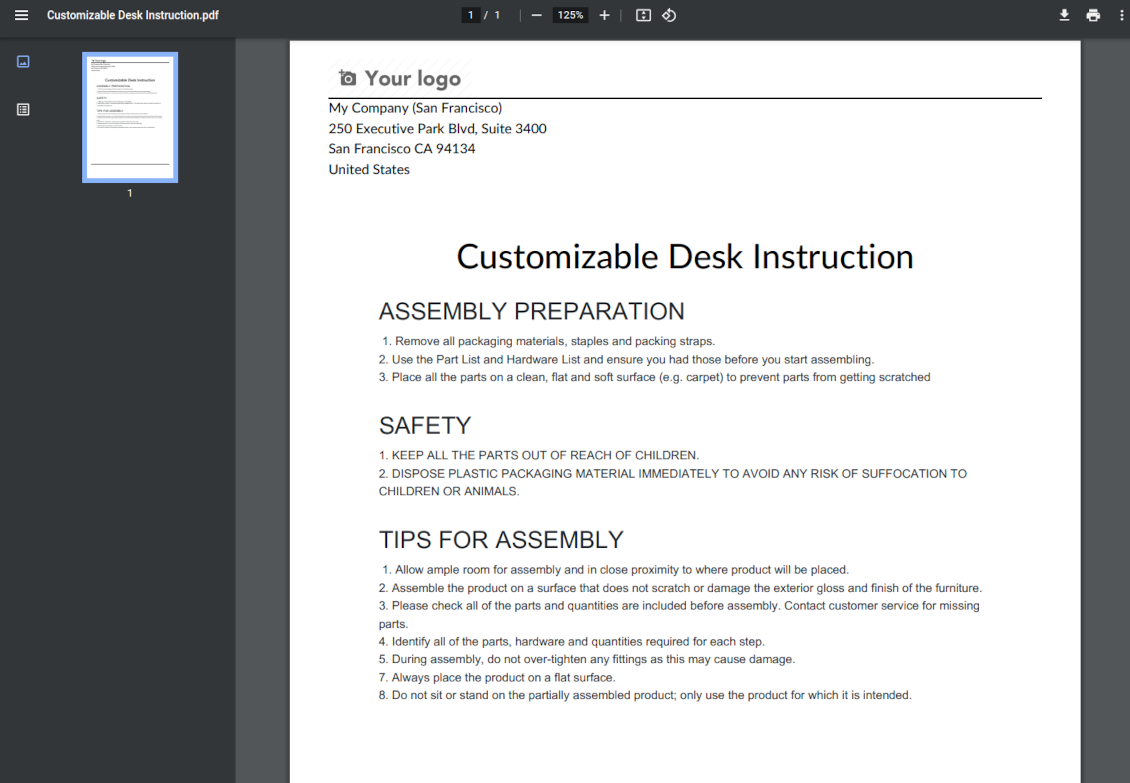
Attach a PDF version of referenced article or articles
-
Share knowledge links with your colleagues or partners. Configure the app to send backend, website/portal, or tokenized Odoo portal URLs
-
Turn on the setting 'Articles in Activities' to insert articles or their links also to Odoo activities
Organize learning tours
-
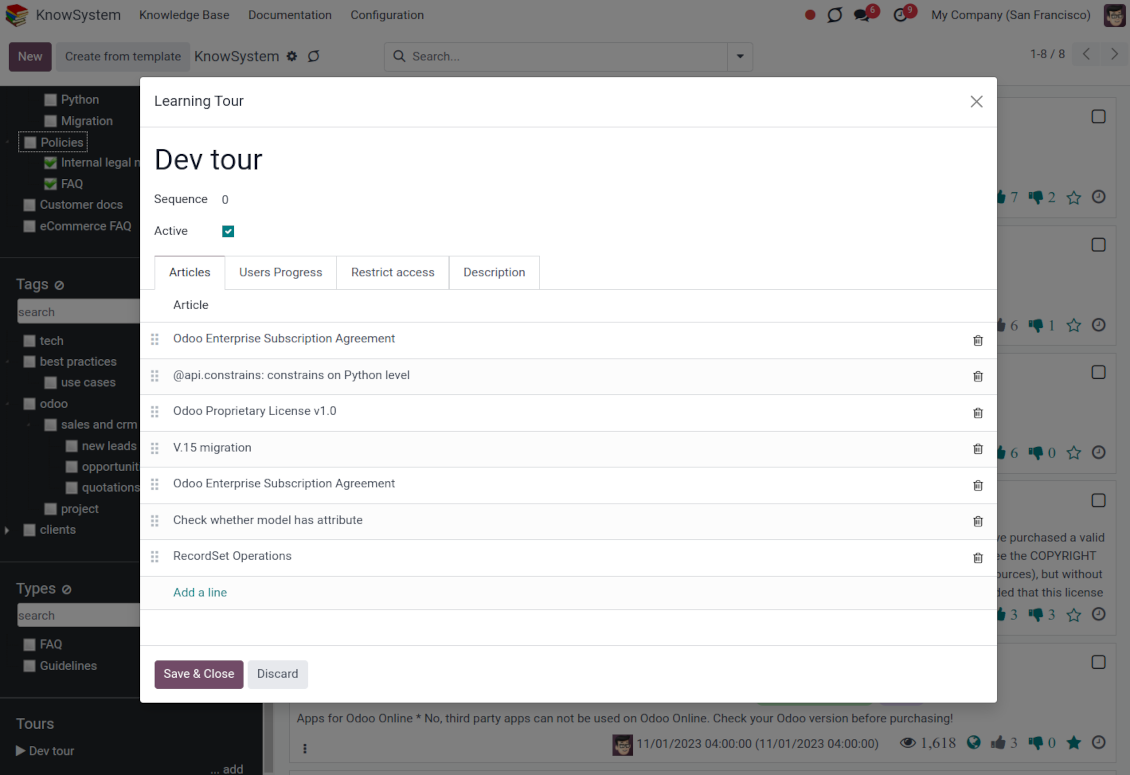
Turn on the option 'Tours' to be able to combine articles in a sequence of learning steps
-
Add any knowledge to a tour in any order
-
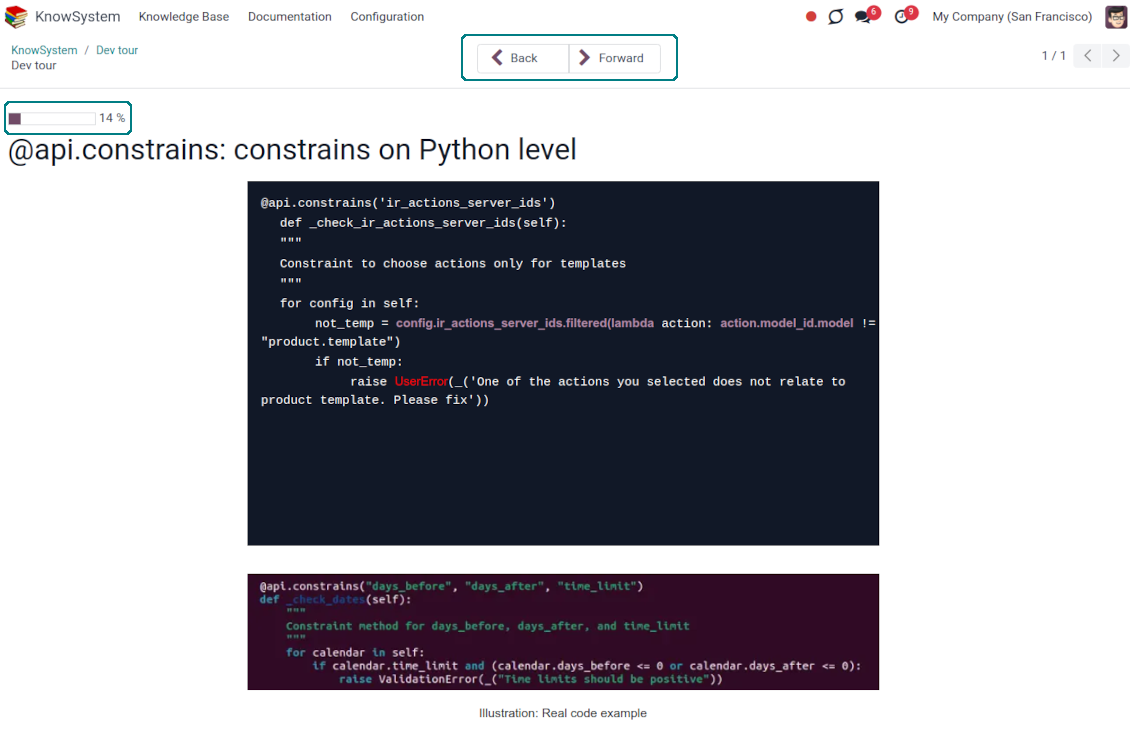
Launch a tour to follow certain steps of study one by one in the special interface
-
Share learning tours with everybody or specific user groups. Control employees' progress in getting familiar with instructions and guidelines
Share and publish knowledge
-
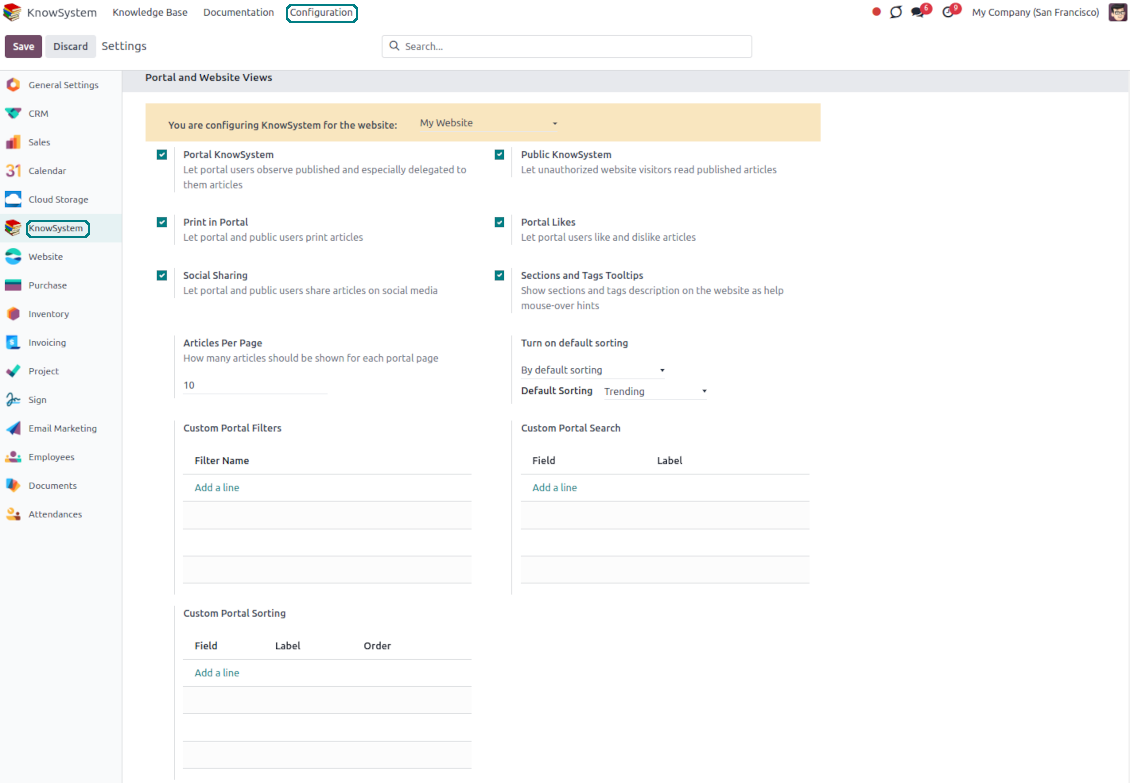
Turn on the setting 'Portal KnowSystem' to give KnowSystem access to external partners, and 'Public KnowSystem' - to website visitors
-
Configure KnowSystem tags or publish articles to share knowledge content
-
Combine articles in advanced documentation to cover a certain aspect of organizational or functional knowledge
-
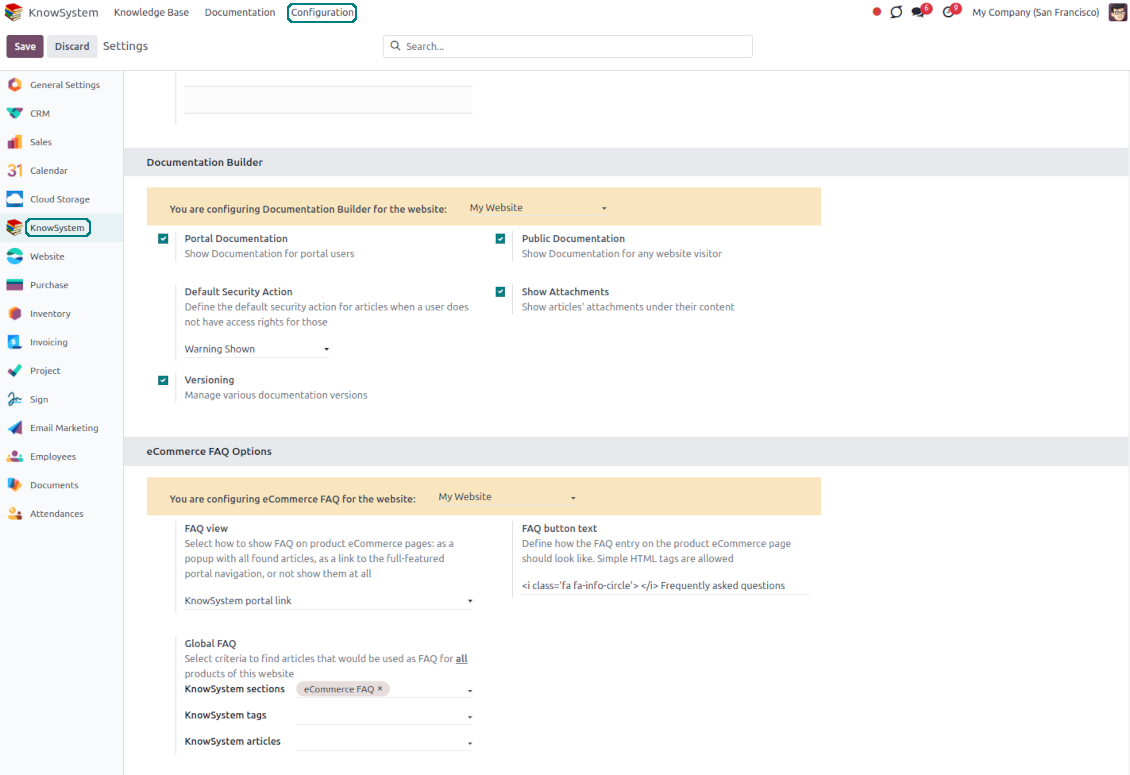
Turn on the option 'Portal Documentation' and 'Public Documentation' to make that documentation available for portal and public users respectively.
Website documentation builder
-
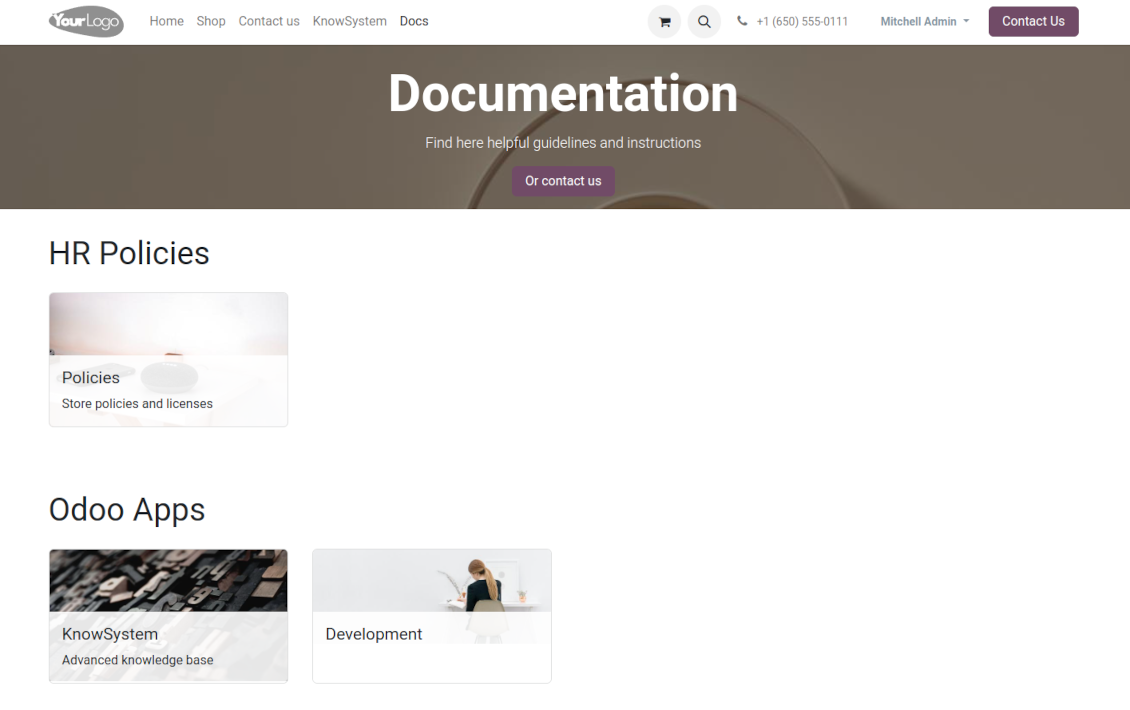
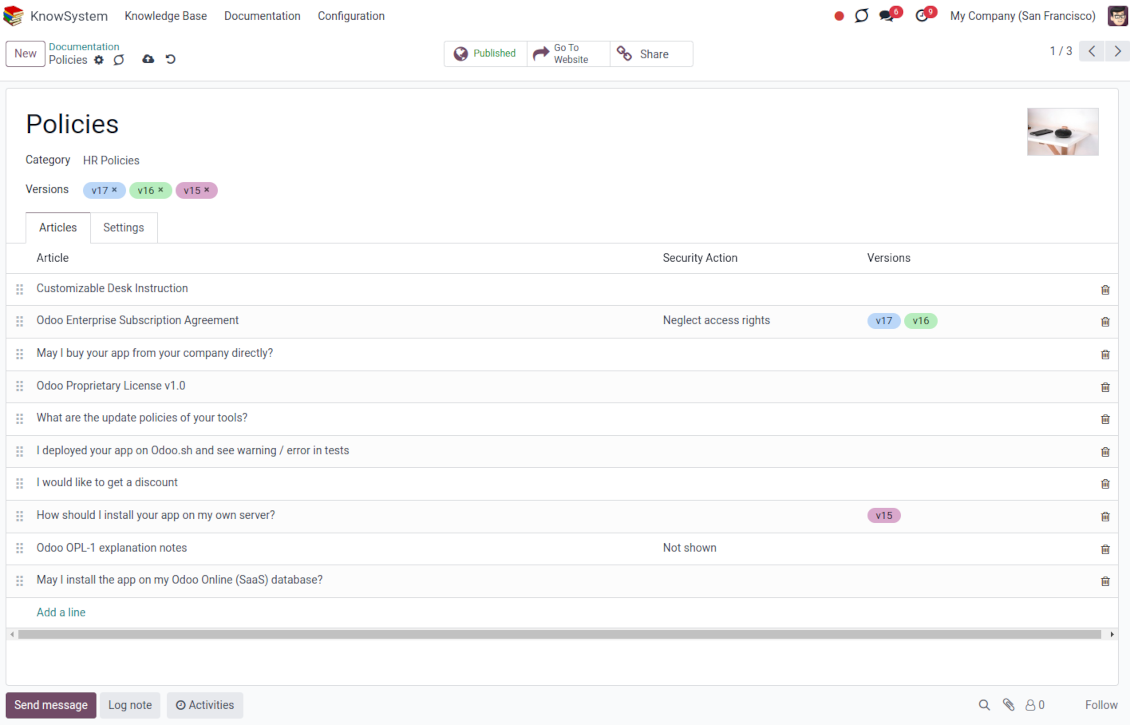
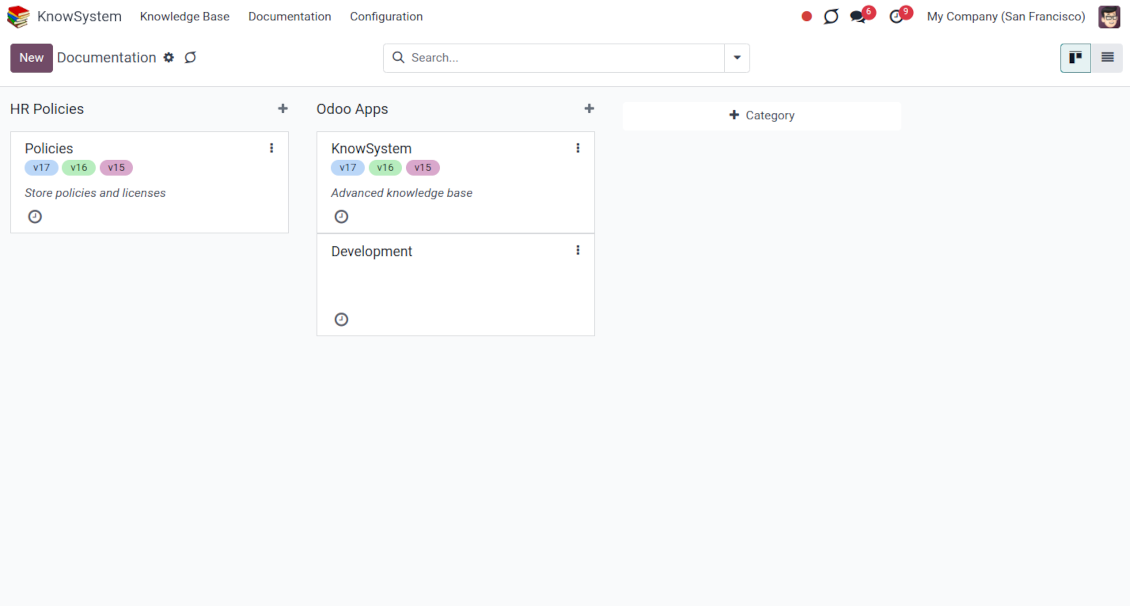
Combine articles into advanced documentation sections to cover a certain business, organizational, or functional aspect
-
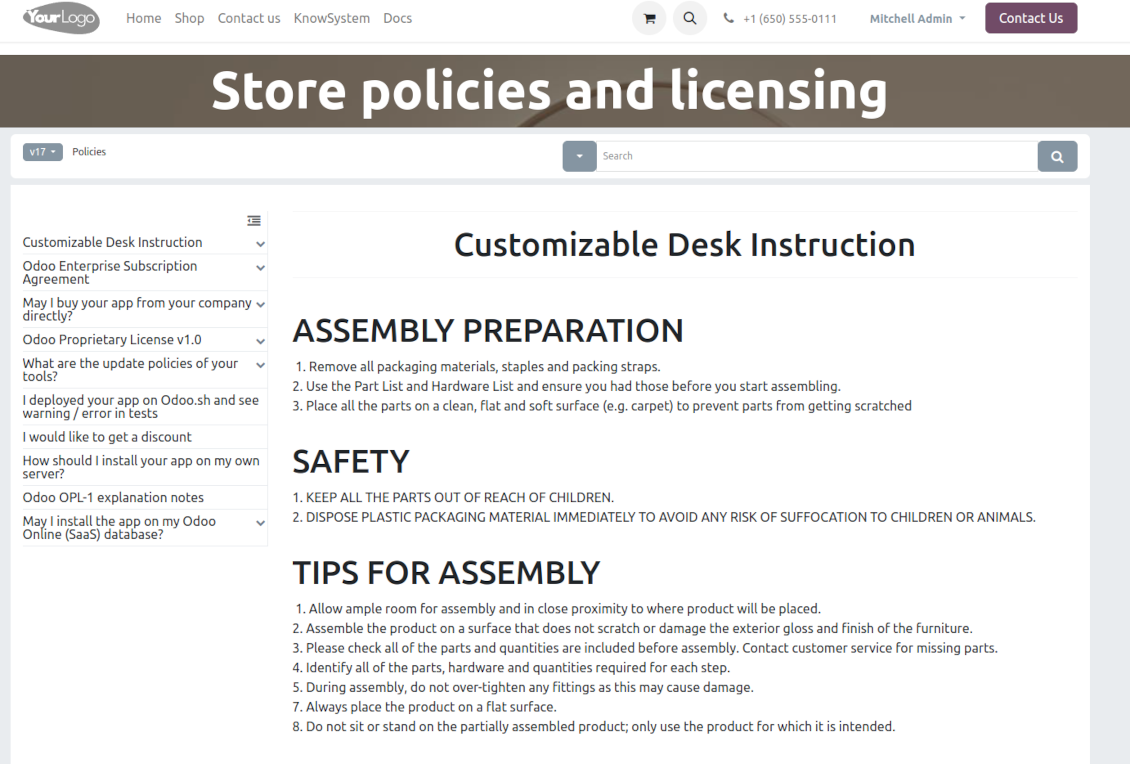
To create a new documentation section just select and order KnowSystem articles. The app would generate a website page automatically
-
Each KMS article might be used several times for different documentation sections
-
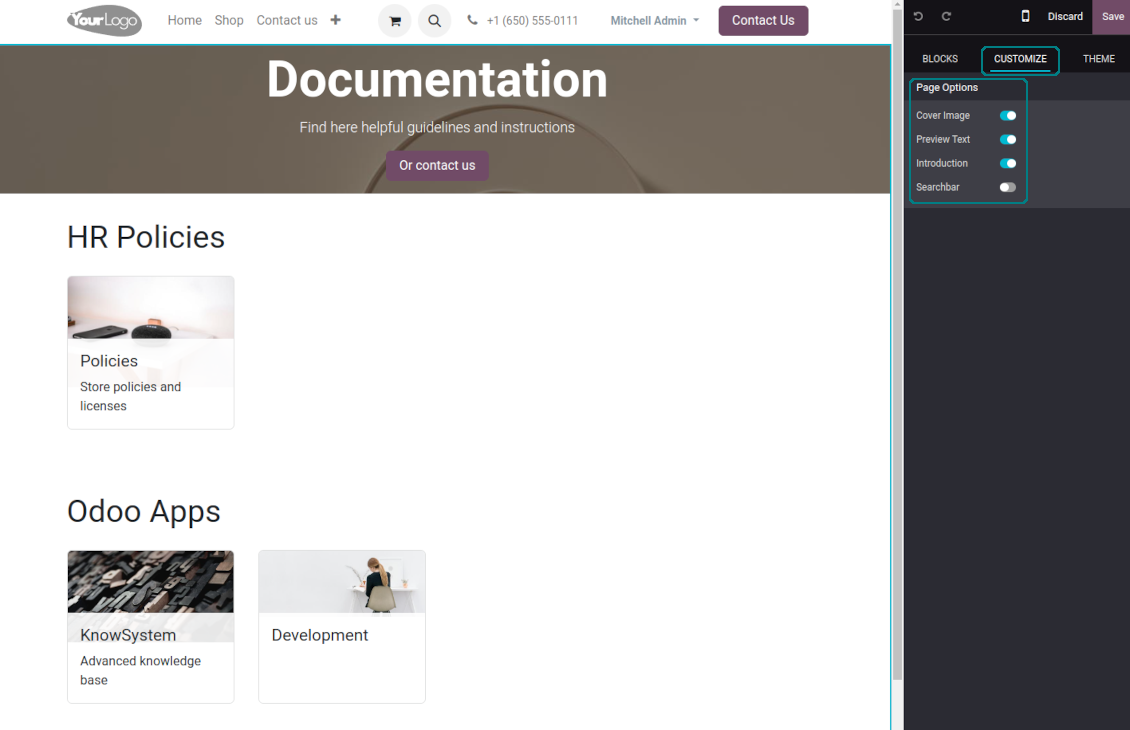
The tool allows preparing an unlimited number of documentation pages structured by categories
-
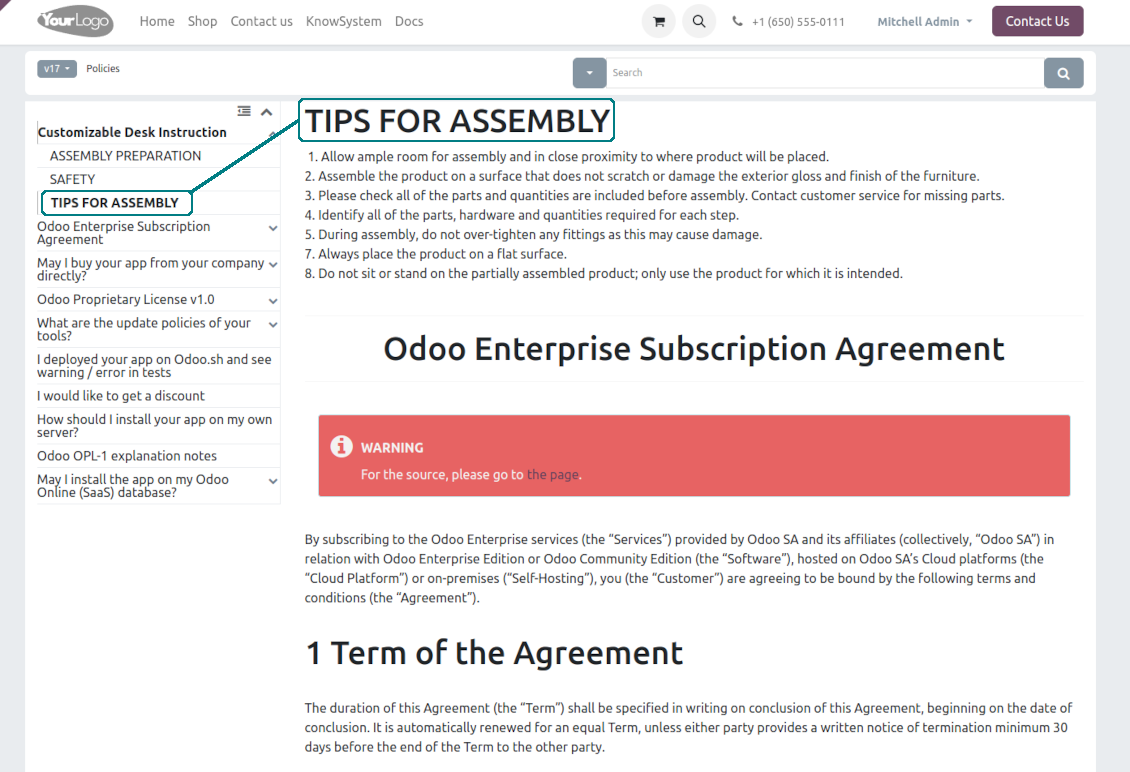
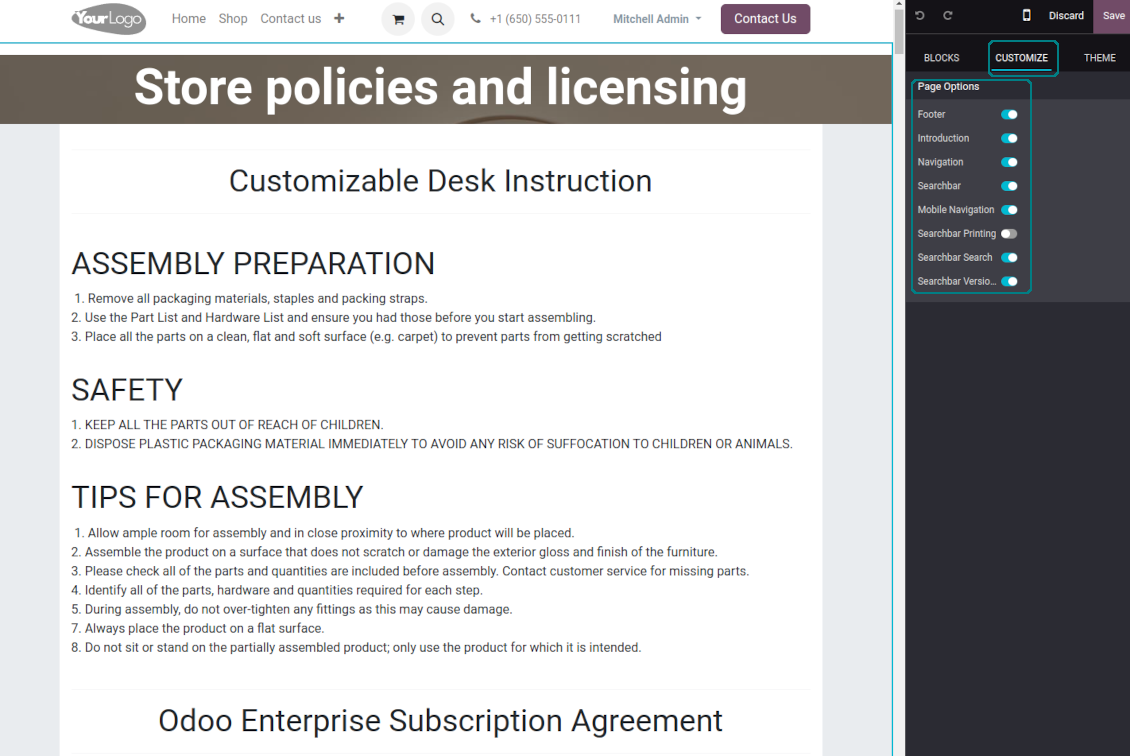
Flexibly customize documentation pages: show or hide introductions and footers, turn on/off the search bar and table of contents, add or remove preview images and texts
-
The app lets flexibly share documentation categories and sections. Publish required documents to make them available for everybody, assign KnowSystem tags - to grant access to chosen Odoo partners
-
Depending on user rights documentation might look different. Define what to do if a documentation user does not have access to included articles: to neglect restrictions, not show that knowledge pieces, or show a security warning
-
Optionally show a table of contents for comfortable and quick navigation. The table of contents is constructed automatically according to the headers of included articles
-
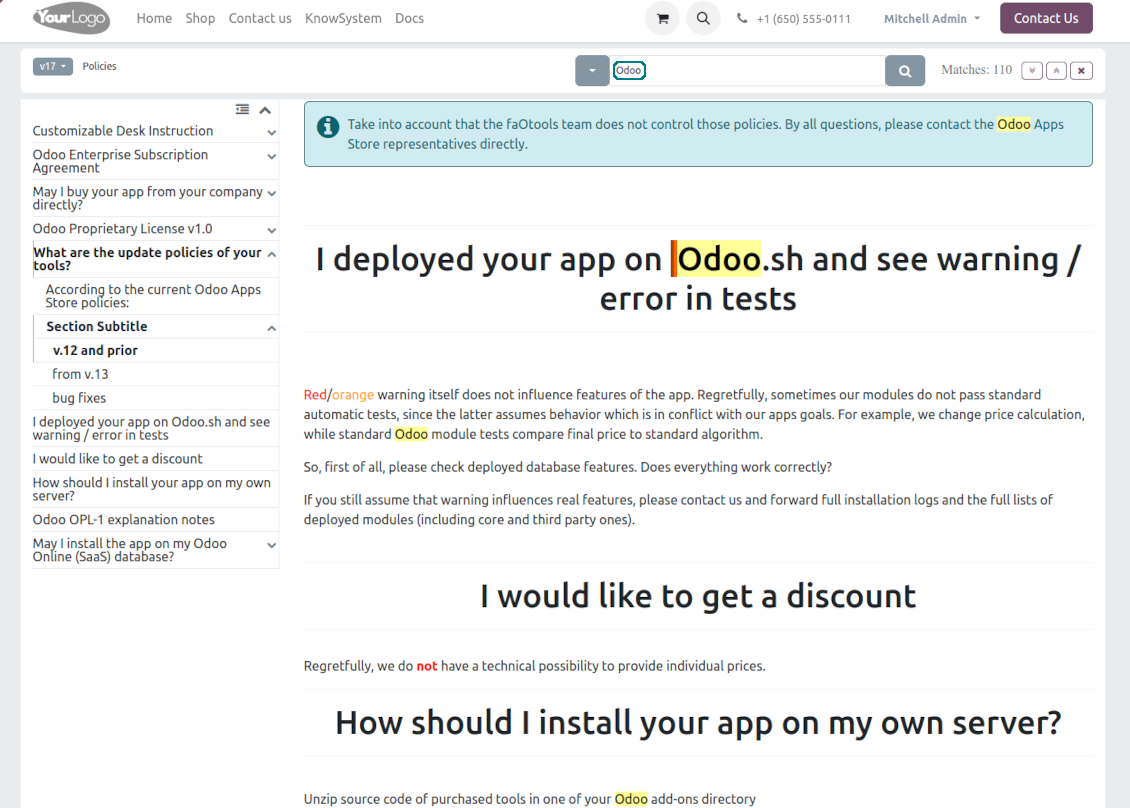
Turn on the search bar for documentation. It is possible to find matches in a whole text or only in headers, to make keywords case-sensitive or insensitive
-
Apply versioning for documentation to avoid double work in preparing specifications, user manuals, or software guidelines.
Partner knowledge base portal and public knowledge system
Knowledge in the Odoo portal
-
KnowSystem lets organize a web portal personally for each Odoo partner by selecting articles to be shared. To that end turn on the option 'Portal KnowSystem'
-
Design an article specially for a definite company, or use the same knowledge experience among multiple clients
-
Knowledge articles are available for portal users if: (a) those articles are published; (b) those articles have user-related tags
-
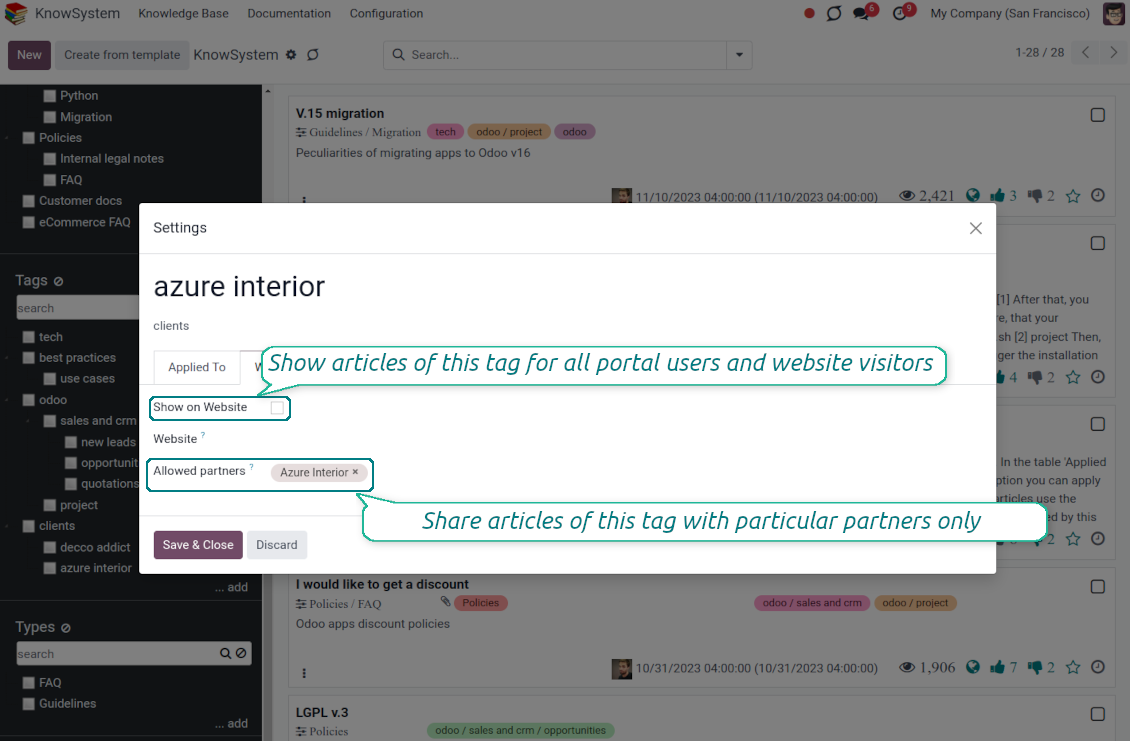
To assign a KnowSystem tag for a partner do one of the following: (a) go to a partner form and enter the field 'KnowSystem tags'; (b) on a tag form define 'Allowed partners'
-
Optionally allow partners to print knowledge pieces, like, and share articles
Public KMS
-
To make self-service possible: make your knowledge base available also for unauthenticated users. To that goal, turn on the option 'Public KnowSystem'
-
Only articles which are published will be available for website visitors
-
To publish specific knowledge parts: apply the mass action 'Publish' or tick the checkbox 'Visible on current website' on an article form
-
To show tags and article types in the portal and website do not forget to publish them. Knowledge sections will be shown only if they have articles for observation
-
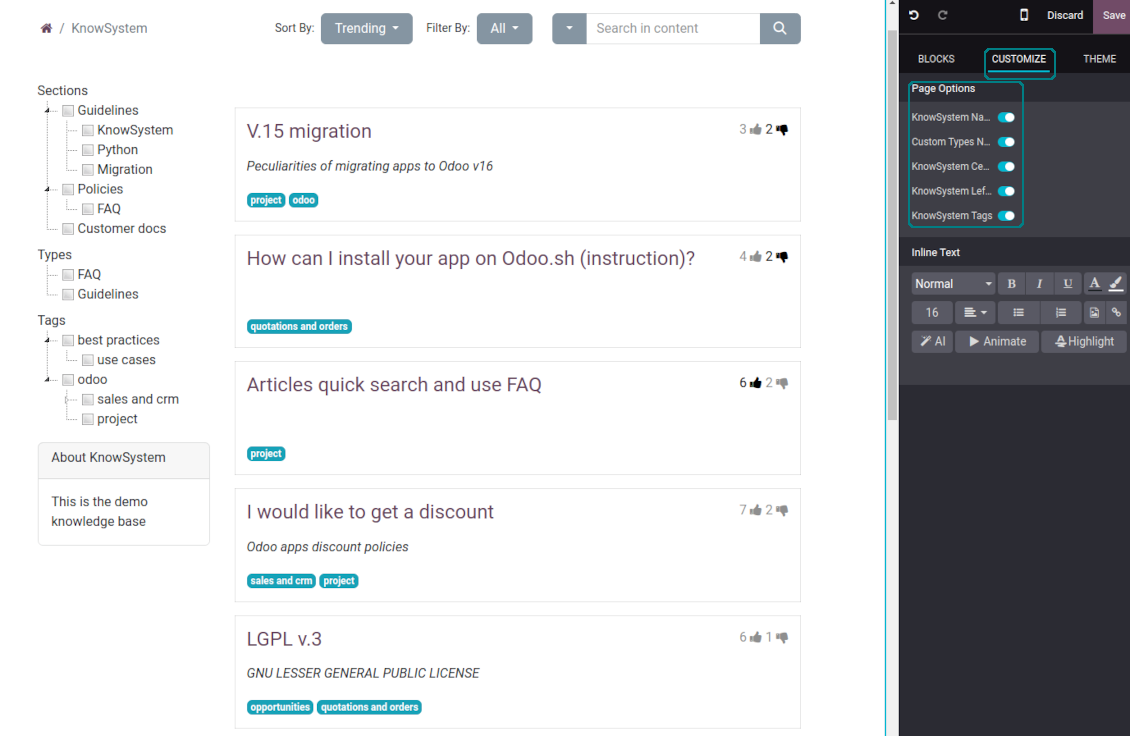
Customize the knowledge portal: hide/show the navigation by tags and types or the whole navigation, prepare introduction or navigation hints, and add section tooltips.
Interactive and evolving knowledge base
Teamwork and use
-
The history of article revisions is kept in Odoo in a similar way it's done in Wikipedia. If one of the Odoo users breaks something, it takes 2 clicks to recover a proper knowledge version
-
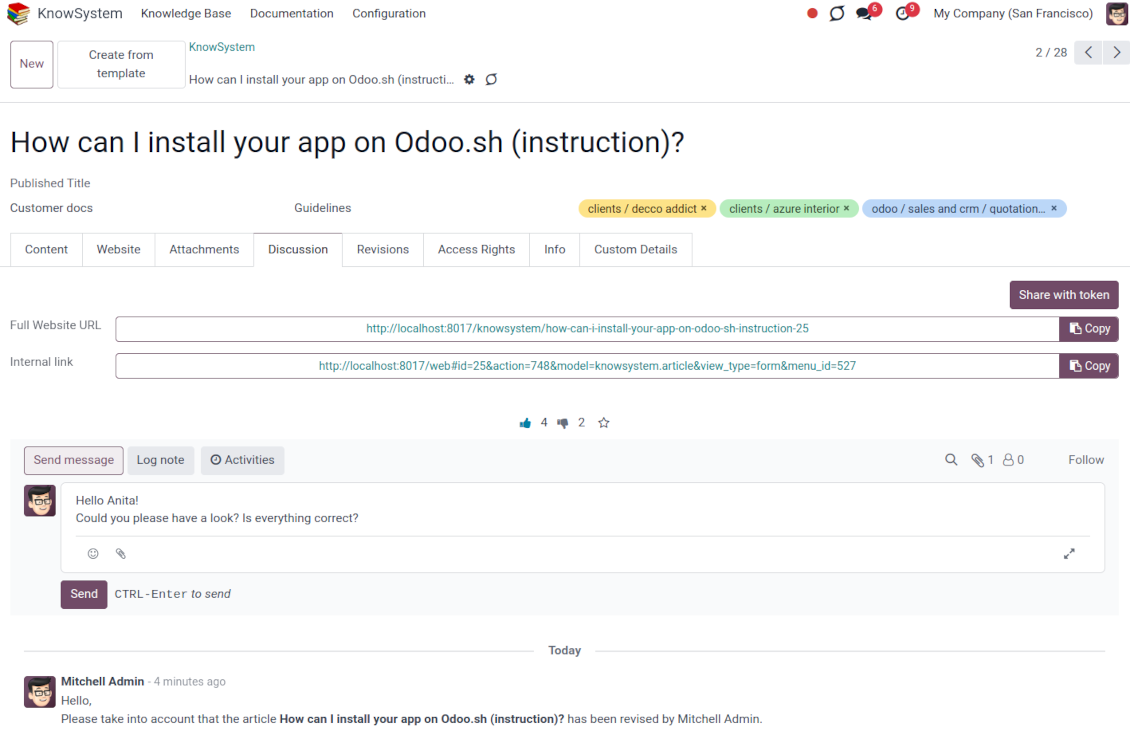
Users might take part in article discussions and subscribe to updates
-
Share tokenized articles with any contacts
-
Control statistics by articles: contributors, number of views, likes, and dislikes, how frequently they are used in messaging, who marks them as favorite
-
Set activities to improve the knowledge base. Configure articles to be auto-archived after a particular date
Multi-lingual knowledge
-
KnowSystem lets you translate articles in the languages installed in Odoo. In this way, users might read and edit articles in a language of their preferences
-
To avoid double work, article content might be copied from another language (the button 'Copy from another translation' under the article content). Simultaneously, make sure you actually require a multi-lingual regime: all articles should be anyway kept updated in all Odoo languages
-
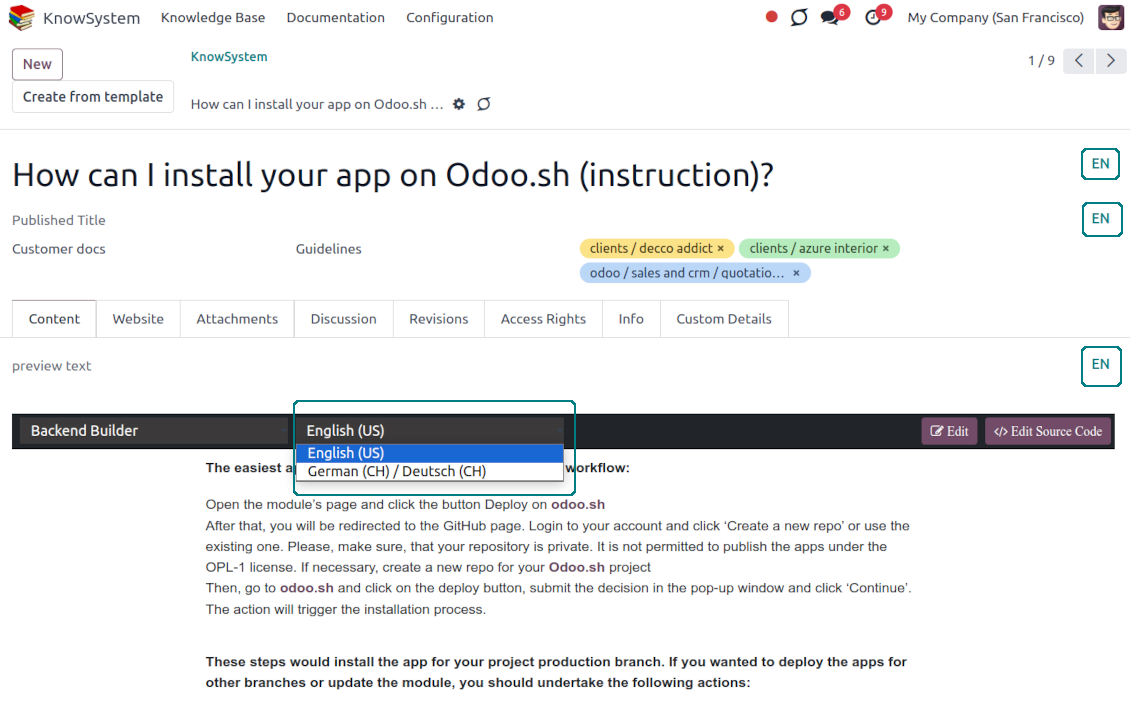
To observe or update knowledge translation, you may switch the language right in the backend editor.
Design eCommerce FAQ or documentation
-
The tools allow adding the product knowledge entry to all eCommerce product pages
-
Optionally hide that for specific templates (the setting 'Do not show eCommerce FAQ') or for the whole eShop on a particular website (the configuration option 'FAQ view' - 'Do not show')
-
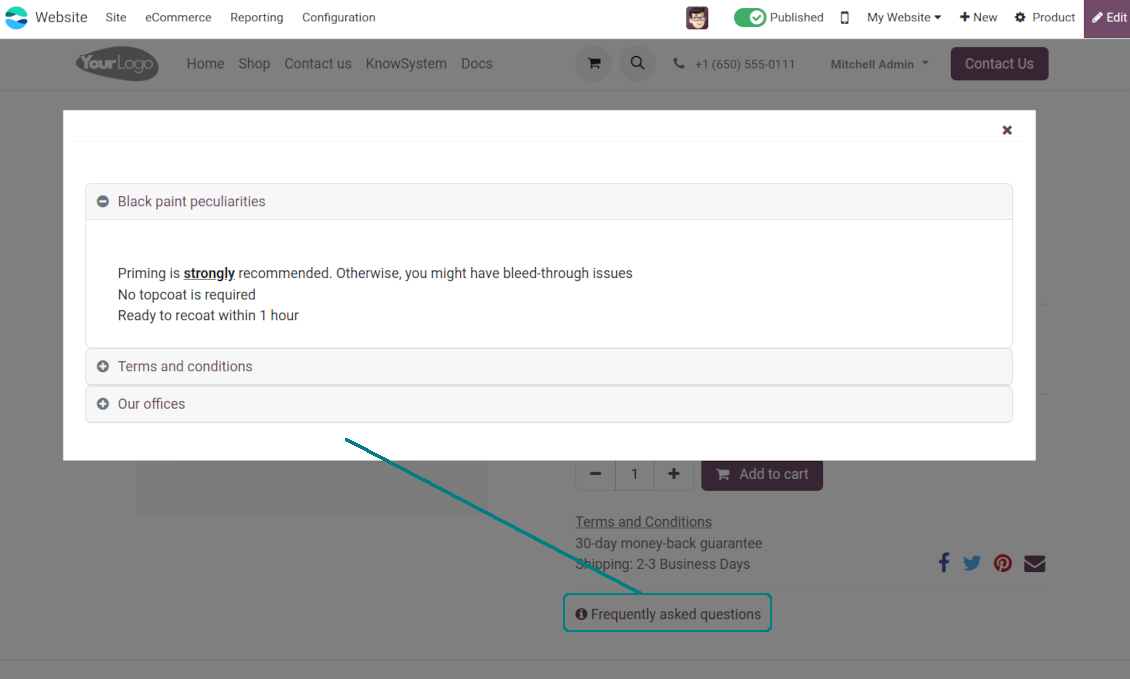
Introduce your own title for the button (the website setting 'FAQ button text'). By default, it is ' Frequently asked questions'. But you can change that to any, e.g. 'Product docs' or 'Instructions'. Simple HTML tags are allowed for that goal
-
Show product knowledge as a link to the main knowledge portal interface (choose 'KnowSystem portal link' for the option 'FAQ view'). In this way, when clicked users are redirected to the full KnowSystem navigation but are restricted by articles linked to the current product
-
Alternatively, the tool allows triggering a popup with all found articles accordion (choose 'Popup accordion' for the option 'FAQ view'). Thus, users are able to check articles without leaving a product e-Shop page
-
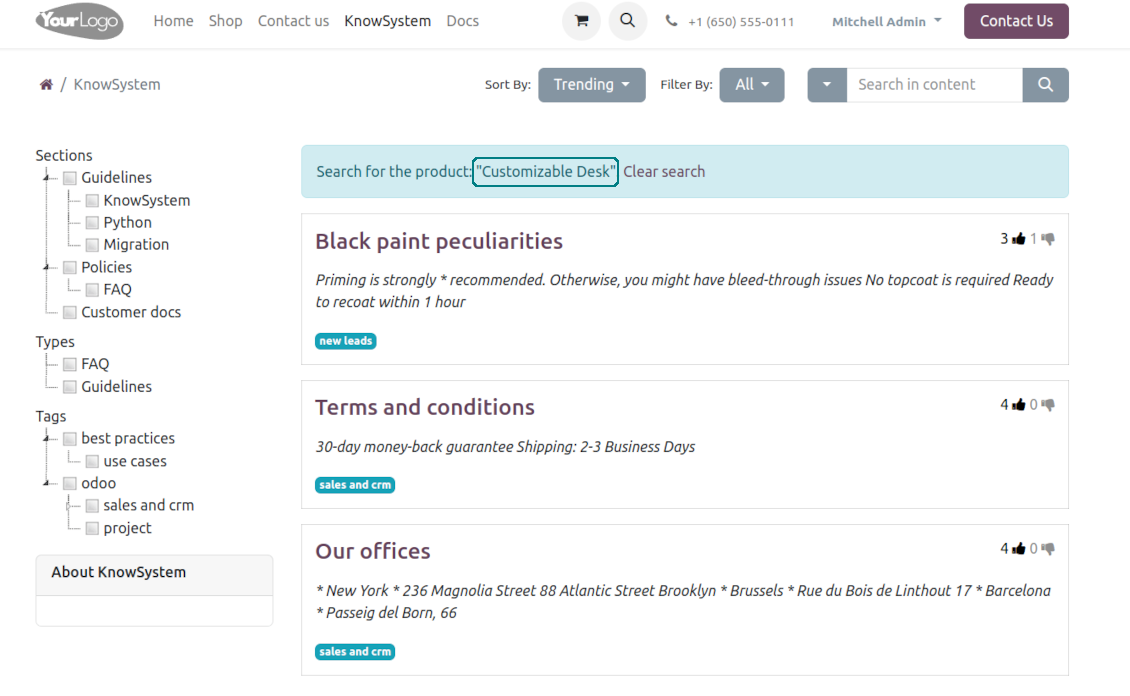
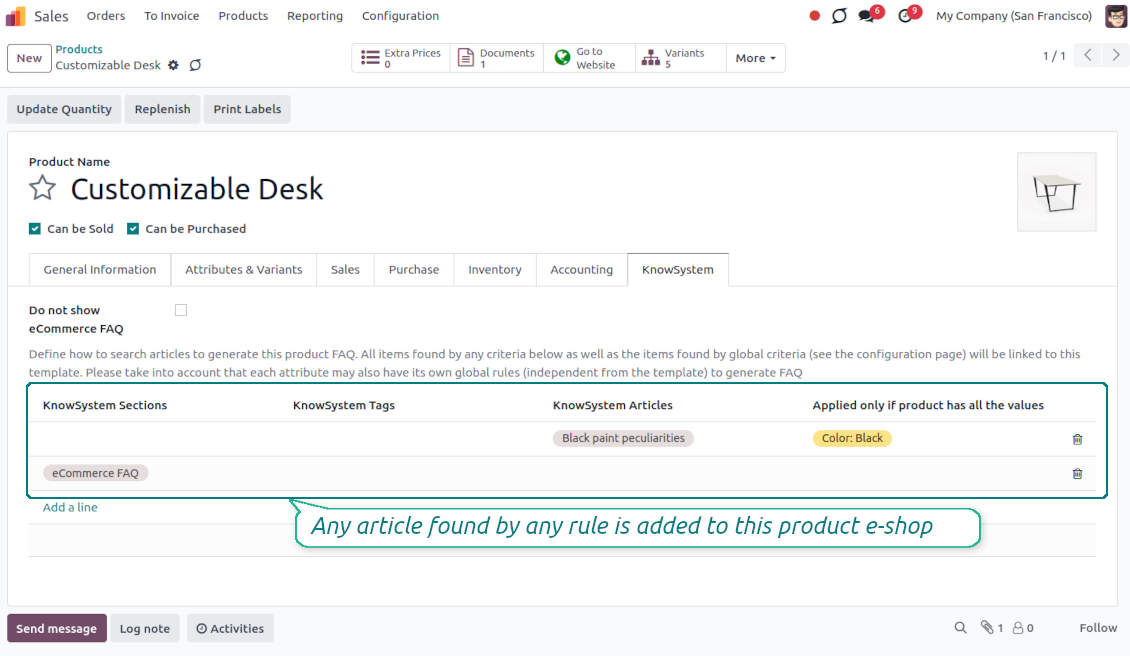
Establish links between product templates and KnowSystem to cumulate Odoo eShop knowledge. Show articles for specific sets of attribute values and hide them for others. For example, to have different FAQs for steel and aluminum tables
-
Define its own knowledge for Odoo attributes or attribute values disregarding actual products. For instance, complementary documentation for all variants that have 'legs' or 'custom legs'
-
Apply global settings of how to find articles for all eCommerce product pages. In this way, the app lets have the same FAQs basis for all sold items on a particular website
-
It is possible to define KnowSystem sections, tags, or specific articles on each layer. A knowledge piece would be selected if it satisfies any of the criteria. For sections and tags, child nodes would be also taken into account
-
Articles are shown on product pages only if a user can access those articles. Thus, website visitors would see only published ones.
Any business and functional area
KnowSystem is a universal knowledge management tool that might be configured to any business goal and any set of Odoo apps: helpdesk, marketing, IT, HR, project management, and so on and so on. Typical use cases are:
-
Helpdesk - once faced a challenge, its solution might be recorded in KnowSystem for repeated usage by co-workers and for self-service by clients
-
Sales and CRM - salesperson helper to find information about products and offers, frequently asked customer questions
-
Project management - to keep and easily retrieve knowledge of existing solutions, tools, hints, and experiments
-
HR - to prepare instructions, guidelines, learning tours and training, and any codified knowledge of routine in your company
-
Marketing - to organize Odoo's online library of product use cases, expert knowledge, and well-structured documentation
-
Legal issues - systematize your policies, contract/approval management, keep the full classifier of trademarks, licenses
-
Informational technologies - share easy-reached manuals and configuration guidelines.
Custom knowledge system attributes
-
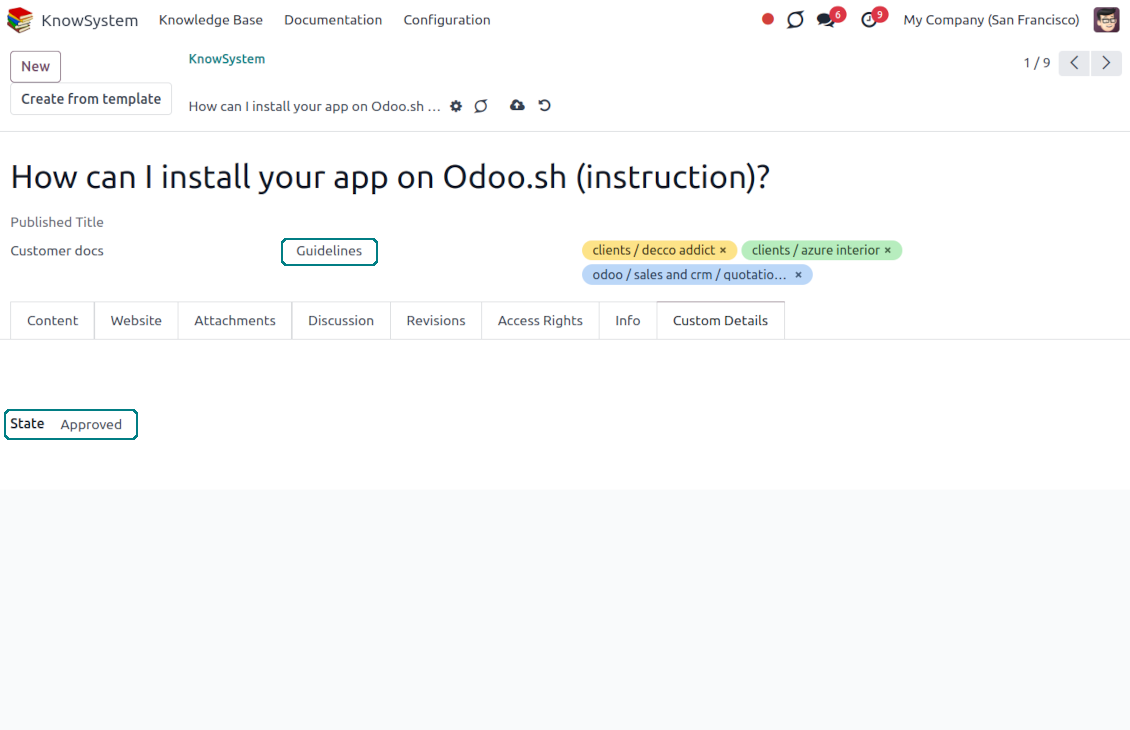
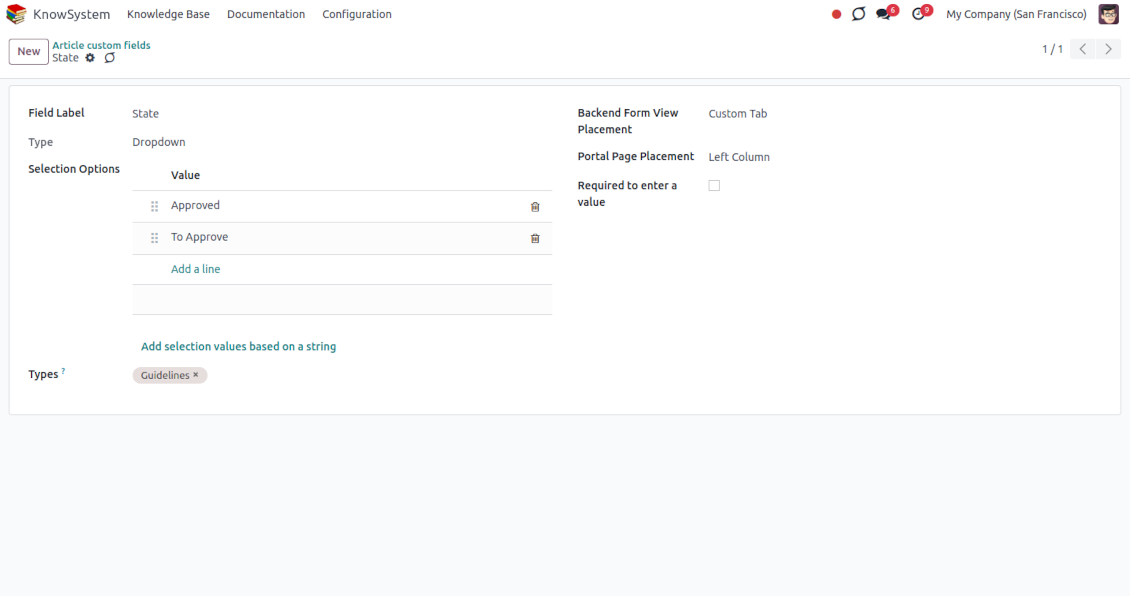
Custom attributes creation does not require any technical knowledge. In order to show a new property for knowledge base articles, just add a new field and enter details
-
It is possible to add custom fields of the following types: single-line text (char), simple text without formatting (text), rich text (HTML-formatted text), integer or float numbers, drop-down choice with your own options (selection), checkbox (boolean), date or date and time, binary (a file to upload), reference to another Odoo document (e.g. for sale order, contact; many2one)
-
The tool lets you comfortably select an interface position of a custom field from a closed list of options
-
Distinguish knowledge articles by type in order to show properties only for suitable ones. Thus, the set of attributes for 'user guidelines' and 'technical specifications' might be different
-
Mark a custom field required to force users to enter values
-
The app might work for both the KnowSystem backend and the knowledge share portal
-
Custom knowledge system fields might be imported and exported
-
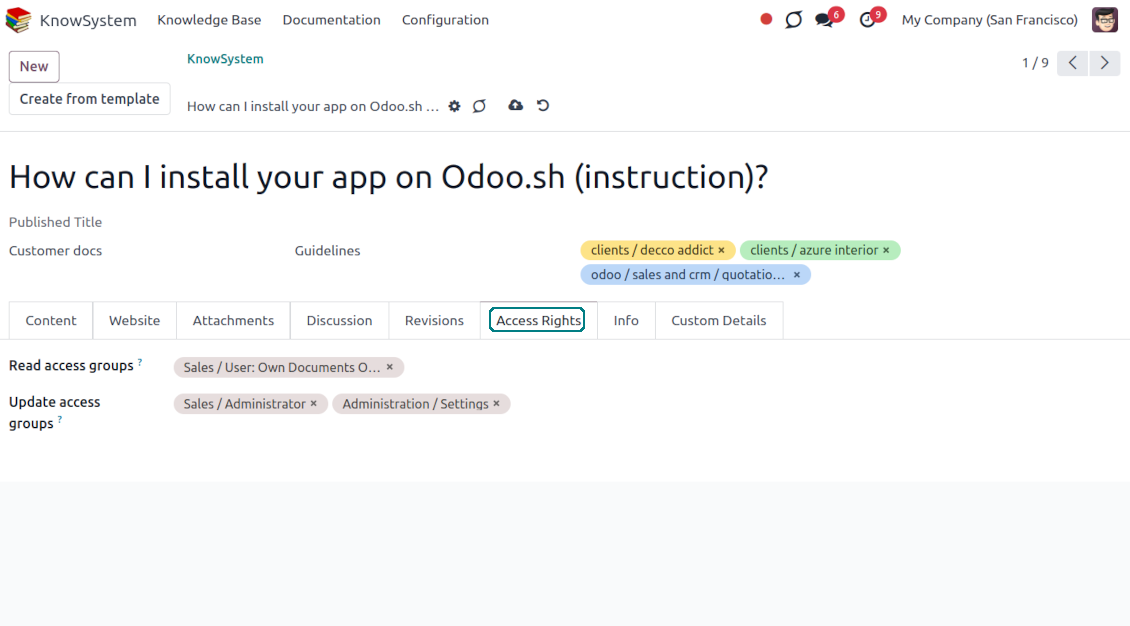
The rights to create custom fields belong only to KnowSystem administrators.
Secured and shared knowledge
-
Security for internal and for portal/public users differs
-
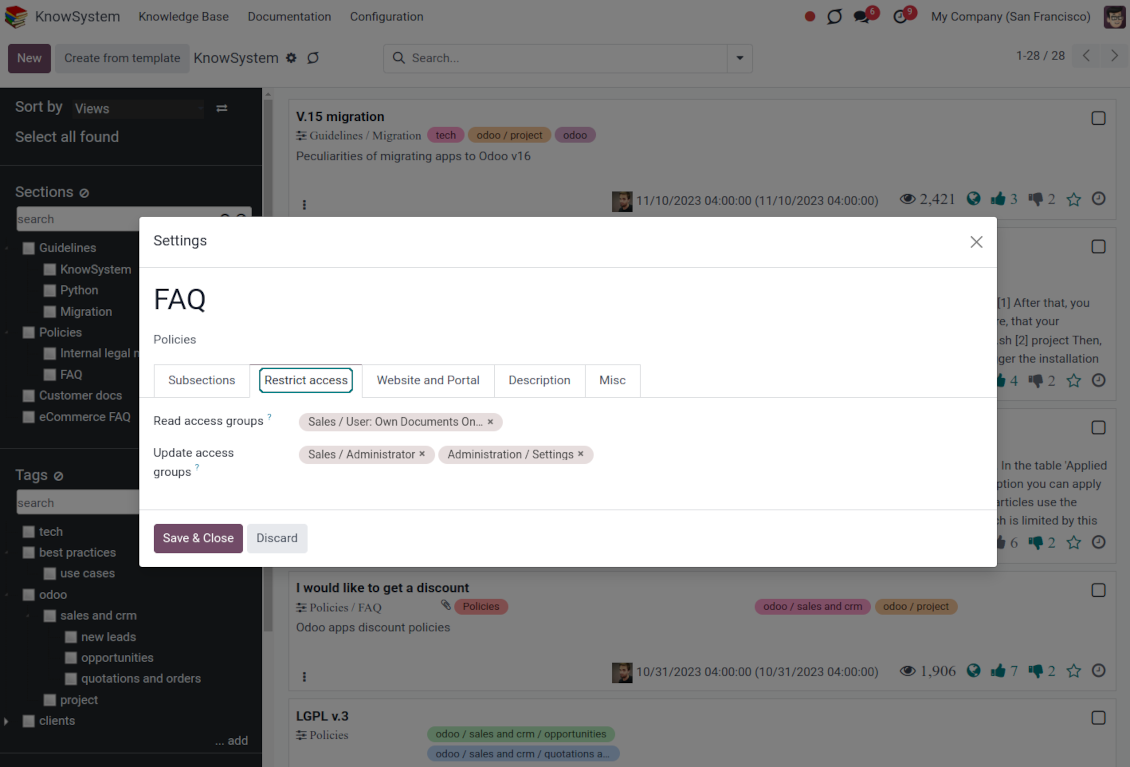
For the company employees: KnowSystem considers user groups which are defined per articles, sections, and tours. Look at the tab 'Restrict to' on forms of those objects. If that field is not defined, a document is considered 'global' and each internal user may read it
-
For portal / public users: KnowSystem takes into account tags and whether an article is website-published. A knowledge tag has a field 'Allowed partners', which may grant access to portal users for articles with this tag. Website-published pages are available for any external visitor
-
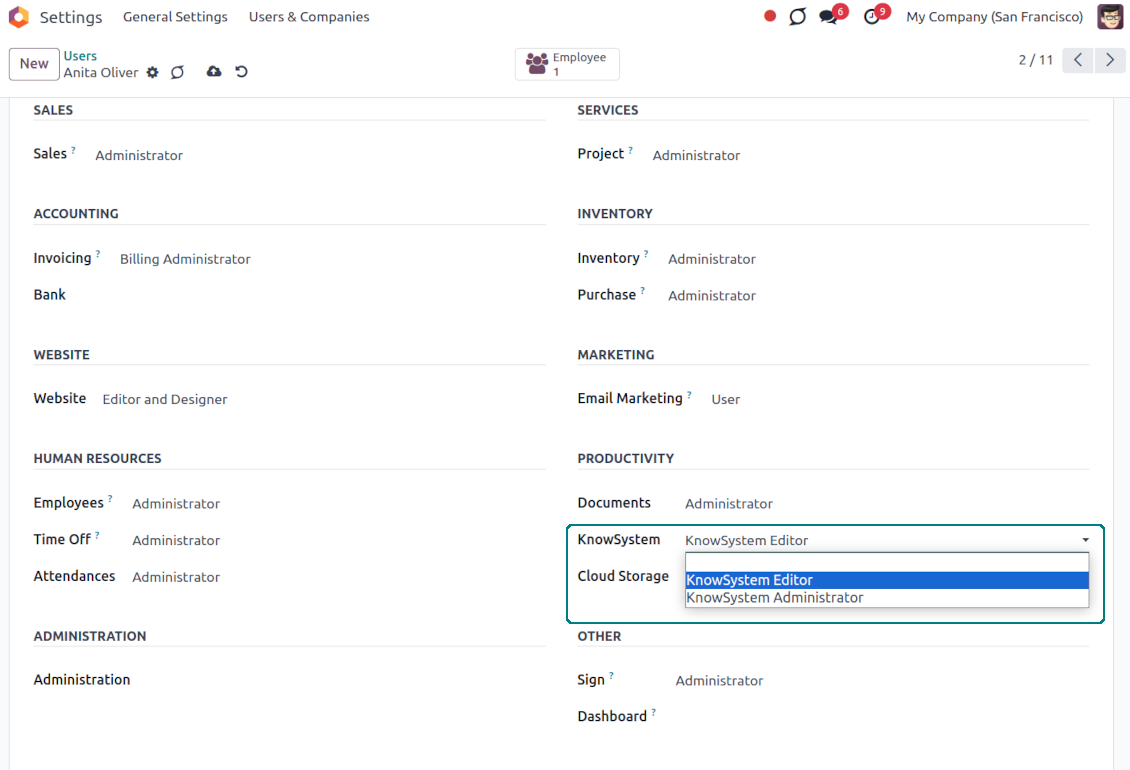
Rights to administrate the Odoo knowledge management system belongs to 2 user roles: KnowSystem Editor and KnowSystem Administrator. If you want a user to create and edit articles, a user should belong to one of those groups
-
Odoo users always may access an article if he/she is an author of that article disregarding further restrictions
-
Rights for a knowledge section are defined not only according to this section but also according to all its parents. For example, if a user can't access 'sales', he/she would not be able to access 'sales/crm' disregarding whether 'crm' is available for his/her user group.
|
|
Odoo user |
KnowSystem Editor |
KnowSystem Admin |
Portal user |
Public user |
| Articles | read related to his/her user groups and sections | read, create, edit, archive related to his/her user groups and sections | read, create, edit, delete any | read published articles and articles related to partner-related tags | read published articles |
| Sections | read related to his/her user groups | read, create, edit, archive related to his/her user groups and sections | read, create, edit, delete any | read published ones | read published ones |
| Tags | read any | read, create, edit, archive any | read, create, edit, delete any | read published ones | read published ones |
| Article Types | read any | read any | read, create, edit, delete any | read published ones | read published ones |
| Tours | read related to his/her user groups | read, create, edit, delete related to his/her user groups | read, create, edit, delete any | no access | no access |
| Misc | may like/dislike, add to favorites, print, take part in discussions | may configure options | may like/dislike an article |
|
Häufig gestellte Fragen zu KnowSystem: Knowledge Base System Odoo v.17
Ich sehe keinen Unterschied zwischen den Texten der Revisionen.
Revisionen speichern nicht nur Textänderungen, sondern auch alle Stilaktualisierungen (technisch, wenn Sie den HTML-Quellcode eines Artikels ändern). Manche sind auf den ersten Blick unklar (z. B. eine geänderte Schriftgrösse eines einzelnen Wortes). Andere können drastisch sein. Jede Folge Edit > irgendetwas im Artikel ändern > Save erzeugt jedoch eine neue Revision.
Kann ich ein YouTube-/ Vimeo- / Dailymotion- / Youku-Video in einen Artikel einfügen?
Ja, Sie können Videos dieser Dienste sowohl aus dem Odoo-Backend als auch aus dem Website-Builder in Artikel einbetten. Fügen Sie dazu einen Baustein mit einem Bild hinzu > klicken Sie auf das Bild > wählen Sie ‘Video’ > geben Sie die URL des Mediums ein.
Bitte beachten: solche Videos werden als iframes eingebunden, und manche Browser blockieren die Wiedergabe, bis der Benutzer das ausdrücklich erlaubt.
Wie mache ich einen Abschnitt auf der Website sichtbar?
In KnowSystem wird ein Abschnitt auf einer Website sichtbar, wenn er veröffentlicht ist und mindestens einen Artikel enthält. Auch mit Unterabschnitten bleibt er unsichtbar, solange im Abschnitt selbst kein Artikel liegt. So vermeidet man leere Abschnitte und hält das KnowSystem-Portal übersichtlich. Damit der Abschnitt auf der Website erscheint, fügen Sie einen einleitenden oder allgemeinen Artikel hinzu, der die Artikel der Unterabschnitte kurz beschreibt oder auflistet.
Wie gebe ich einen Artikel für einen externen Partner frei?
Rechtsklick auf ein beliebiges Schlagwort im linken Navigationsbereich - Create
Suchen Sie das Feld 'Allowed partners'. Zum Beispiel 'clients - azure interior', um dem Partner 'Azure Interior' Zugriff zu geben. Umgekehrt können Sie KnowSystem-Schlagwörter direkt im Partnerformular zuweisen
Öffnen Sie nun den gewünschten Artikel (oder nutzen Sie dieselbe Aktion 'Mass update' für mehrere Datensätze):
Wenn er veröffentlicht ist: heben Sie die Veröffentlichung auf, falls er nicht für alle Portalbenutzer und öffentlichen Besucher sichtbar sein soll
Weisen Sie das neu erstellte Schlagwort zu (im Beispiel 'clients - azure interior')
Ergebnis:
Alle Portalbenutzer des kommerziellen Partners 'Azure Interior' haben Zugriff auf die Artikel mit dem Schlagwort 'Azure Interior'
Keine anderen Portalbenutzer (wenn kein anderes Schlagwort zugewiesen ist) haben Zugriff auf diese Artikel
Interne Benutzer sind nicht betroffen und sehen Artikel gemäss der Logik 'access to' von Artikeln und Abschnitten.
Können wir die Sprachauswahl-Schaltfläche für den Artikeltext hinzufügen?
Die Schaltfläche 'translate' wird vom optionalen Add-on 'KnowSystem: Multi Languages' bewusst nicht in den Artikeltext gesetzt. HTML ist in dem einfachen Popup dieser Schaltfläche sehr schwer zu übersetzen. Es gäbe sehr wenig Text und viele HTML-Teile (die der Übersetzer zudem beschädigen könnte).
Deshalb sollten Sie sich zum Bearbeiten eines Artikels in einer bestimmten Sprache als Benutzer dieser Sprache anmelden. Das kann ein anderer Benutzer sein, oder Sie ändern vorübergehend die Einstellungen des aktuellen Benutzers. Danach erfolgen alle Änderungen am Artikeltext in dieser Benutzersprache.
Ausserdem können Sie unter dem Artikeltext die Schaltfläche 'Copy from another translation' nutzen, um jederzeit den Inhalt aus einer anderen Sprache zu übernehmen (nützlich, wenn der Artikel in einer Sprache stark aktualisiert wurde).
Wie bette ich eine andere Webseite in einen Artikel ein
Dazu können Sie iframes verwenden. Schalten Sie den Artikel in den Roh-HTML-Editor und fügen Sie zum Beispiel <iframe src="https://faotools.com/" style="width:100%;min-height:600px;"> </iframe> ein.
Ich habe KnowSystem installiert, sehe aber die Schaltfläche 'create' und andere Schaltflächen nicht
Wahrscheinlich haben Sie Ihrem Benutzer keine KnowSystem-Rechte gegeben. Wählen Sie die passende Rolle 'KnowSystem Editor' oder 'KnowSystem Admin' und aktualisieren Sie die Seite. Die Steuerungsschaltflächen sollten nun angezeigt werden.
Kann ich eine bestimmte Lerntour nur ausgewählten Benutzern anzeigen?
Ja, indem Sie eine Benutzergruppe zuweisen (z. B. 'Sales Manager'), die diese Tour durchlaufen soll. Gehört der Benutzer zu dieser Gruppe, sieht er die Tour. Andernfalls wird sie nicht angezeigt. Das funktioniert wie die Zugriffsrechte für KnowSystem-Artikel und -Abschnitte.
Beachten Sie: hat eine Tour keine zugewiesenen Gruppen, ist sie 'global' und für alle sichtbar.
Wie ändere ich Fusszeile und Kopfzeile beim Drucken von Artikeln?
Kopf- und Fusszeile der Artikel-PDFs stammen aus den Unternehmenslayouts. Öffnen Sie Settings > General Settings > den Bereich Business Documents. Dort legen Sie die Unternehmensvorlage fest, die für alle Dokumenttypen gilt, einschliesslich Rechnungen, Verkaufsaufträge usw. und auch für Artikel. Dieser Odoo-Ansatz behandelt Fuss- und Kopfzeile als allgemeinen Unternehmensstil, nicht als Eigenschaft einzelner Ausdrucke.
Wie verknüpfe ich Artikel miteinander?
Jeder Artikel hat interne (Backend-) und Website-URLs (wenn die Option 'KnowSystem: Website and Portal' installiert ist). Klicken Sie auf der Artikelformularansicht auf die Schaltfläche 'Info', um die Webadressen dieses Datensatzes zu sehen. Sie können jede davon als Hyperlink in den Artikeltext einfügen.
Kann ich den HTML-Quellcode eines Artikels ändern?
Ja: schalten Sie die debug assets ein (auf der Einstellungsübersicht) und kehren Sie zum aktuellen Artikel zurück. Im Bearbeitungsmodus erscheint das Symbol '</>'. Klicken Sie darauf, um HTML und Stile anzuzeigen und zu bearbeiten.
Wie sind die Update-Richtlinien Ihrer Tools?
Laut den aktuellen Richtlinien des Odoo Apps Store:
- Ein fur Version 12.0 oder früher gekauftes Modul gibt Zugang zu allen Versionen bis 12.0.
- Ab Version 13.0 muss jede Modulversion separat gekauft werden.
- Unabhängig von der Version berechtigt der Kauf zu allen Updates und Fehlerbehebungen innerhalb einer Hauptversion.
Das faOtools-Team steuert diese Richtlinien nicht. Fragen richten Sie bitte direkt an die Vertreter des Odoo Apps Store.
Wie installiere ich Ihre App auf Odoo.sh?
Der direkteste Weg ist der integrierte Ablauf des Odoo Stores:
1. Öffnen Sie die Modulseite und klicken Sie auf Deploy on odoo.sh
2. Sie werden zu GitHub weitergeleitet. Melden Sie sich an und klicken Sie auf Create a new repo oder nutzen Sie ein vorhandenes. Das Repository muss privat sein. Apps unter OPL-1 dürfen nicht öffentlich gemacht werden. Legen Sie bei Bedarf ein neues Repo fur das Odoo.sh-Projekt an
3. Gehen Sie zu odoo.sh, klicken Sie auf Deploy, bestätigen Sie und klicken Sie auf Continue. Die Installation startet.
Damit wird die App auf dem Production-Branch installiert. Fur andere Branches oder Updates:
1. Laden Sie den Quellcode aus dem Odoo Store
2. Committen Sie das Modul in das GitHub-Repository. Keine App-Ordner/Dateien dürfen in .gitignore stehen. Von odoo.sh erzeugte Repos ignorieren oft wichtige Pfade (z. B. /lib). Laden Sie alle Modulverzeichnisse und Dateien hoch
3. Deployen Sie den Ziel-Branch des odoo.sh-Projekts oder warten Sie auf den automatischen Build.
Wie installiere ich Ihre App auf meinem eigenen Server?
2. Starten Sie den Odoo-Server neu;
3. Schalten Sie den Entwicklermodus ein (technische Einstellungen);
4. Aktualisieren Sie die App-Liste (Apps-Menü);
5. Finden Sie die App und klicken Sie auf Activate/Install;
6. Folgen Sie den Hinweisen auf der App-Seite, falls vorhanden.
Ihre App hat Zusatzmodule. Kann ich sie später kaufen?
Ja. Odoo legt alle Abhängigkeiten automatisch in den Warenkorb. SchlieBen Sie bereits gekaufte Tools aus, um nicht doppelt zu zahlen.
Ich habe Ihre App auf Odoo.sh bereitgestellt und sehe eine Warnung/einen Fehler in den Tests
Eine rote/orange Warnung beeinflusst die Funktionen der App nicht. Manchmal bestehen unsere Module die Standard-Automatiktests nicht, weil diese ein Verhalten erwarten, das unseren Zielen widerspricht. Zum Beispiel ändern wir die Preisberechnung, während die Odoo-Tests den Endpreis mit dem Standardalgorithmus vergleichen.
Prüfen Sie zuerst die Funktionen der bereitgestellten Datenbank. Funktioniert alles?
Wenn Sie dennoch annehmen, dass die Warnung echte Funktionen betrifft, senden Sie uns die vollständigen Installationsprotokolle und die vollständige Liste der bereitgestellten Module (Kern und Drittanbieter).
Kann ich Ihre App direkt bei Ihnen kaufen?
Nein, wir vertreiben die Tools nur über den offiziellen Odoo Apps Store.
Ich mochte einen Rabatt
Leider haben wir keine technischen Mittel fur individuelle Preise.
Kann ich die App auf meiner Odoo Online (SaaS)-Datenbank installieren?
Nein, Drittanbieter-Apps können nicht auf Odoo Online genutzt werden. Odoo SaaS blockiert das.
Ihr Tool hängt von anderen Apps ab. Muss ich diese kaufen?
Ja, das Tool benötigt alle als Abhängigkeit markierten Module. Der Preis auf der App-Seite enthält bereits alle noetigen Abhängigkeiten.
Was kostet das Modul in US-Dollar? Warum hat sich der Preis geändert?
Die Preise unserer Module sind in Euro festgelegt. Der Odoo Store rechnet nach seinem internen Wechselkurs um. Der Preis in US-Dollar kann sich ändern, wenn der Kurs aktualisiert wird.
Die Texte der App und Website in anderen Sprachen als Englisch werden KI-gestützt erstellt und an die offiziellen Odoo-Übersetzungen angeglichen. Wenn Sie einen Fehler entdecken, ein Uebersetzungs-Ticket senden und wir korrigieren es.
Odoo-Demo-Datenbanken (Vorschauen)
Für diese App können wir eine kostenlose personalisierte Demo-Datenbank bereitstellen.
Sie benötigen keine Telefonnummer oder Kreditkarte, um mit uns Kontakt aufzunehmen. Sie sollten nur eine kurze E-Mail-Anmeldung durchführen, die nicht länger als 30 Sekunden dauert.
Auf Anfrage richten wir eine eigene Vorschau-Datenbank ein, in der Sie rund zwei Wochen lang beliebig testen und Ihre Annahmen prüfen können.
Fehlermeldung
Wenn Sie auf Fehler oder inkonsistentes Verhalten stossen, zögern Sie nicht, uns zu kontaktieren. Wir garantieren eine Reparatur innerhalb von 60 Tagen nach dem Kauf und sind auch nach diesem Zeitraum stark daran interessiert, unsere Werkzeuge zu verbessern.
Sie benötigen keine Telefonnummer oder Kreditkarte, um mit uns Kontakt aufzunehmen. Sie sollten nur eine kurze E-Mail-Anmeldung durchführen, die nicht länger als 30 Sekunden dauert.
Bitte nehmen Sie moglichst viele Details in Ihre Anfrage auf: Screenshots, Odoo-Serverprotokolle, eine vollständige Beschreibung zur Reproduktion Ihres Problems usw. Normalerweise dauert es einige Werktage, einen Arbeitsplan fur ein Problem zu erstellen (wenn ein Fehler bestätigt wird) oder Ihnen Hinweise zum weiteren Vorgehen zu geben (andernfalls).
Öffentliche Funktionsanfragen und Modulideen (kostenlose Entwicklung)
Wir sind stark motiviert, unsere Tools zu verbessern und wären für jedes Feedback dankbar. Wenn Ihre Anforderungen von öffentlichem Nutzen sind und effizient umgesetzt werden könnten, nimmt das Team diese in unsere To-Do-Liste auf.
Eine solche To-Do-Liste wird regelmässig bearbeitet und erfordert keine zusätzlichen Gebühren. Obwohl wir keine Fristen und keinen endgültigen Entwurf versprechen können, könnte dies eine gute Möglichkeit sein, die gewünschten Funktionen ohne Investitionen und Risiken zu erhalten.
Sie benötigen keine Telefonnummer oder Kreditkarte, um mit uns Kontakt aufzunehmen. Sie sollten nur eine kurze E-Mail-Anmeldung durchführen, die nicht länger als 30 Sekunden dauert.
17.0.1.3.21
- The issue of Late Activities listing articles that have no overdue activity for the selected user has been fixed.
17.0.1.3.20
- The issue of autovacuum failure has been fixed.
17.0.1.3.19
- The issue with the double click needed to remove selected articles has been fixed.
17.0.1.3.18
- The issue of non-updated likes counters has been fixed.
17.0.1.3.17
- The edit rights for sections/articles now imply the read rights for those objects.
17.0.1.3.16
- The feature to search keywords divided by bold or italic tags has been added.
17.0.1.3.15
- The issue with the access error when opening the articles search wizard for ordinary users has been fixed.
17.0.1.3.15
- The archived ribbon for inactive records is added to article kanban and form views, and form views of sections and tags.
17.0.1.3.14
- The website view of articles and documentation is optimized for small screens.
17.0.1.3.13
- Die Standard-Aktivitaetsansicht fuer KnowSystem-Artikel ist Kanban.
17.0.1.3.12
- Uebermaessiges Bereinigen von KnowSystem-Artikeln nach einer Composer-Nachricht ist behoben.
17.0.1.3.11
- Der Sprachumschalter der schnellen Artikelsuche ist behoben.
17.0.1.3.10
- Im Backend ist die Suche nur in Titeln moeglich.
- Die Schaltflaeche, einen gefundenen Artikel aus einem Dialog in einem neuen Tab zu oeffnen, ist behoben.
17.0.1.3.9
- Drag-and-drop aktualisiert Artikel in Masse: Stichwort, Abschnitt, Lerntour.
- Gefundene Artikel lassen sich in einem neuen Tab oeffnen.
- Das gewaehlte Elternelement der Navigationsbaeume ist korrekt hervorgehoben.
17.0.1.3.8
- Die Kanban-Ansicht von KnowSystem-Artikeln folgt den Odoo-v.17-Ansaetzen.
- Navigationshierarchien sind optimiert.
17.0.1.3.7
- Das Standardsortierkriterium der Artikel-Backendnavigation ist auf der App-Seite einstellbar.

The tool to flexibly structure Odoo attachments in folders and synchronize directories with cloud clients: Google Drive, OneDrive/SharePoint, Nextcloud/ownCloud, Dropbox, Amazon S3, Box, and NAS. DMS. File Manager. Document management system
398€
The tool to automatically synchronize Odoo attachments with OneDrive files in both ways
487€
The tool to automatically synchronize Odoo attachments with Google Drive files in both ways
487€

The tool to set up KPI targets and control their fulfillment by periods. KPI dashboards. Dashboard designer. KPI charts

The tool for time-based service management from booking appointments to sales and reviews
398€
The tool to manage your Odoo from your favorite AI chats through MCP. Claude. Any MCP-supporting AI.

The tool to combine different Odoo events in a few configurable super calendars

The tool to translate URL addresses of Odoo website pages
38€