KnowSystem: Knowledge Base System v.17
The tool to build a deep and structured knowledge base for internal and external use. Knowledge System. KMS. Wiki-like revisions.
This is a full-featured Odoo knowledge management tool to be used in any industry and by any firm. The app serves to accumulate, curate, utilize, and share organizational knowledge within your company and outside it.
- a core of knowledge management. It might be used stand-alone as a complete internal knowledge base system. Tā cena ir 398€.
- an optional module, which lets you publish articles to the website, share them with portal users, and use the website builder to update articles. The features assumed by this add-on are marked by the icon . Tā cena ir 40€.
- an optional extension to KnowSystem: Website and Portal to design website documentation pages based on knowledge base articles. The features assumed by this add-on are marked by the icon . Read the full description on the related page. Tā cena ir 60€.
- an optional module, which lets you add and show custom fields for articles (backend). The features assumed by this add-on are marked by the icon . Tā cena ir 48€.
- an optional free module, which shows custom fields on website and portal pages (frontend). The features assumed by this add-on are also marked by the icon .
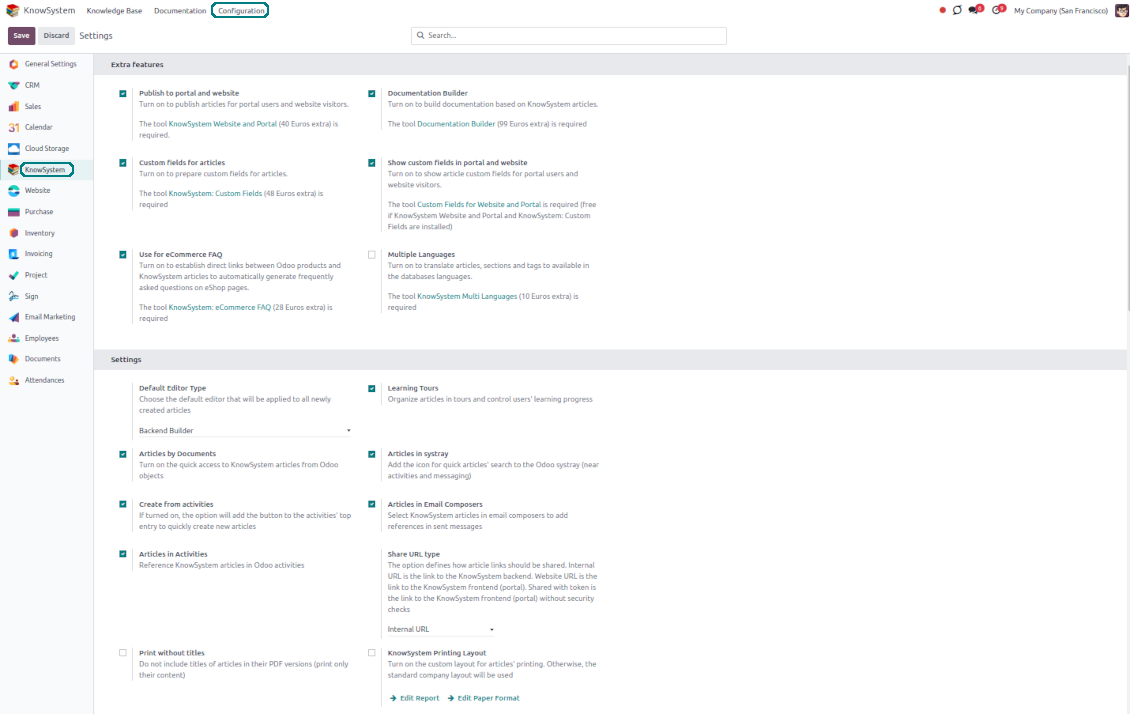
- an optional extension to KnowSystem: Website and Portal to prepare FAQ/documentation for Odoo eCommerce product pages. The features assumed by this add-on are marked by the icon . Read the full description on the related page. Tā cena ir 28€.
- an optional module, which lets you translate articles, sections, and tags to installed in Odoo languages. The features assumed by this add-on are marked by the icon . Tā cena ir 10€.
Record and keep knowledge
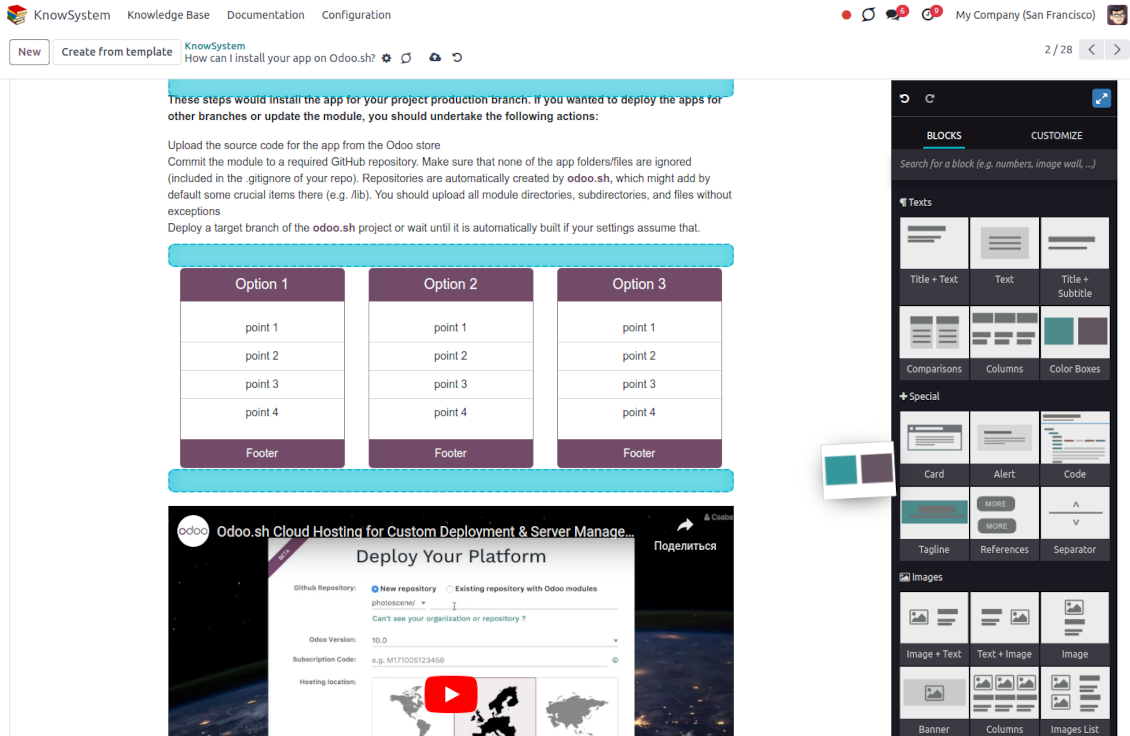
Drag and drop building blocks of the backend or website editors to construct professional-looking articles. Use simple text or HTML editors. Switch to the raw code when needed. Create and use knowledge templates.
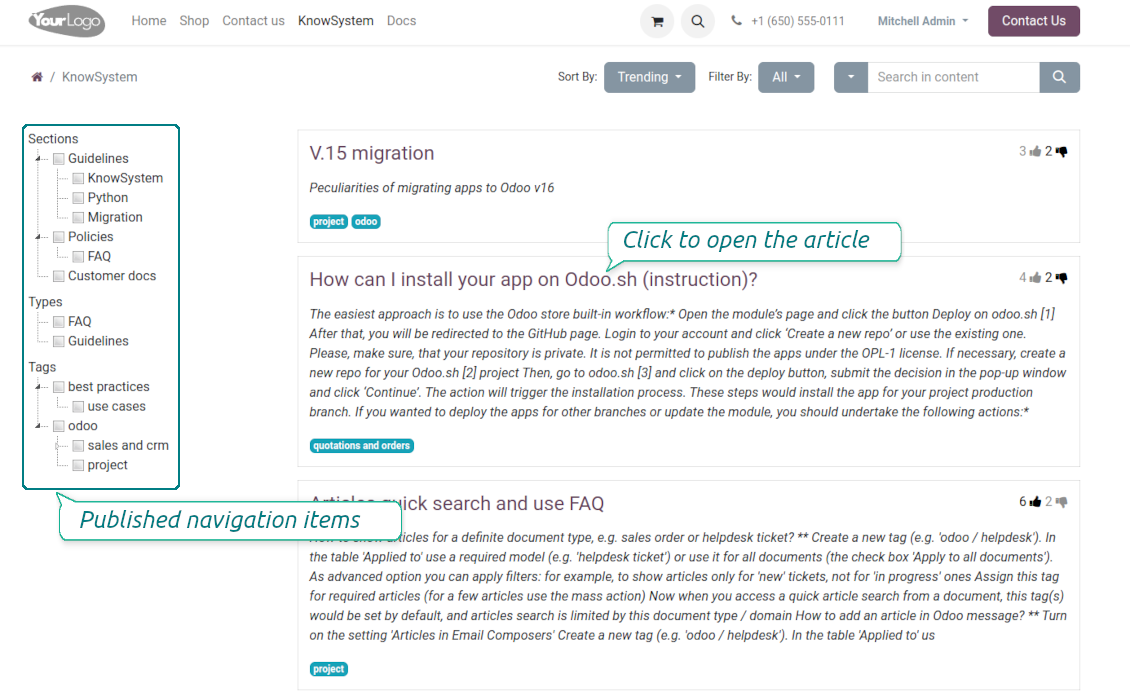
Single view KMS navigation
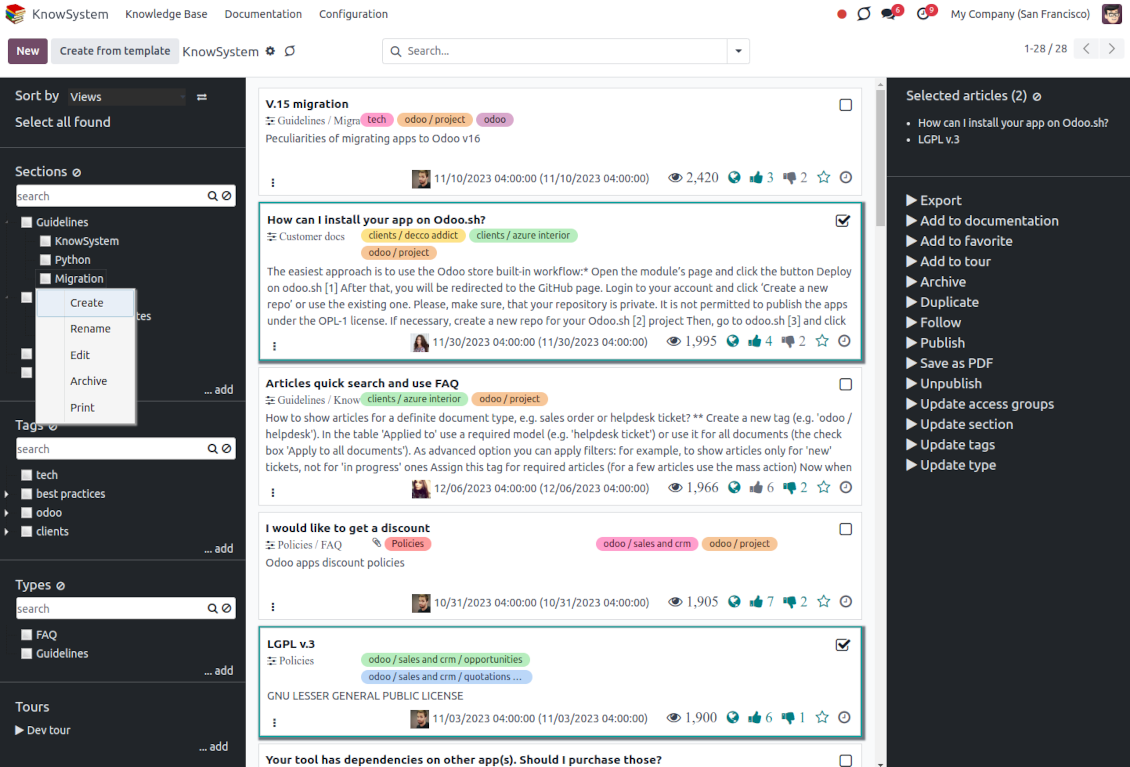
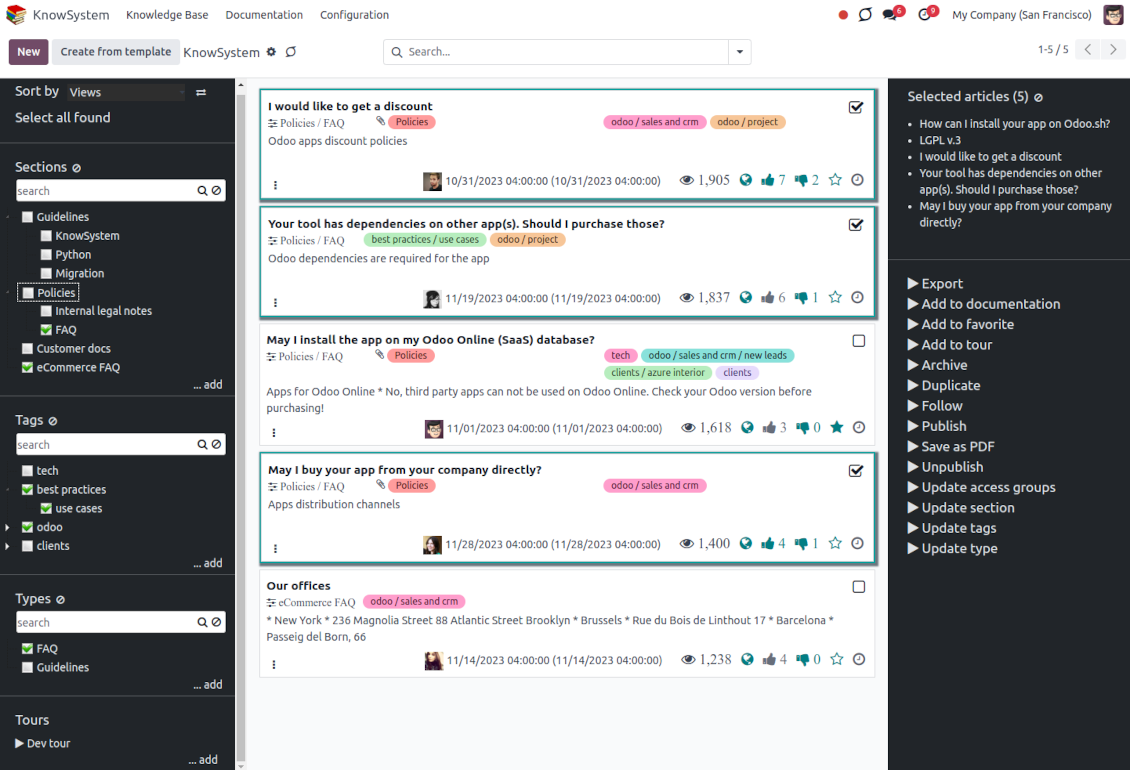
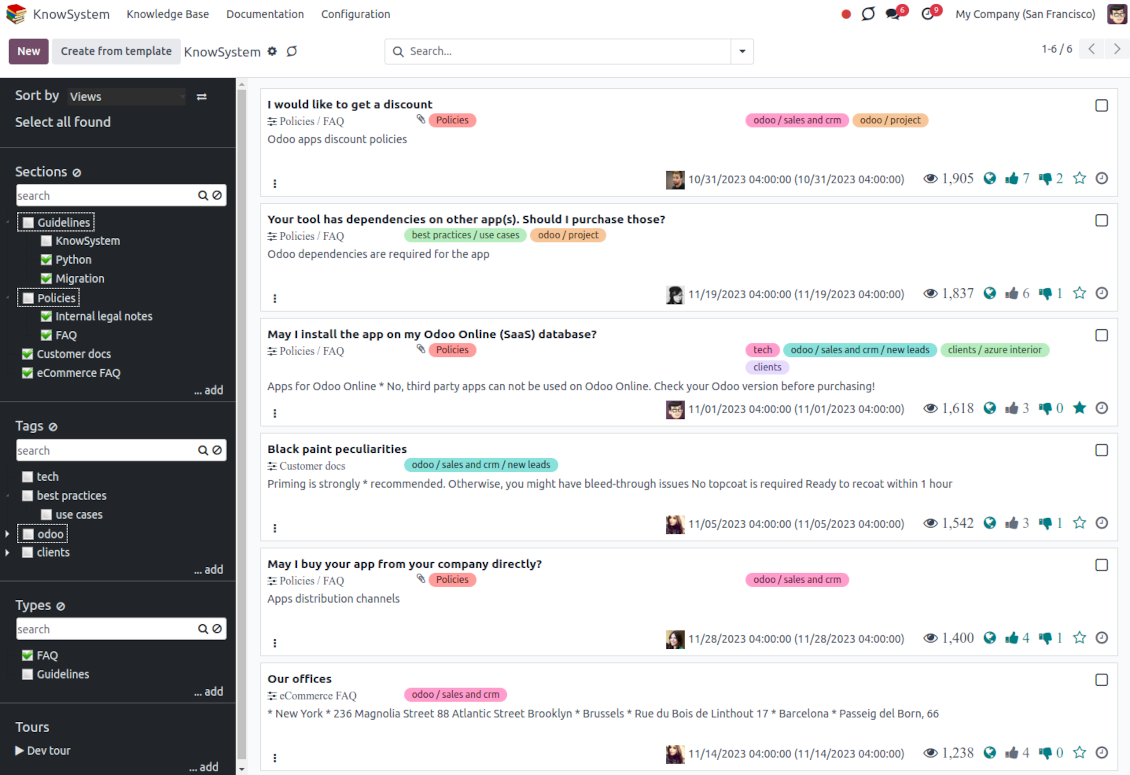
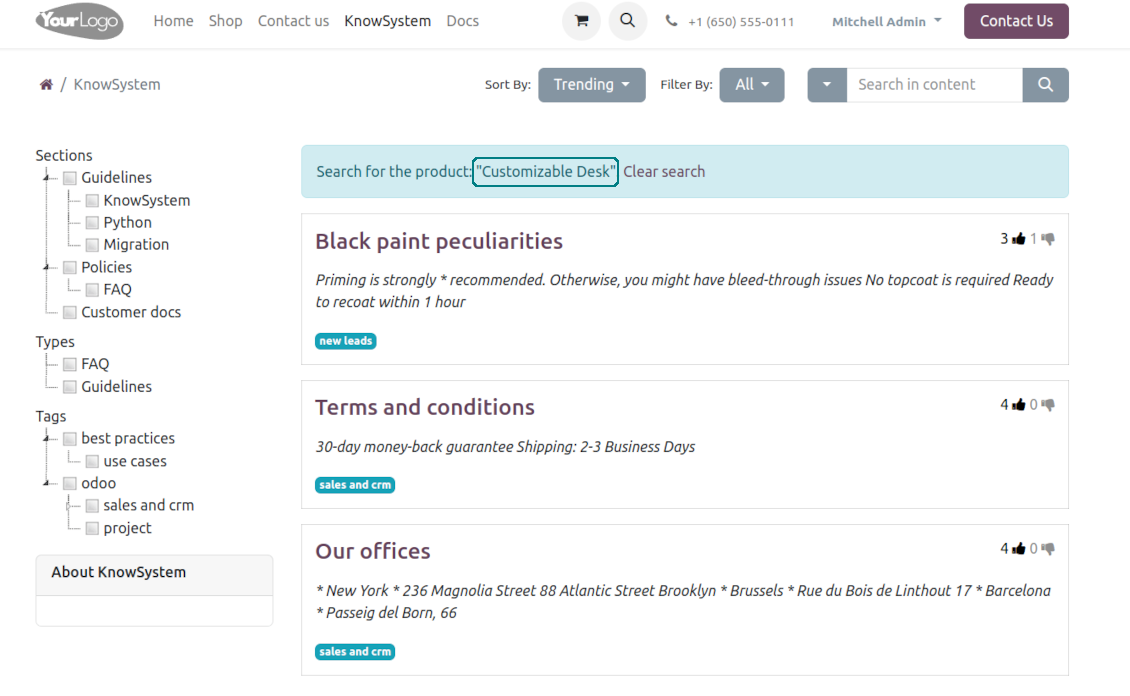
Filter articles by the hierarchy of sections, by the tree of tags, or by knowledge types. Select articles step by step and proceed with mass actions. Sort and search in seconds
Get benefit of knowledge
Instantly access the knowledge base from any Odoo documents. Reference articles in messages and activities. Organize learning tours. Prepare instructions, guidelines, or eCommerce FAQs. Print or share knowledge
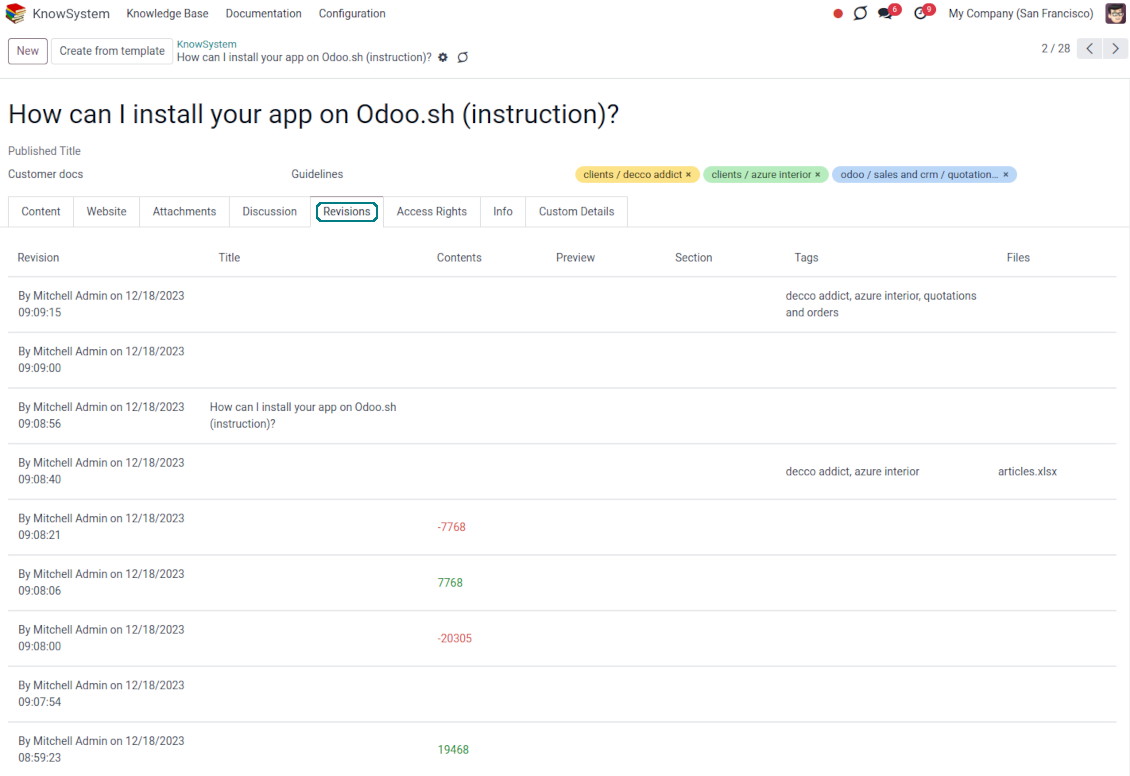
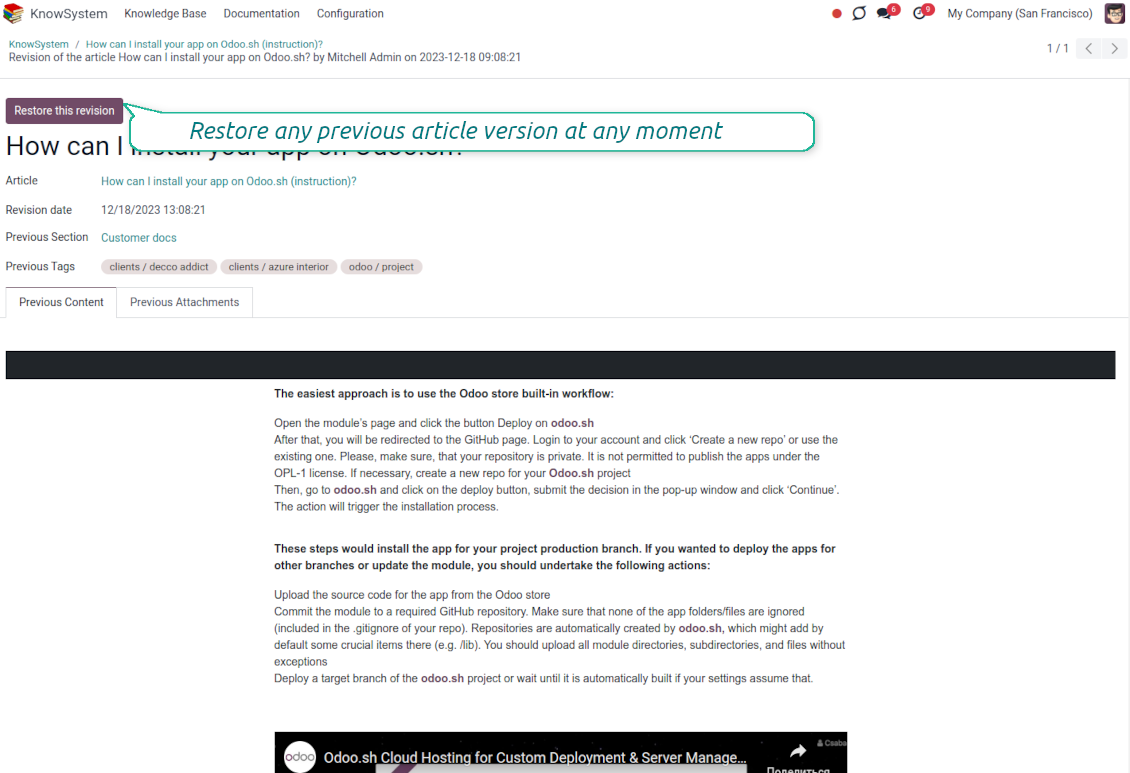
Wiki-like revisions
Restore any article version at any moment: the app keeps the history of knowledge updates. Breaking becomes harder than restoring
Portal or public knowledge base
Share articles with your partners or publish knowledge for any website visitor
Website documentation builder
Combine organizational knowledge into advanced documentation with comfortable navigation and search
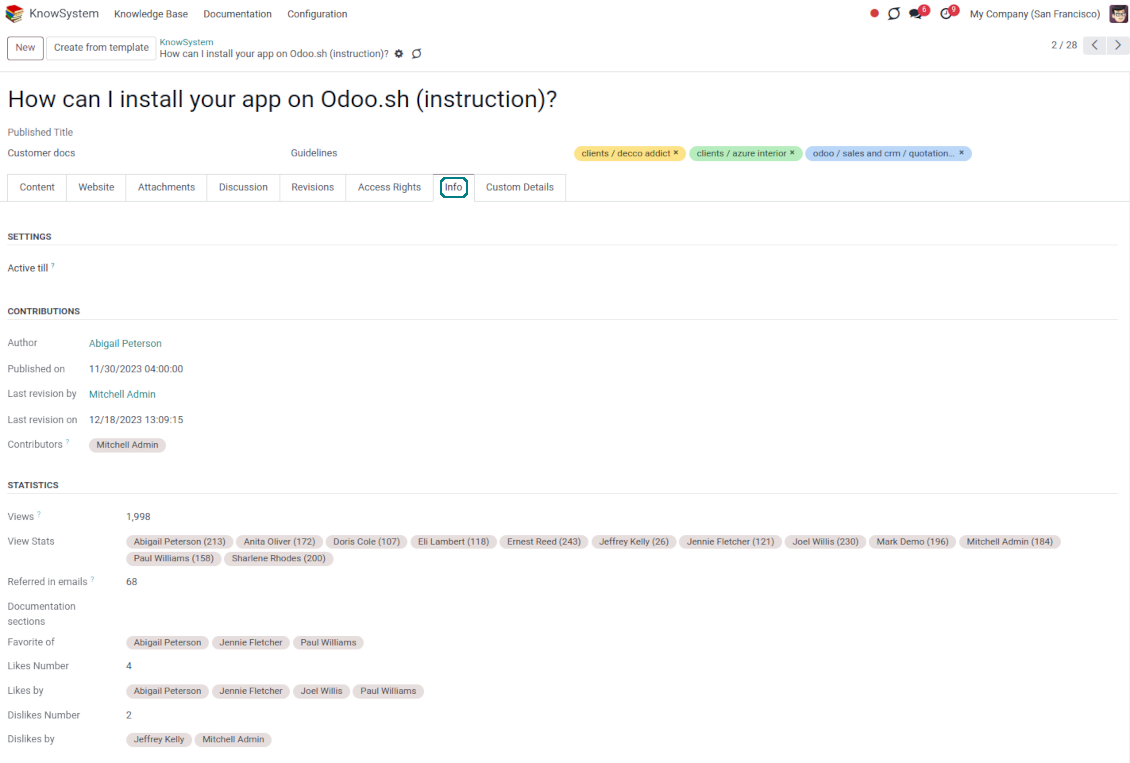
Knowledge system statistics
Control views of articles, likes, dislikes, and contributions. Motivate discussions
Applied in any functional area
Use the app for any knowledge management business goal and for any set of Odoo apps.
Best knowledge base system for Odoo!
Excellent app and exceptional after-sales support.
Really well thought-out product and one of the best features is the contextual help by means of the tags. Really a game changer for us.
Keep up the great work FaOtools!
Outstanding app! Tremendous value for money, an absolute must have!
One of the features sorely lacking from Odoo has been a robust Wiki/documentation system. Using third party platforms is a massive headache: yet another system to maintain, users get distracted switching back-and-forth, and errors get made. Then you have to worry about training, additional logins, etc.
KnowSystem feels like a native/core app, is very well-polished, and extremely fast. It's accessible from any screen, and the search results are instant (none of the latency inherent with most apps).The interface is elegant yet powerful, with robust access control, rich editing features, and version control. It's simple to revert to previous entries, view audit trails, etc. It's very intuitive for anyone familiar with Odoo; onboarding takes just a few minutes. The user guides are excellent.
This is invaluable for any organisation with a lot of documented information, SOPs, ISO compliance, or similar. If you're using eLearning, it's great for creating a help system / reminders. For example, noting key takeaways or specific instructions. The user can be in MRP, Sales, or any other function, and instantly lookup a guide. Since it overlays whichever screen you're in, it doesn't interrupt the workflow.
This dramatically increases efficiency, minimises questions, and helps keep everyone on the same page.
Oh, and customer service is excellent, faOtools stands behind their product. Thank you!
KnowSystem is excellent - OdooTools offer great support, are very helpful and responsive
Our company needed the ability to add a Knowledge Base to our Odoo portal website for our customers to access article content on a membership-only basis. KnowSystem provided this and much more, along with ability to add search by section, set permissions to allow only certain partners access to articles by tag etc. OdooTools have been very helpful and implemented several features we suggested including automatic redirect upon login, customisable filters and a social sharing capability on articles. Overall a great app by a great company, something that massively adds to Odoo's capabilities and is something that everyone could benefit from using.
Very functional application and responsive support
Our company produces medical laser equipment and we use KnowSystem to streamline the knowledge base of our company. Convenient search system and classification of content, as well as access rules for groups and even for individual users.
Great app and professional team
The app is great the the team is very professional in both response timing and problem solving.
Highly recommended.
Marco from ALO.zone.
Excellent system
Excellent system.
A great tool from some very nice developers!
KnowSystem is a great tool and a game changer for us. Finally a place to put all our company know-how. I highly recommend it. And also important to us: We got great support from FaOtools too. A rare thing in this busy world. thx!
Excellent app and support.
Great app and a very helpfull support. Openess to improve their products is outstanding.
Single-view knowledge navigation
-
Prepare the hierarchy of knowledge sections to instantly switch between knowledge areas
-
Define the tree of tags for quick navigation and deeper knowledge structuring
-
Introduce knowledge base typology to distinguish kinds of articles in a single click
-
Create, update, and reorder tags, sections, or types right from the KnowSystem interface. Print all articles related to a certain tag or a section
-
Instantly search KMS sections and tags right on the navigation panel
-
Manage and launch learning tours
-
Sort knowledge articles by views, a score of likes, title, author, section, and create and write dates
-
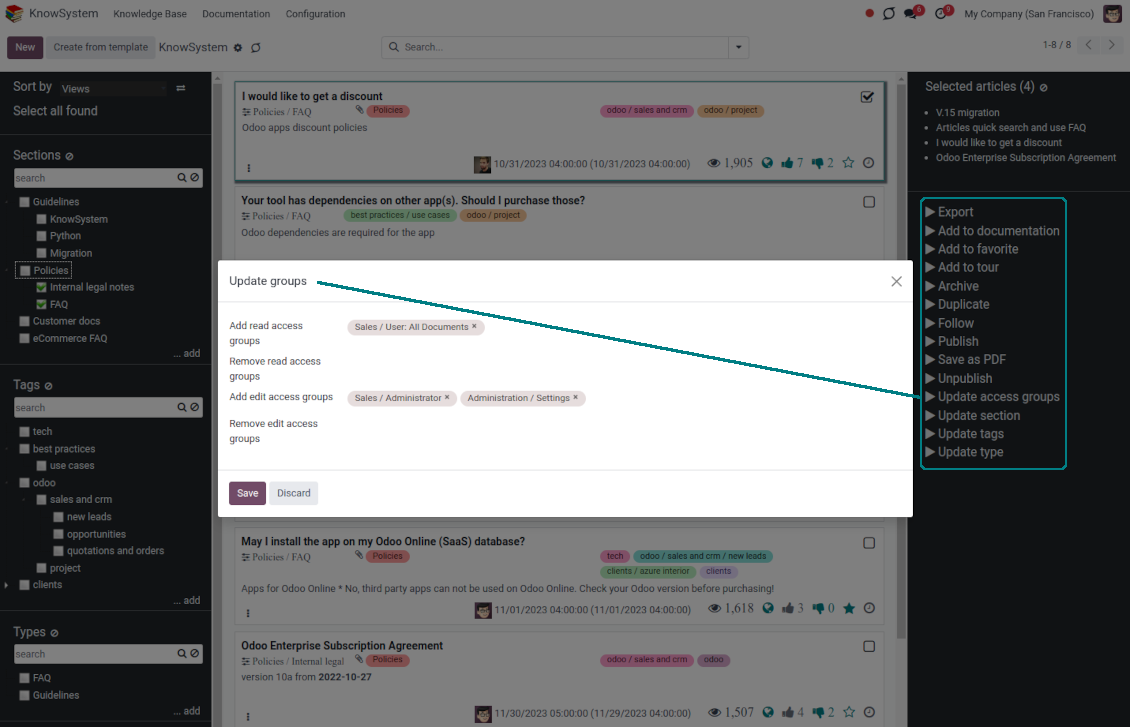
Pick articles up step by step: the selection is not cleared with a new search or when you opened a record. Proceed mass action(s) for all chosen items
-
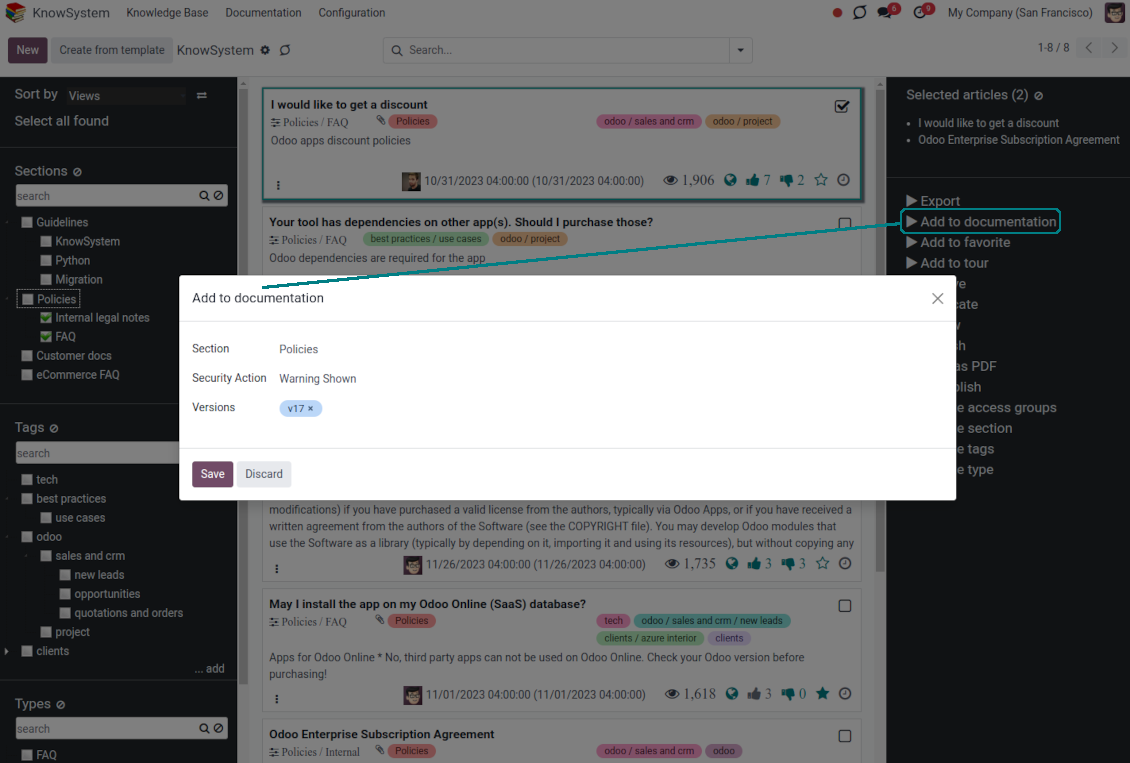
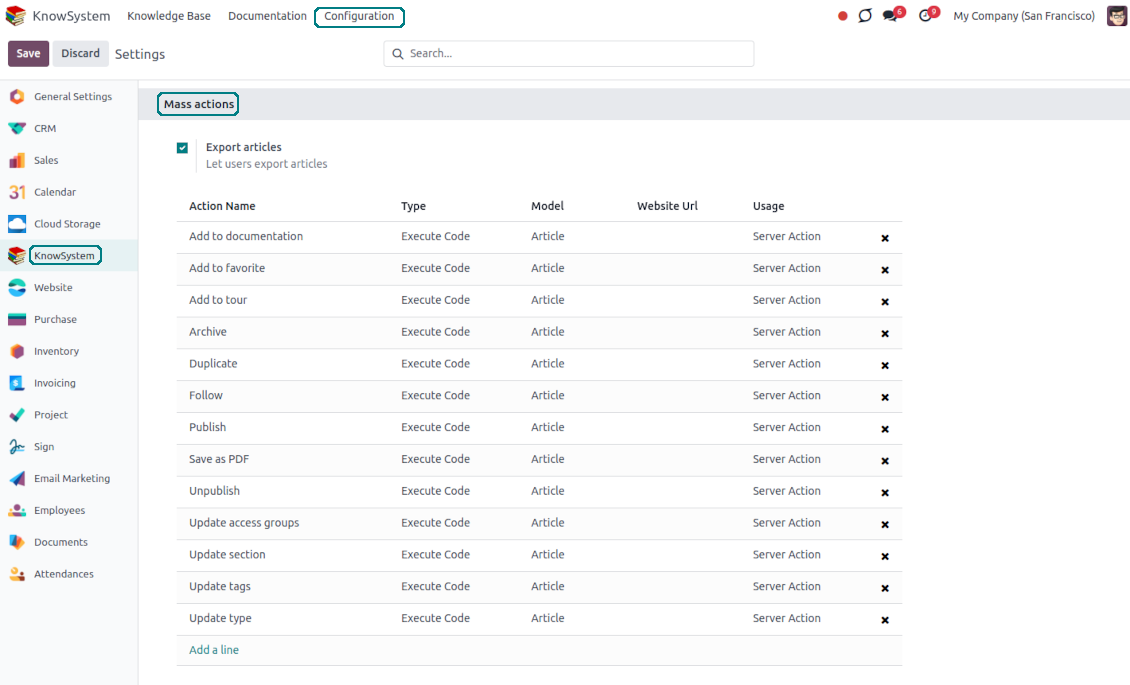
Update knowledge in batch: assign new section (incl. dropping articles to the left navigation panel), change or remove tags, print multiple articles as a single PDF, follow/unfollow discussions, publish/unpublish articles, export articles to an Excel table, archive or restore items, add articles to learning tours and documentations, mark knowledge records as favorite, duplicate articles.
Fast, comfortable, and professional knowledge recording
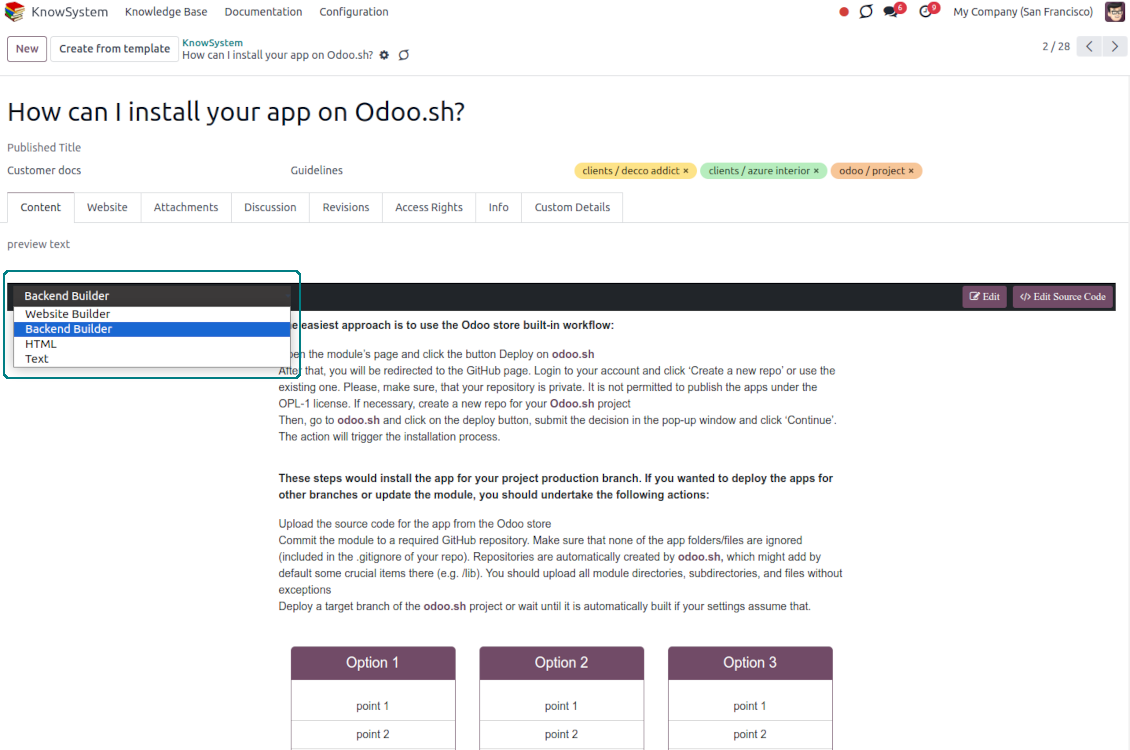
Safe backend editor
-
Drag and drop building blocks to write a new article right in the Odoo backend interface. The process is simple while the result is professional looking
-
Edit blocks styles, re-order Knowledge elements, change the width and height of items
-
KnowSystem editor relies upon strict HTML structures which are in most cases compatible with printing and messaging layouts
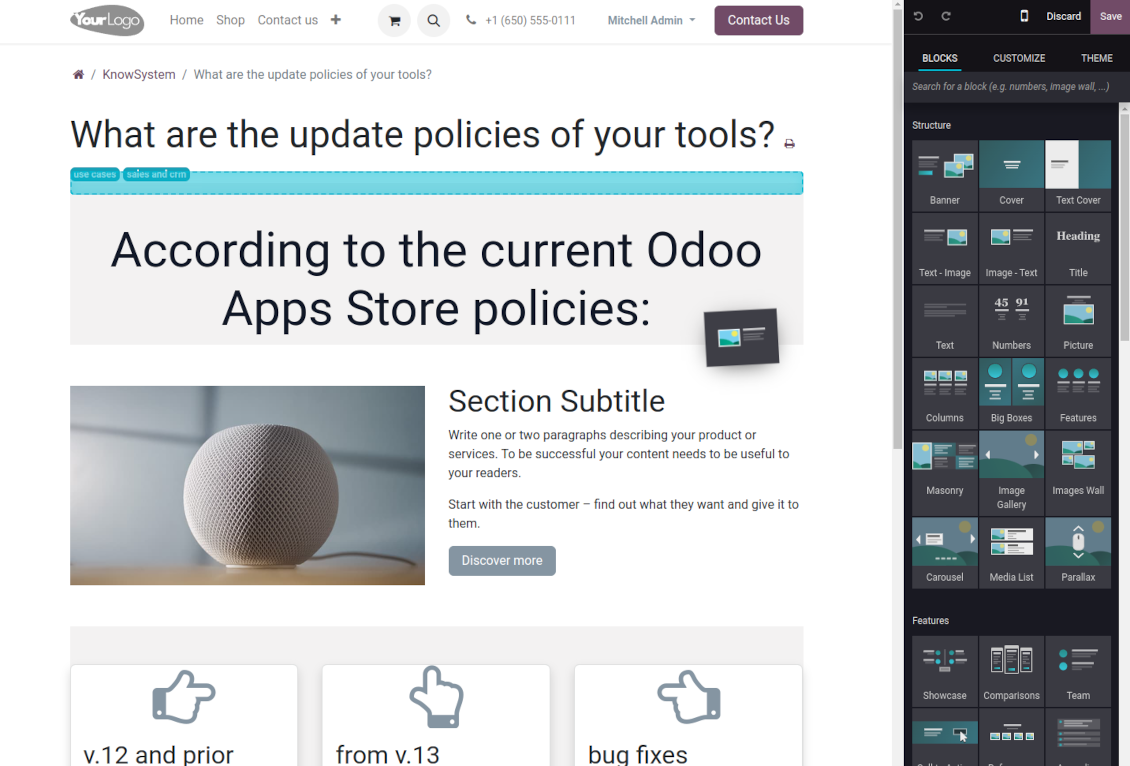
Advanced website builder
-
Apply advanced styles and complex widgets by using Odoo's built-in website editor
-
Exploit Odoo website know-how: numerous snippets and animations, style templates, and options
-
Rely upon the website editor to prepare nice-looking portal knowledge pages. Avoid using that for internal or printing purposes: advanced styles often contradict printing and composer layouts
Simple text articles
-
Make certain articles as simple texts with unlimited compatibility with printings and emails
-
Copy knowledge texts to a clipboard for quick sharing
Standard HTML editor
-
Use the familiar Odoo HTML editor to prepare inline knowledge pieces
-
Get the benefit of the Odoo editor's built-in commands
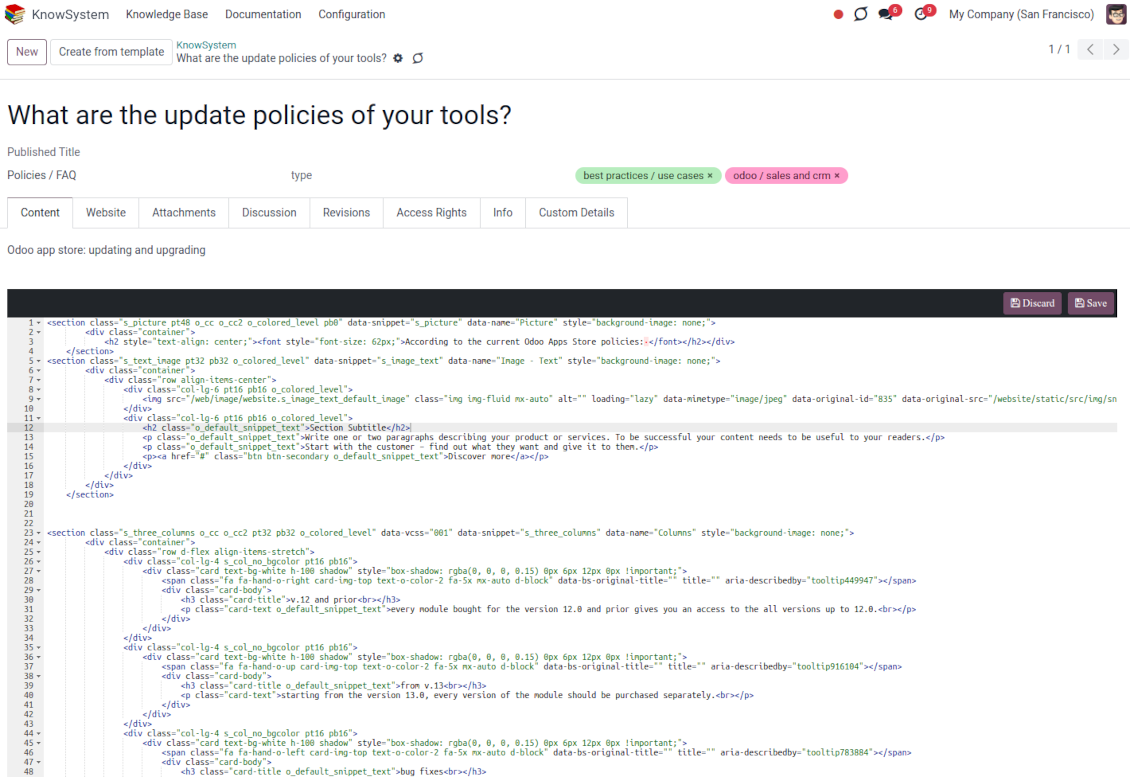
Raw HTML interface
-
At any moment switch to the raw code editor to update the articles' HTML
-
Introduce any HTML tags and styles, including Bootstrap-ready elements and iframes
Knowledge templates
-
Prepare new knowledge templates or save any existing article as a template
-
Use templates to create new articles to save time or keep uniform styles.
Get benefit from your knowledge
Knowledge system for any Odoo document
-
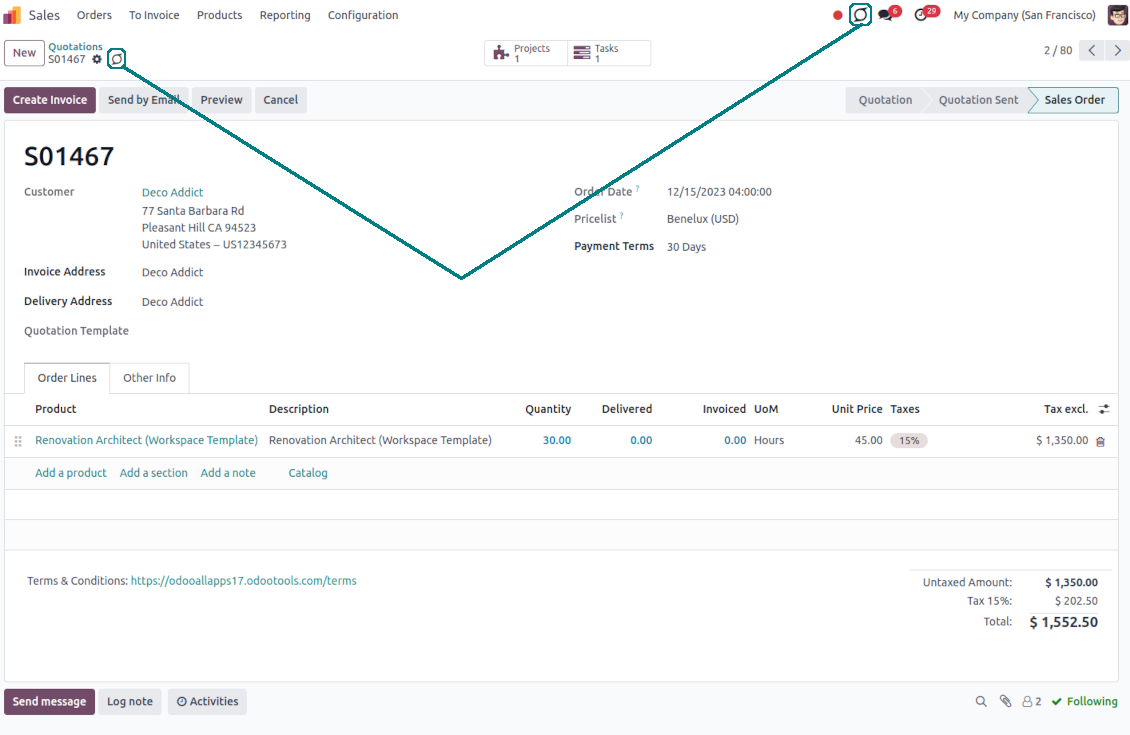
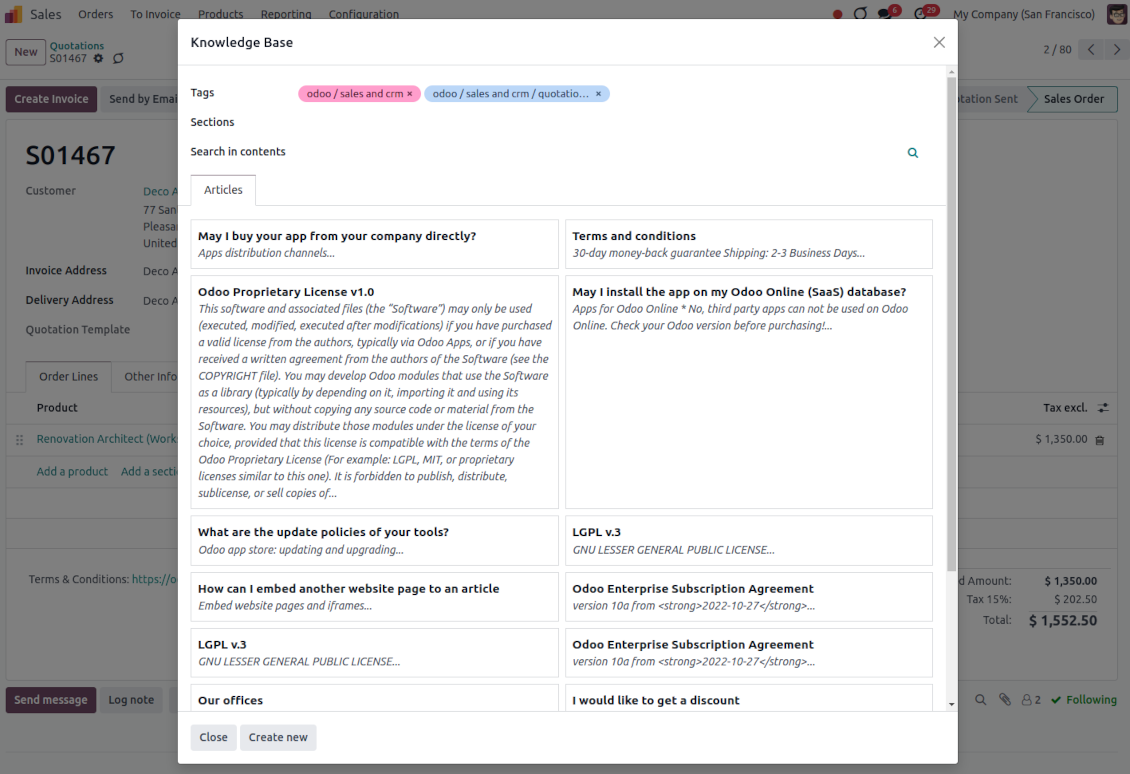
Turn on the setting 'Articles by Documents' to add a quick entry for the Knowledge base from any Odoo form view
-
Search articles by tags, section, or content in a few clicks for a quick overview
-
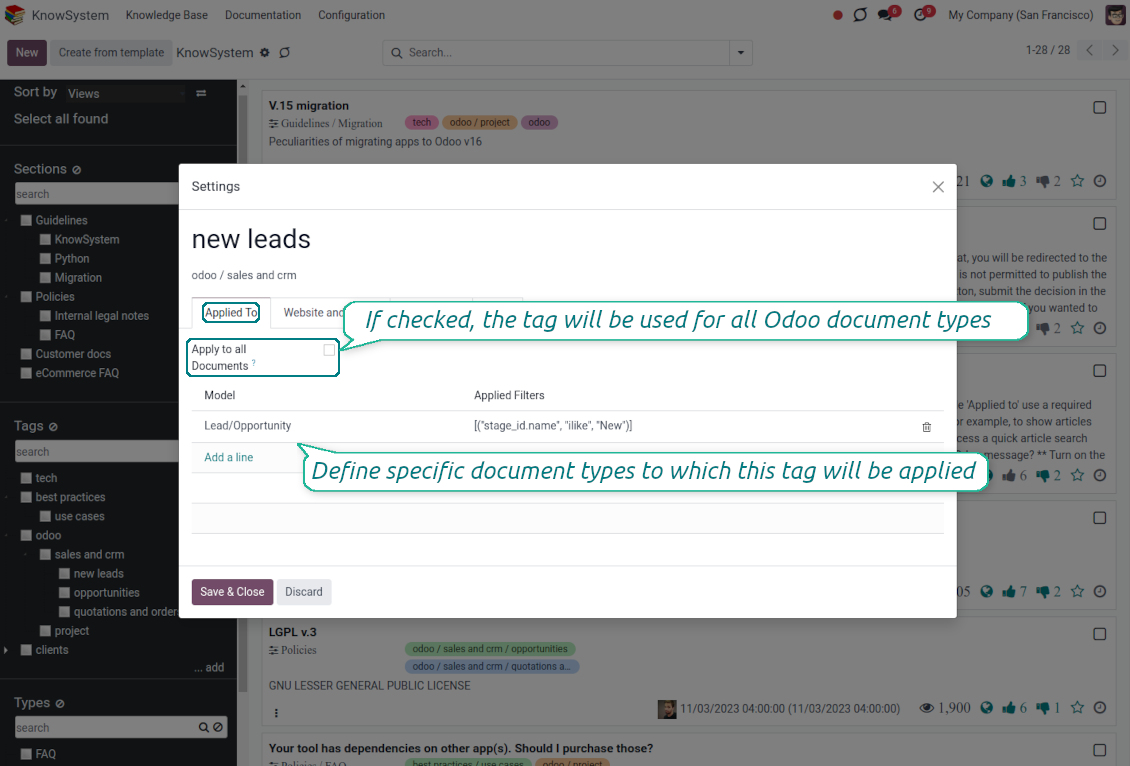
Link knowledge tags with Odoo document types to simplify the search of articles. For example, assign helpdesk tickets to the tag 'odoo/helpdesk': the latter would be entered by default for support requests objects
-
Observe article content right from any Odoo object: there is no need to always switch to the KnowSystem advanced interface
-
Turn on also the option 'KnowSystem in systray' to access knowledge from the Odoo systray disregarding the active interface
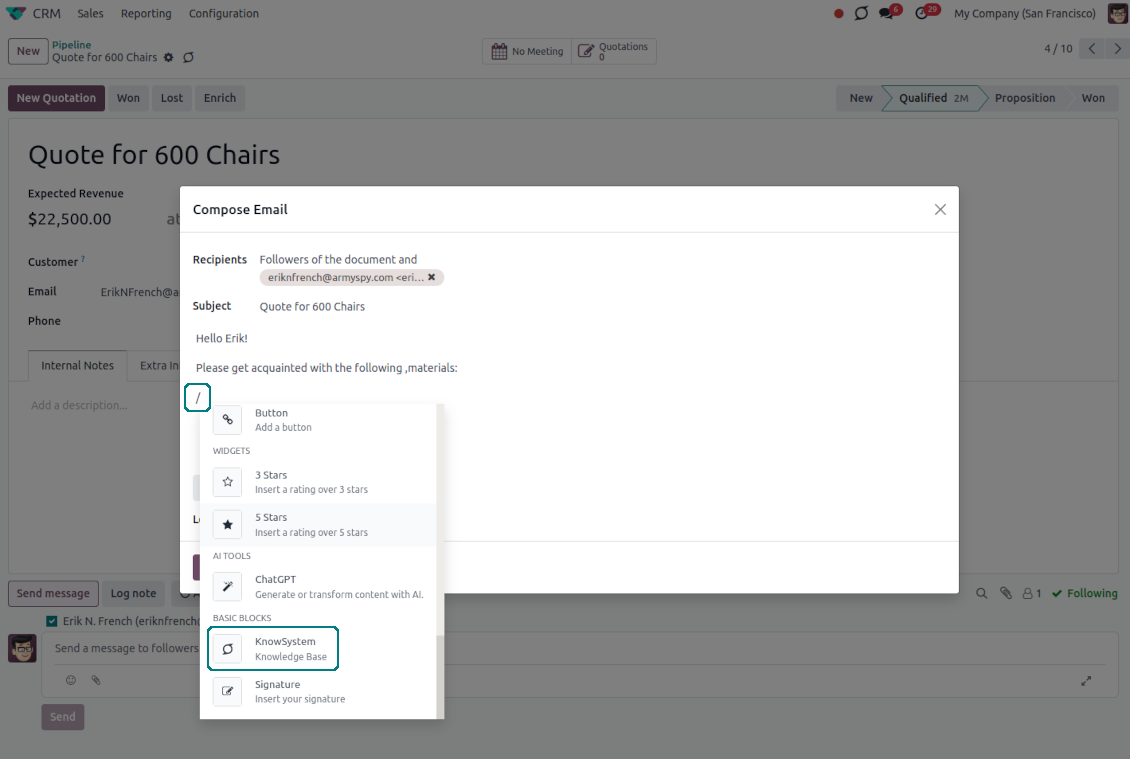
Apply knowledge in communication
-
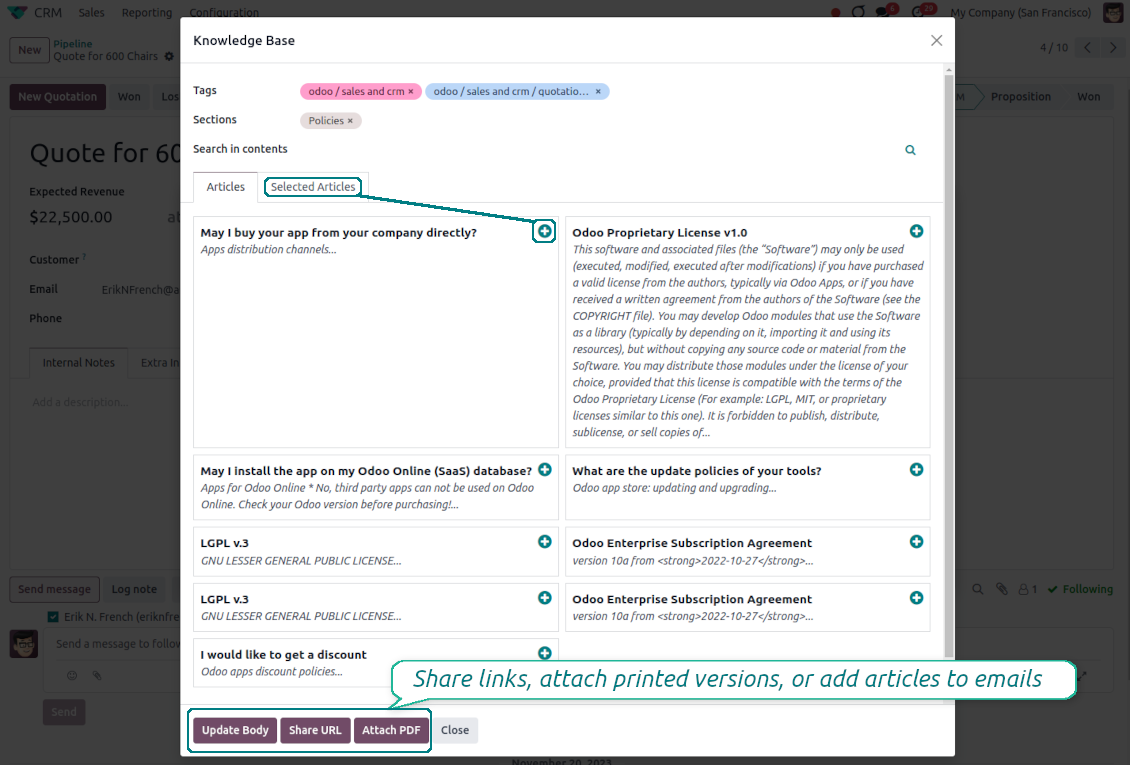
Turn on the option 'Articles in Email Composers' to let users reference or cite Knowledge records in Odoo messages
-
Quickly observe articles related to a current document discussion. Instantly reference those by applying the Odoo editor command '/' > KnowSystem
-
Update message body with knowledge content (it would be added to the end of a current message)
-
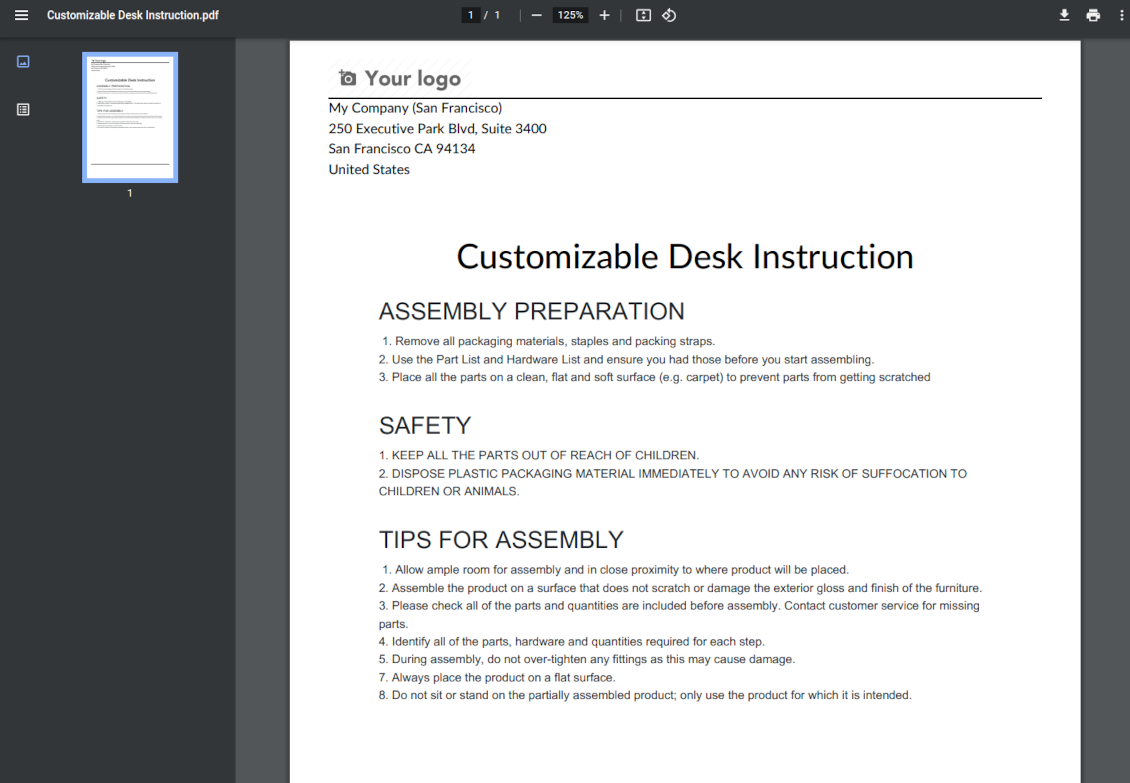
Attach a PDF version of referenced article or articles
-
Share knowledge links with your colleagues or partners. Configure the app to send backend, website/portal, or tokenized Odoo portal URLs
-
Turn on the setting 'Articles in Activities' to insert articles or their links also to Odoo activities
Organize learning tours
-
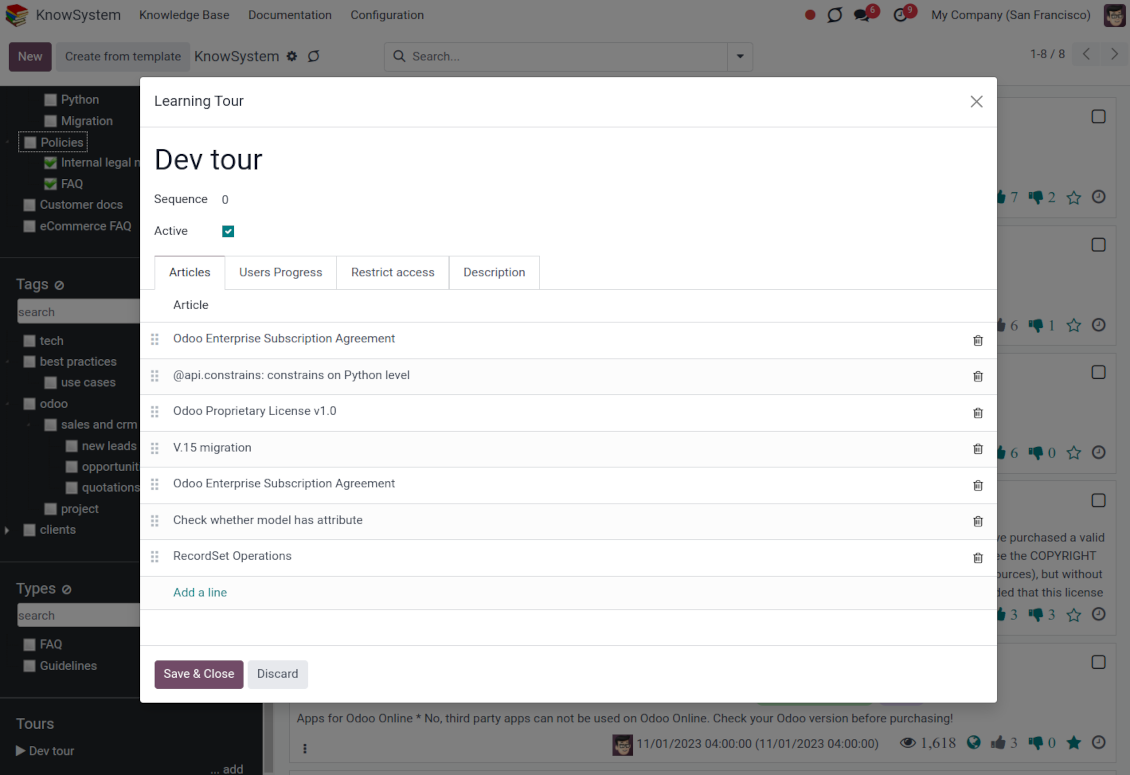
Turn on the option 'Tours' to be able to combine articles in a sequence of learning steps
-
Add any knowledge to a tour in any order
-
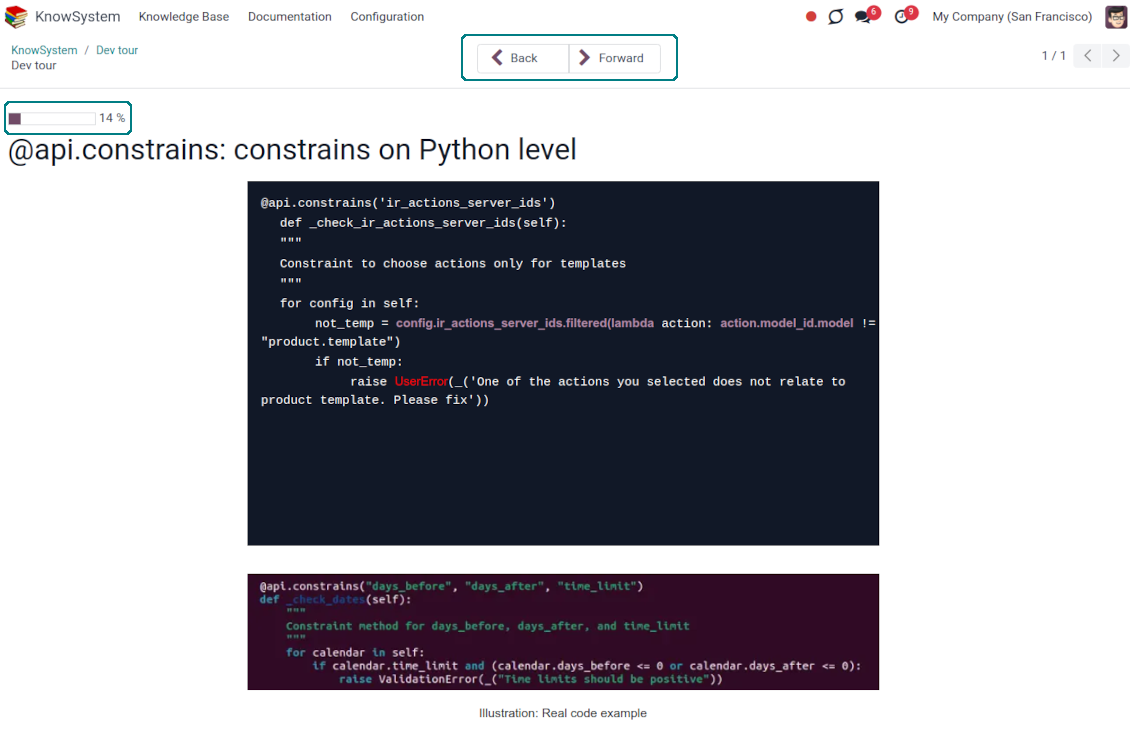
Launch a tour to follow certain steps of study one by one in the special interface
-
Share learning tours with everybody or specific user groups. Control employees' progress in getting familiar with instructions and guidelines
Share and publish knowledge
-
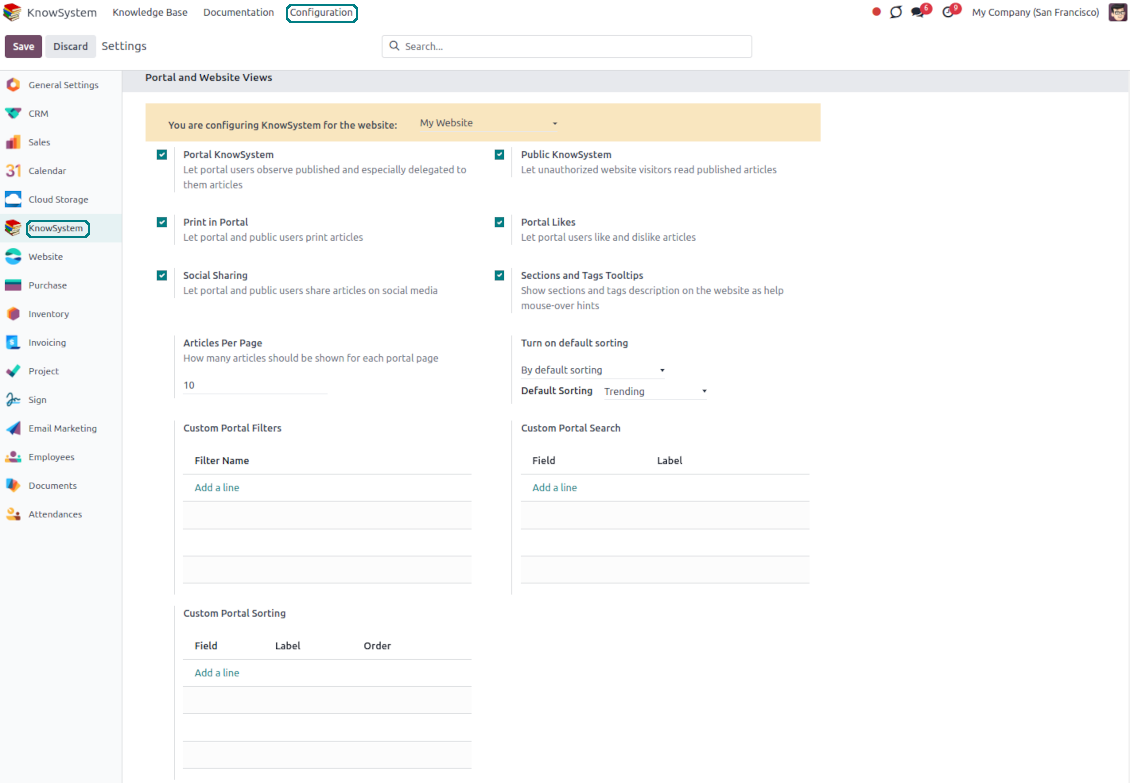
Turn on the setting 'Portal KnowSystem' to give KnowSystem access to external partners, and 'Public KnowSystem' - to website visitors
-
Configure KnowSystem tags or publish articles to share knowledge content
-
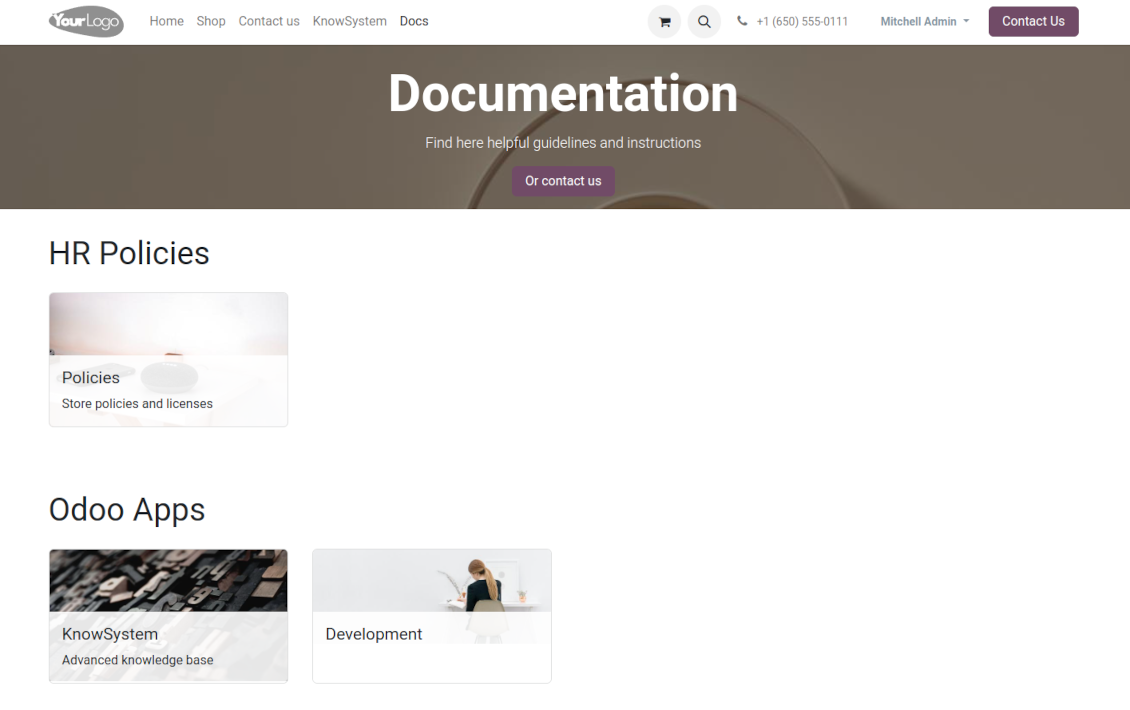
Combine articles in advanced documentation to cover a certain aspect of organizational or functional knowledge
-
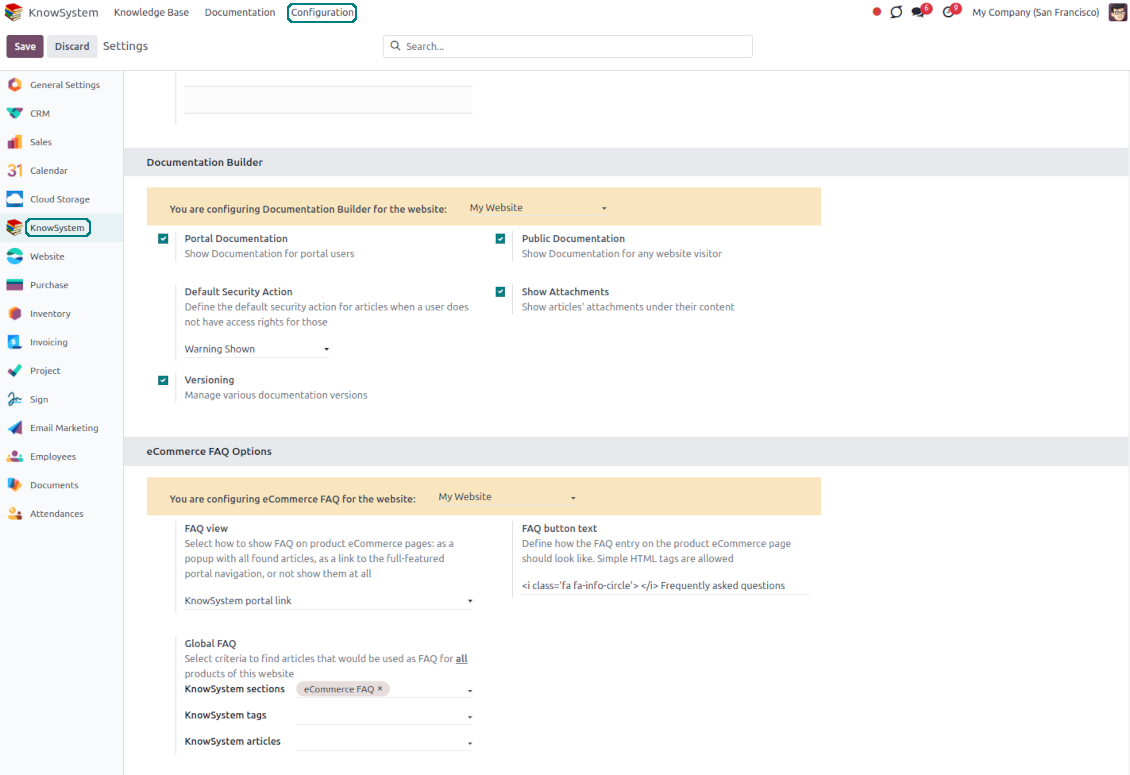
Turn on the option 'Portal Documentation' and 'Public Documentation' to make that documentation available for portal and public users respectively.
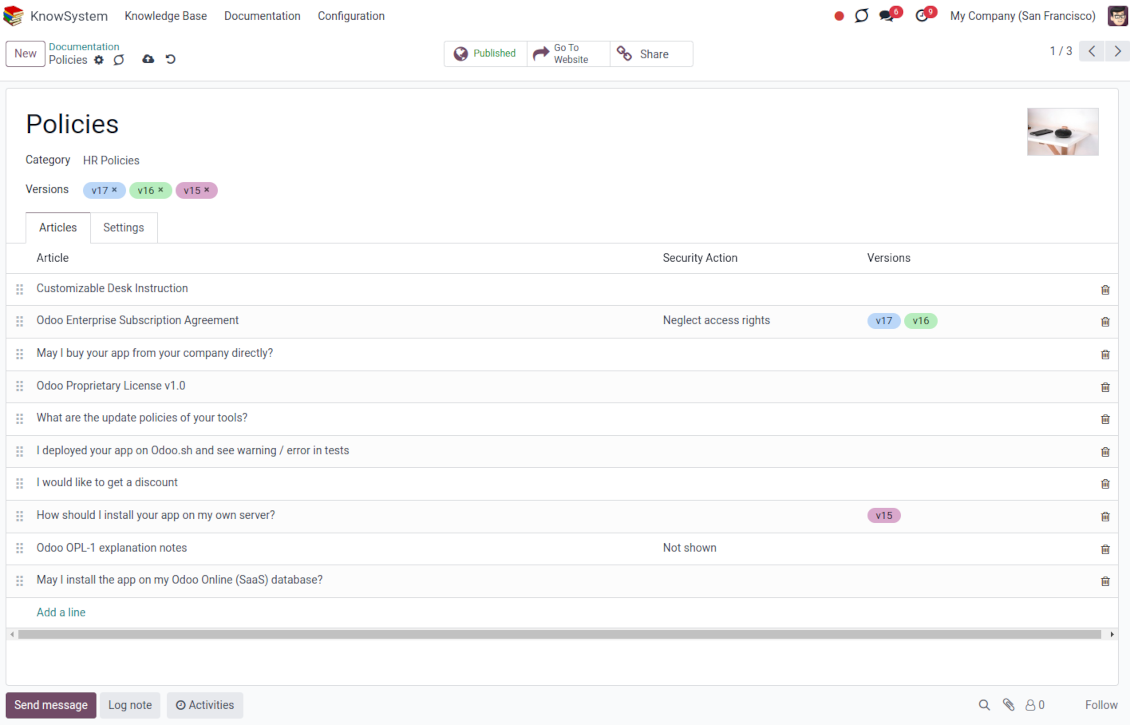
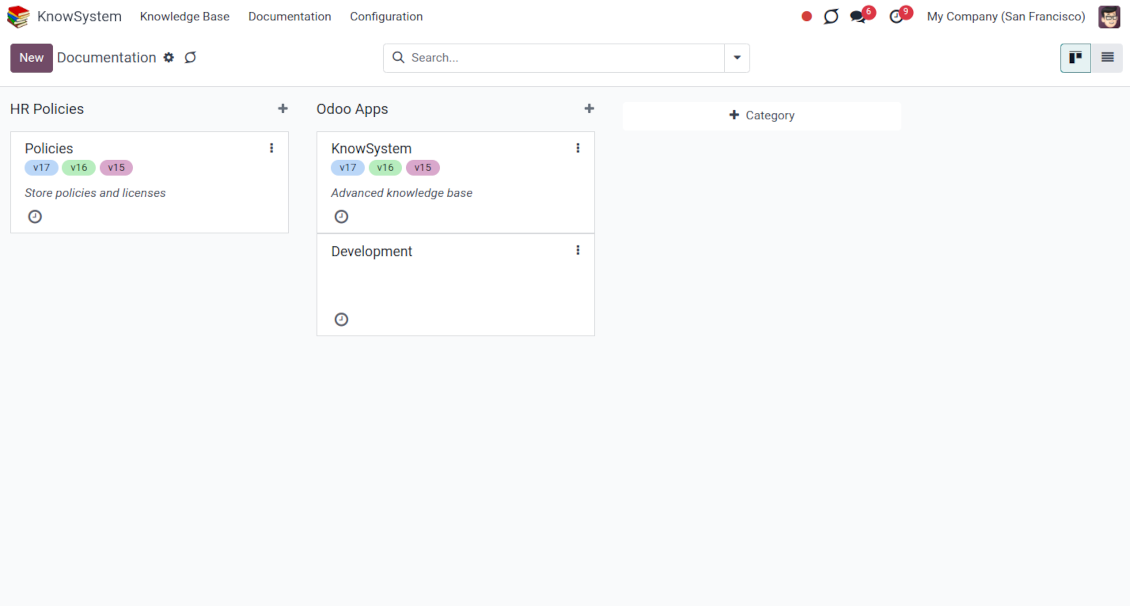
Website documentation builder
-
Combine articles into advanced documentation sections to cover a certain business, organizational, or functional aspect
-
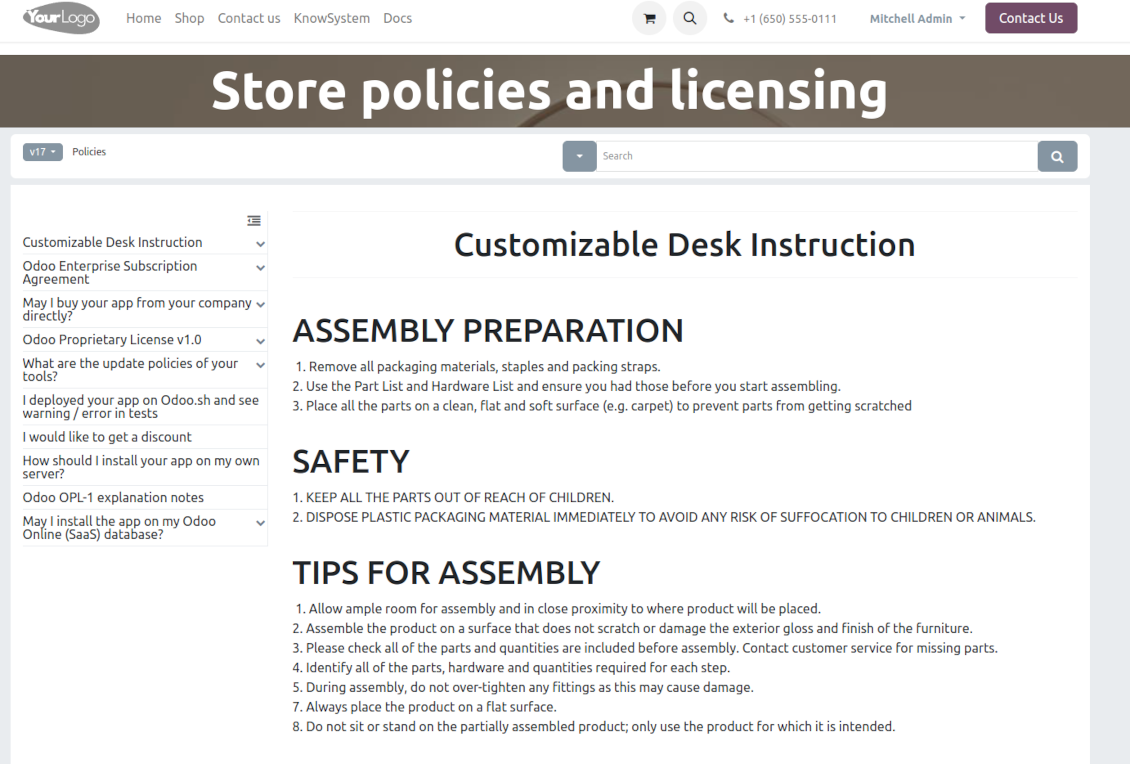
To create a new documentation section just select and order KnowSystem articles. The app would generate a website page automatically
-
Each KMS article might be used several times for different documentation sections
-
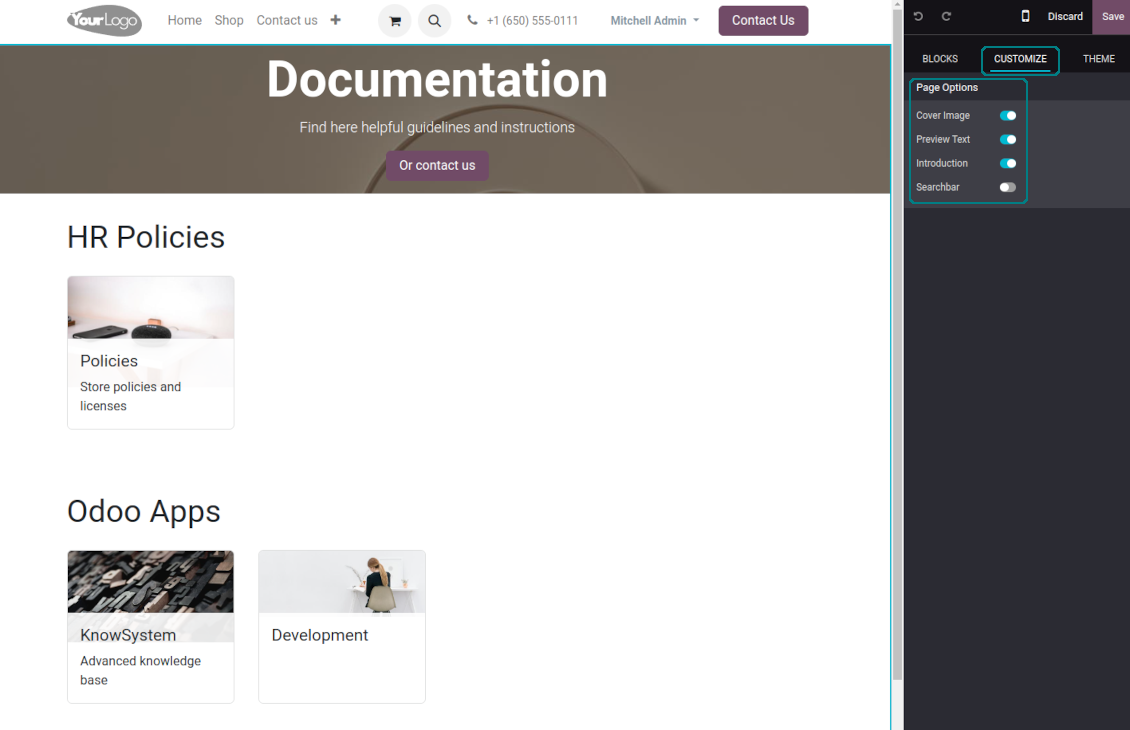
The tool allows preparing an unlimited number of documentation pages structured by categories
-
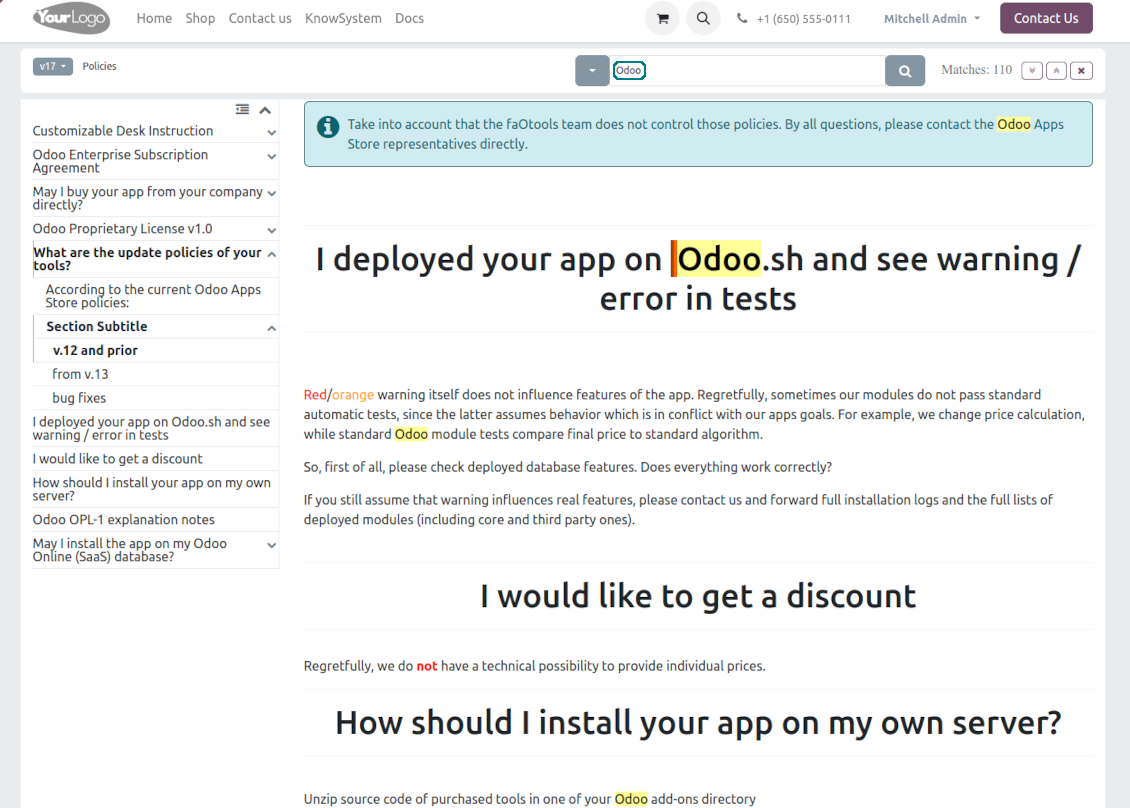
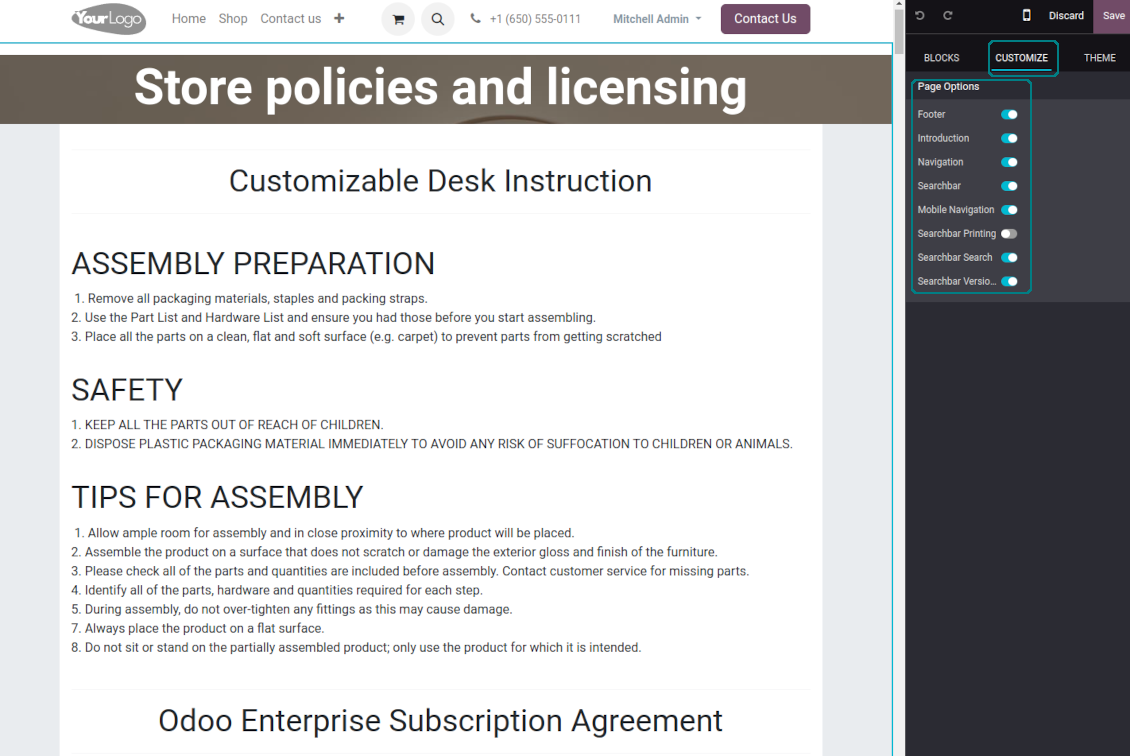
Flexibly customize documentation pages: show or hide introductions and footers, turn on/off the search bar and table of contents, add or remove preview images and texts
-
The app lets flexibly share documentation categories and sections. Publish required documents to make them available for everybody, assign KnowSystem tags - to grant access to chosen Odoo partners
-
Depending on user rights documentation might look different. Define what to do if a documentation user does not have access to included articles: to neglect restrictions, not show that knowledge pieces, or show a security warning
-
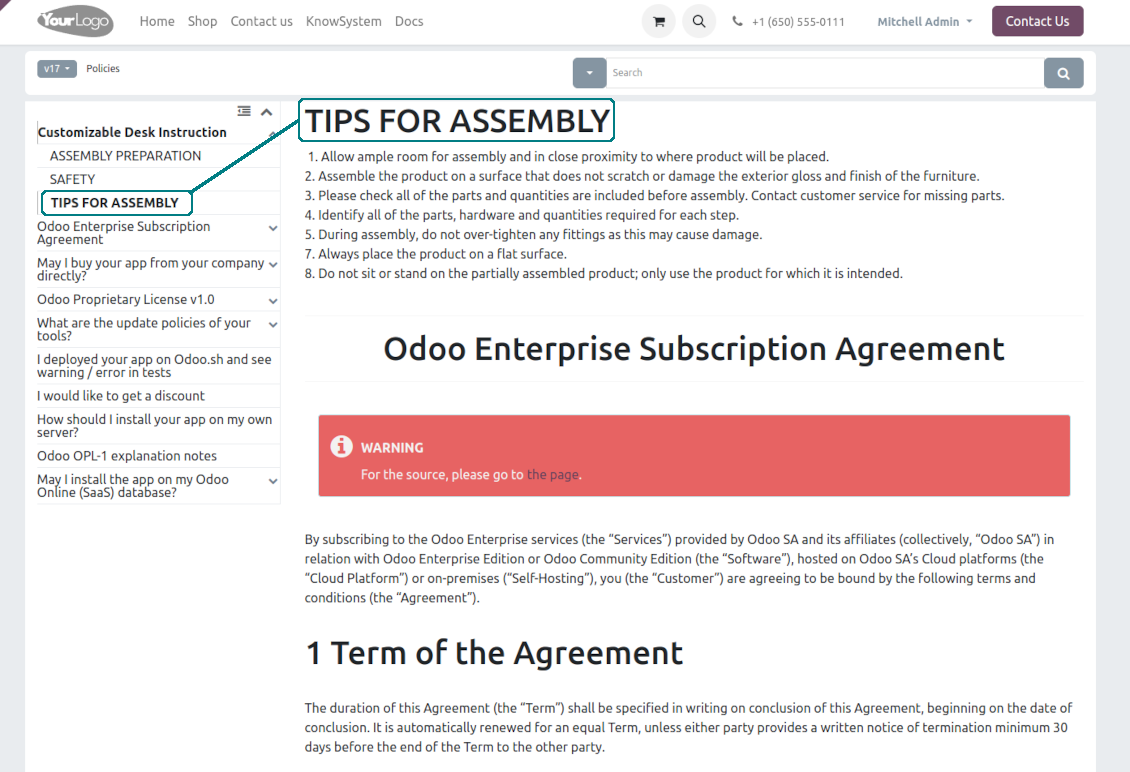
Optionally show a table of contents for comfortable and quick navigation. The table of contents is constructed automatically according to the headers of included articles
-
Turn on the search bar for documentation. It is possible to find matches in a whole text or only in headers, to make keywords case-sensitive or insensitive
-
Apply versioning for documentation to avoid double work in preparing specifications, user manuals, or software guidelines.
Partner knowledge base portal and public knowledge system
Knowledge in the Odoo portal
-
KnowSystem lets organize a web portal personally for each Odoo partner by selecting articles to be shared. To that end turn on the option 'Portal KnowSystem'
-
Design an article specially for a definite company, or use the same knowledge experience among multiple clients
-
Knowledge articles are available for portal users if: (a) those articles are published; (b) those articles have user-related tags
-
To assign a KnowSystem tag for a partner do one of the following: (a) go to a partner form and enter the field 'KnowSystem tags'; (b) on a tag form define 'Allowed partners'
-
Optionally allow partners to print knowledge pieces, like, and share articles
Public KMS
-
To make self-service possible: make your knowledge base available also for unauthenticated users. To that goal, turn on the option 'Public KnowSystem'
-
Only articles which are published will be available for website visitors
-
To publish specific knowledge parts: apply the mass action 'Publish' or tick the checkbox 'Visible on current website' on an article form
-
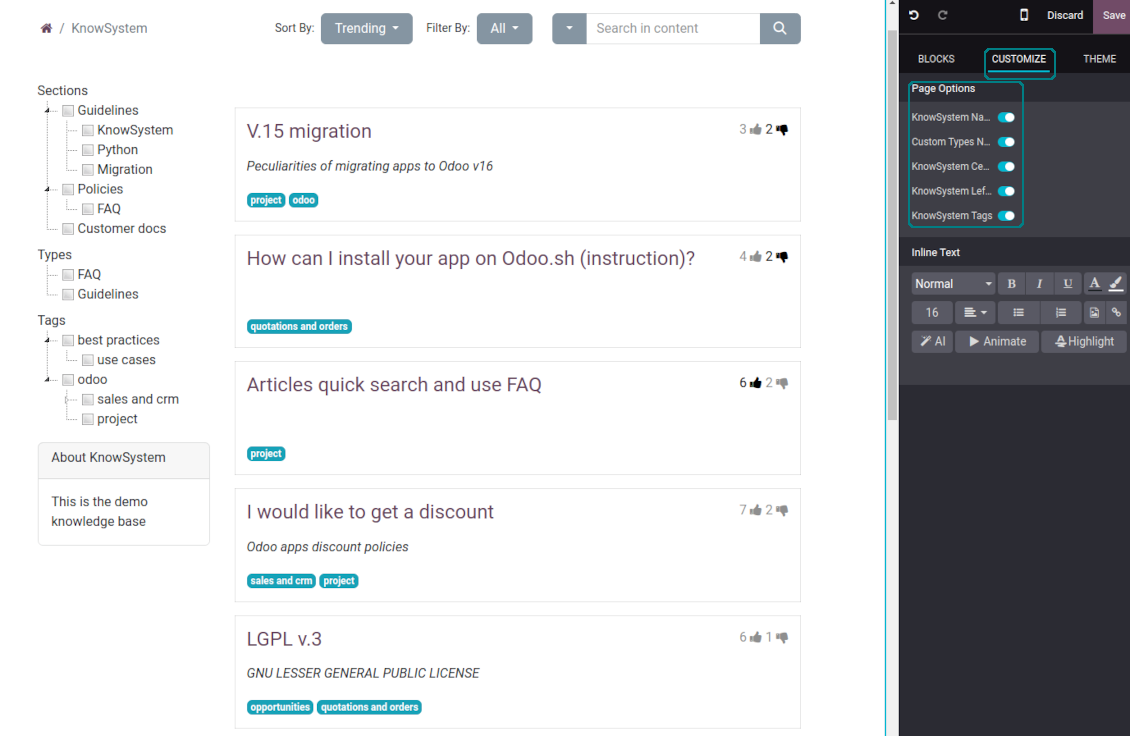
To show tags and article types in the portal and website do not forget to publish them. Knowledge sections will be shown only if they have articles for observation
-
Customize the knowledge portal: hide/show the navigation by tags and types or the whole navigation, prepare introduction or navigation hints, and add section tooltips.
Interactive and evolving knowledge base
Teamwork and use
-
The history of article revisions is kept in Odoo in a similar way it's done in Wikipedia. If one of the Odoo users breaks something, it takes 2 clicks to recover a proper knowledge version
-
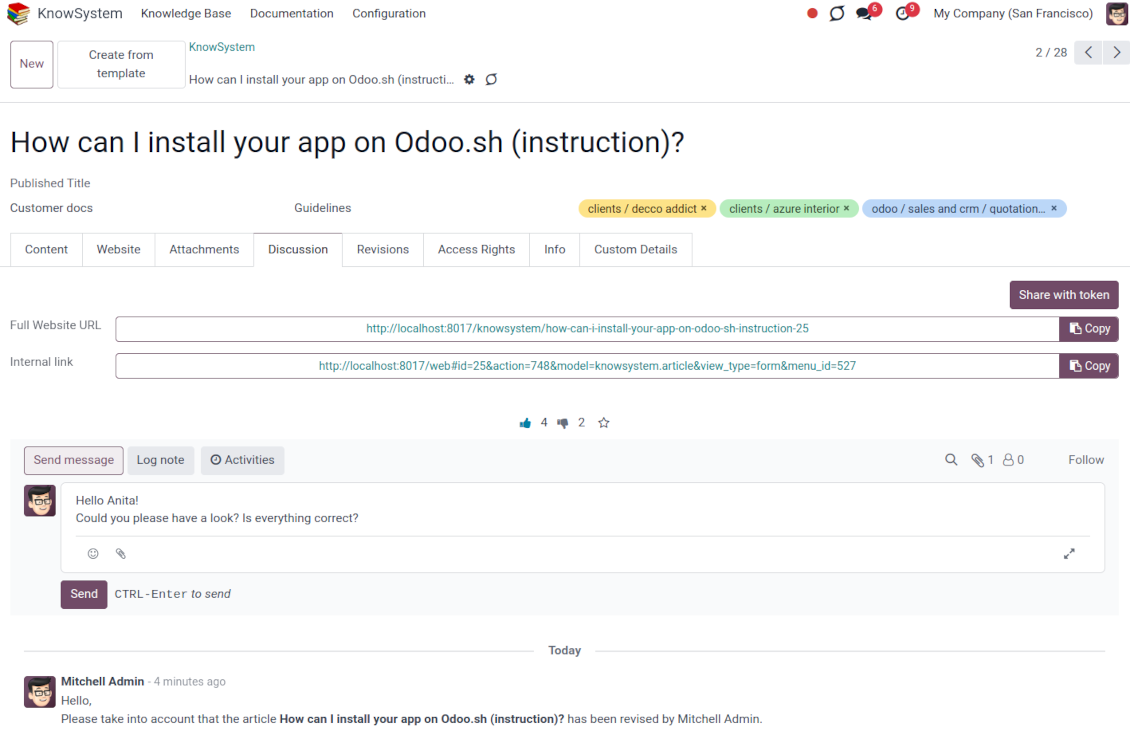
Users might take part in article discussions and subscribe to updates
-
Share tokenized articles with any contacts
-
Control statistics by articles: contributors, number of views, likes, and dislikes, how frequently they are used in messaging, who marks them as favorite
-
Set activities to improve the knowledge base. Configure articles to be auto-archived after a particular date
Multi-lingual knowledge
-
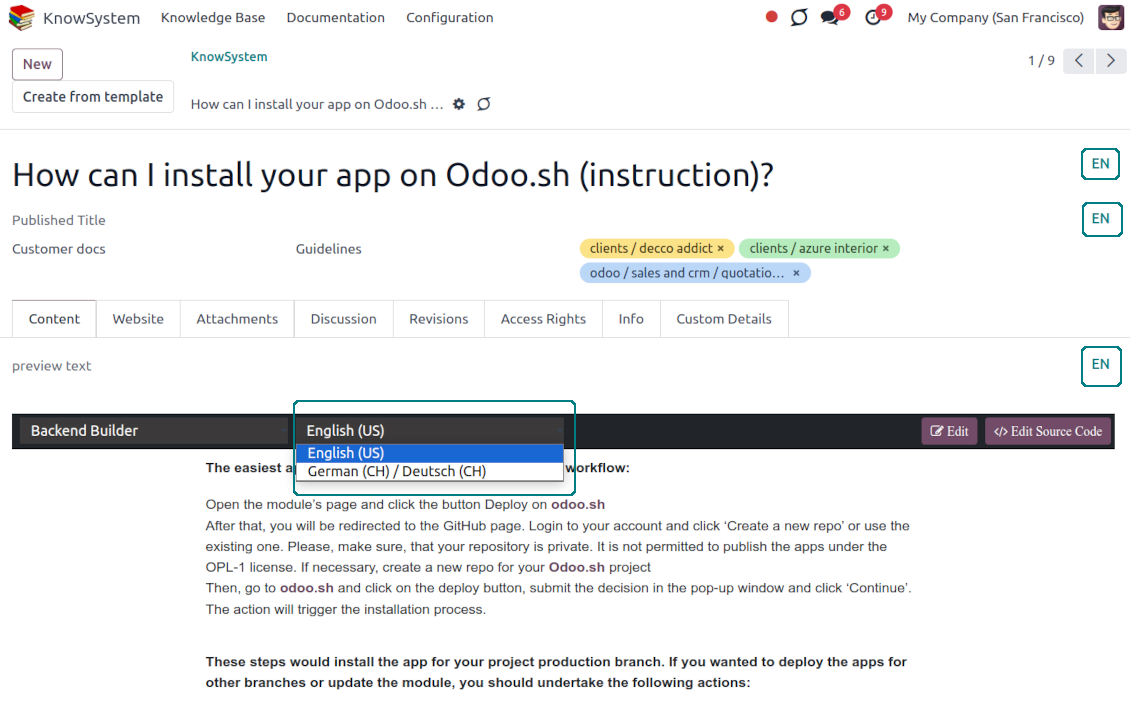
KnowSystem lets you translate articles in the languages installed in Odoo. In this way, users might read and edit articles in a language of their preferences
-
To avoid double work, article content might be copied from another language (the button 'Copy from another translation' under the article content). Simultaneously, make sure you actually require a multi-lingual regime: all articles should be anyway kept updated in all Odoo languages
-
To observe or update knowledge translation, you may switch the language right in the backend editor.
Design eCommerce FAQ or documentation
-
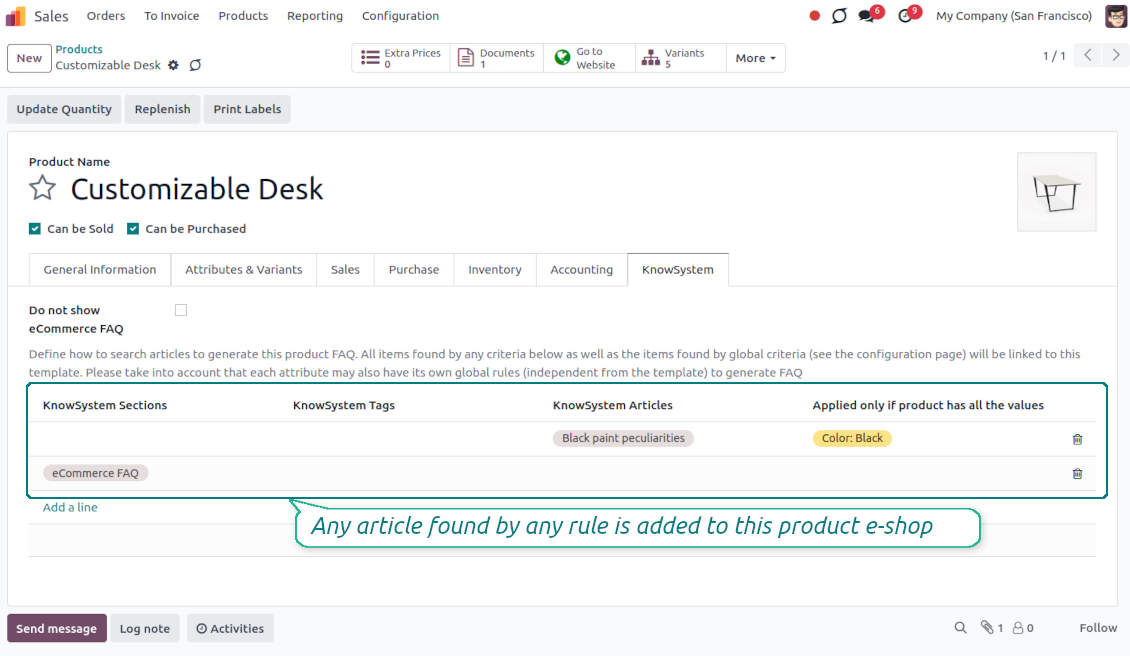
The tools allow adding the product knowledge entry to all eCommerce product pages
-
Optionally hide that for specific templates (the setting 'Do not show eCommerce FAQ') or for the whole eShop on a particular website (the configuration option 'FAQ view' - 'Do not show')
-
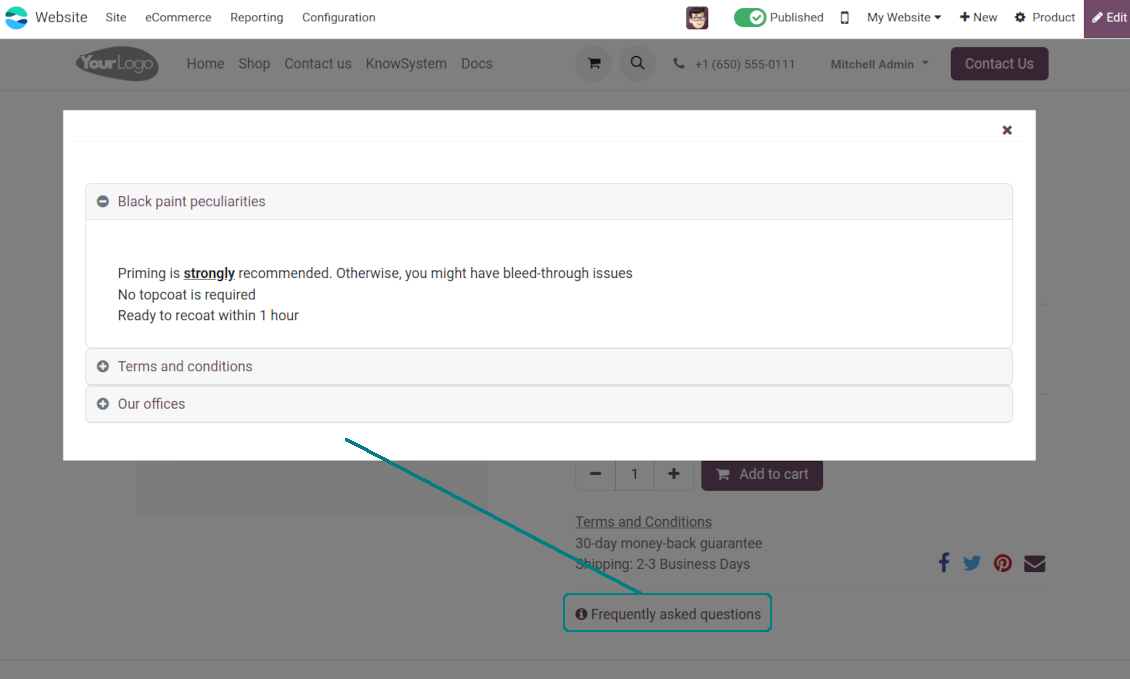
Introduce your own title for the button (the website setting 'FAQ button text'). By default, it is ' Frequently asked questions'. But you can change that to any, e.g. 'Product docs' or 'Instructions'. Simple HTML tags are allowed for that goal
-
Show product knowledge as a link to the main knowledge portal interface (choose 'KnowSystem portal link' for the option 'FAQ view'). In this way, when clicked users are redirected to the full KnowSystem navigation but are restricted by articles linked to the current product
-
Alternatively, the tool allows triggering a popup with all found articles accordion (choose 'Popup accordion' for the option 'FAQ view'). Thus, users are able to check articles without leaving a product e-Shop page
-
Establish links between product templates and KnowSystem to cumulate Odoo eShop knowledge. Show articles for specific sets of attribute values and hide them for others. For example, to have different FAQs for steel and aluminum tables
-
Define its own knowledge for Odoo attributes or attribute values disregarding actual products. For instance, complementary documentation for all variants that have 'legs' or 'custom legs'
-
Apply global settings of how to find articles for all eCommerce product pages. In this way, the app lets have the same FAQs basis for all sold items on a particular website
-
It is possible to define KnowSystem sections, tags, or specific articles on each layer. A knowledge piece would be selected if it satisfies any of the criteria. For sections and tags, child nodes would be also taken into account
-
Articles are shown on product pages only if a user can access those articles. Thus, website visitors would see only published ones.
Any business and functional area
KnowSystem is a universal knowledge management tool that might be configured to any business goal and any set of Odoo apps: helpdesk, marketing, IT, HR, project management, and so on and so on. Typical use cases are:
-
Helpdesk - once faced a challenge, its solution might be recorded in KnowSystem for repeated usage by co-workers and for self-service by clients
-
Sales and CRM - salesperson helper to find information about products and offers, frequently asked customer questions
-
Project management - to keep and easily retrieve knowledge of existing solutions, tools, hints, and experiments
-
HR - to prepare instructions, guidelines, learning tours and training, and any codified knowledge of routine in your company
-
Marketing - to organize Odoo's online library of product use cases, expert knowledge, and well-structured documentation
-
Legal issues - systematize your policies, contract/approval management, keep the full classifier of trademarks, licenses
-
Informational technologies - share easy-reached manuals and configuration guidelines.
Custom knowledge system attributes
-
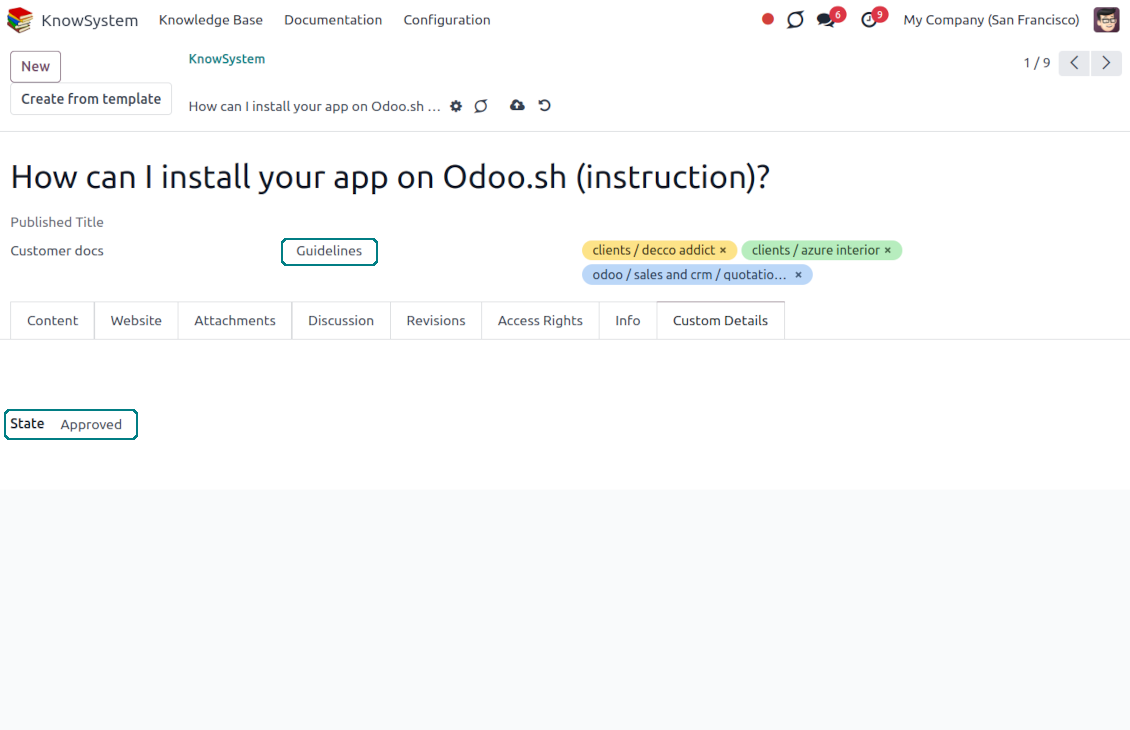
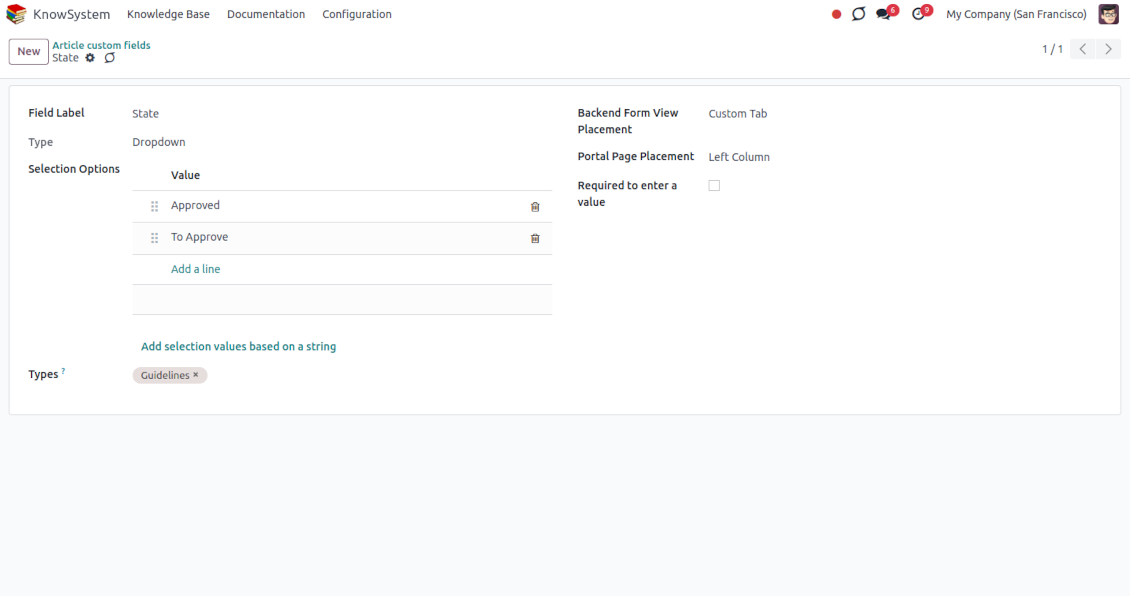
Custom attributes creation does not require any technical knowledge. In order to show a new property for knowledge base articles, just add a new field and enter details
-
It is possible to add custom fields of the following types: single-line text (char), simple text without formatting (text), rich text (HTML-formatted text), integer or float numbers, drop-down choice with your own options (selection), checkbox (boolean), date or date and time, binary (a file to upload), reference to another Odoo document (e.g. for sale order, contact; many2one)
-
The tool lets you comfortably select an interface position of a custom field from a closed list of options
-
Distinguish knowledge articles by type in order to show properties only for suitable ones. Thus, the set of attributes for 'user guidelines' and 'technical specifications' might be different
-
Mark a custom field required to force users to enter values
-
The app might work for both the KnowSystem backend and the knowledge share portal
-
Custom knowledge system fields might be imported and exported
-
The rights to create custom fields belong only to KnowSystem administrators.
Secured and shared knowledge
-
Security for internal and for portal/public users differs
-
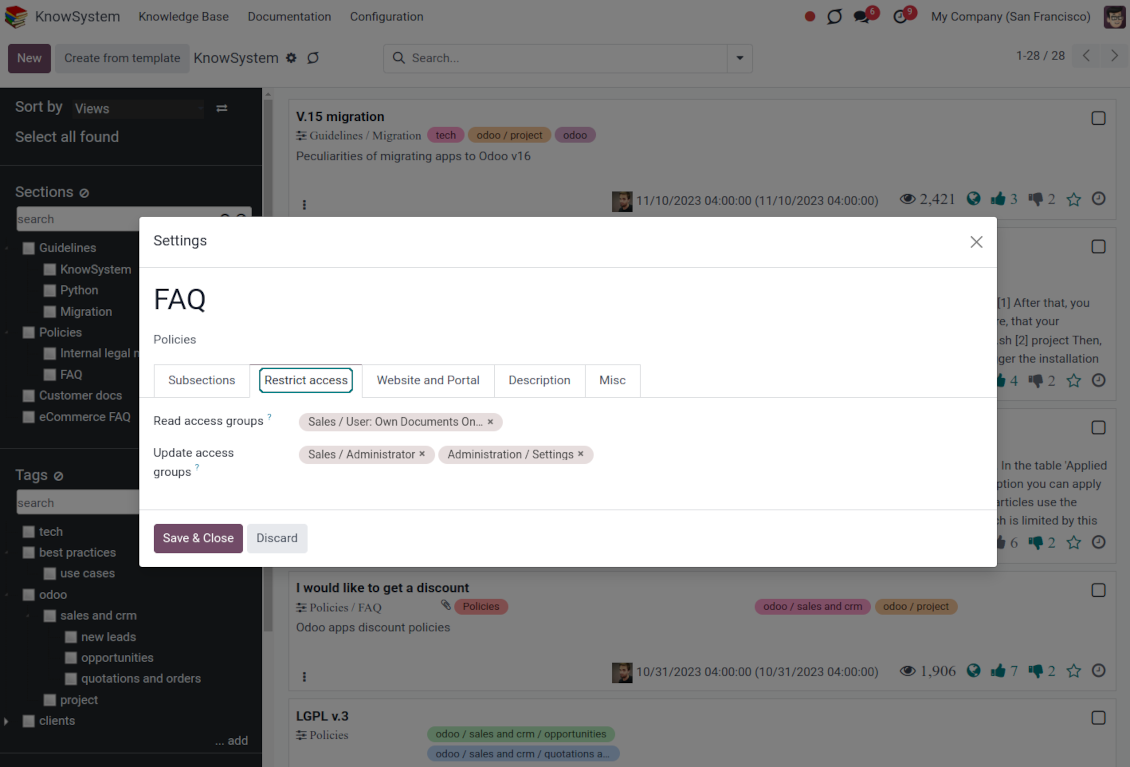
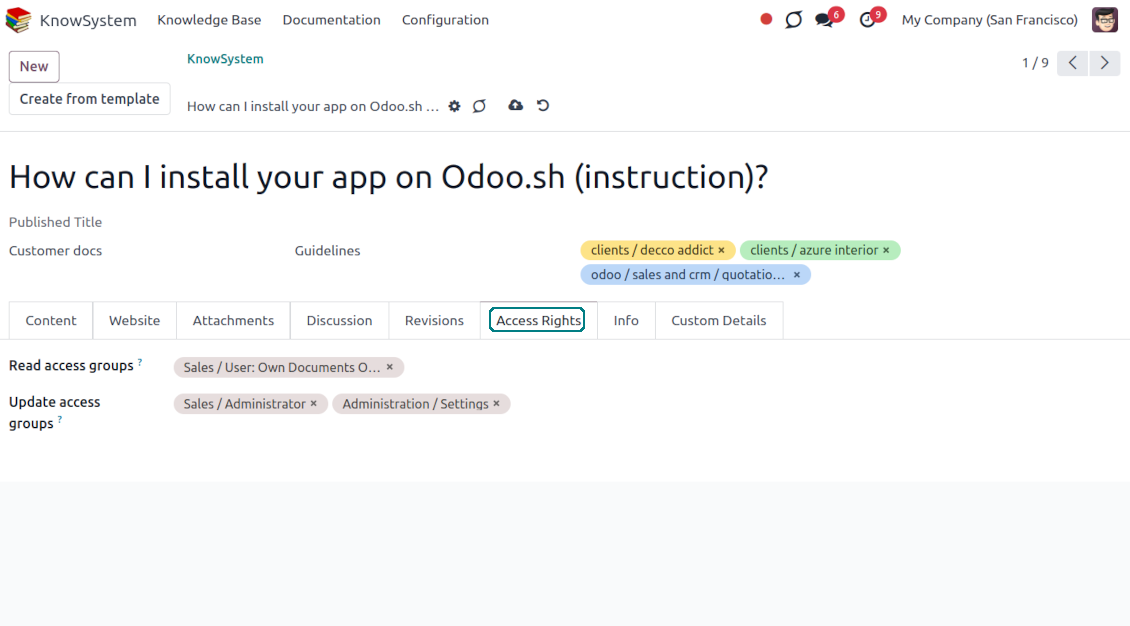
For the company employees: KnowSystem considers user groups which are defined per articles, sections, and tours. Look at the tab 'Restrict to' on forms of those objects. If that field is not defined, a document is considered 'global' and each internal user may read it
-
For portal / public users: KnowSystem takes into account tags and whether an article is website-published. A knowledge tag has a field 'Allowed partners', which may grant access to portal users for articles with this tag. Website-published pages are available for any external visitor
-
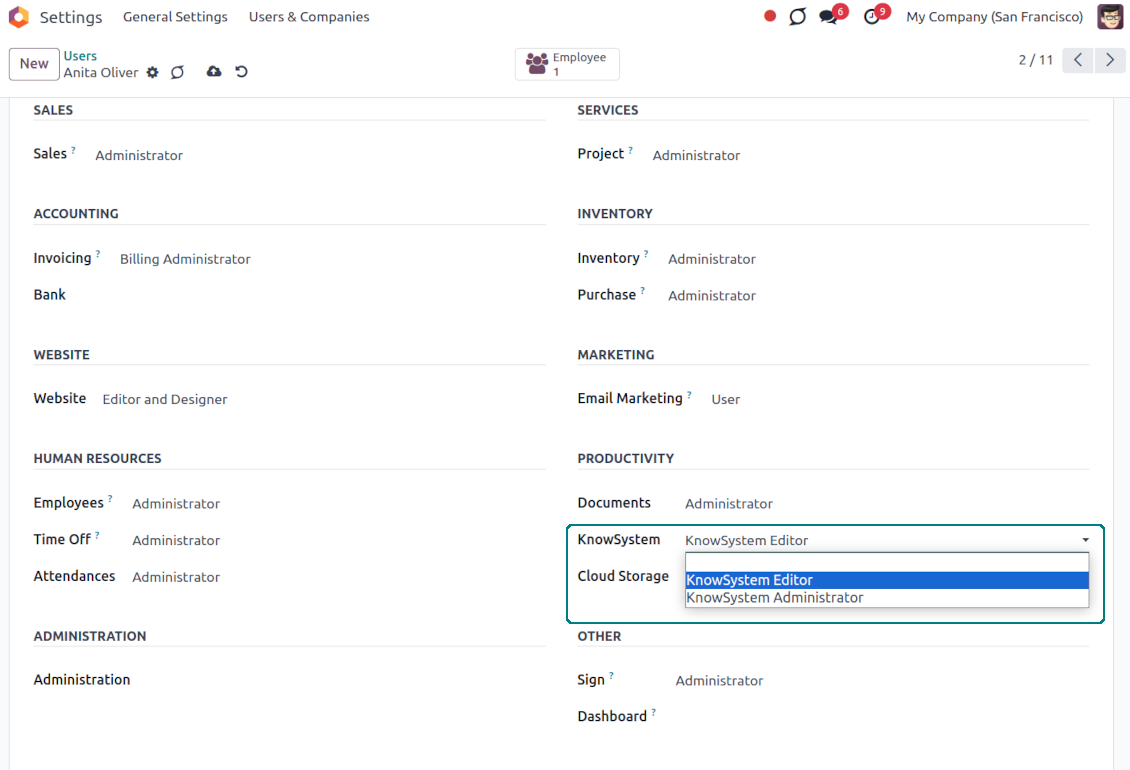
Rights to administrate the Odoo knowledge management system belongs to 2 user roles: KnowSystem Editor and KnowSystem Administrator. If you want a user to create and edit articles, a user should belong to one of those groups
-
Odoo users always may access an article if he/she is an author of that article disregarding further restrictions
-
Rights for a knowledge section are defined not only according to this section but also according to all its parents. For example, if a user can't access 'sales', he/she would not be able to access 'sales/crm' disregarding whether 'crm' is available for his/her user group.
|
|
Odoo user |
KnowSystem Editor |
KnowSystem Admin |
Portal user |
Public user |
| Articles | read related to his/her user groups and sections | read, create, edit, archive related to his/her user groups and sections | read, create, edit, delete any | read published articles and articles related to partner-related tags | read published articles |
| Sections | read related to his/her user groups | read, create, edit, archive related to his/her user groups and sections | read, create, edit, delete any | read published ones | read published ones |
| Tags | read any | read, create, edit, archive any | read, create, edit, delete any | read published ones | read published ones |
| Article Types | read any | read any | read, create, edit, delete any | read published ones | read published ones |
| Tours | read related to his/her user groups | read, create, edit, delete related to his/her user groups | read, create, edit, delete any | no access | no access |
| Misc | may like/dislike, add to favorites, print, take part in discussions | may configure options | may like/dislike an article |
|
Bieži uzdotie jautājumi par KnowSystem: Knowledge Base System Odoo v.17
Es neredzu nekādu atšķirību starp revīziju tekstiem.
Revīzijas reģistrē ne tikai teksta izmaiņas, bet arī stila atjauninājumus (tehniski, kad maināt raksta HTML pirmkodu). Dažas no tām var nebūt skaidras no pirmā acu uzmetiena (piem., viena vārda fonta lieluma maiņa). Citas var būt krāsas. Tomēr jebkura darbību kopā Rediģēt > Mainīt kaut ko rakstā > Saglabāt izveido jaunu revīziju.
Vai rakstam var pievienot YouTube/ Vimeo / Dailymotion / Youku video?
Jā, video no šiem pakalpojumiem var iegult rakstos gan no Odoo administrācijas, gan no vietnes veidotāja. Pievienojiet jebkuru bloku ar attēlu > nospiediet attēlu > izvēlieties ‘Video’ > ievadiet vajadzīgā medija URL.
Ņemiet vērā: šādi video tiek iekļauti kā iframe, un dažas pārlūkprogrammas var bloķēt atskaņošanu, līdz lietotājs to skaidri atļauj.
Kā padarīt sadaļu redzamu vietnē?
KnowSystem sadaļa vietnē ir redzama, ja tā ir publicēta un satur vismaz vienu rakstu. Pat ar apakšsadaļām tā nebūs redzama, ja pašā sadaļā nav neviena raksta. Tā izvairās no tukšām sadaļām, un KnowSystem portāls paliek pārskatāms. Lai sadaļa parādītos vietnē, pievienojiet ievada vai vispārīgu rakstu, kas īsi apraksta vai uzskaita apakšsadaļu rakstus.
Kā kopīgot rakstu ārējam partnerim?
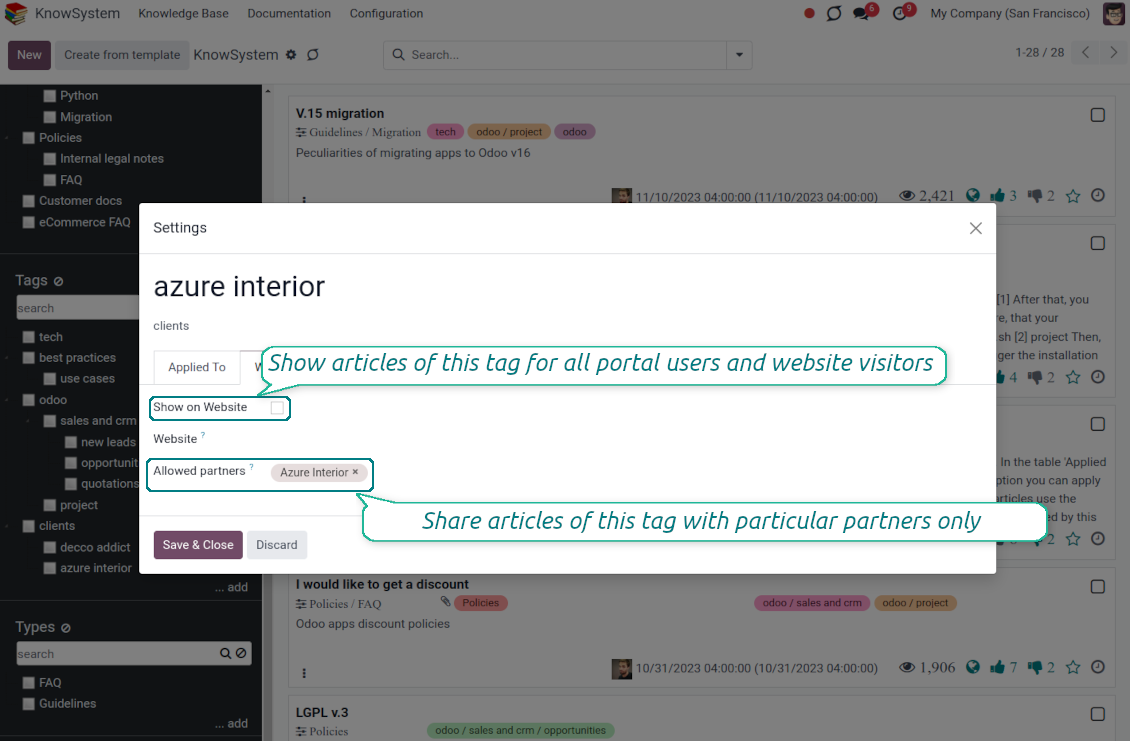
Ar peles labo pogu noklikšķiniet uz jebkuras birkas kreisajā navigācijas panelī - Izveidot
Atrodiet lauku „Allowed partners”. Piemēram, 'clients - azure interior', lai piešķirtu piekļuvi partnerim 'Azure Interior'. Varat arī pretēji: piešķirt KnowSystem birkas tieši partnera formā
Tagad atveriet vajadzīgo rakstu (vai dariet to pašu ar darbību „Mass update” vairākiem ierakstiem):
Ja tas ir publicēts: atceliet publicēšanu, ja nevēlaties, lai tas būtu pieejams visiem portāla lietotājiem un publiskajiem apmeklētājiem
Piešķiriet tikko izveidoto birku (piemērā tā ir 'clients - azure interior')
Tagad:
Visiem portāla lietotājiem, kas saistīti ar komercpartneri 'Azure Interior', ir piekļuve rakstiem ar birku 'Azure Interior'
Nevienam citam portāla lietotājam (ja nav piešķirta cita birka) nav piekļuves šiem rakstiem
Iekšējie lietotāji netiek ietekmēti un rakstus redz saskaņā ar rakstu un sadaļu loģiku „access to“.
Vai raksta saturam var pievienot valodas izvēles pogu?
Pogu 'translate' izvēles papildinājums 'KnowSystem: Multi Languages' tīši neliek raksta saturam. Iemesls: HTML kodu ir ļoti grūti tulkot vienkāršajā uznirstošajā logā, ko paredz poga. Tulkojamā teksta būtu ļoti maz, bet HTML daļu daudz (tulkotājs tās var arī sabojāt).
Tāpēc, lai veidotu rakstu noteiktā valodā, piesakieties kā šīs valodas lietotājs. Tas var būt cits lietotājs, vai arī īslaicīgi mainiet pašreizējā lietotāja iestatījumus. Pēc tam visus raksta satura labojumus veiks šajā valodā.
Varat izmantot arī pogu 'Copy from another translation' zem raksta satura, lai jebkurā brīdī paņemtu saturu no citas valodas (noderīgi, ja raksts kādā valodā ir būtiski atjaunināts).
Kā iegult citas vietnes lapu rakstā
Šim nolūkam varat izmantot iframe. Pārslēdziet rakstu uz neapstrādāta HTML koda redaktoru un ievietojiet, piemēram, <iframe src="https://faotools.com/" style="width:100%;min-height:600px;"> </iframe>.
Instalēju KnowSystem, bet neredzu pogu “create” un citas pogas
Visticamāk, lietotājam nav piešķirtas KnowSystem tiesības. Izvēlieties tiesības „KnowSystem Editor” vai „KnowSystem Admin” un atsvaidziniet lapu. Vadības pogām tagad jābūt redzamām.
Vai es varu rādīt konkrētu mācību tūri tikai izvēlētiem lietotājiem?
Jā, piemērojot lietotāju grupu (piem. 'Sales Manager'), kurai jāredz šī ekskursija. Ja lietotājs pieder grupai, viņš to redzēs. Ja nē, ekskursija netiks rādīta. Tas darbojas tāpat kā KnowSystem rakstu un sadaļu drošības tiesības.
Ņemiet vērā: ja ekskursijai nav piešķirtu grupu, tā ir „globāla” un redzama visiem.
Kā mainīt kājeni un galveni, drukājot rakstus?
Rakstu PDF galvene un kājene tiek ņemtas no uzņēmuma izkārtojumiem. Skatiet Settings > General Settings > sadaļu Business Documents. Tur definējat uzņēmuma veidni visiem dokumentu veidiem, tostarp rēķiniem, pārdošanas pasūtījumiem u.c., un arī rakstiem. Šāda Odoo pieeja uzskata kājeni un galveni par vispārēju uzņēmuma stilu, nevis konkrētu izdruku atribūtu.
Kā sasaistīt rakstus savā starpā?
Katram rakstam ir iekšējie (backend) un vietnes URLs (ja ir instalēta opcija 'KnowSystem: Website and Portal'). Noklikšķiniet pogu 'Info' raksta formā, lai uzzinātu šī ieraksta vietnes adreses. Jebkuru varat ievietot raksta tekstā kā hipersaiti.
Vai es varu mainīt raksta HTML pirmkodu?
Jā: ieslēdziet debug assets (iestatījumu pārskata ekrānā) un atgriezieties pie pašreizējā raksta. Rediģēšanas režīmā redzēsiet īpašo ikonu '</>'. Noklikšķiniet, lai skatītu un rediģētu HTML un stilus.
Kādas ir jūsu rīku atjaunināšanas politikas?
Saskaņā ar spēkā esošajiem Odoo Apps Store noteikumiem:
- Katrs 12.0 un vecākai versijai pirktais modulis dod piekļuvi visām versijām līdz 12.0.
- Sākot ar 13.0. versiju, katra moduļa versija jāpērk atsevišķi.
- Neatkarīgi no versijas pirkums dod tiesības uz visiem atjauninājumiem un labojumiem galvenās versijas ietvaros.
Ņemiet vērā, ka faOtools komanda šos noteikumus nekontrolē. Jautājumus adresējiet tieši Odoo Apps Store pārstāvjiem.
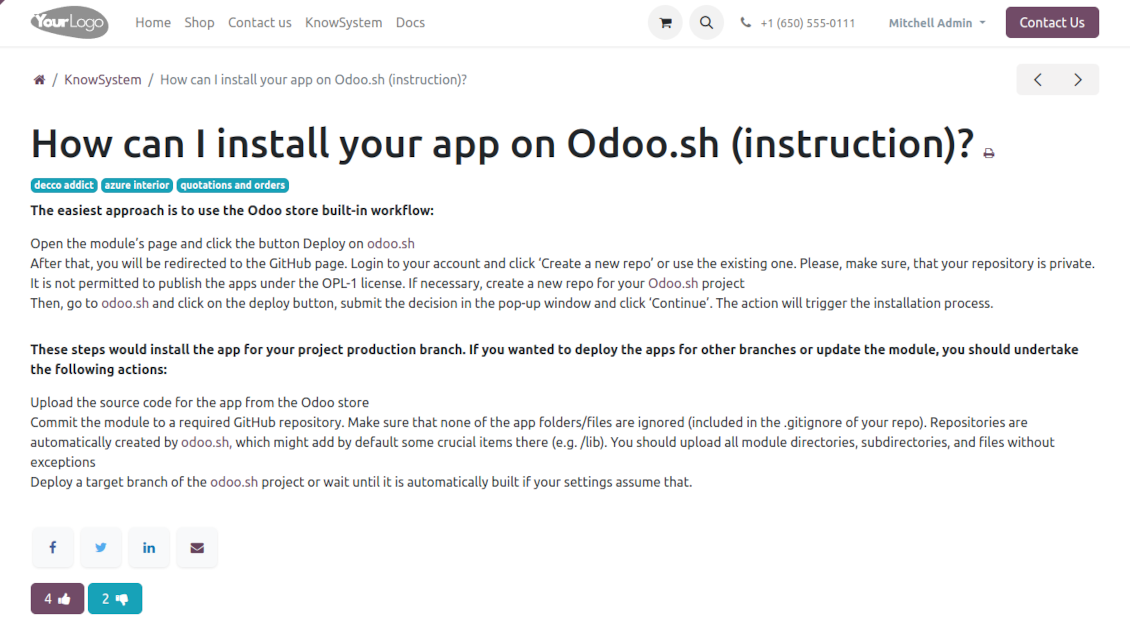
Kā instalēt jūsu lietotni Odoo.sh?
Visiešākā pieeja ir izmantot Odoo veikala iebūvēto darbplūsmu:
1. Atveriet moduļa lapu un noklikšķiniet pogu Deploy on odoo.sh
2. Pēc tam jūs novirzīs uz GitHub lapu. Pierakstieties kontā, pēc tam noklikšķiniet 'Create a new repo' vai izmantojiet esošu. Pārliecinieties, ka krātuve ir privāta. Lietotnes nedrīkst publicēt ar OPL-1 licenci. Ja vajag, izveidojiet jaunu repo Odoo.sh projektam
3. Pēc tam dodieties uz odoo.sh un noklikšķiniet pogu Deploy. Uznirstošajā logā iesniedziet lēmumu un noklikšķiniet 'Continue.' Šī darbība sāk instalēšanu.
Šīs darbības instalēs lietotni projekta produkcijas zarā. Ja vēlaties izvietot lietotnes citos zaros vai atjaunināt moduli, veiciet šīs darbības:
1. Augšupielādējiet lietotnes pirmkodu no Odoo veikala
2. Veiciet moduļa commit vajadzīgajā GitHub krātuvē. Pārliecinieties, ka neviens lietotnes mape/fails netiek ignorēts (t.i., nav repo .gitignore). Krātuves automātiski izveido odoo.sh, un pēc noklusējuma tajās var būt svarīgi elementi (piem., /lib). Augšupielādējiet visus moduļa katalogus, apakškatalogus un failus bez izņēmumiem
3. Izvietojiet odoo.sh projekta mērķa zaru vai, ja iestatījumi to paredz, gaidiet, līdz tas tiek automātiski būvēts.
Kā instalēt jūsu lietotni savā serverī?
2. Restartējiet Odoo serveri;
3. Ieslēdziet izstrādātāja režīmu (tehniskie iestatījumi);
4. Atjauniniet lietotņu sarakstu (lietotņu izvēlne);
5. Atrodiet lietotni un nospiediet „Activate“/„Install“;
6. Sekojiet lietotnes lapas vadlīnijām, ja tādas ir.
Pamanīju, ka jūsu lietotnei ir papildu papildinājumi. Vai varu tos iegādāties vēlāk?
Jā, protams. Vienlaikus Odoo automātiski pievieno visas atkarības grozam, tāpēc iepriekš iegādātie rīki jāizslēdz, lai izvairītos no dubultas samaksas.
Izvietoju jūsu lietotni Odoo.sh un testos redzu brīdinājumu/kļūdu
Sarkans/oranžs brīdinājums neietekmē lietotnes funkcijas. Diemžēl mūsu moduļi dažkārt neiztur standarta automātiskos testus, jo tie pieņem uzvedību, kas ir pretrunā ar lietotnes mērķiem. Piemēram, mēs mainām cenas aprēķinu, bet standarta Odoo moduļa testi salīdzina galīgo cenu ar standarta algoritmu.
Vispirms pārbaudiet izvietotās datubāzes funkcijas. Vai viss darbojas pareizi?
Ja joprojām uzskatāt, ka brīdinājums ietekmē īstas funkcijas, sazinieties ar mums un nosūtiet pilnus instalācijas žurnālus un pilnu izvietoto moduļu sarakstu (ieskaitot kodolu un trešo pušu).
Vai es varu iegādāties lietotni tieši no jūsu uzņēmuma?
Nē, rīkus izplatām tikai caur oficiālo Odoo lietotņu veikalu.
Es vēlētos saņemt atlaidi
Diemžēl mums nav tehnisku līdzekļu individuālu cenu piedāvāšanai.
Vai es varu instalēt lietotni savā Odoo Online (SaaS) datubāzē?
Nē, trešo pušu lietotnes nevar izmantot Odoo Online. Diemžēl Odoo SaaS to bloķē.
Jūsu rīkam ir atkarības no citām lietotnēm. Vai tās jāiegādājas?
Jā, rīkam ir nepieciešami visi atkarībās atzīmētie moduļi, lai darbotos pareizi. Lietotnes lapā norādītā cena jau ietver visas nepieciešamās atkarības.
Kāda ir moduļa cena ASV dolāros? Kāpēc tā mainījās?
Mūsu moduļu cena ir eiro. Odoo veikals konvertē cenas citās valūtās pēc iekšējā kursa. Tāpēc cena ASV dolāros var mainīties, kad kurss tiek atjaunināts.
Lietotnes un vietnes teksti valodās, kas nav angļu, ir sagatavoti ar MI palīdzību un saskaņoti ar oficiālajiem Odoo tulkojumiem. Ja pamanāt kļūdu, nosūtiet biļeti par tulkojumu pareizību un mēs to labosim.
Odoo demonstrācijas datubāzes (tiešie priekšskatījumi)
Šai lietotnei varam nodrošināt bezmaksas personalizētu demo datubāzi.
Lai sazinātos, nav vajadzīgs tālruņa numurs vai kredītkarte. Pietiek ar īsu e-pasta reģistrāciju, kas neaizņem vairāk par 30 sekundēm.
Pēc jūsu pieprasījuma sagatavosim individuālu tiešā priekšskatījuma datubāzi, kurā apmēram divas nedēļas varēsiet veikt testus un pārbaudīt pieņēmumus.
Kļūdu ziņošana
Ja sastopaties ar kļūdām vai nekonsekventu uzvedību, sazinieties ar mums. Garantējam labojumus 60 dienu laikā pēc pirkuma un esam ieinteresēti rīkus uzlabot arī pēc šī perioda.
Lai sazinātos, nav vajadzīgs tālruņa numurs vai kredītkarte. Pietiek ar īsu e-pasta reģistrāciju, kas neaizņem vairāk par 30 sekundēm.
Iekļaujiet pieprasījumā pēc iespējas vairāk informācijas: ekrānuzņēmumus, Odoo servera žurnālus, pilnu problēmas atkārtošanas aprakstu u. tml. Parasti darba plāna sagatavošana (ja kļūda ir apstiprināta) vai norādījumu sniegšana (citādi) prasa dažas darba dienas.
Publiski funkciju pieprasījumi un moduļu idejas (bezmaksas izstrāde)
Mēs esam stipri motivēti uzlabot savus rīkus un būsim pateicīgi par jebkuru atsauksmi. Ja jūsu prasības ir vispārīgi noderīgas un tās var efektīvi īstenot, komanda tās iekļaus mūsu uzdevumu sarakstā.
Šāds uzdevumu saraksts tiek apstrādāts regulāri un neparedz papildu maksas. Lai gan mēs nevaram solīt termiņus un galīgo dizainu, tas var būt labs veids, kā iegūt vēlamās funkcijas bez ieguldījumiem un riskiem.
Lai sazinātos, nav vajadzīgs tālruņa numurs vai kredītkarte. Pietiek ar īsu e-pasta reģistrāciju, kas neaizņem vairāk par 30 sekundēm.
17.0.1.3.21
- The issue of Late Activities listing articles that have no overdue activity for the selected user has been fixed.
17.0.1.3.20
- The issue of autovacuum failure has been fixed.
17.0.1.3.19
- The issue with the double click needed to remove selected articles has been fixed.
17.0.1.3.18
- The issue of non-updated likes counters has been fixed.
17.0.1.3.17
- The edit rights for sections/articles now imply the read rights for those objects.
17.0.1.3.16
- The feature to search keywords divided by bold or italic tags has been added.
17.0.1.3.15
- The issue with the access error when opening the articles search wizard for ordinary users has been fixed.
17.0.1.3.15
- The archived ribbon for inactive records is added to article kanban and form views, and form views of sections and tags.
17.0.1.3.14
- The website view of articles and documentation is optimized for small screens.
17.0.1.3.13
- KnowSystem rakstu noklusējuma aktivitāšu skats tagad ir Kanban.
17.0.1.3.12
- KnowSystem rakstu pārmērīgas tīrīšanas problēma pēc composer ziņojuma nosūtīšanas ir novērsta.
17.0.1.3.11
- Ātrās rakstu meklēšanas valodas pārslēdzēja problēma ir novērsta.
17.0.1.3.10
- Meklēšana tikai virsrakstos tagad ir iespējama backendā.
- Labota poga, kas no uznirstošā dialogā atver atrasto rakstu jaunā cilnē.
17.0.1.3.9
- Ievietota vilkšana un nomešana rakstu masveida atjaunināšanai: pievienot birku, atjaunināt sadaļu un pievienot mācību tūrei.
- Pievienota atrastā raksta atvēršana jaunā cilnē.
- Atlasītais navigācijas koku vecāks tiek izcelts pareizi.
17.0.1.3.8
- KnowSystem rakstu Kanban skats ir pielāgots jaunākajām Odoo v.17 pieejām.
- Navigācijas hierarhijas ir optimizētas.
17.0.1.3.7
- Rakstu aizmugures navigācijas noklusējuma kārtošanas kritērijs tagad ir konfigurējams lietotnes lapā.

The tool to flexibly structure Odoo attachments in folders and synchronize directories with cloud clients: Google Drive, OneDrive/SharePoint, Nextcloud/ownCloud, Dropbox, Amazon S3, Box, and NAS. DMS. File Manager. Document management system
398€
The tool to automatically synchronize Odoo attachments with OneDrive files in both ways
487€
The tool to automatically synchronize Odoo attachments with Google Drive files in both ways
487€

The tool to set up KPI targets and control their fulfillment by periods. KPI dashboards. Dashboard designer. KPI charts

The tool for time-based service management from booking appointments to sales and reviews
398€
The tool to manage your Odoo from your favorite AI chats through MCP. Claude. Any MCP-supporting AI.

The tool to translate URL addresses of Odoo website pages
38€
The tool to combine different Odoo events in a few configurable super calendars