DropBox Odoo Integration v.13
The tool to automatically synchronize Odoo attachments with DropBox files in both ways



- the technical core which provides basic mechanics of auto synchronization. This is a required module for integration. Giá là 398€.
- the connector itself which introduces links between Odoo and DropBox. Giá là 89€.
- an optional add-on to sync Odoo documents (introduced by the enterprise app 'Documents') with clouds. The features assumed by this add-on are marked by the icon . Giá là 44€.
Selectable documents types for sync
The tool let you split any business model into a few directories. Have a separate folder for individuals and companies, for European and American opportunities, for each project, etc.
Moreover, it is possible to guarantee that only topical documents are synced by using relative periods: leads registered in the last 3 months, invoices updated the last week, and so on.
Typical use cases
- Projects: have an own DropBox folder for each customer project.
- Customers: add all partner files in a single directory available both from Odoo and from DropBox. Modify those using default cloud editors and access them when working in Odoo.
- Employees: gather all files by this employee in a single cloud folder: photos, document scans, contracts. Access and upload those from Odoo and DropBox alternatively.
- Opportunities: carefully store all specifications, requirements, any files which would let you make a good offer.
- Orders: keep all printings and contracts in DropBox with simple availability from Odoo.
Ảnh chụp màn hình
Choose document types to be synced
Document type might have a few folders based on filters
Automatic and bilateral integration
Synced attachments are physically kept only in a cloud storage, what increases Odoo interface performance. Simultaneously, you can open documents from Odoo or download those in a single click.
How files and folders are synced from Odoo to DropBox
Based on the scheduled job 'Synchronize attachments with cloud' Odoo regularly checks whether:
- Any new attachment should be forwarded to DropBox;
- Any new document type (e.g. Sale orders) is added / replaced / renamed as a sync model and, hence, whether a directory should be created / removed / renamed in DropBox;
- Any new document (e.g. Sale Order SO019) is generated / updated / unlinked and, hence, whether a DropBox folder should be created / moved or renamed / deleted.
- Any new attachment should be removed from DropBox if it has been deleted from Odoo.
Based on results of that checks, Odoo starts processing queue of changes, and makes sure that all items are located correctly. The final goal is to have the structure 'Odoo / Document Types / Documents / Files. For example, 'Odoo / Quotations / SO019 / commercial offer.pdf'.
During the synchronization all synced Odoo attachments change their type to a link (URL), while binary content is removed with a next Odoo cleaner. So, no actual files would be stored on your Odoo server.
Please take into account:
- Each sync (especially the very first one) might take quite a long. It is not recommended to make sync too frequent: once an hour seems reasonable frequency.
- File names should be managed in DropBox: each backward sync would recover DropBox names, Odoo is here less important.
How items are retrieved from DropBox to Odoo
Based on the scheduled job 'Synchronize attachments from cloud' Odoo regularly checks whether:
- Any file is added / moved / removed in a DropBox document folder. If yes, Odoo would create a link to this file in a target object (e.g. a new attachment to SO019) or would move / delete such an attachment.
- Any file of a DropBox document folder is renamed. If yes, an attachment would be renamed in Odoo as well.
- In document folders you can put not only files but also child folders. In that case a link for this folder (not its content) would be kept in Odoo attachments.
- If you deleted a folder related to this document type or this document, their child files would be deleted as well. Thus, Odoo would remove related attachments. The folders, however, will be recovered with a next direct sync.
- Each backward sync might take quite a long. It is not recommended to make sync too frequent: once an hour seems safe enough.
Ảnh chụp màn hình
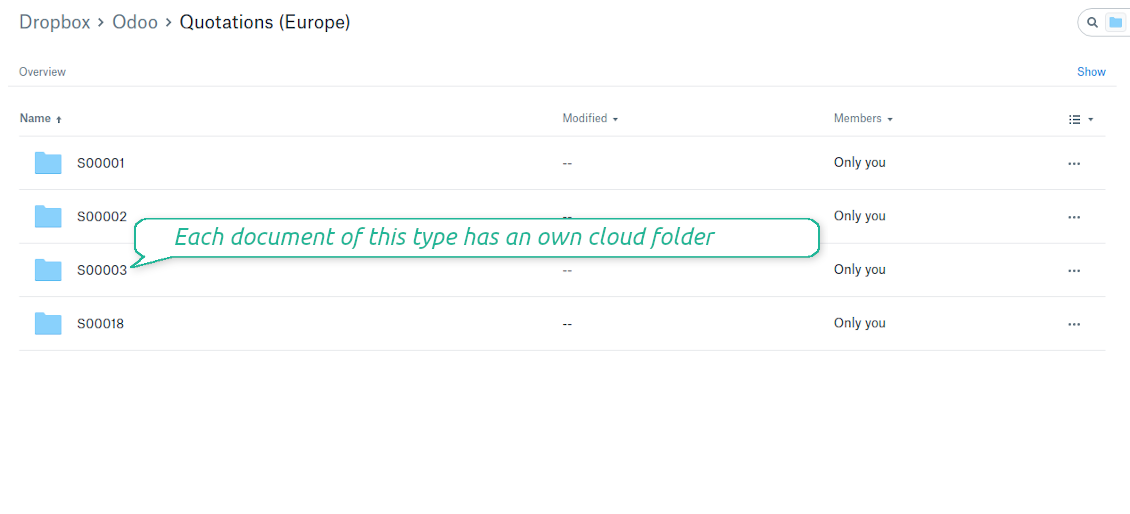
Synced files are simply found in DropBox. Add unlimited number of files or folders
Document types folders in DropBox
All document of this type has an own folder
Direct access to DropBox items
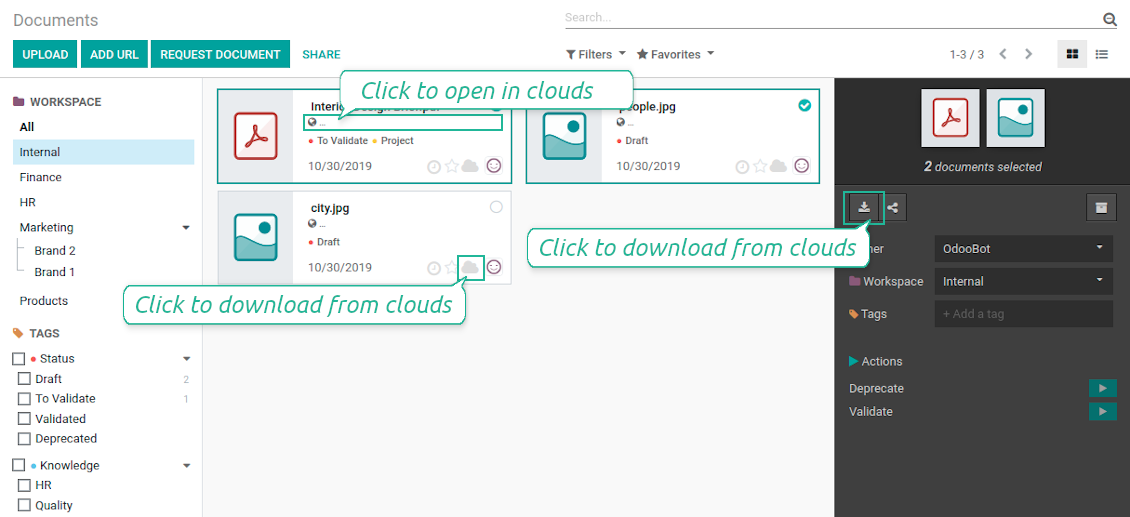
- Click on attachment to open it in DropBox in a new tab (necessary to be logged in DropBox). Have also a look at the section Dropbox URLs below;
- Click the icon of cloud to start downloading file from DropBox (no extra check in is required)
- Push the button "Open cloud folder" to open all files related to this document.
DropBox URLs
DropBox has a specific way to generate links for existing files and folders. In particular, there are no concepts of internal or private URLs. Instead, each DropBox item might get so-called shared URLs. Such shared links are either public or team-only. Moreover, the latter feature is available only for DropBox business account.
This tool relies upon share links' mechanics. It means, that each attachment link is either public (all personal DropBox accounts) or team-only (all business DropBox accounts).
Sometimes it is considered to be not fully safe. Although website URLs will be hardly known by external users, there is a slight chance that they become available as a result of some user actions. Besides, sharing links generation is not super fast and might make a sync process slower. That is why the feature to switch off sharing urls is introduced.
If checked, all DropBox urls in Odoo will be of type https://www.dropbox.com/home/Odoo/[PATH]. Such links will not work in quite a many cases. Thus, if you need to open DropBox files / folders from Odoo, do not switch off the feature 'No links to DropBox from Odoo'.
Ảnh chụp màn hình
Quick access to DropBox files and folders
Apply to DropBox right from Odoo chatter
Fully integrated and compatible with Enterprise Documents
It does not contradict printing, mailing, or Enterprise documents features.
For the latter it is also possible to fully reflect directories structure, not only sync standard attachments.
How Odoo Enterprise Documents are synced
This tool is not in conflict with the 'documents' module provided under the Enterprise license. Attachments related to Enterprise folders would be synced as any other files: according to a document they relate to.
It is not always comfortable, and you might be interested in reflecting directories' structure introduced by the module 'Documents'. To this end the special extension is developed. This extension introduces the following features:
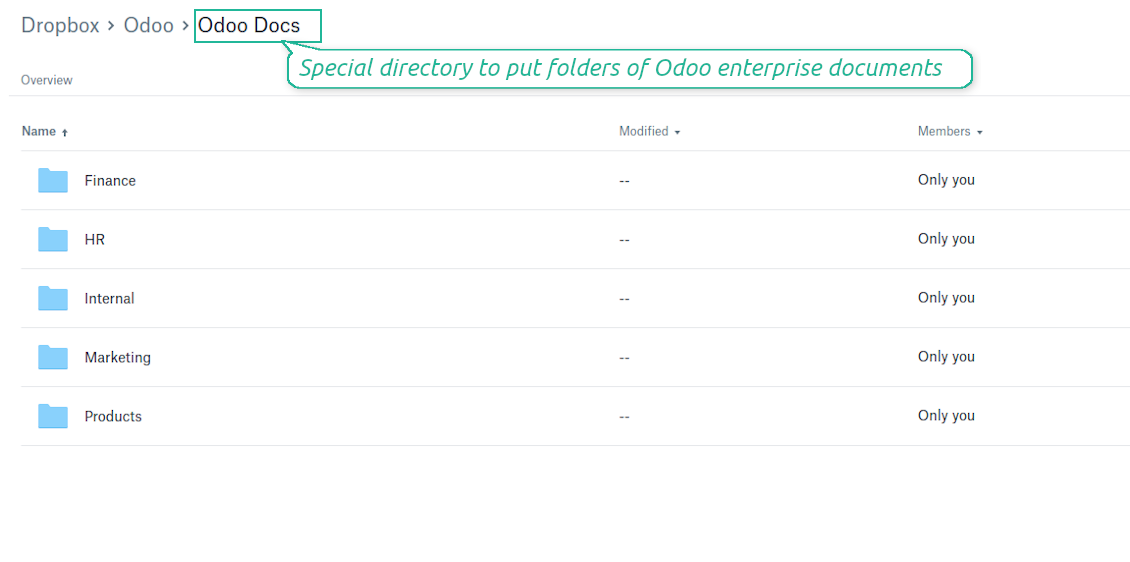
- The documents hierarchy is reflected within the folder 'Odoo / Odoo Docs'
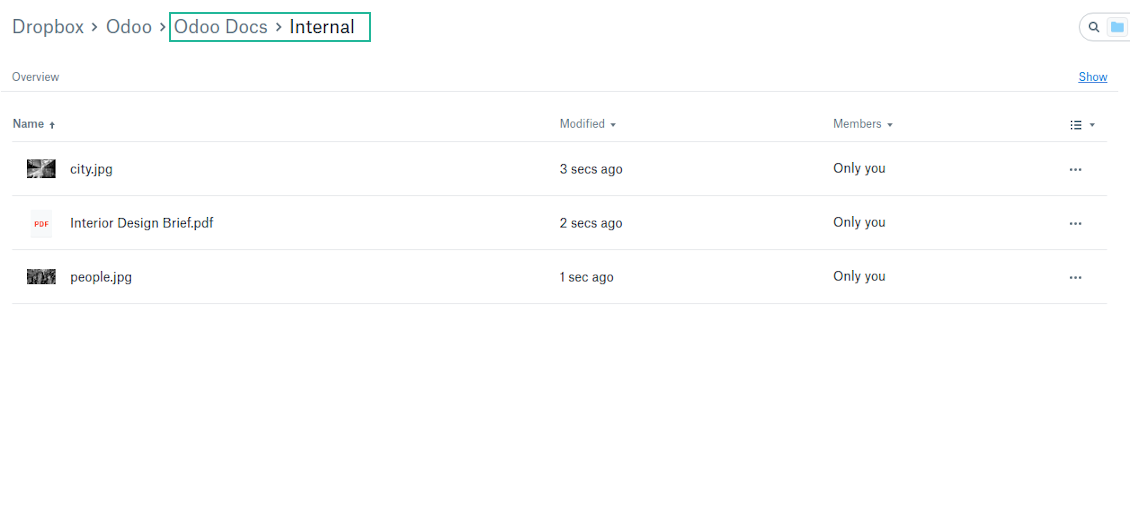
- Each Odoo folder has a linked cloud folder. Take into account that folders created in the cloud storage will be synced as Odoo attachments. The key principle is: folders are managed by Odoo, files are managed by the cloud client
- All files are synced with the same logic as usual attachments. Files created in Odoo will be added to the cloud storage and will be replaced with links in Odoo. Files created in cloud storage will generate attachments within a paired directory
- Please do not name synced models as 'Odoo Docs'. This is the reserved name for Odoo Enterprise Documents
A few other peculiarities to take into account
- Try to avoid the following symbols in folders' and files' names: *, ?, ", ', :, <, >, |, +, %, !, @, \, /,. Direct sync will replace such symbols with '-'. It is done to avoid conflicts with file systems.
Ảnh chụp màn hình
Direct access from Odoo documents to DropBox
Enterprise Documents in DropBox
Enterprise files in DropBox
DropBox Sync logs in Odoo
Ảnh chụp màn hình
Logged synchronization activities
Default folders for documents
All DropBox tariffs
Mẹo cấu hình và cài đặt cho DropBox Odoo Integration Odoo v.13
Python dependency
pip3 install dropboxConfiguration and log in
- Follow the url https://www.dropbox.com/developers/apps/create
- Choose an API as 'Scoped access'
- Choose the type of access as 'Full Dropbox'
- Select any suitable name for the app and push the button 'Create app'
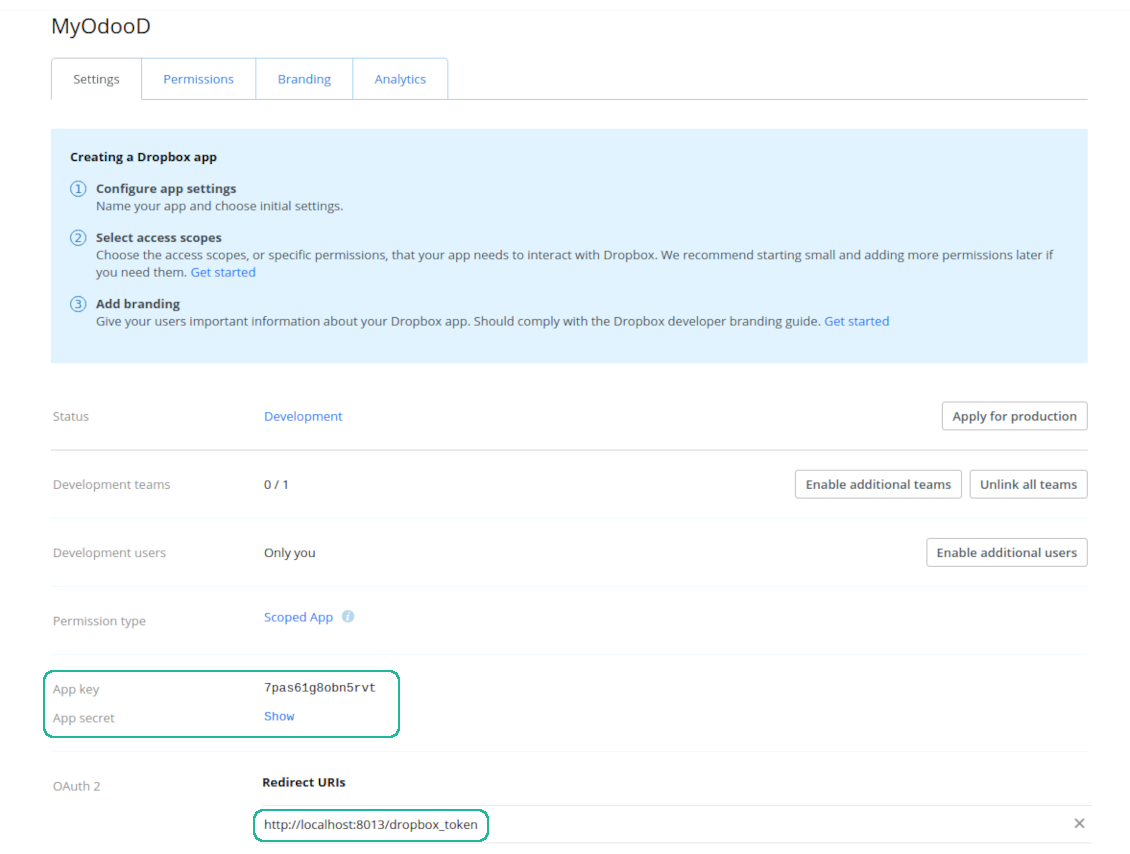
- Add the redirect URI as YOURODOOSITENAME]/dropbox_token (e.g. https://faotools.com/dropbox_token). A valid SSL certificate (https) is required
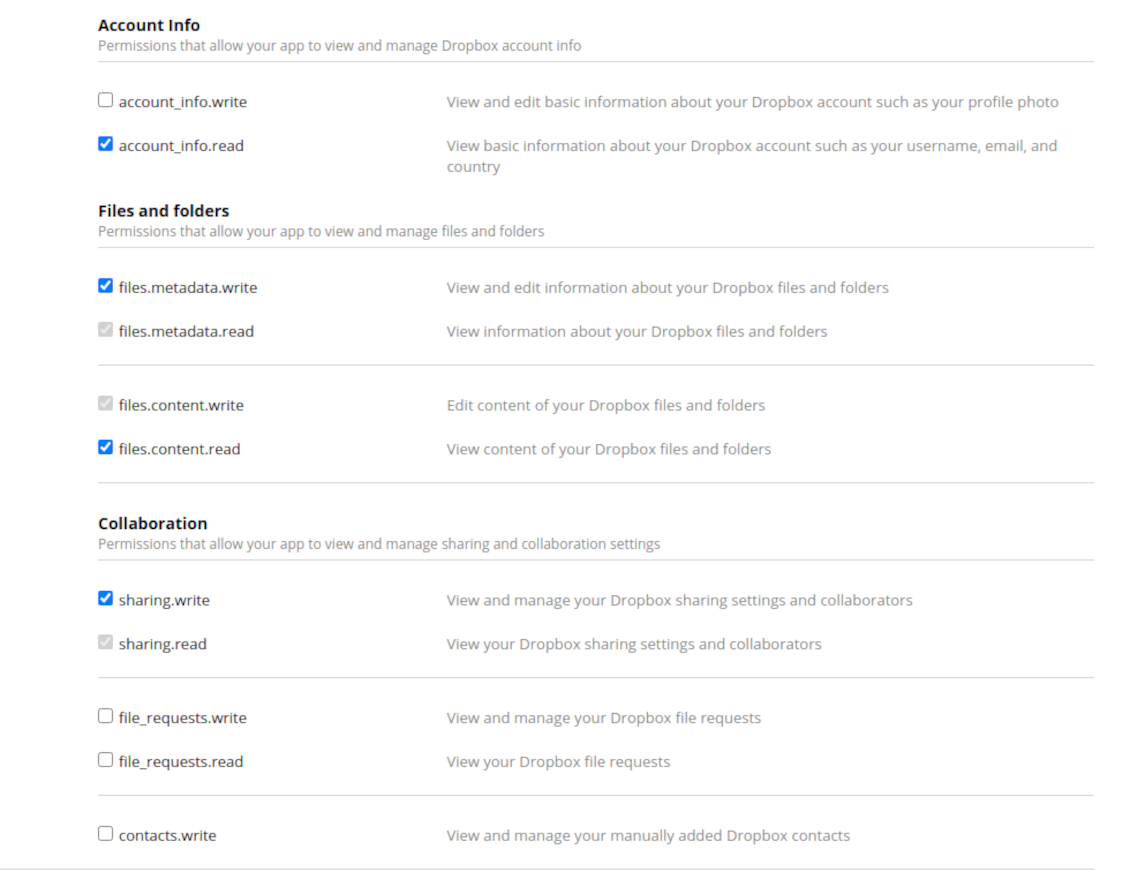
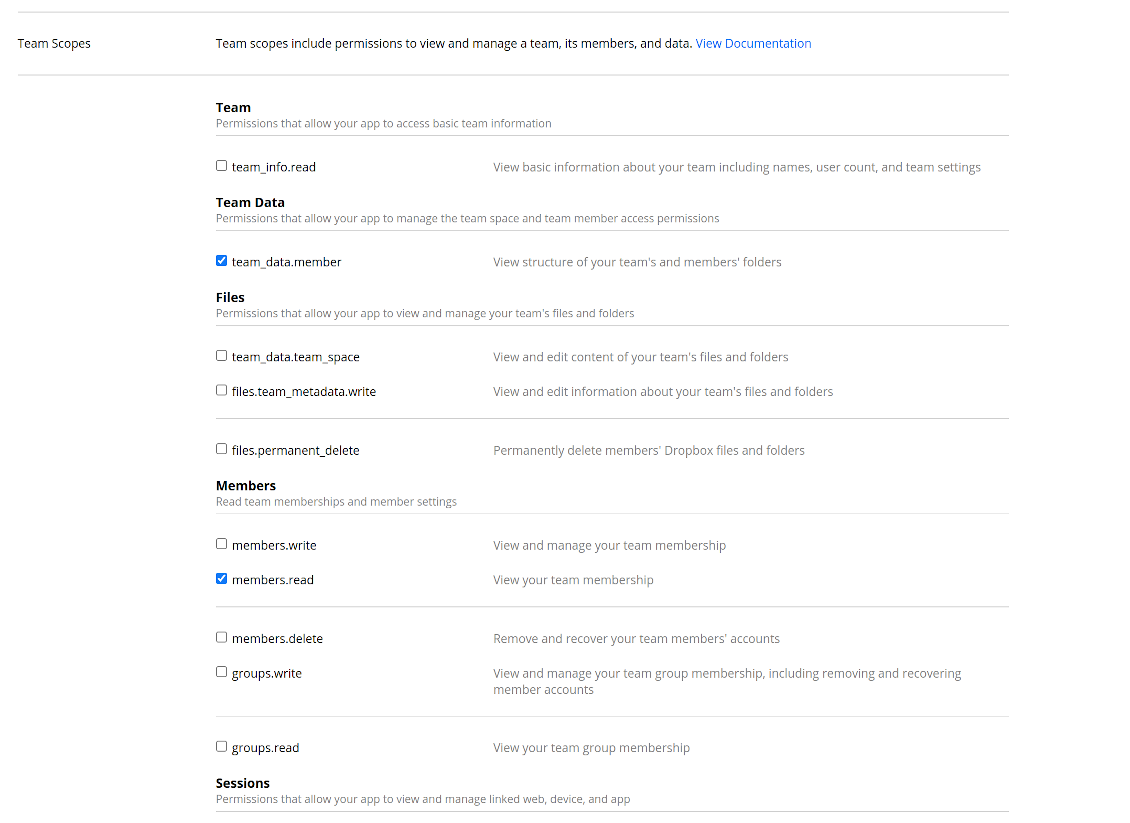
- Grant permissions to the app: 'Account Info (Read)', 'Files and folders Metadata (Write)', 'Files Content (Write)', 'Collaboration (Write)'. For team DropBox assign also 'Team Data Members', 'Members (Read)'. Make sure no other permissions are assigned.
- Submit App
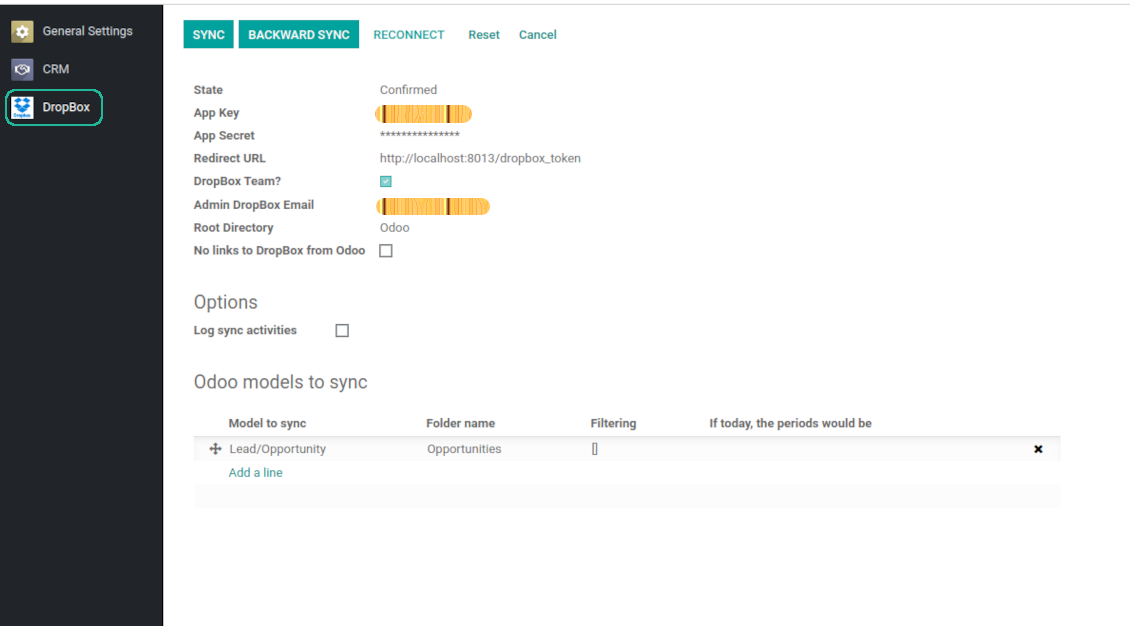
- Go to Odoo general settings - DropBox
- Copy App Key, App secret, and redirect URI to the Odoo configuration page
-
For team DropBoxes only
- Check the box 'DropBox Team'
- Set an email of DropBox user. Inside this user folder all Odoo related items would be created and only after that they are shared to all other users. Under this user all files and folders are created, changed, moved, and deleted
- Choose a suitable name for the root Odoo folder, e.g. 'Odoo' or 'ERP'
- Press Save
- Press 'Login and Confirm'
Create a DropBox app
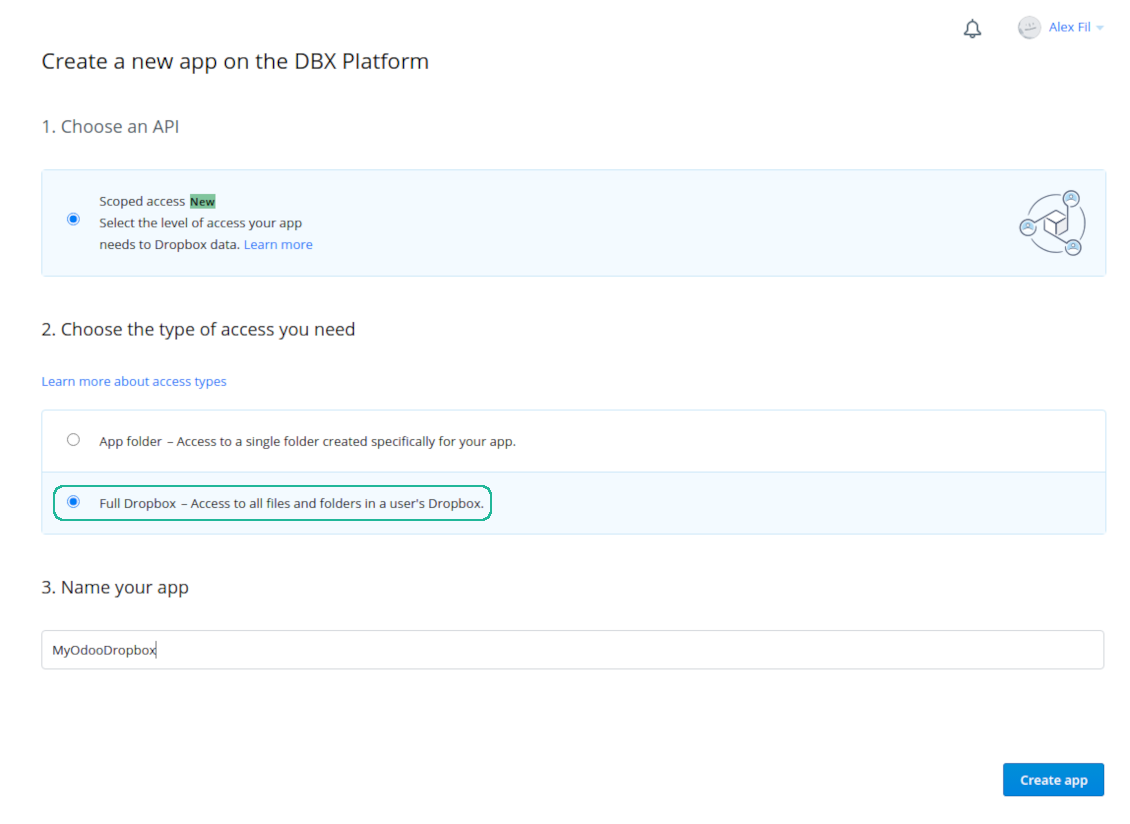
Set up DropBox App: redirection URL
DropBox permissions for personal accounts
DropBox permissions for business accounts
Set up Odoo for DropBox integration
Odoo server configuration and cron job configuration
To make sure the synchronization works correctly apply proper timeouts to the Odoo configuration file: LIMIT_TIME_CPU, LIMIT_TIME_REAL, LIMIT_TIME_REAL_CRON should be more than 900 seconds.
For Odoo.sh this should not be done, since timeouts are predefined and are not configurable.
Then, timeout should be entered to your Odoo. To that goal find the section 'Settings' on the app configuration page and copy the number there.
Afterwards, it is needed to make the cron jobs suit the applied timeouts. In the debug mode go to the Settings > Technical > Automation > Scheduled Jobs:
- Set up the job 'Synchronize attachments with cloud' as (a) frequency - 2*timeout; (b) the next execution as the next hour +timeout. For example, for 900seconds timeout: frequency - as 30minutes; the next execution - at 08:15
- Set up the job 'Synchronize attachments from cloud' as (a) frequency - 2*timeout; (b) the next execution as the next hour + timeout*2. For example, for 900seconds timeout: frequency - as 30minutes; the next execution- at 08:30.
Reconnection
Reconnection might be required for the case a refresh token is expired and when you migrate the app from previous versions. In such a case:
- Press the button 'Reconnect'
- Press the button 'Login and confirm'
Câu hỏi thường gặp về DropBox Odoo Integration Odoo v.13
Tôi có thể đổi tần suất công việc đồng bộ không?
Có, bạn có thể. Để làm việc này:
Bật chế độ gỡ lỗi
Vào cài đặt kỹ thuật > Tự động hóa > Công việc đã lên lịch
Tìm các công việc 'Synchronize attachments with cloud' và 'Update attachments from cloud'.
Đừng đặt chúng quá thường xuyên. Nên để công việc kết thúc trước khi công việc mới bắt đầu. Cấu hình tùy thuộc vào số mục bạn cần đồng bộ. Thường thì tần suất từ 15 phút đến 4 giờ.
Hãy chắc rằng bạn đã đặt giới hạn thời gian đủ lớn trong tệp cấu hình Odoo. Các tham số LIMIT_TIME_CPU và LIMIT_TIME_REAL phải bằng hoặc lớn hơn thời gian cron dự kiến. Từ phiên bản 13 hãy tính cả tham số LIMIT_TIME_REAL_CRON.
Lưu ý quan trọng cho khách hàng Odoo.sh: thời gian tối đa của công việc cron có thể chỉ là 15 phút.
Tôi có thể cấu hình cấu trúc thư mục đồng bộ khác với cấu trúc mà đồng bộ giả định không?
Không, tính năng này chỉ có từ phiên bản 15. Trước phiên bản đó, phân hệ làm việc với cấu trúc thư mục định sẵn:
Odoo - thư mục gốc cho đồng bộ
Models - thư mục cho mỗi loại chứng từ Odoo. Ví dụ, 'Projects', 'Partners'. Phân theo domain có thể có thư mục cụ thể hơn: chẳng hạn 'Customer 1 Projects', 'Projects of the Customer 2', 'Internal Projects', v.v.
Objects - thư mục cho từng chứng từ, vd. 'Project 1' hoặc 'Customer 1'
Tệp và thư mục liên quan đến chứng từ Odoo này sẽ được đồng bộ.
Kết quả là bạn có thể có chẳng hạn:
Odoo / Projects / Project 1 / tệp và thư mục liên quan đến project 1
Odoo / Customer 1 Projects / Project 1; Odoo / Customer 2 Projects / Project 3, ...
Odoo / Customers / Customer 1 / tệp và thư mục liên quan đến customer 1
Cấu trúc này luôn phẳng, nghĩa là chỉ có những cấp phân cấp đó. Do đó đúng là các loại chứng từ khác nhau không thể nằm trong cùng một cấu trúc. Trong thư mục 'Customer 1' chúng ta không thể giữ các tệp liên quan đồng thời đến đơn bán, hóa đơn và dự án. Mỗi loại chứng từ đó có thư mục riêng (hoặc vài thư mục riêng). Nếu không sẽ không thể đồng bộ ngược vì không còn tiêu chí để dựa vào.
Tôi có nên thiết lập quyền truy cập người dùng cụ thể trong Odoo không?
Không, công cụ dựa trên một điểm cuối người dùng duy nhất. Mọi tiến trình đồng bộ chạy dưới một quản trị cloud (ứng dụng). Quyền truy cập thư mục / tệp đã tạo không được tự động hóa. Bạn phải quản trị quyền đó trong giải pháp lưu trữ đám mây.
Trường đã đồng bộ lưu ở đâu? Có bị nhân đôi sang Odoo và clouds không?
Ứng dụng giả định nội dùng nhị phân của tệp đính kèm được lưu trong Cloud Client thay vì trên máy chủ Odoo. Những tệp đính kèm đó trong Odoo trở thành kiểu URL và bạn có thể mở chúng bất cứ lúc nào từ hộp đính kèm hoặc từ Cloud Client.
Sau khi thiết lập, không cần thao tác thủ công vì đồng bộ hoàn toàn tự động. Hãy chọn loại chứng từ Odoo cần đồng bộ và thiết lập model liên quan cho từng loại (Khách hàng, đơn bán hoặc đơn mua, Nhiệm vụ, Dự án, v.v.).
Tôi có thể có vài thư mục cho cùng một loại chứng từ không? Ví dụ dự án nội bộ và dự án khách hàng?
Có. Hãy chuẩn bị một quy tắc cho từng loại, rồi áp bộ lọc: ví dụ theo kiểu dự án.
Hãy làm bộ lọc loại trừ lẫn nhau để một chứng từ được gán chắc chắn. Ví dụ 'khách hàng nhưng không phải nhà cung cấp', 'nhà cung cấp nhưng không phải khách hàng'. Nếu không, thư mục của một chứng từ sẽ nhảy từ model này sang model khác.
Tôi có chỉ cần ứng dụng Cloud Storage Solution không?
Không, công cụ chỉ là lõi kỹ thuật. Bạn còn cần connector cho cloud client.
Có sao không nếu tôi có nhiều đối tượng cần đồng bộ, ví dụ 10000?
Có, dù khi nhiều thư mục/tệp đính kèm cần đồng bộ thì quá trình có thể chậm. Đồng thời khách hàng đã báo môi trường với >10k đối tác và ~5k biến thể sản phẩm cần đồng bộ, và tiến trình vẫn chấp nhận được.
Vài điểm cần nhấn mạnh:
- Đồng bộ được thiết kế để mọi mục đều được đồng bộ và không mất, dù có thể không nhanh. Điều này được bảo đảm bằng hàng đợi FIFO và mỗi job được commit.
- Số đối tượng có thể giới hạn theo logic. Cấu hình model cho phép hạn chế đồng bộ mục lỗi thời (vd. không cần đồng bộ đối tác đã lưu trữ hoặc đơn cách đây 2 năm).
Có thể đồng bộ theo thời gian thực không?
Không. Chúng tôi có lý do vững chắc để tránh đồng bộ thời gian thực:
Vấn đề hiệu năng. Nếu đồng bộ theo thời gian thực, mỗi lần tải tệp lên sẽ hiện màn hình chờ.
Vấn đề xung đột. Nếu 2 người dùng cùng lúc sửa một mục, có thể dẫn đến tình huống không giải quyết được. Với tác vụ định kỳ ta sửa sau được; còn thời gian thực phải lưu thành hàng đợi, càng khiến người dùng bối rối.
Vấn đề chức năng. Đặc biệt là đổi tên và tổ chức lại mục. Ở chiều đồng bộ ngược, công cụ dựa chặt vào logic thư mục và mỗi lần đồng bộ kiểm tra 100% mục. Nếu làm sau mỗi lần cập nhật, sẽ có hàng nghìn yêu cầu mỗi giây. Nếu không: thay đổi sẽ bị mất.
Tôi có thể đồng bộ tệp đính kèm với vài máy khách đám mây
Không, tính năng này chỉ có từ phiên bản 15.
Chúng tôi dùng trình soạn thảo đặc biệt trên đám mây (ví dụ OnlyOffice, Office 365…). Tệp có mở trong trình đó không?
Có, tùy cấu hình cloud client của bạn.
Chính sách cập nhật của các công cụ của bạn là gì?
Theo chính sách hiện tại của Odoo Apps Store:
- Mọi mô-đun mua cho phiên bản 12.0 trở về trước cho phép truy cập mọi phiên bản đến 12.0.
- Từ phiên bản 13.0, mỗi phiên bản mô-đun phải mua riêng.
- Bất kể phiên bản, mua công cụ cho quyền mọi cập nhật và sửa lỗi trong một phiên bản chính.
Lưu ý rằng nhóm faOtools không kiểm soát các chính sách đó. Mọi câu hỏi xin liên hệ trực tiếp đại diện Odoo Apps Store.
Làm sao cài ứng dụng của bạn trên Odoo.sh?
Cách thẳng nhất là dùng quy trình có sẵn của cửa hàng Odoo:
1. Mở trang phân hệ và bấm nút Deploy on odoo.sh
2. Sau đó bạn sẽ được chuyển tới trang GitHub. Đăng nhập tài khoản, rồi bấm 'Create a new repo' hoặc dùng repo có sẵn. Hãy đảm bảo kho là riêng tư. Không được phép công bố ứng dụng theo giấy phép OPL-1. Nếu cần, tạo repo mới cho dự án Odoo.sh
3. Rồi vào odoo.sh và bấm nút Deploy. Trong cửa sổ pop-up, gửi quyết định và bấm 'Continue.' Thao tác này sẽ kích hoạt cài đặt.
Các bước này sẽ cài ứng dụng cho nhánh production của dự án. Nếu muốn triển khai ứng dụng cho nhánh khác hoặc cập nhật phân hệ, hãy làm các bước sau:
1. Tải mã nguồn ứng dụng từ cửa hàng Odoo
2. Commit phân hệ vào kho GitHub cần thiết. Đảm bảo không thư mục/tệp ứng dụng nào bị bỏ qua (tức không nằm trong .gitignore của repo). Kho được odoo.sh tạo tự động và mặc định có thể gồm mục quan trọng (vd. /lib). Hãy tải lên mọi thư mục, thư mục con và tệp của phân hệ, không ngoại lệ
3. Triển khai nhánh đích của dự án odoo.sh hoặc, nếu thiết lập của bạn giả định vậy, đợi đến khi được xây tự động.
Tôi nên cài ứng dụng của bạn trên máy chủ riêng thế nào?
2. Khởi động lại máy chủ Odoo;
3. Bật chế độ nhà phát triển (cài đặt kỹ thuật);
4. Cập nhật danh sách ứng dụng (menu ứng dụng);
5. Tìm ứng dụng và bấm 'Activate'/'Install';
6. Làm theo hướng dẫn trên trang ứng dụng nếu có.
Tôi thấy ứng dụng có tiện ích thêm. Có thể mua sau không?
Có, chắc chắn. Đồng thời Odoo tự thêm mọi phụ thuộc vào giỏ, nên bạn nên loại các công cụ đã mua để tránh trả hai lần.
Tôi triển khai ứng dụng trên Odoo.sh và thấy cảnh báo/lỗi trong kiểm thử
Cảnh báo đỏ/cam không ảnh hưởng đến tính năng của ứng dụng. Đáng tiếc, đôi khi phân hệ của chúng tôi không qua được các kiểm thử tự động chuẩn vì chúng giả định hành vi xung đột với mục tiêu ứng dụng. Ví dụ chúng tôi đổi cách tính giá, trong khi kiểm thử phân hệ Odoo chuẩn so giá cuối với thuật toán chuẩn.
Trước hết, hãy kiểm tra tính năng của cơ sở dữ liệu đã triển khai. Mọi thứ có chạy đúng không?
Nếu vẫn cho rằng cảnh báo ảnh hưởng tính năng thật, hãy liên hệ chúng tôi và gửi nhật ký cài đặt đầy đủ cùng danh sách đầy đủ phân hệ đã triển khai (gồm lõi và bên thứ ba).
Tôi có thể mua ứng dụng trực tiếp từ công ty bạn không?
Không, chúng tôi chỉ phân phối công cụ qua cửa hàng ứng dụng Odoo chính thức.
Tôi muốn được giảm giá
Rất tiếc, chúng tôi không có phương tiện kỹ thuật để cung cấp giá riêng.
Tôi có thể cài ứng dụng trên cơ sở dữ liệu Odoo Online (SaaS) không?
Không, ứng dụng bên thứ ba không dùng được trên Odoo Online. Rất tiếc Odoo SaaS chặn khả năng đó.
Công cụ của bạn phụ thuộc ứng dụng khác. Tôi có cần mua chúng không?
Có, công cụ cần tất cả phân hệ ghi trong phụ thuộc để chạy đúng. Giá trên trang ứng dụng đã gồm mọi phụ thuộc cần thiết.
Giá mô-đun bằng đô la Mỹ là bao nhiêu? Sao lại đổi?
Giá phân hệ của chúng tôi tính bằng euro. Cửa hàng Odoo đổi sang các tiền tệ khác theo tỷ giá nội bộ. Vì vậy giá bằng đô la Mỹ có thể đổi khi tỷ giá được cập nhật.
Lời ứng dụng và trang web ở ngôn ngữ khác tiếng Anh được hỗ trợ bởi AI và khớp với bản dịch Odoo chính thức. Nếu bạn thấy sai, gửi phiếu hỗ trợ về đúng bản dịch và chúng tôi sẽ sửa.
Báo lỗi
Nếu gặp lỗi hoặc hành vi không nhất quán, hãy liên hệ. Chúng tôi cam kết sửa trong 60 ngày kể từ khi mua và vẫn muốn cải thiện công cụ sau giai đoạn đó.
Bạn không cần số điện thoại hay thẻ tín dụng để liên hệ. Chỉ cần đăng ký email ngắn, không quá 30 giây.
Hãy nêu càng nhiều chi tiết càng tốt trong yêu cầu: ảnh chụp màn hình, nhật ký máy chủ Odoo, mô tả đầy đủ cách tái hiện sự cố, v.v. Thường mất vài ngày làm việc để chuẩn bị kế hoạch xử lý (nếu xác nhận lỗi) hoặc hướng dẫn việc cần làm (nếu không).
Yêu cầu tính năng công khai và ý tưởng module (phát triển miễn phí)
Chúng tôi rất muốn cải thiện công cụ và biết ơn mọi phản hồi. Nếu yêu cầu của bạn hữu ích cho mọi người và có thể triển khai hiệu quả, nhóm sẽ đưa vào danh sách việc cần làm.
Danh sách việc cần làm như vậy được xử lý đều đặn và không phát sinh phí thêm. Dù chúng tôi không hứa hạn chót và thiết kế cuối, đây có thể là cách tốt để có tính năng mong muốn mà không đầu tư và rủi ro.
Bạn không cần số điện thoại hay thẻ tín dụng để liên hệ. Chỉ cần đăng ký email ngắn, không quá 30 giây.

Công cụ để lưu mật khẩu an toàn trong Odoo cho dùng chung. Kho dùng chung

Công cụ xây dựng cơ sở tri thức sâu và có cấu trúc cho nội bộ và bên ngoài. Knowledge System. KMS. Bản sửa kiểu wiki.
398€
Công cụ đặt mục tiêu KPI và kiểm soát hoàn thành theo kỳ. Bảng điều khiển KPI. Trình thiết kế bảng. Biểu đồ KPI

Công cụ quản lý dịch vụ theo thời gian, từ đặt lịch đến bán hàng và đánh giá
398€
Công cụ quản lý Odoo từ các chat AI yêu thích qua MCP. Claude. Mọi AI hỗ trợ MCP.

Công cụ sắp xếp linh hoạt tệp đính kèm Odoo vào thư mục và đồng bộ thư mục với máy khách đám mây: Google Drive, OneDrive/SharePoint, Nextcloud/ownCloud, Dropbox, Amazon S3, Box và NAS. DMS. Trình quản lý tệp. Hệ thống quản lý tài liệu
398€
Công cụ đồng bộ hai chiều tự động tệp đính kèm Odoo với tệp OneDrive
487€
Công cụ đồng bộ hai chiều tự động tệp đính kèm Odoo với tệp Google Drive
487€
Công cụ đồng bộ hai chiều tự động tệp đính kèm Odoo với tệp ownCloud/Nextcloud
487€