DropBox Odoo Integration v.13
The tool to automatically synchronize Odoo attachments with DropBox files in both ways



- the technical core which provides basic mechanics of auto synchronization. This is a required module for integration. Fiyatı 398€.
- the connector itself which introduces links between Odoo and DropBox. Fiyatı 89€.
- an optional add-on to sync Odoo documents (introduced by the enterprise app 'Documents') with clouds. The features assumed by this add-on are marked by the icon . Fiyatı 44€.
Selectable documents types for sync
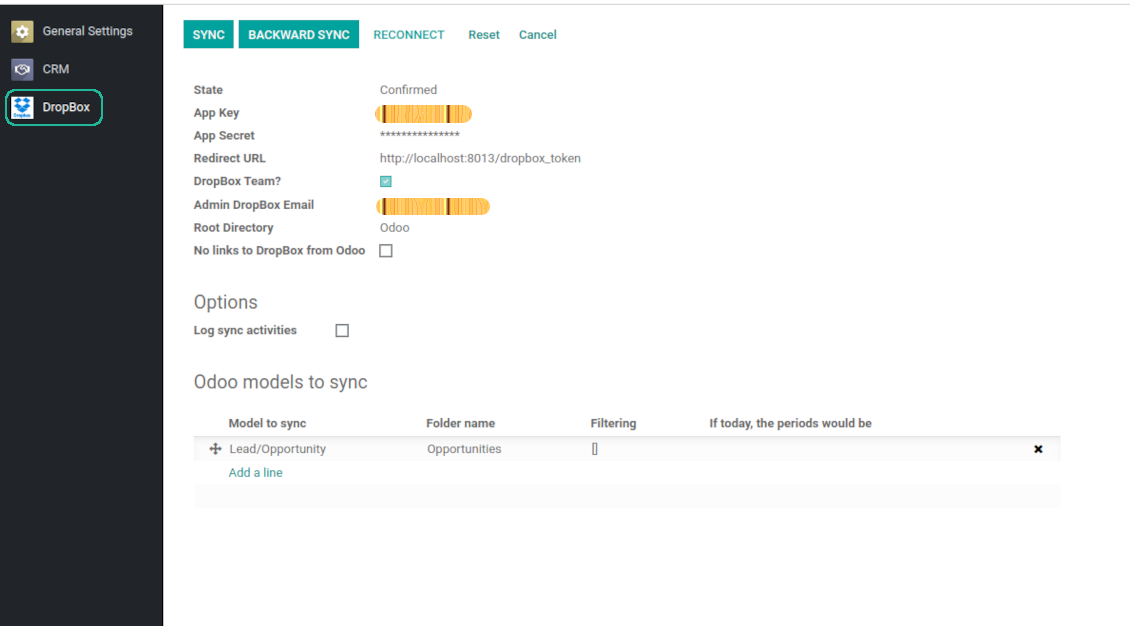
The tool let you split any business model into a few directories. Have a separate folder for individuals and companies, for European and American opportunities, for each project, etc.
Moreover, it is possible to guarantee that only topical documents are synced by using relative periods: leads registered in the last 3 months, invoices updated the last week, and so on.
Typical use cases
- Projects: have an own DropBox folder for each customer project.
- Customers: add all partner files in a single directory available both from Odoo and from DropBox. Modify those using default cloud editors and access them when working in Odoo.
- Employees: gather all files by this employee in a single cloud folder: photos, document scans, contracts. Access and upload those from Odoo and DropBox alternatively.
- Opportunities: carefully store all specifications, requirements, any files which would let you make a good offer.
- Orders: keep all printings and contracts in DropBox with simple availability from Odoo.
Ekran Görüntüleri
Choose document types to be synced
Document type might have a few folders based on filters
Automatic and bilateral integration
Synced attachments are physically kept only in a cloud storage, what increases Odoo interface performance. Simultaneously, you can open documents from Odoo or download those in a single click.
How files and folders are synced from Odoo to DropBox
Based on the scheduled job 'Synchronize attachments with cloud' Odoo regularly checks whether:
- Any new attachment should be forwarded to DropBox;
- Any new document type (e.g. Sale orders) is added / replaced / renamed as a sync model and, hence, whether a directory should be created / removed / renamed in DropBox;
- Any new document (e.g. Sale Order SO019) is generated / updated / unlinked and, hence, whether a DropBox folder should be created / moved or renamed / deleted.
- Any new attachment should be removed from DropBox if it has been deleted from Odoo.
Based on results of that checks, Odoo starts processing queue of changes, and makes sure that all items are located correctly. The final goal is to have the structure 'Odoo / Document Types / Documents / Files. For example, 'Odoo / Quotations / SO019 / commercial offer.pdf'.
During the synchronization all synced Odoo attachments change their type to a link (URL), while binary content is removed with a next Odoo cleaner. So, no actual files would be stored on your Odoo server.
Please take into account:
- Each sync (especially the very first one) might take quite a long. It is not recommended to make sync too frequent: once an hour seems reasonable frequency.
- File names should be managed in DropBox: each backward sync would recover DropBox names, Odoo is here less important.
How items are retrieved from DropBox to Odoo
Based on the scheduled job 'Synchronize attachments from cloud' Odoo regularly checks whether:
- Any file is added / moved / removed in a DropBox document folder. If yes, Odoo would create a link to this file in a target object (e.g. a new attachment to SO019) or would move / delete such an attachment.
- Any file of a DropBox document folder is renamed. If yes, an attachment would be renamed in Odoo as well.
- In document folders you can put not only files but also child folders. In that case a link for this folder (not its content) would be kept in Odoo attachments.
- If you deleted a folder related to this document type or this document, their child files would be deleted as well. Thus, Odoo would remove related attachments. The folders, however, will be recovered with a next direct sync.
- Each backward sync might take quite a long. It is not recommended to make sync too frequent: once an hour seems safe enough.
Ekran Görüntüleri
Synced files are simply found in DropBox. Add unlimited number of files or folders
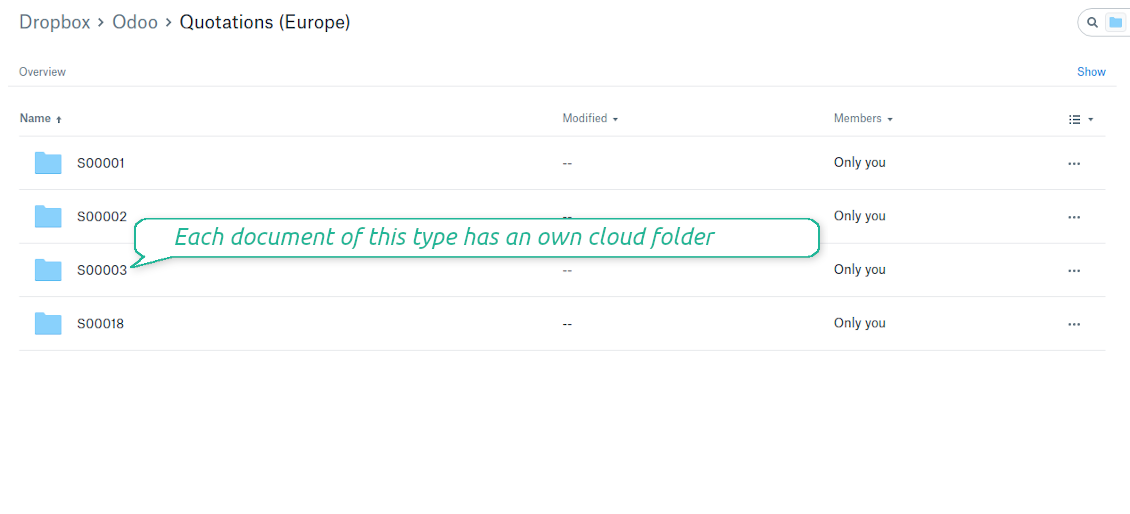
Document types folders in DropBox
All document of this type has an own folder
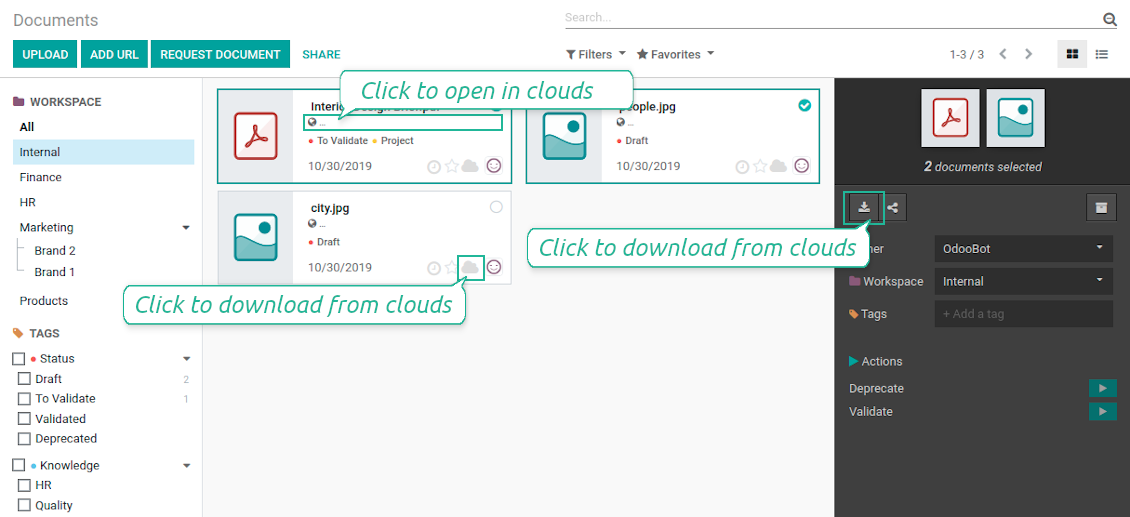
Direct access to DropBox items
- Click on attachment to open it in DropBox in a new tab (necessary to be logged in DropBox). Have also a look at the section Dropbox URLs below;
- Click the icon of cloud to start downloading file from DropBox (no extra check in is required)
- Push the button "Open cloud folder" to open all files related to this document.
DropBox URLs
DropBox has a specific way to generate links for existing files and folders. In particular, there are no concepts of internal or private URLs. Instead, each DropBox item might get so-called shared URLs. Such shared links are either public or team-only. Moreover, the latter feature is available only for DropBox business account.
This tool relies upon share links' mechanics. It means, that each attachment link is either public (all personal DropBox accounts) or team-only (all business DropBox accounts).
Sometimes it is considered to be not fully safe. Although website URLs will be hardly known by external users, there is a slight chance that they become available as a result of some user actions. Besides, sharing links generation is not super fast and might make a sync process slower. That is why the feature to switch off sharing urls is introduced.
If checked, all DropBox urls in Odoo will be of type https://www.dropbox.com/home/Odoo/[PATH]. Such links will not work in quite a many cases. Thus, if you need to open DropBox files / folders from Odoo, do not switch off the feature 'No links to DropBox from Odoo'.
Ekran Görüntüleri
Quick access to DropBox files and folders
Apply to DropBox right from Odoo chatter
Fully integrated and compatible with Enterprise Documents
It does not contradict printing, mailing, or Enterprise documents features.
For the latter it is also possible to fully reflect directories structure, not only sync standard attachments.
How Odoo Enterprise Documents are synced
This tool is not in conflict with the 'documents' module provided under the Enterprise license. Attachments related to Enterprise folders would be synced as any other files: according to a document they relate to.
It is not always comfortable, and you might be interested in reflecting directories' structure introduced by the module 'Documents'. To this end the special extension is developed. This extension introduces the following features:
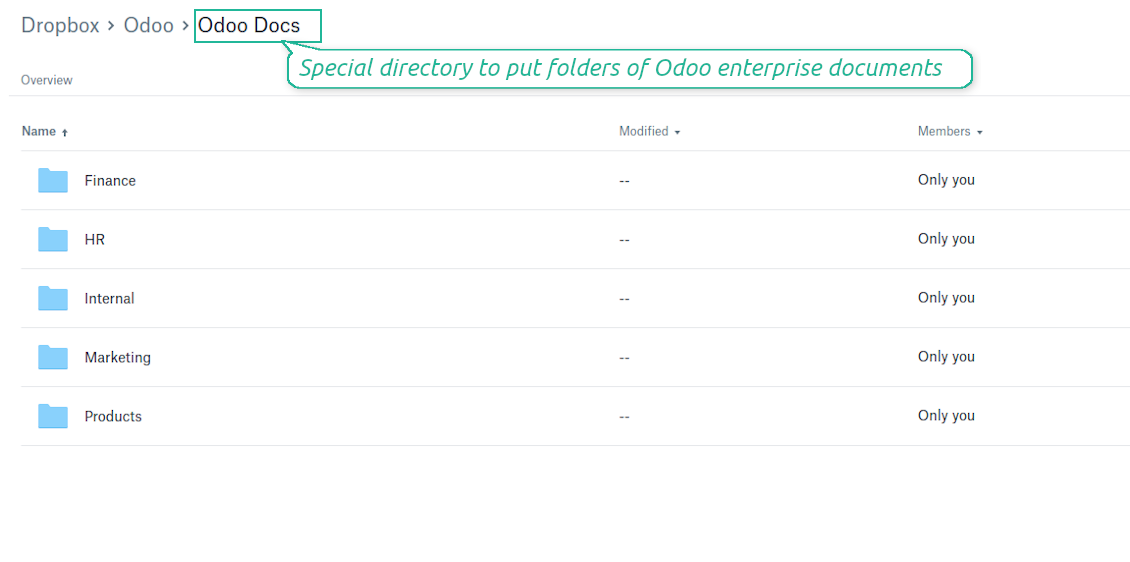
- The documents hierarchy is reflected within the folder 'Odoo / Odoo Docs'
- Each Odoo folder has a linked cloud folder. Take into account that folders created in the cloud storage will be synced as Odoo attachments. The key principle is: folders are managed by Odoo, files are managed by the cloud client
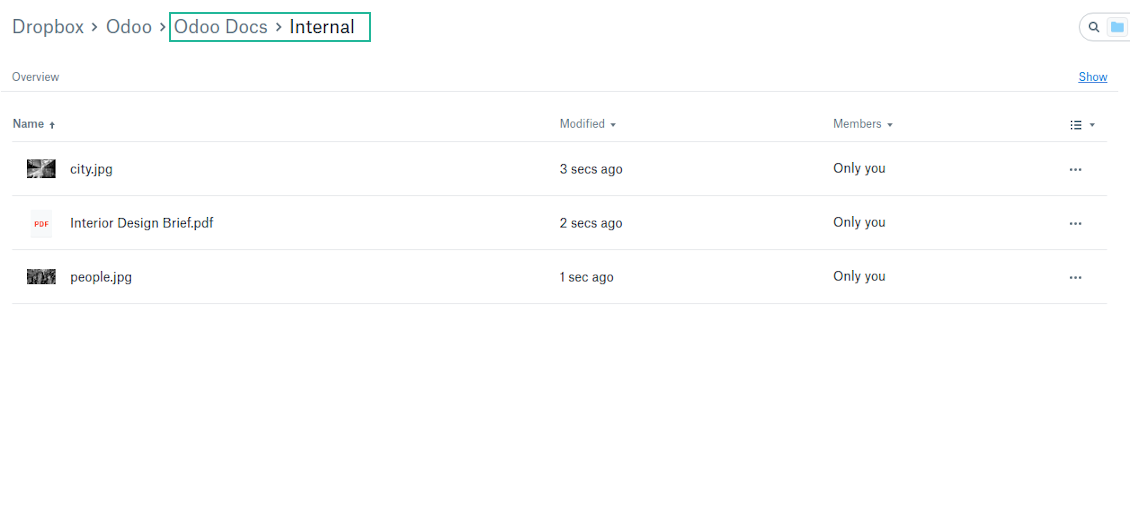
- All files are synced with the same logic as usual attachments. Files created in Odoo will be added to the cloud storage and will be replaced with links in Odoo. Files created in cloud storage will generate attachments within a paired directory
- Please do not name synced models as 'Odoo Docs'. This is the reserved name for Odoo Enterprise Documents
A few other peculiarities to take into account
- Try to avoid the following symbols in folders' and files' names: *, ?, ", ', :, <, >, |, +, %, !, @, \, /,. Direct sync will replace such symbols with '-'. It is done to avoid conflicts with file systems.
Ekran Görüntüleri
Direct access from Odoo documents to DropBox
Enterprise Documents in DropBox
Enterprise files in DropBox
DropBox Sync logs in Odoo
Ekran Görüntüleri
Logged synchronization activities
Default folders for documents
All DropBox tariffs
Yapılandırma ve kurulum ipuçları: DropBox Odoo Integration Odoo v.13
Python dependency
pip3 install dropboxConfiguration and log in
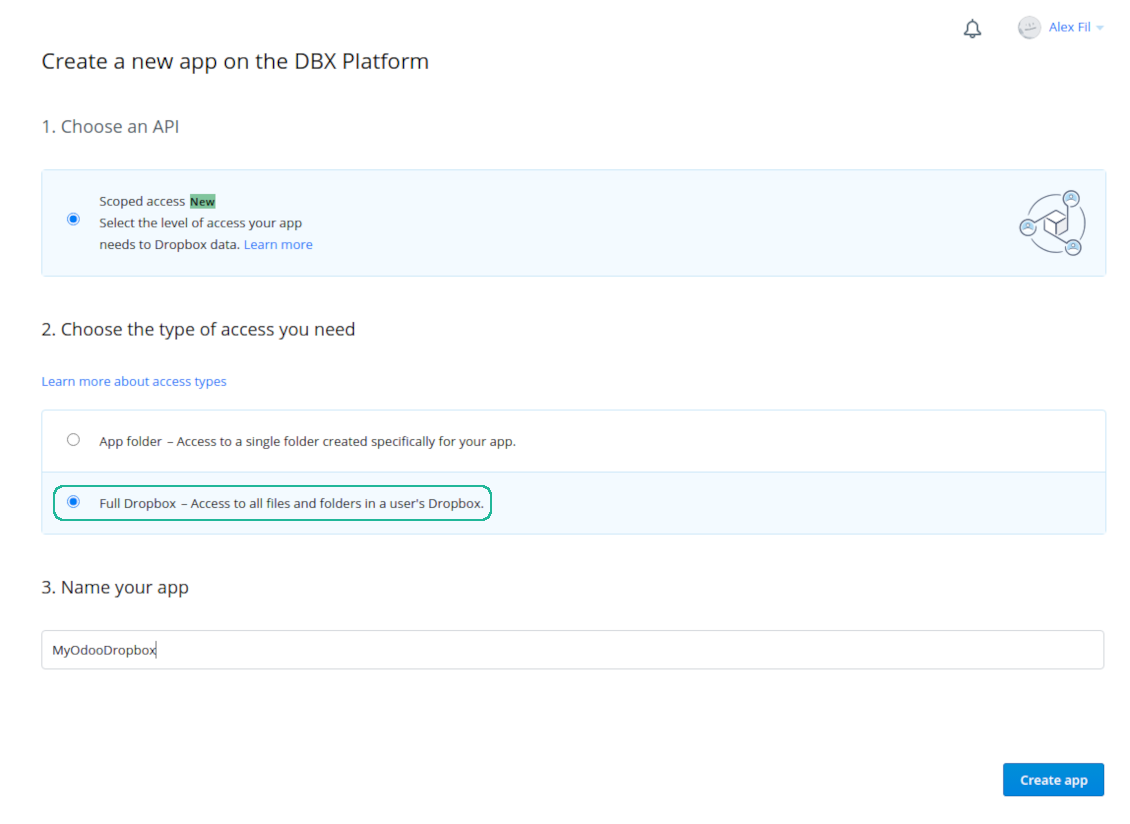
- Follow the url https://www.dropbox.com/developers/apps/create
- Choose an API as 'Scoped access'
- Choose the type of access as 'Full Dropbox'
- Select any suitable name for the app and push the button 'Create app'
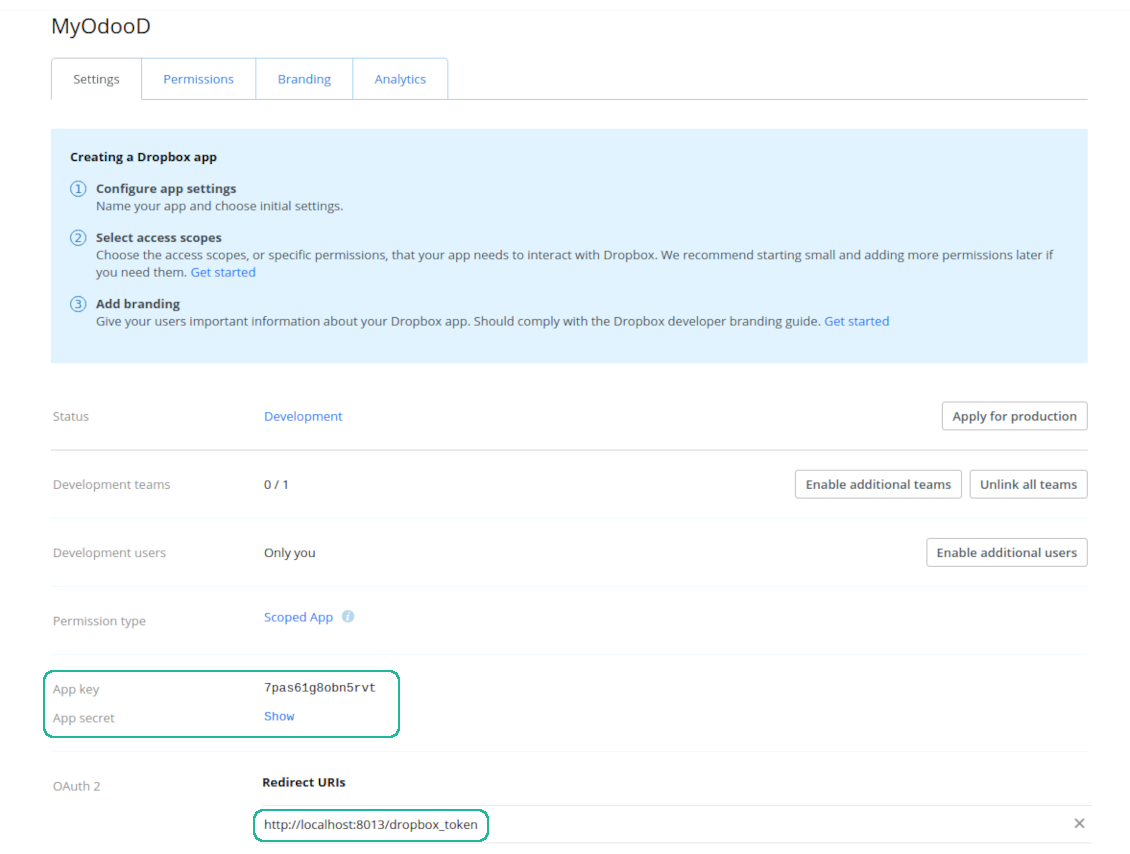
- Add the redirect URI as YOURODOOSITENAME]/dropbox_token (e.g. https://faotools.com/dropbox_token). A valid SSL certificate (https) is required
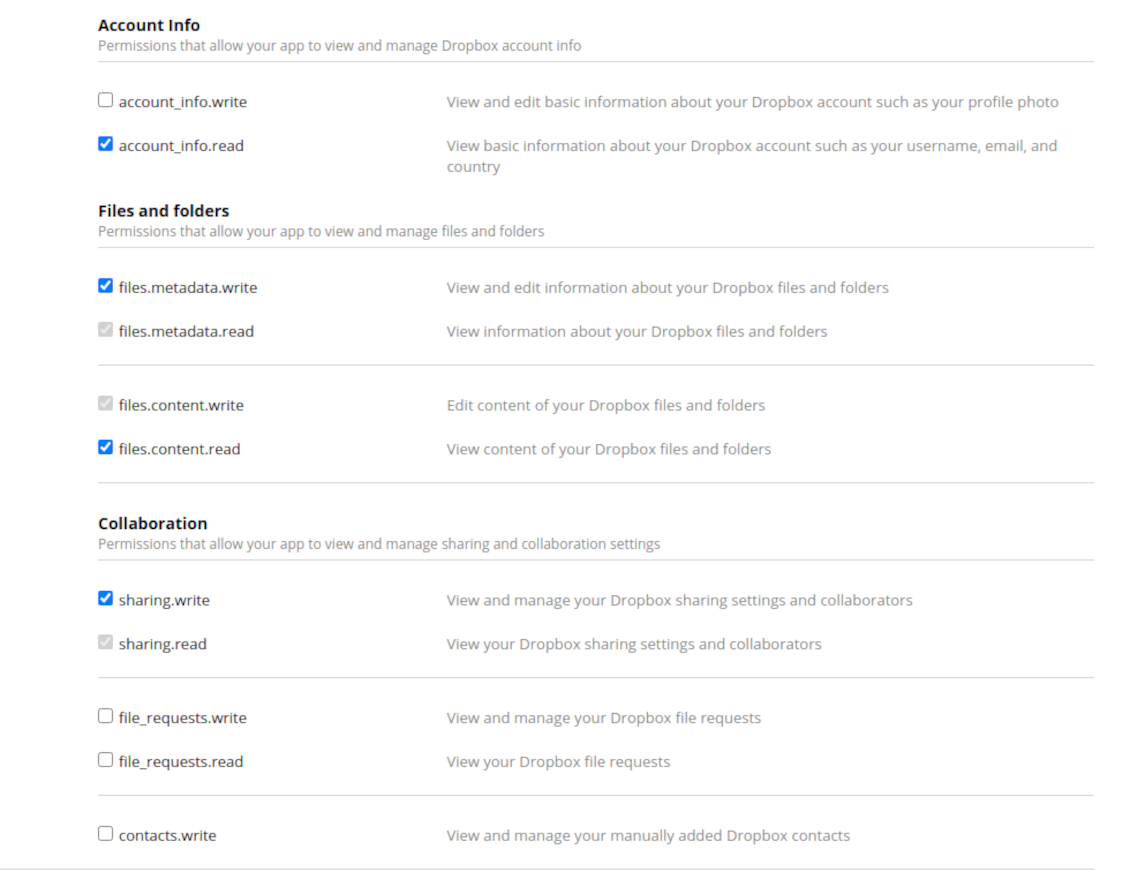
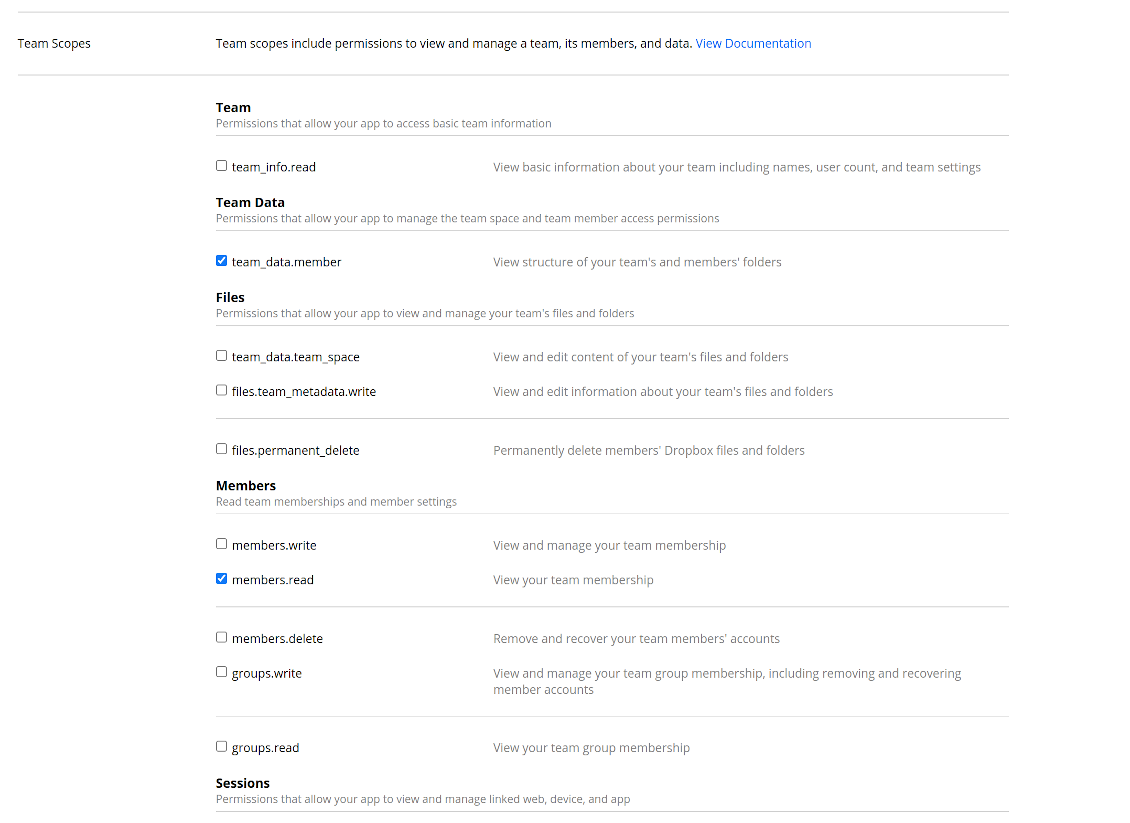
- Grant permissions to the app: 'Account Info (Read)', 'Files and folders Metadata (Write)', 'Files Content (Write)', 'Collaboration (Write)'. For team DropBox assign also 'Team Data Members', 'Members (Read)'. Make sure no other permissions are assigned.
- Submit App
- Go to Odoo general settings - DropBox
- Copy App Key, App secret, and redirect URI to the Odoo configuration page
-
For team DropBoxes only
- Check the box 'DropBox Team'
- Set an email of DropBox user. Inside this user folder all Odoo related items would be created and only after that they are shared to all other users. Under this user all files and folders are created, changed, moved, and deleted
- Choose a suitable name for the root Odoo folder, e.g. 'Odoo' or 'ERP'
- Press Save
- Press 'Login and Confirm'
Create a DropBox app
Set up DropBox App: redirection URL
DropBox permissions for personal accounts
DropBox permissions for business accounts
Set up Odoo for DropBox integration
Odoo server configuration and cron job configuration
To make sure the synchronization works correctly apply proper timeouts to the Odoo configuration file: LIMIT_TIME_CPU, LIMIT_TIME_REAL, LIMIT_TIME_REAL_CRON should be more than 900 seconds.
For Odoo.sh this should not be done, since timeouts are predefined and are not configurable.
Then, timeout should be entered to your Odoo. To that goal find the section 'Settings' on the app configuration page and copy the number there.
Afterwards, it is needed to make the cron jobs suit the applied timeouts. In the debug mode go to the Settings > Technical > Automation > Scheduled Jobs:
- Set up the job 'Synchronize attachments with cloud' as (a) frequency - 2*timeout; (b) the next execution as the next hour +timeout. For example, for 900seconds timeout: frequency - as 30minutes; the next execution - at 08:15
- Set up the job 'Synchronize attachments from cloud' as (a) frequency - 2*timeout; (b) the next execution as the next hour + timeout*2. For example, for 900seconds timeout: frequency - as 30minutes; the next execution- at 08:30.
Reconnection
Reconnection might be required for the case a refresh token is expired and when you migrate the app from previous versions. In such a case:
- Press the button 'Reconnect'
- Press the button 'Login and confirm'
Hakkında sık sorulan sorular DropBox Odoo Integration Odoo v.13
Senkronizasyon işlerinin sıklığını değiştirebilir miyim?
Evet, yapabilirsiniz. Bunun için:
Hata ayıklama modunu açın
Teknik ayarlar > Otomasyon > Zamanlanmış işler bölümüne gidin
«Synchronize attachments with cloud» ve «Update attachments from cloud» işlerini bulun.
Çok sık çalıştırmayın. Bir işin, yenisi başlamadan bitmesi tercih edilir. Ayar, senkronize edilecek öğe sayısına bağlıdır. Sıklık genellikle 15 dakika ile 4 saat arasındadır.
Odoo yapılandırma dosyasında yeterli zaman sınırları da ayarlayın. LIMIT_TIME_CPU ve LIMIT_TIME_REAL, planlanan cron süresine eşit veya daha büyük olmalıdır. Sürüm 13'ten itibaren LIMIT_TIME_REAL_CRON parametresini de dikkate alın.
Odoo.sh müşterileri için önemli not: cron işinin azami süresi yalnızca 15 dakika olabilir.
Senkronizasyonun varsaydığından farklı bir dizin yapısı yapılandırabilir miyim?
Hayır, bu özellik yalnızca sürüm 15'ten itibaren vardır. Öncesinde modül önceden tanımlı klasör yapısıyla çalışır:
Odoo - senkronun kök klasörü
Modeller - her Odoo belge türü için klasörler. Örneğin «Projects», «Partners». Alana göre daha özel klasörler olabilir: «Customer 1 Projects», «Projects of the Customer 2», «Internal Projects» vb.
Nesneler - her belge için klasör, örn. «Project 1» veya «Customer 1»
Bu Odoo belgesine ait senkronize edilecek dosya ve klasörler.
Sonuç olarak örneğin şunlar oluşabilir:
Odoo / Projects / Project 1 / proje 1'e ait dosya ve klasörler
Odoo / Customer 1 Projects / Project 1; Odoo / Customer 2 Projects / Project 3, ...
Odoo / Customers / Customer 1 / müşteri 1'e ait dosya ve klasörler
Yapı her zaman düzdür: yalnızca bu hiyerarşi düzeyleri. Farklı belge türleri aynı dalda tutulamaz. «Customer 1» klasöründe hem sipariş, hem fatura hem proje dosyaları olamaz. Her türün kendi klasörü (veya klasörleri) vardır. Aksi halde geri senkron için dayanak kalmaz.
Odoo'da belirli kullanıcı erişimleri ayarlamalı mıyım?
Hayır, araç tek bir kullanıcı uç noktasına dayanır. Tüm senkron süreçleri tek bir bulut yöneticisi (uygulama) altında yapılır. Oluşturulan klasör / dosya hakları otomatik değildir. Bunları bulut depolama çözümünüzde yönetin.
Senkronize edilen dosyalar nerede saklanır? Odoo ve bulutlarda çoğaltılır mı?
Uygulama, eklerin ikili içeriğinin Odoo sunucusu yerine Cloud Client'te tutulduğunu varsayar. Bu yüzden Odoo'daki bu ekler URL tipine dönüşür ve onlara istediğiniz zaman ek kutusundan veya Cloud Client'ten erişebilirsiniz.
Kurulumdan sonra elle işlem gerekmez; senkronizasyon tamamen otomatiktir. Hangi Odoo belge tiplerinin senkronize edileceğine karar verin ve her biri için ilgili modeli ayarlayın (müşteriler, satış veya satın alma siparişleri, görevler, projeler vb.).
Aynı belge türü için birkaç klasörüm olabilir mi? Örneğin iç projeler ve müşteri projeleri?
Evet, yapabilirsiniz. Bunun için her biri için bir kural hazırlayın ve filtre uygulayın: örneğin proje türüne göre.
Bir belgenin kesin atanması için filtreleri birbirini dışlar hale getirin. Örneğin: «müşteri ama tedarikçi değil», «tedarikçi ama müşteri değil». Aksi halde belgenin klasörü bir modelden diğerine atlar.
Yalnızca Cloud Storage Solution uygulaması yeterli mi?
Hayır, araç yalnızca teknik çekirdektir. Bulut istemcinizin bağlayıcısına da i̇htiyacınız var.
Senkronize edilecek çok nesne varsa, örneğin 10000, sorun olur mu?
Evet, çok klasör/ek varsa süreç yavaş olabilir. Yine de müşteriler >10 bin iş ortağı ve ~5 bin ürün varyantı olan ortamlar bildirdi ve süreçler kabul edilebilirdi.
Vurgulanacak noktalar:
- Senkron, her öğenin senkronize edilip kaybolmamasını sağlar; hızlı olmayabilir. FIFO kuyrukları ve her işin commit edilmesi bunu garanti eder.
- Nesne sayısı mantıksal olarak sınırlanabilir. Model yapılandırması eski öğeleri dışlar (ör. arşivlenmiş iş ortakları veya 2 yıl önceki siparişler).
Senkronizasyonu gerçek zamanlı yapmak mümkün mü?
Hayır. Gerçek zamanlı senkronizasyondan kaçınmamızın güçlü nedenleri var:
Performans. Senkron gerçek zamanlıysa her dosya yüklemesi yükleme ekranı gösterir.
Çakışmalar. 2 kullanıcı aynı anda bir öğeyi değiştirirse durum çözümsüz kalabilir. Düzenli işlerde sonra düzeltebiliriz; gerçek zamanda kuyruk gerekir ve bu daha kafa karıştırıcı olur.
İşlevsellik. Özellikle yeniden adlandırma ve yeniden yapılandırma. Geri senkron dizin mantığına sıkı bağlıdır ve her senkronde öğelerin %100'ü kontrol edilir. Her güncellemeden sonra saniyede binlerce istek olur. Yoksa değişiklikler kaybolur.
Ekleri birkaç bulut istemcisine senkronize edebilir miyim
Hayır, bu özellik yalnızca sürüm 15'ten itibaren kullanılabilir.
Bulutlarımızda özel bir düzenleyici kullanıyoruz (ör. OnlyOffice, Office 365 vb.). Dosyalar o düzenleyicide açılır mı?
Evet, bulut istemcinizin yapılandırmasına bağlı olarak.
Araclarinizin güncelleme politikalari nedir?
Güncel Odoo Apps Store politikalarina göre:
- 12.0 ve önceki sürüm için alinan her modül, 12.0'a kadar tum surumlere erişim verir.
- 13.0 surumunden itibaren her modül sürümü ayri satin alinmalidir.
- Surumden bagimsiz olarak satin alma, o ana sürüm içindeki tum güncelleme ve hata duzeltmelerine hak verir.
faOtools ekibi bu politikalari kontrol etmez. Sorulariniz için doğrudan Odoo Apps Store temsilcilerine ulasin.
Uygulamanizi Odoo.sh üzerine nasil kurarim?
En doğrudan yaklasim, Odoo magazasinin yerlesik is akisidir:
1. Modül sayfasini acin ve Deploy on odoo.sh düğmesine tiklayin
2. GitHub sayfasina yonlendirilirsiniz. Hesabiniza giriş yapin, ardindan Create a new repo'ya tiklayin veya mevcut birini kullanin. Depo özel olmalidir. OPL-1 lisansli uygulamalarin yayimlanmasi yasaktir. Gerekirse Odoo.sh projeniz için yeni bir depo oluşturun
3. Ardindan odoo.sh'e gidin, Deploy'a tiklayin, karari onaylayin ve Continue'ya tiklayin. Kurulum başlar.
Bu adimlar uygulamayi projenin production dalina kurar. Diğer dallar veya modül guncellemesi için:
1. Kaynak kodu Odoo magazasindan indirin
2. Modulu gerekli GitHub deposuna commit edin. Hiçbir uygulama klasörü/dosyasi .gitignore'da olmamalidir. odoo.sh'in oluşturduğu depolar varsayilan olarak önemli yollari (örneğin /lib) yok sayabilir. Tum modül dizinlerini ve dosyalarini istisnasiz yükleyin
3. odoo.sh projesinin hedef dalini deploy edin veya ayarlariniz otomatik derlemeyi ongoruyorsa bekleyin.
Uygulamayi kendi sunucuma nasil kurarim?
2. Odoo sunucusunu yeniden baslatin;
3. Gelistirici modunu acin (teknik ayarlar);
4. Uygulama listesini güncelleyin (Uygulamalar menusu);
5. Uygulamayi bulun ve Activate/Install düğmesine basin;
6. Varsa uygulama sayfasindaki yonergeyi izleyin.
Uygulamanizin ek eklentileri var. Sonradan alabilir miyim?
Evet. Odoo tum bagimliliklari sepete otomatik ekler: çift odemeyi onlemek için daha önce satin alinan araclari cikarin.
Uygulamayi Odoo.sh üzerine kurdum ve testlerde uyari/hata goruyorum
Kirmizi/turuncu uyari uygulamanin özelliklerini etkilemez. Bazen modüllerimiz standart otomatik testleri gecemez, çünkü bunlar uygulamamizin amaclarina aykiri davranis bekler. Örneğin fiyati farkli hesaplariz, Odoo testleri ise nihai fiyati standart algoritmayla karsilastirir.
Önce dagitilan veritabaninin özelliklerini kontrol edin. Her sey doğru calisiyor mu?
Uyarinin gerçek özellikleri etkiledigini dusunuyorsaniz bize yazin; tam kurulum günlüklerini ve dagitilan modüllerin tam listesini (çekirdek ve üçüncü taraf) gönderin.
Uygulamanizi doğrudan sizden satin alabilir miyim?
Hayir, araclari yalnizca resmi Odoo uygulama magazasi üzerinden dagitiyoruz.
Indirim almak istiyorum
Ne yazik ki bireysel fiyat sunacak teknik imkanimiz yok.
Uygulamayi Odoo Online (SaaS) veritabanima kurabilir miyim?
Hayir, üçüncü taraf uygulamalar Odoo Online'da kullanilamaz. Odoo SaaS bunu engeller.
Aracinizin başka uygulamalara bagimliligi var. Onlari da almali miyim?
Evet, aracimizin doğru calismasi için bagimliliklarda isaretlenen tum modullere ihtiyaci vardir. Uygulama sayfasindaki fiyat bu bagimliliklari zaten içerir.
Modulun ABD dolari fiyati nedir? Neden değişti?
Modullerimizin fiyati euro cinsinden belirlenir. Odoo magazasi fiyatlari kendi ic kuruna göre diğer para birimlerine çevirir. Bu yüzden ABD dolari fiyati kur guncellendiginde degisebilir.
İngilizce dışındaki dillerdeki uygulama ve web sitesi metinleri yapay zeka desteklidir ve resmi Odoo çevirileriyle hizalanır. Bir hata görürseniz, çeviri doğruluğu bileti gönderin ve düzeltiriz.
Hata bildirimi
Hata veya tutarsız davranış görürseniz bize yazın. Satın alımdan sonra 60 gün içinde düzeltme garantisi veririz; bu süreden sonra da araçları geliştirmeye devam ederiz.
Bize yazmak için telefon veya kredi kartı gerekmez. Yalnızca 30 saniyeyi aşmayan kısa e-posta kaydı yeter.
İstekte mümkün olduğunca ayrıntı verin: ekran görüntüleri, Odoo sunucu günlükleri, sorunu nasıl yeniden üreteceğinizin tam açıklaması. Genellikle birkaç iş günü içinde (hata doğrulanırsa) çalışma planı veya (değilse) yönergeler hazırlanır.
Genel özellik talepleri ve modül fikirleri (ücretsiz geliştirme)
Araçlarımızı geliştirmeye güçlü şekilde motiveyiz ve her geri bildirime minnettarız. Gereksinimleriniz kamuya yararlıysa ve verimli uygulanabilirse ekip bunları yapılacaklar listesine alır.
Böyle bir yapılacaklar listesi düzenli işlenir ve ek ücret varsaymaz. Son tarihler ve nihai tasarım sözü veremesek de istenen özellikleri yatırım ve risk olmadan almanın iyi bir yolu olabilir.
Bize yazmak için telefon veya kredi kartı gerekmez. Yalnızca 30 saniyeyi aşmayan kısa e-posta kaydı yeter.

Odoo'da paylaşarak kullanmak üzere parolaları güvenle saklama aracı. Paylaşılan kasalar

İç ve dış kullanım için derin ve yapılandırılmış bir bilgi bankası kurma aracı. Knowledge System. KMS. Wiki benzeri revizyonlar.
398€
KPI hedeflerini kurmak ve dönemlere göre gerçekleşmeyi denetlemek için araç. KPI gösterge panelleri. Gösterge paneli tasarımcısı. KPI grafikleri

Randevu rezervasyonundan satış ve değerlendirmelere zaman tabanlı hizmet yönetimi aracı
398€
Odoo'nuzu MCP ile favori AI sohbetlerinizden yönetme aracı. Claude. MCP destekleyen her AI.

Odoo eklerini klasörlerde esnek yapılandıran ve dizinleri bulut istemcileriyle senkronize eden araç: Google Drive, OneDrive/SharePoint, Nextcloud/ownCloud, Dropbox, Amazon S3, Box ve NAS. DMS. Dosya Yöneticisi. Belge yönetim sistemi
398€
otomatik olarak senkronize et Odoo ekler ile OneDrive dosyalar içinde her iki ways
487€
otomatik olarak senkronize et Odoo ekler ile Google Drive dosyalar içinde her iki ways
487€
otomatik olarak senkronize et Odoo ekler ile ownCloud/Nextcloud dosyalar içinde her iki ways
487€