DropBox Odoo Integration v.13
The tool to automatically synchronize Odoo attachments with DropBox files in both ways



- the technical core which provides basic mechanics of auto synchronization. This is a required module for integration. Sen hinta on 398€.
- the connector itself which introduces links between Odoo and DropBox. Sen hinta on 89€.
- an optional add-on to sync Odoo documents (introduced by the enterprise app 'Documents') with clouds. The features assumed by this add-on are marked by the icon . Sen hinta on 44€.
Selectable documents types for sync
The tool let you split any business model into a few directories. Have a separate folder for individuals and companies, for European and American opportunities, for each project, etc.
Moreover, it is possible to guarantee that only topical documents are synced by using relative periods: leads registered in the last 3 months, invoices updated the last week, and so on.
Typical use cases
- Projects: have an own DropBox folder for each customer project.
- Customers: add all partner files in a single directory available both from Odoo and from DropBox. Modify those using default cloud editors and access them when working in Odoo.
- Employees: gather all files by this employee in a single cloud folder: photos, document scans, contracts. Access and upload those from Odoo and DropBox alternatively.
- Opportunities: carefully store all specifications, requirements, any files which would let you make a good offer.
- Orders: keep all printings and contracts in DropBox with simple availability from Odoo.
Ruutukuvat
Choose document types to be synced
Document type might have a few folders based on filters
Automatic and bilateral integration
Synced attachments are physically kept only in a cloud storage, what increases Odoo interface performance. Simultaneously, you can open documents from Odoo or download those in a single click.
How files and folders are synced from Odoo to DropBox
Based on the scheduled job 'Synchronize attachments with cloud' Odoo regularly checks whether:
- Any new attachment should be forwarded to DropBox;
- Any new document type (e.g. Sale orders) is added / replaced / renamed as a sync model and, hence, whether a directory should be created / removed / renamed in DropBox;
- Any new document (e.g. Sale Order SO019) is generated / updated / unlinked and, hence, whether a DropBox folder should be created / moved or renamed / deleted.
- Any new attachment should be removed from DropBox if it has been deleted from Odoo.
Based on results of that checks, Odoo starts processing queue of changes, and makes sure that all items are located correctly. The final goal is to have the structure 'Odoo / Document Types / Documents / Files. For example, 'Odoo / Quotations / SO019 / commercial offer.pdf'.
During the synchronization all synced Odoo attachments change their type to a link (URL), while binary content is removed with a next Odoo cleaner. So, no actual files would be stored on your Odoo server.
Please take into account:
- Each sync (especially the very first one) might take quite a long. It is not recommended to make sync too frequent: once an hour seems reasonable frequency.
- File names should be managed in DropBox: each backward sync would recover DropBox names, Odoo is here less important.
How items are retrieved from DropBox to Odoo
Based on the scheduled job 'Synchronize attachments from cloud' Odoo regularly checks whether:
- Any file is added / moved / removed in a DropBox document folder. If yes, Odoo would create a link to this file in a target object (e.g. a new attachment to SO019) or would move / delete such an attachment.
- Any file of a DropBox document folder is renamed. If yes, an attachment would be renamed in Odoo as well.
- In document folders you can put not only files but also child folders. In that case a link for this folder (not its content) would be kept in Odoo attachments.
- If you deleted a folder related to this document type or this document, their child files would be deleted as well. Thus, Odoo would remove related attachments. The folders, however, will be recovered with a next direct sync.
- Each backward sync might take quite a long. It is not recommended to make sync too frequent: once an hour seems safe enough.
Ruutukuvat
Synced files are simply found in DropBox. Add unlimited number of files or folders
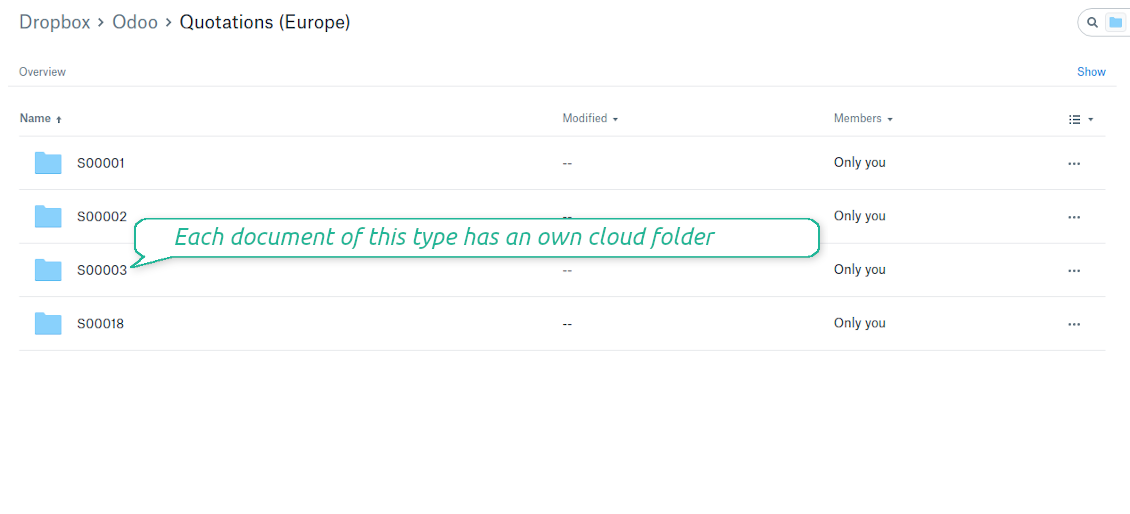
Document types folders in DropBox
All document of this type has an own folder
Direct access to DropBox items
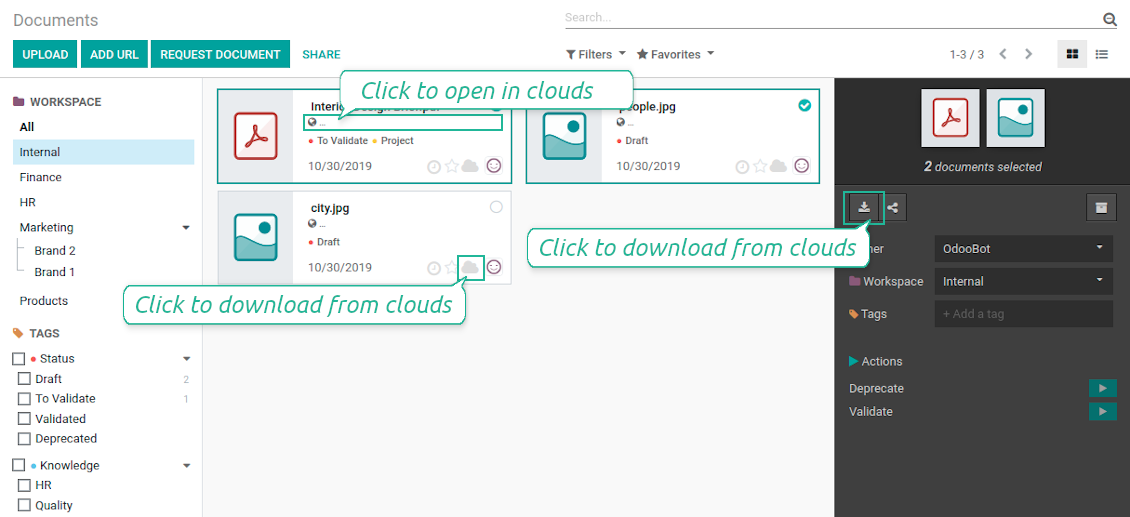
- Click on attachment to open it in DropBox in a new tab (necessary to be logged in DropBox). Have also a look at the section Dropbox URLs below;
- Click the icon of cloud to start downloading file from DropBox (no extra check in is required)
- Push the button "Open cloud folder" to open all files related to this document.
DropBox URLs
DropBox has a specific way to generate links for existing files and folders. In particular, there are no concepts of internal or private URLs. Instead, each DropBox item might get so-called shared URLs. Such shared links are either public or team-only. Moreover, the latter feature is available only for DropBox business account.
This tool relies upon share links' mechanics. It means, that each attachment link is either public (all personal DropBox accounts) or team-only (all business DropBox accounts).
Sometimes it is considered to be not fully safe. Although website URLs will be hardly known by external users, there is a slight chance that they become available as a result of some user actions. Besides, sharing links generation is not super fast and might make a sync process slower. That is why the feature to switch off sharing urls is introduced.
If checked, all DropBox urls in Odoo will be of type https://www.dropbox.com/home/Odoo/[PATH]. Such links will not work in quite a many cases. Thus, if you need to open DropBox files / folders from Odoo, do not switch off the feature 'No links to DropBox from Odoo'.
Ruutukuvat
Quick access to DropBox files and folders
Apply to DropBox right from Odoo chatter
Fully integrated and compatible with Enterprise Documents
It does not contradict printing, mailing, or Enterprise documents features.
For the latter it is also possible to fully reflect directories structure, not only sync standard attachments.
How Odoo Enterprise Documents are synced
This tool is not in conflict with the 'documents' module provided under the Enterprise license. Attachments related to Enterprise folders would be synced as any other files: according to a document they relate to.
It is not always comfortable, and you might be interested in reflecting directories' structure introduced by the module 'Documents'. To this end the special extension is developed. This extension introduces the following features:
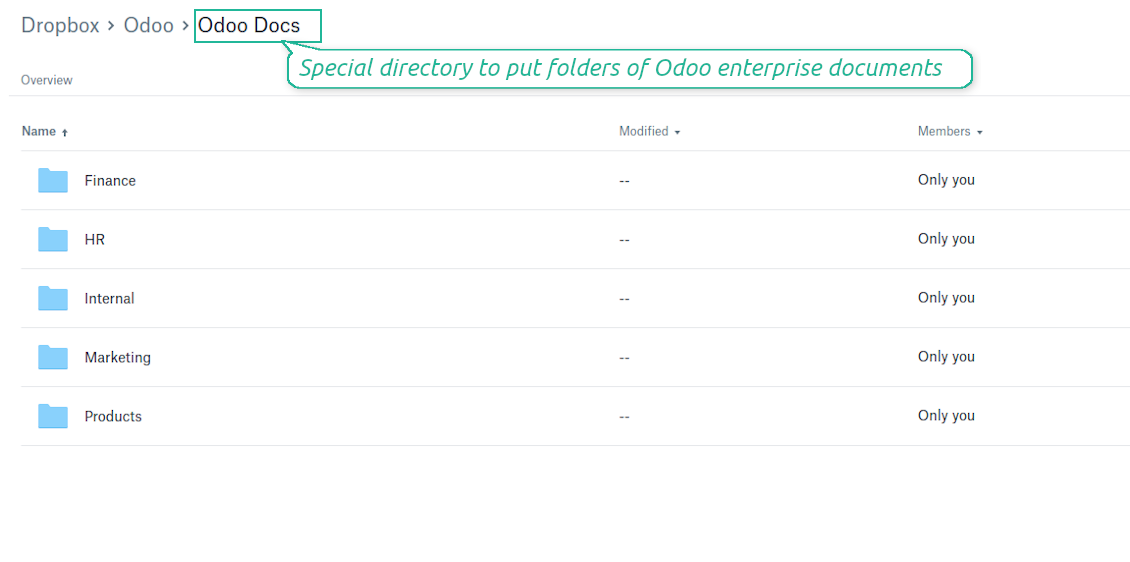
- The documents hierarchy is reflected within the folder 'Odoo / Odoo Docs'
- Each Odoo folder has a linked cloud folder. Take into account that folders created in the cloud storage will be synced as Odoo attachments. The key principle is: folders are managed by Odoo, files are managed by the cloud client
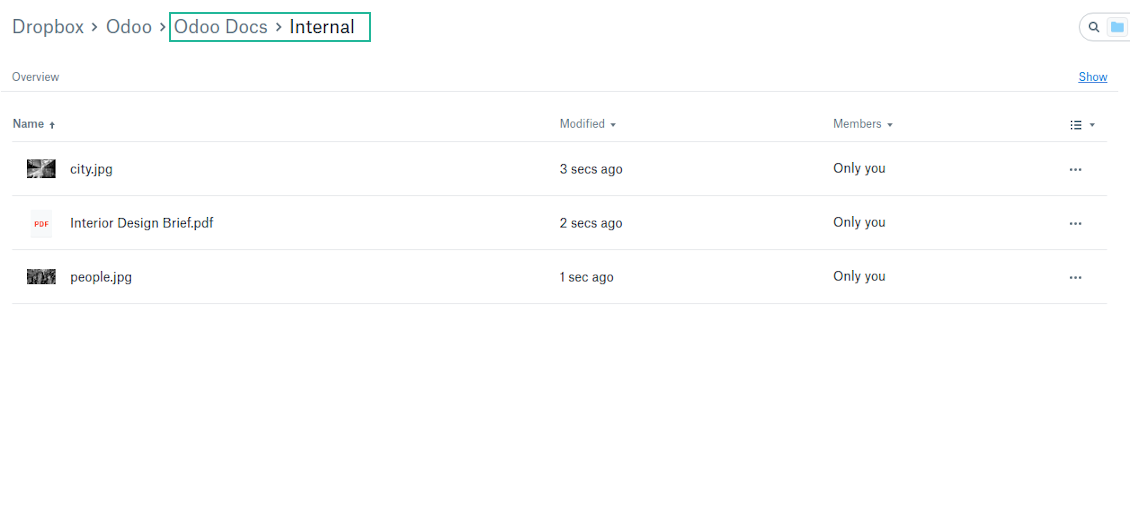
- All files are synced with the same logic as usual attachments. Files created in Odoo will be added to the cloud storage and will be replaced with links in Odoo. Files created in cloud storage will generate attachments within a paired directory
- Please do not name synced models as 'Odoo Docs'. This is the reserved name for Odoo Enterprise Documents
A few other peculiarities to take into account
- Try to avoid the following symbols in folders' and files' names: *, ?, ", ', :, <, >, |, +, %, !, @, \, /,. Direct sync will replace such symbols with '-'. It is done to avoid conflicts with file systems.
Ruutukuvat
Direct access from Odoo documents to DropBox
Enterprise Documents in DropBox
Enterprise files in DropBox
DropBox Sync logs in Odoo
Ruutukuvat
Logged synchronization activities
Default folders for documents
All DropBox tariffs
Määritys- ja asennusvinkkejä: DropBox Odoo Integration Odoo v.13
Python dependency
pip3 install dropboxConfiguration and log in
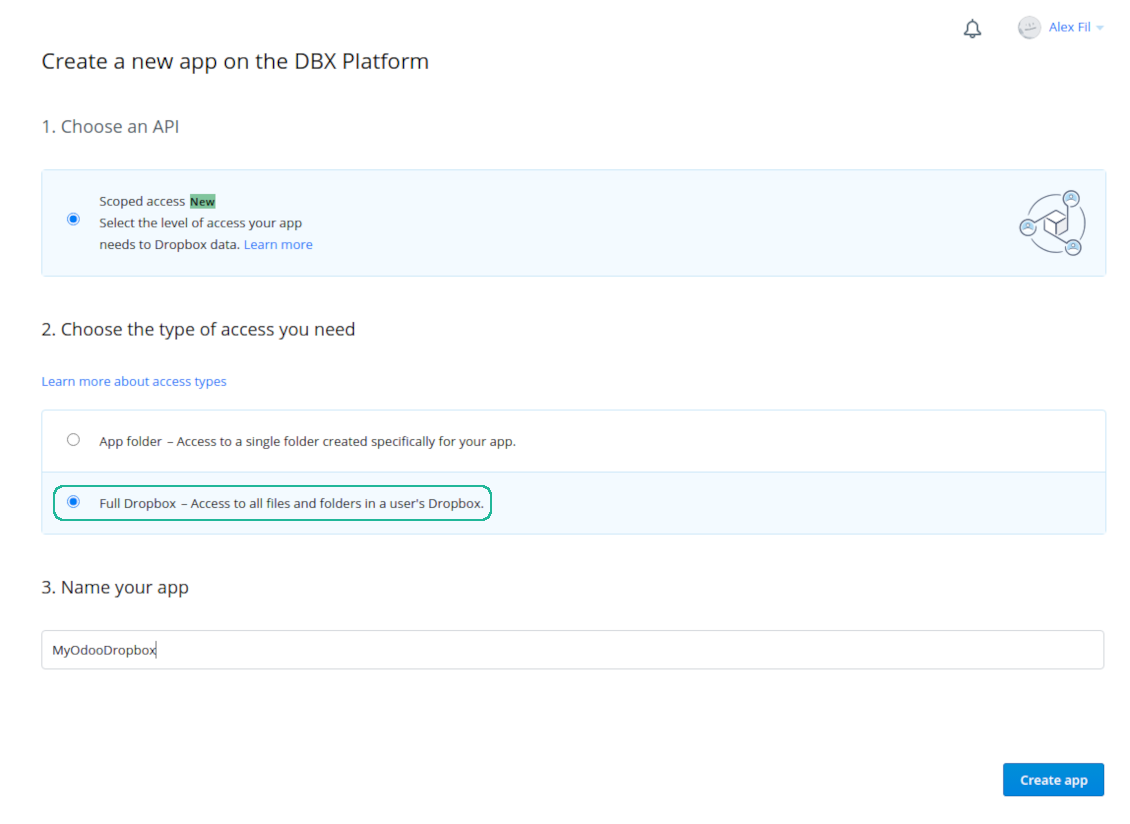
- Follow the url https://www.dropbox.com/developers/apps/create
- Choose an API as 'Scoped access'
- Choose the type of access as 'Full Dropbox'
- Select any suitable name for the app and push the button 'Create app'
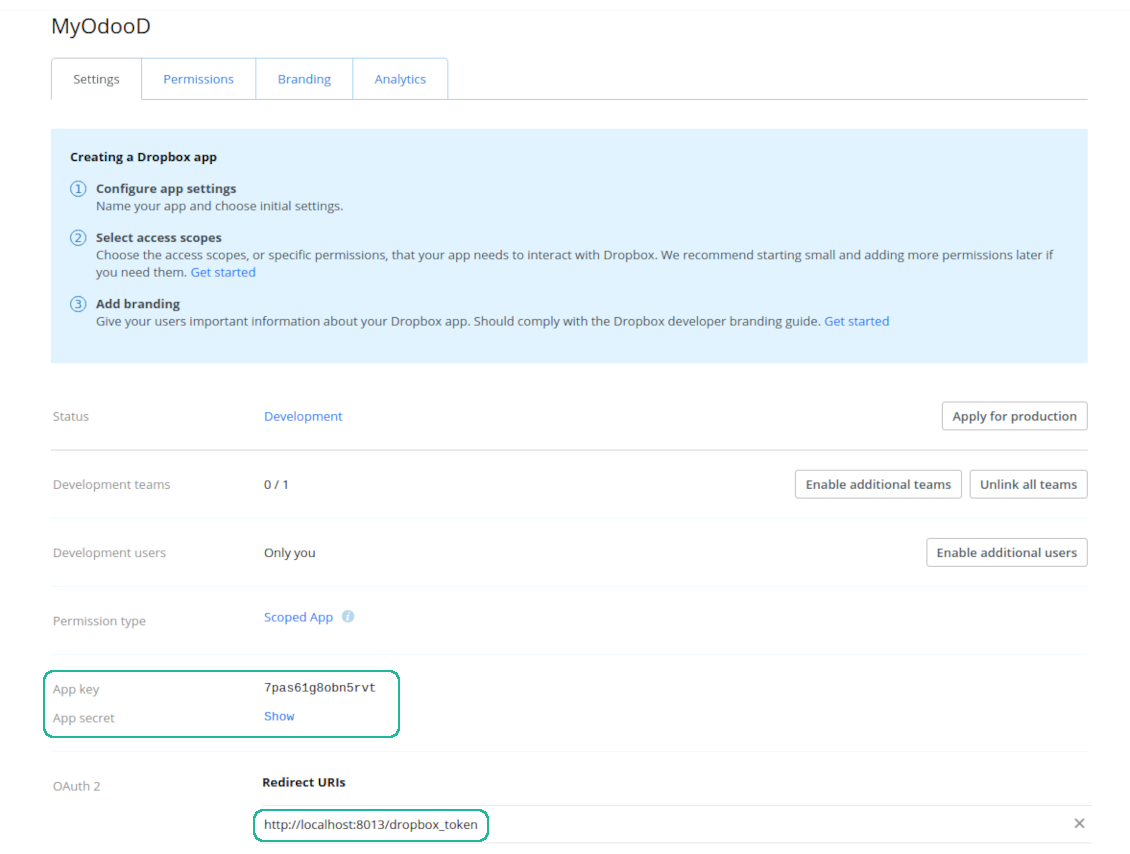
- Add the redirect URI as YOURODOOSITENAME]/dropbox_token (e.g. https://faotools.com/dropbox_token). A valid SSL certificate (https) is required
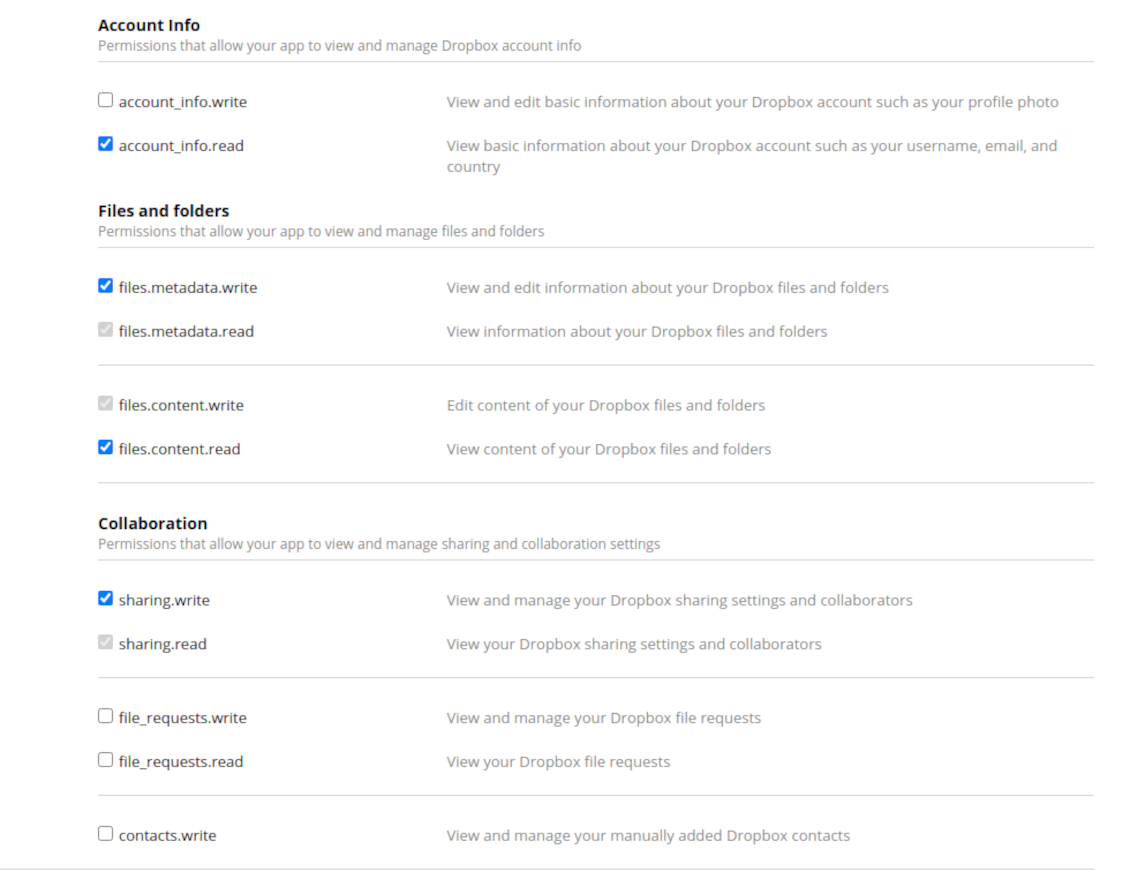
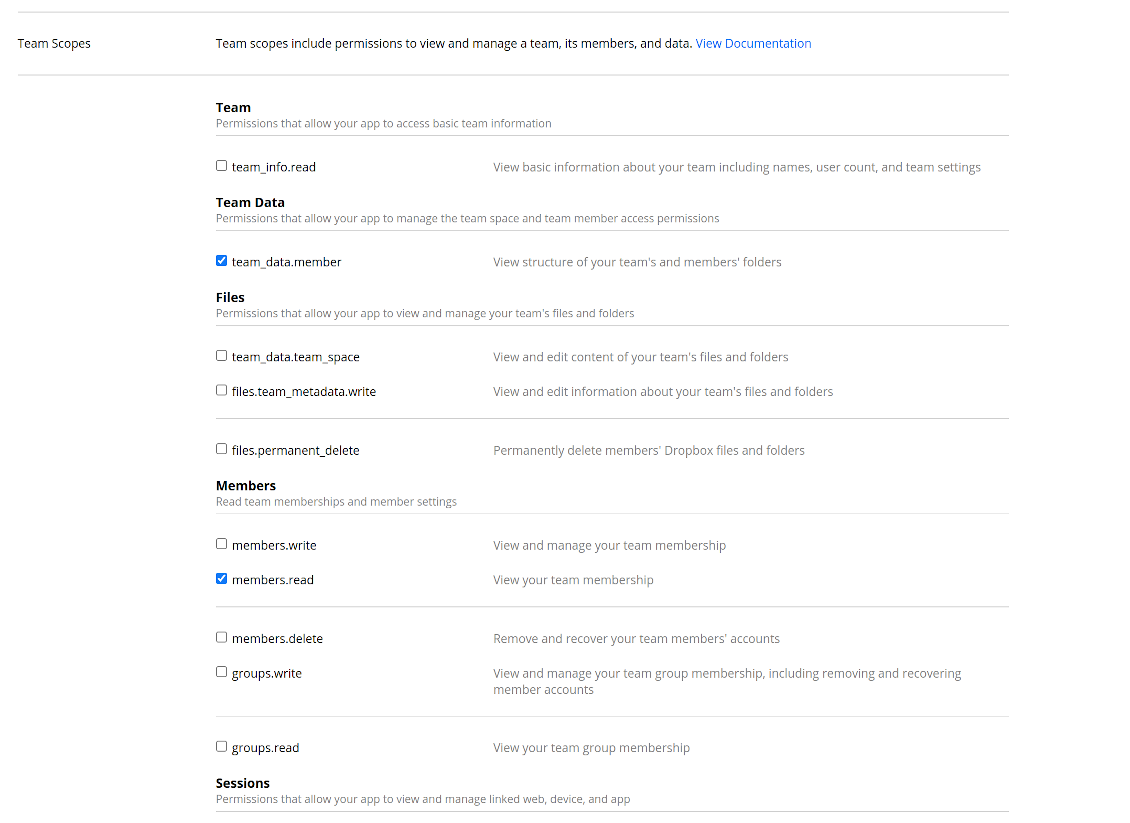
- Grant permissions to the app: 'Account Info (Read)', 'Files and folders Metadata (Write)', 'Files Content (Write)', 'Collaboration (Write)'. For team DropBox assign also 'Team Data Members', 'Members (Read)'. Make sure no other permissions are assigned.
- Submit App
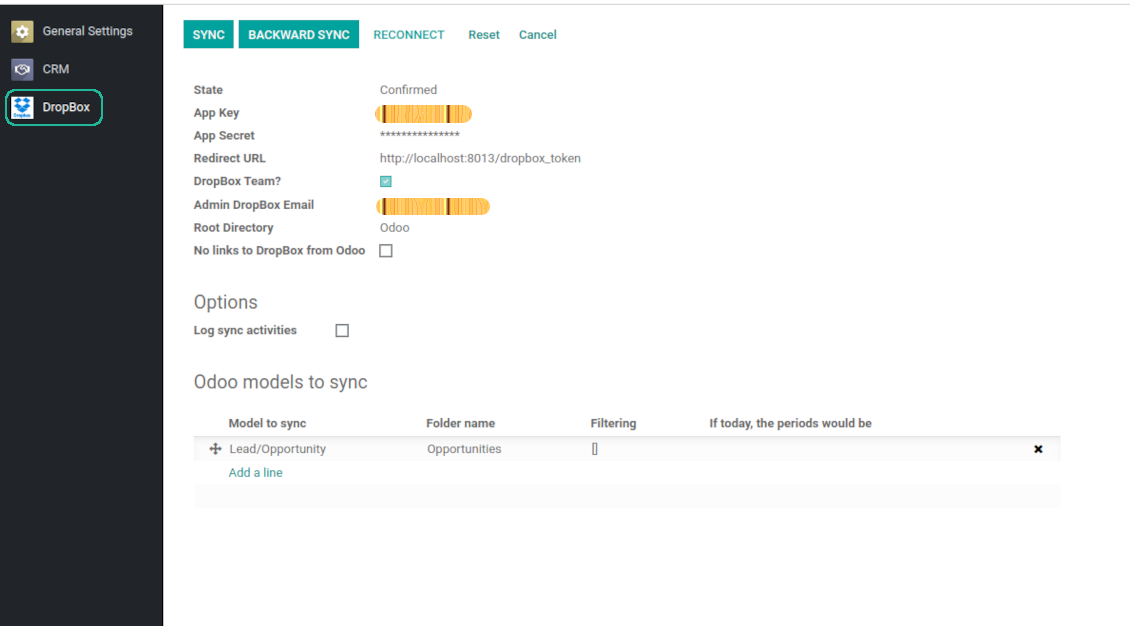
- Go to Odoo general settings - DropBox
- Copy App Key, App secret, and redirect URI to the Odoo configuration page
-
For team DropBoxes only
- Check the box 'DropBox Team'
- Set an email of DropBox user. Inside this user folder all Odoo related items would be created and only after that they are shared to all other users. Under this user all files and folders are created, changed, moved, and deleted
- Choose a suitable name for the root Odoo folder, e.g. 'Odoo' or 'ERP'
- Press Save
- Press 'Login and Confirm'
Create a DropBox app
Set up DropBox App: redirection URL
DropBox permissions for personal accounts
DropBox permissions for business accounts
Set up Odoo for DropBox integration
Odoo server configuration and cron job configuration
To make sure the synchronization works correctly apply proper timeouts to the Odoo configuration file: LIMIT_TIME_CPU, LIMIT_TIME_REAL, LIMIT_TIME_REAL_CRON should be more than 900 seconds.
For Odoo.sh this should not be done, since timeouts are predefined and are not configurable.
Then, timeout should be entered to your Odoo. To that goal find the section 'Settings' on the app configuration page and copy the number there.
Afterwards, it is needed to make the cron jobs suit the applied timeouts. In the debug mode go to the Settings > Technical > Automation > Scheduled Jobs:
- Set up the job 'Synchronize attachments with cloud' as (a) frequency - 2*timeout; (b) the next execution as the next hour +timeout. For example, for 900seconds timeout: frequency - as 30minutes; the next execution - at 08:15
- Set up the job 'Synchronize attachments from cloud' as (a) frequency - 2*timeout; (b) the next execution as the next hour + timeout*2. For example, for 900seconds timeout: frequency - as 30minutes; the next execution- at 08:30.
Reconnection
Reconnection might be required for the case a refresh token is expired and when you migrate the app from previous versions. In such a case:
- Press the button 'Reconnect'
- Press the button 'Login and confirm'
Usein kysytyt kysymykset aiheesta DropBox Odoo Integration Odoo v.13
Voinko muuttaa synkronointitöiden taajuutta?
Kyllä. Tee näin:
Ota debug-tila käyttöön
Siirry teknisiin asetuksiin > Automaatio > Ajoitetut toiminnot
Etsi työt «Synchronize attachments with cloud» ja «Update attachments from cloud».
Älä tee niistä liian tiheitä. Työn tulisi ehtiä valmiiksi ennen seuraavan alkua. Asetus riippuu synkronoitavien kohteiden määrästä. Taajuus on yleensä 15 minuutista 4 tuntiin.
Aseta myös riittävät aikarajat Odoon asetustiedostoon. LIMIT_TIME_CPU ja LIMIT_TIME_REAL on oltava vähintään suunnitellun cron-ajan pituisia. Versiosta 13 alkaen huomioi myös LIMIT_TIME_REAL_CRON.
Tärkeä huomio Odoo.sh-asiakkaille: cron-työn enimmäisaika voi olla vain 15 minuuttia.
Voinko määrittää synkronoiduille hakemistoille eri rakenteen kuin synkronointi olettaa?
Ei, tämä ominaisuus on vasta versiosta 15. Sitä ennen moduuli käyttää ennalta määritettyä kansiorakennetta:
Odoo - synkronoinnin juurikansio
Mallit - kansio kullekin Odoo-asiakirjatyypille. Esimerkiksi «Projects», «Partners». Toimialueen mukaan voi olla tarkempia kansioita: «Customer 1 Projects», «Projects of the Customer 2», «Internal Projects» jne.
Kohteet - kansio kullekin asiakirjalle, esim. «Project 1» tai «Customer 1»
Tähän Odoo-asiakirjaan liittyvät synkronoitavat tiedostot ja kansiot.
Tuloksena voi olla esimerkiksi:
Odoo / Projects / Project 1 / projektin 1 tiedostot ja kansiot
Odoo / Customer 1 Projects / Project 1; Odoo / Customer 2 Projects / Project 3, ...
Odoo / Customers / Customer 1 / asiakkaan 1 tiedostot ja kansiot
Rakenne on aina litteä: vain nämä tasot. Eri asiakirjatyyppejä ei voi pitää samassa haarassa. Kansiossa «Customer 1» ei voi olla sekä tilauksia, laskuja että projekteja. Jokaisella tyypillä on oma kansio (tai useita). Muuten paluysynkronoinnille ei ole kriteeriä.
Pitääkö Odoossa määritellä käyttäjäkohtaiset käyttöoikeudet?
Ei, työkalu käyttää yhtä käyttäjän päätepistettä. Kaikki synkronoinnit tehdään yhden pilviylläpitäjän (sovellus) alla. Luotujen kansioiden / tiedostojen oikeuksia ei automatisoida. Hallitse niitä pilvitallennusratkaisussasi.
Mihin synkronoidut tiedostot tallennetaan? Kopioidaanko ne sekä Odooseen että pilviin?
Sovellus olettaa, että liitteiden binaarisisältö pidetään Cloud Clientissä Odoo-palvelimen sijaan. Siksi tällaisista liitteistä tulee Odoossa URL-tyyppisiä, ja niihin pääsee milloin tahansa joko liitekentästä tai Cloud Clientistä.
Määrityksen jälkeen manuaalisia toimia ei tarvita, koska synkronointi on täysin automaattinen. Päätä vain, mitkä Odoo-asiakirjatyypit synkronoidaan, ja aseta kullekin liittyvä malli (asiakkaat, myynti- tai ostotilaukset, tehtävät, projektit jne.).
Voinko pitää useita kansioita samalle asiakirjatyypille? Esimerkiksi sisäiset projektit ja asiakasprojektit?
Kyllä. Tee sitä varten sääntö kullekin ja aseta suodattimet: esimerkiksi projektin tyypin mukaan.
Tee suodattimista toisensa poissulkevia, jotta asiakirja voidaan sijoittaa varmasti. Esimerkiksi: «asiakas mutta ei toimittaja», «toimittaja mutta ei asiakas». Muuten asiakirjan kansio hyppää mallista toiseen.
Tarvitsenko vain Cloud Storage Solution -sovelluksen?
Ei, työkalu on vain tekninen ydin. Tarvitset myös pilviasiakkaasi liittimen.
Onko ok, jos synkronoitavia kohteita on paljon, esimerkiksi 10000?
Kyllä, vaikka monien kansioiden/liitteiden kanssa prosessi voi olla hidas. Asiakkaat ovat silti raportoineet ympäristöistä, joissa on >10k kumppania ja ~5k tuotevarianttia, ja prosessit olivat hyväksyttäviä.
Muutama kohta:
- Synkronointi on rakennettu niin, ettei mikään kohde katoa, vaikka se ei olisi nopea. FIFO-jonot ja kunkin työn commit takaavat sen.
- Kohteiden määrää voi rajata loogisesti. Mallien asetukset antavat jättää vanhentuneet pois (esim. arkistoidut kumppanit tai 2 vuoden takaiset tilaukset).
Voiko synkronoinnin tehdä reaaliaikaiseksi?
Ei. Meillä on vahvat syyt välttää reaaliaikaista synkronointia:
Suorituskyky. Reaaliaikaisessa synkassa jokainen tiedoston lataus näyttää latausruudun.
Ristiriidat. Jos 2 käyttäjää muuttaa kohdetta yhtä aikaa, tilanne voi jäädä ratkaisematta. Säännöllisissä töissä voimme korjata myöhemmin; reaaliajassa tarvittaisiin jono, mikä sekoittaisi entisestään.
Toiminnallisuus. Erityisesti nimeäminen ja uudelleenjärjestely. Paluysynk nojaa tiukasti hakemistologiikkaan ja jokaisessa synkassa tarkistetaan 100 % kohteista. Jokaisen päivityksen jälkeen se olisi tuhansia pyyntöjä sekunnissa. Muuten muutokset katoaisivat.
Voinko synkronoida liitteet useisiin pilviasiakkaisiin
Ei, tämä ominaisuus on käytettävissä vasta versiosta 15.
Käytämme pilvissä erityistä editoria (esim. OnlyOffice, Office 365 jne.). Avautuisivatko tiedostot siinä editorissa?
Kyllä, pilviasiakkaasi asetuksista riippuen.
Mitkä ovat tyokalujenne paivityskaytannot?
Odoo Apps Storen nykyisten kaytantojen mukaan:
- Versiolle 12.0 tai aiemmalle ostettu moduuli antaa pääsy kaikkiin versioihin 12.0 asti.
- Versiosta 13.0 alkaen jokainen moduuliversio ostetaan erikseen.
- Versiosta riippumatta osto antaa oikeuden kaikkiin paivityksiin ja korjauksiin paaversiossa.
faOtools-tiimi ei hallitse näitä kaytantoja. Kysymykset osoitetaan suoraan Odoo Apps Storen edustajille.
Miten asennan sovelluksen Odoo.sh-palveluun?
Suorin tapa on Odoo-kaupan sisaanrakennettu työnkulku:
1. Avaa moduulin sivu ja napsauta Deploy on odoo.sh
2. Sinut ohjataan GitHubiin. Kirjaudu sisään ja napsauta Create a new repo tai käytä olemassa olevaa. Repositorion on oltava yksityinen. OPL-1-lisenssin sovelluksia ei saa julkaista. Luo tarvittaessa uusi repo Odoo.sh-projektia varten
3. Siirry sitten odoo.sh:iin, napsauta Deploy, vahvista ja napsauta Continue. Asennus kaynnistyy.
Nämä vaiheet asentavat sovelluksen production-haaraan. Muille haaroille tai paivitykseen:
1. Lataa lahdekoodi Odoo-kaupasta
2. Commitoi moduuli GitHub-repositorioon. Mikään sovelluskansio/-tiedosto ei saa olla .gitignore-tiedostossa. odoo.sh:n luomat repositoriot voivat oletuksena ohittaa tarkeita polkuja (esim. /lib). Lataa kaikki moduulin hakemistot ja tiedostot
3. Deployaa odoo.sh-projektin kohdehaara tai odota automaattista koontia, jos asetukset niin maarittavat.
Miten asennan sovelluksen omalle palvelimelleni?
2. Käynnistä Odoo-palvelin uudelleen;
3. Ota kehittajatila kayttoon (tekniset asetukset);
4. Päivitä sovellusluettelo (Sovellukset-valikko);
5. Etsi sovellus ja paina Activate/Install;
6. Noudata sovellussivun ohjeita, jos niitä on.
Sovelluksella on lisaosia. Voinko ostaa ne myöhemmin?
Kyllä. Odoo lisää kaikki riippuvuudet ostoskoriin automaattisesti: jätä pois jo ostetut työkalut, jottet maksa kahdesti.
Asensin sovelluksen Odoo.sh-palveluun ja näin varoituksen/virheen testeissa
Punainen/oranssi varoitus ei vaikuta sovelluksen ominaisuuksiin. Joskus moduulimme eivät lapaise vakioautomaattitesteja, koska ne olettavat kayttaytymisen, joka on ristiriidassa sovelluksen tavoitteiden kanssa. Muutamme esimerkiksi hinnanlaskentaa, kun Odoo-testit vertaavat loppuhintaa vakioalgoritmiin.
Tarkista ensin kayttoon otetun tietokannan ominaisuudet. Toimiiko kaikki?
Jos oletat silti, että varoitus vaikuttaa todellisiin ominaisuuksiin, ota yhteyttä ja lähetä täydet asennuslokit sekä täydellinen luettelo kayttoon otetuista moduuleista (ydin ja kolmannet osapuolet).
Voinko ostaa sovelluksen suoraan teilta?
Ei, jaamme työkalut vain virallisen Odoo-sovelluskaupan kautta.
Haluan alennuksen
Valitettavasti meillä ei ole teknisia keinoja tarjota yksilöllisiä hintoja.
Voinko asentaa sovelluksen Odoo Online (SaaS) -tietokantaani?
Ei, kolmannen osapuolen sovelluksia ei voi käyttää Odoo Online -palvelussa. Odoo SaaS estää sen.
Tyokalulla on riippuvuuksia. Pitääko ne ostaa?
Kyllä, työkalu tarvitsee kaikki riippuvuuksissa merkittyt moduulit. Sovellussivun hinta sisältää jo nämä riippuvuudet.
Mikä on moduulin hinta Yhdysvaltain dollareina? Miksi se muuttui?
Moduuliemme hinta on euroissa. Odoo-kauppa muuntaa hinnat muihin valuuttoihin sisaisen kurssinsa mukaan. Siksi Yhdysvaltain dollarin hinta voi muuttua, kun kurssi paivittyy.
Sovellus- ja sivustotekstit muilla kielillä kuin englanniksi on tehty tekoälyn tuella ja linjattu virallisiin Odoo-käännöksiin. Jos huomaat virheen, lähetä käännösten oikeellisuutta koskeva tiketti niin korjaamme sen.
Virheiden ilmoittaminen
Jos kohtaat virheitä tai epäjohdonmukaista toimintaa, ota yhteyttä. Korjaamme 60 päivän kuluessa ostosta ja kehitämme työkaluja sen jälkeenkin.
Yhteydenottoon ei tarvita puhelinnumeroa eikä luottokorttia. Riittää lyhyt sähköpostirekisteröinti, joka kestää alle 30 sekuntia.
Liitä pyyntöön mahdollisimman paljon tietoja: kuvakaappaukset, Odoo-palvelinlokit ja täysi kuvaus ongelman toistamisesta. Työsuunnitelma (jos virhe vahvistetaan) tai ohjeet (muuten) valmistuvat yleensä muutamassa arkipäivässä.
Julkiset ominaisuuspyynnöt ja moduliehdotukset (ilmainen kehitys)
Olemme vahvasti motivoituneita kehittämään työkalujamme ja kiitollisia kaikesta palautteesta. Jos vaatimuksesi palvelevat yleisesti ja ne voidaan toteuttaa tehokkaasti, tiimi lisää ne tehtävälistaan.
Tällainen tehtävälista käsitellään säännöllisesti eikä siihen sisälly lisämaksuja. Emme voi luvata määräaikoja ja lopullista suunnittelua, mutta se voi olla hyvä tapa saada toivottuja ominaisuuksia ilman investointeja ja riskejä.
Yhteydenottoon ei tarvita puhelinnumeroa eikä luottokorttia. Riittää lyhyt sähköpostirekisteröinti, joka kestää alle 30 sekuntia.

Työkalu salasanojen turvalliseen säilytykseen Odoossa jaettuun käyttöön. Jaetut holvit

Työkalu syvän ja jäsennellyn tietopankin rakentamiseen sisäiseen ja ulkoiseen käyttöön. Knowledge System. KMS. Wiki-tyyliset versiot.
398€
Työkalu KPI-tavoitteiden asettamiseen ja täyttymisen seurantaan jaksoittain. KPI-koontinäytöt. Koontinäytön suunnittelija. KPI-kaaviot

Työkalu aikaperusteiseen palvelunhallintaan varauksista myyntiin ja arvosteluihin
398€
Työkalu Odoon hallintaan suosikki-AI-chateista MCP:n kautta. Claude. Mikä tahansa MCP-tekoäly.

Työkalu, jolla Odoo-liitteet järjestetään kansioihin ja hakemistot synkronoidaan pilviasiakkaisiin: Google Drive, OneDrive/SharePoint, Nextcloud/ownCloud, Dropbox, Amazon S3, Box ja NAS. DMS. Tiedostonhallinta. Asiakirjahallinta
398€
Työkalu: automaattisesti synkronoi Odoo liitteet kanssa OneDrive tiedostot ssa molemmat ways
487€
Työkalu: automaattisesti synkronoi Odoo liitteet kanssa Google Drive tiedostot ssa molemmat ways
487€
Työkalu: automaattisesti synkronoi Odoo liitteet kanssa ownCloud/Nextcloud tiedostot ssa molemmat ways
487€