DropBox Odoo Integration v.13
The tool to automatically synchronize Odoo attachments with DropBox files in both ways



- the technical core which provides basic mechanics of auto synchronization. This is a required module for integration. Dess pris är 398€.
- the connector itself which introduces links between Odoo and DropBox. Dess pris är 89€.
- an optional add-on to sync Odoo documents (introduced by the enterprise app 'Documents') with clouds. The features assumed by this add-on are marked by the icon . Dess pris är 44€.
Selectable documents types for sync
The tool let you split any business model into a few directories. Have a separate folder for individuals and companies, for European and American opportunities, for each project, etc.
Moreover, it is possible to guarantee that only topical documents are synced by using relative periods: leads registered in the last 3 months, invoices updated the last week, and so on.
Typical use cases
- Projects: have an own DropBox folder for each customer project.
- Customers: add all partner files in a single directory available both from Odoo and from DropBox. Modify those using default cloud editors and access them when working in Odoo.
- Employees: gather all files by this employee in a single cloud folder: photos, document scans, contracts. Access and upload those from Odoo and DropBox alternatively.
- Opportunities: carefully store all specifications, requirements, any files which would let you make a good offer.
- Orders: keep all printings and contracts in DropBox with simple availability from Odoo.
Skärmdump
Choose document types to be synced
Document type might have a few folders based on filters
Automatic and bilateral integration
Synced attachments are physically kept only in a cloud storage, what increases Odoo interface performance. Simultaneously, you can open documents from Odoo or download those in a single click.
How files and folders are synced from Odoo to DropBox
Based on the scheduled job 'Synchronize attachments with cloud' Odoo regularly checks whether:
- Any new attachment should be forwarded to DropBox;
- Any new document type (e.g. Sale orders) is added / replaced / renamed as a sync model and, hence, whether a directory should be created / removed / renamed in DropBox;
- Any new document (e.g. Sale Order SO019) is generated / updated / unlinked and, hence, whether a DropBox folder should be created / moved or renamed / deleted.
- Any new attachment should be removed from DropBox if it has been deleted from Odoo.
Based on results of that checks, Odoo starts processing queue of changes, and makes sure that all items are located correctly. The final goal is to have the structure 'Odoo / Document Types / Documents / Files. For example, 'Odoo / Quotations / SO019 / commercial offer.pdf'.
During the synchronization all synced Odoo attachments change their type to a link (URL), while binary content is removed with a next Odoo cleaner. So, no actual files would be stored on your Odoo server.
Please take into account:
- Each sync (especially the very first one) might take quite a long. It is not recommended to make sync too frequent: once an hour seems reasonable frequency.
- File names should be managed in DropBox: each backward sync would recover DropBox names, Odoo is here less important.
How items are retrieved from DropBox to Odoo
Based on the scheduled job 'Synchronize attachments from cloud' Odoo regularly checks whether:
- Any file is added / moved / removed in a DropBox document folder. If yes, Odoo would create a link to this file in a target object (e.g. a new attachment to SO019) or would move / delete such an attachment.
- Any file of a DropBox document folder is renamed. If yes, an attachment would be renamed in Odoo as well.
- In document folders you can put not only files but also child folders. In that case a link for this folder (not its content) would be kept in Odoo attachments.
- If you deleted a folder related to this document type or this document, their child files would be deleted as well. Thus, Odoo would remove related attachments. The folders, however, will be recovered with a next direct sync.
- Each backward sync might take quite a long. It is not recommended to make sync too frequent: once an hour seems safe enough.
Skärmdump
Synced files are simply found in DropBox. Add unlimited number of files or folders
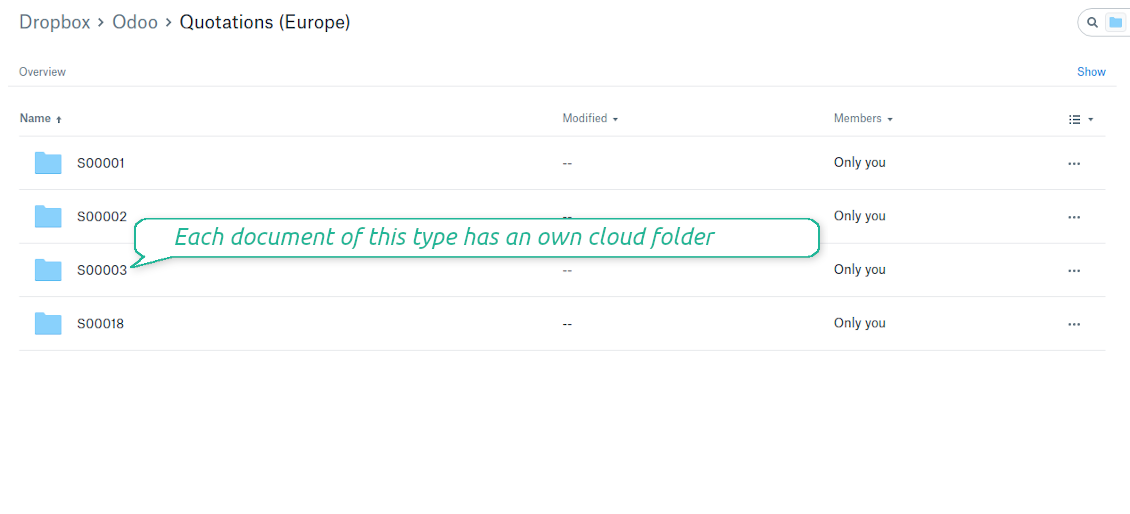
Document types folders in DropBox
All document of this type has an own folder
Direct access to DropBox items
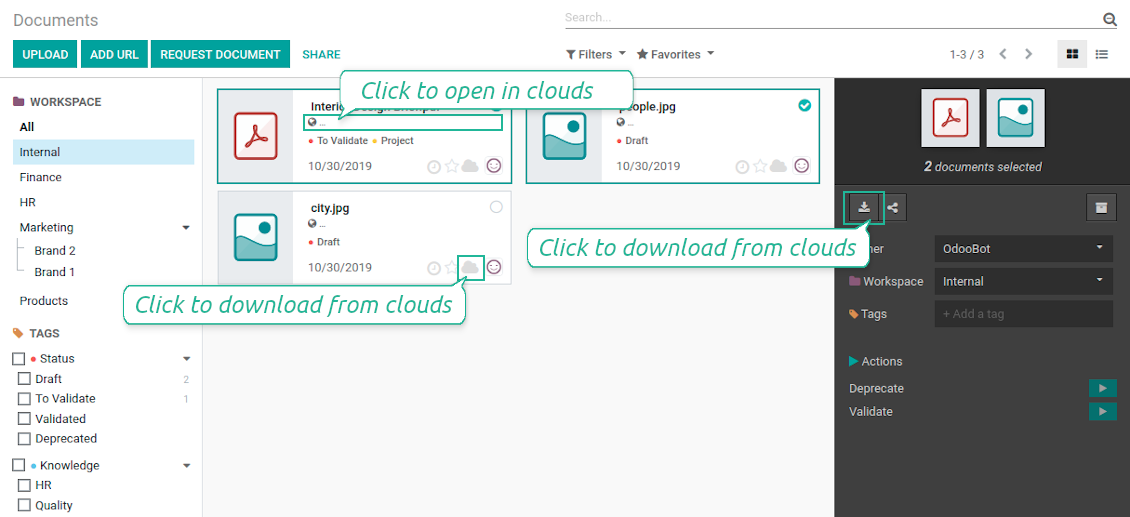
- Click on attachment to open it in DropBox in a new tab (necessary to be logged in DropBox). Have also a look at the section Dropbox URLs below;
- Click the icon of cloud to start downloading file from DropBox (no extra check in is required)
- Push the button "Open cloud folder" to open all files related to this document.
DropBox URLs
DropBox has a specific way to generate links for existing files and folders. In particular, there are no concepts of internal or private URLs. Instead, each DropBox item might get so-called shared URLs. Such shared links are either public or team-only. Moreover, the latter feature is available only for DropBox business account.
This tool relies upon share links' mechanics. It means, that each attachment link is either public (all personal DropBox accounts) or team-only (all business DropBox accounts).
Sometimes it is considered to be not fully safe. Although website URLs will be hardly known by external users, there is a slight chance that they become available as a result of some user actions. Besides, sharing links generation is not super fast and might make a sync process slower. That is why the feature to switch off sharing urls is introduced.
If checked, all DropBox urls in Odoo will be of type https://www.dropbox.com/home/Odoo/[PATH]. Such links will not work in quite a many cases. Thus, if you need to open DropBox files / folders from Odoo, do not switch off the feature 'No links to DropBox from Odoo'.
Skärmdump
Quick access to DropBox files and folders
Apply to DropBox right from Odoo chatter
Fully integrated and compatible with Enterprise Documents
It does not contradict printing, mailing, or Enterprise documents features.
For the latter it is also possible to fully reflect directories structure, not only sync standard attachments.
How Odoo Enterprise Documents are synced
This tool is not in conflict with the 'documents' module provided under the Enterprise license. Attachments related to Enterprise folders would be synced as any other files: according to a document they relate to.
It is not always comfortable, and you might be interested in reflecting directories' structure introduced by the module 'Documents'. To this end the special extension is developed. This extension introduces the following features:
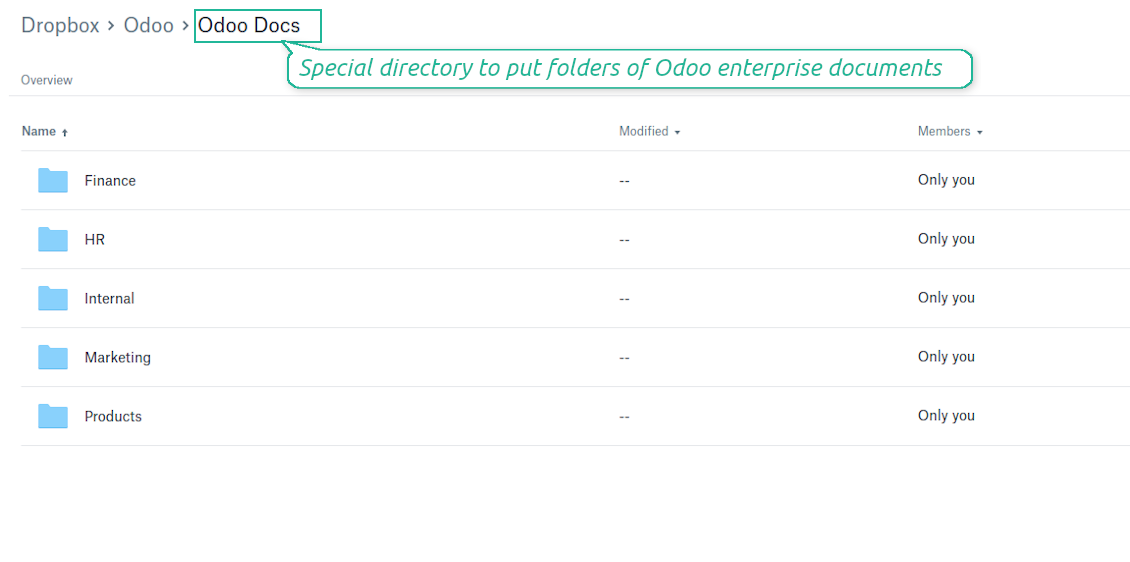
- The documents hierarchy is reflected within the folder 'Odoo / Odoo Docs'
- Each Odoo folder has a linked cloud folder. Take into account that folders created in the cloud storage will be synced as Odoo attachments. The key principle is: folders are managed by Odoo, files are managed by the cloud client
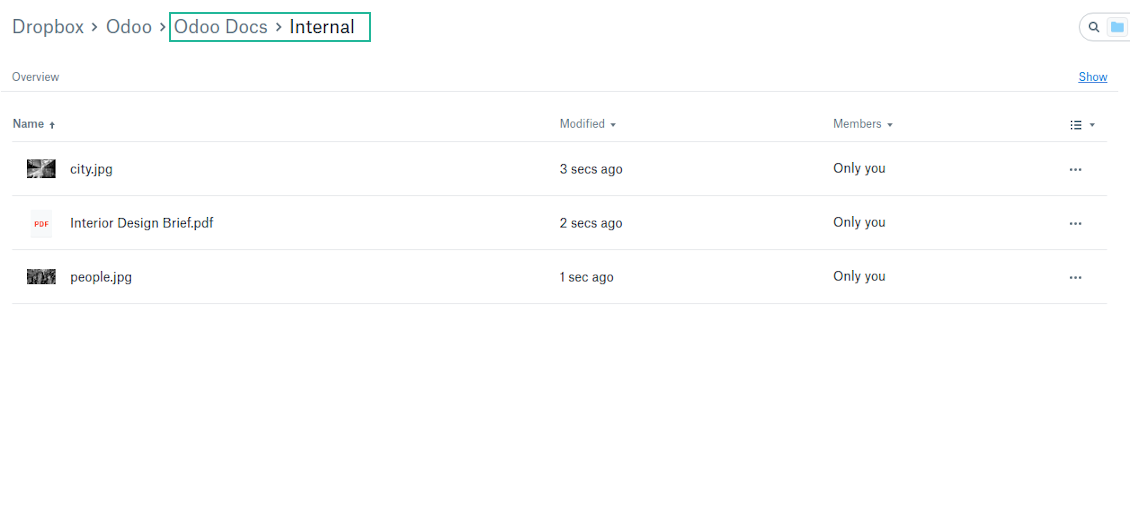
- All files are synced with the same logic as usual attachments. Files created in Odoo will be added to the cloud storage and will be replaced with links in Odoo. Files created in cloud storage will generate attachments within a paired directory
- Please do not name synced models as 'Odoo Docs'. This is the reserved name for Odoo Enterprise Documents
A few other peculiarities to take into account
- Try to avoid the following symbols in folders' and files' names: *, ?, ", ', :, <, >, |, +, %, !, @, \, /,. Direct sync will replace such symbols with '-'. It is done to avoid conflicts with file systems.
Skärmdump
Direct access from Odoo documents to DropBox
Enterprise Documents in DropBox
Enterprise files in DropBox
DropBox Sync logs in Odoo
Skärmdump
Logged synchronization activities
Default folders for documents
All DropBox tariffs
Konfigurations- och installationstips för DropBox Odoo Integration Odoo v.13
Python dependency
pip3 install dropboxConfiguration and log in
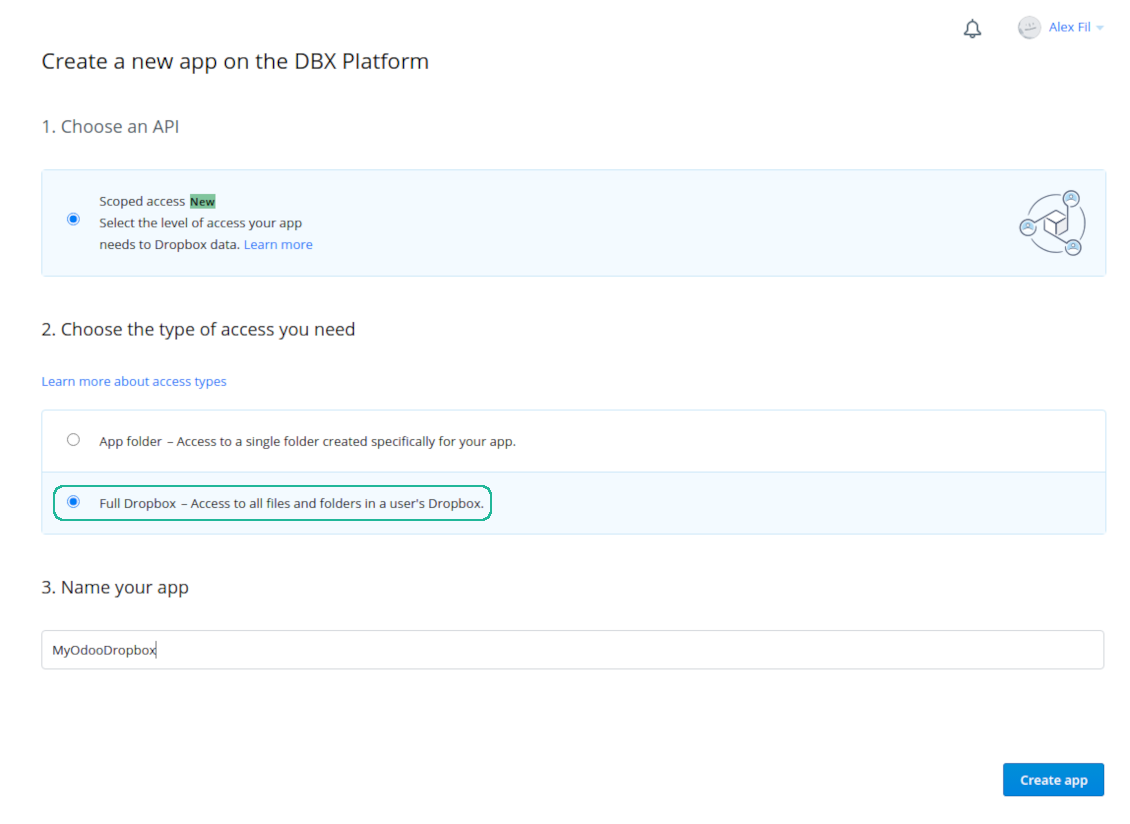
- Follow the url https://www.dropbox.com/developers/apps/create
- Choose an API as 'Scoped access'
- Choose the type of access as 'Full Dropbox'
- Select any suitable name for the app and push the button 'Create app'
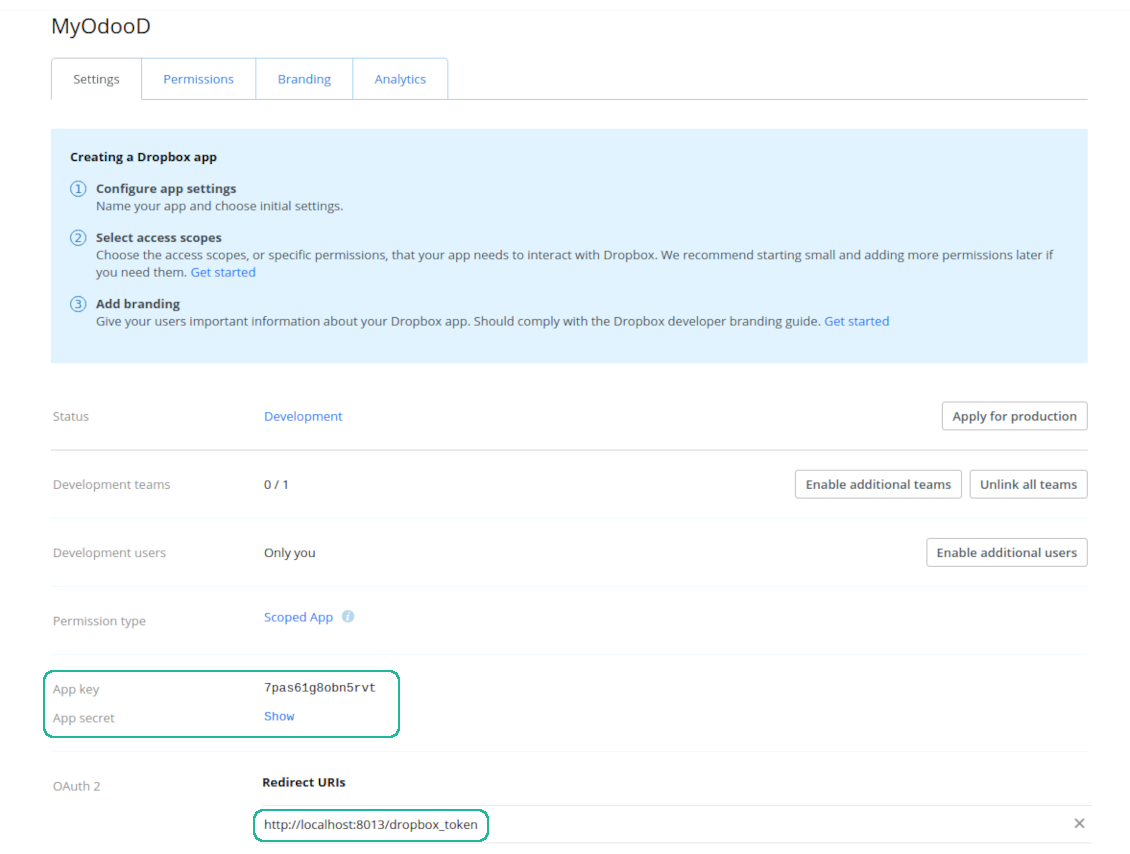
- Add the redirect URI as YOURODOOSITENAME]/dropbox_token (e.g. https://faotools.com/dropbox_token). A valid SSL certificate (https) is required
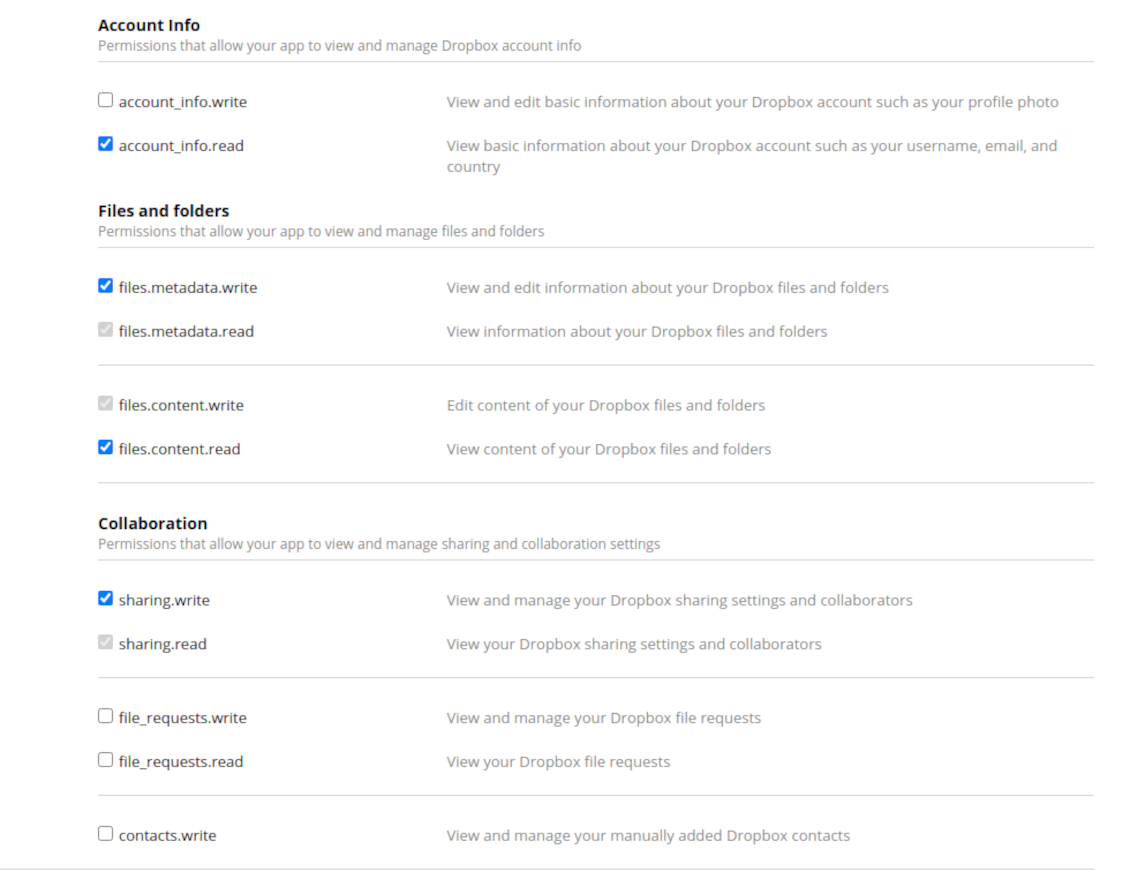
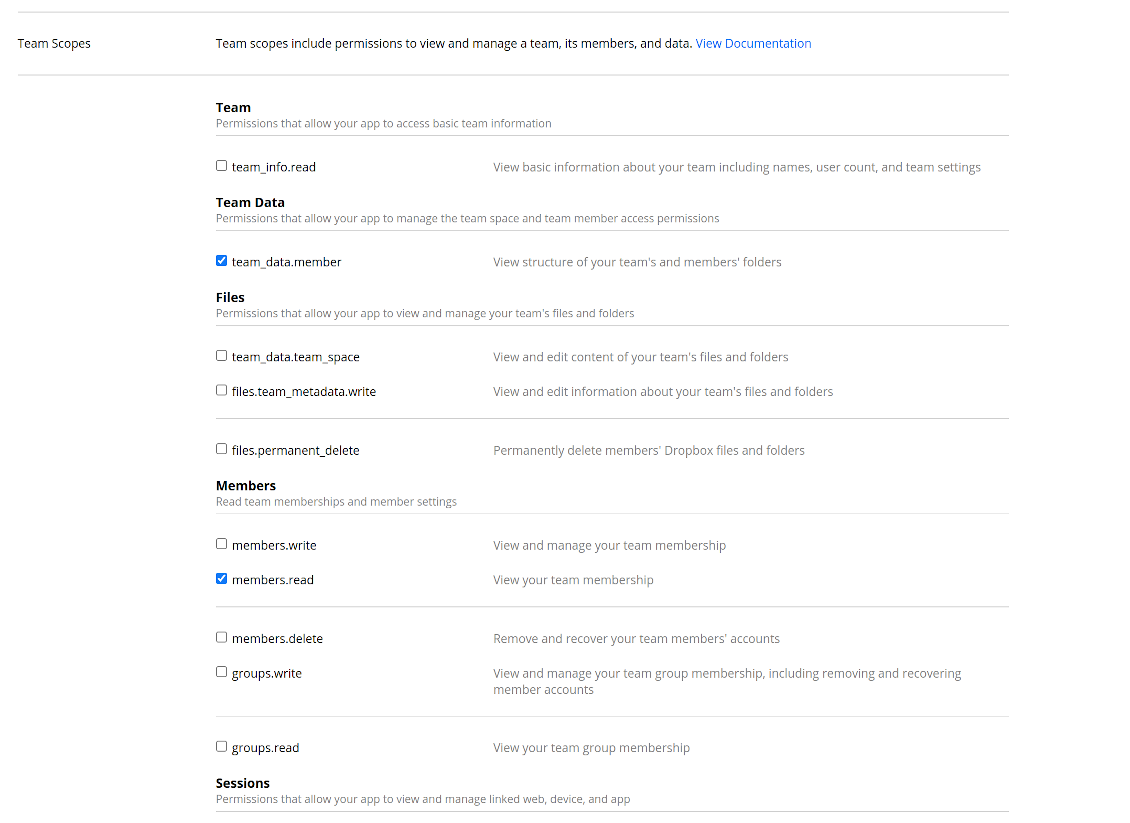
- Grant permissions to the app: 'Account Info (Read)', 'Files and folders Metadata (Write)', 'Files Content (Write)', 'Collaboration (Write)'. For team DropBox assign also 'Team Data Members', 'Members (Read)'. Make sure no other permissions are assigned.
- Submit App
- Go to Odoo general settings - DropBox
- Copy App Key, App secret, and redirect URI to the Odoo configuration page
-
For team DropBoxes only
- Check the box 'DropBox Team'
- Set an email of DropBox user. Inside this user folder all Odoo related items would be created and only after that they are shared to all other users. Under this user all files and folders are created, changed, moved, and deleted
- Choose a suitable name for the root Odoo folder, e.g. 'Odoo' or 'ERP'
- Press Save
- Press 'Login and Confirm'
Create a DropBox app
Set up DropBox App: redirection URL
DropBox permissions for personal accounts
DropBox permissions for business accounts
Set up Odoo for DropBox integration
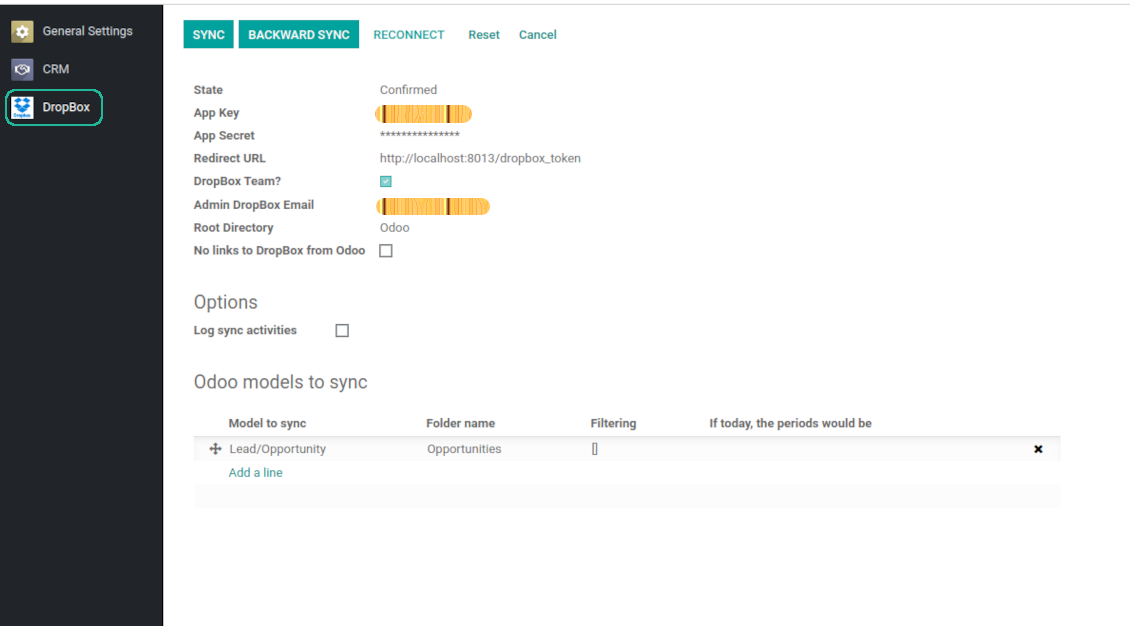
Odoo server configuration and cron job configuration
To make sure the synchronization works correctly apply proper timeouts to the Odoo configuration file: LIMIT_TIME_CPU, LIMIT_TIME_REAL, LIMIT_TIME_REAL_CRON should be more than 900 seconds.
For Odoo.sh this should not be done, since timeouts are predefined and are not configurable.
Then, timeout should be entered to your Odoo. To that goal find the section 'Settings' on the app configuration page and copy the number there.
Afterwards, it is needed to make the cron jobs suit the applied timeouts. In the debug mode go to the Settings > Technical > Automation > Scheduled Jobs:
- Set up the job 'Synchronize attachments with cloud' as (a) frequency - 2*timeout; (b) the next execution as the next hour +timeout. For example, for 900seconds timeout: frequency - as 30minutes; the next execution - at 08:15
- Set up the job 'Synchronize attachments from cloud' as (a) frequency - 2*timeout; (b) the next execution as the next hour + timeout*2. For example, for 900seconds timeout: frequency - as 30minutes; the next execution- at 08:30.
Reconnection
Reconnection might be required for the case a refresh token is expired and when you migrate the app from previous versions. In such a case:
- Press the button 'Reconnect'
- Press the button 'Login and confirm'
Vanliga frågor om DropBox Odoo Integration Odoo v.13
Kan jag ändra frekvensen för synkroniseringsjobb?
Ja, det går. Gör så här:
Slå på felsökningsläget
Gå till tekniska inställningar > Automatisering > Schemalagda åtgärder
Hitta jobben «Synchronize attachments with cloud» och «Update attachments from cloud».
Gör dem inte för täta. Ett jobb bör hinna slutföras innan nästa startar. Inställningen beror på hur många objekt som ska synkas. Vanligtvis är frekvensen mellan 15 minuter och 4 timmar.
Sätt också tillräckliga tidsgränser i Odoos konfigurationsfil. LIMIT_TIME_CPU och LIMIT_TIME_REAL ska vara lika med eller större än den planerade crontiden. Från version 13 gäller även LIMIT_TIME_REAL_CRON.
Viktig anmärkning för Odoo.sh-kunder: max tiden för ett cronjobb kan vara begränsad till 15 minuter.
Kan jag konfigurera en annan struktur för synkade kataloger än den som synken förutsätter?
Nej, den här funktionen finns först från version 15. Dessförinnan använder modulen en fördefinierad mappstruktur:
Odoo - rotmapp för synken
Modeller - mappar för varje Odoo-dokumenttyp. Till exempel «Projects», «Partners». Via domän kan det finnas mer specifika mappar: «Customer 1 Projects», «Projects of the Customer 2», «Internal Projects» osv.
Objekt - mappar för varje dokument, t.ex. «Project 1» eller «Customer 1»
Filer och mappar som hör till detta Odoo-dokument och ska synkas.
Då kan du till exempel ha:
Odoo / Projects / Project 1 / filer och mappar för projekt 1
Odoo / Customer 1 Projects / Project 1; Odoo / Customer 2 Projects / Project 3, ...
Odoo / Customers / Customer 1 / filer och mappar för kund 1
Strukturen är alltid platt: bara dessa nivåer. Olika dokumenttyper kan inte ligga i samma gren. I mappen «Customer 1» kan man inte hålla både order, fakturor och projekt. Varje typ har egen/egna mapp(ar). Annars finns inget kriterium för bakåtsynken.
Ska jag ställa in specifika användaråtkomster i Odoo?
Nej, verktyget använder en enda användarslutpunkt. Alla synkprocesser körs under en enda molnadministratör (app). Rättigheter för skapade mappar / filer automatiseras inte. Administrera dem i din molnlagring.
Var lagras synkade filer? Dupliceras de till Odoo och molnen?
Appen utgår från att bilagornas binära innehåll ligger i Cloud Client i stället för på Odoo-servern. Sådana bilagor blir därför av typen URL i Odoo, och du kan när som helst nå dem antingen från bilagefältet eller från Cloud Client.
Efter installationen krävs inga manuella åtgärder, eftersom synkroniseringen är helt automatisk. Bestäm bara vilka Odoo-dokumenttyper som ska synkas och sätt upp en relaterad modell att synka för var och en (kunder, försäljnings- eller inköpsorder, uppgifter, projekt osv.).
Kan jag ha flera mappar för samma dokumenttyp? Till exempel interna projekt och kundprojekt?
Ja, det går. Skapa en regel för varje och applicera filter: till exempel efter projekttyp.
Gör filtren ömsesidigt uteslutande så att ett dokument kan tilldelas entydigt. Till exempel: «kund men inte leverantör», «leverantör men inte kund». Annars hoppar dokumentmappen från en modell till en annan.
Behöver jag bara appen Cloud Storage Solution?
Nej, verktyget är bara en teknisk kärna. Du behöver också anslutningen för din molnklient.
Är det okej om jag har många objekt att synka, till exempel 10000?
Ja, även om processen kan vara långsam med många mappar/bilagor. Samtidigt har kunder rapporterat miljöer med >10k partners och ~5k produktvarianter, och processerna var acceptabla.
Några punkter:
- Synken är byggd så att varje objekt synkas och inte går förlorat, även om det inte är snabbt. FIFO-köer och commit av varje jobb garanterar det.
- Antalet objekt kan begränsas logiskt. Modellkonfigurationen låter dig utesluta föråldrade poster (t.ex. arkiverade partners eller order från 2 år sedan).
Går det att göra synkroniseringen i realtid?
Nej. Vi har starka skäl att undvika realtidssynk:
Prestanda. Vid realtidssynk ger varje filuppladdning en laddningsskärm.
Konflikter. Om 2 användare ändrar ett objekt samtidigt kan det bli olösligt. Med vanliga jobb kan vi rätta efteråt; i realtid behövs en kö, ännu mer vilseledande.
Funktion. Särskilt namnbyte och omstrukturering. Bakåtsynken bygger strikt på kataloglogiken och vid varje synk kontrolleras 100 % av objekten. Efter varje uppdatering skulle det bli tusentals anrop per sekund. Annars går ändringar förlorade.
Kan jag synka bilagor till flera molnklienter
Nej, den här funktionen finns först från version 15.
Vi använder en särskild redigerare i våra moln (t.ex. OnlyOffice, Office 365 osv.). Skulle filerna öppnas i den redigeraren?
Ja, beroende på din molnklients konfiguration.
Vilka uppdateringsregler gäller for era verktyg?
Enligt de aktuella reglerna for Odoo Apps Store:
- Varje modul kop for version 12.0 eller tidigare ger tillgang till alla versioner upp till 12.0.
- Från och med version 13.0 måste varje modulversion kopas separat.
- Oavsett version ger kopet rätt till alla uppdateringar och felrättningar inom en huvudversion.
faOtools-teamet styr inte dessa regler. Vid frågor, kontakta representanterna for Odoo Apps Store direkt.
Hur installerar jag er app pa Odoo.sh?
Det mest direkta sättet ar Odoo-butikens inbyggda flöde:
1. Öppna modulens sida och klicka pa Deploy on odoo.sh
2. Du omdirigeras till GitHub. Logga in och klicka pa Create a new repo eller använd ett befintligt. Repot måste vara privat. Appar under OPL-1 far inte publiceras. Skapa vid behov ett nytt repo for Odoo.sh-projektet
3. Ga sedan till odoo.sh, klicka pa Deploy, bekräfta och klicka pa Continue. Installationen startar.
Stegen installerar appen pa production-grenen. For andra grenar eller uppdatering:
1. Ladda ner kallkoden från Odoo-butiken
2. Committa modulen till GitHub-repot. Ingen app-mapp/fil far sta i .gitignore. Repon som odoo.sh skapar kan ignorera viktiga sokvagar (t.ex. /lib). Ladda upp alla modulmappar och filer
3. Deploya malgrenen i odoo.sh-projektet eller vänta pa den automatiska builden om inställningarna anger det.
Hur installerar jag er app pa min egen server?
2. Starta om Odoo-servern;
3. Sla pa utvecklarlaget (tekniska inställningar);
4. Uppdatera applistan (Appar-menyn);
5. Hitta appen och klicka pa Activate/Install;
6. Följ anvisningarna pa appsidan om det finns någon.
Er app har extra tillägg. Kan jag kopa dem senare?
Ja. Odoo lägger automatiskt alla beroenden i varukorgen: uteslut redan kopta verktyg sa att du inte betalar tva gånger.
Jag deployade er app pa Odoo.sh och ser en varning/ett fel i testerna
En rod/orange varning påverkar inte appens funktioner. Ibland klarar vara moduler inte de vanliga automatiska testerna, eftersom de förväntar ett beteende som strider mot appens mal. Vi ändrar till exempel prisberakningen, medan Odoo-testerna jämför slutpriset med standardalgoritmen.
Kontrollera först funktionerna i den deployade databasen. Fungerar allt?
Om du ändå tror att varningen påverkar verkliga funktioner, kontakta oss och skicka de fullständiga installationsloggarna och den fullständiga listan över deployade moduler (karn och tredje part).
Kan jag kopa er app direkt av er?
Nej, vi distribuerar verktygen endast via den officiella Odoo-appbutiken.
Jag vill ha rabatt
Tyvärr har vi inte tekniska möjligheter att erbjuda individuella priser.
Kan jag installera appen pa min Odoo Online (SaaS)-databas?
Nej, tredjepartsappar kan inte användas pa Odoo Online. Odoo SaaS blockerar den möjligheten.
Ert verktyg beror pa andra appar. Behöver jag kopa dem?
Ja, verktyget behöver alla moduler som anges som beroenden. Priset pa appsidan inkluderar redan dessa beroenden.
Vad kostar modulen i amerikanska dollar? Varför andrades det?
Priset for vara moduler anges i euro. Odoo-butiken konverterar till andra valutor enligt sin interna vaxelkurs. Därför kan priset i amerikanska dollar andras nar kursen uppdateras.
App- och webbplatsformuleringar på andra språk än engelska är AI-assisterade och anpassade till officiella Odoo-översättningar. Om du upptäcker ett fel, skicka ett ärende om översättningskorrekthet så åtgärdar vi det.
Felrapportering
Om du stöter på fel eller inkonsekvent beteende, kontakta oss. Vi garanterar rättningar inom 60 dagar efter köpet och vill förbättra verktygen även efter det.
Du behöver varken telefonnummer eller kreditkort för att kontakta oss. Det räcker med en kort e-postregistrering som tar högst 30 sekunder.
Ta med så många detaljer som möjligt: skärmbilder, Odoo-serverloggar och en fullständig beskrivning av hur problemet återskapas. Det tar vanligtvis några arbetsdagar att ta fram en arbetsplan (om felet bekräftas) eller riktlinjer (annars).
Offentliga funktionsönskemål och modulidéer (gratis utveckling)
Vi är starkt motiverade att förbättra våra verktyg och tackar för all feedback. Om kraven är av allmänt intresse och kan implementeras effektivt tar teamet med dem i att-göra-listan.
En sådan att göra-lista behandlas regelbundet och innebär inga extraavgifter. Även om vi inte kan lova tidsfrister och slutlig design kan det vara ett bra sätt att få önskade funktioner utan investeringar och risker.
Du behöver varken telefonnummer eller kreditkort för att kontakta oss. Det räcker med en kort e-postregistrering som tar högst 30 sekunder.

Verktyget för att förvara lösenord säkert i Odoo för delad användning. Delade valv

Verktyget för att bygga en djup och strukturerad kunskapsbas för internt och externt bruk. Knowledge System. KMS. Wiki-liknande revisioner.
398€
Verktyget för att sätta KPI-mål och kontrollera uppfyllandet per period. KPI-instrumentpaneler. Instrumentpanelsdesigner. KPI-diagram

Verktyget för tidsbaserad tjänstehantering från bokning till försäljning och recensioner
398€
Verktyget för att styra Odoo från dina AI-chattar via MCP. Claude. Valfri AI med MCP.

Verktyget som strukturerar Odoo-bilagor i mappar och synkar kataloger med molnklienter: Google Drive, OneDrive/SharePoint, Nextcloud/ownCloud, Dropbox, Amazon S3, Box och NAS. DMS. Filhanterare. Dokumenthantering
398€
Verktyget för att automatiskt synkronisera Odoo bilagor med OneDrive filer i båda ways
487€
Verktyget för att automatiskt synkronisera Odoo bilagor med Google Drive filer i båda ways
487€
Verktyget för att automatiskt synkronisera Odoo bilagor med ownCloud/Nextcloud filer i båda ways
487€