DropBox Odoo Integration v.13
The tool to automatically synchronize Odoo attachments with DropBox files in both ways



- the technical core which provides basic mechanics of auto synchronization. This is a required module for integration. Его цена 398€.
- the connector itself which introduces links between Odoo and DropBox. Его цена 89€.
- an optional add-on to sync Odoo documents (introduced by the enterprise app 'Documents') with clouds. The features assumed by this add-on are marked by the icon . Его цена 44€.
Selectable documents types for sync
The tool let you split any business model into a few directories. Have a separate folder for individuals and companies, for European and American opportunities, for each project, etc.
Moreover, it is possible to guarantee that only topical documents are synced by using relative periods: leads registered in the last 3 months, invoices updated the last week, and so on.
Typical use cases
- Projects: have an own DropBox folder for each customer project.
- Customers: add all partner files in a single directory available both from Odoo and from DropBox. Modify those using default cloud editors and access them when working in Odoo.
- Employees: gather all files by this employee in a single cloud folder: photos, document scans, contracts. Access and upload those from Odoo and DropBox alternatively.
- Opportunities: carefully store all specifications, requirements, any files which would let you make a good offer.
- Orders: keep all printings and contracts in DropBox with simple availability from Odoo.
Скриншоты
Choose document types to be synced
Document type might have a few folders based on filters
Automatic and bilateral integration
Synced attachments are physically kept only in a cloud storage, what increases Odoo interface performance. Simultaneously, you can open documents from Odoo or download those in a single click.
How files and folders are synced from Odoo to DropBox
Based on the scheduled job 'Synchronize attachments with cloud' Odoo regularly checks whether:
- Any new attachment should be forwarded to DropBox;
- Any new document type (e.g. Sale orders) is added / replaced / renamed as a sync model and, hence, whether a directory should be created / removed / renamed in DropBox;
- Any new document (e.g. Sale Order SO019) is generated / updated / unlinked and, hence, whether a DropBox folder should be created / moved or renamed / deleted.
- Any new attachment should be removed from DropBox if it has been deleted from Odoo.
Based on results of that checks, Odoo starts processing queue of changes, and makes sure that all items are located correctly. The final goal is to have the structure 'Odoo / Document Types / Documents / Files. For example, 'Odoo / Quotations / SO019 / commercial offer.pdf'.
During the synchronization all synced Odoo attachments change their type to a link (URL), while binary content is removed with a next Odoo cleaner. So, no actual files would be stored on your Odoo server.
Please take into account:
- Each sync (especially the very first one) might take quite a long. It is not recommended to make sync too frequent: once an hour seems reasonable frequency.
- File names should be managed in DropBox: each backward sync would recover DropBox names, Odoo is here less important.
How items are retrieved from DropBox to Odoo
Based on the scheduled job 'Synchronize attachments from cloud' Odoo regularly checks whether:
- Any file is added / moved / removed in a DropBox document folder. If yes, Odoo would create a link to this file in a target object (e.g. a new attachment to SO019) or would move / delete such an attachment.
- Any file of a DropBox document folder is renamed. If yes, an attachment would be renamed in Odoo as well.
- In document folders you can put not only files but also child folders. In that case a link for this folder (not its content) would be kept in Odoo attachments.
- If you deleted a folder related to this document type or this document, their child files would be deleted as well. Thus, Odoo would remove related attachments. The folders, however, will be recovered with a next direct sync.
- Each backward sync might take quite a long. It is not recommended to make sync too frequent: once an hour seems safe enough.
Скриншоты
Synced files are simply found in DropBox. Add unlimited number of files or folders
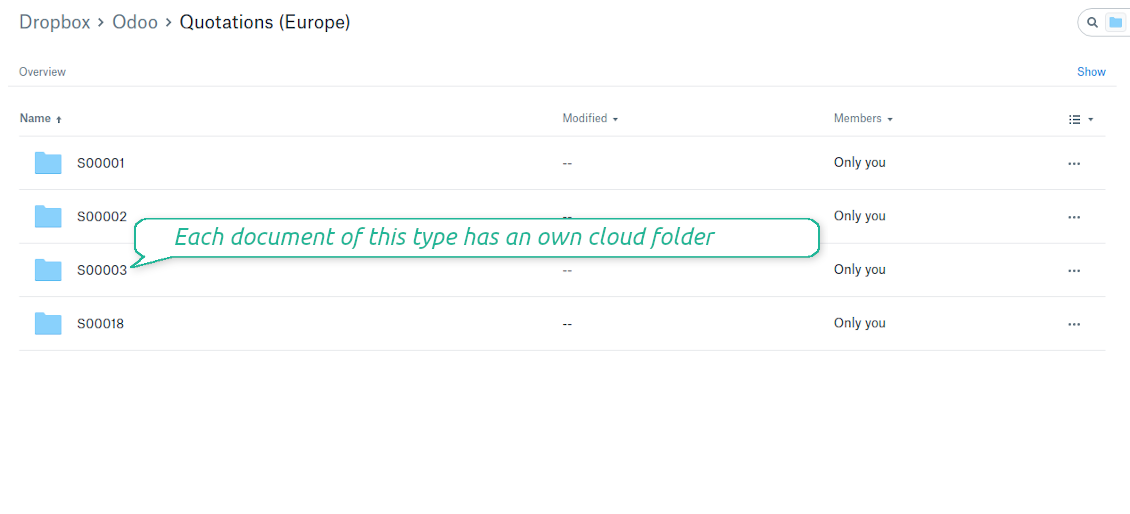
Document types folders in DropBox
All document of this type has an own folder
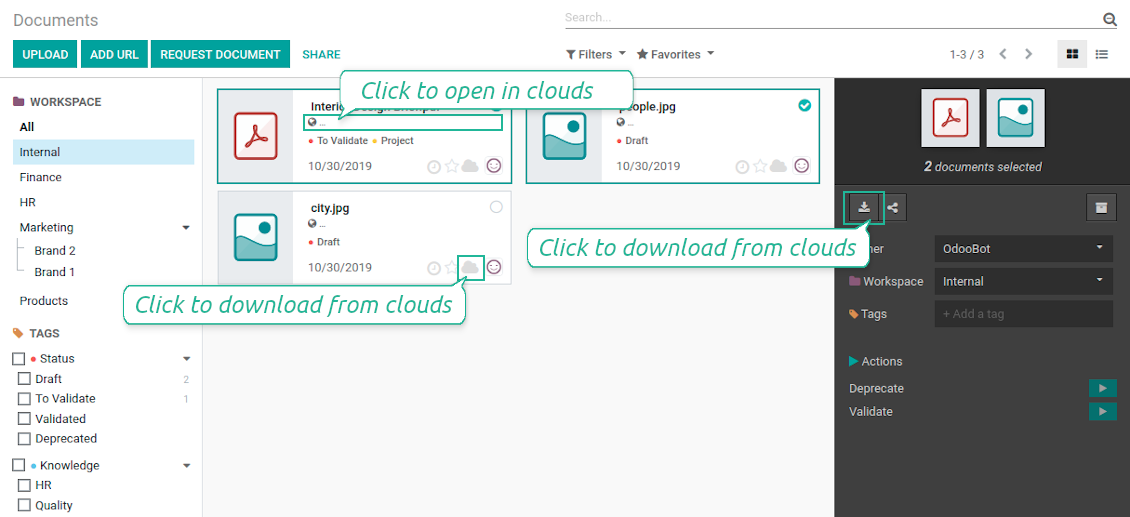
Direct access to DropBox items
- Click on attachment to open it in DropBox in a new tab (necessary to be logged in DropBox). Have also a look at the section Dropbox URLs below;
- Click the icon of cloud to start downloading file from DropBox (no extra check in is required)
- Push the button "Open cloud folder" to open all files related to this document.
DropBox URLs
DropBox has a specific way to generate links for existing files and folders. In particular, there are no concepts of internal or private URLs. Instead, each DropBox item might get so-called shared URLs. Such shared links are either public or team-only. Moreover, the latter feature is available only for DropBox business account.
This tool relies upon share links' mechanics. It means, that each attachment link is either public (all personal DropBox accounts) or team-only (all business DropBox accounts).
Sometimes it is considered to be not fully safe. Although website URLs will be hardly known by external users, there is a slight chance that they become available as a result of some user actions. Besides, sharing links generation is not super fast and might make a sync process slower. That is why the feature to switch off sharing urls is introduced.
If checked, all DropBox urls in Odoo will be of type https://www.dropbox.com/home/Odoo/[PATH]. Such links will not work in quite a many cases. Thus, if you need to open DropBox files / folders from Odoo, do not switch off the feature 'No links to DropBox from Odoo'.
Скриншоты
Quick access to DropBox files and folders
Apply to DropBox right from Odoo chatter
Fully integrated and compatible with Enterprise Documents
It does not contradict printing, mailing, or Enterprise documents features.
For the latter it is also possible to fully reflect directories structure, not only sync standard attachments.
How Odoo Enterprise Documents are synced
This tool is not in conflict with the 'documents' module provided under the Enterprise license. Attachments related to Enterprise folders would be synced as any other files: according to a document they relate to.
It is not always comfortable, and you might be interested in reflecting directories' structure introduced by the module 'Documents'. To this end the special extension is developed. This extension introduces the following features:
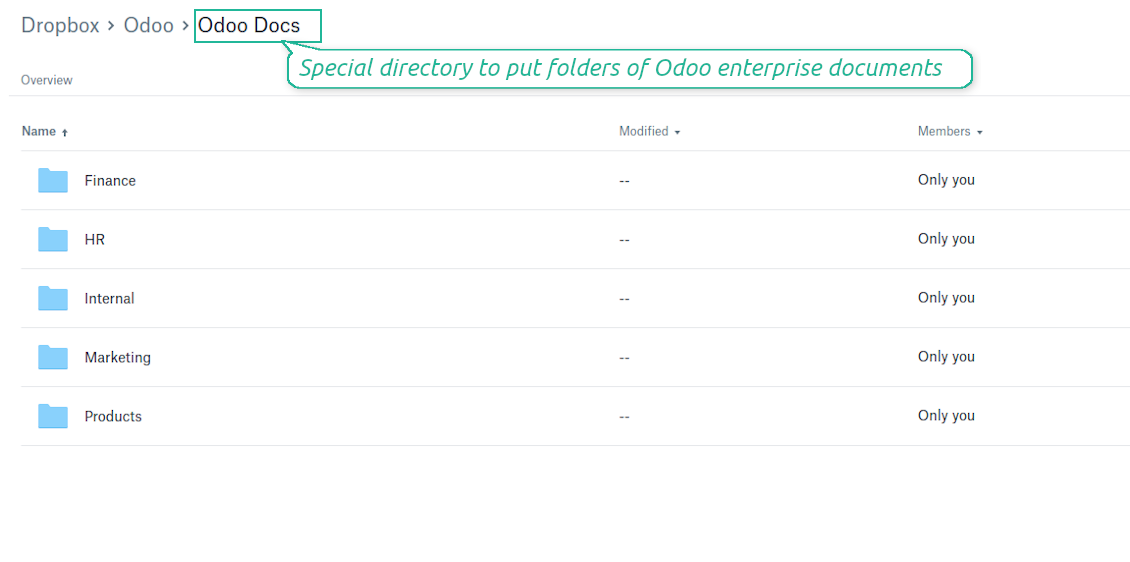
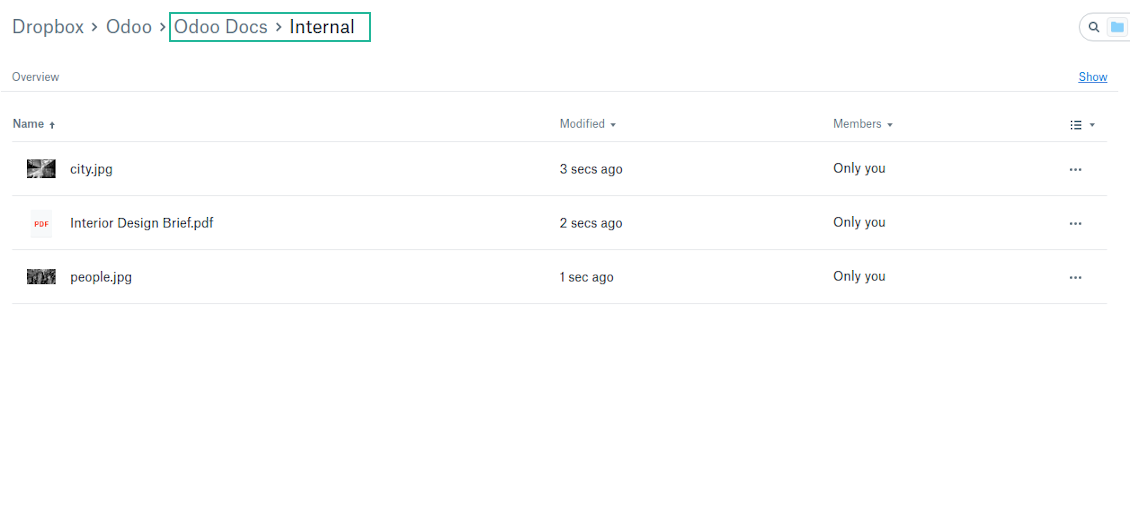
- The documents hierarchy is reflected within the folder 'Odoo / Odoo Docs'
- Each Odoo folder has a linked cloud folder. Take into account that folders created in the cloud storage will be synced as Odoo attachments. The key principle is: folders are managed by Odoo, files are managed by the cloud client
- All files are synced with the same logic as usual attachments. Files created in Odoo will be added to the cloud storage and will be replaced with links in Odoo. Files created in cloud storage will generate attachments within a paired directory
- Please do not name synced models as 'Odoo Docs'. This is the reserved name for Odoo Enterprise Documents
A few other peculiarities to take into account
- Try to avoid the following symbols in folders' and files' names: *, ?, ", ', :, <, >, |, +, %, !, @, \, /,. Direct sync will replace such symbols with '-'. It is done to avoid conflicts with file systems.
Скриншоты
Direct access from Odoo documents to DropBox
Enterprise Documents in DropBox
Enterprise files in DropBox
DropBox Sync logs in Odoo
Скриншоты
Logged synchronization activities
Default folders for documents
All DropBox tariffs
Советы по настройке и установке для DropBox Odoo Integration Odoo v.13
Python dependency
pip3 install dropboxConfiguration and log in
- Follow the url https://www.dropbox.com/developers/apps/create
- Choose an API as 'Scoped access'
- Choose the type of access as 'Full Dropbox'
- Select any suitable name for the app and push the button 'Create app'
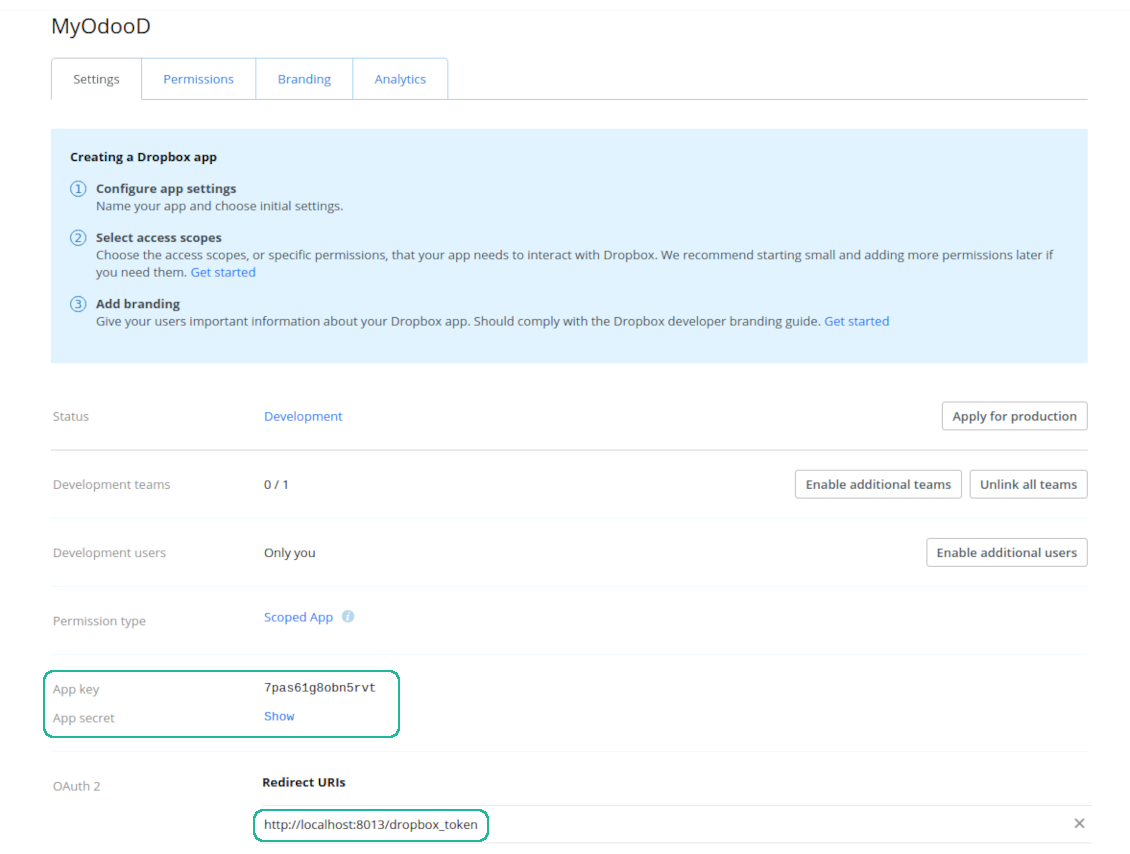
- Add the redirect URI as YOURODOOSITENAME]/dropbox_token (e.g. https://faotools.com/dropbox_token). A valid SSL certificate (https) is required
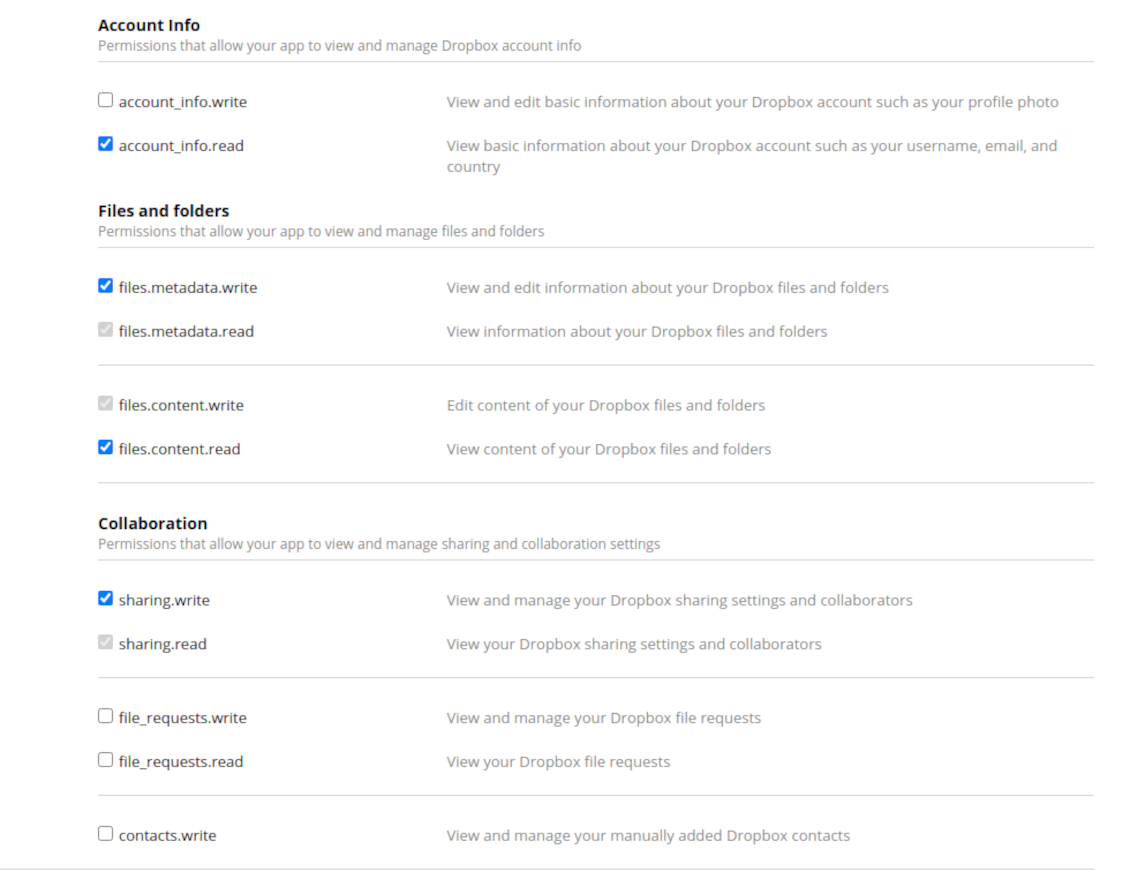
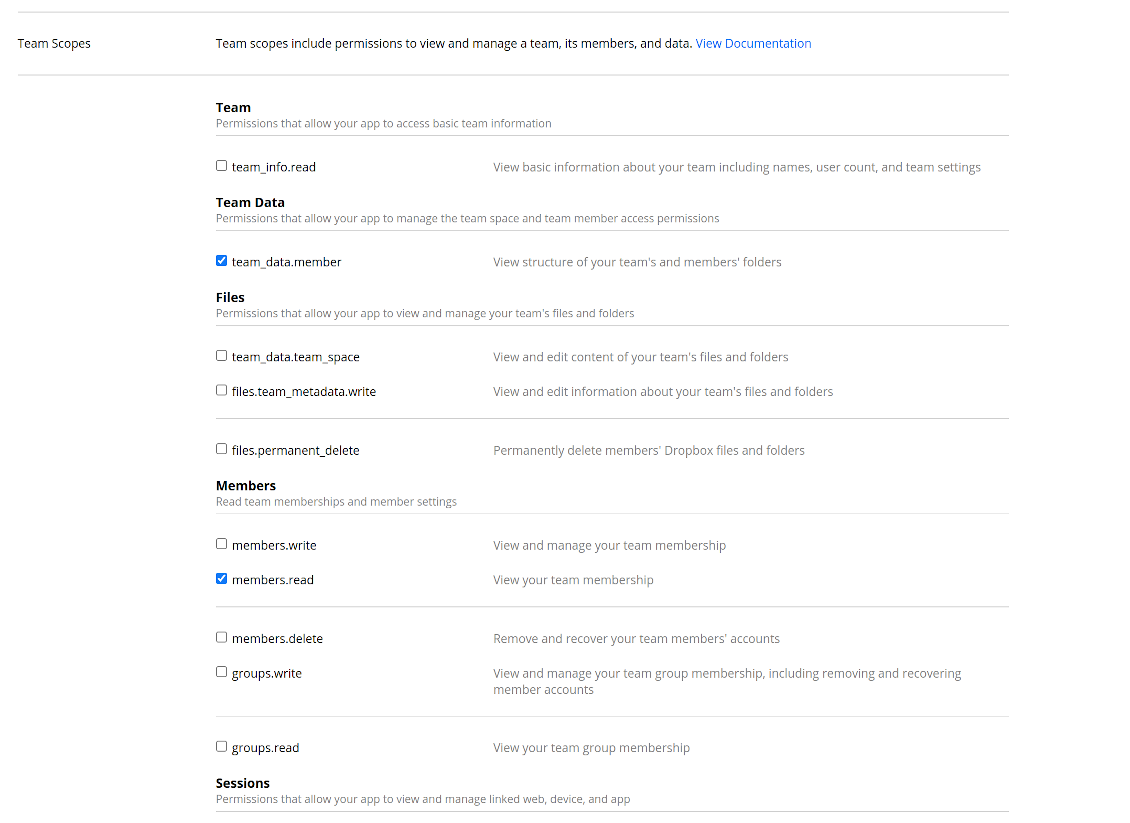
- Grant permissions to the app: 'Account Info (Read)', 'Files and folders Metadata (Write)', 'Files Content (Write)', 'Collaboration (Write)'. For team DropBox assign also 'Team Data Members', 'Members (Read)'. Make sure no other permissions are assigned.
- Submit App
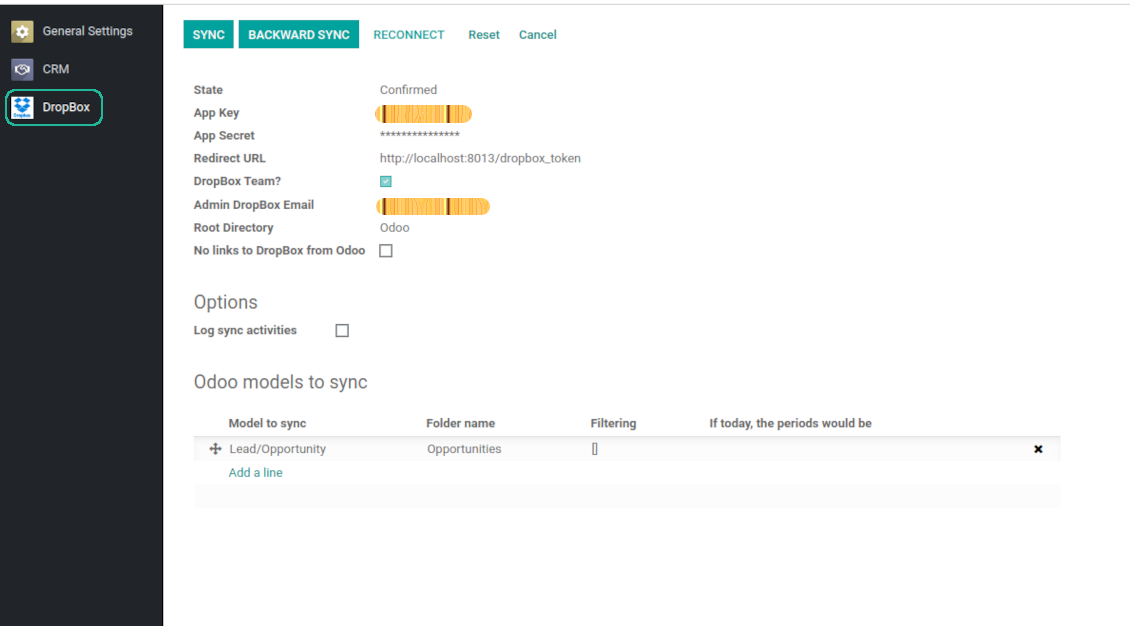
- Go to Odoo general settings - DropBox
- Copy App Key, App secret, and redirect URI to the Odoo configuration page
-
For team DropBoxes only
- Check the box 'DropBox Team'
- Set an email of DropBox user. Inside this user folder all Odoo related items would be created and only after that they are shared to all other users. Under this user all files and folders are created, changed, moved, and deleted
- Choose a suitable name for the root Odoo folder, e.g. 'Odoo' or 'ERP'
- Press Save
- Press 'Login and Confirm'
Create a DropBox app
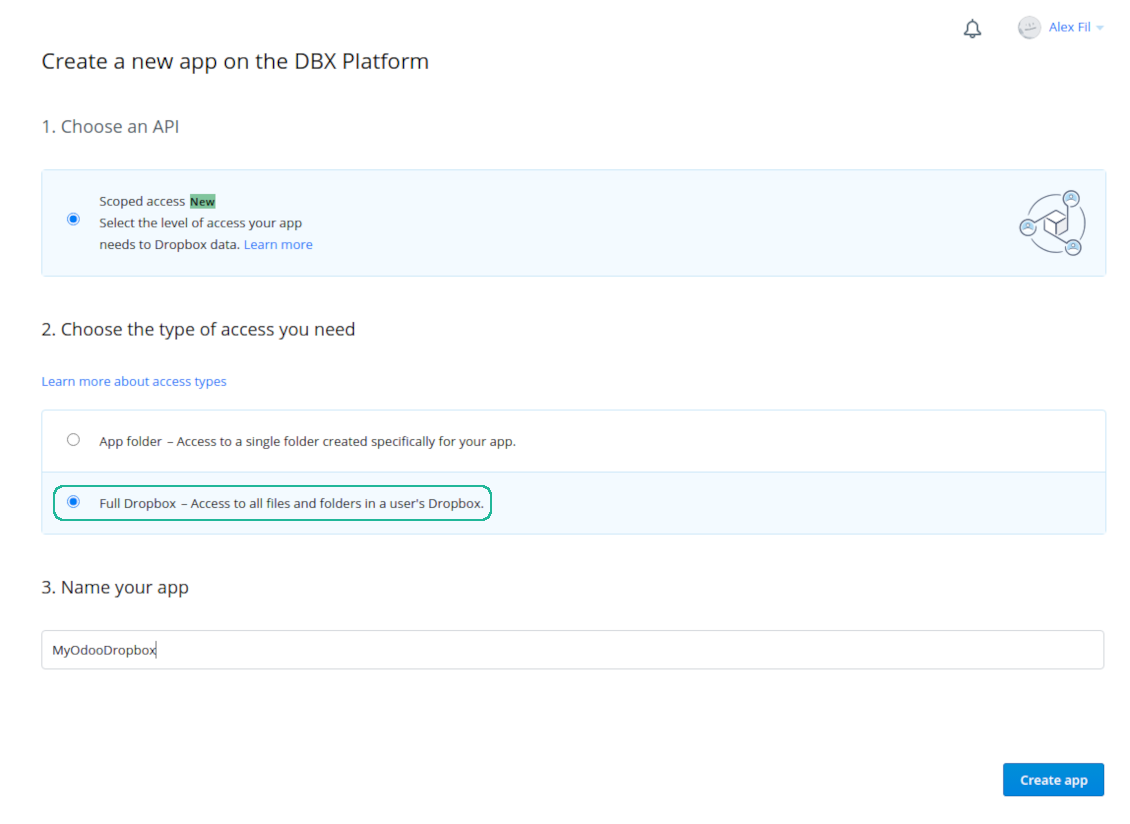
Set up DropBox App: redirection URL
DropBox permissions for personal accounts
DropBox permissions for business accounts
Set up Odoo for DropBox integration
Odoo server configuration and cron job configuration
To make sure the synchronization works correctly apply proper timeouts to the Odoo configuration file: LIMIT_TIME_CPU, LIMIT_TIME_REAL, LIMIT_TIME_REAL_CRON should be more than 900 seconds.
For Odoo.sh this should not be done, since timeouts are predefined and are not configurable.
Then, timeout should be entered to your Odoo. To that goal find the section 'Settings' on the app configuration page and copy the number there.
Afterwards, it is needed to make the cron jobs suit the applied timeouts. In the debug mode go to the Settings > Technical > Automation > Scheduled Jobs:
- Set up the job 'Synchronize attachments with cloud' as (a) frequency - 2*timeout; (b) the next execution as the next hour +timeout. For example, for 900seconds timeout: frequency - as 30minutes; the next execution - at 08:15
- Set up the job 'Synchronize attachments from cloud' as (a) frequency - 2*timeout; (b) the next execution as the next hour + timeout*2. For example, for 900seconds timeout: frequency - as 30minutes; the next execution- at 08:30.
Reconnection
Reconnection might be required for the case a refresh token is expired and when you migrate the app from previous versions. In such a case:
- Press the button 'Reconnect'
- Press the button 'Login and confirm'
Часто задаваемые вопросы о DropBox Odoo Integration Odoo v.13
Можно ли изменить частоту заданий синхронизации?
Да, можно. Для этого:
Включите режим отладки
Перейдите в технические настройки > Автоматизация > Запланированные задания
Найдите задания «Synchronize attachments with cloud» и «Update attachments from cloud».
Не делайте их слишком частыми. Желательно, чтобы задание успевало завершиться до запуска следующего. Настройка зависит от того, сколько элементов нужно синхронизировать. Обычно частота — от 15 минут до 4 часов.
Также задайте достаточные лимиты времени в файле конфигурации Odoo. Параметры LIMIT_TIME_CPU и LIMIT_TIME_REAL должны быть не меньше запланированного времени cron. Начиная с версии 13 учитывайте также параметр LIMIT_TIME_REAL_CRON.
Важное замечание для клиентов Odoo.sh: максимальное время cron-задания может быть ограничено 15 минутами.
Можно ли настроить другую структуру синхронизируемых каталогов, не ту, что задаёт синхронизация?
Нет, эта возможность есть только с версии 15. До неё модуль работает с заранее заданной структурой папок:
Odoo — корневая папка синхронизации
Модели — папки для каждого типа документов Odoo. Например, «Projects», «Partners». По домену могут быть более узкие папки: «Customer 1 Projects», «Projects of the Customer 2», «Internal Projects» и т. д.
Объекты — папки для каждого документа, например «Project 1» или «Customer 1»
Файлы и папки, связанные с этим документом Odoo и подлежащие синхронизации.
В итоге может получиться, например:
Odoo / Projects / Project 1 / файлы и папки проекта 1
Odoo / Customer 1 Projects / Project 1; Odoo / Customer 2 Projects / Project 3, ...
Odoo / Customers / Customer 1 / файлы и папки клиента 1
Структура всегда плоская: только эти уровни иерархии. Разные типы документов нельзя держать в одной ветке. В папке «Customer 1» нельзя хранить файлы и заказов, и счетов, и проектов. У каждого типа документа своя папка (или несколько). Иначе обратная синхронизация будет невозможна: не на что опереться.
Нужно ли настраивать отдельные права пользователей в Odoo?
Нет, инструмент работает через одну пользовательскую конечную точку. Все процессы синхронизации идут от имени одного облачного администратора (приложения). Права на созданные папки и файлы не назначаются автоматически. Настройте их в своём облачном хранилище.
Где хранятся синхронизированные файлы? Дублируются ли они в Odoo и в облаках?
Приложение предполагает, что двоичное содержимое вложений хранится в Cloud Client, а не на сервере Odoo. Такие вложения в Odoo становятся типа URL, и к ним можно в любой момент обратиться из блока вложений или из Cloud Client.
После настройки ручные действия не нужны: синхронизация полностью автоматическая. Решите, какие типы документов Odoo синхронизировать, и настройте связанную модель для каждого из них (клиенты, заказы на продажу или закупку, задачи, проекты и т. д.).
Можно ли создать несколько папок для одного типа документов? Например, внутренние проекты и клиентские проекты?
Да, можно. Для этого подготовьте правило для каждой папки и задайте фильтры: например, по типу проекта.
Сделайте фильтры взаимоисключающими, чтобы документ однозначно попадал в одну папку. Например: «клиент, но не поставщик», «поставщик, но не клиент». Иначе папка документа будет перескакивать с одной модели на другую.
Достаточно ли только приложения Cloud Storage Solution?
Нет, инструмент — только техническое ядро. Нужен ещё коннектор вашего облачного клиента.
Нормально ли, если нужно синхронизировать много объектов, например 10000?
Да, хотя при большом числе папок и вложений процесс может быть медленным. При этом клиенты сообщали о средах с >10 тыс. партнёров и ~5 тыс. вариантов продуктов — процессы оставались приемлемыми.
Несколько важных моментов:
- Синхронизация устроена так, что любой элемент будет синхронизирован и не потеряется, хотя это может быть небыстро. Это гарантируют очереди FIFO и фиксация каждого задания.
- Число объектов можно ограничить логически. Настройка моделей позволяет не синхронизировать устаревшие записи (например, нет смысла синхронизировать архивных партнёров или заказы двухлетней давности).
Можно ли сделать синхронизацию в реальном времени?
Нет. Есть веские причины не делать синхронизацию в реальном времени:
Производительность. При синхронизации в реальном времени каждая загрузка файла приводит к экрану ожидания.
Конфликты. Если двое одновременно меняют элемент, ситуация может стать неразрешимой. При регулярных заданиях это можно исправить позже; в реальном времени пришлось бы ставить изменения в очередь, что ещё сильнее запутает пользователей.
Функциональность. В частности, переименование и перестройка элементов. Обратная синхронизация строго опирается на логику каталогов, и при каждом запуске проверяется 100% элементов. Если делать это после каждого обновления, будут тысячи запросов в секунду. Если нет — изменения потеряются.
Можно ли синхронизировать вложения с несколькими облачными клиентами
Нет, эта возможность есть только с версии 15.
Мы используем специальный редактор в облаках (например OnlyOffice, Office 365 и т. д.). Будут ли файлы открываться в этом редакторе?
Да, в зависимости от конфигурации облачного клиента.
Какова политика обновлений ваших инструментов?
По текущим правилам Odoo Apps Store:
- Модуль, купленный для версии 12.0 и ниже, даёт доступ ко всем версиям до 12.0 включительно.
- С версии 13.0 каждую версию модуля нужно покупать отдельно.
- Независимо от версии покупка даёт право на все обновления и исправления в рамках этой мажорной версии.
Команда faOtools эти правила не задаёт. Вопросы направляйте напрямую представителям Odoo Apps Store.
Как установить приложение на Odoo.sh?
Самый прямой способ - встроенный сценарий магазина Odoo:
1. Откройте страницу модуля и нажмите Deploy on odoo.sh
2. Вас перенаправит на GitHub. Войдите в аккаунт и нажмите Create a new repo или выберите существующий. Репозиторий должен быть закрытым: публиковать приложения по лицензии OPL-1 нельзя. При необходимости создайте новый репозиторий для проекта Odoo.sh
3. Затем в odoo.sh нажмите Deploy, подтвердите решение и нажмите Continue. Так запустится установка.
Эти шаги ставят приложение на production-ветку проекта. Для других веток или обновления модуля:
1. Скачайте исходный код из магазина Odoo
2. Закоммитьте модуль в нужный репозиторий GitHub. Ни одна папка или файл приложения не должны попасть в .gitignore. Репозитории, которые создаёт odoo.sh, по умолчанию могут игнорировать важные пути (например /lib). Загрузите все каталоги и файлы модуля без исключений
3. Разверните целевую ветку проекта odoo.sh или дождитесь автоматической сборки, если так настроено.
Как установить приложение на свой сервер?
2. Перезапустите сервер Odoo;
3. Включите режим разработчика (технические настройки);
4. Обновите список приложений (меню приложений);
5. Найдите приложение и нажмите Activate/Install;
6. Следуйте рекомендациям на странице приложения, если они есть.
У приложения есть дополнительные модули. Можно купить их позже?
Да. При этом Odoo сам кладёт все зависимости в корзину: исключите уже купленные инструменты, чтобы не заплатить дважды.
Я развернул приложение на Odoo.sh и вижу предупреждение или ошибку в тестах
Odoo Красное или оранжевое предупреждение не влияет на функции приложения. Иногда наши модули не проходят стандартные автотесты, потому что те ждут поведение, которое противоречит целям приложения. Например, мы меняем расчёт цены, а тесты ядра сравнивают итог со стандартным алгоритмом.
Сначала проверьте саму развёрнутую базу: всё ли работает?
Если всё же считаете, что предупреждение ломает функции, напишите нам и пришлите полные логи установки и полный список установленных модулей (ядро и сторонние).
Можно ли купить приложение напрямую у вас?
Нет, мы распространяем инструменты только через официальный магазин приложений Odoo.
Я хочу получить скидку
К сожалению, у нас нет технической возможности давать индивидуальные цены.
Можно ли поставить приложение на базу Odoo Online (SaaS)?
Нет, сторонние приложения нельзя использовать на Odoo Online. Odoo SaaS это блокирует.
У инструмента есть зависимости. Нужно ли их покупать?
Да, для корректной работы нужны все модули из зависимостей. Цена на странице приложения уже включает необходимые зависимости.
Какова цена модуля в долларах США? Почему она меняется?
Цены на наши модули заданы в евро. Магазин Odoo пересчитывает их в другие валюты по своему внутреннему курсу. Поэтому цена в долларах США может меняться при обновлении курса.
Тексты приложения и веб-сайта на языках, отличных от английского, переведены с помощью ИИ и согласованы с официальными переводами Odoo. Если вы заметили ошибку, отправьте тикет о переводе и мы исправим его.
Отправка отчетов об ошибках
Если вы столкнулись с ошибками или непоследовательным поведением, не стесняйтесь обращаться к нам. Мы гарантируем предоставление исправлений в течение 60 дней с момента покупки и очень заинтересованы в улучшении наших инструментов даже по истечении этого периода.
Чтобы связаться с нами, вам не нужен номер телефона или кредитная карта. Вам нужно всего лишь пройти короткую регистрацию по электронной почте, которая займет не более 30 секунд.
Укажите в запросе как можно больше сведений: снимки экрана, журналы сервера Odoo, полное описание воспроизведения проблемы и так далее. Обычно подготовка рабочего плана по проблеме (если ошибка подтверждена) или рекомендаций по необходимым действиям (в противном случае) занимает несколько рабочих дней.
Запросы на публичные функции и идей модулей (бесплатная разработка)
Мы очень заинтересованы в улучшении наших инструментов и будем благодарны за любые отзывы. Если ваши требования общедоступны и могут быть эффективно реализованы, команда включит их в наш список дел.
Такой список дел обрабатывается регулярно и не предполагает дополнительных комиссий. Хотя мы не можем обещать сроки и окончательный дизайн, это может быть хорошим способом получить желаемые функции без вложений и рисков.
Чтобы связаться с нами, вам не нужен номер телефона или кредитная карта. Вам нужно всего лишь пройти короткую регистрацию по электронной почте, которая займет не более 30 секунд.

Инструмент, чтобы безопасно хранить пароли в Odoo для совместной работы. Общие хранилища

Инструмент, чтобы строить глубокую базу знаний для своих и внешних. Knowledge System. KMS. Правки как в вики
398€
Инструмент, чтобы задавать цели KPI и контролировать выполнение по периодам. Дашборды KPI. Конструктор. Графики

Инструмент для услуг по записи: от бронирования до продаж и отзывов
398€
Инструмент, чтобы управлять Odoo из любимых AI-чатов через MCP. Claude. Любой AI с MCP.

Инструмент, чтобы раскладывать вложения Odoo по папкам и синхронизировать каталоги с Google Drive, OneDrive/SharePoint, Nextcloud/ownCloud, Dropbox, Amazon S3, Box и NAS. Файловый менеджер. DMS
398€
Инструмент для двусторонней синхронизации вложений Odoo с OneDrive
487€
Инструмент для двусторонней синхронизации вложений Odoo с Google Drive
487€
Инструмент для двусторонней синхронизации вложений Odoo с ownCloud/Nextcloud
487€