Накратко
Odoo Messaging Suite е Odoo 18 Обсъждане приложение. The tool to improve the Odoo messaging experience.
Odoo Messaging Suite brings lost-message recovery, private discussions, message citing, post-send editing, managed From/Reply-To addresses and a richer email composer together in one application. Compose with CC/BCC and per-user drafts, route emails to the right document, quote from the message toolbar, send later with your own presets, and catch forgotten attachments before they leave. Every message keeps its email headers behind a details icon, and administrators configure the whole toolkit from one Messaging Suite settings page.
Идеално за
Support and sales teams living in their inbox
Perfect for teams that answer customers by email all day and want CC/BCC, drafts and quoting available right inside the Odoo composer, without switching to an external mail client.
Companies needing confidentiality
Ideal when some conversations must stay private from portal users and other followers, while still being logged on the Odoo document for later reference.
Administrators who want oversight and control
Useful for admins who need routing rules, send-later presets, attachment reminders and one settings page to manage the whole messaging toolkit.
Готови за оценка?
Започнете с безплатна заявка за демо или покупка в Odoo Apps Store.
Безплатна персонализирана демо база. Не се изисква телефонен номер или кредитна карта. Безплатни доживотни обновления и експертна поддръжка в рамките на основната версия на Odoo.
Защо екипите го избират
Ключови ползи преди подробностите
One settings page
Turn on CC/BCC, drafts, routing, attachment checks and the rest of the toolkit from a single Messaging Suite configuration screen, without hunting through scattered settings menus.
Full email composer
Compose with CC/BCC recipients, per-user drafts and managed From/Reply-To addresses directly inside the Odoo composer.
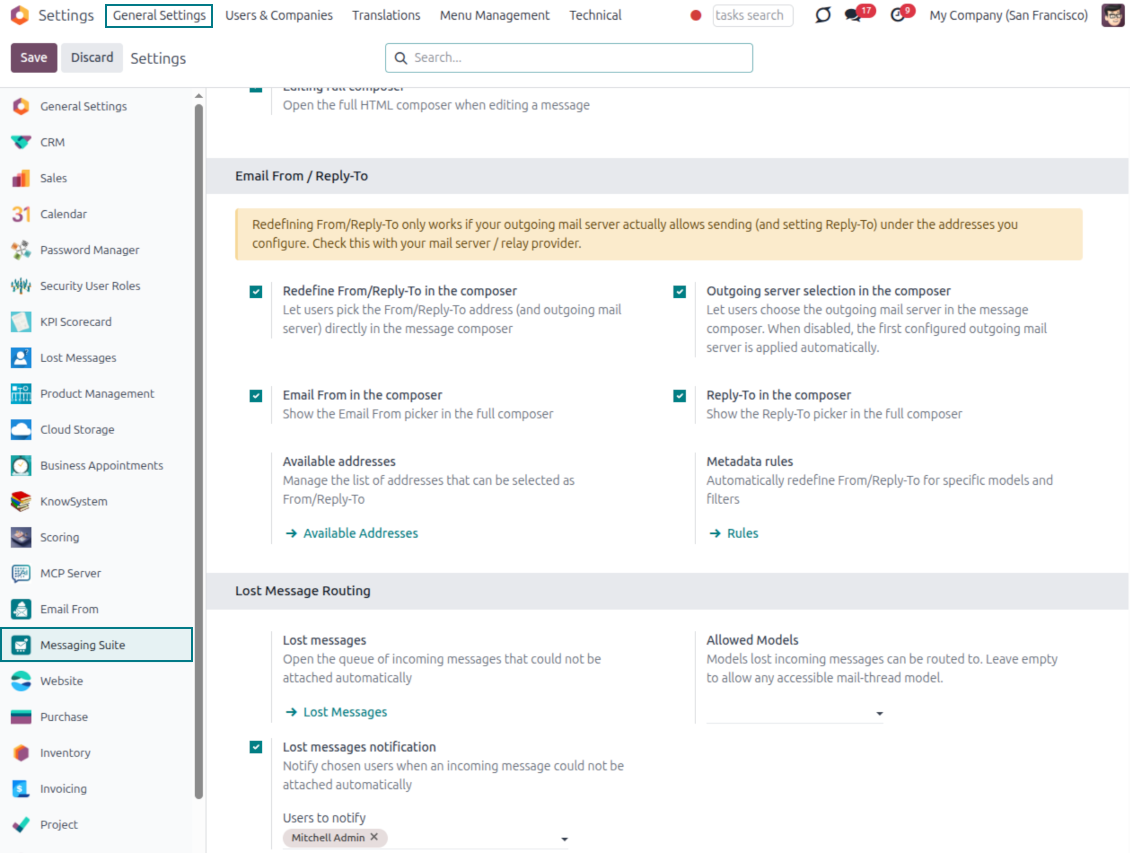
Managed sender addresses
Stop typing sender emails by hand. Pick from an address book tied to the right outgoing mail server, with automatic rules by document type.
Message actions
Route and quote any message from quick actions, and inspect full email headers in a single click.
Lost message recovery
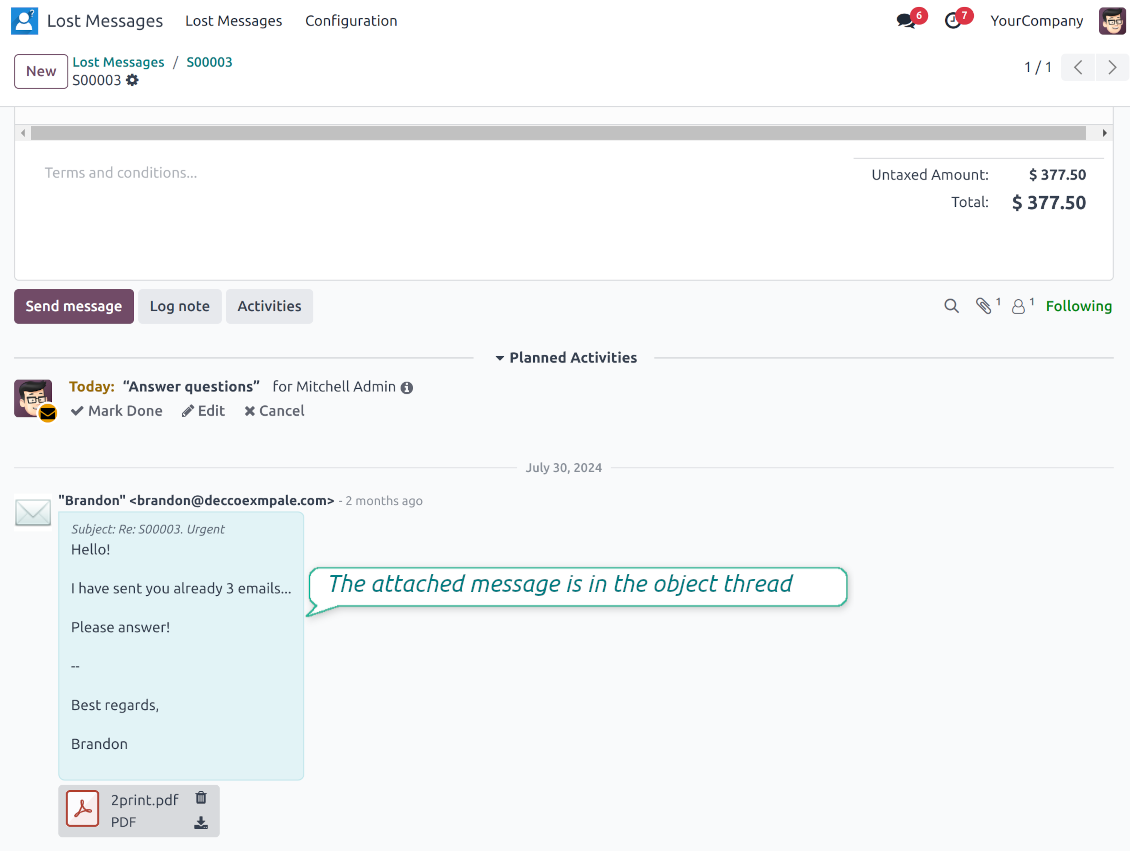
Never lose an incoming email again. Review unattached messages in a dedicated queue and route them to the correct Odoo document before customers wait.
Private threads
Keep sensitive conversations hidden from portal users and other followers, while staying logged on the Odoo document for later reference.
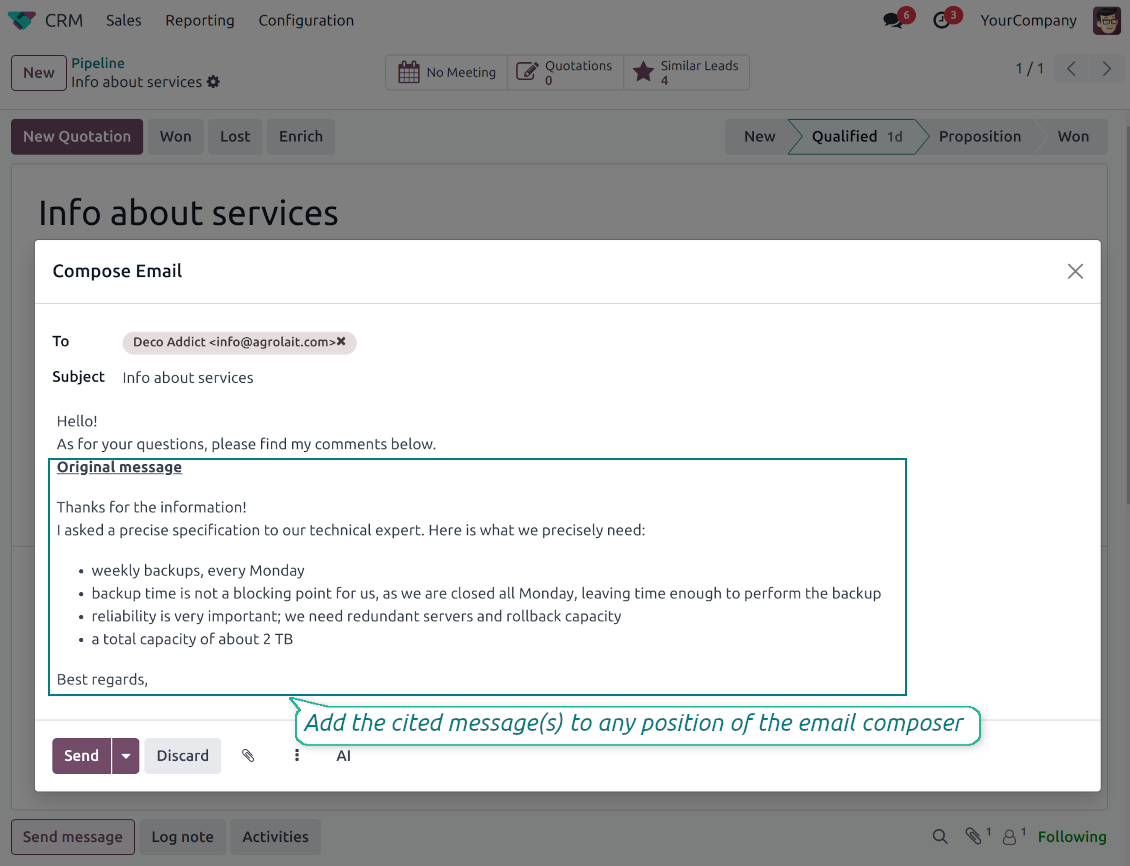
Message citing
Search and cite any earlier Odoo message straight from the composer, so every reply carries the right context.
Message editing & history
Edit or delete your own messages, notes and activity feedback, with a full history of every change kept for admins.
Safer sending
Catch forgotten attachments before you hit send and schedule follow-ups with your own Send Later presets.
Готови за оценка?
Започнете с безплатна заявка за демо или покупка в Odoo Apps Store.
Безплатна персонализирана демо база. Не се изисква телефонен номер или кредитна карта. Безплатни доживотни обновления и експертна поддръжка в рамките на основната версия на Odoo.
Compose like a real email client
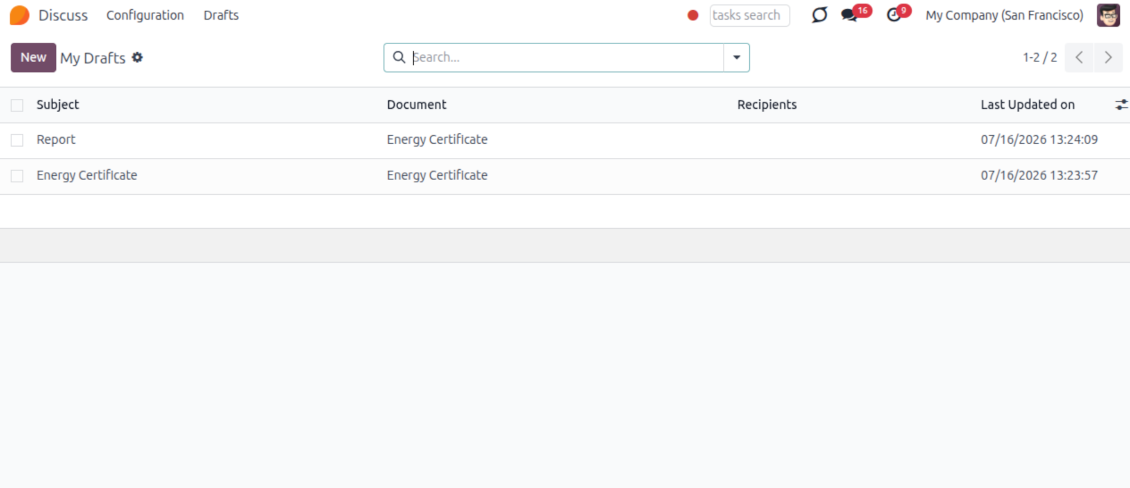
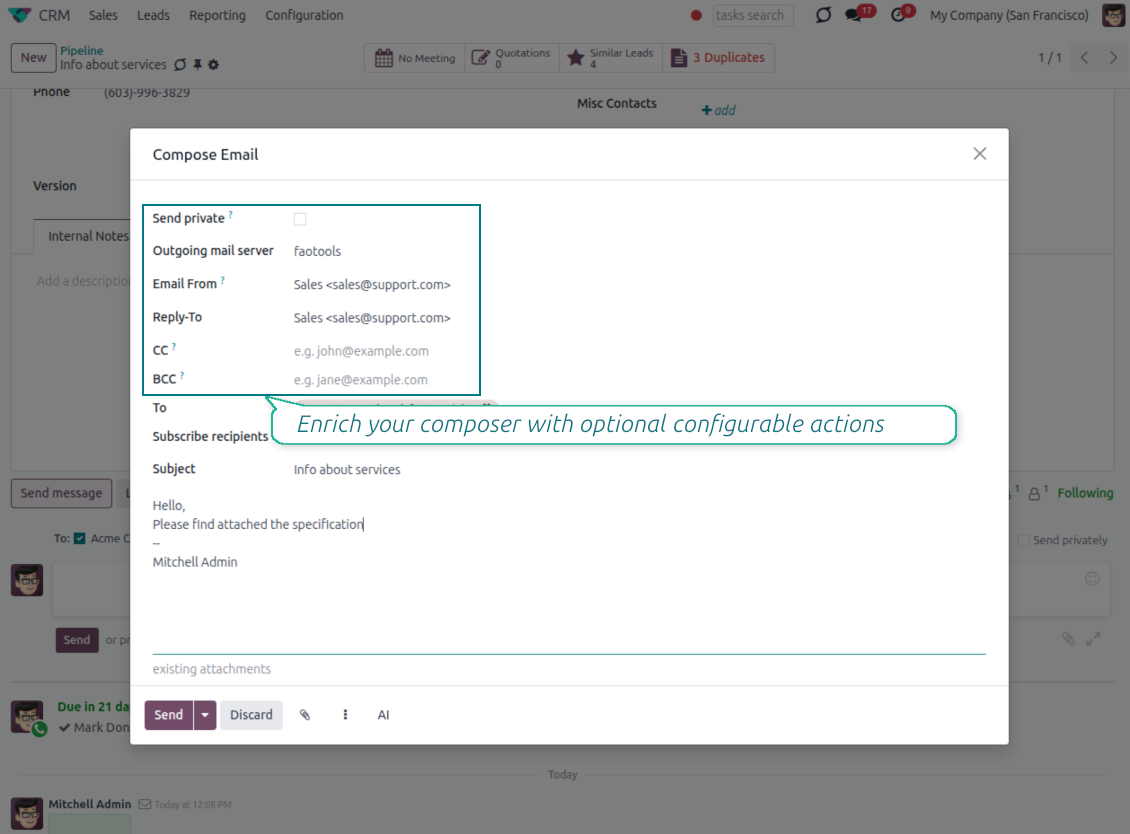
CC, BCC and per-user drafts in the full composer
Copy and blind copy
- Add CC and BCC in the full composer. Type email addresses or pick existing contacts.
- Keep recipients in the message history. Sent CC/BCC values stay visible on the message afterwards.
- Use only when you need them. Turn CC/BCC off in settings if your team does not use copy recipients.
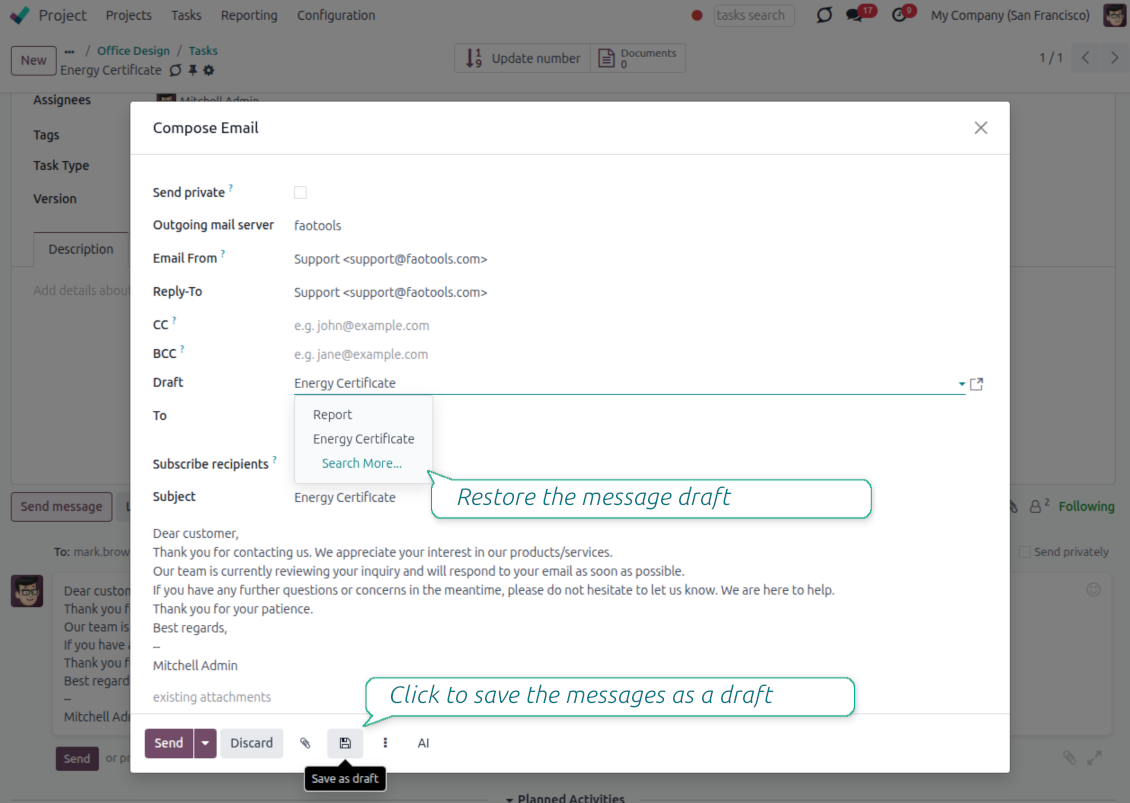
Save as draft
- Save the full message. Drafts keep subject, body, recipients and related fields for the current record.
- Resume where you stopped. Reopening the composer on the same document brings back your latest draft automatically.
- Pick up drafts from Discuss. Every internal user can open the drafts menu and finish unfinished messages.
Message actions and email metadata
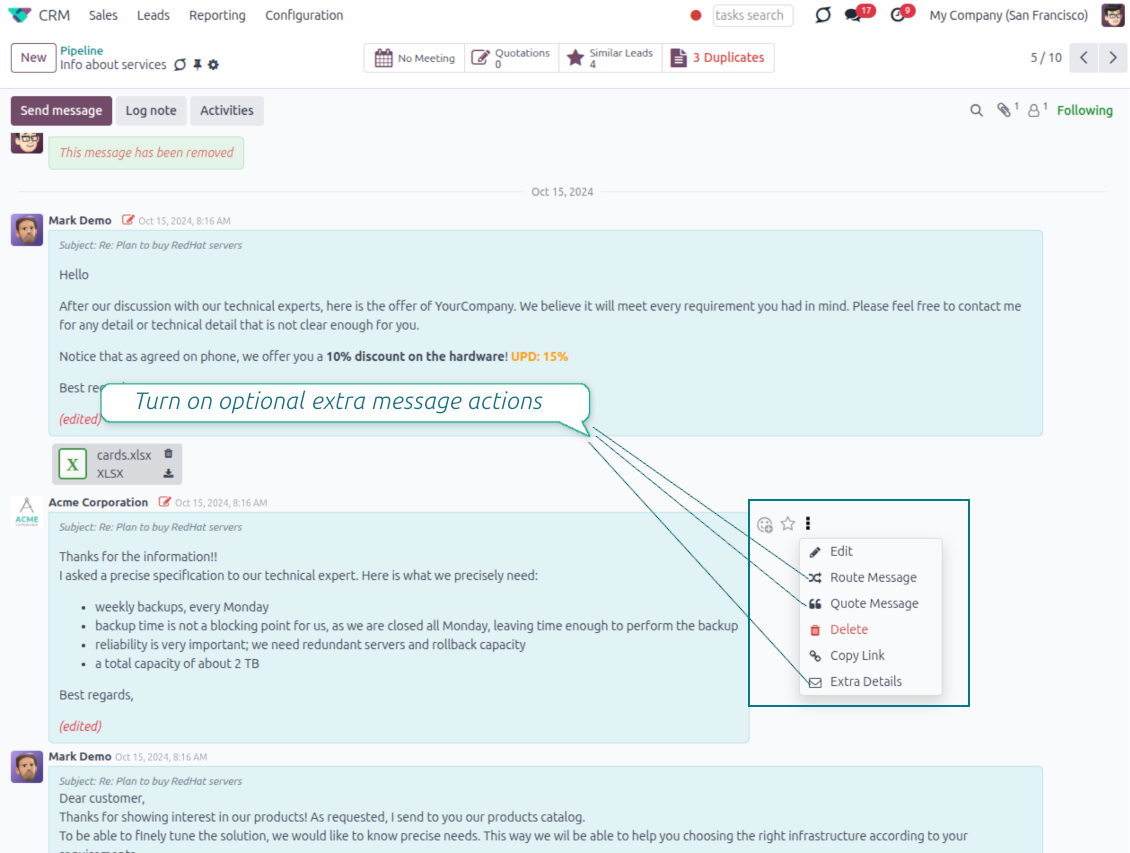
Route, quote and inspect email details without leaving the chatter
Actions on every message
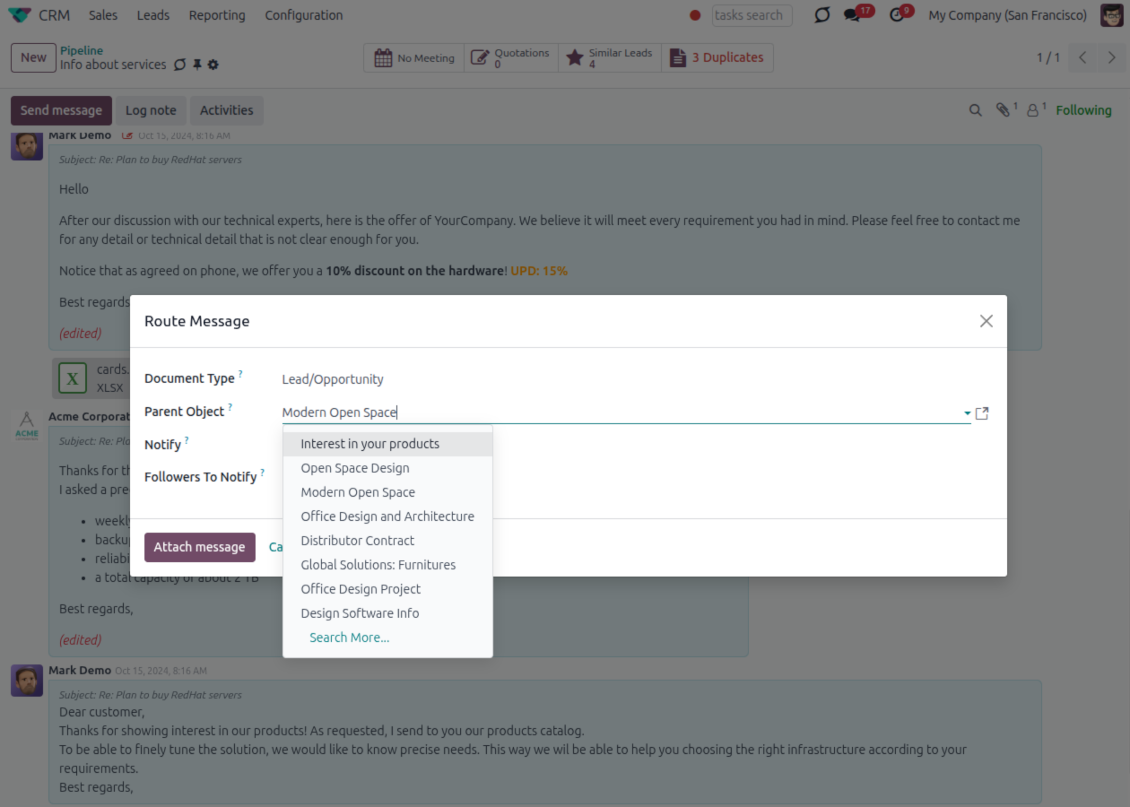
- Route from the thread. Move a message to another document when it landed on the wrong record.
- Quote in a new email. Start a reply with the original message included in the body.
- Keep the composer simple. Every action opens the standard Odoo composer already pre-filled, no separate tooling to learn.
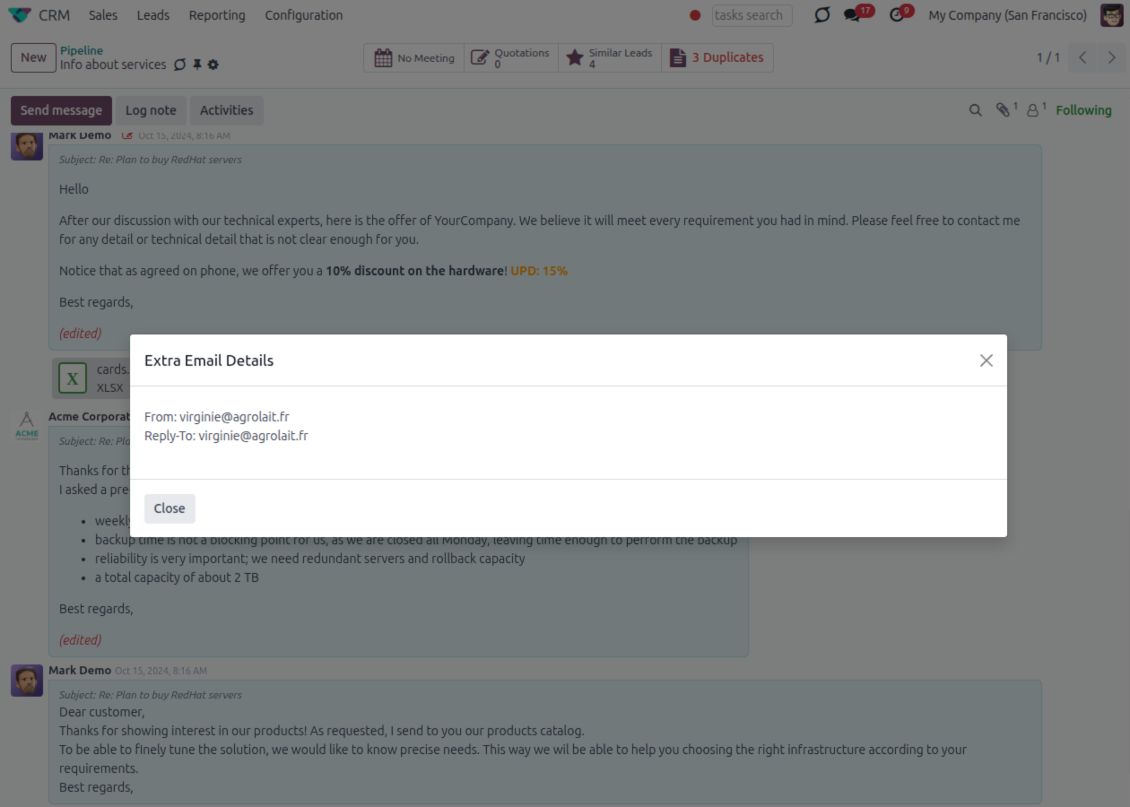
Email details on every message
- See full headers. From, Reply-To, To and CC stay available on incoming and outgoing mail.
- Keep CC/BCC too. Copy recipients added in the composer are saved with the message.
- Open details in one click. A small icon on the message shows the complete email information.
Odoo Email From
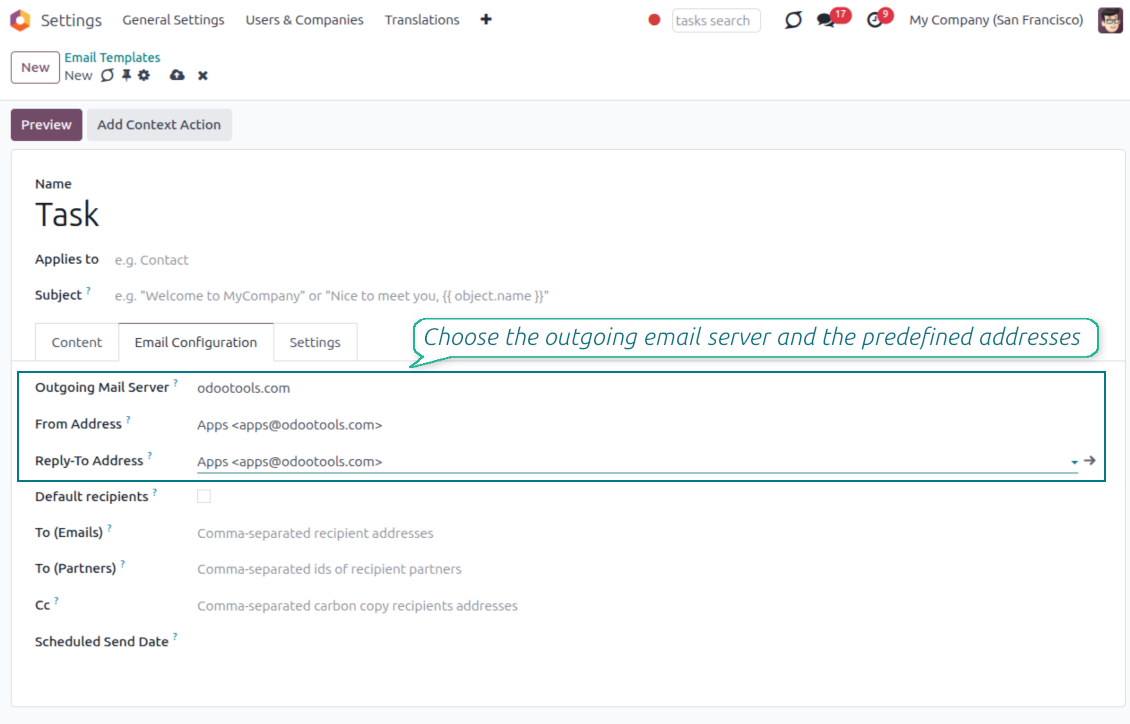
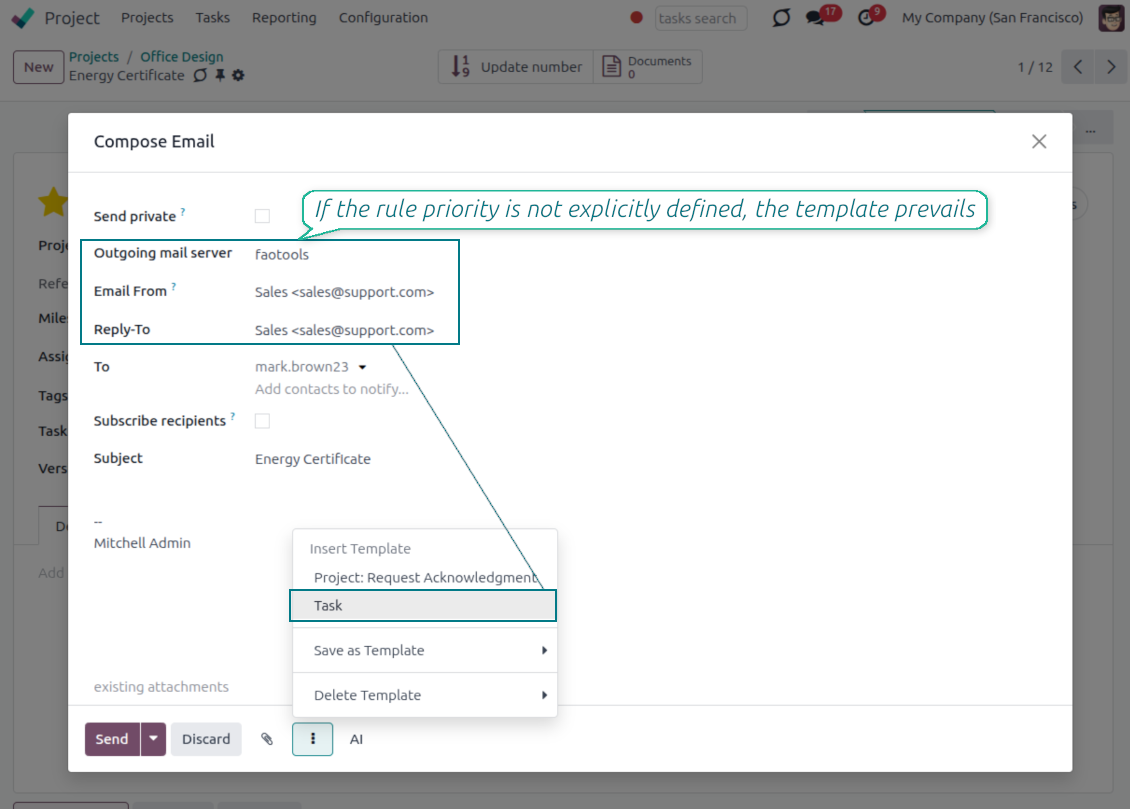
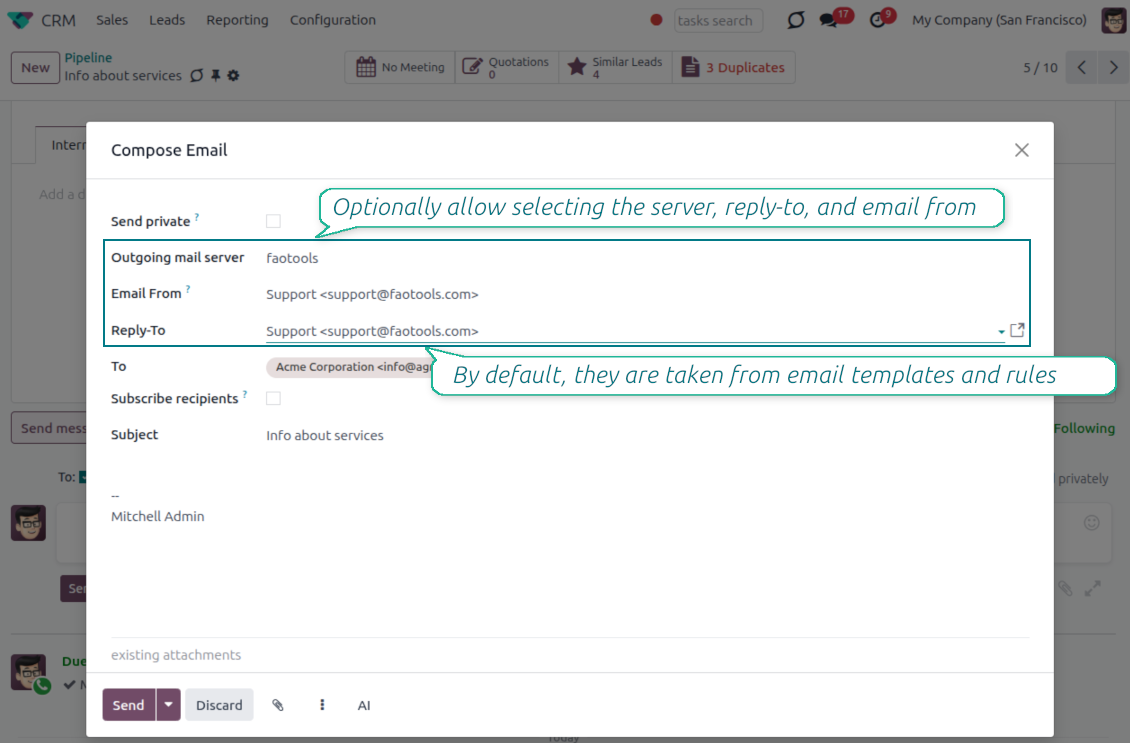
Choose the right From and Reply-To address for every email
Managed sender addresses
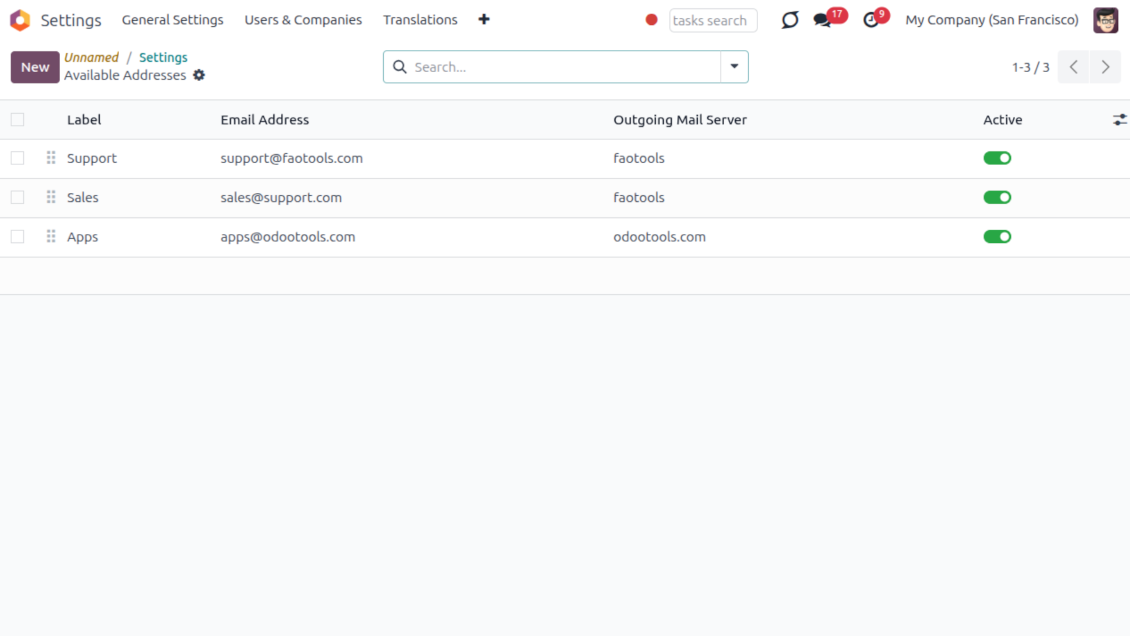
- Pick instead of typing. Users choose From and Reply-To from an address book linked to outgoing mail servers.
- Apply on templates too. Email templates can use the same managed sender addresses.
- Keep the screen simple. The outgoing mail server field is hidden when only one server is configured.
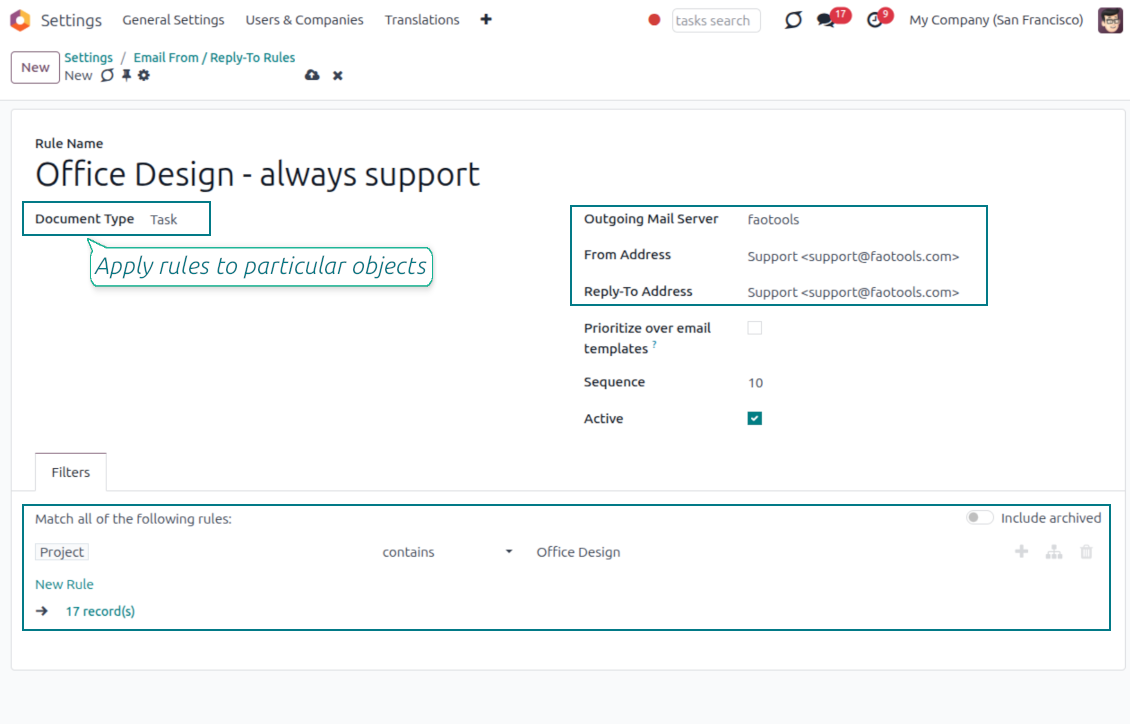
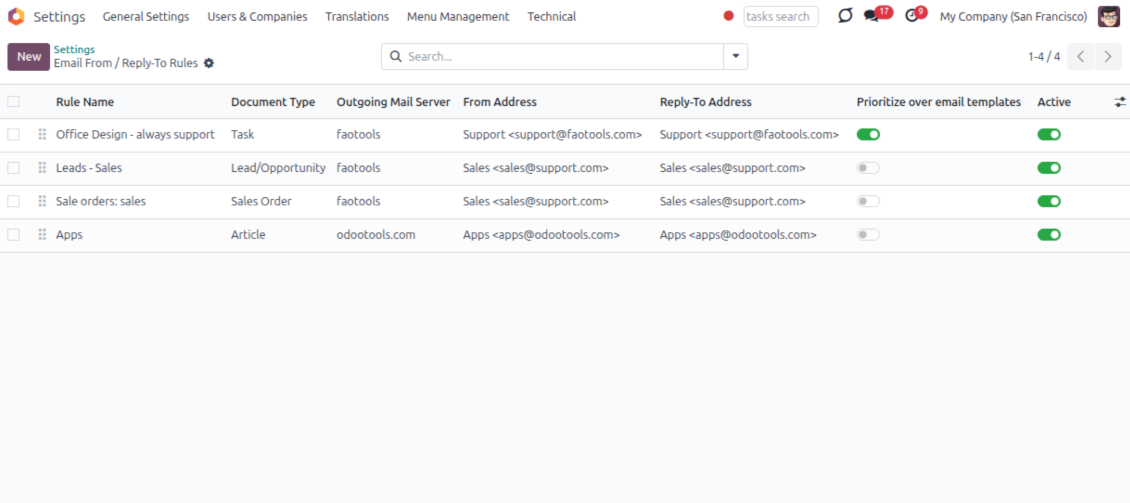
Automatic sender rules
- Set the sender by document type. Rules choose the right From and Reply-To for sales orders, tasks, invoices and other records.
- Prevent invalid combinations. Odoo blocks sender addresses that do not match the selected outgoing mail server.
- Start with working mail setup. Make sure each outgoing server can actually send from the addresses you add.
Готови за оценка?
Започнете с безплатна заявка за демо или покупка в Odoo Apps Store.
Безплатна персонализирана демо база. Не се изисква телефонен номер или кредитна карта. Безплатни доживотни обновления и експертна поддръжка в рамките на основната версия на Odoo.
Lost Messages Routing
Recover incoming emails Odoo could not attach automatically
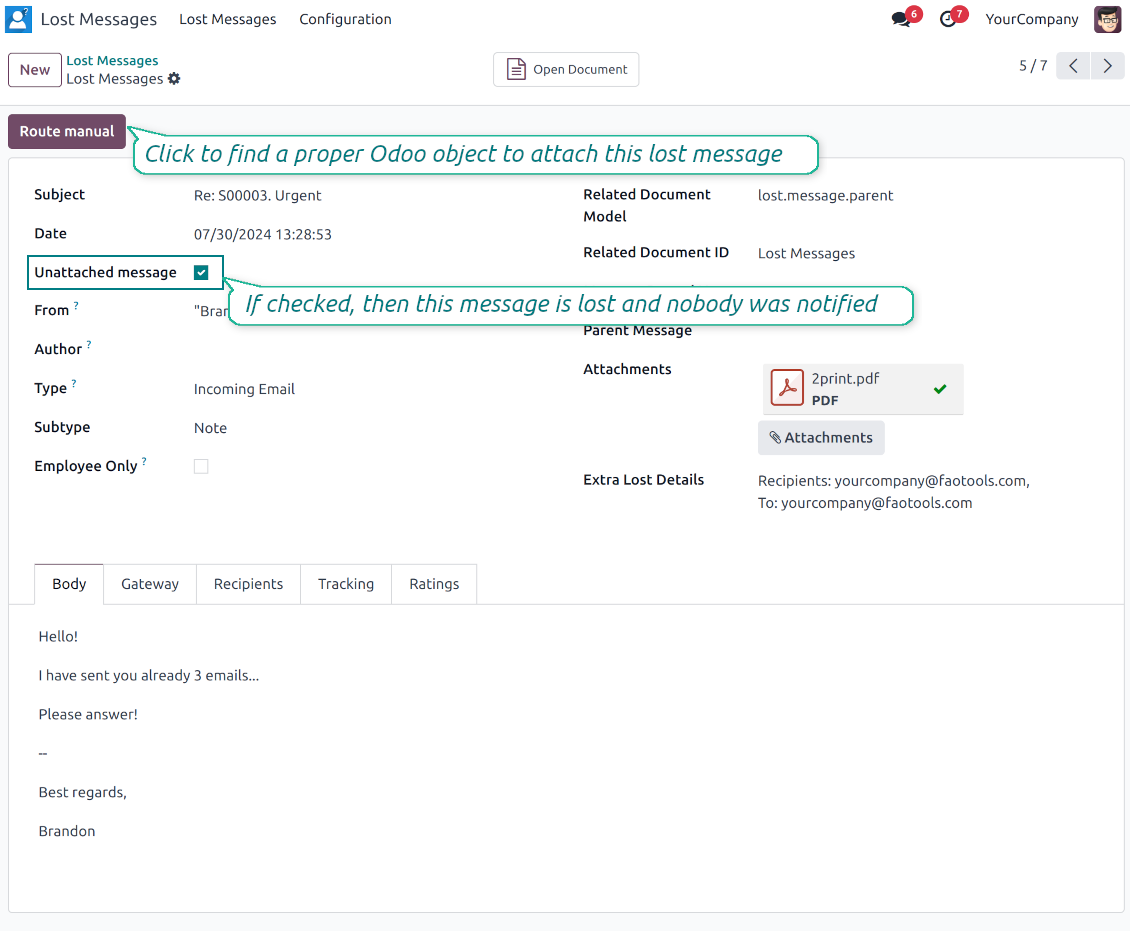
Lost message queue
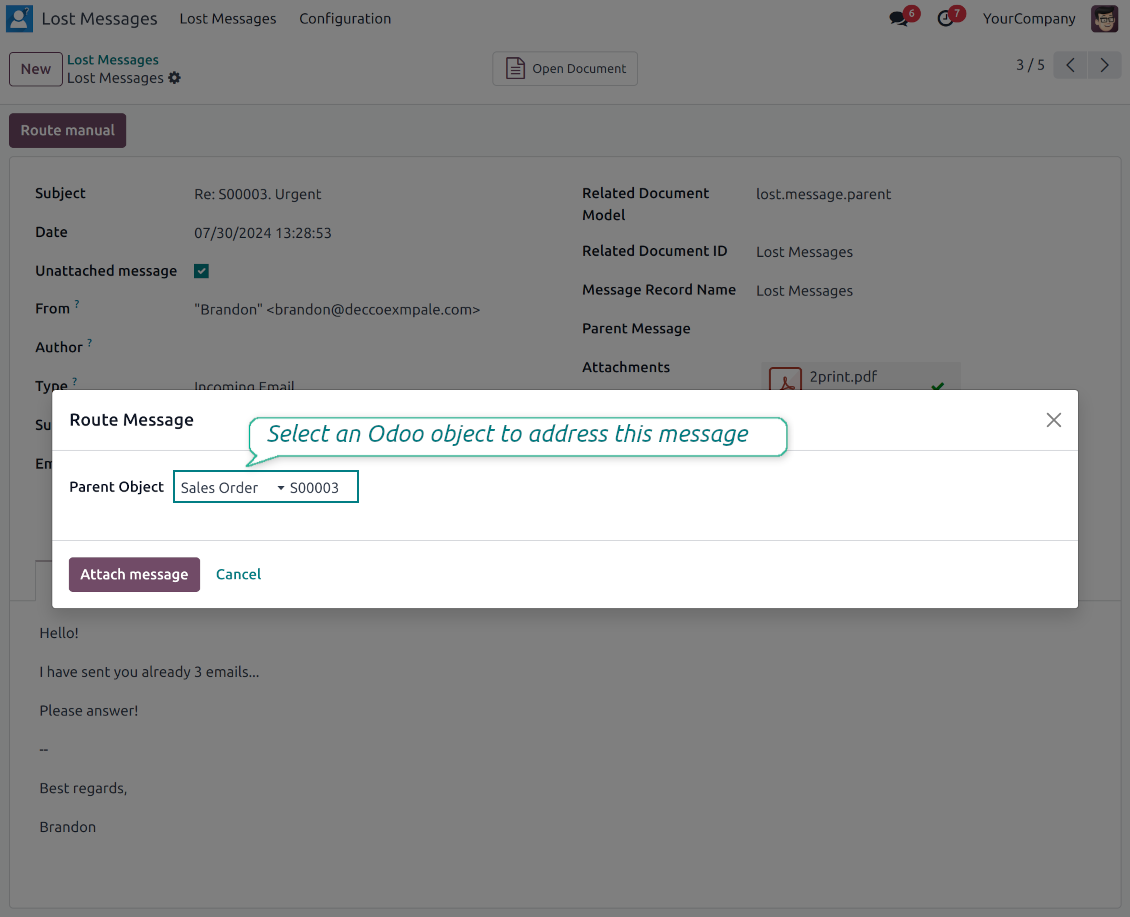
- Catch emails that did not attach. Incoming messages Odoo cannot place on a document are kept instead of disappearing.
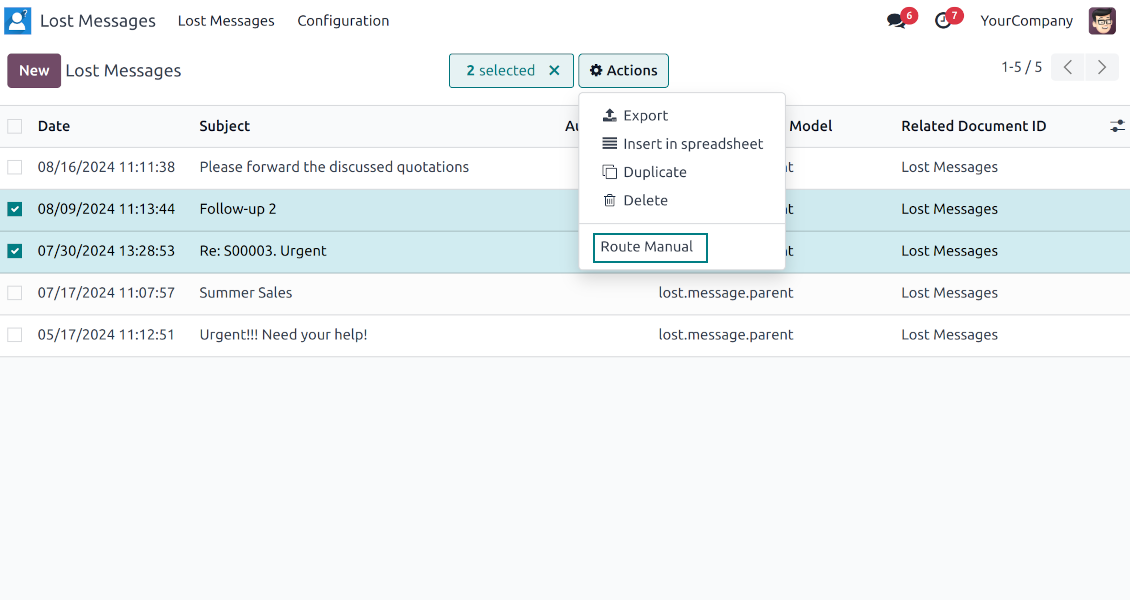
- Review in one menu. Your team works from a dedicated queue with subject, sender, body and search tools.
- Keep routing clues. Recipients, To, CC and In Reply To stay available to help find the right document.
Route to the right document
- Attach in a few clicks. Pick the target document and attach one or several lost messages in a single action.
- Limit where messages may go. Restrict routing to selected document types or leave the list open for managers.
- Move attached messages too. Already linked chatter messages can be rerouted to another document when needed.
Private Thread
Confidential discussions that stay inside Odoo and off the portal
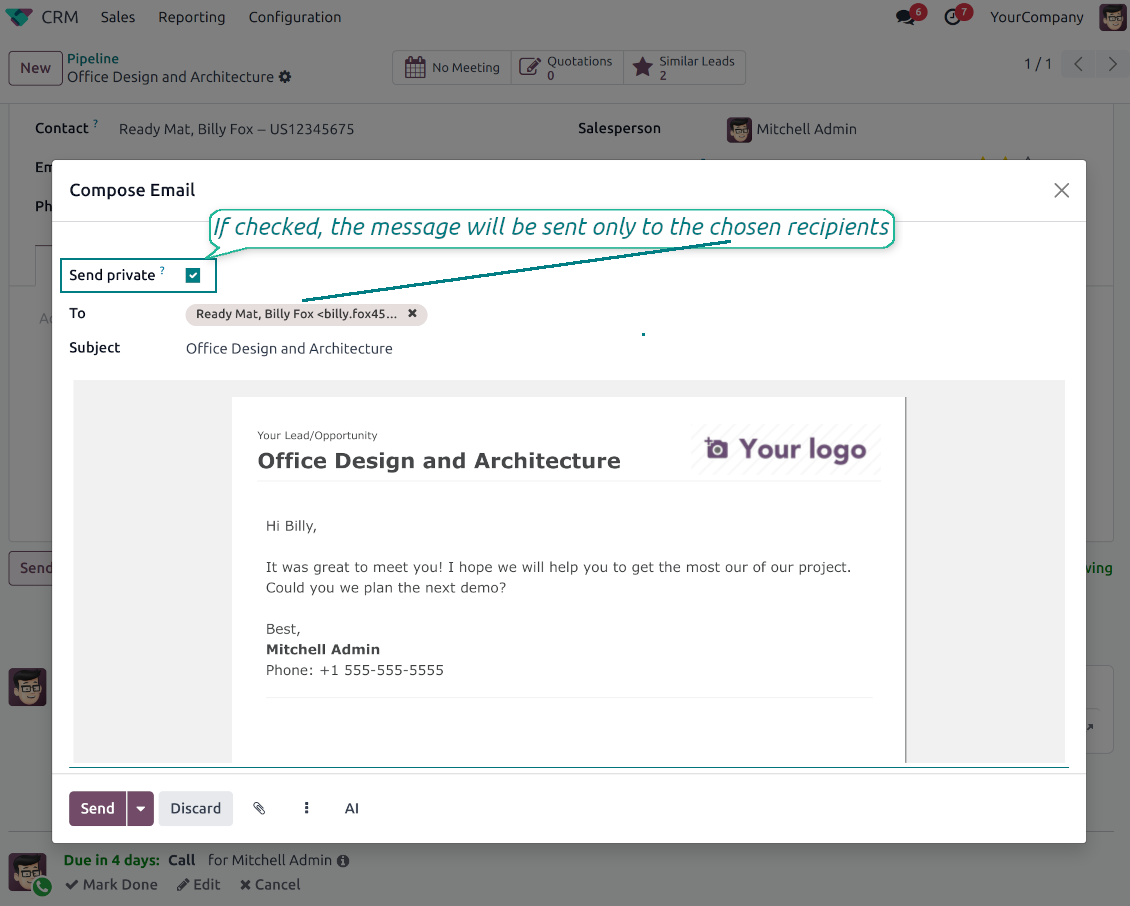
Send private from the composer
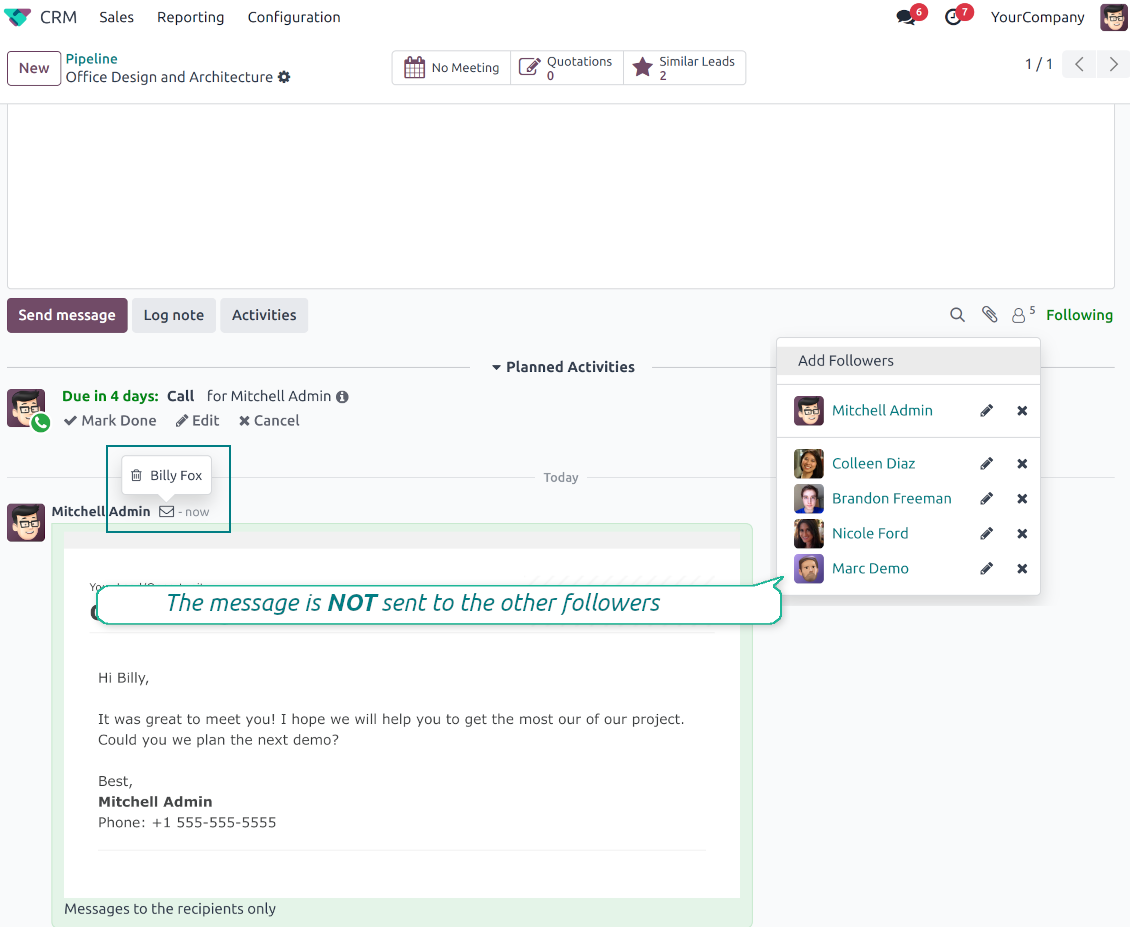
- Tick Send private. Compose a message that reaches only the selected recipients.
- Do not notify other followers. Portal users and regular followers stay out of the conversation.
- Works on any document. Use private sending on sales orders, tasks, invoices, leads and other records.
Confidential but traceable
- Keep history on the record. Private messages remain on the document for later reference.
- Hide from portal users. External contacts cannot read internal discussions on their documents.
- Stay private in replies. Follow-up replies remain private too.
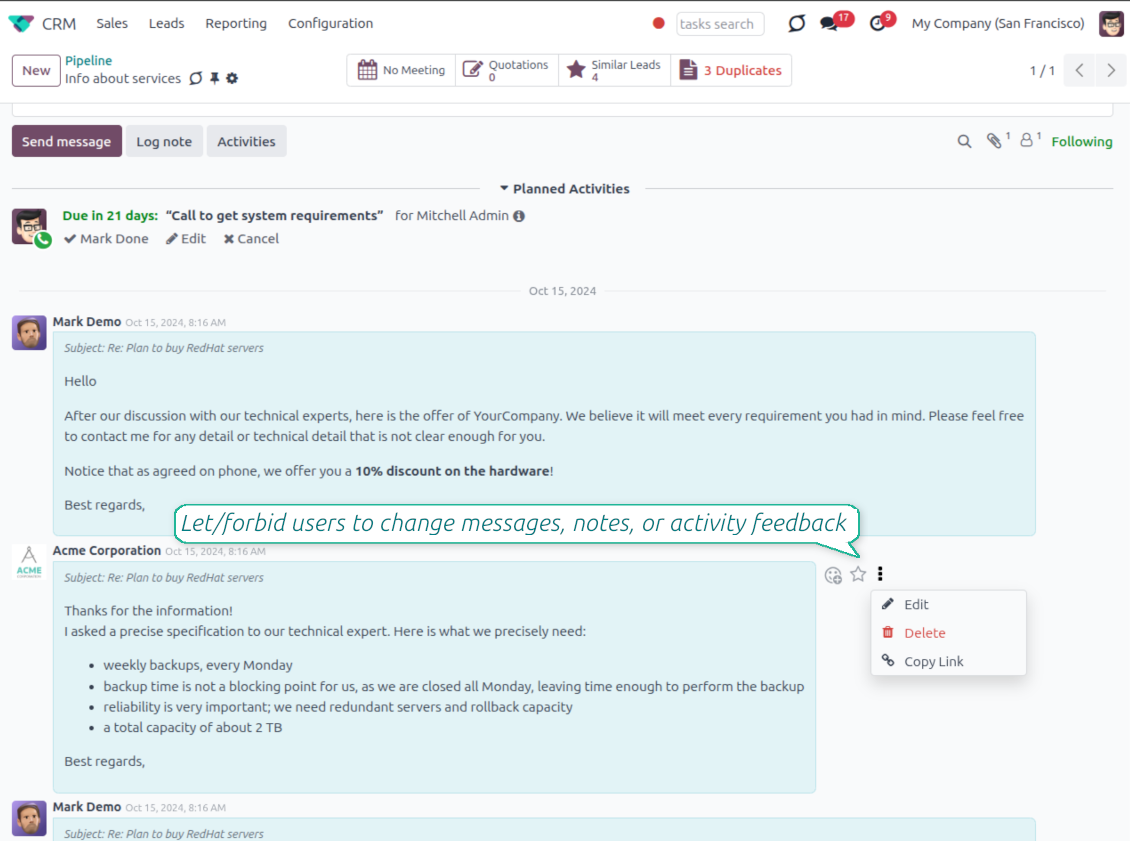
Message and Note Editing
Fix mistakes after sending while keeping a transparent history
Fix mistakes after sending
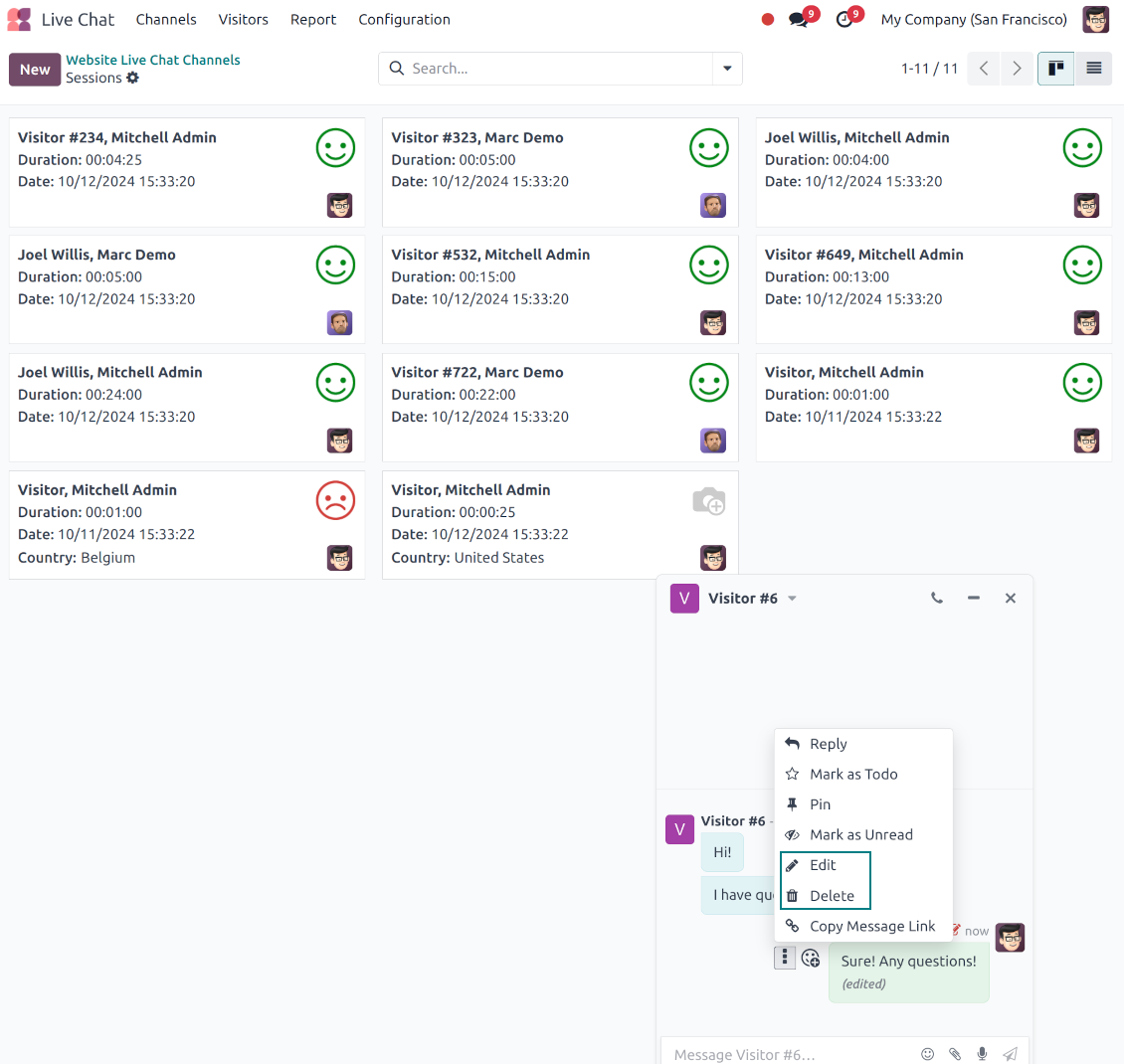
- Edit your own messages. Correct comments, notes and activity feedback after they were posted.
- Give admins broader control. Authorized users can manage messages posted by others when policy requires it.
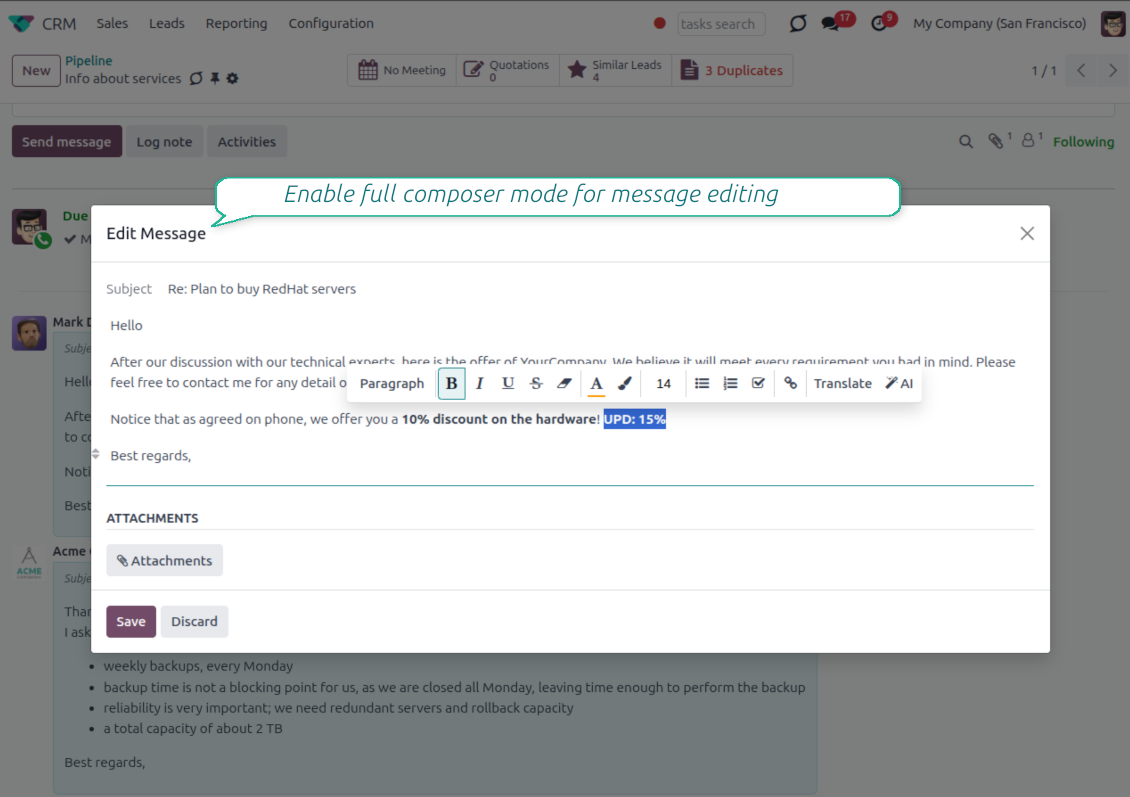
- Use the full editor when needed. Open subject, rich body and attachments in a pop-up for bigger changes.
History for every change
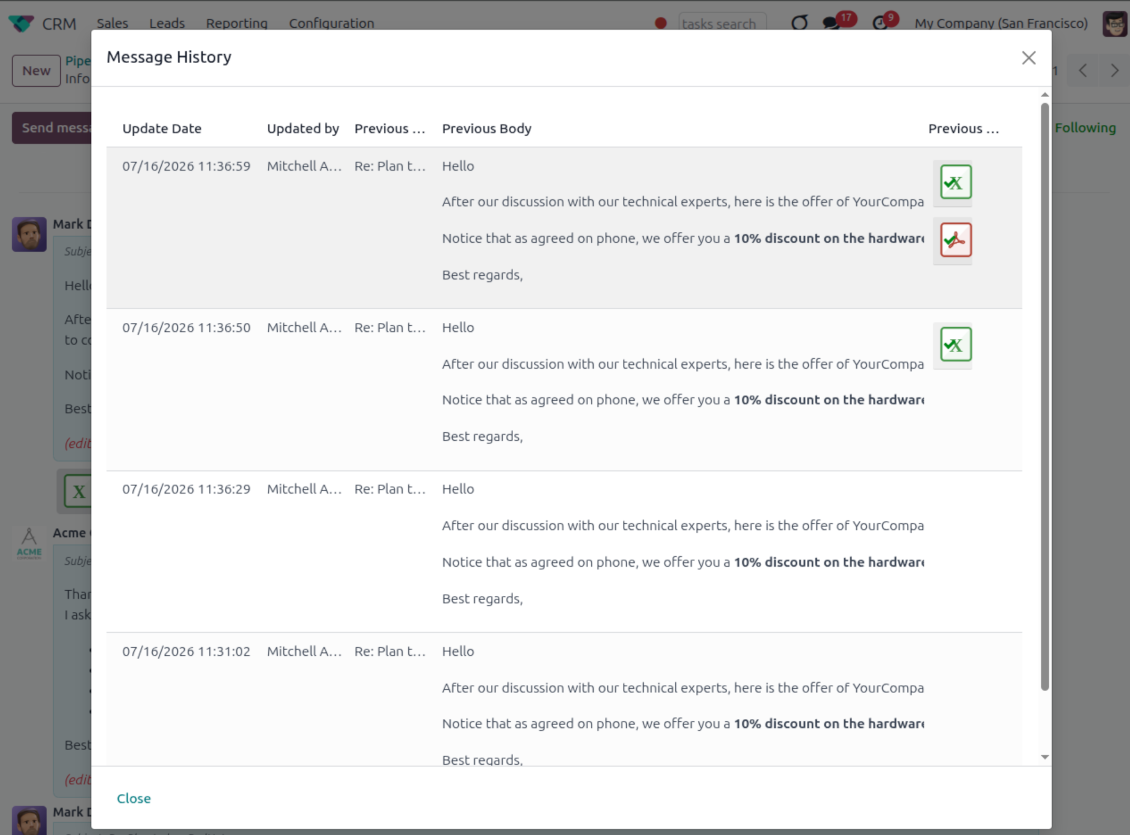
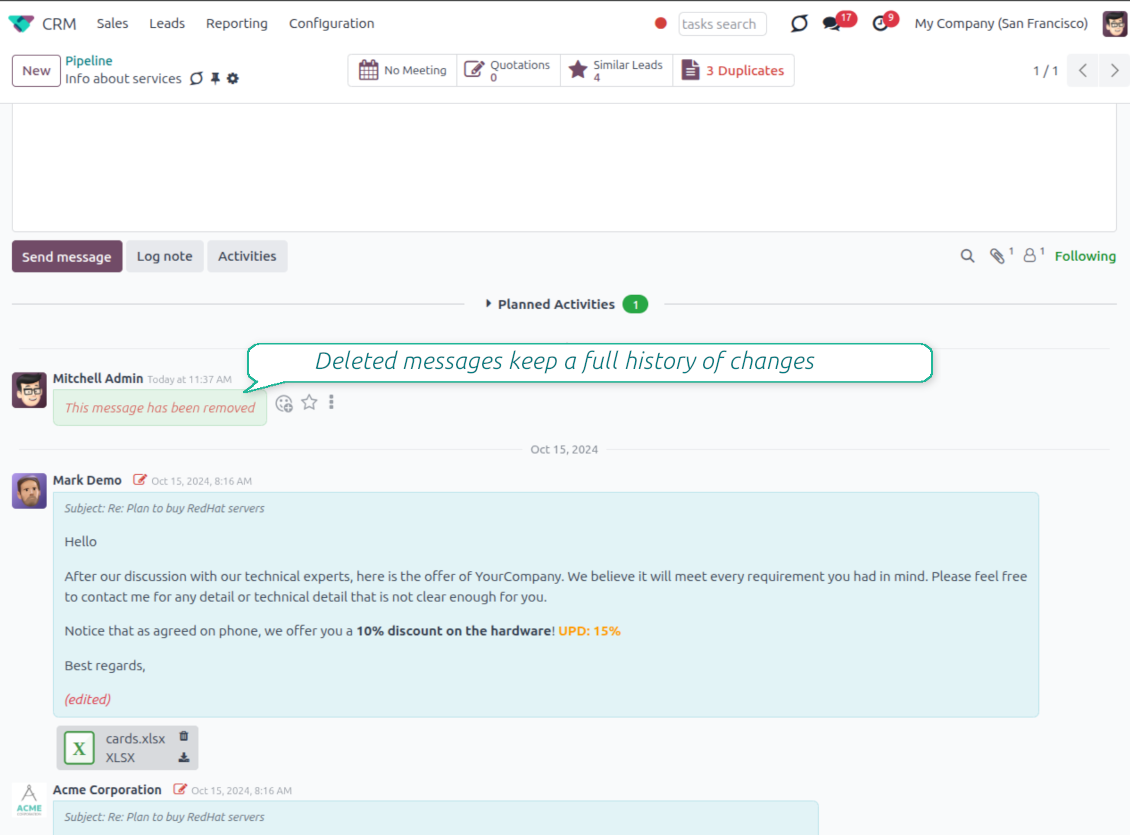
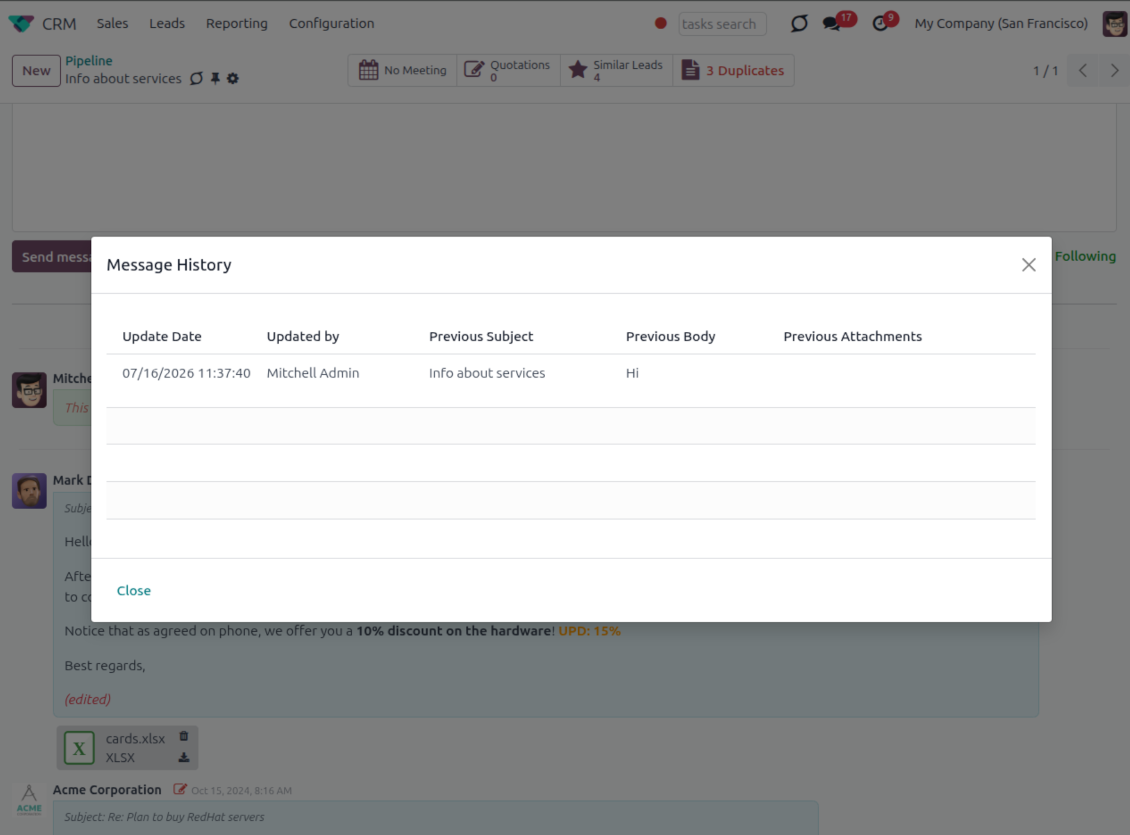
- Track what changed. Subject, body and attachment updates are stored with user and timestamp.
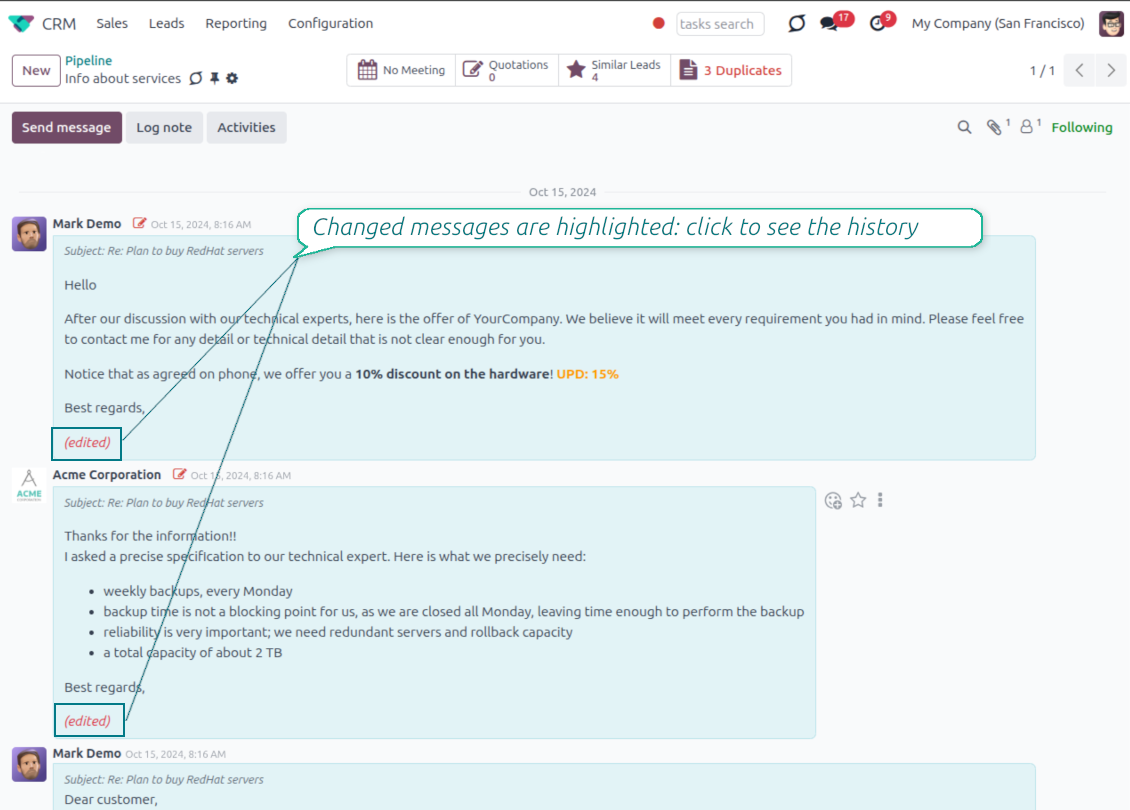
- Spot edited messages quickly. Modified entries show an edited label that opens the history in one click.
- Keep deleted content. Even removed messages retain their history for audit purposes.
Готови за оценка?
Започнете с безплатна заявка за демо или покупка в Odoo Apps Store.
Безплатна персонализирана демо база. Не се изисква телефонен номер или кредитна карта. Безплатни доживотни обновления и експертна поддръжка в рамките на основната версия на Odoo.
Catch missing attachments
Confirm forgotten attachments before they leave the composer
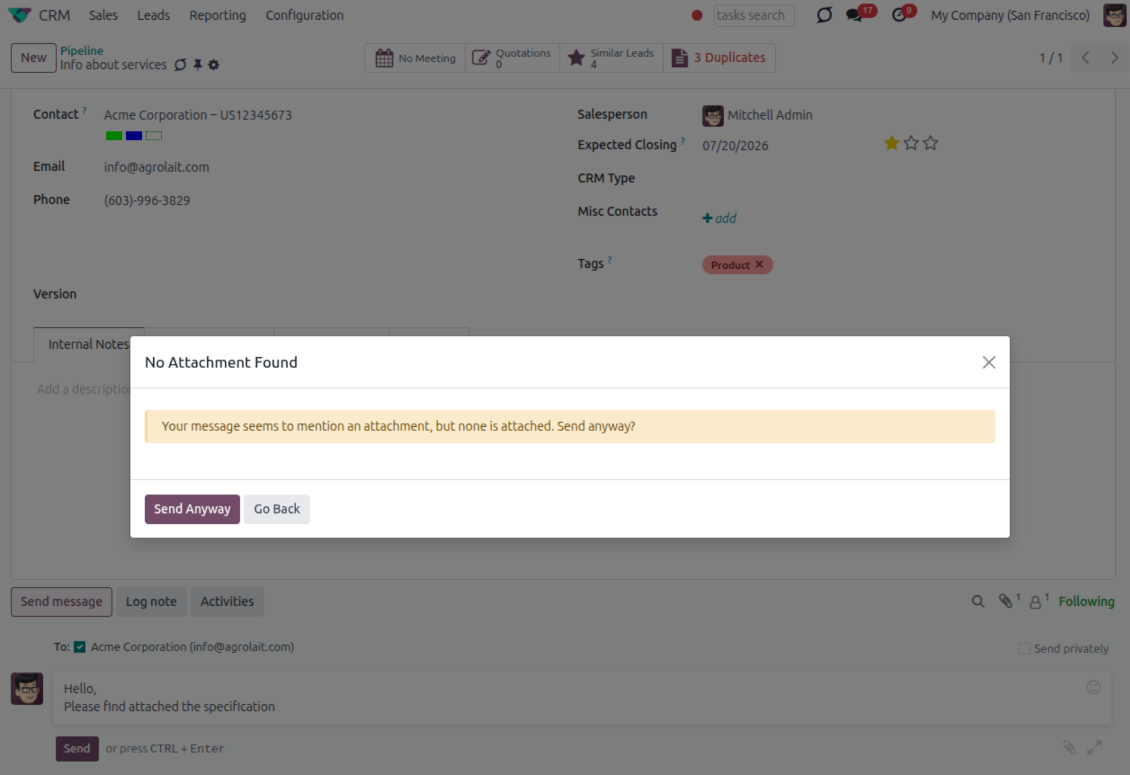
Attachment mention check
- Spot missing files before send. Odoo checks the message text when you mention an attachment.
- Works everywhere you write. The reminder appears in the full composer, quick reply and chat flows.
- Turn it off when not needed. Enable or disable the check from Messaging Suite settings.
Send-time confirmation
- Stop accidental sends. A dialog appears when the body mentions an attachment but none is attached.
- Let the user decide. Send Anyway and Go Back keep the flow moving without losing the draft.
- Adapt the wording. Adjust what counts as an attachment mention in settings when your team uses different phrases.
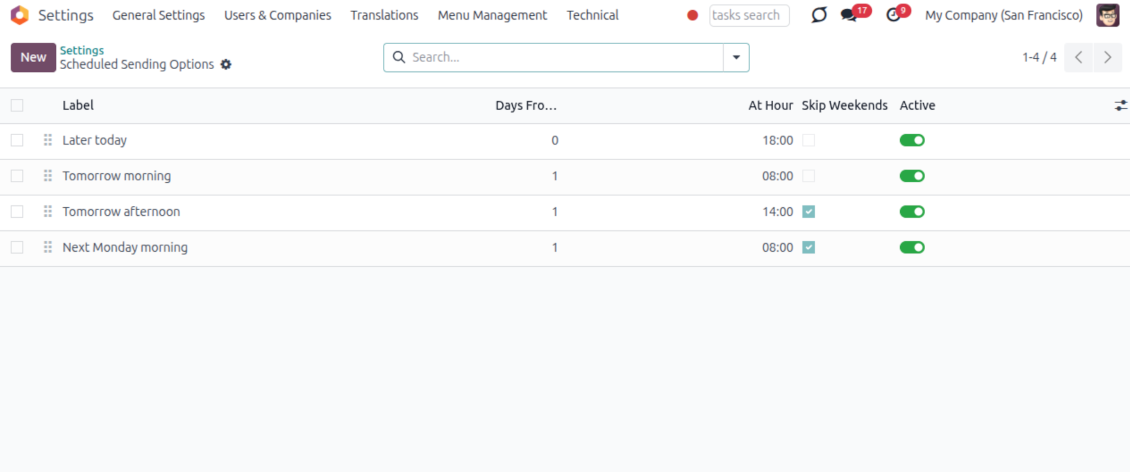
Send later with your own presets
Schedule follow-ups with options your team actually uses
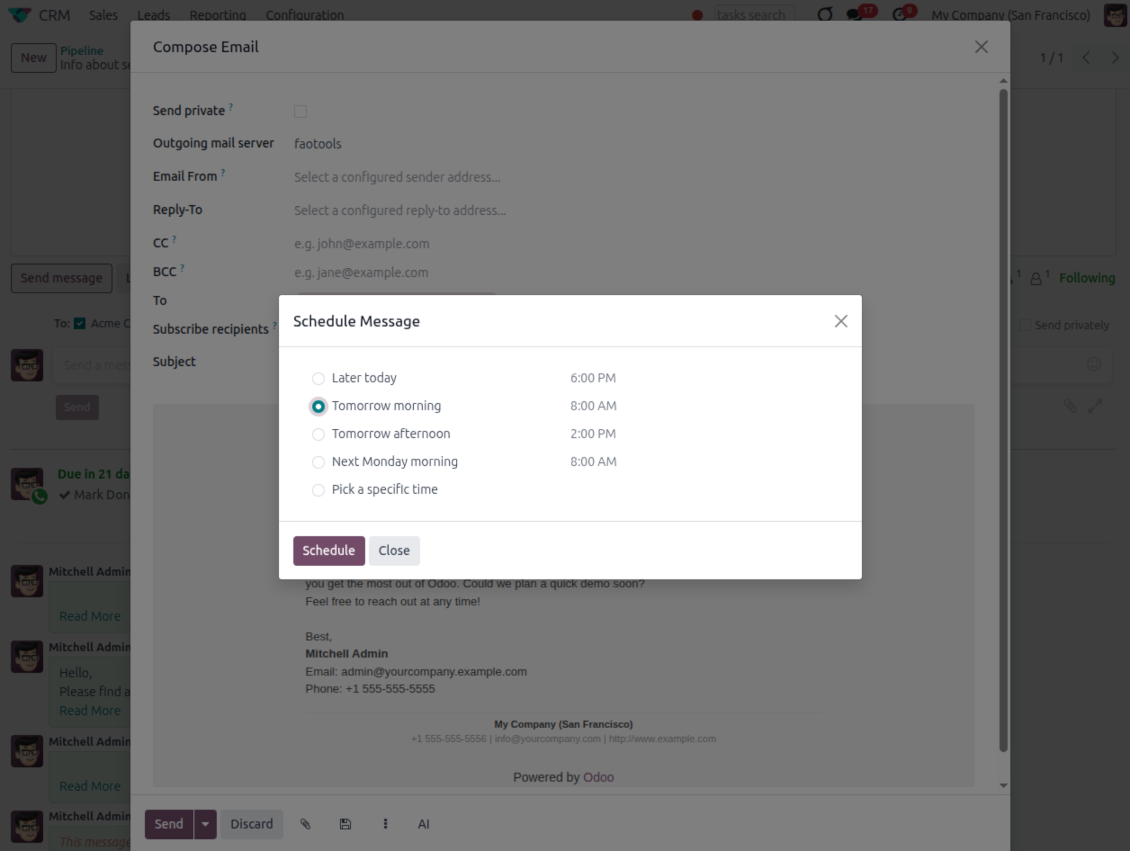
Your own Send Later options
- Go beyond the built-in choices. Define your own scheduled-sending options instead of only Tomorrow Morning / Afternoon.
- Show them in Send Later. Presets appear directly in the standard scheduled-send dialog.
- Pick a preset in one click. Users schedule follow-ups without calculating dates manually.
Maintain the preset list
- Set label, offset and send time. Each option defines days from today, hour and whether weekends are skipped.
- Control order and availability. Reorder presets and switch them on or off any time.
- Manage from Discuss. Administrators maintain Scheduled Sending Options from its own menu entry.
Message Citing
Quote earlier Odoo messages while you reply
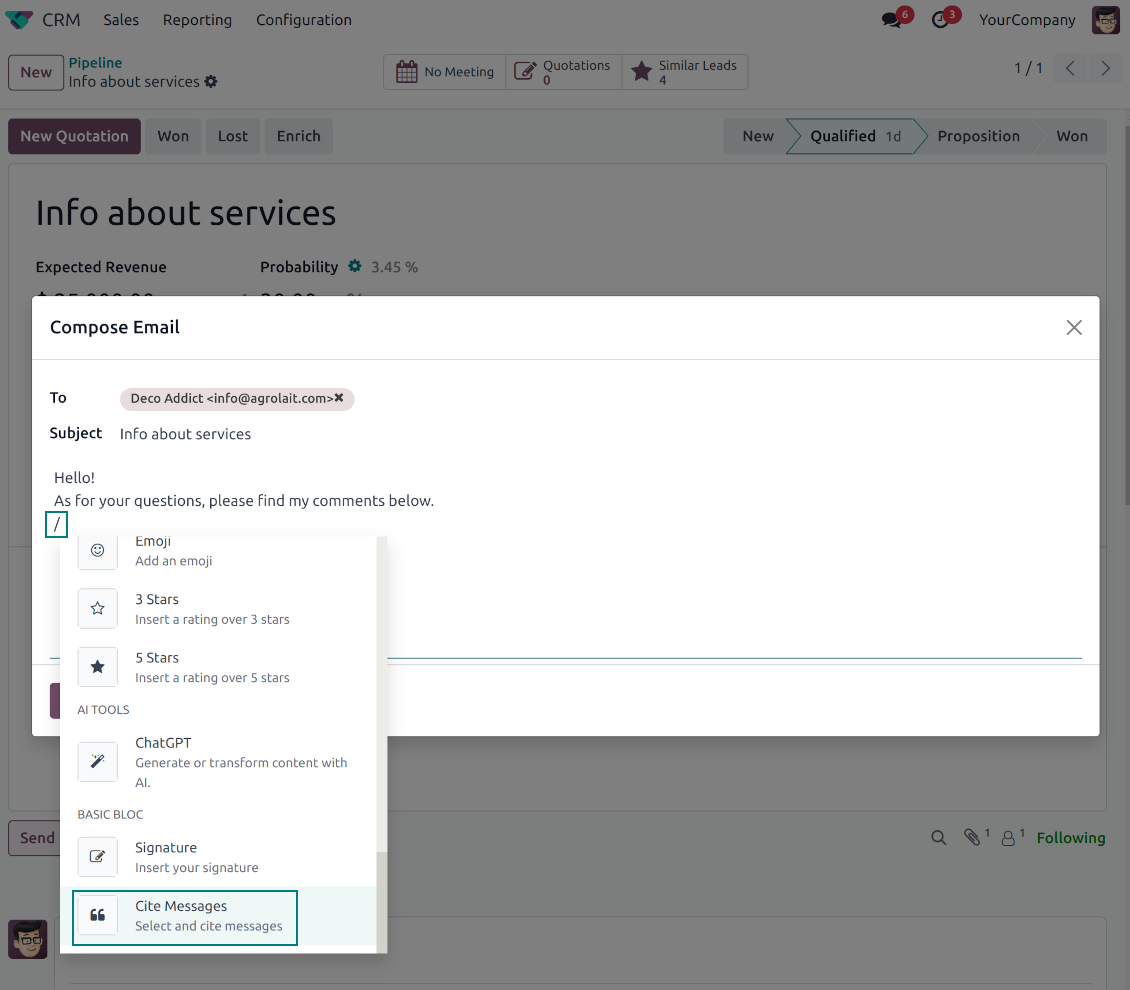
Cite while you compose
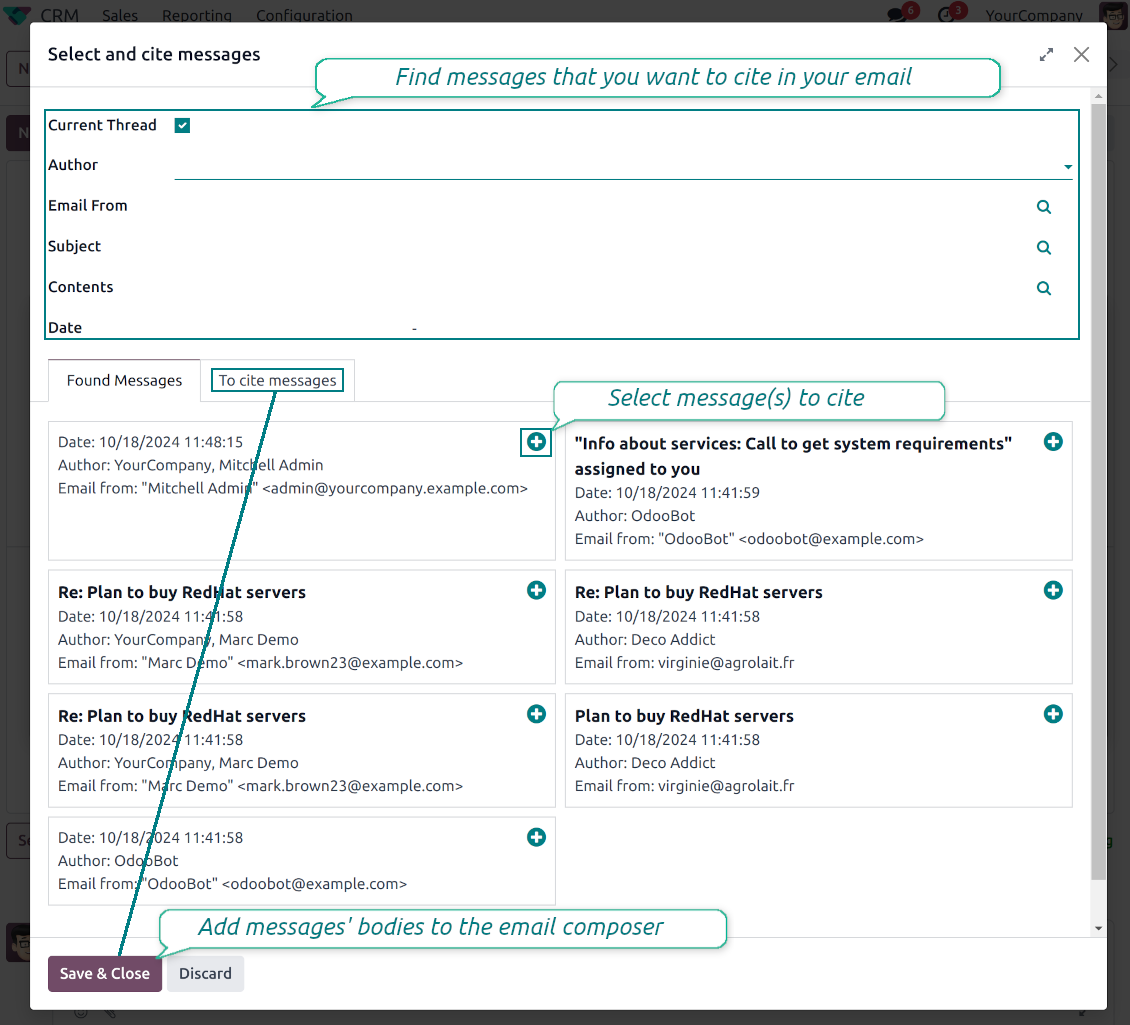
- Open Cite Message from the composer. Search earlier messages without leaving the email you are writing.
- Find the right message fast. Filter by author, content, date range, or limit results to the current thread.
- Insert with one click. Add the selected message at the cursor position in the email body.
Readable quoted history
- Shape the quoted header. Define the text placed before every cited message.
- Reply with context. Help customers and colleagues see exactly which earlier message you refer to.
- Use across documents. Cite messages from any discussion while composing on another record.
Messaging Suite administration
One place to configure your messaging tools
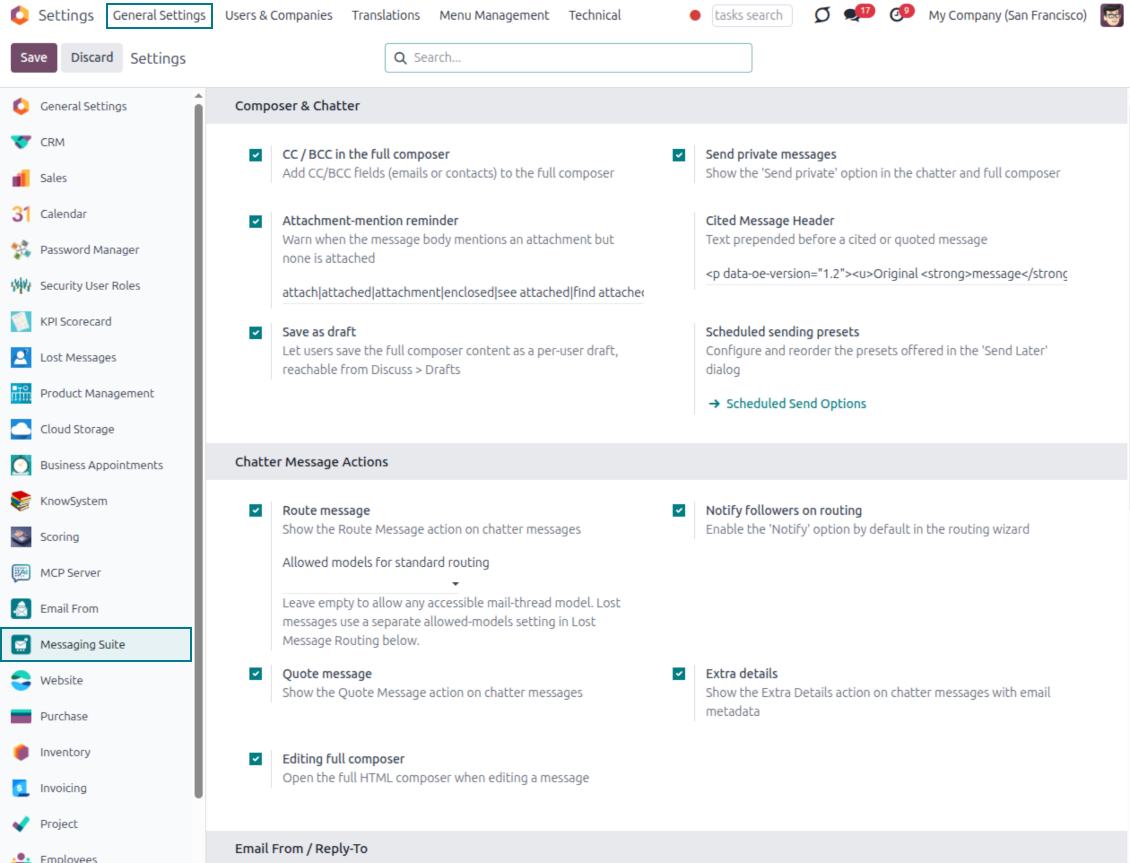
One Messaging Suite settings page
- Turn features on or off. CC/BCC, drafts, attachment reminders and send-later presets are controlled from one place.
- Reach every related option. Open settings for routing, privacy, quoting, editing and sender addresses without leaving the suite.
- Set up once, use everywhere. Configure the whole messaging toolkit from a single administration screen.
Routing and access control
- Choose where messages may go. Define which documents can receive rerouted chatter messages.
- Keep lost emails separate. Unattached incoming mail keeps its own queue and routing rules.
- Decide who may reroute. Give routing rights only to the users who should move messages between documents.
Готови за оценка?
Започнете с безплатна заявка за демо или покупка в Odoo Apps Store.
Безплатна персонализирана демо база. Не се изисква телефонен номер или кредитна карта. Безплатни доживотни обновления и експертна поддръжка в рамките на основната версия на Odoo.
Често задавани въпроси за Odoo Messaging Suite Odoo v.18
Какви са политиките за обновяване на вашите инструменти?
Според действащите правила на Odoo Apps Store:
- Всеки модул, купен за версия 12.0 и по-стара, дава достъп до всички версии до 12.0.
- От версия 13.0 всяка версия на модула се купува отделно.
- Независимо от версията покупката дава право на всички обновления и поправки в рамките на основната версия.
Имайте предвид, че екипът на faOtools не контролира тези правила. За въпроси се обръщайте директно към представителите на Odoo Apps Store.
Как да инсталирам вашето приложение в Odoo.sh?
Най-прекият подход е да използвате вградения работен поток на магазина Odoo:
1. Отворете страницата на модула и щракнете бутона Deploy on odoo.sh
2. След това ще бъдете пренасочени към страницата на GitHub. Влезте в профила си, след което щракнете 'Create a new repo' или използвайте съществуващо. Уверете се, че хранилището е частно. Не е позволено публикуването на приложения под лиценз OPL-1. Ако е нужно, създайте ново repo за проекта Odoo.sh
3. След това отидете в odoo.sh и щракнете бутона Deploy. В изскачащия прозорец потвърдете решението и щракнете 'Continue.' Това стартира инсталацията.
Тези стъпки ще инсталират приложението в продукционния клон на проекта. Ако искате да разположите приложенията в други клонове или да обновите модула, направете следното:
1. Качете изходния код на приложението от магазина Odoo
2. Направете commit на модула в необходимото GitHub хранилище. Уверете се, че никой папки/файлове на приложението не се игнорират (т.е. не са в .gitignore на repo). Хранилищата се създават автоматично от odoo.sh и по подразбиране може да включват важни елементи (напр. /lib). Качете всички директории, поддиректории и файлове на модула без изключения
3. Разположете целевия клон на проекта odoo.sh или, ако настройките предполагат това, изчакайте да се изгради автоматично.
Как да инсталирам вашето приложение на собствен сървър?
2. Рестартирайте сървъра на Odoo;
3. Включете режим за разработчици (технически настройки);
4. Обновете списъка с приложения (менюто с приложения);
5. Намерете приложението и натиснете „Activate“/„Install“;
6. Следвайте указанията на страницата на приложението, ако има такива.
Забелязах, че приложението ви има допълнителни добавки. Мога ли да ги купя по-късно?
Да, разбира се. Едновременно Odoo автоматично добавя всички зависимости в количката, затова трябва да изключите вече купените инструменти, за да избегнете двойно плащане.
Инсталирах приложението ви в Odoo.sh и в тестовете виждам предупреждение/грешка
Червено/оранжево предупреждение не влияе на функциите на приложението. За съжаление понякога модулите ни не минават стандартните автоматични тестове, защото те очакват поведение в конфликт с целите на приложението. Например променяме изчислението на цената, а тестовете на стандартния модул Odoo сравняват крайната цена със стандартен алгоритъм.
Първо проверете функциите на разгънатата база. Всичко работи ли коректно?
Ако все пак смятате, че предупреждението влияе на реални функции, свържете се с нас и изпратете пълните регистрационни файлове от инсталацията и пълния списък на разгънатите модули (включително ядро и трети страни).
Мога ли да купя приложението директно от вашата фирма?
Не, разпространяваме инструментите само чрез официалния магазин за приложения Odoo.
Бих искал да получа отстъпка
За съжаление нямаме техническа възможност да предложим индивидуални цени.
Мога ли да инсталирам приложението в моята база Odoo Online (SaaS)?
Не, приложения на трети страни не могат да се ползват в Odoo Online. За съжаление Odoo SaaS блокира тази възможност.
Вашият инструмент зависи от други приложения. Трябва ли да ги купя?
Да, инструментът изисква всички модули, посочени в зависимостите, за да работи правилно. Цената на страницата на приложението вече включва всички необходими зависимости.
Каква е цената на модула в щатски долари? Защо се промени?
Цената на нашите модули е в евро. Магазинът Odoo превалутира цените по вътрешния си курс. Затова цената в щатски долари може да се промени при обновяване на курса.
Текстовете на приложението и уебсайта на езици, различни от английски, са с помощта на ИИ и са съгласувани с официалните преводи на Odoo. Ако забележите грешка, изпратете тикет за коректност на преводите и ще го поправим.
Демонстрационни бази Odoo (прегледи наживо)
За това приложение можем да предоставим безплатна персонализирана демо база.
За да се свържете с нас не са нужни телефонен номер или кредитна карта. Достатъчна е кратка регистрация по имейл, която не отнема повече от 30 секунди.
По ваше искане ще подготвим индивидуална база за преглед наживо, където около две седмици можете да правите тестове и да проверявате предположения.
Докладване на грешки
Ако срещнете грешки или непоследователно поведение, свържете се с нас. Гарантираме поправки до 60 дни от покупката и сме силно заинтересовани да подобряваме инструментите и след този срок.
За да се свържете с нас не са нужни телефонен номер или кредитна карта. Достатъчна е кратка регистрация по имейл, която не отнема повече от 30 секунди.
Включете възможно най-много подробности в заявката: екранни снимки, дневници на Odoo сървъра, пълно описание как да възпроизведете проблема и т.н. Обикновено са нужни няколко работни дни, за да се подготви работен план (ако грешката е потвърдена) или насоки какво да се направи (в противен случай).
Публични заявки за функции и идеи за модули (безплатна разработка)
Силно сме мотивирани да подобряваме инструментите си и ще сме благодарни за всяка обратна връзка. Ако изискванията ви са от обществена полза и могат да се реализират ефективно, екипът ще ги включи в нашия списък със задачи.
Такъв списък със задачи се обработва редовно и не предполага допълнителни такси. Макар да не можем да обещаем срокове и окончателен дизайн, това може да е добър начин да получите желаните функции без инвестиции и рискове.
За да се свържете с нас не са нужни телефонен номер или кредитна карта. Достатъчна е кратка регистрация по имейл, която не отнема повече от 30 секунди.

Инструмент за гъвкаво подреждане на прикачените файлове на Odoo в папки и синхронизация на директории с облачни клиенти: Google Drive, OneDrive/SharePoint, Nextcloud/ownCloud, Dropbox, Amazon S3, Box и NAS. DMS. Файлов мениджър. Система за управление на документи
398€

The tool to build a deep and structured knowledge base for internal and external use. Knowledge System. KMS. Wiki-like revisions.
398€
The tool to automatically synchronize Odoo attachments with OneDrive files in both ways
487€
The tool to set up KPI targets and control their fulfillment by periods. KPI dashboards. Dashboard designer. KPI charts

The tool for time-based service management from booking appointments to sales and reviews
398€
The tool to automatically synchronize Odoo attachments with Google Drive files in both ways
487€

The tool to plan and generate recurring activities according to the flexible timetable rules
38€