Ukratko
Odoo Messaging Suite je Odoo 18 Rasprava aplikacija. The tool to improve the Odoo messaging experience.
Odoo Messaging Suite brings lost-message recovery, private discussions, message citing, post-send editing, managed From/Reply-To addresses and a richer email composer together in one application. Compose with CC/BCC and per-user drafts, route emails to the right document, quote from the message toolbar, send later with your own presets, and catch forgotten attachments before they leave. Every message keeps its email headers behind a details icon, and administrators configure the whole toolkit from one Messaging Suite settings page.
Idealno za
Support and sales teams living in their inbox
Perfect for teams that answer customers by email all day and want CC/BCC, drafts and quoting available right inside the Odoo composer, without switching to an external mail client.
Companies needing confidentiality
Ideal when some conversations must stay private from portal users and other followers, while still being logged on the Odoo document for later reference.
Administrators who want oversight and control
Useful for admins who need routing rules, send-later presets, attachment reminders and one settings page to manage the whole messaging toolkit.
Spremni za procjenu?
Započnite besplatnim zahtjevom za demo ili kupnjom u Odoo Apps Store.
Besplatna personalizirana demo baza. Broj telefona ili kreditna kartica nisu potrebni. Besplatna doživotna ažuriranja i stručna podrška unutar glavne verzije Odoo.
Zašto ga timovi biraju
Ključne prednosti prije detalja
One settings page
Turn on CC/BCC, drafts, routing, attachment checks and the rest of the toolkit from a single Messaging Suite configuration screen, without hunting through scattered settings menus.
Full email composer
Compose with CC/BCC recipients, per-user drafts and managed From/Reply-To addresses directly inside the Odoo composer.
Managed sender addresses
Stop typing sender emails by hand. Pick from an address book tied to the right outgoing mail server, with automatic rules by document type.
Message actions
Route and quote any message from quick actions, and inspect full email headers in a single click.
Lost message recovery
Never lose an incoming email again. Review unattached messages in a dedicated queue and route them to the correct Odoo document before customers wait.
Private threads
Keep sensitive conversations hidden from portal users and other followers, while staying logged on the Odoo document for later reference.
Message citing
Search and cite any earlier Odoo message straight from the composer, so every reply carries the right context.
Message editing & history
Edit or delete your own messages, notes and activity feedback, with a full history of every change kept for admins.
Safer sending
Catch forgotten attachments before you hit send and schedule follow-ups with your own Send Later presets.
Spremni za procjenu?
Započnite besplatnim zahtjevom za demo ili kupnjom u Odoo Apps Store.
Besplatna personalizirana demo baza. Broj telefona ili kreditna kartica nisu potrebni. Besplatna doživotna ažuriranja i stručna podrška unutar glavne verzije Odoo.
Compose like a real email client
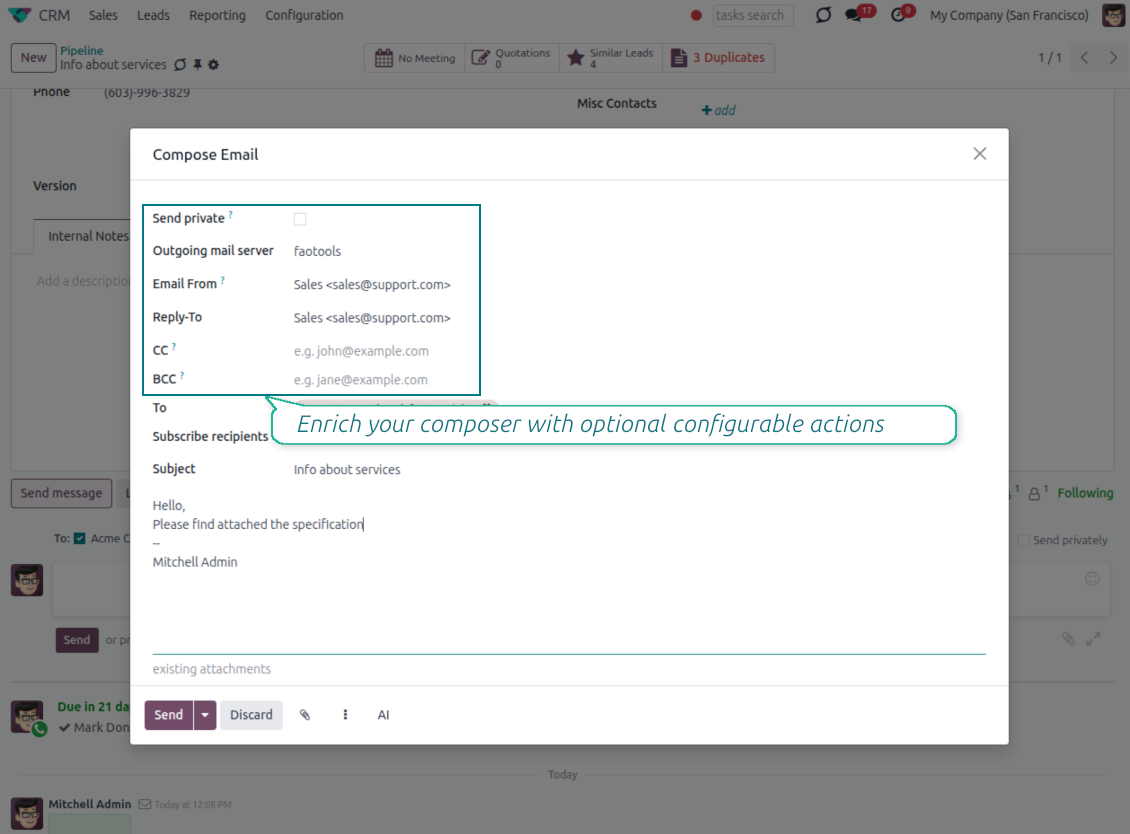
CC, BCC and per-user drafts in the full composer
Copy and blind copy
- Add CC and BCC in the full composer. Type email addresses or pick existing contacts.
- Keep recipients in the message history. Sent CC/BCC values stay visible on the message afterwards.
- Use only when you need them. Turn CC/BCC off in settings if your team does not use copy recipients.
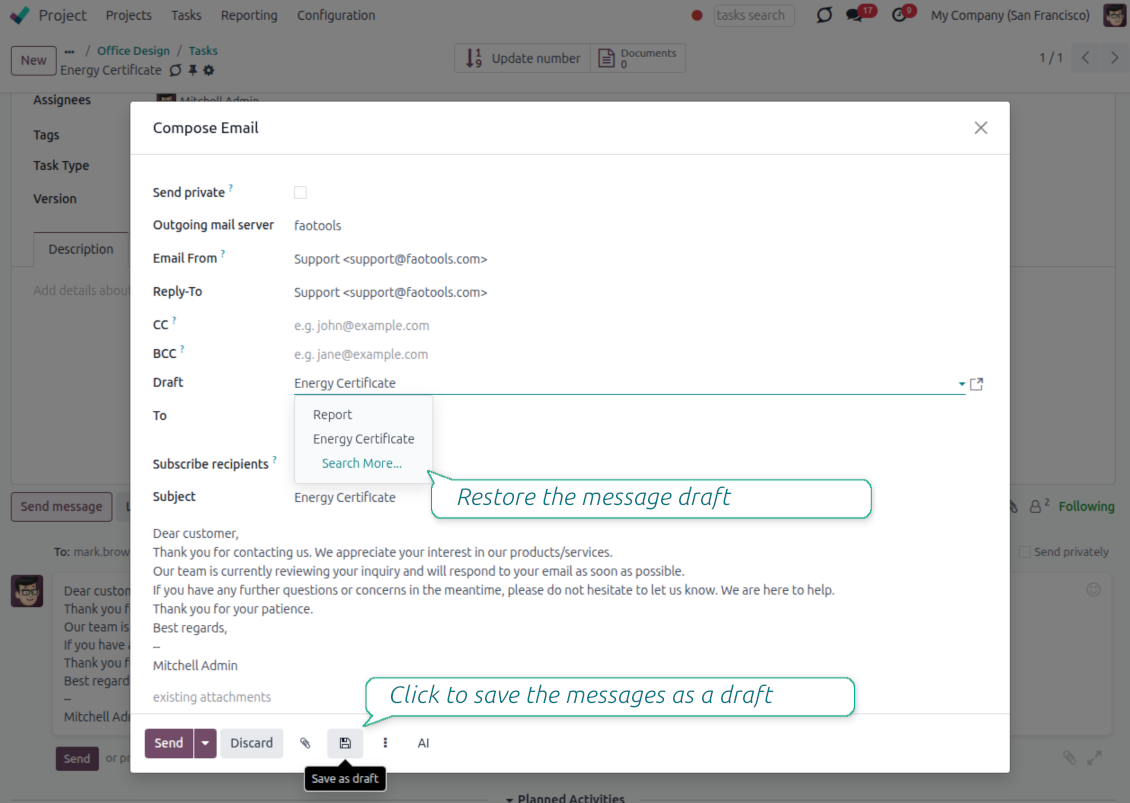
Save as draft
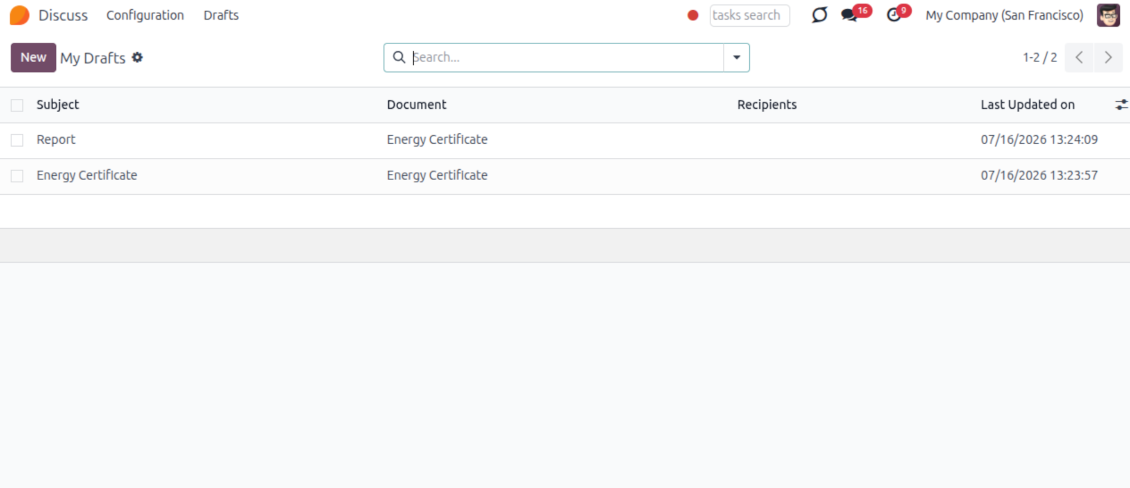
- Save the full message. Drafts keep subject, body, recipients and related fields for the current record.
- Resume where you stopped. Reopening the composer on the same document brings back your latest draft automatically.
- Pick up drafts from Discuss. Every internal user can open the drafts menu and finish unfinished messages.
Message actions and email metadata
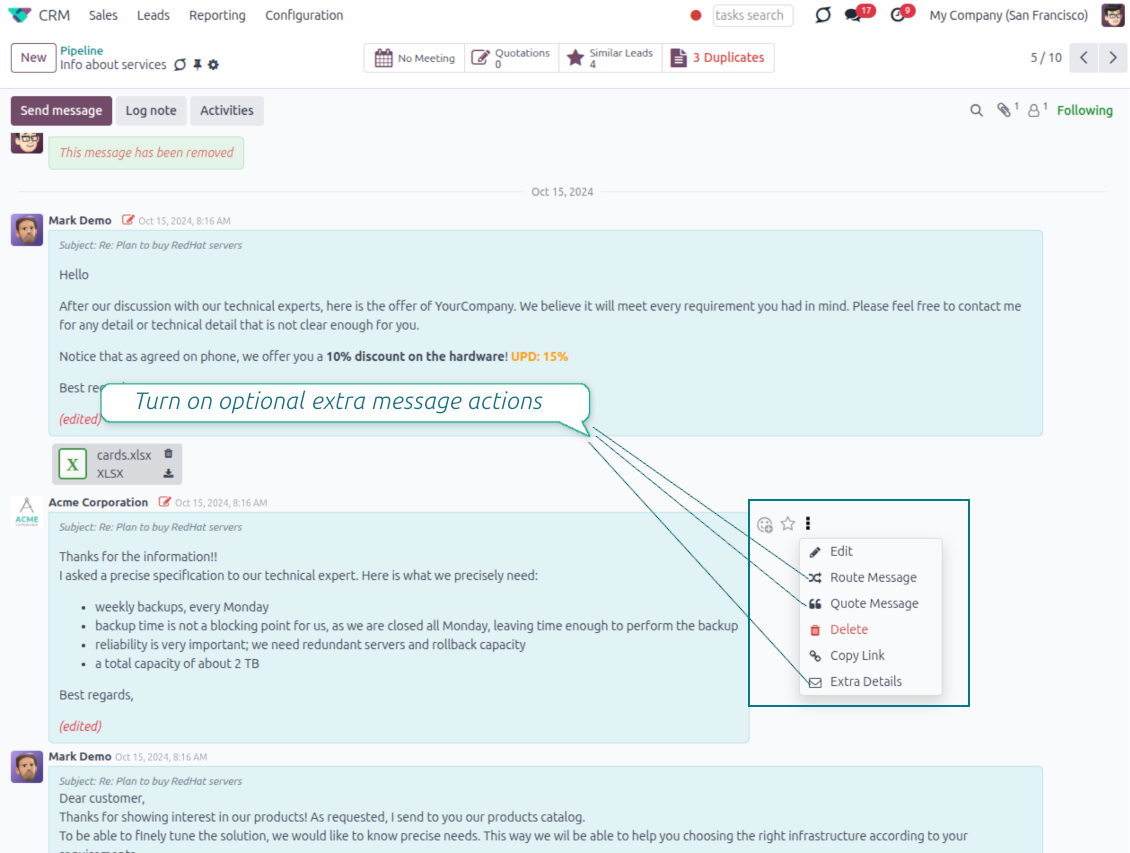
Route, quote and inspect email details without leaving the chatter
Actions on every message
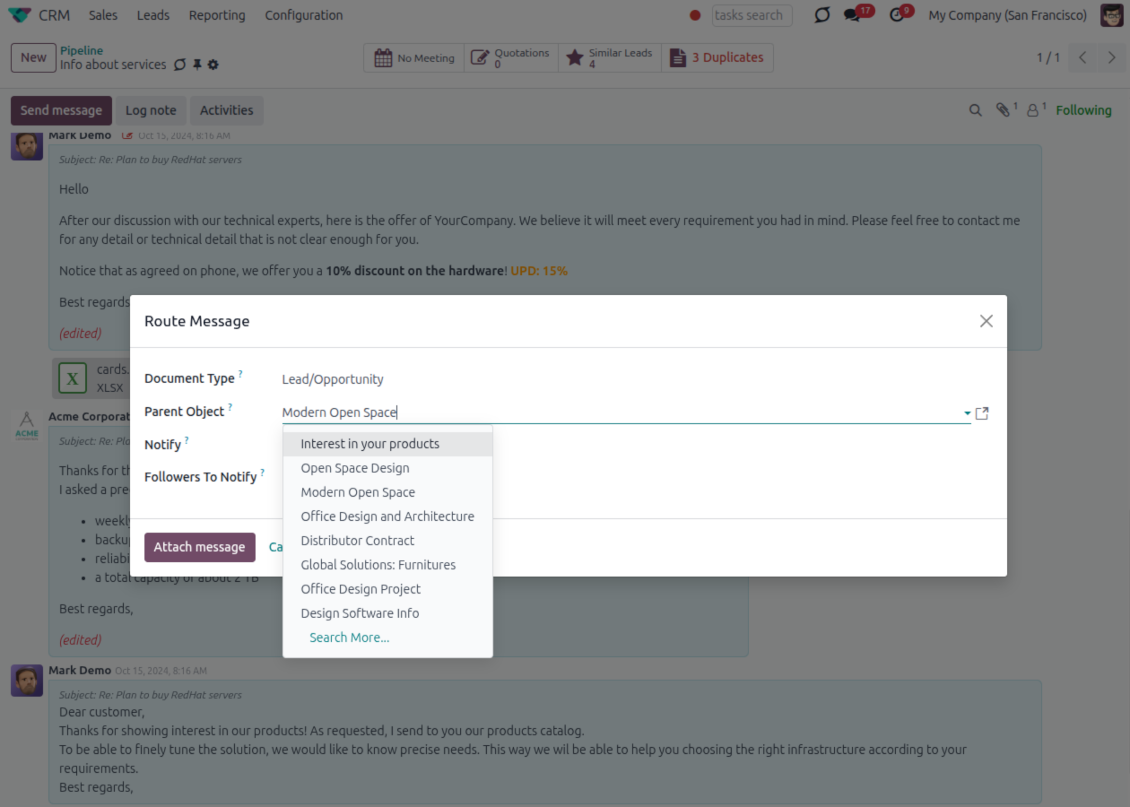
- Route from the thread. Move a message to another document when it landed on the wrong record.
- Quote in a new email. Start a reply with the original message included in the body.
- Keep the composer simple. Every action opens the standard Odoo composer already pre-filled, no separate tooling to learn.
Email details on every message
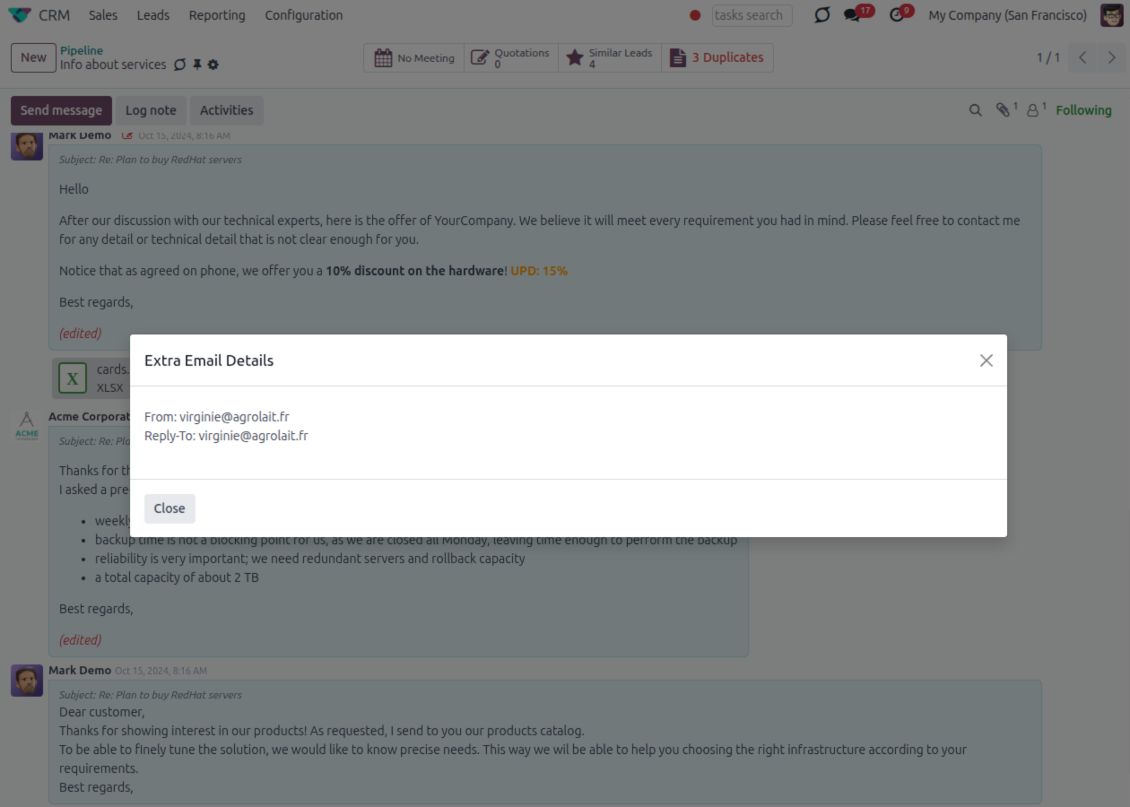
- See full headers. From, Reply-To, To and CC stay available on incoming and outgoing mail.
- Keep CC/BCC too. Copy recipients added in the composer are saved with the message.
- Open details in one click. A small icon on the message shows the complete email information.
Odoo Email From
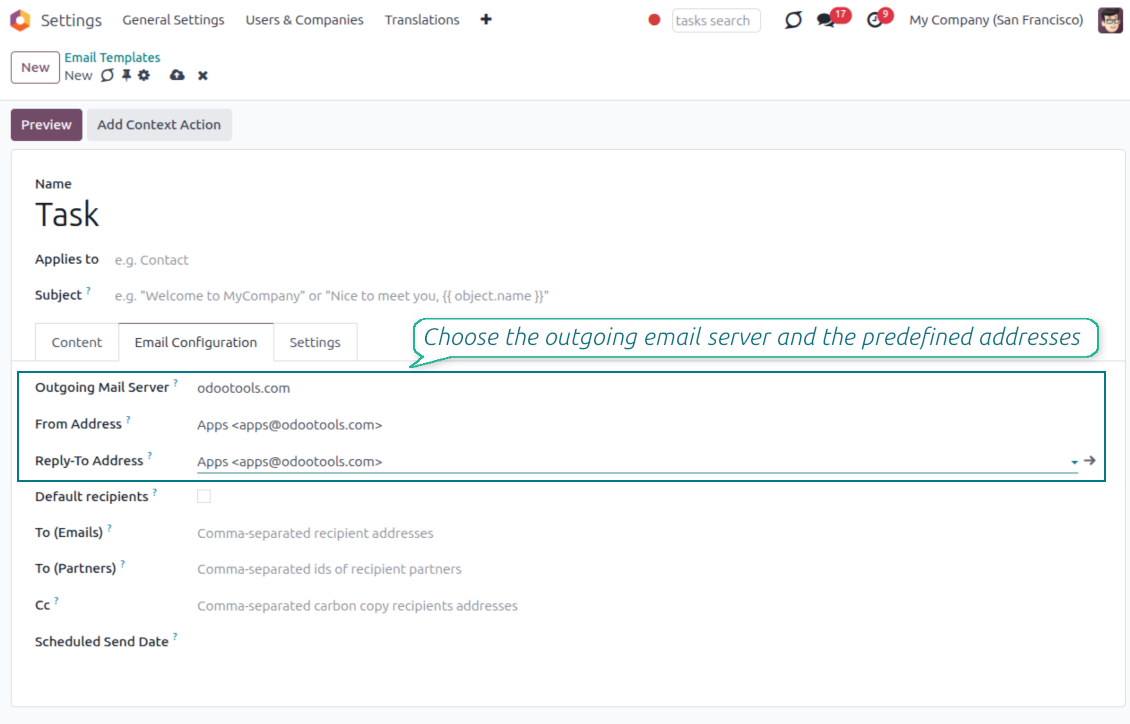
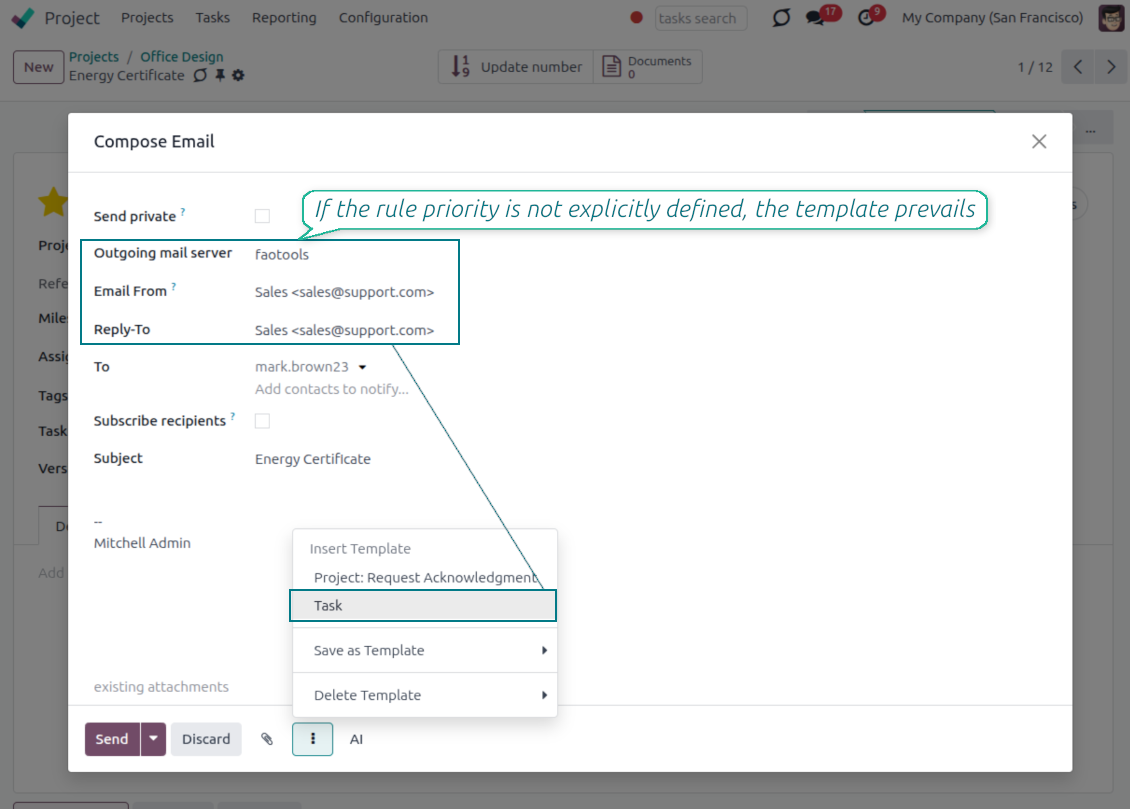
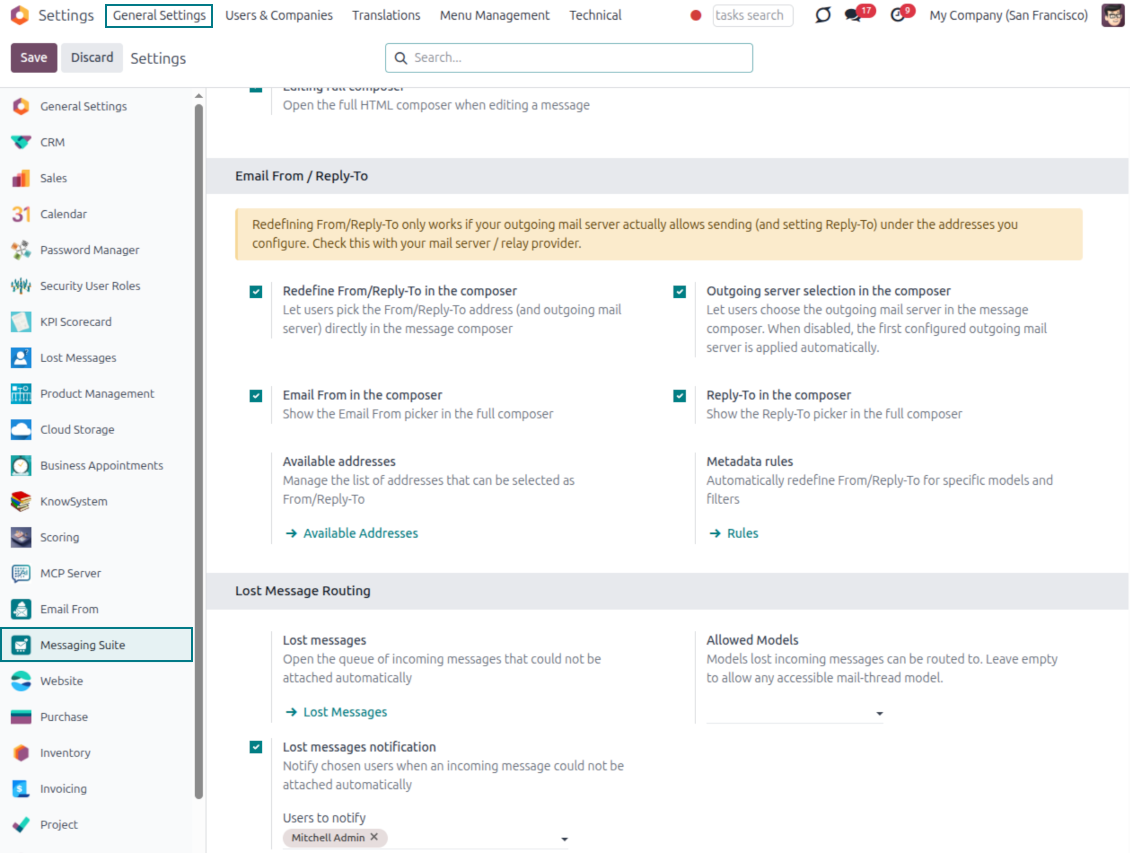
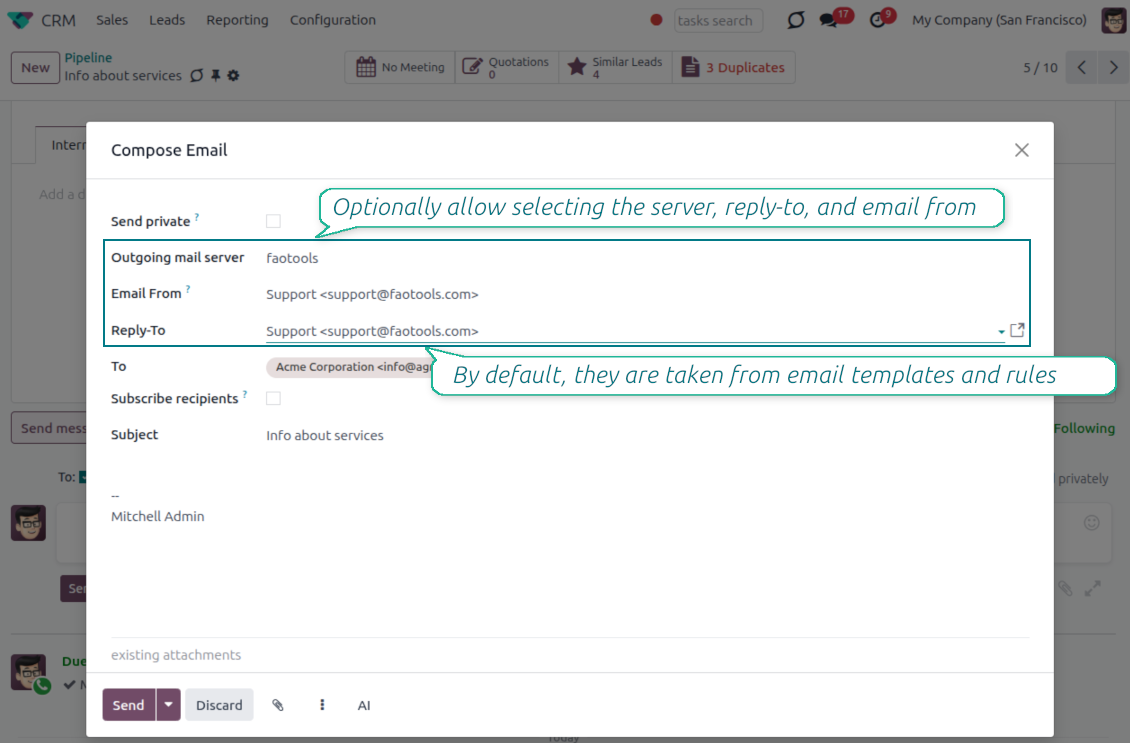
Choose the right From and Reply-To address for every email
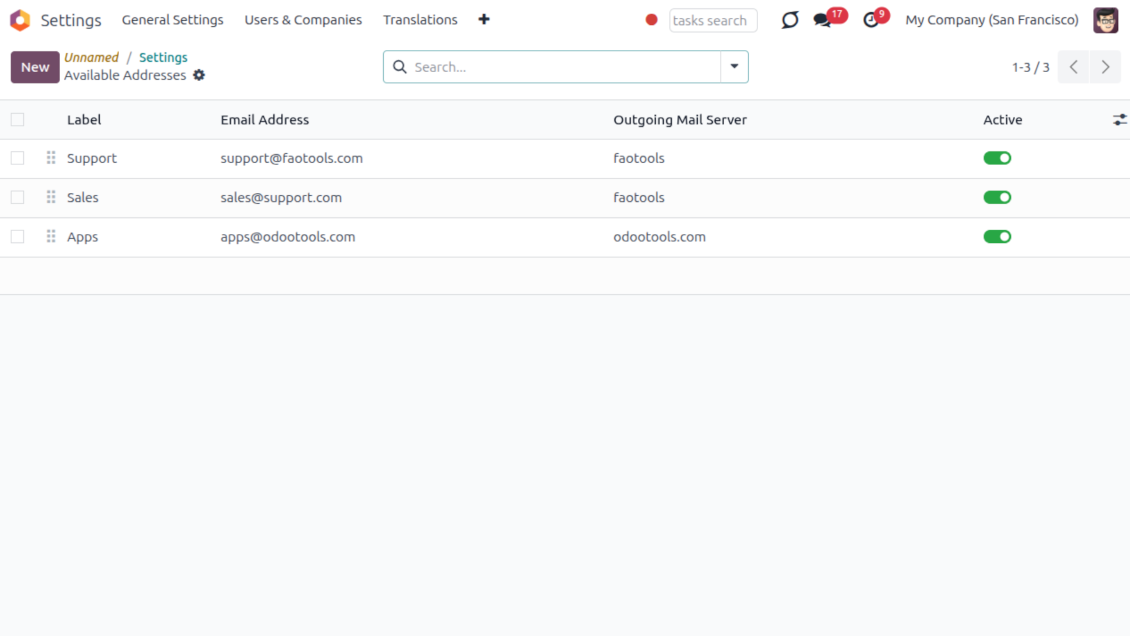
Managed sender addresses
- Pick instead of typing. Users choose From and Reply-To from an address book linked to outgoing mail servers.
- Apply on templates too. Email templates can use the same managed sender addresses.
- Keep the screen simple. The outgoing mail server field is hidden when only one server is configured.
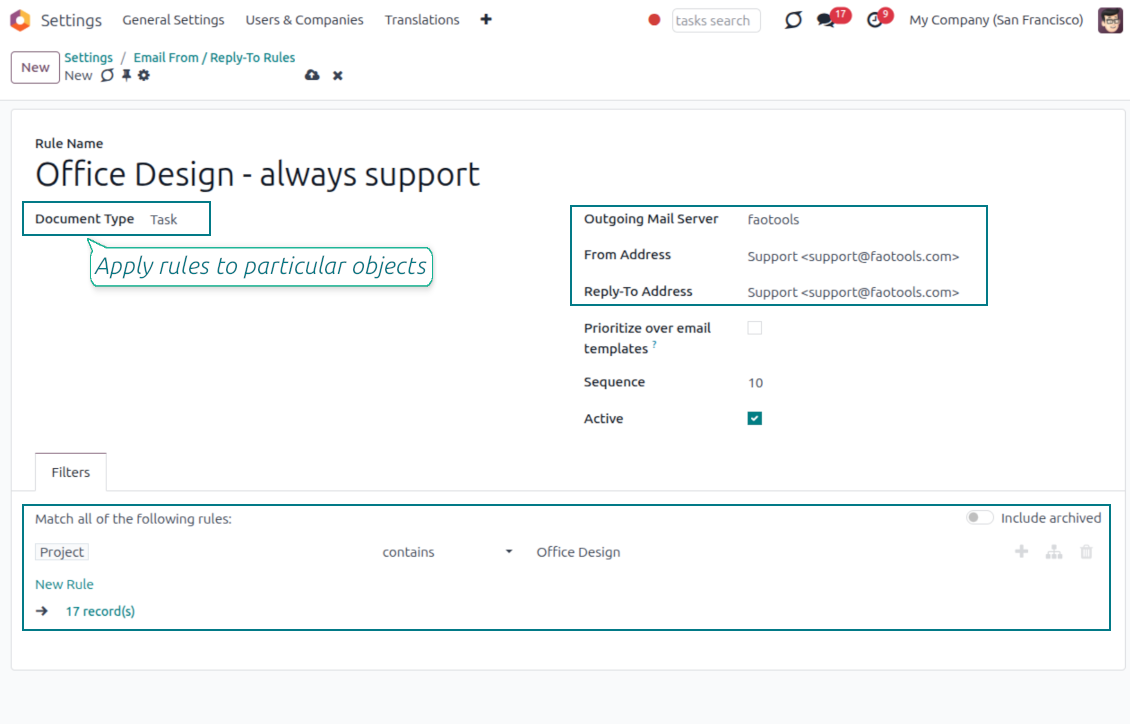
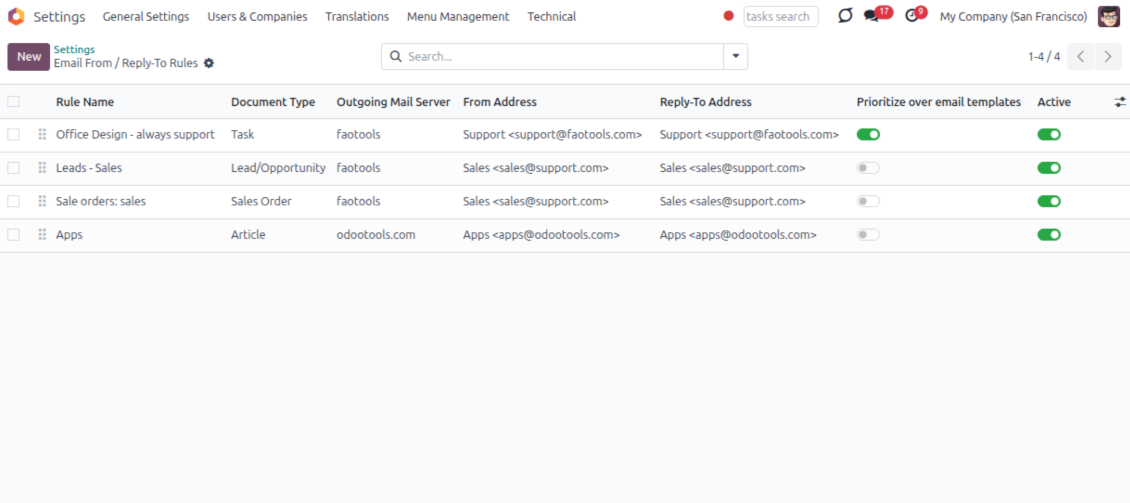
Automatic sender rules
- Set the sender by document type. Rules choose the right From and Reply-To for sales orders, tasks, invoices and other records.
- Prevent invalid combinations. Odoo blocks sender addresses that do not match the selected outgoing mail server.
- Start with working mail setup. Make sure each outgoing server can actually send from the addresses you add.
Spremni za procjenu?
Započnite besplatnim zahtjevom za demo ili kupnjom u Odoo Apps Store.
Besplatna personalizirana demo baza. Broj telefona ili kreditna kartica nisu potrebni. Besplatna doživotna ažuriranja i stručna podrška unutar glavne verzije Odoo.
Lost Messages Routing
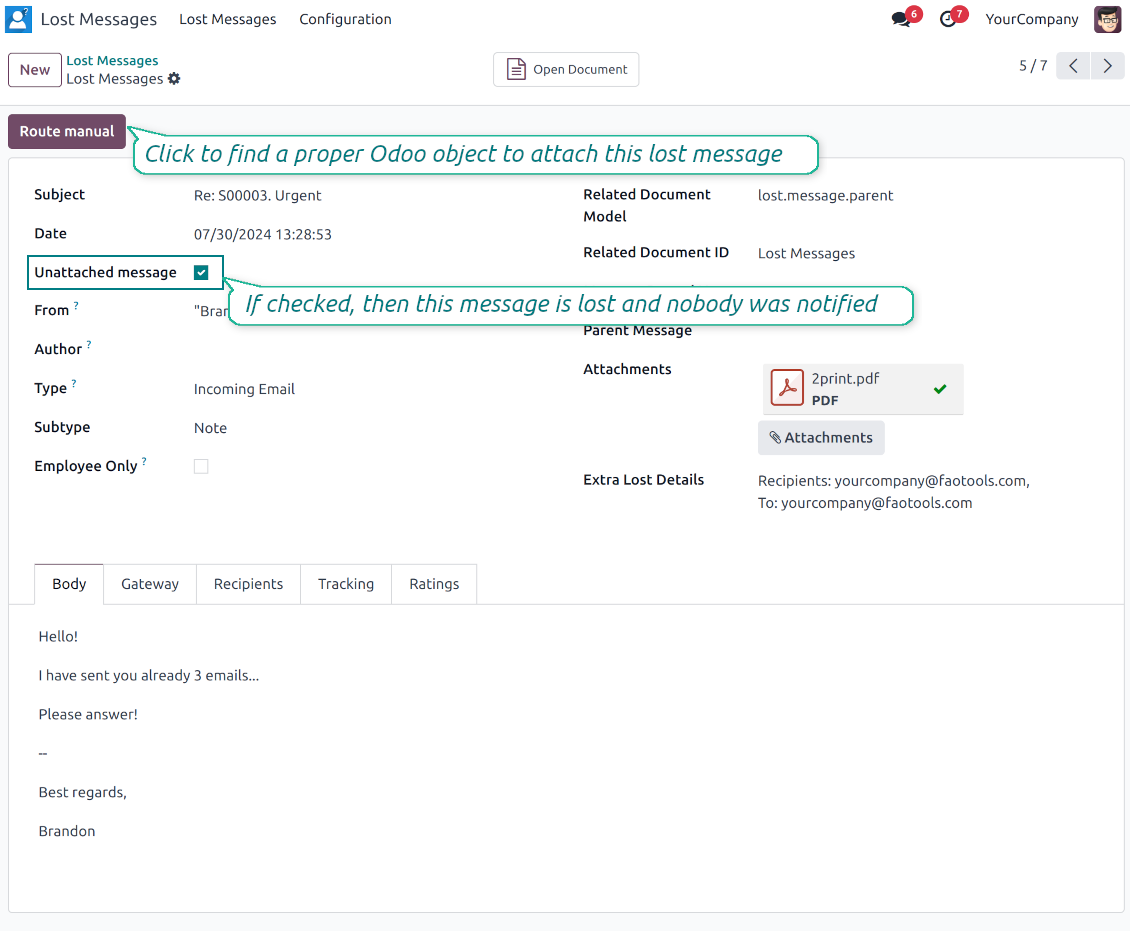
Recover incoming emails Odoo could not attach automatically
Lost message queue
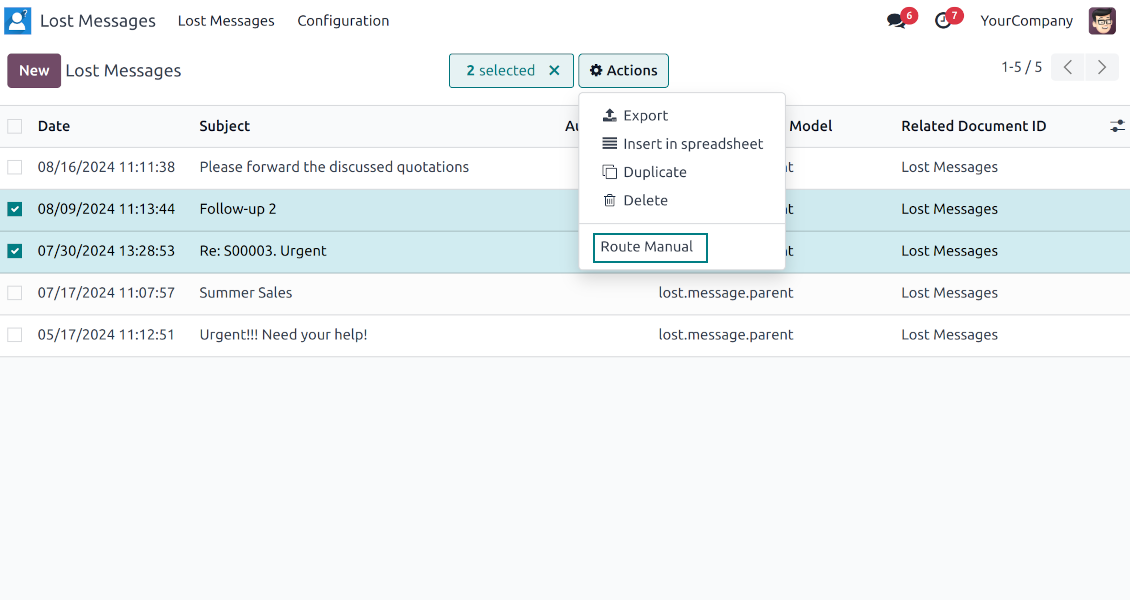
- Catch emails that did not attach. Incoming messages Odoo cannot place on a document are kept instead of disappearing.
- Review in one menu. Your team works from a dedicated queue with subject, sender, body and search tools.
- Keep routing clues. Recipients, To, CC and In Reply To stay available to help find the right document.
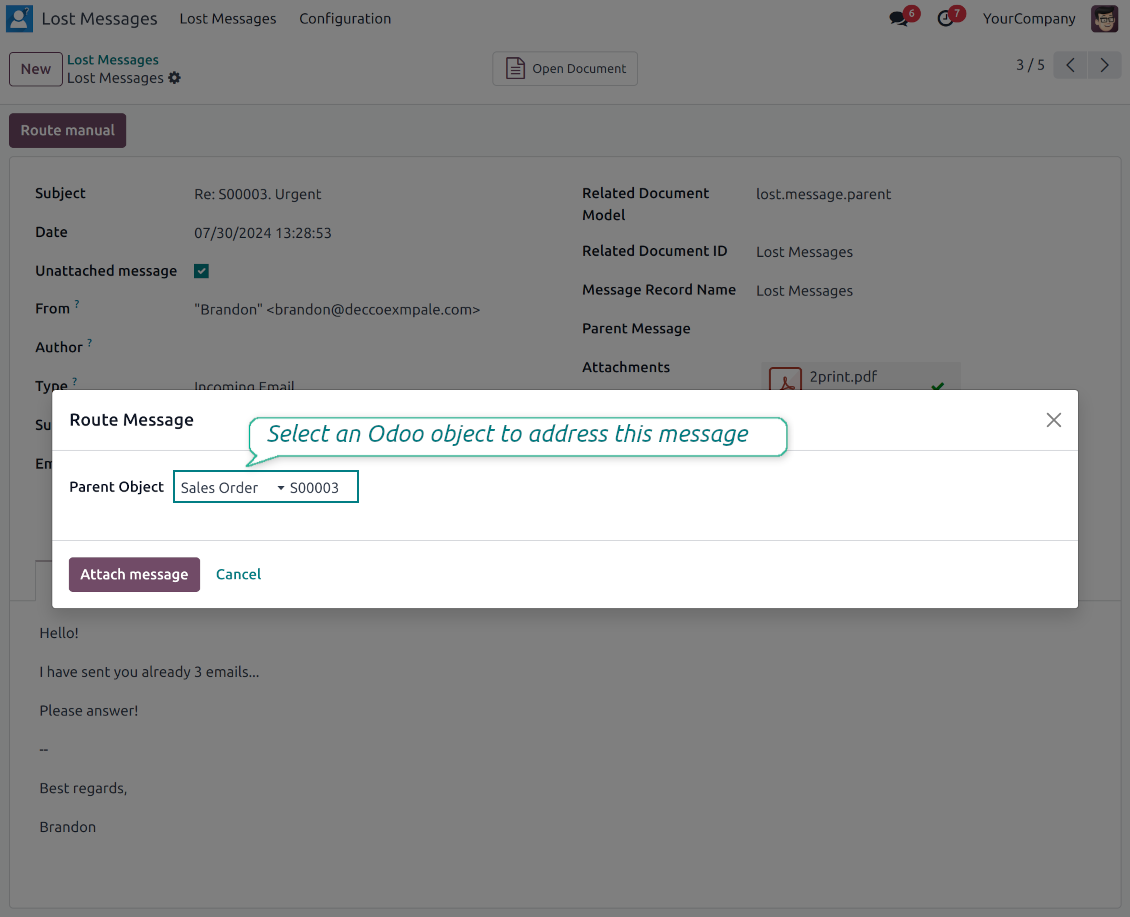
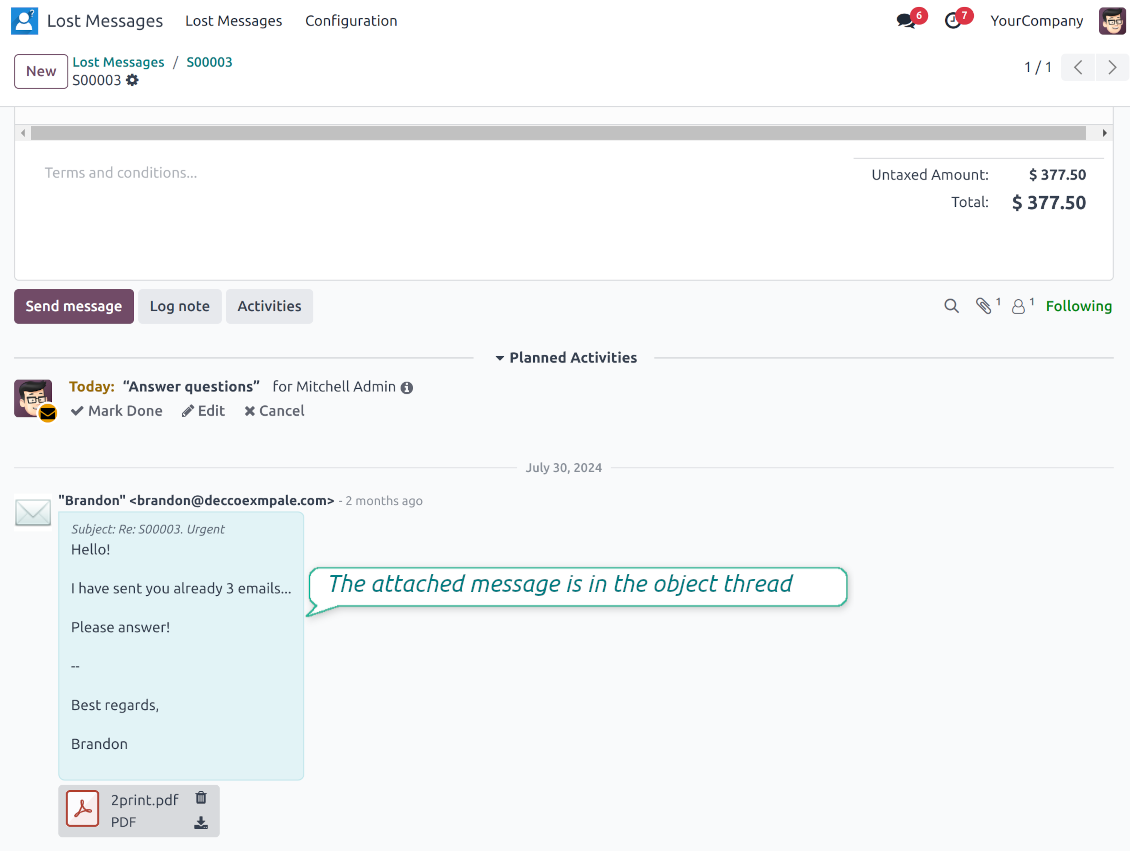
Route to the right document
- Attach in a few clicks. Pick the target document and attach one or several lost messages in a single action.
- Limit where messages may go. Restrict routing to selected document types or leave the list open for managers.
- Move attached messages too. Already linked chatter messages can be rerouted to another document when needed.
Private Thread
Confidential discussions that stay inside Odoo and off the portal
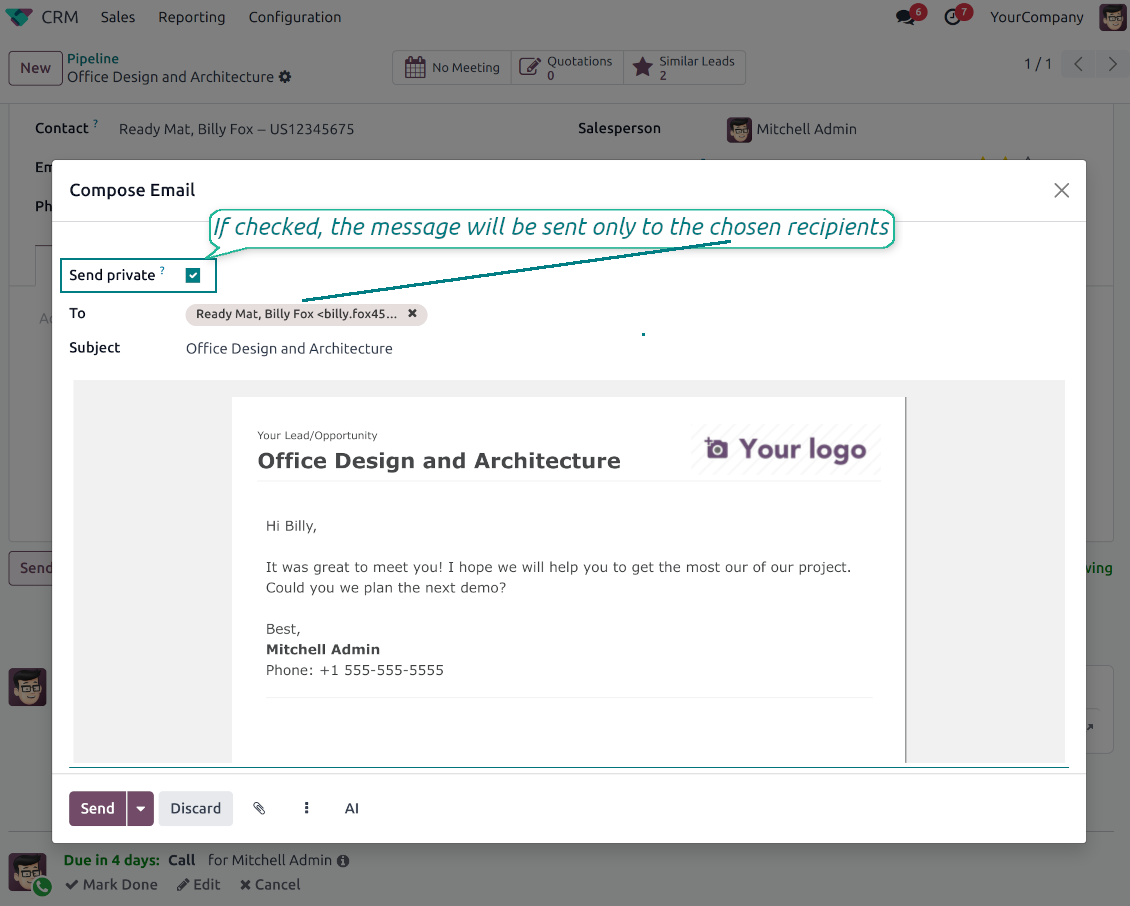
Send private from the composer
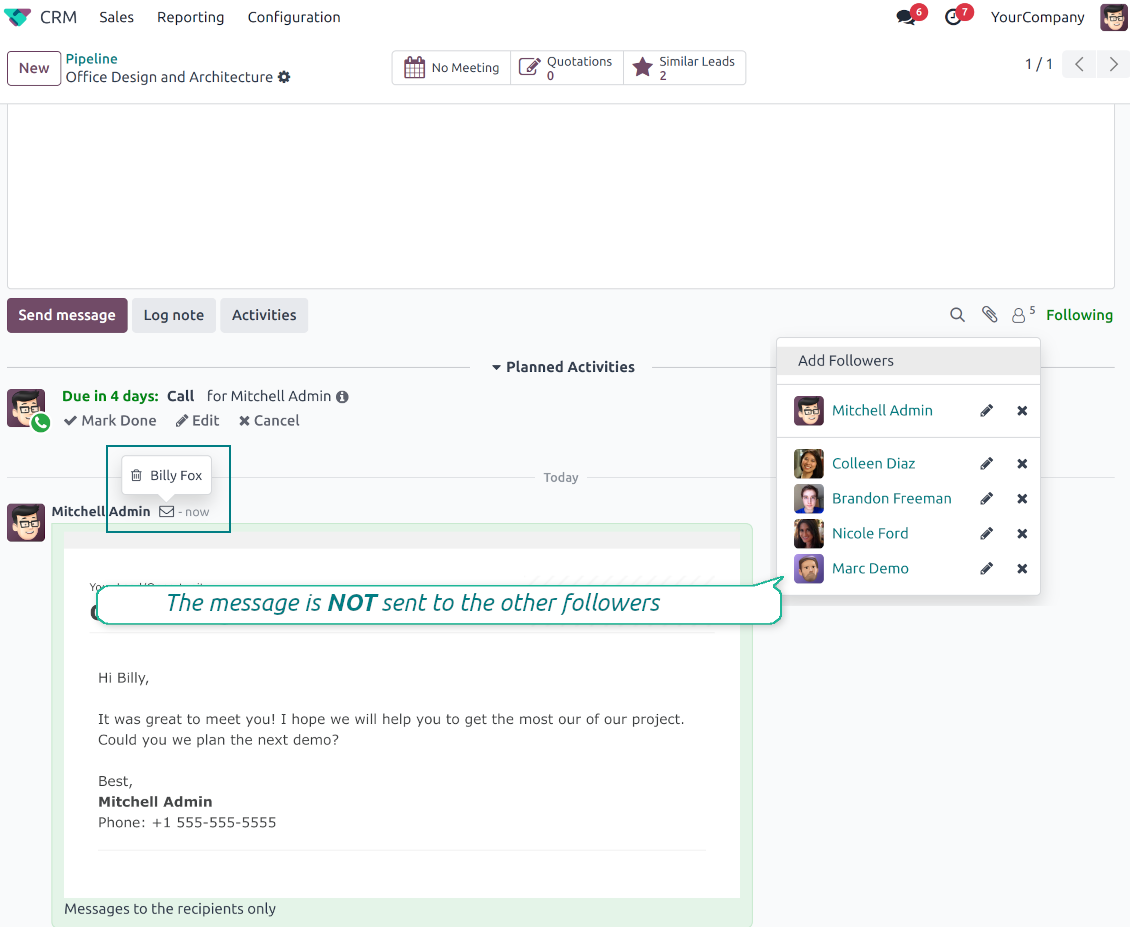
- Tick Send private. Compose a message that reaches only the selected recipients.
- Do not notify other followers. Portal users and regular followers stay out of the conversation.
- Works on any document. Use private sending on sales orders, tasks, invoices, leads and other records.
Confidential but traceable
- Keep history on the record. Private messages remain on the document for later reference.
- Hide from portal users. External contacts cannot read internal discussions on their documents.
- Stay private in replies. Follow-up replies remain private too.
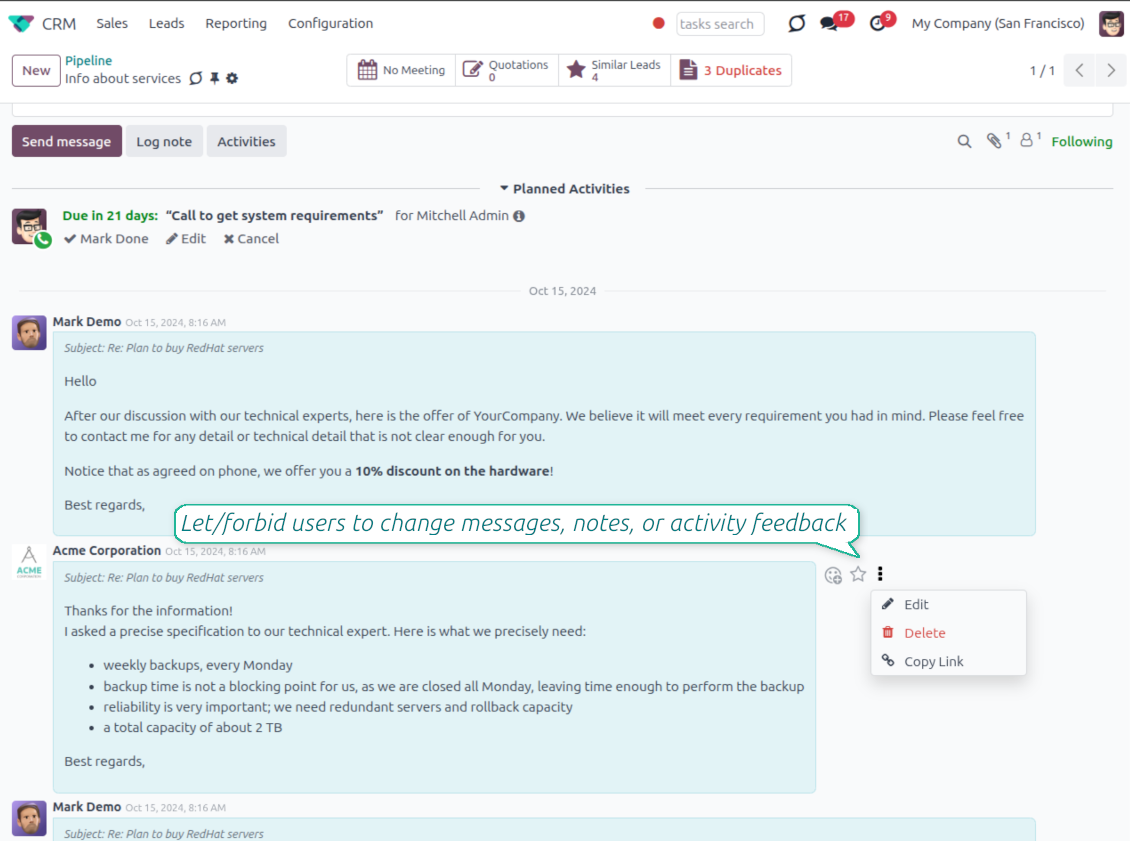
Message and Note Editing
Fix mistakes after sending while keeping a transparent history
Fix mistakes after sending
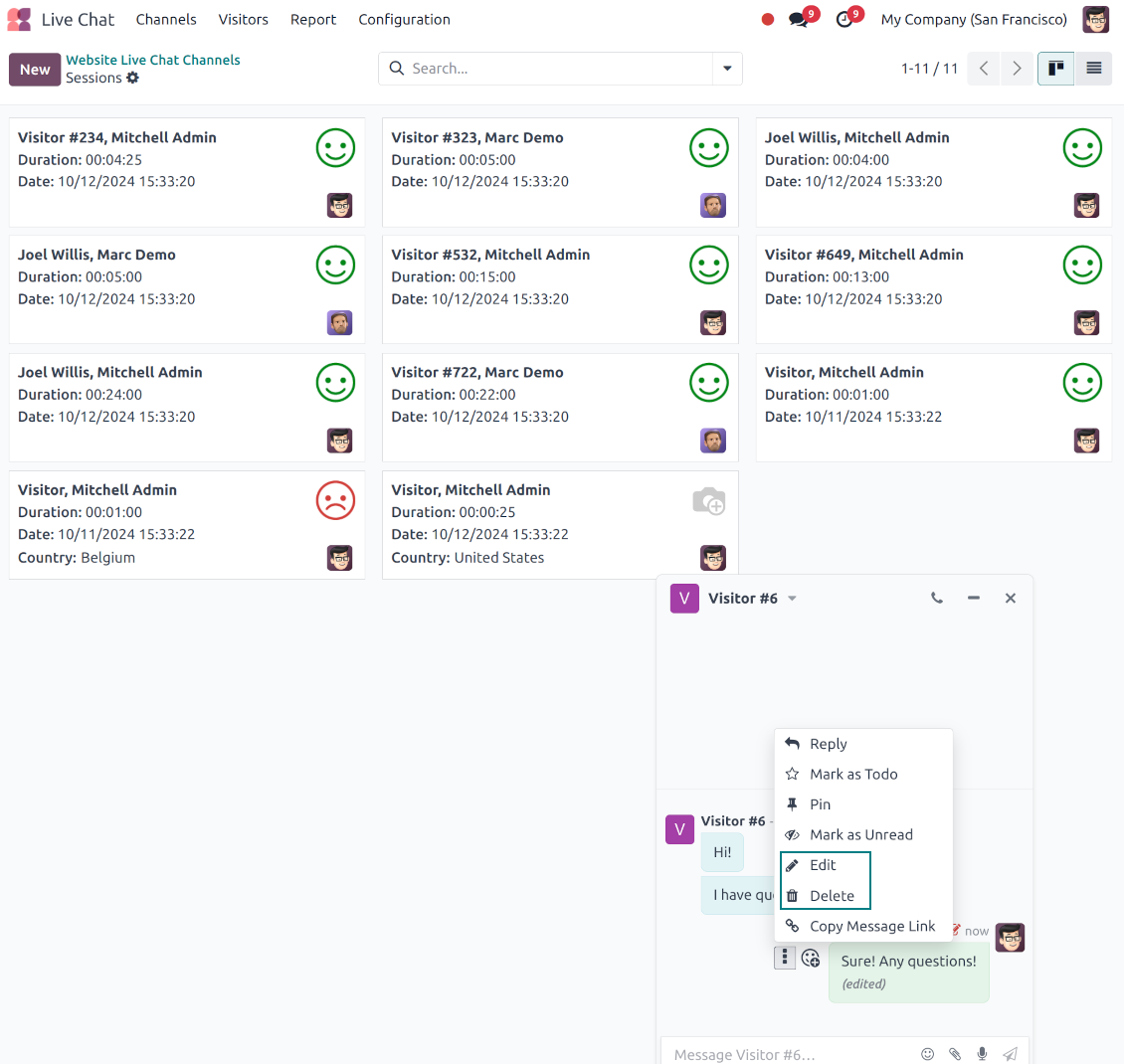
- Edit your own messages. Correct comments, notes and activity feedback after they were posted.
- Give admins broader control. Authorized users can manage messages posted by others when policy requires it.
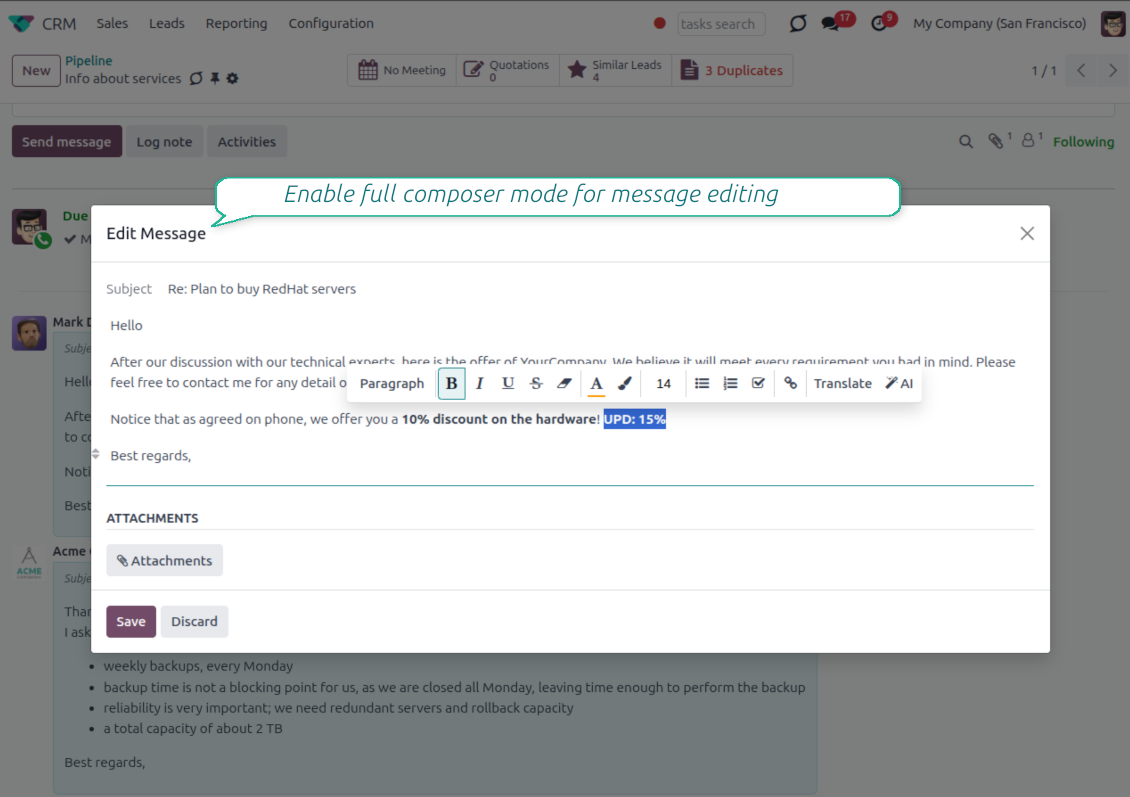
- Use the full editor when needed. Open subject, rich body and attachments in a pop-up for bigger changes.
History for every change
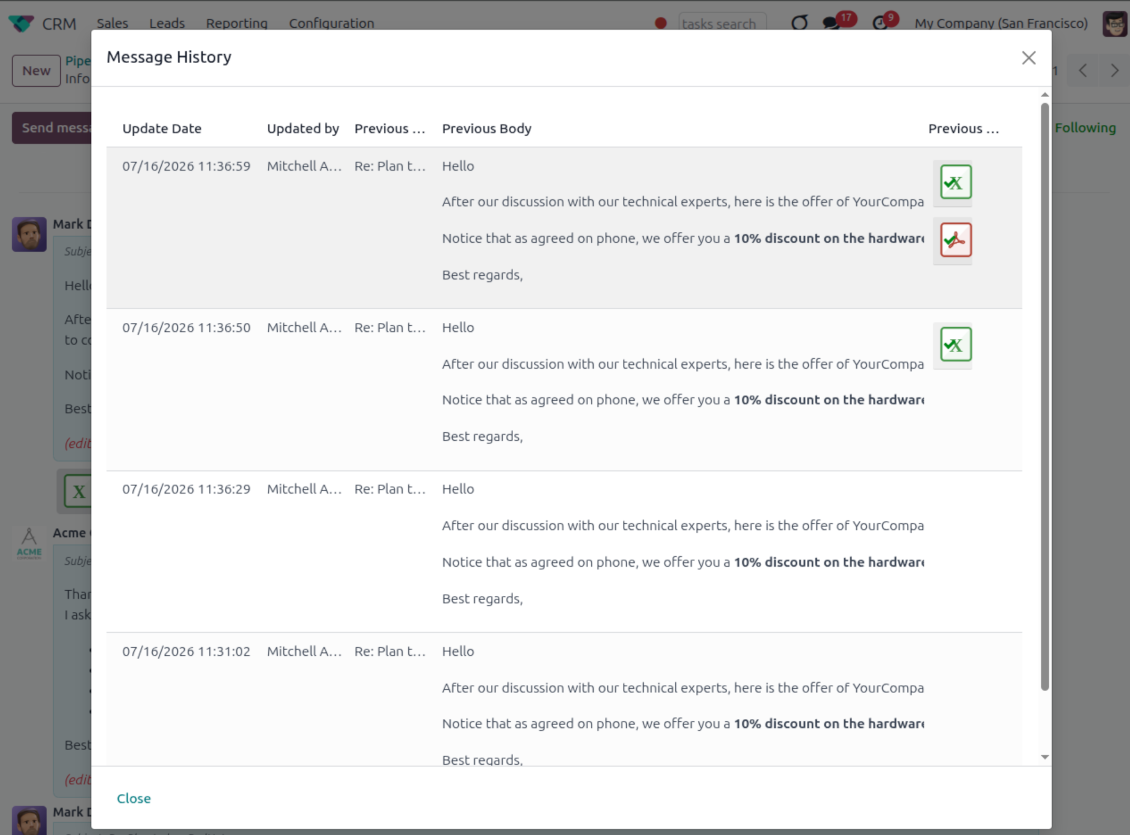
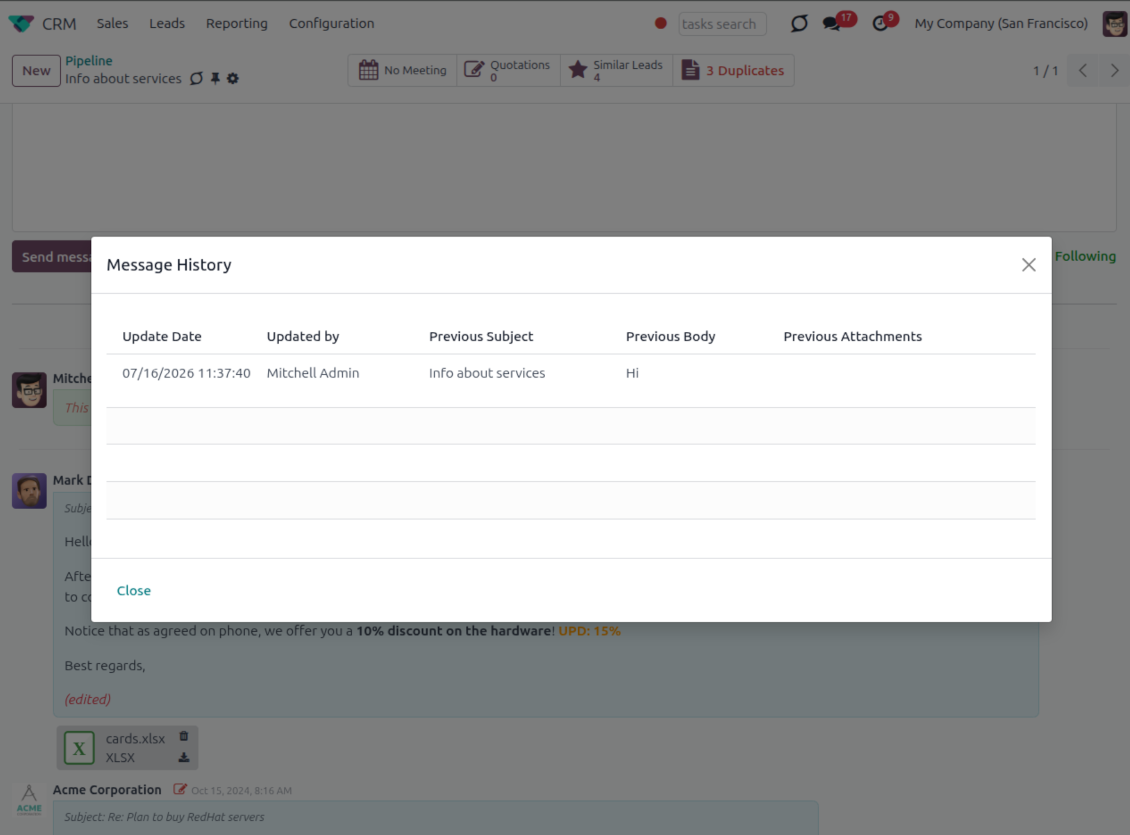
- Track what changed. Subject, body and attachment updates are stored with user and timestamp.
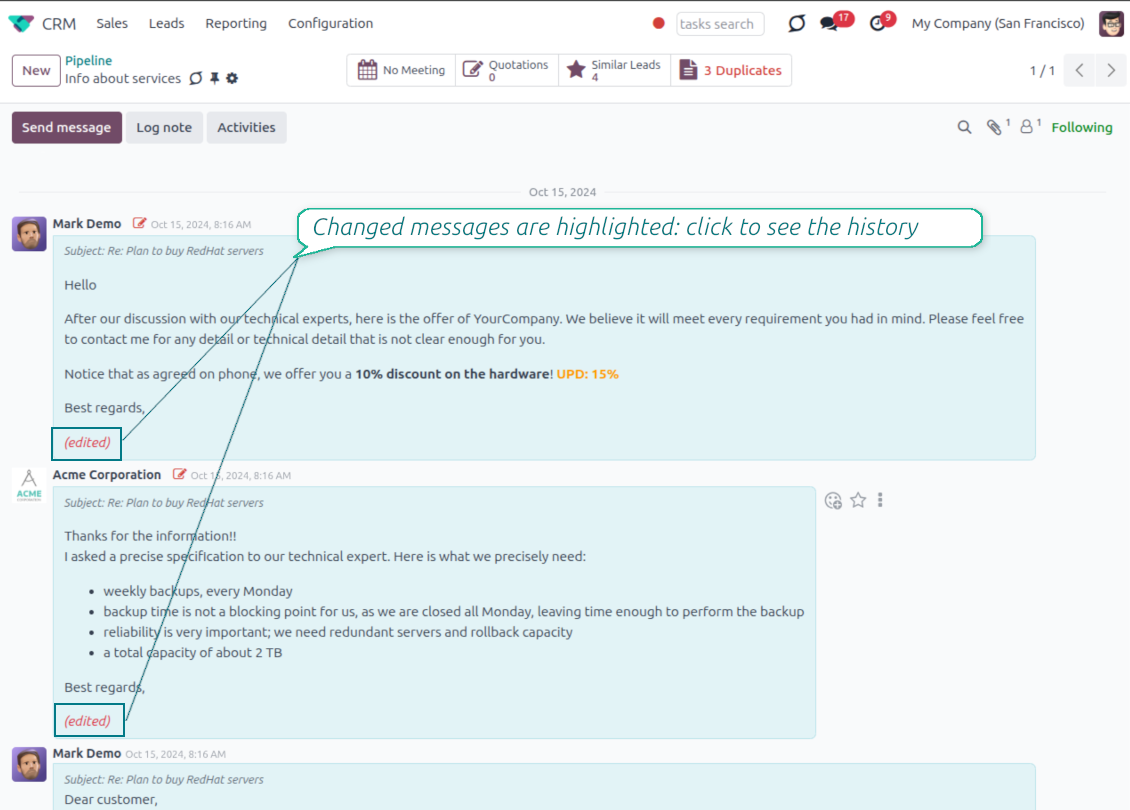
- Spot edited messages quickly. Modified entries show an edited label that opens the history in one click.
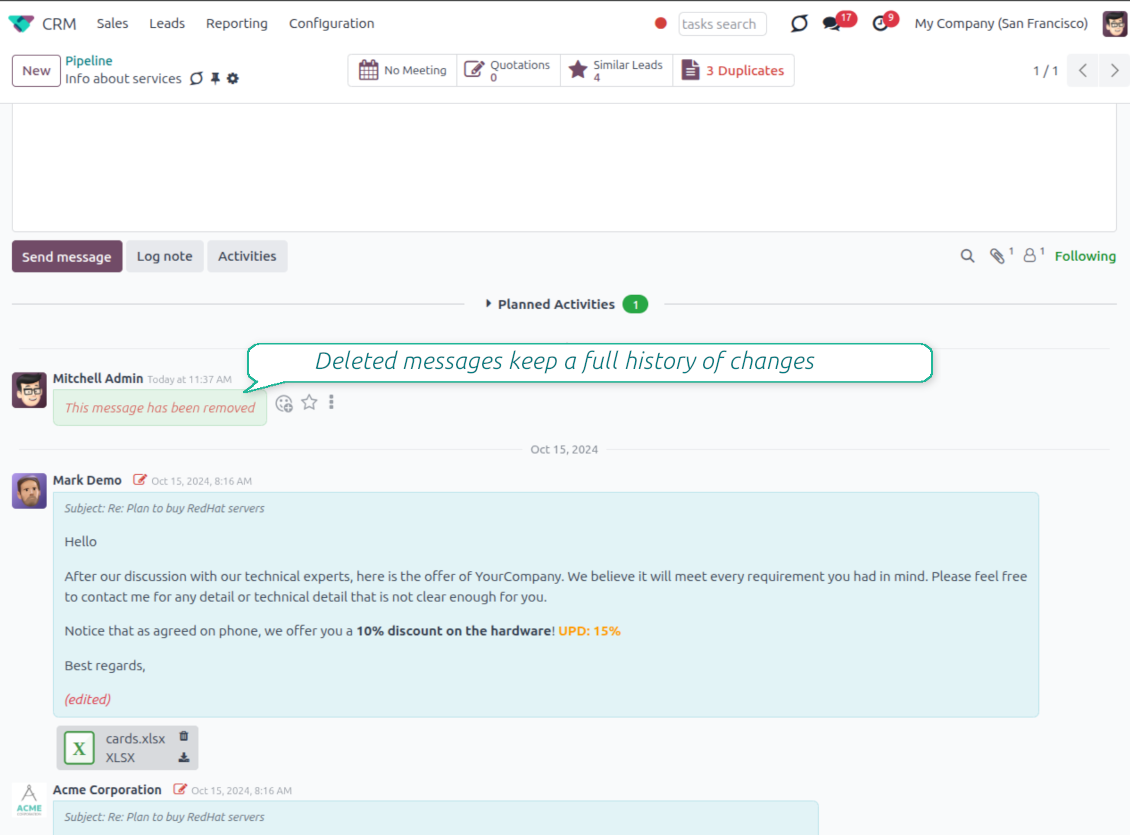
- Keep deleted content. Even removed messages retain their history for audit purposes.
Spremni za procjenu?
Započnite besplatnim zahtjevom za demo ili kupnjom u Odoo Apps Store.
Besplatna personalizirana demo baza. Broj telefona ili kreditna kartica nisu potrebni. Besplatna doživotna ažuriranja i stručna podrška unutar glavne verzije Odoo.
Catch missing attachments
Confirm forgotten attachments before they leave the composer
Attachment mention check
- Spot missing files before send. Odoo checks the message text when you mention an attachment.
- Works everywhere you write. The reminder appears in the full composer, quick reply and chat flows.
- Turn it off when not needed. Enable or disable the check from Messaging Suite settings.
Send-time confirmation
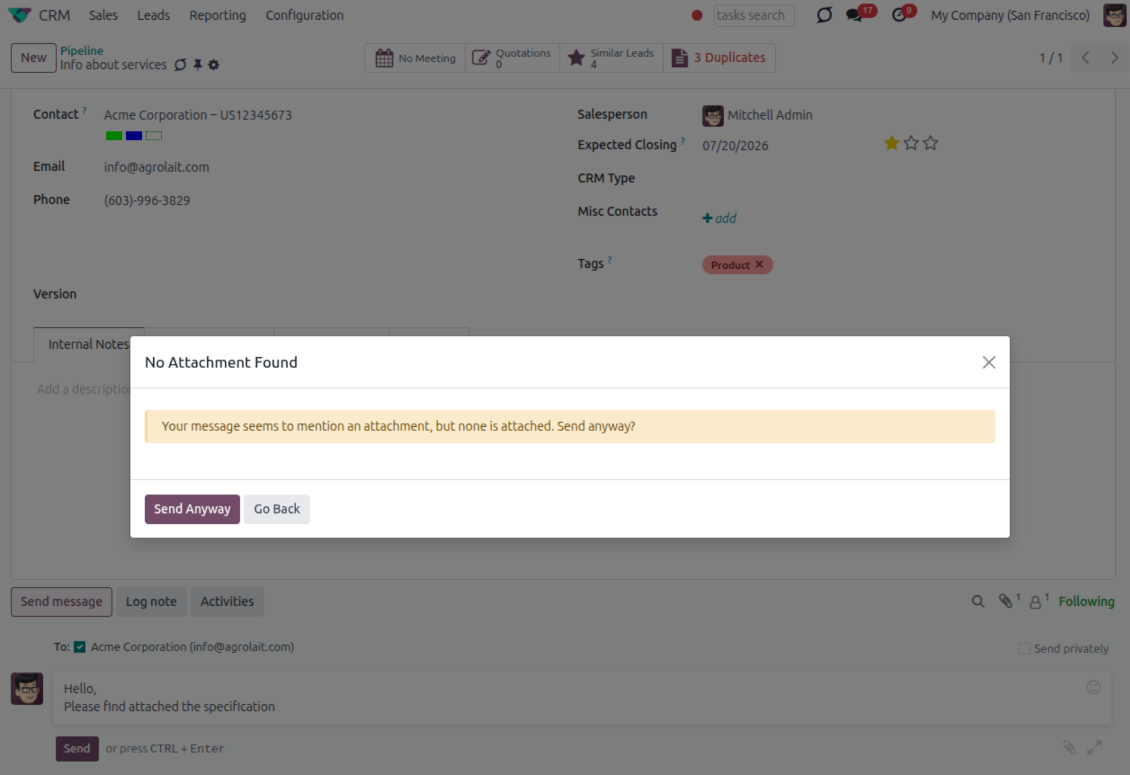
- Stop accidental sends. A dialog appears when the body mentions an attachment but none is attached.
- Let the user decide. Send Anyway and Go Back keep the flow moving without losing the draft.
- Adapt the wording. Adjust what counts as an attachment mention in settings when your team uses different phrases.
Send later with your own presets
Schedule follow-ups with options your team actually uses
Your own Send Later options
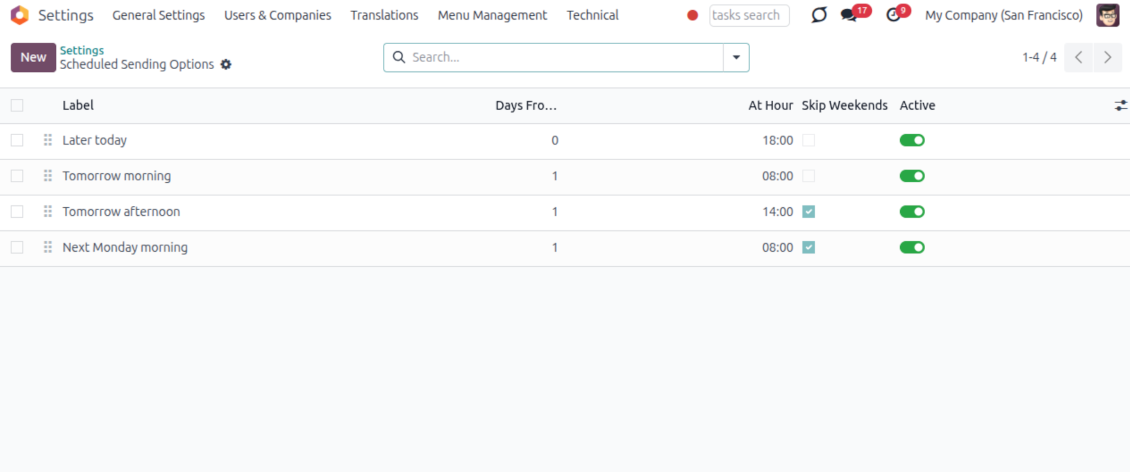
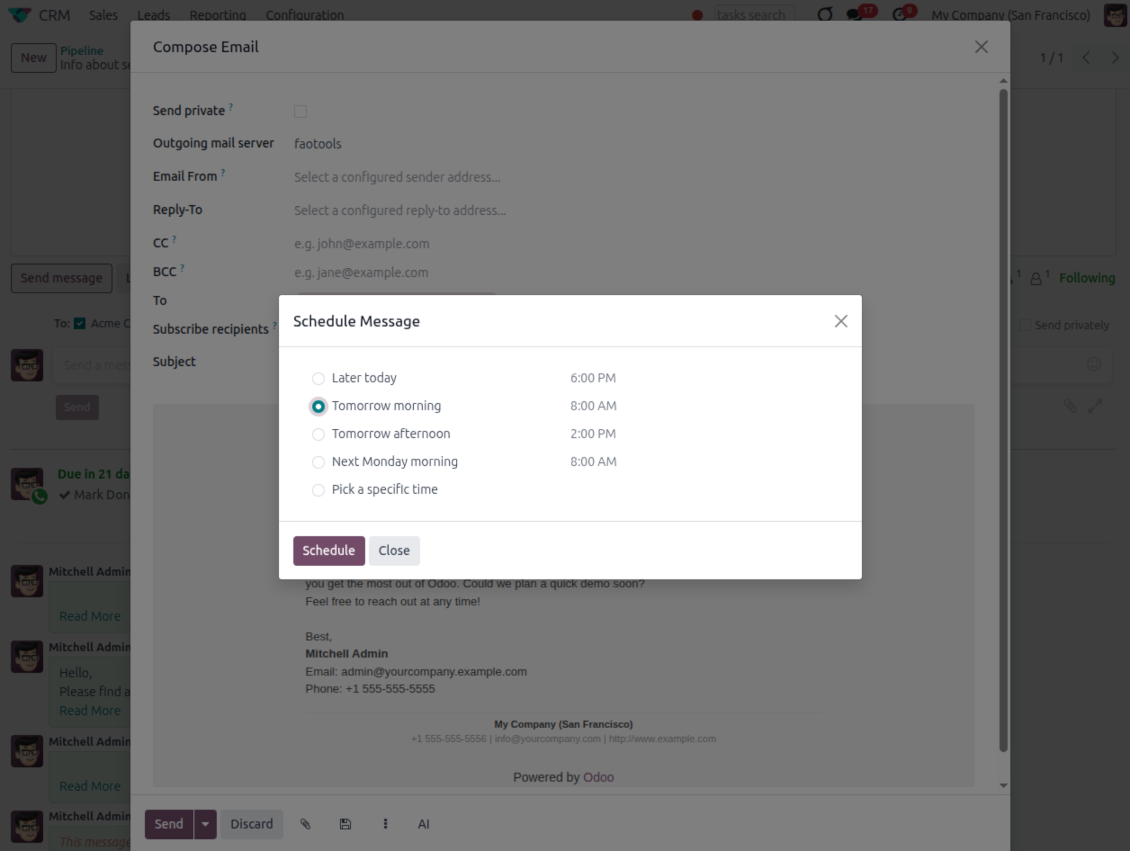
- Go beyond the built-in choices. Define your own scheduled-sending options instead of only Tomorrow Morning / Afternoon.
- Show them in Send Later. Presets appear directly in the standard scheduled-send dialog.
- Pick a preset in one click. Users schedule follow-ups without calculating dates manually.
Maintain the preset list
- Set label, offset and send time. Each option defines days from today, hour and whether weekends are skipped.
- Control order and availability. Reorder presets and switch them on or off any time.
- Manage from Discuss. Administrators maintain Scheduled Sending Options from its own menu entry.
Message Citing
Quote earlier Odoo messages while you reply
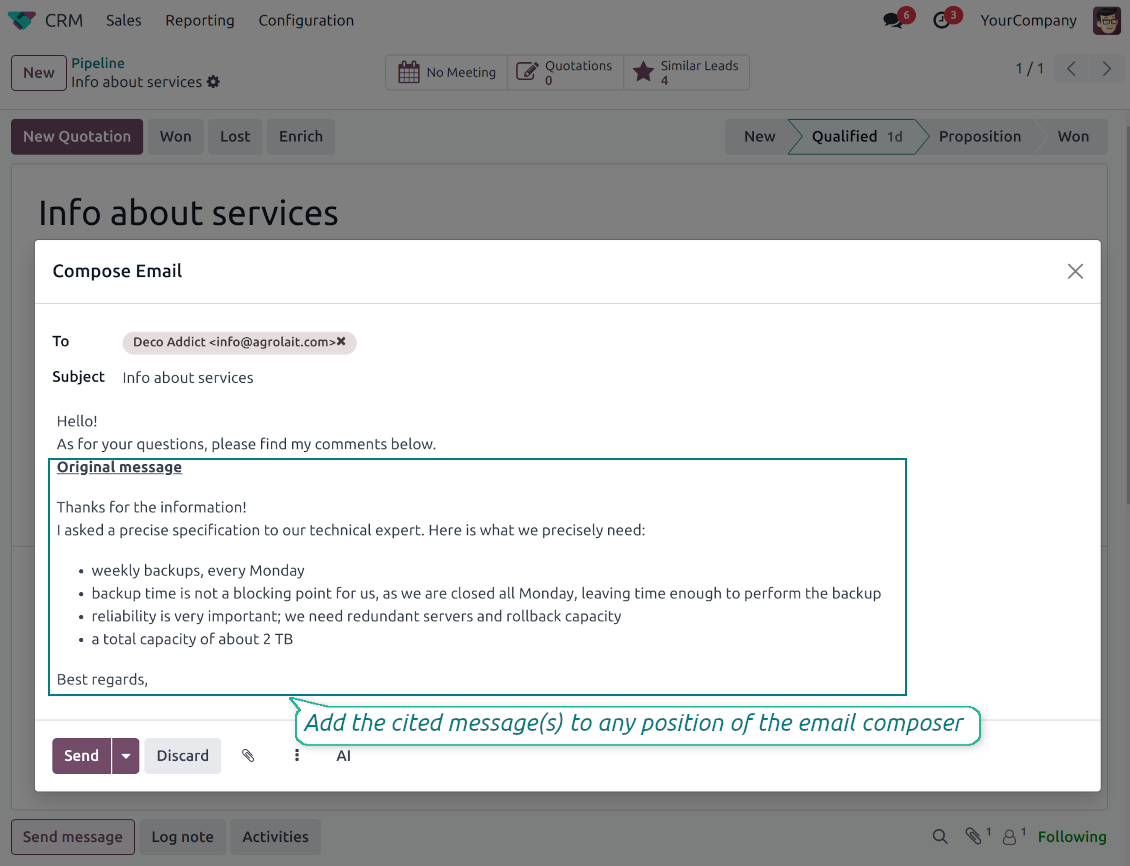
Cite while you compose
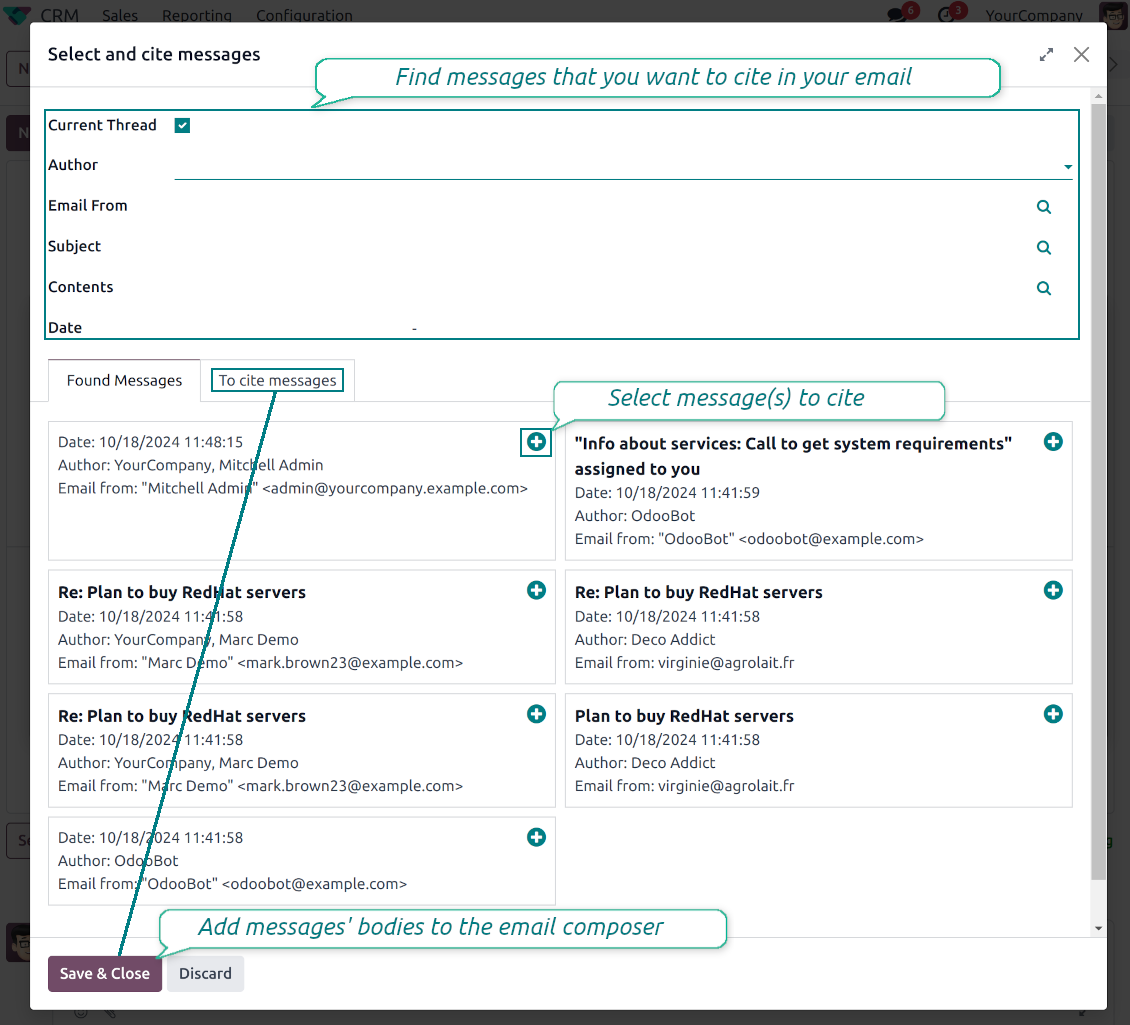
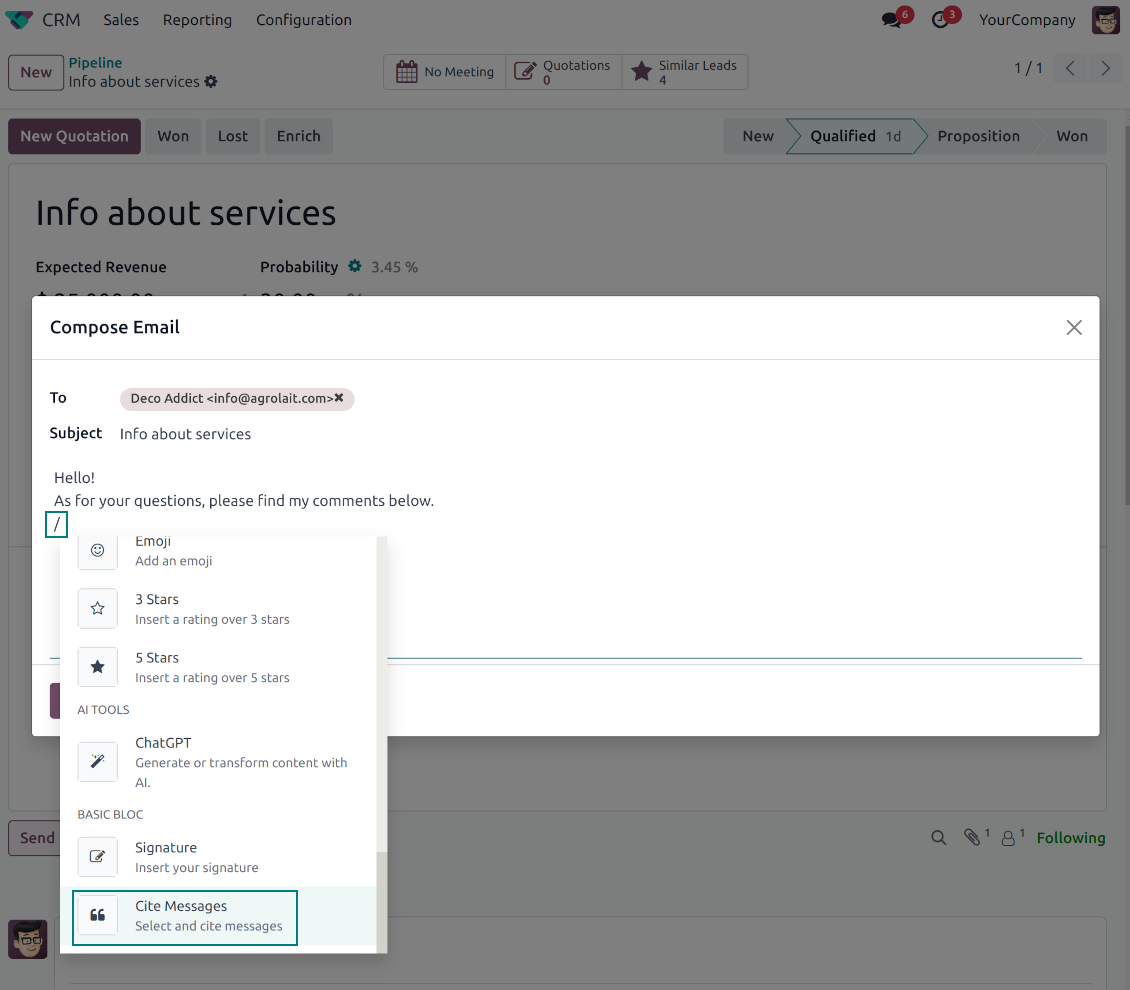
- Open Cite Message from the composer. Search earlier messages without leaving the email you are writing.
- Find the right message fast. Filter by author, content, date range, or limit results to the current thread.
- Insert with one click. Add the selected message at the cursor position in the email body.
Readable quoted history
- Shape the quoted header. Define the text placed before every cited message.
- Reply with context. Help customers and colleagues see exactly which earlier message you refer to.
- Use across documents. Cite messages from any discussion while composing on another record.
Messaging Suite administration
One place to configure your messaging tools
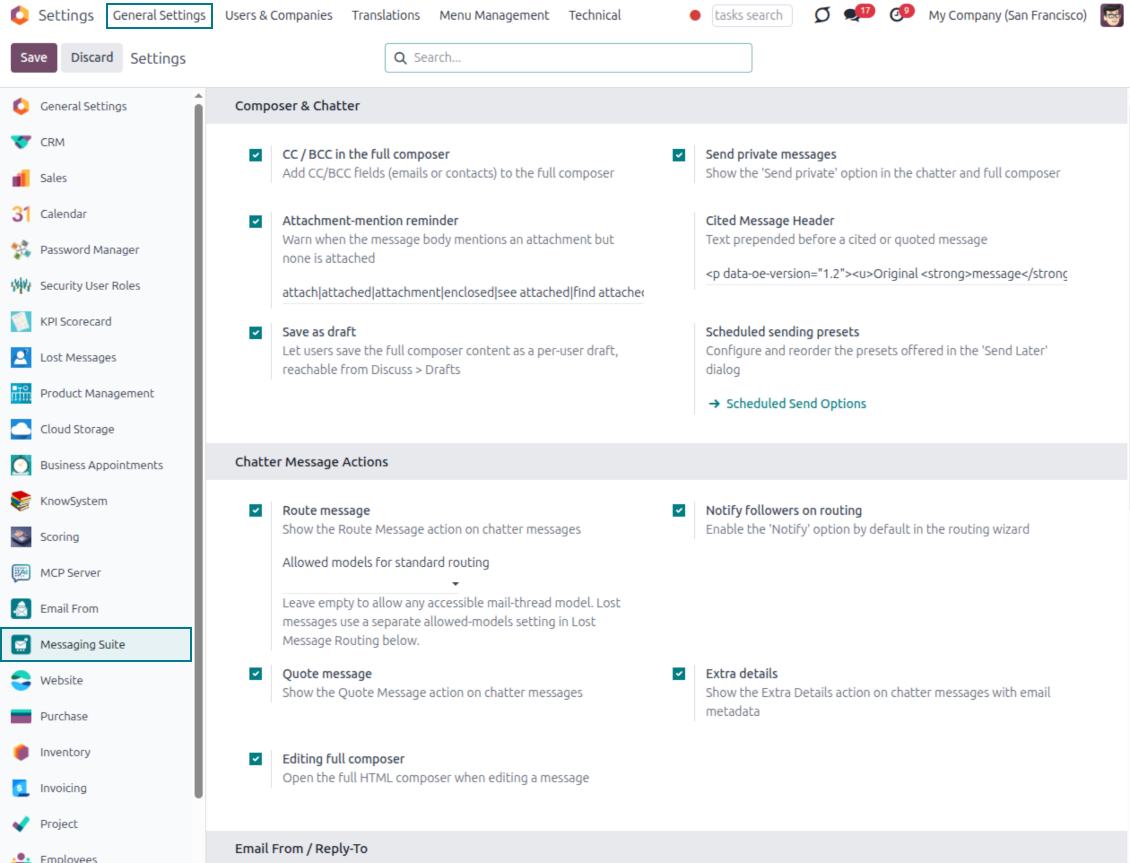
One Messaging Suite settings page
- Turn features on or off. CC/BCC, drafts, attachment reminders and send-later presets are controlled from one place.
- Reach every related option. Open settings for routing, privacy, quoting, editing and sender addresses without leaving the suite.
- Set up once, use everywhere. Configure the whole messaging toolkit from a single administration screen.
Routing and access control
- Choose where messages may go. Define which documents can receive rerouted chatter messages.
- Keep lost emails separate. Unattached incoming mail keeps its own queue and routing rules.
- Decide who may reroute. Give routing rights only to the users who should move messages between documents.
Spremni za procjenu?
Započnite besplatnim zahtjevom za demo ili kupnjom u Odoo Apps Store.
Besplatna personalizirana demo baza. Broj telefona ili kreditna kartica nisu potrebni. Besplatna doživotna ažuriranja i stručna podrška unutar glavne verzije Odoo.
Često postavljana pitanja o Odoo Messaging Suite Odoo v.18
Koje su politike ažuriranja vaših alata?
Prema važećim pravilima Odoo Apps Store:
- Svaki modul kupljen za verziju 12.0 i stariju daje pristup svim verzijama do 12.0.
- Od verzije 13.0 svaku verziju modula treba kupiti zasebno.
- Bez obzira na verziju, kupnja daje pravo na sva ažuriranja i ispravke unutar glavne verzije.
Imajte na umu da tim faOtools ne kontrolira ta pravila. Za pitanja obratite se izravno predstavnicima Odoo Apps Store.
Kako mogu instalirati vašu aplikaciju na Odoo.sh?
Najizravniji je pristup koristiti ugrađeni tijek rada Odoo trgovine:
1. Otvorite stranicu modula i kliknite gumb Deploy on odoo.sh
2. Nakon toga bit ćete preusmjereni na GitHub stranicu. Prijavite se na račun, zatim kliknite 'Create a new repo' ili upotrijebite postojeći. Provjerite da je spremište privatno. Nije dopušteno objavljivati aplikacije pod licencijom OPL-1. Ako treba, stvorite novi repo za Odoo.sh projekt
3. Zatim idite na odoo.sh i kliknite gumb Deploy. U skočnom prozoru potvrdite odluku i kliknite 'Continue.' Time se pokreće instalacija.
Ovi koraci instalirat će aplikaciju na produkcijsku granu projekta. Ako želite postaviti aplikacije na druge grane ili ažurirati modul, poduzmite sljedeće:
1. Prenesite izvorni kod aplikacije iz Odoo trgovine
2. Napravite commit modula u potrebni GitHub repozitorij. Provjerite da nijedna mapa/datoteka aplikacije nije ignorirana (tj. nije u .gitignore repozitorija). Repozitorije automatski stvara odoo.sh i po zadanim postavkama mogu sadržavati važne stavke (npr. /lib). Prenesite sve direktorije, poddirektorije i datoteke modula bez iznimaka
3. Postavite ciljnu granu odoo.sh projekta ili, ako to pretpostavljaju postavke, pričekajte dok se automatski izgradi.
Kako trebam instalirati vašu aplikaciju na vlastiti poslužitelj?
2. Ponovno pokrenite Odoo poslužitelj;
3. Uključite način za razvoj (tehničke postavke);
4. Ažurirajte popis aplikacija (izbornik aplikacija);
5. Pronađite aplikaciju i pritisnite „Activate“/„Install“;
6. Slijedite smjernice na stranici aplikacije ako postoje.
Primijetio sam da vaša aplikacija ima dodatne dodatke. Mogu li ih kupiti naknadno?
Da, naravno. Istodobno Odoo automatski dodaje sve ovisnosti u košaricu, pa prethodno kupljene alate treba isključiti da ne platite dvaput.
Postavio sam vašu aplikaciju na Odoo.sh i u testovima vidim upozorenje/pogrešku
Crveno/narančasto upozorenje ne utječe na značajke aplikacije. Nažalost, naši moduli ponekad ne prođu standardne automatske testove jer oni pretpostavljaju ponašanje koje je u sukobu s ciljevima aplikacije. Npr. mijenjamo izračun cijene, a testovi standardnog Odoo modula uspoređuju konačnu cijenu sa standardnim algoritmom.
Prije svega provjerite značajke postavljene baze. Radi li sve ispravno?
Ako i dalje smatrate da upozorenje utječe na stvarne značajke, javite nam i pošaljite potpune zapisnike instalacije i potpuni popis postavljenih modula (uključujući jezgru i treće strane).
Mogu li kupiti aplikaciju izravno od vaše tvrtke?
Ne, alate distribuiramo samo preko službene trgovine aplikacija Odoo.
Želio bih dobiti popust
Nažalost, nemamo tehničkih sredstava za individualne cijene.
Mogu li instalirati aplikaciju u svoju bazu Odoo Online (SaaS)?
Ne, aplikacije trećih strana ne mogu se koristiti na Odoo Online. Nažalost Odoo SaaS to blokira.
Vaš alat ovisi o drugim aplikacijama. Trebam li ih kupiti?
Da, alatu su potrebni svi moduli navedeni u ovisnostima da bi ispravno radio. Cijena na stranici aplikacije već uključuje sve potrebne ovisnosti.
Koja je cijena modula u američkim dolarima? Zašto se promijenila?
Cijena naših modula je u eurima. Odoo trgovina pretvara cijene u druge valute prema internom tečaju. Stoga se cijena u američkim dolarima može promijeniti kad se tečaj ažurira.
Tekstovi aplikacije i web stranice na jezicima osim engleskog izrađeni su uz pomoć UI i usklađeni sa službenim Odoo prijevodima. Ako uočite pogrešku, pošaljite prijavu o ispravnosti prijevoda i ispravit ćemo.
Odoo demonstracijske baze (pregledi uživo)
Za ovu aplikaciju možemo osigurati besplatnu personaliziranu demo bazu.
Za kontakt nije potreban broj telefona ni kreditna kartica. Potrebna je samo kratka prijava e-poštom koja ne traje više od 30 sekundi.
Na vaš zahtjev pripremit ćemo individualnu bazu za pregled uživo, gdje možete oko dva tjedna provoditi testove i provjeravati pretpostavke.
Prijava grešaka
Ako naiđete na greške ili nedosljedno ponašanje, slobodno nas kontaktirajte. Jamčimo ispravke unutar 60 dana od kupnje i i dalje želimo unapređivati alate nakon tog razdoblja.
Za kontakt nije potreban broj telefona ni kreditna kartica. Potrebna je samo kratka prijava e-poštom koja ne traje više od 30 sekundi.
U zahtjev uključite što više pojedinosti: snimke zaslona, zapisnike Odoo poslužitelja, potpuni opis kako reproducirati problem i slično. Obično treba nekoliko radnih dana za pripremu radnog plana (ako je greška potvrđena) ili smjernica što učiniti (inače).
Javni zahtjevi za značajke i ideje modula (besplatan razvoj)
Snažno smo motivirani poboljšati svoje alate i zahvalni smo na svakoj povratnoj informaciji. Ako su vaši zahtjevi od javne koristi i mogu se učinkovito provesti, tim će ih uvrstiti na naš popis zadataka.
Takav popis zadataka obrađuje se redovito i ne podrazumijeva dodatne naknade. Iako ne možemo obećati rokove i konačni dizajn, to može biti dobar način da dobijete željene značajke bez ulaganja i rizika.
Za kontakt nije potreban broj telefona ni kreditna kartica. Potrebna je samo kratka prijava e-poštom koja ne traje više od 30 sekundi.

Alat za fleksibilno strukturiranje Odoo privitaka u mapama i sinkronizaciju direktorija s cloud klijentima: Google Drive, OneDrive/SharePoint, Nextcloud/ownCloud, Dropbox, Amazon S3, Box i NAS. DMS. Upravitelj datotekama. Sustav za upravljanje dokumentima
398€

The tool to build a deep and structured knowledge base for internal and external use. Knowledge System. KMS. Wiki-like revisions.
398€
The tool to automatically synchronize Odoo attachments with OneDrive files in both ways
487€
The tool to set up KPI targets and control their fulfillment by periods. KPI dashboards. Dashboard designer. KPI charts

The tool to automatically synchronize Odoo attachments with Google Drive files in both ways
487€
The tool for time-based service management from booking appointments to sales and reviews
398€

The tool to design, generate, and periodically send reports and reminders. Report designer. List generator. Auto reminders