Kurz gesagt
Odoo Messaging Suite ist eine Odoo 18 Dialog App. The tool to improve the Odoo messaging experience.
Odoo Messaging Suite brings lost-message recovery, private discussions, message citing, post-send editing, managed From/Reply-To addresses and a richer email composer together in one application. Compose with CC/BCC and per-user drafts, route emails to the right document, quote from the message toolbar, send later with your own presets, and catch forgotten attachments before they leave. Every message keeps its email headers behind a details icon, and administrators configure the whole toolkit from one Messaging Suite settings page.
Ideal für
Support and sales teams living in their inbox
Perfect for teams that answer customers by email all day and want CC/BCC, drafts and quoting available right inside the Odoo composer, without switching to an external mail client.
Companies needing confidentiality
Ideal when some conversations must stay private from portal users and other followers, while still being logged on the Odoo document for later reference.
Administrators who want oversight and control
Useful for admins who need routing rules, send-later presets, attachment reminders and one settings page to manage the whole messaging toolkit.
Bereit zur Bewertung?
Starten Sie mit einer kostenlosen Demo-Anfrage oder kaufen Sie im Odoo Apps Store.
Kostenlose personalisierte Demo-Datenbank. Keine Telefonnummer oder Kreditkarte nötig. Lebenslange Updates und Experten-Support innerhalb der Odoo-Hauptversion.
Warum Teams es wählen
Die wichtigsten Vorteile vor den Details
One settings page
Turn on CC/BCC, drafts, routing, attachment checks and the rest of the toolkit from a single Messaging Suite configuration screen, without hunting through scattered settings menus.
Full email composer
Compose with CC/BCC recipients, per-user drafts and managed From/Reply-To addresses directly inside the Odoo composer.
Managed sender addresses
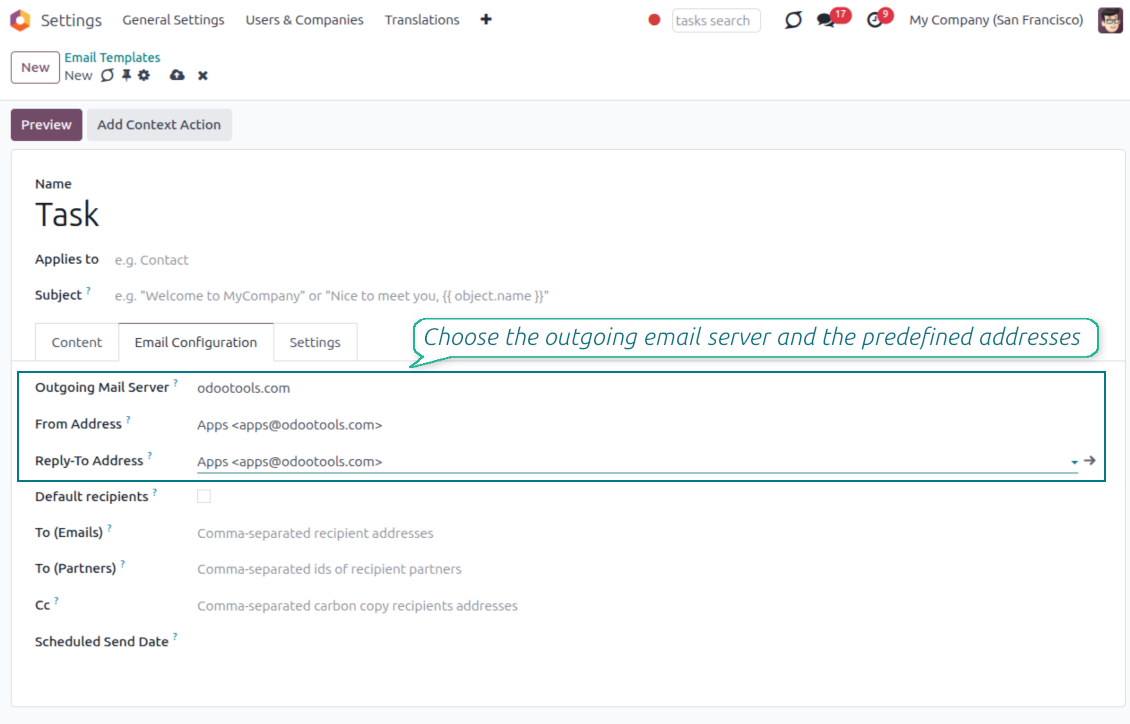
Stop typing sender emails by hand. Pick from an address book tied to the right outgoing mail server, with automatic rules by document type.
Message actions
Route and quote any message from quick actions, and inspect full email headers in a single click.
Lost message recovery
Never lose an incoming email again. Review unattached messages in a dedicated queue and route them to the correct Odoo document before customers wait.
Private threads
Keep sensitive conversations hidden from portal users and other followers, while staying logged on the Odoo document for later reference.
Message citing
Search and cite any earlier Odoo message straight from the composer, so every reply carries the right context.
Message editing & history
Edit or delete your own messages, notes and activity feedback, with a full history of every change kept for admins.
Safer sending
Catch forgotten attachments before you hit send and schedule follow-ups with your own Send Later presets.
Bereit zur Bewertung?
Starten Sie mit einer kostenlosen Demo-Anfrage oder kaufen Sie im Odoo Apps Store.
Kostenlose personalisierte Demo-Datenbank. Keine Telefonnummer oder Kreditkarte nötig. Lebenslange Updates und Experten-Support innerhalb der Odoo-Hauptversion.
Compose like a real email client
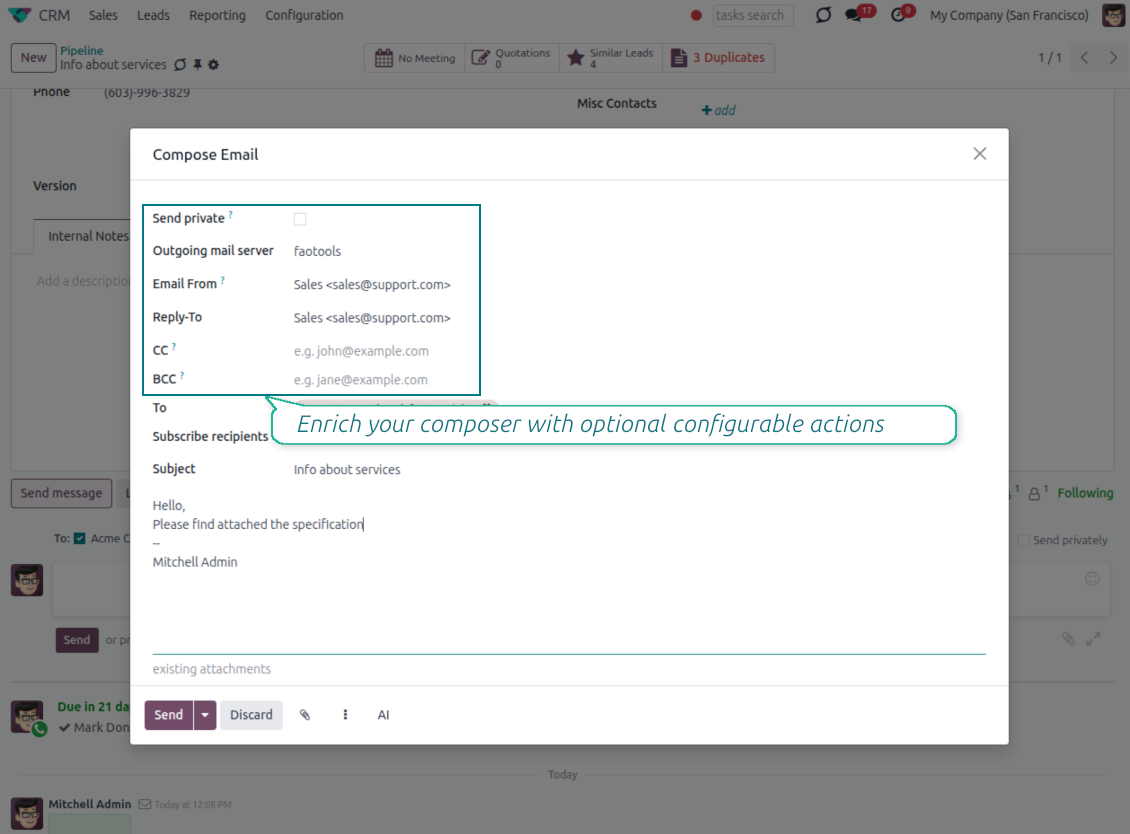
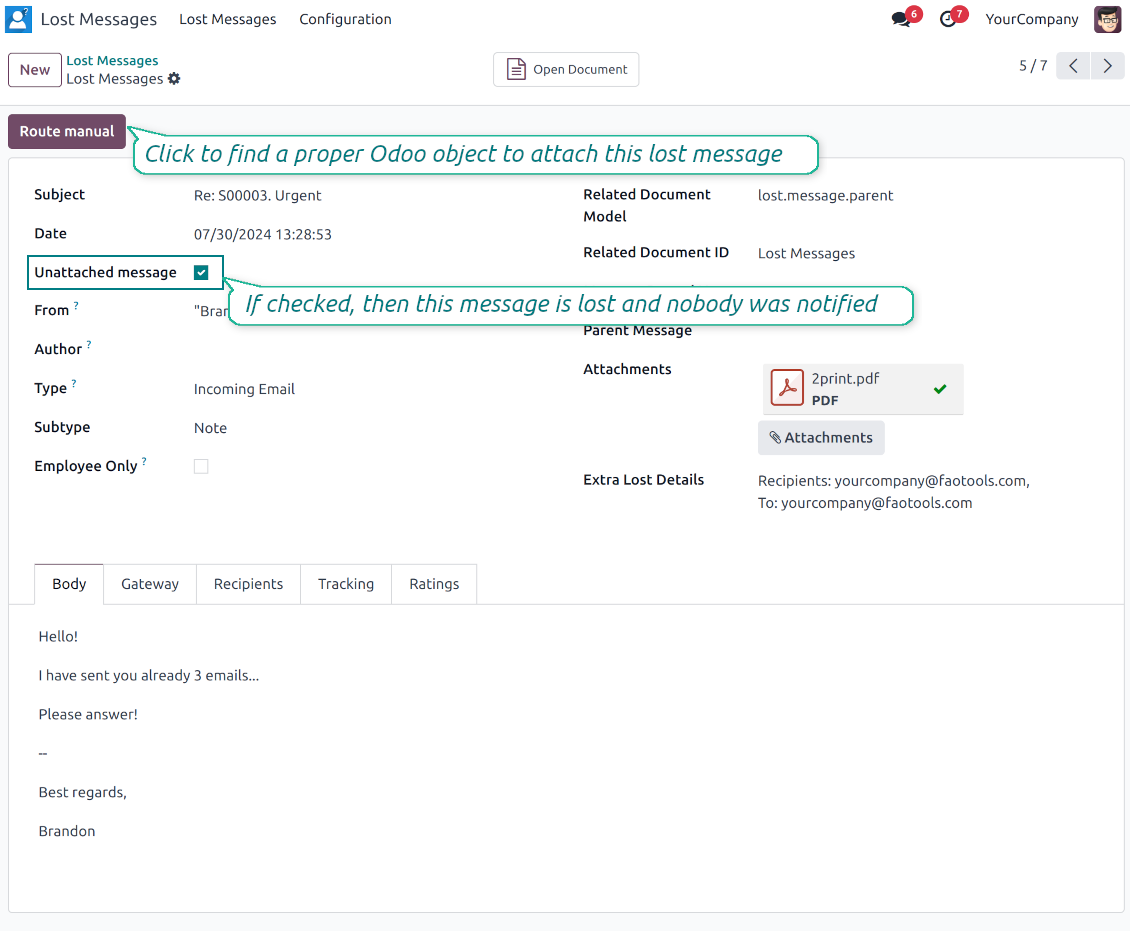
CC, BCC and per-user drafts in the full composer
Copy and blind copy
- Add CC and BCC in the full composer. Type email addresses or pick existing contacts.
- Keep recipients in the message history. Sent CC/BCC values stay visible on the message afterwards.
- Use only when you need them. Turn CC/BCC off in settings if your team does not use copy recipients.
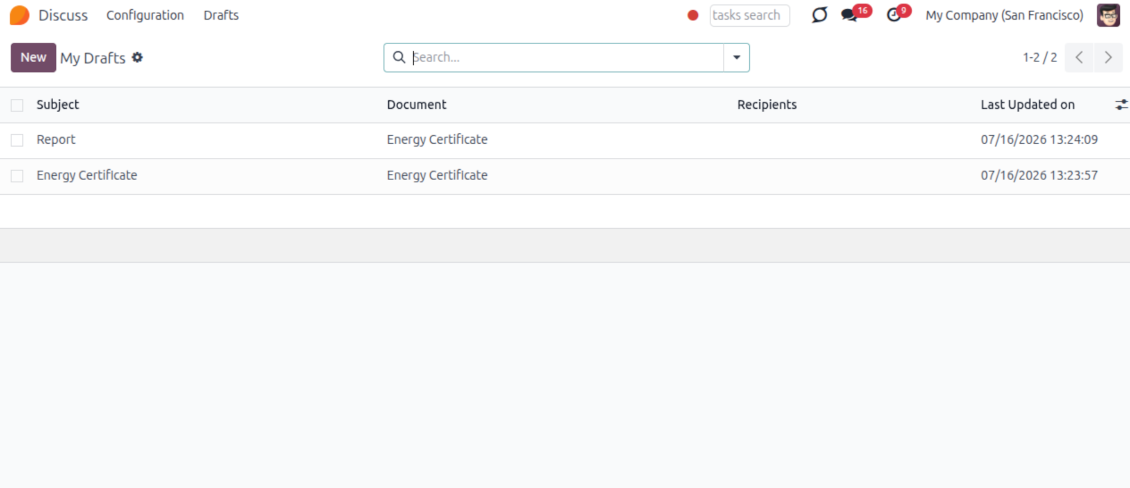
Save as draft
- Save the full message. Drafts keep subject, body, recipients and related fields for the current record.
- Resume where you stopped. Reopening the composer on the same document brings back your latest draft automatically.
- Pick up drafts from Discuss. Every internal user can open the drafts menu and finish unfinished messages.
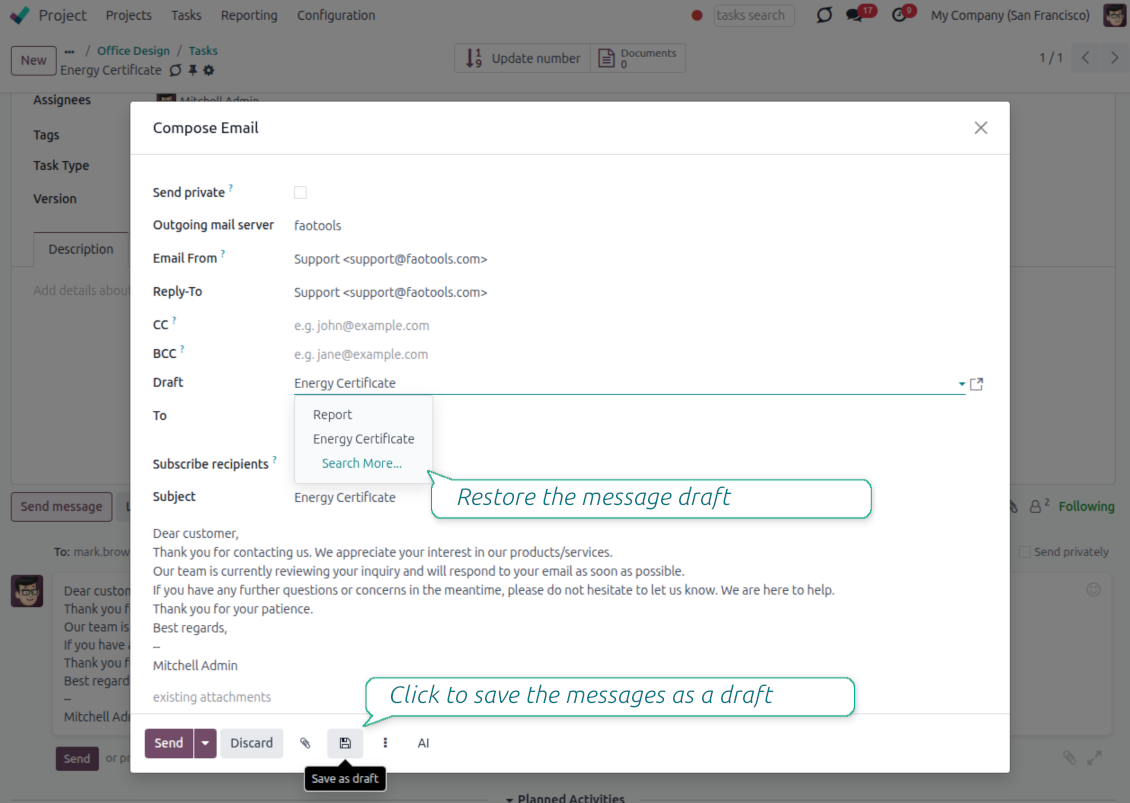
Message actions and email metadata
Route, quote and inspect email details without leaving the chatter
Actions on every message
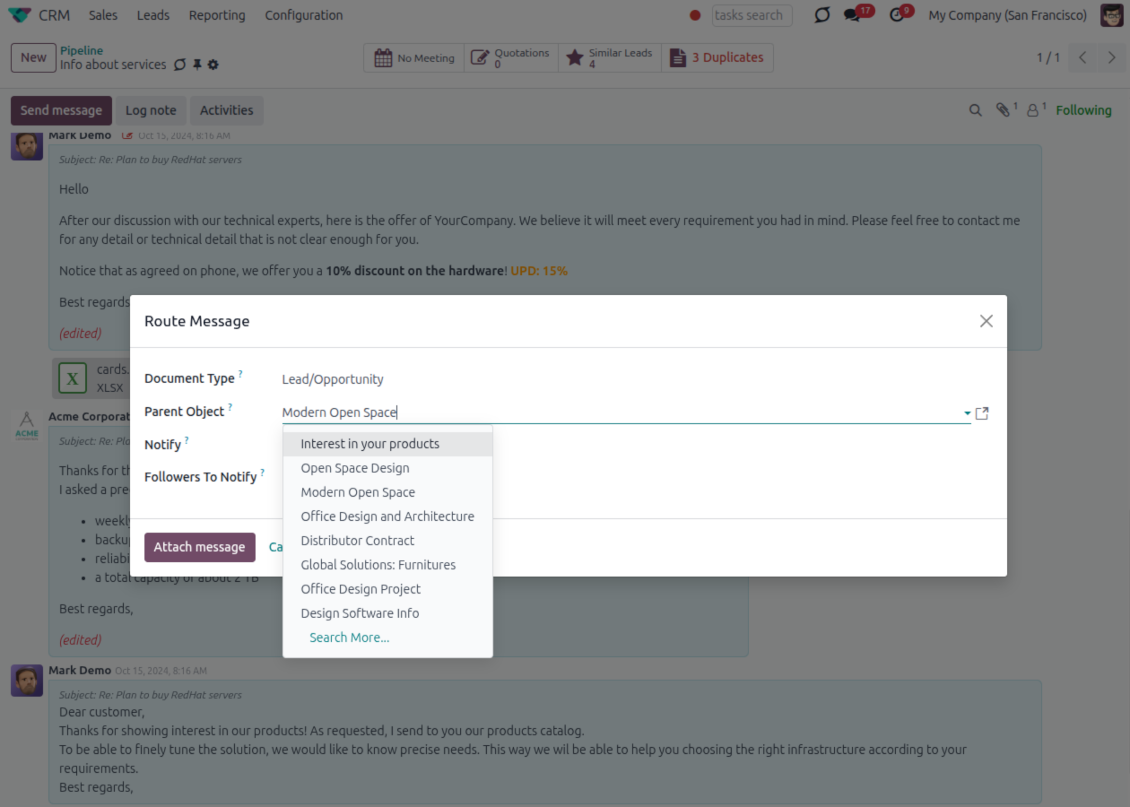
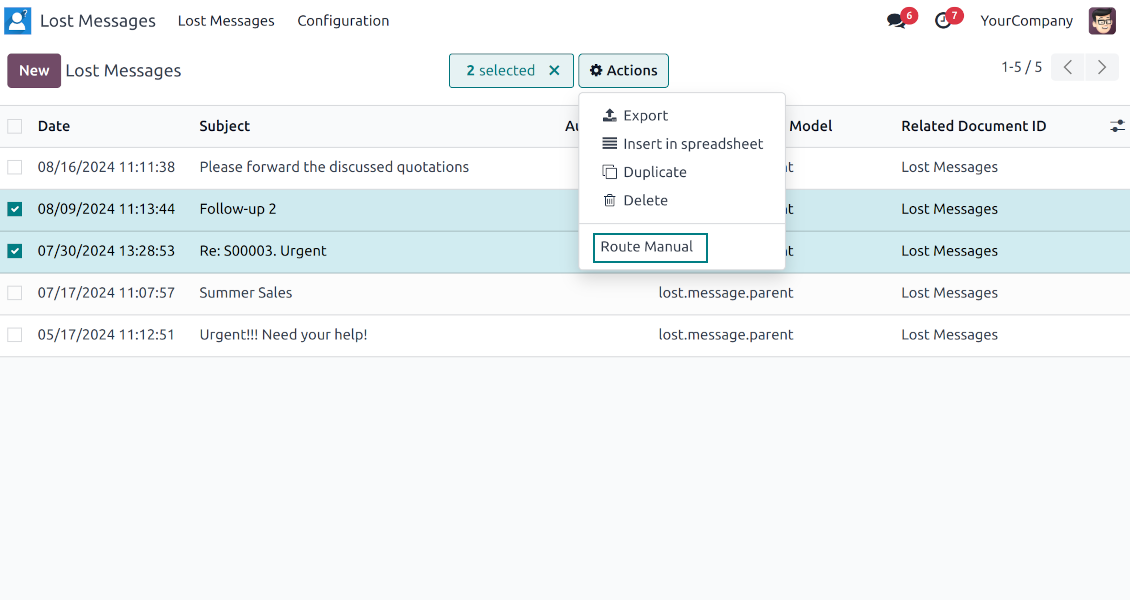
- Route from the thread. Move a message to another document when it landed on the wrong record.
- Quote in a new email. Start a reply with the original message included in the body.
- Keep the composer simple. Every action opens the standard Odoo composer already pre-filled, no separate tooling to learn.
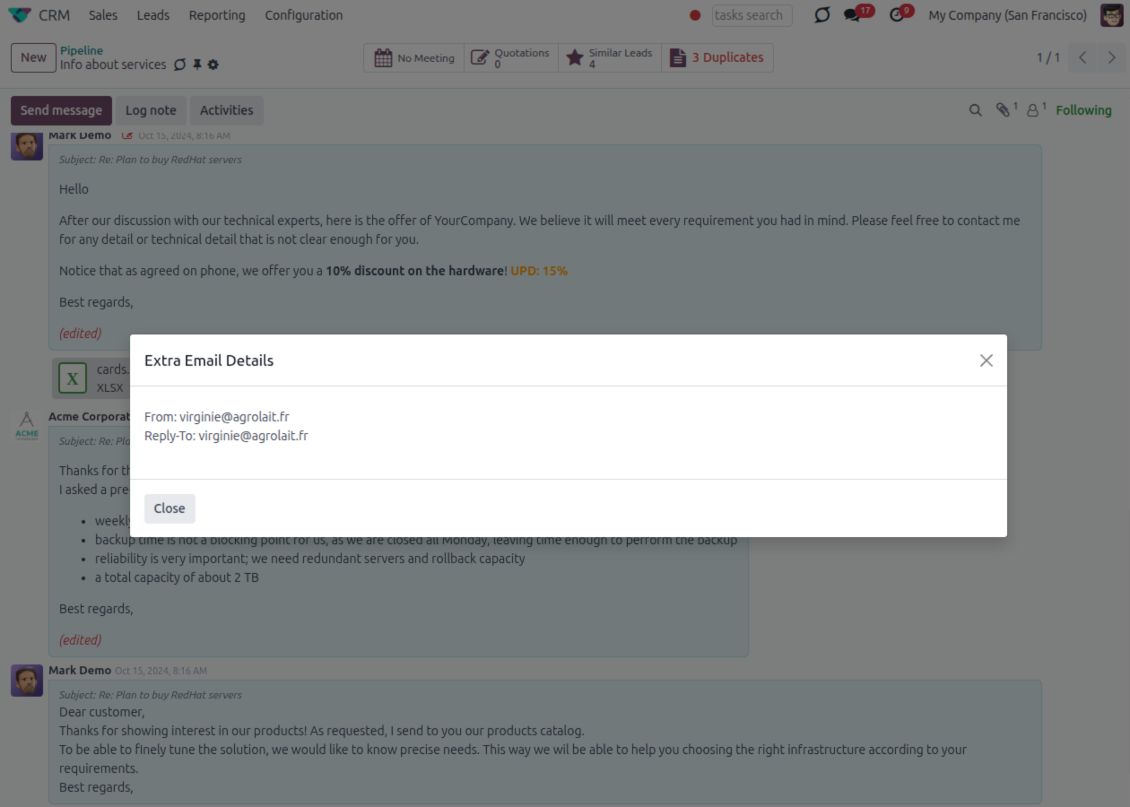
Email details on every message
- See full headers. From, Reply-To, To and CC stay available on incoming and outgoing mail.
- Keep CC/BCC too. Copy recipients added in the composer are saved with the message.
- Open details in one click. A small icon on the message shows the complete email information.
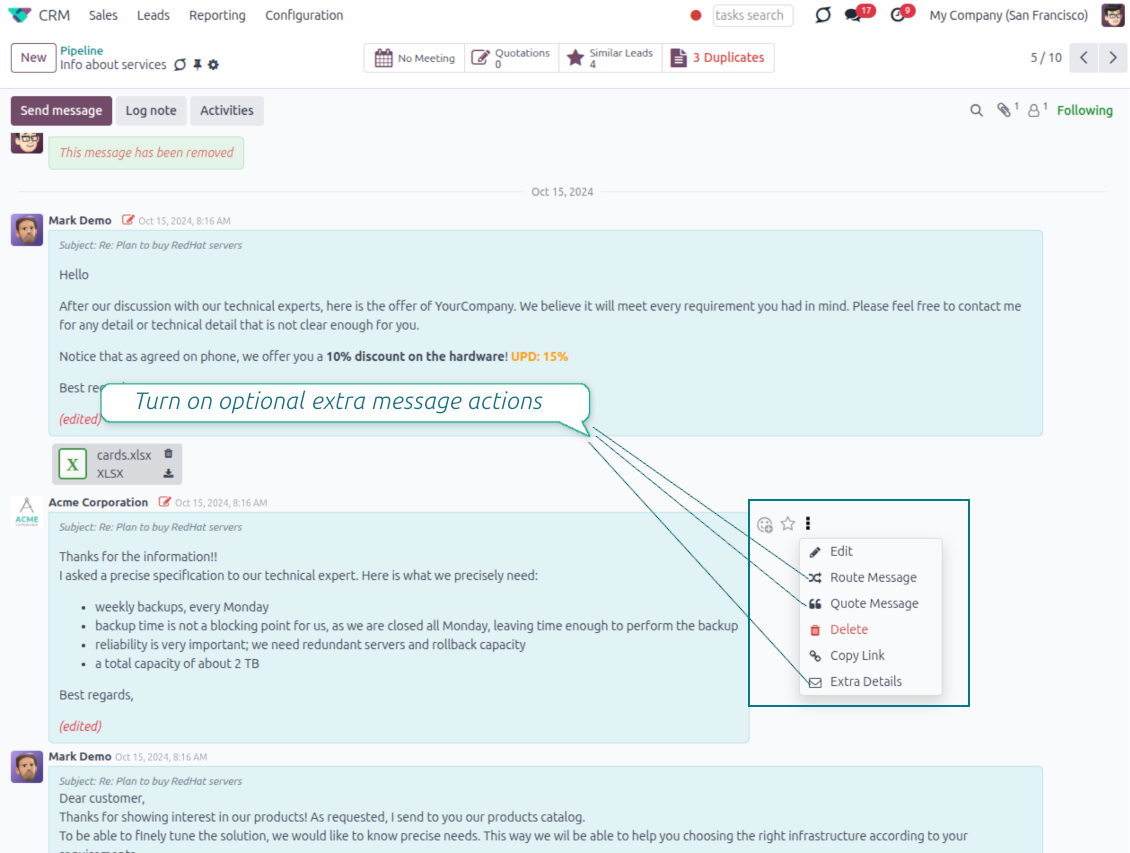
Odoo Email From
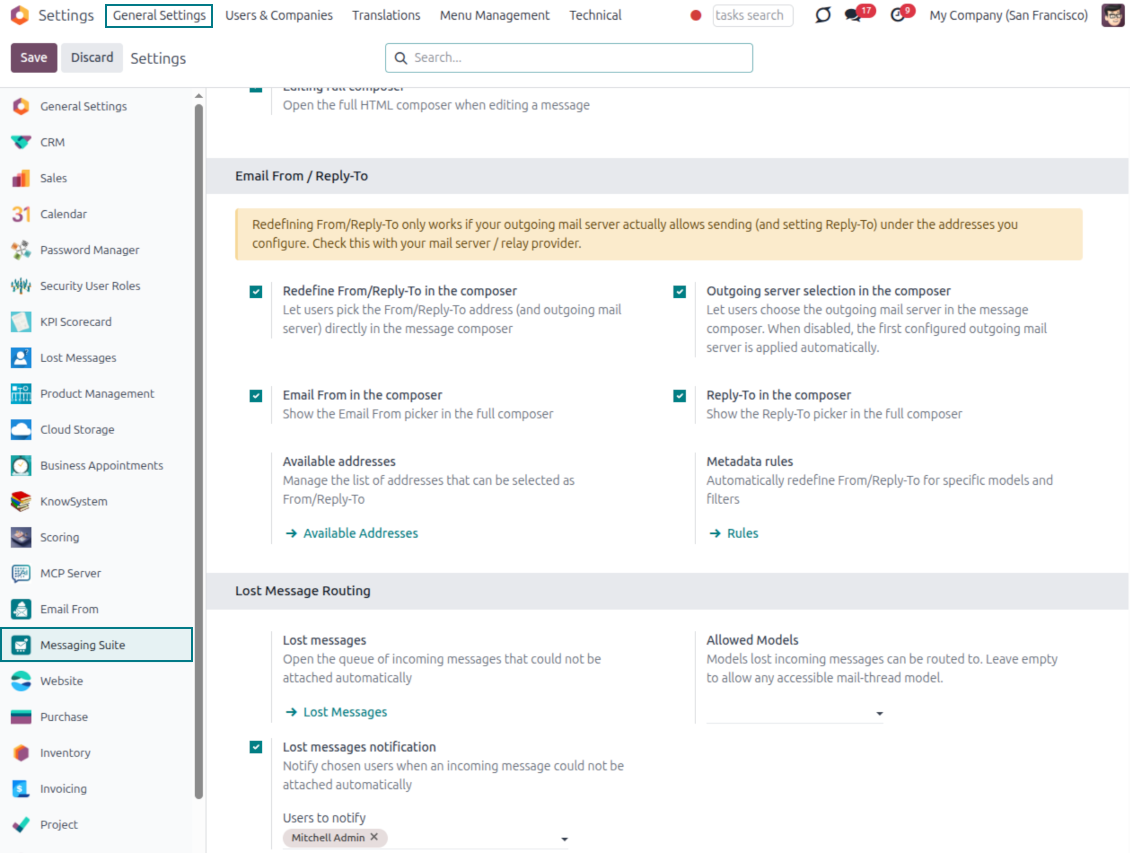
Choose the right From and Reply-To address for every email
Managed sender addresses
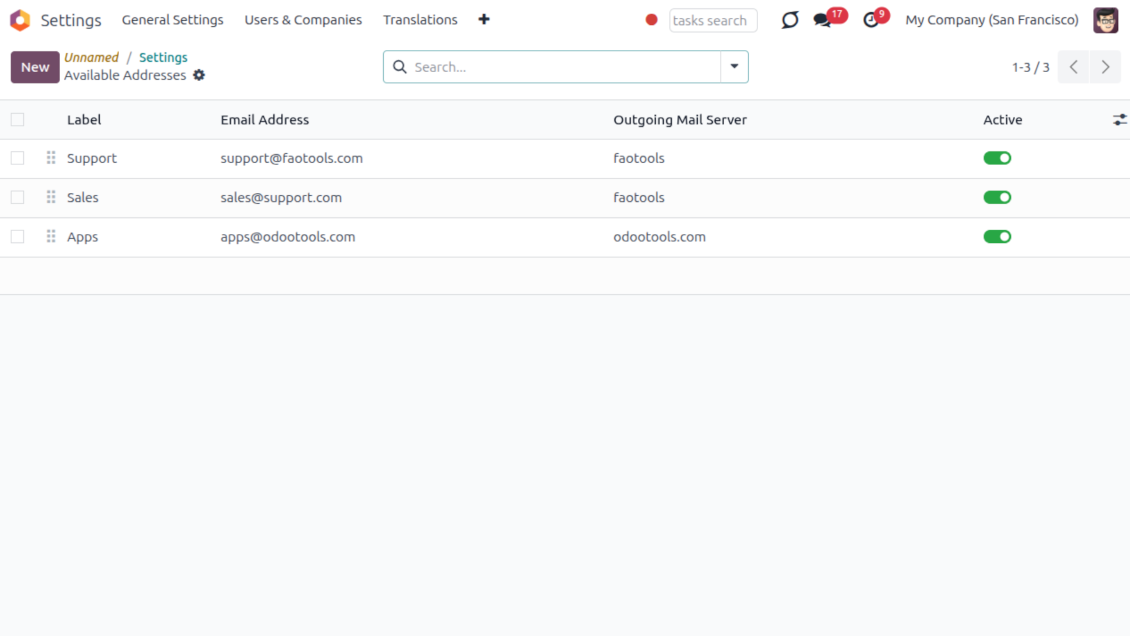
- Pick instead of typing. Users choose From and Reply-To from an address book linked to outgoing mail servers.
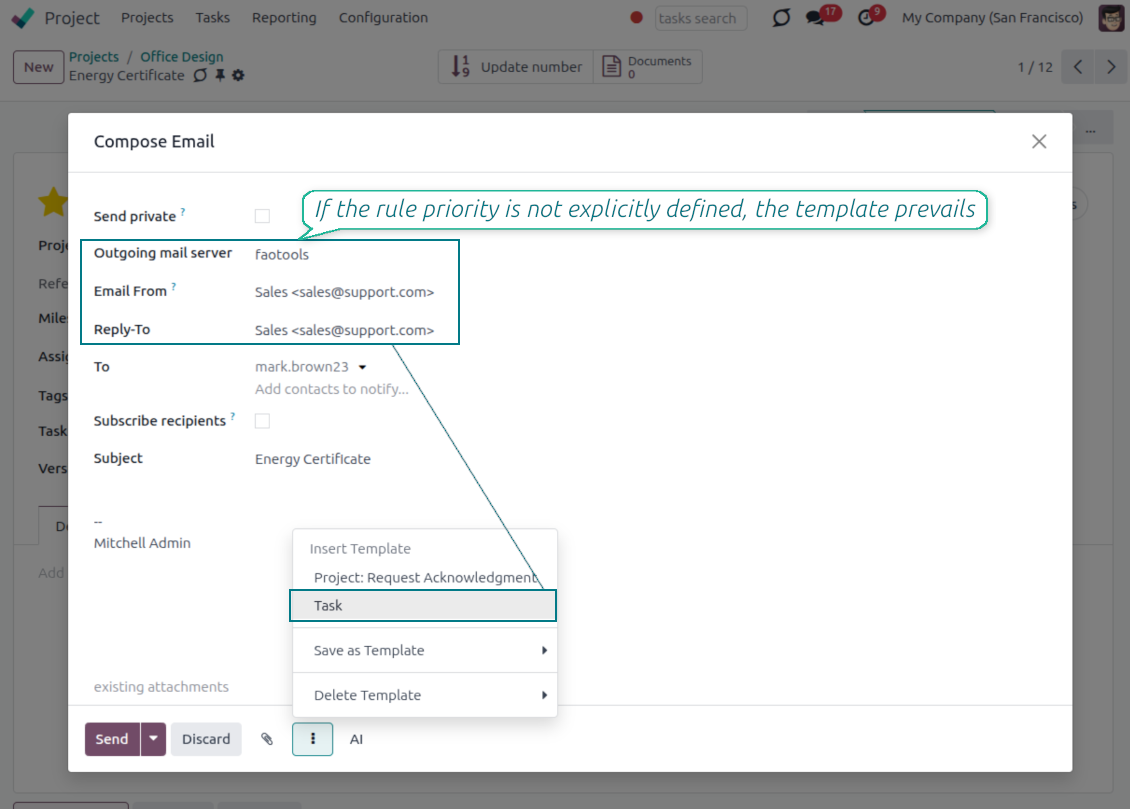
- Apply on templates too. Email templates can use the same managed sender addresses.
- Keep the screen simple. The outgoing mail server field is hidden when only one server is configured.
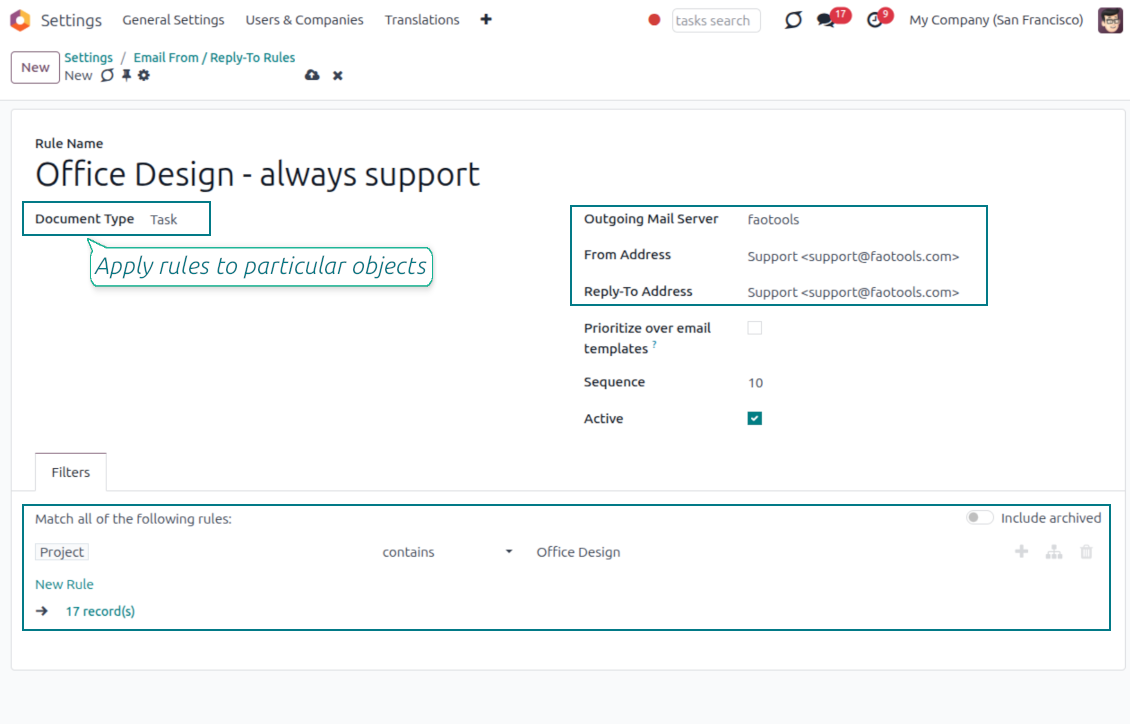
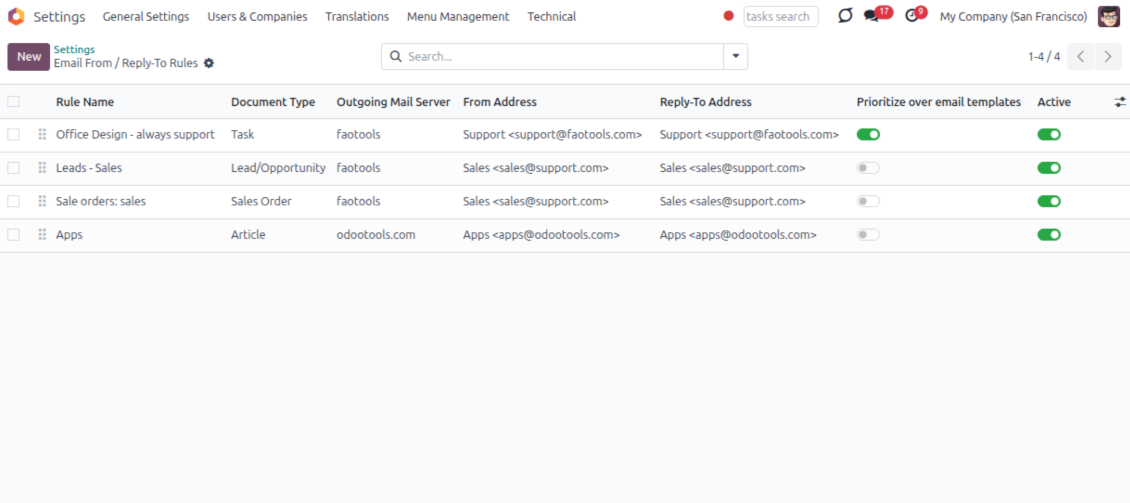
Automatic sender rules
- Set the sender by document type. Rules choose the right From and Reply-To for sales orders, tasks, invoices and other records.
- Prevent invalid combinations. Odoo blocks sender addresses that do not match the selected outgoing mail server.
- Start with working mail setup. Make sure each outgoing server can actually send from the addresses you add.
Bereit zur Bewertung?
Starten Sie mit einer kostenlosen Demo-Anfrage oder kaufen Sie im Odoo Apps Store.
Kostenlose personalisierte Demo-Datenbank. Keine Telefonnummer oder Kreditkarte nötig. Lebenslange Updates und Experten-Support innerhalb der Odoo-Hauptversion.
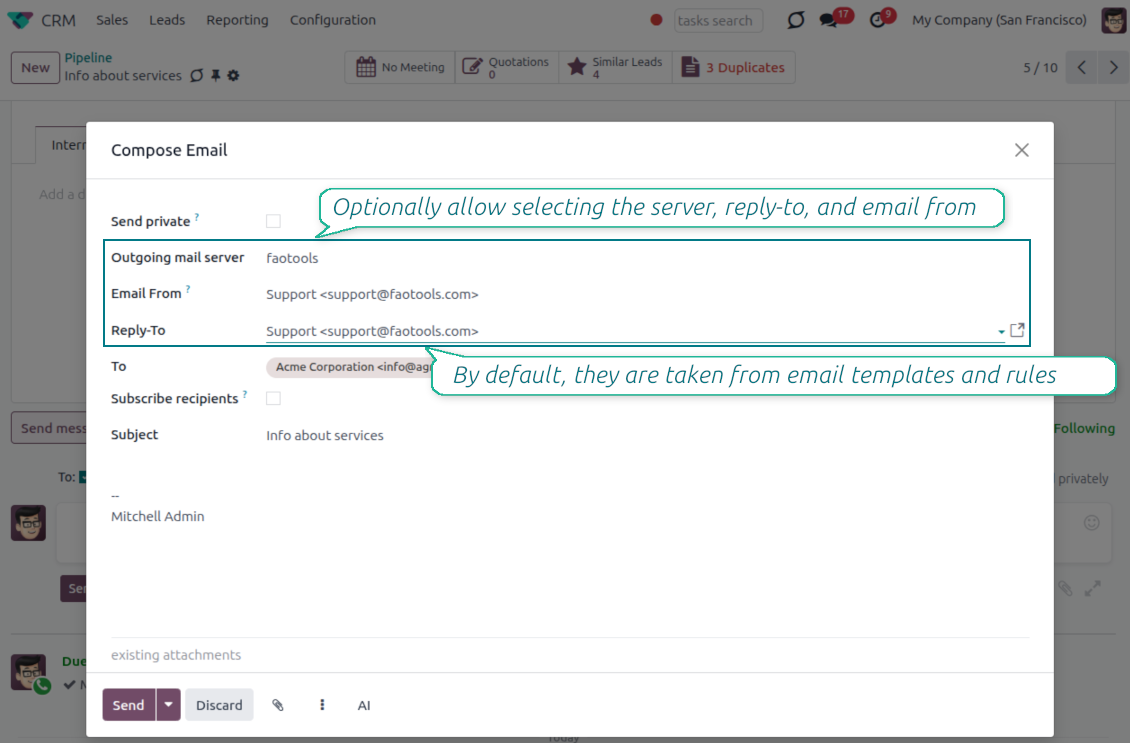
Lost Messages Routing
Recover incoming emails Odoo could not attach automatically
Lost message queue
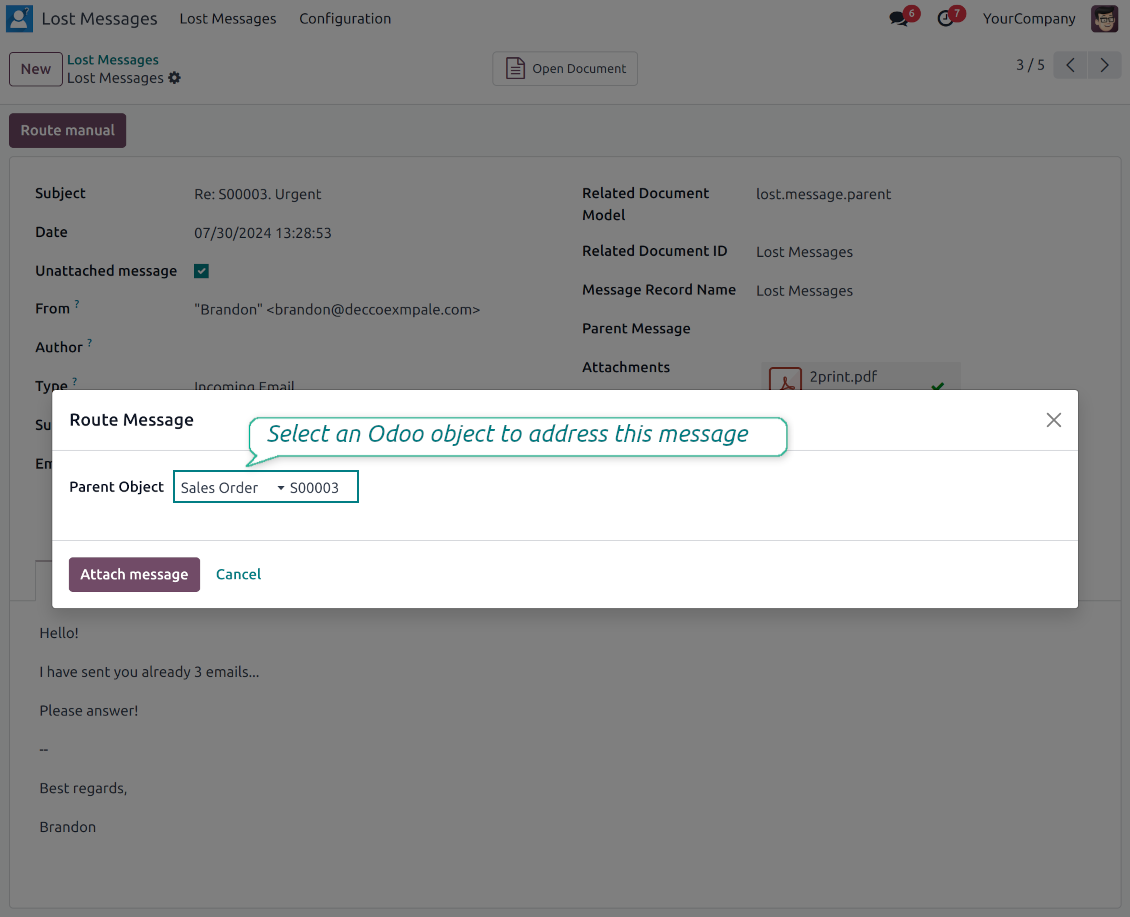
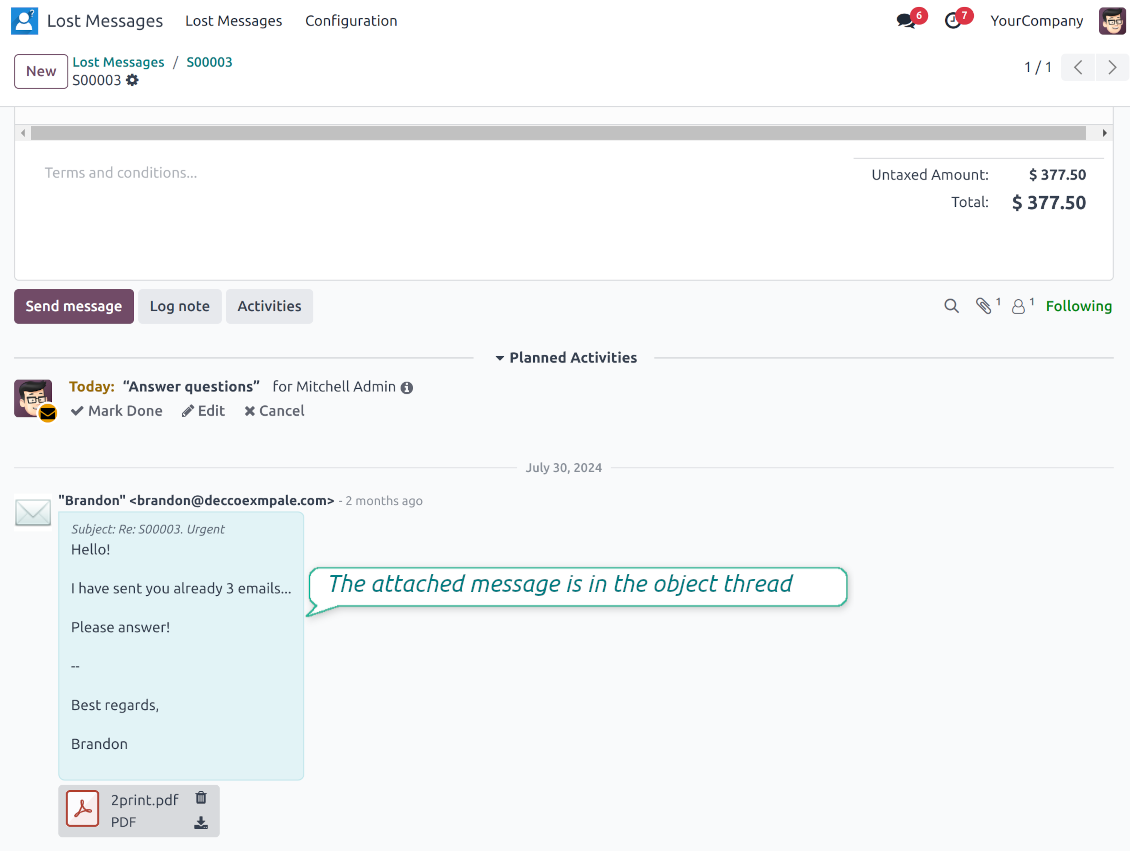
- Catch emails that did not attach. Incoming messages Odoo cannot place on a document are kept instead of disappearing.
- Review in one menu. Your team works from a dedicated queue with subject, sender, body and search tools.
- Keep routing clues. Recipients, To, CC and In Reply To stay available to help find the right document.
Route to the right document
- Attach in a few clicks. Pick the target document and attach one or several lost messages in a single action.
- Limit where messages may go. Restrict routing to selected document types or leave the list open for managers.
- Move attached messages too. Already linked chatter messages can be rerouted to another document when needed.
Private Thread
Confidential discussions that stay inside Odoo and off the portal
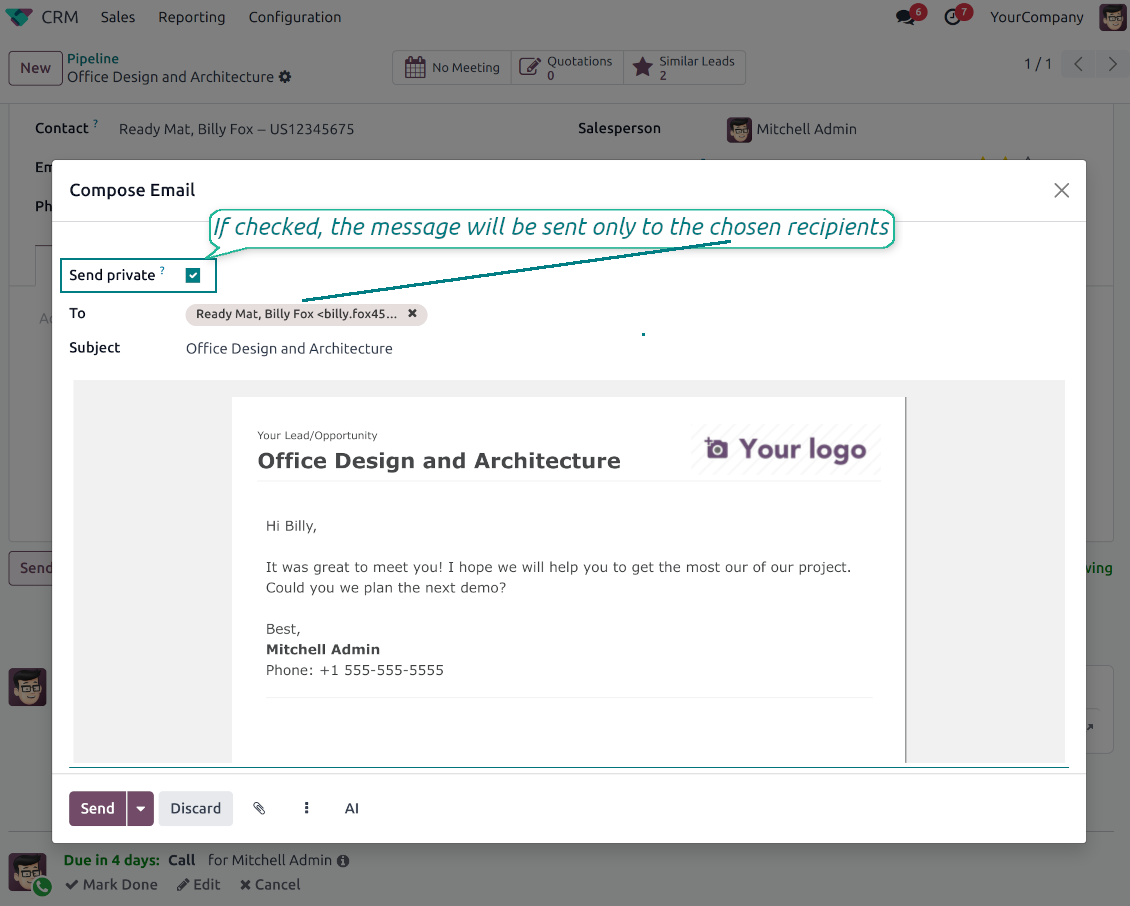
Send private from the composer
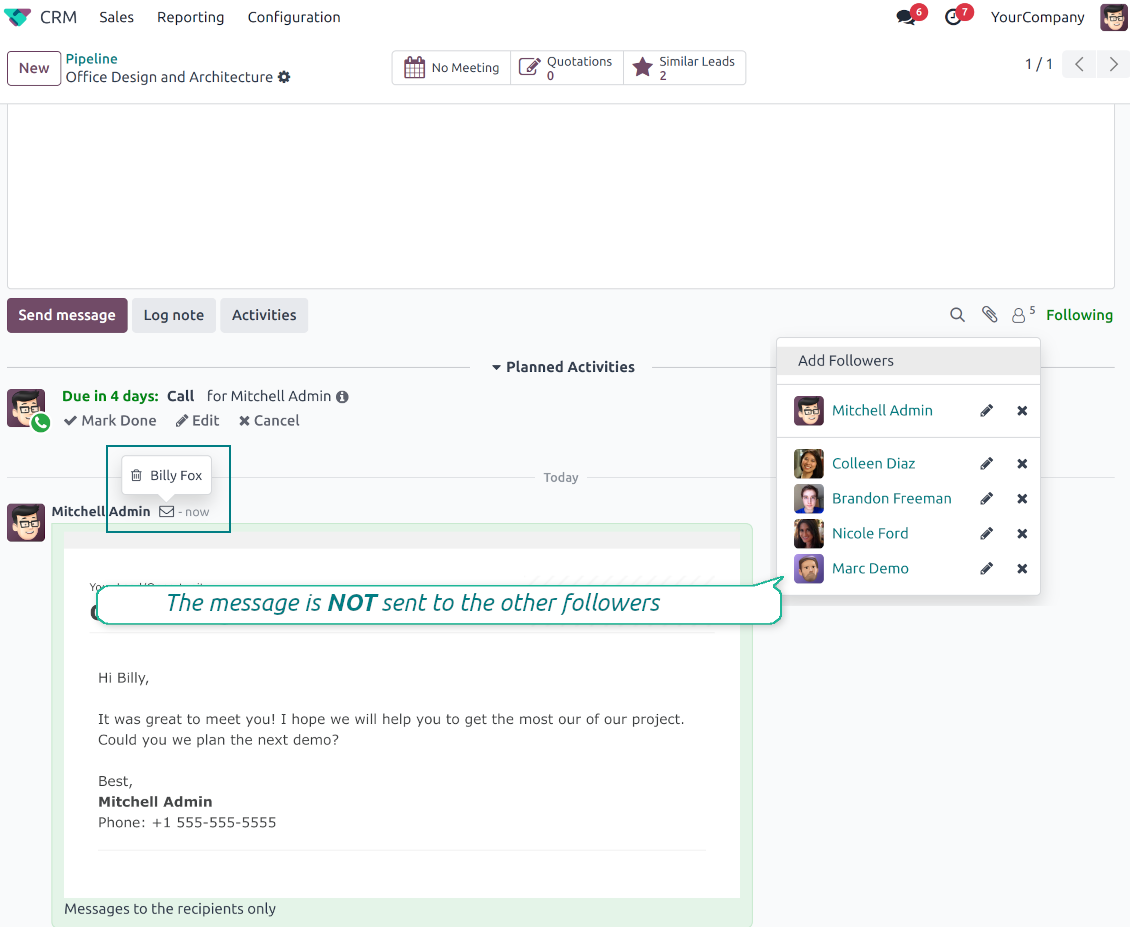
- Tick Send private. Compose a message that reaches only the selected recipients.
- Do not notify other followers. Portal users and regular followers stay out of the conversation.
- Works on any document. Use private sending on sales orders, tasks, invoices, leads and other records.
Confidential but traceable
- Keep history on the record. Private messages remain on the document for later reference.
- Hide from portal users. External contacts cannot read internal discussions on their documents.
- Stay private in replies. Follow-up replies remain private too.
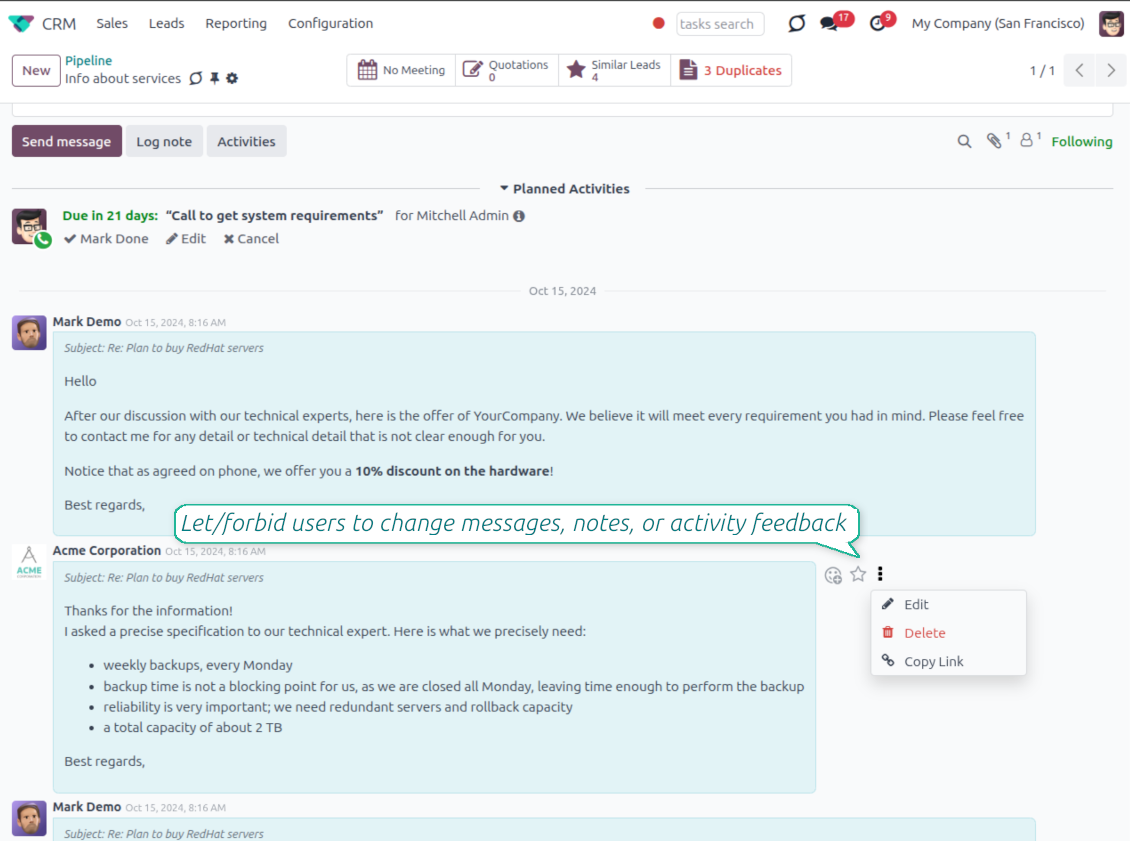
Message and Note Editing
Fix mistakes after sending while keeping a transparent history
Fix mistakes after sending
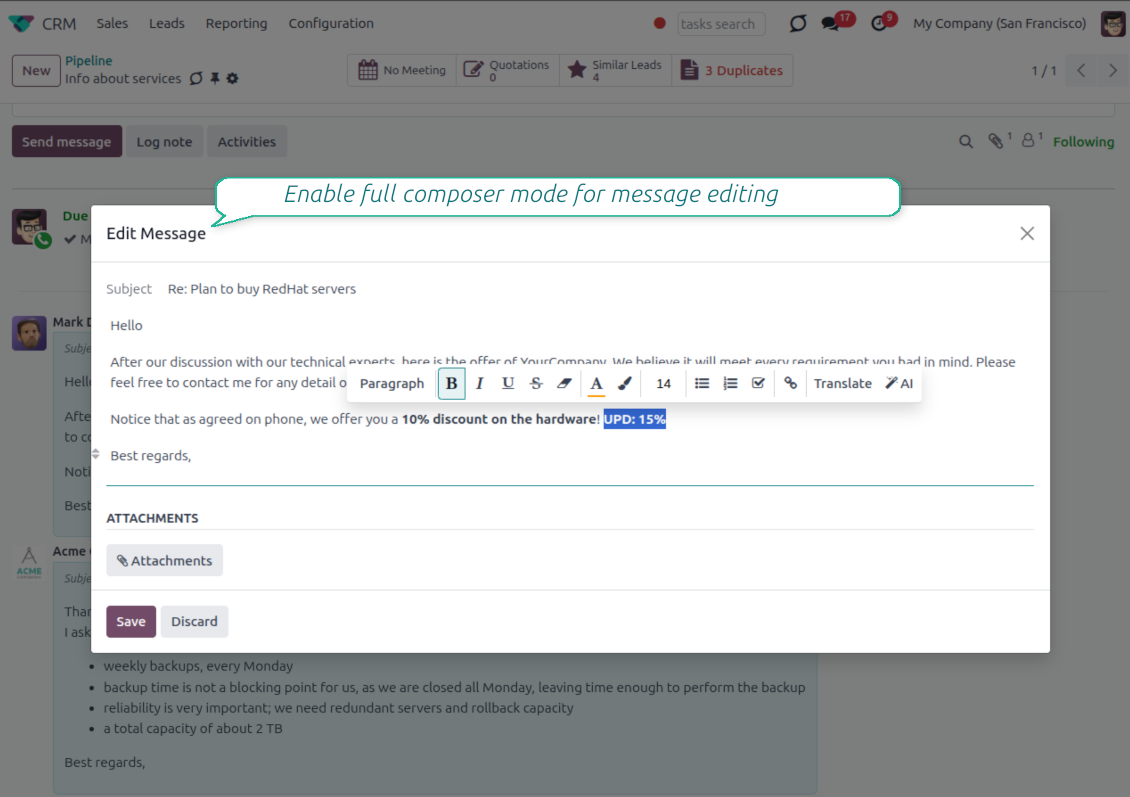
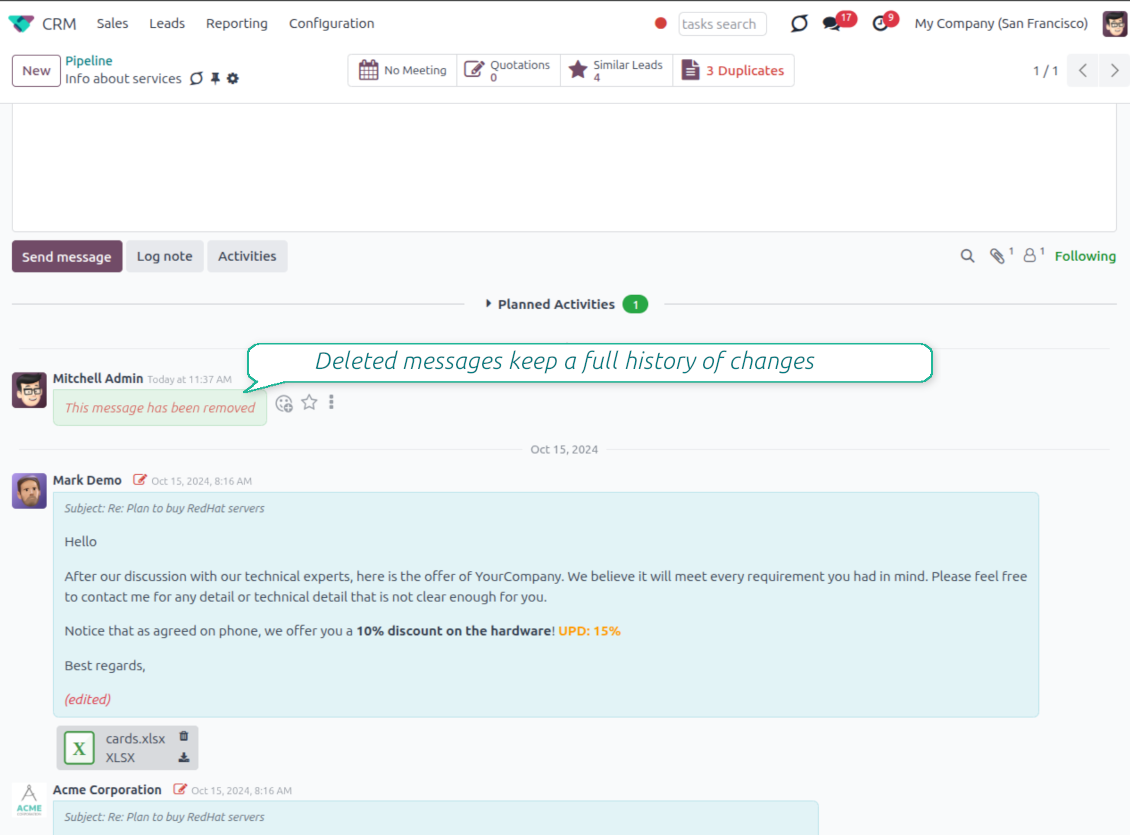
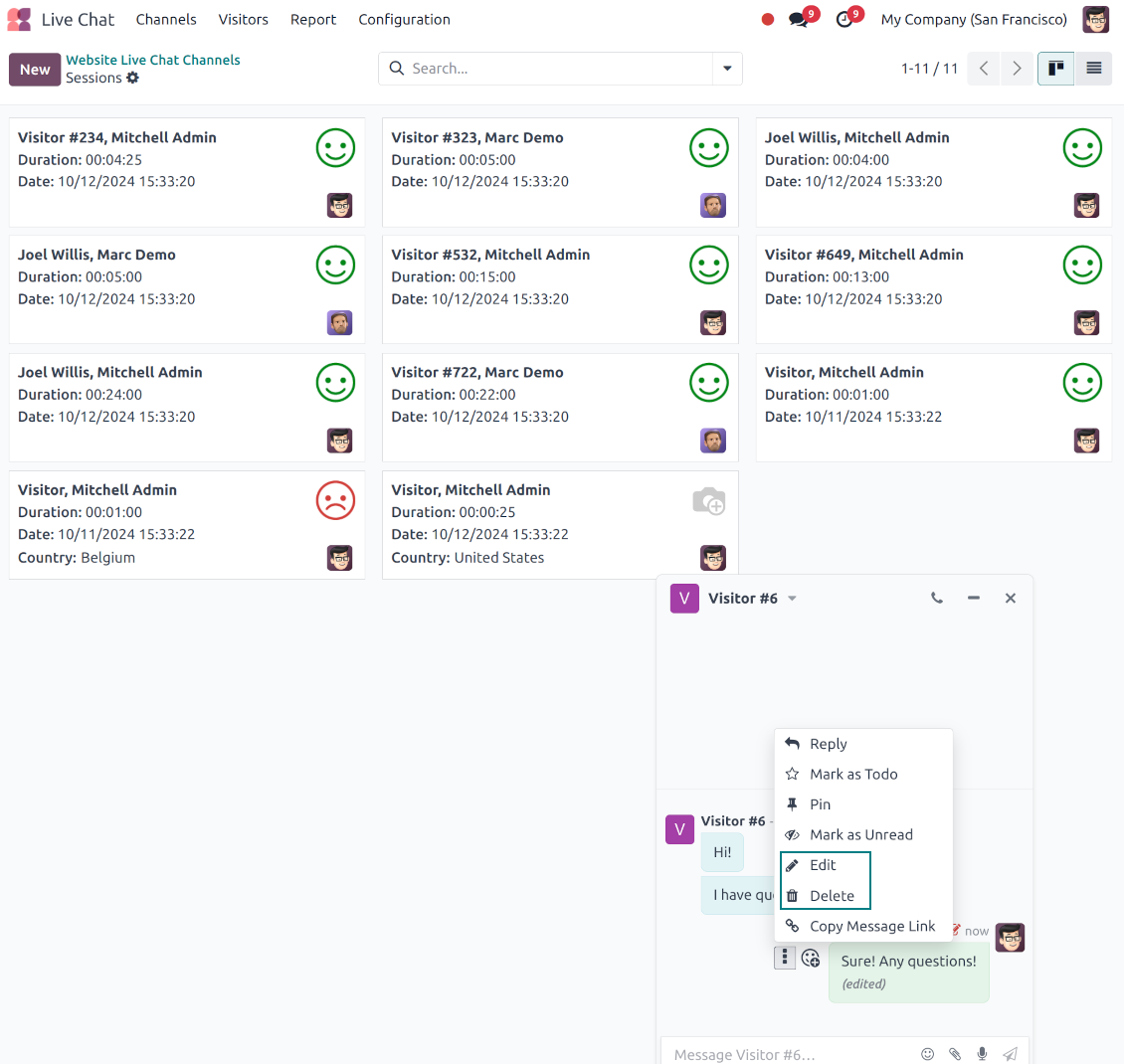
- Edit your own messages. Correct comments, notes and activity feedback after they were posted.
- Give admins broader control. Authorized users can manage messages posted by others when policy requires it.
- Use the full editor when needed. Open subject, rich body and attachments in a pop-up for bigger changes.
History for every change
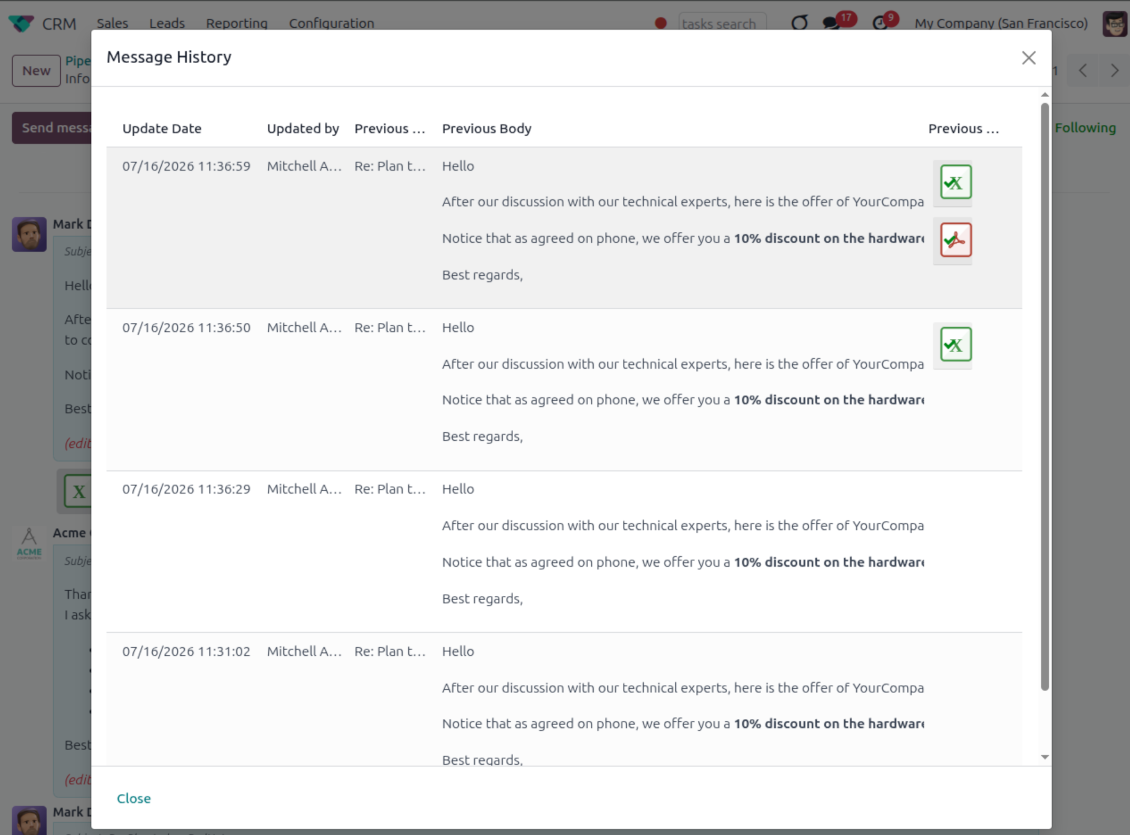
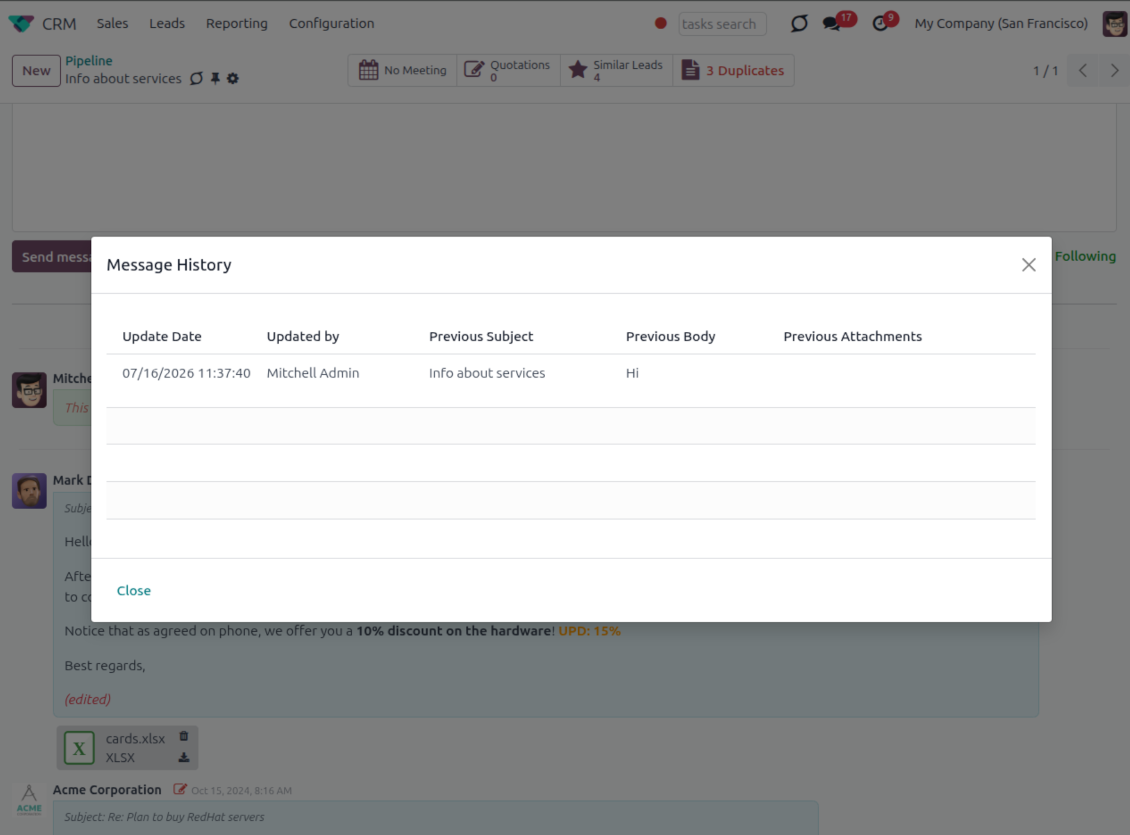
- Track what changed. Subject, body and attachment updates are stored with user and timestamp.
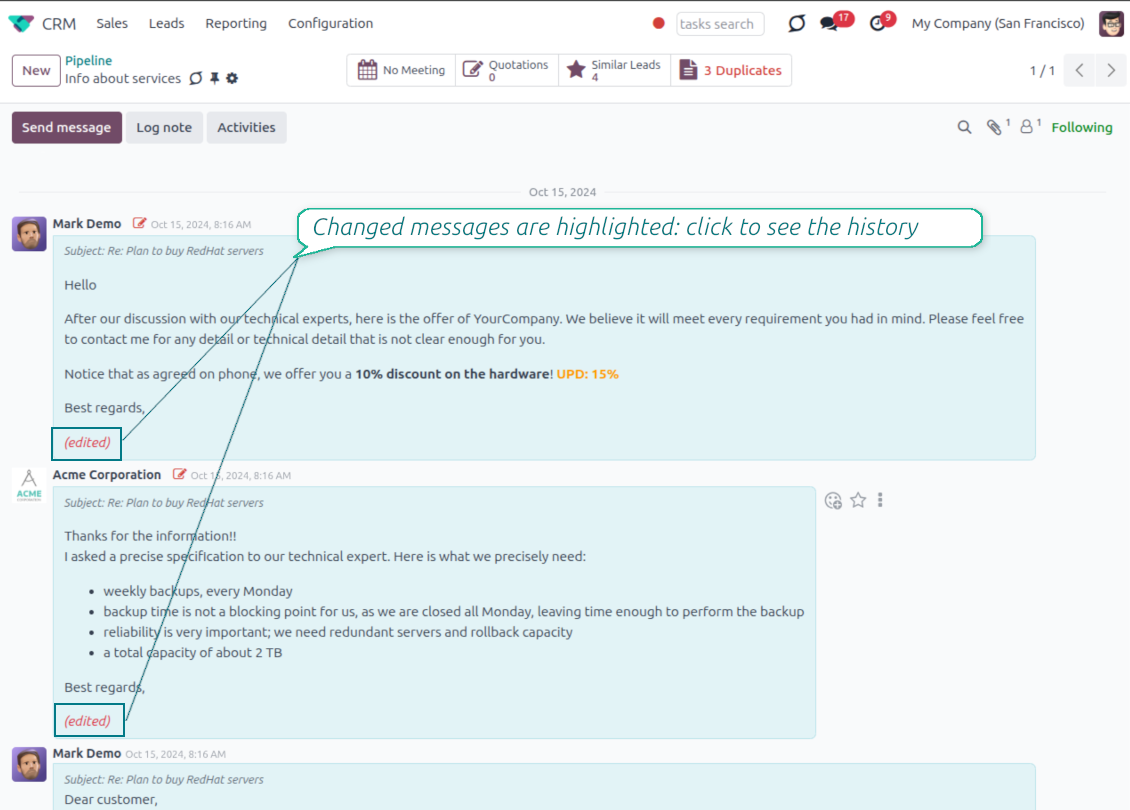
- Spot edited messages quickly. Modified entries show an edited label that opens the history in one click.
- Keep deleted content. Even removed messages retain their history for audit purposes.
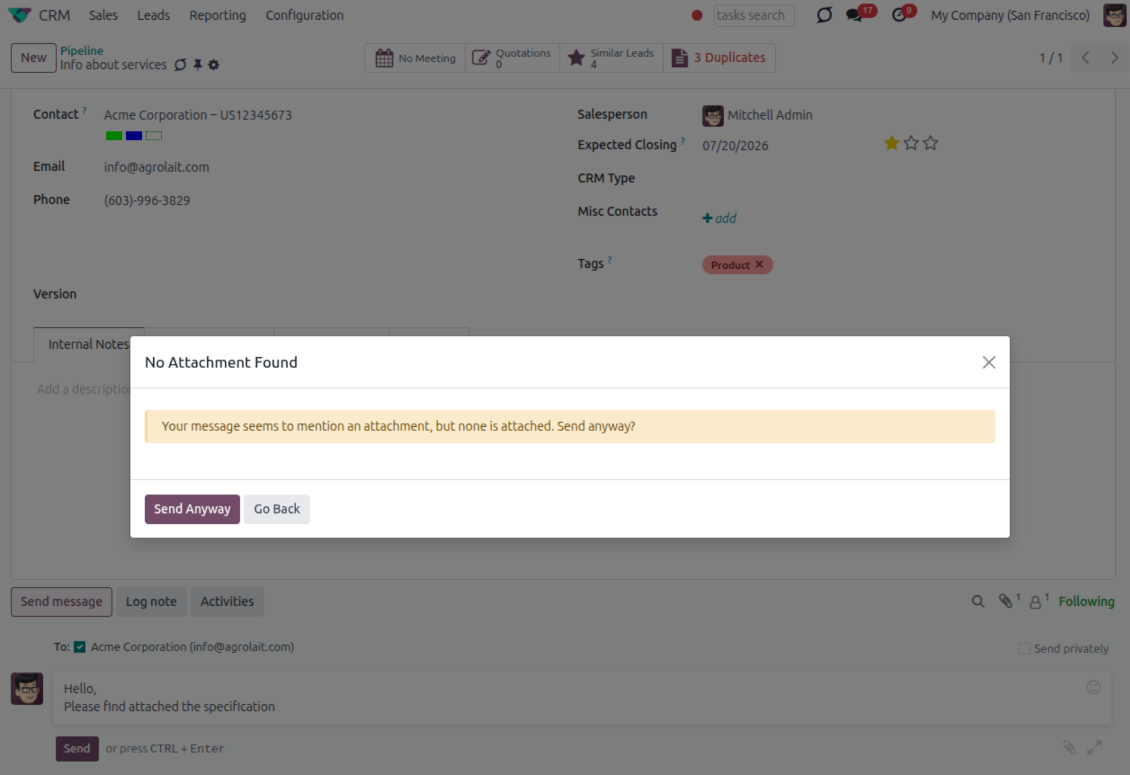
Bereit zur Bewertung?
Starten Sie mit einer kostenlosen Demo-Anfrage oder kaufen Sie im Odoo Apps Store.
Kostenlose personalisierte Demo-Datenbank. Keine Telefonnummer oder Kreditkarte nötig. Lebenslange Updates und Experten-Support innerhalb der Odoo-Hauptversion.
Catch missing attachments
Confirm forgotten attachments before they leave the composer
Attachment mention check
- Spot missing files before send. Odoo checks the message text when you mention an attachment.
- Works everywhere you write. The reminder appears in the full composer, quick reply and chat flows.
- Turn it off when not needed. Enable or disable the check from Messaging Suite settings.
Send-time confirmation
- Stop accidental sends. A dialog appears when the body mentions an attachment but none is attached.
- Let the user decide. Send Anyway and Go Back keep the flow moving without losing the draft.
- Adapt the wording. Adjust what counts as an attachment mention in settings when your team uses different phrases.
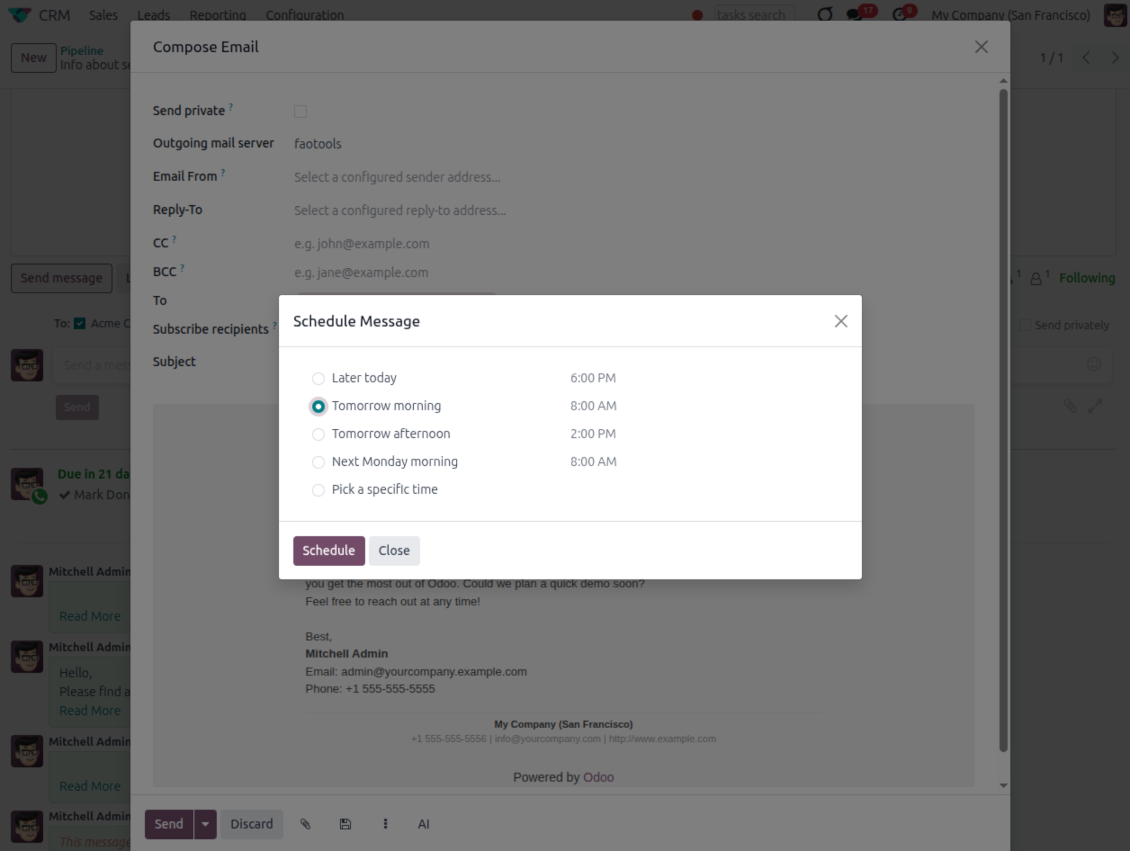
Send later with your own presets
Schedule follow-ups with options your team actually uses
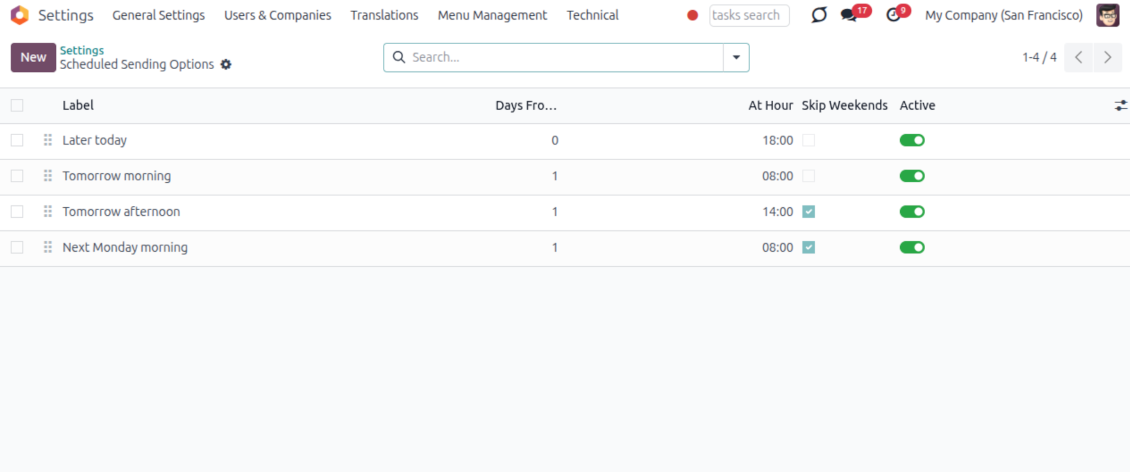
Your own Send Later options
- Go beyond the built-in choices. Define your own scheduled-sending options instead of only Tomorrow Morning / Afternoon.
- Show them in Send Later. Presets appear directly in the standard scheduled-send dialog.
- Pick a preset in one click. Users schedule follow-ups without calculating dates manually.
Maintain the preset list
- Set label, offset and send time. Each option defines days from today, hour and whether weekends are skipped.
- Control order and availability. Reorder presets and switch them on or off any time.
- Manage from Discuss. Administrators maintain Scheduled Sending Options from its own menu entry.
Message Citing
Quote earlier Odoo messages while you reply
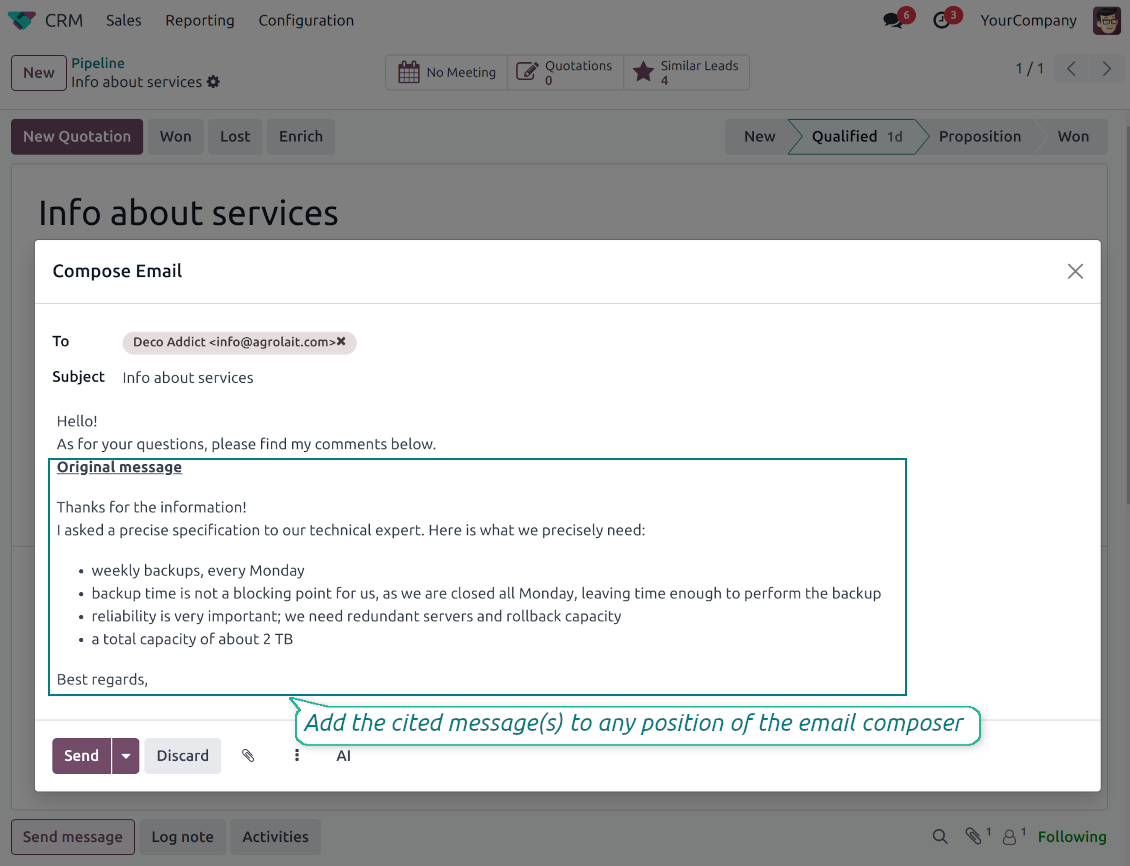
Cite while you compose
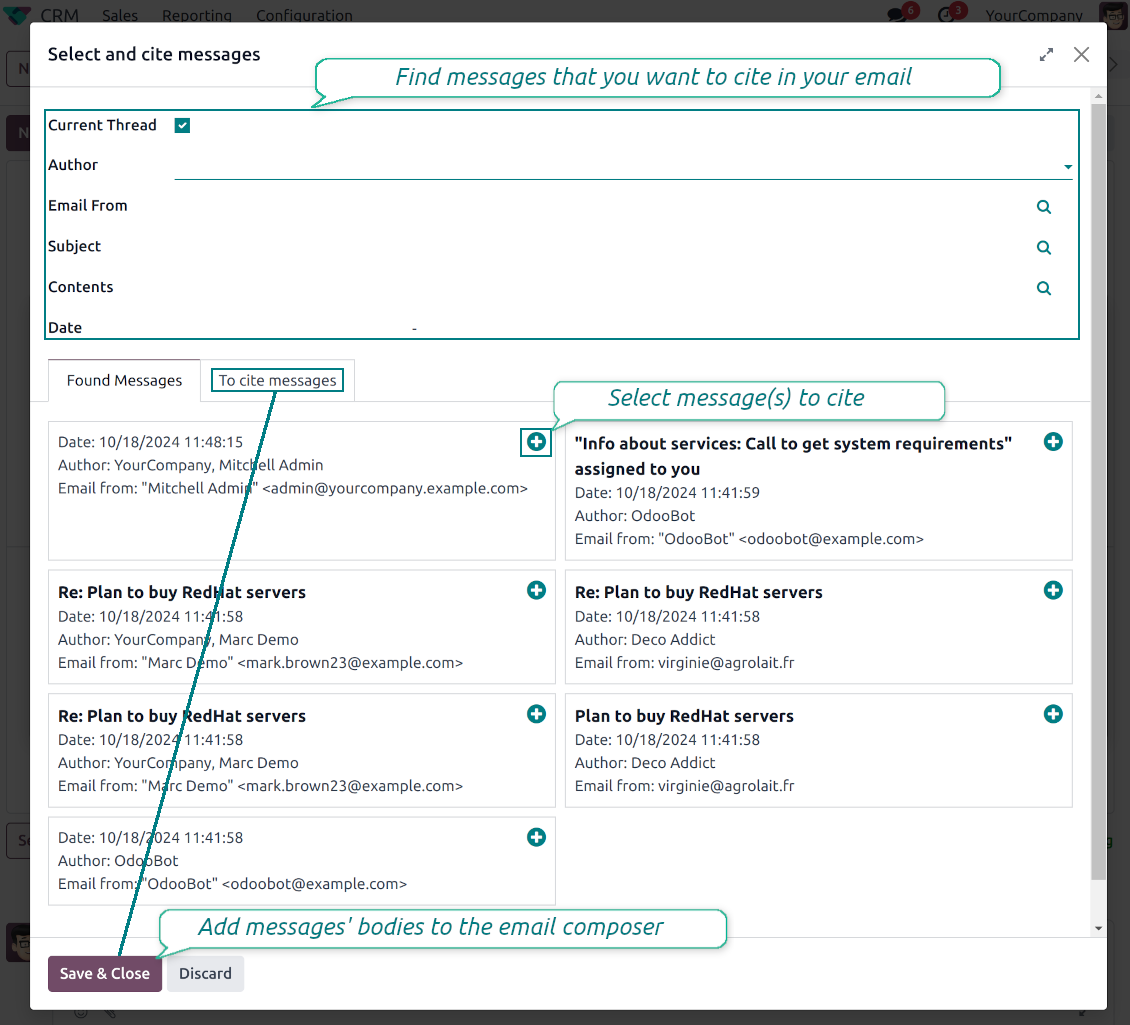
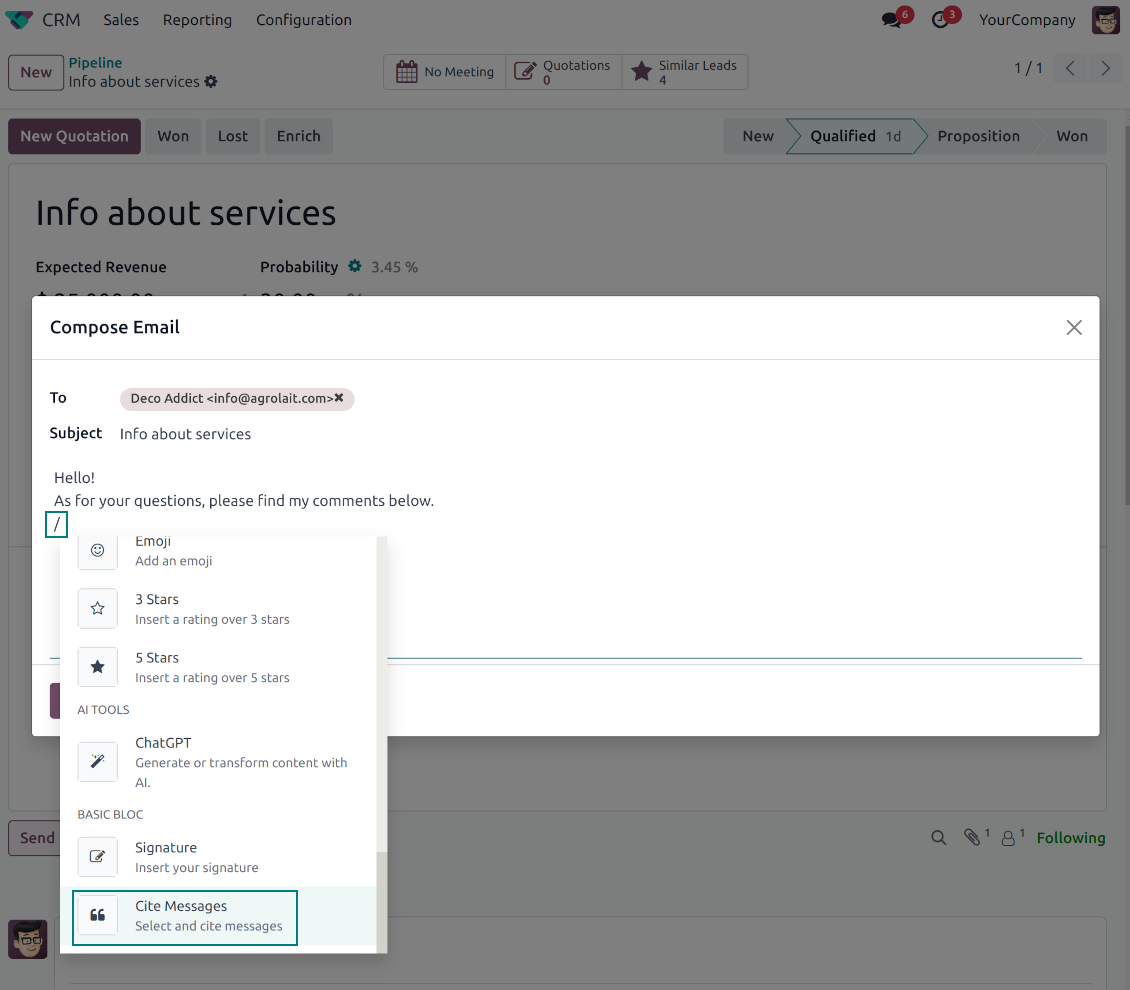
- Open Cite Message from the composer. Search earlier messages without leaving the email you are writing.
- Find the right message fast. Filter by author, content, date range, or limit results to the current thread.
- Insert with one click. Add the selected message at the cursor position in the email body.
Readable quoted history
- Shape the quoted header. Define the text placed before every cited message.
- Reply with context. Help customers and colleagues see exactly which earlier message you refer to.
- Use across documents. Cite messages from any discussion while composing on another record.
Messaging Suite administration
One place to configure your messaging tools
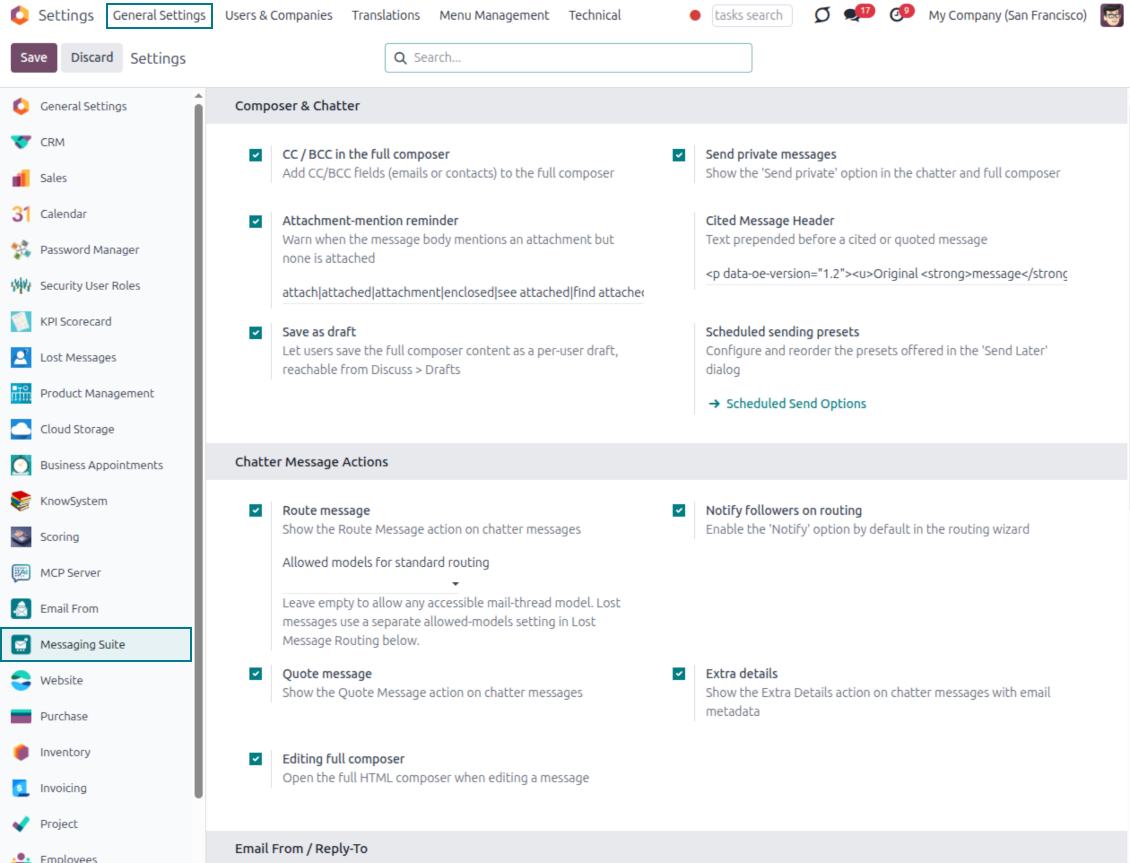
One Messaging Suite settings page
- Turn features on or off. CC/BCC, drafts, attachment reminders and send-later presets are controlled from one place.
- Reach every related option. Open settings for routing, privacy, quoting, editing and sender addresses without leaving the suite.
- Set up once, use everywhere. Configure the whole messaging toolkit from a single administration screen.
Routing and access control
- Choose where messages may go. Define which documents can receive rerouted chatter messages.
- Keep lost emails separate. Unattached incoming mail keeps its own queue and routing rules.
- Decide who may reroute. Give routing rights only to the users who should move messages between documents.
Bereit zur Bewertung?
Starten Sie mit einer kostenlosen Demo-Anfrage oder kaufen Sie im Odoo Apps Store.
Kostenlose personalisierte Demo-Datenbank. Keine Telefonnummer oder Kreditkarte nötig. Lebenslange Updates und Experten-Support innerhalb der Odoo-Hauptversion.
Häufig gestellte Fragen zu Odoo Messaging Suite Odoo v.18
Wie sind die Update-Richtlinien Ihrer Tools?
Laut den aktuellen Richtlinien des Odoo Apps Store:
- Ein fur Version 12.0 oder früher gekauftes Modul gibt Zugang zu allen Versionen bis 12.0.
- Ab Version 13.0 muss jede Modulversion separat gekauft werden.
- Unabhängig von der Version berechtigt der Kauf zu allen Updates und Fehlerbehebungen innerhalb einer Hauptversion.
Das faOtools-Team steuert diese Richtlinien nicht. Fragen richten Sie bitte direkt an die Vertreter des Odoo Apps Store.
Wie installiere ich Ihre App auf Odoo.sh?
Der direkteste Weg ist der integrierte Ablauf des Odoo Stores:
1. Öffnen Sie die Modulseite und klicken Sie auf Deploy on odoo.sh
2. Sie werden zu GitHub weitergeleitet. Melden Sie sich an und klicken Sie auf Create a new repo oder nutzen Sie ein vorhandenes. Das Repository muss privat sein. Apps unter OPL-1 dürfen nicht öffentlich gemacht werden. Legen Sie bei Bedarf ein neues Repo fur das Odoo.sh-Projekt an
3. Gehen Sie zu odoo.sh, klicken Sie auf Deploy, bestätigen Sie und klicken Sie auf Continue. Die Installation startet.
Damit wird die App auf dem Production-Branch installiert. Fur andere Branches oder Updates:
1. Laden Sie den Quellcode aus dem Odoo Store
2. Committen Sie das Modul in das GitHub-Repository. Keine App-Ordner/Dateien dürfen in .gitignore stehen. Von odoo.sh erzeugte Repos ignorieren oft wichtige Pfade (z. B. /lib). Laden Sie alle Modulverzeichnisse und Dateien hoch
3. Deployen Sie den Ziel-Branch des odoo.sh-Projekts oder warten Sie auf den automatischen Build.
Wie installiere ich Ihre App auf meinem eigenen Server?
2. Starten Sie den Odoo-Server neu;
3. Schalten Sie den Entwicklermodus ein (technische Einstellungen);
4. Aktualisieren Sie die App-Liste (Apps-Menü);
5. Finden Sie die App und klicken Sie auf Activate/Install;
6. Folgen Sie den Hinweisen auf der App-Seite, falls vorhanden.
Ihre App hat Zusatzmodule. Kann ich sie später kaufen?
Ja. Odoo legt alle Abhängigkeiten automatisch in den Warenkorb. SchlieBen Sie bereits gekaufte Tools aus, um nicht doppelt zu zahlen.
Ich habe Ihre App auf Odoo.sh bereitgestellt und sehe eine Warnung/einen Fehler in den Tests
Eine rote/orange Warnung beeinflusst die Funktionen der App nicht. Manchmal bestehen unsere Module die Standard-Automatiktests nicht, weil diese ein Verhalten erwarten, das unseren Zielen widerspricht. Zum Beispiel ändern wir die Preisberechnung, während die Odoo-Tests den Endpreis mit dem Standardalgorithmus vergleichen.
Prüfen Sie zuerst die Funktionen der bereitgestellten Datenbank. Funktioniert alles?
Wenn Sie dennoch annehmen, dass die Warnung echte Funktionen betrifft, senden Sie uns die vollständigen Installationsprotokolle und die vollständige Liste der bereitgestellten Module (Kern und Drittanbieter).
Kann ich Ihre App direkt bei Ihnen kaufen?
Nein, wir vertreiben die Tools nur über den offiziellen Odoo Apps Store.
Ich mochte einen Rabatt
Leider haben wir keine technischen Mittel fur individuelle Preise.
Kann ich die App auf meiner Odoo Online (SaaS)-Datenbank installieren?
Nein, Drittanbieter-Apps können nicht auf Odoo Online genutzt werden. Odoo SaaS blockiert das.
Ihr Tool hängt von anderen Apps ab. Muss ich diese kaufen?
Ja, das Tool benötigt alle als Abhängigkeit markierten Module. Der Preis auf der App-Seite enthält bereits alle noetigen Abhängigkeiten.
Was kostet das Modul in US-Dollar? Warum hat sich der Preis geändert?
Die Preise unserer Module sind in Euro festgelegt. Der Odoo Store rechnet nach seinem internen Wechselkurs um. Der Preis in US-Dollar kann sich ändern, wenn der Kurs aktualisiert wird.
Die Texte der App und Website in anderen Sprachen als Englisch werden KI-gestützt erstellt und an die offiziellen Odoo-Übersetzungen angeglichen. Wenn Sie einen Fehler entdecken, ein Uebersetzungs-Ticket senden und wir korrigieren es.
Odoo-Demo-Datenbanken (Vorschauen)
Für diese App können wir eine kostenlose personalisierte Demo-Datenbank bereitstellen.
Sie benötigen keine Telefonnummer oder Kreditkarte, um mit uns Kontakt aufzunehmen. Sie sollten nur eine kurze E-Mail-Anmeldung durchführen, die nicht länger als 30 Sekunden dauert.
Auf Anfrage richten wir eine eigene Vorschau-Datenbank ein, in der Sie rund zwei Wochen lang beliebig testen und Ihre Annahmen prüfen können.
Fehlermeldung
Wenn Sie auf Fehler oder inkonsistentes Verhalten stoßen, zögern Sie nicht, uns zu kontaktieren. Wir garantieren eine Reparatur innerhalb von 60 Tagen nach dem Kauf und sind auch nach diesem Zeitraum stark daran interessiert, unsere Werkzeuge zu verbessern.
Sie benötigen keine Telefonnummer oder Kreditkarte, um mit uns Kontakt aufzunehmen. Sie sollten nur eine kurze E-Mail-Anmeldung durchführen, die nicht länger als 30 Sekunden dauert.
Bitte nehmen Sie moglichst viele Details in Ihre Anfrage auf: Screenshots, Odoo-Serverprotokolle, eine vollständige Beschreibung zur Reproduktion Ihres Problems usw. Normalerweise dauert es einige Werktage, einen Arbeitsplan fur ein Problem zu erstellen (wenn ein Fehler bestätigt wird) oder Ihnen Hinweise zum weiteren Vorgehen zu geben (andernfalls).
Öffentliche Funktionsanfragen und Modulideen (kostenlose Entwicklung)
Wir sind stark motiviert, unsere Tools zu verbessern und wären für jedes Feedback dankbar. Wenn Ihre Anforderungen von öffentlichem Nutzen sind und effizient umgesetzt werden könnten, nimmt das Team diese in unsere To-Do-Liste auf.
Eine solche To-Do-Liste wird regelmäßig bearbeitet und erfordert keine zusätzlichen Gebühren. Obwohl wir keine Fristen und keinen endgültigen Entwurf versprechen können, könnte dies eine gute Möglichkeit sein, die gewünschten Funktionen ohne Investitionen und Risiken zu erhalten.
Sie benötigen keine Telefonnummer oder Kreditkarte, um mit uns Kontakt aufzunehmen. Sie sollten nur eine kurze E-Mail-Anmeldung durchführen, die nicht länger als 30 Sekunden dauert.

Das Werkzeug, um Odoo-Anhänge in Ordnern zu strukturieren und mit Google Drive, OneDrive/SharePoint, Nextcloud/ownCloud, Dropbox, Amazon S3, Box und NAS zu synchronisieren. Dateimanager. DMS
398€

The tool to build a deep and structured knowledge base for internal and external use. Knowledge System. KMS. Wiki-like revisions.
398€
The tool to automatically synchronize Odoo attachments with OneDrive files in both ways
487€
The tool to set up KPI targets and control their fulfillment by periods. KPI dashboards. Dashboard designer. KPI charts

The tool for time-based service management from booking appointments to sales and reviews
398€
The tool to automatically synchronize Odoo attachments with Google Drive files in both ways
487€
