Em resumo
Odoo Messaging Suite e uma aplicacao Odoo 18 de Discussão. The tool to improve the Odoo messaging experience.
Odoo Messaging Suite brings lost-message recovery, private discussions, message citing, post-send editing, managed From/Reply-To addresses and a richer email composer together in one application. Compose with CC/BCC and per-user drafts, route emails to the right document, quote from the message toolbar, send later with your own presets, and catch forgotten attachments before they leave. Every message keeps its email headers behind a details icon, and administrators configure the whole toolkit from one Messaging Suite settings page.
Ideal para
Support and sales teams living in their inbox
Perfect for teams that answer customers by email all day and want CC/BCC, drafts and quoting available right inside the Odoo composer, without switching to an external mail client.
Companies needing confidentiality
Ideal when some conversations must stay private from portal users and other followers, while still being logged on the Odoo document for later reference.
Administrators who want oversight and control
Useful for admins who need routing rules, send-later presets, attachment reminders and one settings page to manage the whole messaging toolkit.
Pronto para avaliar?
Comece com um pedido de demo gratuito ou compre na Odoo Apps Store.
Base de demonstração personalizada gratuita. Sem telefone nem cartão. Atualizações gratuitas vitalícias e apoio especializado na versão major do Odoo.
Porque as equipas o escolhem
Principais vantagens antes dos detalhes
One settings page
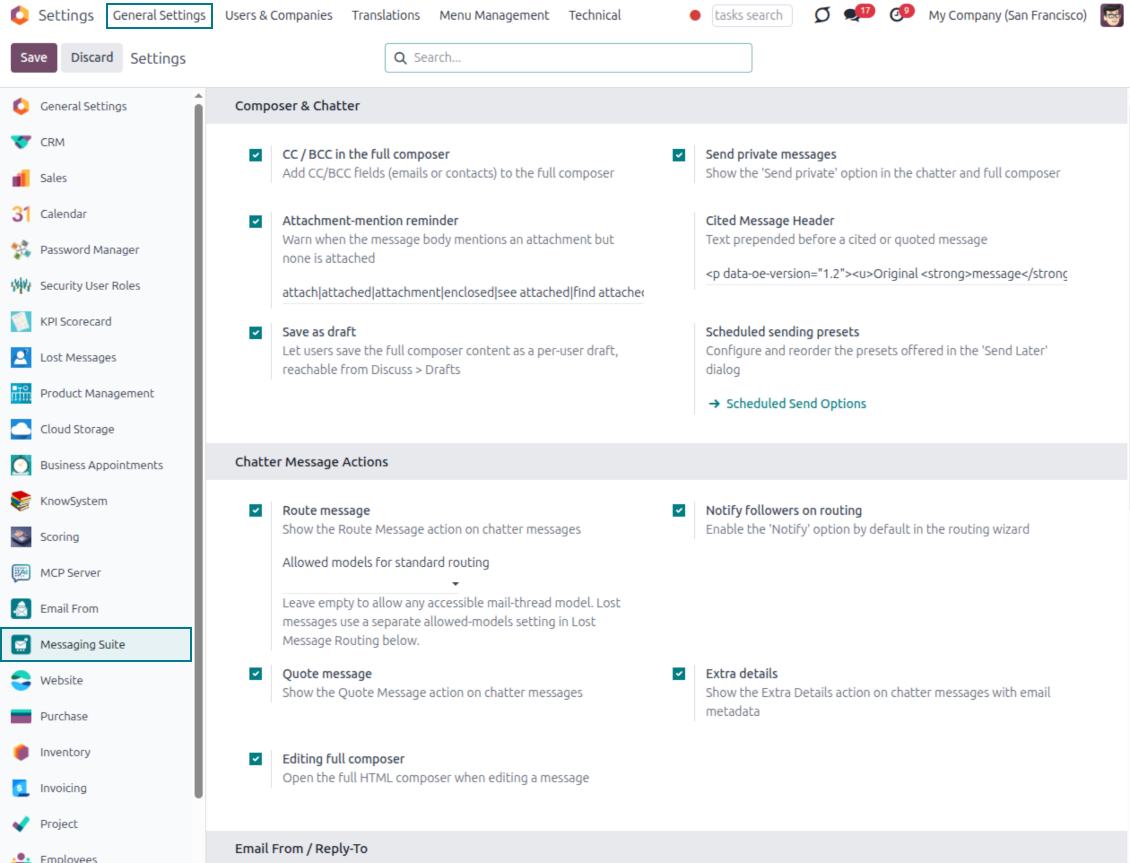
Turn on CC/BCC, drafts, routing, attachment checks and the rest of the toolkit from a single Messaging Suite configuration screen, without hunting through scattered settings menus.
Full email composer
Compose with CC/BCC recipients, per-user drafts and managed From/Reply-To addresses directly inside the Odoo composer.
Managed sender addresses
Stop typing sender emails by hand. Pick from an address book tied to the right outgoing mail server, with automatic rules by document type.
Message actions
Route and quote any message from quick actions, and inspect full email headers in a single click.
Lost message recovery
Never lose an incoming email again. Review unattached messages in a dedicated queue and route them to the correct Odoo document before customers wait.
Private threads
Keep sensitive conversations hidden from portal users and other followers, while staying logged on the Odoo document for later reference.
Message citing
Search and cite any earlier Odoo message straight from the composer, so every reply carries the right context.
Message editing & history
Edit or delete your own messages, notes and activity feedback, with a full history of every change kept for admins.
Safer sending
Catch forgotten attachments before you hit send and schedule follow-ups with your own Send Later presets.
Pronto para avaliar?
Comece com um pedido de demo gratuito ou compre na Odoo Apps Store.
Base de demonstração personalizada gratuita. Sem telefone nem cartão. Atualizações gratuitas vitalícias e apoio especializado na versão major do Odoo.
Compose like a real email client
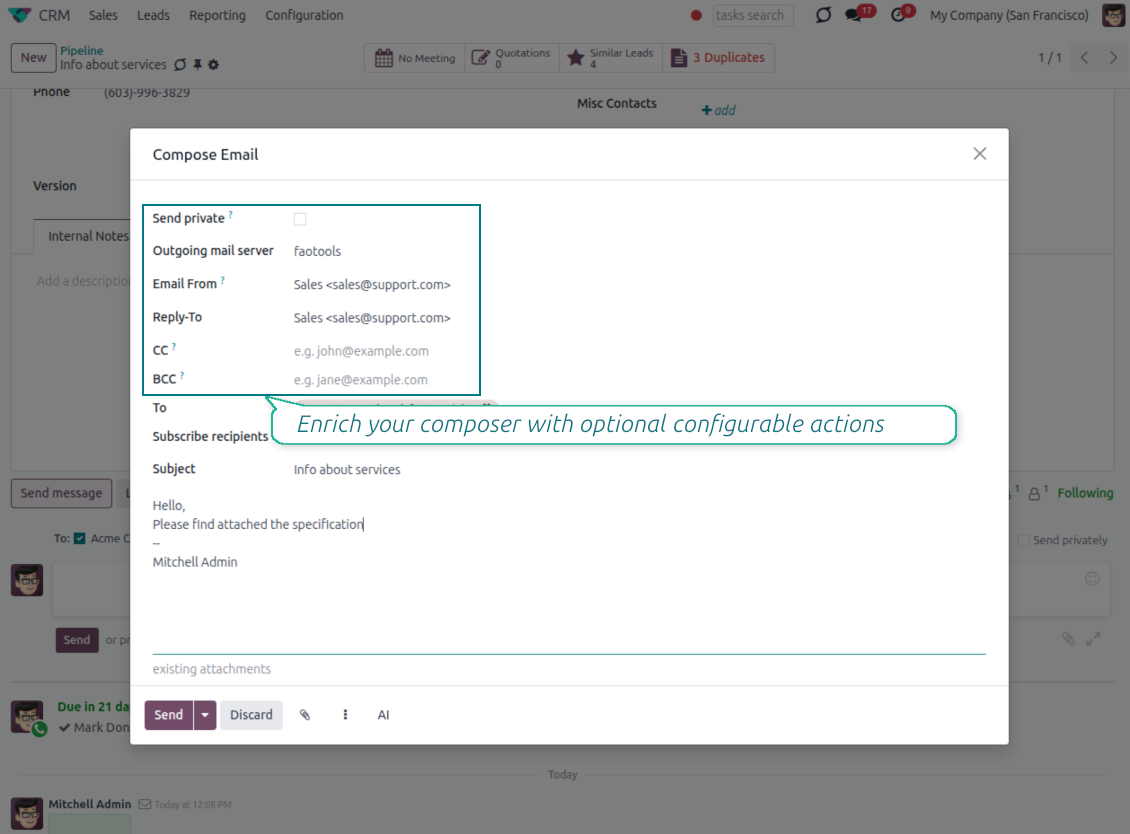
CC, BCC and per-user drafts in the full composer
Copy and blind copy
- Add CC and BCC in the full composer. Type email addresses or pick existing contacts.
- Keep recipients in the message history. Sent CC/BCC values stay visible on the message afterwards.
- Use only when you need them. Turn CC/BCC off in settings if your team does not use copy recipients.
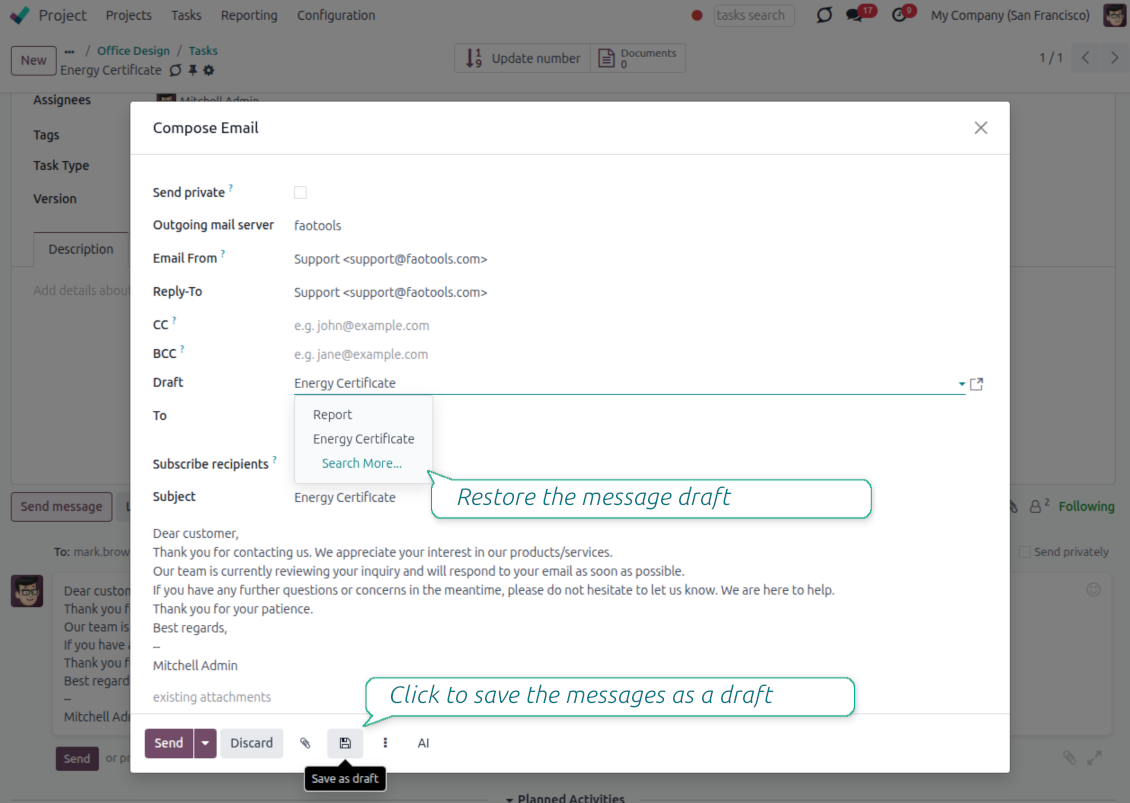
Save as draft
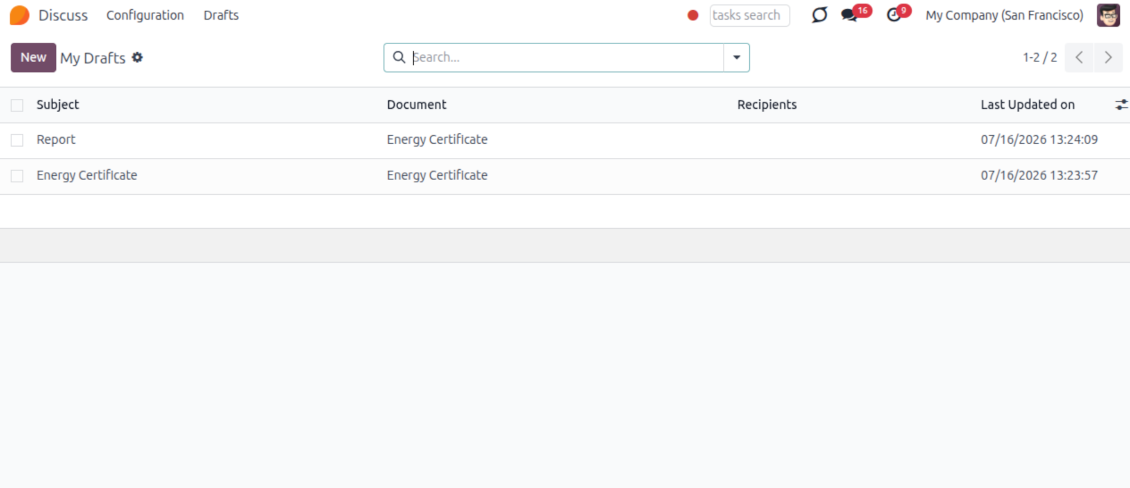
- Save the full message. Drafts keep subject, body, recipients and related fields for the current record.
- Resume where you stopped. Reopening the composer on the same document brings back your latest draft automatically.
- Pick up drafts from Discuss. Every internal user can open the drafts menu and finish unfinished messages.
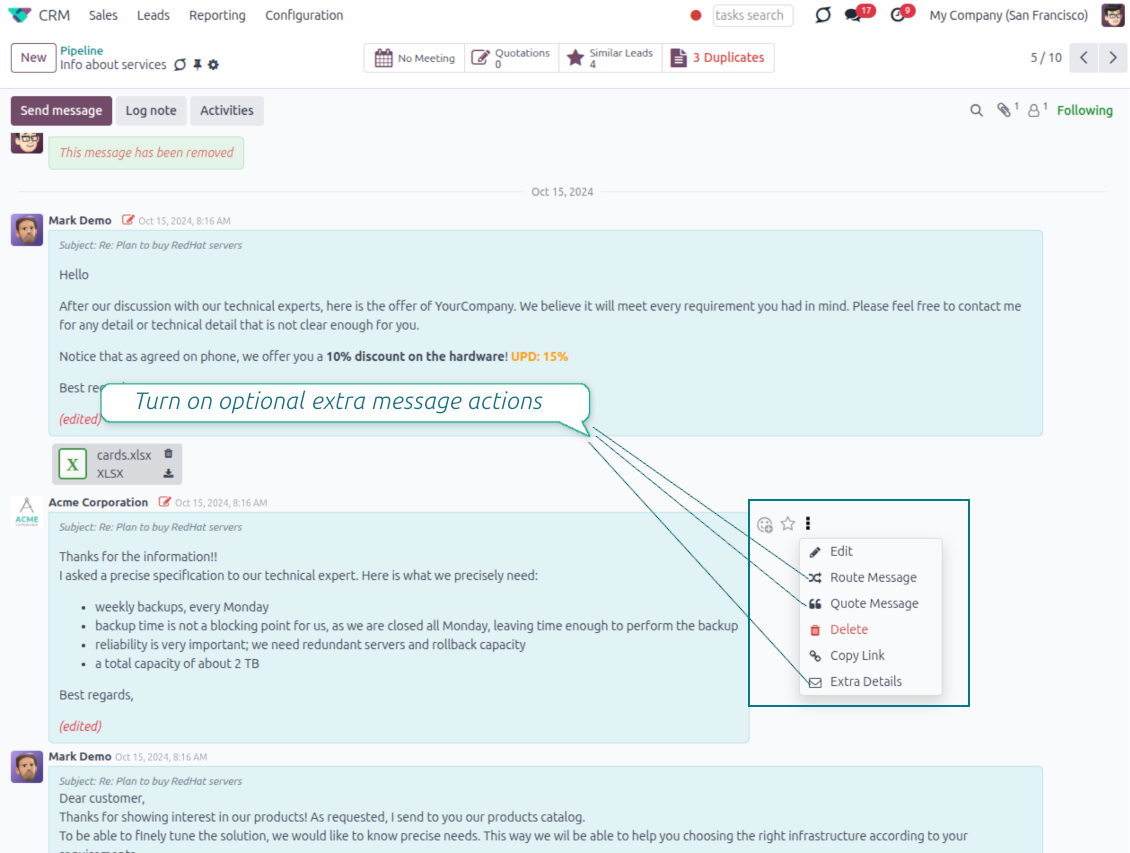
Message actions and email metadata
Route, quote and inspect email details without leaving the chatter
Actions on every message
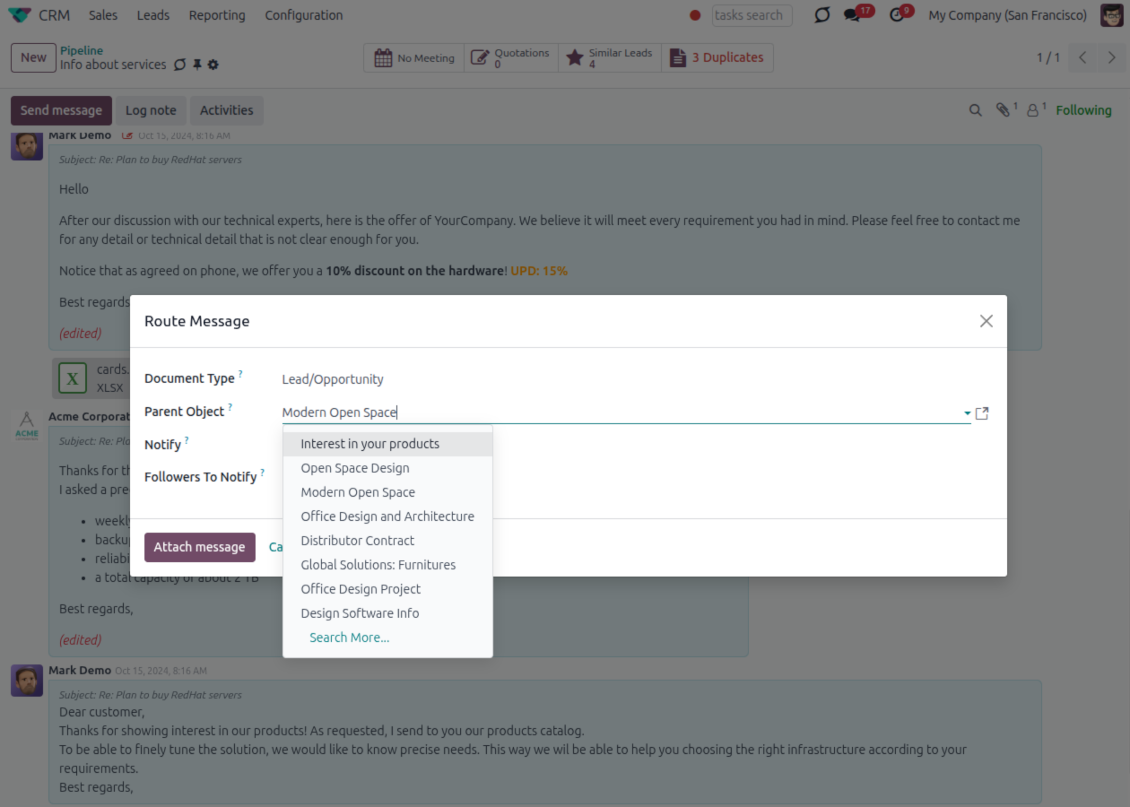
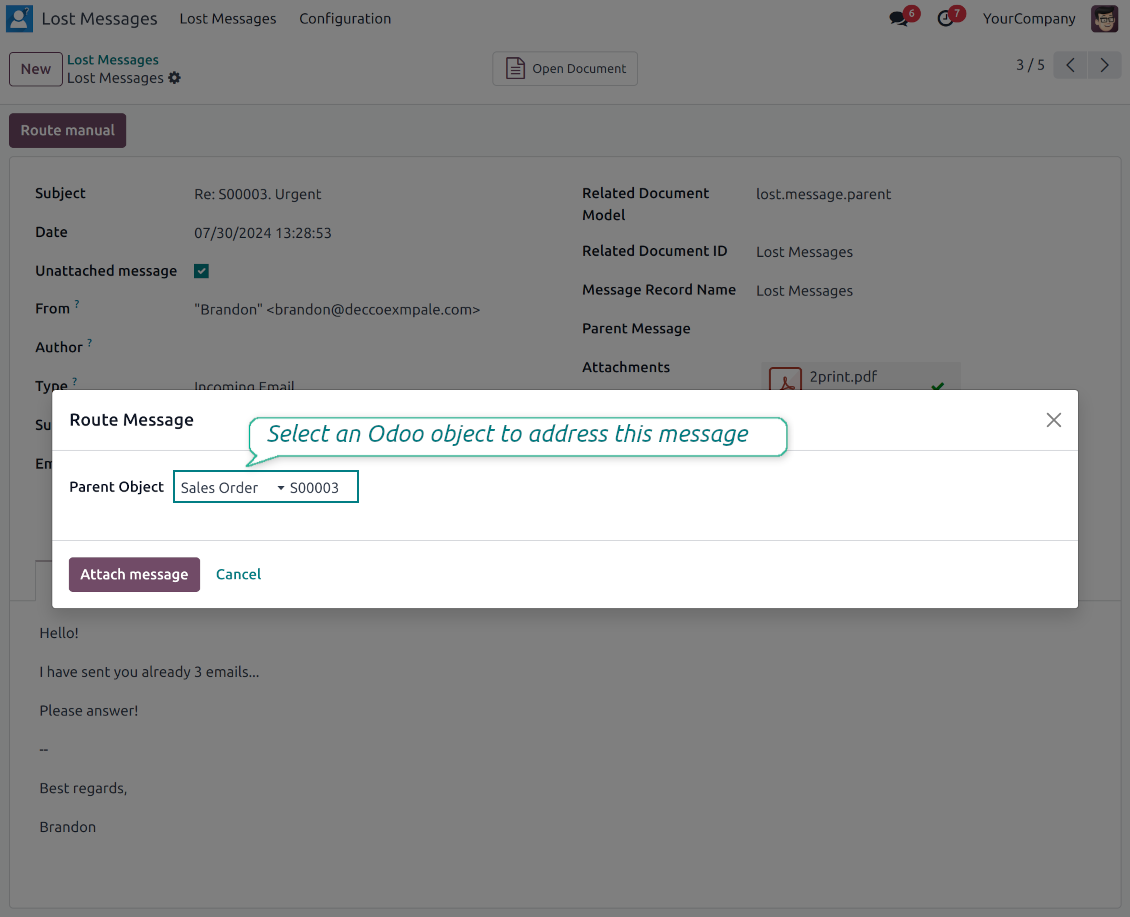
- Route from the thread. Move a message to another document when it landed on the wrong record.
- Quote in a new email. Start a reply with the original message included in the body.
- Keep the composer simple. Every action opens the standard Odoo composer already pre-filled, no separate tooling to learn.
Email details on every message
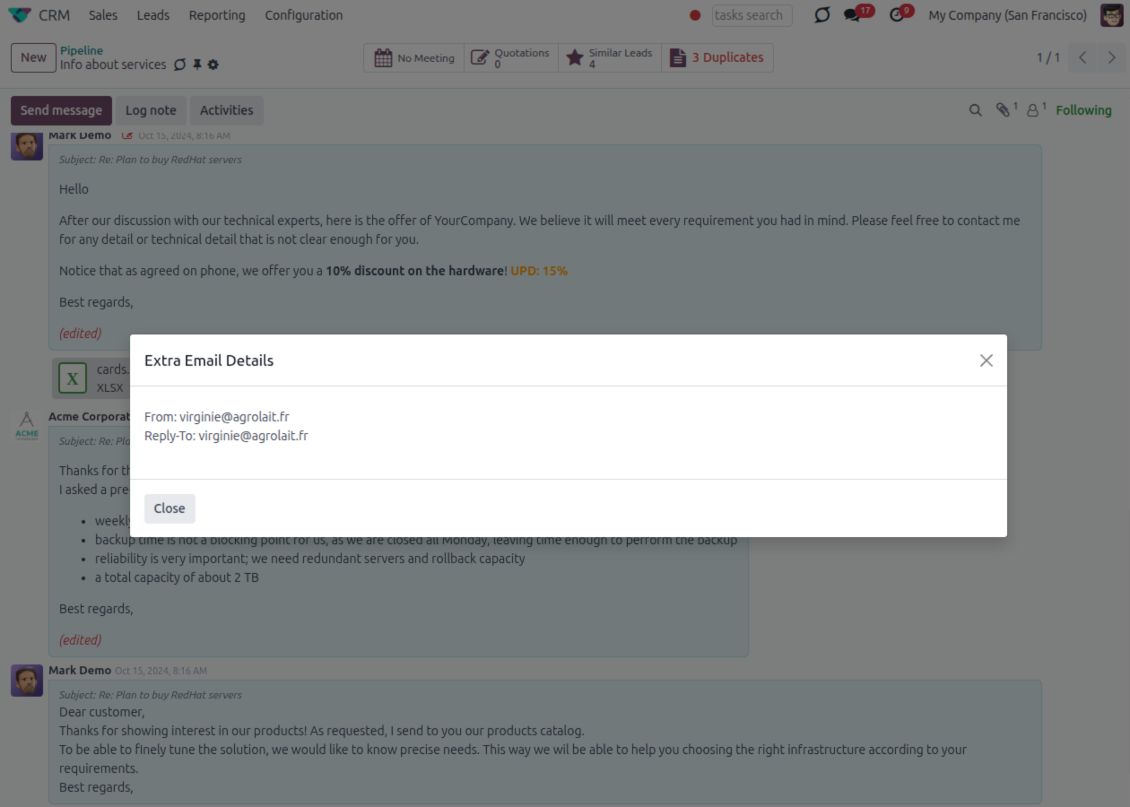
- See full headers. From, Reply-To, To and CC stay available on incoming and outgoing mail.
- Keep CC/BCC too. Copy recipients added in the composer are saved with the message.
- Open details in one click. A small icon on the message shows the complete email information.
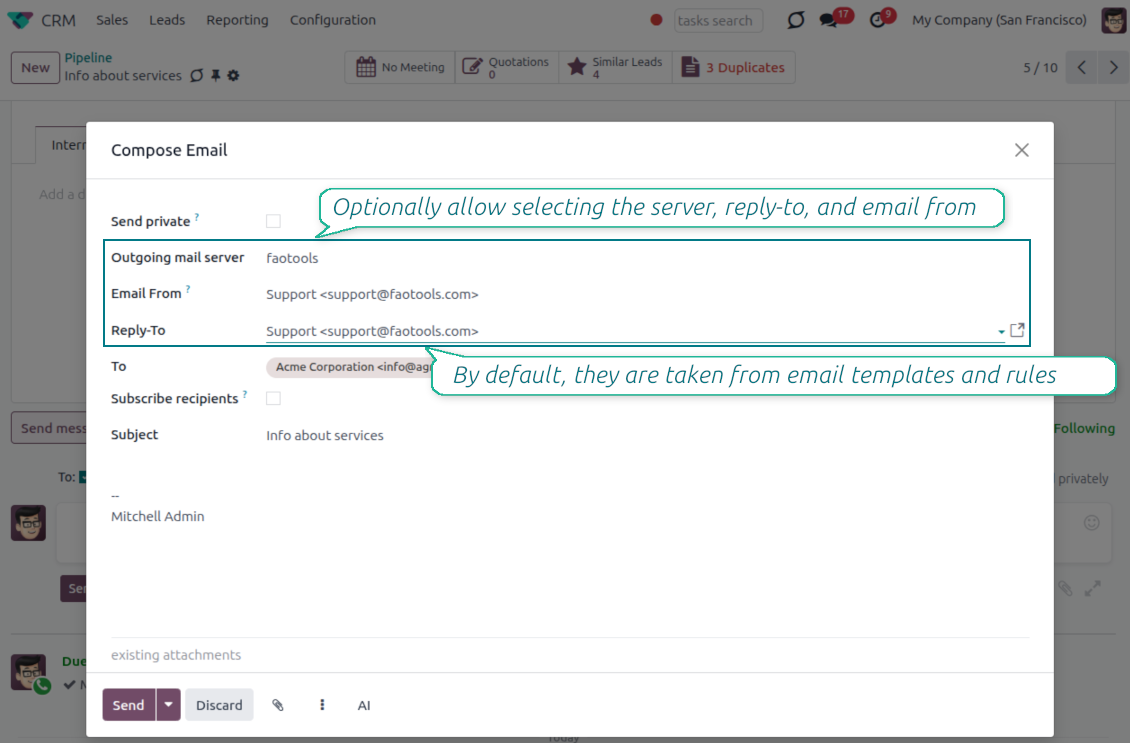
Odoo Email From
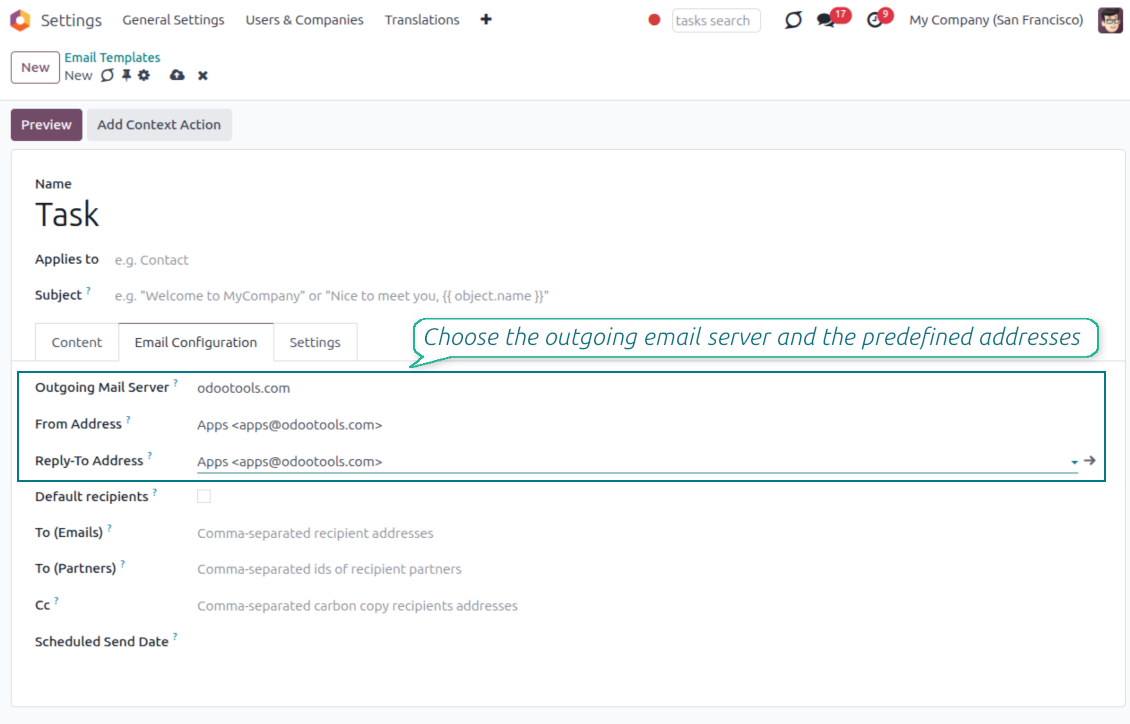
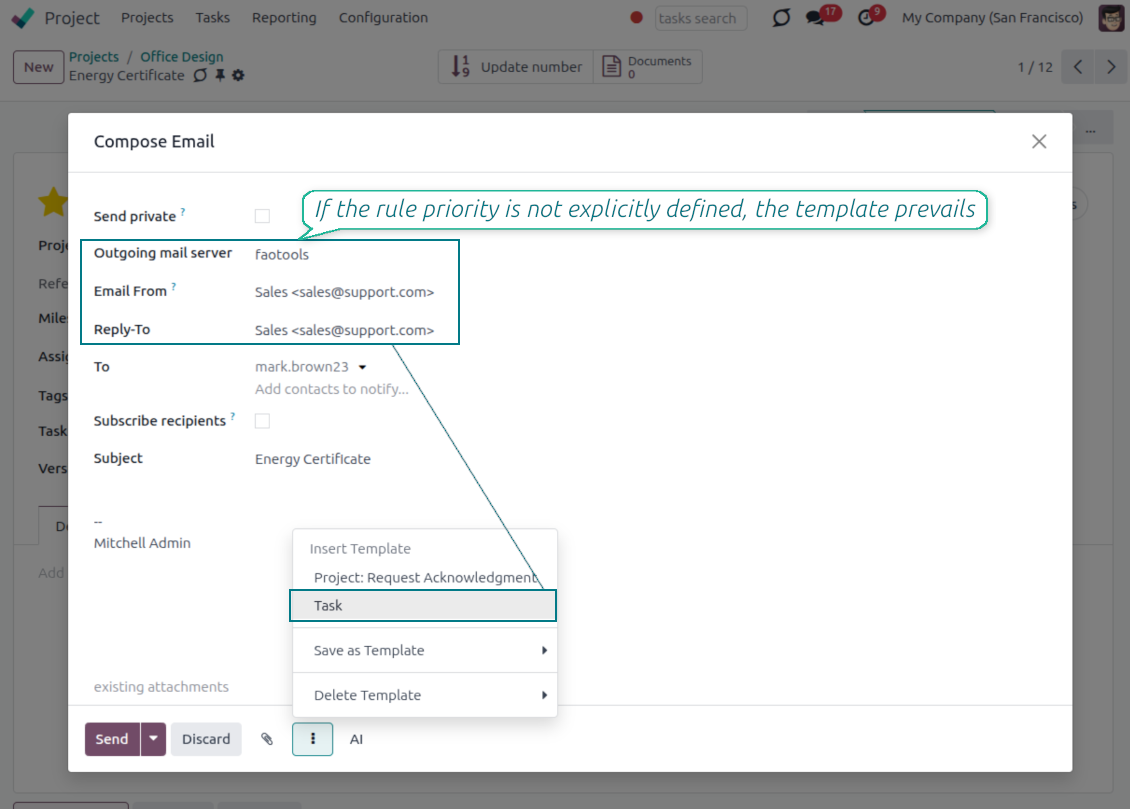
Choose the right From and Reply-To address for every email
Managed sender addresses
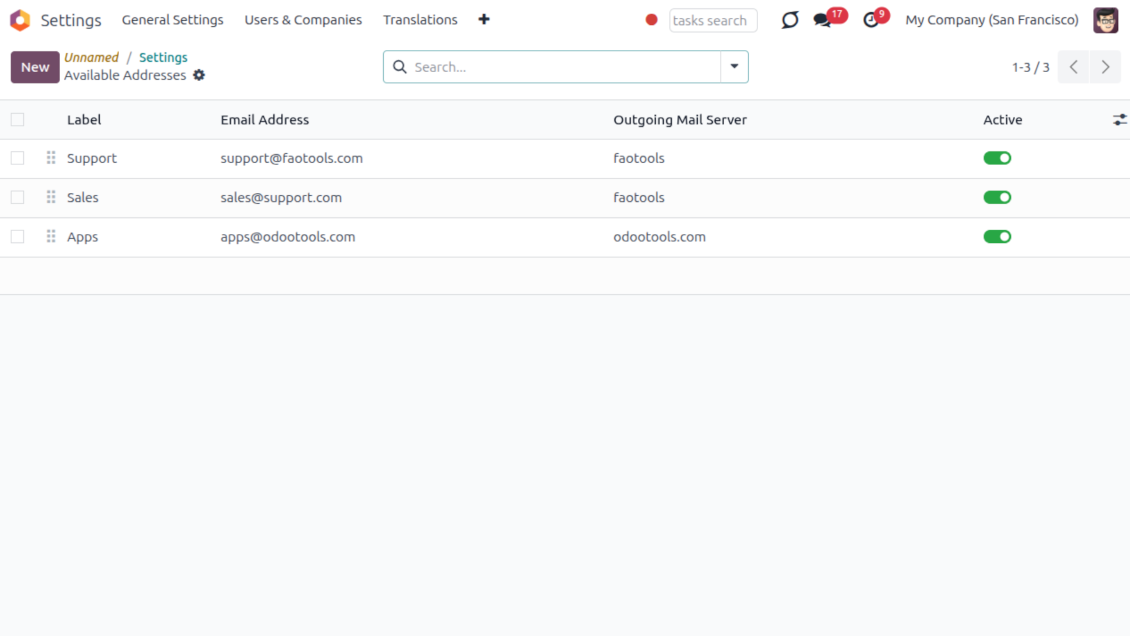
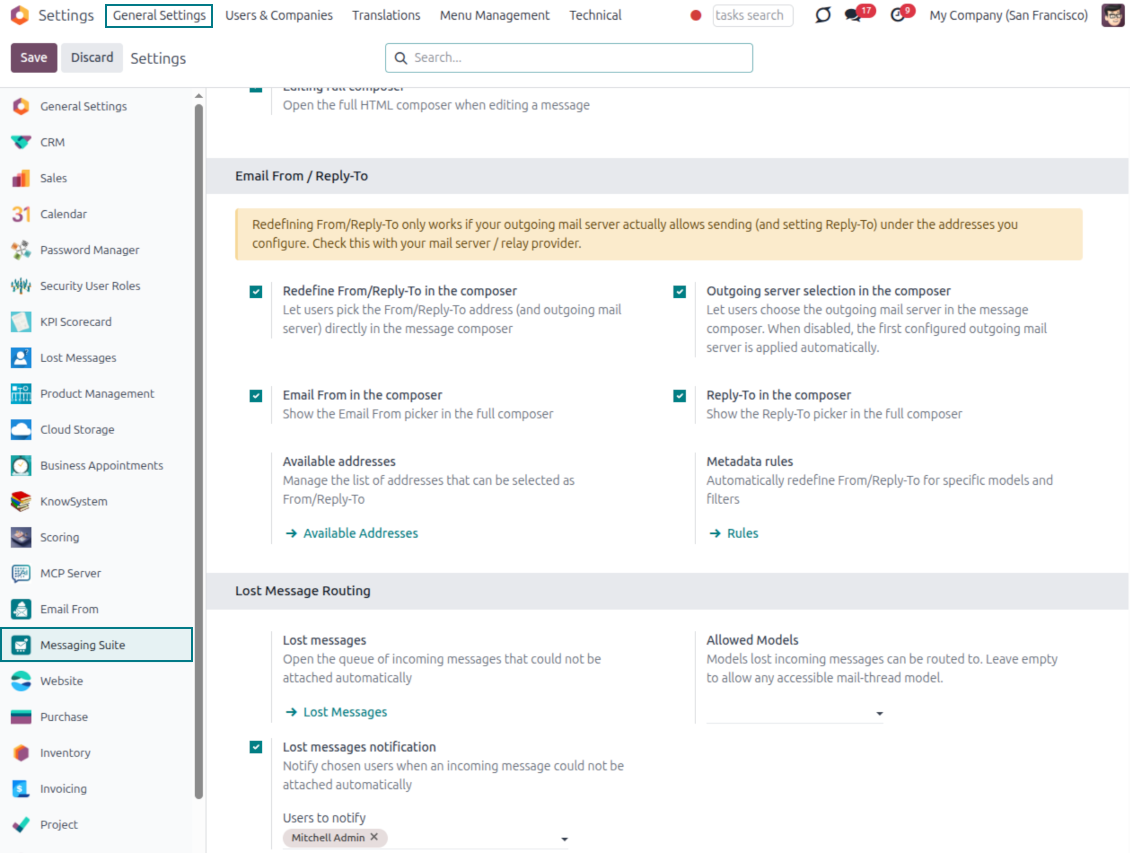
- Pick instead of typing. Users choose From and Reply-To from an address book linked to outgoing mail servers.
- Apply on templates too. Email templates can use the same managed sender addresses.
- Keep the screen simple. The outgoing mail server field is hidden when only one server is configured.
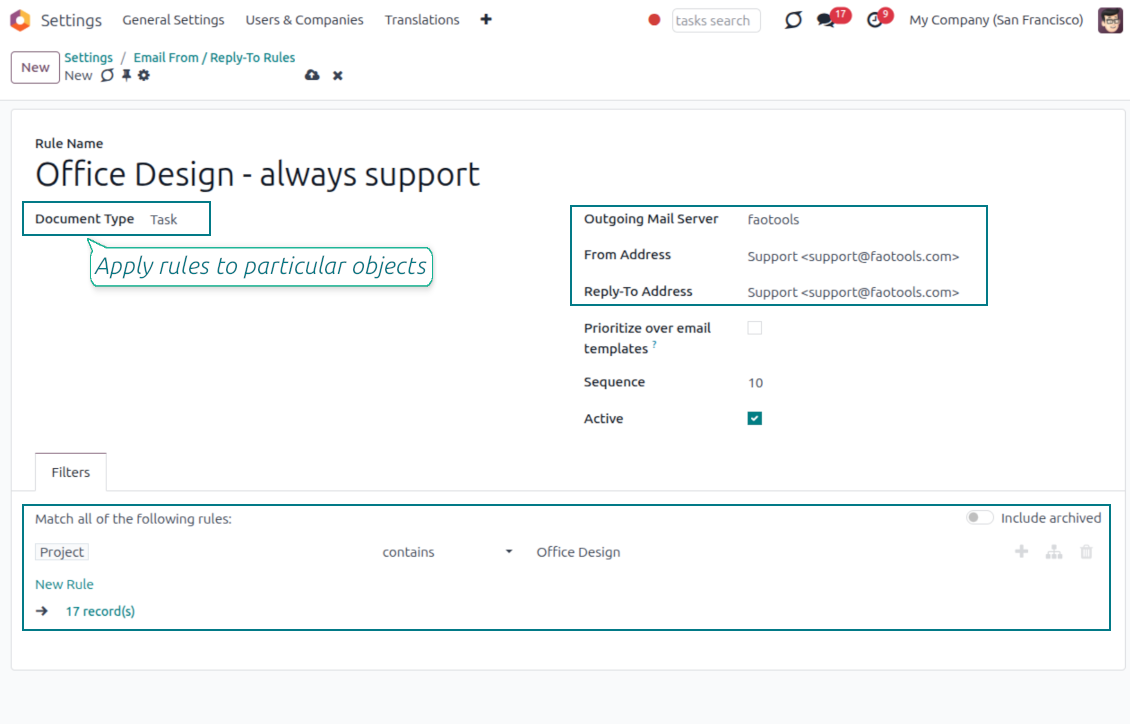
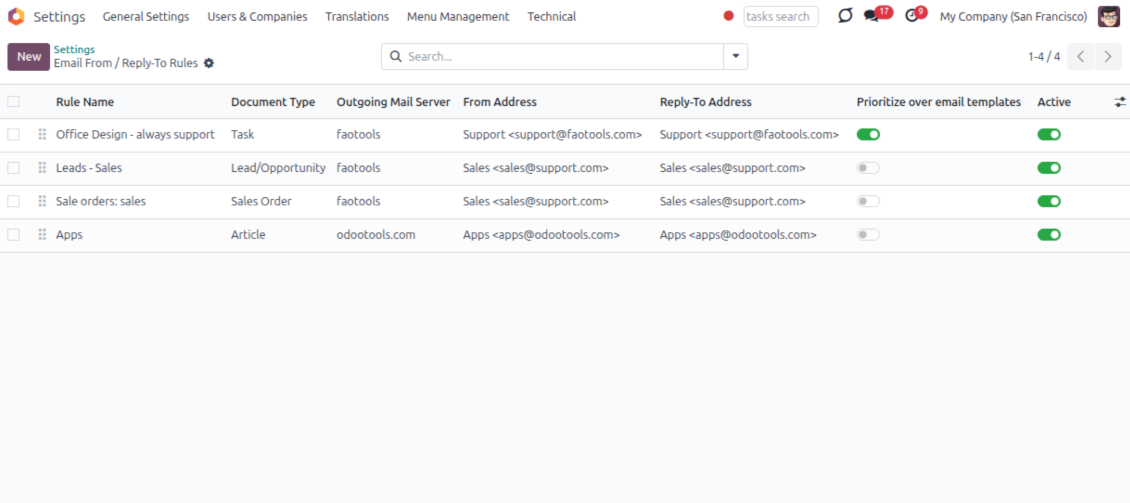
Automatic sender rules
- Set the sender by document type. Rules choose the right From and Reply-To for sales orders, tasks, invoices and other records.
- Prevent invalid combinations. Odoo blocks sender addresses that do not match the selected outgoing mail server.
- Start with working mail setup. Make sure each outgoing server can actually send from the addresses you add.
Pronto para avaliar?
Comece com um pedido de demo gratuito ou compre na Odoo Apps Store.
Base de demonstração personalizada gratuita. Sem telefone nem cartão. Atualizações gratuitas vitalícias e apoio especializado na versão major do Odoo.
Lost Messages Routing
Recover incoming emails Odoo could not attach automatically
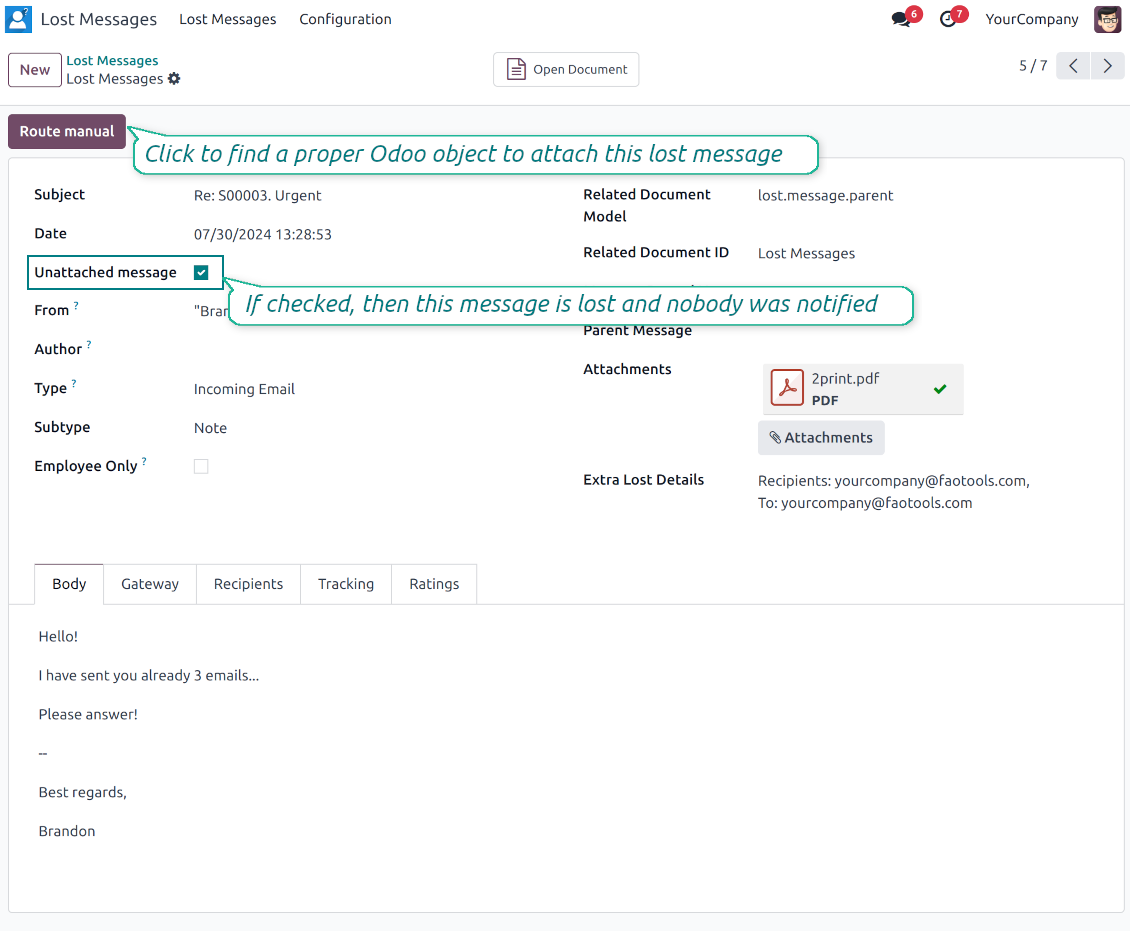
Lost message queue
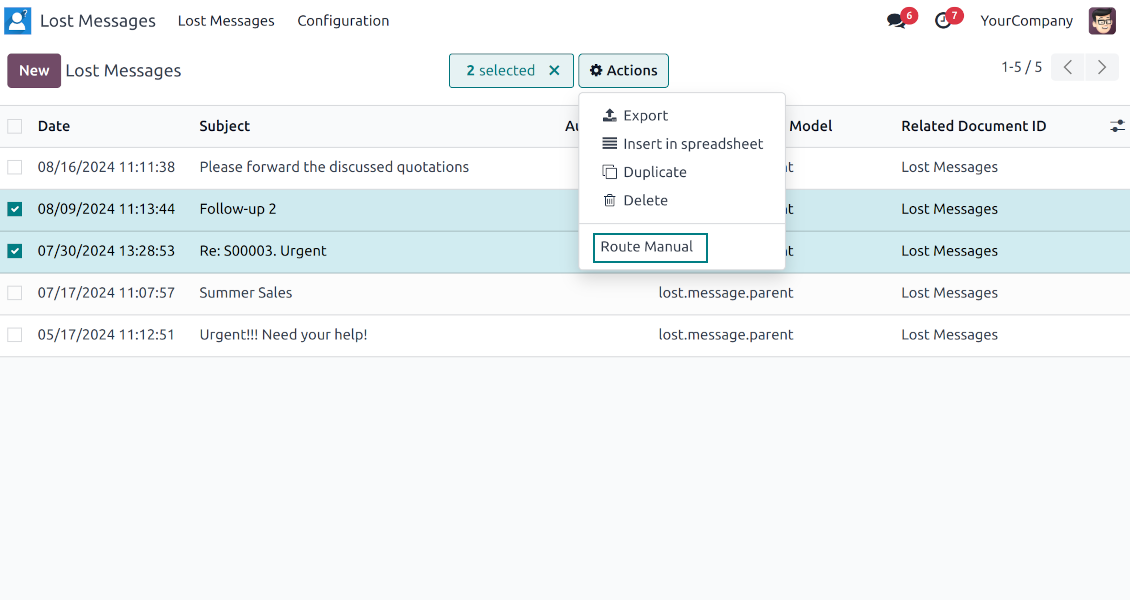
- Catch emails that did not attach. Incoming messages Odoo cannot place on a document are kept instead of disappearing.
- Review in one menu. Your team works from a dedicated queue with subject, sender, body and search tools.
- Keep routing clues. Recipients, To, CC and In Reply To stay available to help find the right document.
Route to the right document
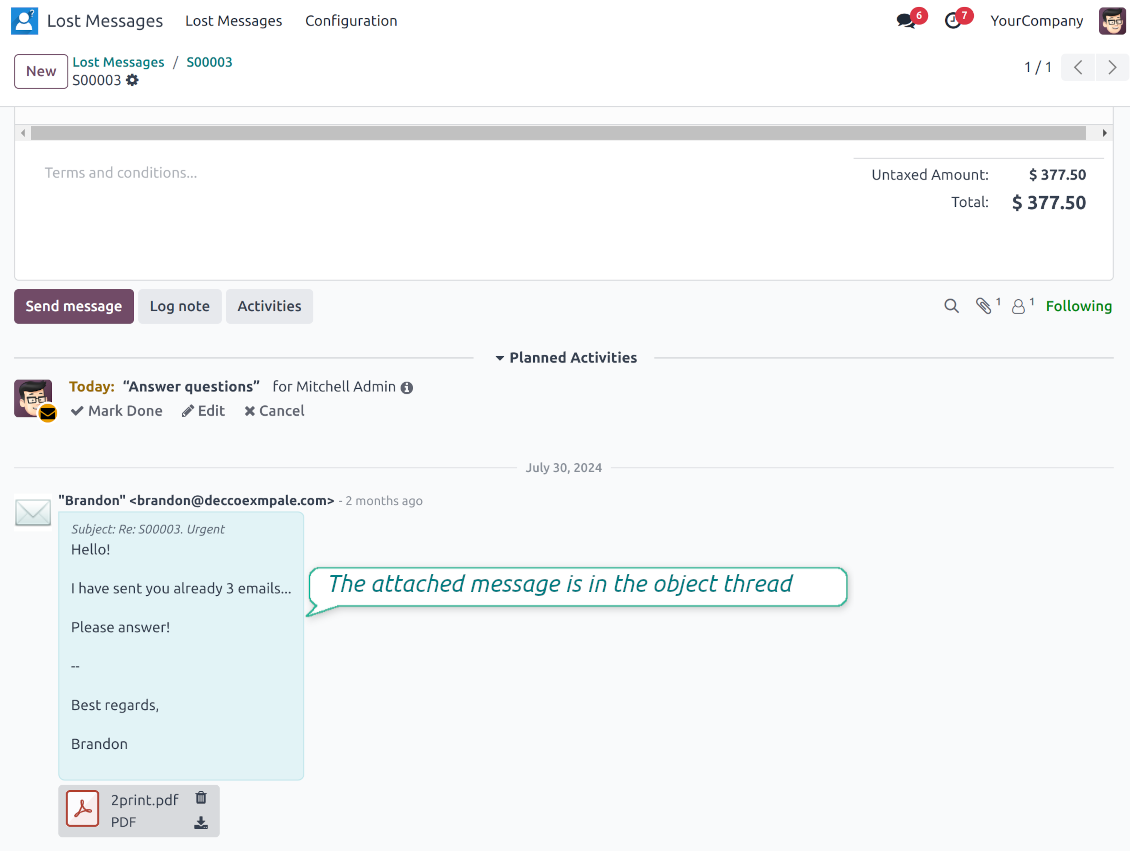
- Attach in a few clicks. Pick the target document and attach one or several lost messages in a single action.
- Limit where messages may go. Restrict routing to selected document types or leave the list open for managers.
- Move attached messages too. Already linked chatter messages can be rerouted to another document when needed.
Private Thread
Confidential discussions that stay inside Odoo and off the portal
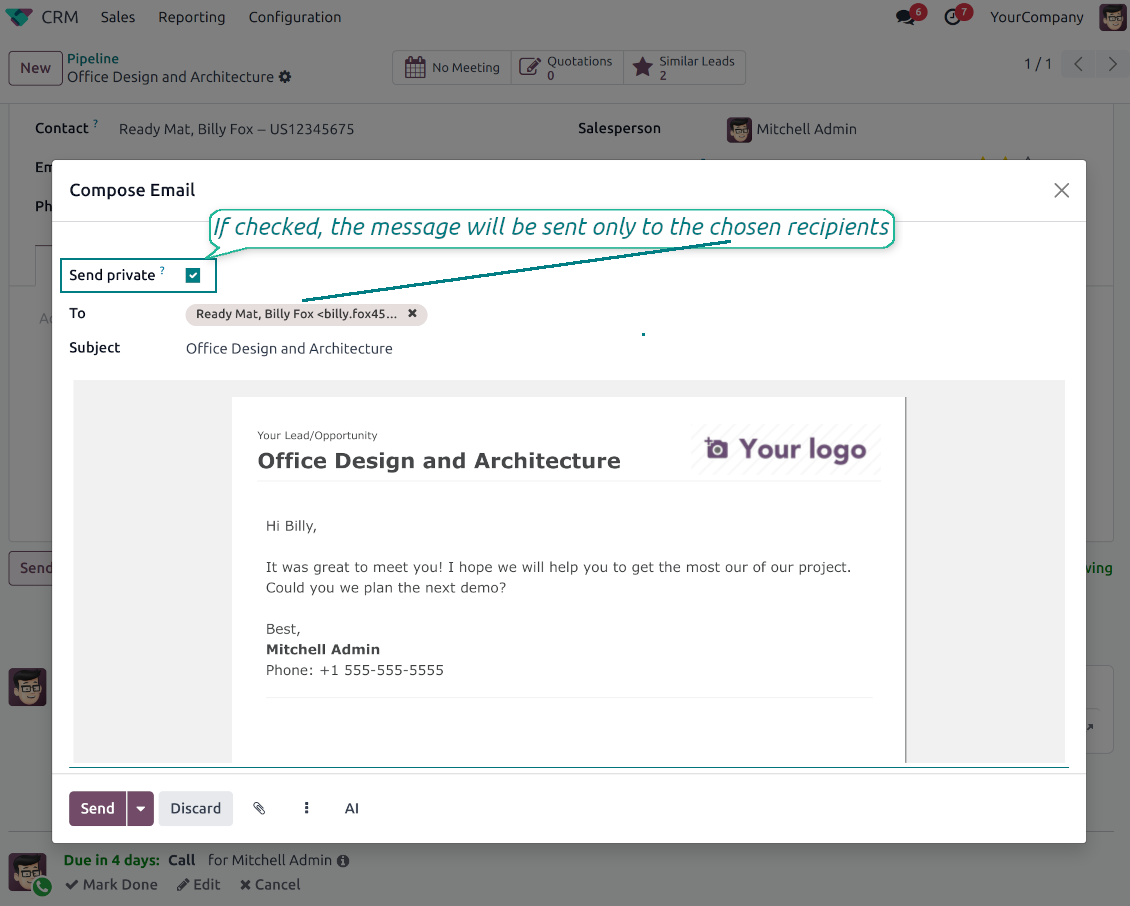
Send private from the composer
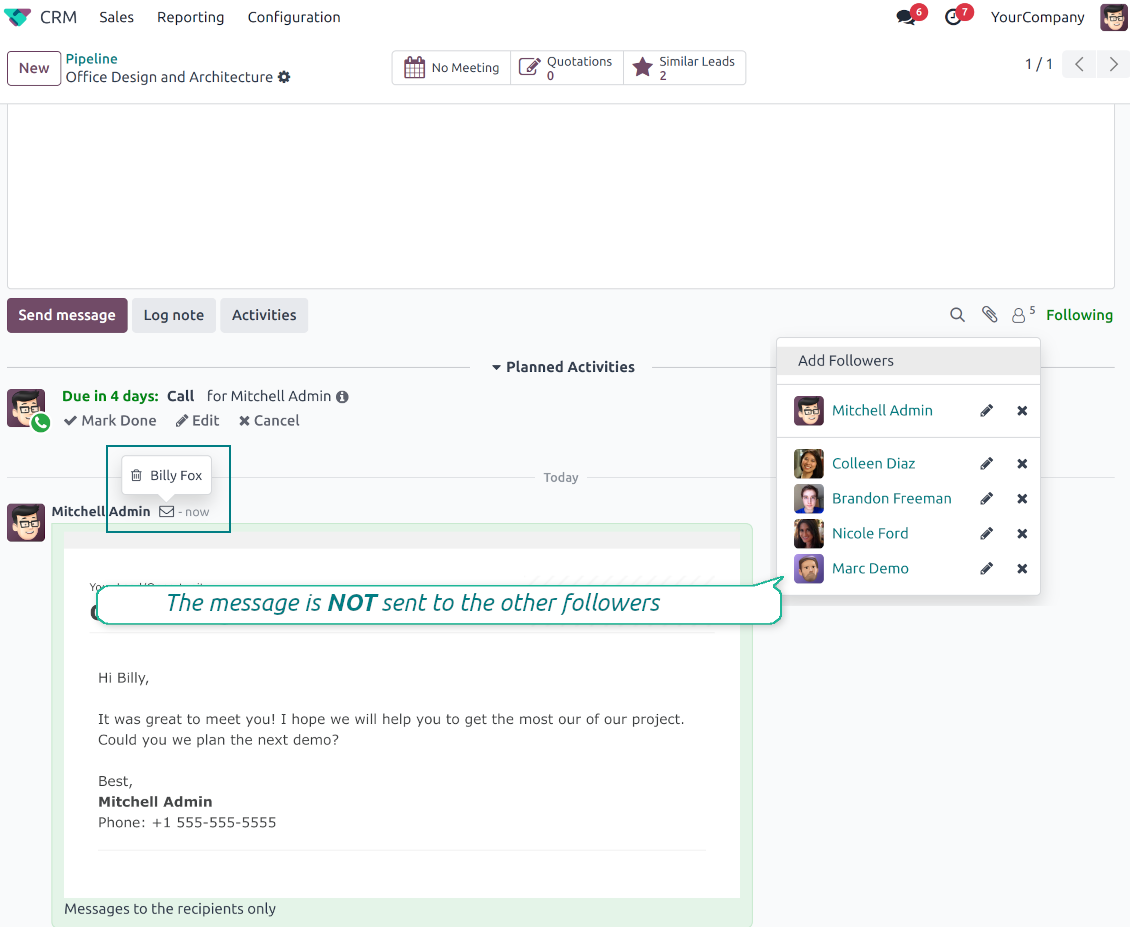
- Tick Send private. Compose a message that reaches only the selected recipients.
- Do not notify other followers. Portal users and regular followers stay out of the conversation.
- Works on any document. Use private sending on sales orders, tasks, invoices, leads and other records.
Confidential but traceable
- Keep history on the record. Private messages remain on the document for later reference.
- Hide from portal users. External contacts cannot read internal discussions on their documents.
- Stay private in replies. Follow-up replies remain private too.
Message and Note Editing
Fix mistakes after sending while keeping a transparent history
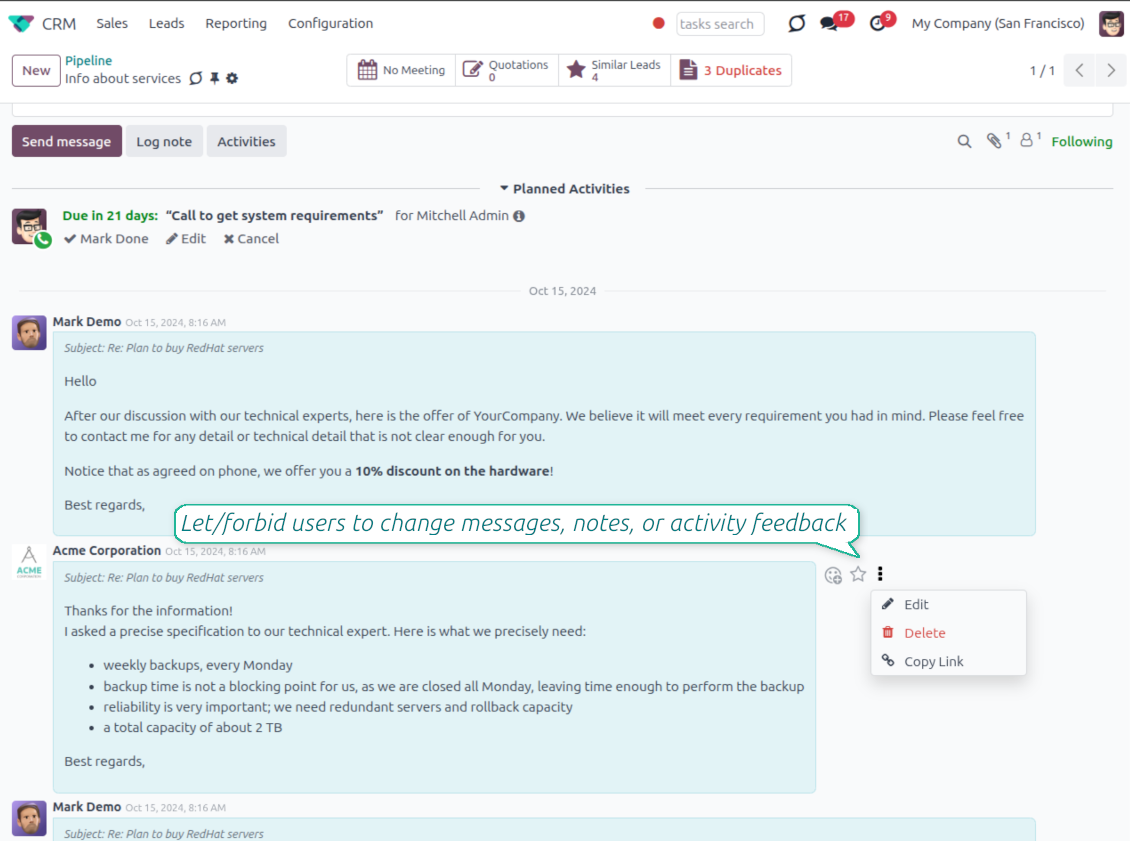
Fix mistakes after sending
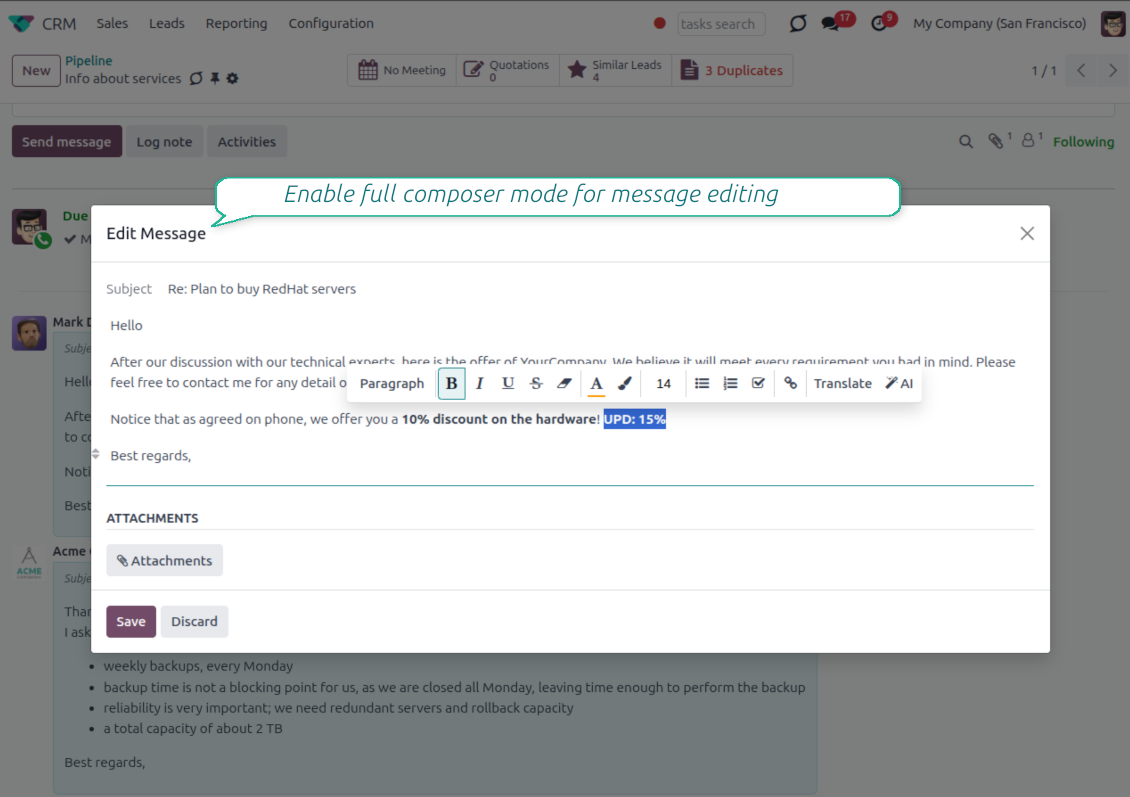
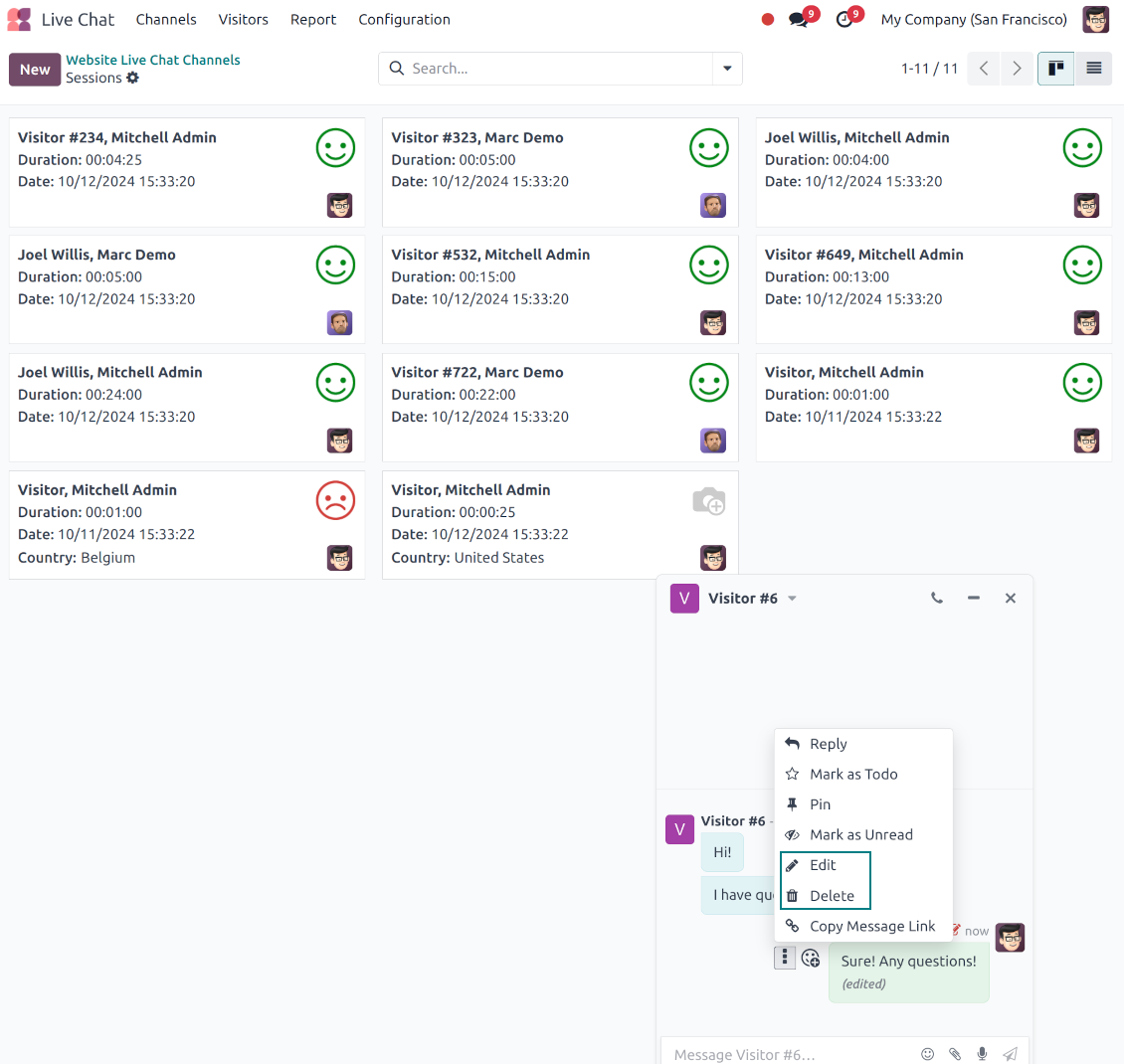
- Edit your own messages. Correct comments, notes and activity feedback after they were posted.
- Give admins broader control. Authorized users can manage messages posted by others when policy requires it.
- Use the full editor when needed. Open subject, rich body and attachments in a pop-up for bigger changes.
History for every change
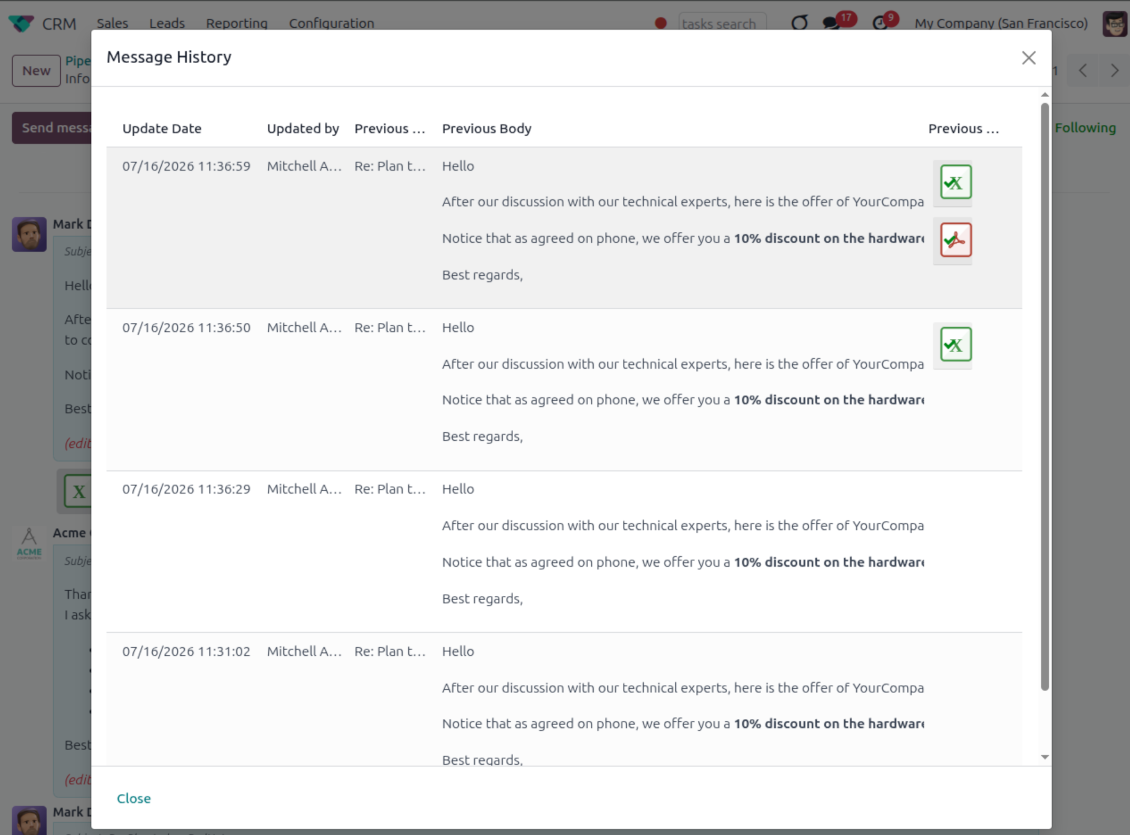
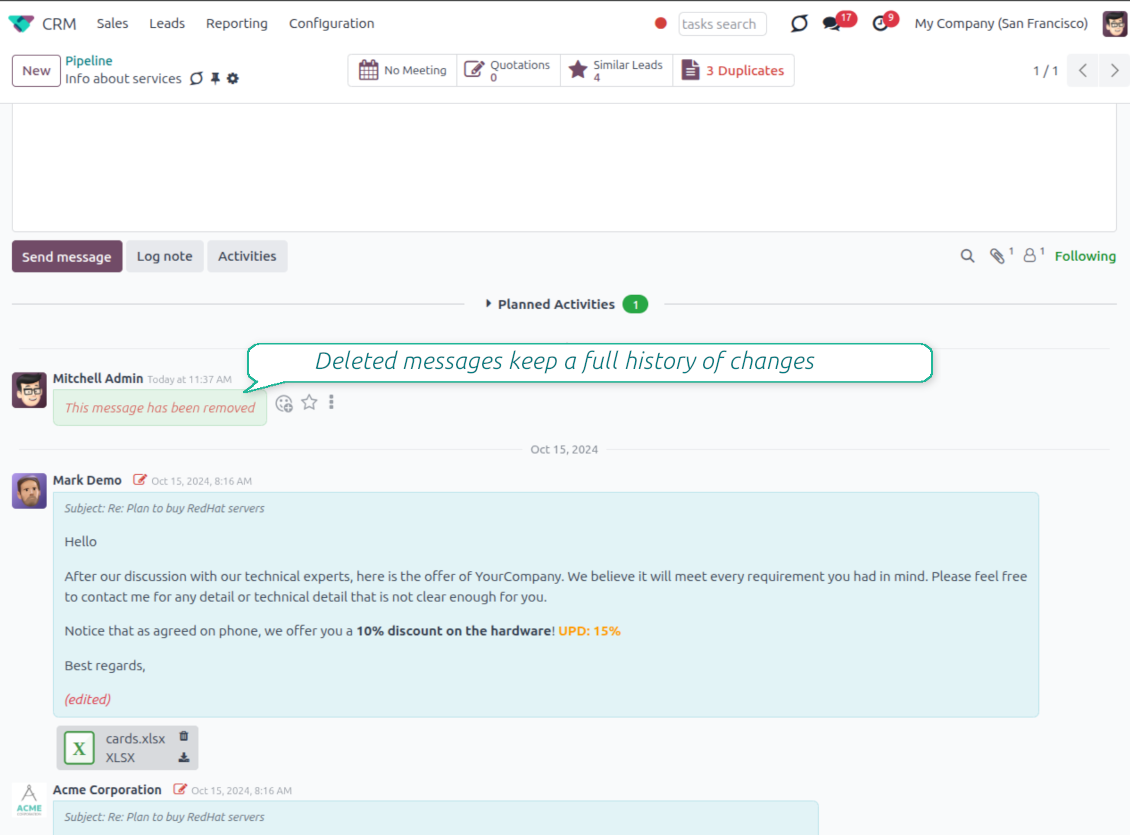
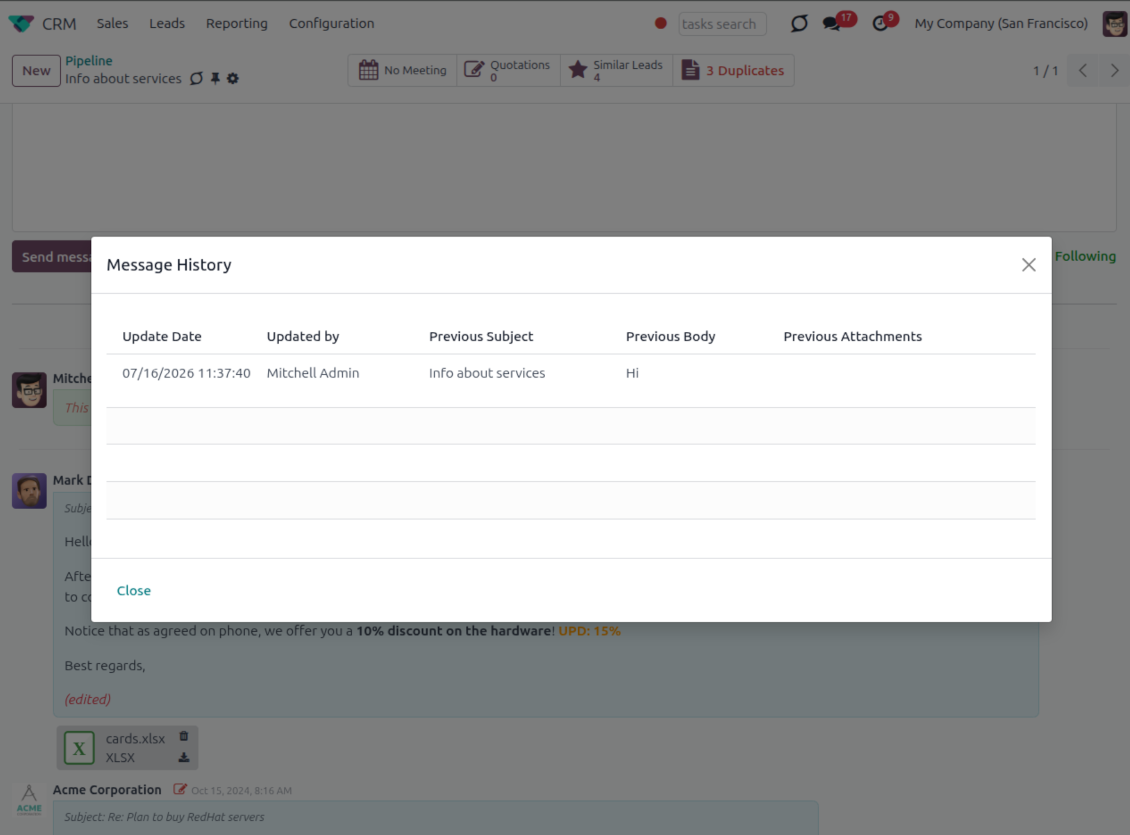
- Track what changed. Subject, body and attachment updates are stored with user and timestamp.
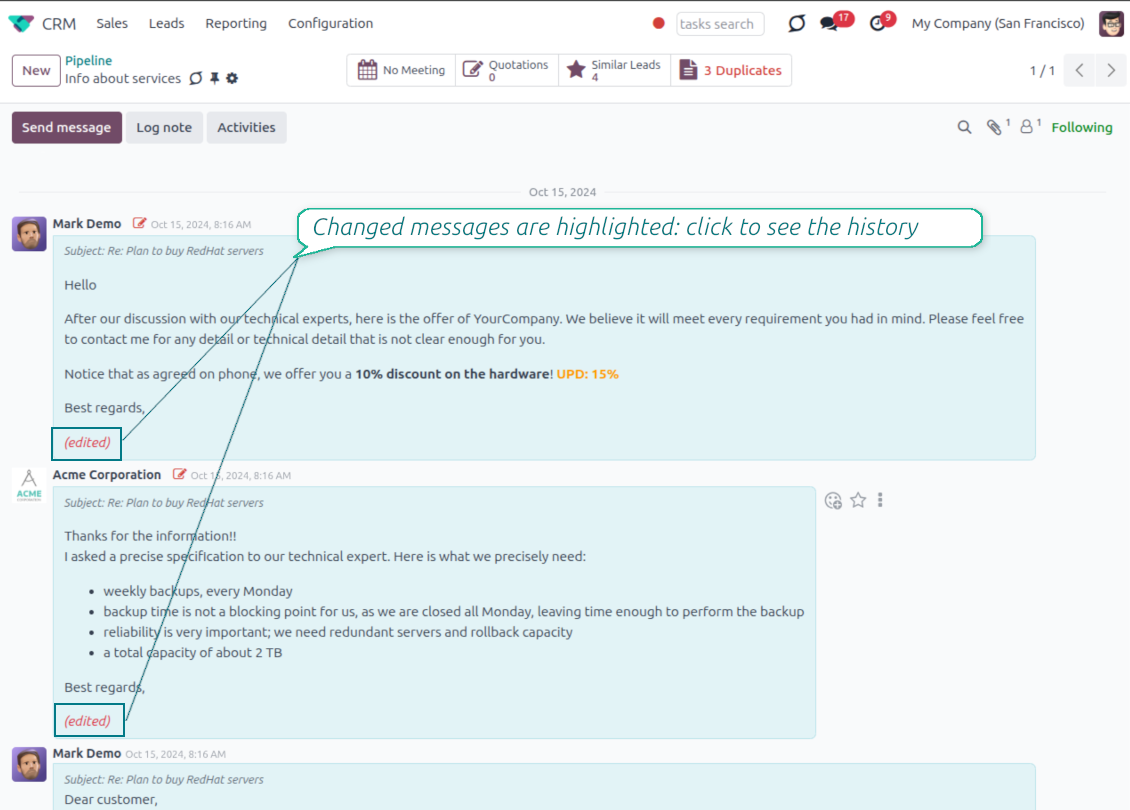
- Spot edited messages quickly. Modified entries show an edited label that opens the history in one click.
- Keep deleted content. Even removed messages retain their history for audit purposes.
Pronto para avaliar?
Comece com um pedido de demo gratuito ou compre na Odoo Apps Store.
Base de demonstração personalizada gratuita. Sem telefone nem cartão. Atualizações gratuitas vitalícias e apoio especializado na versão major do Odoo.
Catch missing attachments
Confirm forgotten attachments before they leave the composer
Attachment mention check
- Spot missing files before send. Odoo checks the message text when you mention an attachment.
- Works everywhere you write. The reminder appears in the full composer, quick reply and chat flows.
- Turn it off when not needed. Enable or disable the check from Messaging Suite settings.
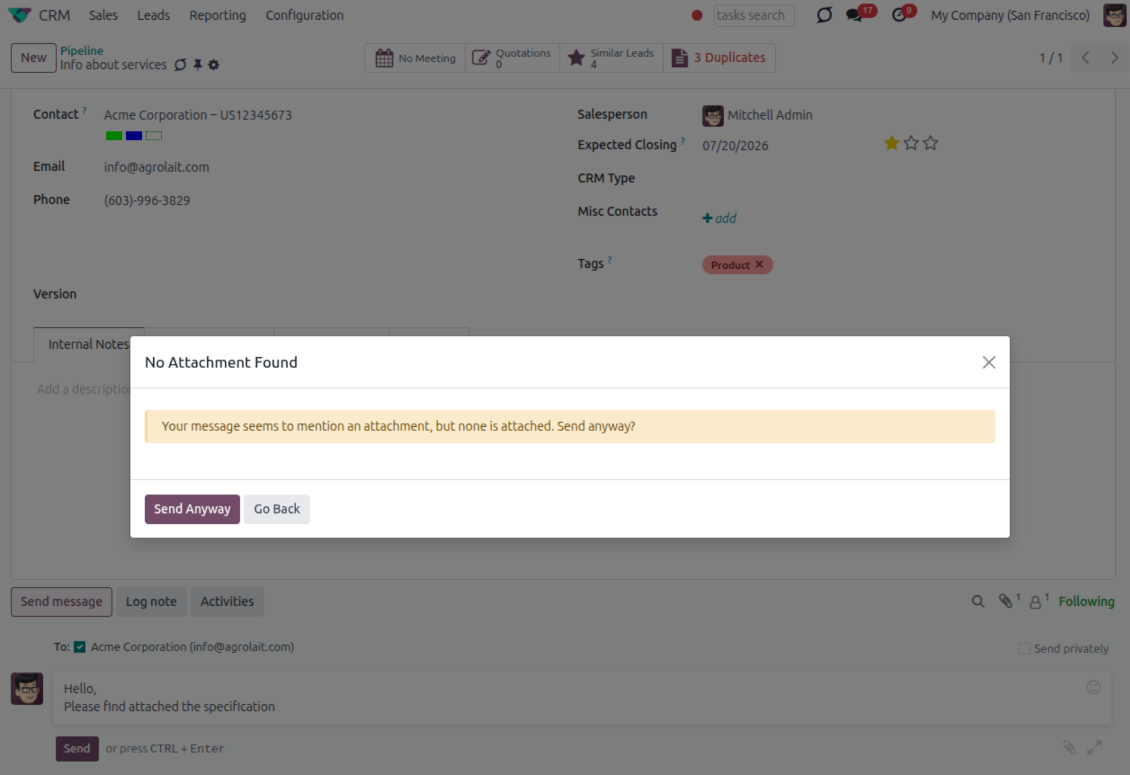
Send-time confirmation
- Stop accidental sends. A dialog appears when the body mentions an attachment but none is attached.
- Let the user decide. Send Anyway and Go Back keep the flow moving without losing the draft.
- Adapt the wording. Adjust what counts as an attachment mention in settings when your team uses different phrases.
Send later with your own presets
Schedule follow-ups with options your team actually uses
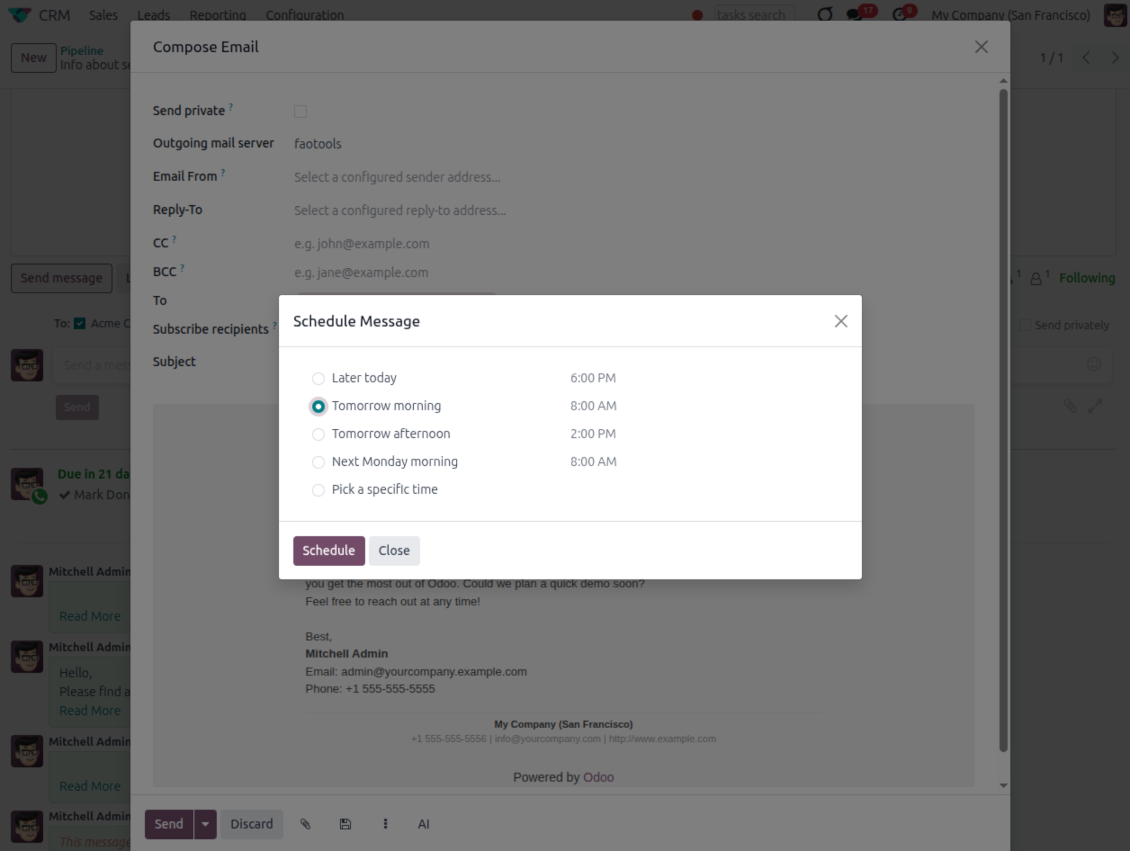
Your own Send Later options
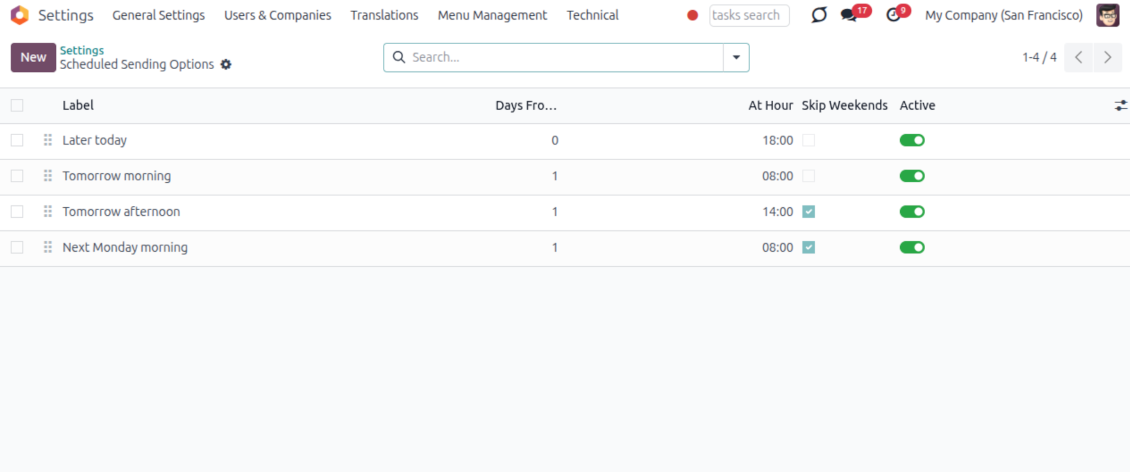
- Go beyond the built-in choices. Define your own scheduled-sending options instead of only Tomorrow Morning / Afternoon.
- Show them in Send Later. Presets appear directly in the standard scheduled-send dialog.
- Pick a preset in one click. Users schedule follow-ups without calculating dates manually.
Maintain the preset list
- Set label, offset and send time. Each option defines days from today, hour and whether weekends are skipped.
- Control order and availability. Reorder presets and switch them on or off any time.
- Manage from Discuss. Administrators maintain Scheduled Sending Options from its own menu entry.
Message Citing
Quote earlier Odoo messages while you reply
Cite while you compose
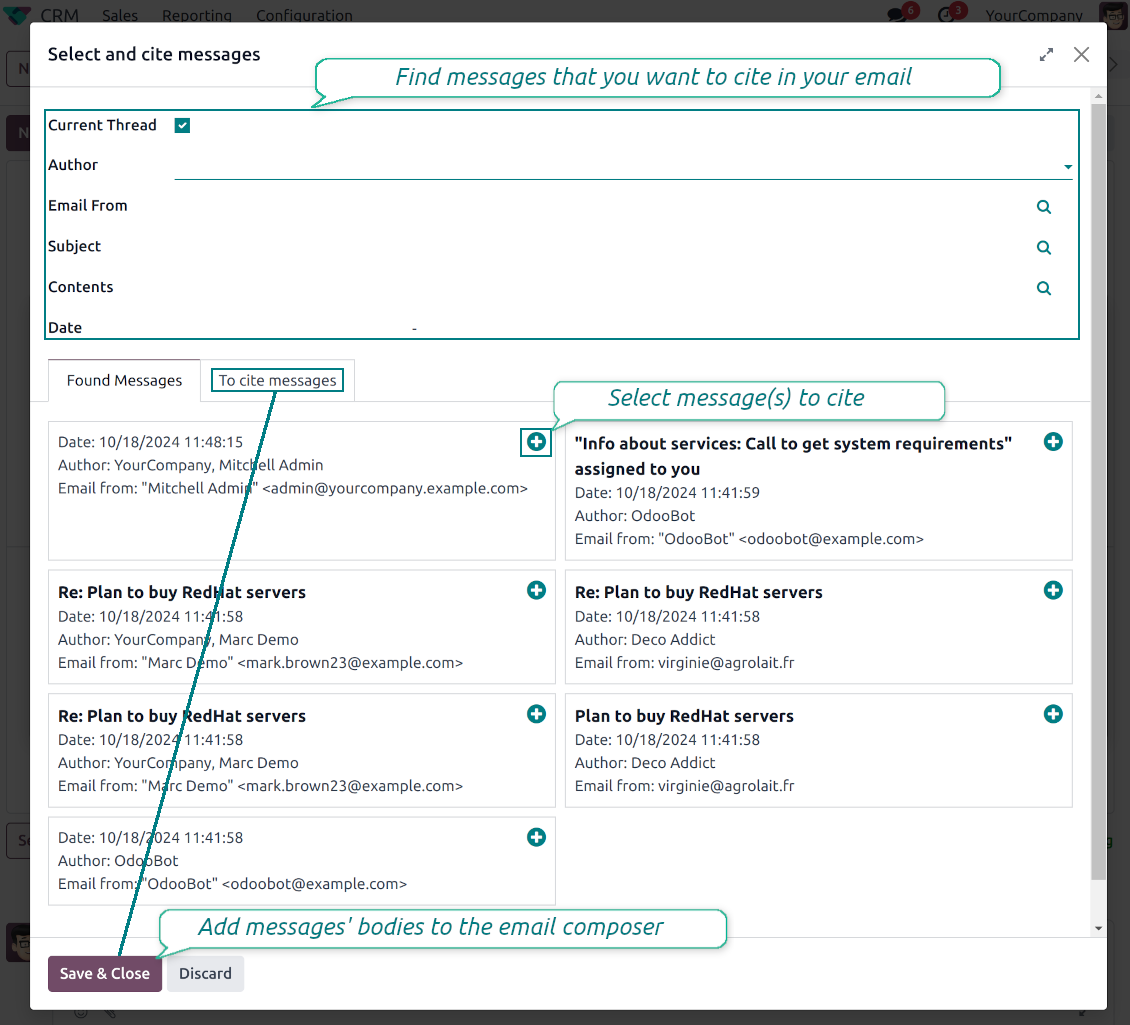
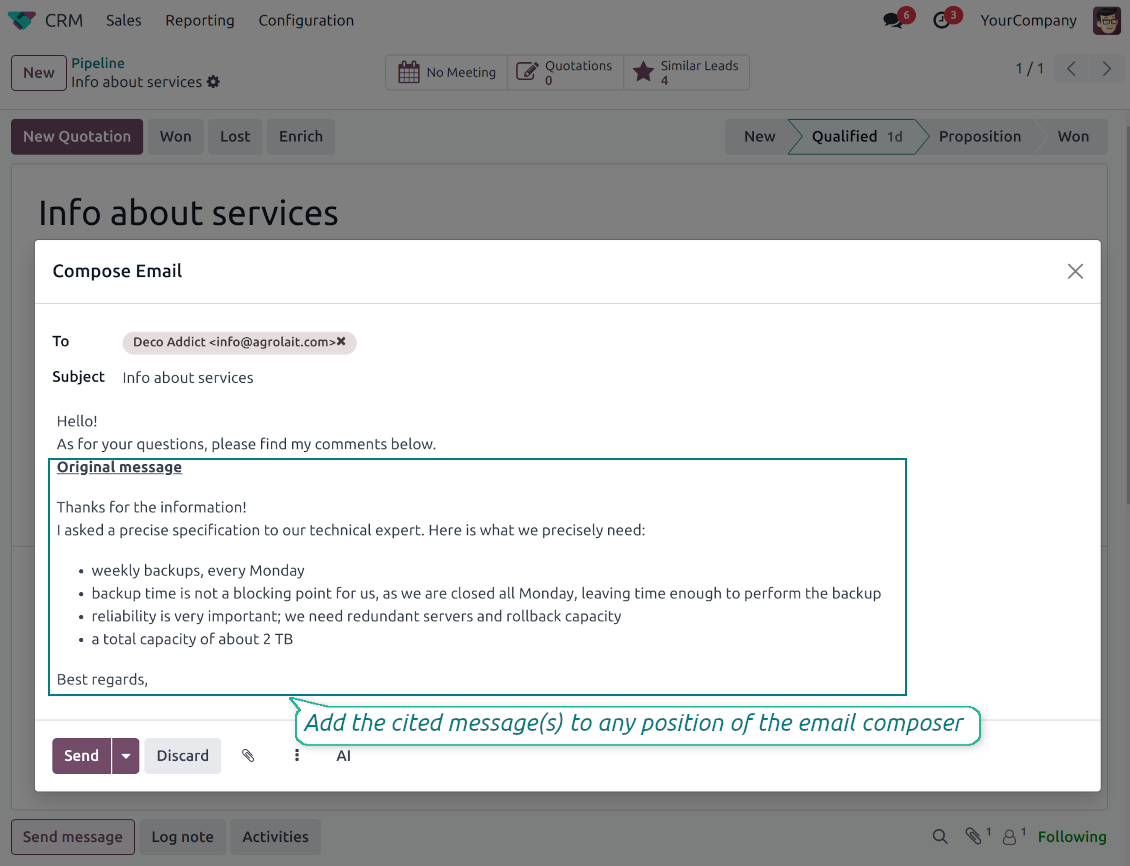
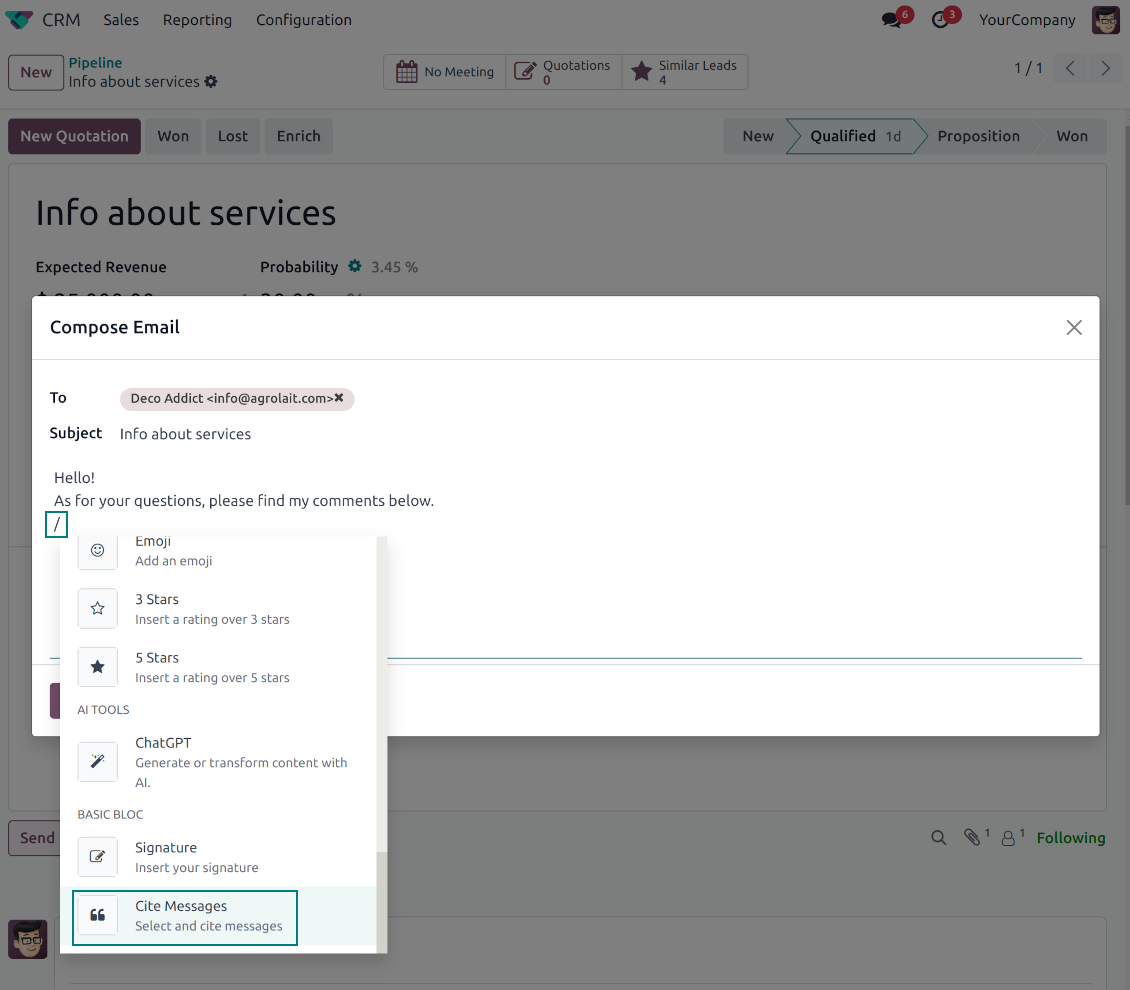
- Open Cite Message from the composer. Search earlier messages without leaving the email you are writing.
- Find the right message fast. Filter by author, content, date range, or limit results to the current thread.
- Insert with one click. Add the selected message at the cursor position in the email body.
Readable quoted history
- Shape the quoted header. Define the text placed before every cited message.
- Reply with context. Help customers and colleagues see exactly which earlier message you refer to.
- Use across documents. Cite messages from any discussion while composing on another record.
Messaging Suite administration
One place to configure your messaging tools
One Messaging Suite settings page
- Turn features on or off. CC/BCC, drafts, attachment reminders and send-later presets are controlled from one place.
- Reach every related option. Open settings for routing, privacy, quoting, editing and sender addresses without leaving the suite.
- Set up once, use everywhere. Configure the whole messaging toolkit from a single administration screen.
Routing and access control
- Choose where messages may go. Define which documents can receive rerouted chatter messages.
- Keep lost emails separate. Unattached incoming mail keeps its own queue and routing rules.
- Decide who may reroute. Give routing rights only to the users who should move messages between documents.
Pronto para avaliar?
Comece com um pedido de demo gratuito ou compre na Odoo Apps Store.
Base de demonstração personalizada gratuita. Sem telefone nem cartão. Atualizações gratuitas vitalícias e apoio especializado na versão major do Odoo.
Perguntas frequentes sobre Odoo Messaging Suite Odoo v.18
Quais sao as políticas de atualização das vossas ferramentas?
Segundo as políticas atuais da Odoo Apps Store:
- Cada módulo comprado para a versao 12.0 ou anterior da acesso a todas as versões ate 12.0.
- A partir da versao 13.0, cada versao do módulo deve ser comprada em separado.
- Independentemente da versao, a compra da direito a todas as atualizações e correcoes dentro de uma versao major.
A equipa faOtools nao controla essas políticas. Para questões, contacte diretamente os representantes da Odoo Apps Store.
Como posso instalar a aplicacao no Odoo.sh?
A forma mais direta e usar o fluxo da loja Odoo:
1. Abra a página do módulo e clique em Deploy on odoo.sh
2. Será redirecionado para o GitHub. Inicie sessão e clique em Create a new repo ou use um existente. O repositorio deve ser privado. Nao e permitido publicar as apps com licença OPL-1. Se necessário, crie um repo novo para o projeto Odoo.sh
3. Depois, no odoo.sh, clique em Deploy, confirme e clique em Continue. A instalação começa.
Estes passos instalam a app no ramo de produção. Para outros ramos ou para atualizar:
1. Transferir o código-fonte da loja Odoo
2. Fazer commit do módulo no repositorio GitHub. Nenhuma pasta/ficheiro da app deve estar no .gitignore. Os repos criados pelo odoo.sh podem ignorar caminhos importantes (p. ex. /lib). Envie todos os diretórios e ficheiros do módulo
3. Fazer deploy do ramo alvo do projeto odoo.sh ou esperar pela compilacao automática se as definições o assumirem.
Como devo instalar a aplicacao no meu próprio servidor?
2. Reinicie o servidor Odoo;
3. Ative o modo programador (definições técnicas);
4. Atualize a lista de aplicações (menu Aplicações);
5. Encontre a app e clique em Activate/Install;
6. Siga as indicações na página da app, se existirem.
A app tem extras. Posso compra-los mais tarde?
Sim. O Odoo adiciona automaticamente as dependências ao carrinho: exclua as ferramentas ja compradas para nao pagar duas vezes.
Instalei a app no Odoo.sh e vejo um aviso/erro nos testes
Um aviso vermelho/laranja nao afeta as funções da app. Por vezes os nossos módulos nao passam os testes automáticos padrão, porque estes assumem um comportamento que conflitua com os objetivos da app. Por exemplo, alteramos o cálculo do preço e os testes Odoo comparam o preço final com o algoritmo padrão.
Primeiro, verifique as funções da base implantada. Esta tudo a funcionar?
Se ainda achar que o aviso afeta funções reais, contacte-nos e envie os registos completos de instalação e a lista completa de módulos implantados (nucleo e de terceiros).
Posso comprar a aplicacao diretamente junto de vos?
Nao, so distribuimos as ferramentas através da loja oficial de aplicações Odoo.
Gostaria de ter um desconto
Infelizmente, nao temos meios tecnicos para oferecer preços individuais.
Posso instalar a app na minha base Odoo Online (SaaS)?
Nao, as apps de terceiros nao podem ser usadas no Odoo Online. O Odoo SaaS bloqueia essa possibilidade.
A ferramenta depende de outras apps. Devo compra-las?
Sim, a ferramenta precisa de todos os módulos assinalados nas dependências. O preço na página da app ja as inclui.
Qual e o preço do módulo em dolares americanos? Porque mudou?
O preço dos nossos módulos e definido em euros. A loja Odoo converte para outras moedas segundo a taxa interna. Assim, o preço em dolares americanos pode mudar quando a taxa e atualizada.
Os textos da aplicação e do site em idiomas diferentes do inglês são assistidos por IA e estão alinhados com as traduções oficiais do Odoo. Se detetar um erro, enviar um pedido de tradução e nos corrigimos.
Bases de dados de demonstração Odoo (pré-visualizações)
Para esta aplicação, podemos fornecer uma base de dados de demonstração personalizada gratuita.
Não precisa de um número de telefone ou cartão de crédito para entrar em contacto connosco. Deve apenas passar por um breve registo de e-mail, que não demora mais de 30 segundos.
A seu pedido, preparamos uma base de dados de pré-visualização individual onde pode fazer qualquer teste e validar as suas hipóteses durante cerca de duas semanas.
Comunicação de erros
Se encontrar bugs ou comportamento inconsistente, não hesite em nos contactar. Garantimos o fornecimento de correções em até 60 dias após a compra e estamos intensamente interessados em melhorar nossas ferramentas mesmo após esse período.
Não precisa de um número de telefone ou cartão de crédito para entrar em contacto connosco. Deve apenas passar por um breve registo de e-mail, que não demora mais de 30 segundos.
Inclua o máximo de detalhes possível no seu pedido: capturas de ecrã, registos do servidor Odoo, uma descrição completa de como reproduzir o problema, entre outros. Normalmente, sao necessários alguns dias úteis para preparar um plano de trabalho para um problema (se for confirmado um erro) ou fornecer orientacoes sobre o que deve ser feito (caso contrário).
Pedidos de recursos públicos e ideias de módulos (desenvolvimento gratuito)
Estamos fortemente motivados para melhorar as nossas ferramentas e ficaríamos gratos por qualquer feedback. Se os seus requisitos forem de utilização pública e puderem ser implementados de forma eficiente, a equipa irá incluí-los na nossa lista de tarefas.
Esta lista de tarefas é processada regularmente e não envolve taxas extra. Embora não possamos prometer prazos e design final, pode ser uma boa forma de obter as características desejadas sem investimentos e riscos.
Não precisa de um número de telefone ou cartão de crédito para entrar em contacto connosco. Deve apenas passar por um breve registo de e-mail, que não demora mais de 30 segundos.

A ferramenta para estruturar anexos Odoo em pastas e sincronizar com Google Drive, OneDrive/SharePoint, Nextcloud/ownCloud, Dropbox, Amazon S3, Box e NAS. Gestor de ficheiros. DMS
398€

The tool to build a deep and structured knowledge base for internal and external use. Knowledge System. KMS. Wiki-like revisions.
398€
The tool to automatically synchronize Odoo attachments with OneDrive files in both ways
487€
The tool to set up KPI targets and control their fulfillment by periods. KPI dashboards. Dashboard designer. KPI charts

The tool for time-based service management from booking appointments to sales and reviews
398€
The tool to automatically synchronize Odoo attachments with Google Drive files in both ways
487€
