باختصار
Odoo Messaging Suite هو تطبيق Odoo 18 للفئة المناقشة. The tool to improve the Odoo messaging experience.
Odoo Messaging Suite brings lost-message recovery, private discussions, message citing, post-send editing, managed From/Reply-To addresses and a richer email composer together in one application. Compose with CC/BCC and per-user drafts, route emails to the right document, quote from the message toolbar, send later with your own presets, and catch forgotten attachments before they leave. Every message keeps its email headers behind a details icon, and administrators configure the whole toolkit from one Messaging Suite settings page.
مثالي لـ
Support and sales teams living in their inbox
Perfect for teams that answer customers by email all day and want CC/BCC, drafts and quoting available right inside the Odoo composer, without switching to an external mail client.
Companies needing confidentiality
Ideal when some conversations must stay private from portal users and other followers, while still being logged on the Odoo document for later reference.
Administrators who want oversight and control
Useful for admins who need routing rules, send-later presets, attachment reminders and one settings page to manage the whole messaging toolkit.
هل أنت جاهز للتقييم?
ابدأ بطلب نسخة تجريبية مجانية أو اشترِ من Odoo Apps Store.
قاعدة بيانات تجريبية مخصصة مجانية. لا يلزم رقم هاتف أو بطاقة. تحديثات مجانية مدى الحياة ودعم خبير ضمن إصدار Odoo الرئيسي.
لماذا تختاره الفرق
الفوائد الرئيسية قبل التفاصيل
One settings page
Turn on CC/BCC, drafts, routing, attachment checks and the rest of the toolkit from a single Messaging Suite configuration screen, without hunting through scattered settings menus.
Full email composer
Compose with CC/BCC recipients, per-user drafts and managed From/Reply-To addresses directly inside the Odoo composer.
Managed sender addresses
Stop typing sender emails by hand. Pick from an address book tied to the right outgoing mail server, with automatic rules by document type.
Message actions
Route and quote any message from quick actions, and inspect full email headers in a single click.
Lost message recovery
Never lose an incoming email again. Review unattached messages in a dedicated queue and route them to the correct Odoo document before customers wait.
Private threads
Keep sensitive conversations hidden from portal users and other followers, while staying logged on the Odoo document for later reference.
Message citing
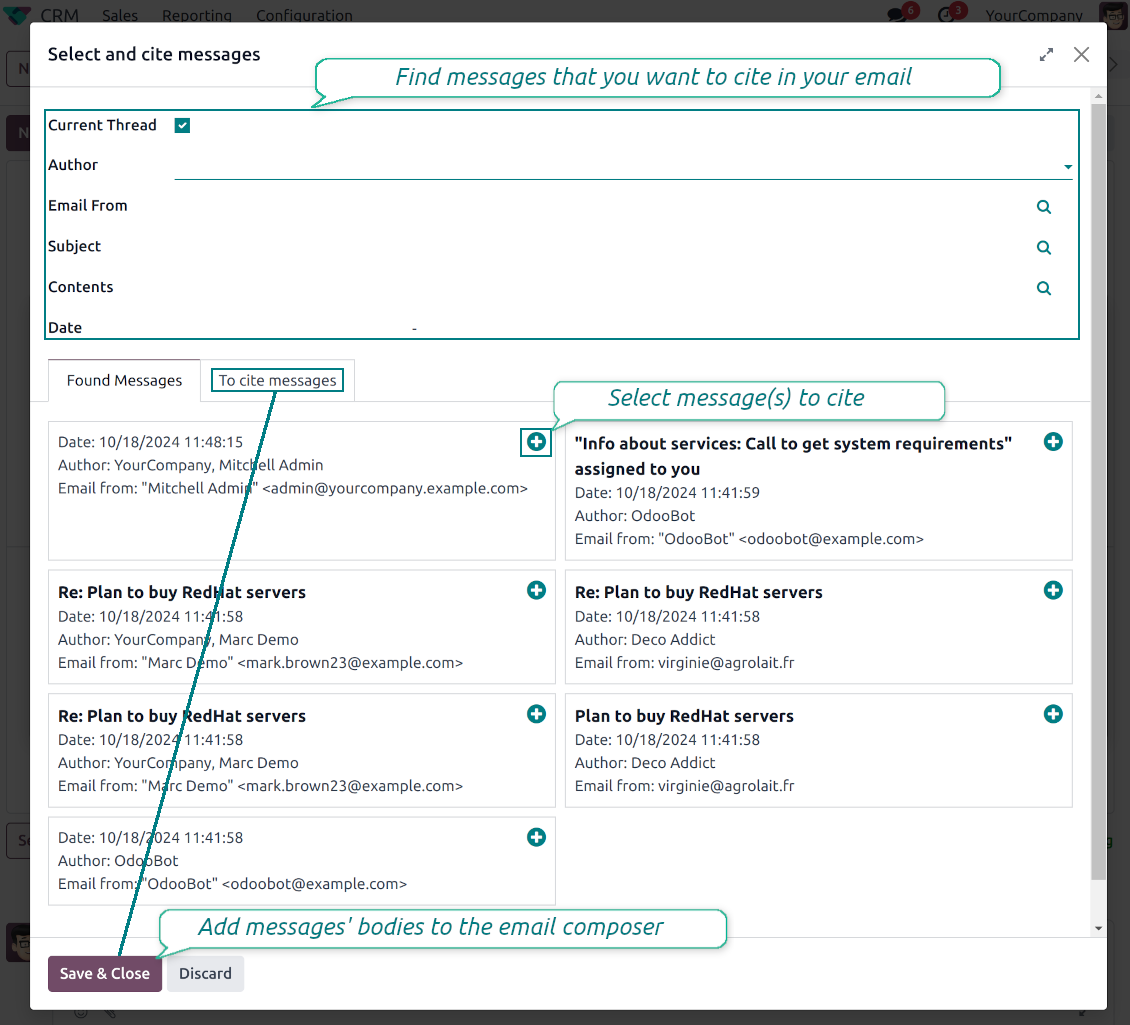
Search and cite any earlier Odoo message straight from the composer, so every reply carries the right context.
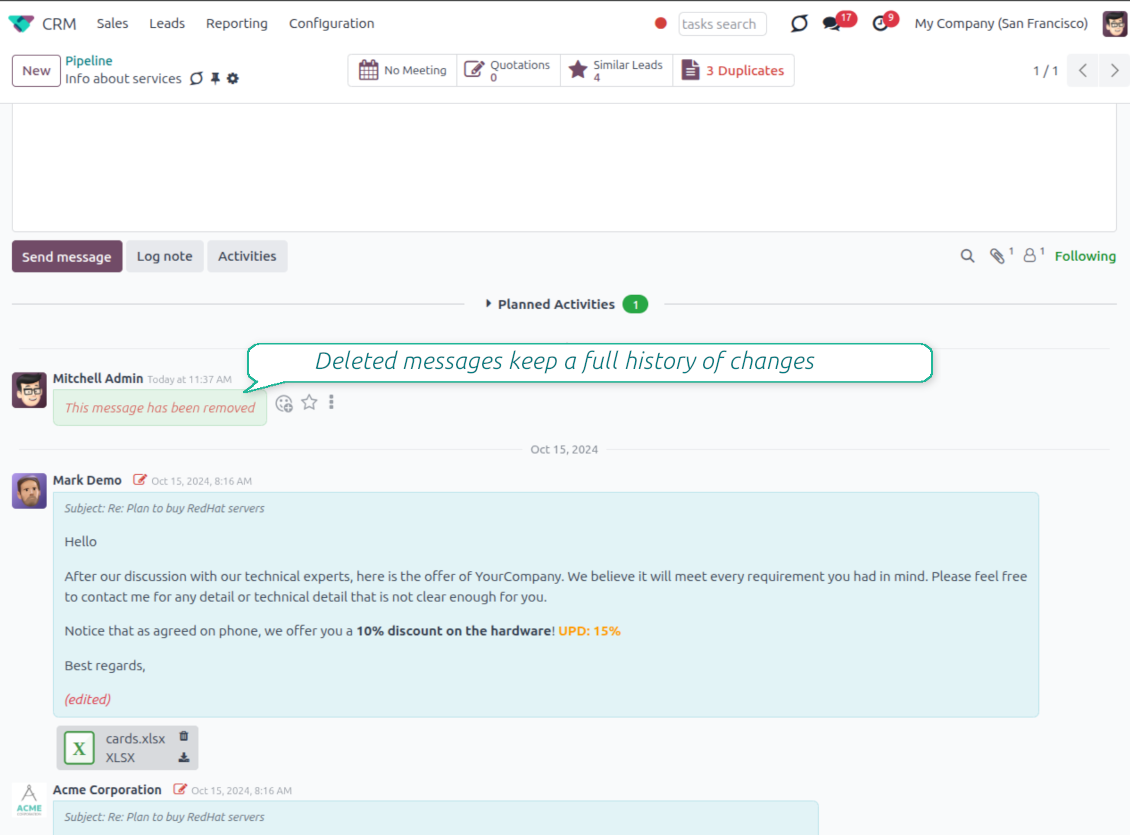
Message editing & history
Edit or delete your own messages, notes and activity feedback, with a full history of every change kept for admins.
Safer sending
Catch forgotten attachments before you hit send and schedule follow-ups with your own Send Later presets.
هل أنت جاهز للتقييم?
ابدأ بطلب نسخة تجريبية مجانية أو اشترِ من Odoo Apps Store.
قاعدة بيانات تجريبية مخصصة مجانية. لا يلزم رقم هاتف أو بطاقة. تحديثات مجانية مدى الحياة ودعم خبير ضمن إصدار Odoo الرئيسي.
Compose like a real email client
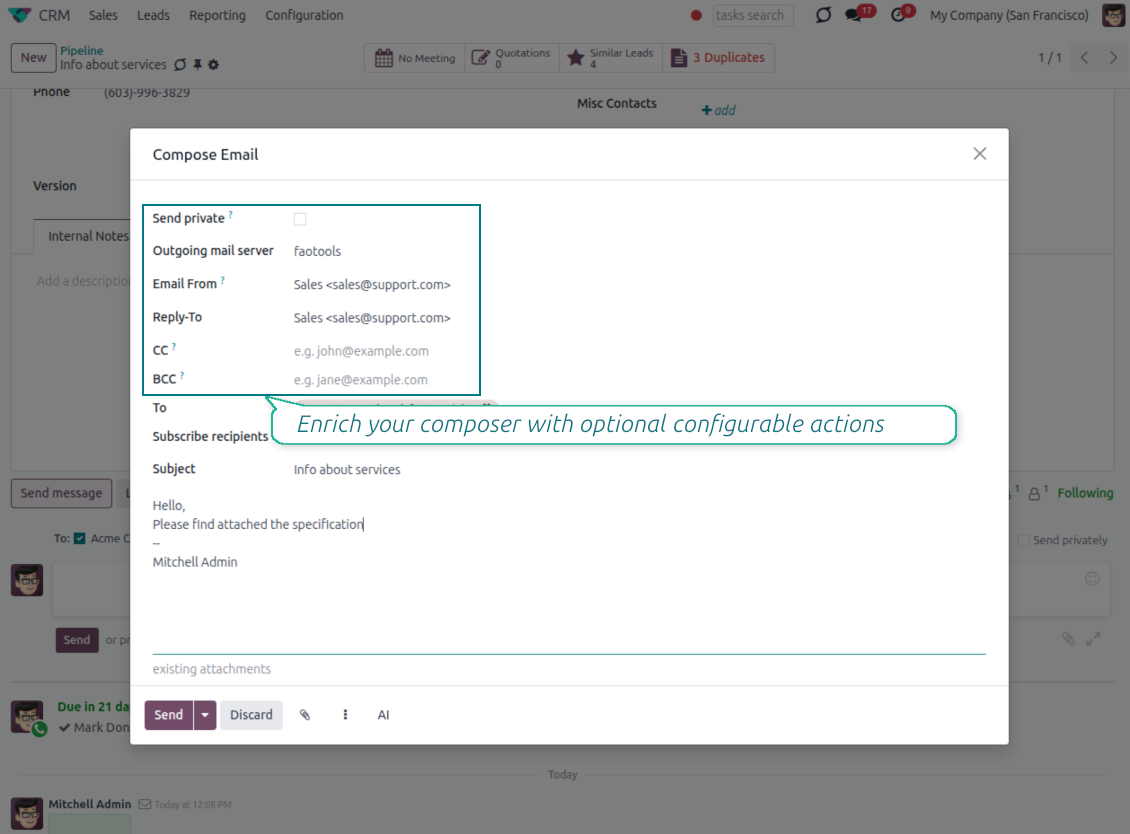
CC, BCC and per-user drafts in the full composer
Copy and blind copy
- Add CC and BCC in the full composer. Type email addresses or pick existing contacts.
- Keep recipients in the message history. Sent CC/BCC values stay visible on the message afterwards.
- Use only when you need them. Turn CC/BCC off in settings if your team does not use copy recipients.
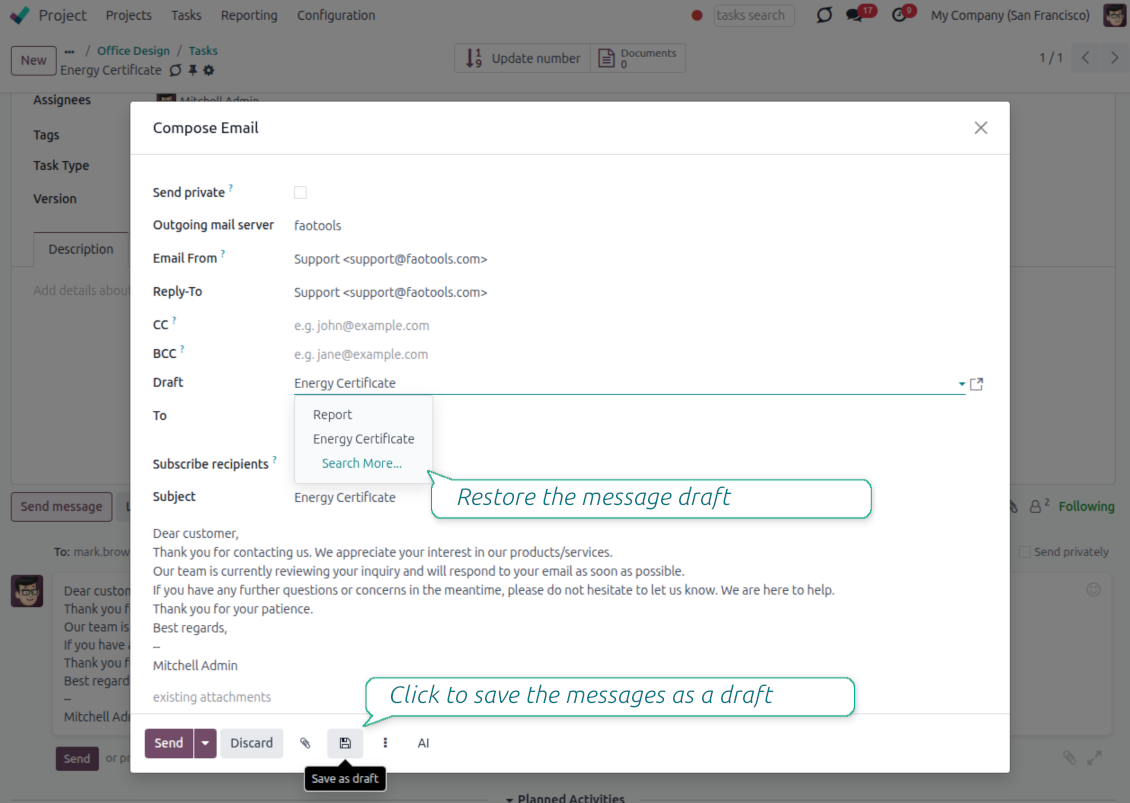
Save as draft
- Save the full message. Drafts keep subject, body, recipients and related fields for the current record.
- Resume where you stopped. Reopening the composer on the same document brings back your latest draft automatically.
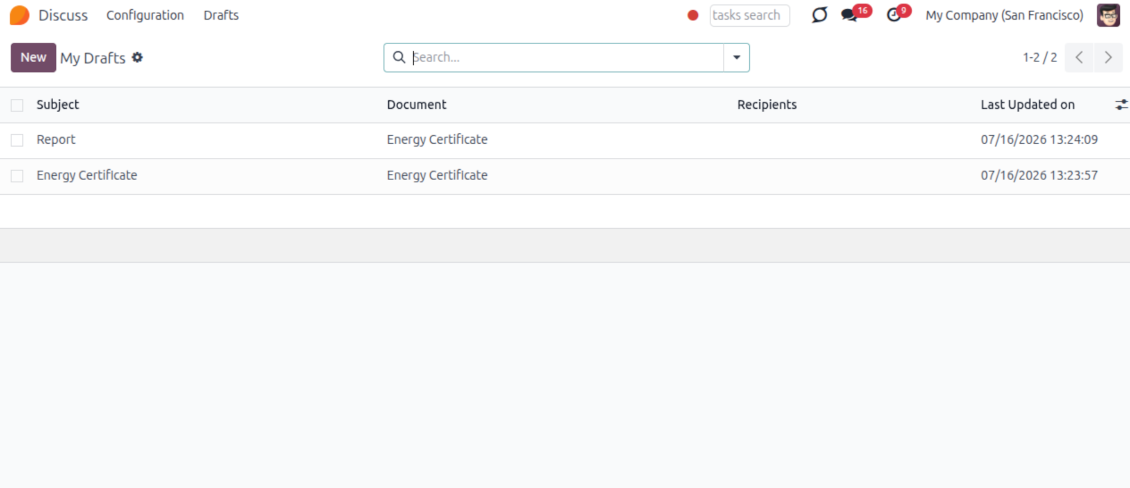
- Pick up drafts from Discuss. Every internal user can open the drafts menu and finish unfinished messages.
Message actions and email metadata
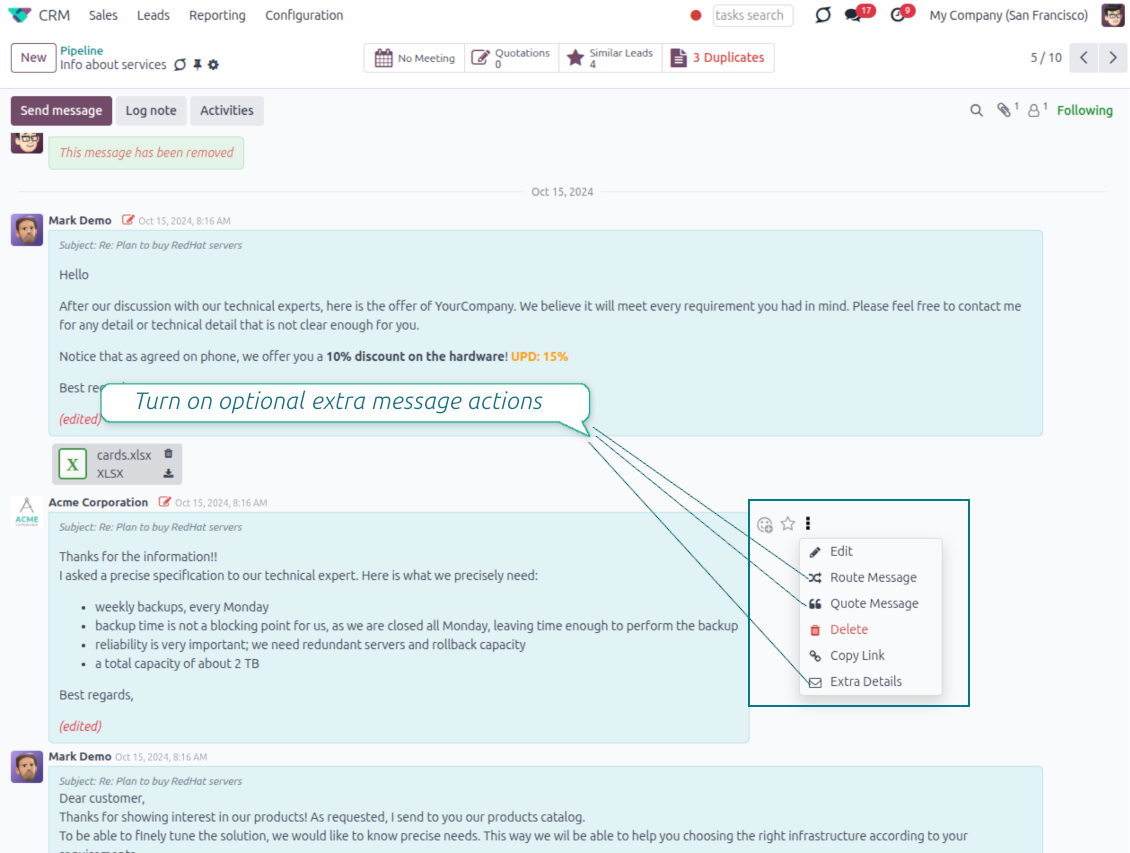
Route, quote and inspect email details without leaving the chatter
Actions on every message
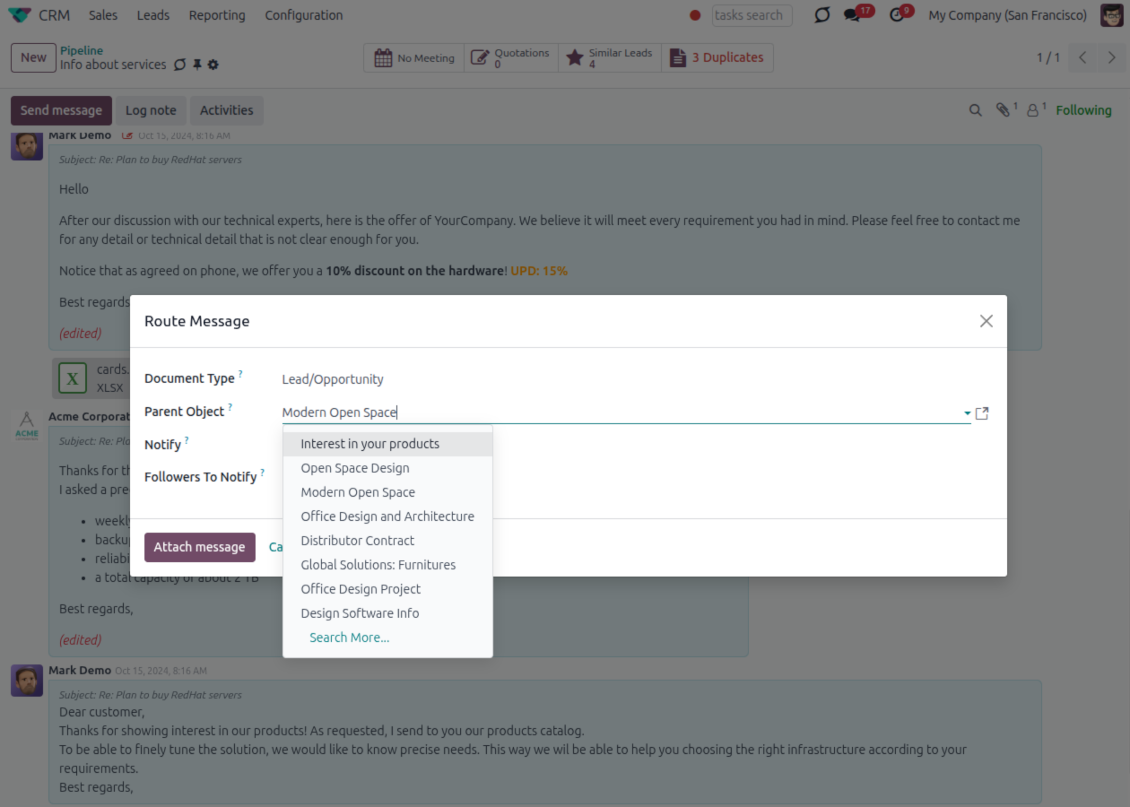
- Route from the thread. Move a message to another document when it landed on the wrong record.
- Quote in a new email. Start a reply with the original message included in the body.
- Keep the composer simple. Every action opens the standard Odoo composer already pre-filled, no separate tooling to learn.
Email details on every message
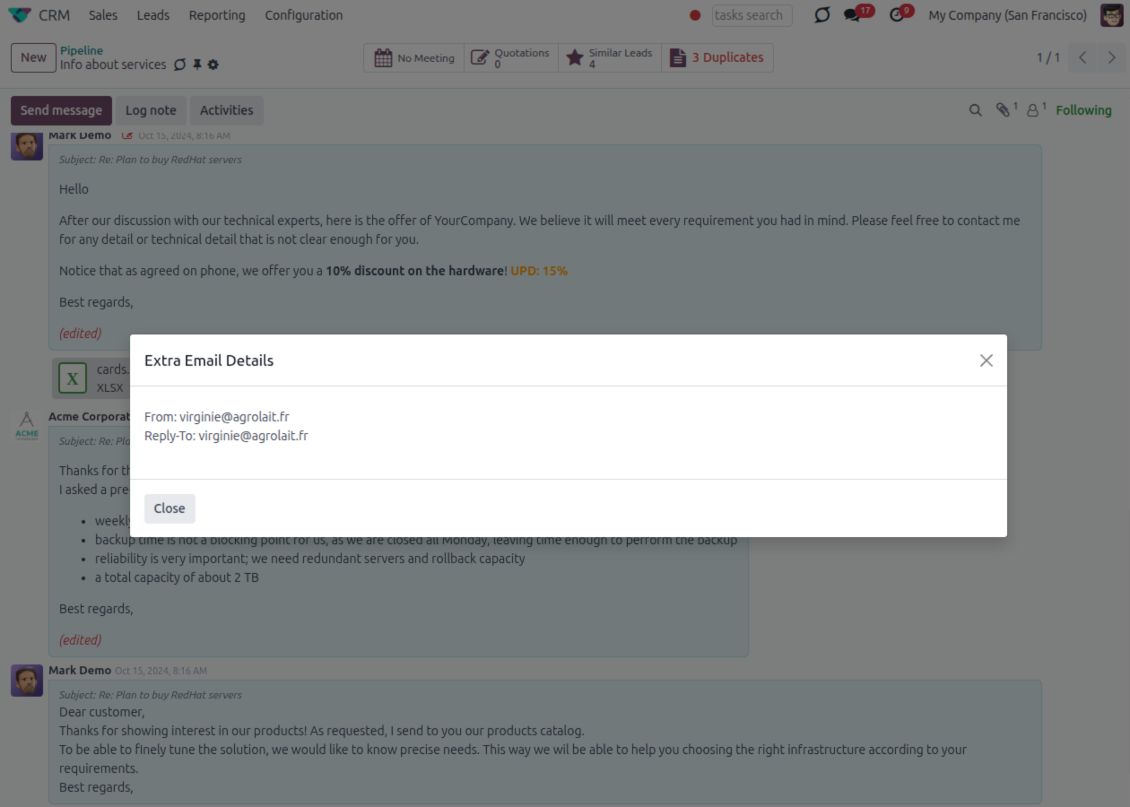
- See full headers. From, Reply-To, To and CC stay available on incoming and outgoing mail.
- Keep CC/BCC too. Copy recipients added in the composer are saved with the message.
- Open details in one click. A small icon on the message shows the complete email information.
Odoo Email From
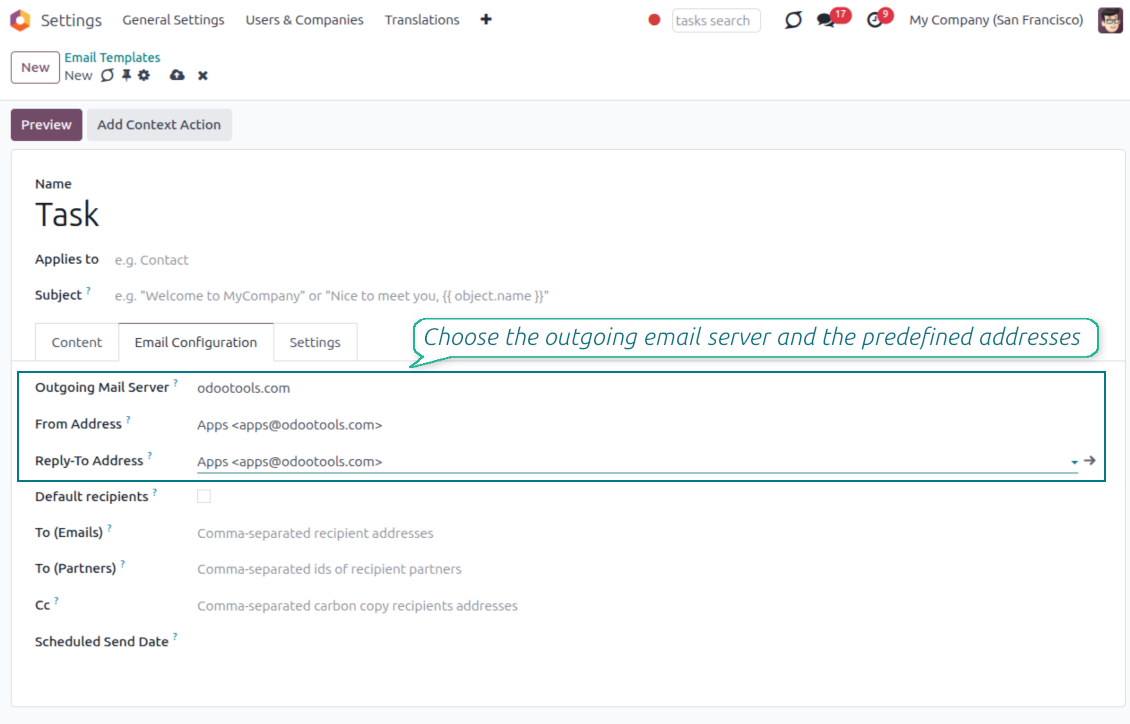
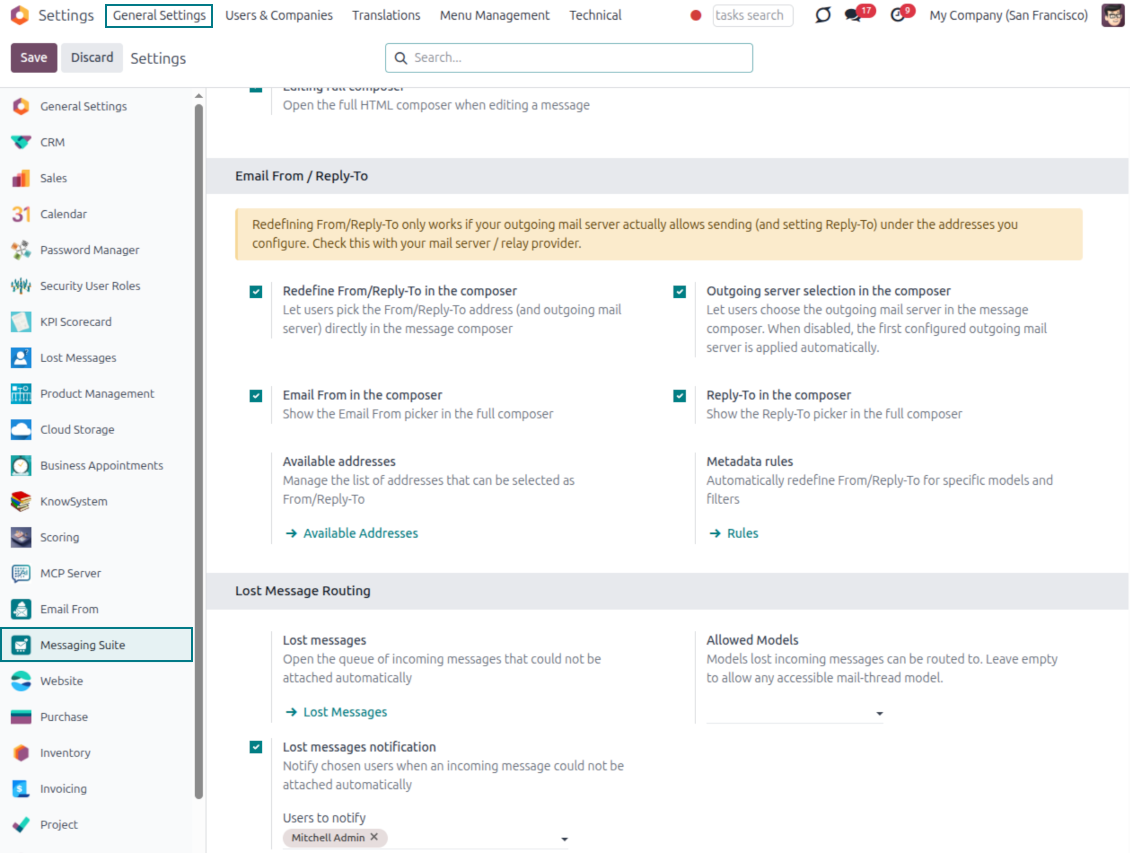
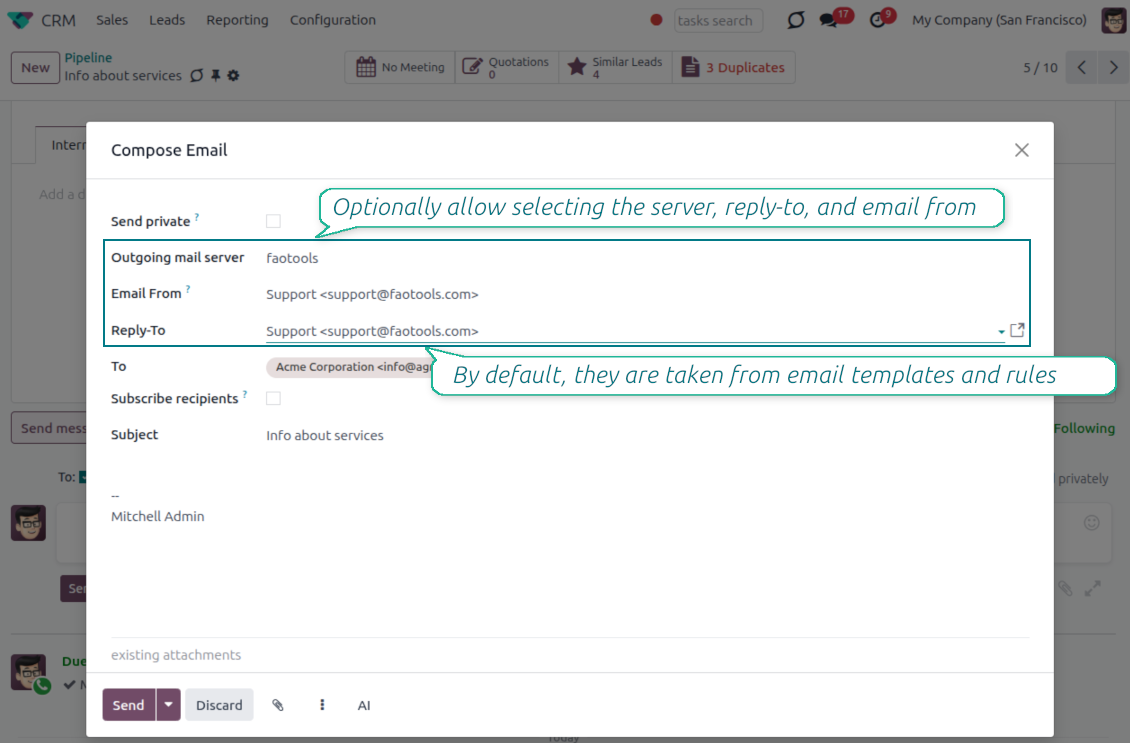
Choose the right From and Reply-To address for every email
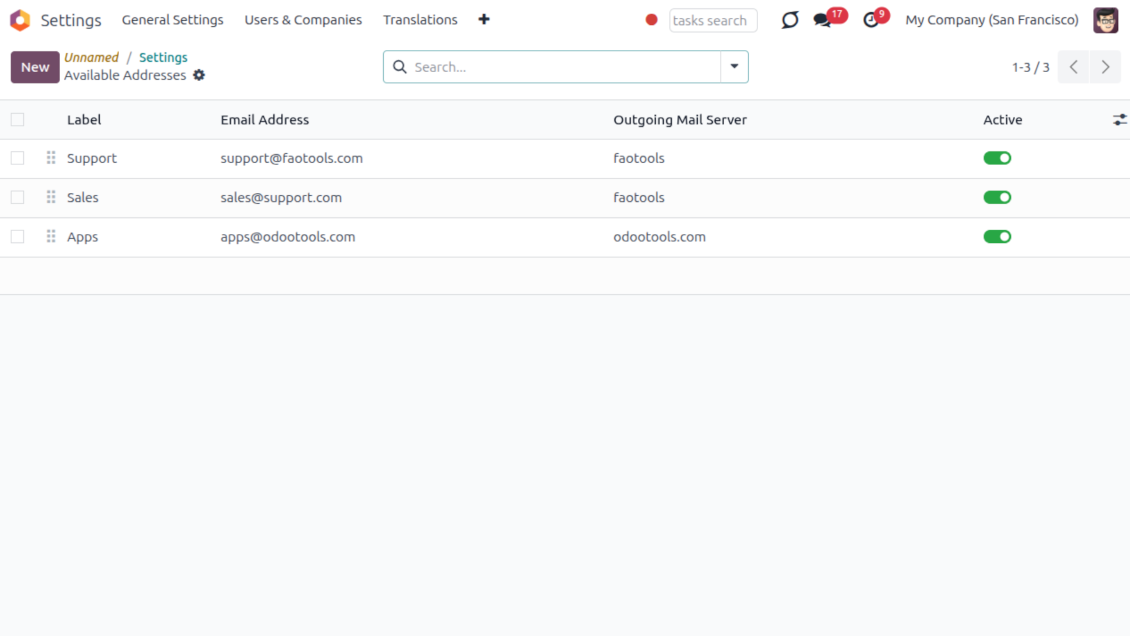
Managed sender addresses
- Pick instead of typing. Users choose From and Reply-To from an address book linked to outgoing mail servers.
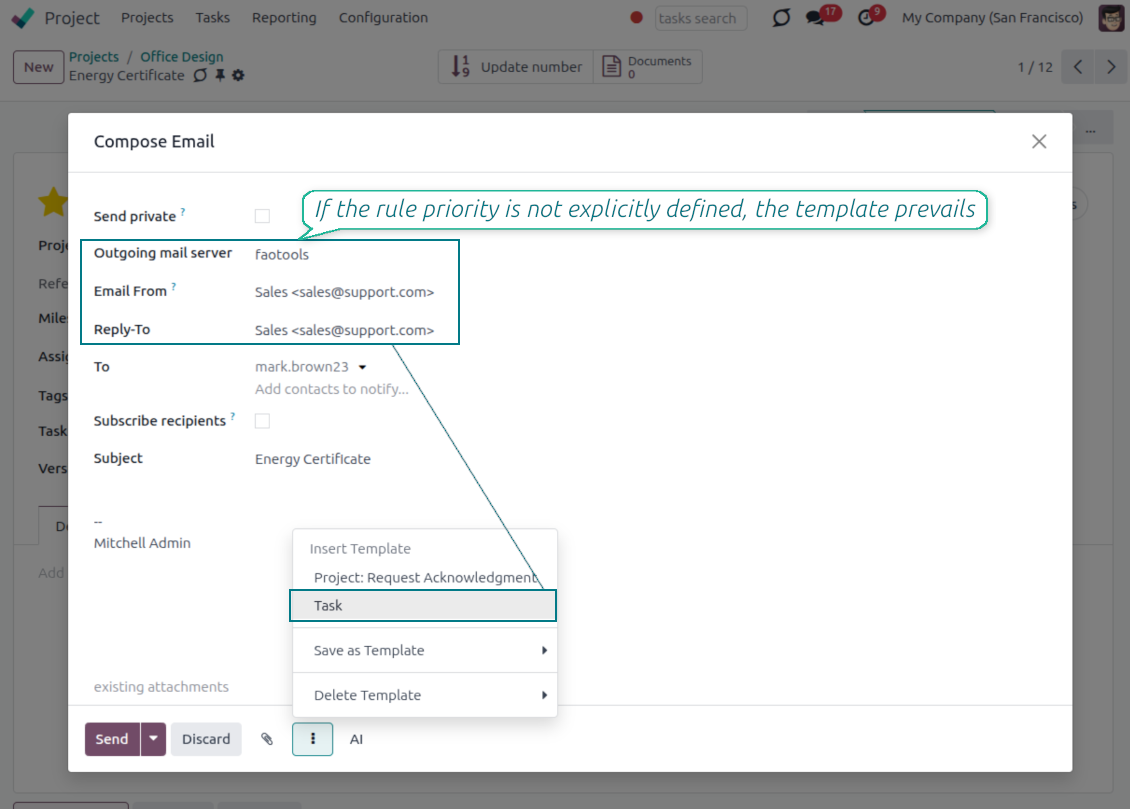
- Apply on templates too. Email templates can use the same managed sender addresses.
- Keep the screen simple. The outgoing mail server field is hidden when only one server is configured.
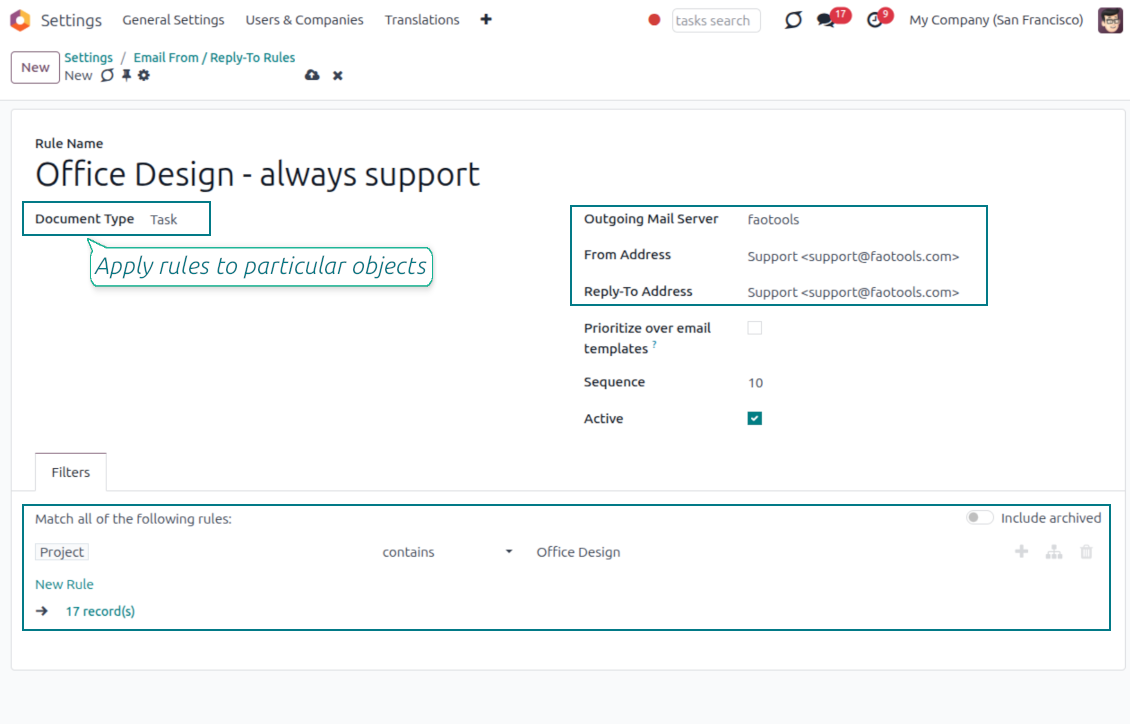
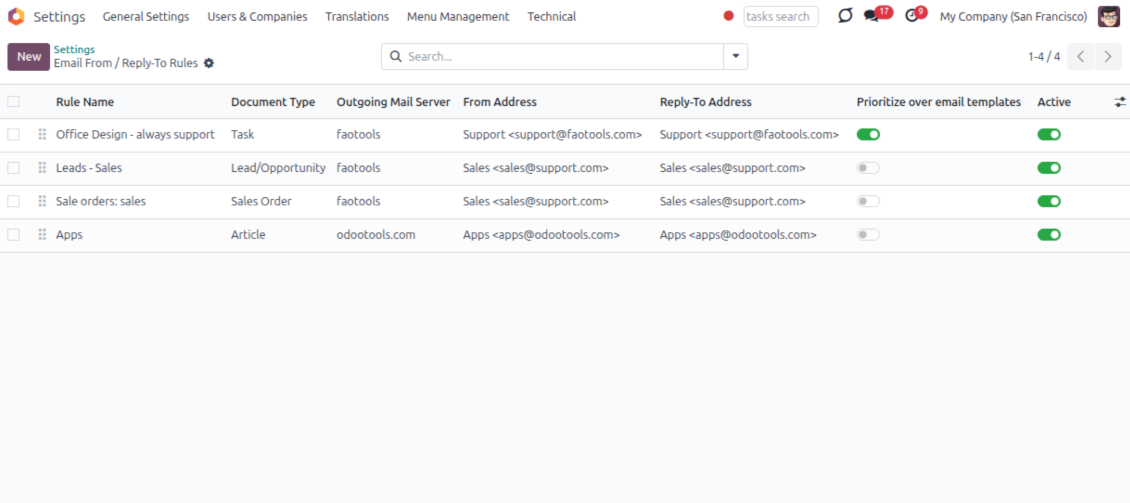
Automatic sender rules
- Set the sender by document type. Rules choose the right From and Reply-To for sales orders, tasks, invoices and other records.
- Prevent invalid combinations. Odoo blocks sender addresses that do not match the selected outgoing mail server.
- Start with working mail setup. Make sure each outgoing server can actually send from the addresses you add.
هل أنت جاهز للتقييم?
ابدأ بطلب نسخة تجريبية مجانية أو اشترِ من Odoo Apps Store.
قاعدة بيانات تجريبية مخصصة مجانية. لا يلزم رقم هاتف أو بطاقة. تحديثات مجانية مدى الحياة ودعم خبير ضمن إصدار Odoo الرئيسي.
Lost Messages Routing
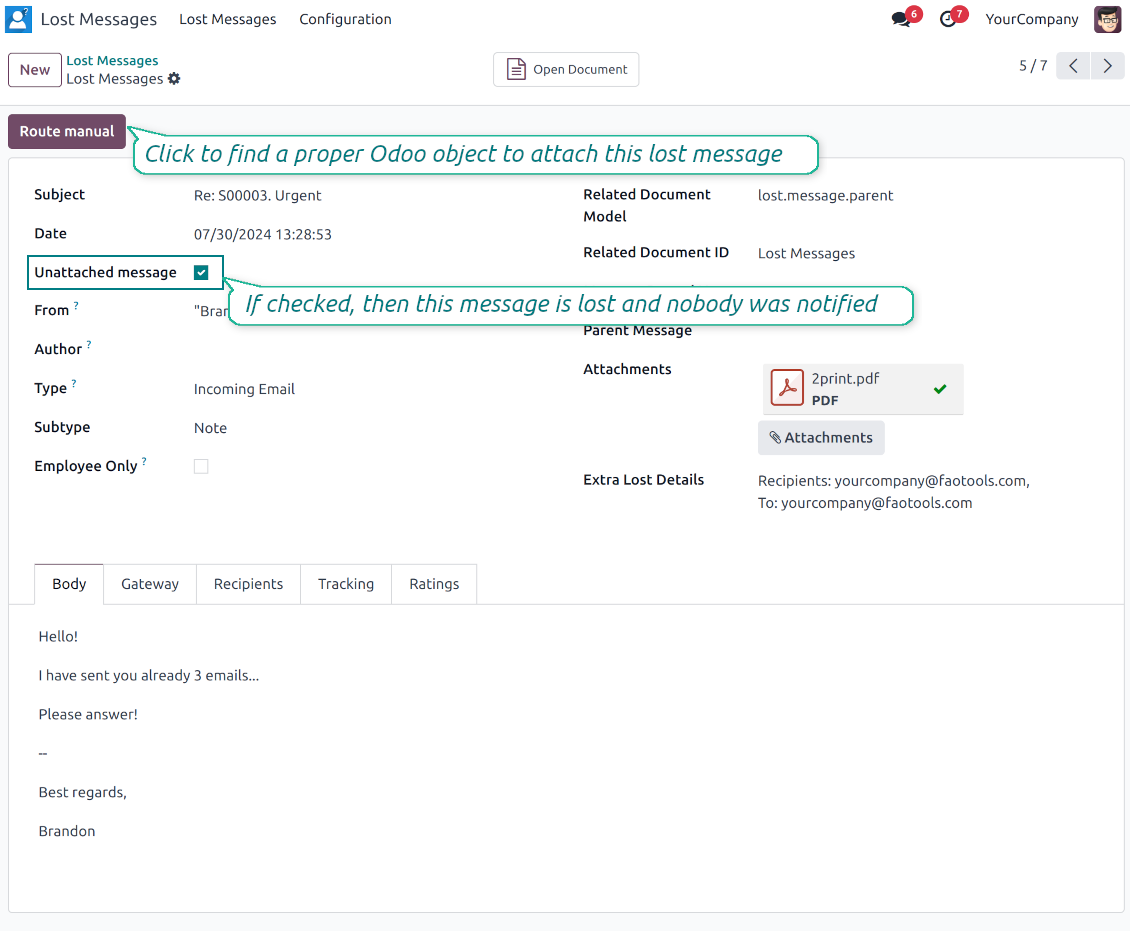
Recover incoming emails Odoo could not attach automatically
Lost message queue
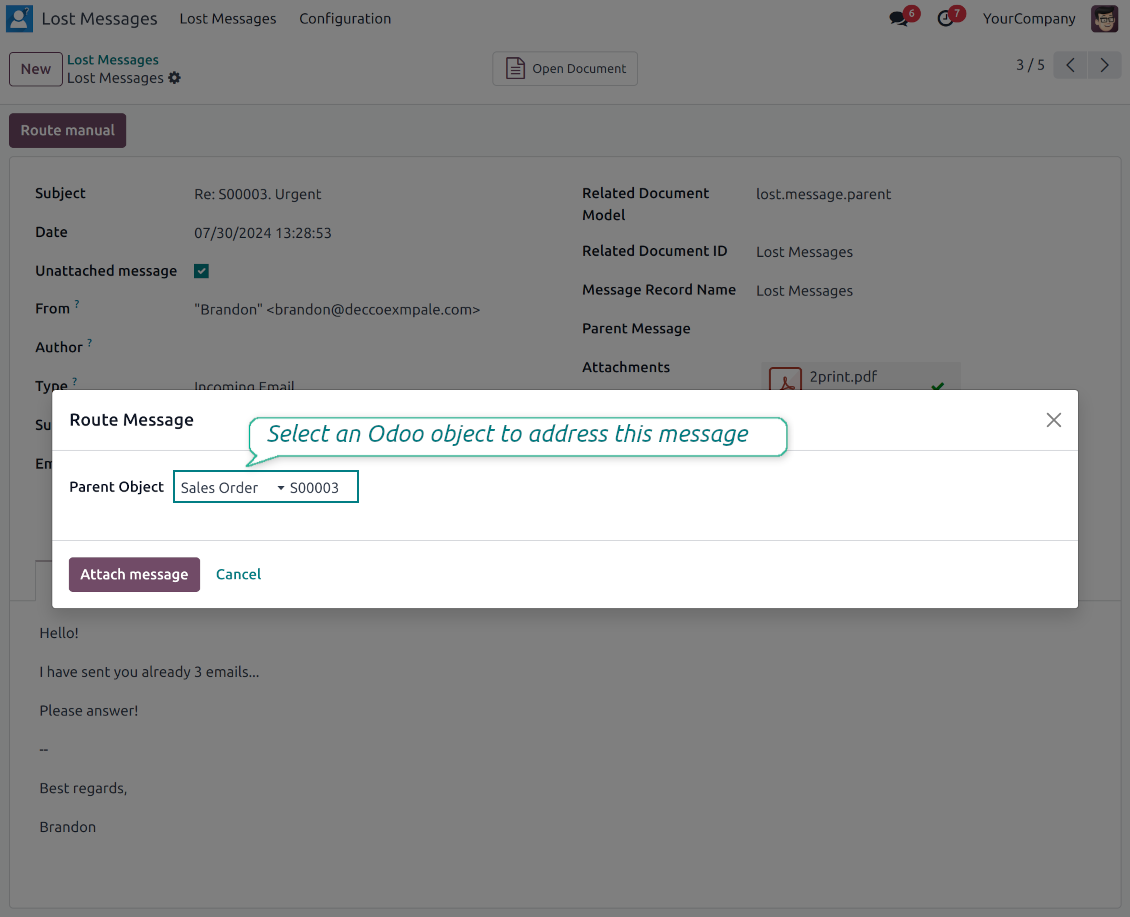
- Catch emails that did not attach. Incoming messages Odoo cannot place on a document are kept instead of disappearing.
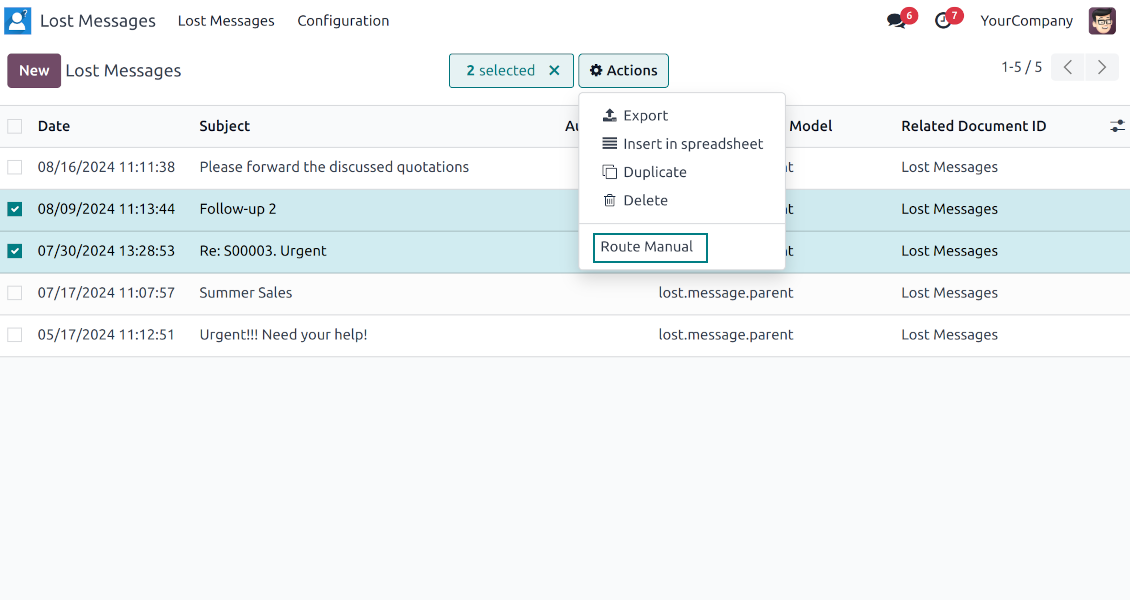
- Review in one menu. Your team works from a dedicated queue with subject, sender, body and search tools.
- Keep routing clues. Recipients, To, CC and In Reply To stay available to help find the right document.
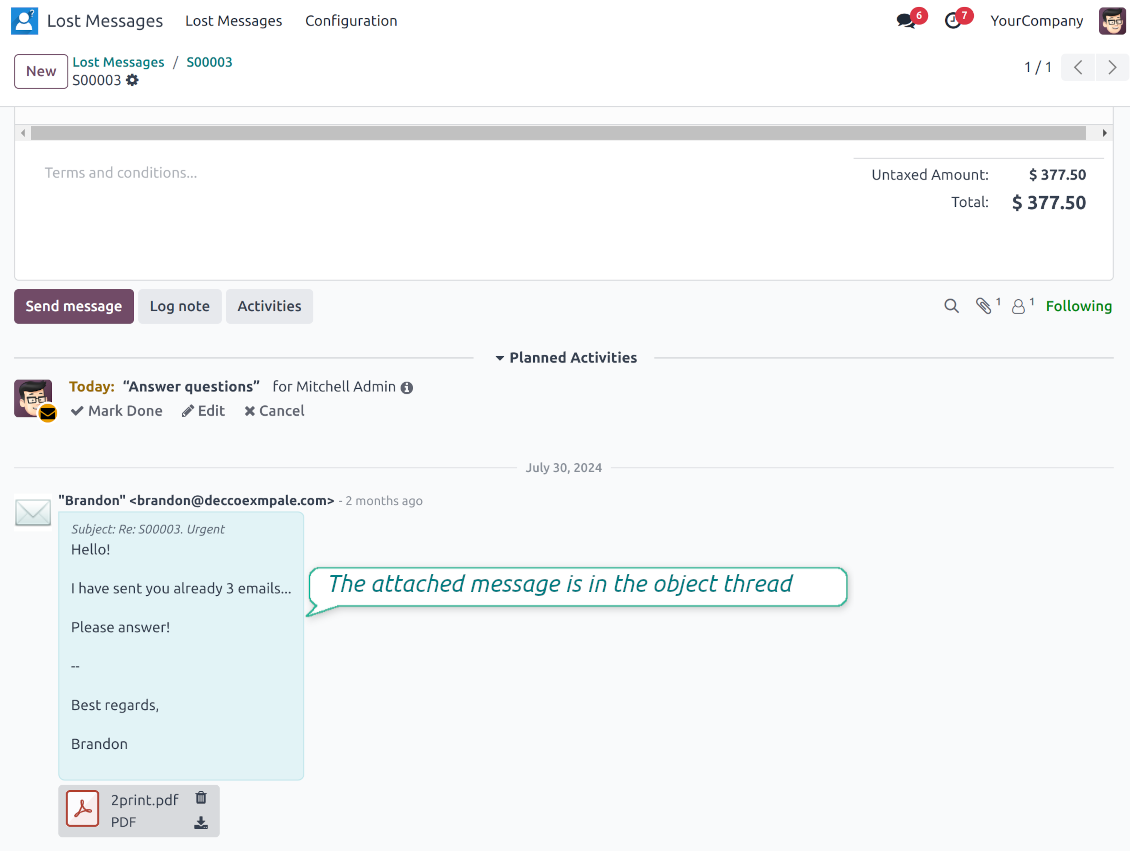
Route to the right document
- Attach in a few clicks. Pick the target document and attach one or several lost messages in a single action.
- Limit where messages may go. Restrict routing to selected document types or leave the list open for managers.
- Move attached messages too. Already linked chatter messages can be rerouted to another document when needed.
Private Thread
Confidential discussions that stay inside Odoo and off the portal
Send private from the composer
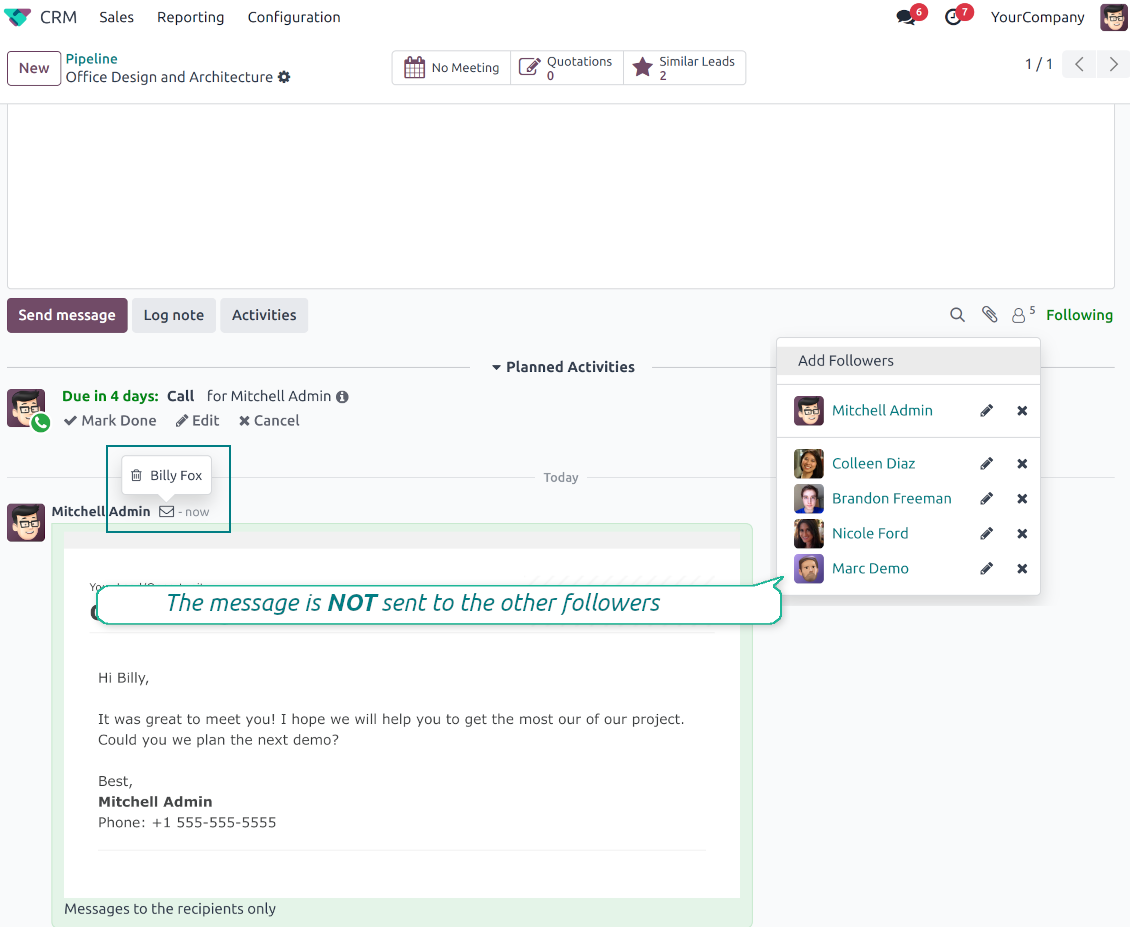
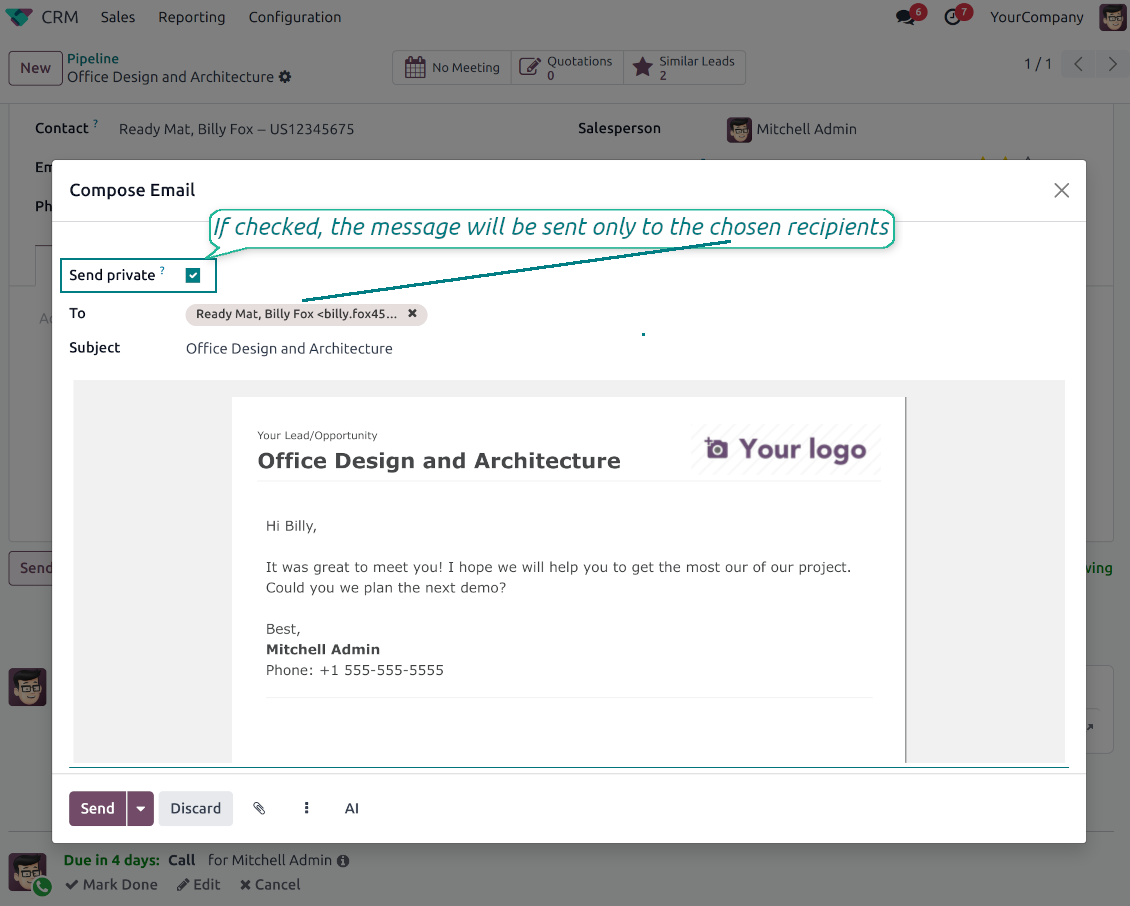
- Tick Send private. Compose a message that reaches only the selected recipients.
- Do not notify other followers. Portal users and regular followers stay out of the conversation.
- Works on any document. Use private sending on sales orders, tasks, invoices, leads and other records.
Confidential but traceable
- Keep history on the record. Private messages remain on the document for later reference.
- Hide from portal users. External contacts cannot read internal discussions on their documents.
- Stay private in replies. Follow-up replies remain private too.
Message and Note Editing
Fix mistakes after sending while keeping a transparent history
Fix mistakes after sending
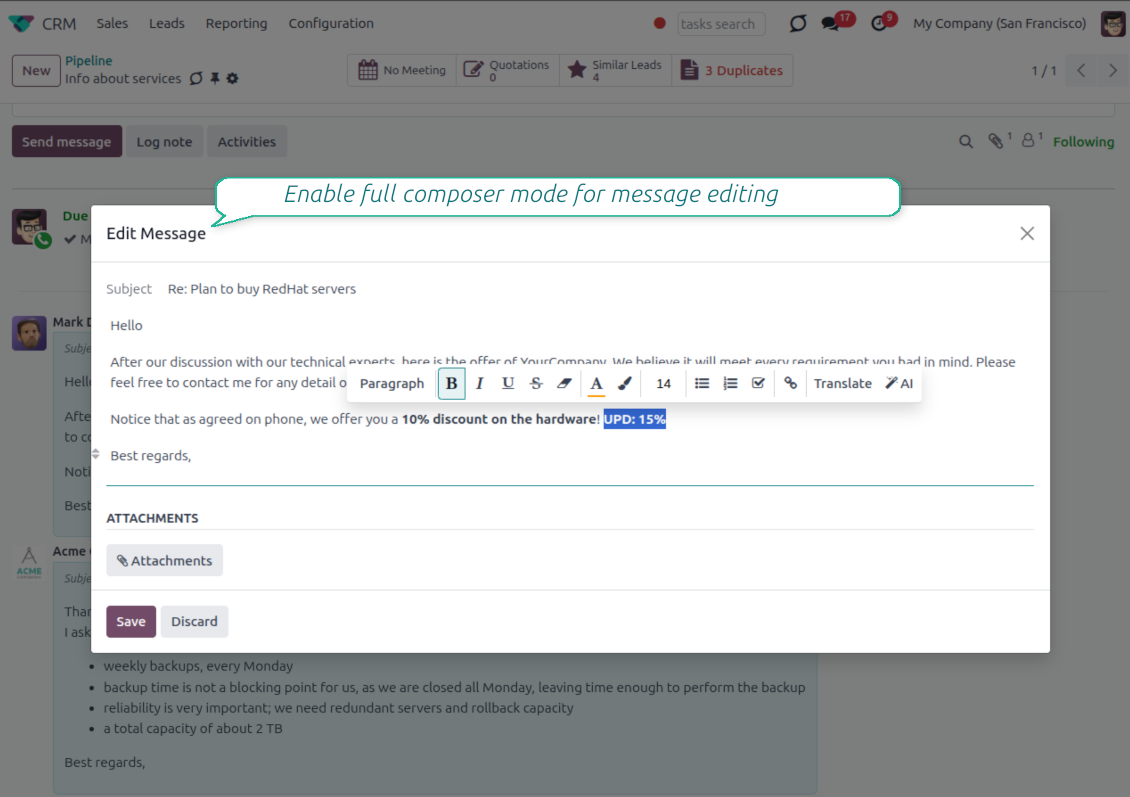
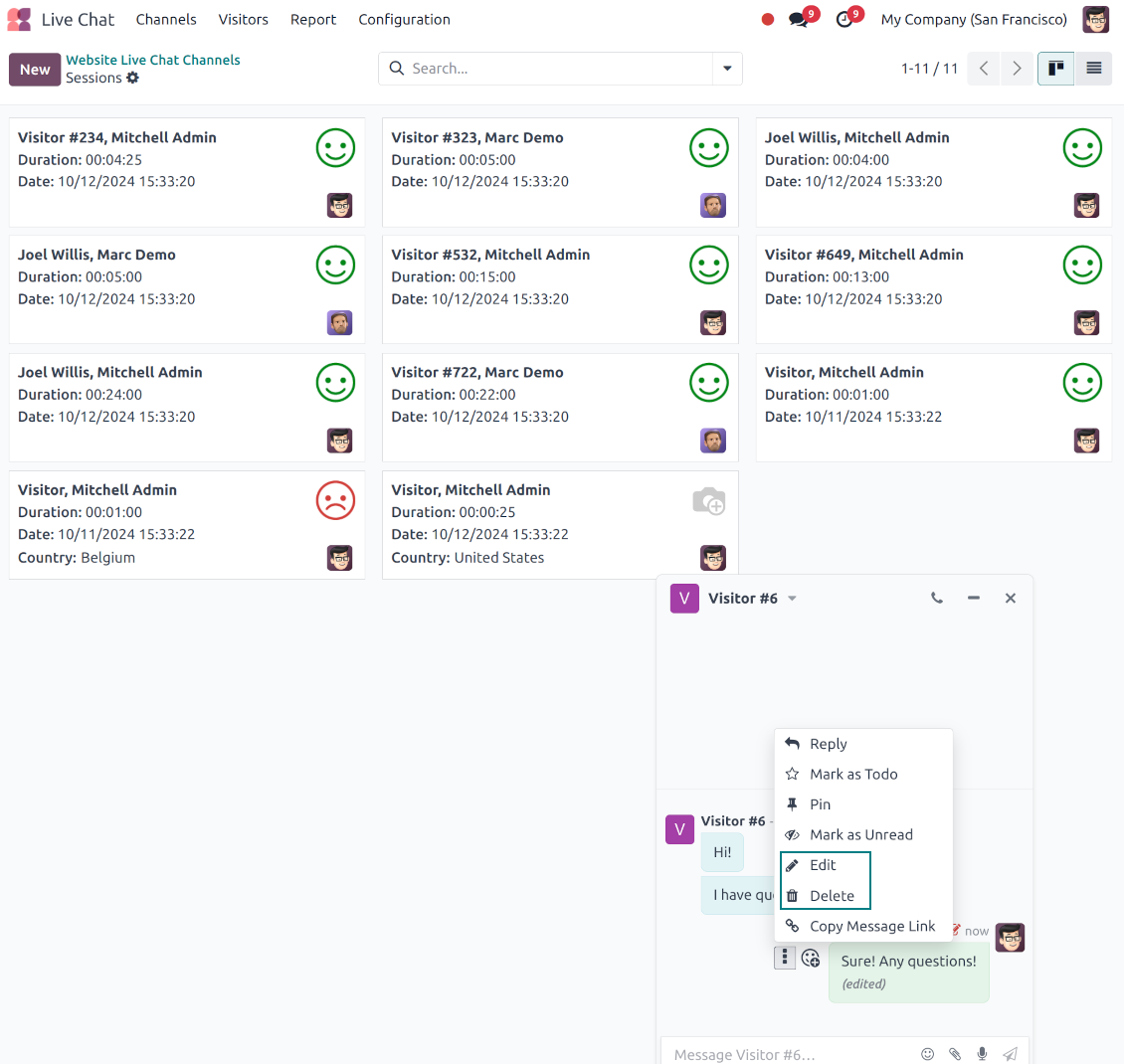
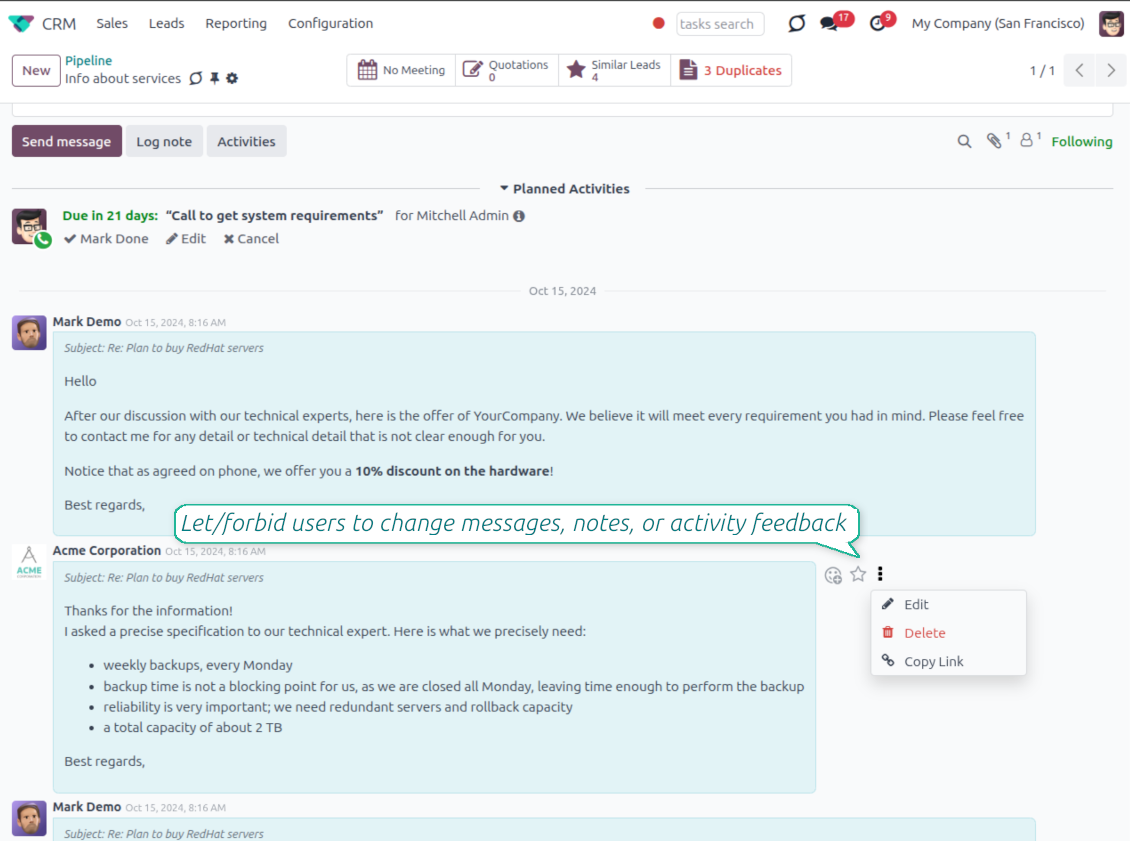
- Edit your own messages. Correct comments, notes and activity feedback after they were posted.
- Give admins broader control. Authorized users can manage messages posted by others when policy requires it.
- Use the full editor when needed. Open subject, rich body and attachments in a pop-up for bigger changes.
History for every change
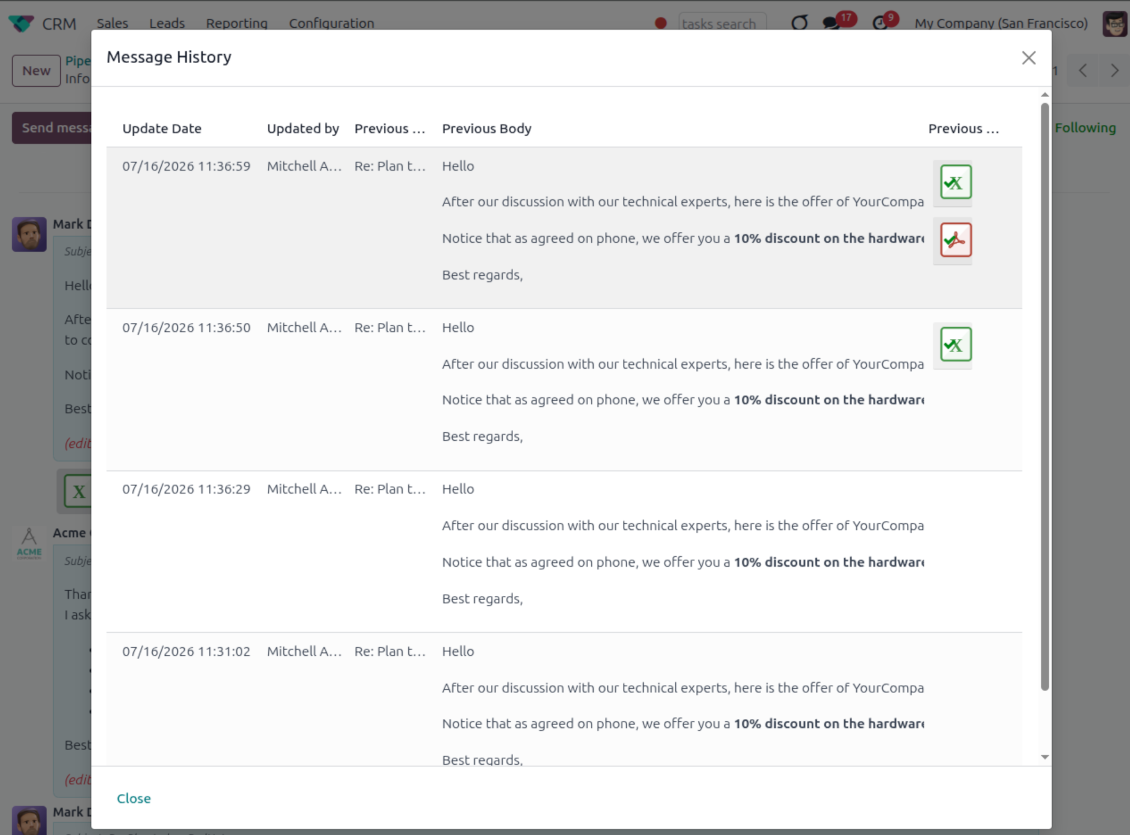
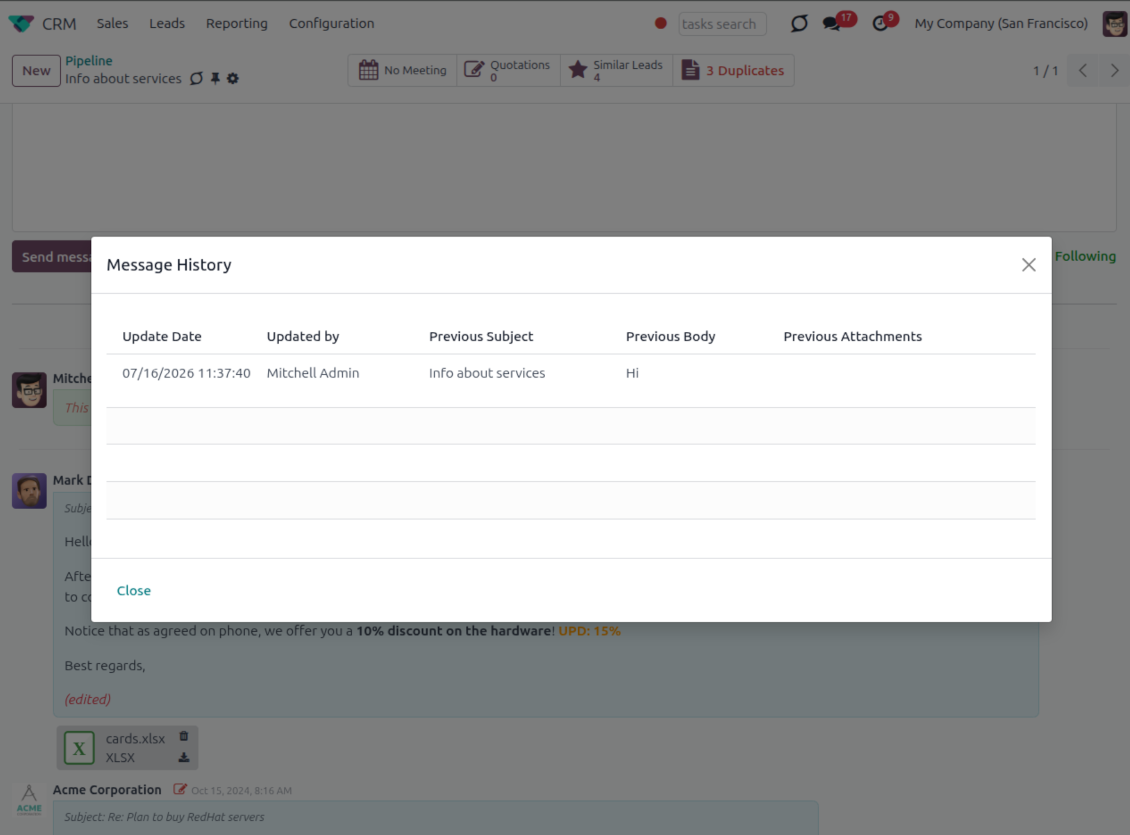
- Track what changed. Subject, body and attachment updates are stored with user and timestamp.
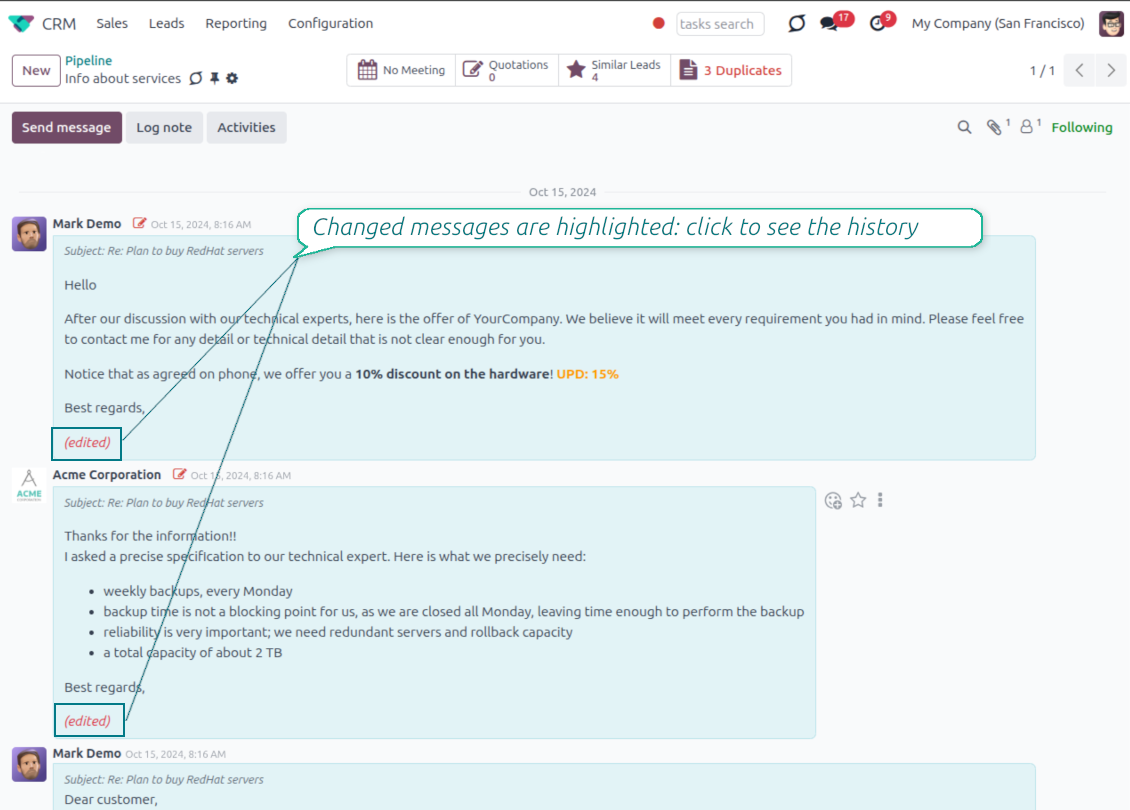
- Spot edited messages quickly. Modified entries show an edited label that opens the history in one click.
- Keep deleted content. Even removed messages retain their history for audit purposes.
هل أنت جاهز للتقييم?
ابدأ بطلب نسخة تجريبية مجانية أو اشترِ من Odoo Apps Store.
قاعدة بيانات تجريبية مخصصة مجانية. لا يلزم رقم هاتف أو بطاقة. تحديثات مجانية مدى الحياة ودعم خبير ضمن إصدار Odoo الرئيسي.
Catch missing attachments
Confirm forgotten attachments before they leave the composer
Attachment mention check
- Spot missing files before send. Odoo checks the message text when you mention an attachment.
- Works everywhere you write. The reminder appears in the full composer, quick reply and chat flows.
- Turn it off when not needed. Enable or disable the check from Messaging Suite settings.
Send-time confirmation
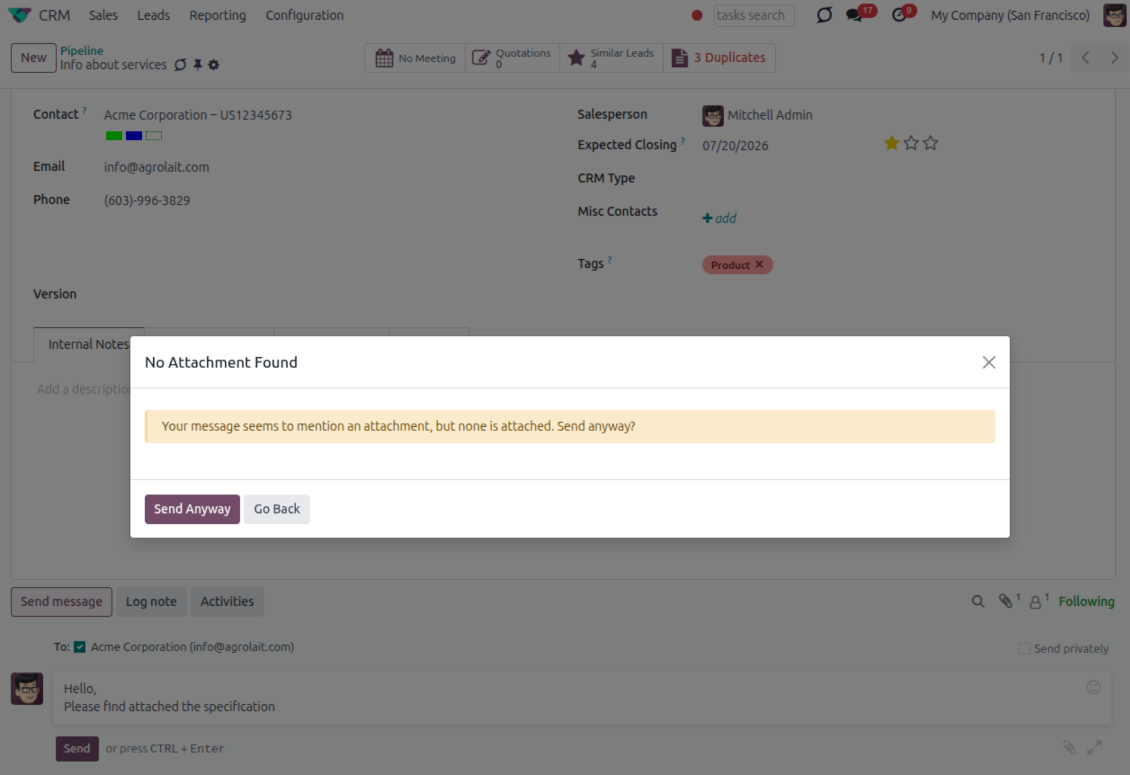
- Stop accidental sends. A dialog appears when the body mentions an attachment but none is attached.
- Let the user decide. Send Anyway and Go Back keep the flow moving without losing the draft.
- Adapt the wording. Adjust what counts as an attachment mention in settings when your team uses different phrases.
Send later with your own presets
Schedule follow-ups with options your team actually uses
Your own Send Later options
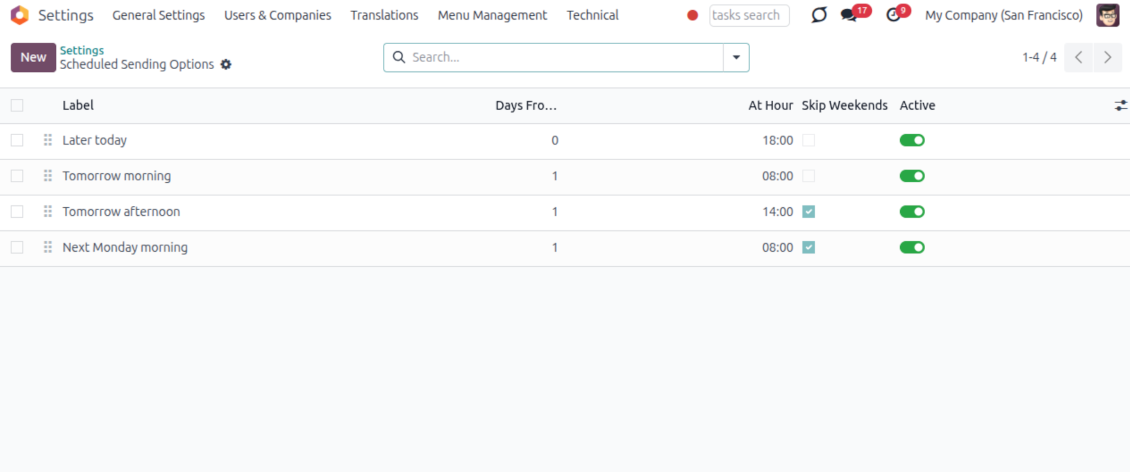
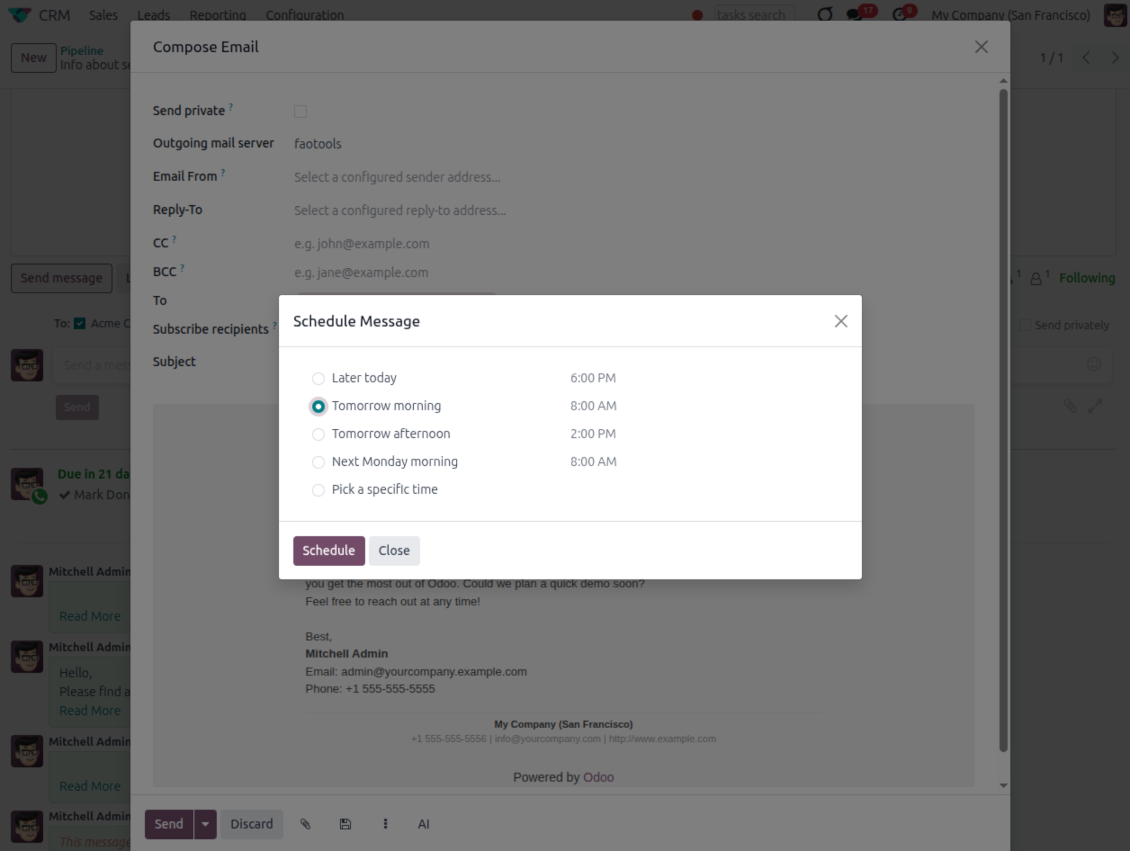
- Go beyond the built-in choices. Define your own scheduled-sending options instead of only Tomorrow Morning / Afternoon.
- Show them in Send Later. Presets appear directly in the standard scheduled-send dialog.
- Pick a preset in one click. Users schedule follow-ups without calculating dates manually.
Maintain the preset list
- Set label, offset and send time. Each option defines days from today, hour and whether weekends are skipped.
- Control order and availability. Reorder presets and switch them on or off any time.
- Manage from Discuss. Administrators maintain Scheduled Sending Options from its own menu entry.
Message Citing
Quote earlier Odoo messages while you reply
Cite while you compose
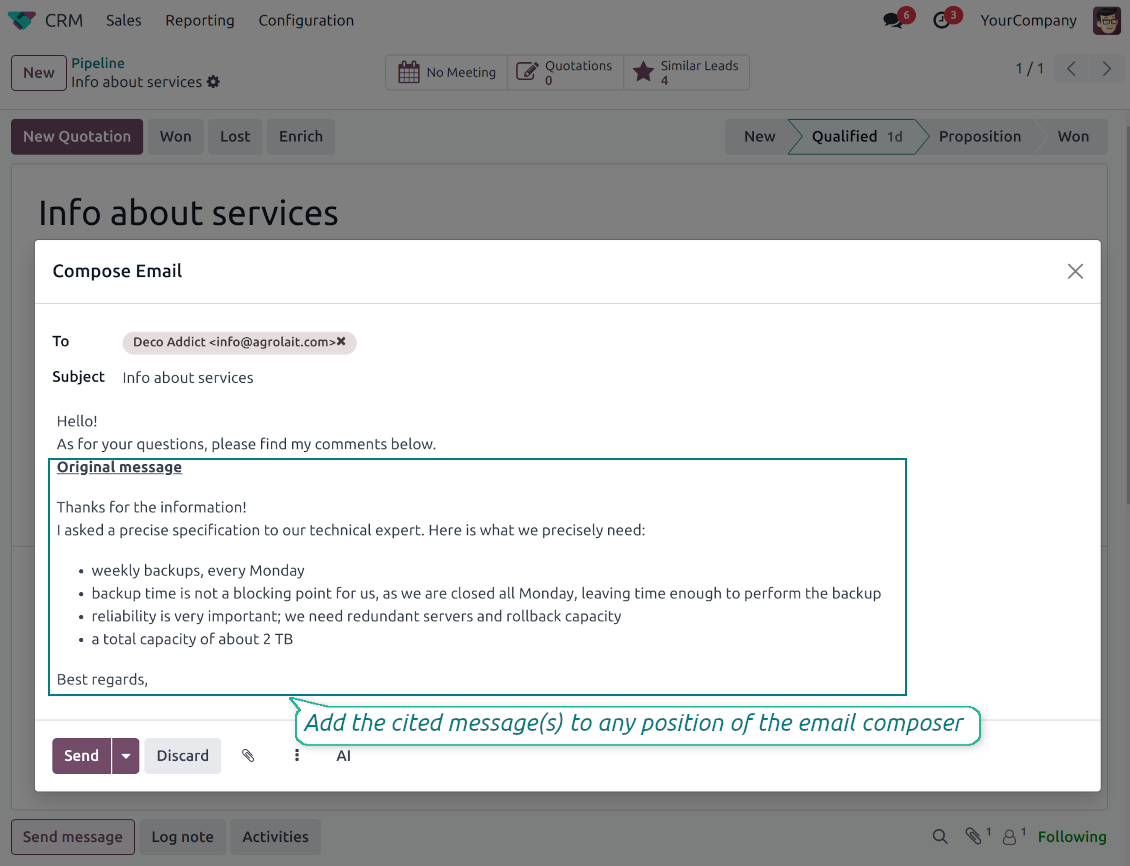
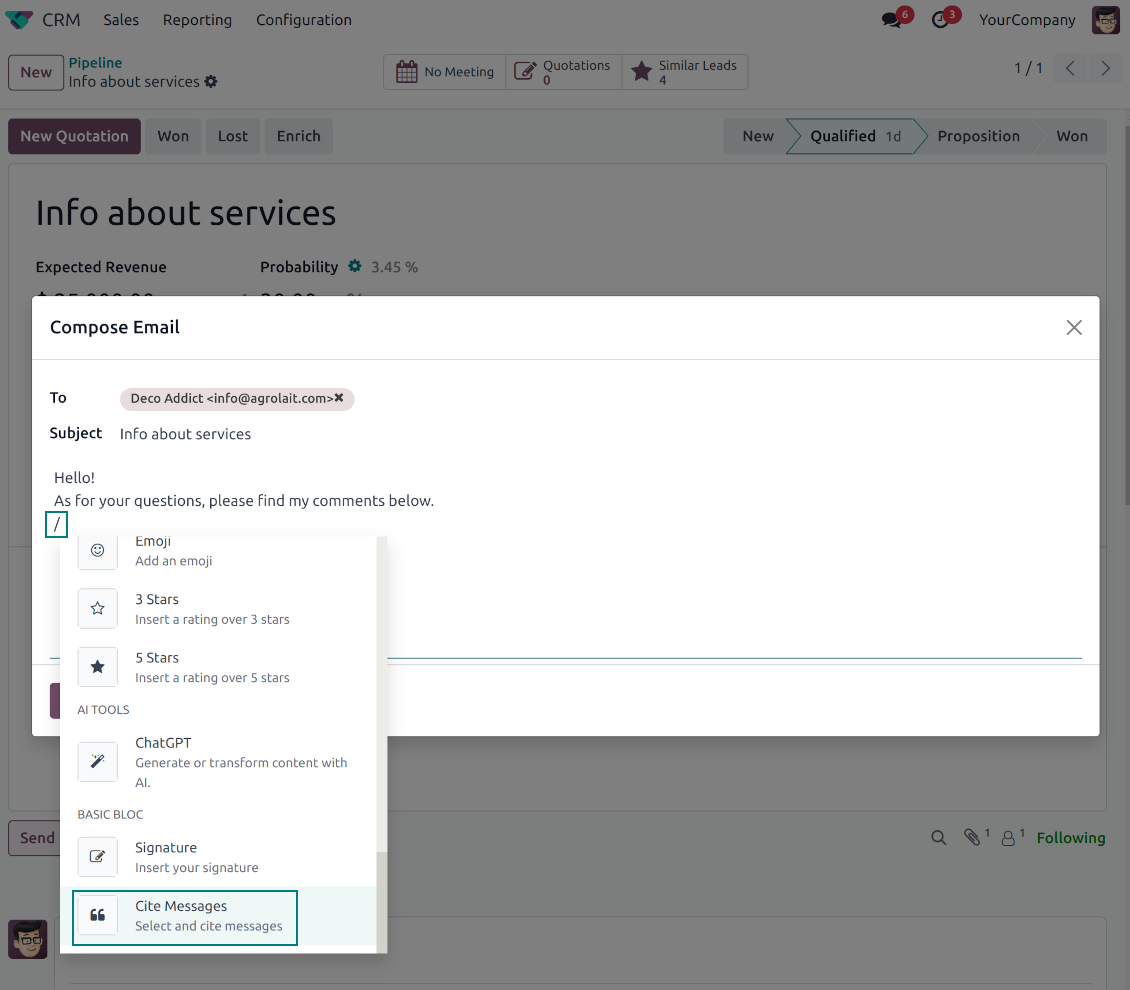
- Open Cite Message from the composer. Search earlier messages without leaving the email you are writing.
- Find the right message fast. Filter by author, content, date range, or limit results to the current thread.
- Insert with one click. Add the selected message at the cursor position in the email body.
Readable quoted history
- Shape the quoted header. Define the text placed before every cited message.
- Reply with context. Help customers and colleagues see exactly which earlier message you refer to.
- Use across documents. Cite messages from any discussion while composing on another record.
Messaging Suite administration
One place to configure your messaging tools
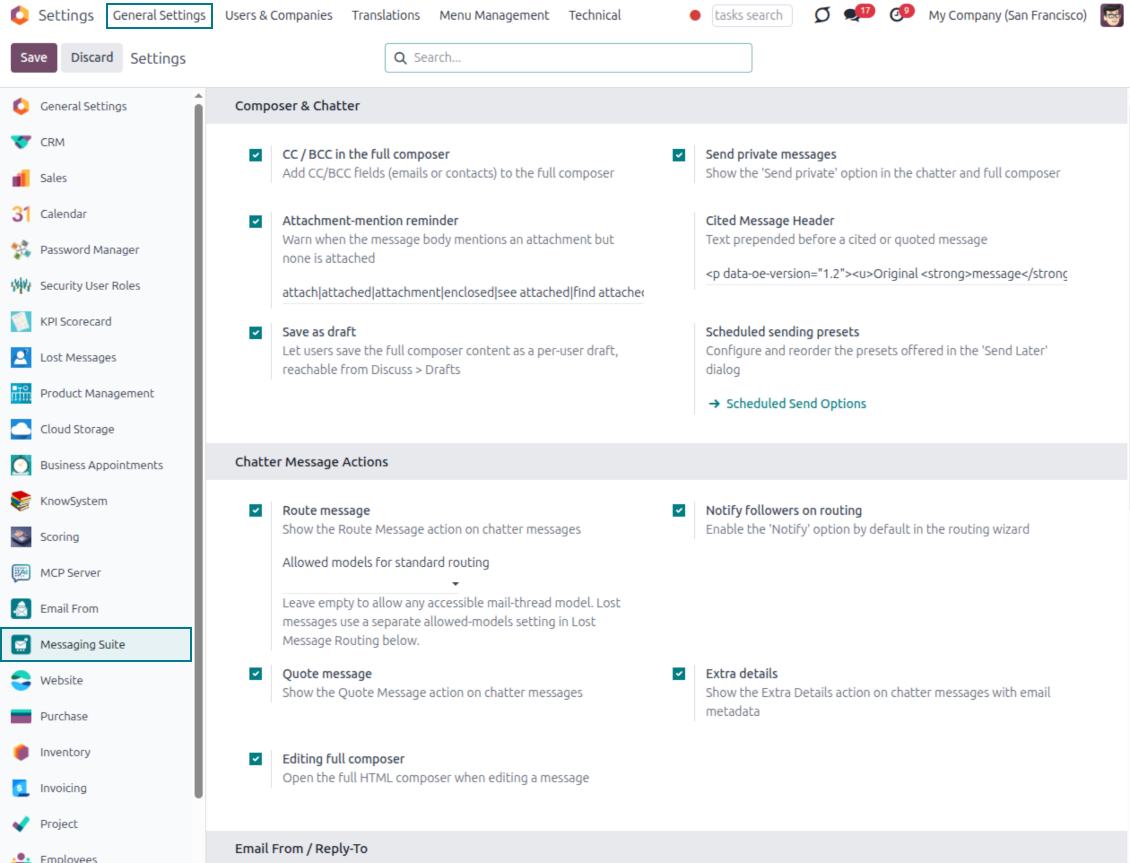
One Messaging Suite settings page
- Turn features on or off. CC/BCC, drafts, attachment reminders and send-later presets are controlled from one place.
- Reach every related option. Open settings for routing, privacy, quoting, editing and sender addresses without leaving the suite.
- Set up once, use everywhere. Configure the whole messaging toolkit from a single administration screen.
Routing and access control
- Choose where messages may go. Define which documents can receive rerouted chatter messages.
- Keep lost emails separate. Unattached incoming mail keeps its own queue and routing rules.
- Decide who may reroute. Give routing rights only to the users who should move messages between documents.
هل أنت جاهز للتقييم?
ابدأ بطلب نسخة تجريبية مجانية أو اشترِ من Odoo Apps Store.
قاعدة بيانات تجريبية مخصصة مجانية. لا يلزم رقم هاتف أو بطاقة. تحديثات مجانية مدى الحياة ودعم خبير ضمن إصدار Odoo الرئيسي.
الأسئلة الشائعة حول Odoo Messaging Suite Odoo v.18
ما سياسة تحديث ادواتكم؟
وفق سياسات Odoo Apps Store الحالية:
- كل وحدة مشتراة للإصدار 12.0 وما قبله تمنح الوصول إلى كل الإصدارات حتى 12.0.
- بدءا من الإصدار 13.0 تُشترى كل نسخة من الوحدة على حدة.
- بغض النظر عن الإصدار، الشراء يعطي حق كل التحديثات والإصلاحات ضمن الإصدار الرئيسي.
فريق faOtools لا يتحكم بهذه السياسات. للأسئلة تواصلوا مباشرة مع ممثلي Odoo Apps Store.
كيف اثبّت التطبيق على Odoo.sh؟
أبسط طريقة هي مسار متجر Odoo المدمج:
1. افتح صفحة الوحدة واضغط Deploy on odoo.sh
2. ستُنقل إلى GitHub. سجّل الدخول ثم Create a new repo أو استخدم مستودعا قائما. يجب أن يكون المستودع خاصا. لا يُسمح بنشر التطبيقات بترخيص OPL-1. أنشئ مستودعا جديدا لمشروع Odoo.sh عند الحاجة
3. ثم في odoo.sh اضغط Deploy وأكّد ثم Continue. يبدأ التثبيت.
هذه الخطوات تثبّت التطبيق على فرع الإنتاج. لفروع أخرى أو للتحديث:
1. نزّل الشيفرة من متجر Odoo
2. اعمل commit للوحدة في مستودع GitHub. لا تُستثنى مجلدات/ملفات التطبيق في .gitignore. مستودعات odoo.sh قد تتجاهل مسارات مهمة (مثل /lib). ارفع كل مجلدات وملفات الوحدة
3. انشر الفرع المستهدف في مشروع odoo.sh أو انتظر البناء التلقائي إن كانت الإعدادات كذلك.
كيف اثبّت التطبيق على خادمي؟
2. أعد تشغيل خادم Odoo;
3. فعّل وضع المطوّر (الإعدادات التقنية);
4. حدّث قائمة التطبيقات (قائمة التطبيقات);
5. اعثر على التطبيق واضغط Activate/Install;
6. اتبع الإرشادات في صفحة التطبيق إن وُجدت.
للتطبيق إضافات أخرى. هل اشتريها لاحقا؟
نعم. يضيف Odoo التبعيات تلقائيا إلى السلة؛ استبعد الأدوات المشتراة سابقا حتى لا تدفع مرتين.
نشرت التطبيق على Odoo.sh وأرى تحذيرا/خطأ في الاختبارات
التحذير الأحمر/البرتقالي لا يؤثر على وظائف التطبيق. أحيانا لا تتجاوز وحداتنا الاختبارات التلقائية القياسية لأنها تفترض سلوكا يتعارض مع أهداف التطبيق. مثلا نغيّر حساب السعر بينما تقارن اختبارات Odoo السعر النهائي بالخوارزمية القياسية.
تحقق أولا من وظائف قاعدة البيانات المنشورة. هل كل شيء يعمل؟
إن ظننتم أن التحذير يؤثر على وظائف حقيقية، تواصلوا معنا وأرسلوا سجلات التثبيت كاملة وقائمة الوحدات المنشورة كاملة (الأساسية والطرف الثالث).
هل يمكنني شراء التطبيق منكم مباشرة؟
لا، نوزع الأدوات فقط عبر متجر تطبيقات Odoo الرسمي.
اريد خصما
للأسف ليست لدينا وسيلة تقنية لتقديم أسعار فردية.
هل يمكن تثبيت التطبيق على قاعدة Odoo Online (SaaS)؟
لا، لا يمكن استخدام تطبيقات الطرف الثالث على Odoo Online. خدمة Odoo SaaS تمنع ذلك.
للاداة تبعيات على تطبيقات أخرى. هل اشتريها؟
نعم، تحتاج الأداة إلى كل الوحدات المذكورة في التبعيات. السعر في صفحة التطبيق يشمل هذه التبعيات.
ما سعر الوحدة بالدولار الأمريكي؟ لماذا تغيّر؟
أسعار وحداتنا باليورو. يحوّل متجر Odoo الأسعار إلى عملات أخرى حسب سعره الداخلي. لذا قد يتغيّر السعر بالدولار الأمريكي عند تحديث سعر الصرف.
تتم صياغة نصوص التطبيق والموقع الإلكتروني باللغات غير الإنجليزية بمساعدة الذكاء الاصطناعي وبما يتوافق مع ترجمات Odoo الرسمية. إذا لاحظت خطأ، أرسل تذكرة تصحيح الترجمة وسنقوم بتصحيحه.
قواعد بيانات Odoo التجريبية (معاينات)
قد نوفر لهذا التطبيق قاعدة بيانات تجريبية مخصصة مجانية.
لا تحتاج إلى رقم هاتف أو بطاقة ائتمان للاتصال بنا. يجب عليك فقط اجتياز عملية تسجيل قصيرة عبر البريد الإلكتروني, والتي لا تستغرق أكثر من 30 ثانية.
بناءً على طلبك، نُعِدّ قاعدة بيانات معاينة خاصة بك، يمكنك خلالها إجراء أي اختبارات والتحقق من افتراضاتك لمدة أسبوعين تقريبًا.
الإبلاغ عن الأخطاء
إذا واجهت أخطاء أو سلوكًا غير متسق, فلا تتردد في الاتصال بنا. نحن نضمن تقديم الإصلاحات خلال 60 يومًا من الشراء ونهتم بشدة بتحسين أدواتنا حتى بعد هذه الفترة.
لا تحتاج إلى رقم هاتف أو بطاقة ائتمان للاتصال بنا. يجب عليك فقط اجتياز عملية تسجيل قصيرة عبر البريد الإلكتروني, والتي لا تستغرق أكثر من 30 ثانية.
يرجى تضمين أكبر قدر ممكن من التفاصيل في طلبك: لقطات الشاشة وسجلات خادم Odoo ووصف كامل لكيفية إعادة إنتاج المشكلة وما الى ذلك. عادة ما يستغرق إعداد خطة عمل للمشكلة بضعة أيام عمل (اذا تأكد وجود خطا) او تزويدك بارشادات حول ما ينبغي فعله (في الحالات الأخرى).
طلبات الميزات العامة وأفكار الوحدات (تطوير مجاني)
لدينا دوافع قوية لتحسين أدواتنا وسنكون ممتنين لأي تعليقات. إذا كانت متطلباتك ذات استخدام عام ويمكن تنفيذها بكفاءة, فسيقوم الفريق بإدراج تلك المتطلبات في قائمة المهام الخاصة بنا.
تتم معالجة قائمة المهام هذه بانتظام ولا يتم فرض رسوم إضافية. على الرغم من أننا لا نستطيع أن نعد بالمواعيد النهائية والتصميم النهائي, إلا أنها قد تكون طريقة جيدة للحصول على الميزات المطلوبة دون استثمارات ومخاطر.
لا تحتاج إلى رقم هاتف أو بطاقة ائتمان للاتصال بنا. يجب عليك فقط اجتياز عملية تسجيل قصيرة عبر البريد الإلكتروني, والتي لا تستغرق أكثر من 30 ثانية.

اداة لتنظيم مرفقات Odoo في مجلدات ومزامنة الدلائل مع Google Drive وOneDrive/SharePoint وNextcloud/ownCloud وDropbox وAmazon S3 وBox وNAS. مدير الملفات. DMS
398€

The tool to build a deep and structured knowledge base for internal and external use. Knowledge System. KMS. Wiki-like revisions.
398€
The tool to automatically synchronize Odoo attachments with OneDrive files in both ways
487€
The tool to set up KPI targets and control their fulfillment by periods. KPI dashboards. Dashboard designer. KPI charts

The tool for time-based service management from booking appointments to sales and reviews
398€
The tool to automatically synchronize Odoo attachments with Google Drive files in both ways
487€
