Google Drive Odoo Integration v.13
The tool to automatically synchronize Odoo attachments with Google Drive files in both ways

- the technical core which provides basic mechanics of auto synchronization. This is a required module for integration. Seu preço é 398€.
- the connector itself which introduces links between Odoo and Google Drive. Seu preço é 89€.
- an optional add-on to sync Odoo documents (introduced by the enterprise app 'Documents') with clouds. The features assumed by this add-on are marked by the icon . Seu preço é 44€.
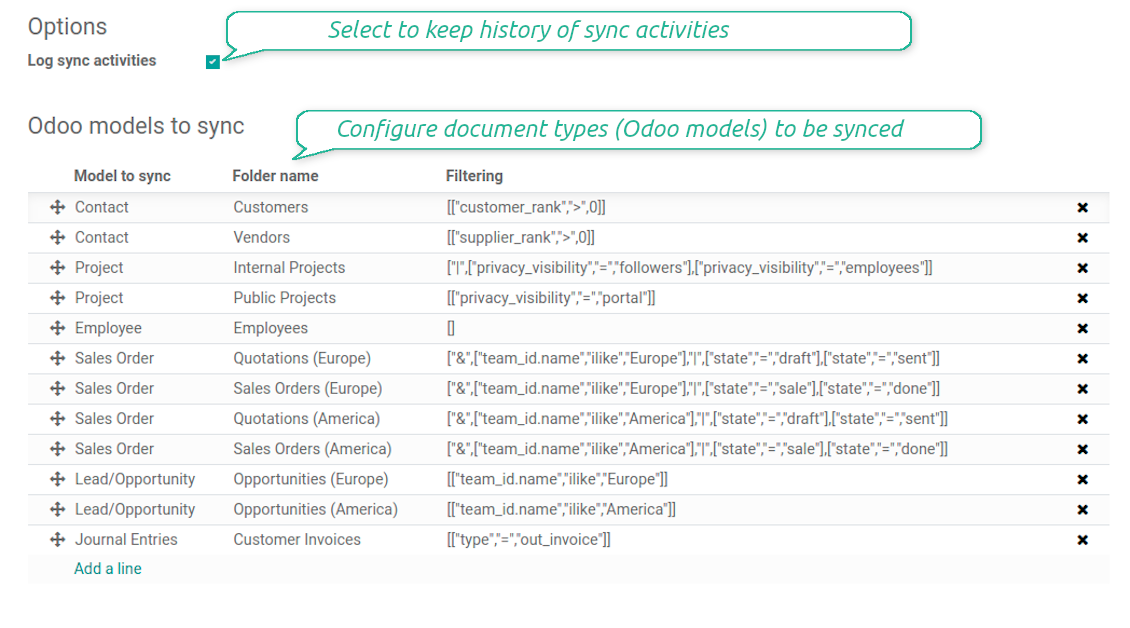
Selectable documents types for sync
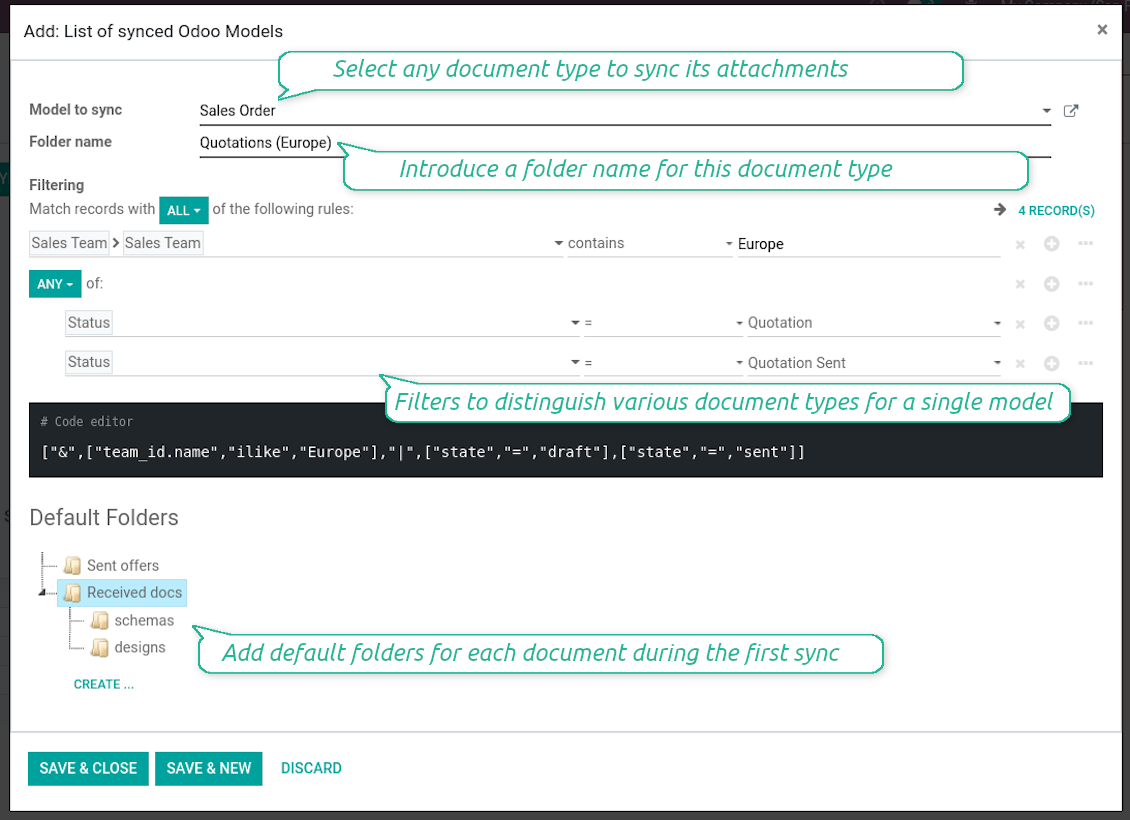
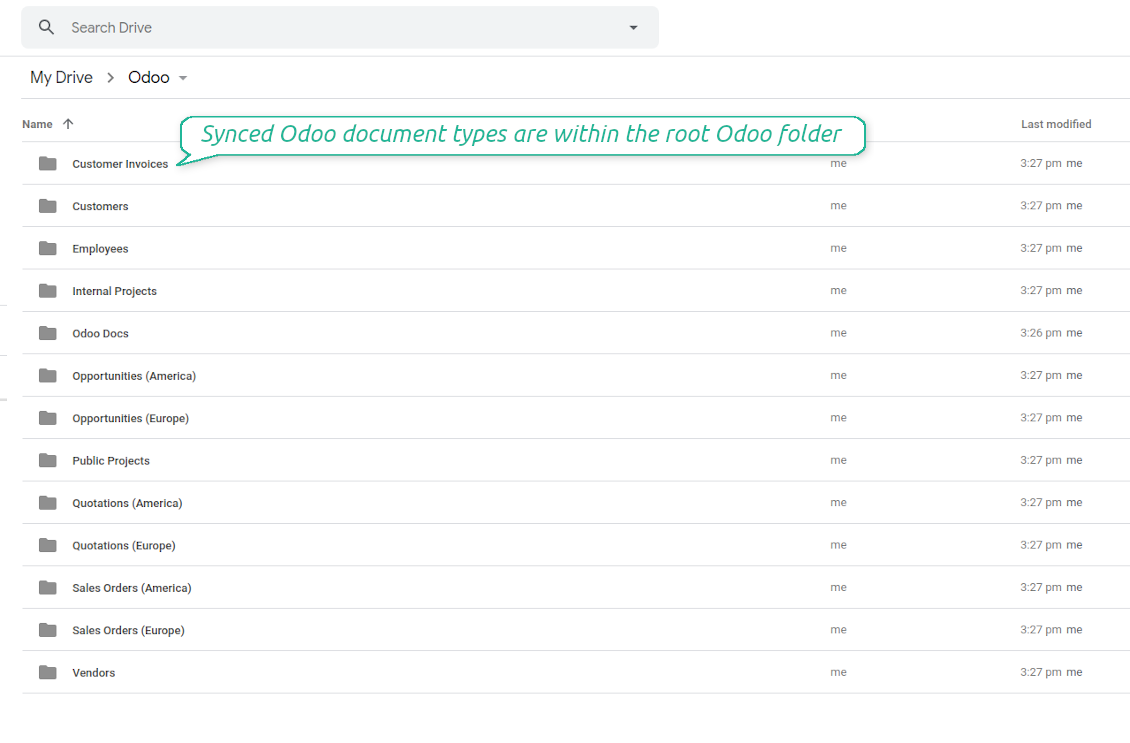
The tool let you split any business model into a few directories. Have a separate folder for individuals and companies, for European and American opportunities, for each project, etc.
Moreover, it is possible to guarantee that only topical documents are synced by using relative periods: leads registered in the last 3 months, invoices updated the last week, and so on.
Typical use cases
- Projects: have an own Google Drive folder for each customer project.
- Customers: add all partner files in a single directory available both from Odoo and from Google Drive. Modify those using default cloud editors and access them when working in Odoo.
- Employees: gather all files by this employee in a single cloud folder: photos, document scans, contracts. Access and upload those from Odoo and Google Drive alternatively.
- Opportunities: carefully store all specifications, requirements, any files which would let you make a good offer.
- Orders: keep all printings and contracts in Google Drive with simple availability from Odoo.
Capturas de ecrã
Choose document types to be synced
Document type might have a few folders based on filters
Automatic and bilateral integration
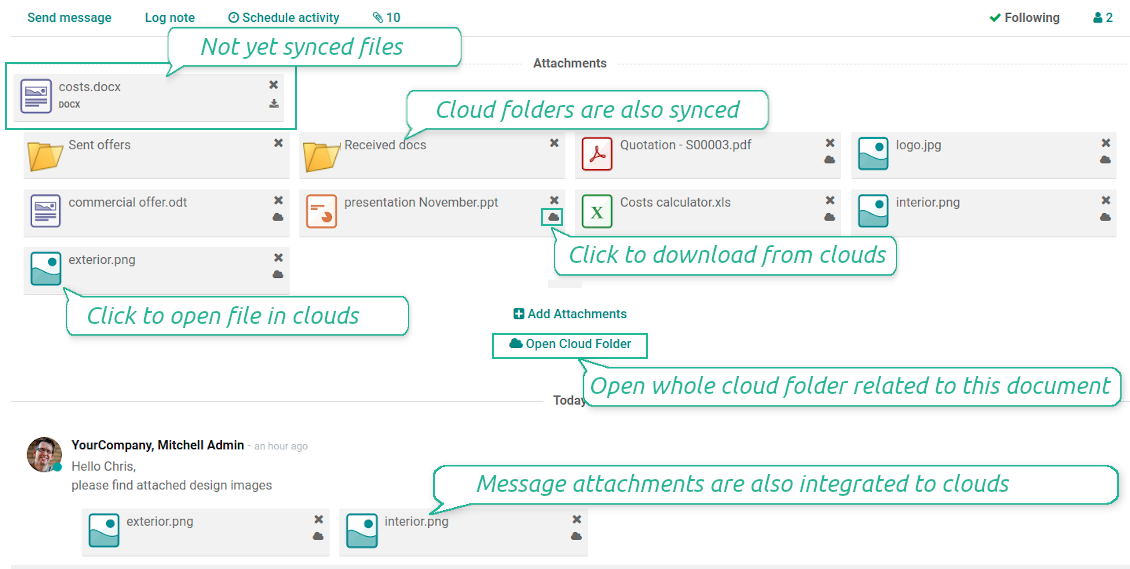
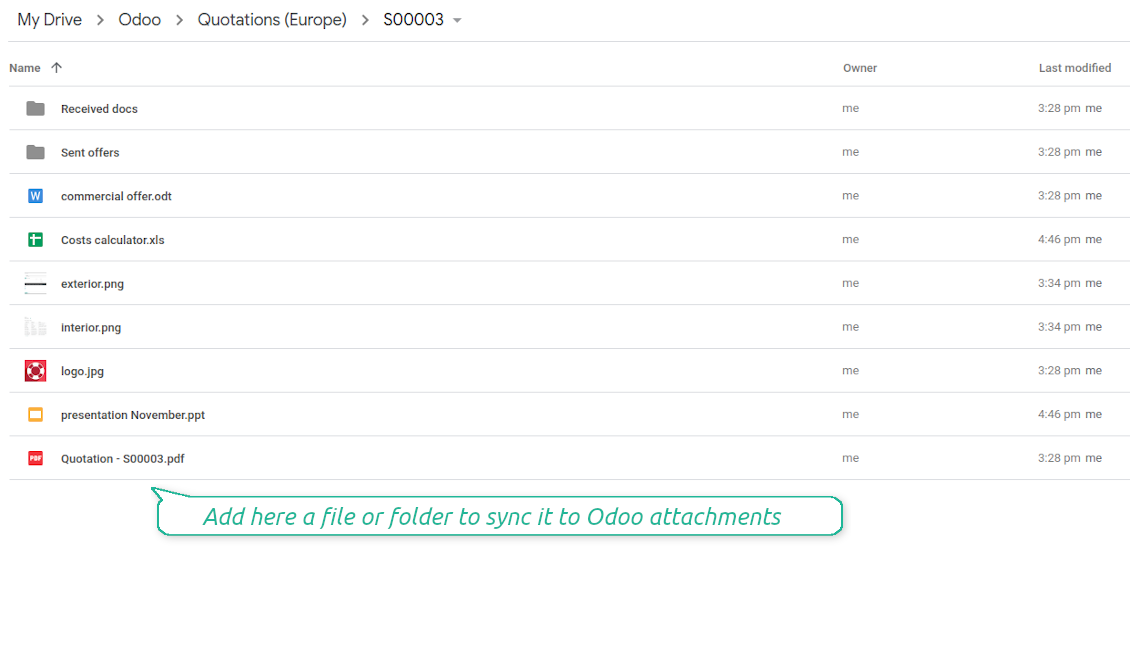
Synced attachments are physically kept only in a cloud storage, what increases Odoo interface performance. Simultaneously, you can open documents from Odoo or download those in a single click.
How files and folders are synced from Odoo to Google Drive
Based on the scheduled job 'Synchronize attachments with cloud' Odoo regularly checks whether:
- Any new attachment should be forwarded to Google Drive;
- Any new document type (e.g. Sale orders) is added / replaced / renamed as a sync model and, hence, whether a directory should be created / removed / renamed in Google Drive;
- Any new document (e.g. Sale Order SO019) is generated / updated / unlinked and, hence, whether a Google Drive folder should be created / moved or renamed / deleted.
- Any new attachment should be removed from Google Drive if it has been deleted from Odoo.
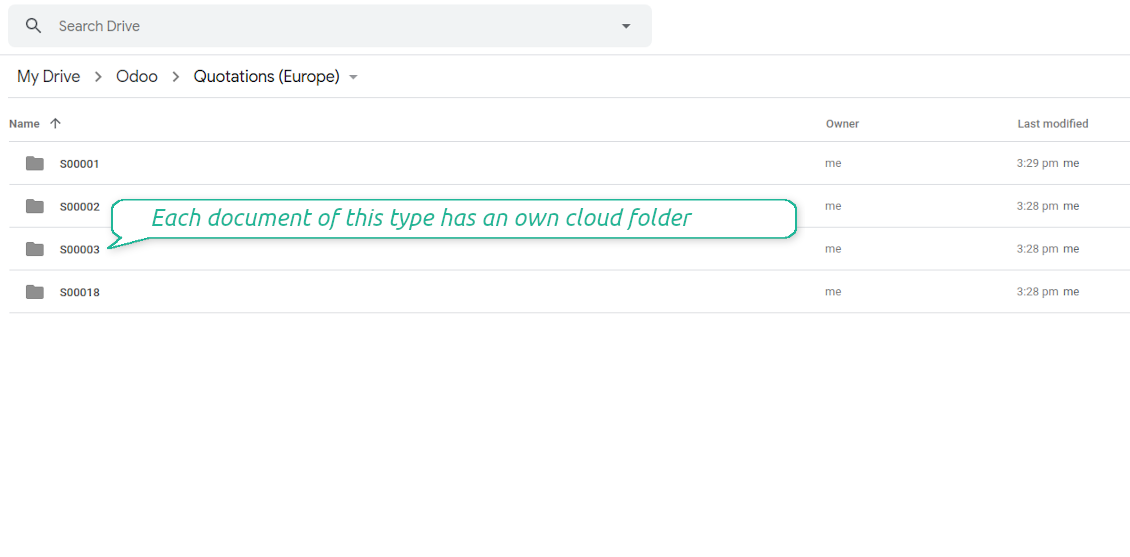
Based on results of that checks, Odoo starts processing queue of changes, and makes sure that all items are located correctly. The final goal is to have the structure 'Odoo / Document Types / Documents / Files. For example, 'Odoo / Quotations / SO019 / commercial offer.pdf'.
During the synchronization all synced Odoo attachments change their type to a link (URL), while binary content is removed with a next Odoo cleaner. So, no actual files would be stored on your Odoo server.
Please take into account:
- Each sync (especially the very first one) might take quite a long. It is not recommended to make sync too frequent: once an hour seems reasonable frequency.
- File names should be managed in Google Drive: each backward sync would recover Google Drive names, Odoo is here less important.
How items are retrieved from Google Drive to Odoo
Based on the scheduled job 'Synchronize attachments from cloud' Odoo regularly checks whether:
- Any file is added / moved / removed in a Google Drive document folder. If yes, Odoo would create a link to this file in a target object (e.g. a new attachment to SO019) or would move / delete such an attachment.
- Any file of a Google Drive document folder is renamed. If yes, an attachment would be renamed in Odoo as well.
- In document folders you can put not only files but also child folders. In that case a link for this folder (not its content) would be kept in Odoo attachments.
- If you deleted a folder related to this document type or this document, their child files would be deleted as well. Thus, Odoo would remove related attachments. The folders, however, will be recovered with a next direct sync.
- Each backward sync might take quite a long. It is not recommended to make sync too frequent: once an hour seems safe enough.
Capturas de ecrã
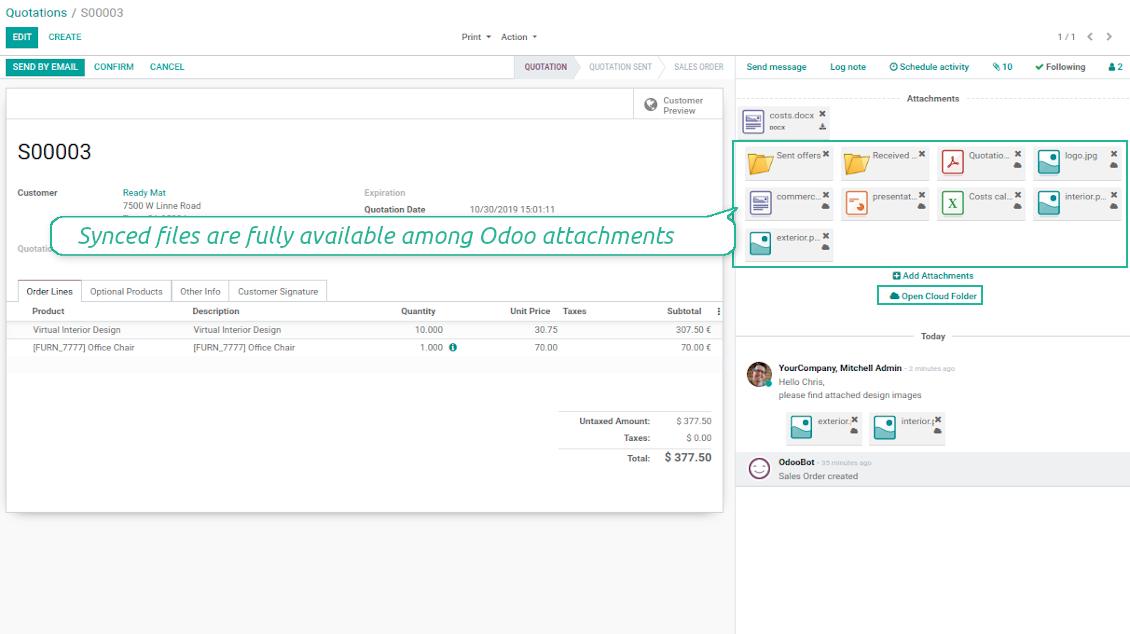
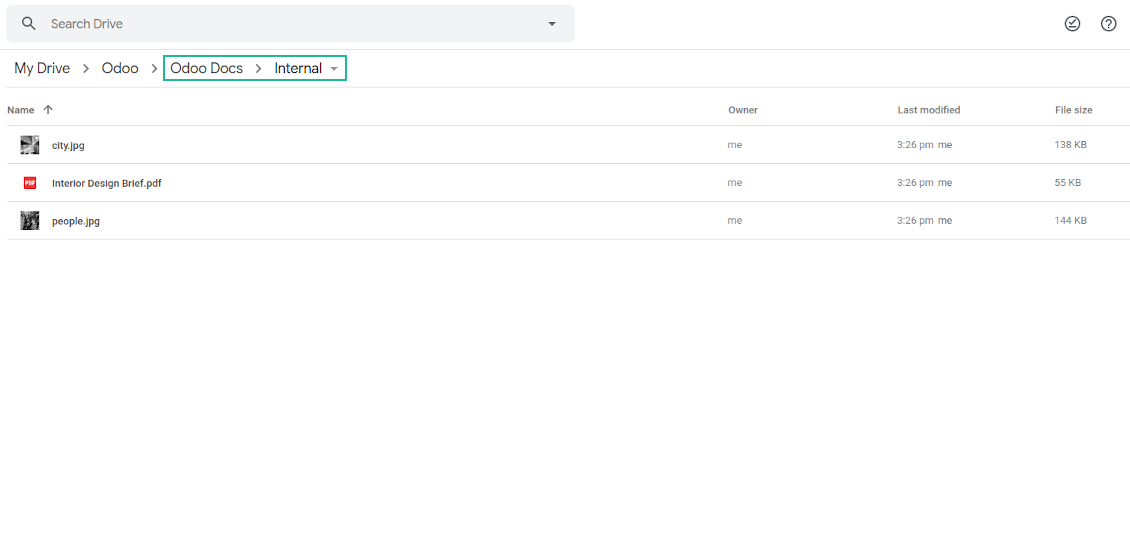
Synced files are simply found in Google Drive. Add unlimited number of files or folders
Document types folders in Google Drive
All document of this type has an own folder
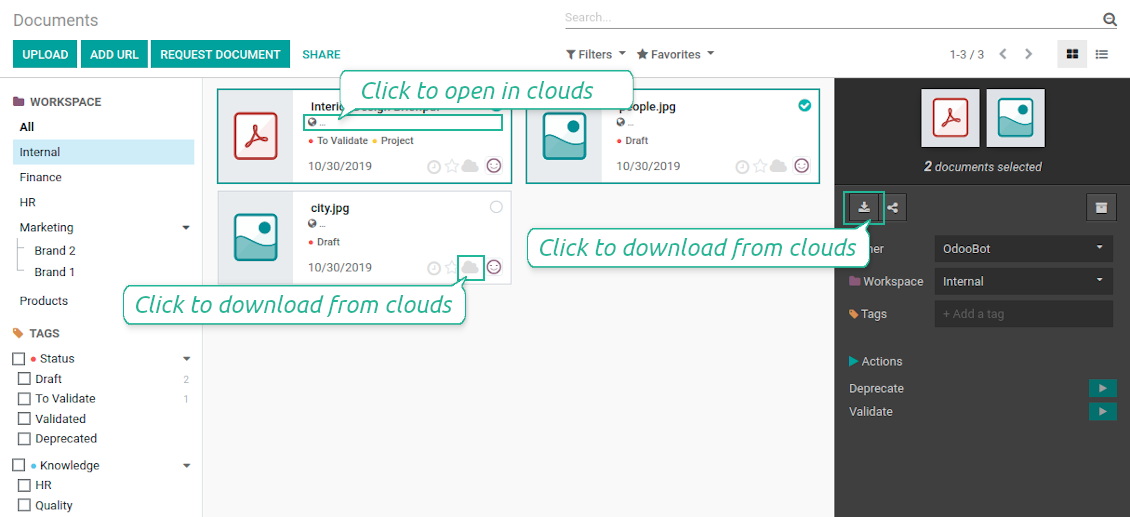
Direct access to Google Drive items
- Click on attachment to open it in Google Drive in a new tab (necessary to be logged in Google Drive);
- Click the icon of cloud to start downloading file from Google Drive (no extra check in is required)
- Push the button "Open cloud folder" to open all files related to this document.
Capturas de ecrã
Quick access to Google Drive files and folders
Apply to Google Drive right from Odoo chatter
Individual and team drives
Fully integrated and compatible with Enterprise Documents
It does not contradict printing, mailing, or Enterprise documents features.
For the latter it is also possible to fully reflect directories structure, not only sync standard attachments.
How Odoo Enterprise Documents are synced
This tool is not in conflict with the 'documents' module provided under the Enterprise license. Attachments related to Enterprise folders would be synced as any other files: according to a document they relate to.
It is not always comfortable, and you might be interested in reflecting directories' structure introduced by the module 'Documents'. To this end the special extension is developed. This extension introduces the following features:
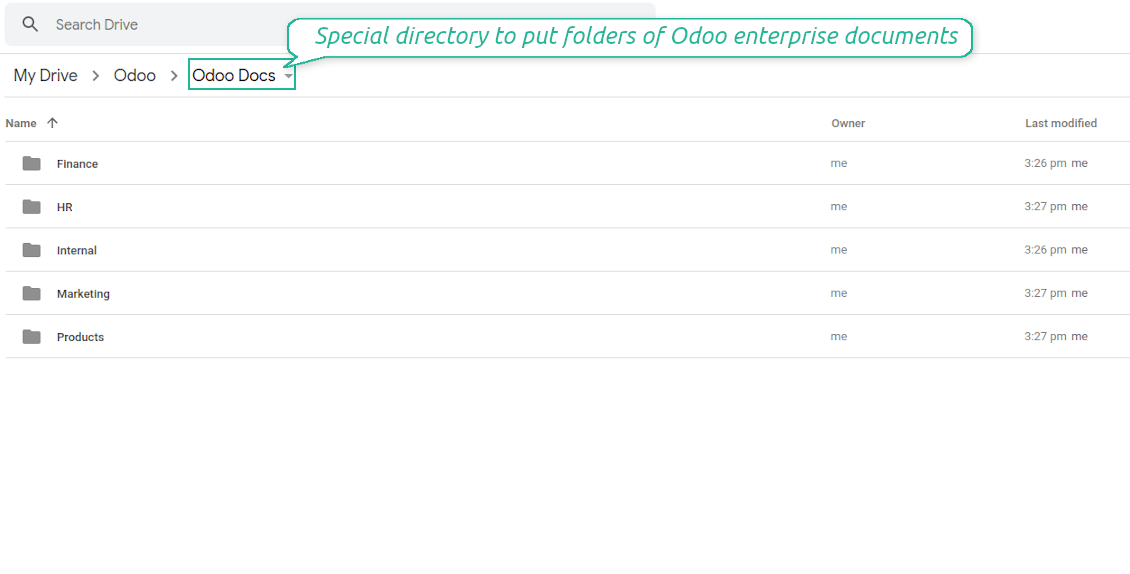
- The documents hierarchy is reflected within the folder 'Odoo / Odoo Docs'
- Each Odoo folder has a linked cloud folder. Take into account that folders created in the cloud storage will be synced as Odoo attachments. The key principle is: folders are managed by Odoo, files are managed by the cloud client
- All files are synced with the same logic as usual attachments. Files created in Odoo will be added to the cloud storage and will be replaced with links in Odoo. Files created in cloud storage will generate attachments within a paired directory
- Please do not name synced models as 'Odoo Docs'. This is the reserved name for Odoo Enterprise Documents
A few important peculiarities to take into account
- Take into account that files or folders deleted in Google Drive are really deleted only when you clean trash. Otherwise, such files still exist and would be reflected in Odoo
- Try to avoid the following symbols in folders' and files' names: *, ?, ", ', :, <, >, |, +, %, !, @, \, /,. Direct sync will replace such symbols with '-'. It is done to avoid conflicts with file systems.
Capturas de ecrã
Direct access from Odoo documents to Google Drive
Enterprise Documents in Google Drive
Enterprise files in Google Drive
Tricky setup, but works perfectly now
Really solid module. We managed to get a very flexible folder structure (sorted by clients) and synced all our sales orders, invoices and tasks by projects to Google Drive.
Initial setup was a bit of a pain and kinda tricky to configure everything at first, but now it's running smoothly and works perfectly. The faotools team helped a lot. Def worth it if u need to keep your docs organized in Odoo and Google Drive.
Recommended!
Excellent !!!
Great App and great Service from faOtools.
Best module for integration with google drive
The module performs its function correctly and faOtools responds quickly to any problem and, in case of detecting any bug, quickly apply the changes. Its support is 10 stars.
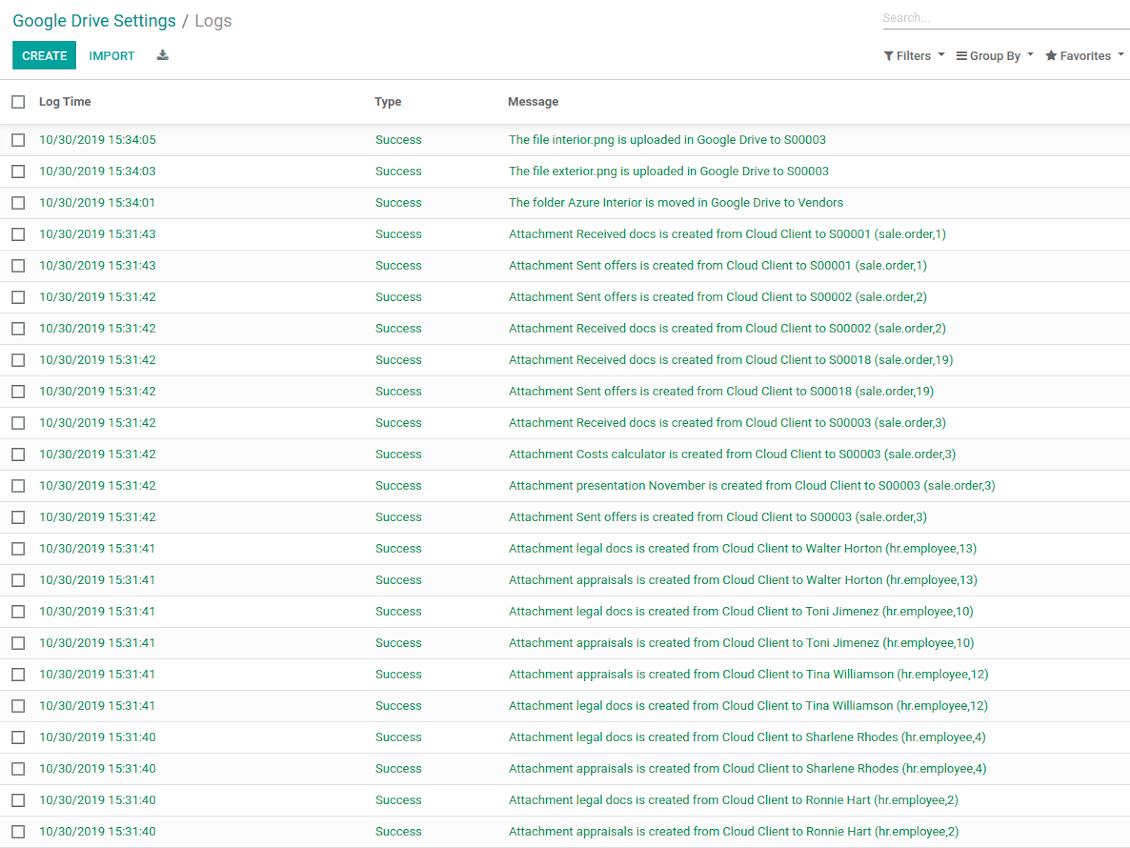
Google Drive Sync logs in Odoo
Capturas de ecrã
Logged synchronization activities
Default folders for documents
Sugestões de configuração e instalação para Google Drive Odoo Integration Odoo v.13
Login and Google Drive Credentials
- Go to the Google Cloud Console via the URL https://console.cloud.google.com
- Select or create a project
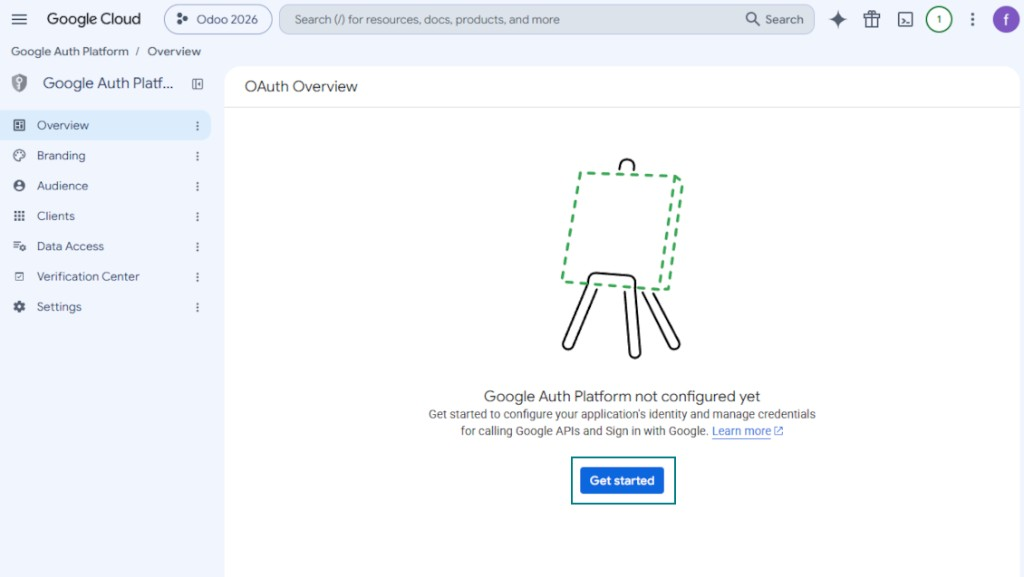
- After the project is selected, the console opens the Google Auth Platform. Press 'Get Started'
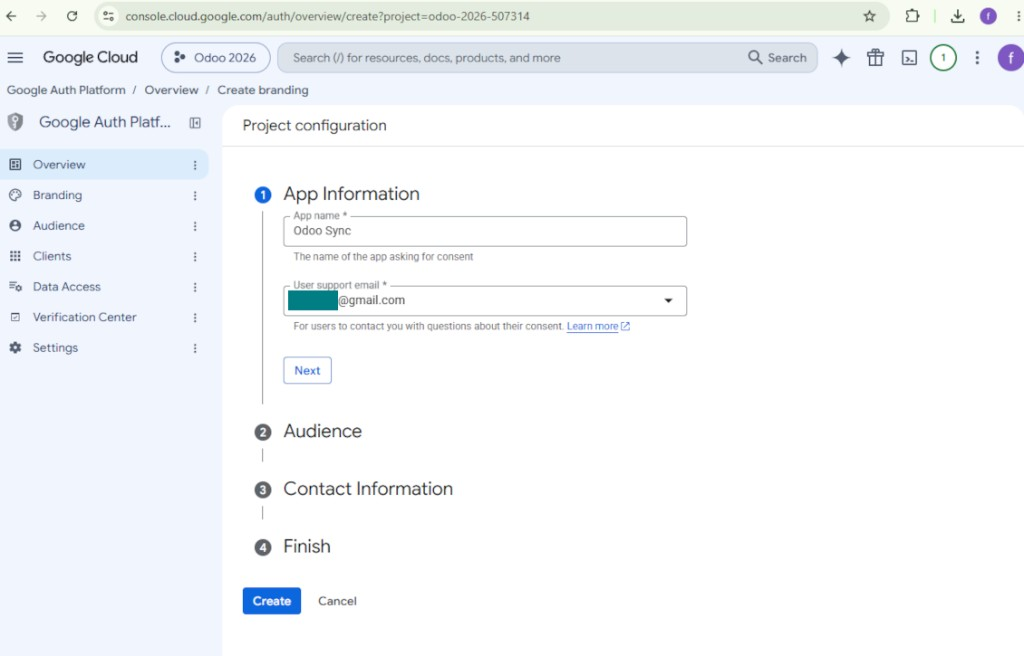
- Add app information
- As an app name select any suitable
- As a user support email select your email address
- Press 'Next'
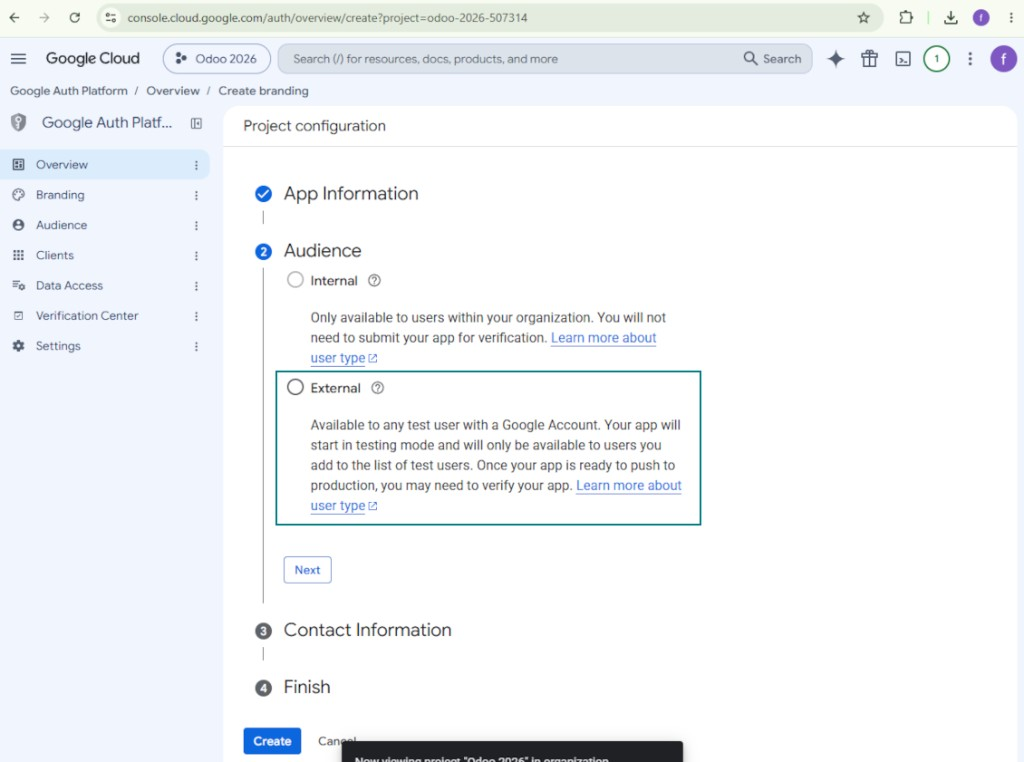
- As the audience select 'External' and press 'Next'. Note: you are anyway going to use this app only for your own Odoo connection
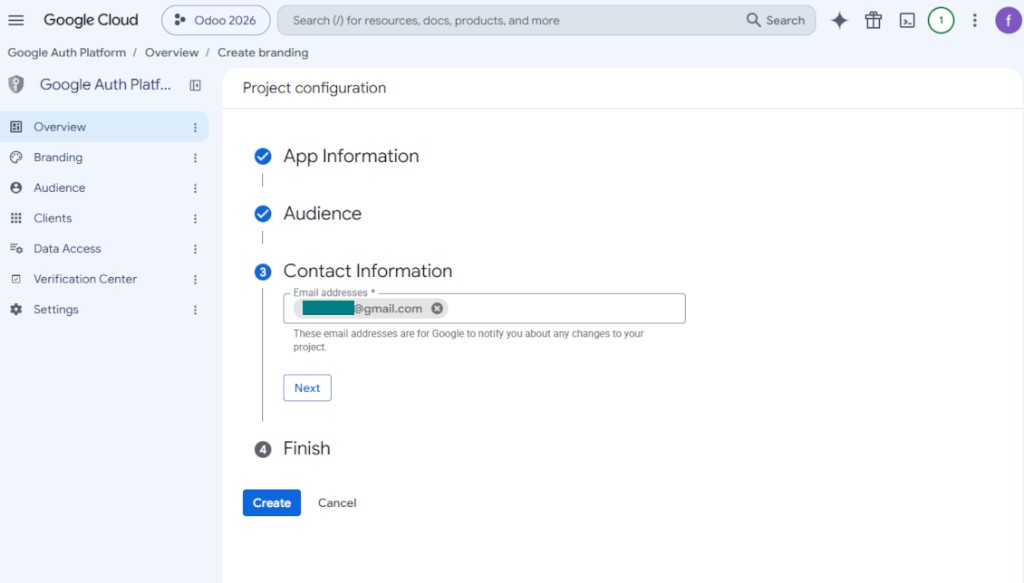
- As the contact information enter your Google or Google Workspace email address and press 'Next'
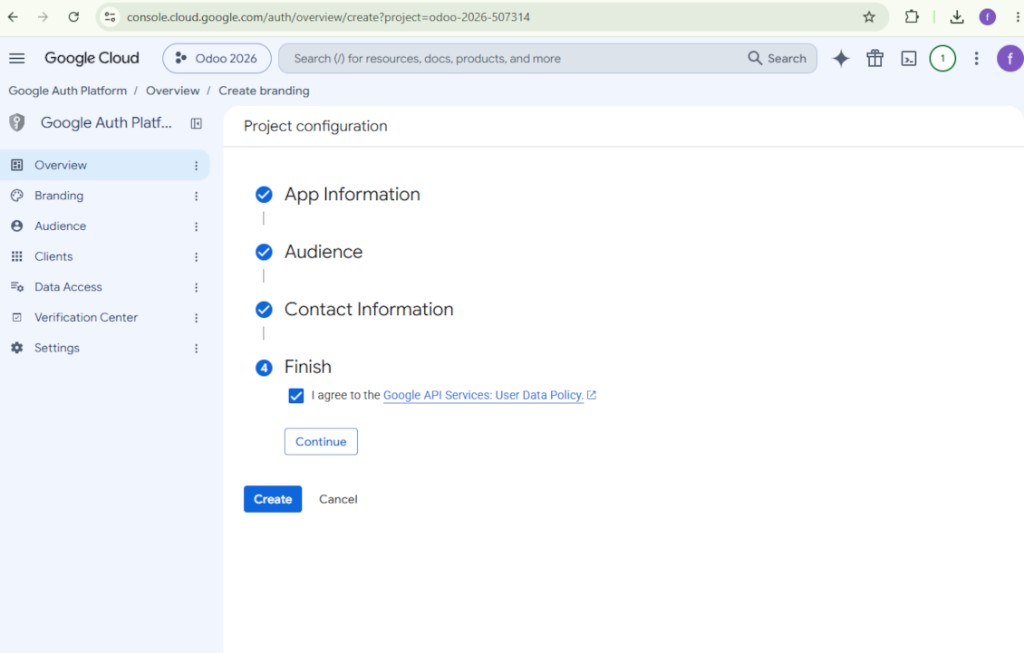
- Agree with the Google API Services User Data Policy, press 'Continue', and then press 'Create'
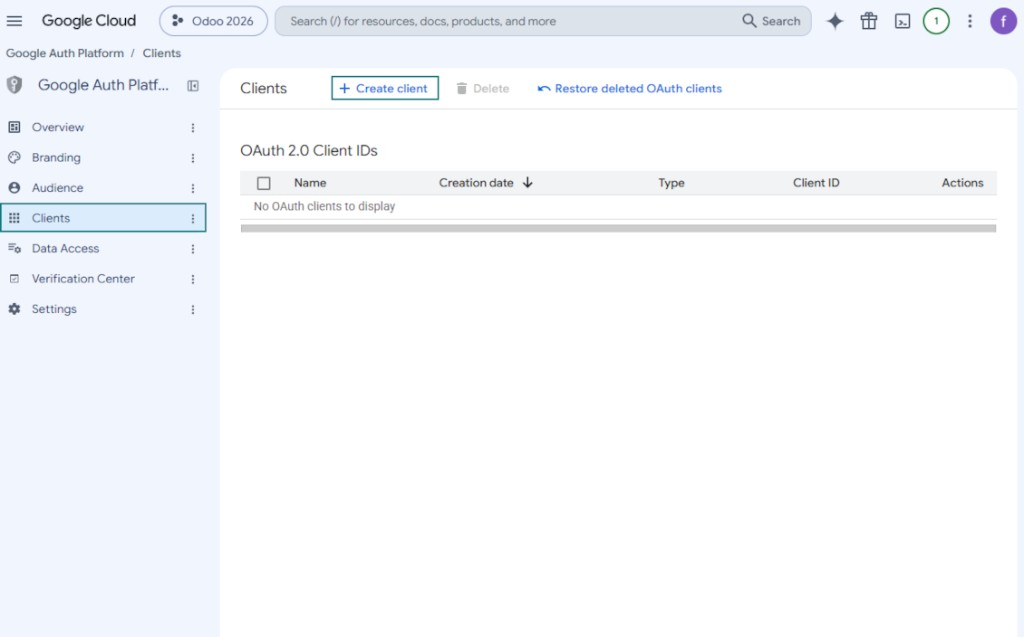
- Go to 'Clients' and press 'Create client'
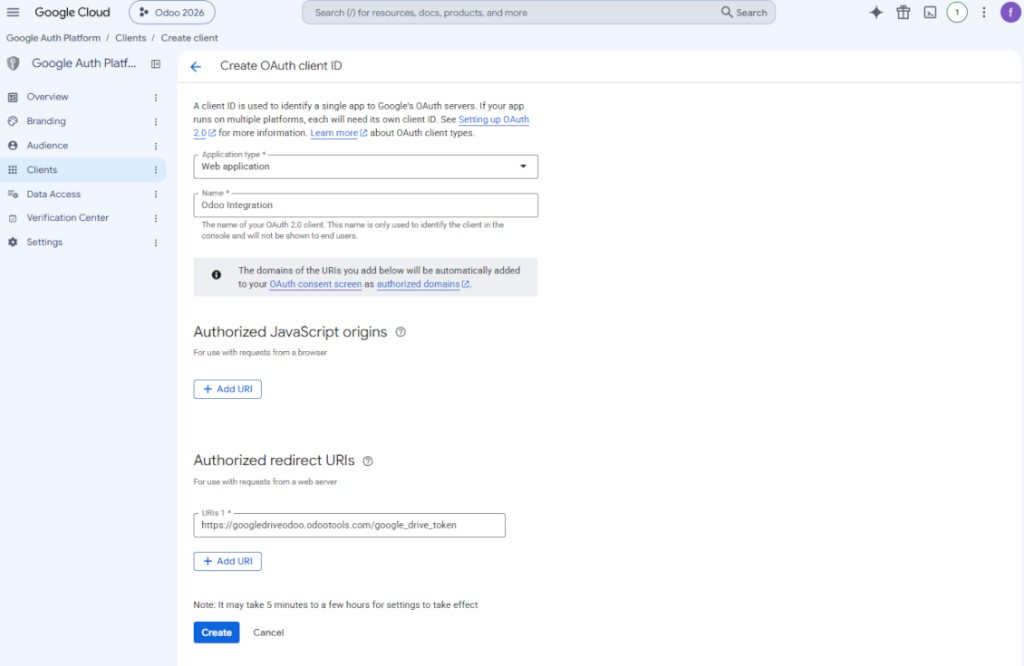
- As the application type select 'Web application'
- As a name select any suitable
- As the authorized redirect URI, add the link in a format [YOURODOOSITENAME]/google_drive_token (e.g. https://odootools.com/google_drive_token).
- Press 'Create'
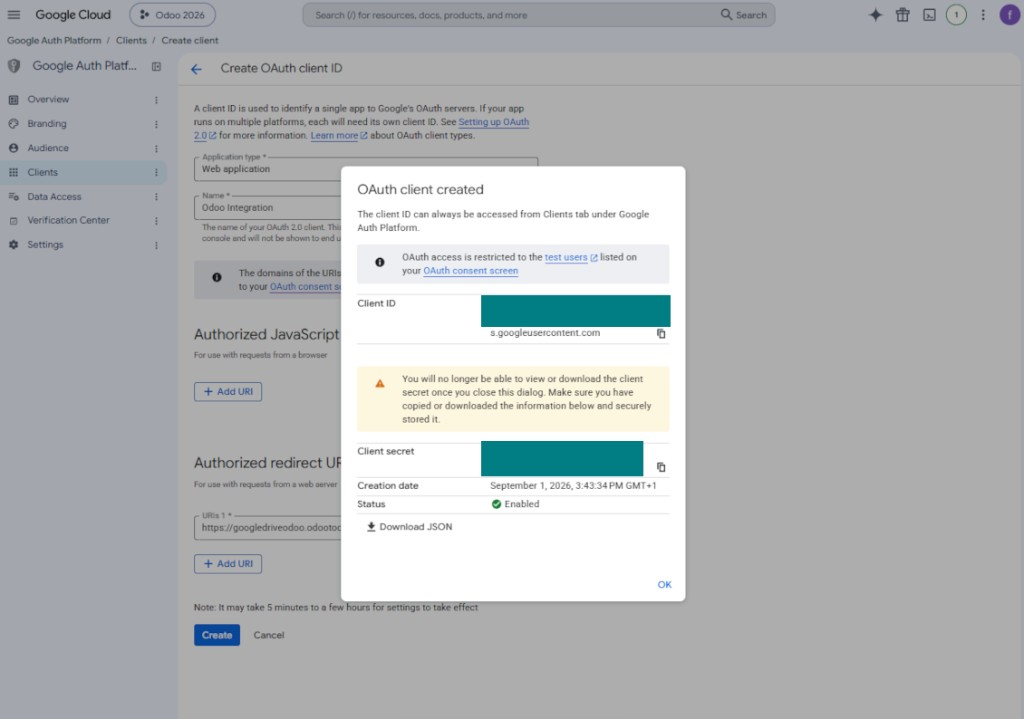
- Copy and safely store 'Client ID' and 'Client secret'. The client secret is shown only once
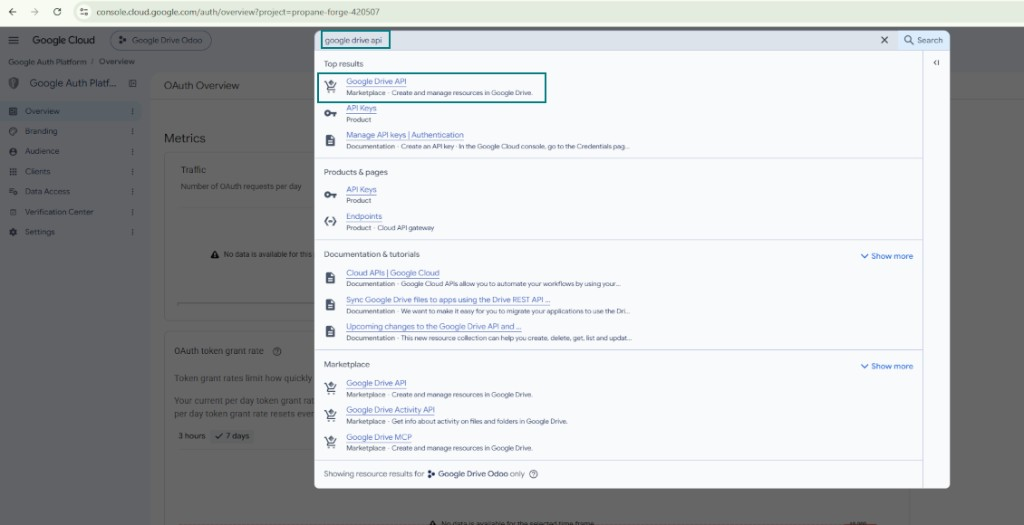
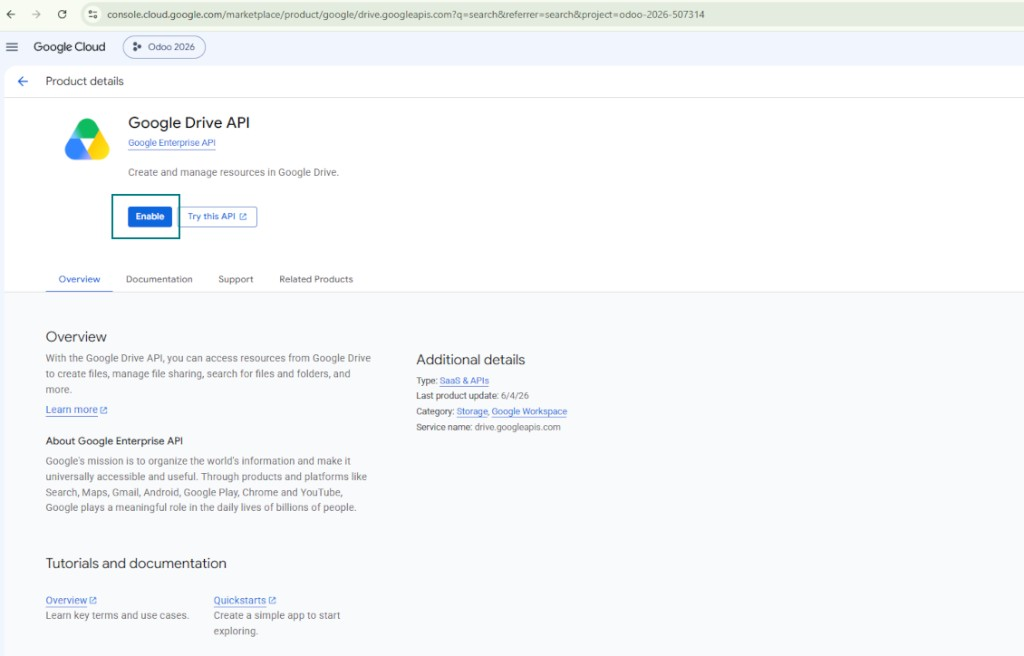
- Enable the Google Drive API for this project: type 'Google Drive API' in the top search box, open the found product, and press 'Enable'
- Go to 'Audience' and add your email address as a test user
- Publish the app. Otherwise, the app stays in the testing state and its token expires every 7 days
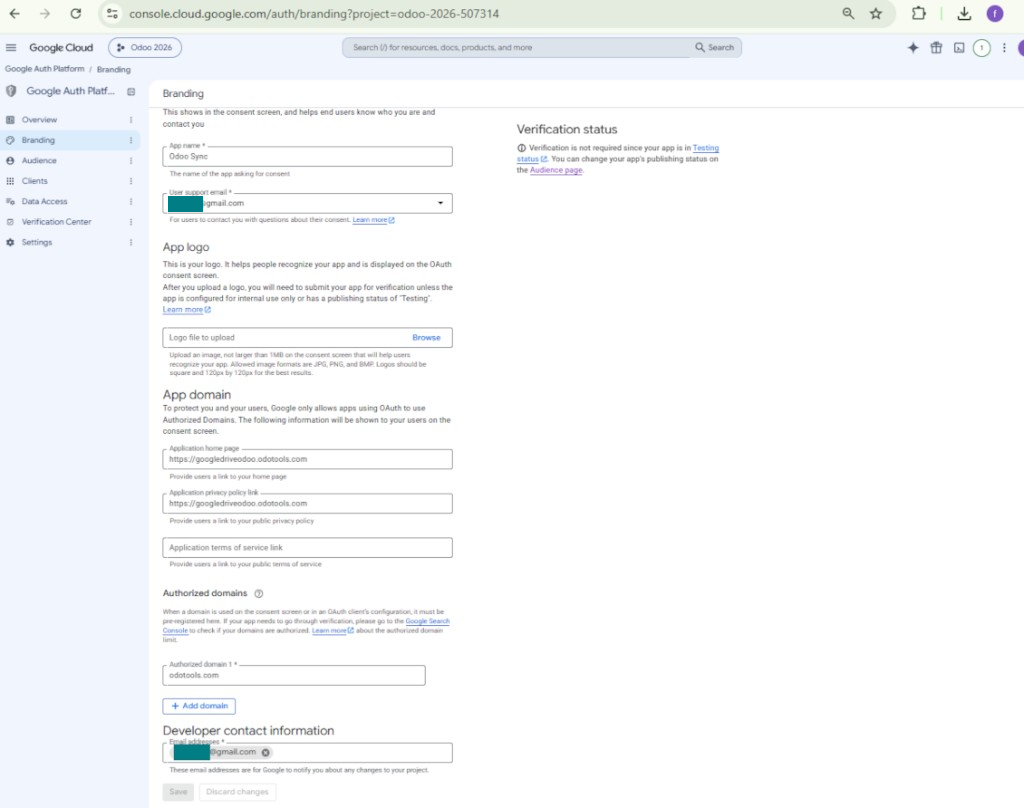
- Open 'Branding' and fill in the application home page and the application privacy policy link (for example, the links to your Odoo website). Add the domains of those links as the authorized domains
- Open 'Audience' and press 'Publish app'
- Do not upload an app logo. This would invoke a long and complex Google verification process that is of no actual need to you
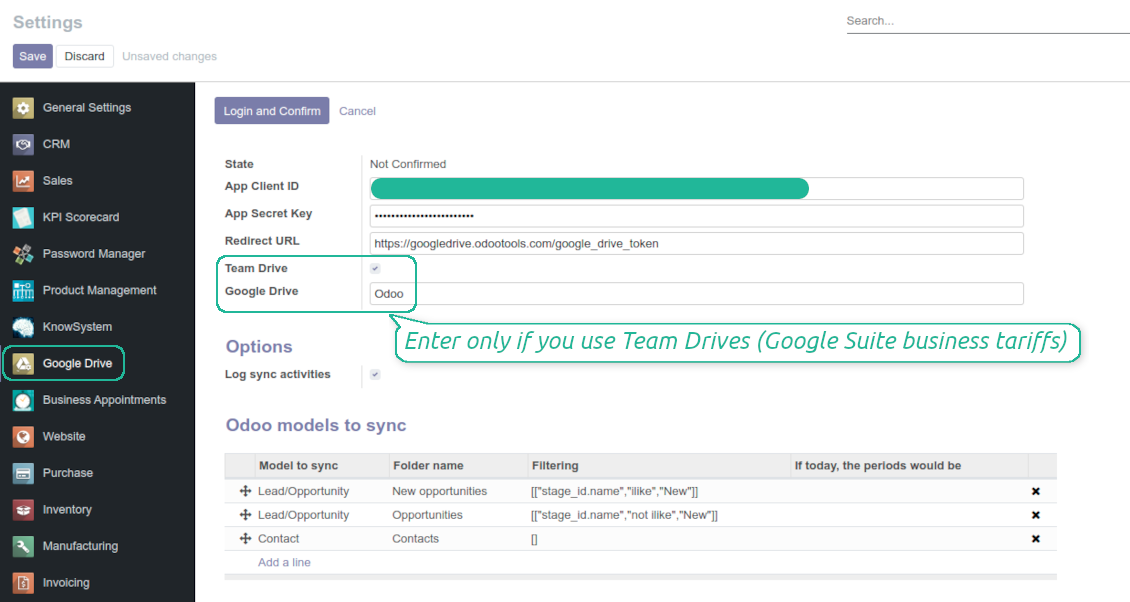
- Go to the Odoo Google Drive Settings
- Copy 'Client ID' from step 8 into the field 'App Client ID'
- Copy 'Client secret' from step 8 into the field 'App Secret Key'
- Insert the redirect URL you entered in step 8
- If you use team drives, check the related box. Make sure you really use team drives. In you Google Drive you should find the item 'Team Drives' in the left sidebar. This feature is available only for business and enterprise tariffs
- If the option 'Team Drive' is enabled, introduce its name. It should be absolutely the same as you see it in your Google Drive. Make sure that your user has full rights for this team drive
- Press 'Save'
- Press 'Login and Confirm'. Odoo redirects you to Google login page. Check in, agree with all conditions, and grant permissions asked
- After login, Google redirects you back to Odoo. Google Drive - Odoo synchronization is ready to be done.
Open the Google Auth Platform
Add app information
Select the external audience
Add contact information
Agree with the policies and create the app
Create an OAuth client
Configure the web application client
Copy the client ID and client secret
Find the Google Drive API
Enable the Google Drive API
Fill in branding to publish the app
Add test users and publish the app
Enter Google app credentials to Odoo
Odoo server configuration and cron job configuration
To make sure the synchronization works correctly apply proper timeouts to the Odoo configuration file: LIMIT_TIME_CPU, LIMIT_TIME_REAL, LIMIT_TIME_REAL_CRON should be more than 900 seconds.
For Odoo.sh this should not be done, since timeouts are predefined and are not configurable.
Then, timeout should be entered to your Odoo. To that goal find the section 'Settings' on the app configuration page and copy the number there.
Afterwards, it is needed to make the cron jobs suit the applied timeouts. In the debug mode go to the Settings > Technical > Automation > Scheduled Jobs:
- Set up the job 'Synchronize attachments with cloud' as (a) frequency - 2*timeout; (b) the next execution as the next hour +timeout. For example, for 900seconds timeout: frequency - as 30minutes; the next execution - at 08:15
- Set up the job 'Synchronize attachments from cloud' as (a) frequency - 2*timeout; (b) the next execution as the next hour + timeout*2. For example, for 900seconds timeout: frequency - as 30minutes; the next execution- at 08:30.
Perguntas frequentes sobre Google Drive Odoo Integration Odoo v.13
As pastas geradas no Google Drive são partilhadas automaticamente entre os utilizadores Odoo?
A própria aplicação não regula os direitos de acesso no Google Drive. Isso deve ser feito lá manualmente. O Odoo cria as pastas de destino no Google Drive; por predefinição não são partilhadas, mas pode alterar as permissões de qualquer uma. Por exemplo, direitos totais para o diretório «Odoo» ou para «Odoo > Sale Orders» ou «Odoo > Sale Orders > SO-001».
A aplicação funciona com um único ponto de extremidade de utilizador. Todas as operações de sincronização correm sob o mesmo utilizador Google Drive (conforme a aplicação Google API configurada).
Eliminei um ficheiro no Google Drive, mas ainda está no Odoo
Para eliminar um ficheiro por completo, esvazie também a reciclagem no Google Drive.
Tenha também em mente que o ficheiro ainda pode estar no Odoo, porque a sincronização inversa ainda não processou o anexo. É um processo agendado e leva tempo.
O Google cobra com base nos pedidos de API?
O módulo usa apenas a API gratuita, pelo que o Google não cobra.
Posso alterar a frequência dos trabalhos de sincronização?
Sim, pode. Para isso:
Ative o modo de depuração
Vá a definições técnicas > Automatização > Ações agendadas
Encontre os trabalhos «Synchronize attachments with cloud» e «Update attachments from cloud».
Não os torne demasiado frequentes. É preferível que o trabalho termine antes de o seguinte começar. A configuração depende de quantos itens tem para sincronizar. Normalmente a frequência fica entre 15 minutos e 4 horas.
Garanta também limites de tempo suficientes no ficheiro de configuração do Odoo. LIMIT_TIME_CPU e LIMIT_TIME_REAL devem ser iguais ou superiores ao tempo previsto do cron. A partir da versão 13 considere também LIMIT_TIME_REAL_CRON.
Nota importante para clientes Odoo.sh: o tempo máximo de um trabalho cron pode estar limitado a 15 minutos.
Posso configurar uma estrutura diferente dos diretórios sincronizados em vez da assumida pela sincronização?
Não, esta funcionalidade só existe a partir da versão 15. Antes, o módulo usa uma estrutura de pastas predefinida:
Odoo - pasta raiz da sincronização
Modelos - pastas para cada tipo de documento Odoo. Por exemplo «Projects», «Partners». Por domínio pode haver pastas mais específicas: «Customer 1 Projects», «Projects of the Customer 2», «Internal Projects», etc.
Objetos - pastas para cada documento, p. ex. «Project 1» ou «Customer 1»
Ficheiros e pastas deste documento Odoo a sincronizar.
Assim pode ter, por exemplo:
Odoo / Projects / Project 1 / ficheiros e pastas do projeto 1
Odoo / Customer 1 Projects / Project 1; Odoo / Customer 2 Projects / Project 3, ...
Odoo / Customers / Customer 1 / ficheiros e pastas do cliente 1
A estrutura é sempre plana: só esses níveis. Não se misturam vários tipos de documento na mesma ramificação. Na pasta «Customer 1» não se guardam ao mesmo tempo encomendas, faturas e projetos. Cada tipo tem a(s) sua(s) pasta(s). Caso contrário, a sincronização inversa não teria critério.
Devo configurar acessos específicos de utilizadores no Odoo?
Não, a ferramenta usa um único ponto de extremidade de utilizador. Todos os processos de sincronização correm sob um único administrador cloud (aplicação). Os direitos das pastas / ficheiros criados não são automatizados. Administre-os na sua solução de armazenamento cloud.
Onde ficam armazenados os ficheiros sincronizados? São duplicados no Odoo e nas clouds?
A aplicação assume que o conteúdo binário dos anexos fica no Cloud Client e não no servidor Odoo. Esses anexos no Odoo passam a ser do tipo URL e pode aceder-lhes a qualquer momento a partir da caixa de anexos ou do Cloud Client.
Após a configuração, não são necessárias ações manuais: a sincronização é totalmente automática. Decida que tipos de documento Odoo devem ser sincronizados e configure um modelo relacionado para cada um (clientes, encomendas de venda ou compra, tarefas, projetos, etc.).
Posso ter várias pastas para o mesmo tipo de documento? Por exemplo, projetos internos e projetos de clientes?
Sim, pode. Para isso, prepare uma regra para cada uma e aplique filtros: por exemplo, por tipo de projeto.
Torne os filtros mutuamente exclusivos para que um documento seja atribuído de forma inequívoca. Por exemplo: «cliente mas não fornecedor», «fornecedor mas não cliente». Caso contrário, a pasta do documento saltaria de um modelo para outro.
Preciso apenas da aplicação Cloud Storage Solution?
Não, a ferramenta é apenas um núcleo técnico. Precisa também do conector do seu cliente cloud.
Não há problema se tiver muitos objetos para sincronizar, por exemplo 10000?
Sim, embora com muitas pastas/anexos o processo possa ser lento. Ainda assim, clientes relataram ambientes com >10k parceiros e ~5k variantes de produto, e os processos foram aceitáveis.
Alguns pontos:
- A sincronização está feita para que qualquer item seja sincronizado e não se perca, ainda que não seja rápido. Filas FIFO e o commit de cada trabalho garantem-no.
- O número de objetos pode ser limitado logicamente. A configuração dos modelos permite restringir itens obsoletos (p. ex. parceiros arquivados ou encomendas de há 2 anos).
É possível tornar a sincronização em tempo real?
Não. Temos razões fortes para evitar a sincronização em tempo real:
Desempenho. Se a sincronização for em tempo real, cada carregamento de ficheiro mostra o ecrã de espera.
Conflitos. Se 2 utilizadores alterarem um item ao mesmo tempo, a situação pode ficar sem solução. Com trabalhos regulares podemos corrigir depois; em tempo real seria preciso uma fila, ainda mais confusa.
Funcionalidade. Em especial, mudar o nome e reestruturar. A sincronização inversa baseia-se na lógica dos diretórios e em cada sincronização verifica 100 % dos itens. Após cada atualização seriam milhares de pedidos por segundo. Caso contrário, as alterações perder-se-iam.
Posso sincronizar anexos com vários clientes cloud
Não, esta funcionalidade só fica disponível a partir da versão 15.
Usamos um editor especial nas clouds (p. ex. OnlyOffice, Office 365, etc.). Os ficheiros seriam abertos nesse editor?
Sim, consoante a configuração do seu cliente cloud.
Quais sao as políticas de atualização das vossas ferramentas?
Segundo as políticas atuais da Odoo Apps Store:
- Cada módulo comprado para a versao 12.0 ou anterior da acesso a todas as versões ate 12.0.
- A partir da versao 13.0, cada versao do módulo deve ser comprada em separado.
- Independentemente da versao, a compra da direito a todas as atualizações e correcoes dentro de uma versao major.
A equipa faOtools nao controla essas políticas. Para questões, contacte diretamente os representantes da Odoo Apps Store.
Como posso instalar a aplicacao no Odoo.sh?
A forma mais direta e usar o fluxo da loja Odoo:
1. Abra a página do módulo e clique em Deploy on odoo.sh
2. Será redirecionado para o GitHub. Inicie sessão e clique em Create a new repo ou use um existente. O repositorio deve ser privado. Nao e permitido publicar as apps com licença OPL-1. Se necessário, crie um repo novo para o projeto Odoo.sh
3. Depois, no odoo.sh, clique em Deploy, confirme e clique em Continue. A instalação começa.
Estes passos instalam a app no ramo de produção. Para outros ramos ou para atualizar:
1. Transferir o código-fonte da loja Odoo
2. Fazer commit do módulo no repositorio GitHub. Nenhuma pasta/ficheiro da app deve estar no .gitignore. Os repos criados pelo odoo.sh podem ignorar caminhos importantes (p. ex. /lib). Envie todos os diretórios e ficheiros do módulo
3. Fazer deploy do ramo alvo do projeto odoo.sh ou esperar pela compilacao automática se as definições o assumirem.
Como devo instalar a aplicacao no meu próprio servidor?
2. Reinicie o servidor Odoo;
3. Ative o modo programador (definições técnicas);
4. Atualize a lista de aplicações (menu Aplicações);
5. Encontre a app e clique em Activate/Install;
6. Siga as indicações na página da app, se existirem.
A app tem extras. Posso compra-los mais tarde?
Sim. O Odoo adiciona automaticamente as dependências ao carrinho: exclua as ferramentas ja compradas para nao pagar duas vezes.
Instalei a app no Odoo.sh e vejo um aviso/erro nos testes
Um aviso vermelho/laranja nao afeta as funções da app. Por vezes os nossos módulos nao passam os testes automáticos padrão, porque estes assumem um comportamento que conflitua com os objetivos da app. Por exemplo, alteramos o cálculo do preço e os testes Odoo comparam o preço final com o algoritmo padrão.
Primeiro, verifique as funções da base implantada. Esta tudo a funcionar?
Se ainda achar que o aviso afeta funções reais, contacte-nos e envie os registos completos de instalação e a lista completa de módulos implantados (nucleo e de terceiros).
Posso comprar a aplicacao diretamente junto de vos?
Nao, so distribuimos as ferramentas através da loja oficial de aplicações Odoo.
Gostaria de ter um desconto
Infelizmente, nao temos meios tecnicos para oferecer preços individuais.
Posso instalar a app na minha base Odoo Online (SaaS)?
Nao, as apps de terceiros nao podem ser usadas no Odoo Online. O Odoo SaaS bloqueia essa possibilidade.
A ferramenta depende de outras apps. Devo compra-las?
Sim, a ferramenta precisa de todos os módulos assinalados nas dependências. O preço na página da app ja as inclui.
Qual e o preço do módulo em dolares americanos? Porque mudou?
O preço dos nossos módulos e definido em euros. A loja Odoo converte para outras moedas segundo a taxa interna. Assim, o preço em dolares americanos pode mudar quando a taxa e atualizada.
Os textos da aplicação e do site em idiomas diferentes do inglês são assistidos por IA e estão alinhados com as traduções oficiais do Odoo. Se detetar um erro, enviar um pedido de tradução e nos corrigimos.
Comunicação de erros
Se encontrar bugs ou comportamento inconsistente, não hesite em nos contactar. Garantimos o fornecimento de correções em até 60 dias após a compra e estamos intensamente interessados em melhorar nossas ferramentas mesmo após esse período.
Não precisa de um número de telefone ou cartão de crédito para entrar em contacto connosco. Deve apenas passar por um breve registo de e-mail, que não demora mais de 30 segundos.
Inclua o máximo de detalhes possível no seu pedido: capturas de ecrã, registos do servidor Odoo, uma descrição completa de como reproduzir o problema, entre outros. Normalmente, sao necessários alguns dias úteis para preparar um plano de trabalho para um problema (se for confirmado um erro) ou fornecer orientacoes sobre o que deve ser feito (caso contrário).
Pedidos de recursos públicos e ideias de módulos (desenvolvimento gratuito)
Estamos fortemente motivados para melhorar as nossas ferramentas e ficaríamos gratos por qualquer feedback. Se os seus requisitos forem de utilização pública e puderem ser implementados de forma eficiente, a equipa irá incluí-los na nossa lista de tarefas.
Esta lista de tarefas é processada regularmente e não envolve taxas extra. Embora não possamos prometer prazos e design final, pode ser uma boa forma de obter as características desejadas sem investimentos e riscos.
Não precisa de um número de telefone ou cartão de crédito para entrar em contacto connosco. Deve apenas passar por um breve registo de e-mail, que não demora mais de 30 segundos.

A ferramenta para guardar palavras-passe no Odoo com segurança partilhada. Cofres

A ferramenta para construir uma base de conhecimento profunda, interna e externa. KMS. Revisões tipo wiki
398€
A ferramenta para definir metas KPI e controlar o cumprimento por período. Painéis. Graficos

A ferramenta para serviços por marcação, da reserva as vendas e avaliações
398€
A ferramenta para gerir o Odoo a partir de chats de IA via MCP. Claude. Qualquer IA com MCP.

A ferramenta para estruturar anexos Odoo em pastas e sincronizar com Google Drive, OneDrive/SharePoint, Nextcloud/ownCloud, Dropbox, Amazon S3, Box e NAS. Gestor de ficheiros. DMS
398€
A ferramenta para sincronizar anexos Odoo com OneDrive nos dois sentidos
487€
A ferramenta para sincronizar anexos Odoo com ownCloud/Nextcloud nos dois sentidos
487€
A ferramenta para sincronizar anexos Odoo com NAS nos dois sentidos. Synology, QNAP, TrueNAS, WebDAV
487€