Krótki
KnowSystem: Knowledge Base System to aplikacja Odoo 18 (Dodatkowe narzędzia). The tool to build a deep and structured knowledge base for internal and external use. Knowledge System. KMS. Wiki-like revisions.
KnowSystem turns scattered company know-how into one structured, searchable knowledge base for your team, your partners, and your customers. Capture articles with drag-and-drop building blocks, organize them by sections, tags, and types, and reuse them anywhere in Odoo - messages, activities, helpdesk, projects, or product pages. Every change is versioned wiki-style, so improving knowledge is always safer than breaking it.
Doskonały
Helpdesk & support
Record every solved ticket once, then reuse it for faster agent replies and round-the-clock customer self-service.
Sales & CRM
Give salespeople instant answers on products, offers, and frequent customer questions right where they work.
HR & onboarding
Turn policies, guidelines, and training into structured knowledge and step-by-step learning tours.
IT & technical teams
Keep manuals, configurations, and runbooks one search away for the whole company.
Project management
Preserve solutions, tools, and lessons learned so your teams never reinvent the wheel.
Marketing & documentation
Build a polished online library and product documentation your audience can actually find and read.
Gotowy do oceny?
Zacznij od bezpłatnego zgłoszenia demo lub kup w Odoo Apps Store.
Bezpłatna spersonalizowaną baza demo. Nie potrzeba telefonu ani karty. Bezpłatne aktualizacje dożywotnio i wsparcie ekspertów w ramach głównej wersji Odoo.
Dlaczego zespoły to wybierają
Kluczowe korzyści zanim zagłębisz się w szczegóły
Capture knowledge
Write professional-looking articles with drag-and-drop building blocks, the HTML editor, or raw code - and reuse ready-made templates for uniform styles.
Organize and find
Structure everything by a hierarchy of sections, a tree of tags, and knowledge types. Filter, sort, and run mass actions on hundreds of articles from one screen.
Put it to work
Surface the right article inside any Odoo document, cite it in messages and activities, run guided learning tours, and answer product FAQs - then print or share in a click.
Wiki-like revisions
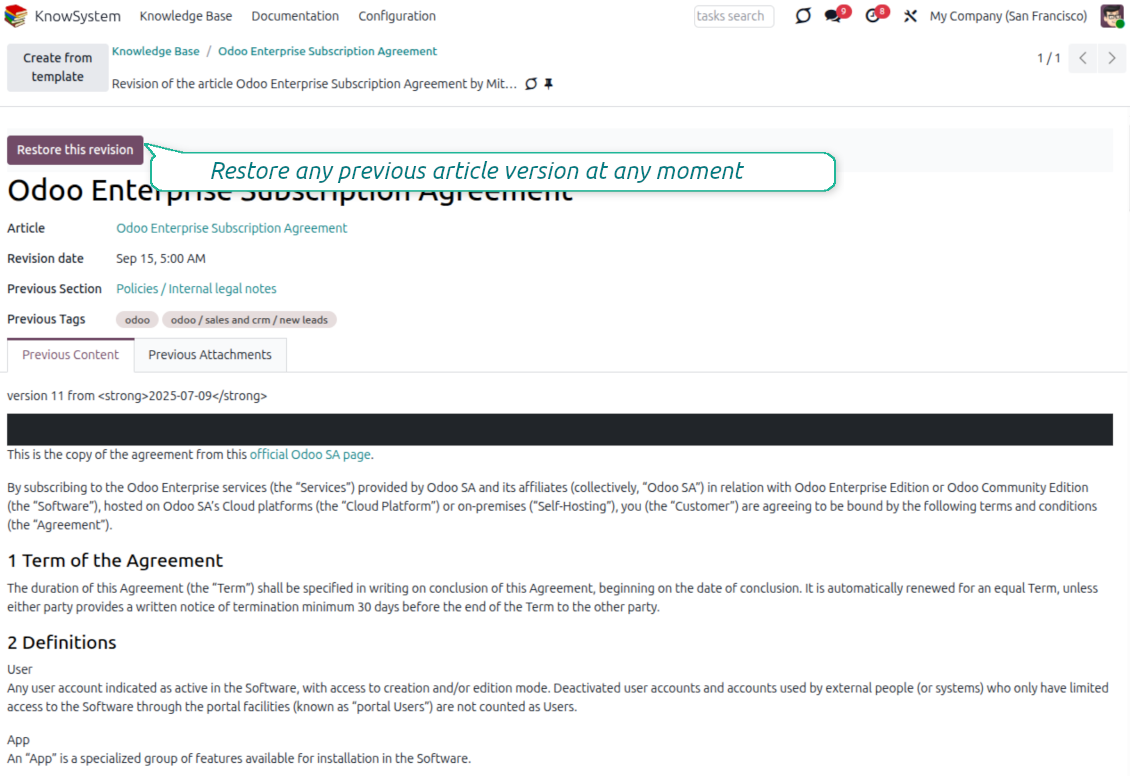
Every change is versioned. If a teammate breaks an article, restore the right version in two clicks - breaking becomes harder than restoring.
Portal & public base
Give each partner a personal knowledge portal, or publish a self-service knowledge base for any website visitor - access controlled by tags and publishing.
Documentation builder
Combine articles into advanced website documentation with automatic table of contents and instant search - reusable across versions, manuals, and guidelines.
Analytics that keep it alive
Track views, likes, dislikes, contributors, and messaging usage. See what your team relies on and keep content fresh and trusted.
Secure by design
Control who sees what with granular access for staff, partners, and the public - governed by user groups, tags, and website publishing.
Fits any team
One universal tool for helpdesk, sales, HR, IT, legal, marketing, and projects - configurable to any goal and any combination of Odoo apps.
Opinie z Odoo Apps Store
Co klienci mówią o aplikacji
Best knowledge base system for Odoo!
Excellent app and exceptional after-sales support.
Really well thought-out product and one of the best features is the contextual help by means of the tags. Really a game changer for us.
Keep up the great work FaOtools!
Magnus
Outstanding app! Tremendous value for money, an absolute must have!
One of the features sorely lacking from Odoo has been a robust Wiki/documentation system. Using third party platforms is a massive headache: yet another system to maintain, users get distracted switching back-and-forth, and errors get made. Then you have to worry about training, additional logins, etc.
KnowSystem feels like a native/core app, is very well-polished, and extremely fast. It's accessible from any screen, and the search results are instant (none of the latency inherent with most apps).The interface is elegant yet powerful, with robust access control, rich editing features, and version control. It's simple to revert to previous entries, view audit trails, etc. It's very intuitive for anyone familiar with Odoo; onboarding takes just a few minutes. The user guides are excellent.
This is invaluable for any organisation with a lot of documented information, SOPs, ISO compliance, or similar. If you're using eLearning, it's great for creating a help system / reminders. For example, noting key takeaways or specific instructions. The user can be in MRP, Sales, or any other function, and instantly lookup a guide. Since it overlays whichever screen you're in, it doesn't interrupt the workflow.
This dramatically increases efficiency, minimises questions, and helps keep everyone on the same page.
Oh, and customer service is excellent, faOtools stands behind their product. Thank you!
nico.valentino@gmx.net
KnowSystem is excellent - OdooTools offer great support, are very helpful and responsive
Our company needed the ability to add a Knowledge Base to our Odoo portal website for our customers to access article content on a membership-only basis. KnowSystem provided this and much more, along with ability to add search by section, set permissions to allow only certain partners access to articles by tag etc. OdooTools have been very helpful and implemented several features we suggested including automatic redirect upon login, customisable filters and a social sharing capability on articles. Overall a great app by a great company, something that massively adds to Odoo's capabilities and is something that everyone could benefit from using.
Chris Mann
Very functional application and responsive support
Our company produces medical laser equipment and we use KnowSystem to streamline the knowledge base of our company. Convenient search system and classification of content, as well as access rules for groups and even for individual users.
Svetlana
Great app and professional team
The app is great the the team is very professional in both response timing and problem solving.
Highly recommended.
Marco from ALO.zone.
Marco Carboni
Excellent system
Excellent system.
Gordon
A great tool from some very nice developers!
KnowSystem is a great tool and a game changer for us. Finally a place to put all our company know-how. I highly recommend it. And also important to us: We got great support from FaOtools too. A rare thing in this busy world. thx!
Eisberger
Excellent app and support.
Great app and a very helpfull support. Openess to improve their products is outstanding.
Lucas Huber
Gotowy do oceny?
Zacznij od bezpłatnego zgłoszenia demo lub kup w Odoo Apps Store.
Bezpłatna spersonalizowaną baza demo. Nie potrzeba telefonu ani karty. Bezpłatne aktualizacje dożywotnio i wsparcie ekspertów w ramach głównej wersji Odoo.
Navigation
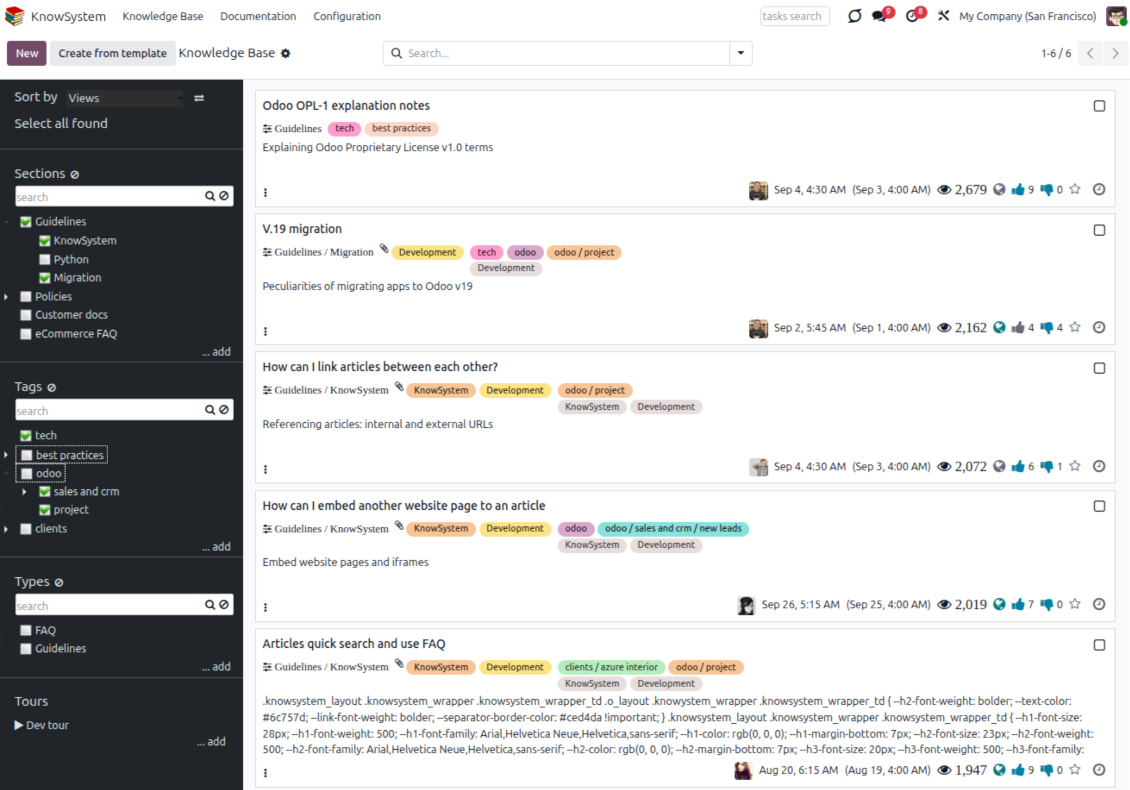
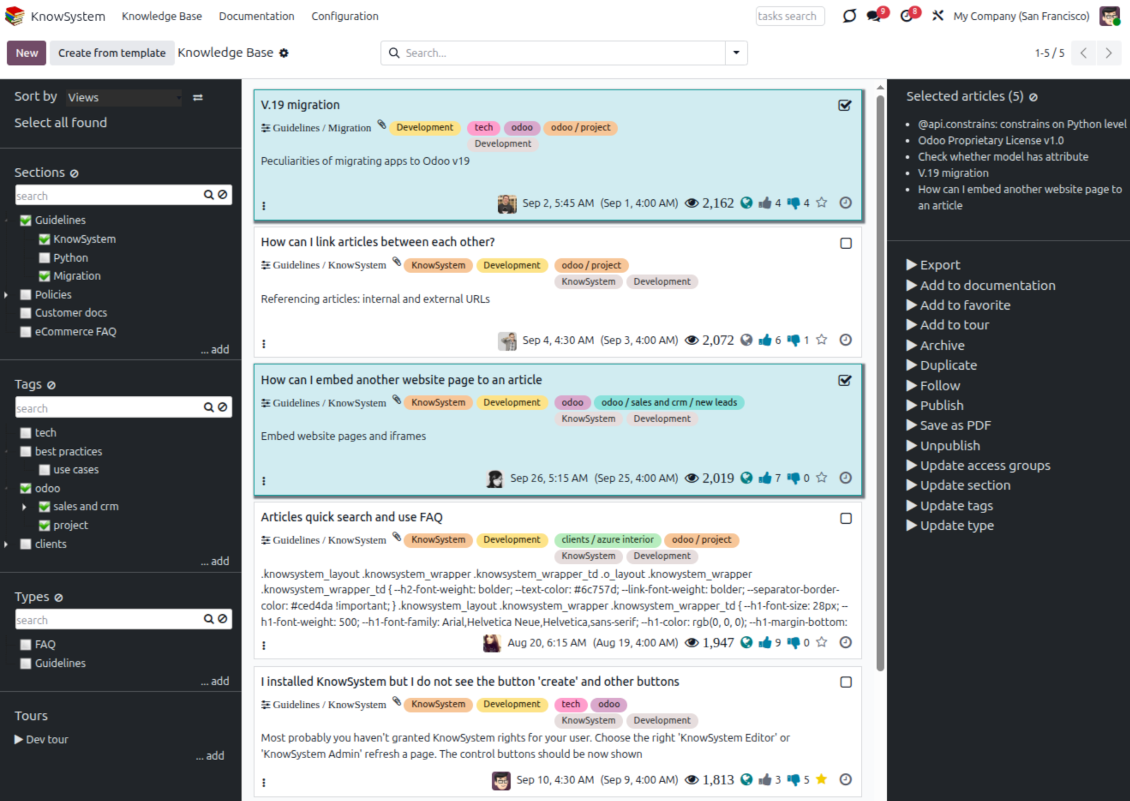
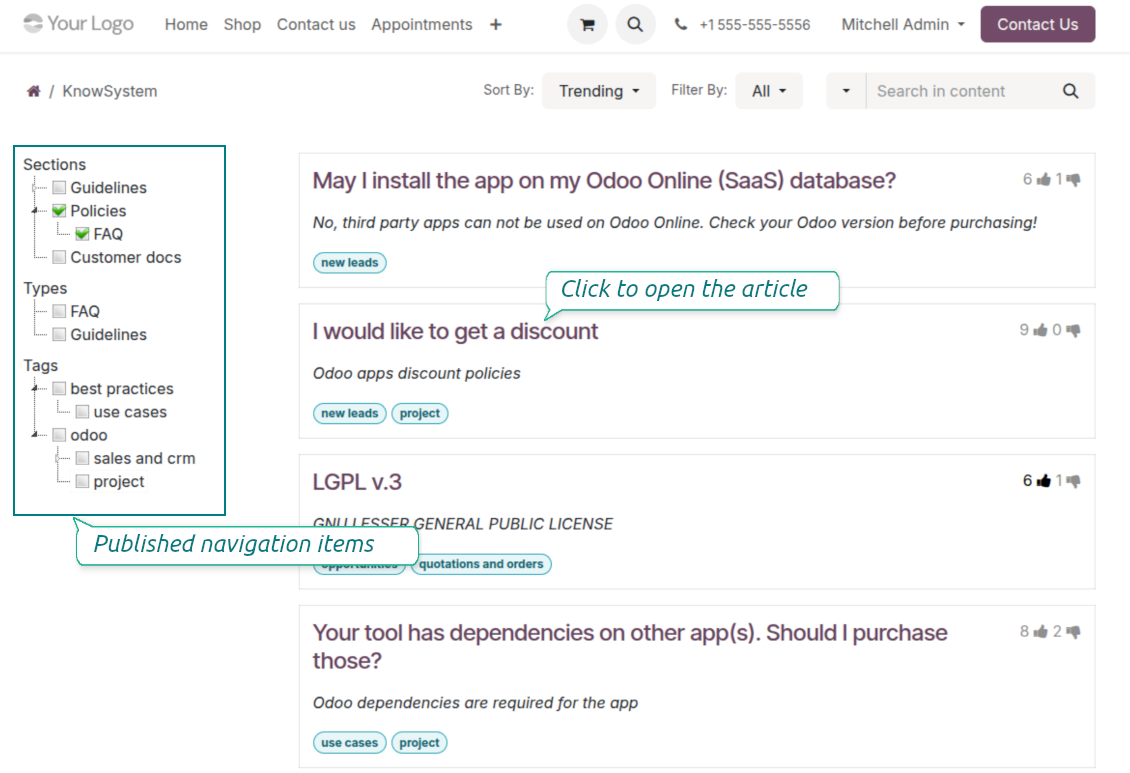
Find, filter, and bulk-edit articles from one screen
Structure and navigate
- Build a hierarchy of knowledge sections to switch between areas instantly, however large the base grows.
- Define a tree of tags for quick navigation and deeper, cross-cutting structuring.
- Introduce a knowledge typology to distinguish kinds of articles in a single click.
- Create, update, and reorder tags, sections, and types right inside KnowSystem - and print every article under a chosen tag or section.
- Search sections and tags instantly on the navigation panel.
Select, sort, and act in bulk
- Sort articles by views, score of likes, title, author, section, and create or write dates.
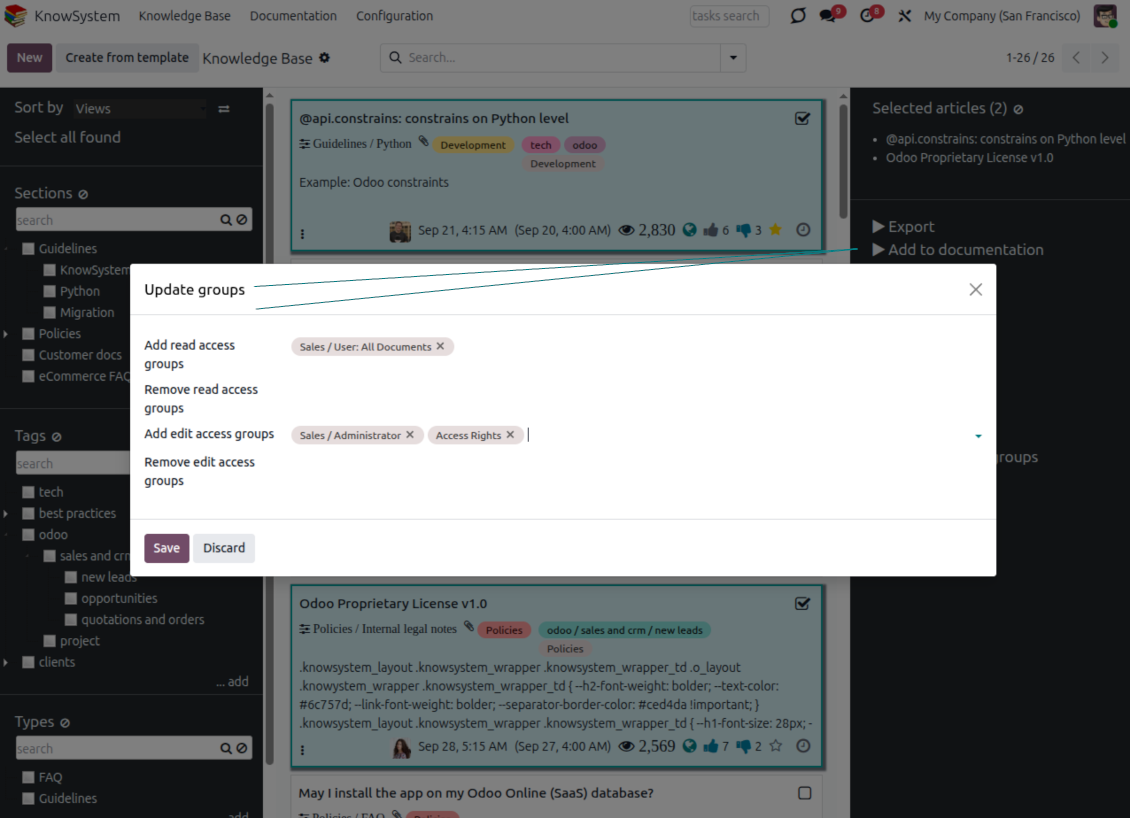
- Pick articles step by step - the selection is not cleared by a new search or when you open a record - then run mass actions on everything you chose.
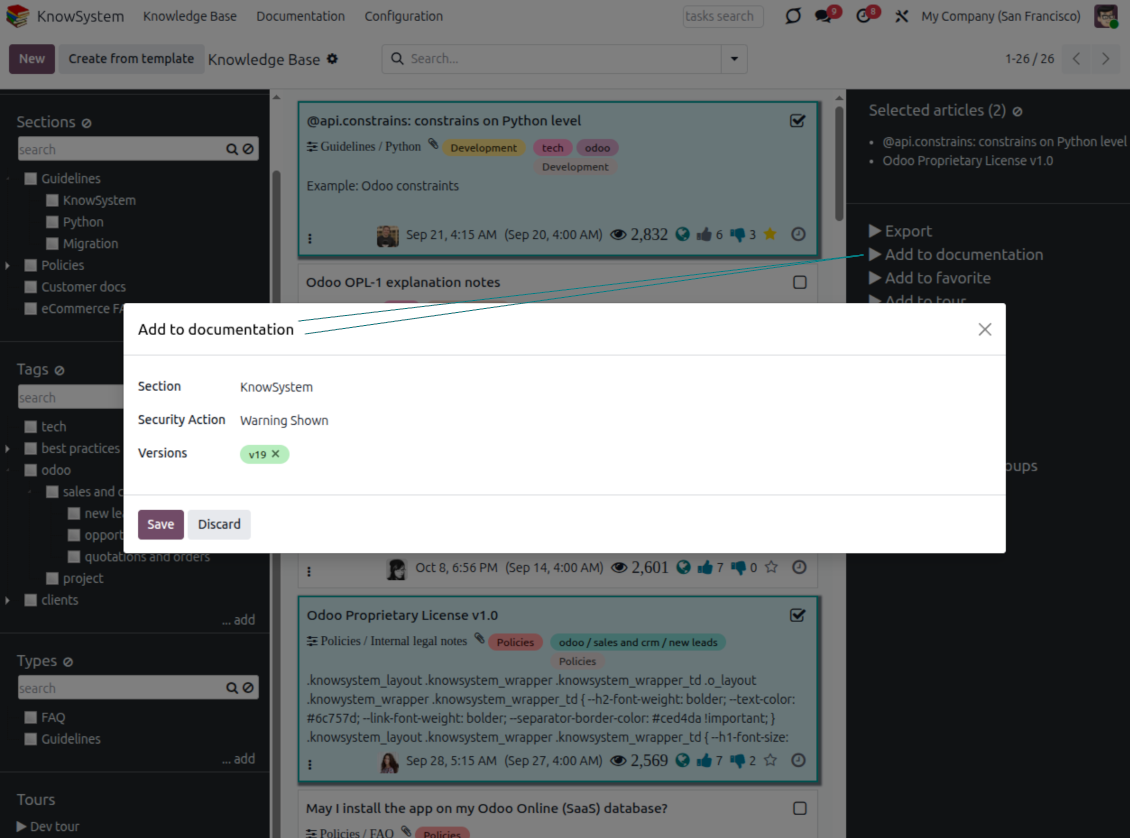
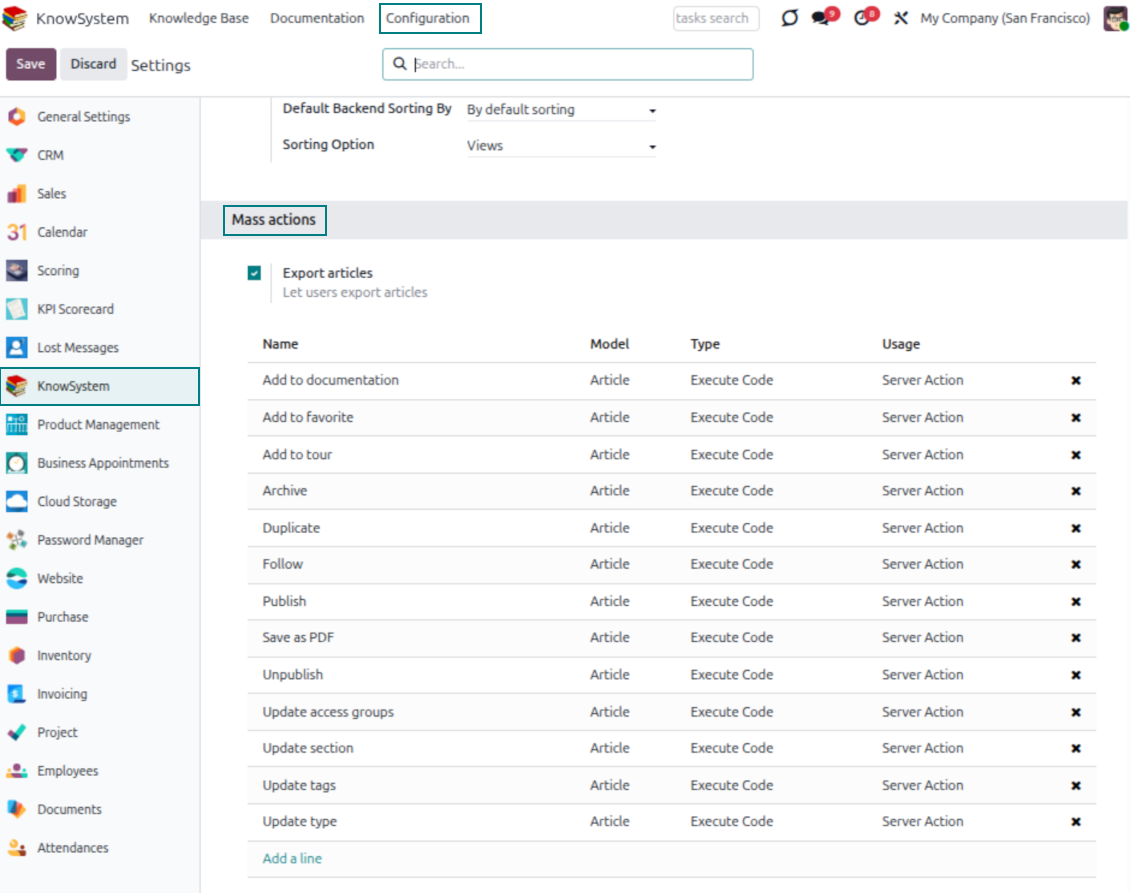
- Update knowledge in batch: assign a new section (including by dragging articles onto the navigation panel), add or remove tags, print many articles as one PDF, follow/unfollow discussions, publish/unpublish, export to Excel, archive or restore, add to learning tours and documentation, mark as favorite, and duplicate.
Article editors
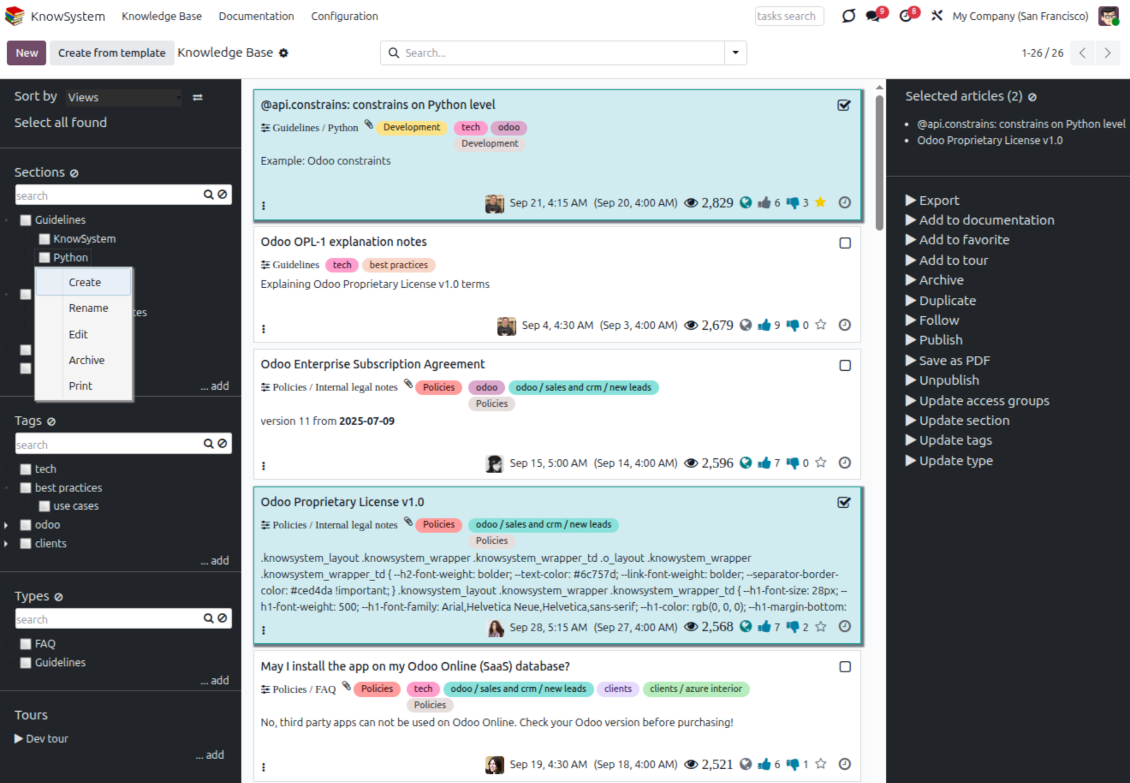
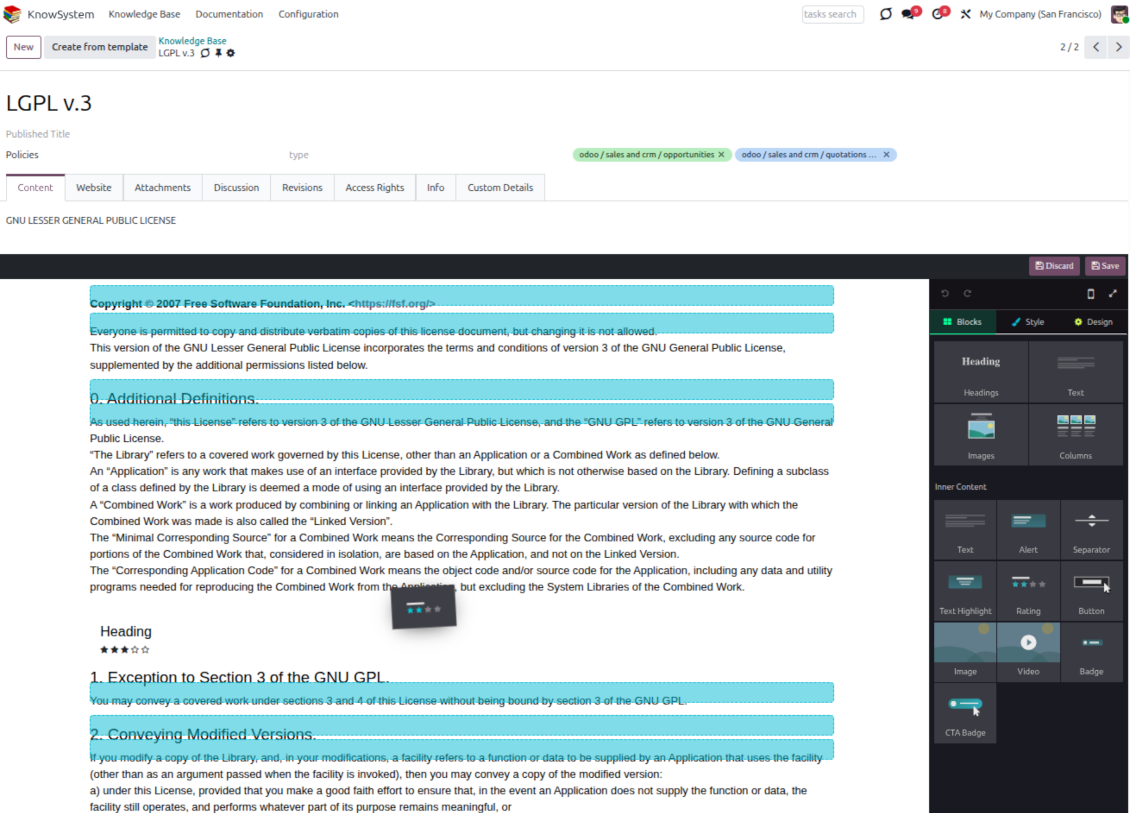
Write professional articles your way
Five editors, one article model
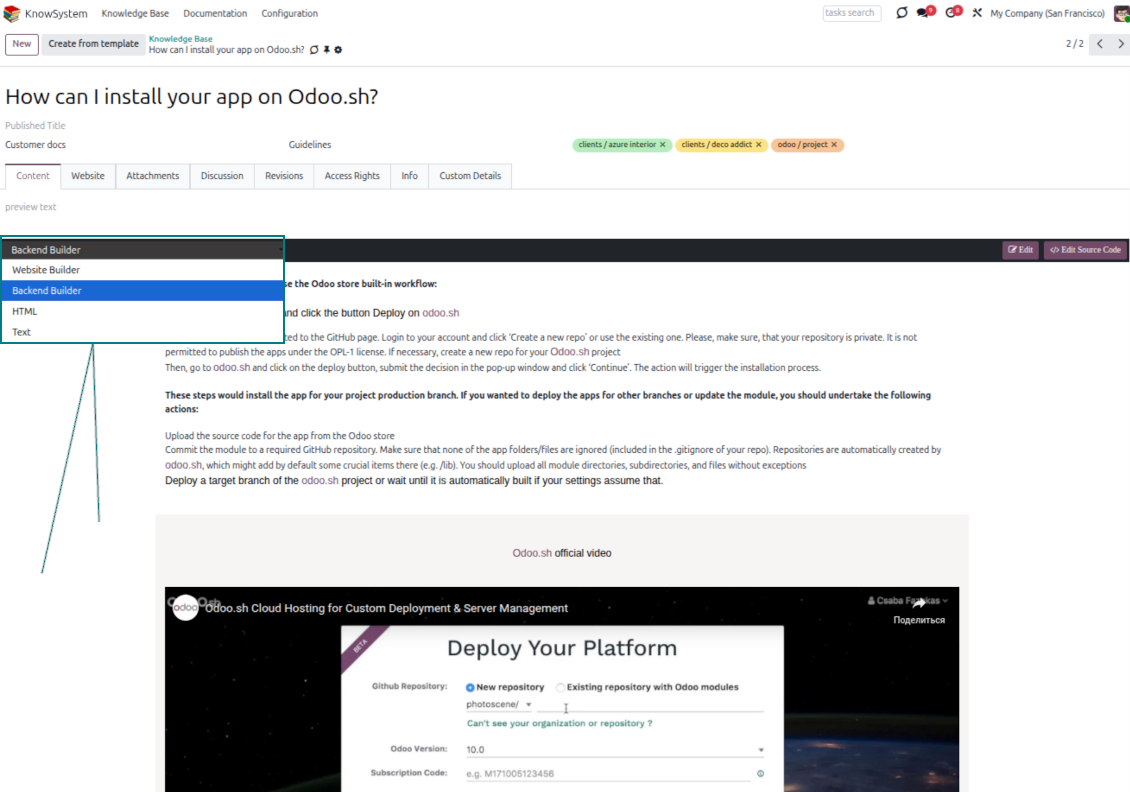
- Backend building blocks - drag and drop to compose professional articles right in the Odoo backend. The editor relies on strict HTML that stays compatible with printing and messaging layouts; reorder blocks and adjust their width, height, and styles.
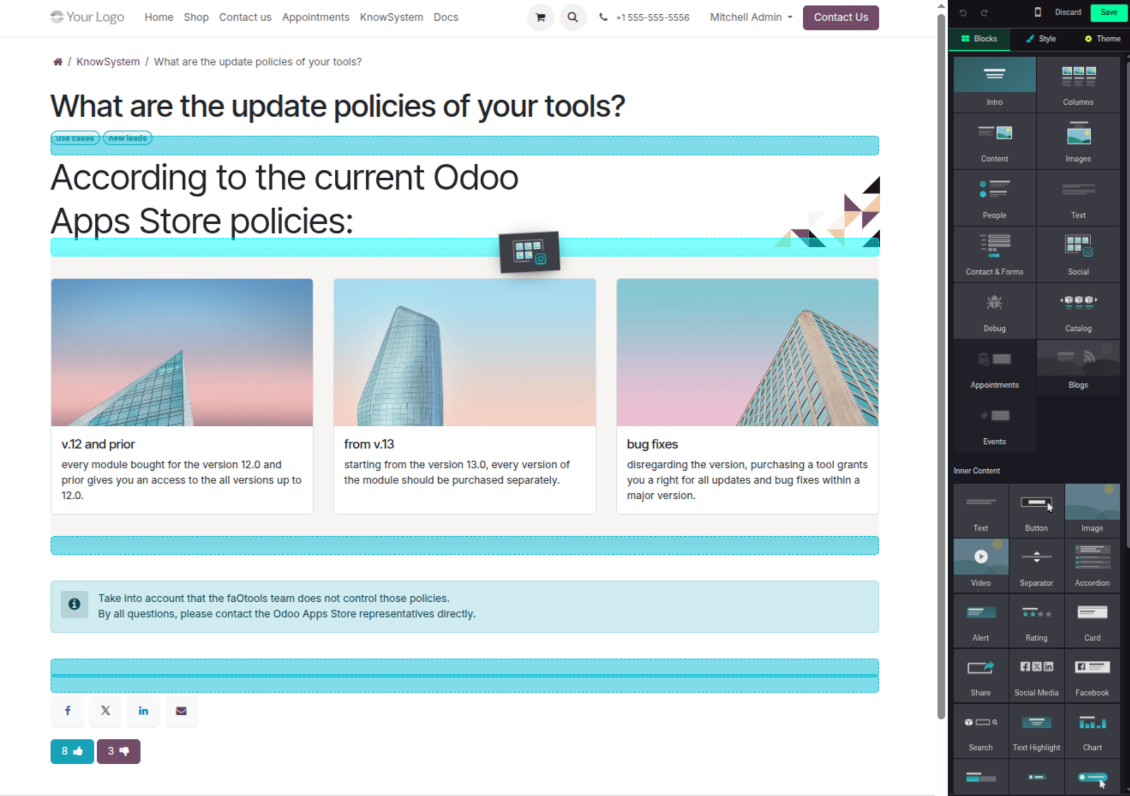
- Website builder - apply advanced styles, snippets, animations, and widgets via Odoo's built-in website editor. Ideal for nice-looking portal pages; avoid it for internal or printed articles, as advanced styles often contradict print and composer layouts.
- Plain text - keep certain articles as simple text for unlimited compatibility with printouts and emails, and copy their content to the clipboard for quick sharing.
- Standard HTML editor - the familiar Odoo editor with its built-in slash commands for quick inline pieces.
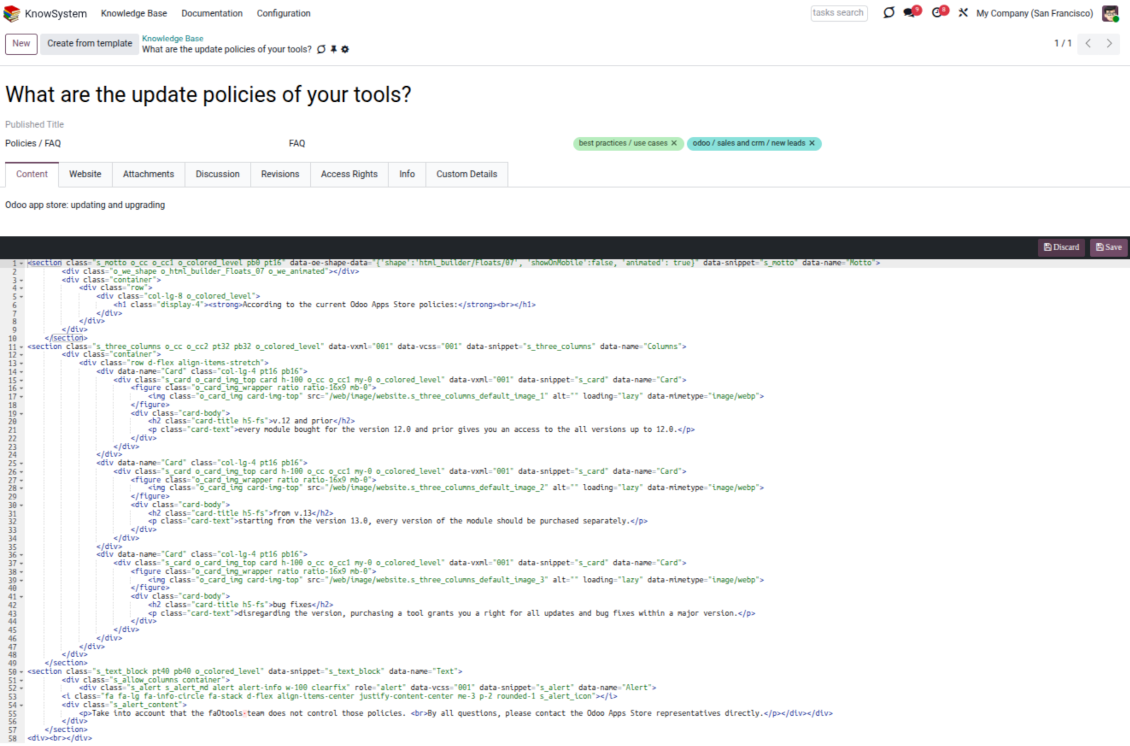
- Raw HTML - switch to the code editor at any moment to add any tags and styles, including Bootstrap-ready elements and iframes.
Templates for speed and consistency
- Reusable templates - prepare dedicated knowledge templates for recurring article types such as procedures, FAQs, or release notes, so contributors never start from a blank page.
- Save any article as a template - turn an existing, well-structured article into a reusable template in one click and grow your own library over time.
- Faster, consistent authoring - start new articles from a template to save time and keep a uniform structure and look across the entire knowledge base.
- Right editor for each page - switch an article's editor type whenever the content calls for it, so every page uses the most suitable tool without re-creating it.
Use anywhere
Surface the right article in documents, chats, and tours
Knowledge inside any Odoo document
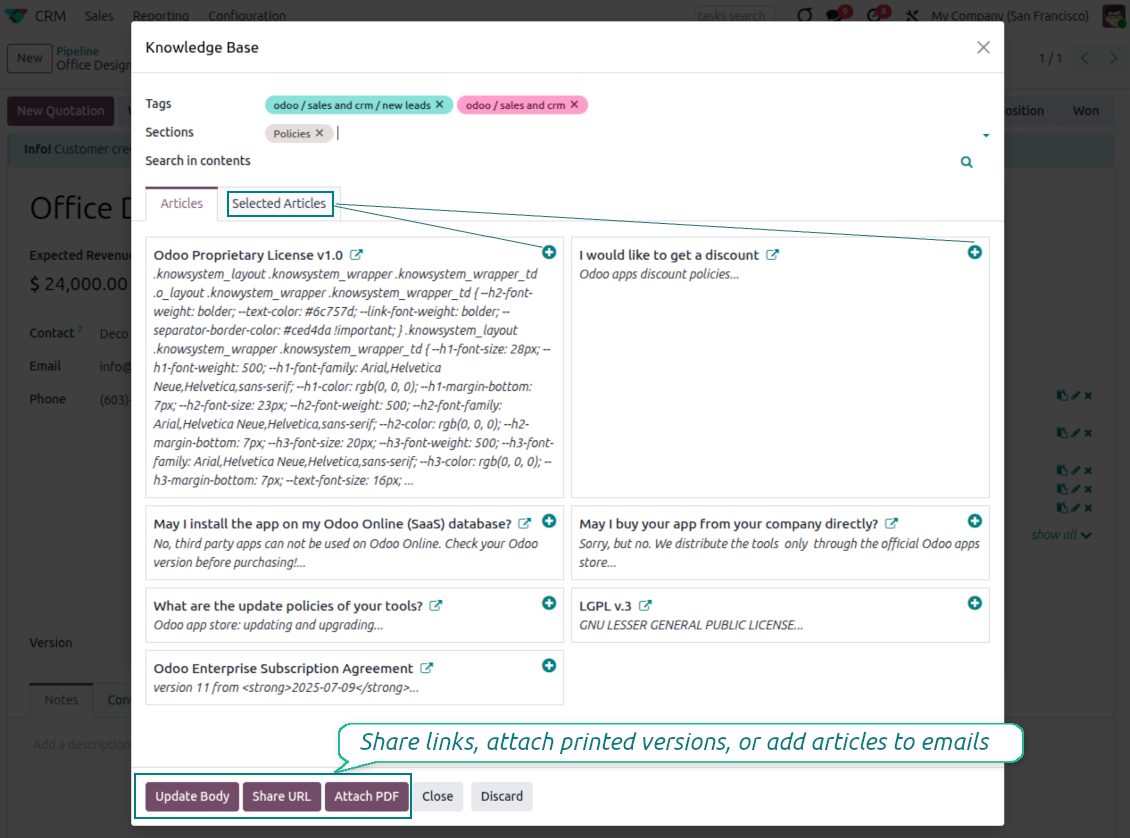
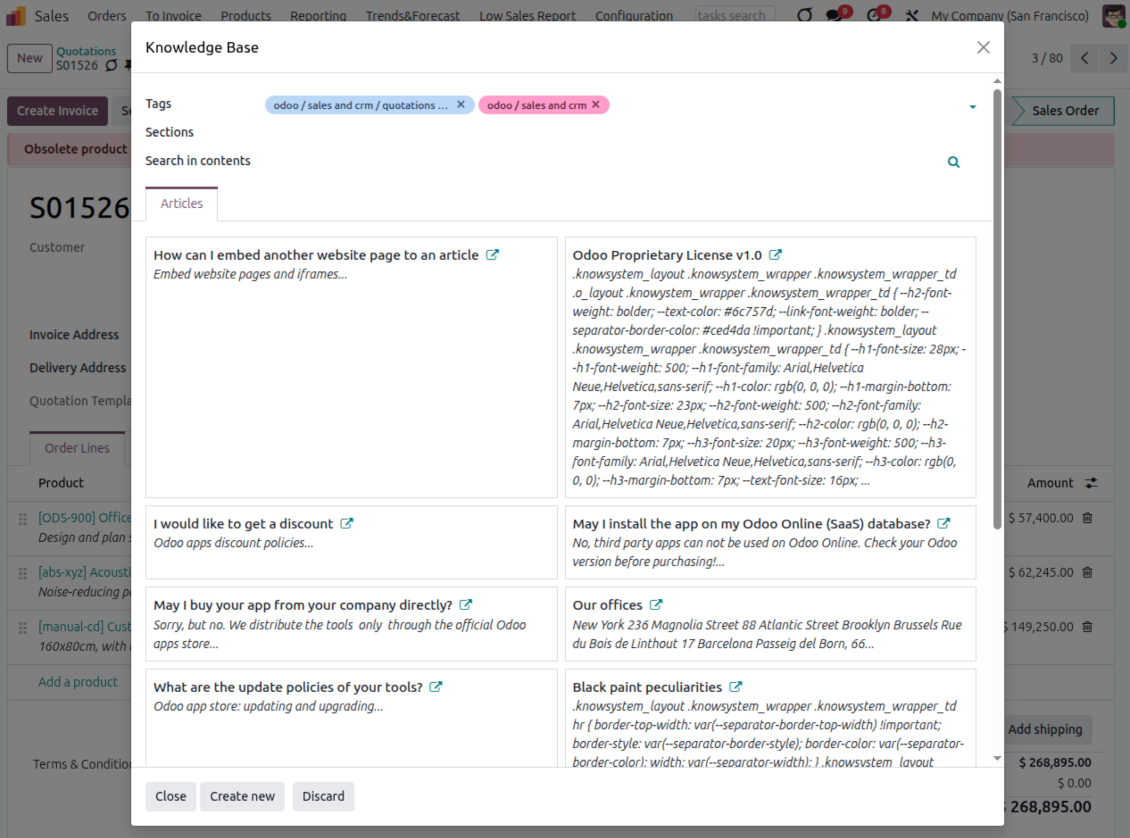
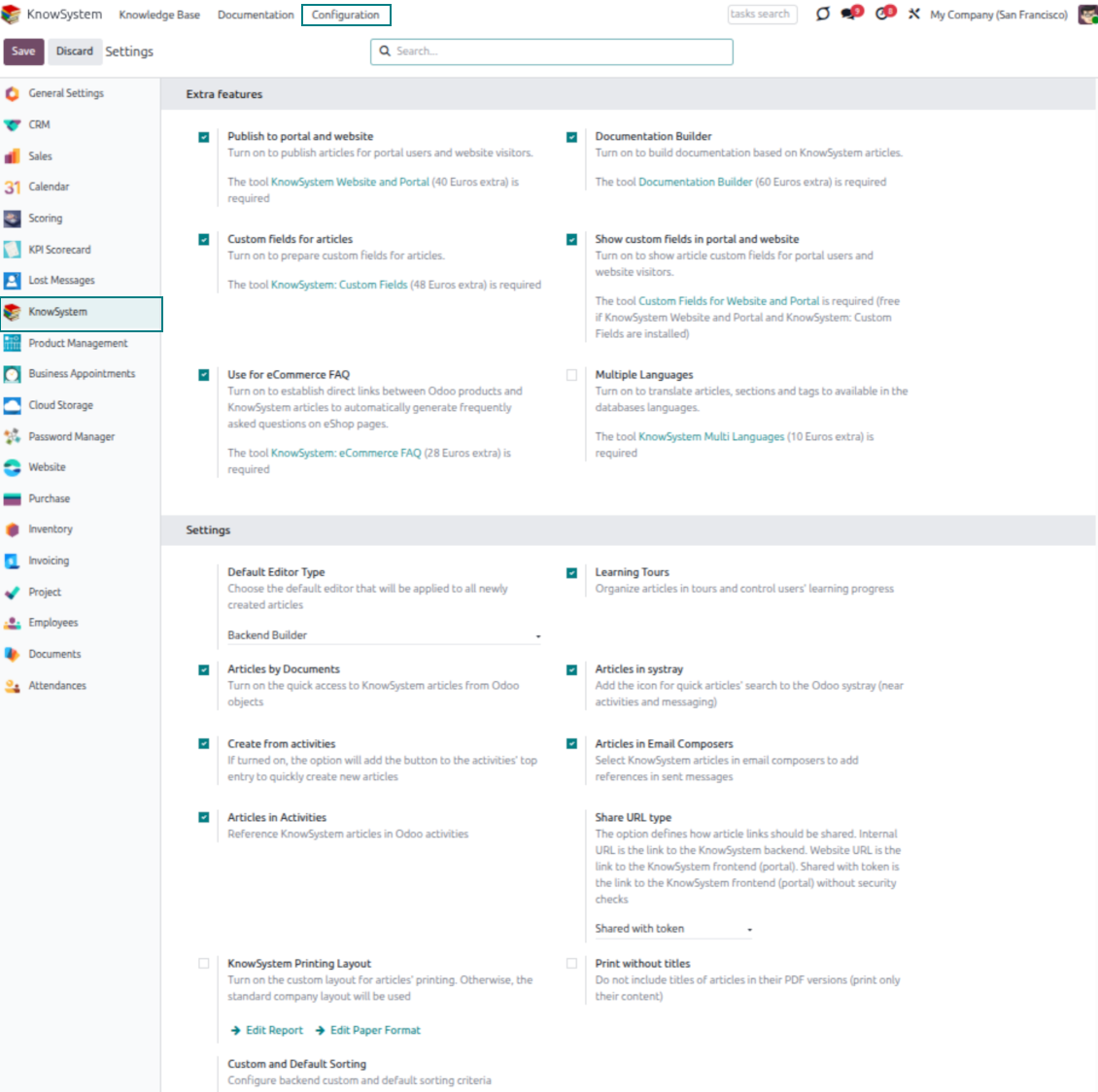
- Turn on 'Articles by Documents' to add a quick knowledge entry to any Odoo form view.
- Search by tags, section, or content for a quick overview, and read article content without leaving the record.
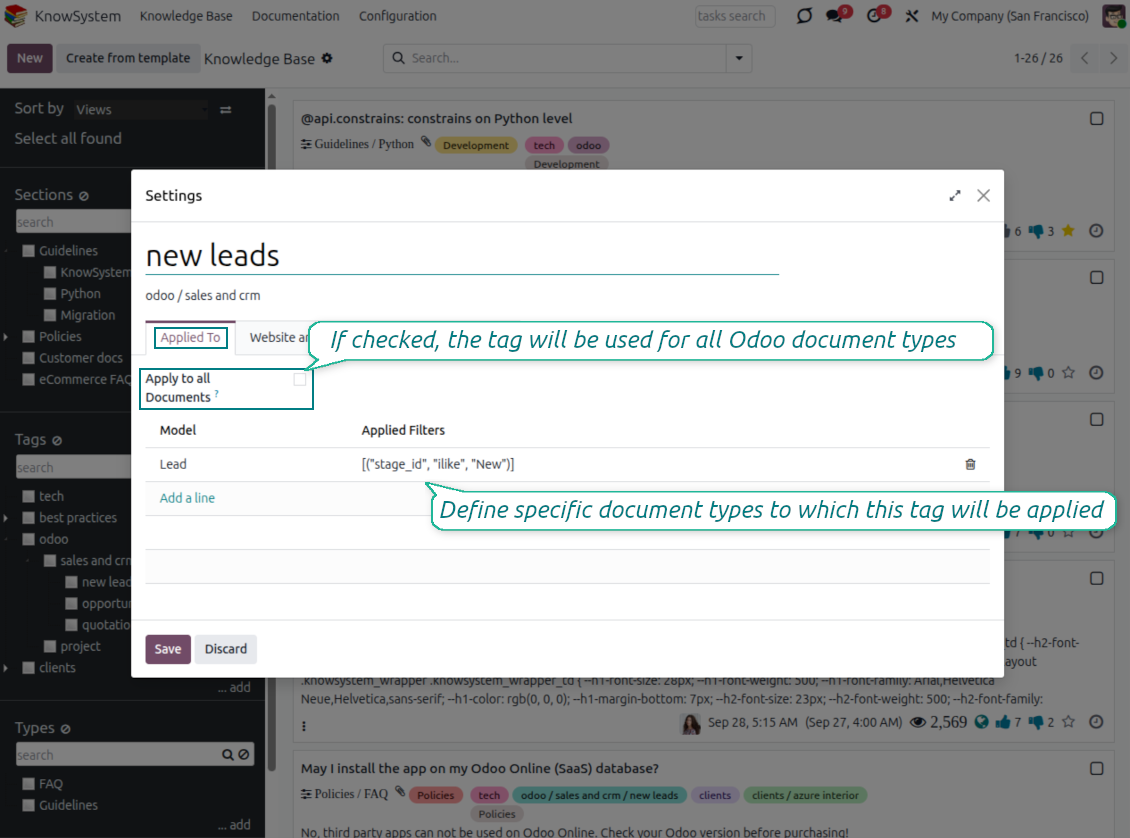
- Link tags to document types so the right articles appear by default - e.g. assign helpdesk tickets the tag 'odoo/helpdesk' and it is pre-filled on every ticket.
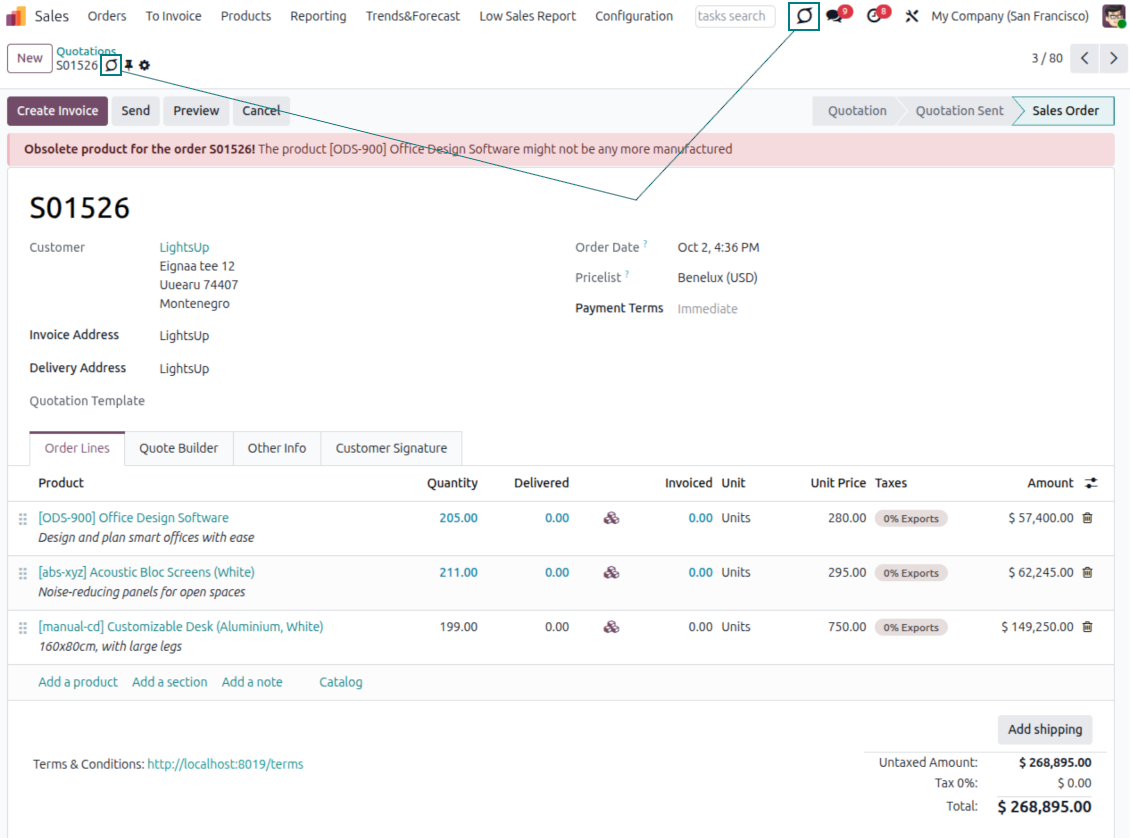
- Turn on 'KnowSystem in systray' to reach the base from anywhere in Odoo, whatever screen you are on.
Apply knowledge in communication
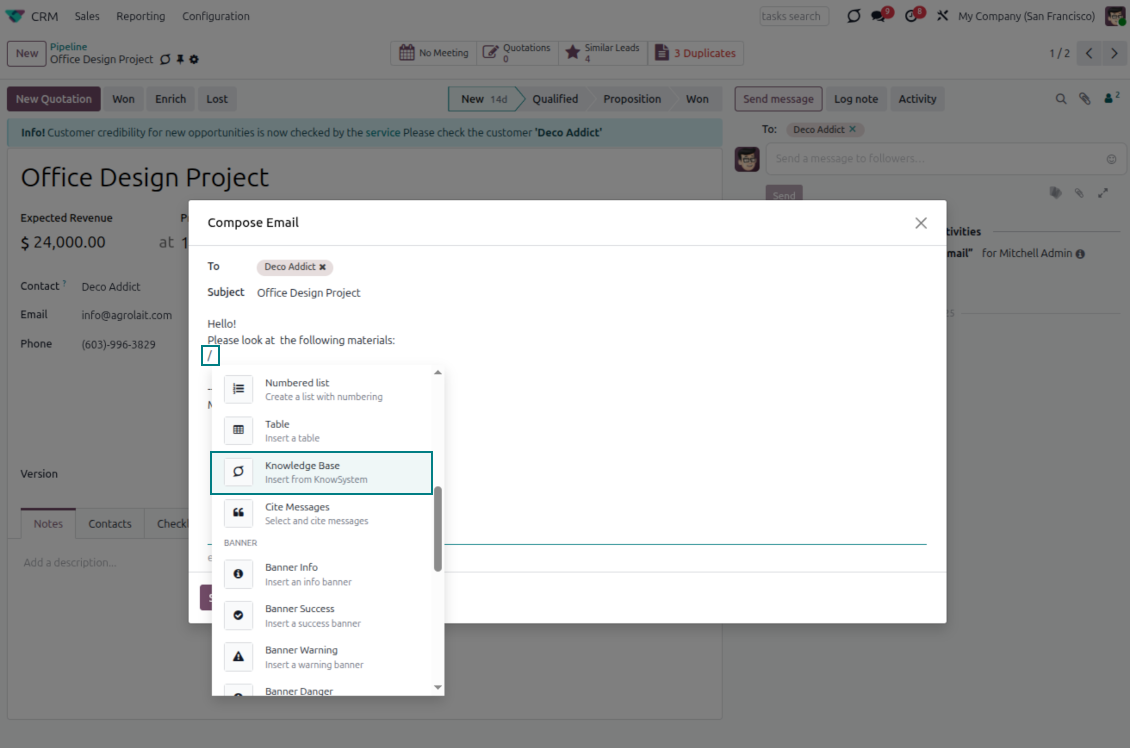
- Turn on 'Articles in Email Composers' to reference or cite knowledge in Odoo messages.
- See articles related to the current discussion and insert them with the editor command '/' > KnowSystem; the content is appended to the message.
- Attach a PDF version of the referenced article(s) automatically.
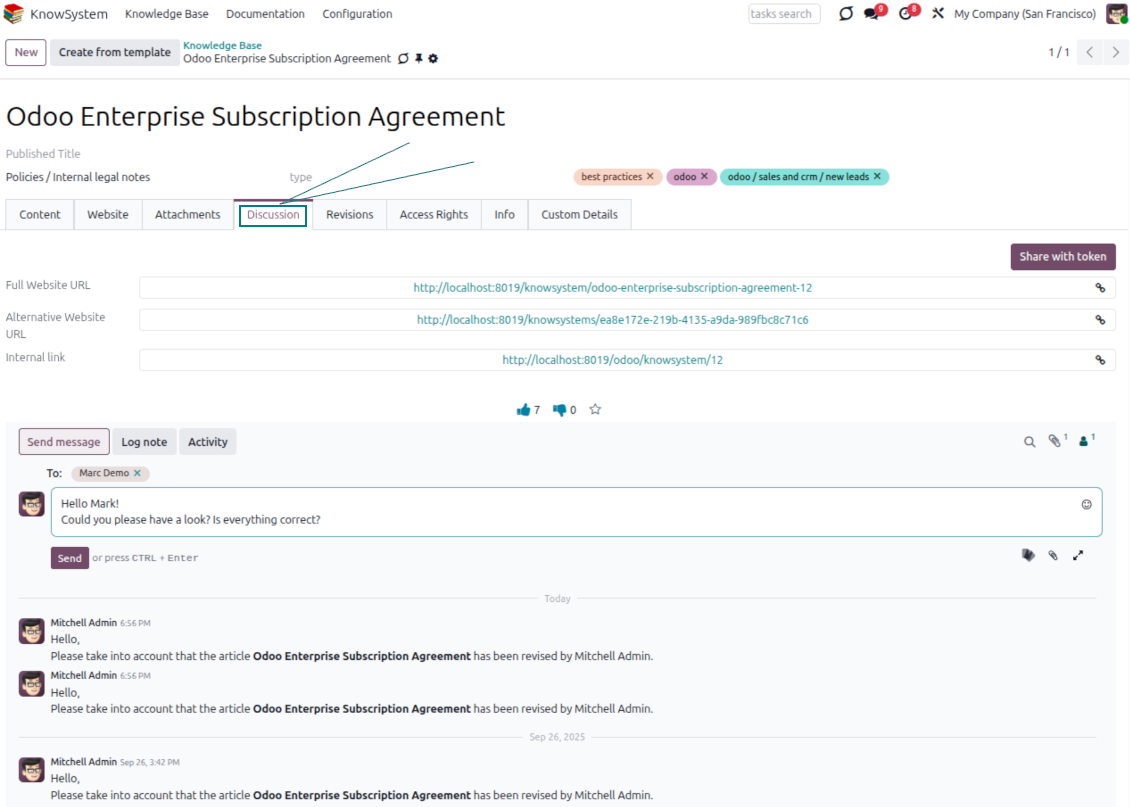
- Share links with colleagues or partners as backend, website/portal, or tokenized portal URLs.
- Turn on 'Articles in Activities' to insert articles or their links into Odoo activities.
Guided learning tours
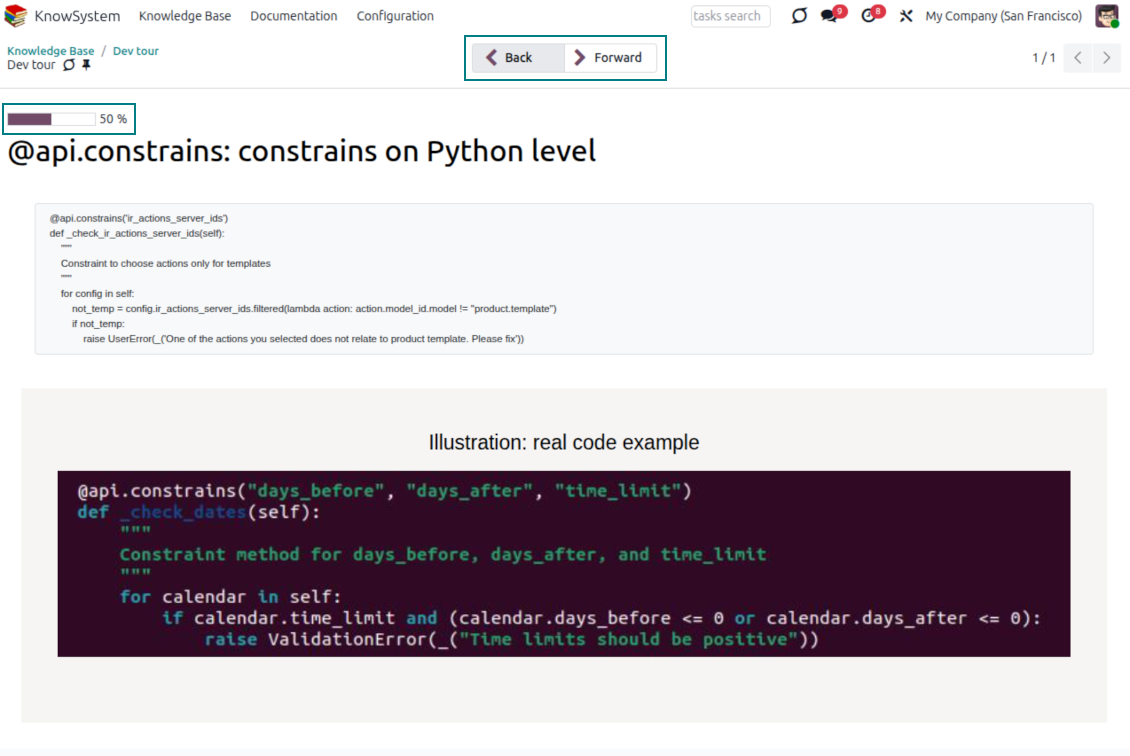
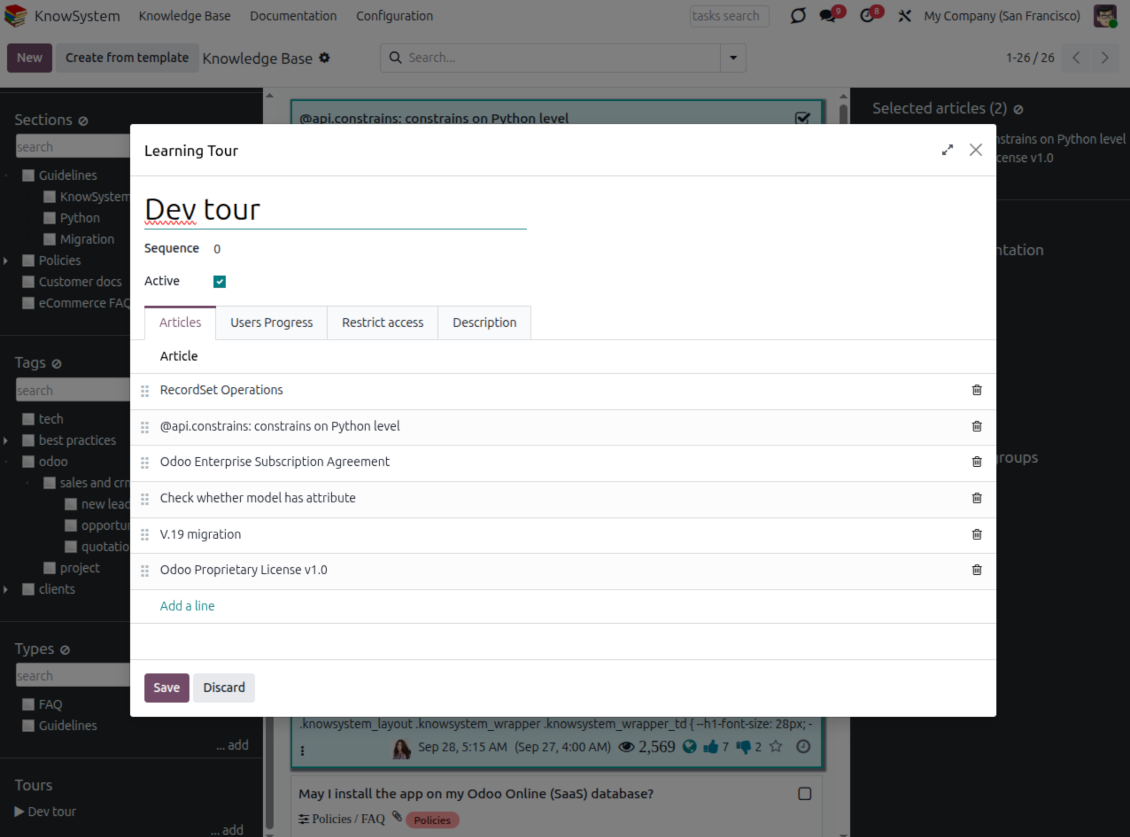
- Turn on 'Tours' to combine articles into an ordered sequence of learning steps.
- Launch a tour in a dedicated interface to study step by step, and share it with everyone or specific user groups.
- Track employees' progress through your instructions and guidelines.
Share and publish
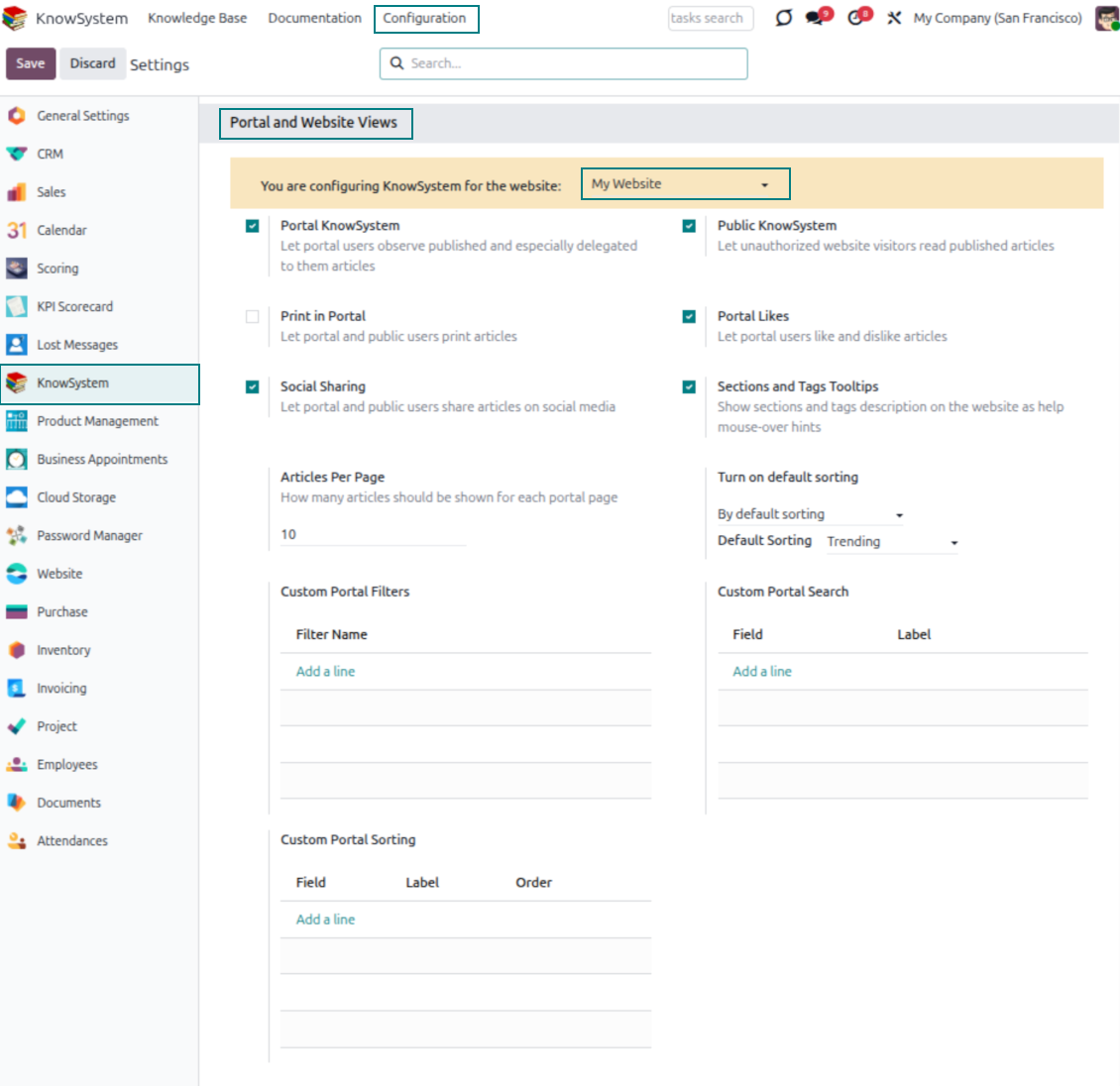
- 'Portal KnowSystem' shares knowledge with external partners; 'Public KnowSystem' opens it to website visitors.
- Configure KnowSystem tags or publish articles to control exactly what is shared.
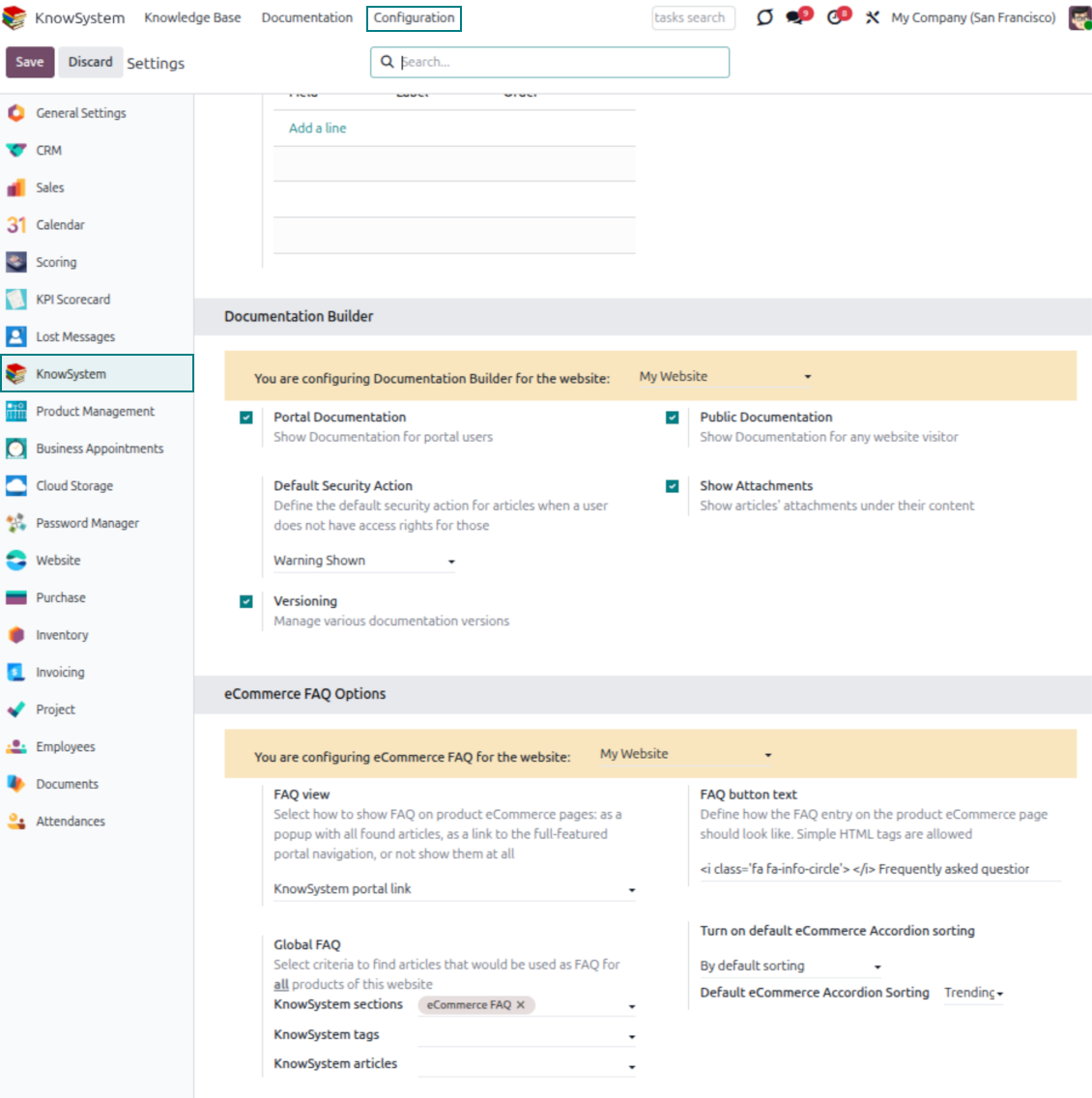
- Combine articles into advanced documentation; 'Portal Documentation' and 'Public Documentation' decide who can read it.
Gotowy do oceny?
Zacznij od bezpłatnego zgłoszenia demo lub kup w Odoo Apps Store.
Bezpłatna spersonalizowaną baza demo. Nie potrzeba telefonu ani karty. Bezpłatne aktualizacje dożywotnio i wsparcie ekspertów w ramach głównej wersji Odoo.
Documentation
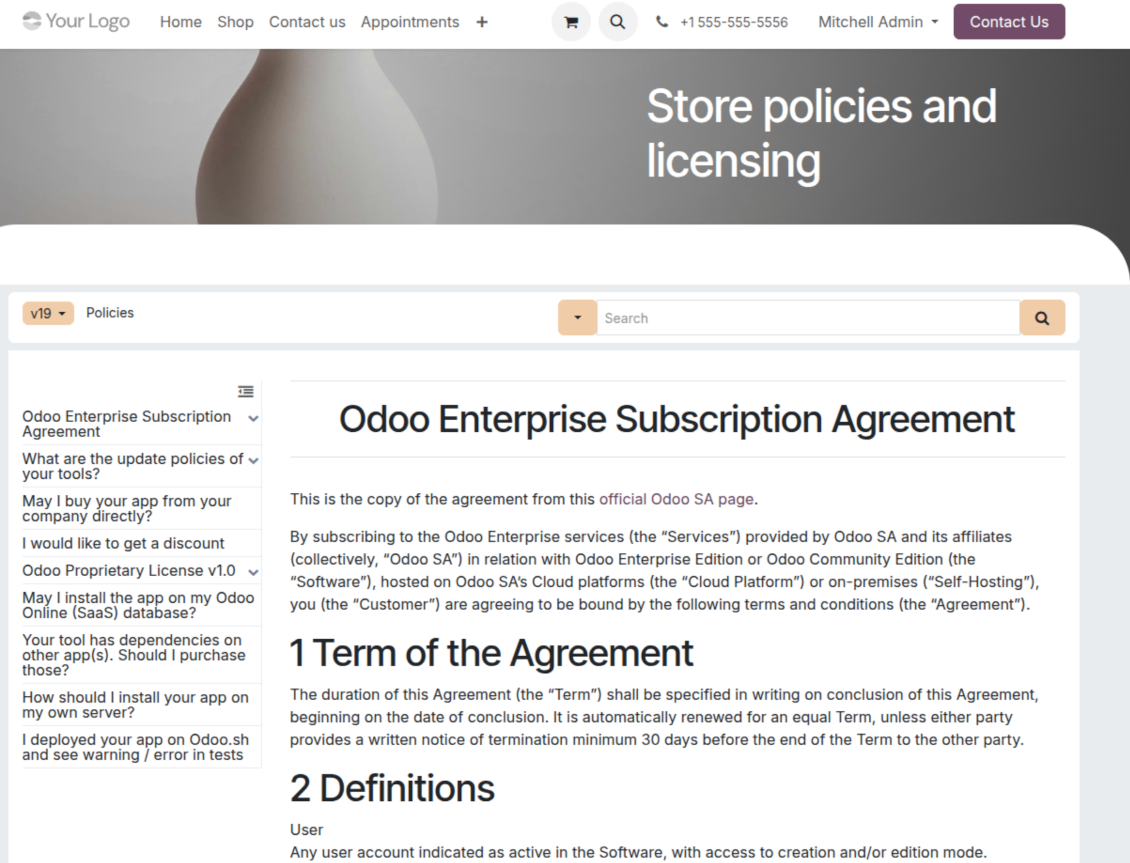
Turn articles into searchable website documentation
Create and structure
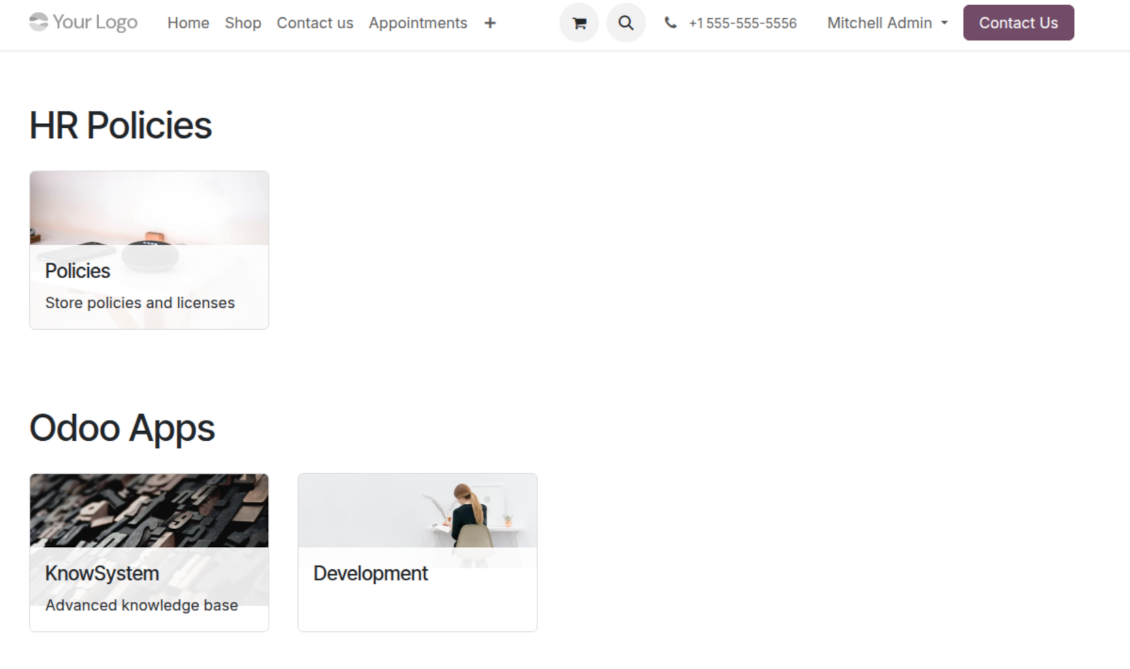
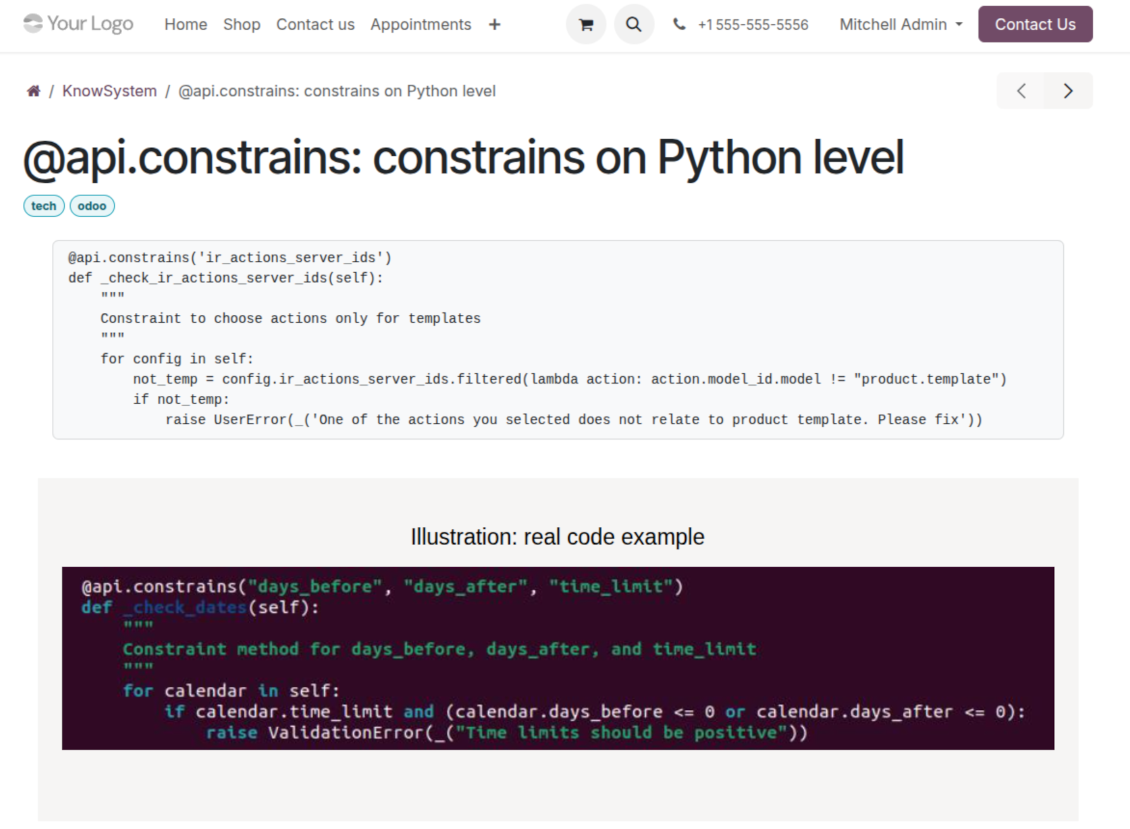
- Combine articles into advanced documentation that covers a whole business, organizational, or functional aspect.
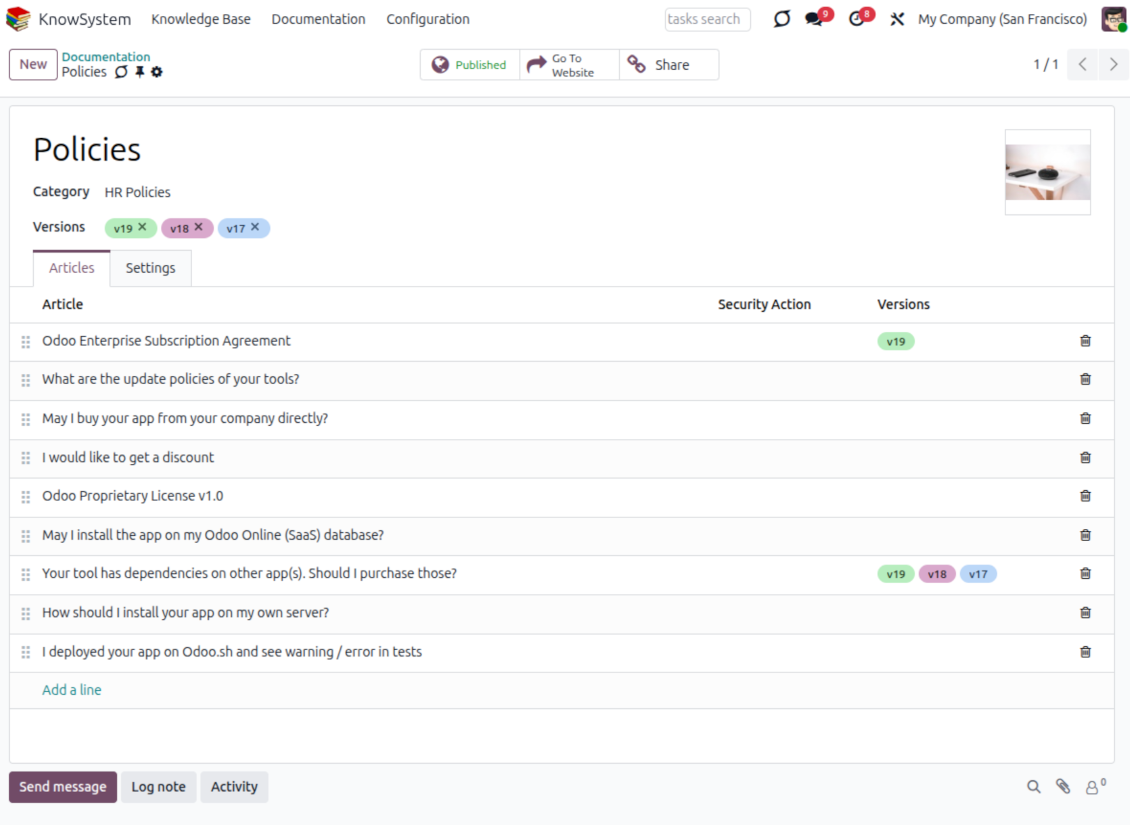
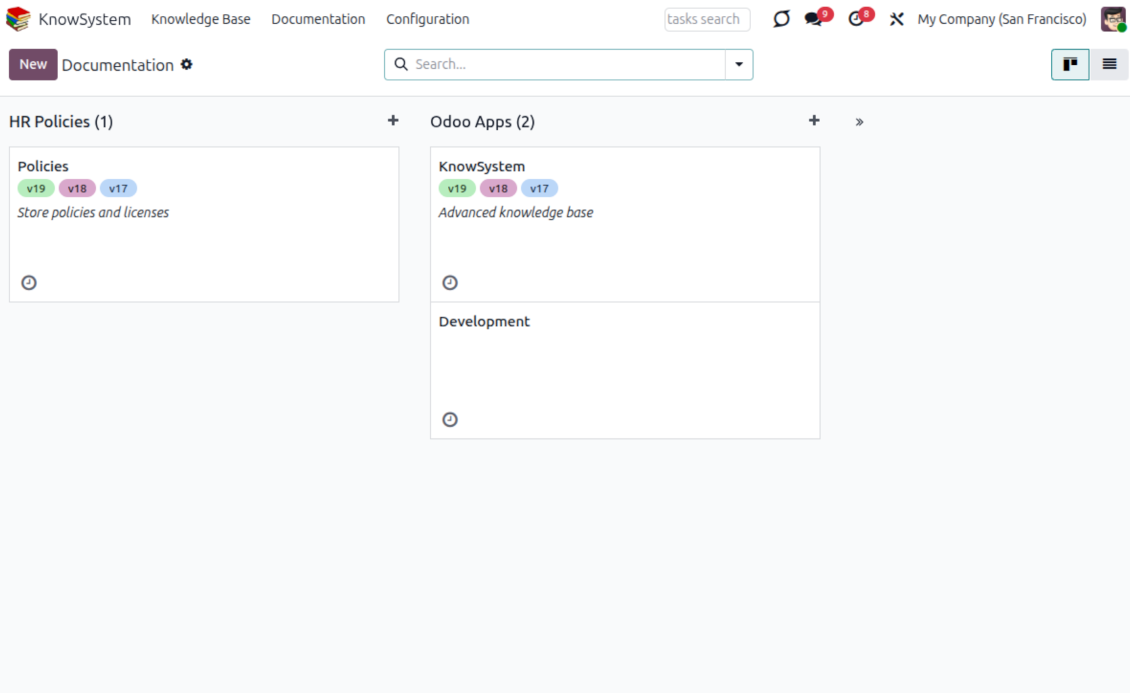
- Create a section simply by selecting and ordering articles - KnowSystem generates the website page automatically.
- Reuse the same article across several documentation sections.
- Build an unlimited number of documentation pages, structured by categories.
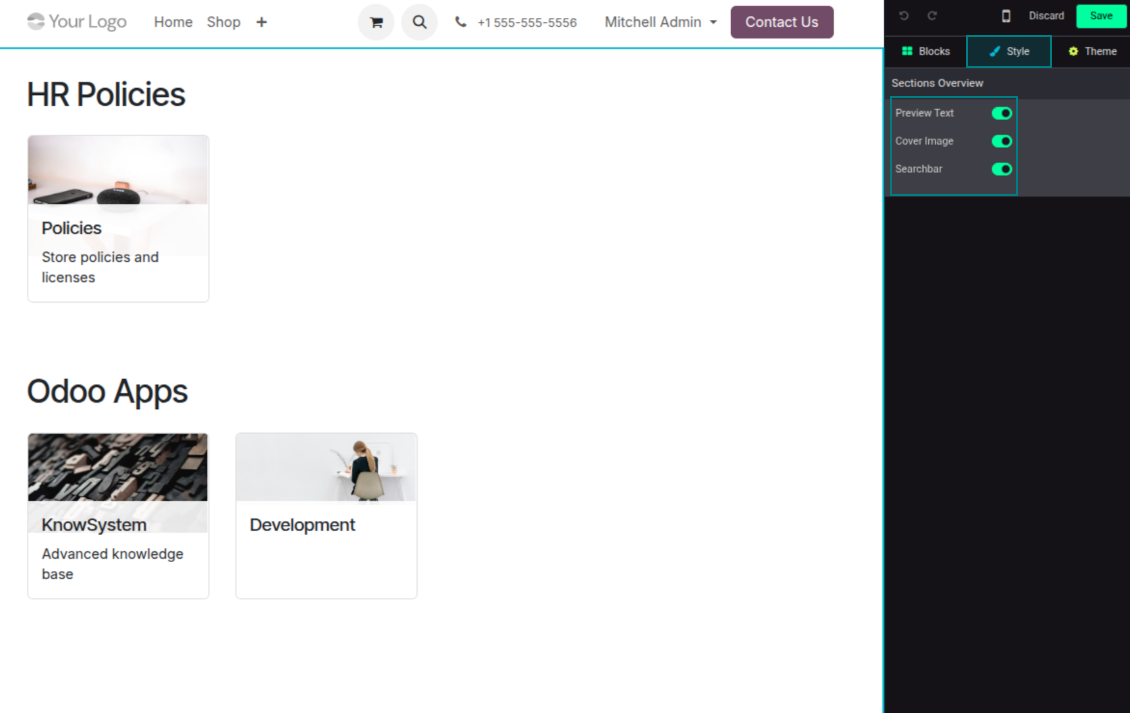
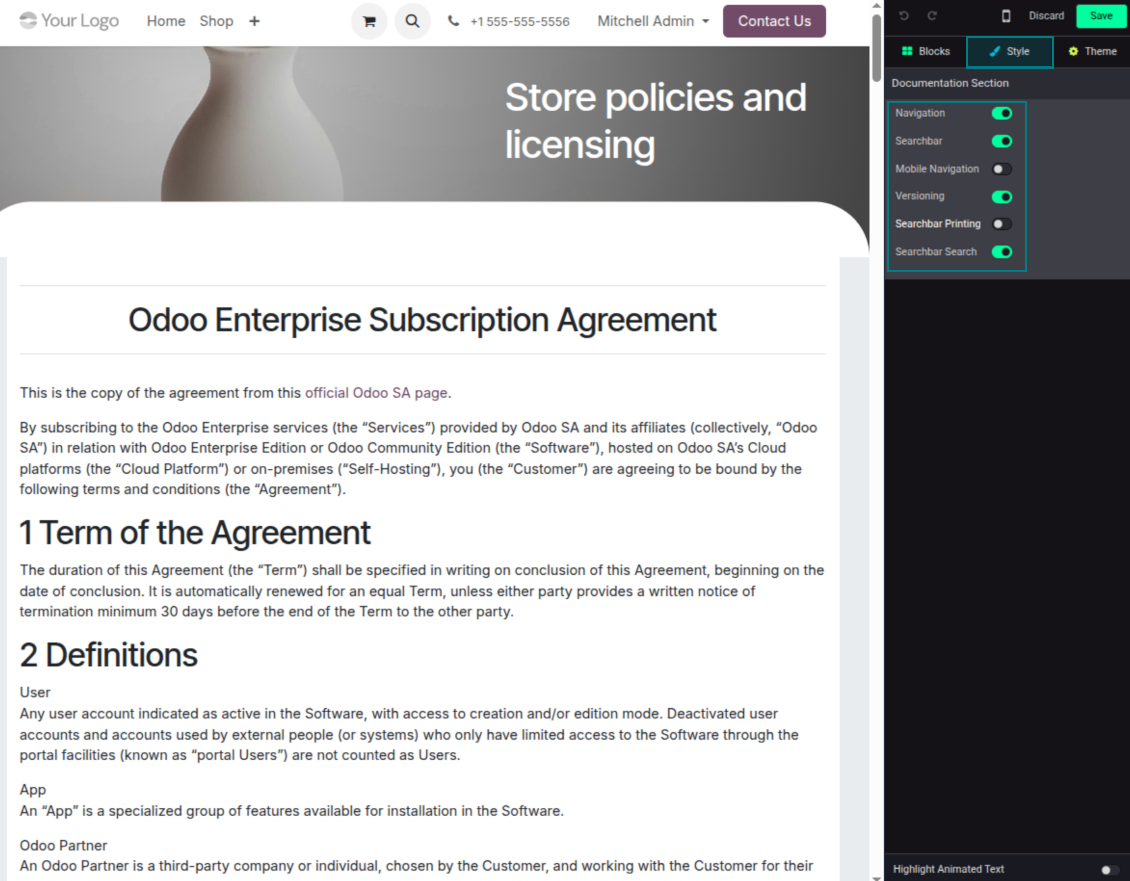
- Customize each page: toggle the search bar and table of contents, and add or remove preview images and texts.
Share, navigate, and version
- Publish documentation for everyone, or assign KnowSystem tags to grant access to chosen Odoo partners.
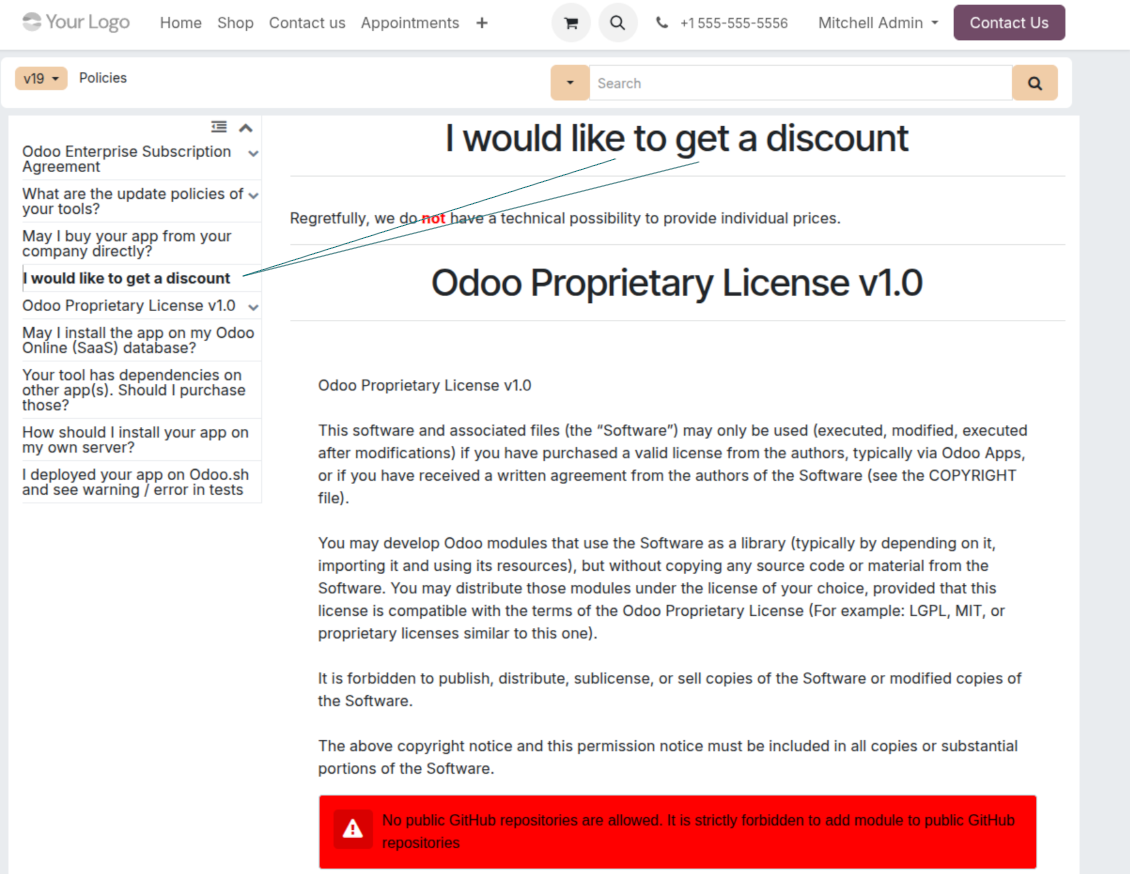
- Decide what happens when a reader lacks access to an included article: ignore the restriction, hide that piece, or show a security warning.
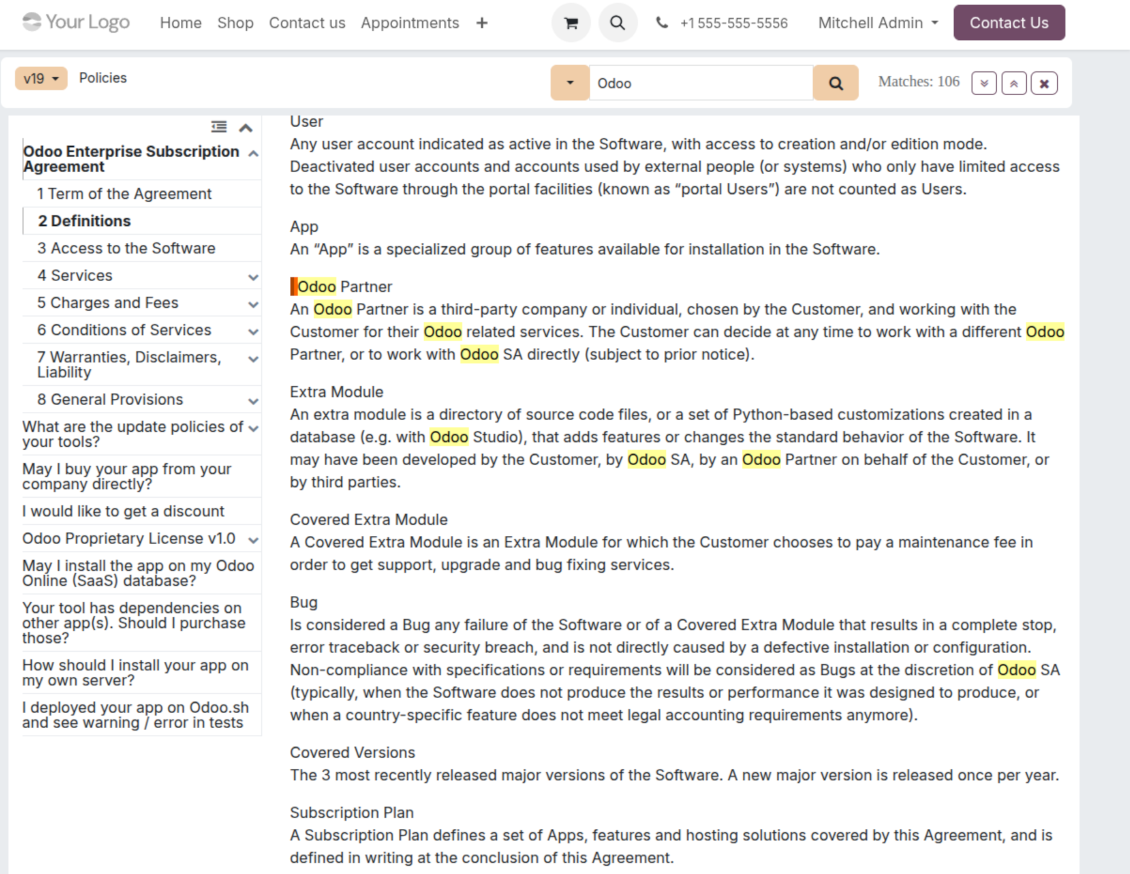
- Show an automatic table of contents, built from the headers of the included articles, for fast navigation.
- Enable search across the whole text or only headers, with case-sensitive or insensitive keywords.
- Apply versioning to avoid double work on specifications, user manuals, and software guidelines.
Portal & public
Share with partners or publish to everyone
Knowledge in the Odoo partner portal
- Turn on 'Portal KnowSystem' to give each Odoo partner a personal web portal built from the articles you choose to share.
- Design an article for one specific company, or reuse the same knowledge experience across many clients.
- Articles reach a portal user when they are (a) published, or (b) carry user-related tags.
- Assign a tag to a partner in two ways: fill 'KnowSystem tags' on the partner form, or define 'Allowed partners' on the tag.
- Optionally allow partners to print articles, like them, and share.
Public self-service knowledge base
- Turn on 'Public KnowSystem' to open knowledge to unauthenticated website visitors for true self-service.
- Only published articles are shown - publish via the 'Publish' mass action or the 'Visible on current website' checkbox.
- Publish tags and article types too so they appear in the portal; sections show only once they contain visible articles.
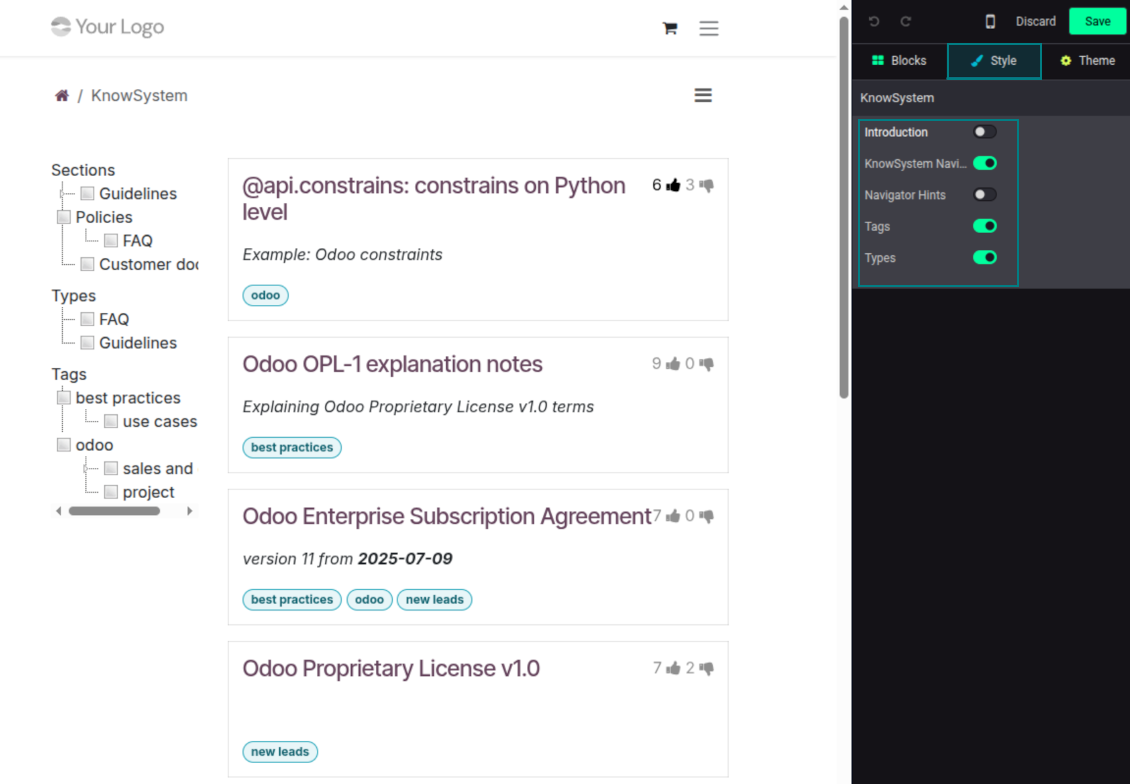
- Customize the portal: show or hide navigation by tags and types (or the whole navigation), add an introduction and navigation hints, and set section tooltips.
Collaboration
Versioned, social, and multi-lingual knowledge
Teamwork and use
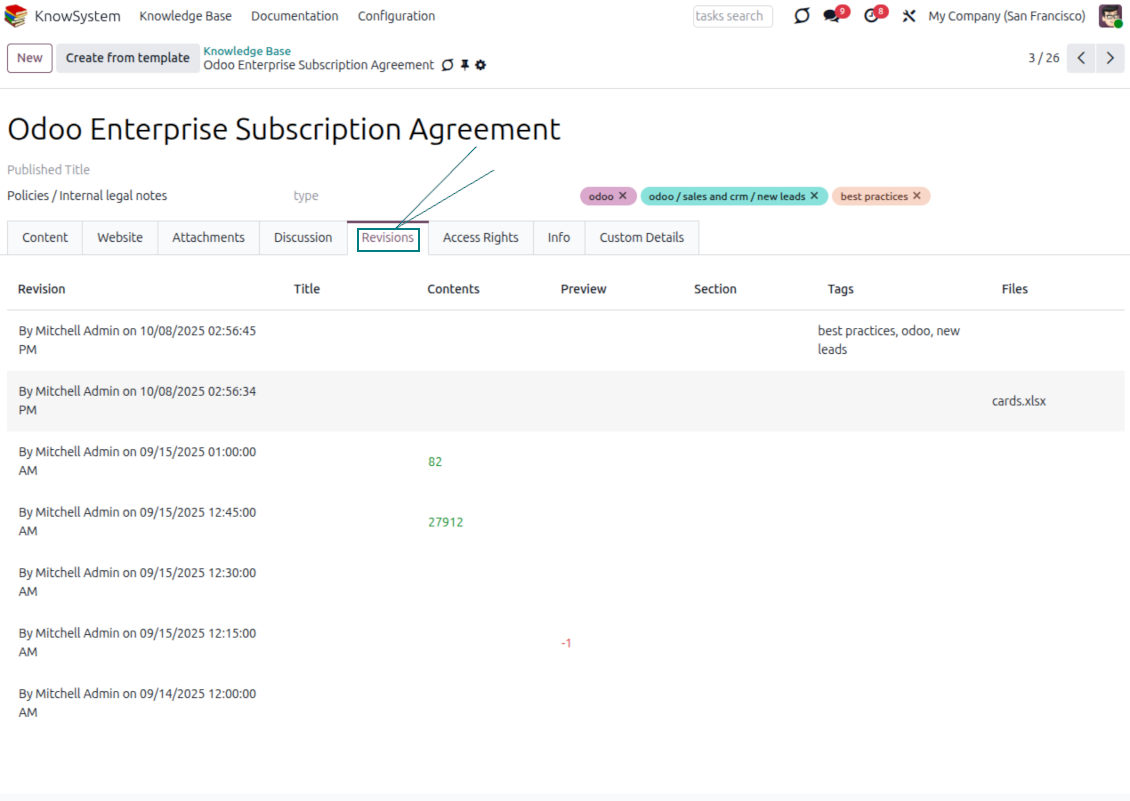
- The full history of article revisions is kept in Odoo, wiki-style. If a user breaks something, it takes just 2 clicks to recover the right version.
- Users take part in article discussions and subscribe to updates.
- Share tokenized articles with any contact.
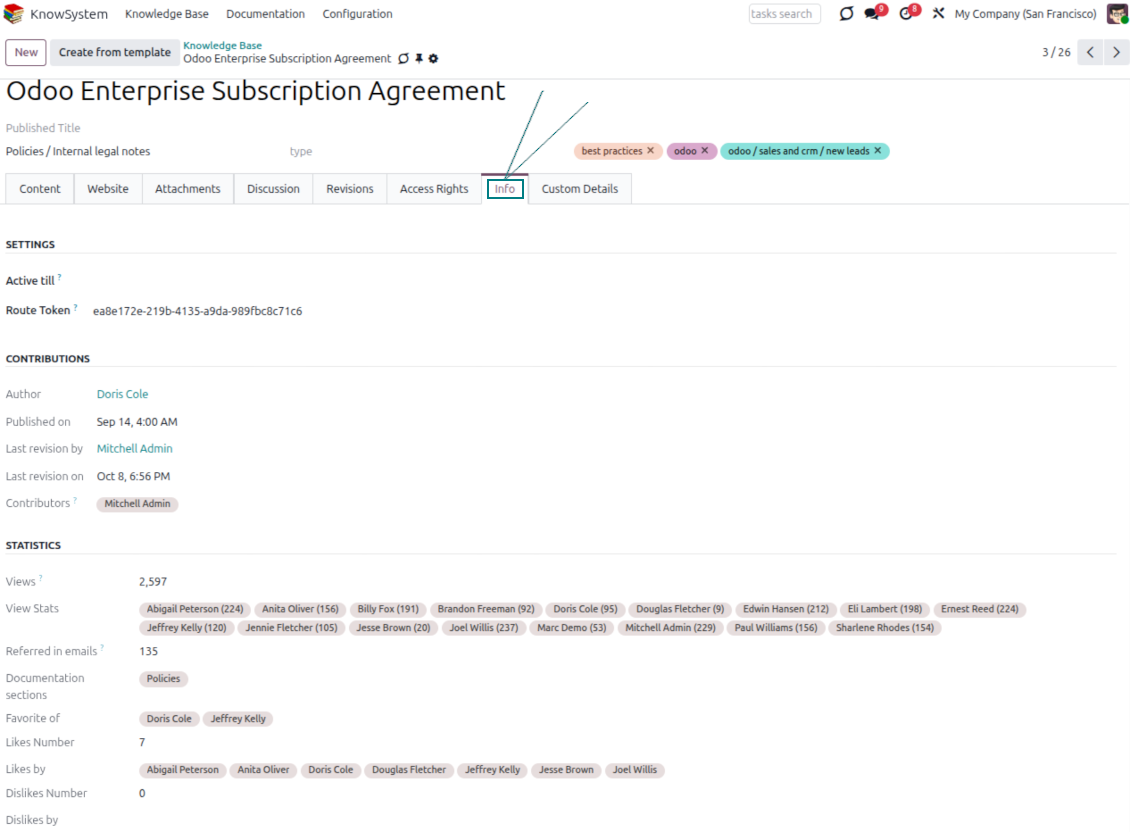
- Track statistics per article: contributors, views, likes and dislikes, how often it is used in messaging, and who marked it as favorite.
- Set activities to keep the base improving, and auto-archive articles after a chosen date.
Multi-lingual knowledge
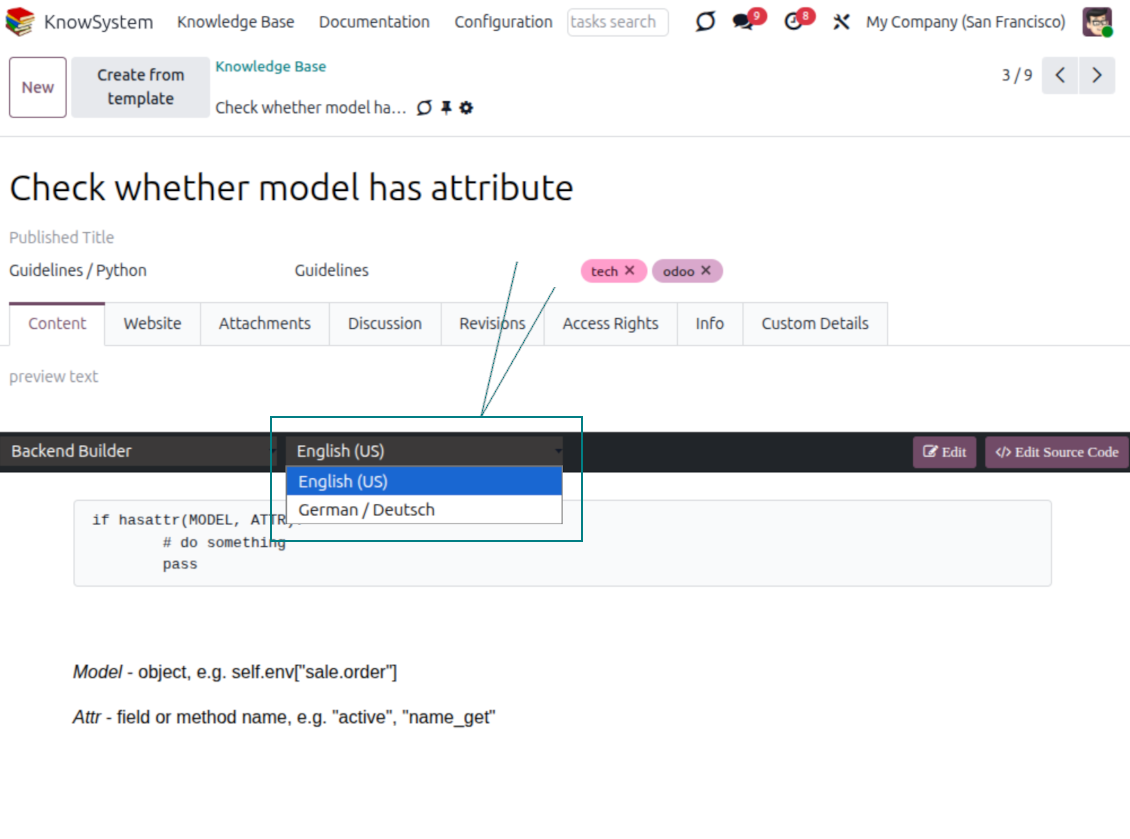
- Translate articles into every language installed in Odoo, so users read and edit in the language of their choice.
- Avoid double work with 'Copy from another translation' - but be sure you really need a multi-lingual regime, since every article must then be kept up to date in all languages.
- Switch the language right in the backend editor to review or update any translation.
eCommerce FAQ
Add a product FAQ and docs to every eShop page
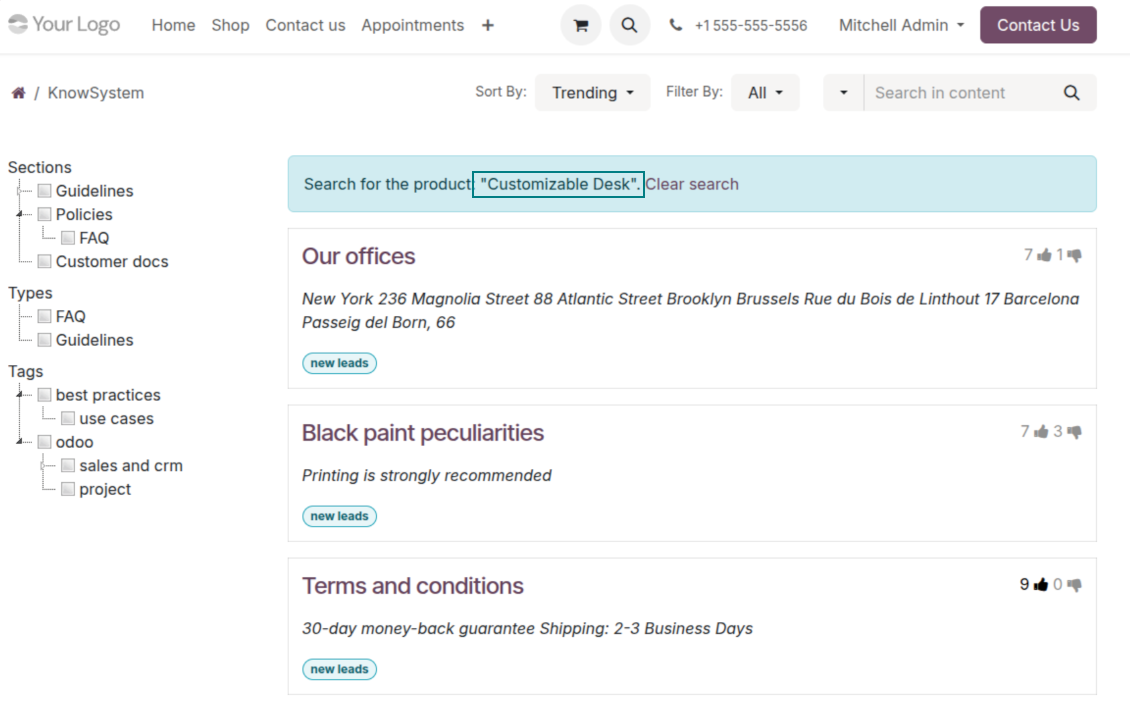
Show knowledge on product pages
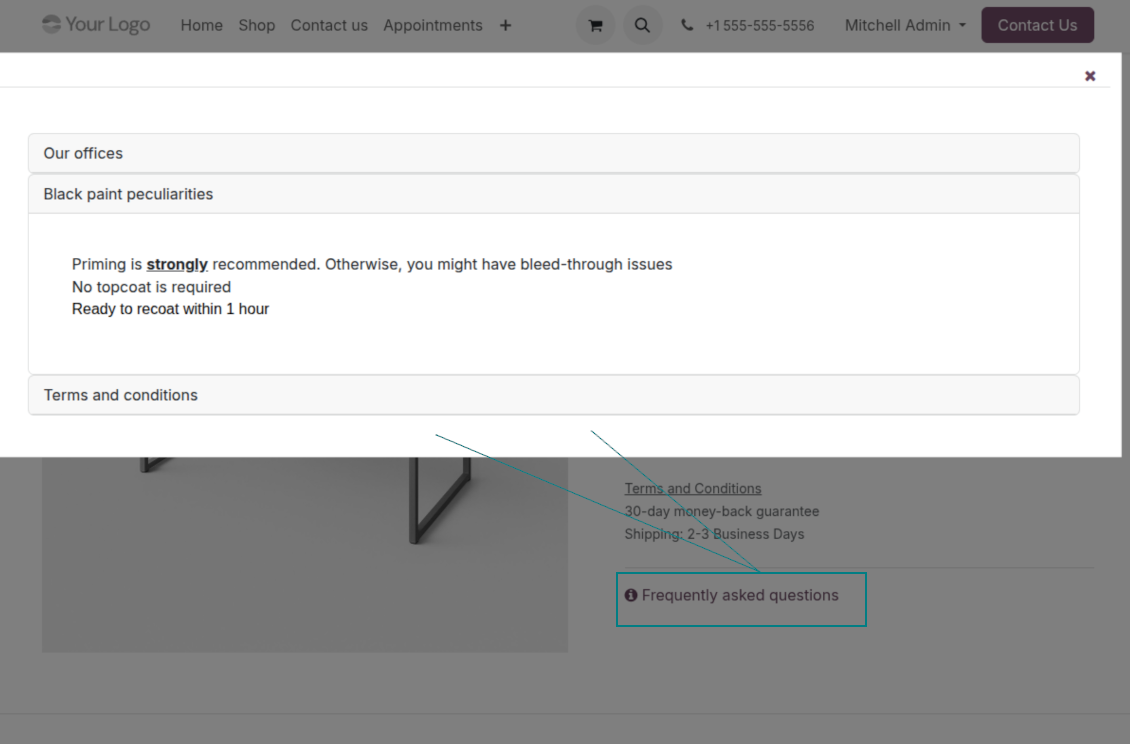
- Adds a product knowledge entry to all eCommerce product pages out of the box.
- Hide it for specific templates (the setting 'Do not show eCommerce FAQ') or for an entire eShop on a website (the option 'FAQ view' - 'Do not show').
- Set your own button title ('FAQ button text'); the default is ' Frequently asked questions', but you can change it to anything, e.g. 'Product docs' or 'Instructions' - simple HTML tags are allowed.
- Choose 'KnowSystem portal link' for the 'FAQ view' to send shoppers to the full navigation, restricted to articles linked to the current product.
- Or choose 'Popup accordion' to open all matching articles in a popup, so shoppers stay on the product page.
Match the right FAQ to the right product
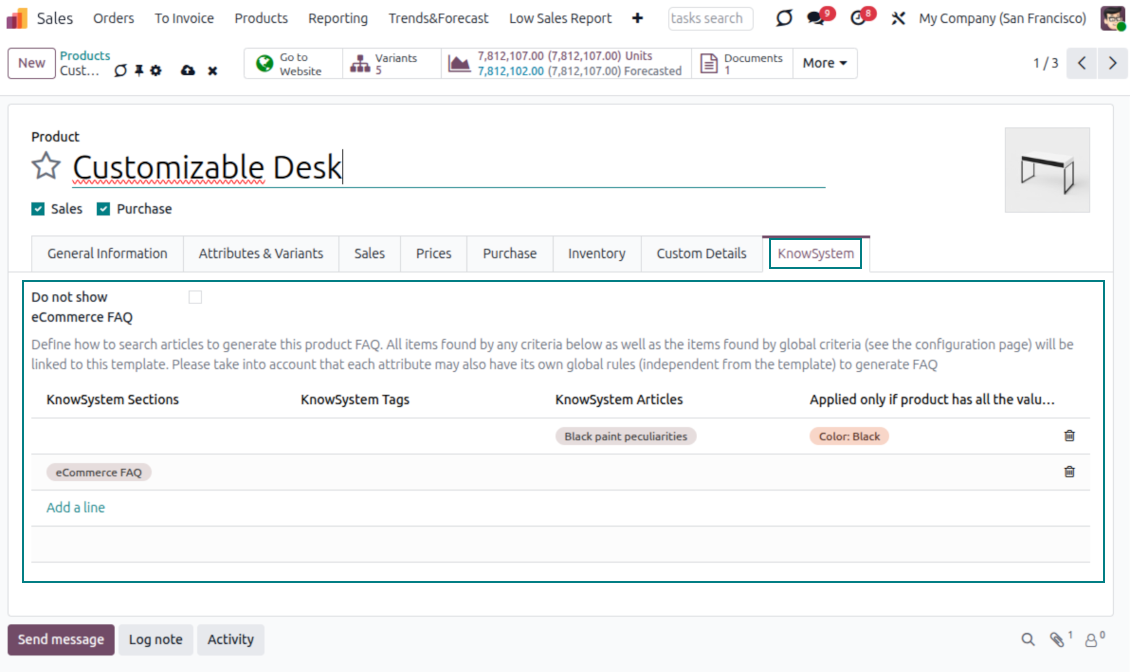
- Link product templates to KnowSystem; show articles for specific sets of attribute values and hide them for others - e.g. different FAQs for steel and aluminum tables.
- Define knowledge for Odoo attributes or attribute values regardless of the actual product - for instance, complementary documentation for every variant that has 'legs' or 'custom legs'.
- Apply global settings per website to keep the same FAQ basis across all items sold there.
- Target KnowSystem sections, tags, or specific articles on each layer. A knowledge piece is selected if it satisfies any of the criteria; for sections and tags, child nodes are taken into account too.
- Articles appear only if a user can access them, so website visitors see only published ones.
Use cases
Built for helpdesk, sales, HR, IT, and beyond
KnowSystem is a universal knowledge management tool that adapts to any business goal and any set of Odoo apps - helpdesk, sales, marketing, IT, HR, legal, and projects. Typical use cases:
- Helpdesk - once a challenge is solved, record its solution in KnowSystem for repeated use by co-workers and self-service by clients.
- Sales & CRM - a salesperson helper for product information, current offers, and frequently asked customer questions.
- Project management - keep and easily retrieve knowledge of existing solutions, tools, hints, and experiments.
- HR - prepare instructions, guidelines, learning tours, training, and any codified knowledge of routine in your company.
- Marketing - organize an online library of product use cases, expert knowledge, and well-structured documentation.
- Legal - systematize policies and contract/approval management, and keep a full classifier of trademarks and licenses.
- Information technology - share easy-to-reach manuals and configuration guidelines, one search away.
Custom fields
Add your own article attributes - no code
Add fields without code
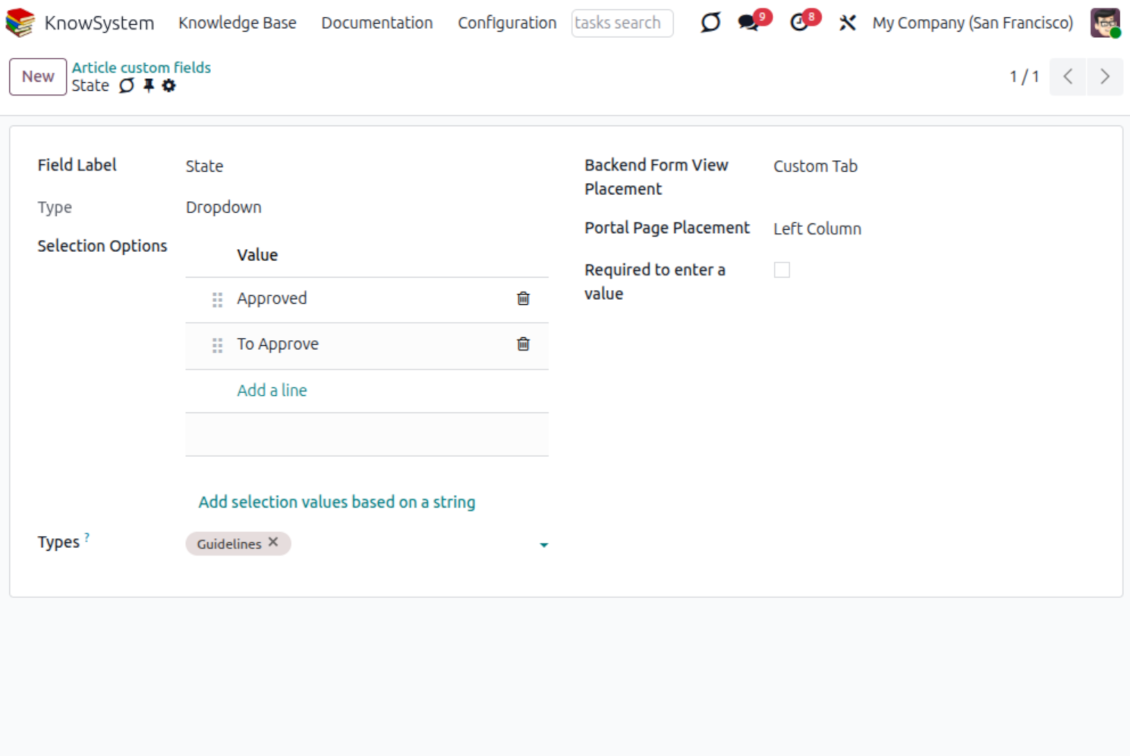
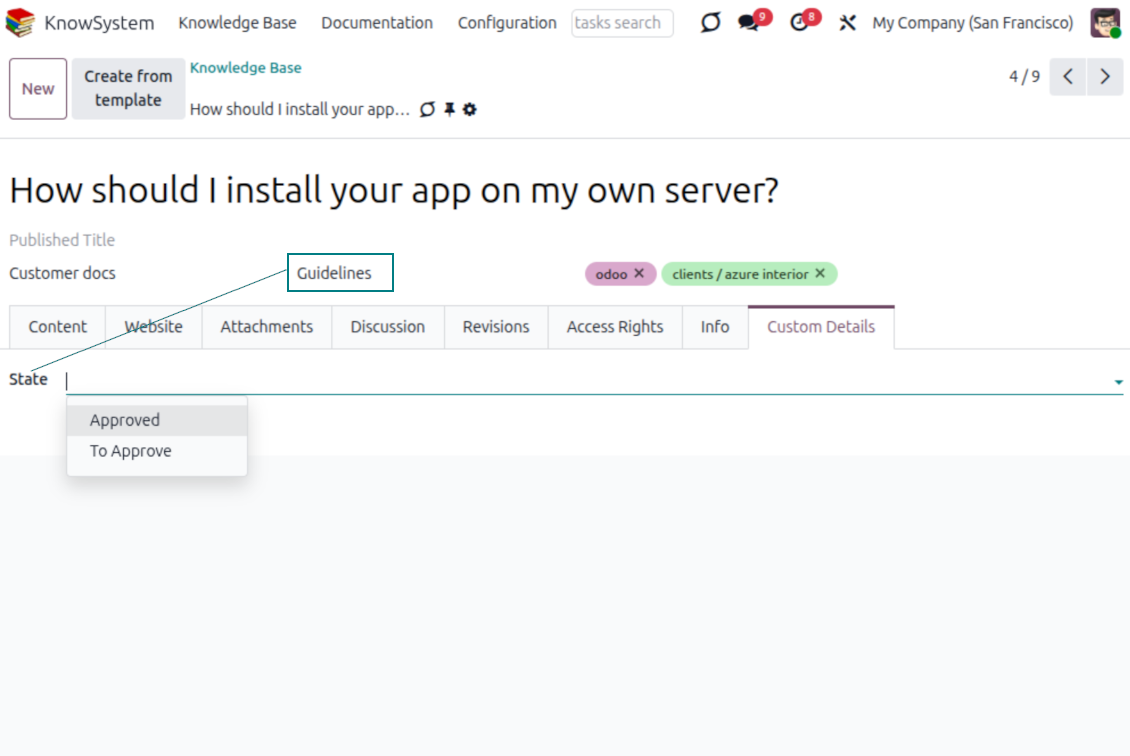
- No technical knowledge required - add a field and enter details to show a new property for articles.
- Choose from a full range of types: single-line text (char), plain text, rich (HTML) text, integer or float numbers, drop-down selection with your own options, checkbox (boolean), date or date-and-time, file upload (binary), and a reference to another Odoo record such as a sale order or contact (many2one).
- Pick the field's interface position from a closed list of options.
- Mark a field required to force users to enter a value.
Tailor by type, share, and secure
- Use article types to show properties only for the right articles - 'user guidelines' and 'technical specifications' can carry completely different attributes.
- Works in both the KnowSystem backend and the knowledge share portal.
- Custom fields can be imported and exported.
- Only KnowSystem administrators may create custom fields.
Security
Granular access for staff, partners, and the public
How access works
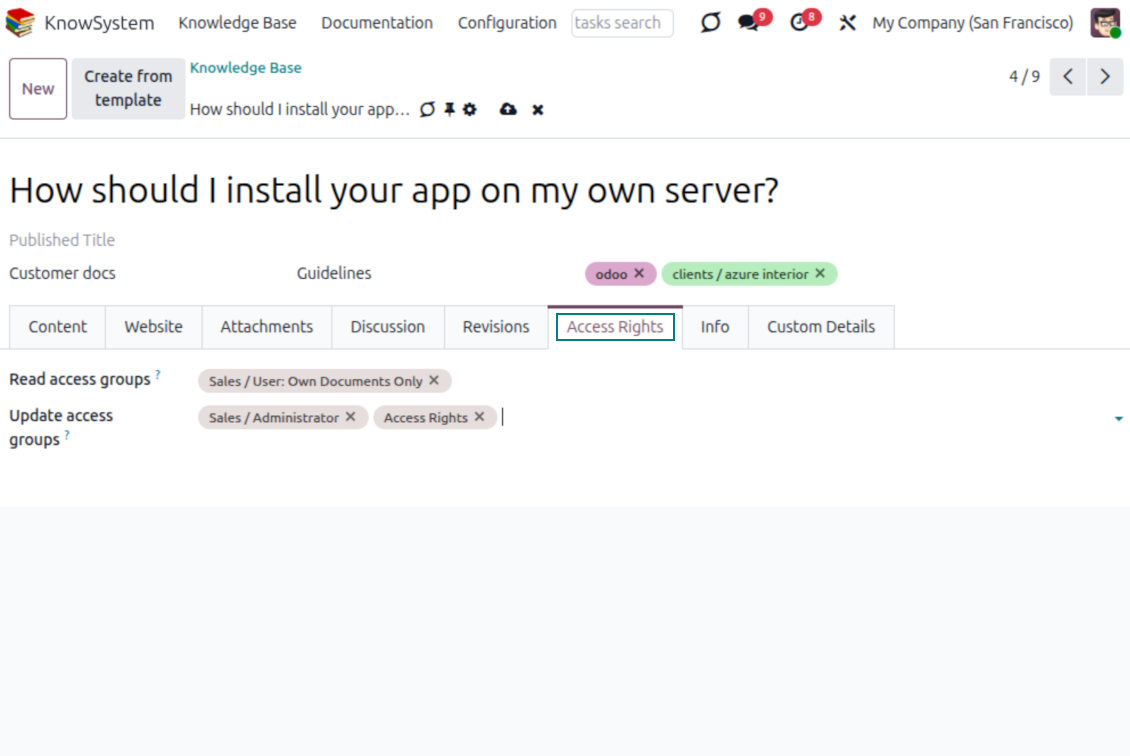
- Security for internal users and for portal/public users is handled separately.
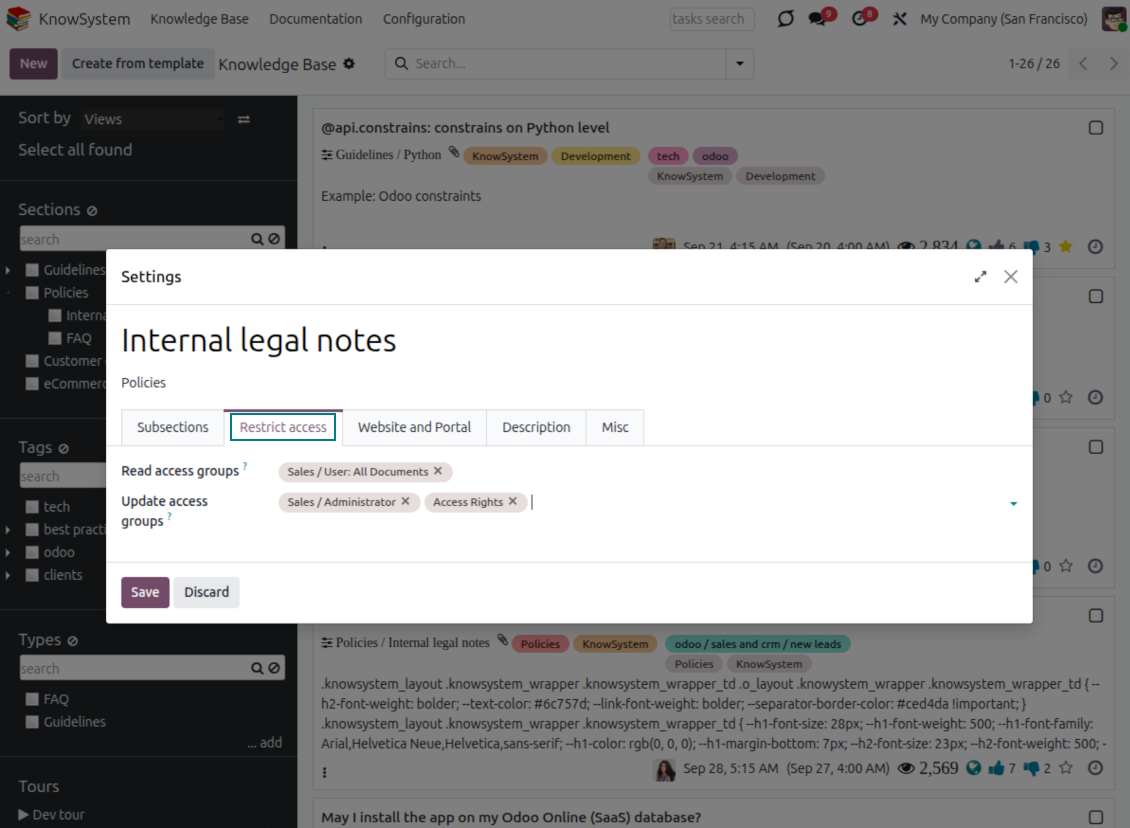
- For company employees: KnowSystem honors the user groups defined per article, section, and tour (the 'Restrict to' tab on those forms). If that field is empty, the record is 'global' and every internal user may read it.
- For portal / public users: access depends on tags and on whether an article is website-published. A tag's 'Allowed partners' grants portal users access to articles carrying that tag; published pages are open to any visitor.
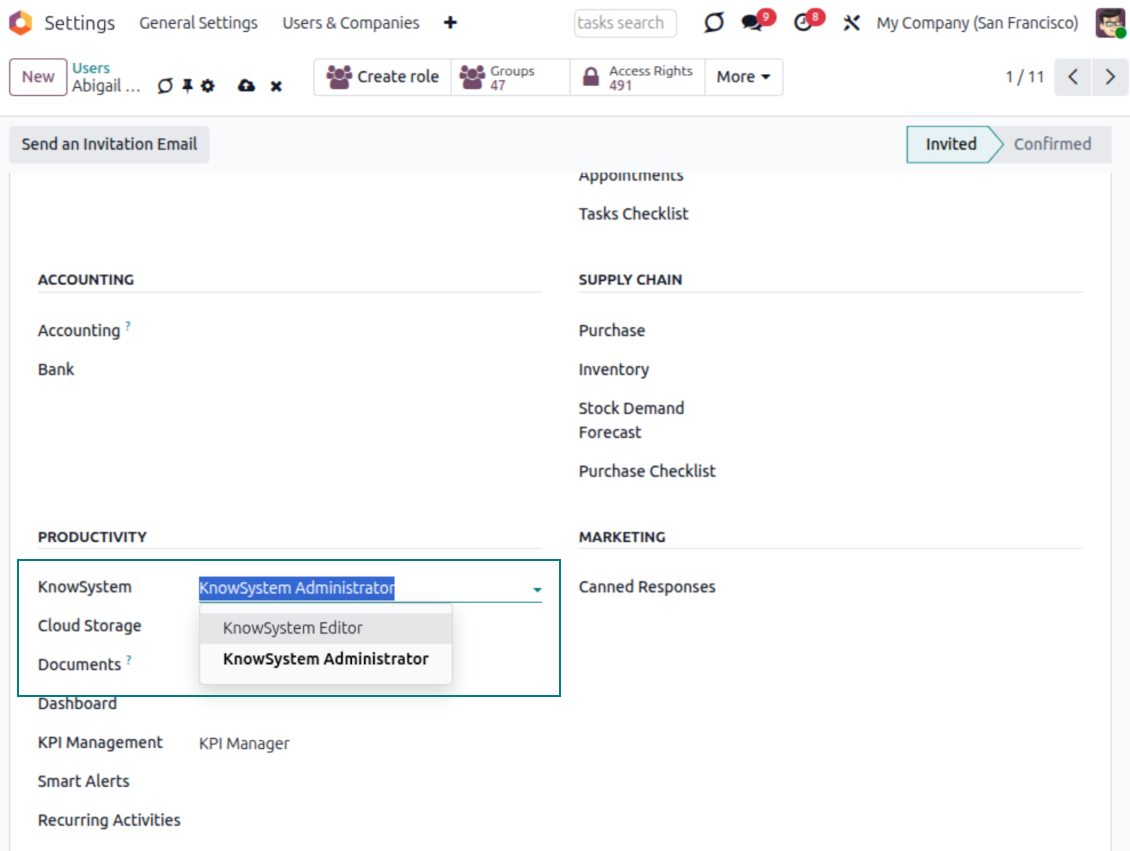
- Administration belongs to two roles - KnowSystem Editor and KnowSystem Administrator. A user must belong to one of them to create and edit articles.
- A user can always access an article they authored, regardless of further restrictions.
- Section rights consider the section and all its parents - no access to 'sales' means no access to 'sales/crm', even if 'crm' is open to the user's group.
Access rights at a glance
Odoo user |
KnowSystem Editor |
KnowSystem Admin |
Portal user |
Public user |
|
| Articles | read related to their user groups and sections | read, create, edit, archive related to their user groups and sections | read, create, edit, delete any | read published articles and articles related to partner-related tags | read published articles |
| Sections | read related to their user groups | read, create, edit, archive related to their user groups and sections | read, create, edit, delete any | read published ones | read published ones |
| Tags | read any | read, create, edit, archive any | read, create, edit, delete any | read published ones | read published ones |
| Article Types | read any | read any | read, create, edit, delete any | read published ones | read published ones |
| Tours | read related to their user groups | read, create, edit, delete related to their user groups | read, create, edit, delete any | no access | no access |
| Misc | may like/dislike, add to favorites, print, take part in discussions | may configure options | may like/dislike an article |
Gotowy do oceny?
Zacznij od bezpłatnego zgłoszenia demo lub kup w Odoo Apps Store.
Bezpłatna spersonalizowaną baza demo. Nie potrzeba telefonu ani karty. Bezpłatne aktualizacje dożywotnio i wsparcie ekspertów w ramach głównej wersji Odoo.
Często zadawane pytania o KnowSystem: Knowledge Base System Odoo v.18
Nie widzę różnicy między tekstami rewizji.
Rewizję zapisują nie tylko zmiany tekstu, ale też wszelkie aktualizacje stylów (technicznie, gdy zmieniasz kod źródłowy HTML artykułu). Część z nich nie jest oczywista na pierwszy rzut oka (np. zmieniony rozmiar czcionki jednego słowa). Inne bywają drastyczne. Każdy ciąg Edit > zmień cokolwiek w artykule > Save tworzy jednak nową rewizję.
Czy mogę dodać film YouTube/ Vimeo / Dailymotion / Youku do artykułu?
Tak, możesz osadzić film z tych usług w artykułach zarówno z backendu Odoo, jak i z kreatora witryny. Dodaj blok z obrazem > naciśnij obraz > wybierz ‘Video’ > wpisz URL wymaganego medium.
Uwzględnij: takie filmy są wstawiane jako iframe, a niektóre przeglądarki mogą blokować odtwarzanie, dopóki użytkownik tego wyraźnie nie zezwoli.
Jak uczynić sekcję widoczną na stronie internetowej?
W KnowSystem sekcja jest widoczna na stronie, gdy jest opublikowana i zawiera co najmniej jeden artykuł. Nawet z podsekcjami nie będzie widoczna, jeśli w samej sekcji nie ma żadnego artykułu. Dzięki temu unika się pustych sekcji, a portal KnowSystem jest przejrzysty. Aby sekcja pojawiła się na stronie, dodaj jeden artykuł wstępny lub ogólny, który krótko opisuje lub wymienia artykuły w podsekcjach.
Jak udostępnić artykuł zewnętrznemu kontrahentowi?
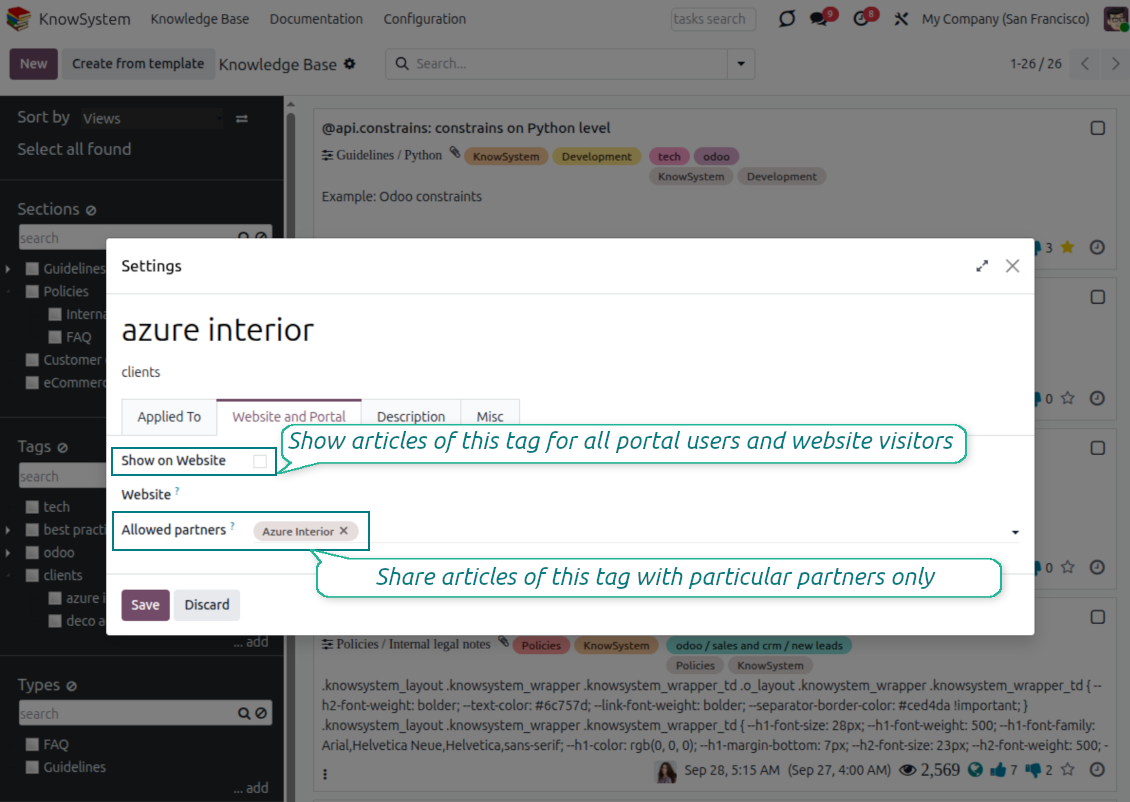
Kliknij prawym przyciskiem dowolny tag w lewym panelu nawigacji - Create
Znajdź pole 'Allowed partners'. Na przykład 'clients - azure interior', aby dać dostęp partnerowi 'Azure Interior'. Możesz też odwrotnie: przypisać tagi KnowSystem na formularzu partnera
Następnie otwórz wymagany artykuł (albo zrób to samo akcją 'Mass update' dla wielu rekordów):
Jeśli jest opublikowany: wycofaj publikację, jeśli nie ma być dostępny dla wszystkich użytkowników portalu i gości publicznych
Przypisz nowo utworzony tag (w przykładzie jest to 'clients - azure interior')
Teraz:
Wszyscy użytkownicy portalu powiązani z partnerem handlowym 'Azure Interior' mają dostęp do artykułów z tagiem 'Azure Interior'
Żadni inni użytkownicy portalu (jeśli nie przypisano innego tagu) nie mają dostępu do tych artykułów
Użytkownicy wewnętrzni nie są objęci tym ograniczeniem i widzą artykuły według logiki 'access to' artykułów i sekcji.
Czy możemy dodać przycisk wyboru języka dla treści artykułu?
Przycisk 'translate' nie jest celowo dodawany do treści artykułu przez opcjonalny dodatek 'KnowSystem: Multi Languages'. Kod HTML jest bardzo trudny do tłumaczenia w prostym oknie przycisku. Byłoby bardzo mało tekstu do tłumaczenia i dużo fragmentów HTML (które tłumacz mógłby też zepsuć).
Dlatego, aby przygotować artykuł w danym języku, zaloguj się jako użytkownik tego języka. Może to być inny użytkownik albo tymczasowo zmień preferencje bieżącego użytkownika. Potem wszelkie aktualizacje treści artykułu będą w tym języku.
Możesz też użyć przycisku 'Copy from another translation' pod treścią artykułu, aby w dowolnym momencie pobrać treść z innego języka (przydatne, gdy artykuł mocno zaktualizowano w jednym z języków).
Jak osadzić inną stronę internetową w artykule
W tym celu możesz użyć iframe. Przełącz artykuł na edytor surowego kodu HTML i wstaw na przykład <iframe src="https://faotools.com/" style="width:100%;min-height:600px;"> </iframe>.
Zainstalowałem KnowSystem, ale nie widzę przycisku 'create' ani innych przycisków
Najpewniej nie nadałeś użytkownikowi uprawnień KnowSystem. Wybierz prawo 'KnowSystem Editor' lub 'KnowSystem Admin' i odśwież stronę. Przyciski sterowania powinny się teraz pokazać.
Czy mogę pokazać konkretny samouczek tylko wybranym użytkownikom?
Tak, przez przypisanie grupy użytkowników (np. 'Sales Manager'), która ma przejść ten przewodnik. Jeśli użytkownik należy do grupy, zobaczy przewodnik. Jeśli nie, przewodnik się nie pokaże. Działa to tak samo jak uprawnienia do artykułów i sekcji KnowSystem.
Weź pod uwagę, że przewodnik bez przypisanych grup jest 'global' i będzie widoczny dla wszystkich.
Jak zmienić stopkę i nagłówek przy drukowaniu artykułów?
Nagłówek i stopka PDF-ów artykułów pochodzą z układów firmy. Zobacz Settings > General Settings > sekcję Business Documents. Tam definiujesz szablon firmy używany dla wszystkich typów dokumentów, w tym faktur, zamówień sprzedaży itd., a także artykułów. Takie podejście Odoo traktuje stopkę i nagłówek jako ogólny styl firmy, nie atrybut konkretnych wydruków.
Jak powiązać artykuły ze sobą?
Każdy artykuł ma wewnętrzne (backend) i witrynowe adresy URL (jeśli zainstalowano opcję 'KnowSystem: Website and Portal'). Kliknij przycisk 'Info' na formularzu artykułu, aby poznać adresy WWW tego rekordu. Dowolny z nich możesz wstawić w treści artykułu jako hiperłącze.
Czy mogę zmienić kod źródłowy HTML artykułu?
Tak: włącz zasoby debug (na ekranie przeglądu ustawień) i wróć do bieżącego artykułu. W trybie edycji zobaczysz specjalną ikonę '</>'. Kliknij ją, aby obejrzeć i edytować HTML oraz style.
Jakie sa zasady aktualizacji Waszych narzędzi?
Zgodnie z biezacymi zasadami Odoo Apps Store:
- Modul kupiony dla wersji 12.0 lub starszej daje dostęp do wszystkich wersji do 12.0.
- Od wersji 13.0 każda wersja modulu musi byc kupiona osobno.
- Niezależnie od wersji zakup daje prawo do wszystkich aktualizacji i poprawek w ramach wersji glownej.
Zespol faOtools nie kontroluje tych zasad. Pytania kierujcie bezpośrednio do przedstawicieli Odoo Apps Store.
Jak zainstalowac aplikacje na Odoo.sh?
Najbardziej bezpośrednie podejscie to wbudowany przeplyw sklepu Odoo:
1. Otwórz stronę modulu i kliknij Deploy on odoo.sh
2. Zostaniesz przekierowany do GitHub. Zaloguj sie i kliknij Create a new repo lub użyj istniejącego. Repozytorium musi byc prywatne. Publikowanie aplikacji na licencji OPL-1 jest zabronione. W razie potrzeby utwórz nowe repo dla projektu Odoo.sh
3. Następnie w odoo.sh kliknij Deploy, potwierdź i kliknij Continue. Instalacja sie rozpoczyna.
Te kroki instaluja aplikacje na galezi production. Dla innych galezi lub aktualizacji:
1. Pobierz kod zrodlowy ze sklepu Odoo
2. Zrób commit modulu do repozytorium GitHub. Żaden folder/plik aplikacji nie może byc w .gitignore. Repo tworzone przez odoo.sh mogą ignorowac ważne ścieżki (np. /lib). Prześlij wszystkie katalogi i pliki modulu
3. Wdroz docelowa galaz projektu odoo.sh lub poczekaj na automatyczny build, jeśli tak ustawiono.
Jak zainstalowac aplikacje na wlasnym serwerze?
2. Uruchom ponownie serwer Odoo;
3. Wlacz tryb programisty (ustawienia techniczne);
4. Zaktualizuj liste aplikacji (menu Aplikacje);
5. Znajdź aplikacje i kliknij Activate/Install;
6. Postępuj zgodnie ze wskazowkami na stronie aplikacji, jeśli istnieją.
Aplikacja ma dodatkowe dodatki. Czy moge kupic je później?
Tak. Odoo automatycznie dodaje zależności do koszyka: wylacz juz zakupione narzędzia, aby nie zaplacic dwa razy.
Wdrozyłem aplikacje na Odoo.sh i widze ostrzeżenie/blad w testach
Czerwone/pomaranczowe ostrzeżenie nie wplywa na funkcje aplikacji. Czasem nasze moduly nie przechodzą standardowych testów automatycznych, bo te zakladaja zachowanie sprzeczne z celami aplikacji. Na przyklad zmieniamy obliczanie ceny, a testy Odoo porownuja cenę koncowa ze standardowym algorytmem.
Najpierw sprawdź funkcje wdroznej bazy. Czy wszystko dziala?
Jeśli nadal uwazasz, ze ostrzeżenie wplywa na rzeczywiste funkcje, skontaktuj sie z nami i prześlij pelne logi instalacji oraz pelna liste wdroznych modulow (rdzeń i firmy trzecie).
Czy moge kupic aplikacje bezpośrednio u Was?
Nie, dystrybuujemy narzędzia tylko przez oficjalny sklep aplikacji Odoo.
Chcialbym uzyskać znizke
Niestety nie mamy srodkow technicznych, by oferowac ceny indywidualne.
Czy moge zainstalowac aplikacje na bazie Odoo Online (SaaS)?
Nie, aplikacji innych firm nie można używać na Odoo Online. Odoo SaaS blokuje te mozliwosc.
Narzędzie zależy od innych aplikacji. Czy musze je kupic?
Tak, narzędzie wymaga wszystkich modulow oznaczonych jako zależności. Cena na stronie aplikacji juz je obejmuje.
Jaka jest cena modulu w dolarach amerykanskich? Dlaczego sie zmienila?
Ceny naszych modulow sa w euro. Sklep Odoo przelicza je na inne waluty wedlug wewnetrznego kursu. Dlatego cena w dolarach amerykanskich może sie zmienić po aktualizacji kursu.
Sformułowania aplikacji i witryny w językach innych niż angielski są wspomagane przez AI i zgodne z oficjalnymi tłumaczeniami Odoo. Jeśli zauważysz błąd, wyślij zgłoszenie o poprawność tłumaczeń a naprawimy to.
Bazy demonstracyjne Odoo (podglądy na żywo)
Dla tej aplikacji możemy zapewnić darmową spersonalizowaną bazę demo.
Nie potrzebujesz telefonu ani karty, by się z nami skontaktować. Wystarczy krótka rejestracja e-mail, która nie zajmuje więcej niż 30 sekund.
Na Twoją prośbę przygotujemy indywidualną bazę podglądu na żywo, w której przez około dwa tygodnie możesz testować i sprawdzać założenia.
Zgłaszanie błędów
Jeśli zauważysz błędy lub niespójne działanie, napisz do nas. Gwarantujemy poprawki w 60 dni od zakupu i dalej ulepszamy narzędzia.
Nie potrzebujesz telefonu ani karty, by się z nami skontaktować. Wystarczy krótka rejestracja e-mail, która nie zajmuje więcej niż 30 sekund.
Dołącz jak najwięcej szczegółów: zrzuty ekranu, logi serwera Odoo i pełny opis odtworzenia problemu. Zwykle kilka dni roboczych zajmuje plan (gdy błąd potwierdzono) albo wskazówki (w przeciwnym razie).
Publiczne zgłoszenia funkcji i pomysły na moduły (bezpłatny rozwój)
Jesteśmy mocno zmotywowani do ulepszania narzędzi i wdzięczni za każdą opinię. Jeśli wymagania są użyteczne publicznie i da się je sprawnie wdrożyć, zespół wpisze je na listę zadań.
Taka lista zadań jest przetwarzana regularnie i nie zakłada dodatkowych opłat. Choć nie możemy obiecać terminów i ostatecznego projektu, to dobry sposób na pożądane funkcje bez inwestycji i ryzyka.
Nie potrzebujesz telefonu ani karty, by się z nami skontaktować. Wystarczy krótka rejestracja e-mail, która nie zajmuje więcej niż 30 sekund.
18.0.1.3.29
- The issue of Late Activities listing articles that have no overdue activity for the selected user has been fixed.
18.0.1.3.27
- The issue of autovacuum failure has been fixed.
18.0.1.3.25
- problem z default tagi z e-mail composer i activity formularze został naprawiony.
18.0.1.3.24
- Problem z niewyświetlaniem palety kolorów w edytorze HTML został rozwiązany.
18.0.1.3.23
- Problem konieczności podwójnego kliknięcia, by usunąć wybrane artykuły, został naprawiony.
18.0.1.3.22
- Problem przełączania między artykułami o różnych typach edytora został naprawiony.
18.0.1.3.21
- Uprawnienia do edycji sekcji/artykułów obejmują teraz uprawnienia do odczytu tych obiektów.
- Problem nieaktualizowanych liczników polubień został naprawiony.
18.0.1.3.20
- Dodano wyszukiwanie słów kluczowych rozdzielonych znacznikami pogrubienia lub kursywy.
18.0.1.3.19
- Błąd dostępu przy otwieraniu kreatora wyszukiwania artykułów dla zwykłych użytkowników został naprawiony.
18.0.1.3.18
- Widoki kanban dostosowano do nowych zasad XML Odoo 18.
- Wstęga zarchiwizowanych rekordów nieaktywnych została dodana do widoków Kanban i formularza artykułów oraz do formularzy sekcji i etykiet.
18.0.1.3.17
- Widok witryny artykułów i dokumentacji jest zoptymalizowany pod małe ekrany.
18.0.1.3.16
- Aplikacja jest dostosowana do niedawnych aktualizacji Odoo 18 we wtyczkach edytora WWW.
18.0.1.3.15
- Nadmiarowy przycisk tłumaczenia dla artykułów "Text" został usunięty.
18.0.1.3.14
- Niemożność poprawnego zapisywania i kopiowania tekstu została naprawiona.
18.0.1.3.13
- Aplikacja jest opublikowana w wersji 18.
17.0.1.3.13
- default activity widok dla KnowSystem artykuły now is kanban.
17.0.1.3.12
- Nadmierne oczyszczanie artykułów KnowSystem po wysłaniu wiadomości z kompozytora zostało naprawione.
17.0.1.3.11
- Problem z przełącznikiem języka szybkiego wyszukiwania artykułów został naprawiony.
17.0.1.3.10
- Wyszukiwanie wyłącznie w tytułach jest teraz możliwe w backendzie.
- Przycisk otwierania znalezionego artykułu w nowej karcie z okna podręcznego został naprawiony.
17.0.1.3.9
- Wprowadzono funkcje przeciągnij i upuść do masowej aktualizacji artykułów: dodaj etykietę, zaktualizuj sekcję i dodaj do tury szkoleniowej.
- funkcja otwórz found artykuł w nowy tab dodano.
- Wybrany element nadrzędny drzew nawigacji jest poprawnie podświetlany.
17.0.1.3.8
- Widok Kanban artykułów KnowSystem jest dostosowany do najnowszych podejść Odoo v.17.
- Hierarchie nawigacji są zoptymalizowane.
17.0.1.3.7
- Domyślne kryterium sortowania nawigacji backend artykułów jest teraz konfigurowalne na stronie aplikacji.

Narzędzie do elastycznego układania załączników Odoo w folderach i synchronizacji katalogów z klientami chmury: Google Drive, OneDrive/SharePoint, Nextcloud/ownCloud, Dropbox, Amazon S3, Box i NAS. DMS. Menedżer plików. System zarządzania dokumentami
398€
The tool to automatically synchronize Odoo attachments with OneDrive files in both ways
487€
The tool to automatically synchronize Odoo attachments with Google Drive files in both ways
487€

The tool to set up KPI targets and control their fulfillment by periods. KPI dashboards. Dashboard designer. KPI charts

The tool for time-based service management from booking appointments to sales and reviews
398€
The tool to manage your Odoo from your favorite AI chats through MCP. Claude. Any MCP-supporting AI.

The tool to combine different Odoo events in a few configurable super calendars

The tool to translate URL addresses of Odoo website pages
38€