In het kort
KnowSystem: Knowledge Base System is een Odoo 18 Extra tools-app. The tool to build a deep and structured knowledge base for internal and external use. Knowledge System. KMS. Wiki-like revisions.
KnowSystem turns scattered company know-how into one structured, searchable knowledge base for your team, your partners, and your customers. Capture articles with drag-and-drop building blocks, organize them by sections, tags, and types, and reuse them anywhere in Odoo - messages, activities, helpdesk, projects, or product pages. Every change is versioned wiki-style, so improving knowledge is always safer than breaking it.
Ideaal voor
Helpdesk & support
Record every solved ticket once, then reuse it for faster agent replies and round-the-clock customer self-service.
Sales & CRM
Give salespeople instant answers on products, offers, and frequent customer questions right where they work.
HR & onboarding
Turn policies, guidelines, and training into structured knowledge and step-by-step learning tours.
IT & technical teams
Keep manuals, configurations, and runbooks one search away for the whole company.
Project management
Preserve solutions, tools, and lessons learned so your teams never reinvent the wheel.
Marketing & documentation
Build a polished online library and product documentation your audience can actually find and read.
Klaar om te evalueren?
Begin met een gratis demoaanvraag of koop in de Odoo Apps Store.
Gratis gepersonaliseerde demodatabase. Geen telefoonnummer of creditcard nodig. Gratis lifetime-updates en expert support binnen de Odoo-hoofdversie.
Waarom teams het kiezen
Belangrijkste voordelen vóór de details
Capture knowledge
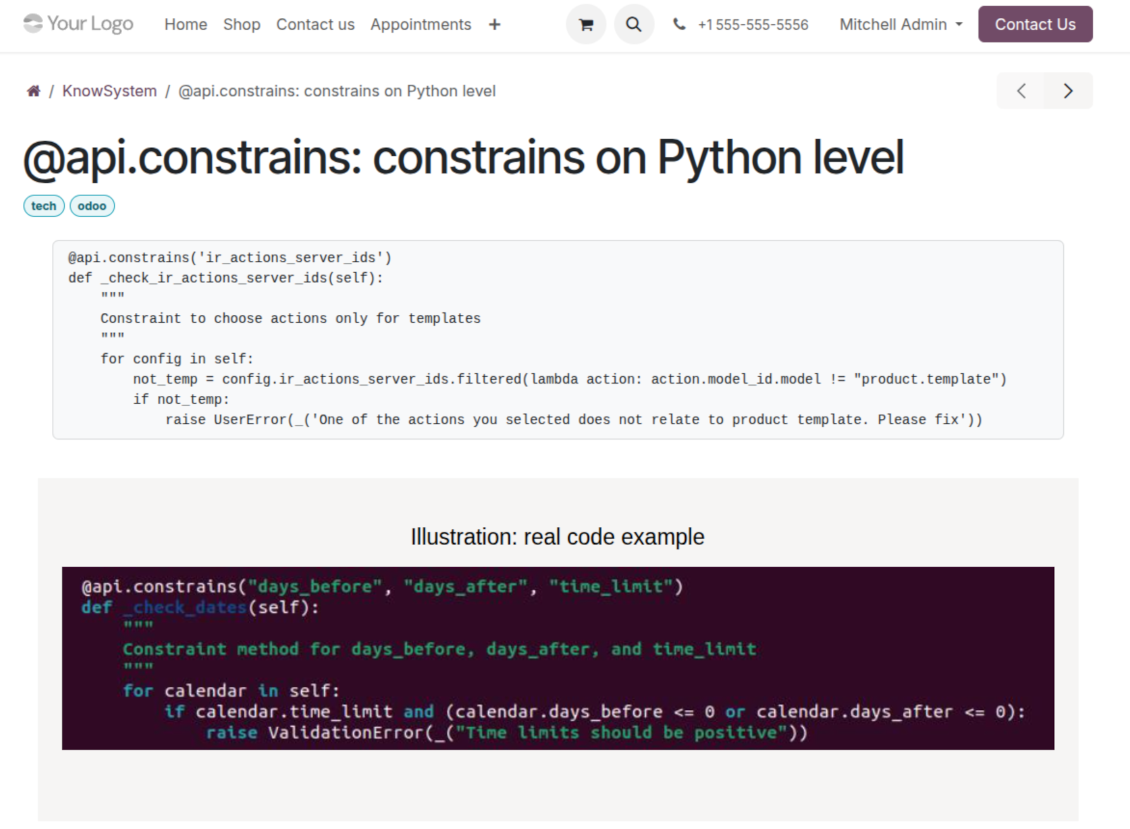
Write professional-looking articles with drag-and-drop building blocks, the HTML editor, or raw code - and reuse ready-made templates for uniform styles.
Organize and find
Structure everything by a hierarchy of sections, a tree of tags, and knowledge types. Filter, sort, and run mass actions on hundreds of articles from one screen.
Put it to work
Surface the right article inside any Odoo document, cite it in messages and activities, run guided learning tours, and answer product FAQs - then print or share in a click.
Wiki-like revisions
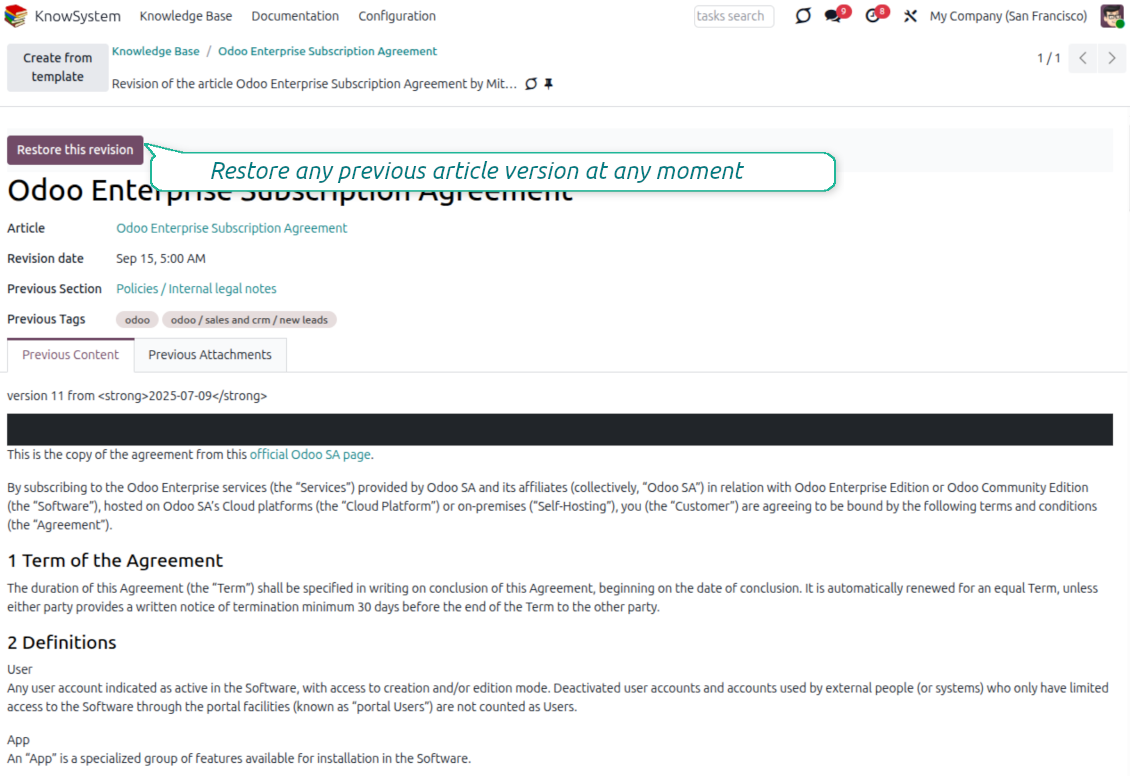
Every change is versioned. If a teammate breaks an article, restore the right version in two clicks - breaking becomes harder than restoring.
Portal & public base
Give each partner a personal knowledge portal, or publish a self-service knowledge base for any website visitor - access controlled by tags and publishing.
Documentation builder
Combine articles into advanced website documentation with automatic table of contents and instant search - reusable across versions, manuals, and guidelines.
Analytics that keep it alive
Track views, likes, dislikes, contributors, and messaging usage. See what your team relies on and keep content fresh and trusted.
Secure by design
Control who sees what with granular access for staff, partners, and the public - governed by user groups, tags, and website publishing.
Fits any team
One universal tool for helpdesk, sales, HR, IT, legal, marketing, and projects - configurable to any goal and any combination of Odoo apps.
Feedback uit de Odoo Apps Store
Wat klanten over de app zeggen
Best knowledge base system for Odoo!
Excellent app and exceptional after-sales support.
Really well thought-out product and one of the best features is the contextual help by means of the tags. Really a game changer for us.
Keep up the great work FaOtools!
Magnus
Outstanding app! Tremendous value for money, an absolute must have!
One of the features sorely lacking from Odoo has been a robust Wiki/documentation system. Using third party platforms is a massive headache: yet another system to maintain, users get distracted switching back-and-forth, and errors get made. Then you have to worry about training, additional logins, etc.
KnowSystem feels like a native/core app, is very well-polished, and extremely fast. It's accessible from any screen, and the search results are instant (none of the latency inherent with most apps).The interface is elegant yet powerful, with robust access control, rich editing features, and version control. It's simple to revert to previous entries, view audit trails, etc. It's very intuitive for anyone familiar with Odoo; onboarding takes just a few minutes. The user guides are excellent.
This is invaluable for any organisation with a lot of documented information, SOPs, ISO compliance, or similar. If you're using eLearning, it's great for creating a help system / reminders. For example, noting key takeaways or specific instructions. The user can be in MRP, Sales, or any other function, and instantly lookup a guide. Since it overlays whichever screen you're in, it doesn't interrupt the workflow.
This dramatically increases efficiency, minimises questions, and helps keep everyone on the same page.
Oh, and customer service is excellent, faOtools stands behind their product. Thank you!
nico.valentino@gmx.net
KnowSystem is excellent - OdooTools offer great support, are very helpful and responsive
Our company needed the ability to add a Knowledge Base to our Odoo portal website for our customers to access article content on a membership-only basis. KnowSystem provided this and much more, along with ability to add search by section, set permissions to allow only certain partners access to articles by tag etc. OdooTools have been very helpful and implemented several features we suggested including automatic redirect upon login, customisable filters and a social sharing capability on articles. Overall a great app by a great company, something that massively adds to Odoo's capabilities and is something that everyone could benefit from using.
Chris Mann
Very functional application and responsive support
Our company produces medical laser equipment and we use KnowSystem to streamline the knowledge base of our company. Convenient search system and classification of content, as well as access rules for groups and even for individual users.
Svetlana
Great app and professional team
The app is great the the team is very professional in both response timing and problem solving.
Highly recommended.
Marco from ALO.zone.
Marco Carboni
Excellent system
Excellent system.
Gordon
A great tool from some very nice developers!
KnowSystem is a great tool and a game changer for us. Finally a place to put all our company know-how. I highly recommend it. And also important to us: We got great support from FaOtools too. A rare thing in this busy world. thx!
Eisberger
Excellent app and support.
Great app and a very helpfull support. Openess to improve their products is outstanding.
Lucas Huber
Klaar om te evalueren?
Begin met een gratis demoaanvraag of koop in de Odoo Apps Store.
Gratis gepersonaliseerde demodatabase. Geen telefoonnummer of creditcard nodig. Gratis lifetime-updates en expert support binnen de Odoo-hoofdversie.
Navigation
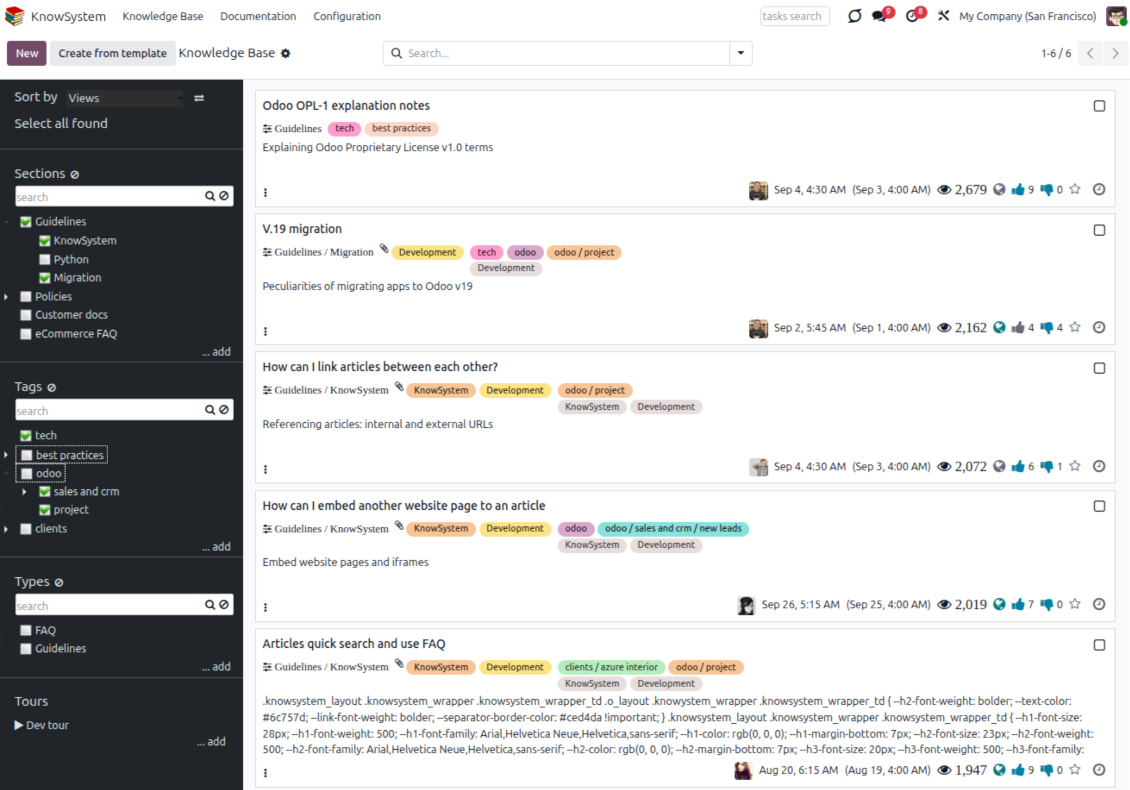
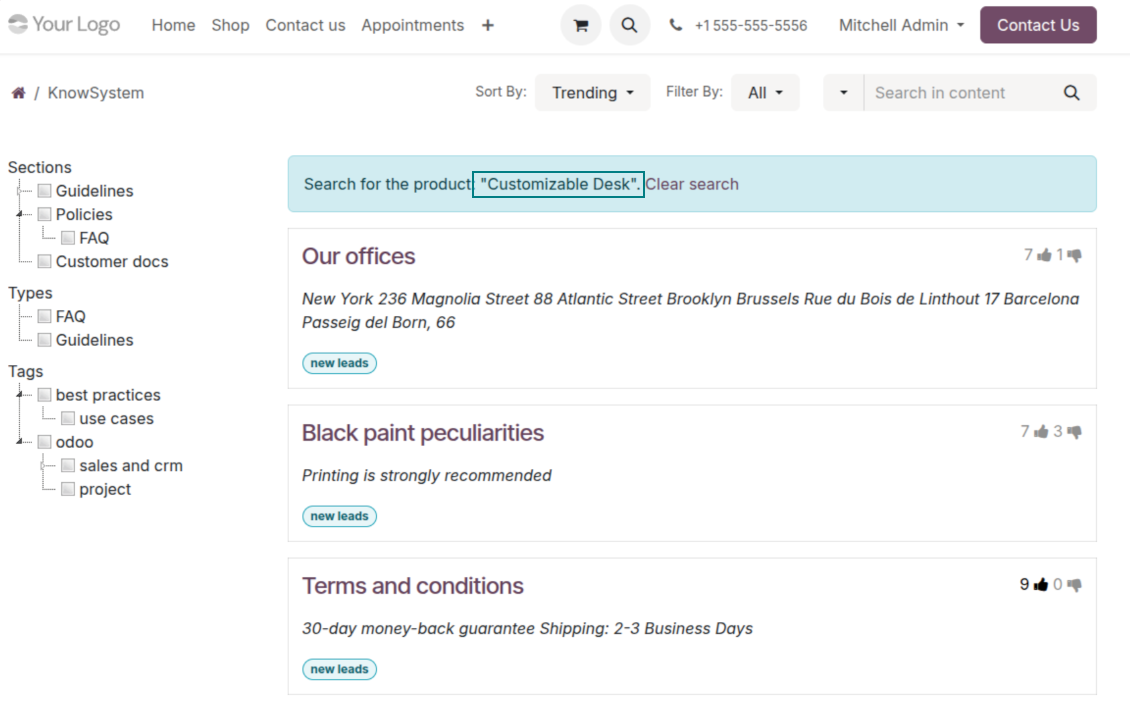
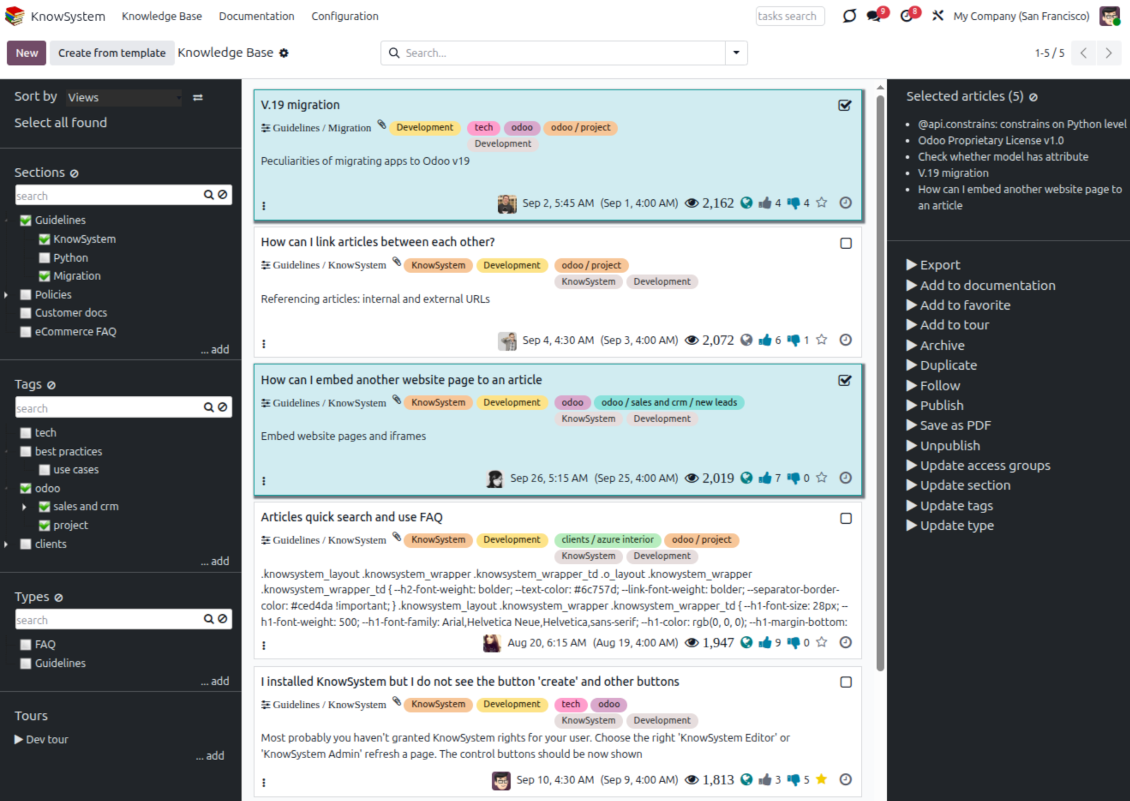
Find, filter, and bulk-edit articles from one screen
Structure and navigate
- Build a hierarchy of knowledge sections to switch between areas instantly, however large the base grows.
- Define a tree of tags for quick navigation and deeper, cross-cutting structuring.
- Introduce a knowledge typology to distinguish kinds of articles in a single click.
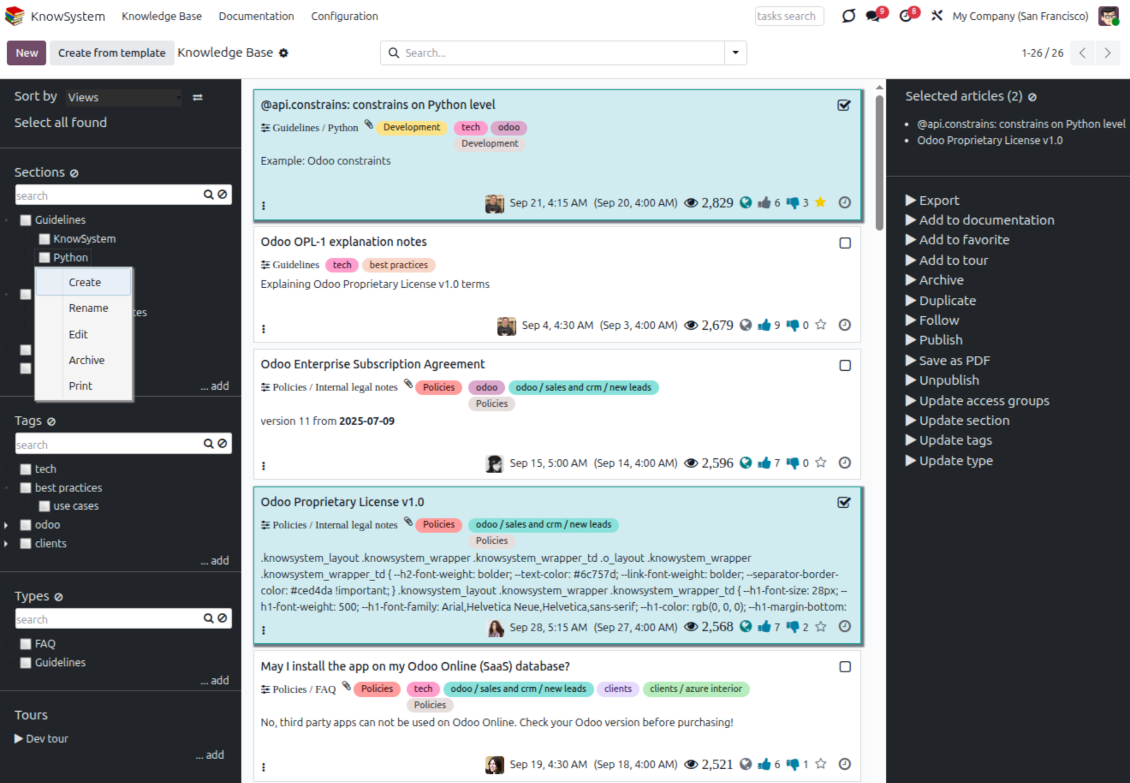
- Create, update, and reorder tags, sections, and types right inside KnowSystem - and print every article under a chosen tag or section.
- Search sections and tags instantly on the navigation panel.
Select, sort, and act in bulk
- Sort articles by views, score of likes, title, author, section, and create or write dates.
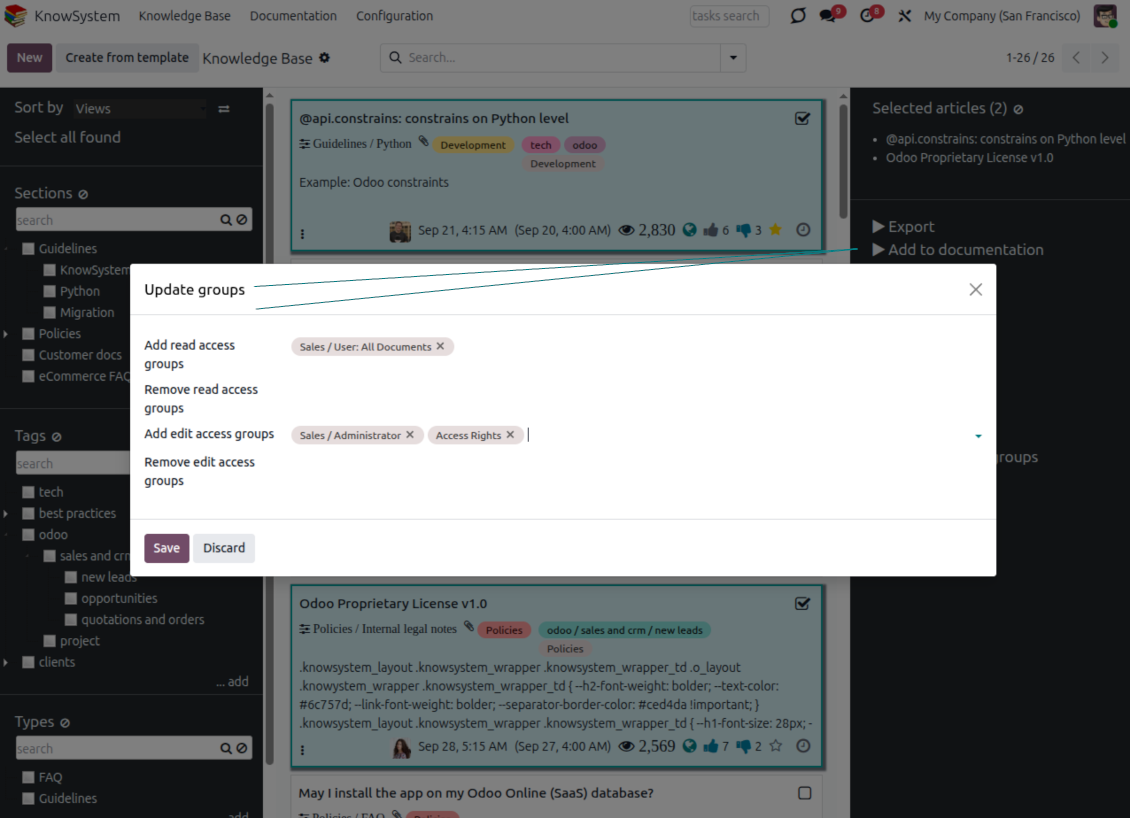
- Pick articles step by step - the selection is not cleared by a new search or when you open a record - then run mass actions on everything you chose.
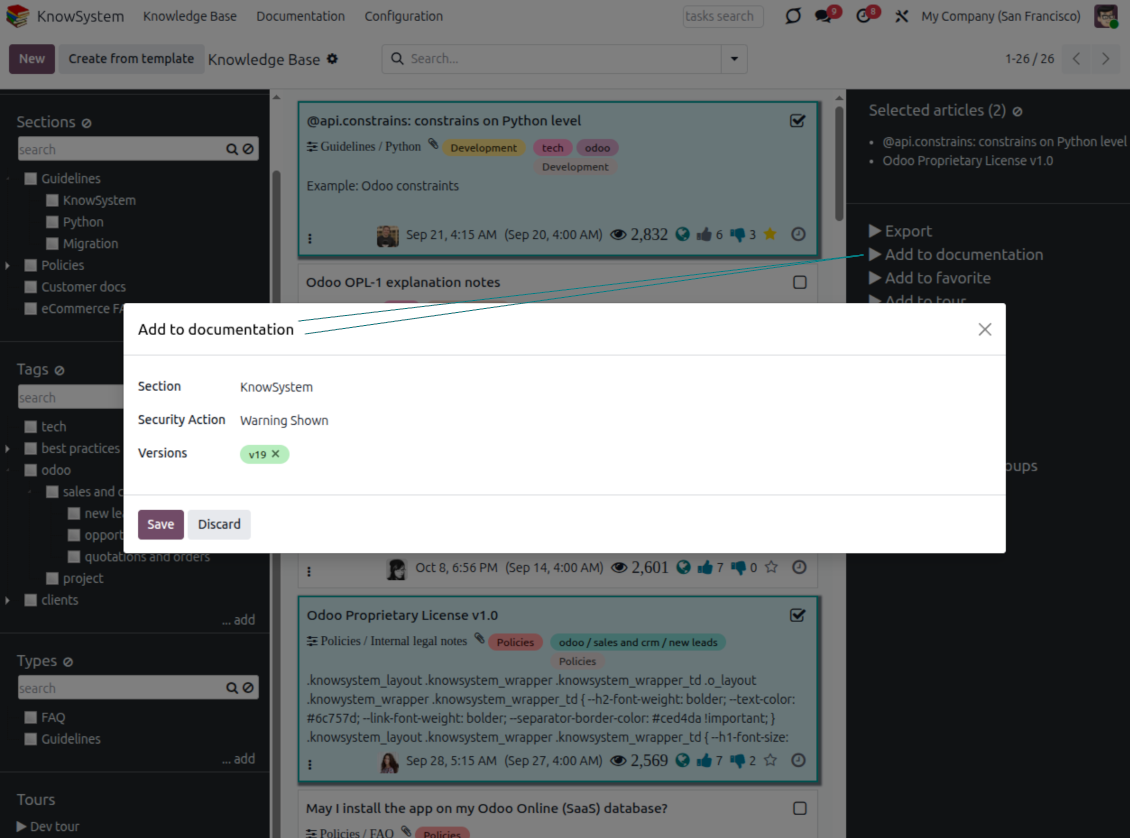
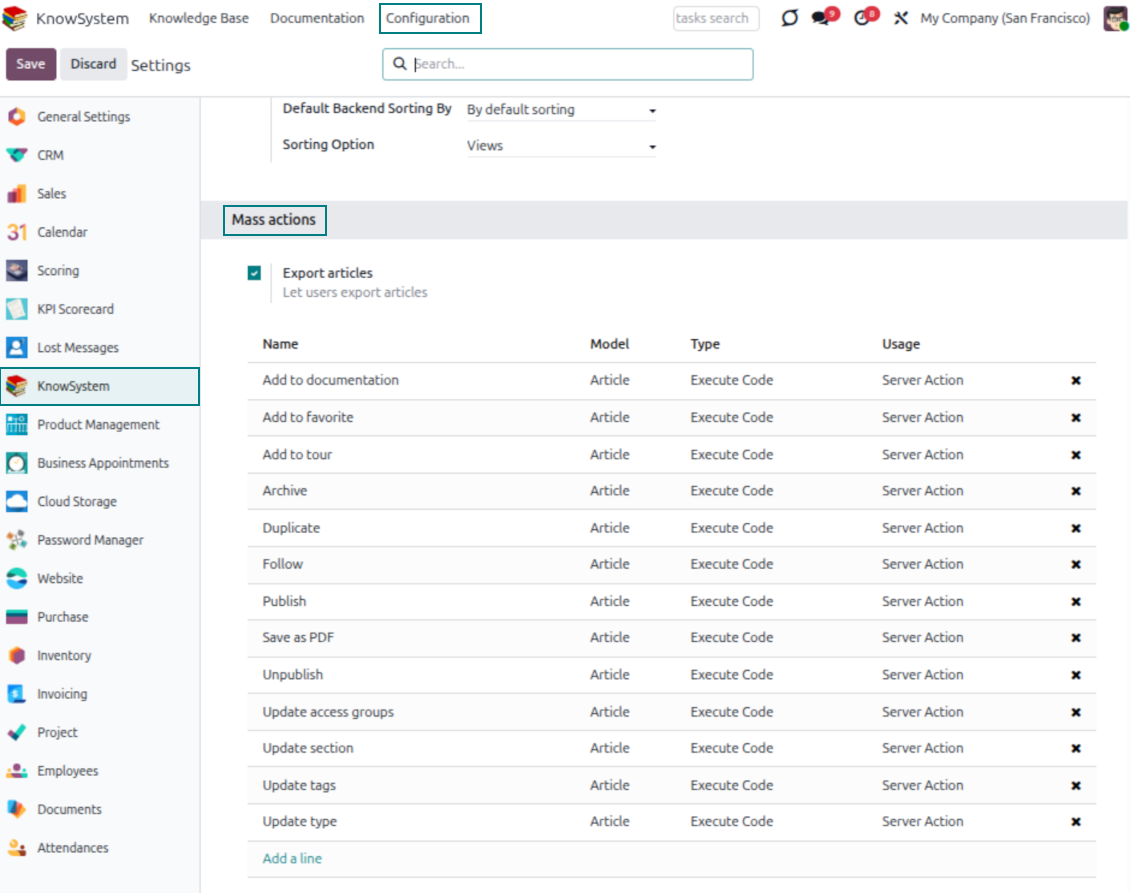
- Update knowledge in batch: assign a new section (including by dragging articles onto the navigation panel), add or remove tags, print many articles as one PDF, follow/unfollow discussions, publish/unpublish, export to Excel, archive or restore, add to learning tours and documentation, mark as favorite, and duplicate.
Article editors
Write professional articles your way
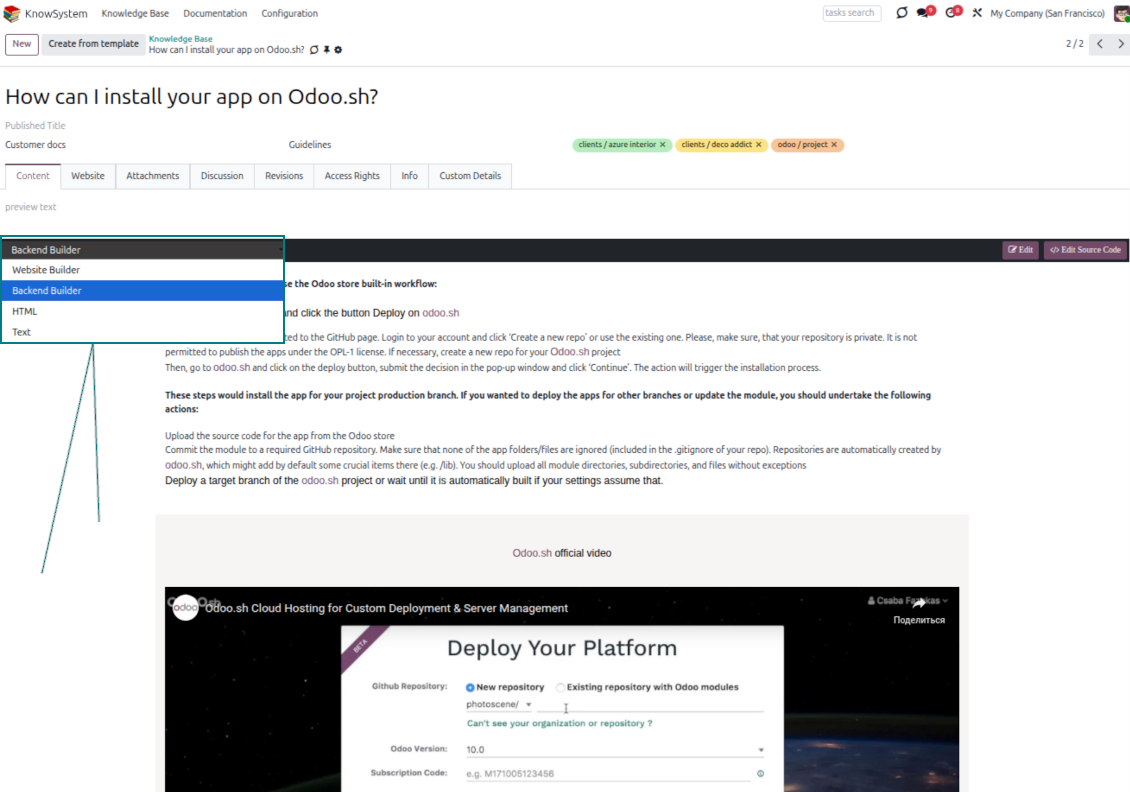
Five editors, one article model
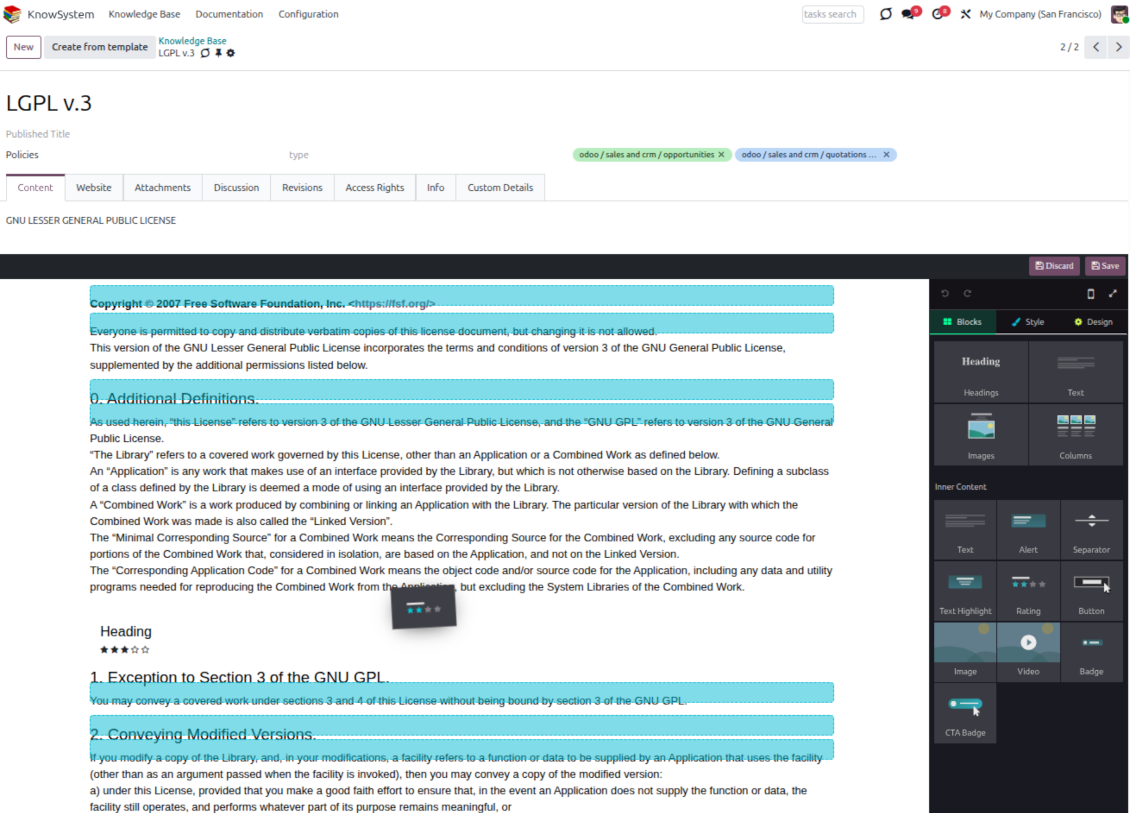
- Backend building blocks - drag and drop to compose professional articles right in the Odoo backend. The editor relies on strict HTML that stays compatible with printing and messaging layouts; reorder blocks and adjust their width, height, and styles.
- Website builder - apply advanced styles, snippets, animations, and widgets via Odoo's built-in website editor. Ideal for nice-looking portal pages; avoid it for internal or printed articles, as advanced styles often contradict print and composer layouts.
- Plain text - keep certain articles as simple text for unlimited compatibility with printouts and emails, and copy their content to the clipboard for quick sharing.
- Standard HTML editor - the familiar Odoo editor with its built-in slash commands for quick inline pieces.
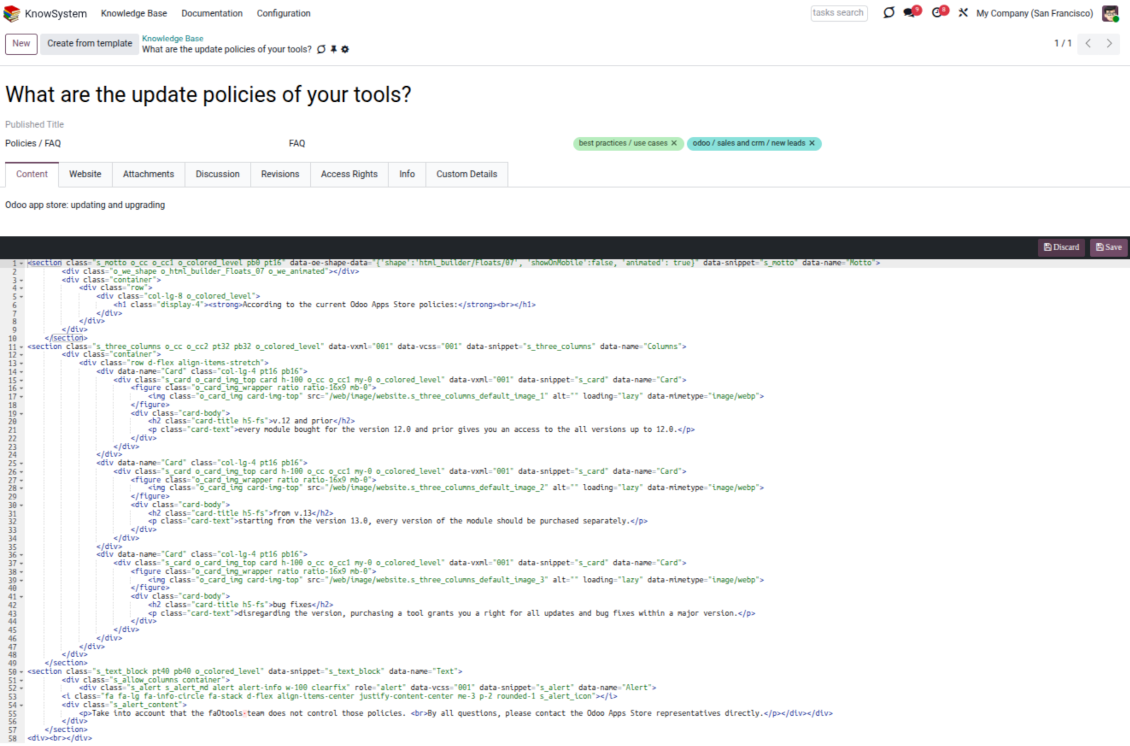
- Raw HTML - switch to the code editor at any moment to add any tags and styles, including Bootstrap-ready elements and iframes.
Templates for speed and consistency
- Reusable templates - prepare dedicated knowledge templates for recurring article types such as procedures, FAQs, or release notes, so contributors never start from a blank page.
- Save any article as a template - turn an existing, well-structured article into a reusable template in one click and grow your own library over time.
- Faster, consistent authoring - start new articles from a template to save time and keep a uniform structure and look across the entire knowledge base.
- Right editor for each page - switch an article's editor type whenever the content calls for it, so every page uses the most suitable tool without re-creating it.
Use anywhere
Surface the right article in documents, chats, and tours
Knowledge inside any Odoo document
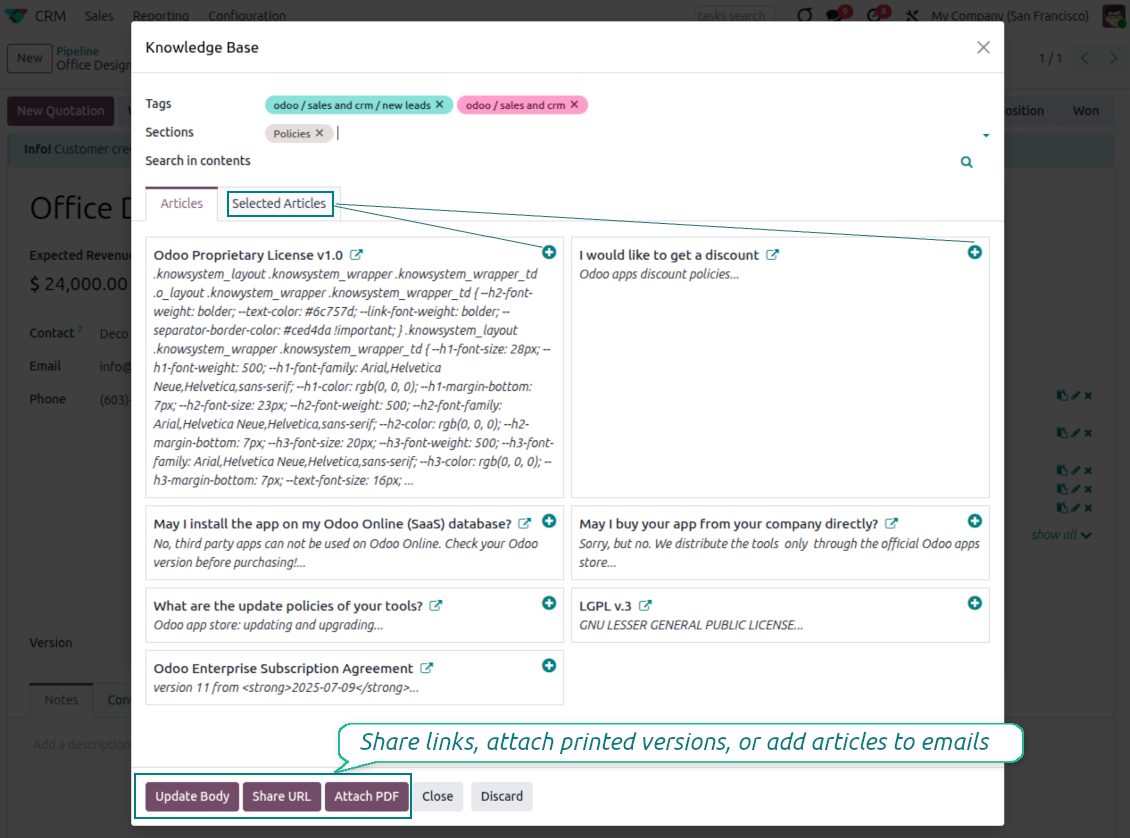
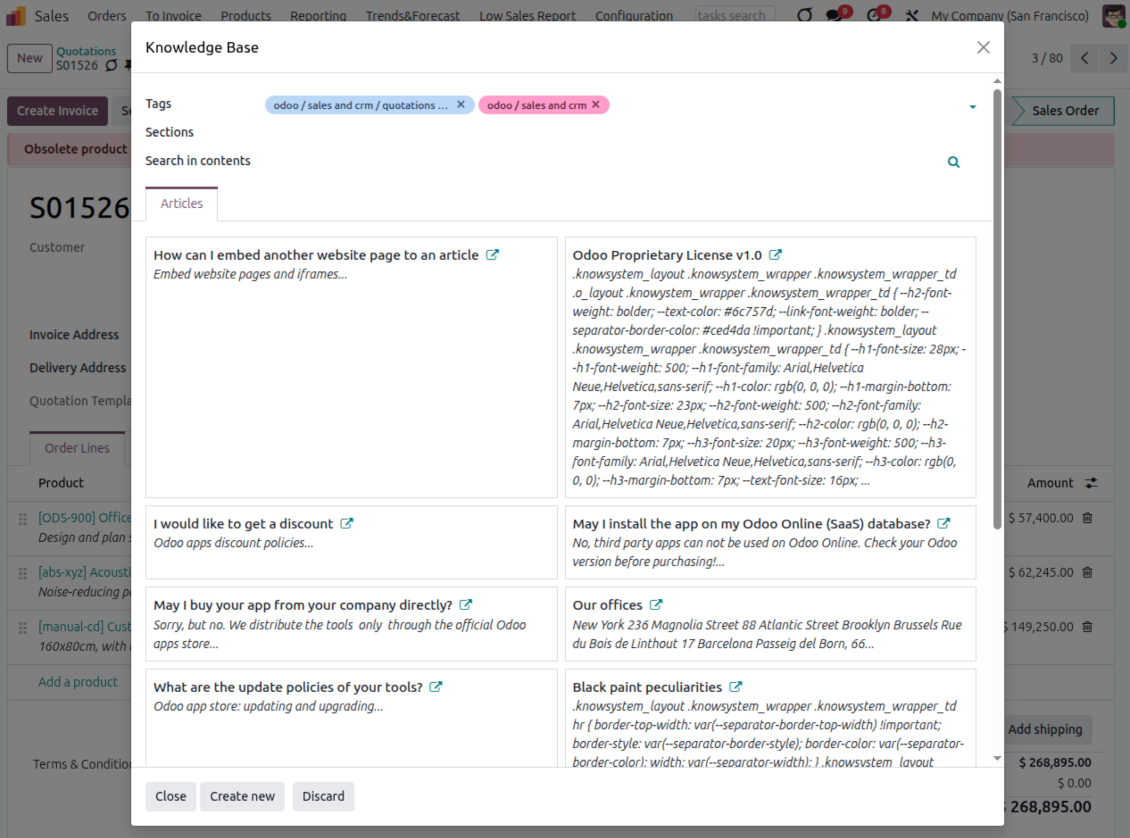
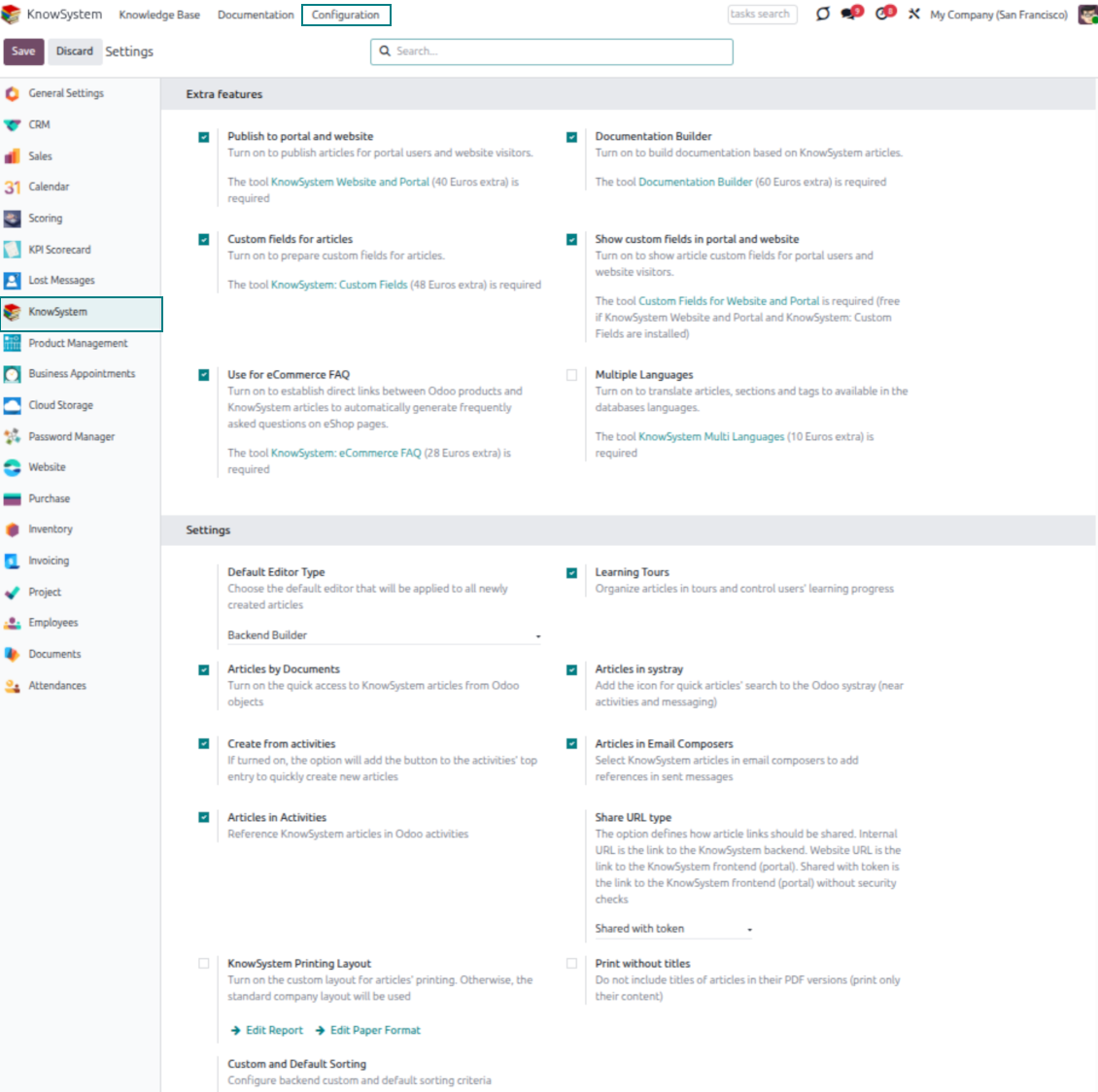
- Turn on 'Articles by Documents' to add a quick knowledge entry to any Odoo form view.
- Search by tags, section, or content for a quick overview, and read article content without leaving the record.
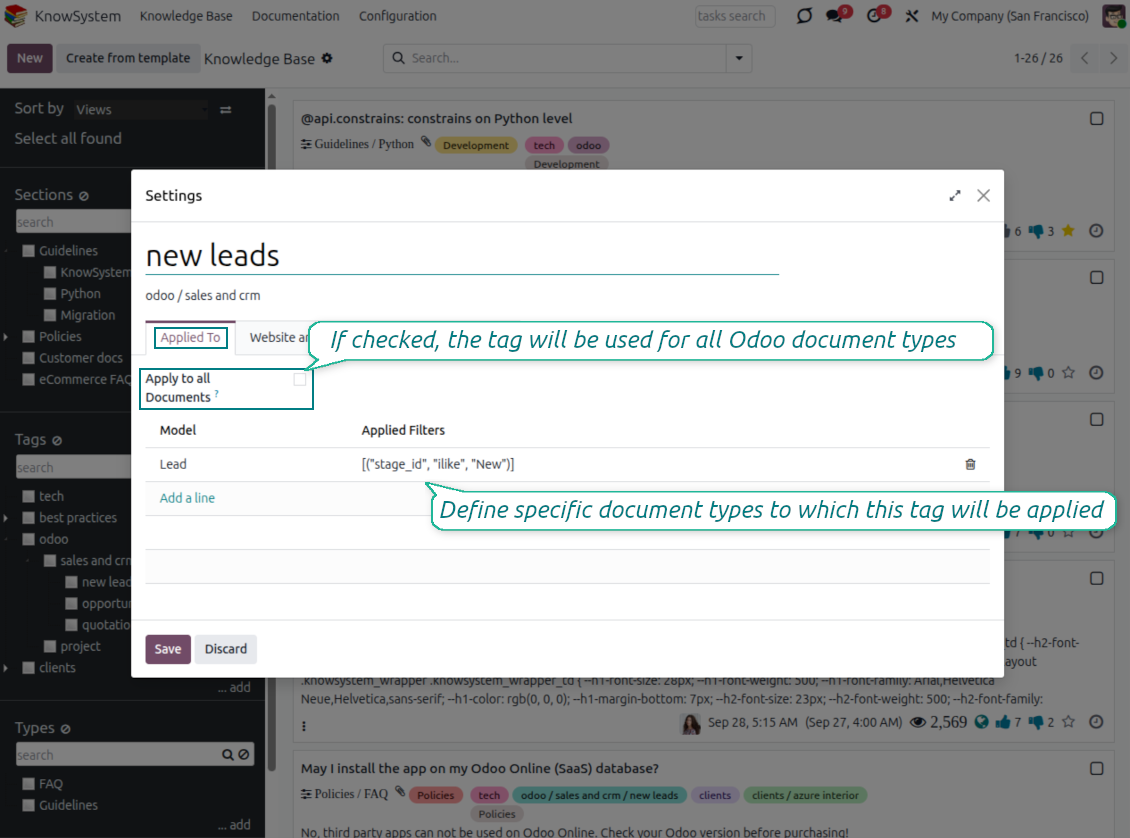
- Link tags to document types so the right articles appear by default - e.g. assign helpdesk tickets the tag 'odoo/helpdesk' and it is pre-filled on every ticket.
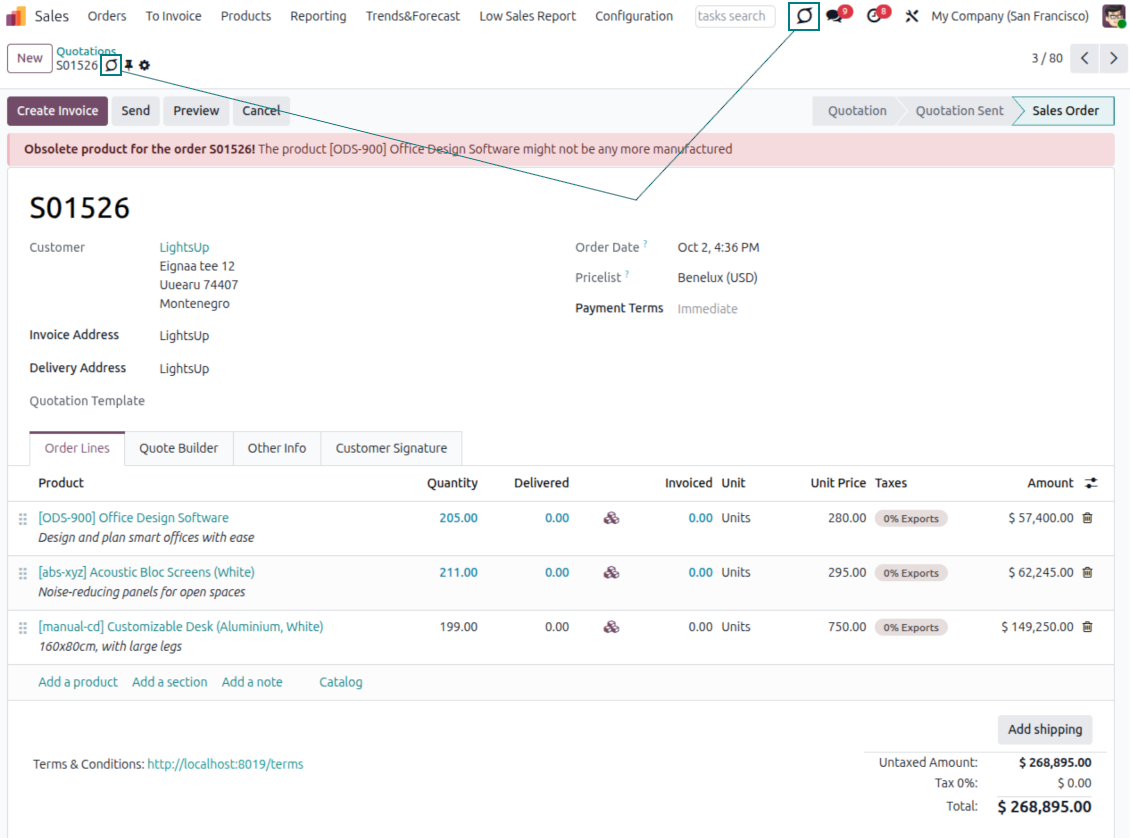
- Turn on 'KnowSystem in systray' to reach the base from anywhere in Odoo, whatever screen you are on.
Apply knowledge in communication
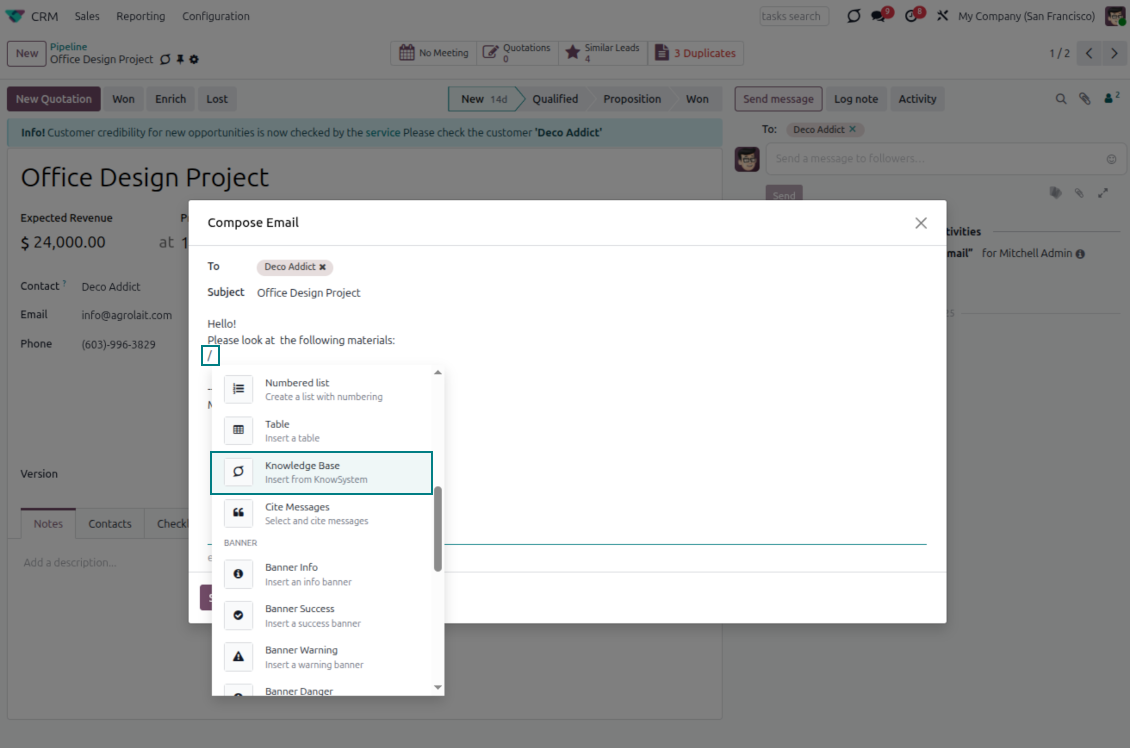
- Turn on 'Articles in Email Composers' to reference or cite knowledge in Odoo messages.
- See articles related to the current discussion and insert them with the editor command '/' > KnowSystem; the content is appended to the message.
- Attach a PDF version of the referenced article(s) automatically.
- Share links with colleagues or partners as backend, website/portal, or tokenized portal URLs.
- Turn on 'Articles in Activities' to insert articles or their links into Odoo activities.
Guided learning tours
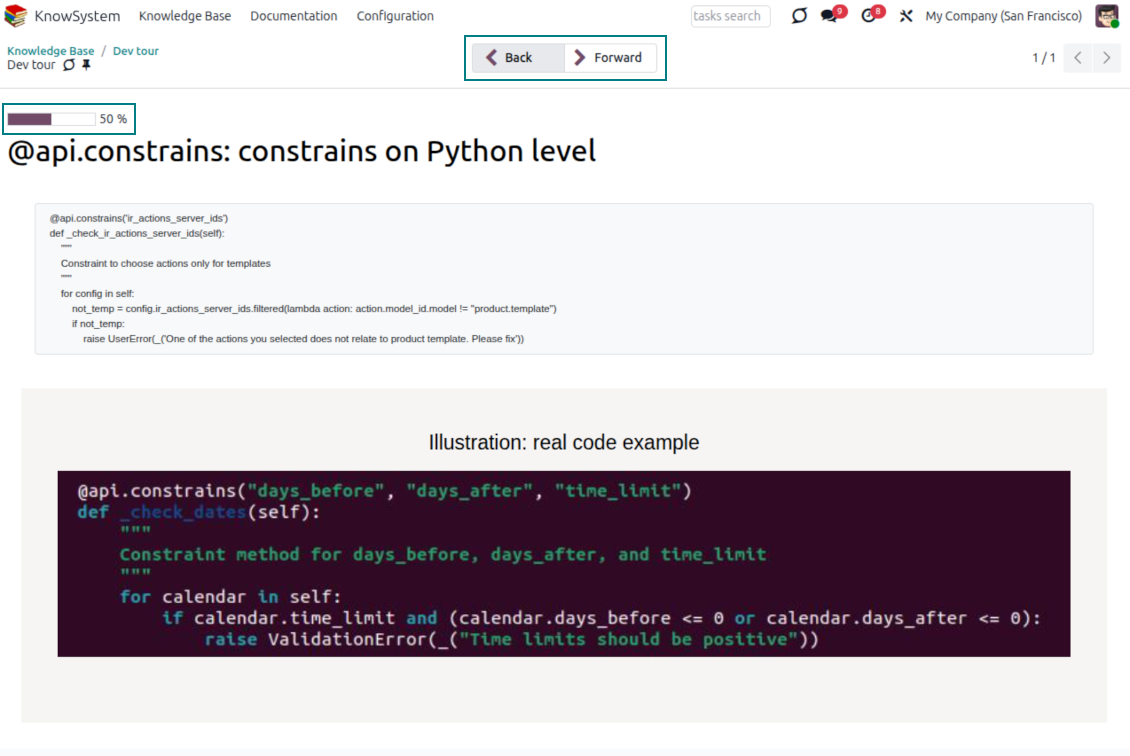
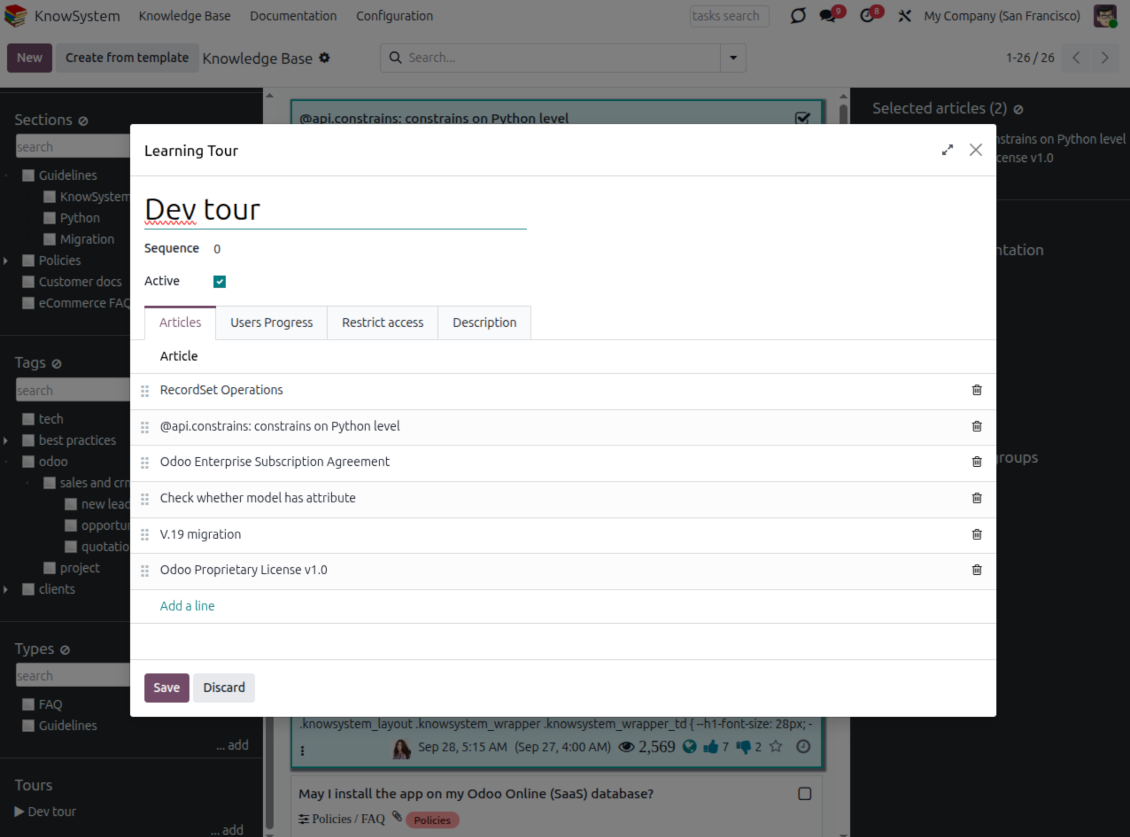
- Turn on 'Tours' to combine articles into an ordered sequence of learning steps.
- Launch a tour in a dedicated interface to study step by step, and share it with everyone or specific user groups.
- Track employees' progress through your instructions and guidelines.
Share and publish
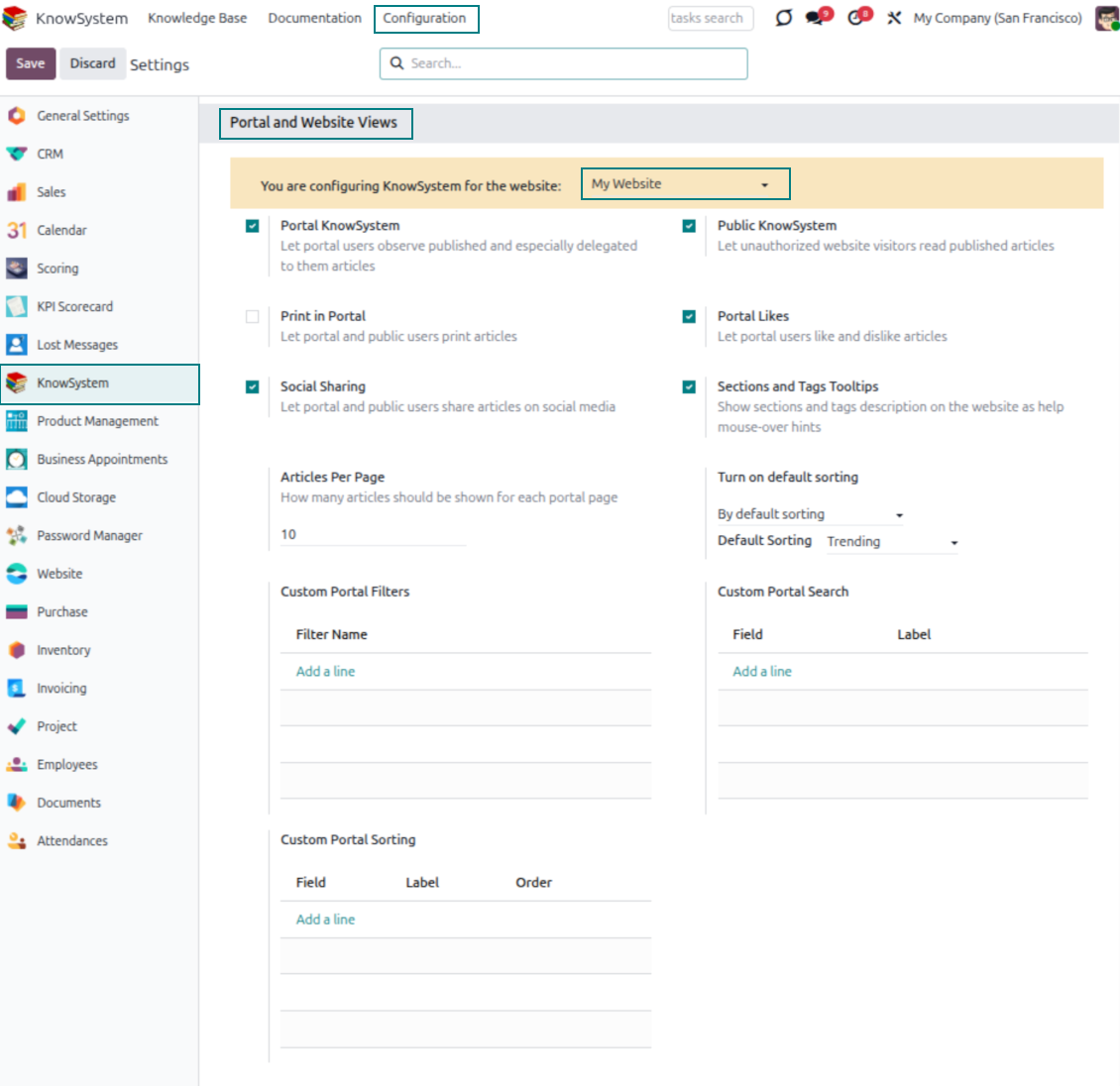
- 'Portal KnowSystem' shares knowledge with external partners; 'Public KnowSystem' opens it to website visitors.
- Configure KnowSystem tags or publish articles to control exactly what is shared.
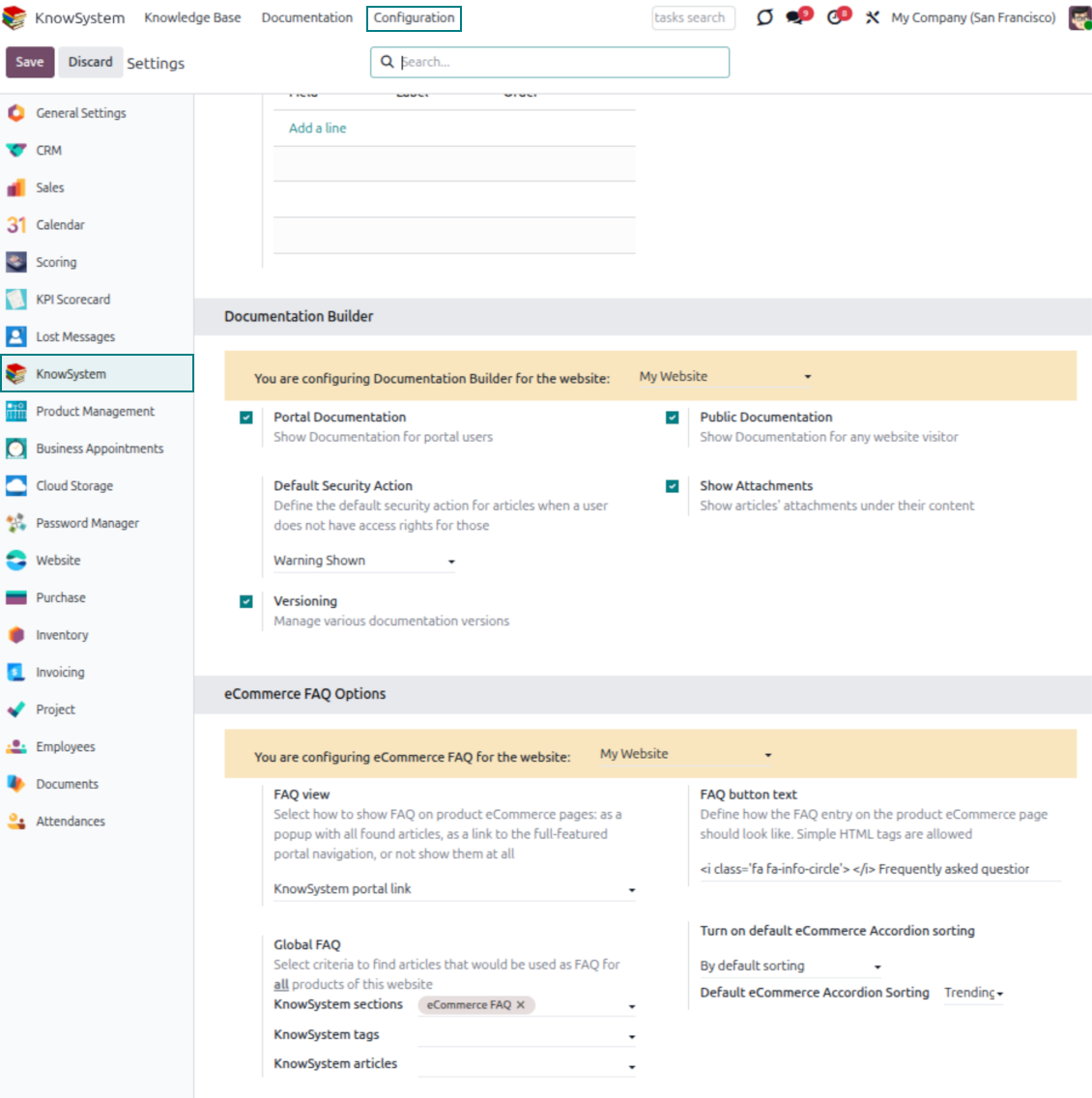
- Combine articles into advanced documentation; 'Portal Documentation' and 'Public Documentation' decide who can read it.
Klaar om te evalueren?
Begin met een gratis demoaanvraag of koop in de Odoo Apps Store.
Gratis gepersonaliseerde demodatabase. Geen telefoonnummer of creditcard nodig. Gratis lifetime-updates en expert support binnen de Odoo-hoofdversie.
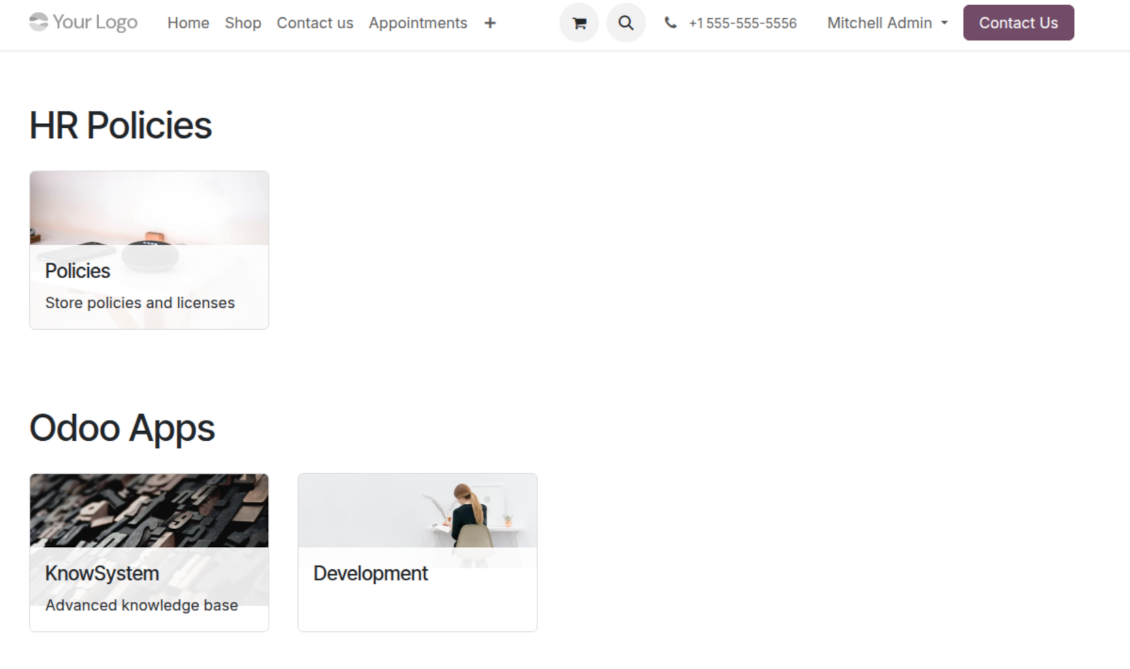
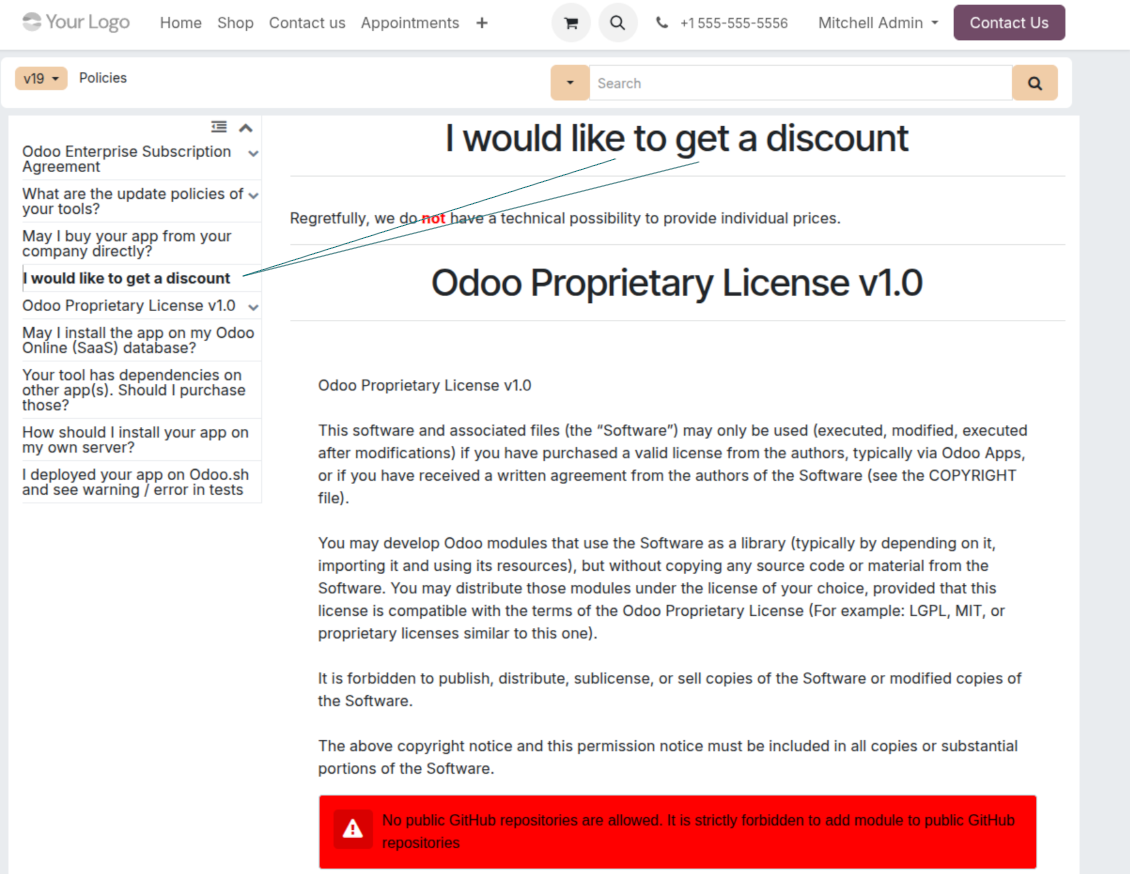
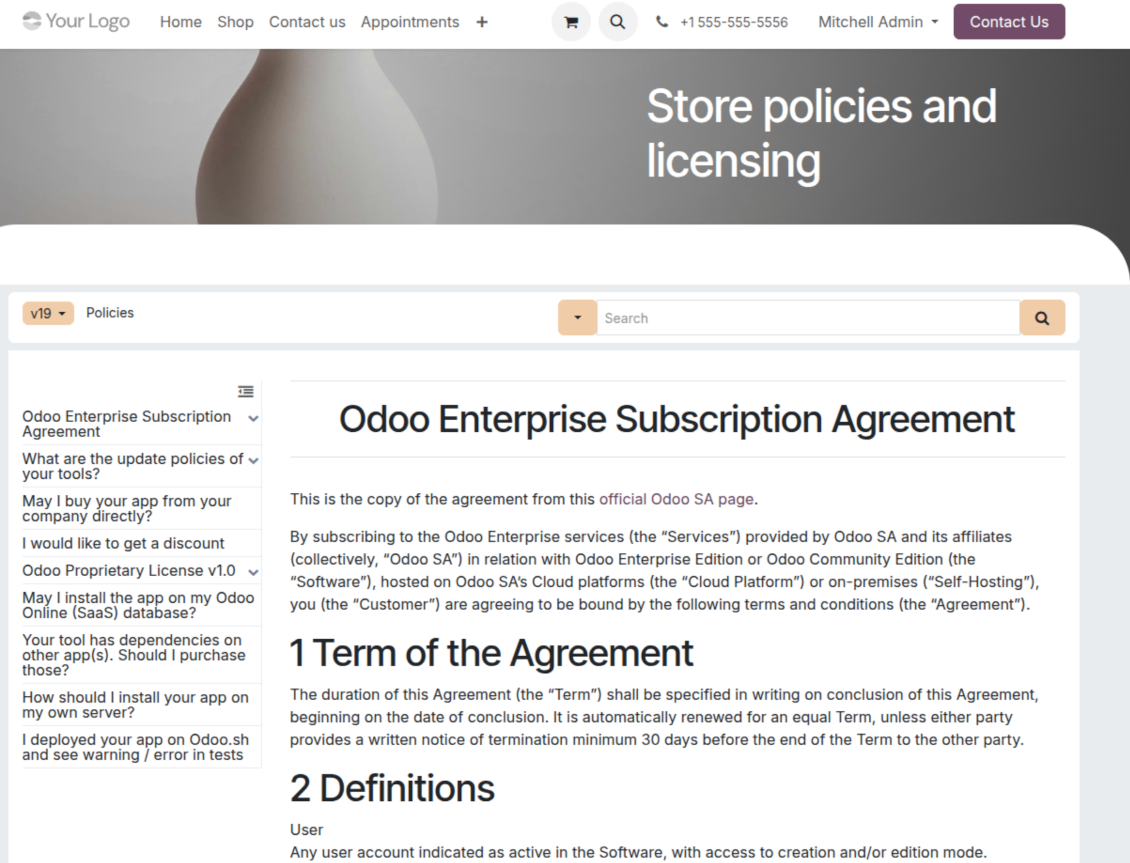
Documentation
Turn articles into searchable website documentation
Create and structure
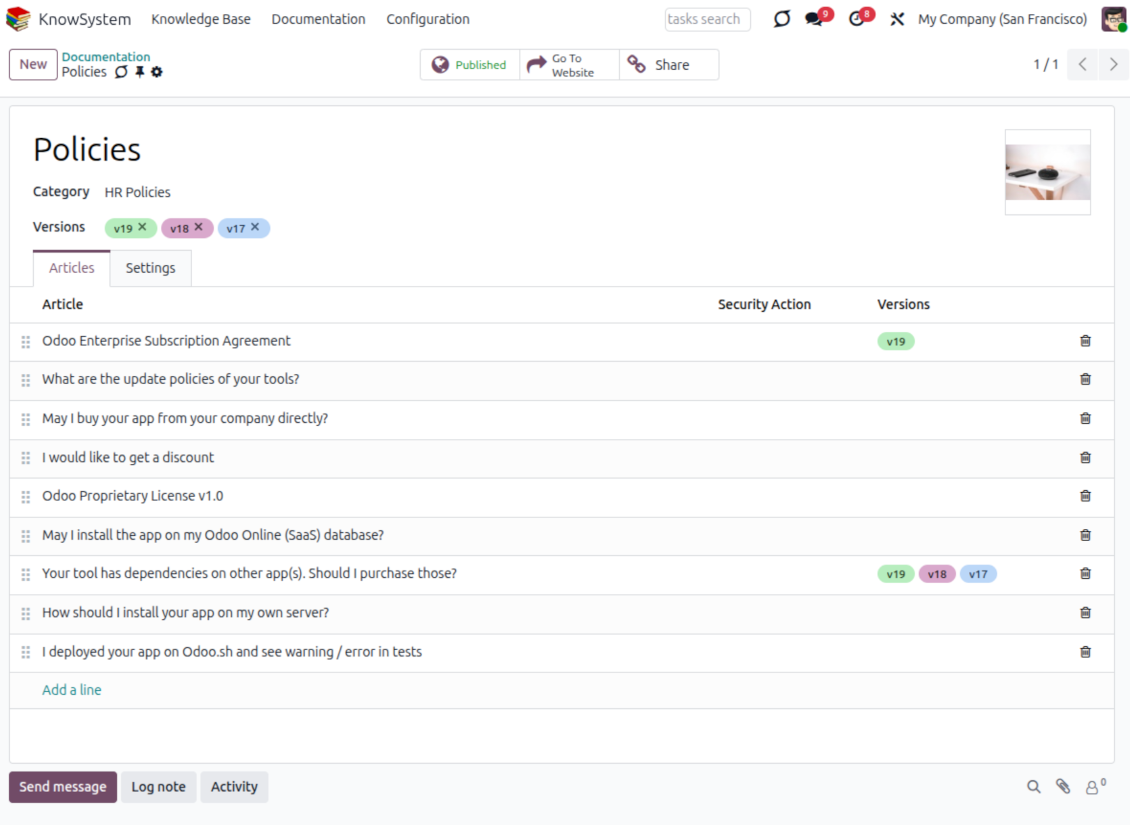
- Combine articles into advanced documentation that covers a whole business, organizational, or functional aspect.
- Create a section simply by selecting and ordering articles - KnowSystem generates the website page automatically.
- Reuse the same article across several documentation sections.
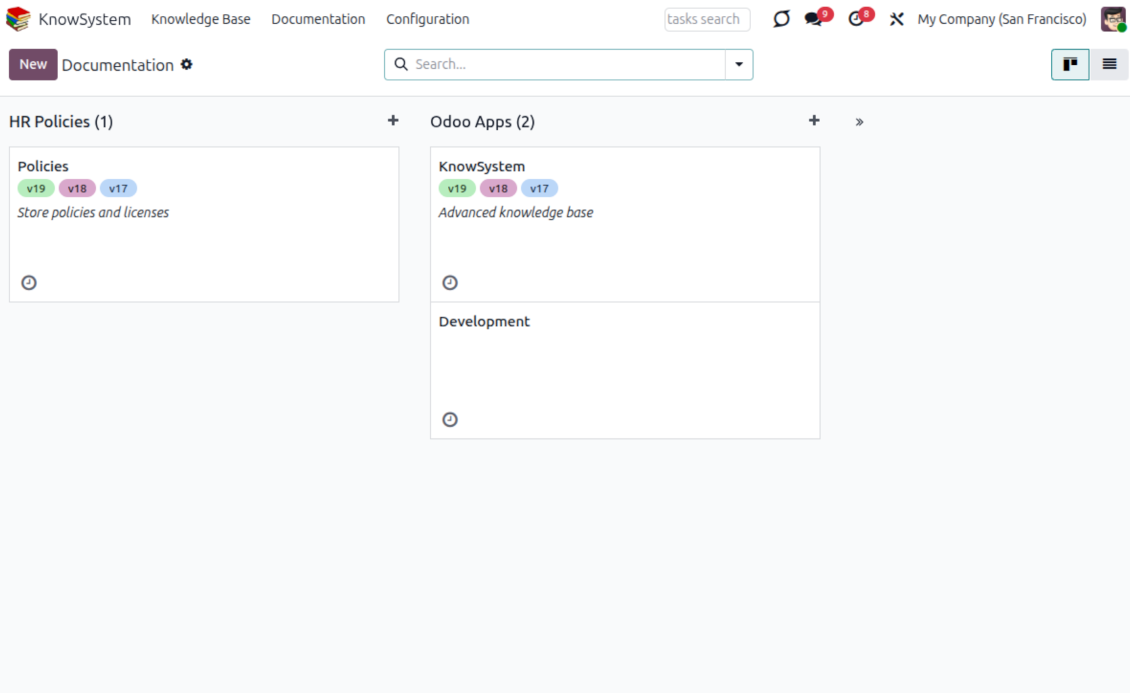
- Build an unlimited number of documentation pages, structured by categories.
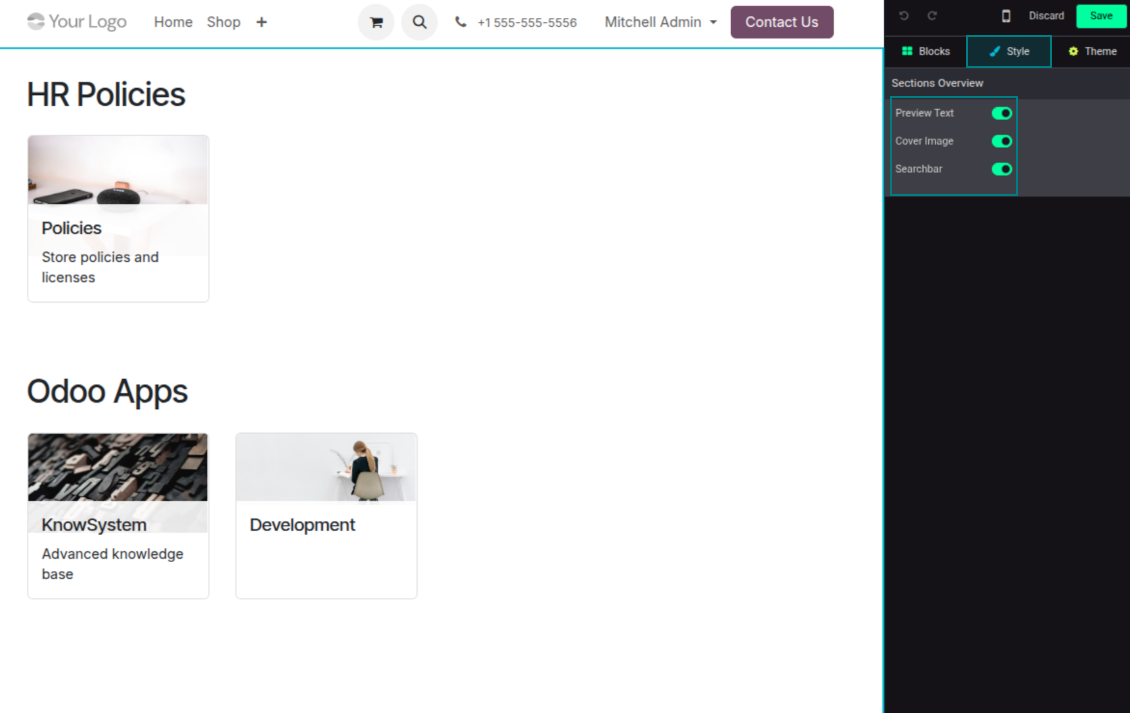
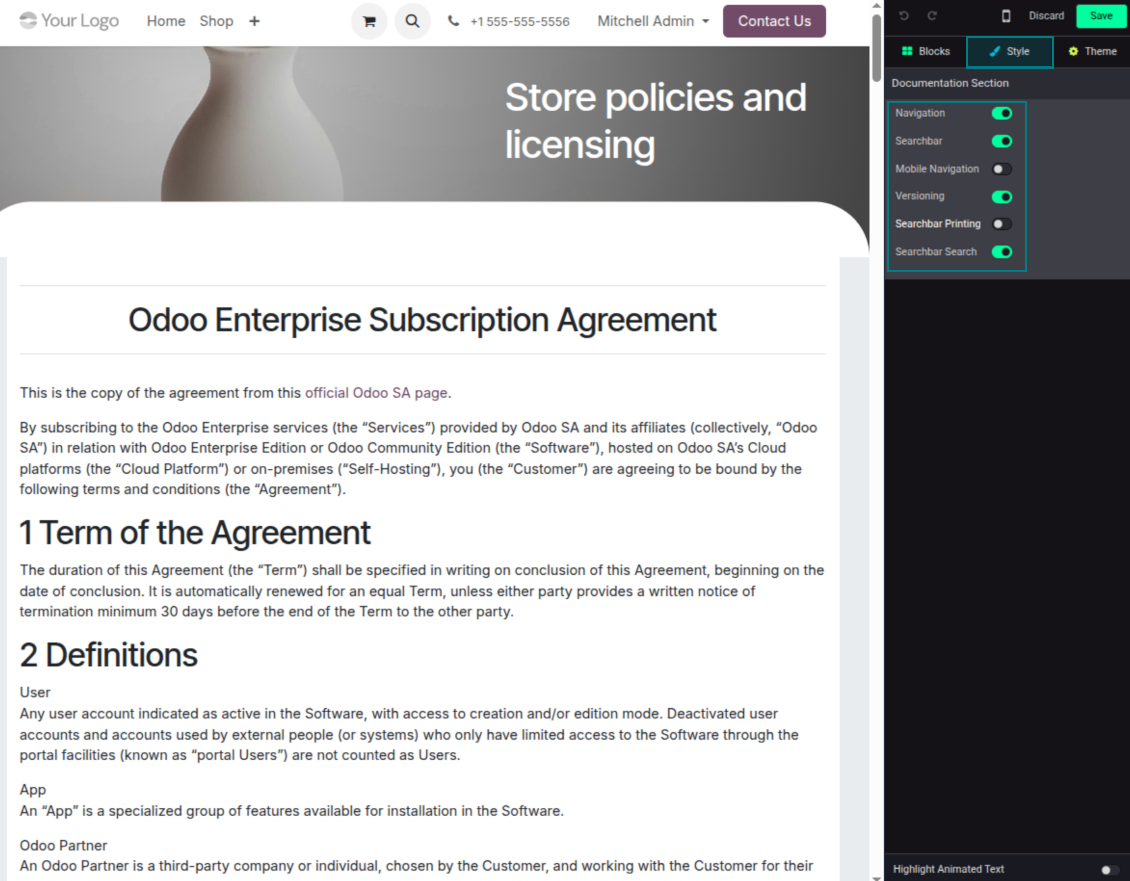
- Customize each page: toggle the search bar and table of contents, and add or remove preview images and texts.
Share, navigate, and version
- Publish documentation for everyone, or assign KnowSystem tags to grant access to chosen Odoo partners.
- Decide what happens when a reader lacks access to an included article: ignore the restriction, hide that piece, or show a security warning.
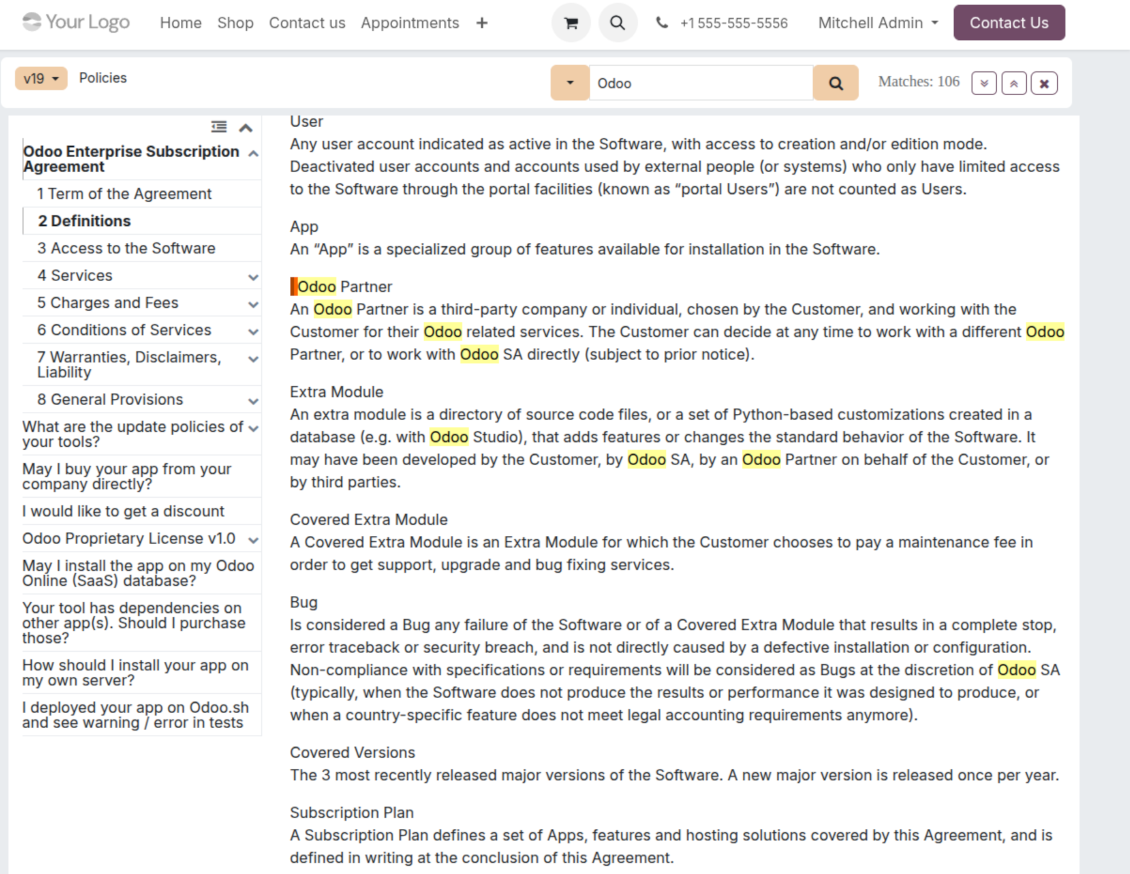
- Show an automatic table of contents, built from the headers of the included articles, for fast navigation.
- Enable search across the whole text or only headers, with case-sensitive or insensitive keywords.
- Apply versioning to avoid double work on specifications, user manuals, and software guidelines.
Portal & public
Share with partners or publish to everyone
Knowledge in the Odoo partner portal
- Turn on 'Portal KnowSystem' to give each Odoo partner a personal web portal built from the articles you choose to share.
- Design an article for one specific company, or reuse the same knowledge experience across many clients.
- Articles reach a portal user when they are (a) published, or (b) carry user-related tags.
- Assign a tag to a partner in two ways: fill 'KnowSystem tags' on the partner form, or define 'Allowed partners' on the tag.
- Optionally allow partners to print articles, like them, and share.
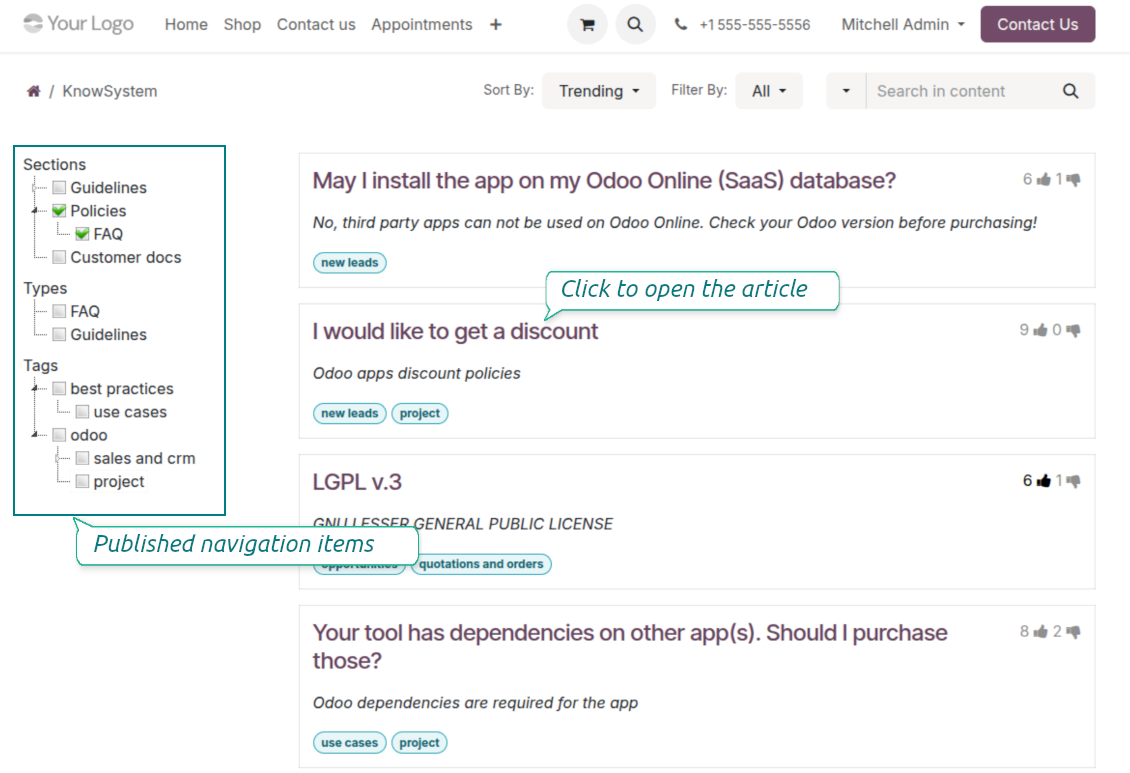
Public self-service knowledge base
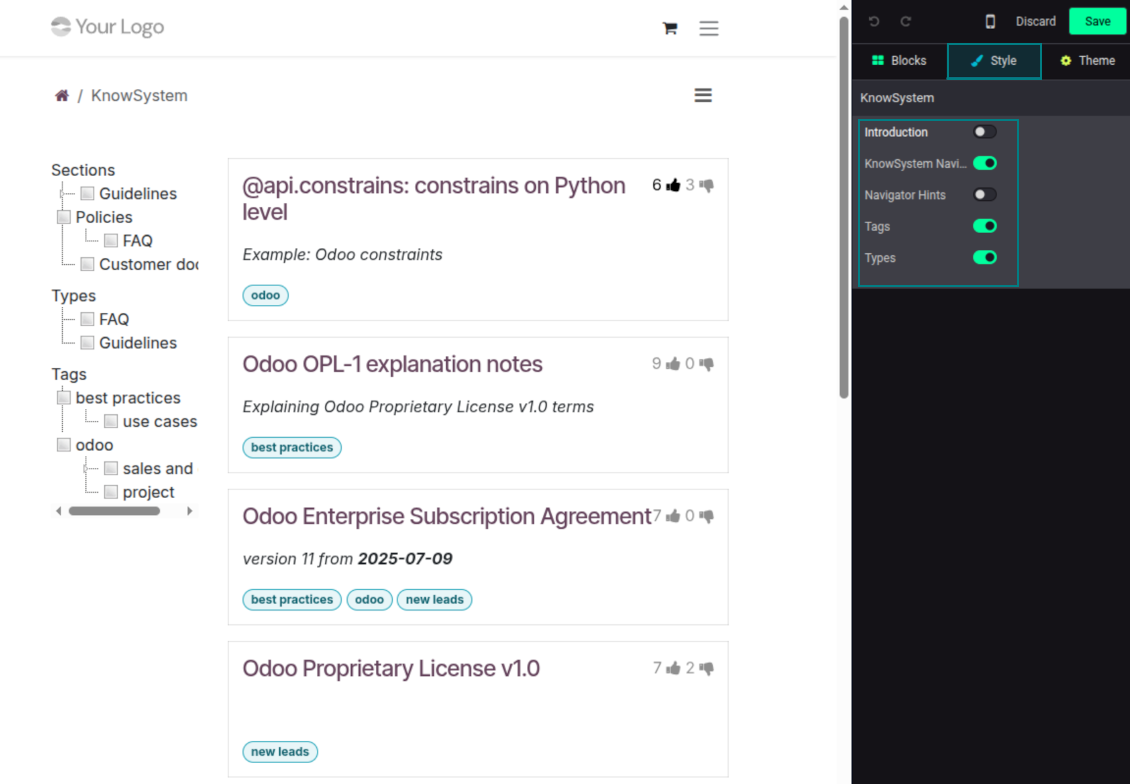
- Turn on 'Public KnowSystem' to open knowledge to unauthenticated website visitors for true self-service.
- Only published articles are shown - publish via the 'Publish' mass action or the 'Visible on current website' checkbox.
- Publish tags and article types too so they appear in the portal; sections show only once they contain visible articles.
- Customize the portal: show or hide navigation by tags and types (or the whole navigation), add an introduction and navigation hints, and set section tooltips.
Collaboration
Versioned, social, and multi-lingual knowledge
Teamwork and use
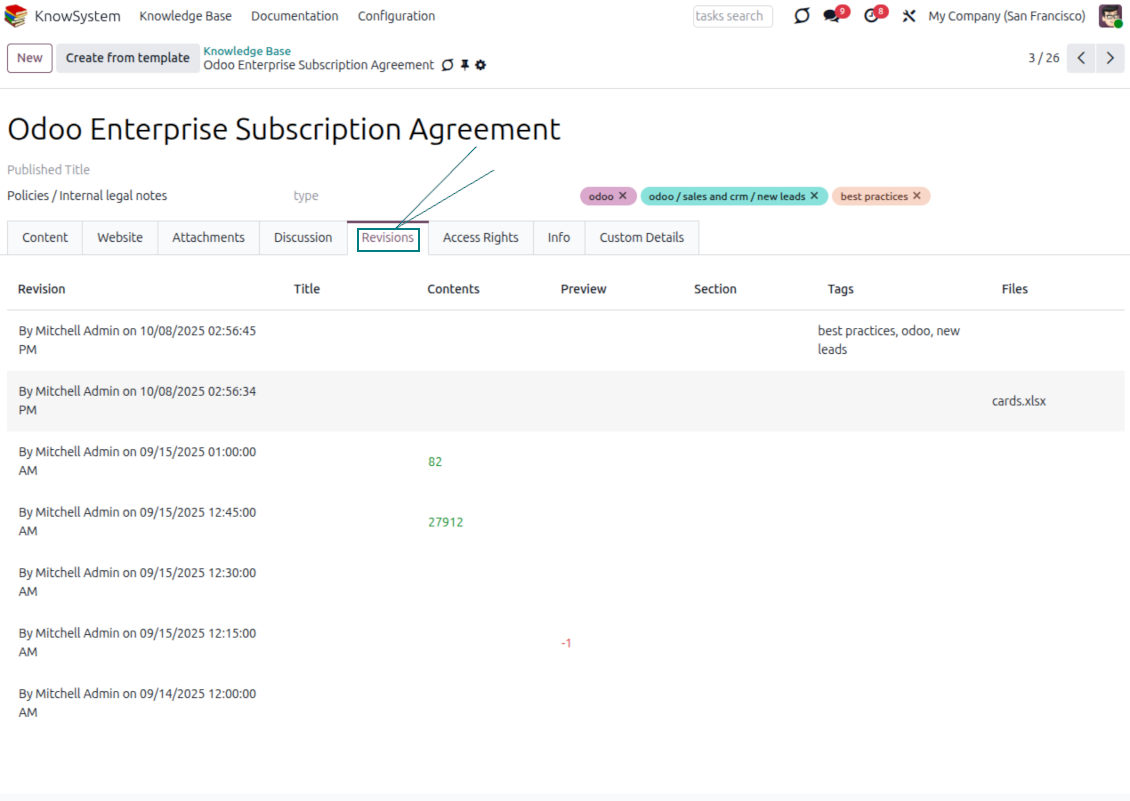
- The full history of article revisions is kept in Odoo, wiki-style. If a user breaks something, it takes just 2 clicks to recover the right version.
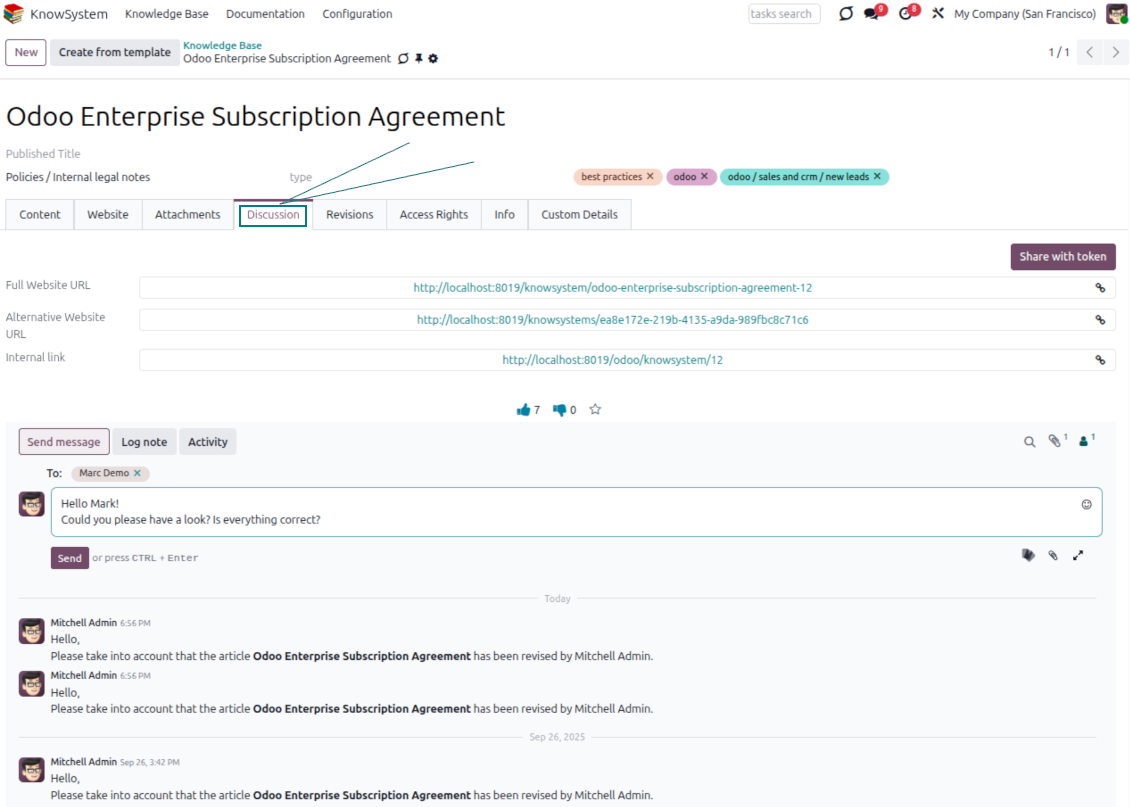
- Users take part in article discussions and subscribe to updates.
- Share tokenized articles with any contact.
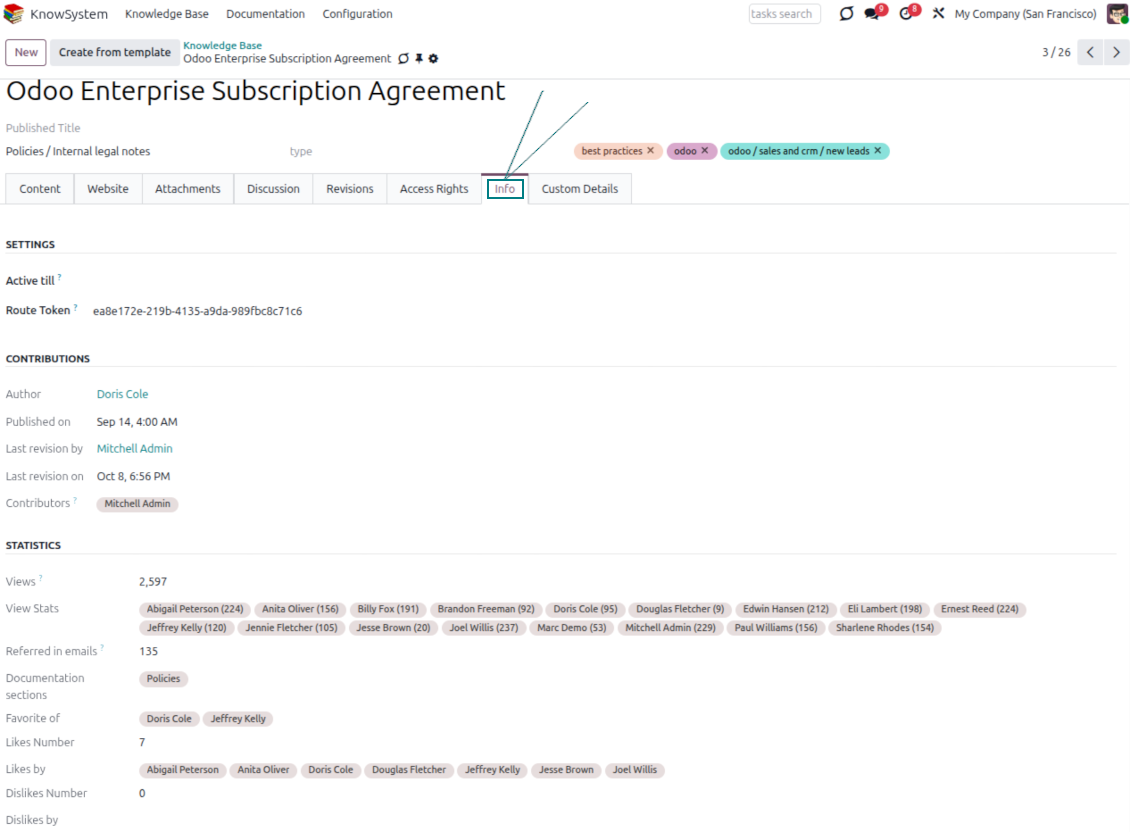
- Track statistics per article: contributors, views, likes and dislikes, how often it is used in messaging, and who marked it as favorite.
- Set activities to keep the base improving, and auto-archive articles after a chosen date.
Multi-lingual knowledge
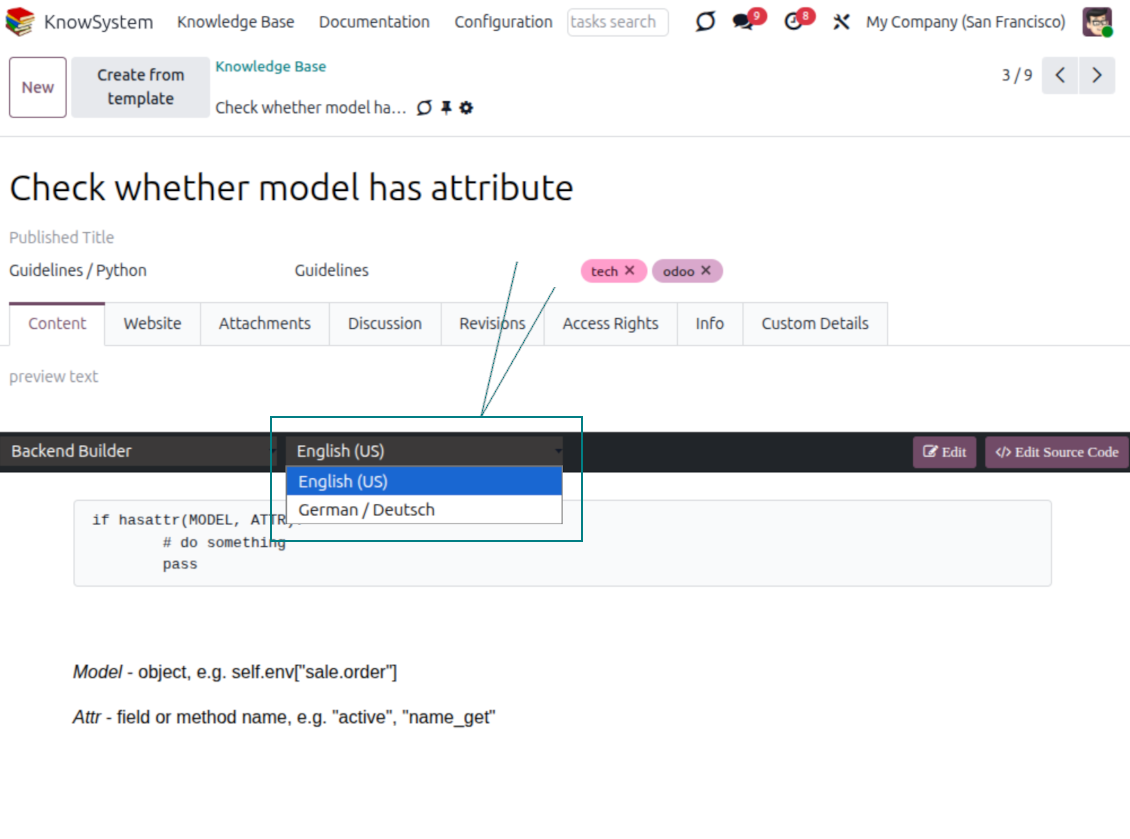
- Translate articles into every language installed in Odoo, so users read and edit in the language of their choice.
- Avoid double work with 'Copy from another translation' - but be sure you really need a multi-lingual regime, since every article must then be kept up to date in all languages.
- Switch the language right in the backend editor to review or update any translation.
eCommerce FAQ
Add a product FAQ and docs to every eShop page
Show knowledge on product pages
- Adds a product knowledge entry to all eCommerce product pages out of the box.
- Hide it for specific templates (the setting 'Do not show eCommerce FAQ') or for an entire eShop on a website (the option 'FAQ view' - 'Do not show').
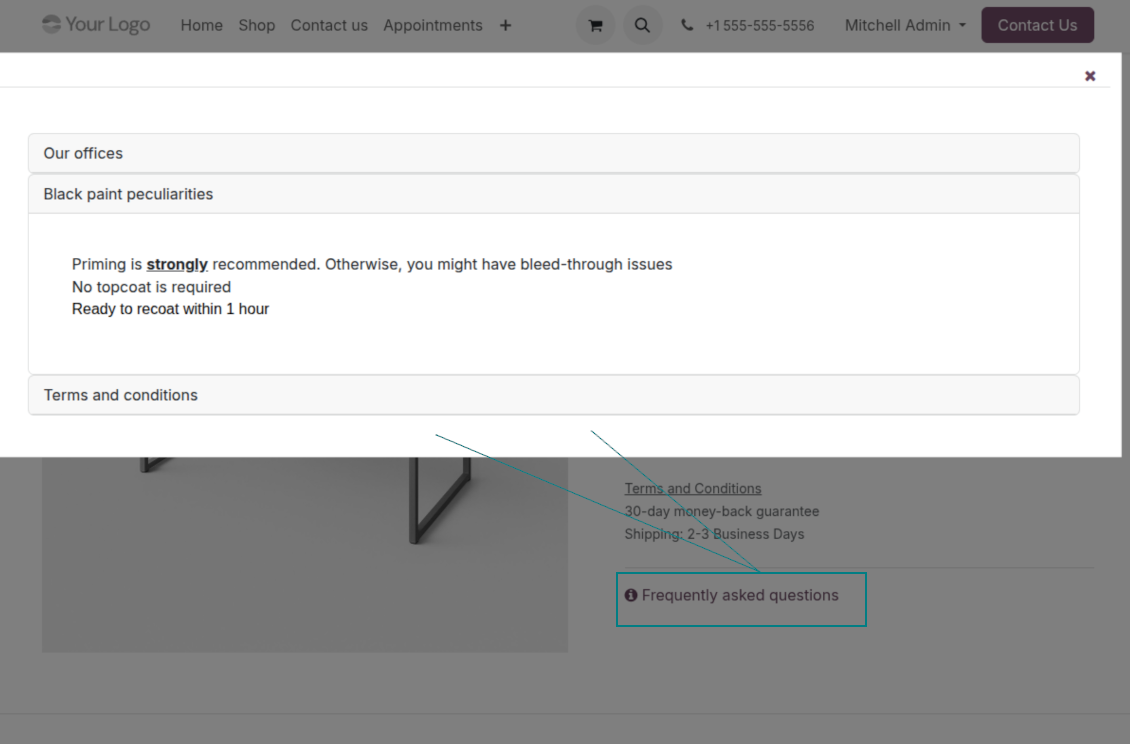
- Set your own button title ('FAQ button text'); the default is ' Frequently asked questions', but you can change it to anything, e.g. 'Product docs' or 'Instructions' - simple HTML tags are allowed.
- Choose 'KnowSystem portal link' for the 'FAQ view' to send shoppers to the full navigation, restricted to articles linked to the current product.
- Or choose 'Popup accordion' to open all matching articles in a popup, so shoppers stay on the product page.
Match the right FAQ to the right product
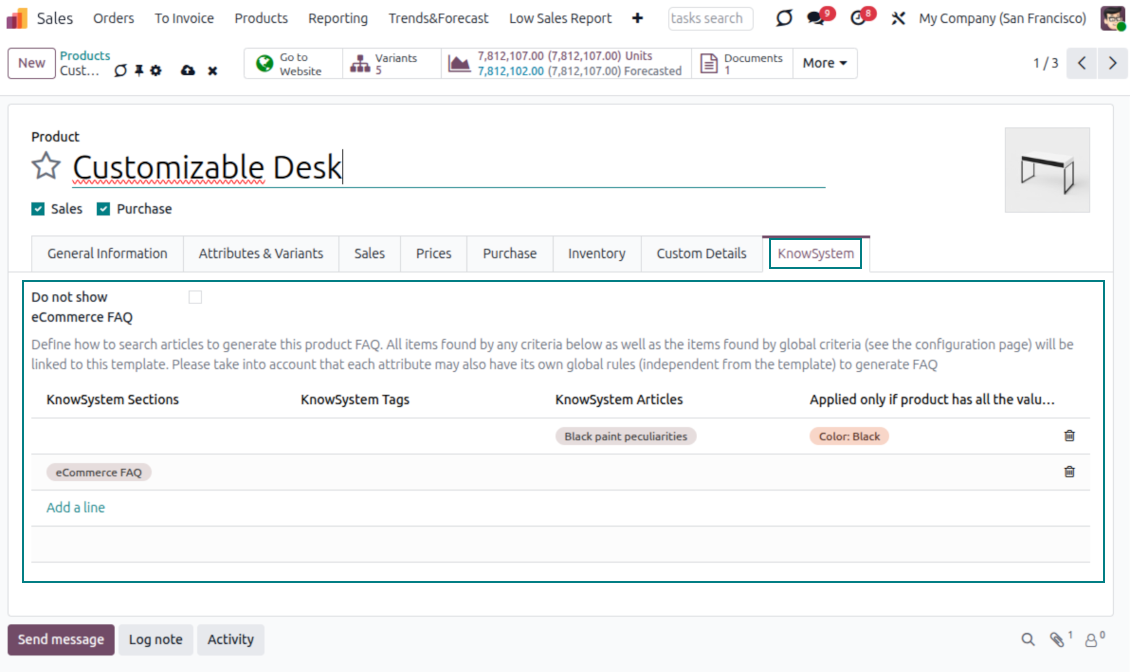
- Link product templates to KnowSystem; show articles for specific sets of attribute values and hide them for others - e.g. different FAQs for steel and aluminum tables.
- Define knowledge for Odoo attributes or attribute values regardless of the actual product - for instance, complementary documentation for every variant that has 'legs' or 'custom legs'.
- Apply global settings per website to keep the same FAQ basis across all items sold there.
- Target KnowSystem sections, tags, or specific articles on each layer. A knowledge piece is selected if it satisfies any of the criteria; for sections and tags, child nodes are taken into account too.
- Articles appear only if a user can access them, so website visitors see only published ones.
Use cases
Built for helpdesk, sales, HR, IT, and beyond
KnowSystem is a universal knowledge management tool that adapts to any business goal and any set of Odoo apps - helpdesk, sales, marketing, IT, HR, legal, and projects. Typical use cases:
- Helpdesk - once a challenge is solved, record its solution in KnowSystem for repeated use by co-workers and self-service by clients.
- Sales & CRM - a salesperson helper for product information, current offers, and frequently asked customer questions.
- Project management - keep and easily retrieve knowledge of existing solutions, tools, hints, and experiments.
- HR - prepare instructions, guidelines, learning tours, training, and any codified knowledge of routine in your company.
- Marketing - organize an online library of product use cases, expert knowledge, and well-structured documentation.
- Legal - systematize policies and contract/approval management, and keep a full classifier of trademarks and licenses.
- Information technology - share easy-to-reach manuals and configuration guidelines, one search away.
Custom fields
Add your own article attributes - no code
Add fields without code
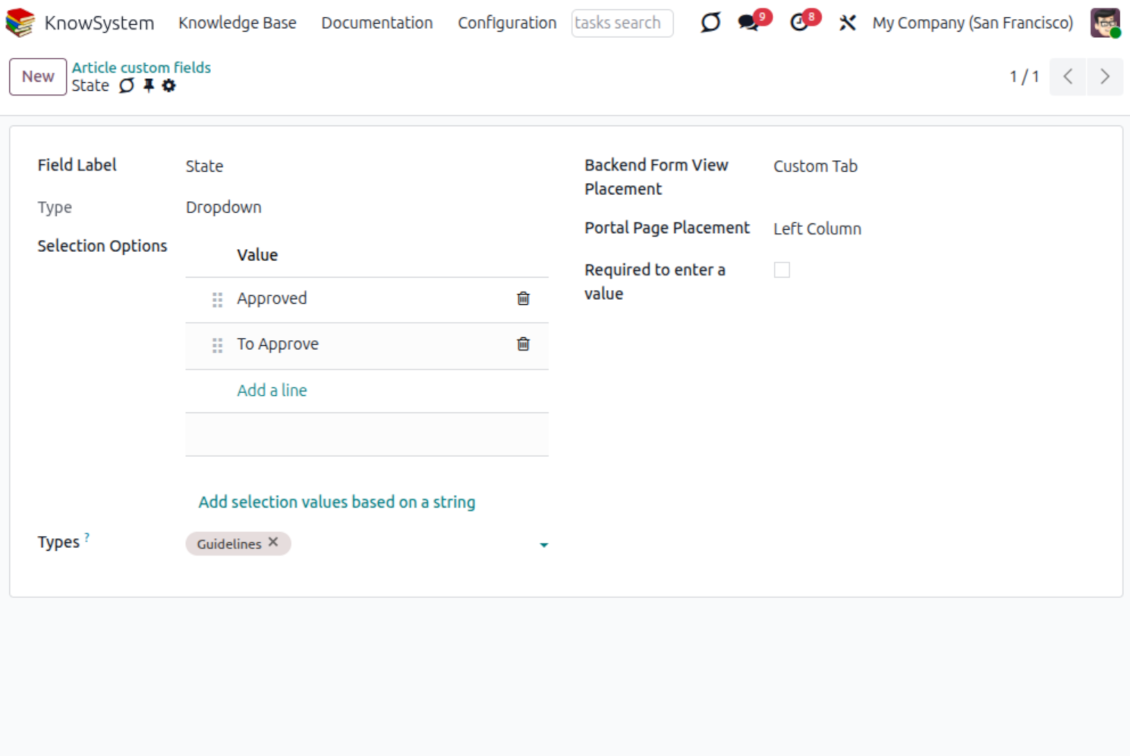
- No technical knowledge required - add a field and enter details to show a new property for articles.
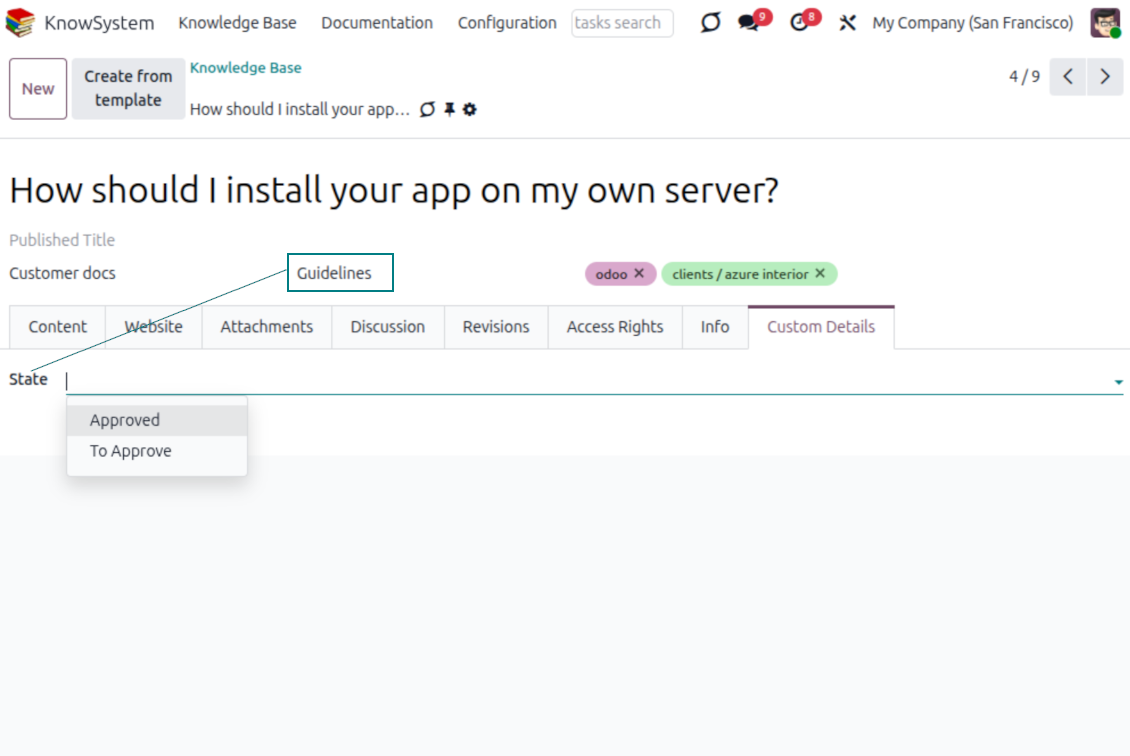
- Choose from a full range of types: single-line text (char), plain text, rich (HTML) text, integer or float numbers, drop-down selection with your own options, checkbox (boolean), date or date-and-time, file upload (binary), and a reference to another Odoo record such as a sale order or contact (many2one).
- Pick the field's interface position from a closed list of options.
- Mark a field required to force users to enter a value.
Tailor by type, share, and secure
- Use article types to show properties only for the right articles - 'user guidelines' and 'technical specifications' can carry completely different attributes.
- Works in both the KnowSystem backend and the knowledge share portal.
- Custom fields can be imported and exported.
- Only KnowSystem administrators may create custom fields.
Security
Granular access for staff, partners, and the public
How access works
- Security for internal users and for portal/public users is handled separately.
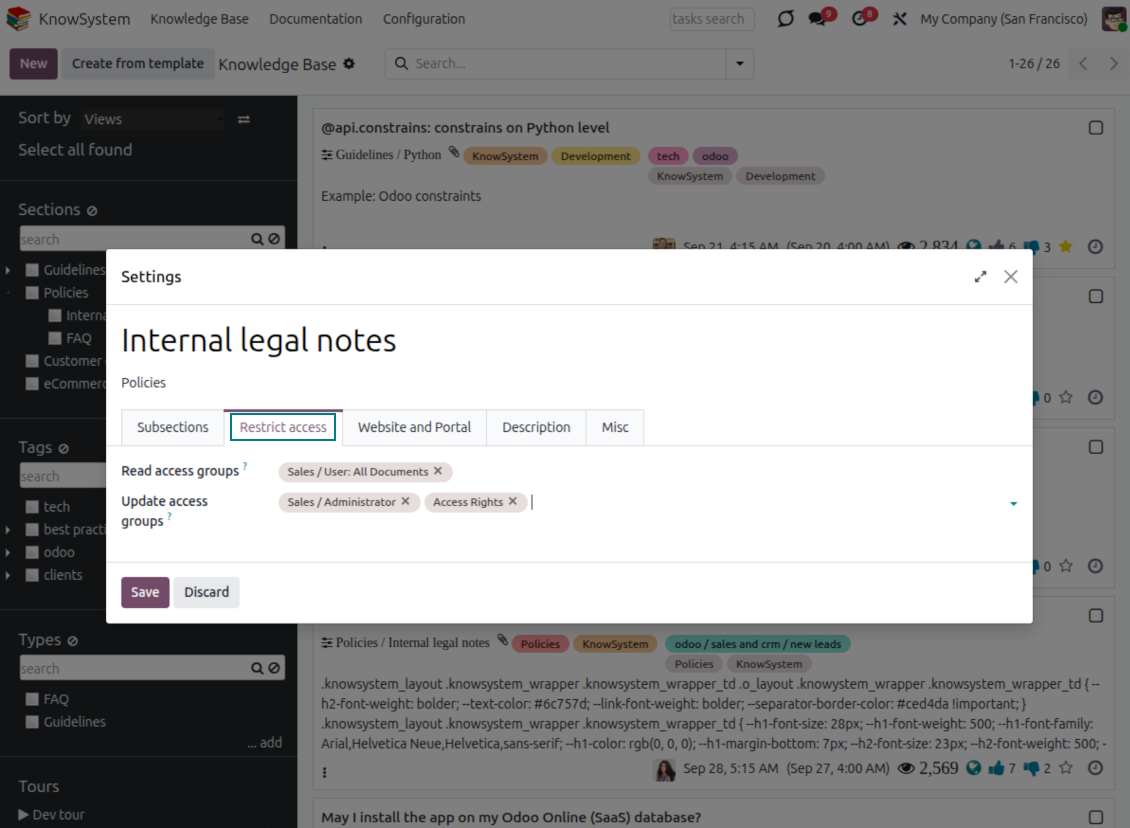
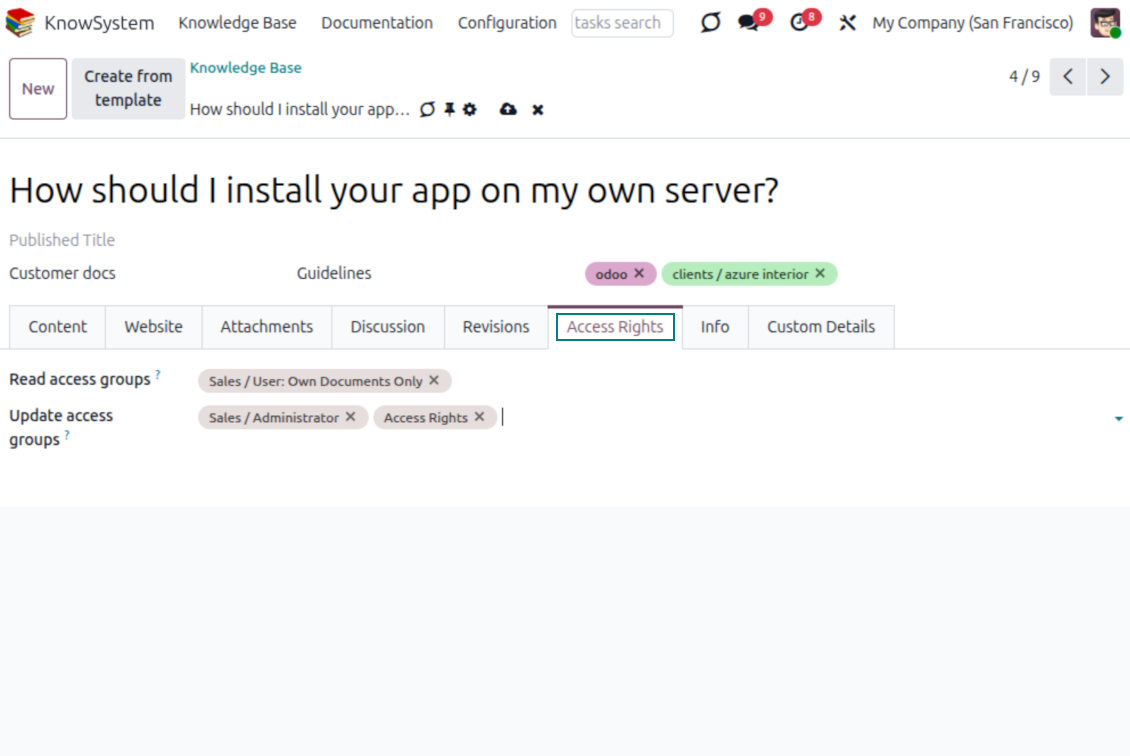
- For company employees: KnowSystem honors the user groups defined per article, section, and tour (the 'Restrict to' tab on those forms). If that field is empty, the record is 'global' and every internal user may read it.
- For portal / public users: access depends on tags and on whether an article is website-published. A tag's 'Allowed partners' grants portal users access to articles carrying that tag; published pages are open to any visitor.
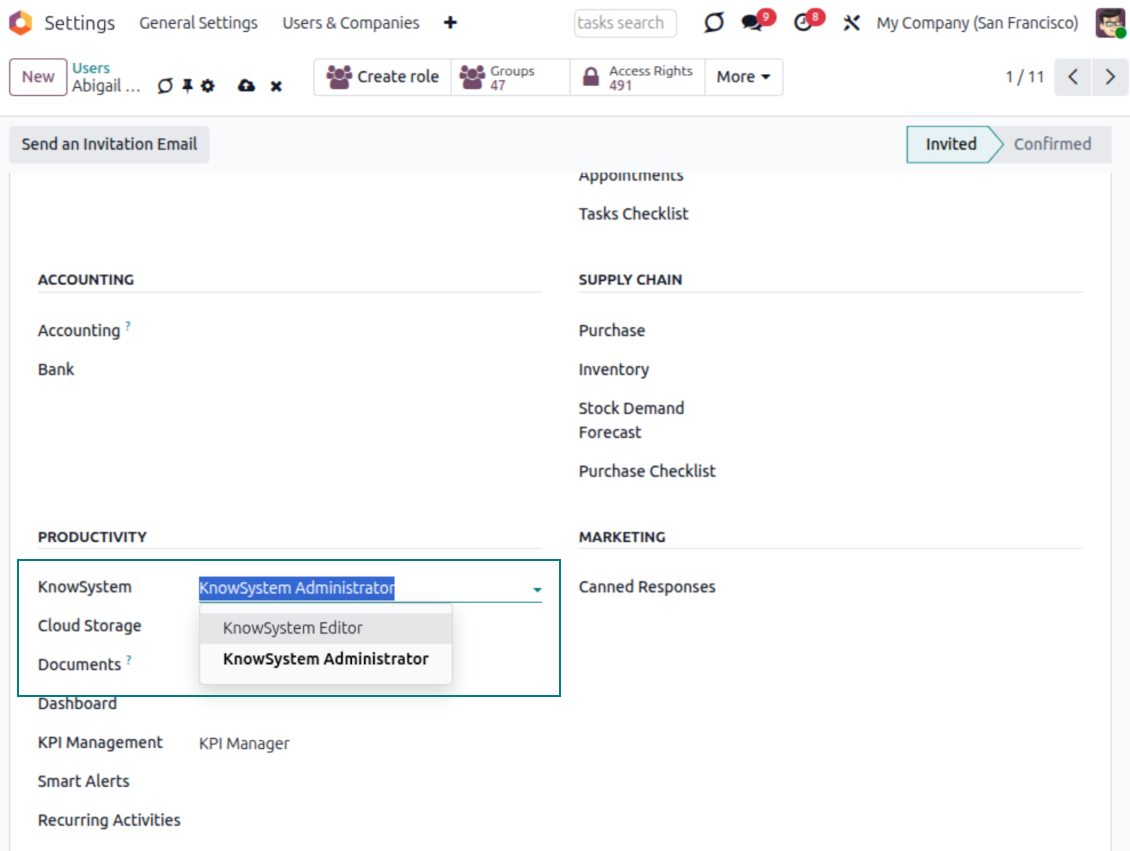
- Administration belongs to two roles - KnowSystem Editor and KnowSystem Administrator. A user must belong to one of them to create and edit articles.
- A user can always access an article they authored, regardless of further restrictions.
- Section rights consider the section and all its parents - no access to 'sales' means no access to 'sales/crm', even if 'crm' is open to the user's group.
Access rights at a glance
Odoo user |
KnowSystem Editor |
KnowSystem Admin |
Portal user |
Public user |
|
| Articles | read related to their user groups and sections | read, create, edit, archive related to their user groups and sections | read, create, edit, delete any | read published articles and articles related to partner-related tags | read published articles |
| Sections | read related to their user groups | read, create, edit, archive related to their user groups and sections | read, create, edit, delete any | read published ones | read published ones |
| Tags | read any | read, create, edit, archive any | read, create, edit, delete any | read published ones | read published ones |
| Article Types | read any | read any | read, create, edit, delete any | read published ones | read published ones |
| Tours | read related to their user groups | read, create, edit, delete related to their user groups | read, create, edit, delete any | no access | no access |
| Misc | may like/dislike, add to favorites, print, take part in discussions | may configure options | may like/dislike an article |
Klaar om te evalueren?
Begin met een gratis demoaanvraag of koop in de Odoo Apps Store.
Gratis gepersonaliseerde demodatabase. Geen telefoonnummer of creditcard nodig. Gratis lifetime-updates en expert support binnen de Odoo-hoofdversie.
Veelgestelde vragen over KnowSystem: Knowledge Base System Odoo v.18
Ik zie geen verschil tussen de teksten van de revisies.
Revisies leggen niet alleen tekstwijzigingen vast, maar ook alle stijlupdates (technisch wanneer u de HTML-broncode van een artikel wijzigt). Sommige zijn niet meteen duidelijk (bijv. een gewijzigde lettergrootte van één woord). Andere kunnen ingrijpend zijn. Elke reeks Edit > iets in een artikel wijzigen > Save levert echter een nieuwe revisie op.
Kan ik een YouTube-/ Vimeo- / Dailymotion- / Youku-video in een artikel zetten?
Ja, u kunt video's van die diensten in artikelen insluiten vanuit de Odoo-backend en de websitebouwer. Voeg daarvoor een bouwblok met een afbeelding toe > druk op de afbeelding > selecteer ‘Video’ > voer de URL van het medium in.
Houd rekening: zulke video's worden als iframes opgenomen, en sommige browsers kunnen het afspelen blokkeren tot de gebruiker dat expliciet toestaat.
Hoe maak ik een sectie zichtbaar op de website?
In KnowSystem wordt een sectie zichtbaar op een website als ze is gepubliceerd en minstens één artikel bevat. Ook met subsecties blijft ze onzichtbaar als er in de sectie zelf geen artikel staat. Zo vermijdt u lege secties en blijft het KnowSystem-portaal overzichtelijk. Wilt u de sectie op de website tonen, voeg dan één inleidend of algemeen artikel toe dat de artikelen in de subsecties kort beschrijft of opsomt.
Hoe deel ik een artikel met een externe partner?
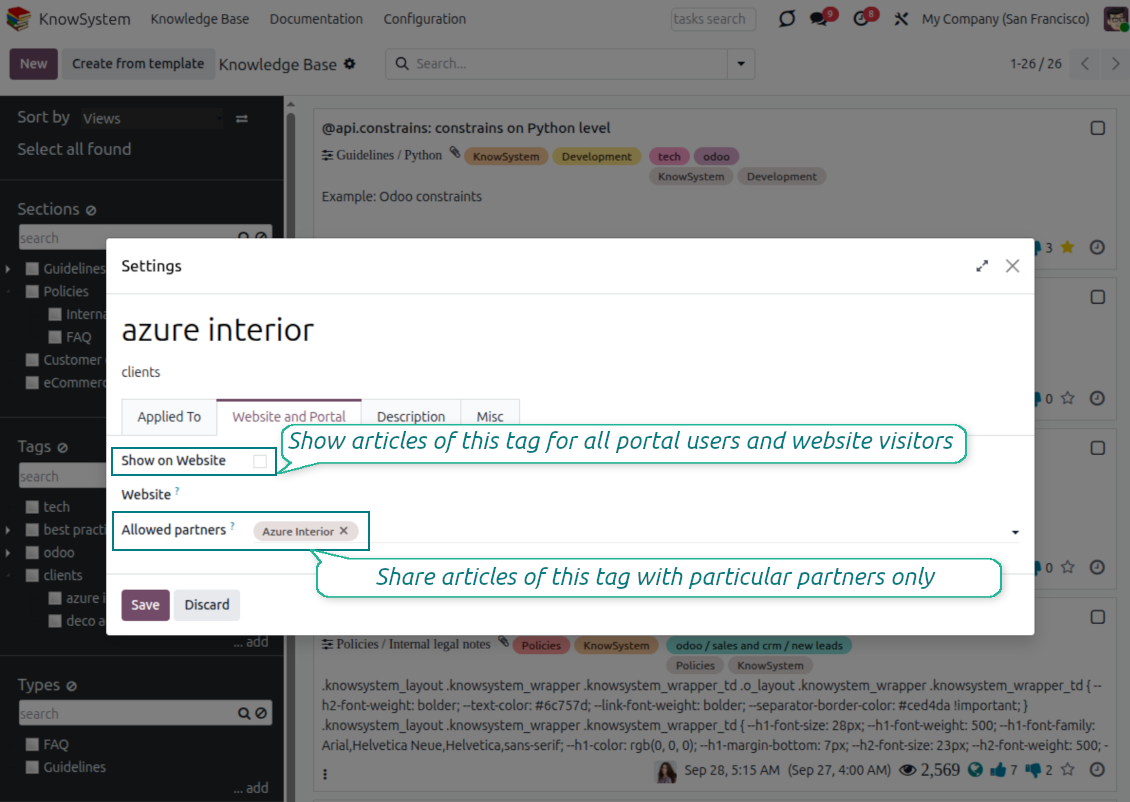
Rechtsklik op een willekeurige tag in het linkernavigatiepaneel - Create
Zoek het veld 'Allowed partners'. Bijvoorbeeld 'clients - azure interior' om toegang in te stellen voor de partner 'Azure Interior'. U kunt ook het omgekeerde doen: KnowSystem-tags toewijzen op het partnerformulier
Ga nu naar het gewenste artikel (of doe hetzelfde met de actie 'Mass update' voor meerdere records):
Als het is gepubliceerd: maak de publicatie ongedaan als u het niet beschikbaar wilt maken voor alle portaalgebruikers en openbare bezoekers
Wijs de nieuw aangemaakte tag toe (in het voorbeeld is dat 'clients - azure interior')
Nu:
Alle portaalgebruikers van de commerciële partner 'Azure Interior' hebben toegang tot de artikelen met de tag 'Azure Interior'
Geen andere portaalgebruikers (als geen andere tag is toegewezen) hebben toegang tot die artikelen
Interne gebruikers worden niet beïnvloed en zien artikelen volgens de logica 'access to' van artikelen en secties.
Kunnen we de taalselectieknop voor de artikeltekst toevoegen?
De knop 'translate' wordt door de optionele add-on 'KnowSystem: Multi Languages' expres niet aan de artikeltekst toegevoegd. HTML is zeer moeilijk te vertalen in de eenvoudige popup van die knop. Er zou heel weinig tekst te vertalen zijn en veel HTML-delen (die de vertaler ook kan breken).
Daarom moet u, om een artikel in een bepaalde taal te maken, inloggen als gebruiker van die taal. Dat kan een andere gebruiker zijn, of u wijzigt tijdelijk de voorkeuren van de huidige gebruiker. Daarna gebeuren alle updates van de artikeltekst in die gebruikerstaal.
Ook kunt u onder de artikeltekst de knop 'Copy from another translation' gebruiken om op elk moment de inhoud uit een andere taal te halen (handig als het artikel in één taal sterk is bijgewerkt).
Hoe sluit ik een andere webpagina in een artikel in
Daarvoor kunt u iframes gebruiken. Schakel het artikel naar de ruwe HTML-code-editor en voeg bijvoorbeeld <iframe src="https://faotools.com/" style="width:100%;min-height:600px;"> </iframe> in.
Ik heb KnowSystem geïnstalleerd, maar ik zie de knop 'create' en andere knoppen niet
Waarschijnlijk hebt u uw gebruiker geen KnowSystem-rechten gegeven. Kies de juiste rol 'KnowSystem Editor' of 'KnowSystem Admin' en vernieuw de pagina. De bedieningsknoppen zouden nu zichtbaar moeten zijn.
Kan ik een specifieke leerreis alleen aan gekozen gebruikers tonen?
Ja, door een gebruikersgroep toe te passen (bijv. 'Sales Manager') die deze leerreis moet volgen. Als de gebruiker tot die groep behoort, ziet hij de leerreis. Zo niet, dan wordt die niet getoond. Het werkt hetzelfde als de toegangsrechten voor KnowSystem-artikelen en -secties.
Houd er rekening mee dat een leerreis zonder toegewezen groepen 'global' is en voor iedereen zichtbaar.
Hoe wijzig ik de voettekst en de koptekst bij het afdrukken van artikelen?
Kop- en voettekst van artikel-PDF's komen uit de bedrijfsindelingen. Bekijk Settings > General Settings > het gedeelte Business Documents. Daar stelt u het bedrijfsjabloon in dat voor alle documenttypen geldt, inclusief facturen, verkooporders enz., en ook voor artikelen. Deze Odoo-aanpak ziet voettekst en koptekst als algemene bedrijfsstijl, niet als kenmerk van specifieke afdrukken.
Hoe koppel ik artikelen aan elkaar?
Elk artikel heeft interne (backend-) en website-URL's (als de optie 'KnowSystem: Website and Portal' is geïnstalleerd). Klik op de knop 'Info' op het artikelformulier om de webadressen van dit record te zien. U kunt elk adres als hyperlink in de artikeltekst invoegen.
Kan ik de HTML-broncode van een artikel wijzigen?
Ja: zet de debug assets aan (op het overzichtsscherm van de instellingen) en ga terug naar het huidige artikel. In de bewerkingsmodus ziet u het pictogram '</>'. Klik erop om HTML en stijlen te bekijken en te bewerken.
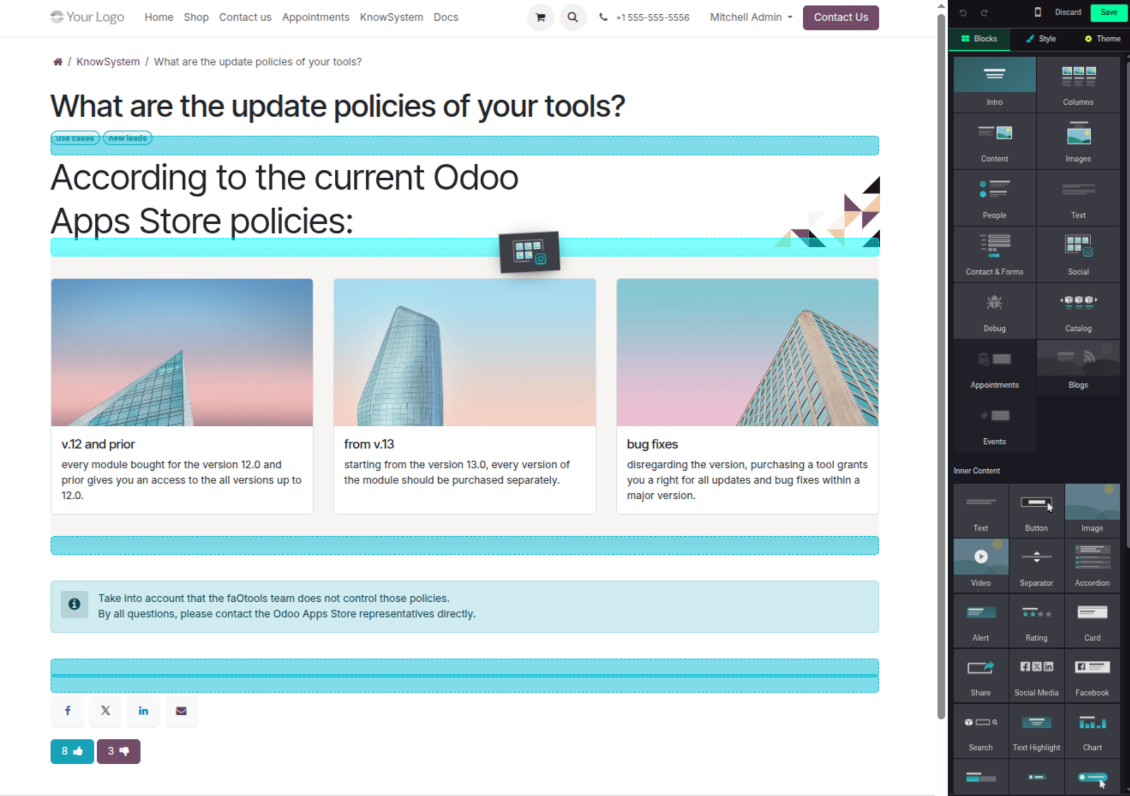
Wat is het updatebeleid van uw tools?
Volgens het huidige beleid van de Odoo Apps Store:
- Elke module gekocht voor versie 12.0 of eerder geeft toegang tot alle versies tot 12.0.
- Vanaf versie 13.0 moet elke moduleversie apart worden gekocht.
- Ongeacht de versie geeft aankoop recht op alle updates en bugfixes binnen een hoofdversie.
Het faOtools-team bepaalt dit beleid niet. Neem voor vragen rechtstreeks contact op met vertegenwoordigers van de Odoo Apps Store.
Hoe installeer ik uw app op Odoo.sh?
De meest directe aanpak is de ingebouwde workflow van de Odoo-store:
1. Open de modulepagina en klik op Deploy on odoo.sh
2. U gaat naar GitHub. Log in en klik op Create a new repo of gebruik een bestaande. De repository moet privé zijn. Apps onder OPL-1 mogen niet openbaar. Maak zo nodig een nieuwe repo voor het Odoo.sh-project
3. Ga daarna naar odoo.sh, klik op Deploy, bevestig en klik op Continue. De installatie start.
Zo installeert u de app op de productiebranch. Voor andere branches of een update:
1. Download de broncode uit de Odoo-store
2. Commit de module naar de GitHub-repository. Geen app-mappen/bestanden in .gitignore. Repo's van odoo.sh negeren soms belangrijke paden (bijv. /lib). Upload alle modulemappen en -bestanden
3. Deploy de doelbranch van het odoo.sh-project of wacht op de automatische build.
Hoe installeer ik uw app op mijn eigen server?
2. Herstart de Odoo-server;
3. Zet de ontwikkelaarsmodus aan (technische instellingen);
4. Werk de applijst bij (Apps-menu);
5. Zoek de app en klik op Activate/Install;
6. Volg de richtlijnen op de app-pagina als die er zijn.
Uw app heeft extra add-ons. Kan ik die later kopen?
Ja. Odoo zet automatisch alle afhankelijkheden in de winkelwagen: sluit eerder gekochte tools uit om dubbel betalen te voorkomen.
Ik heb uw app op Odoo.sh gezet en zie een waarschuwing/fout in de tests
Een rode/oranje waarschuwing beinvloedt de functies van de app niet. Soms halen onze modules de standaard automatische tests niet, omdat die gedrag verwachten dat indruist tegen het doel van de app. We wijzigen bijvoorbeeld de prijscalculatie, terwijl de Odoo-tests de eindprijs met het standaardalgoritme vergelijken.
Controleer eerst de functies van de gedeployde database. Werkt alles?
Als u toch denkt dat de waarschuwing echte functies raakt, neem contact op en stuur de volledige installatielogs en de volledige lijst gedeployde modules (kern en derden).
Kan ik uw app rechtstreeks bij u kopen?
Nee, we verspreiden de tools alleen via de officiele Odoo-appwinkel.
Ik wil graag korting
Helaas hebben we geen technische mogelijkheid voor individuele prijzen.
Kan ik de app installeren op mijn Odoo Online (SaaS)-database?
Nee, apps van derden kunnen niet op Odoo Online. Odoo SaaS blokkeert die mogelijkheid.
Uw tool hangt van andere apps af. Moet ik die kopen?
Ja, de tool heeft alle modules in de afhankelijkheden nodig. De prijs op de app-pagina is inclusief die afhankelijkheden.
Wat is de prijs van de module in Amerikaanse dollars? Waarom is die veranderd?
De prijs van onze modules staat in euro. De Odoo-store rekent om volgens de interne wisselkoers. De prijs in Amerikaanse dollars kan dus wijzigen als die koers wordt bijgewerkt.
De teksten van de app en website in andere talen dan het Engels zijn met AI ondersteund en afgestemd op de officiële Odoo-vertalingen. Als u een fout ziet, een vertaalticket sturen en we corrigeren het.
Odoo-demodatabases (voorbeelden)
Voor deze app kunnen we een gratis gepersonaliseerde demodatabase aanbieden.
U heeft geen telefoonnummer of creditcard nodig om contact met ons op te nemen. U hoeft slechts een korte e-mailaanmelding door te geven, die niet langer dan 30 seconden duurt.
Op verzoek richten wij een eigen voorbeelddatabase in waarin u ongeveer twee weken lang naar wens kunt testen en aannames kunt controleren.
Fouten melden
Als u bugs of inconsistent gedrag tegenkomt, aarzel dan niet om contact met ons op te nemen. We garanderen dat we binnen 60 dagen na aankoop oplossingen bieden en zijn zeer geïnteresseerd in het verbeteren van onze tools, zelfs na deze periode.
U heeft geen telefoonnummer of creditcard nodig om contact met ons op te nemen. U hoeft slechts een korte e-mailaanmelding door te geven, die niet langer dan 30 seconden duurt.
Vermeld zo veel mogelijk details in uw verzoek: schermafbeeldingen, Odoo-serverlogboeken, een volledige beschrijving om uw probleem te reproduceren enzovoort. Gewoonlijk kost het enkele werkdagen om een werkplan voor een probleem op te stellen (als een bug is bevestigd) of u richtlijnen te geven over wat er moet gebeuren (anders).
Aanvragen voor openbare functies en module-ideeën (gratis ontwikkeling)
We zijn sterk gemotiveerd om onze tools te verbeteren en zijn dankbaar voor alle feedback. Als uw vereisten van openbaar nut zijn en efficiënt kunnen worden geïmplementeerd, zal het team deze opnemen in onze takenlijst.
Zo'n to-dolijst wordt regelmatig verwerkt en er zijn geen extra kosten aan verbonden. Hoewel we geen deadlines en definitief ontwerp kunnen beloven, kan het een goede manier zijn om de gewenste functies te verkrijgen zonder investeringen en risico's.
U heeft geen telefoonnummer of creditcard nodig om contact met ons op te nemen. U hoeft slechts een korte e-mailaanmelding door te geven, die niet langer dan 30 seconden duurt.
18.0.1.3.29
- The issue of Late Activities listing articles that have no overdue activity for the selected user has been fixed.
18.0.1.3.27
- The issue of autovacuum failure has been fixed.
18.0.1.3.25
- Standaardlabels uit de e-mailcomposer en activiteitformulieren zijn opgelost.
18.0.1.3.24
- Het kleurenpalet verschijnt weer in de HTML-editor.
18.0.1.3.23
- Geselecteerde artikelen verwijderen zonder dubbelklik is opgelost.
18.0.1.3.22
- Wisselen tussen artikelen met verschillende editors is opgelost.
18.0.1.3.21
- Bewerkrechten voor secties/artikelen houden leesrechten in.
- Niet-bijgewerkte like-tellers zijn opgelost.
18.0.1.3.20
- Zoeken vindt trefwoorden die door vet- of cursieftags zijn gesplitst.
18.0.1.3.19
- De toegangs fout in de artikelzoekwizard voor gewone gebruikers is opgelost.
18.0.1.3.18
- Kanban-weergaven volgen de XML-principes van Odoo 18.
- Het Archived-lint staat op Kanban en formulieren van artikelen en op formulieren van secties en labels.
18.0.1.3.17
- De websiteweergave van artikelen en documentatie is geoptimaliseerd voor kleine schermen.
18.0.1.3.16
- De app volgt de recente Odoo 18-updates van webeditor-plugins.
18.0.1.3.15
- De overtollige vertaalknop bij "Text"-artikelen is verwijderd.
18.0.1.3.14
- Tekst juist opslaan en kopiëren is opgelost.
18.0.1.3.13
- De app is gepubliceerd voor versie 18.
17.0.1.3.13
- De standaardactiviteitenweergave voor KnowSystem-artikelen is Kanban.
17.0.1.3.12
- Overmatig schonen van KnowSystem-artikelen na een composerbericht is opgelost.
17.0.1.3.11
- De taalschakelaar van het snelle artikelzoeken is opgelost.
17.0.1.3.10
- In de backend kan alleen in titels worden gezocht.
- De knop om een gevonden artikel uit een dialoog in een nieuw tabblad te openen is opgelost.
17.0.1.3.9
- Slepen-en-neerzetten werkt artikelen massaal bij: label, sectie en leerreis.
- Een gevonden artikel is in een nieuw tabblad te openen.
- De geselecteerde bovenliggende map in navigatiebomen wordt juist gemarkeerd.
17.0.1.3.8
- De Kanban-weergave van KnowSystem-artikelen volgt Odoo v.17.
- Navigatiehierarchieen zijn geoptimaliseerd.
17.0.1.3.7
- Het standaardsorteercriterium van artikel-backendnavigatie is in te stellen op de app-pagina.

De tool om Odoo-bijlagen in mappen te structureren en te synchroniseren met Google Drive, OneDrive/SharePoint, Nextcloud/ownCloud, Dropbox, Amazon S3, Box en NAS. Bestandsbeheer. DMS
398€
The tool to automatically synchronize Odoo attachments with OneDrive files in both ways
487€
The tool to automatically synchronize Odoo attachments with Google Drive files in both ways
487€

The tool to set up KPI targets and control their fulfillment by periods. KPI dashboards. Dashboard designer. KPI charts

The tool for time-based service management from booking appointments to sales and reviews
398€
The tool to manage your Odoo from your favorite AI chats through MCP. Claude. Any MCP-supporting AI.

The tool to combine different Odoo events in a few configurable super calendars

The tool to translate URL addresses of Odoo website pages
38€