In Short
Joint Calendar is an Odoo 19 Extra Tools app. The tool to combine different Odoo events in a few configurable super calendars.
Planning in Odoo often means jumping between CRM opportunities, tasks, activities, meetings, sales orders, deliveries, and time off records. Joint Calendar brings those dates into configurable shared super calendars, so teams plan from one view while every event stays linked to its source document.
Perfect for
Operations planners
Coordinate tasks, meetings, activities, orders, deliveries, and other dated records without opening each application separately.
Sales and CRM teams
Put opportunities, quotations, sales orders, calls, and follow-ups on one shared sales calendar filtered by salesperson or team.
Project managers
Track deadlines and assignees from tasks, activities, tickets, and custom project records in a single planning interface.
HR and resource teams
Display approved time off, leaves, employee events, and resource commitments beside operational work that depends on them.
Multi-company databases
Use company-aware calendars and rule settings so users see relevant shared menus and records across their allowed companies.
Service and support teams
Combine tickets, activities, customer appointments, and internal tasks into a calendar that keeps source records one click away.
Ready to evaluate?
Start with a free demo request or purchase in the Odoo Apps Store.
Free personalized demo database. No phone number or credit card required. Free life-time updates and expert support within the major Odoo version.
Why teams choose it
Key benefits before you dive into the details
Any Odoo document on one calendar
Merge opportunities, meetings, activities, sale and purchase orders, deliveries, tasks, tickets, time off, and custom records into a single shared view.
Flexible merging rules
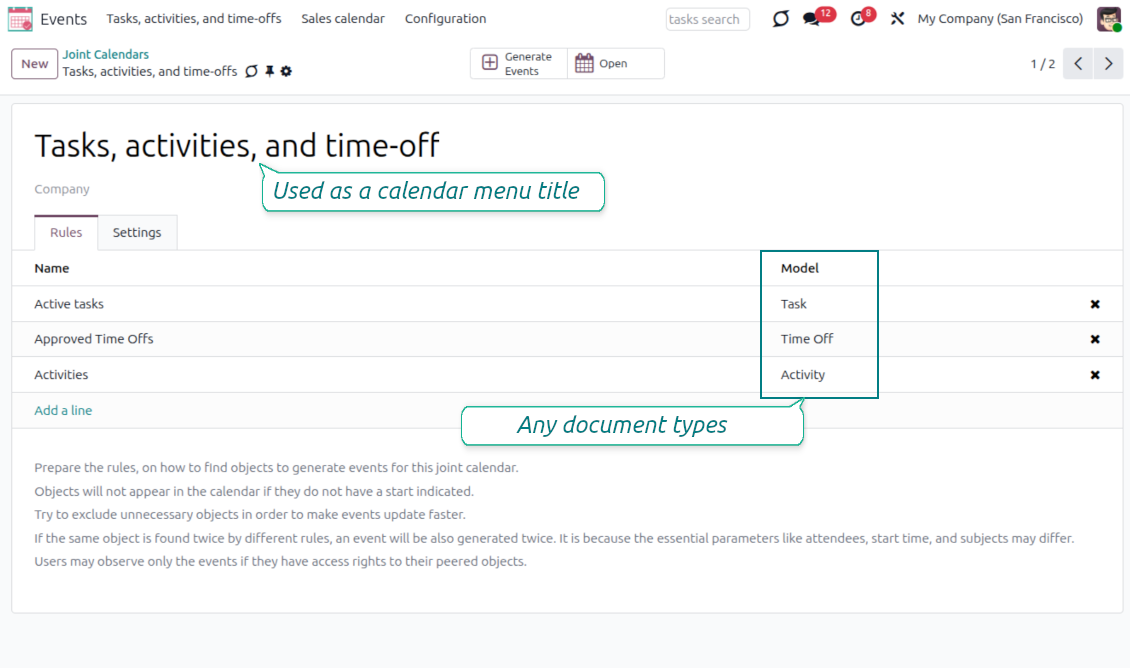
Define what makes the event title, the start and stop dates, the attendees, and which records are included - even the same document twice.
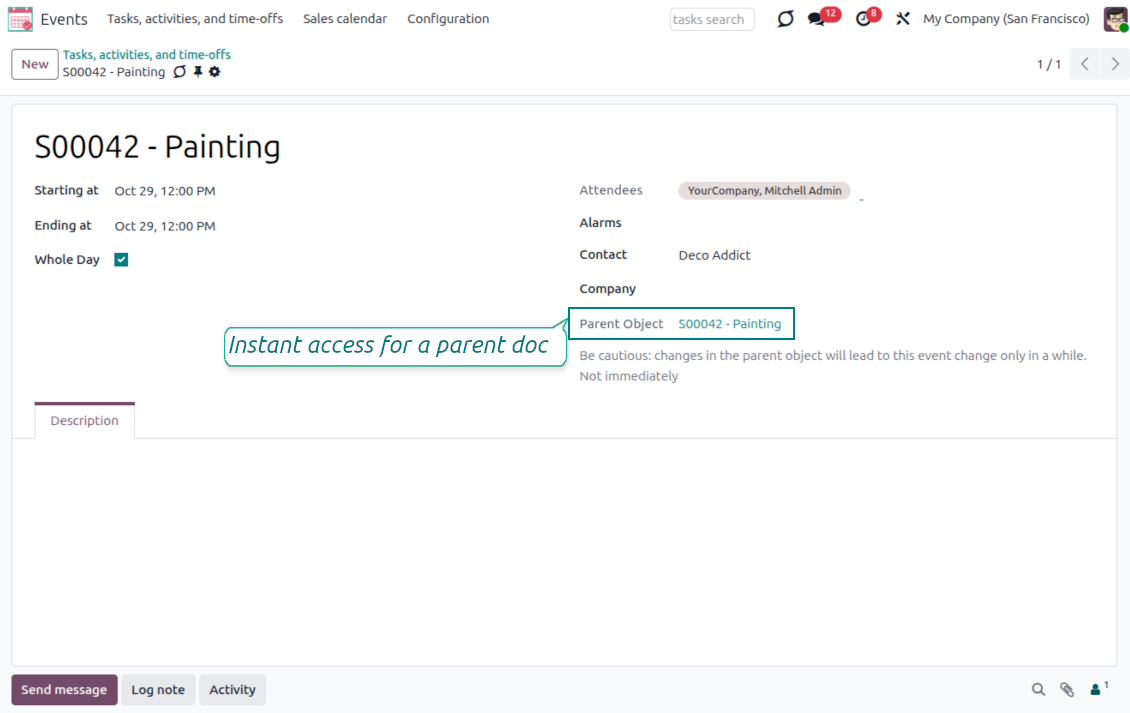
Instant access to source details
Joint events stay interrelated with their documents - update the event and the source follows, with the reverse applied on the scheduled job.
Reminders for any Odoo event
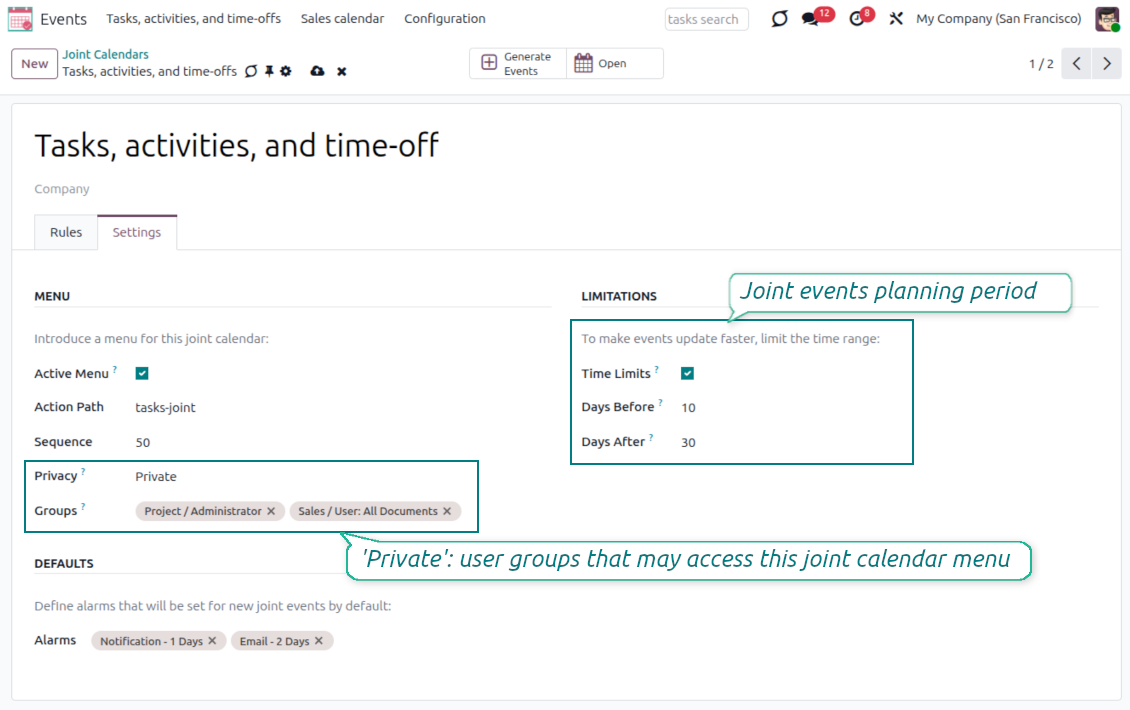
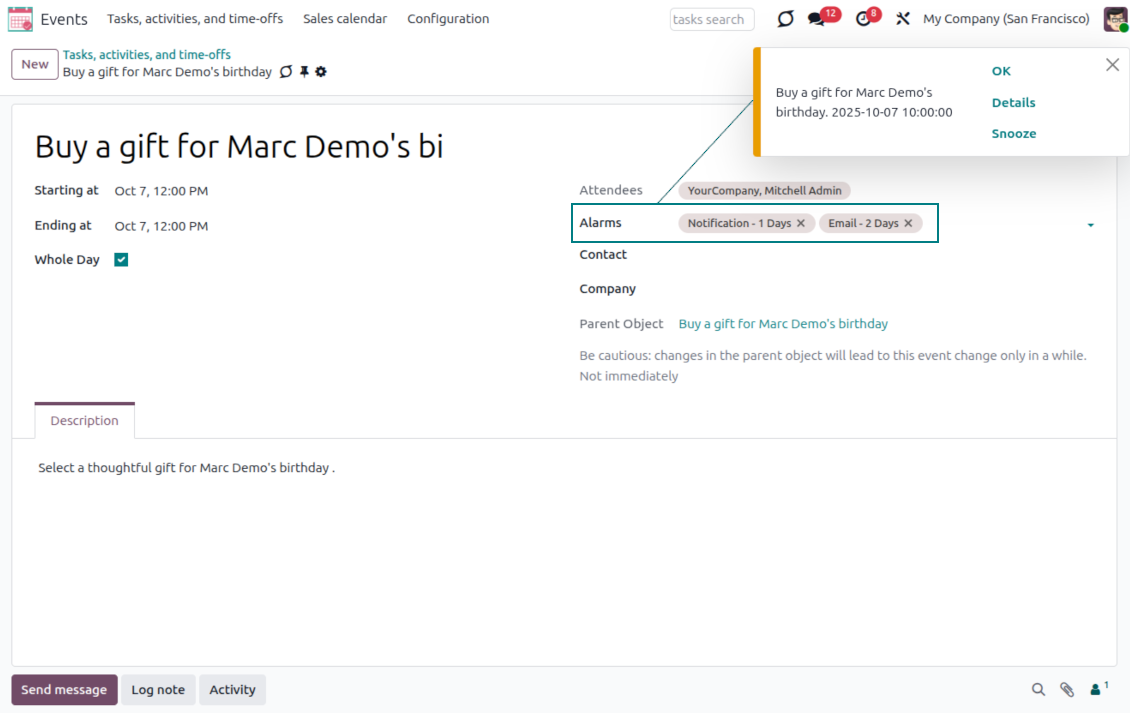
Assign default pop-up and email alarms on the calendar, so attendees are notified about any Odoo event or activity.
Comfortable team navigation
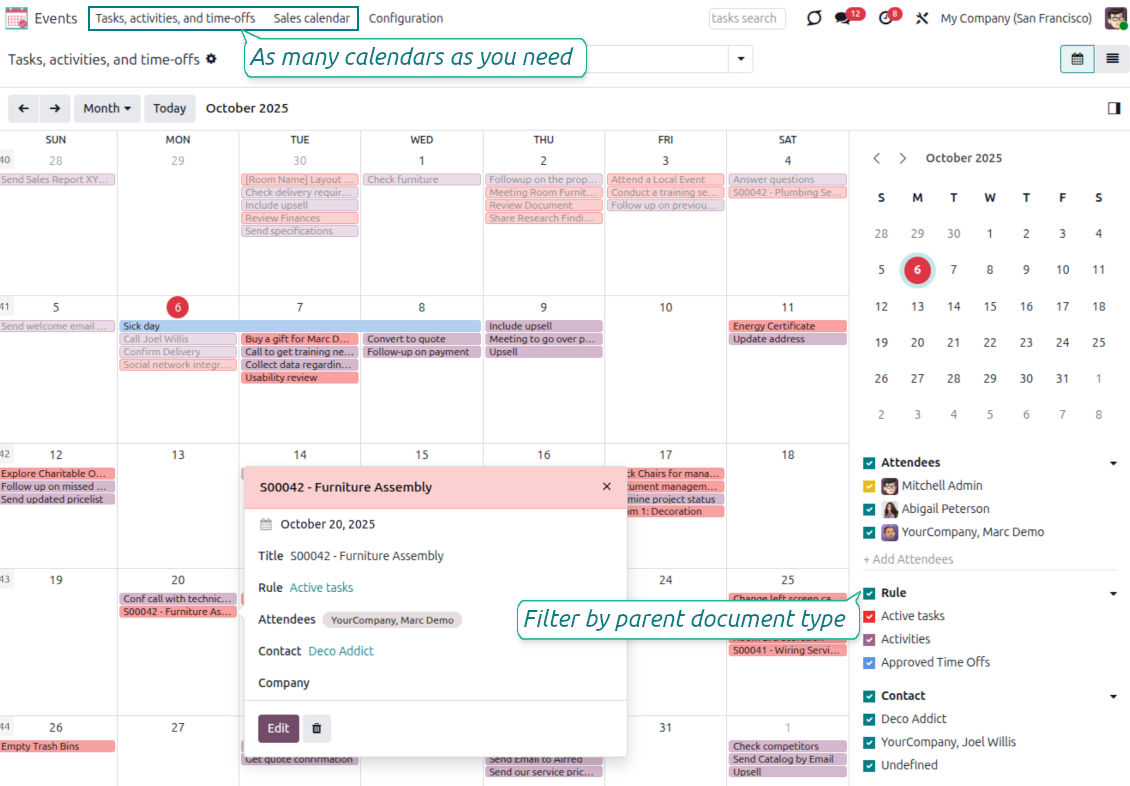
Switch between document types, attendees, linked contacts, and companies in a single click. Optionally turn on the Odoo Enterprise Gantt view.
Simple rights administration
Make a joint calendar public or share it only with chosen user groups, with full multi-company support and automatic cron updates.
Odoo Apps Store feedback
What customers say about the app
Better then expected
The app does exactly what was needed. Combine all tasks from all calendars to one. And allows to manages all activities from all modules in one place.
Arseniy
This makes the Event Calendar so much more useful !
We bought this to combine certain project tasks with the schedules of our maintenance engineers. We now have a better overview which moments are overlapping the schedules of other events. The joining of multiple events in 1 event calendar is super easy, it should be a standard option in ODOO.
Sander Galestien
Excellent responsive team of programmers
Joint Calendar is the perfect addition to the standard Calendaring system that Odoo offers. It makes the job of setting up specific departmental calendars filled with any objects you wish very easy and Alex and the team provides fantastic after-sales support, responding in most cases within 24 hours to requests for help. Thanks for a great module.
Bill Ennals
Essential to have Activities, Tasks, Meetings etc all in one calendar and shared.
Great service support very quick and were right on with fixing the issue... I think the ability to see everything on one shared calendar is such an essential part of coordination and time management. Great product once you sort out the rules you need!
Saul
Ready to evaluate?
Start with a free demo request or purchase in the Odoo Apps Store.
Free personalized demo database. No phone number or credit card required. Free life-time updates and expert support within the major Odoo version.
Super calendars for any business area
Ready-to-use rule examples across CRM, projects, sales, HR, and more
Tasks on a joint calendar
- Model: Task, name: Title.
- Start date: Deadline; attendees: Assignees.
- Domain: optionally limit to definite projects.
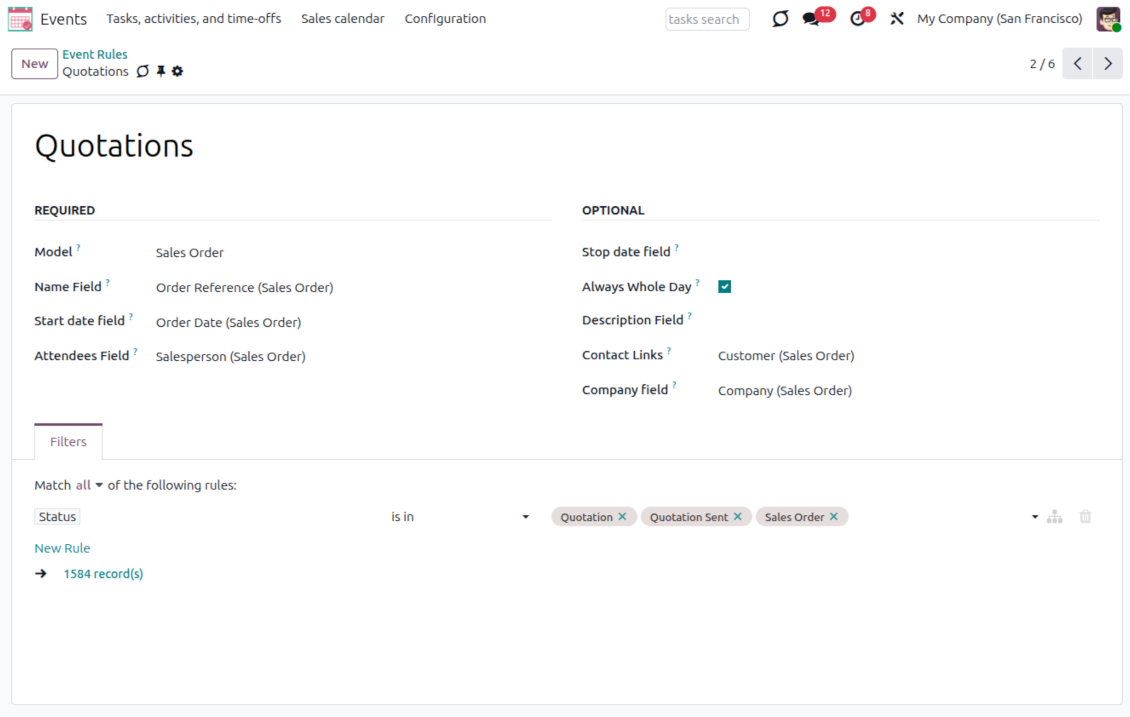
Sale orders on a shared calendar
- Model: Sales Order, name: Order Reference.
- Start date: Order Date; attendees: Salesperson; contact link: Customer.
- Domain: optionally restrict quotations by sales teams.
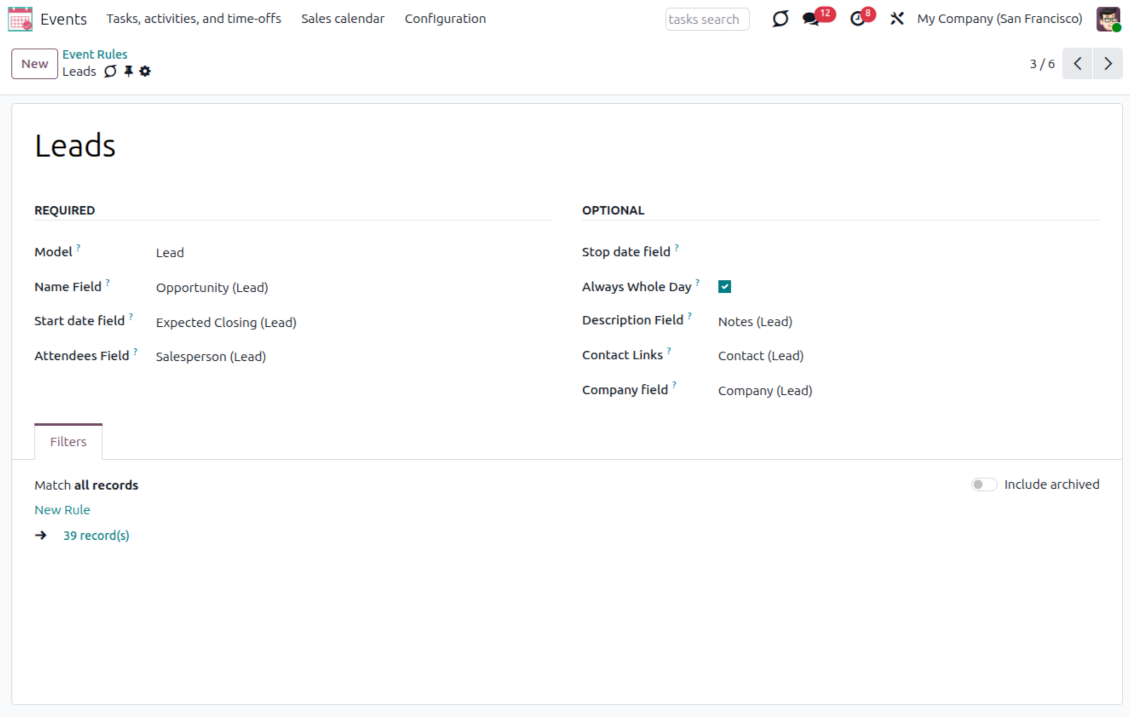
Opportunities on a super calendar
- Model: Lead/Opportunity, name: Opportunity.
- Start date: Expected Closing; attendees: Salesperson; contact link: Customer.
- Domain: optionally restrict opportunities by sales teams.
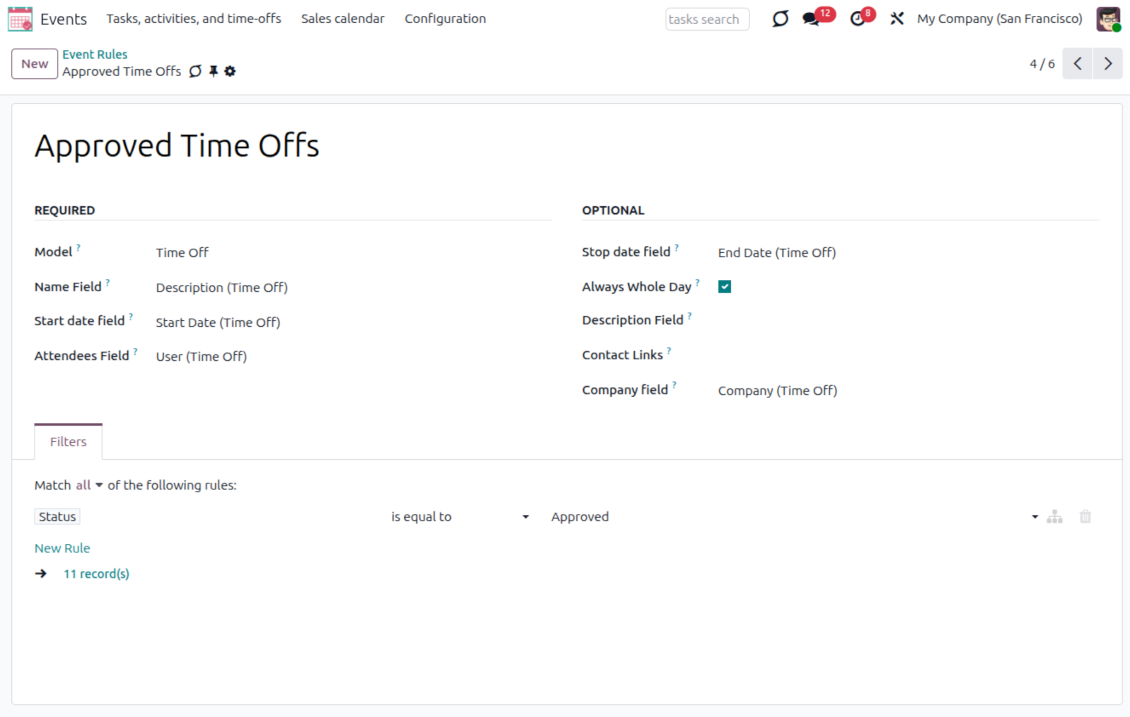
Employees' time off and leaves
- Model: Time Off, name: Description.
- Start date: Start Date; stop date: End Date; attendees: User.
- Domain: filter by status to show only approved leaves.
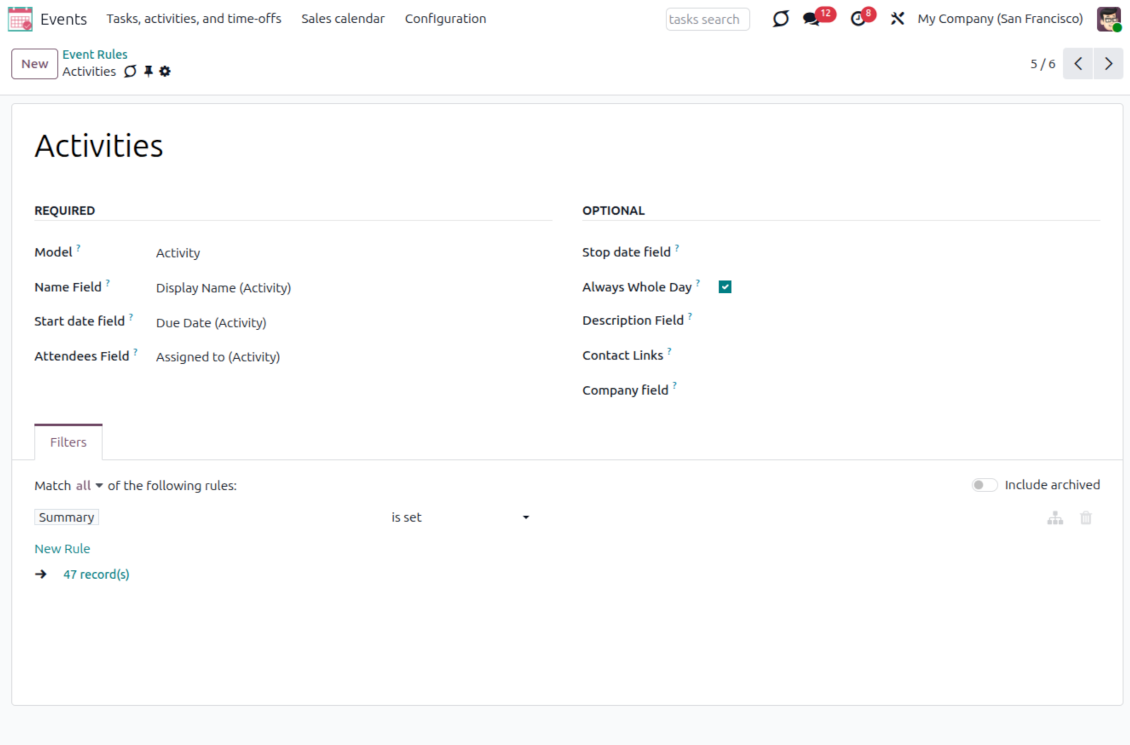
Activities across all objects
- Model: Activity, name: Display Name.
- Start date: Due Date; attendees: Assigned to.
- Domain: apply 'Summary is set'.
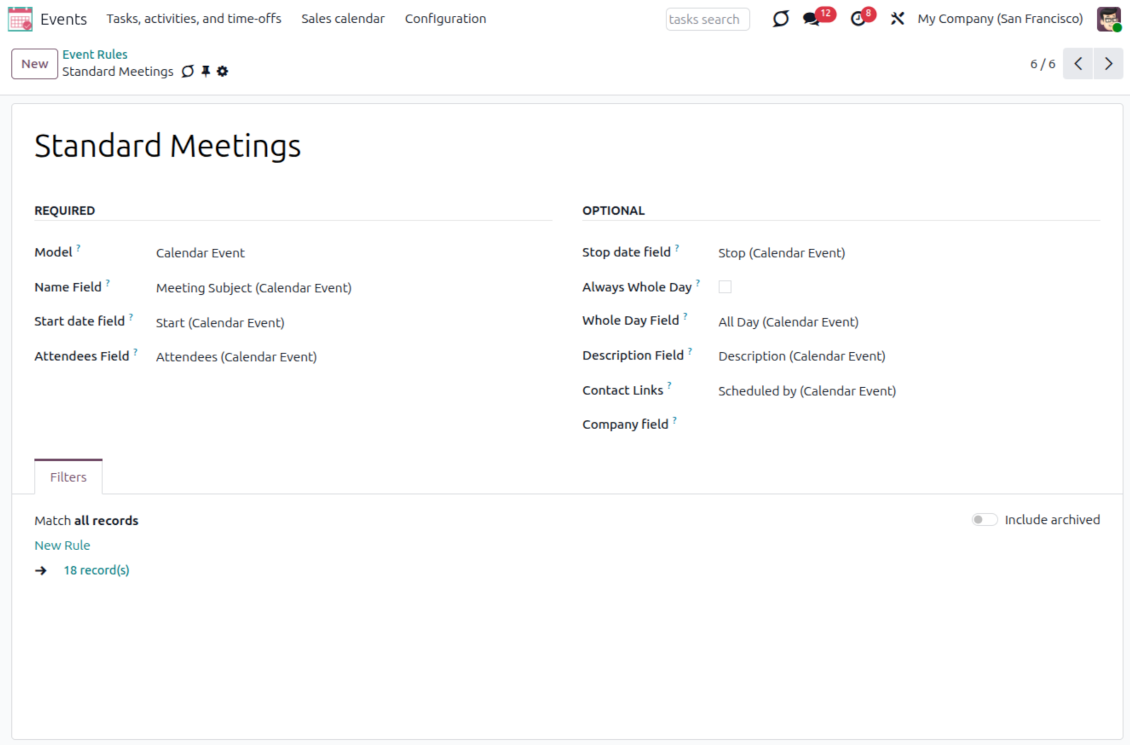
Odoo meetings on the joint calendar
- Model: Calendar Event, name: Meeting Subject.
- Start date: Start; stop date: Stop; attendees: Attendees.
- Whole day field: All Day.
Flexible rules to merge Odoo documents
Configure exactly what each rule scans, shows, and filters
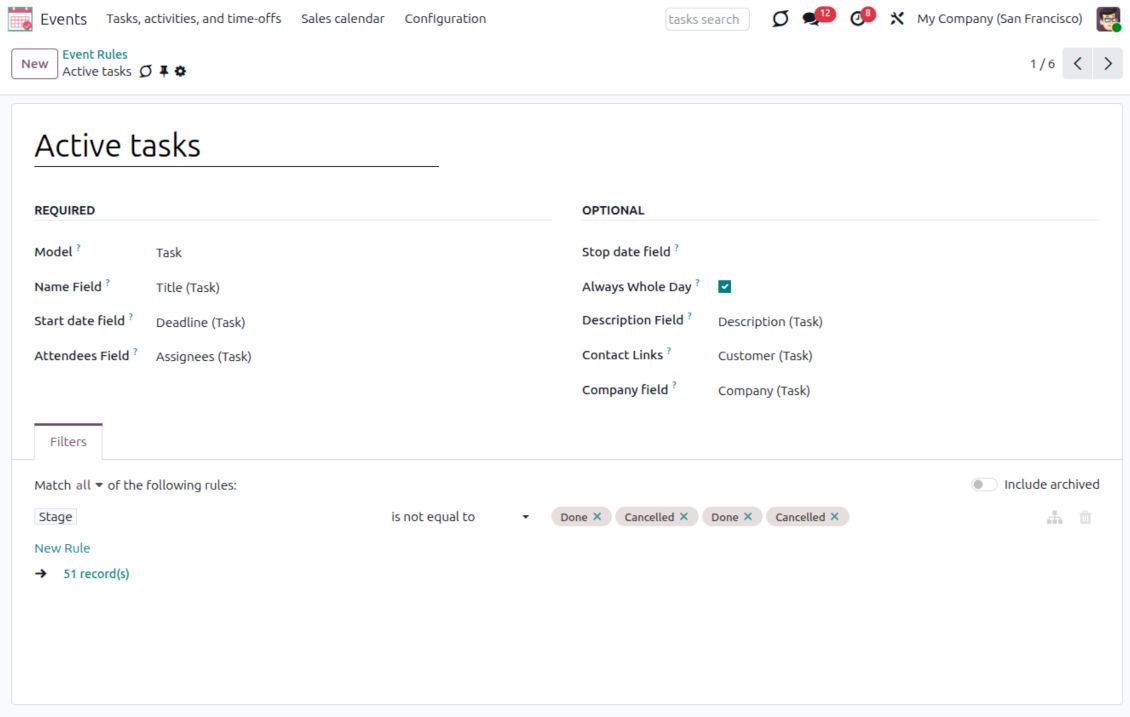
Define what becomes an event
- Model - which objects to scan: opportunities, tasks, orders, meetings, activities, and more, including custom Odoo Studio document types.
- Name - the field used as the joint event title, usually 'name', 'subject', or 'reference'.
- Start date - any date or date-time field that sets when the event begins, such as 'expected closing' or 'order date'.
- Stop date - the optional field marking when the event is shown as finished on the calendar.
- Attendees - the participants, such as 'assigned to', 'salesperson', 'attendees', or even document followers (both users and partners).
Control how the event behaves
- Description - any source field worth showing on joint events, such as internal notes or comments.
- Always Whole Day - force every generated event to last the whole day and sit above the timeline, regardless of start or stop times.
- Whole Day - a source boolean that lets an event optionally span a full day, as with standard Odoo calendar events.
- Contact Link - link the event to a partner via fields such as 'customer' or 'vendor'.
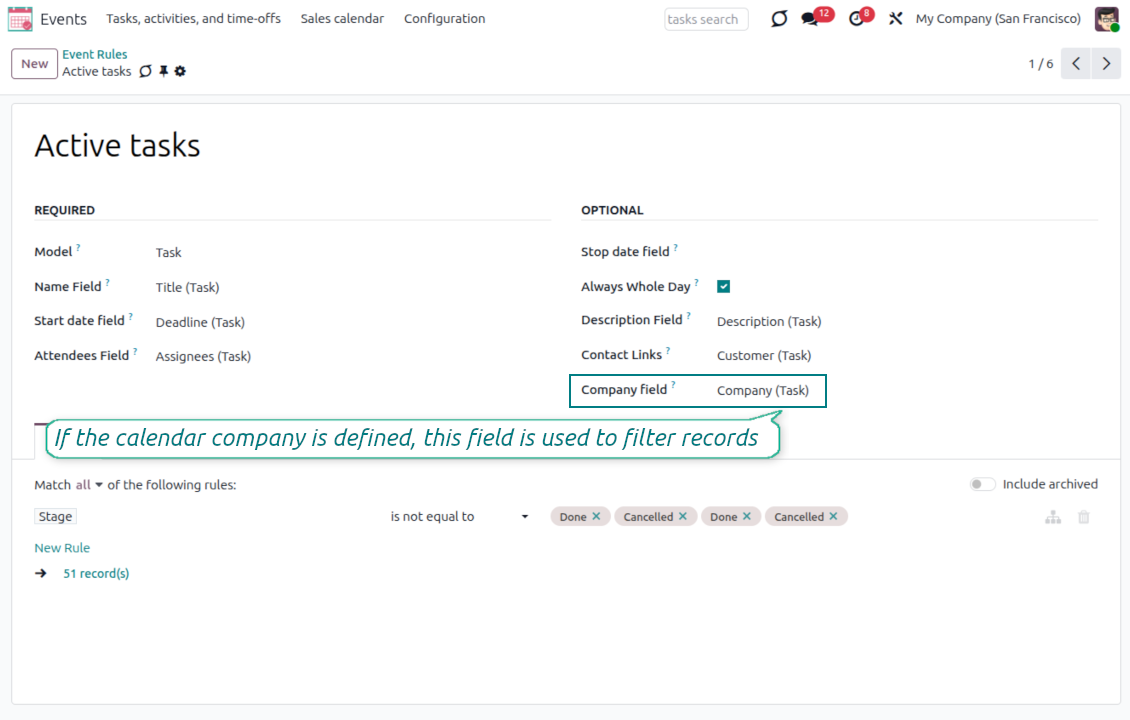
- Company field - the parent field that holds the company, so joint events inherit it for filtering or information.
- Domain - the Odoo filter constructor to include only relevant records, for example quotations without sales orders or one sales team's opportunities.
Multi companies compatibility
Company-aware calendars, menus, and records
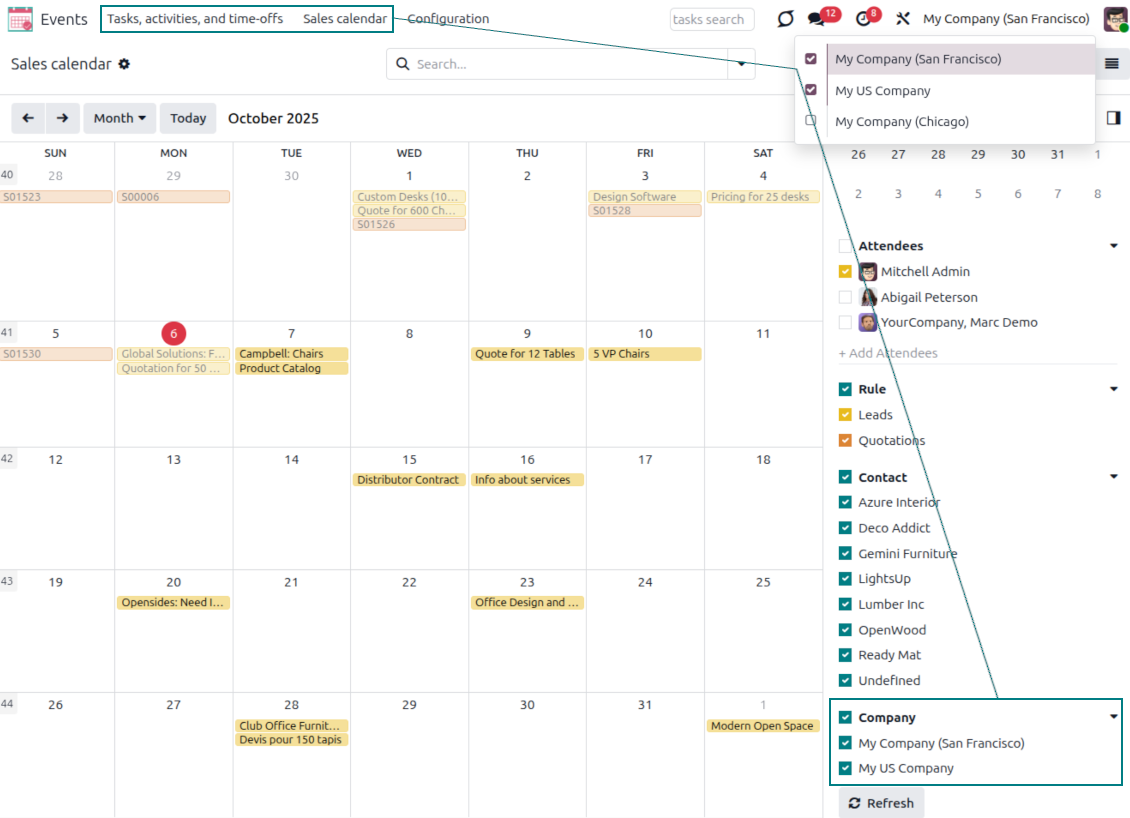
Calendars and menus per company
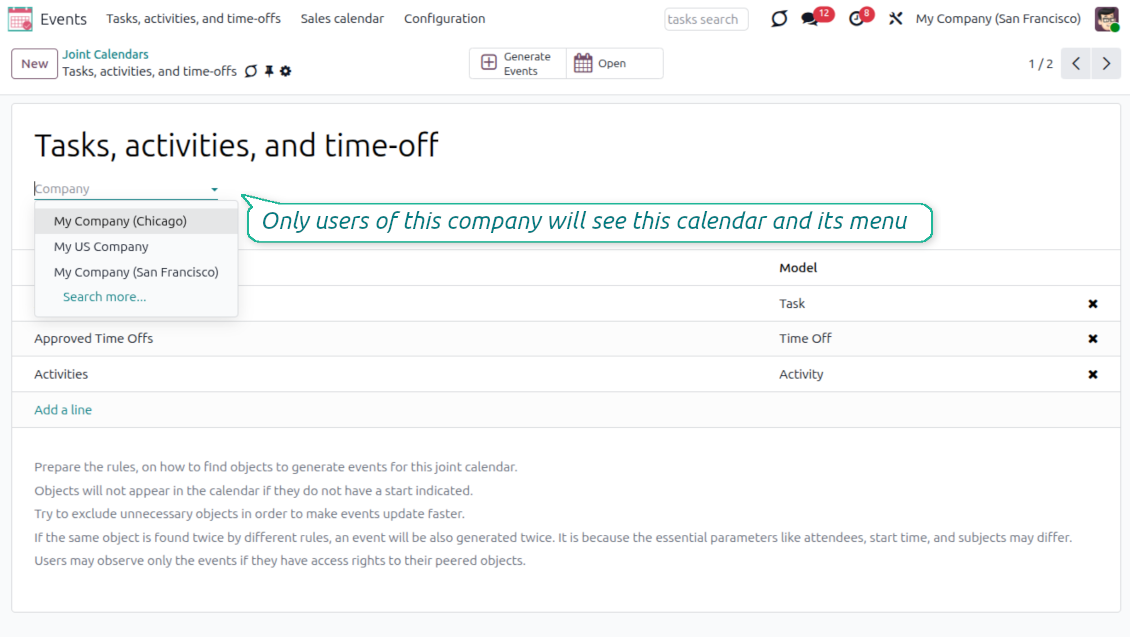
- Link each joint calendar to a specific Odoo company, or leave it 'global' so it is available to every company.
- Users only see the joint menus whose calendar has no company or one of their allowed companies.
- Switch between objects of different companies using the right-hand navigation filters.
Filter records by company
- Set a Company field per rule so records are filtered to the joint calendar's company - for example, only San Francisco or global tasks.
- Joint events inherit the company from the parent document's Company field.
- Combine the company field with a rule domain to include records from several companies while excluding others.
Odoo Enterprise Gantt view for joint calendars
Optional add-on - requires the Joint Calendar: Gantt extension and Odoo Enterprise
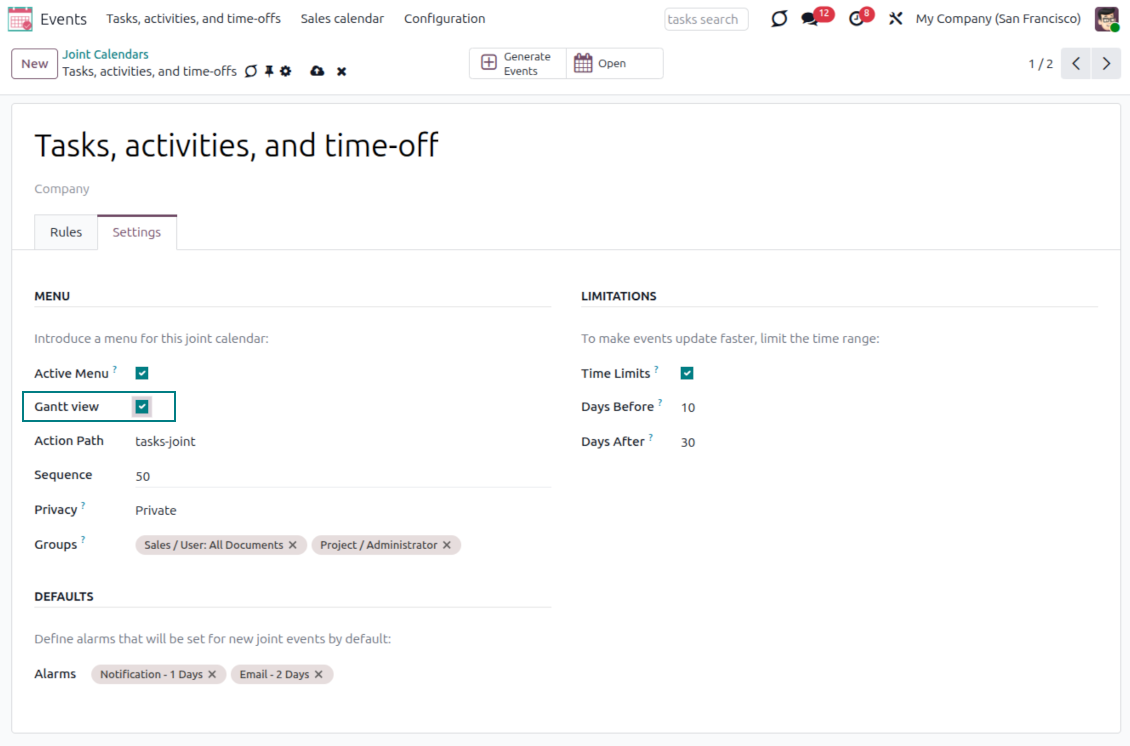
Turn it on per calendar
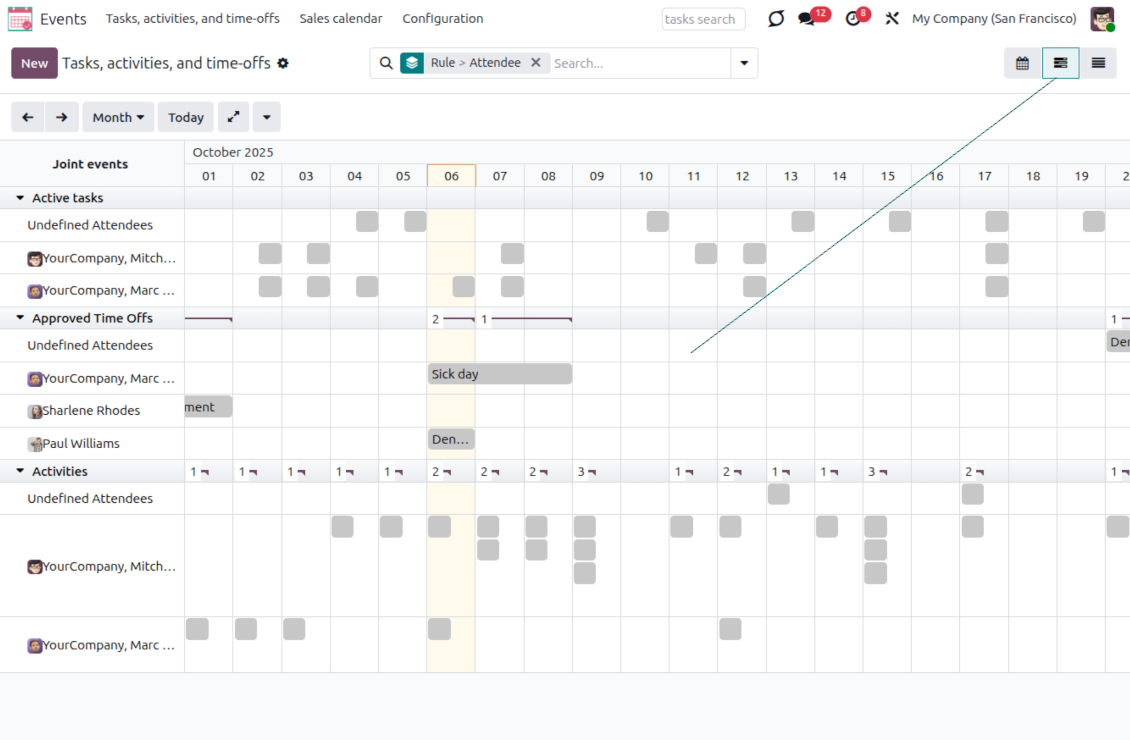
- For any joint calendar, simply tick the Gantt view box in the super calendar settings.
- After you save, the app automatically extends the target calendar action with the Gantt view.
- Enable it only where you need it, calendar by calendar.
Plan mixed documents on one timeline
- See various Odoo documents together on a single super Gantt view.
- Reassign responsible users and drag and drop events to change periods.
- Group, filter, and reach event details quickly, just like in the calendar view.
Ready to evaluate?
Start with a free demo request or purchase in the Odoo Apps Store.
Free personalized demo database. No phone number or credit card required. Free life-time updates and expert support within the major Odoo version.
Configuration and Installation Tips for Joint Calendar Odoo v.19
Joint calendar scheduled jobs
The tool lets you change the frequency of joint calendar refreshing and emails reminders' checks:
- Turn on the debug mode
- Go to technical settings > Automation > Scheduled jobs
- Find the job 'Refresh Joint Events' to change the frequency of super calendars' update
- Find the job 'Notify About Joint Event' to change the frequency of email alarms.
Frequently Asked Questions about Joint Calendar Odoo v.19
What happens when the option "Always Whole Day" is turned on/off?
When the option "Always Whole Day" is turned on, then all generated events created with the rule will last the whole day disregarding whether start or stop are defined with hours and minutes. Such an event will be shown at a special place on a calendar.
For example, if you create a rule for the model "Sale Order", and turn on the option "Always Whole Day", then the event will be placed on the daily and weekly super calendars above the timeline.
If you turn off the option, then, if the start or stop are defined with hours/minutes, the event will be placed at a particular time on the day's timeline and you will see the time before the event's title.
I don't see the calendar's menu in my Odoo. What should I do?
Make sure:
1. There is at least one joint calendar created configured and refreshed. Please refresh your browser page after setting up any joint calendar
2. You have the access to at least one of the calendars
I created some calendars with rules, but I don't see them in the menu.
There might be several reasons for that. It is possible, that the related scheduled job hasn't yet took place. In this case, you can launch the cron manually by clicking on the button refresh on the right column of the joint calendar interface.
Also check, whether you have Time Limits set to the calendar as otherwise the events for only a particular time range will be shown. For example, if you have a calendar 'Sale Orders' with time limits 10 days before and 30 days after. If a Sale Order was created, for example, 12 days before, then it will not be shown in the calendar.
Make sure, that there aren't any filters applied to the rules as there might be no records matching them. For example, if you have a rule 'Sale Order' with the filter 'Customer = Deco Addict', then only orders of this customer will be shown in the related calendar.
How many Odoo documents (f.e. sale orders, projects, activities), can I combine in one joint calendar?
You can combine as many Odoo documents as you like into a single calendar. Or, you can divide those between several calendars (for example Sales Calendar and Projects, Tasks and Activities Calendar) and then switch between them in the systray.
What is a joint calendar rule?
Rules define which Odoo objects should create events, which fields of that object should be used and shown, and whether any filtering should take place.
While creating a rule, you can define by your own what to consider a joint event title, start or stop date, who are target attendees, etc.
What is the field "Stop date" for? Can I leave it empty?
Stop date - a field of the target Odoo model, which defines when an even is shown as finished on a calendar. For example, if you create a rule for the model "Sale Order" and choose the "Delivery Date" for the Stop date field, then the event will be shown in the events menu from the day for which this quotation is planned (Start Date field - Order Date) till the day of the product's delivery.
It is an optional field, so you can leave it empty. In this case, the event will be placed only on the day defined by the Start Date field.
I have an "Undefined" type of events in the calendar. What does it mean?
It means that this event was created manually. It has no parent object, and is not regulated by a rule. Such joint events would be available under the filter "Undefined", without color.
All people, who have the access to see the calendar, may create and see its undefined events.
What are the update policies of your tools?
According to the current Odoo Apps Store policies:
- Every module bought for version 12.0 and prior gives you access to all versions up to 12.0.
- Starting from version 13.0, every module version should be purchased separately.
- Disregarding the version, purchasing a tool grants you a right to all updates and bug fixes within a major version.
Please note that the faOtools team does not control those policies. For all questions, please contact the Odoo Apps Store representatives directly.
How can I install your app on Odoo.sh?
The most straightforward approach is to use the Odoo store's built-in workflow:
1. Open the module's page and click the button Deploy on odoo.sh
2. After that, you will be redirected to the GitHub page. Log in to your account, then click 'Create a new repo' or use an existing one. Please ensure your repository is private. It is not permitted to publish the apps under the OPL-1 license. If necessary, create a new repo for your Odoo.sh project
3. Then, go to odoo.sh and click the Deploy button. In the pop-up window, submit the decision and click 'Continue.' This action will trigger the installation process.
These steps will install the app for your project's production branch. If you want to deploy the apps for other branches or update the module, you should undertake the following actions:
1. Upload the source code for the app from the Odoo store
2. Commit the module to a required GitHub repository. Ensure none of the app folders/files are ignored (i.e., not included in your repo's .gitignore). Repositories are automatically created by odoo.sh and may include some crucial items by default (e.g., /lib). You should upload all module directories, subdirectories, and files without exceptions
3. Deploy a target branch of the odoo.sh project or, if your settings assume that, wait until it is automatically built.
How should I install your app on my own server?
2. Re-start the Odoo server;
3. Turn on developer mode (technical settings);
4. Update the apps' list (the apps' menu);
5. Find the app and push the button 'Activate'/'Install';
6. Follow the guidelines on the app's page if those exist.
I noticed that your app has extra add-ons. May I purchase them afterwards?
Yes, sure. Simultaneously, Odoo automatically adds all dependencies to a cart, so you should exclude previously purchased tools to avoid double payment.
I deployed your app on Odoo.sh and see warning/error in tests
A red/orange warning does not influence the app's features. Regretfully, sometimes our modules do not pass standard automatic tests since the latter assume behavior that conflicts with our app's goals. For example, we change the price calculation, while the standard Odoo module tests compare the final price to a standard algorithm.
So, first of all, please check the deployed database features. Does everything work correctly?
If you still assume that the warning influences real features, please contact us and forward full installation logs and the full list of deployed modules (including core and third-party ones).
May I buy your app from your company directly?
No, we only distribute the tools through the official Odoo apps store.
I would like to get a discount
Regretfully, we do not have the technical means to provide individual prices.
May I install the app on my Odoo Online (SaaS) database?
No, third-party apps can not be used on Odoo Online. Unfortunately, Odoo SaaS blocks such a possibility.
Your tool has dependencies on other app(s). Should I purchase those?
Yes, our tool requires all modules marked in dependencies to work correctly. The price marked on the app page already includes all necessary dependencies.
What is the price for the module in US Dollars? Why did it change?
The price for our modules is set in euros. The Odoo store converts prices to other currencies according to its internal exchange rate. Thus, the price in US Dollars may change when the exchange rate is updated.
Odoo demonstration databases (live previews)
For this app, we might provide a free personalized demo database.
You do not need a phone number or credit card to contact us. You should only pass a short email sign-up, which does not take more than 30 seconds.
By your request, we will prepare an individual live preview database, where you can apply any tests and check assumptions for about two weeks.
Bug reporting
If you encounter bugs or inconsistent behavior, do not hesitate to contact us. We guarantee to provide fixes within 60 days of purchase and are intensely interested in improving our tools even after this period.
You do not need a phone number or credit card to contact us. You should only pass a short email sign-up, which does not take more than 30 seconds.
Please include as many details as possible in your request: screenshots, Odoo server logs, a full description of how to reproduce your problem, and so on. Usually, it takes a few business days to prepare a working plan for an issue (if a bug is confirmed) or provide you with guidelines on what should be done (otherwise).
Public features requests and module ideas (free development)
We are strongly motivated to improve our tools and would be grateful for any feedback. If your requirements are of public use and might be efficiently implemented, the team will include those in our to-do list.
Such a to-do list is processed regularly and does not assume extra fees. Although we cannot promise deadlines and final design, it might be a good way to get desired features without investments and risks.
You do not need a phone number or credit card to contact us. You should only pass a short email sign-up, which does not take more than 30 seconds.
19.0.1.2.9
- The issue of translated calendar names overwriting the related menu title has been fixed.
19.0.1.2.8
- The AI-assisted translations for 25 languages have been introduced.
19.0.1.2.7
- Event synchronization is refactored to improve performance and reliability.
19.0.1.2.6
- The app is published to version 19.
18.0.1.2.6
- The app is adapted to the new domain logic to support dynamic parts.
18.0.1.2.5
- The domain now supports Python libraries' use, including datetime ('date', 'datetime', 'time', 'timedelta', 'timezone', 'tzinfo', 'MAXYEAR', 'MINYEAR'), time ('time', 'strptime', 'strftime'). Also, context_today (short for datetime.now) and relativedelta might be applied.
18.0.1.2.4
- Popup notifications are optimized.
18.0.1.2.4
- The app is published to version 18.
- Joint calendars might optionally have unique web paths.

The tool to flexibly structure Odoo attachments in folders and synchronize directories with cloud clients: Google Drive, OneDrive/SharePoint, Nextcloud/ownCloud, Dropbox, Amazon S3, Box, and NAS. DMS. File Manager. Document management system
398€
The tool to automatically synchronize Odoo attachments with OneDrive files in both ways
487€
The tool to automatically synchronize Odoo attachments with Google Drive files in both ways
487€

The tool to build a deep and structured knowledge base for internal and external use. Knowledge System. KMS. Wiki-like revisions.
398€
The tool to set up KPI targets and control their fulfillment by periods. KPI dashboards. Dashboard designer. KPI charts

The tool for time-based service management from booking appointments to sales and reviews
398€
The tool to manage your Odoo from your favorite AI chats through MCP. Claude. Any MCP-supporting AI.

The tool to translate URL addresses of Odoo website pages
38€