Stock Demand Trends and Forecast v.18
The tool to calculate stock demand trends and make predictions for future demand statistically
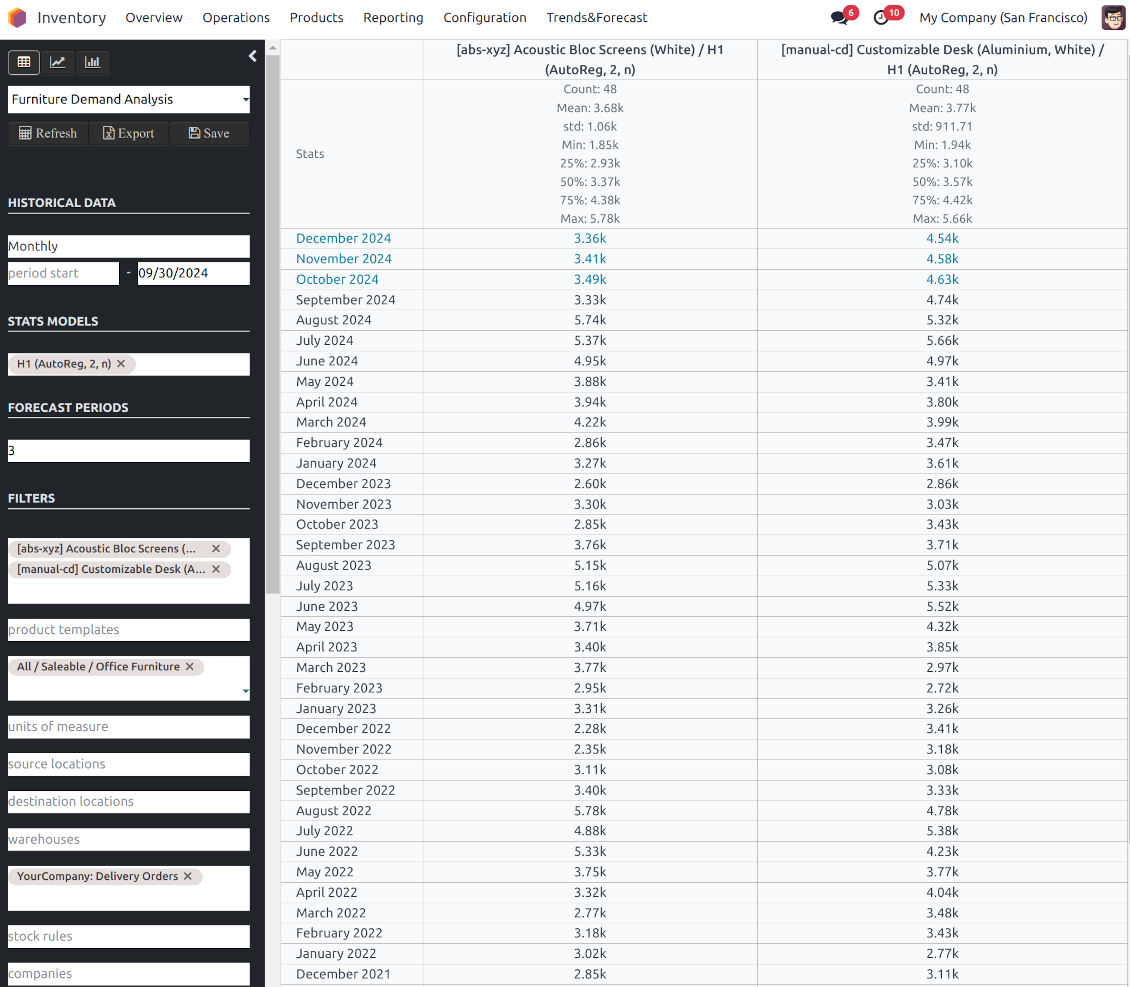
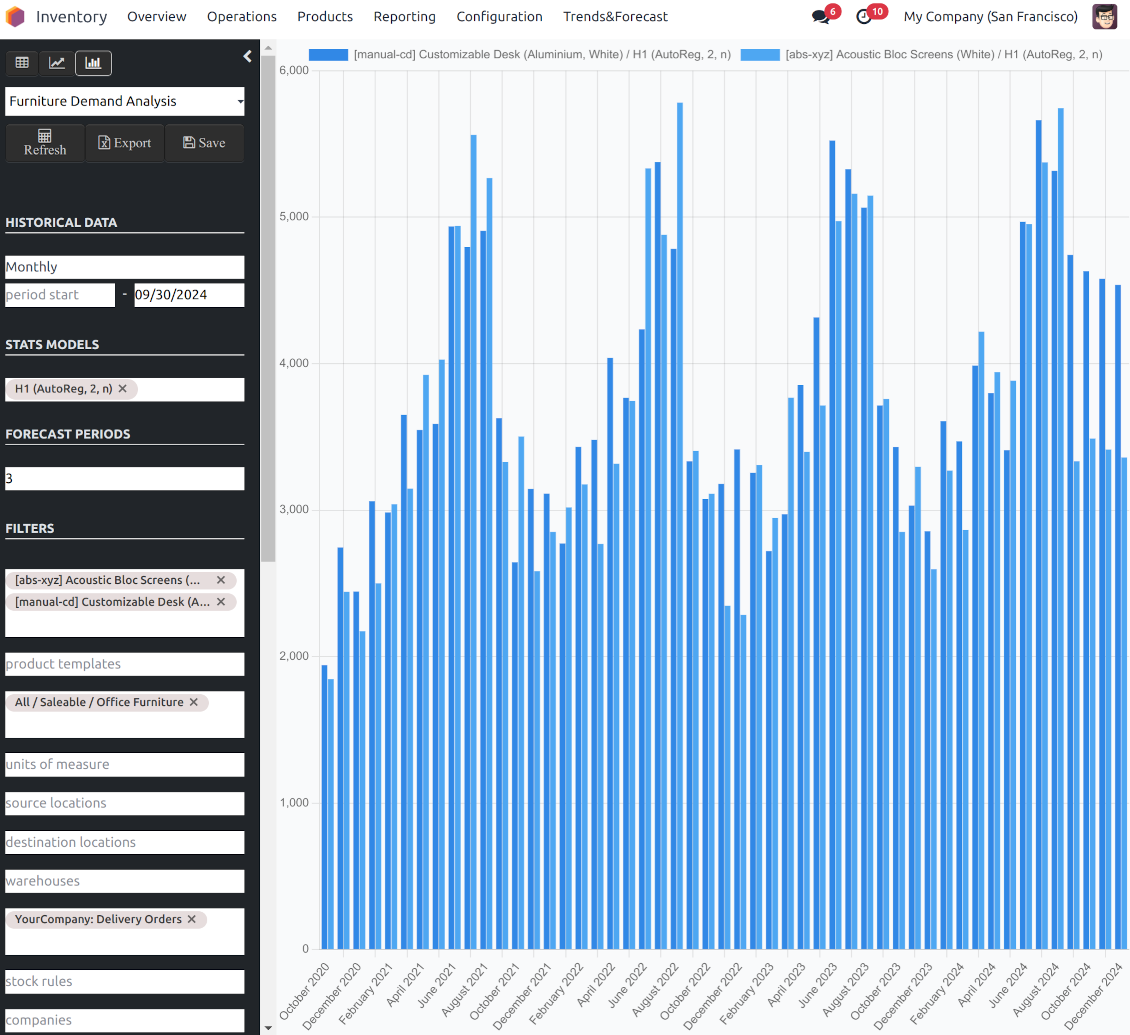
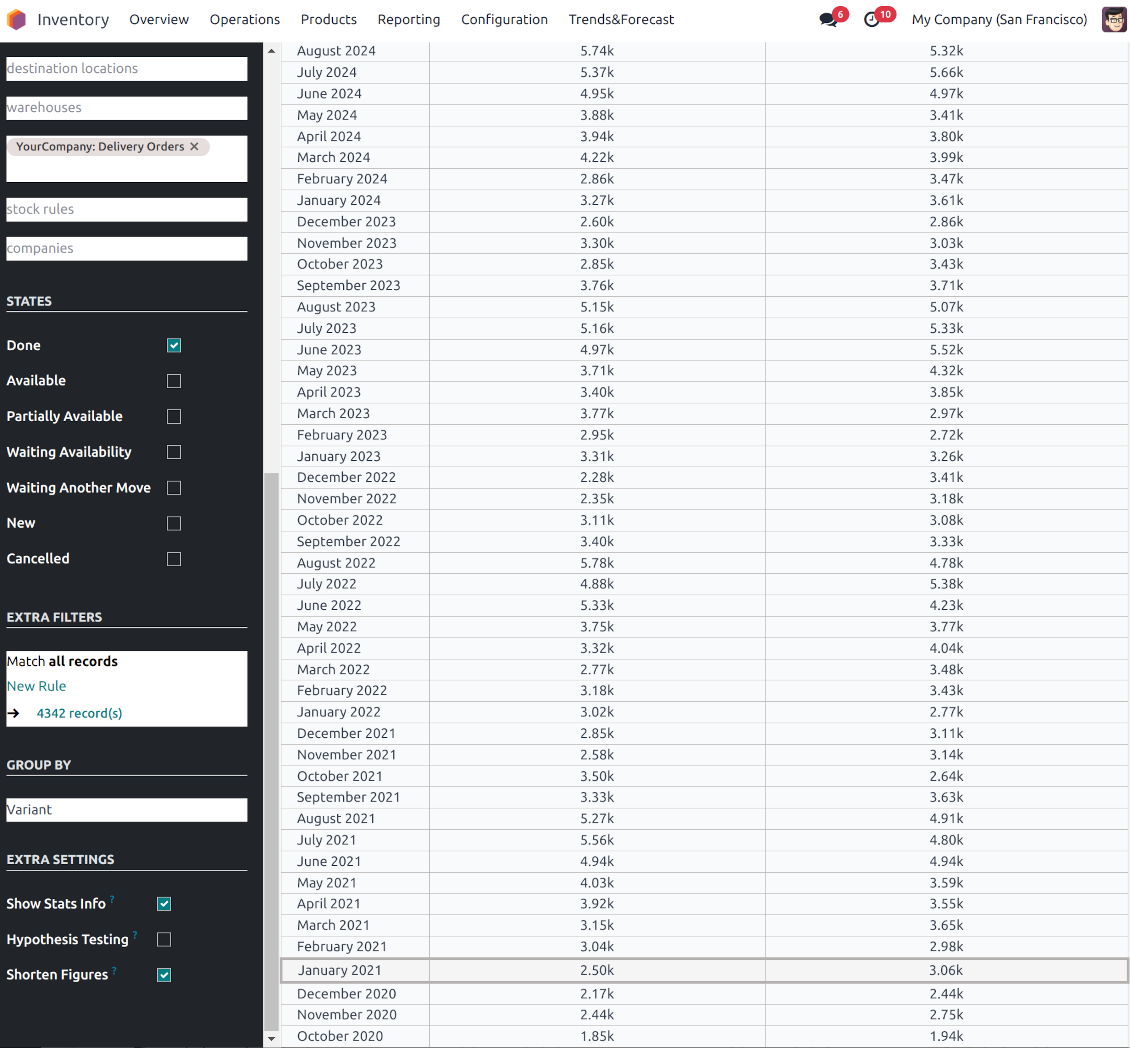
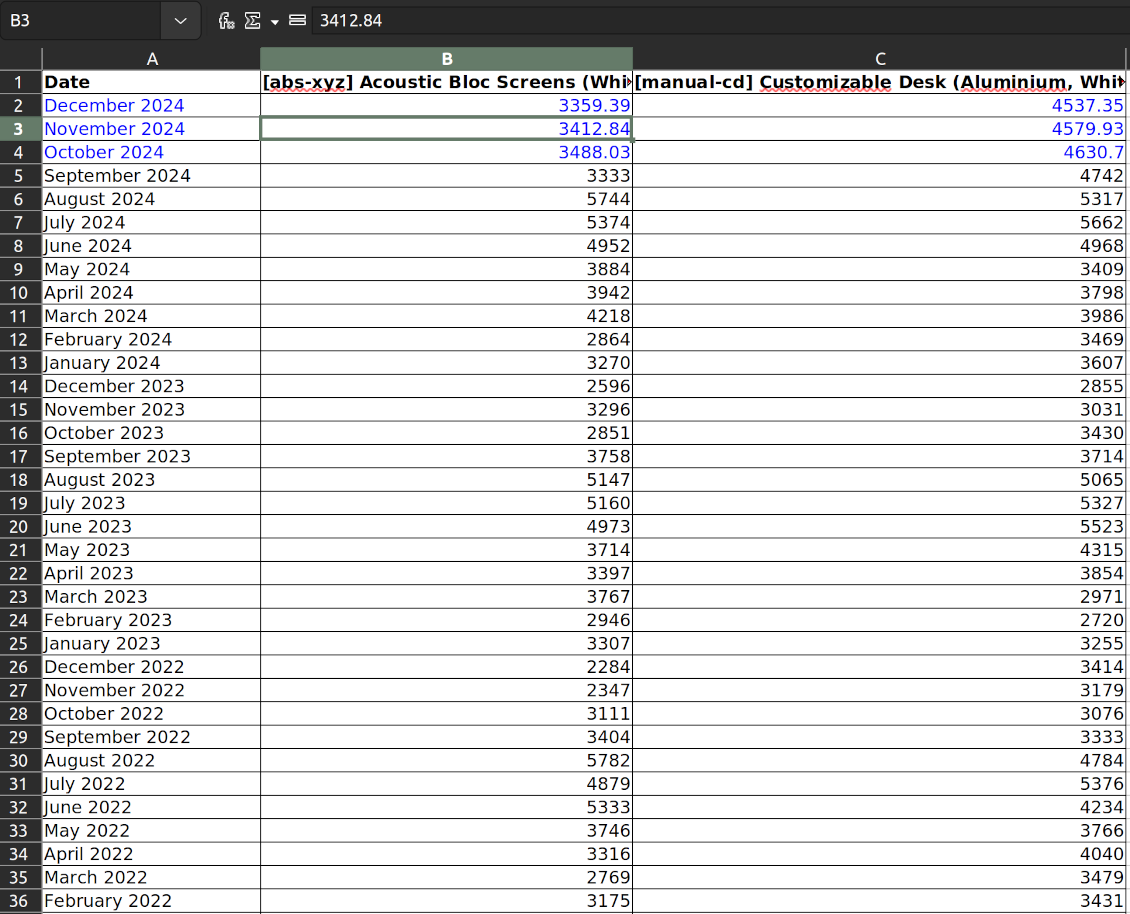
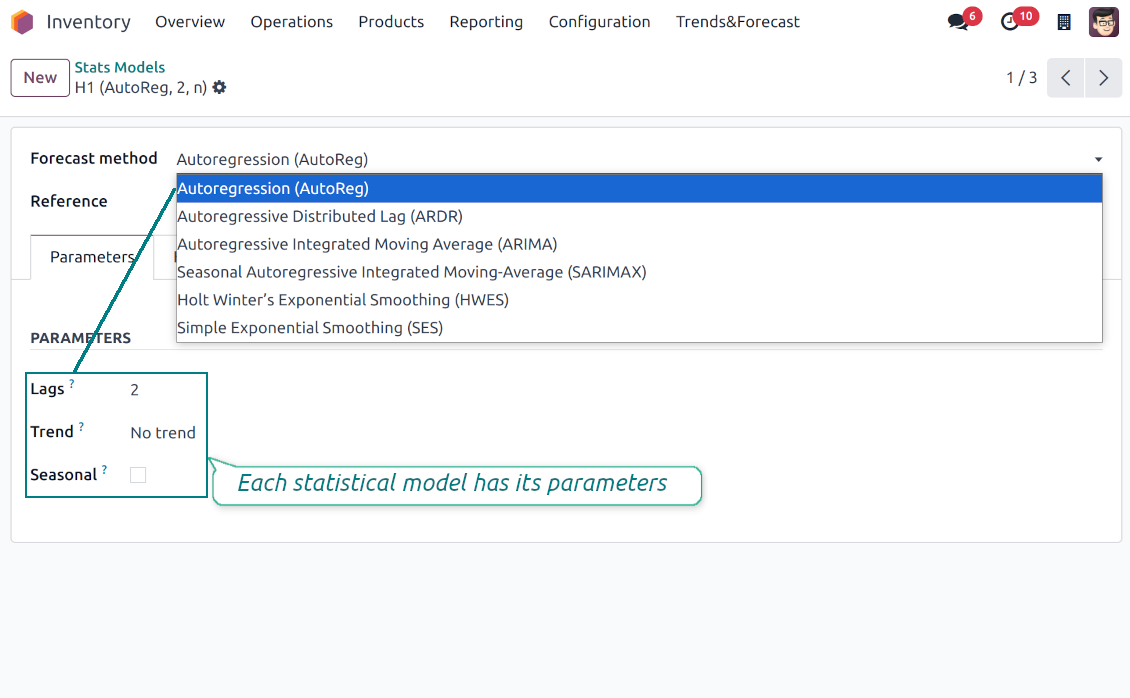
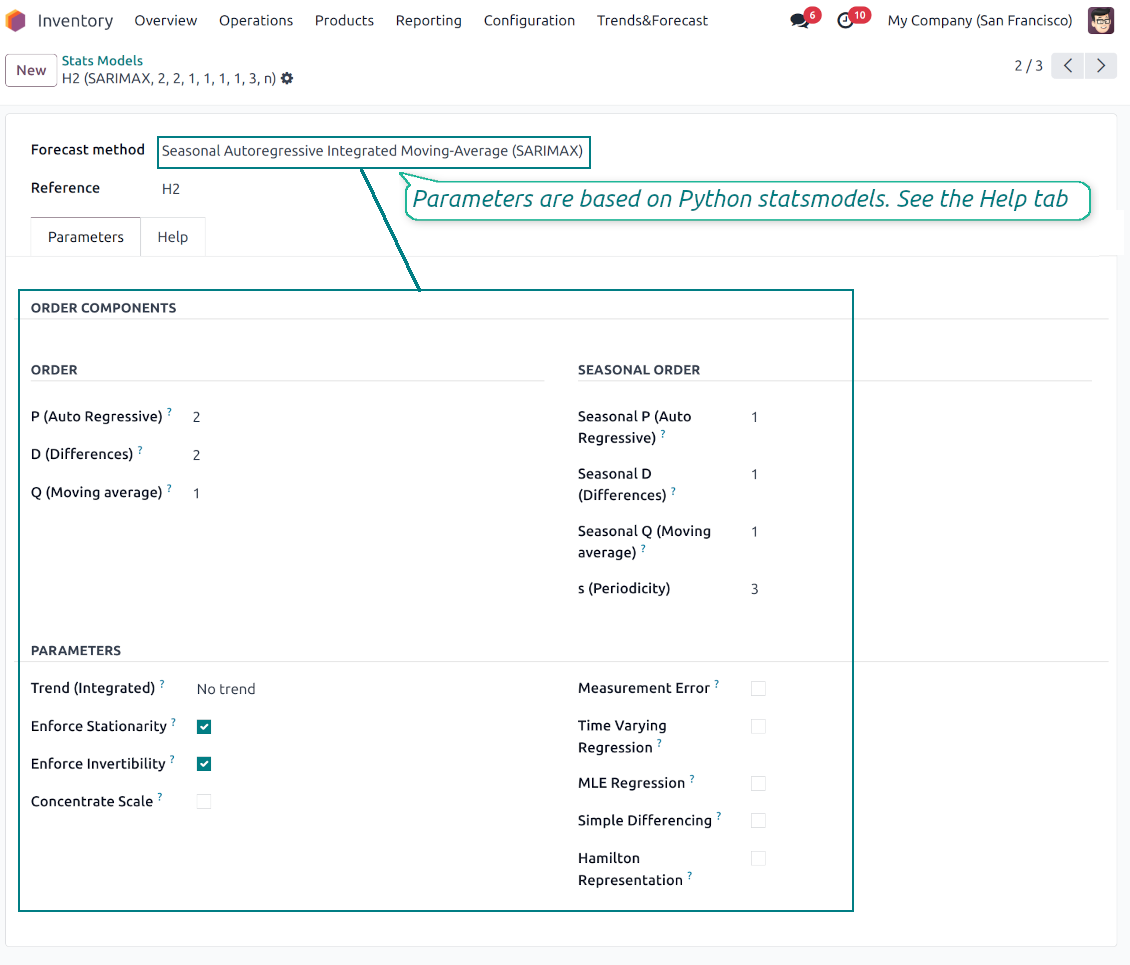
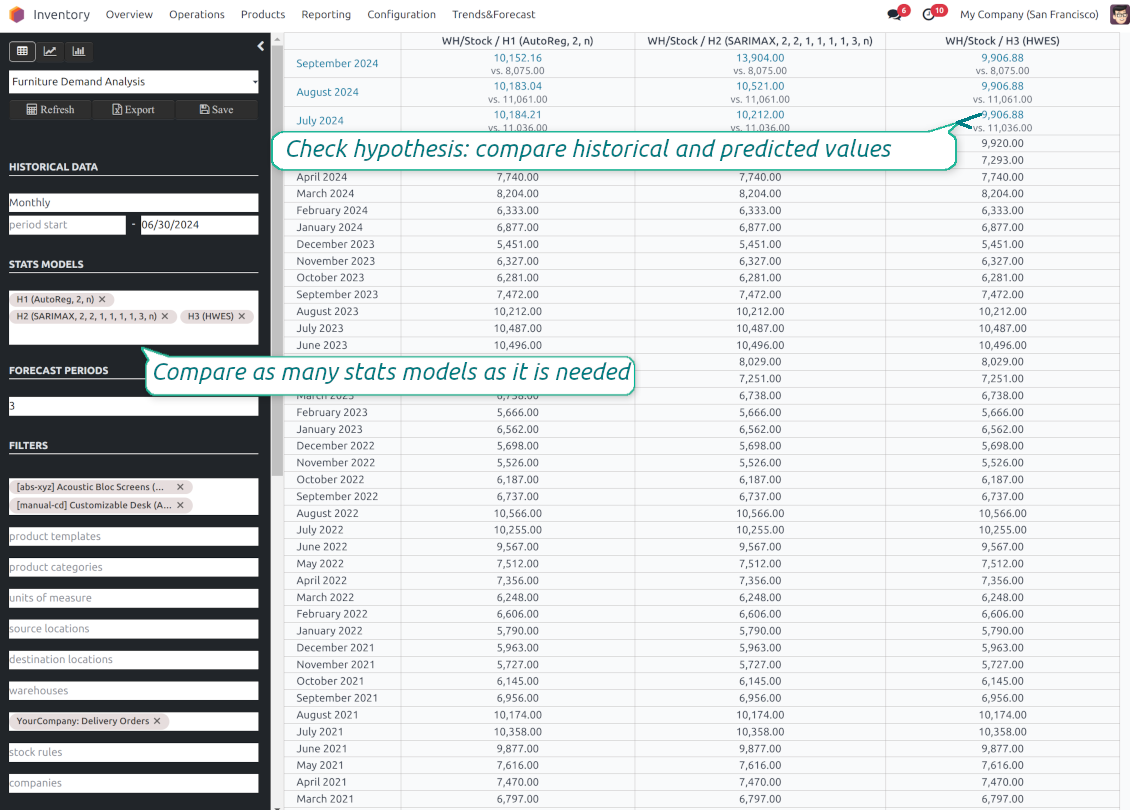
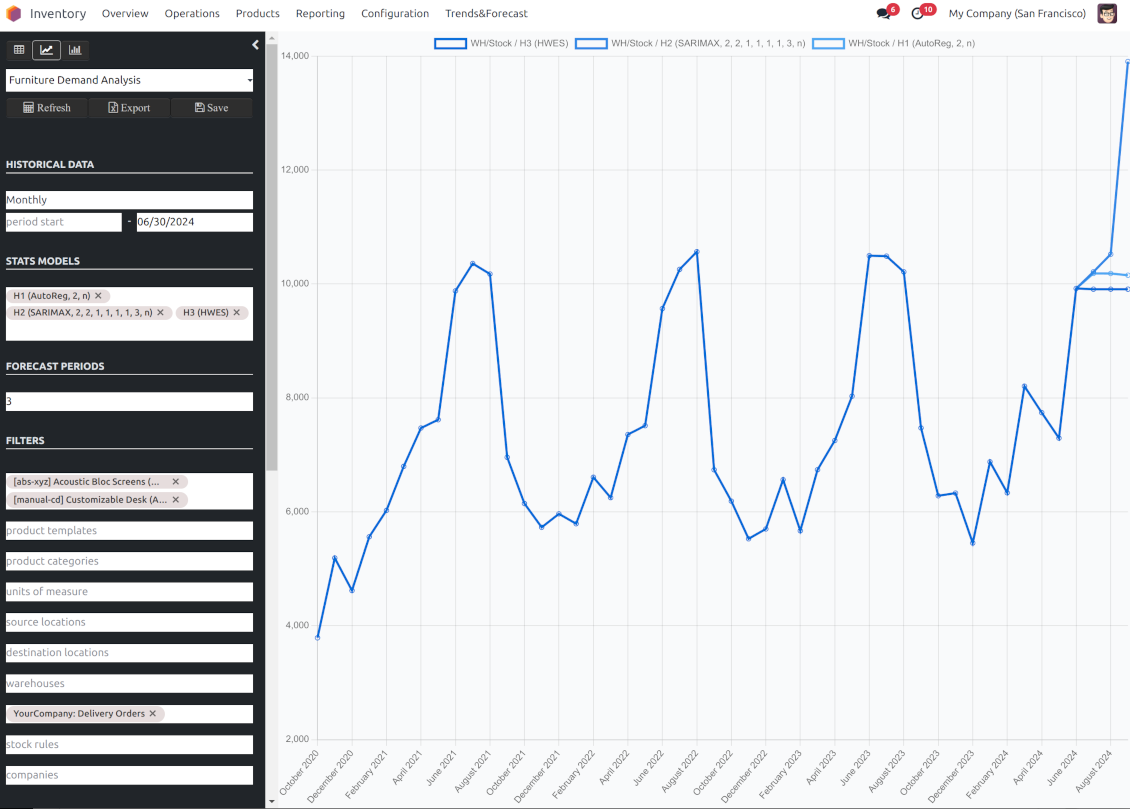
If you knew the stock demand trends of your warehouses, you would have a clue to decrease keeping costs and have a flawless supply chain. Regretfully, you can't know the future. However, you can predict it with a certain reliability. This is an Odoo tool for that goal. The app lets you construct stock demand by periods and forecast scientifically further demand based on the Python library statsmodels.
The scientific approach to forecasting
The app assumes applying statistical methods to calculate historical trends and make a forecast. Experiment with statistical models and parameters to achieve the most reliable prediction. Leverage the proven statsmodels methods
Innovative data analysis interface
The tool introduces a special interface to instantly calculate series. Flexibly switch between different reports and update settings in a few clicks. Control data in pivot, graph, or chart views. Export series as an Excel tabled
Focused analysis
Shrink considered stock operations flexibly or analyze global company inventory demand. Group data into various series
Topical data
Apply time frames for historical data and work with intervals that are of interest to your industry. Work with past and future periods.
Flexible report configuration
-
Introduce as many analytic reports as you need. Each report is based on Odoo's stock moves' data
-
Keep reports to re-use them, instantly switch between reports, or experiment with real-time changes without saving those
-
Show historical and forecast series as a table, line graph, or bar chart, or export data as an Excel table
-
Apply as many and as different statistical models as you want to check. Each stats model will peer its own data series and prediction if the latter is possible. See also the section "Statistical models"
-
Define the data periods under analysis by entering a start and end. Only inventory data within this interval will be included in the series
-
Split data series into years, quarters, months, weeks, and days depending on seasons assumed in your industry or business area
-
Select an unlimited number of periods to predict future periods or check hypotheses
-
Grant the right to forecast tools for any WMS user (the group Inventory > Stock Demand Forecast)
-
Filter stock data by product variants, product templates, product categories, units of measurement, source or destination locations, warehouses, operation/picking types, stock rules, and companies (for multi-company regimes). Introduce your own criteria based on Odoo's dynamic domain constructor, so shrink analysis by any stock move storable fields
-
Introduce a few data series simultaneously with grouping by a product variant, a unit of measurement, a source or destination location, a warehouse, a stock move state, an operation type, a stock rule, or a company. Take into that if the report assumes products with different units of measurement, the grouping will be possible only by the units or by variants
-
Hide/show general statistical measurement of series: count, mean, standard deviation, minimum, maximum, 25%, 50%, and 75% factors
-
Optionally compare predicted values to real historical data if any. See also the section "Hypothesis Testing"
-
Make figures human readable (e.g. 192,217 as 200k) or show them precisely.
Statistical models
-
The tool allows calculating inventory demand trends based on predefined statistical models introduced by the Python package statsmodels
-
Methods have different complexity, and their own unique parameters, and might be suitable for a definite market or a specific business. The final choice of the model and related statistical parameters is only up to you. Nobody except you can better understand tendencies in your company inventory demand, and hence which methods and factors should be applied
-
Available statistical models are Autoregression (AutoReg), Autoregressive Distributed Lag (ARDR), Autoregressive Integrated Moving Average (ARIMA), Seasonal Autoregressive Integrated Moving-Average (SARIMAX), Holt Winter's Exponential Smoothing (HWES), Simple Exponential Smoothing (SES)
-
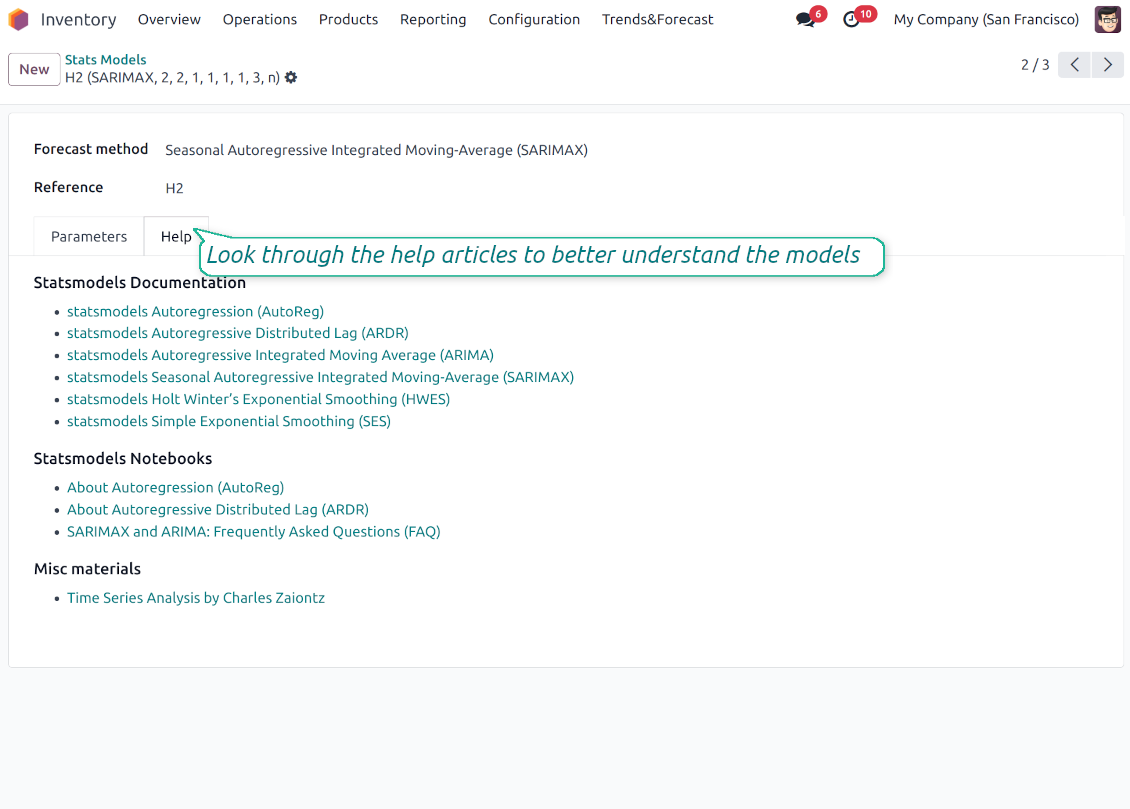
For deep details about what each stats model means and which parameters might be applied, look through the tab "Help" on the stats model form
-
Keep and use an unlimited number of stats models with various parameters. Check, compare, and update those flexibly through the forecast manager interface
-
Often models with specific parameters will not result in any prediction or the prediction will be unrealistic. This is normal, only a deep understating of trends and much experimenting might give a viable forecast for your specific case.
Hypothesis Testing
-
To get a proper prediction, it is usually needed to experiment a lot with statistical models and introduced parameters. To check the results, the app allows compare forecast data with real values
-
To check a certain assumption with historical values, you may make an analysis and prediction for some past periods, and turn on the setting "Hypothesis testing"
-
For example, you have stock moves from 2017 to 2022. Then, you can get report historical data for 2017-2021, and make the forecast for 12 months of 2022. In this way, you will get the prediction for the interval for which you already have actual values. By comparing forecast and actual values, you can decide whether a chosen model and factors are good enough
-
The app allows checking the hypotheses for a few stats models simultaneously. In this way, it is possible to reveal what is actually the most appropriate, or whether experimenting should be continued.
Usage requirements
-
To reveal trends, there should be enough historical stock moves data. It is senseless to make a forecast based on the last 5 days of operations since no trend cannot be retrieved. Take into account that data should be enough for the chosen filters and for each grouped series
-
There should be not only enough stock moves but also there should be some actual trends. Chaotic data will not result in reliable predictions. To use the app, you should understand which assumptions (e.g. seasonal changes) you check
-
To use the app, you either should have a clear understanding of how statistics works or a will to understand that. Regretfully, there is no way to make a "general" analysis, each specific case is unique and requires its own elaboration.
Mẹo cấu hình và cài đặt cho Stock Demand Trends and Forecast Odoo v.18
Python dependencies
To guarantee the tool works correctly, a number of Python libraries are required: pandas, numpy, statsmodels, scipy, xlsxwriter. To install those packages execute the command:
pip3 install pandas numpy statsmodels scipy xlsxwriter
If you run Odoo on Python prior to or equal to version 3.7, please install the following versions of the packages pandas==1.3.5, statsmodels==0.13.1
Server memory limits
Running the statistical analysis and making the forecast is quite a resource-demanding operation. If users face the hanging interface, make sure that server memory limits and timeouts are enough. Otherwise, increase those settings.
Câu hỏi thường gặp về Stock Demand Trends and Forecast Odoo v.18
Chính sách cập nhật của các công cụ của bạn là gì?
Theo chính sách hiện tại của Odoo Apps Store:
- Mọi mô-đun mua cho phiên bản 12.0 trở về trước cho phép truy cập mọi phiên bản đến 12.0.
- Từ phiên bản 13.0, mỗi phiên bản mô-đun phải mua riêng.
- Bất kể phiên bản, mua công cụ cho quyền mọi cập nhật và sửa lỗi trong một phiên bản chính.
Lưu ý rằng nhóm faOtools không kiểm soát các chính sách đó. Mọi câu hỏi xin liên hệ trực tiếp đại diện Odoo Apps Store.
Làm sao cài ứng dụng của bạn trên Odoo.sh?
Cách thẳng nhất là dùng quy trình có sẵn của cửa hàng Odoo:
1. Mở trang phân hệ và bấm nút Deploy on odoo.sh
2. Sau đó bạn sẽ được chuyển tới trang GitHub. Đăng nhập tài khoản, rồi bấm 'Create a new repo' hoặc dùng repo có sẵn. Hãy đảm bảo kho là riêng tư. Không được phép công bố ứng dụng theo giấy phép OPL-1. Nếu cần, tạo repo mới cho dự án Odoo.sh
3. Rồi vào odoo.sh và bấm nút Deploy. Trong cửa sổ pop-up, gửi quyết định và bấm 'Continue.' Thao tác này sẽ kích hoạt cài đặt.
Các bước này sẽ cài ứng dụng cho nhánh production của dự án. Nếu muốn triển khai ứng dụng cho nhánh khác hoặc cập nhật phân hệ, hãy làm các bước sau:
1. Tải mã nguồn ứng dụng từ cửa hàng Odoo
2. Commit phân hệ vào kho GitHub cần thiết. Đảm bảo không thư mục/tệp ứng dụng nào bị bỏ qua (tức không nằm trong .gitignore của repo). Kho được odoo.sh tạo tự động và mặc định có thể gồm mục quan trọng (vd. /lib). Hãy tải lên mọi thư mục, thư mục con và tệp của phân hệ, không ngoại lệ
3. Triển khai nhánh đích của dự án odoo.sh hoặc, nếu thiết lập của bạn giả định vậy, đợi đến khi được xây tự động.
Tôi nên cài ứng dụng của bạn trên máy chủ riêng thế nào?
2. Khởi động lại máy chủ Odoo;
3. Bật chế độ nhà phát triển (cài đặt kỹ thuật);
4. Cập nhật danh sách ứng dụng (menu ứng dụng);
5. Tìm ứng dụng và bấm 'Activate'/'Install';
6. Làm theo hướng dẫn trên trang ứng dụng nếu có.
Tôi thấy ứng dụng có tiện ích thêm. Có thể mua sau không?
Có, chắc chắn. Đồng thời Odoo tự thêm mọi phụ thuộc vào giỏ, nên bạn nên loại các công cụ đã mua để tránh trả hai lần.
Tôi triển khai ứng dụng trên Odoo.sh và thấy cảnh báo/lỗi trong kiểm thử
Cảnh báo đỏ/cam không ảnh hưởng đến tính năng của ứng dụng. Đáng tiếc, đôi khi phân hệ của chúng tôi không qua được các kiểm thử tự động chuẩn vì chúng giả định hành vi xung đột với mục tiêu ứng dụng. Ví dụ chúng tôi đổi cách tính giá, trong khi kiểm thử phân hệ Odoo chuẩn so giá cuối với thuật toán chuẩn.
Trước hết, hãy kiểm tra tính năng của cơ sở dữ liệu đã triển khai. Mọi thứ có chạy đúng không?
Nếu vẫn cho rằng cảnh báo ảnh hưởng tính năng thật, hãy liên hệ chúng tôi và gửi nhật ký cài đặt đầy đủ cùng danh sách đầy đủ phân hệ đã triển khai (gồm lõi và bên thứ ba).
Tôi có thể mua ứng dụng trực tiếp từ công ty bạn không?
Không, chúng tôi chỉ phân phối công cụ qua cửa hàng ứng dụng Odoo chính thức.
Tôi muốn được giảm giá
Rất tiếc, chúng tôi không có phương tiện kỹ thuật để cung cấp giá riêng.
Tôi có thể cài ứng dụng trên cơ sở dữ liệu Odoo Online (SaaS) không?
Không, ứng dụng bên thứ ba không dùng được trên Odoo Online. Rất tiếc Odoo SaaS chặn khả năng đó.
Công cụ của bạn phụ thuộc ứng dụng khác. Tôi có cần mua chúng không?
Có, công cụ cần tất cả phân hệ ghi trong phụ thuộc để chạy đúng. Giá trên trang ứng dụng đã gồm mọi phụ thuộc cần thiết.
Giá mô-đun bằng đô la Mỹ là bao nhiêu? Sao lại đổi?
Giá phân hệ của chúng tôi tính bằng euro. Cửa hàng Odoo đổi sang các tiền tệ khác theo tỷ giá nội bộ. Vì vậy giá bằng đô la Mỹ có thể đổi khi tỷ giá được cập nhật.
Lời ứng dụng và trang web ở ngôn ngữ khác tiếng Anh được hỗ trợ bởi AI và khớp với bản dịch Odoo chính thức. Nếu bạn thấy sai, gửi phiếu hỗ trợ về đúng bản dịch và chúng tôi sẽ sửa.
Cơ sở trình diễn Odoo (xem trước trực tiếp)
Với ứng dụng này, chúng tôi có thể cung cấp cơ sở demo cá nhân miễn phí.
Bạn không cần số điện thoại hay thẻ tín dụng để liên hệ. Chỉ cần đăng ký email ngắn, không quá 30 giây.
Theo yêu cầu, chúng tôi sẽ chuẩn bị cơ sở xem trước trực tiếp riêng, nơi bạn có thể thử nghiệm và kiểm tra giả định khoảng hai tuần.
Báo lỗi
Nếu gặp lỗi hoặc hành vi không nhất quán, hãy liên hệ. Chúng tôi cam kết sửa trong 60 ngày kể từ khi mua và vẫn muốn cải thiện công cụ sau giai đoạn đó.
Bạn không cần số điện thoại hay thẻ tín dụng để liên hệ. Chỉ cần đăng ký email ngắn, không quá 30 giây.
Hãy nêu càng nhiều chi tiết càng tốt trong yêu cầu: ảnh chụp màn hình, nhật ký máy chủ Odoo, mô tả đầy đủ cách tái hiện sự cố, v.v. Thường mất vài ngày làm việc để chuẩn bị kế hoạch xử lý (nếu xác nhận lỗi) hoặc hướng dẫn việc cần làm (nếu không).
Yêu cầu tính năng công khai và ý tưởng module (phát triển miễn phí)
Chúng tôi rất muốn cải thiện công cụ và biết ơn mọi phản hồi. Nếu yêu cầu của bạn hữu ích cho mọi người và có thể triển khai hiệu quả, nhóm sẽ đưa vào danh sách việc cần làm.
Danh sách việc cần làm như vậy được xử lý đều đặn và không phát sinh phí thêm. Dù chúng tôi không hứa hạn chót và thiết kế cuối, đây có thể là cách tốt để có tính năng mong muốn mà không đầu tư và rủi ro.
Bạn không cần số điện thoại hay thẻ tín dụng để liên hệ. Chỉ cần đăng ký email ngắn, không quá 30 giây.
18.0.1.0.9
- The bug with pandas compatibility has been fixed.
18.0.1.0.8
- Đã sửa sự cố bộ lọc gần như vô hình.
18.0.1.0.7
- Đã khắc phục sự cố cảnh báo chưa dịch.
18.0.1.0.6
- Dải Archived cho bản ghi không hoạt động được thêm cho chế độ xem biểu mẫu mô hình và báo cáo đã lưu.
18.0.1.0.5
- Ứng dụng đã được xuất bản cho phiên bản 18.
17.0.1.0.6
- Thuật toán phân tích đã được tối ưu để loại bỏ việc đọc thừa.

Công cụ sắp xếp linh hoạt tệp đính kèm Odoo vào thư mục và đồng bộ thư mục với máy khách đám mây: Google Drive, OneDrive/SharePoint, Nextcloud/ownCloud, Dropbox, Amazon S3, Box và NAS. DMS. Trình quản lý tệp. Hệ thống quản lý tài liệu
398€

The tool to build a deep and structured knowledge base for internal and external use. Knowledge System. KMS. Wiki-like revisions.
398€
The tool to automatically synchronize Odoo attachments with OneDrive files in both ways
487€
The tool to set up KPI targets and control their fulfillment by periods. KPI dashboards. Dashboard designer. KPI charts

The tool to automatically synchronize Odoo attachments with Google Drive files in both ways
487€
The tool for time-based service management from booking appointments to sales and reviews
398€

The tool to make inventory data essential and comfortable for elaboration. Stocks analysis
38€