Stock Demand Trends and Forecast v.18
The tool to calculate stock demand trends and make predictions for future demand statistically
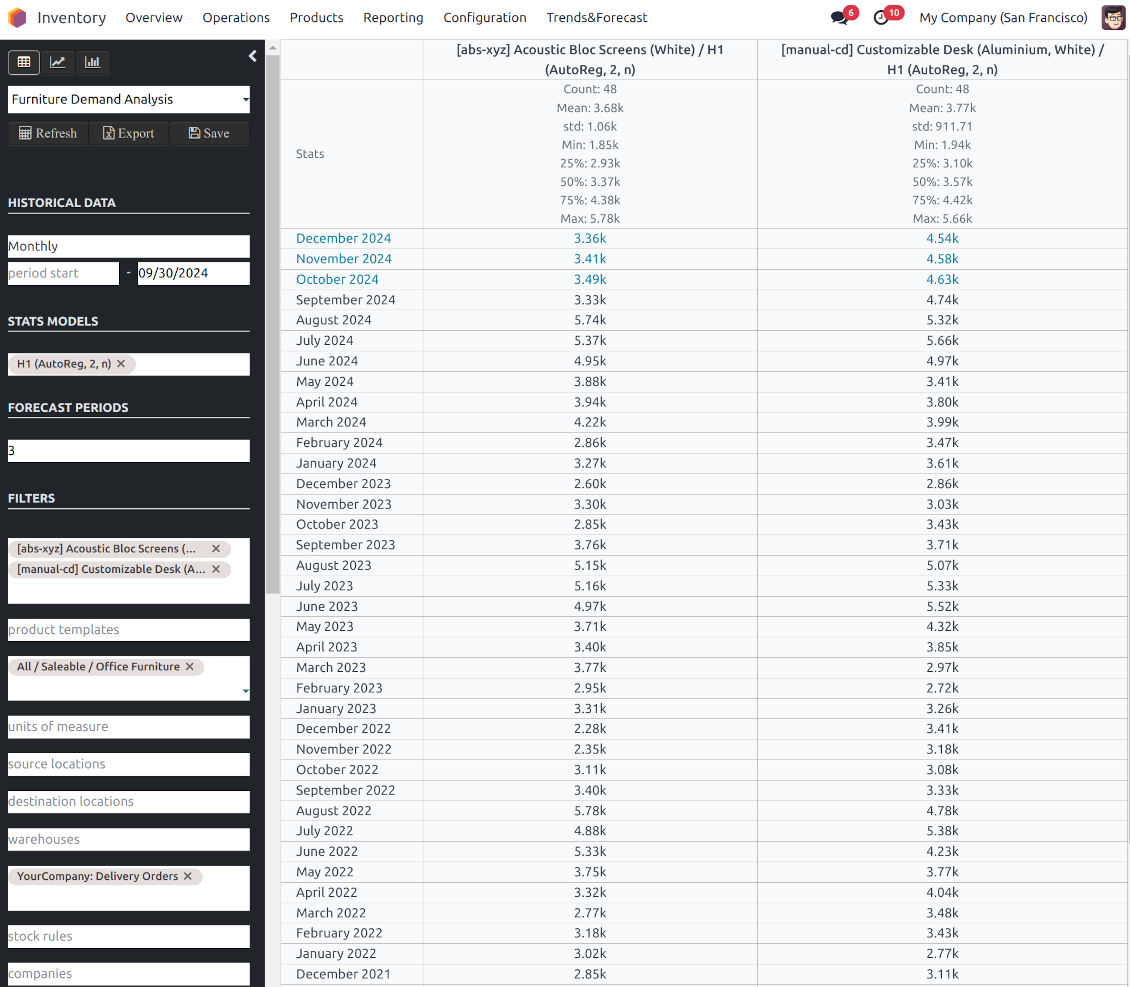
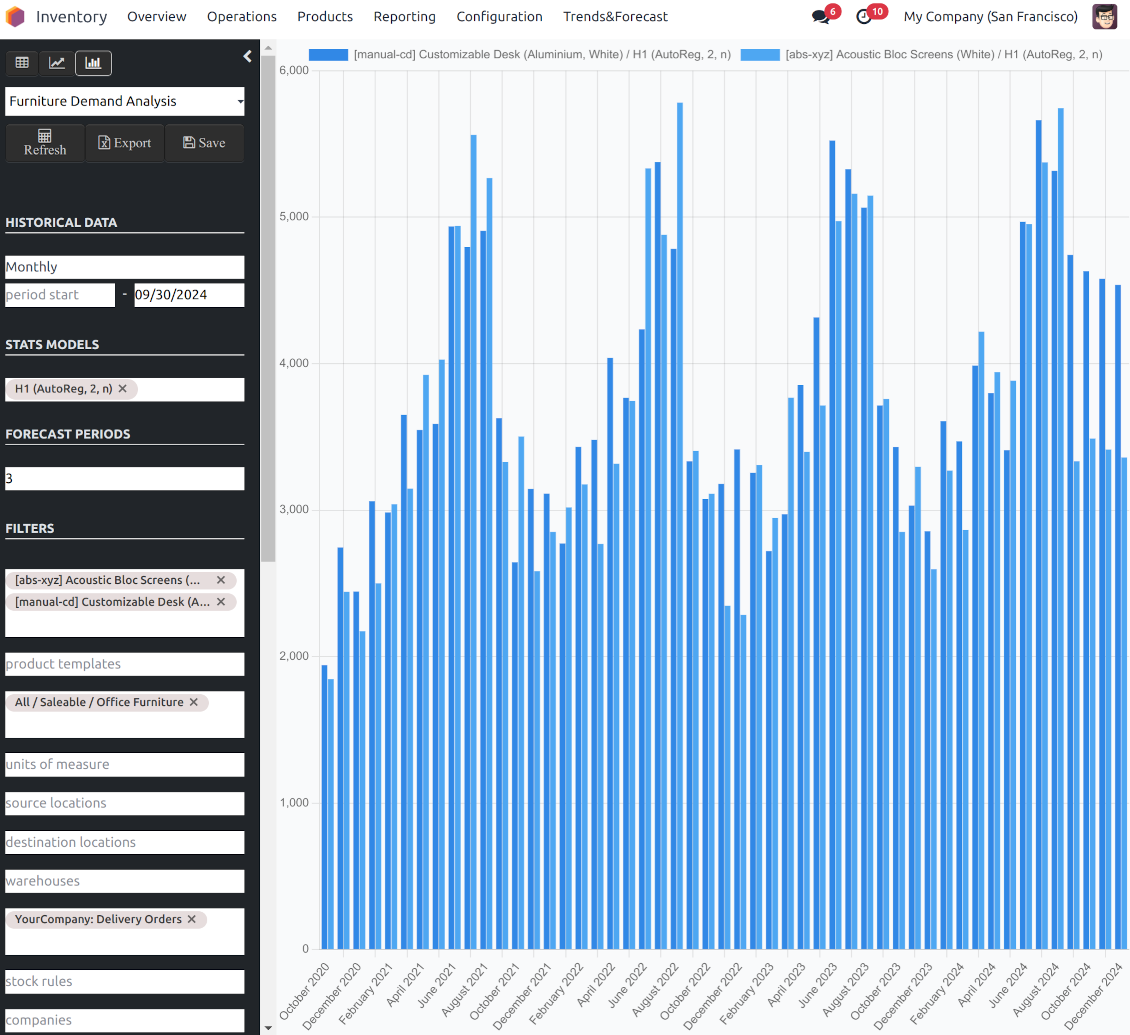
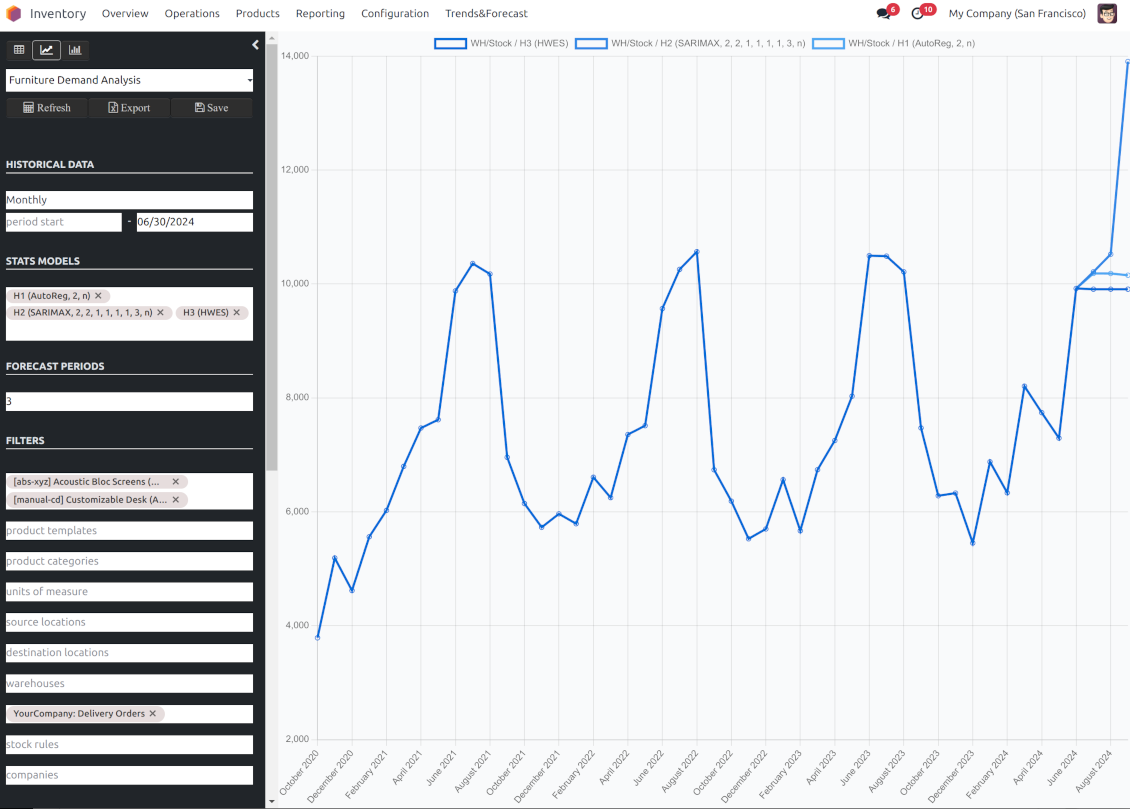
If you knew the stock demand trends of your warehouses, you would have a clue to decrease keeping costs and have a flawless supply chain. Regretfully, you can't know the future. However, you can predict it with a certain reliability. This is an Odoo tool for that goal. The app lets you construct stock demand by periods and forecast scientifically further demand based on the Python library statsmodels.
The scientific approach to forecasting
The app assumes applying statistical methods to calculate historical trends and make a forecast. Experiment with statistical models and parameters to achieve the most reliable prediction. Leverage the proven statsmodels methods
Innovative data analysis interface
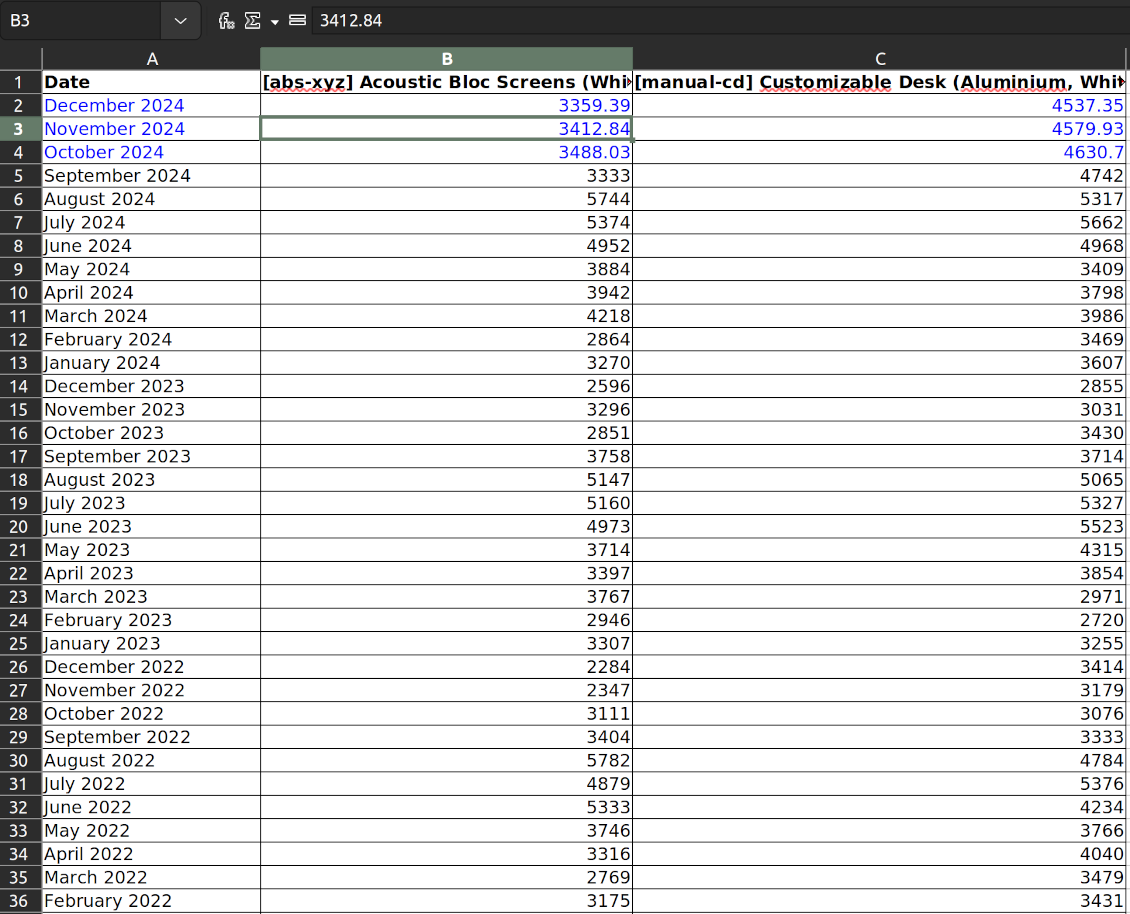
The tool introduces a special interface to instantly calculate series. Flexibly switch between different reports and update settings in a few clicks. Control data in pivot, graph, or chart views. Export series as an Excel tabled
Focused analysis
Shrink considered stock operations flexibly or analyze global company inventory demand. Group data into various series
Topical data
Apply time frames for historical data and work with intervals that are of interest to your industry. Work with past and future periods.
Flexible report configuration
-
Introduce as many analytic reports as you need. Each report is based on Odoo's stock moves' data
-
Keep reports to re-use them, instantly switch between reports, or experiment with real-time changes without saving those
-
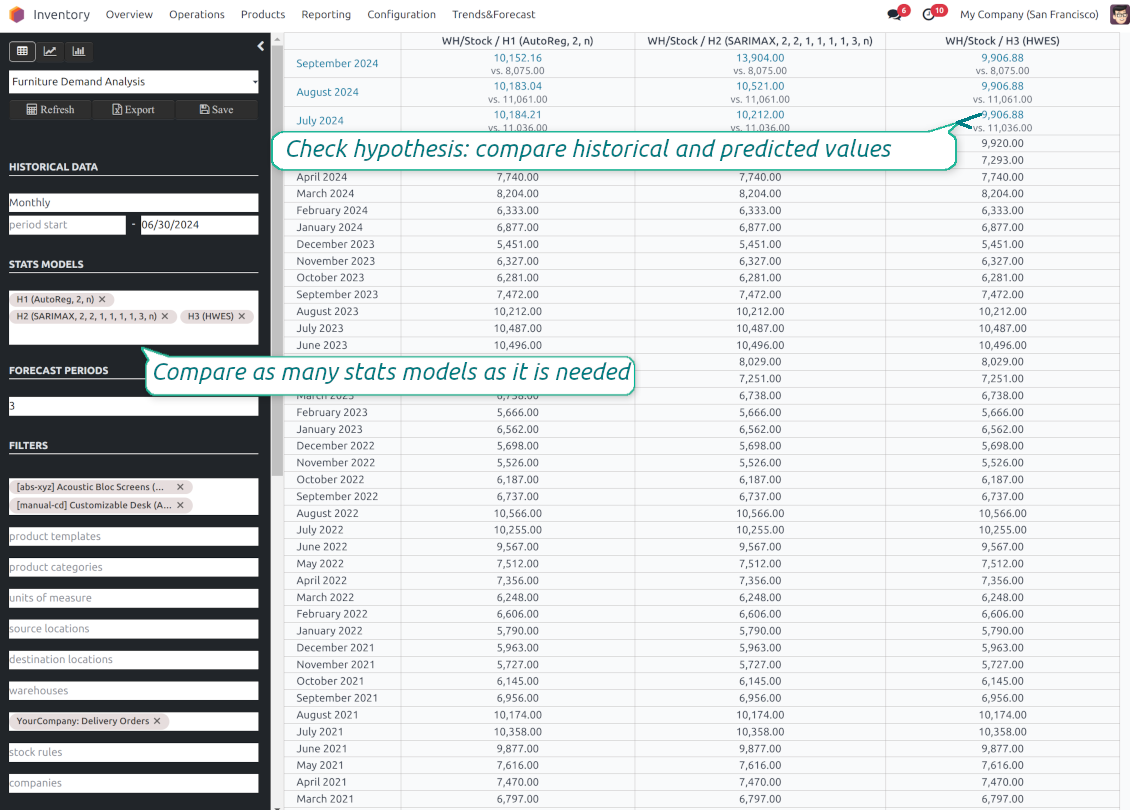
Show historical and forecast series as a table, line graph, or bar chart, or export data as an Excel table
-
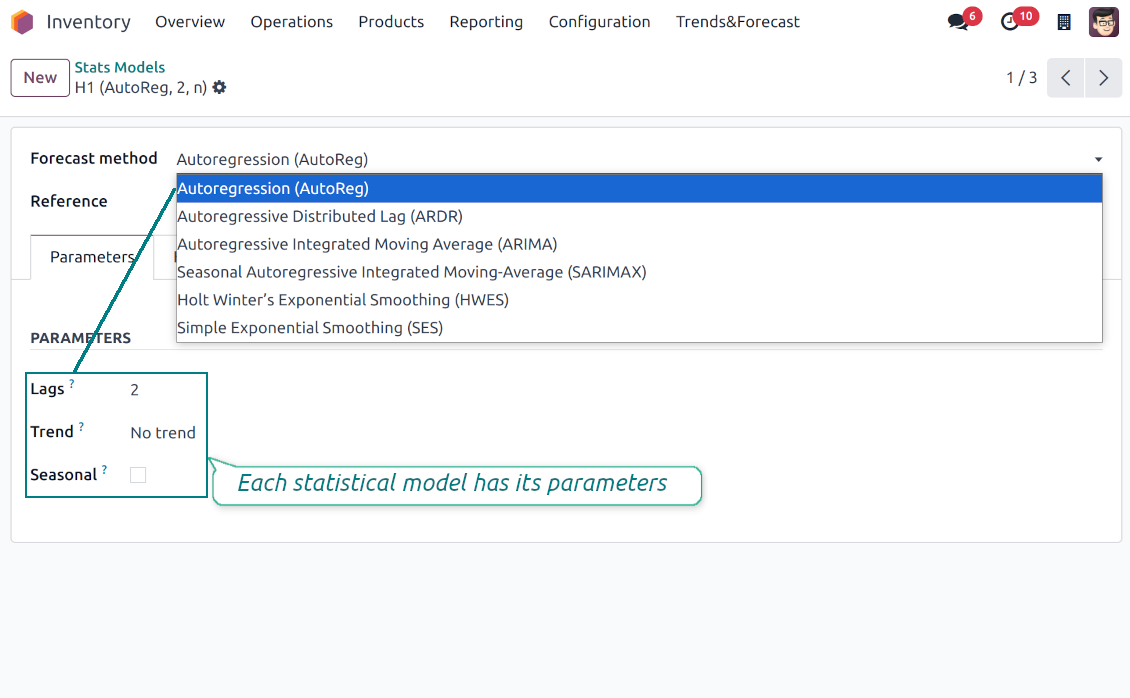
Apply as many and as different statistical models as you want to check. Each stats model will peer its own data series and prediction if the latter is possible. See also the section "Statistical models"
-
Define the data periods under analysis by entering a start and end. Only inventory data within this interval will be included in the series
-
Split data series into years, quarters, months, weeks, and days depending on seasons assumed in your industry or business area
-
Select an unlimited number of periods to predict future periods or check hypotheses
-
Grant the right to forecast tools for any WMS user (the group Inventory > Stock Demand Forecast)
-
Filter stock data by product variants, product templates, product categories, units of measurement, source or destination locations, warehouses, operation/picking types, stock rules, and companies (for multi-company regimes). Introduce your own criteria based on Odoo's dynamic domain constructor, so shrink analysis by any stock move storable fields
-
Introduce a few data series simultaneously with grouping by a product variant, a unit of measurement, a source or destination location, a warehouse, a stock move state, an operation type, a stock rule, or a company. Take into that if the report assumes products with different units of measurement, the grouping will be possible only by the units or by variants
-
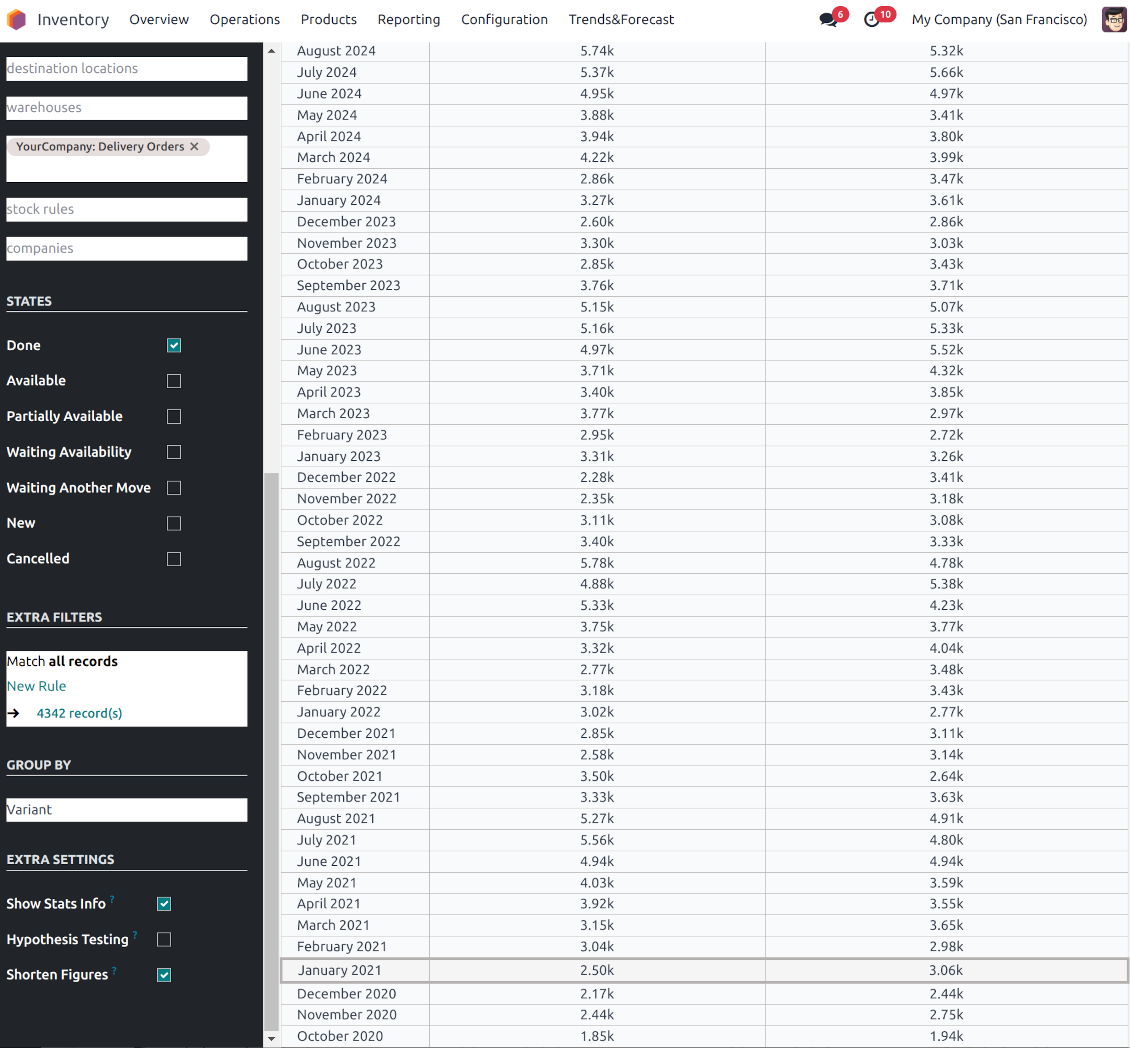
Hide/show general statistical measurement of series: count, mean, standard deviation, minimum, maximum, 25%, 50%, and 75% factors
-
Optionally compare predicted values to real historical data if any. See also the section "Hypothesis Testing"
-
Make figures human readable (e.g. 192,217 as 200k) or show them precisely.
Statistical models
-
The tool allows calculating inventory demand trends based on predefined statistical models introduced by the Python package statsmodels
-
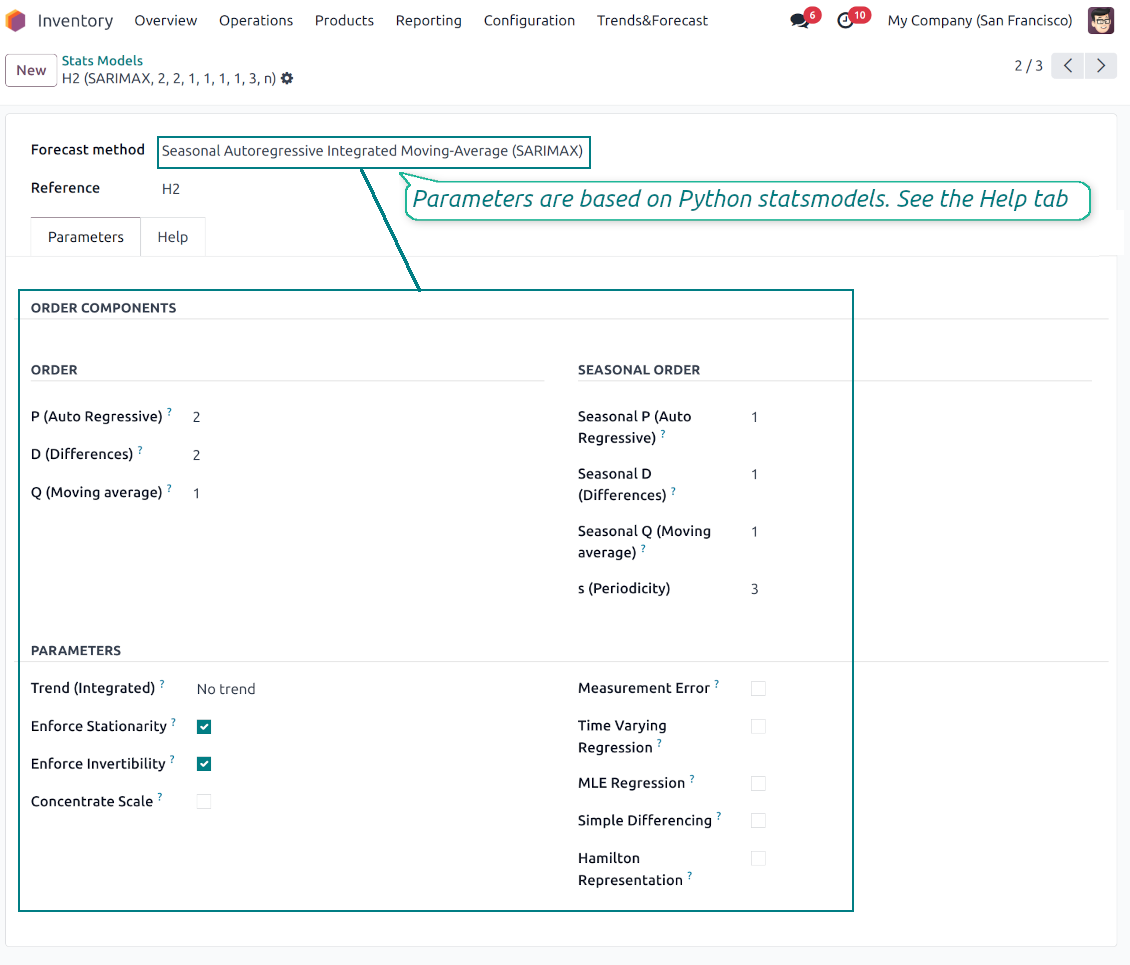
Methods have different complexity, and their own unique parameters, and might be suitable for a definite market or a specific business. The final choice of the model and related statistical parameters is only up to you. Nobody except you can better understand tendencies in your company inventory demand, and hence which methods and factors should be applied
-
Available statistical models are Autoregression (AutoReg), Autoregressive Distributed Lag (ARDR), Autoregressive Integrated Moving Average (ARIMA), Seasonal Autoregressive Integrated Moving-Average (SARIMAX), Holt Winter's Exponential Smoothing (HWES), Simple Exponential Smoothing (SES)
-
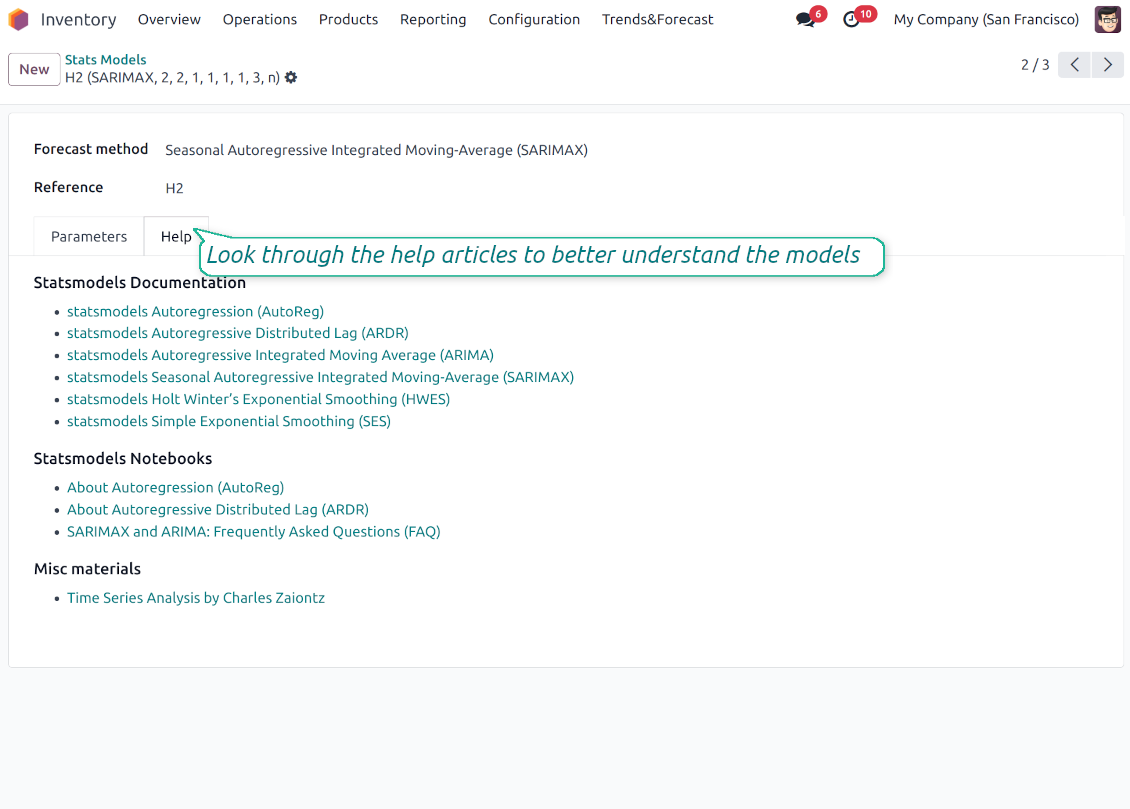
For deep details about what each stats model means and which parameters might be applied, look through the tab "Help" on the stats model form
-
Keep and use an unlimited number of stats models with various parameters. Check, compare, and update those flexibly through the forecast manager interface
-
Often models with specific parameters will not result in any prediction or the prediction will be unrealistic. This is normal, only a deep understating of trends and much experimenting might give a viable forecast for your specific case.
Hypothesis Testing
-
To get a proper prediction, it is usually needed to experiment a lot with statistical models and introduced parameters. To check the results, the app allows compare forecast data with real values
-
To check a certain assumption with historical values, you may make an analysis and prediction for some past periods, and turn on the setting "Hypothesis testing"
-
For example, you have stock moves from 2017 to 2022. Then, you can get report historical data for 2017-2021, and make the forecast for 12 months of 2022. In this way, you will get the prediction for the interval for which you already have actual values. By comparing forecast and actual values, you can decide whether a chosen model and factors are good enough
-
The app allows checking the hypotheses for a few stats models simultaneously. In this way, it is possible to reveal what is actually the most appropriate, or whether experimenting should be continued.
Usage requirements
-
To reveal trends, there should be enough historical stock moves data. It is senseless to make a forecast based on the last 5 days of operations since no trend cannot be retrieved. Take into account that data should be enough for the chosen filters and for each grouped series
-
There should be not only enough stock moves but also there should be some actual trends. Chaotic data will not result in reliable predictions. To use the app, you should understand which assumptions (e.g. seasonal changes) you check
-
To use the app, you either should have a clear understanding of how statistics works or a will to understand that. Regretfully, there is no way to make a "general" analysis, each specific case is unique and requires its own elaboration.
Nasveti za konfiguracijo in namestitev za Stock Demand Trends and Forecast Odoo v.18
Python dependencies
To guarantee the tool works correctly, a number of Python libraries are required: pandas, numpy, statsmodels, scipy, xlsxwriter. To install those packages execute the command:
pip3 install pandas numpy statsmodels scipy xlsxwriter
If you run Odoo on Python prior to or equal to version 3.7, please install the following versions of the packages pandas==1.3.5, statsmodels==0.13.1
Server memory limits
Running the statistical analysis and making the forecast is quite a resource-demanding operation. If users face the hanging interface, make sure that server memory limits and timeouts are enough. Otherwise, increase those settings.
Pogosta vprašanja o Stock Demand Trends and Forecast Odoo v.18
Kakšne so politike posodobitev vaših orodij?
Glede na veljavna pravila Odoo Apps Store:
- Vsak modul, kupljen za različico 12.0 in starejše, omogoča dostop do vseh različic do 12.0.
- Od različice 13.0 je treba vsako različico modula kupiti posebej.
- Ne glede na različico nakup daje pravico do vseh posodobitev in popravkov znotraj glavne različice.
Upoštevajte, da ekipa faOtools teh pravil ne nadzoruje. Za vprašanja se obrnite neposredno na predstavnike Odoo Apps Store.
Kako namestim vašo aplikacijo na Odoo.sh?
Najbolj neposreden pristop je uporaba vgrajenega poteka dela trgovine Odoo:
1. Odprite stran modula in kliknite gumb Deploy on odoo.sh
2. Nato boste preusmerjeni na stran GitHub. Prijavite se v račun, nato kliknite 'Create a new repo' ali uporabite obstoječega. Poskrbite, da je skladišče zasebno. Objavljanje aplikacij pod licenco OPL-1 ni dovoljeno. Po potrebi ustvarite nov repo za projekt Odoo.sh
3. Nato pojdite na odoo.sh in kliknite gumb Deploy. V pojavnem oknu potrdite odločitev in kliknite 'Continue.' To sproži namestitev.
Ti koraki namestijo aplikacijo na produkcijsko vejo projekta. Če želite aplikacije namestiti na druge veje ali posodobiti modul, opravite naslednje:
1. Naložite izvorno kodo aplikacije iz trgovine Odoo
2. Naredite commit modula v zahtevano skladišče GitHub. Poskrbite, da ni nobena mapa/datoteka aplikacije prezrta (tj. ni v .gitignore skladišča). Skladišča samodejno ustvari odoo.sh in lahko privzeto vsebujejo ključne elemente (npr. /lib). Naložite vse imenike, podimenike in datoteke modula brez izjem
3. Namestite ciljno vejo projekta odoo.sh ali, če to predvidevajo nastavitve, počakajte, da se samodejno izgradi.
Kako namestim vašo aplikacijo na lastnem strežniku?
2. Znova zaženite strežnik Odoo;
3. Vklopite način za razvijalce (tehnične nastavitve);
4. Posodobite seznam aplikacij (meni aplikacij);
5. Poiščite aplikacijo in pritisnite „Activate“/„Install“;
6. Sledite smernicam na strani aplikacije, če obstajajo.
Opazil sem, da ima vaša aplikacija dodatne dodatke. Jih smem kupiti pozneje?
Da, seveda. Hkrati Odoo samodejno doda vse odvisnosti v košarico, zato morate predhodno kupljena orodja izključiti, da se izognete dvojnemu plačilu.
Namestil sem vašo aplikacijo na Odoo.sh in v testih vidim opozorilo/napako
Rdeče/oranžno opozorilo ne vpliva na funkcije aplikacije. Žal naši moduli včasih ne opravijo standardnih samodejnih testov, ker ti predvidevajo vedenje, ki je v nasprotju s cilji aplikacije. Na primer spreminjamo izračun cene, medtem ko testi standardnega modula Odoo primerjajo končno ceno s standardnim algoritmom.
Najprej preverite funkcije nameščene zbirke. Ali vse deluje pravilno?
Če še vedno menite, da opozorilo vpliva na resnične funkcije, nas kontaktirajte in pošljite popolne dnevnike namestitve ter popoln seznam nameščenih modulov (vključno z jedrom in tretjimi).
Ali lahko kupim aplikacijo neposredno pri vašem podjetju?
Ne, orodja razširjamo samo prek uradne trgovine aplikacij Odoo.
Rad bi dobil popust
Žal nimamo tehničnih sredstev za individualne cene.
Ali lahko namestim aplikacijo v svojo zbirko Odoo Online (SaaS)?
Ne, aplikacij tretjih oseb ni mogoče uporabljati na Odoo Online. Žal Odoo SaaS to preprečuje.
Vaše orodje je odvisno od drugih aplikacij. Ali jih moram kupiti?
Da, orodje potrebuje vse module, označene v odvisnostih, da deluje pravilno. Cena na strani aplikacije že vključuje vse potrebne odvisnosti.
Kakšna je cena modula v ameriških dolarjih? Zakaj se je spremenila?
Cena naših modulov je v evrih. Trgovina Odoo pretvarja cene v druge valute po notranjem tečaju. Zato se lahko cena v ameriških dolarjih spremeni, ko se tečaj posodobi.
Besedila aplikacije in spletnega mesta v jezikih, ki niso angleščina, so pripravljena z UI in usklajena z uradnimi prevodi Odoo. Če opazite napako, pošljite zahtevek o pravilnosti prevodov in jo bomo popravili.
Predstavitvene zbirke Odoo (predogledi v živo)
Za to aplikacijo lahko zagotovimo brezplačno prilagojeno demo zbirko.
Za stik ne potrebujete telefonske številke niti kreditne kartice. Potrebna je le kratka prijava z e-pošto, ki ne traja več kot 30 sekund.
Na vašo zahtevo pripravimo individualno zbirko za predogled v živo, kjer lahko približno dva tedna izvajate teste in preverjate predpostavke.
Prijavljanje napak
Če naletite na napake ali nedosledno vedenje, nas ne oklevajte kontaktirati. Zagotavljamo popravke v 60 dneh od nakupa in tudi po tem obdobju želimo izboljševati orodja.
Za stik ne potrebujete telefonske številke niti kreditne kartice. Potrebna je le kratka prijava z e-pošto, ki ne traja več kot 30 sekund.
V zahtevo vključite čim več podrobnosti: posnetke zaslona, dnevnike strežnika Odoo, celoten opis ponovitve težave in podobno. Običajno traja nekaj delovnih dni, da pripravimo delovni načrt (če je napaka potrjena) ali smernice, kaj storiti (sicer).
Javne zahteve za funkcije in ideje modulov (brezplačen razvoj)
Močno nas žene izboljševanje orodij in hvaležni smo za vsako povratno informacijo. Če so vaše zahteve v splošno korist in jih je mogoče učinkovito uresničiti, jih bo ekipa vključila na naš seznam opravil.
Tak seznam opravil obdelujemo redno in ne predvideva dodatnih stroškov. Čeprav ne moremo obljubiti rokov in končne zasnove, je to lahko dober način, da dobite želene funkcije brez naložb in tveganj.
Za stik ne potrebujete telefonske številke niti kreditne kartice. Potrebna je le kratka prijava z e-pošto, ki ne traja več kot 30 sekund.
18.0.1.0.9
- The bug with pandas compatibility has been fixed.
18.0.1.0.8
- Odpravljena je težava s skoraj nevidnimi filtri.
18.0.1.0.7
- Težava s neprevedenimi opozorili je odpravljena.
18.0.1.0.6
- Trak Archived za neaktivne zapise je dodan za obrazce modelov in shranjenih poročil.
18.0.1.0.5
- Aplikacija je objavljena za različico 18.
17.0.1.0.6
- Algoritem analize je optimiziran, da odstrani odvečno branje.

Orodje za prilagodljivo razvrščanje prilog Odoo v mape in sinhronizacijo imenikov z oblačnimi odjemalci: Google Drive, OneDrive/SharePoint, Nextcloud/ownCloud, Dropbox, Amazon S3, Box in NAS. DMS. Upravitelj datotek. Sistem za upravljanje dokumentov
398€

The tool to build a deep and structured knowledge base for internal and external use. Knowledge System. KMS. Wiki-like revisions.
398€
The tool to automatically synchronize Odoo attachments with OneDrive files in both ways
487€
The tool to set up KPI targets and control their fulfillment by periods. KPI dashboards. Dashboard designer. KPI charts

The tool to automatically synchronize Odoo attachments with Google Drive files in both ways
487€
The tool for time-based service management from booking appointments to sales and reviews
398€

The tool to make inventory data essential and comfortable for elaboration. Stocks analysis
38€