Tóm lại
Odoo Email From là ứng dụng Odoo 17 Thảo luận. The tool to flexibly administer email From and Reply-To addresses. Custom email from.
Odoo Email From controls which From and Reply-To address is used for every outgoing email, without exposing addresses your outgoing mail server does not support. Maintain a managed address list, each locked to one outgoing server, pick those addresses in the composer and on email templates, and define metadata rules that choose the right sender for a given model and record. The module replaces Odoo's free-text Send From / Reply To controls with managed pickers and fills the native template and sending fields behind the scenes, so you do not configure the same metadata twice.
Lý tưởng cho
Multi-brand and multi-department companies
Perfect for organizations that need different From/Reply-To addresses per brand, department or sales team, without letting every user type in an arbitrary address.
Companies using several outgoing mail servers
Ideal when different SMTP relays or providers are configured in Odoo and each sender address must only ever go out through its matching server.
Teams wanting automated sender selection
Useful for automating which address is used for a given document type or business scenario, instead of relying on users to remember and pick the right one every time.
Vì sao nhóm chọn nó
Lợi ích chính trước khi vào chi tiết
Managed address book
Maintain the allowed From and Reply-To addresses, each linked to the outgoing mail server that actually supports it.
From and Reply-To in the composer
Let users choose an approved sender straight in the full composer instead of free-typing an address.
Template sender addresses
Set a managed From/Reply-To on mail templates and apply it automatically whenever the template runs.
Metadata rules
Pick the sender automatically by document type and domain filter, with optional priority over template defaults.
Matching outgoing server
Every address is tied to one outgoing server, and the server field is hidden when a single server is configured.
Enforced consistency
An XML domain plus a Python check block mismatched address and server pairs, even when sending through the API.
Sẵn sàng đánh giá?
Bắt đầu bằng yêu cầu demo miễn phí hoặc mua trên Odoo Apps Store.
Cơ sở demo cá nhân miễn phí. Không cần số điện thoại hay thẻ tín dụng. Cập nhật trọn đời miễn phí và hỗ trợ chuyên gia trong phiên bản Odoo chính.
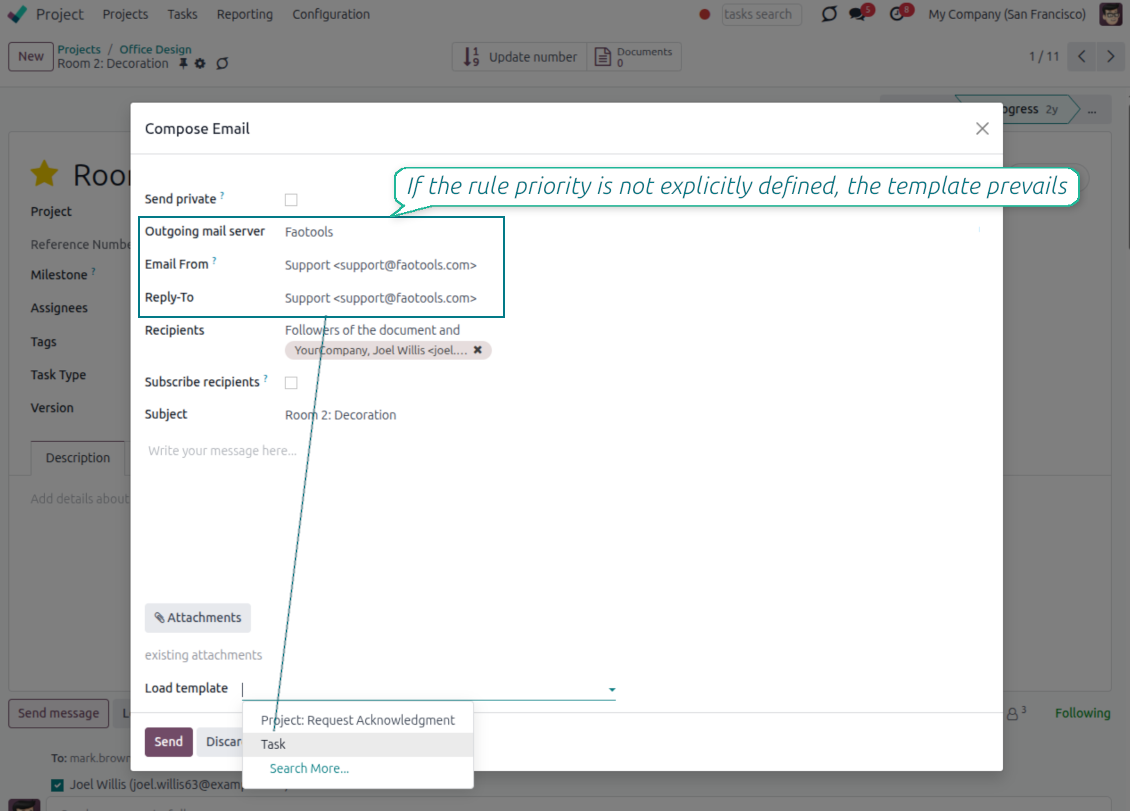
Pick the From and Reply-To in the composer
Managed address pickers instead of typing Send From / Reply To by hand
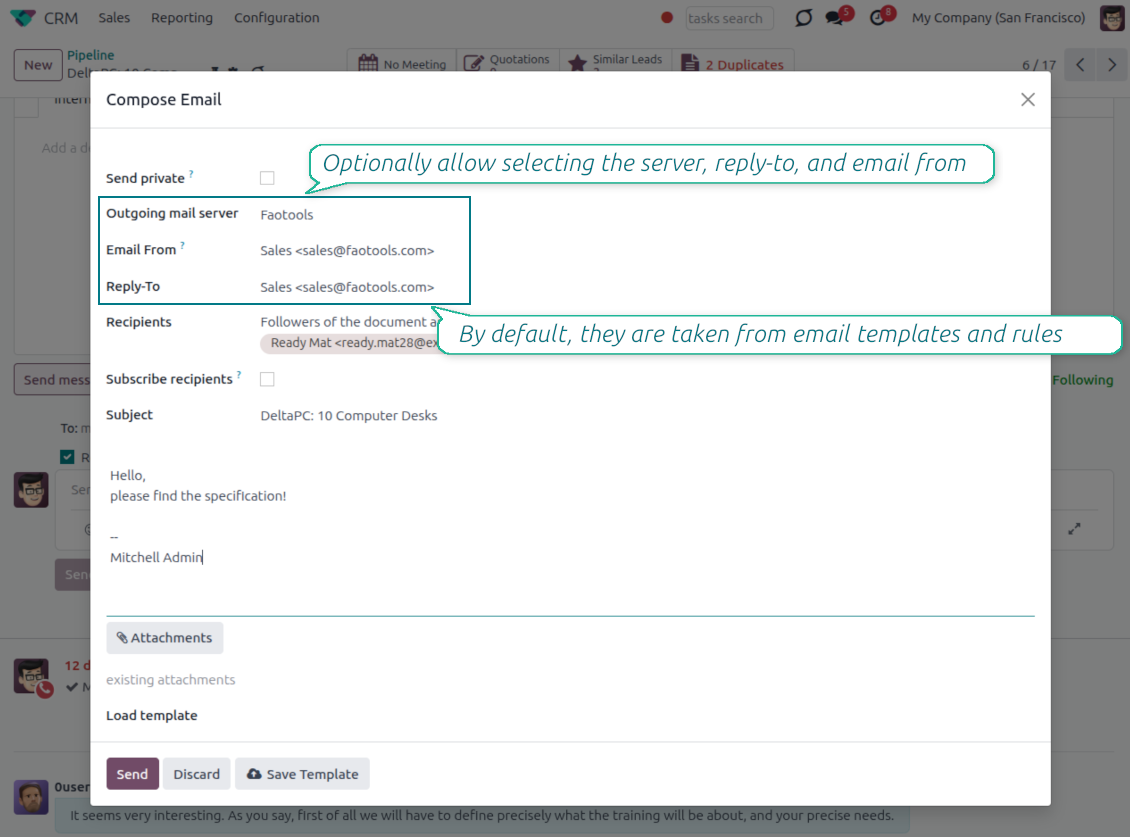
Choose, do not type
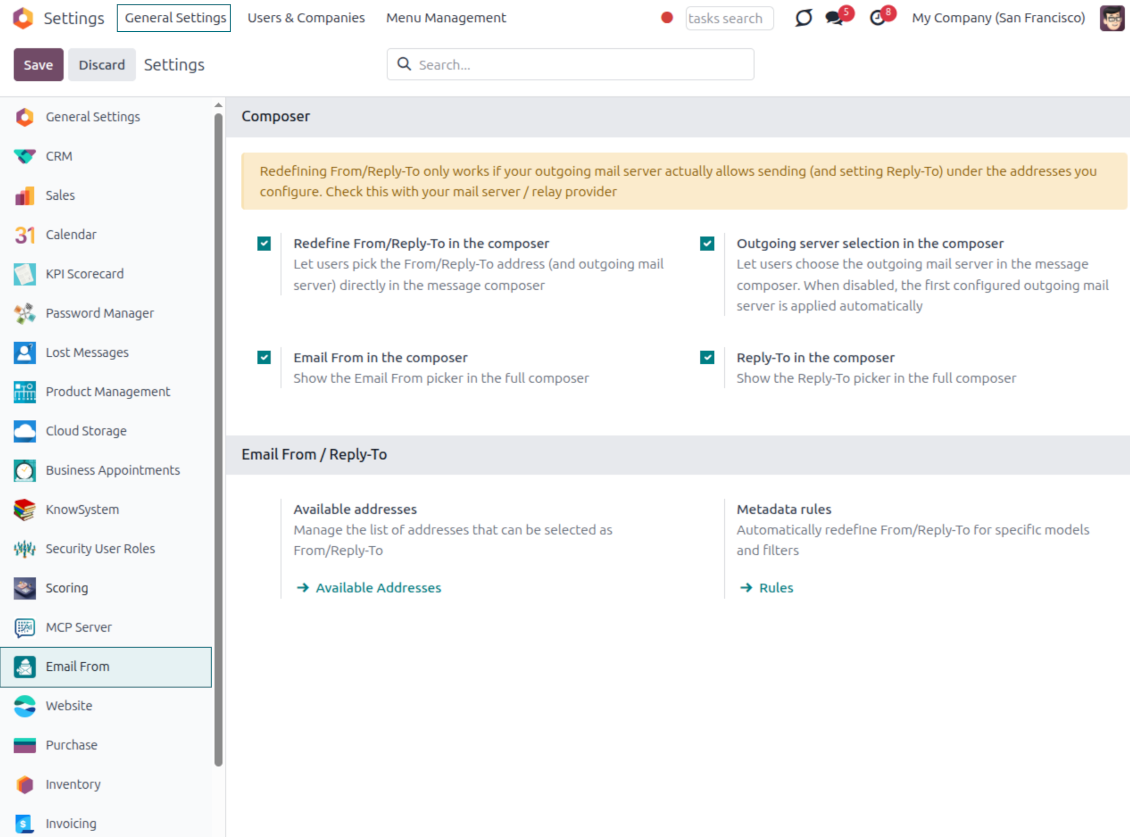
- Turn the pickers on from Settings. Enable the Email From and Reply-To pickers in the full composer from the Email From settings.
- Select an approved address. Users pick a From or Reply-To from the managed list, and the composer fills the real sender values for them.
- Force replies where you want them. Choosing a Reply-To also routes future replies to that address.
Smart outgoing-server handling
- Server set for you. The outgoing mail server matching the chosen address is selected automatically.
- Hidden when there is only one. With a single server configured, the server field is hidden and applied silently.
- Filtered when there are several. With multiple servers, the picker only offers addresses that match the selected server.
One managed address book behind every email
One address list for From and Reply-To; each address already knows its outgoing server
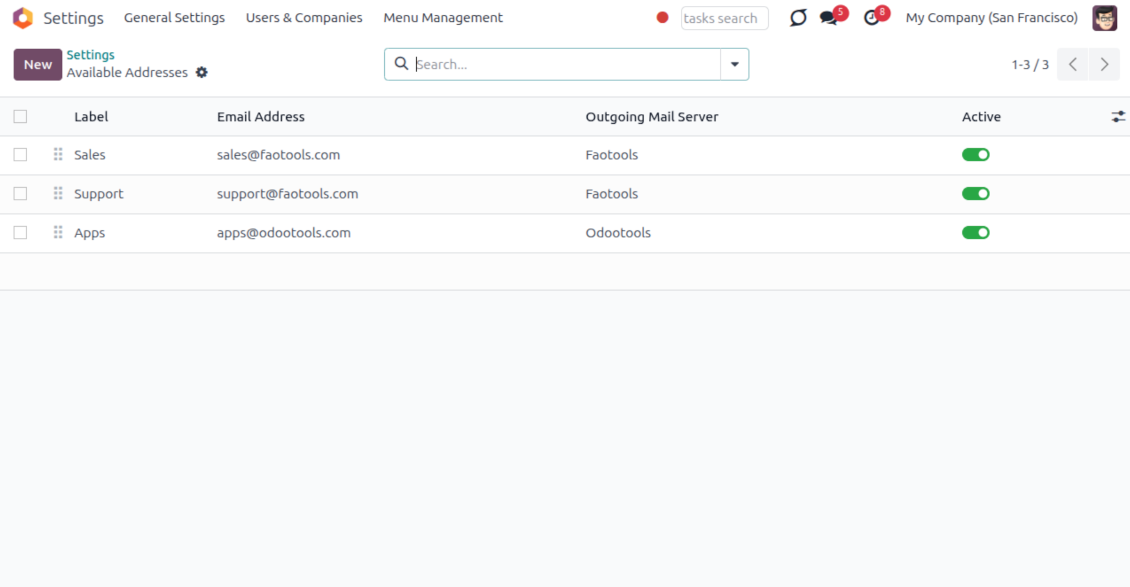
One place to define addresses
- Label every sender clearly. Give each address a name and email, for example Support or Sales, so users recognize it instantly.
- Order and scope the list. Sequence the addresses, archive the ones you retire, and keep them per company.
- Feed the whole module. The same list powers the composer, email templates and metadata rules, so nothing is ever free-typed.
Locked to the right server
- One address, one server. Each address is tied to exactly one outgoing mail server it is allowed to send through.
- No wrong pairings. An address can never be combined with, or sent through, another server by mistake.
- Provider support stays your job. Make sure your relay actually allows sending under each address you add; the module enforces the consistency inside Odoo.
Managed Send From and Reply To on email templates
Replace Odoo's free-text template fields with the same managed address pickers
Set it once on the template
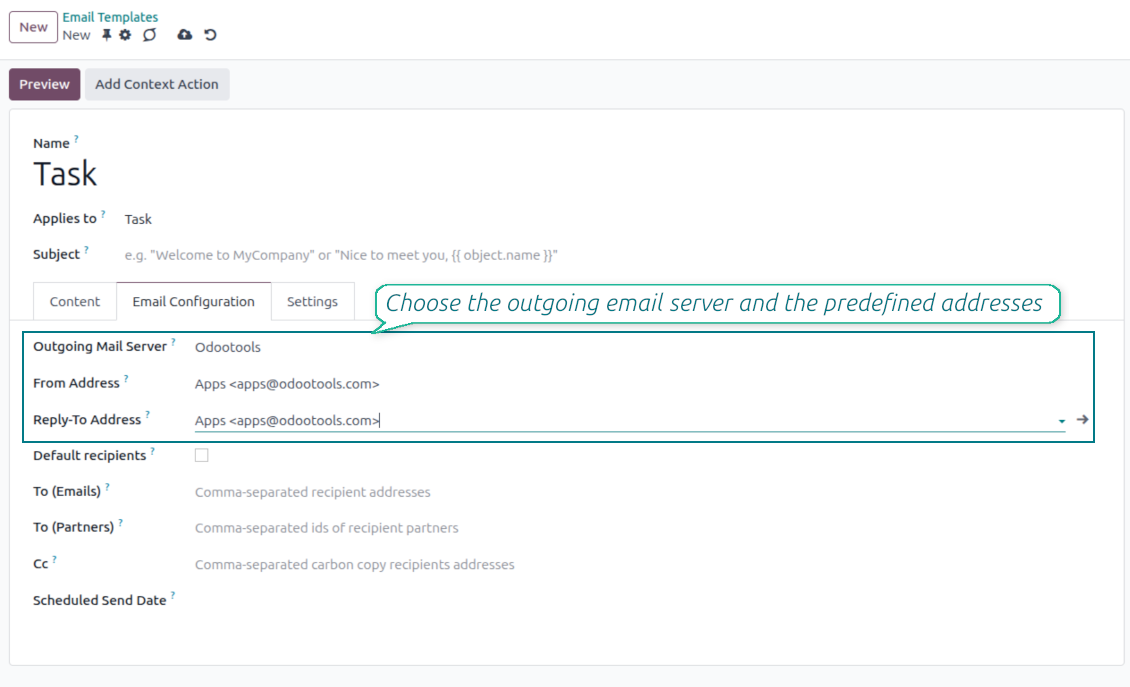
- Pick a managed address. Choose the From and Reply-To of any mail template from the same approved address list.
- Populate the native fields. Your selection fills the template Send From and Reply-To values, so no core behavior is bypassed.
- Keep the server tidy. The outgoing server field stays read-only when a single server is configured.
Applied everywhere the template runs
- Consistent across channels. The template address is used in the composer, automated actions and any flow that sends the template.
- No reselection needed. Once set on the template, the correct sender is applied every time without user input.
- Same safety guarantees. Template addresses obey the same address and outgoing-server matching as the composer.
Automatic sender selection with metadata rules
Choose the right From/Reply-To by document type and filter, with no manual step
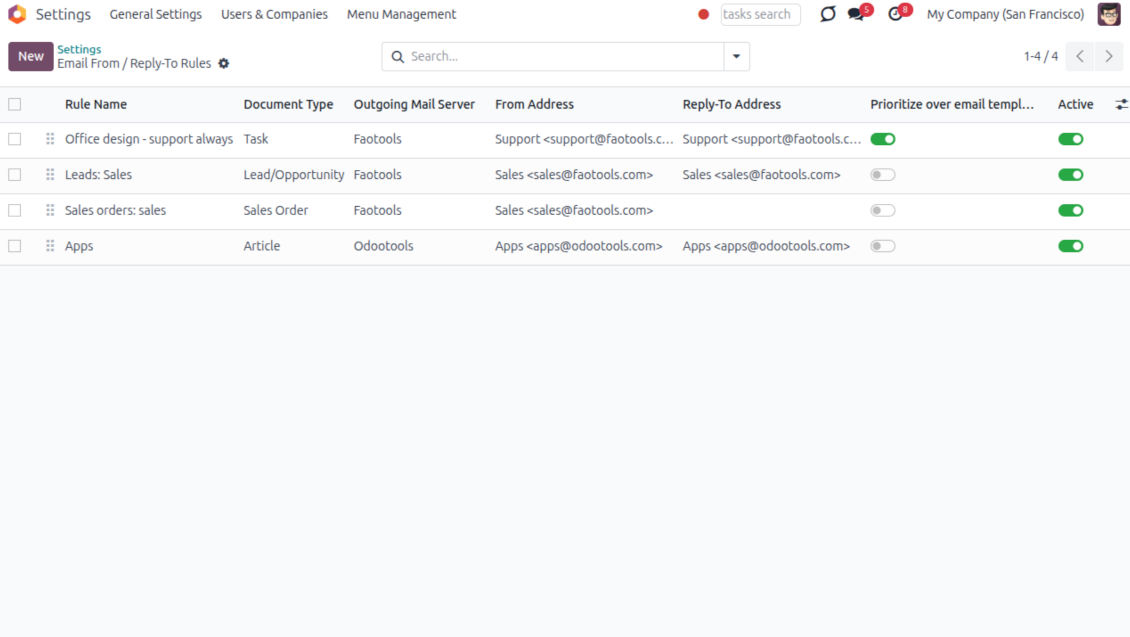
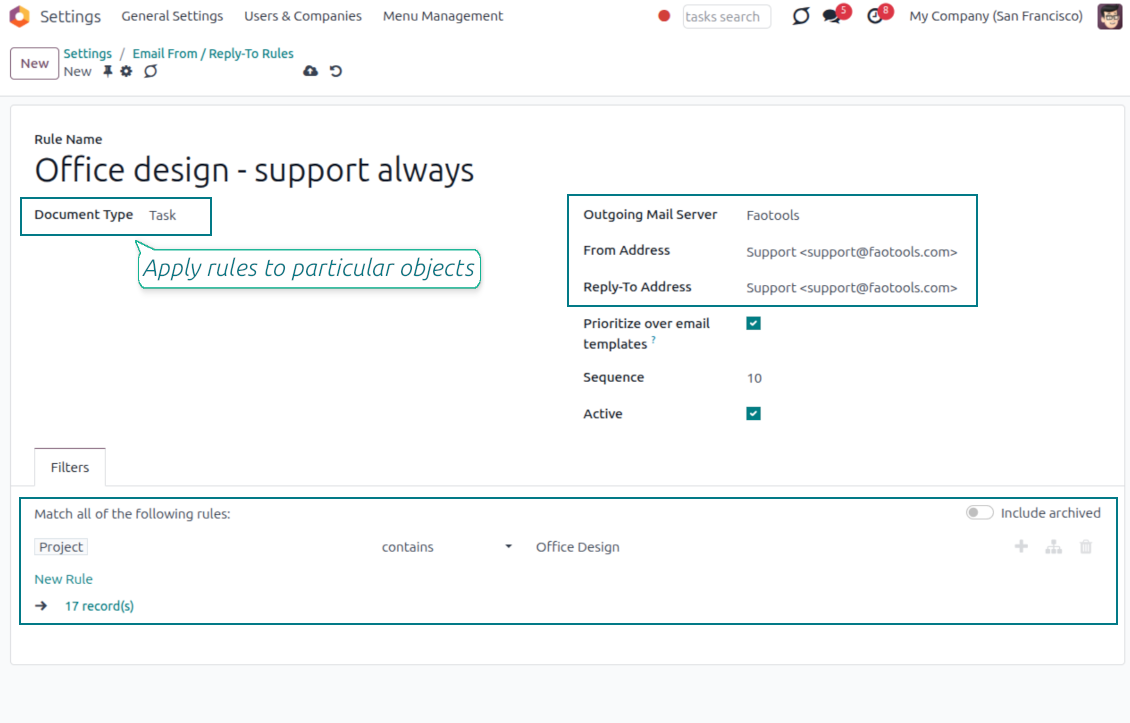
Match by model and filter
- Rules per document type. Define which sender to use for a model, for example sales orders, invoices or leads.
- Narrow with a domain. Add a filter so a rule only fires for matching records, such as a given sales team or customer segment.
- First match resolves everything. The winning rule sets the From, the Reply-To and the matching outgoing server together.
You control the priority
- Templates win by default. When a mail template already defines a sender, the template value is kept.
- Flip it when you need to. Enable Prioritize over templates and the rule takes precedence over the template default.
- Hands-off in the composer. The resolved sender is applied automatically, so users never have to remember the right address.
Keep sending safe and deliverable
Why managed addresses matter and how mismatches are blocked
Why letting anyone type an address is risky
- Providers only trust known senders. Most mail providers reject or mark as spam any message sent from an address they do not recognize.
- Failures can happen quietly. If anyone can type any From or Reply-To address, a message can fail to arrive without a clear warning in Odoo.
- Only approved addresses are offered. The composer, templates and rules only let you choose from the addresses you have already configured.
Mismatches are caught automatically
- Wrong pairings stay out of view. You can only pick an address together with the outgoing mail server it is actually linked to.
- Sending is blocked if something doesn't match. Even automated emails or connected apps cannot bypass this check.
- You still confirm support with your provider. Make sure your outgoing mail server allows sending under each address you add, usually through a matching sender filter or verification step.
Câu hỏi thường gặp về Odoo Email From Odoo v.17
Chính sách cập nhật của các công cụ của bạn là gì?
Theo chính sách hiện tại của Odoo Apps Store:
- Mọi mô-đun mua cho phiên bản 12.0 trở về trước cho phép truy cập mọi phiên bản đến 12.0.
- Từ phiên bản 13.0, mỗi phiên bản mô-đun phải mua riêng.
- Bất kể phiên bản, mua công cụ cho quyền mọi cập nhật và sửa lỗi trong một phiên bản chính.
Lưu ý rằng nhóm faOtools không kiểm soát các chính sách đó. Mọi câu hỏi xin liên hệ trực tiếp đại diện Odoo Apps Store.
Làm sao cài ứng dụng của bạn trên Odoo.sh?
Cách thẳng nhất là dùng quy trình có sẵn của cửa hàng Odoo:
1. Mở trang phân hệ và bấm nút Deploy on odoo.sh
2. Sau đó bạn sẽ được chuyển tới trang GitHub. Đăng nhập tài khoản, rồi bấm 'Create a new repo' hoặc dùng repo có sẵn. Hãy đảm bảo kho là riêng tư. Không được phép công bố ứng dụng theo giấy phép OPL-1. Nếu cần, tạo repo mới cho dự án Odoo.sh
3. Rồi vào odoo.sh và bấm nút Deploy. Trong cửa sổ pop-up, gửi quyết định và bấm 'Continue.' Thao tác này sẽ kích hoạt cài đặt.
Các bước này sẽ cài ứng dụng cho nhánh production của dự án. Nếu muốn triển khai ứng dụng cho nhánh khác hoặc cập nhật phân hệ, hãy làm các bước sau:
1. Tải mã nguồn ứng dụng từ cửa hàng Odoo
2. Commit phân hệ vào kho GitHub cần thiết. Đảm bảo không thư mục/tệp ứng dụng nào bị bỏ qua (tức không nằm trong .gitignore của repo). Kho được odoo.sh tạo tự động và mặc định có thể gồm mục quan trọng (vd. /lib). Hãy tải lên mọi thư mục, thư mục con và tệp của phân hệ, không ngoại lệ
3. Triển khai nhánh đích của dự án odoo.sh hoặc, nếu thiết lập của bạn giả định vậy, đợi đến khi được xây tự động.
Tôi nên cài ứng dụng của bạn trên máy chủ riêng thế nào?
2. Khởi động lại máy chủ Odoo;
3. Bật chế độ nhà phát triển (cài đặt kỹ thuật);
4. Cập nhật danh sách ứng dụng (menu ứng dụng);
5. Tìm ứng dụng và bấm 'Activate'/'Install';
6. Làm theo hướng dẫn trên trang ứng dụng nếu có.
Tôi thấy ứng dụng có tiện ích thêm. Có thể mua sau không?
Có, chắc chắn. Đồng thời Odoo tự thêm mọi phụ thuộc vào giỏ, nên bạn nên loại các công cụ đã mua để tránh trả hai lần.
Tôi triển khai ứng dụng trên Odoo.sh và thấy cảnh báo/lỗi trong kiểm thử
Cảnh báo đỏ/cam không ảnh hưởng đến tính năng của ứng dụng. Đáng tiếc, đôi khi phân hệ của chúng tôi không qua được các kiểm thử tự động chuẩn vì chúng giả định hành vi xung đột với mục tiêu ứng dụng. Ví dụ chúng tôi đổi cách tính giá, trong khi kiểm thử phân hệ Odoo chuẩn so giá cuối với thuật toán chuẩn.
Trước hết, hãy kiểm tra tính năng của cơ sở dữ liệu đã triển khai. Mọi thứ có chạy đúng không?
Nếu vẫn cho rằng cảnh báo ảnh hưởng tính năng thật, hãy liên hệ chúng tôi và gửi nhật ký cài đặt đầy đủ cùng danh sách đầy đủ phân hệ đã triển khai (gồm lõi và bên thứ ba).
Tôi có thể mua ứng dụng trực tiếp từ công ty bạn không?
Không, chúng tôi chỉ phân phối công cụ qua cửa hàng ứng dụng Odoo chính thức.
Tôi muốn được giảm giá
Rất tiếc, chúng tôi không có phương tiện kỹ thuật để cung cấp giá riêng.
Tôi có thể cài ứng dụng trên cơ sở dữ liệu Odoo Online (SaaS) không?
Không, ứng dụng bên thứ ba không dùng được trên Odoo Online. Rất tiếc Odoo SaaS chặn khả năng đó.
Công cụ của bạn phụ thuộc ứng dụng khác. Tôi có cần mua chúng không?
Có, công cụ cần tất cả phân hệ ghi trong phụ thuộc để chạy đúng. Giá trên trang ứng dụng đã gồm mọi phụ thuộc cần thiết.
Giá mô-đun bằng đô la Mỹ là bao nhiêu? Sao lại đổi?
Giá phân hệ của chúng tôi tính bằng euro. Cửa hàng Odoo đổi sang các tiền tệ khác theo tỷ giá nội bộ. Vì vậy giá bằng đô la Mỹ có thể đổi khi tỷ giá được cập nhật.
Lời ứng dụng và trang web ở ngôn ngữ khác tiếng Anh được hỗ trợ bởi AI và khớp với bản dịch Odoo chính thức. Nếu bạn thấy sai, gửi phiếu hỗ trợ về đúng bản dịch và chúng tôi sẽ sửa.
Cơ sở trình diễn Odoo (xem trước trực tiếp)
Với ứng dụng này, chúng tôi có thể cung cấp cơ sở demo cá nhân miễn phí.
Bạn không cần số điện thoại hay thẻ tín dụng để liên hệ. Chỉ cần đăng ký email ngắn, không quá 30 giây.
Theo yêu cầu, chúng tôi sẽ chuẩn bị cơ sở xem trước trực tiếp riêng, nơi bạn có thể thử nghiệm và kiểm tra giả định khoảng hai tuần.
Báo lỗi
Nếu gặp lỗi hoặc hành vi không nhất quán, hãy liên hệ. Chúng tôi cam kết sửa trong 60 ngày kể từ khi mua và vẫn muốn cải thiện công cụ sau giai đoạn đó.
Bạn không cần số điện thoại hay thẻ tín dụng để liên hệ. Chỉ cần đăng ký email ngắn, không quá 30 giây.
Hãy nêu càng nhiều chi tiết càng tốt trong yêu cầu: ảnh chụp màn hình, nhật ký máy chủ Odoo, mô tả đầy đủ cách tái hiện sự cố, v.v. Thường mất vài ngày làm việc để chuẩn bị kế hoạch xử lý (nếu xác nhận lỗi) hoặc hướng dẫn việc cần làm (nếu không).
Yêu cầu tính năng công khai và ý tưởng module (phát triển miễn phí)
Chúng tôi rất muốn cải thiện công cụ và biết ơn mọi phản hồi. Nếu yêu cầu của bạn hữu ích cho mọi người và có thể triển khai hiệu quả, nhóm sẽ đưa vào danh sách việc cần làm.
Danh sách việc cần làm như vậy được xử lý đều đặn và không phát sinh phí thêm. Dù chúng tôi không hứa hạn chót và thiết kế cuối, đây có thể là cách tốt để có tính năng mong muốn mà không đầu tư và rủi ro.
Bạn không cần số điện thoại hay thẻ tín dụng để liên hệ. Chỉ cần đăng ký email ngắn, không quá 30 giây.

The tool to flexibly structure Odoo attachments in folders and synchronize directories with cloud clients: Google Drive, OneDrive/SharePoint, Nextcloud/ownCloud, Dropbox, Amazon S3, Box, and NAS. DMS. File Manager. Document management system
398€

The tool to build a deep and structured knowledge base for internal and external use. Knowledge System. KMS. Wiki-like revisions.
398€
The tool to automatically synchronize Odoo attachments with OneDrive files in both ways
487€
The tool to set up KPI targets and control their fulfillment by periods. KPI dashboards. Dashboard designer. KPI charts

The tool for time-based service management from booking appointments to sales and reviews
398€
The tool to automatically synchronize Odoo attachments with Google Drive files in both ways
487€