간단히
Odoo Email From은(는) Odoo 17 메일 및 채팅 앱입니다. The tool to flexibly administer email From and Reply-To addresses. Custom email from.
Odoo Email From controls which From and Reply-To address is used for every outgoing email, without exposing addresses your outgoing mail server does not support. Maintain a managed address list, each locked to one outgoing server, pick those addresses in the composer and on email templates, and define metadata rules that choose the right sender for a given model and record. The module replaces Odoo's free-text Send From / Reply To controls with managed pickers and fills the native template and sending fields behind the scenes, so you do not configure the same metadata twice.
다음에 적합
Multi-brand and multi-department companies
Perfect for organizations that need different From/Reply-To addresses per brand, department or sales team, without letting every user type in an arbitrary address.
Companies using several outgoing mail servers
Ideal when different SMTP relays or providers are configured in Odoo and each sender address must only ever go out through its matching server.
Teams wanting automated sender selection
Useful for automating which address is used for a given document type or business scenario, instead of relying on users to remember and pick the right one every time.
팀이 선택하는 이유
세부사항 전에 핵심 이점
Managed address book
Maintain the allowed From and Reply-To addresses, each linked to the outgoing mail server that actually supports it.
From and Reply-To in the composer
Let users choose an approved sender straight in the full composer instead of free-typing an address.
Template sender addresses
Set a managed From/Reply-To on mail templates and apply it automatically whenever the template runs.
Metadata rules
Pick the sender automatically by document type and domain filter, with optional priority over template defaults.
Matching outgoing server
Every address is tied to one outgoing server, and the server field is hidden when a single server is configured.
Enforced consistency
An XML domain plus a Python check block mismatched address and server pairs, even when sending through the API.
평가할 준비가 되셨나요?
무료 데모 요청으로 시작하거나 Odoo Apps Store에서 구매하세요.
무료 맞춤 데모 데이터베이스. 전화번호나 신용카드는 필요 없습니다. 해당 주요 Odoo 버전 기간 동안 평생 업데이트와 전문가 지원이 무료입니다.
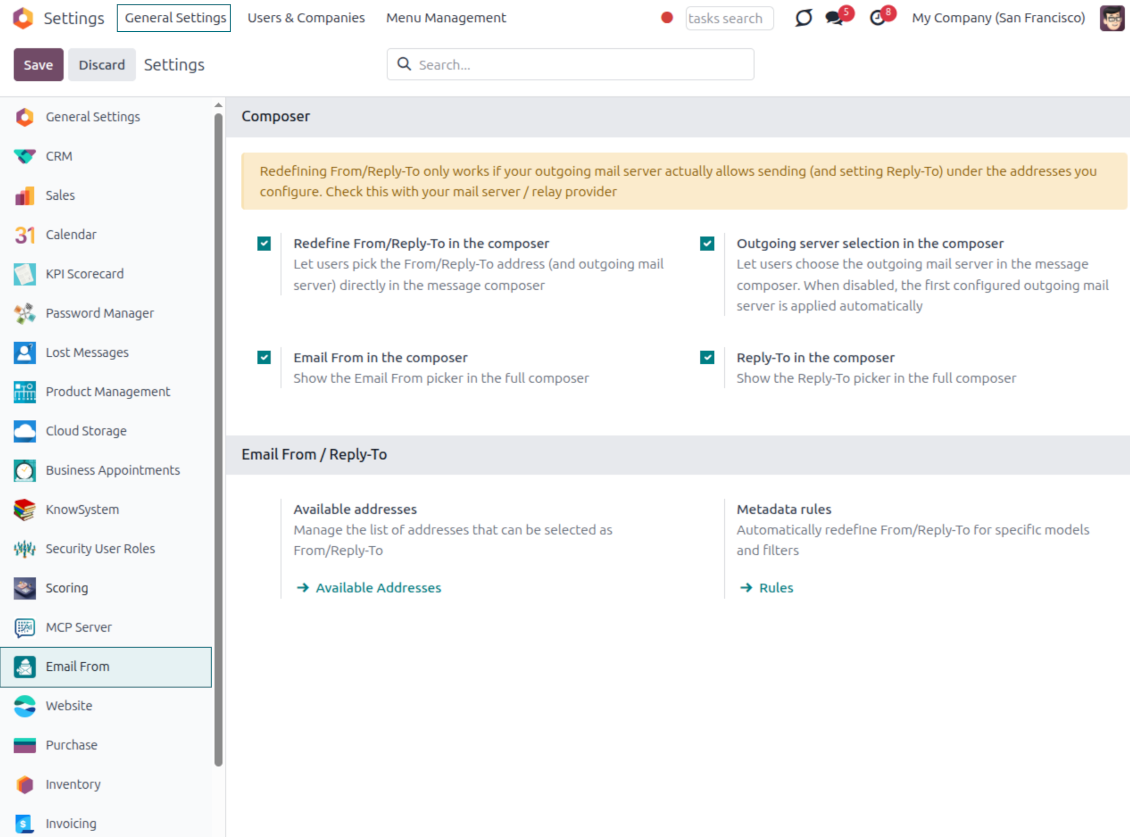
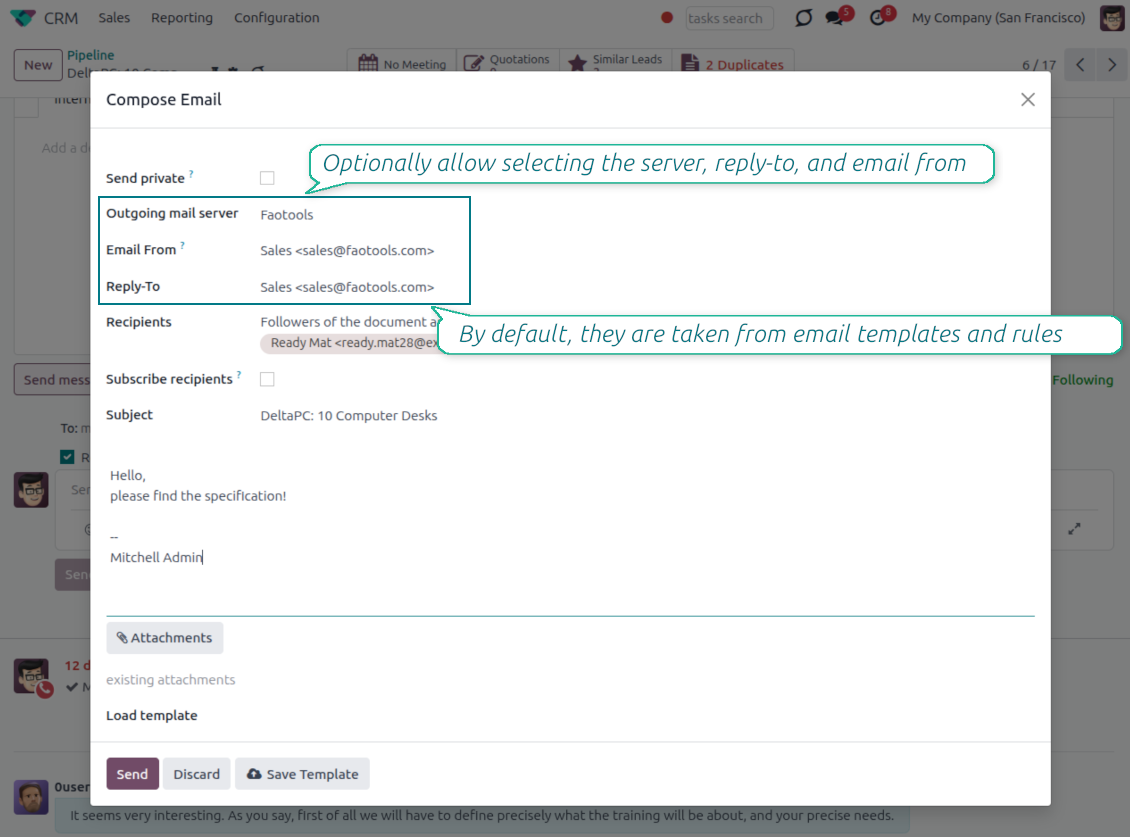
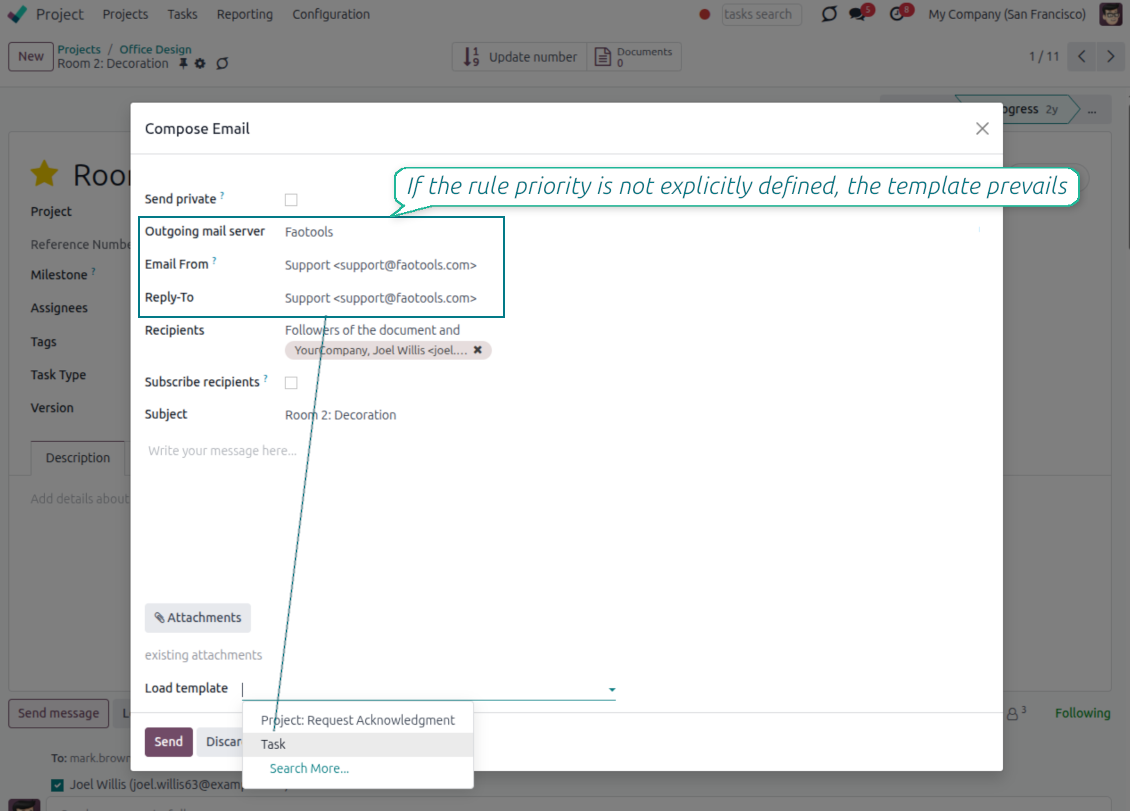
Pick the From and Reply-To in the composer
Managed address pickers instead of typing Send From / Reply To by hand
Choose, do not type
- Turn the pickers on from Settings. Enable the Email From and Reply-To pickers in the full composer from the Email From settings.
- Select an approved address. Users pick a From or Reply-To from the managed list, and the composer fills the real sender values for them.
- Force replies where you want them. Choosing a Reply-To also routes future replies to that address.
Smart outgoing-server handling
- Server set for you. The outgoing mail server matching the chosen address is selected automatically.
- Hidden when there is only one. With a single server configured, the server field is hidden and applied silently.
- Filtered when there are several. With multiple servers, the picker only offers addresses that match the selected server.
One managed address book behind every email
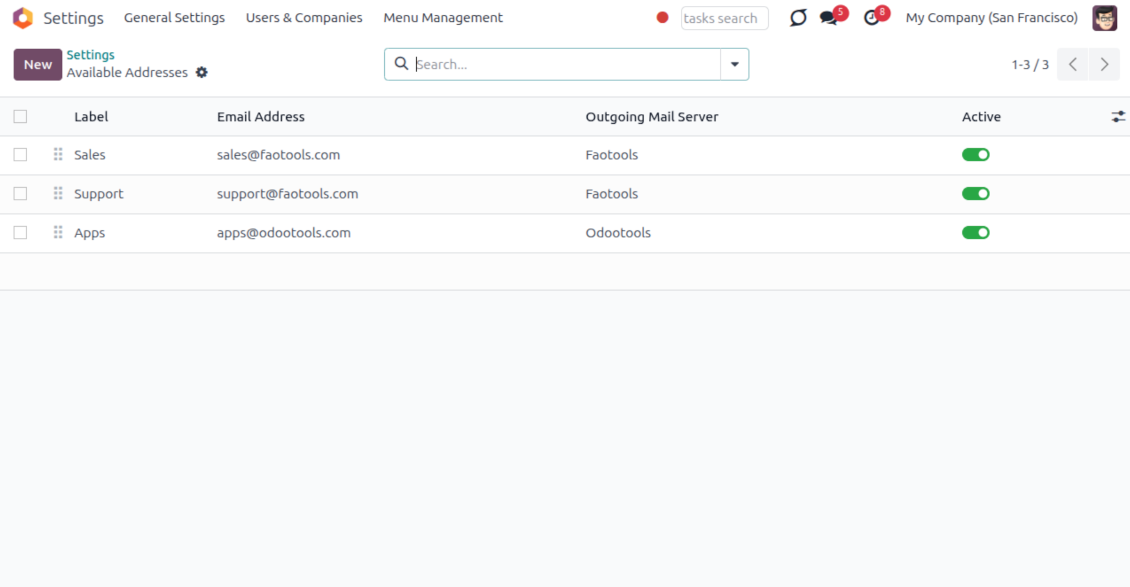
One address list for From and Reply-To; each address already knows its outgoing server
One place to define addresses
- Label every sender clearly. Give each address a name and email, for example Support or Sales, so users recognize it instantly.
- Order and scope the list. Sequence the addresses, archive the ones you retire, and keep them per company.
- Feed the whole module. The same list powers the composer, email templates and metadata rules, so nothing is ever free-typed.
Locked to the right server
- One address, one server. Each address is tied to exactly one outgoing mail server it is allowed to send through.
- No wrong pairings. An address can never be combined with, or sent through, another server by mistake.
- Provider support stays your job. Make sure your relay actually allows sending under each address you add; the module enforces the consistency inside Odoo.
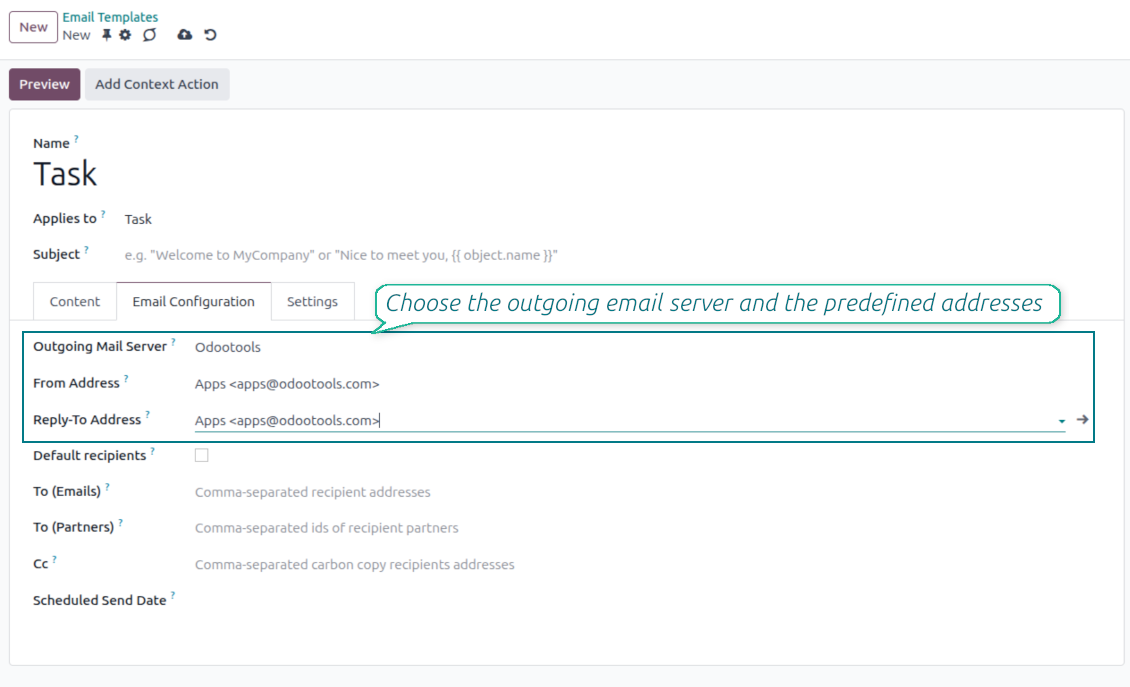
Managed Send From and Reply To on email templates
Replace Odoo's free-text template fields with the same managed address pickers
Set it once on the template
- Pick a managed address. Choose the From and Reply-To of any mail template from the same approved address list.
- Populate the native fields. Your selection fills the template Send From and Reply-To values, so no core behavior is bypassed.
- Keep the server tidy. The outgoing server field stays read-only when a single server is configured.
Applied everywhere the template runs
- Consistent across channels. The template address is used in the composer, automated actions and any flow that sends the template.
- No reselection needed. Once set on the template, the correct sender is applied every time without user input.
- Same safety guarantees. Template addresses obey the same address and outgoing-server matching as the composer.
Automatic sender selection with metadata rules
Choose the right From/Reply-To by document type and filter, with no manual step
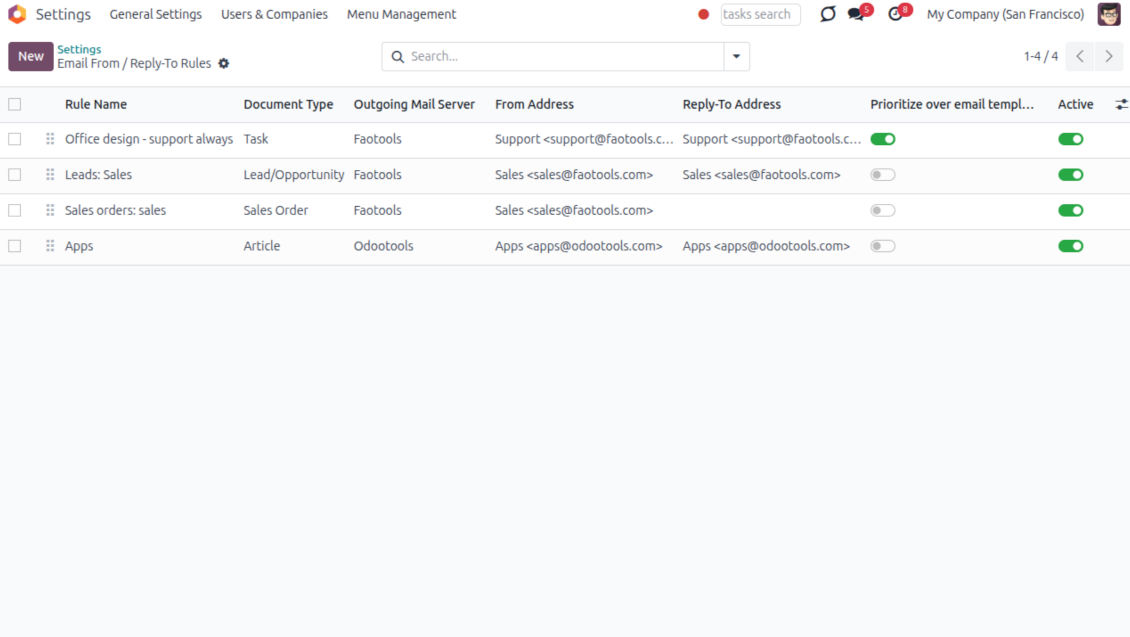
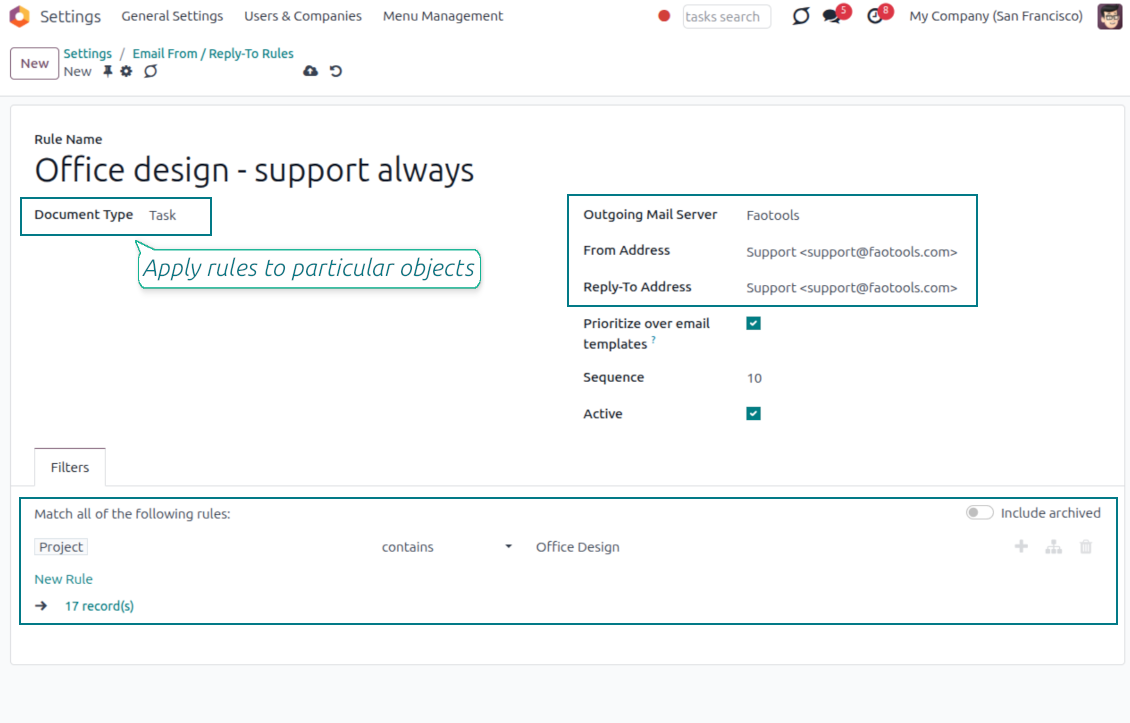
Match by model and filter
- Rules per document type. Define which sender to use for a model, for example sales orders, invoices or leads.
- Narrow with a domain. Add a filter so a rule only fires for matching records, such as a given sales team or customer segment.
- First match resolves everything. The winning rule sets the From, the Reply-To and the matching outgoing server together.
You control the priority
- Templates win by default. When a mail template already defines a sender, the template value is kept.
- Flip it when you need to. Enable Prioritize over templates and the rule takes precedence over the template default.
- Hands-off in the composer. The resolved sender is applied automatically, so users never have to remember the right address.
Keep sending safe and deliverable
Why managed addresses matter and how mismatches are blocked
Why letting anyone type an address is risky
- Providers only trust known senders. Most mail providers reject or mark as spam any message sent from an address they do not recognize.
- Failures can happen quietly. If anyone can type any From or Reply-To address, a message can fail to arrive without a clear warning in Odoo.
- Only approved addresses are offered. The composer, templates and rules only let you choose from the addresses you have already configured.
Mismatches are caught automatically
- Wrong pairings stay out of view. You can only pick an address together with the outgoing mail server it is actually linked to.
- Sending is blocked if something doesn't match. Even automated emails or connected apps cannot bypass this check.
- You still confirm support with your provider. Make sure your outgoing mail server allows sending under each address you add, usually through a matching sender filter or verification step.
관련 자주 묻는 질문 Odoo Email From Odoo v.17
도구의 업데이트 정책은 무엇입니까?
현재 Odoo Apps Store 정책에 따르면:
- 버전 12.0 이하용으로 구매한 모듈은 12.0까지의 모든 버전에 접근할 수 있습니다.
- 버전 13.0부터는 모듈 버전마다 따로 구매해야 합니다.
- 버전과 관계없이 구매하면 해당 메이저 버전 내의 모든 업데이트와 버그 수정 권한이 있습니다.
faOtools 팀은 해당 정책을 통제하지 않습니다. 문의는 Odoo Apps Store 담당자에게 직접 하세요.
앱을 Odoo.sh에 어떻게 설치하나요?
가장 단순한 방법은 Odoo 스토어의 기본 제공 워크플로를 사용하는 것입니다:
1. 모듈 페이지를 열고 Deploy on odoo.sh 버튼을 클릭합니다.
2. 그러면 GitHub 페이지로 이동합니다. 계정에 로그인한 뒤 'Create a new repo'를 클릭하거나 기존 저장소를 사용하세요. 저장소는 비공개여야 합니다. OPL-1 라이선스 앱을 공개하는 것은 허용되지 않습니다. 필요하면 Odoo.sh 프로젝트용 새 repo를 만드세요.
3. 그런 다음 odoo.sh로 가서 Deploy 버튼을 클릭합니다. 팝업에서 결정을 제출하고 'Continue.'를 클릭합니다. 그러면 설치가 시작됩니다.
이 단계로 프로젝트의 프로덕션 브랜치에 앱이 설치됩니다. 다른 브랜치에 앱을 배포하거나 모듈을 업데이트하려면 다음을 수행하세요:
1. Odoo 스토어에서 앱 소스 코드를 업로드합니다.
2. 모듈을 필요한 GitHub 저장소에 커밋합니다. 앱 폴더/파일이 무시되지 않는지 확인하세요(즉 repo의 .gitignore에 넣지 마세요). 저장소는 odoo.sh가 자동 생성하며 기본적으로 중요한 항목(예: /lib)이 포함될 수 있습니다. 모듈의 모든 디렉터리, 하위 디렉터리, 파일을 예외 없이 업로드하세요.
3. odoo.sh 프로젝트의 대상 브랜치를 Deploy하거나, 설정이 그렇게 되어 있으면 자동 빌드될 때까지 기다립니다.
자체 서버에 앱은 어떻게 설치하나요?
2. Odoo 서버를 다시 시작합니다;
3. 개발자 모드를 켭니다(기술 설정);
4. 앱 목록을 업데이트합니다(앱 메뉴);
5. 앱을 찾아 'Activate'/'Install'을 누릅니다;
6. 앱 페이지에 안내가 있으면 따릅니다.
앱에 추가 기능이 있는 것을 봤습니다. 나중에 구매해도 되나요?
네, 물론입니다. 동시에 Odoo가 모든 의존성을 장바구니에 자동 추가하므로, 이중 결제를 피하려면 이미 구매한 도구를 제외하십시오.
앱을 Odoo.sh에 배포했는데 테스트에서 경고/오류가 보입니다
빨강/주황 경고는 앱 기능에 영향을 주지 않습니다. 안타깝게도 표준 자동 테스트가 앱 목표와 충돌하는 동작을 가정해 모듈이 통과하지 못할 때가 있습니다. 예를 들어 우리는 가격 계산을 바꾸는데, 표준 Odoo 모듈 테스트는 최종 가격을 표준 알고리즘과 비교합니다.
먼저 배포된 데이터베이스 기능이 정상인지 확인하십시오. 모두 올바르게 동작합니까?
그래도 경고가 실제 기능에 영향을 준다고 생각되면 연락해 주시고 전체 설치 로그와 배포된 모듈 전체 목록(코어 및 서드파티 포함)을 보내 주십시오.
앱을 귀사에서 직접 구매할 수 있나요?
아니요, 도구는 오직 공식 Odoo 앱 스토어.
할인을 받고 싶습니다
유감스럽게도 개별 가격을 제공할 기술적 수단이 없습니다.
Odoo Online (SaaS) 데이터베이스에 앱을 설치할 수 있나요?
아니요, 서드파티 앱은 Odoo Online에서 사용할 수 없습니다. 유감스럽게도 Odoo SaaS가 이를 차단합니다.
도구가 다른 앱에 의존합니다. 그것도 구매해야 합니까?
예, 도구가 올바르게 동작하려면 의존성에 표시된 모든 모듈이 필요합니다. 앱 페이지의 가격에는 필요한 의존성이 이미 포함되어 있습니다.
모듈의 미국 달러 가격은 얼마입니까? 왜 바뀌었습니까?
모듈 가격은 유로로 책정됩니다. Odoo 스토어는 내부 환율에 따라 다른 통화로 변환합니다. 따라서 환율이 갱신되면 미국 달러 가격이 바뀔 수 있습니다.
영어 이외 언어의 앱·웹사이트 문구는 AI 지원으로 작성되며 공식 Odoo 번역과 맞춥니다. 오류를 발견하시면 번역 정확성 티켓을 보내 주세요 그러면 수정하겠습니다.
Odoo 데모 데이터베이스(라이브 미리보기)
이 앱에는 무료 맞춤 데모 데이터베이스를 제공할 수 있습니다.
문의에 전화번호나 신용카드가 필요 없습니다. 30초가 넘지 않는 짧은 이메일 가입만 하면 됩니다.
요청하시면 개별 라이브 미리보기 데이터베이스를 준비합니다. 약 2주 동안 테스트를 하고 가정을 확인할 수 있습니다.
버그 신고
버그나 일관되지 않은 동작을 발견하면 주저 말고 문의하세요. 구매 후 60일 이내 수정을 보장하며, 그 이후에도 도구를 개선하는 데 관심이 큽니다.
문의에 전화번호나 신용카드가 필요 없습니다. 30초가 넘지 않는 짧은 이메일 가입만 하면 됩니다.
요청에 가능한 한 많은 세부정보를 포함하세요: 스크린샷, Odoo 서버 로그, 문제 재현 방법의 전체 설명 등. 일반적으로 이슈에 대한 작업 계획 준비(버그가 확인된 경우) 또는 수행 지침 제공(그 외의 경우)에는 영업일 기준 며칠이 걸립니다.
공개 기능 요청 및 모듈 아이디어(무료 개발)
도구를 개선하려는 동기가 강하며 어떤 피드백이든 감사드립니다. 요구 사항이 공익에 맞고 효율적으로 구현될 수 있다면 팀이 할 일 목록에 넣습니다.
이런 할 일 목록은 정기적으로 처리되며 추가 요금이 없습니다. 기한과 최종 디자인을 약속할 수는 없지만, 투자와 위험 없이 원하는 기능을 얻는 좋은 방법이 될 수 있습니다.
문의에 전화번호나 신용카드가 필요 없습니다. 30초가 넘지 않는 짧은 이메일 가입만 하면 됩니다.

The tool to flexibly structure Odoo attachments in folders and synchronize directories with cloud clients: Google Drive, OneDrive/SharePoint, Nextcloud/ownCloud, Dropbox, Amazon S3, Box, and NAS. DMS. File Manager. Document management system
398€

The tool to build a deep and structured knowledge base for internal and external use. Knowledge System. KMS. Wiki-like revisions.
398€
The tool to automatically synchronize Odoo attachments with OneDrive files in both ways
487€
The tool to set up KPI targets and control their fulfillment by periods. KPI dashboards. Dashboard designer. KPI charts

The tool for time-based service management from booking appointments to sales and reviews
398€
The tool to automatically synchronize Odoo attachments with Google Drive files in both ways
487€