In het kort
Odoo Email From is een Odoo 17 Discussie-app. The tool to flexibly administer email From and Reply-To addresses. Custom email from.
Odoo Email From controls which From and Reply-To address is used for every outgoing email, without exposing addresses your outgoing mail server does not support. Maintain a managed address list, each locked to one outgoing server, pick those addresses in the composer and on email templates, and define metadata rules that choose the right sender for a given model and record. The module replaces Odoo's free-text Send From / Reply To controls with managed pickers and fills the native template and sending fields behind the scenes, so you do not configure the same metadata twice.
Ideaal voor
Multi-brand and multi-department companies
Perfect for organizations that need different From/Reply-To addresses per brand, department or sales team, without letting every user type in an arbitrary address.
Companies using several outgoing mail servers
Ideal when different SMTP relays or providers are configured in Odoo and each sender address must only ever go out through its matching server.
Teams wanting automated sender selection
Useful for automating which address is used for a given document type or business scenario, instead of relying on users to remember and pick the right one every time.
Waarom teams het kiezen
Belangrijkste voordelen vóór de details
Managed address book
Maintain the allowed From and Reply-To addresses, each linked to the outgoing mail server that actually supports it.
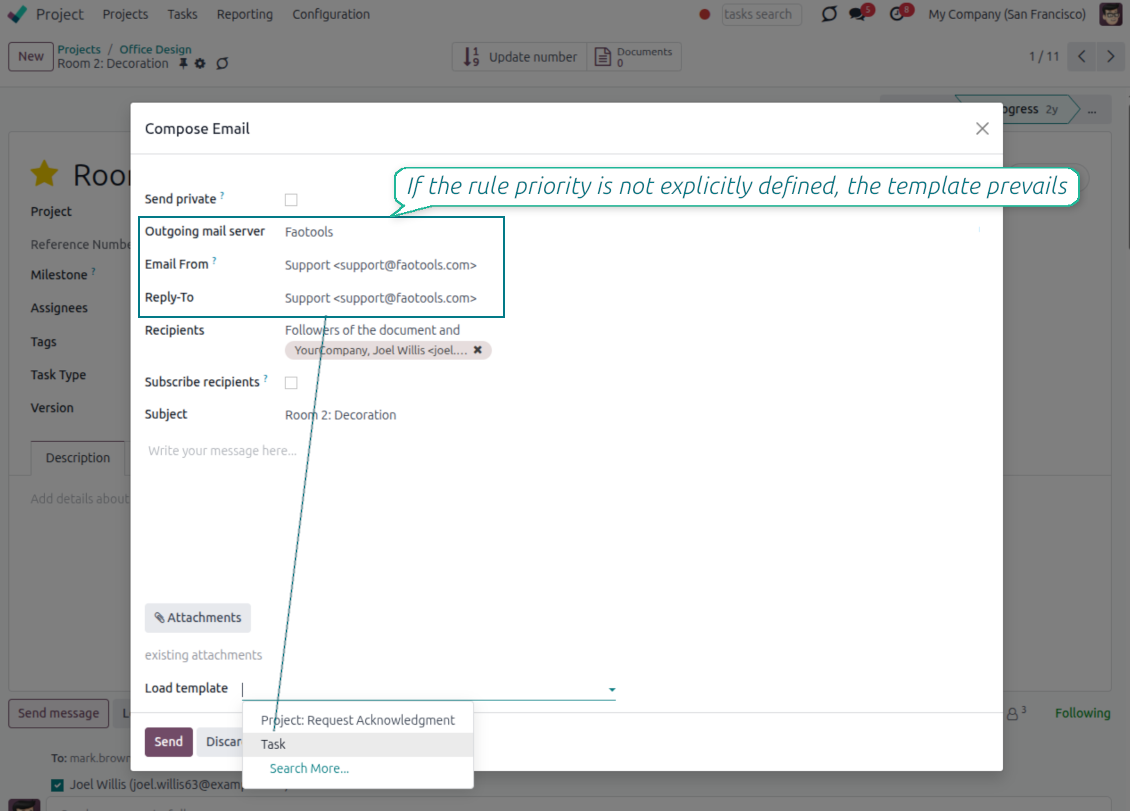
From and Reply-To in the composer
Let users choose an approved sender straight in the full composer instead of free-typing an address.
Template sender addresses
Set a managed From/Reply-To on mail templates and apply it automatically whenever the template runs.
Metadata rules
Pick the sender automatically by document type and domain filter, with optional priority over template defaults.
Matching outgoing server
Every address is tied to one outgoing server, and the server field is hidden when a single server is configured.
Enforced consistency
An XML domain plus a Python check block mismatched address and server pairs, even when sending through the API.
Klaar om te evalueren?
Begin met een gratis demoaanvraag of koop in de Odoo Apps Store.
Gratis gepersonaliseerde demodatabase. Geen telefoonnummer of creditcard nodig. Gratis lifetime-updates en expert support binnen de Odoo-hoofdversie.
Pick the From and Reply-To in the composer
Managed address pickers instead of typing Send From / Reply To by hand
Choose, do not type
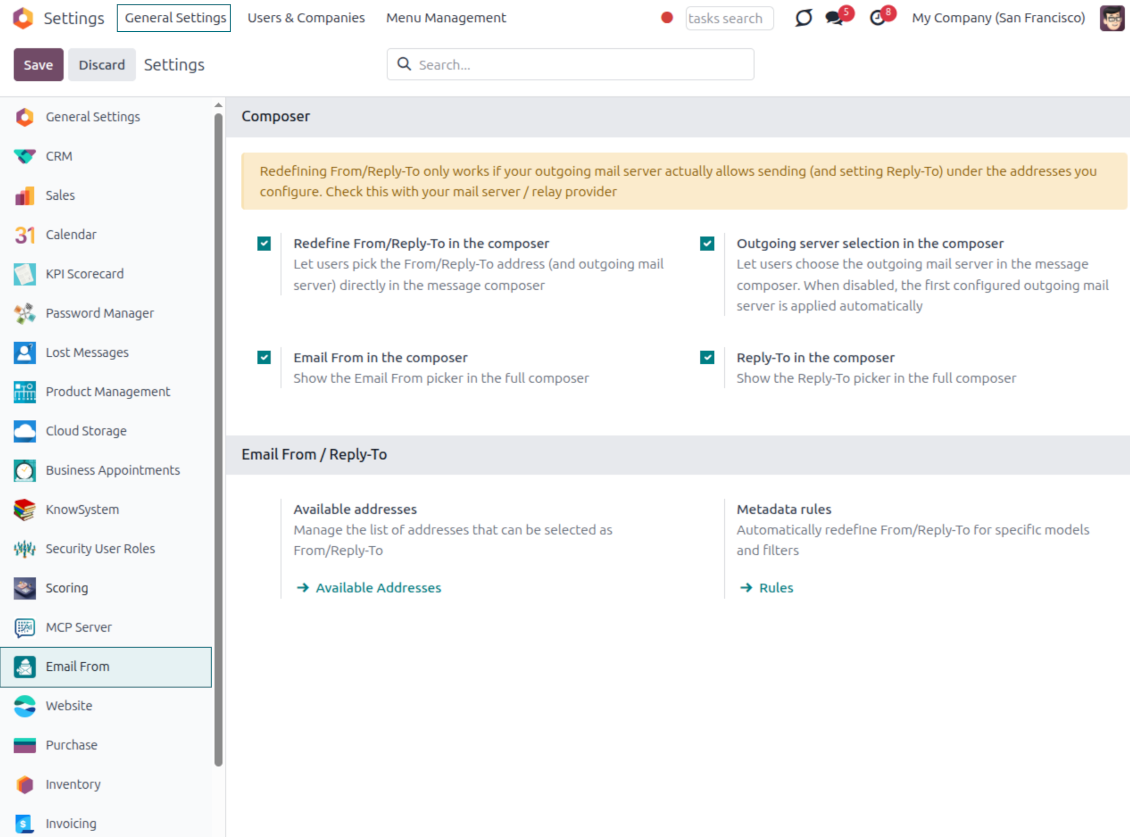
- Turn the pickers on from Settings. Enable the Email From and Reply-To pickers in the full composer from the Email From settings.
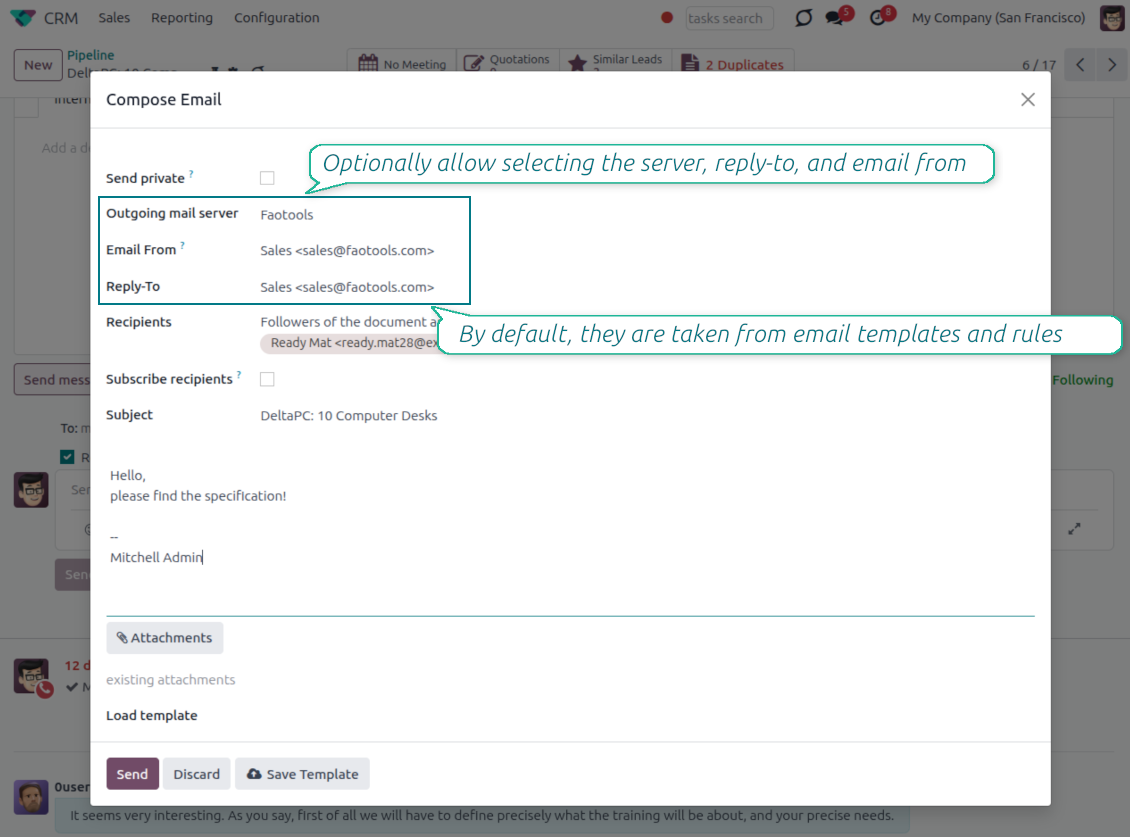
- Select an approved address. Users pick a From or Reply-To from the managed list, and the composer fills the real sender values for them.
- Force replies where you want them. Choosing a Reply-To also routes future replies to that address.
Smart outgoing-server handling
- Server set for you. The outgoing mail server matching the chosen address is selected automatically.
- Hidden when there is only one. With a single server configured, the server field is hidden and applied silently.
- Filtered when there are several. With multiple servers, the picker only offers addresses that match the selected server.
One managed address book behind every email
One address list for From and Reply-To; each address already knows its outgoing server
One place to define addresses
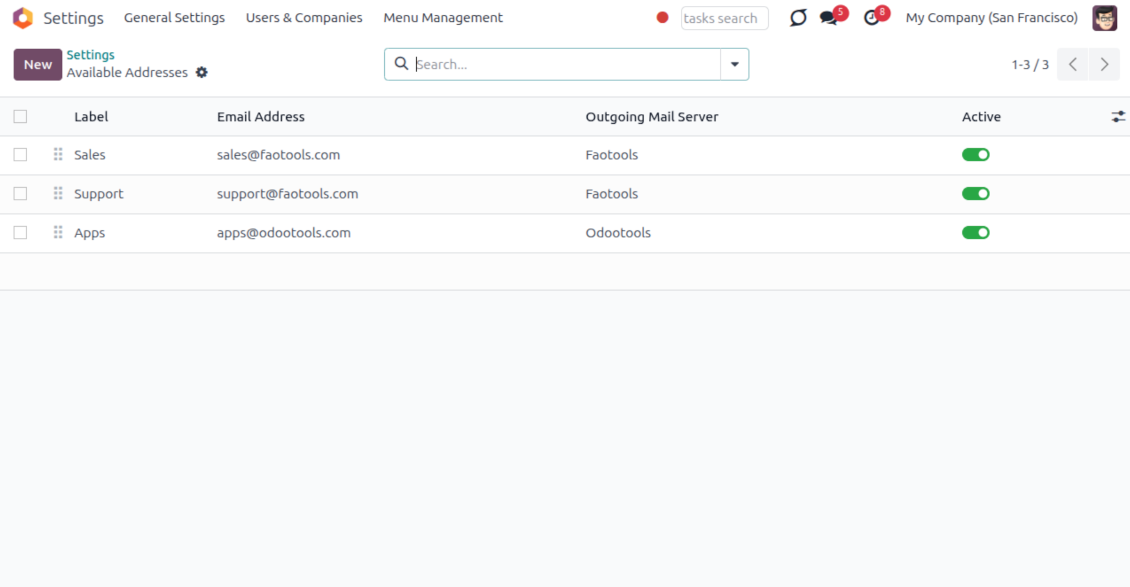
- Label every sender clearly. Give each address a name and email, for example Support or Sales, so users recognize it instantly.
- Order and scope the list. Sequence the addresses, archive the ones you retire, and keep them per company.
- Feed the whole module. The same list powers the composer, email templates and metadata rules, so nothing is ever free-typed.
Locked to the right server
- One address, one server. Each address is tied to exactly one outgoing mail server it is allowed to send through.
- No wrong pairings. An address can never be combined with, or sent through, another server by mistake.
- Provider support stays your job. Make sure your relay actually allows sending under each address you add; the module enforces the consistency inside Odoo.
Managed Send From and Reply To on email templates
Replace Odoo's free-text template fields with the same managed address pickers
Set it once on the template
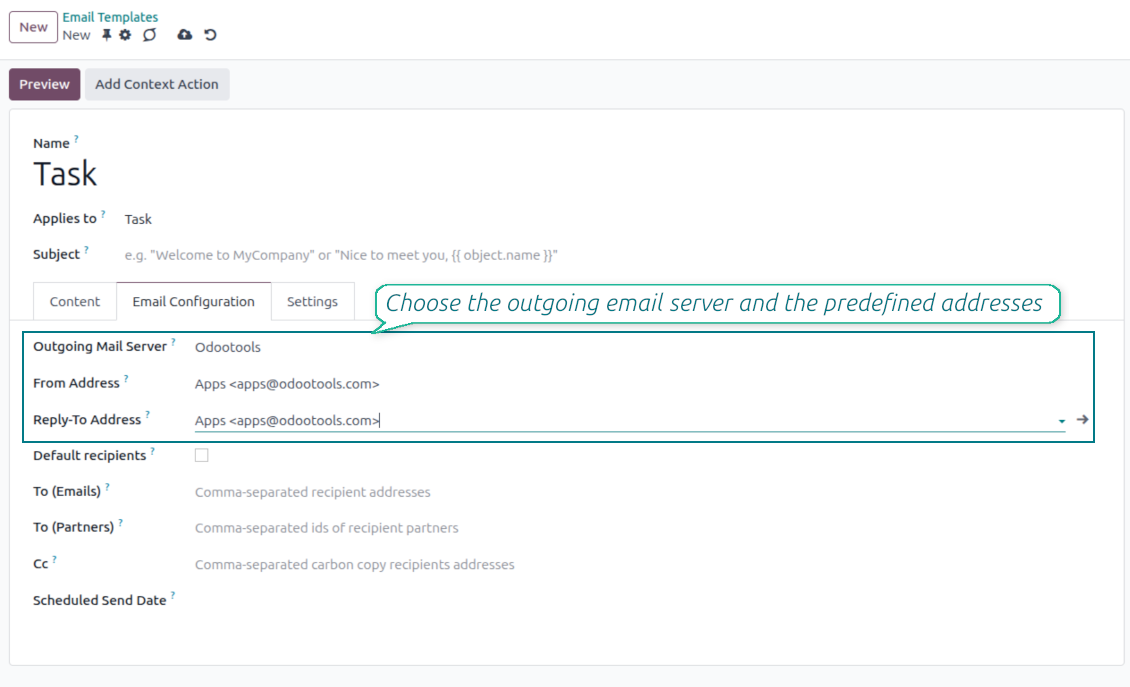
- Pick a managed address. Choose the From and Reply-To of any mail template from the same approved address list.
- Populate the native fields. Your selection fills the template Send From and Reply-To values, so no core behavior is bypassed.
- Keep the server tidy. The outgoing server field stays read-only when a single server is configured.
Applied everywhere the template runs
- Consistent across channels. The template address is used in the composer, automated actions and any flow that sends the template.
- No reselection needed. Once set on the template, the correct sender is applied every time without user input.
- Same safety guarantees. Template addresses obey the same address and outgoing-server matching as the composer.
Automatic sender selection with metadata rules
Choose the right From/Reply-To by document type and filter, with no manual step
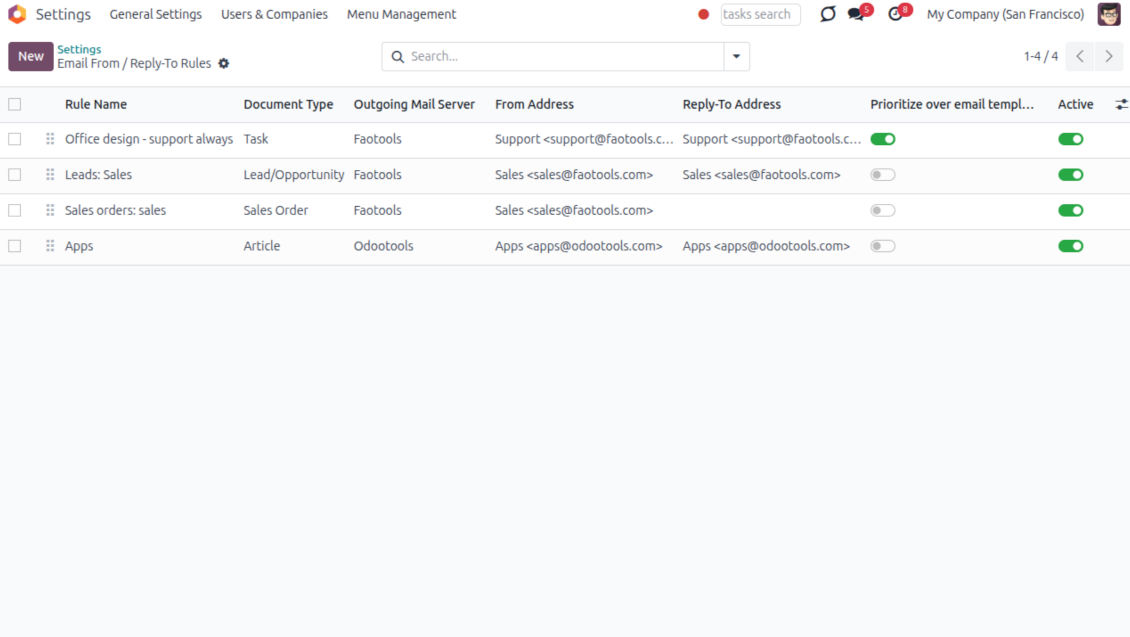
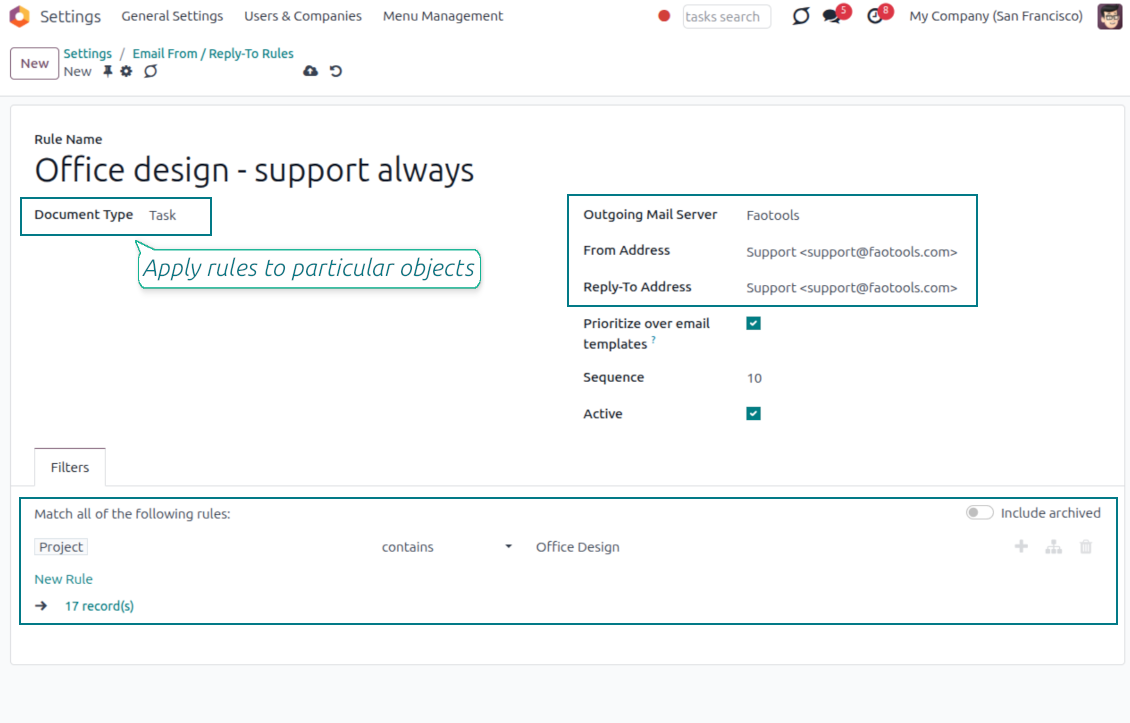
Match by model and filter
- Rules per document type. Define which sender to use for a model, for example sales orders, invoices or leads.
- Narrow with a domain. Add a filter so a rule only fires for matching records, such as a given sales team or customer segment.
- First match resolves everything. The winning rule sets the From, the Reply-To and the matching outgoing server together.
You control the priority
- Templates win by default. When a mail template already defines a sender, the template value is kept.
- Flip it when you need to. Enable Prioritize over templates and the rule takes precedence over the template default.
- Hands-off in the composer. The resolved sender is applied automatically, so users never have to remember the right address.
Keep sending safe and deliverable
Why managed addresses matter and how mismatches are blocked
Why letting anyone type an address is risky
- Providers only trust known senders. Most mail providers reject or mark as spam any message sent from an address they do not recognize.
- Failures can happen quietly. If anyone can type any From or Reply-To address, a message can fail to arrive without a clear warning in Odoo.
- Only approved addresses are offered. The composer, templates and rules only let you choose from the addresses you have already configured.
Mismatches are caught automatically
- Wrong pairings stay out of view. You can only pick an address together with the outgoing mail server it is actually linked to.
- Sending is blocked if something doesn't match. Even automated emails or connected apps cannot bypass this check.
- You still confirm support with your provider. Make sure your outgoing mail server allows sending under each address you add, usually through a matching sender filter or verification step.
Veelgestelde vragen over Odoo Email From Odoo v.17
Wat is het updatebeleid van uw tools?
Volgens het huidige beleid van de Odoo Apps Store:
- Elke module gekocht voor versie 12.0 of eerder geeft toegang tot alle versies tot 12.0.
- Vanaf versie 13.0 moet elke moduleversie apart worden gekocht.
- Ongeacht de versie geeft aankoop recht op alle updates en bugfixes binnen een hoofdversie.
Het faOtools-team bepaalt dit beleid niet. Neem voor vragen rechtstreeks contact op met vertegenwoordigers van de Odoo Apps Store.
Hoe installeer ik uw app op Odoo.sh?
De meest directe aanpak is de ingebouwde workflow van de Odoo-store:
1. Open de modulepagina en klik op Deploy on odoo.sh
2. U gaat naar GitHub. Log in en klik op Create a new repo of gebruik een bestaande. De repository moet privé zijn. Apps onder OPL-1 mogen niet openbaar. Maak zo nodig een nieuwe repo voor het Odoo.sh-project
3. Ga daarna naar odoo.sh, klik op Deploy, bevestig en klik op Continue. De installatie start.
Zo installeert u de app op de productiebranch. Voor andere branches of een update:
1. Download de broncode uit de Odoo-store
2. Commit de module naar de GitHub-repository. Geen app-mappen/bestanden in .gitignore. Repo's van odoo.sh negeren soms belangrijke paden (bijv. /lib). Upload alle modulemappen en -bestanden
3. Deploy de doelbranch van het odoo.sh-project of wacht op de automatische build.
Hoe installeer ik uw app op mijn eigen server?
2. Herstart de Odoo-server;
3. Zet de ontwikkelaarsmodus aan (technische instellingen);
4. Werk de applijst bij (Apps-menu);
5. Zoek de app en klik op Activate/Install;
6. Volg de richtlijnen op de app-pagina als die er zijn.
Uw app heeft extra add-ons. Kan ik die later kopen?
Ja. Odoo zet automatisch alle afhankelijkheden in de winkelwagen: sluit eerder gekochte tools uit om dubbel betalen te voorkomen.
Ik heb uw app op Odoo.sh gezet en zie een waarschuwing/fout in de tests
Een rode/oranje waarschuwing beinvloedt de functies van de app niet. Soms halen onze modules de standaard automatische tests niet, omdat die gedrag verwachten dat indruist tegen het doel van de app. We wijzigen bijvoorbeeld de prijscalculatie, terwijl de Odoo-tests de eindprijs met het standaardalgoritme vergelijken.
Controleer eerst de functies van de gedeployde database. Werkt alles?
Als u toch denkt dat de waarschuwing echte functies raakt, neem contact op en stuur de volledige installatielogs en de volledige lijst gedeployde modules (kern en derden).
Kan ik uw app rechtstreeks bij u kopen?
Nee, we verspreiden de tools alleen via de officiele Odoo-appwinkel.
Ik wil graag korting
Helaas hebben we geen technische mogelijkheid voor individuele prijzen.
Kan ik de app installeren op mijn Odoo Online (SaaS)-database?
Nee, apps van derden kunnen niet op Odoo Online. Odoo SaaS blokkeert die mogelijkheid.
Uw tool hangt van andere apps af. Moet ik die kopen?
Ja, de tool heeft alle modules in de afhankelijkheden nodig. De prijs op de app-pagina is inclusief die afhankelijkheden.
Wat is de prijs van de module in Amerikaanse dollars? Waarom is die veranderd?
De prijs van onze modules staat in euro. De Odoo-store rekent om volgens de interne wisselkoers. De prijs in Amerikaanse dollars kan dus wijzigen als die koers wordt bijgewerkt.
De teksten van de app en website in andere talen dan het Engels zijn met AI ondersteund en afgestemd op de officiële Odoo-vertalingen. Als u een fout ziet, een vertaalticket sturen en we corrigeren het.
Odoo-demodatabases (voorbeelden)
Voor deze app kunnen we een gratis gepersonaliseerde demodatabase aanbieden.
U heeft geen telefoonnummer of creditcard nodig om contact met ons op te nemen. U hoeft slechts een korte e-mailaanmelding door te geven, die niet langer dan 30 seconden duurt.
Op verzoek richten wij een eigen voorbeelddatabase in waarin u ongeveer twee weken lang naar wens kunt testen en aannames kunt controleren.
Fouten melden
Als u bugs of inconsistent gedrag tegenkomt, aarzel dan niet om contact met ons op te nemen. We garanderen dat we binnen 60 dagen na aankoop oplossingen bieden en zijn zeer geïnteresseerd in het verbeteren van onze tools, zelfs na deze periode.
U heeft geen telefoonnummer of creditcard nodig om contact met ons op te nemen. U hoeft slechts een korte e-mailaanmelding door te geven, die niet langer dan 30 seconden duurt.
Vermeld zo veel mogelijk details in uw verzoek: schermafbeeldingen, Odoo-serverlogboeken, een volledige beschrijving om uw probleem te reproduceren enzovoort. Gewoonlijk kost het enkele werkdagen om een werkplan voor een probleem op te stellen (als een bug is bevestigd) of u richtlijnen te geven over wat er moet gebeuren (anders).
Aanvragen voor openbare functies en module-ideeën (gratis ontwikkeling)
We zijn sterk gemotiveerd om onze tools te verbeteren en zijn dankbaar voor alle feedback. Als uw vereisten van openbaar nut zijn en efficiënt kunnen worden geïmplementeerd, zal het team deze opnemen in onze takenlijst.
Zo'n to-dolijst wordt regelmatig verwerkt en er zijn geen extra kosten aan verbonden. Hoewel we geen deadlines en definitief ontwerp kunnen beloven, kan het een goede manier zijn om de gewenste functies te verkrijgen zonder investeringen en risico's.
U heeft geen telefoonnummer of creditcard nodig om contact met ons op te nemen. U hoeft slechts een korte e-mailaanmelding door te geven, die niet langer dan 30 seconden duurt.

The tool to flexibly structure Odoo attachments in folders and synchronize directories with cloud clients: Google Drive, OneDrive/SharePoint, Nextcloud/ownCloud, Dropbox, Amazon S3, Box, and NAS. DMS. File Manager. Document management system
398€

The tool to build a deep and structured knowledge base for internal and external use. Knowledge System. KMS. Wiki-like revisions.
398€
The tool to automatically synchronize Odoo attachments with OneDrive files in both ways
487€
The tool to set up KPI targets and control their fulfillment by periods. KPI dashboards. Dashboard designer. KPI charts

The tool for time-based service management from booking appointments to sales and reviews
398€
The tool to automatically synchronize Odoo attachments with Google Drive files in both ways
487€