Kısa
Odoo Messaging Suite bir Odoo 17 (Mesajlaşma) uygulamasıdır. The tool to improve the Odoo messaging experience.
Odoo Messaging Suite brings lost-message recovery, private discussions, message citing, post-send editing, managed From/Reply-To addresses and a richer email composer together in one application. Compose with CC/BCC and per-user drafts, route emails to the right document, quote from the message toolbar, and catch forgotten attachments before they leave. Every message keeps its email headers behind a details icon, and administrators configure the whole toolkit from one Messaging Suite settings page.
Kusursuz
Support and sales teams living in their inbox
Perfect for teams that answer customers by email all day and want CC/BCC, drafts and quoting available right inside the Odoo composer, without switching to an external mail client.
Companies needing confidentiality
Ideal when some conversations must stay private from portal users and other followers, while still being logged on the Odoo document for later reference.
Administrators who want oversight and control
Useful for admins who need routing rules, attachment reminders and one settings page to manage the whole messaging toolkit.
Değerlendirmeye hazır mısınız?
Ücretsiz bir demo talebiyle başlayın veya Odoo Apps Store'dan satın alın.
Ücretsiz kişiselleştirilmiş demo veritabanı. Telefon veya kredi kartı gerekmez. Ana Odoo sürümü içinde ücretsiz ömür boyu güncellemeler ve uzman destek.
Ekipler neden bunu seçer
Ayrıntılara dalmadan önce temel faydalar
One settings page
Turn on CC/BCC, drafts, routing, attachment checks and the rest of the toolkit from a single Messaging Suite configuration screen, without hunting through scattered settings menus.
Full email composer
Compose with CC/BCC recipients, per-user drafts and managed From/Reply-To addresses directly inside the Odoo composer.
Managed sender addresses
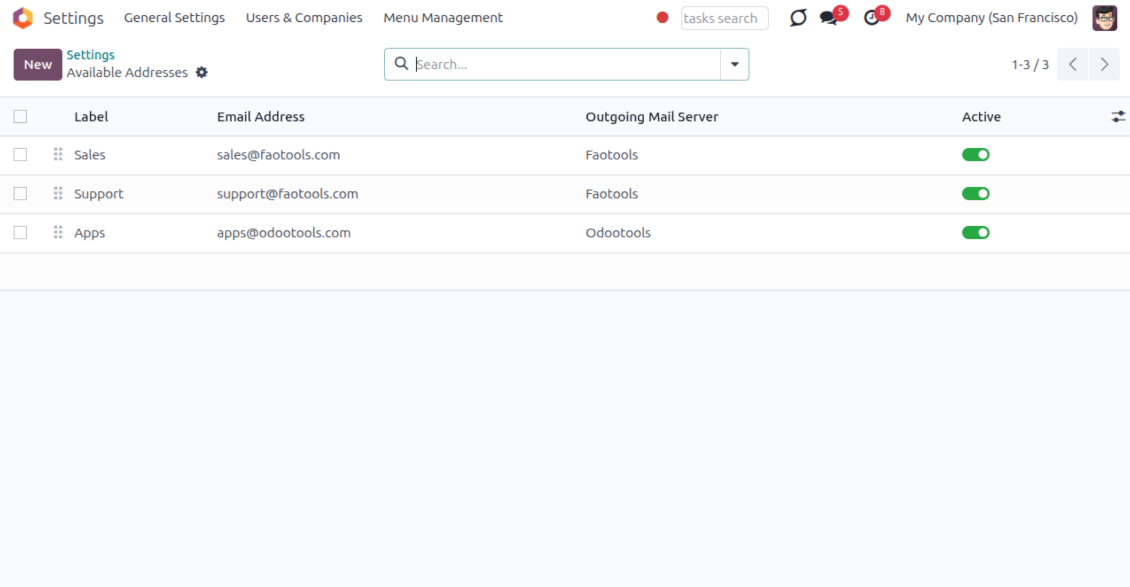
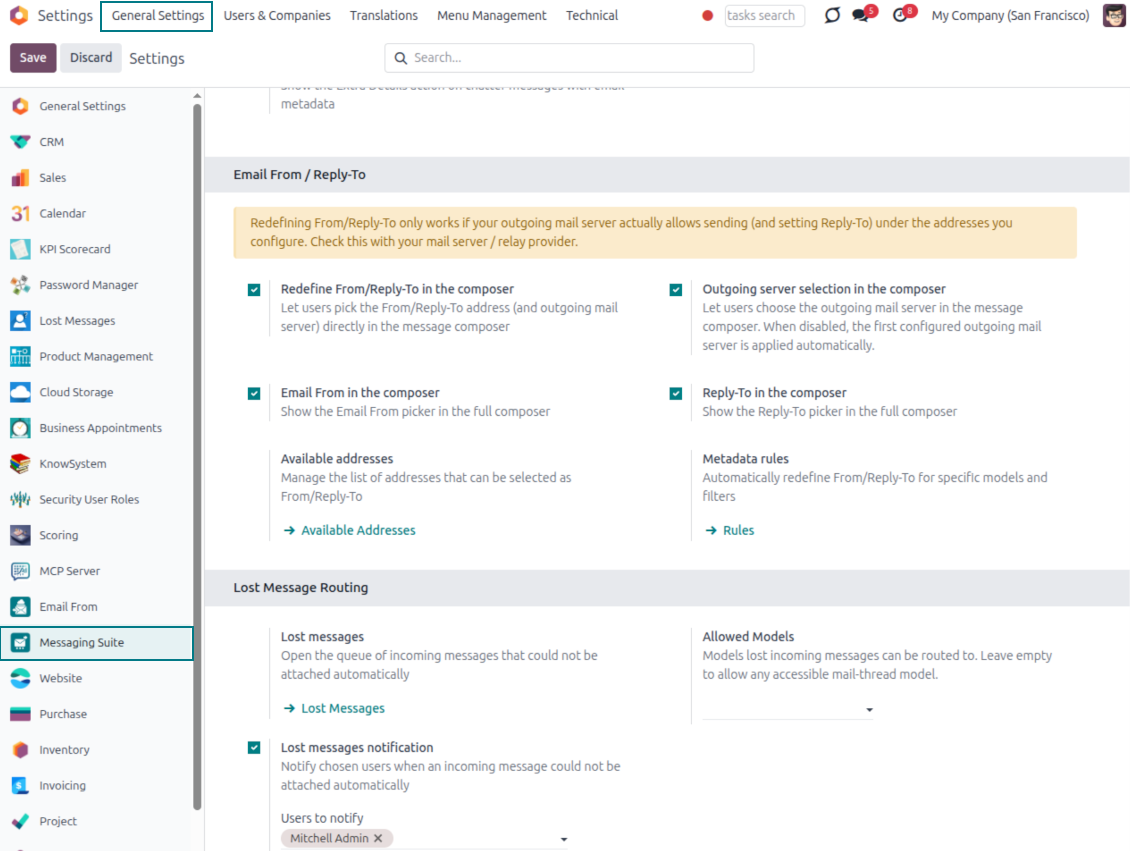
Stop typing sender emails by hand. Pick from an address book tied to the right outgoing mail server, with automatic rules by document type.
Message actions
Route and quote any message from quick actions, and inspect full email headers in a single click.
Lost message recovery
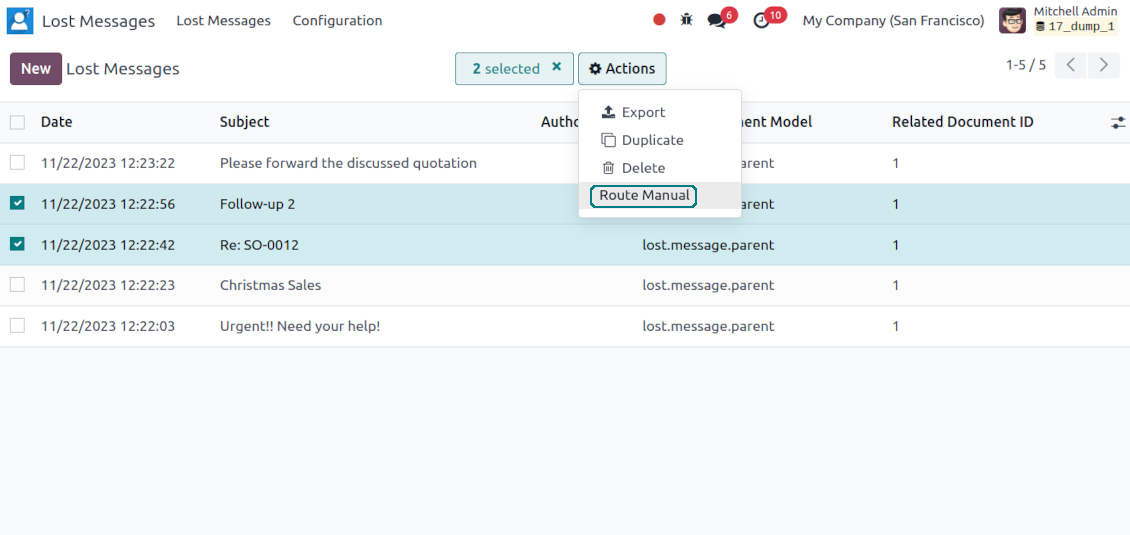
Never lose an incoming email again. Review unattached messages in a dedicated queue and route them to the correct Odoo document before customers wait.
Private threads
Keep sensitive conversations hidden from portal users and other followers, while staying logged on the Odoo document for later reference.
Message citing
Search and cite any earlier Odoo message straight from the composer, so every reply carries the right context.
Message editing & history
Edit or delete your own messages, notes and activity feedback, with a full history of every change kept for admins.
Safer sending
Catch forgotten attachments before you hit send so customers receive complete messages.
Değerlendirmeye hazır mısınız?
Ücretsiz bir demo talebiyle başlayın veya Odoo Apps Store'dan satın alın.
Ücretsiz kişiselleştirilmiş demo veritabanı. Telefon veya kredi kartı gerekmez. Ana Odoo sürümü içinde ücretsiz ömür boyu güncellemeler ve uzman destek.
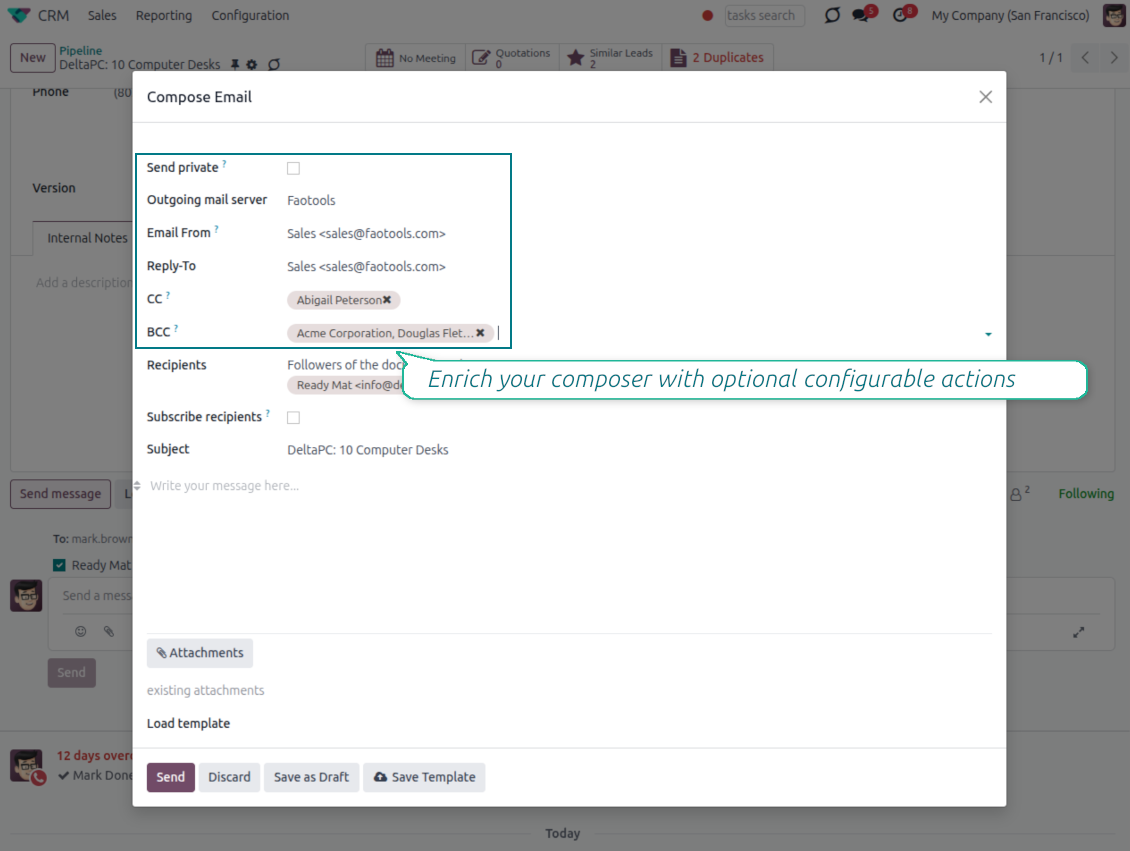
Compose like a real email client
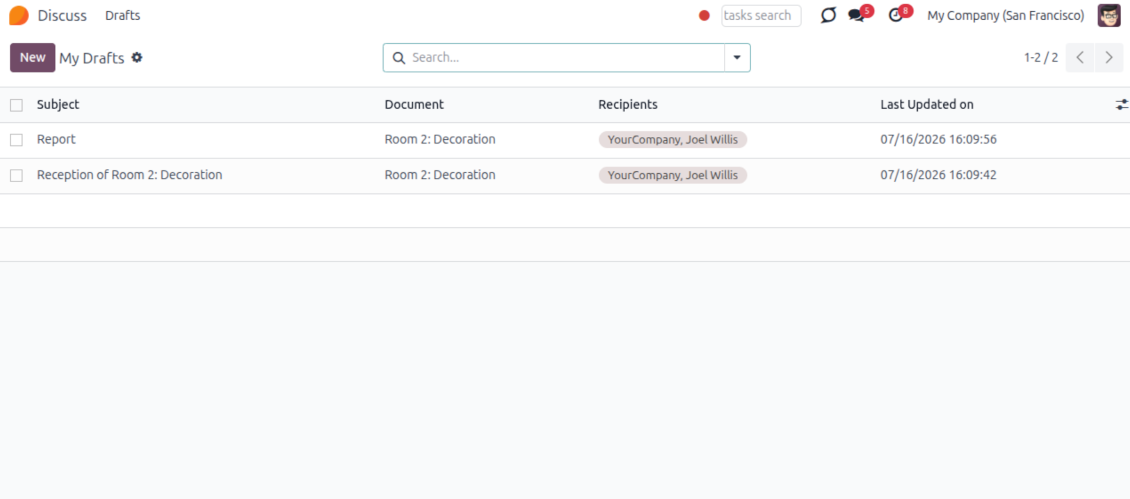
CC, BCC and per-user drafts in the full composer
Copy and blind copy
- Add CC and BCC in the full composer. Type email addresses or pick existing contacts.
- Keep recipients in the message history. Sent CC/BCC values stay visible on the message afterwards.
- Use only when you need them. Turn CC/BCC off in settings if your team does not use copy recipients.
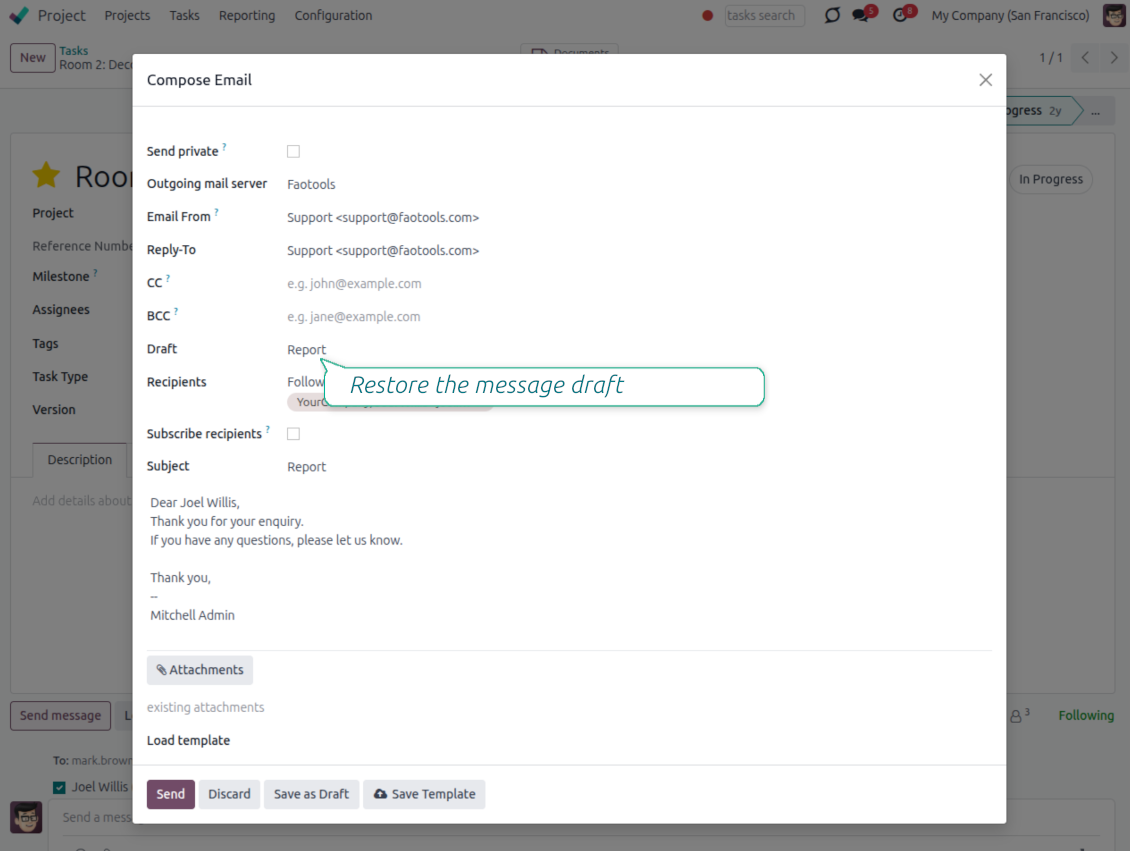
Save as draft
- Save the full message. Drafts keep subject, body, recipients and related fields for the current record.
- Resume where you stopped. Reopening the composer on the same document brings back your latest draft automatically.
- Pick up drafts from Discuss. Every internal user can open the drafts menu and finish unfinished messages.
Message actions and email metadata
Route, quote and inspect email details without leaving the chatter
Actions on every message
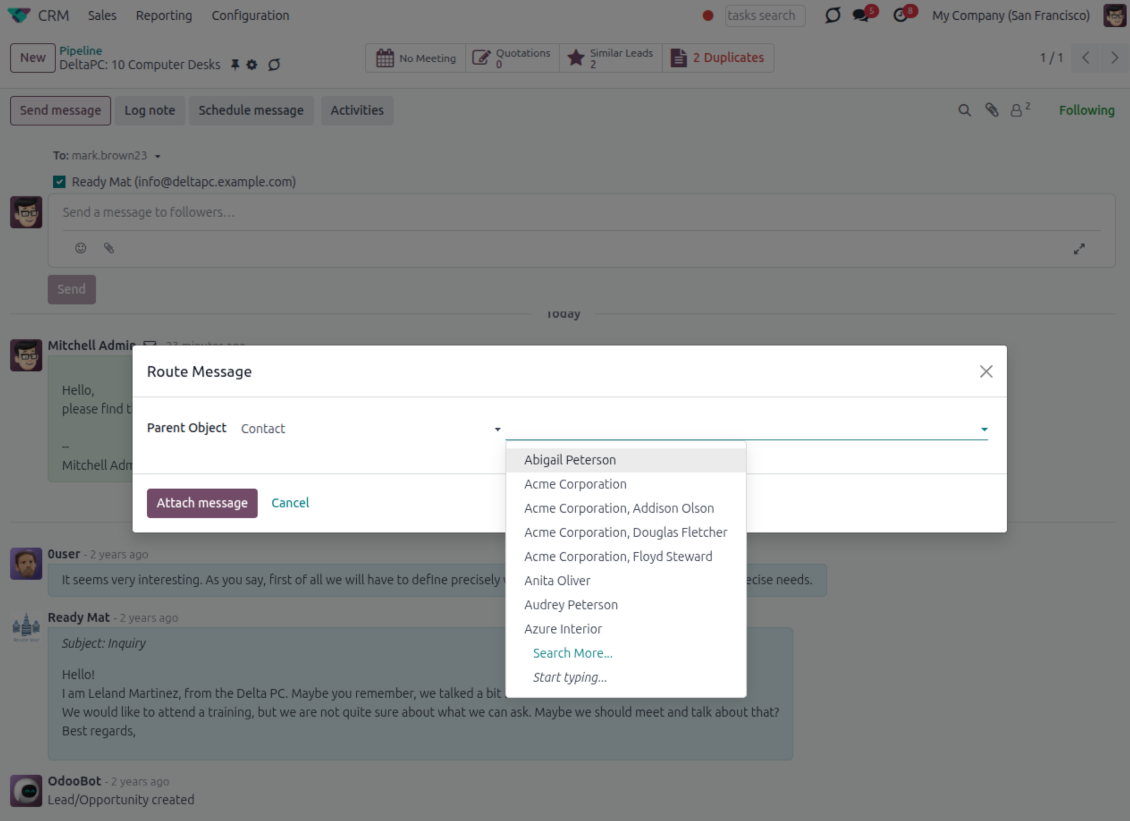
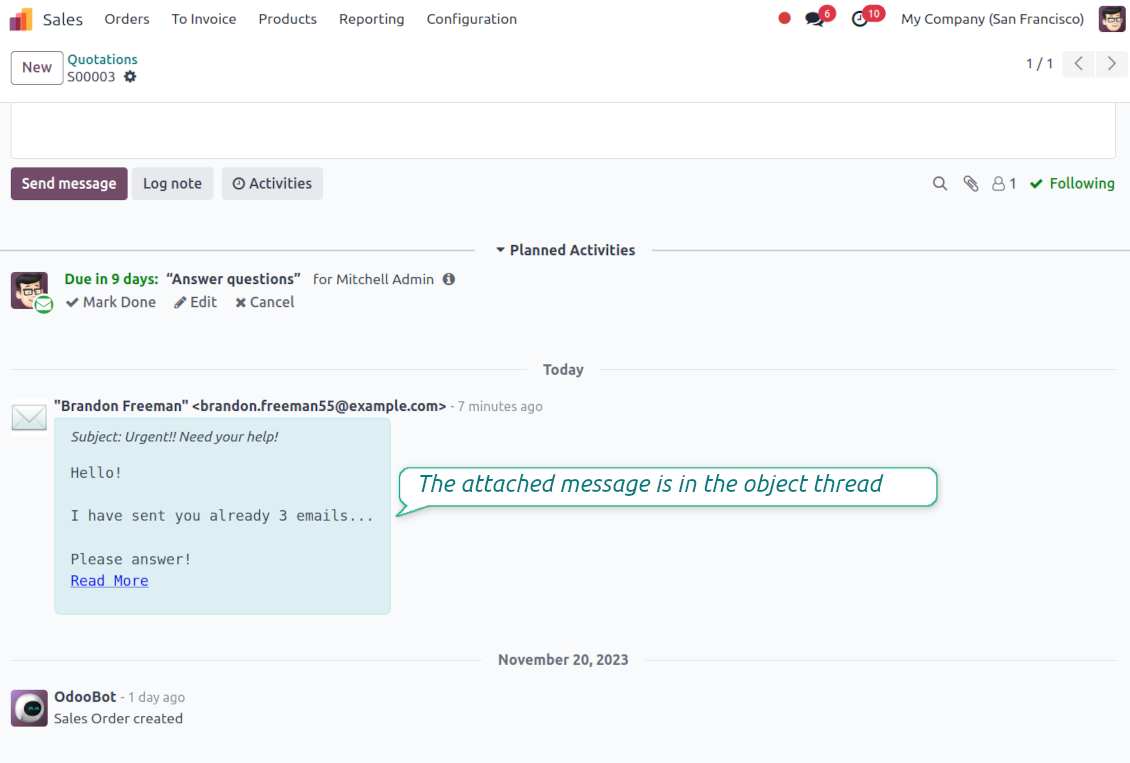
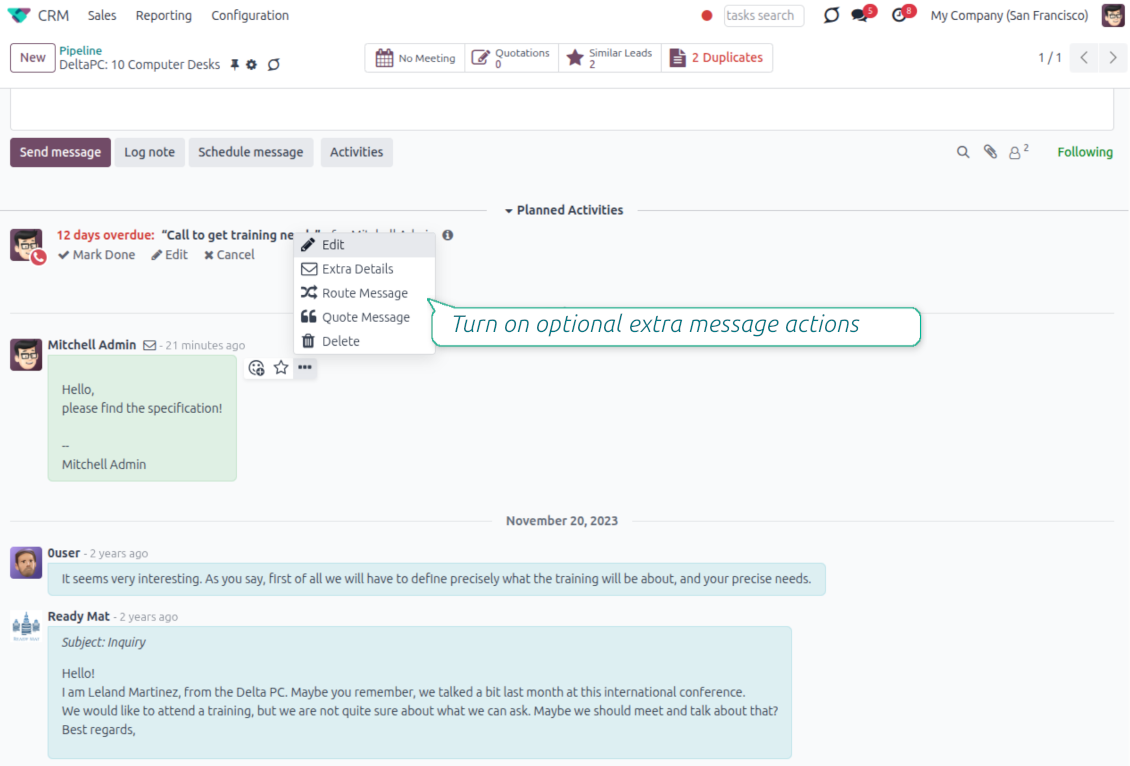
- Route from the thread. Move a message to another document when it landed on the wrong record.
- Quote in a new email. Start a reply with the original message included in the body.
- Keep the composer simple. Every action opens the standard Odoo composer already pre-filled, no separate tooling to learn.
Email details on every message
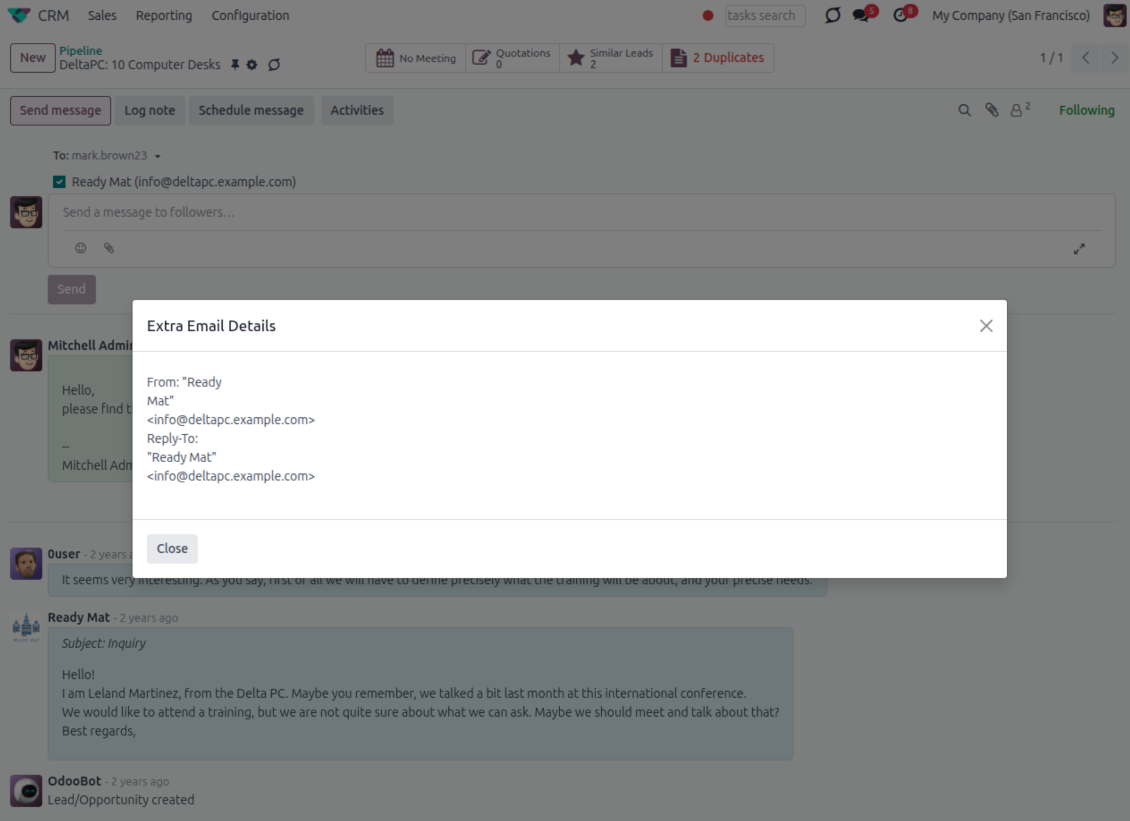
- See full headers. From, Reply-To, To and CC stay available on incoming and outgoing mail.
- Keep CC/BCC too. Copy recipients added in the composer are saved with the message.
- Open details in one click. A small icon on the message shows the complete email information.
Odoo Email From
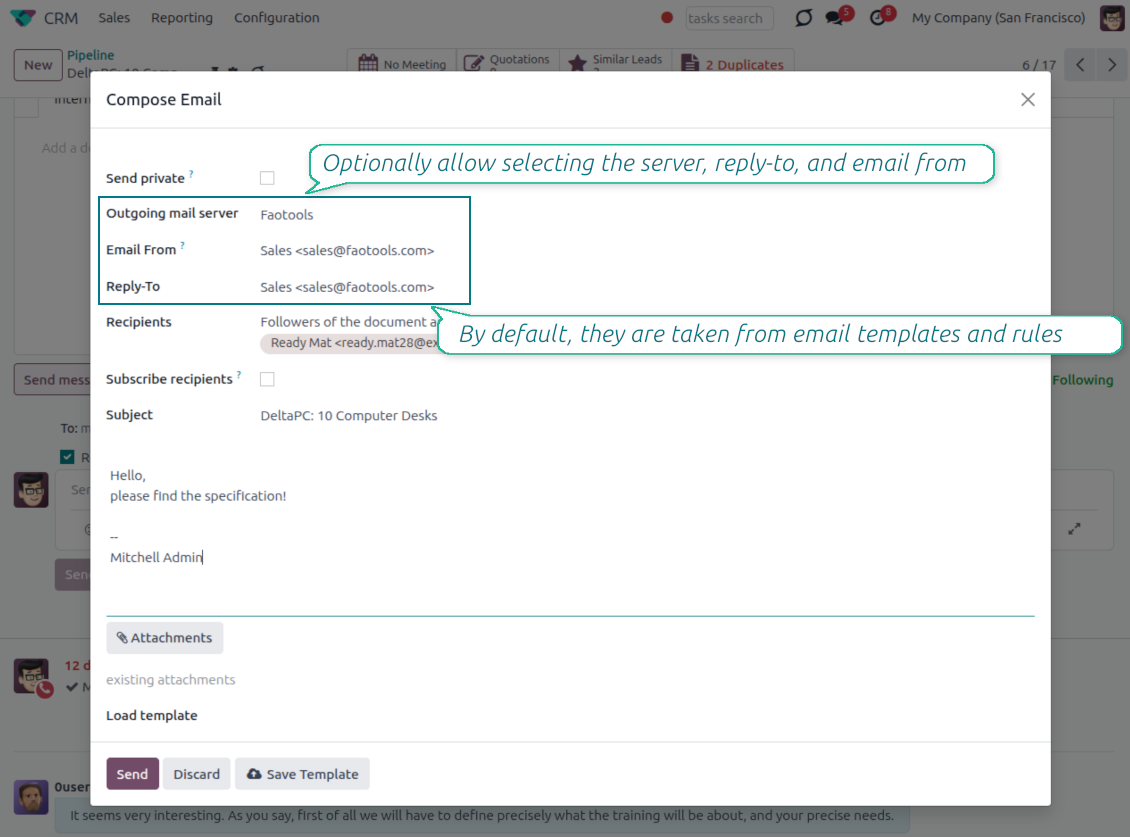
Choose the right From and Reply-To address for every email
Managed sender addresses
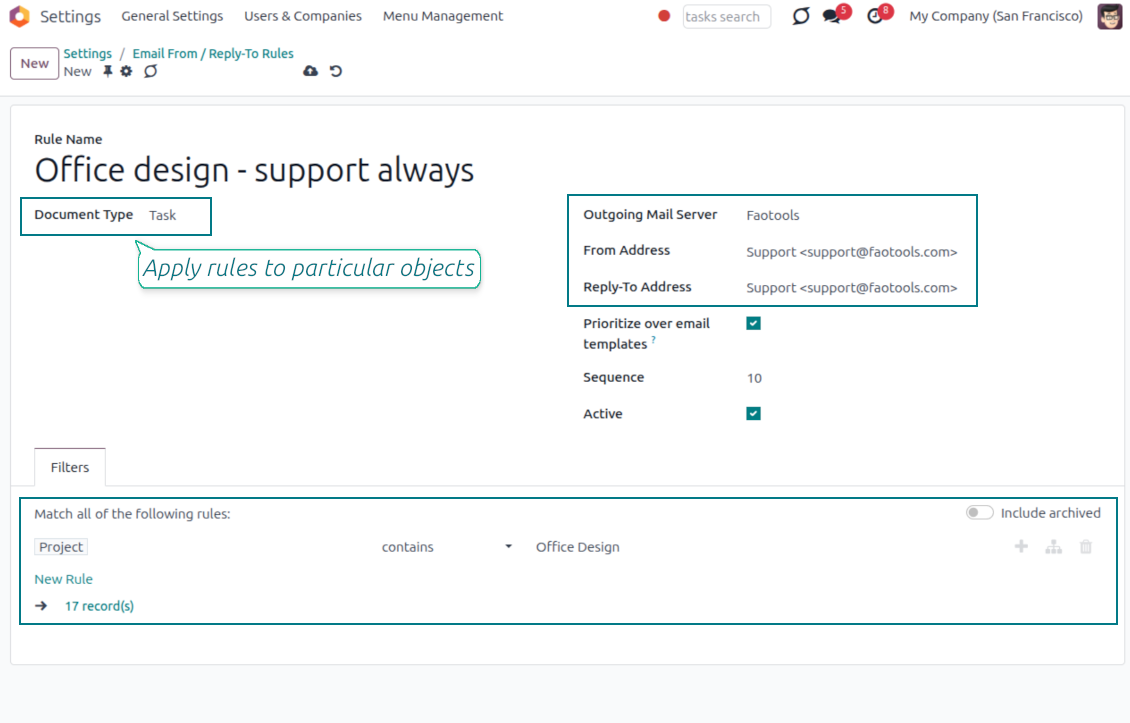
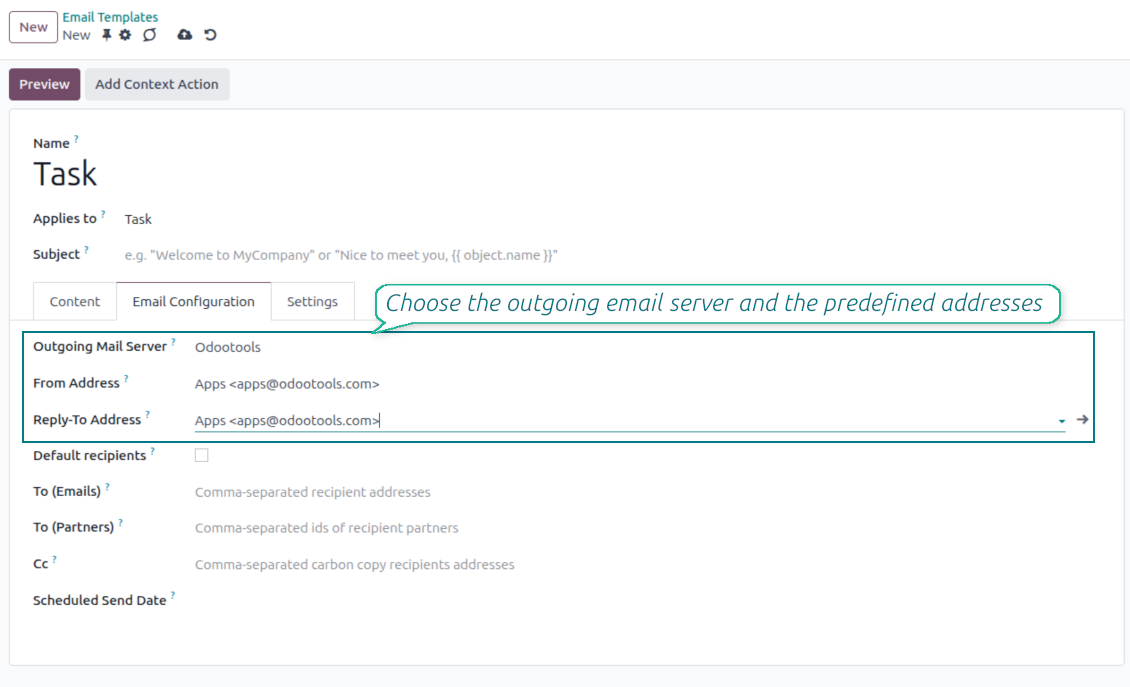
- Pick instead of typing. Users choose From and Reply-To from an address book linked to outgoing mail servers.
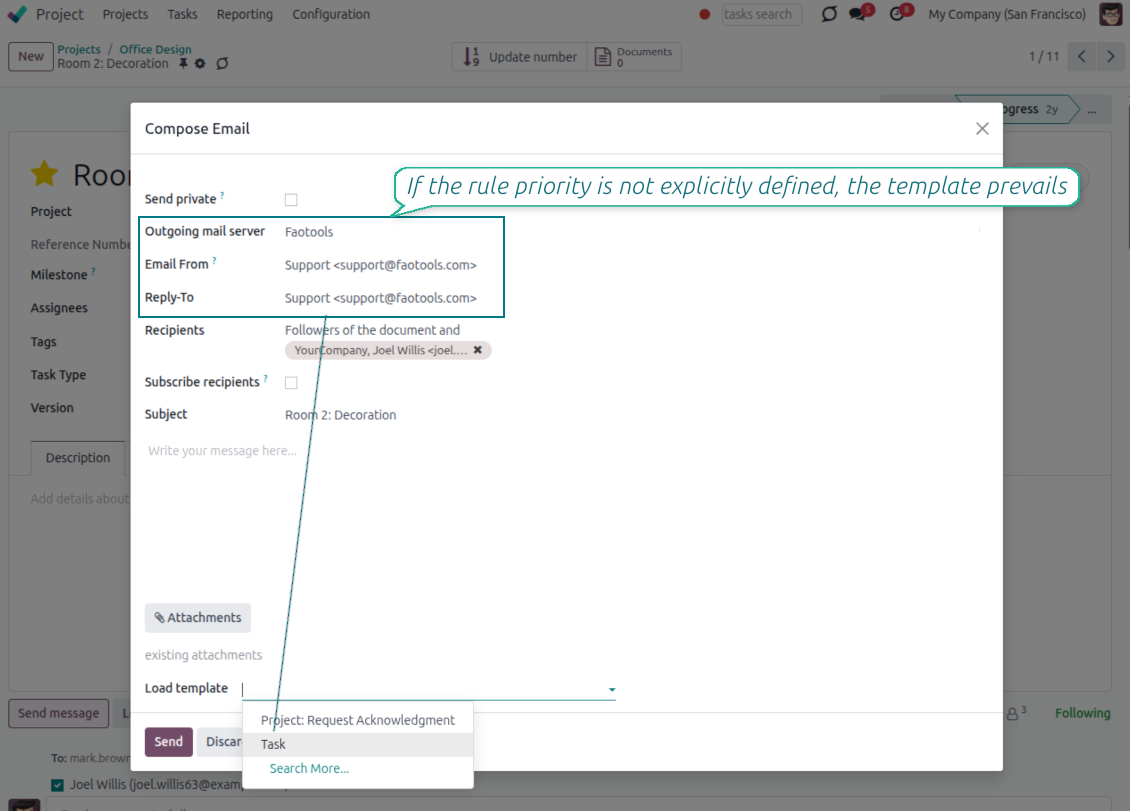
- Apply on templates too. Email templates can use the same managed sender addresses.
- Keep the screen simple. The outgoing mail server field is hidden when only one server is configured.
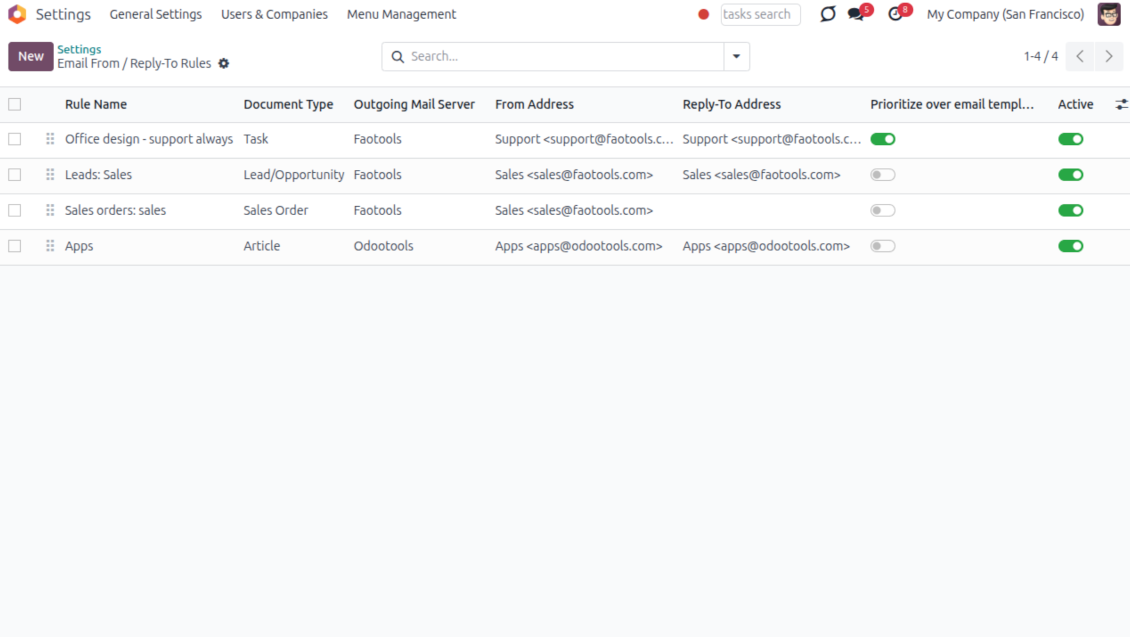
Automatic sender rules
- Set the sender by document type. Rules choose the right From and Reply-To for sales orders, tasks, invoices and other records.
- Prevent invalid combinations. Odoo blocks sender addresses that do not match the selected outgoing mail server.
- Start with working mail setup. Make sure each outgoing server can actually send from the addresses you add.
Değerlendirmeye hazır mısınız?
Ücretsiz bir demo talebiyle başlayın veya Odoo Apps Store'dan satın alın.
Ücretsiz kişiselleştirilmiş demo veritabanı. Telefon veya kredi kartı gerekmez. Ana Odoo sürümü içinde ücretsiz ömür boyu güncellemeler ve uzman destek.
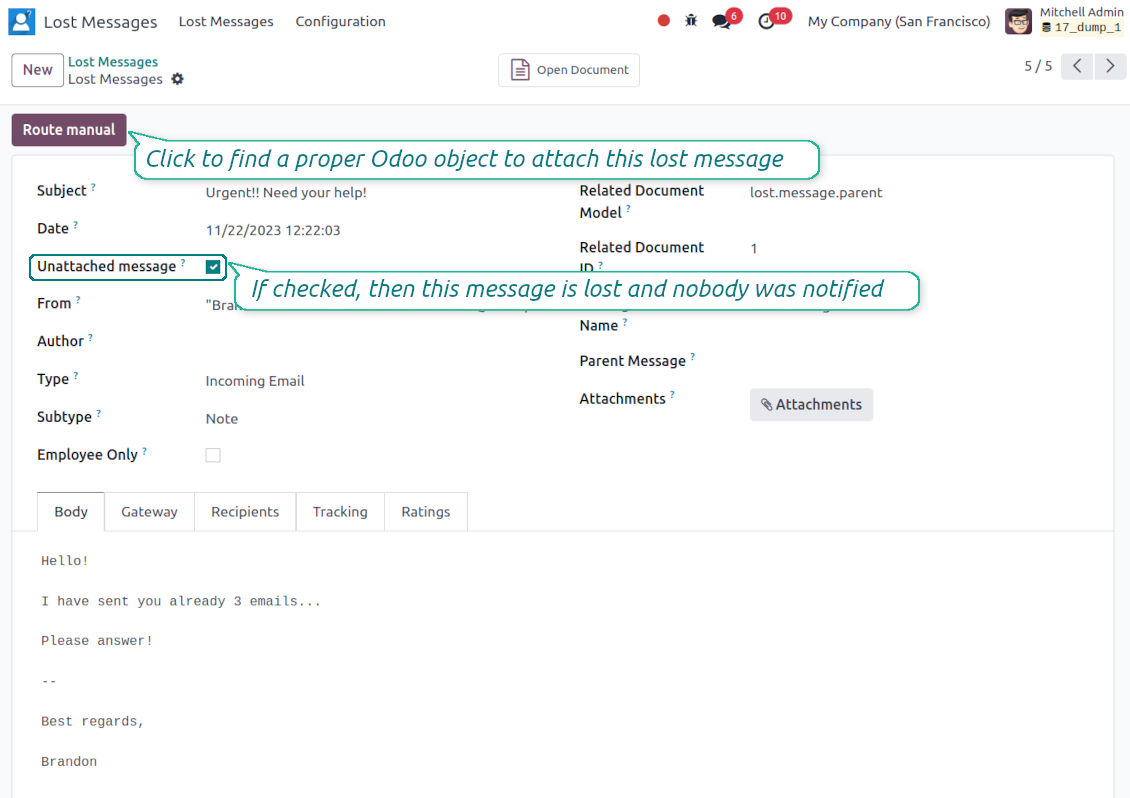
Lost Messages Routing
Recover incoming emails Odoo could not attach automatically
Lost message queue
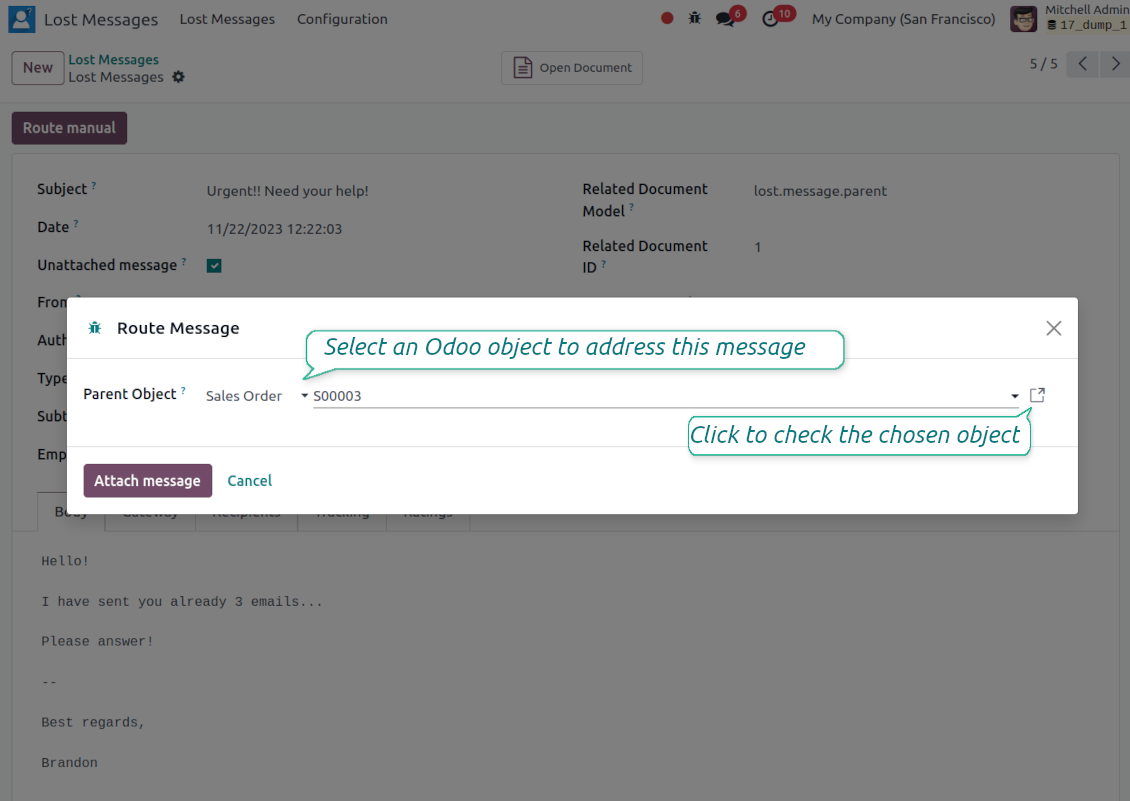
- Catch emails that did not attach. Incoming messages Odoo cannot place on a document are kept instead of disappearing.
- Review in one menu. Your team works from a dedicated queue with subject, sender, body and search tools.
- Keep routing clues. Recipients, To, CC and In Reply To stay available to help find the right document.
Route to the right document
- Attach in a few clicks. Pick the target document and attach one or several lost messages in a single action.
- Limit where messages may go. Restrict routing to selected document types or leave the list open for managers.
- Move attached messages too. Already linked chatter messages can be rerouted to another document when needed.
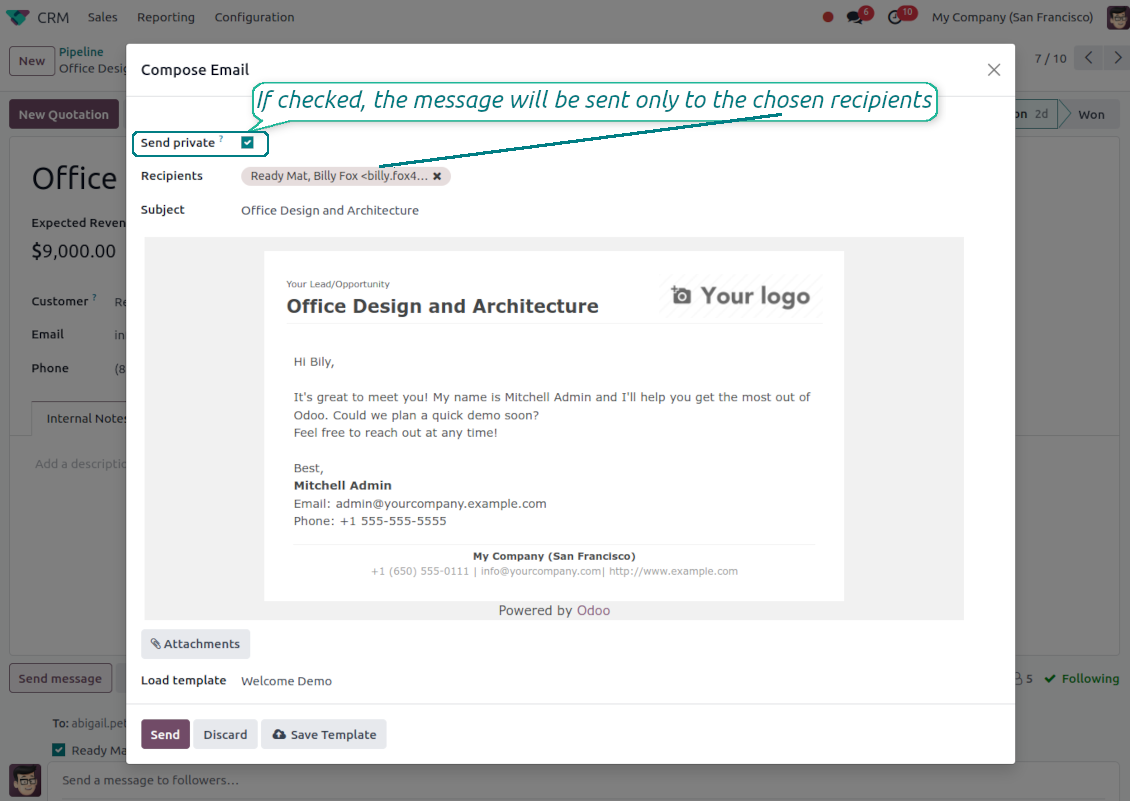
Private Thread
Confidential discussions that stay inside Odoo and off the portal
Send private from the composer
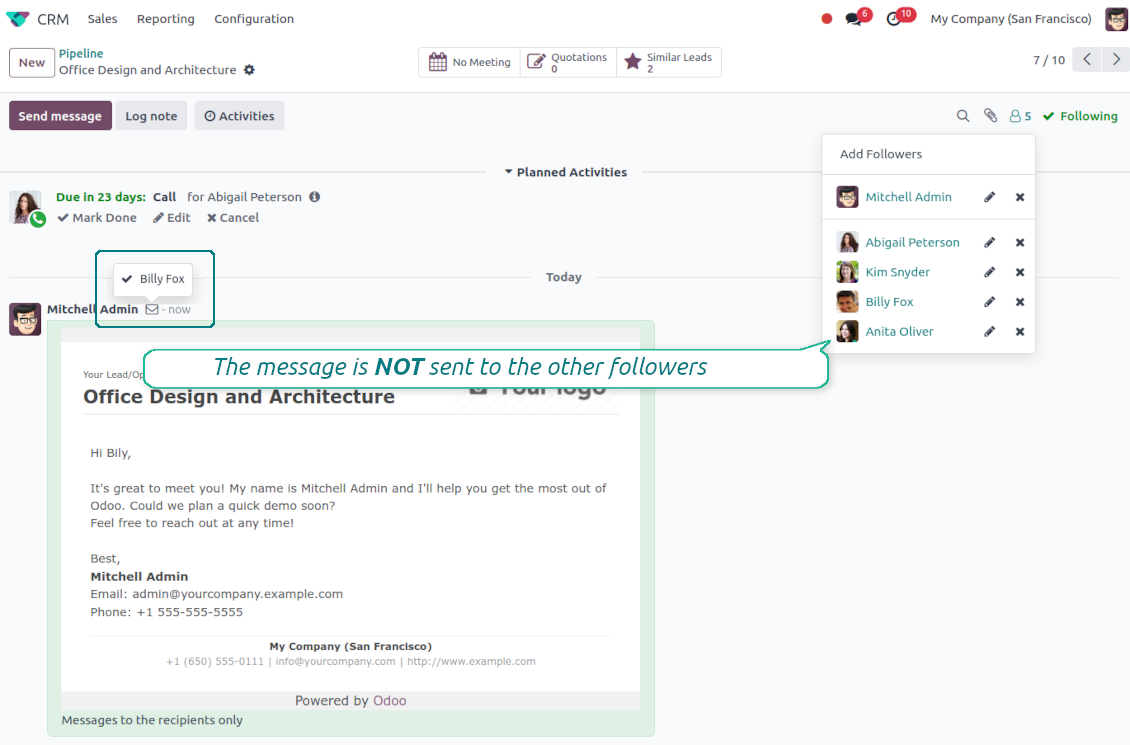
- Tick Send private. Compose a message that reaches only the selected recipients.
- Do not notify other followers. Portal users and regular followers stay out of the conversation.
- Works on any document. Use private sending on sales orders, tasks, invoices, leads and other records.
Confidential but traceable
- Keep history on the record. Private messages remain on the document for later reference.
- Hide from portal users. External contacts cannot read internal discussions on their documents.
- Choose privacy each time you send. Tick Send private again on a follow-up if that reply should stay confidential too.
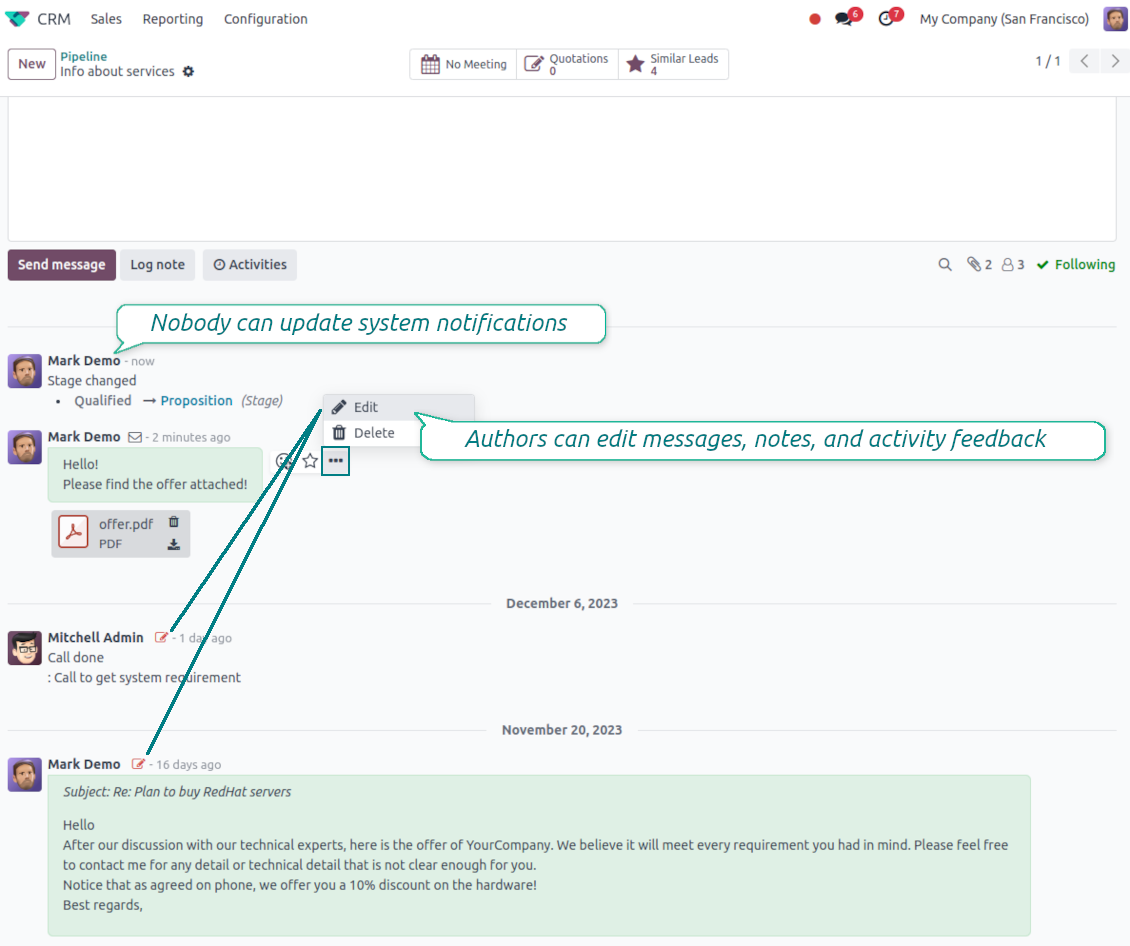
Message and Note Editing
Fix mistakes after sending while keeping a transparent history
Fix mistakes after sending
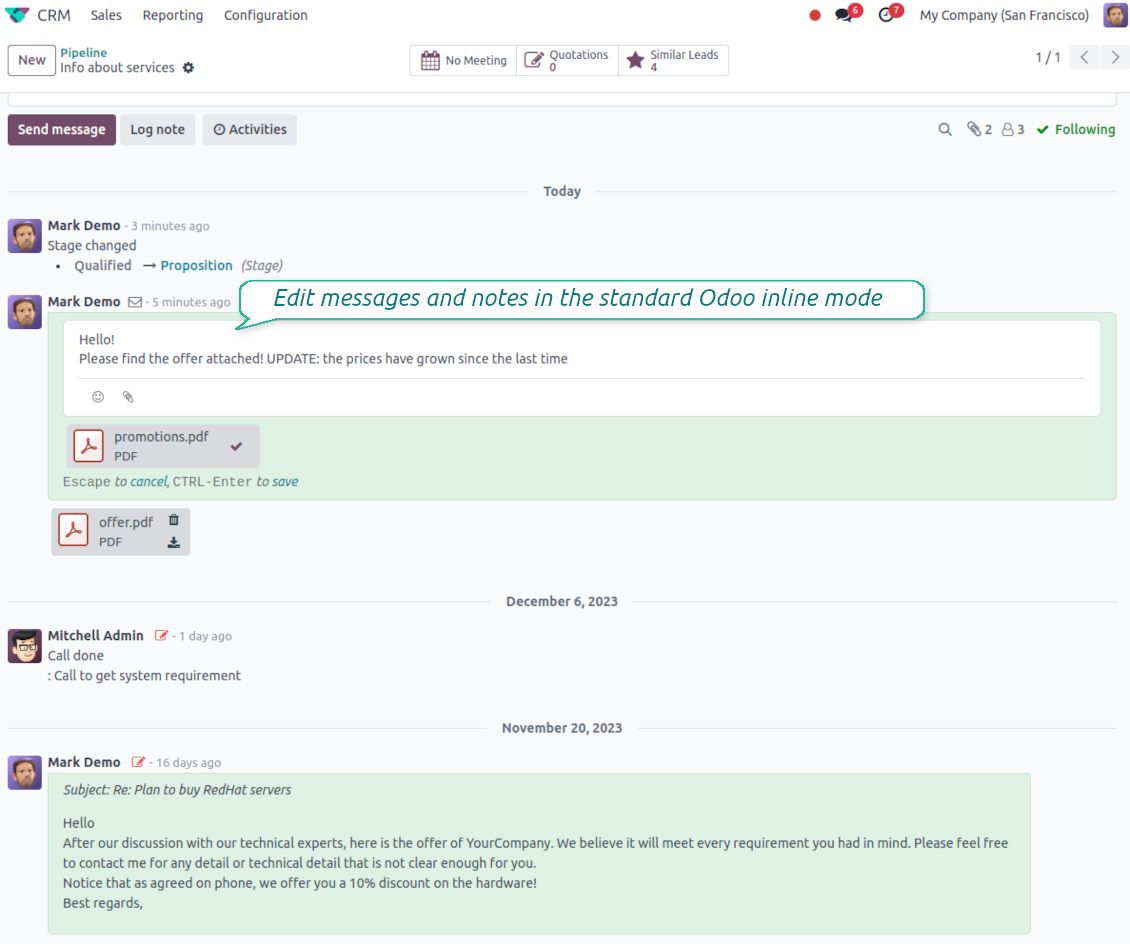
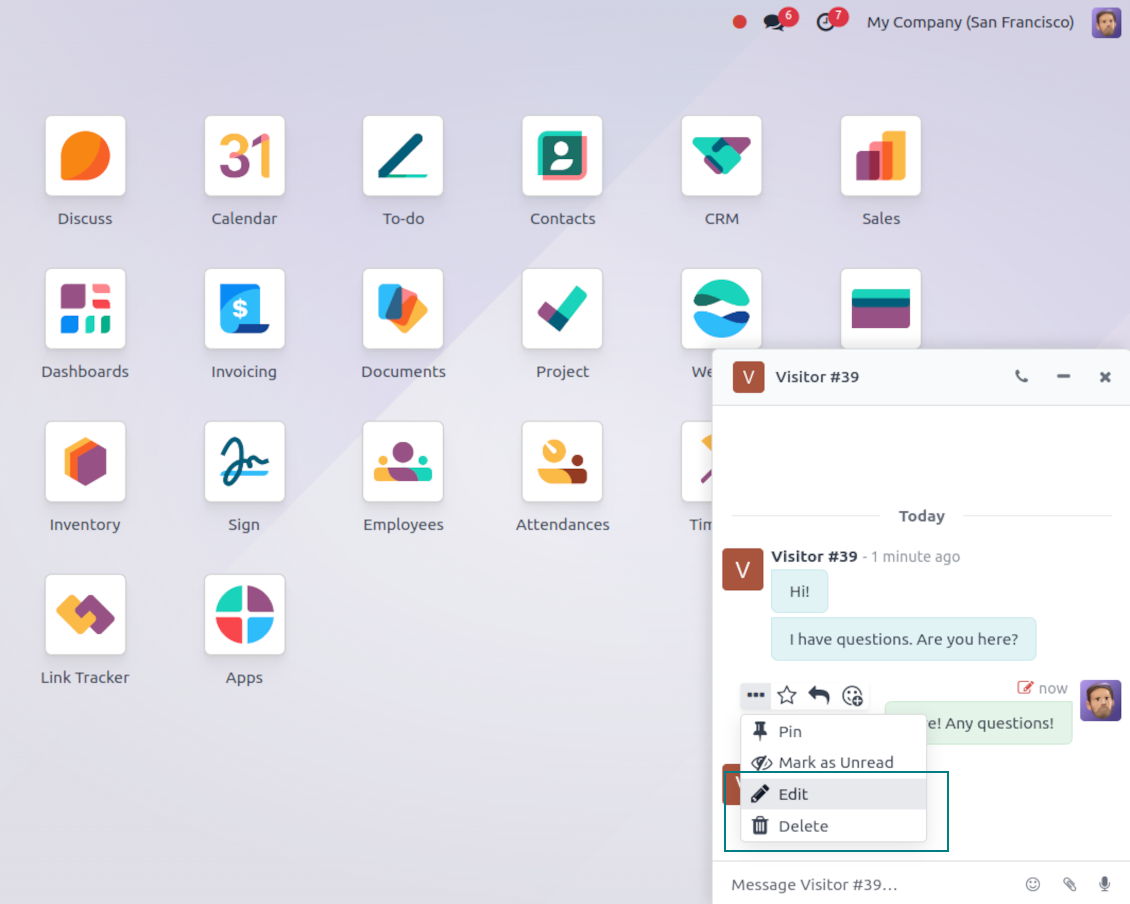
- Edit your own messages. Correct comments, notes and activity feedback after they were posted.
- Give admins broader control. Authorized users can manage messages posted by others when policy requires it.
- Edit body and attachments inline. Update the message content and files directly in the chatter when a correction is needed.
History for every change
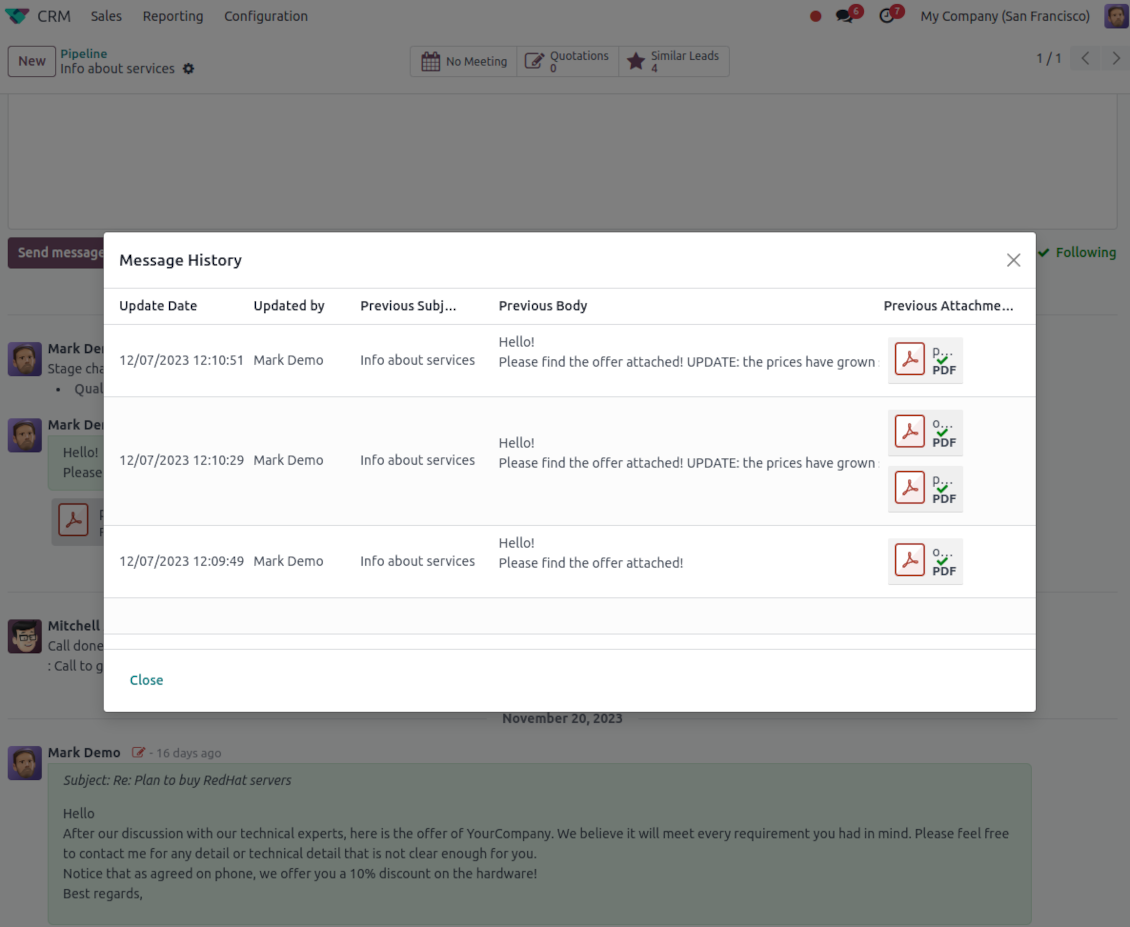
- Track what changed. Subject, body and attachment updates are stored with user and timestamp.
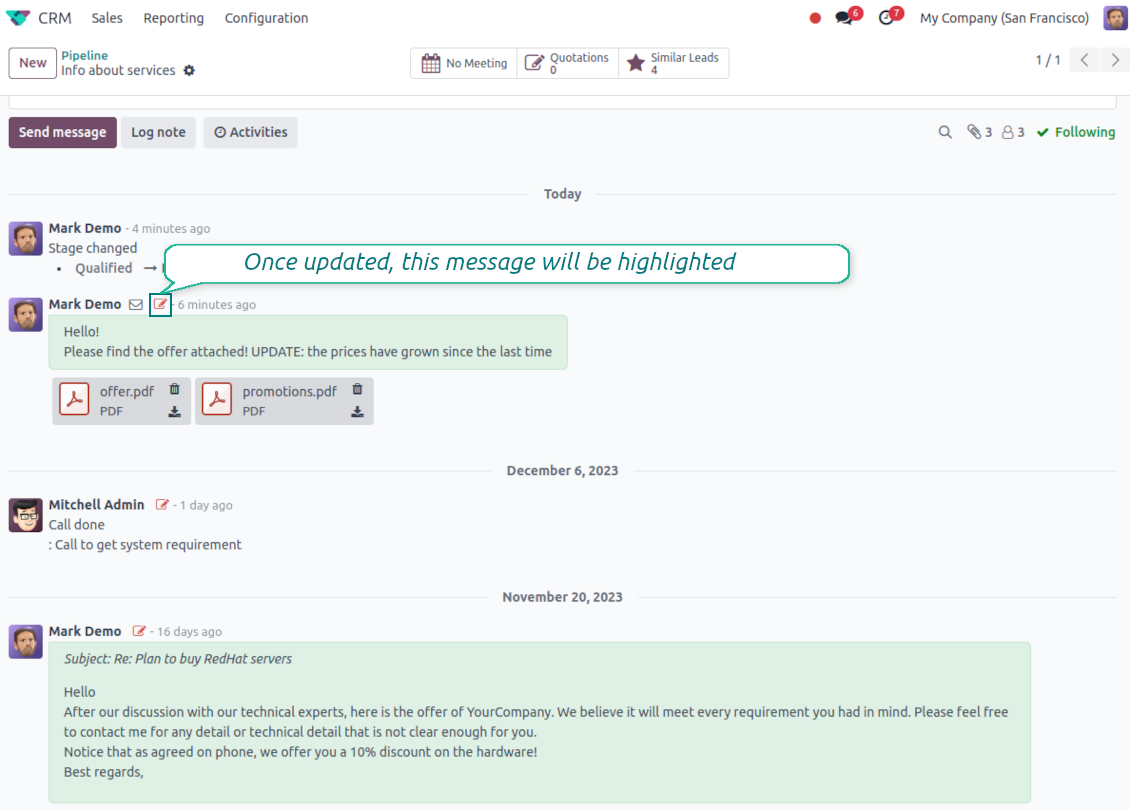
- Spot edited messages quickly. Modified entries show a history icon that opens the change log in one click.
Değerlendirmeye hazır mısınız?
Ücretsiz bir demo talebiyle başlayın veya Odoo Apps Store'dan satın alın.
Ücretsiz kişiselleştirilmiş demo veritabanı. Telefon veya kredi kartı gerekmez. Ana Odoo sürümü içinde ücretsiz ömür boyu güncellemeler ve uzman destek.
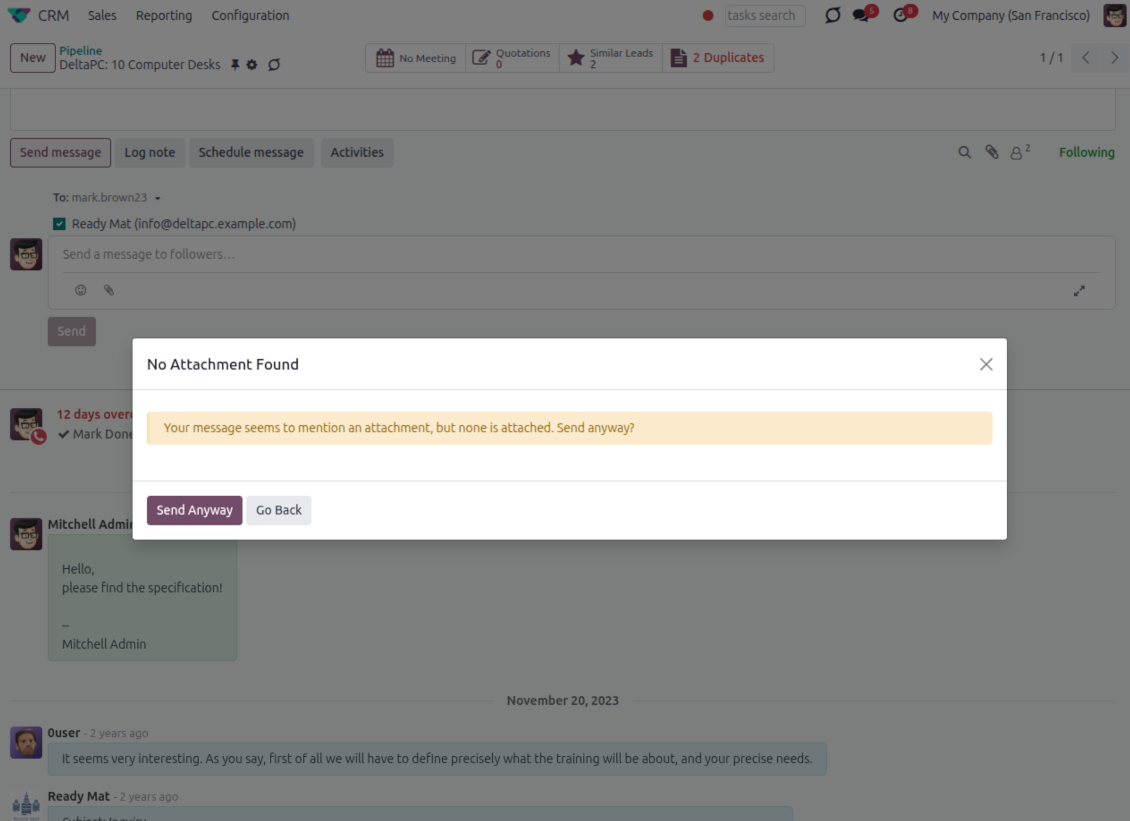
Catch missing attachments
Confirm forgotten attachments before they leave the composer
Attachment mention check
- Spot missing files before send. Odoo checks the message text when you mention an attachment.
- Works everywhere you write. The reminder appears in the full composer, quick reply and chat flows.
- Turn it off when not needed. Enable or disable the check from Messaging Suite settings.
Send-time confirmation
- Stop accidental sends. A dialog appears when the body mentions an attachment but none is attached.
- Let the user decide. Send Anyway and Go Back keep the flow moving without losing the draft.
- Adapt the wording. Adjust what counts as an attachment mention in settings when your team uses different phrases.
Message Citing
Quote earlier Odoo messages while you reply
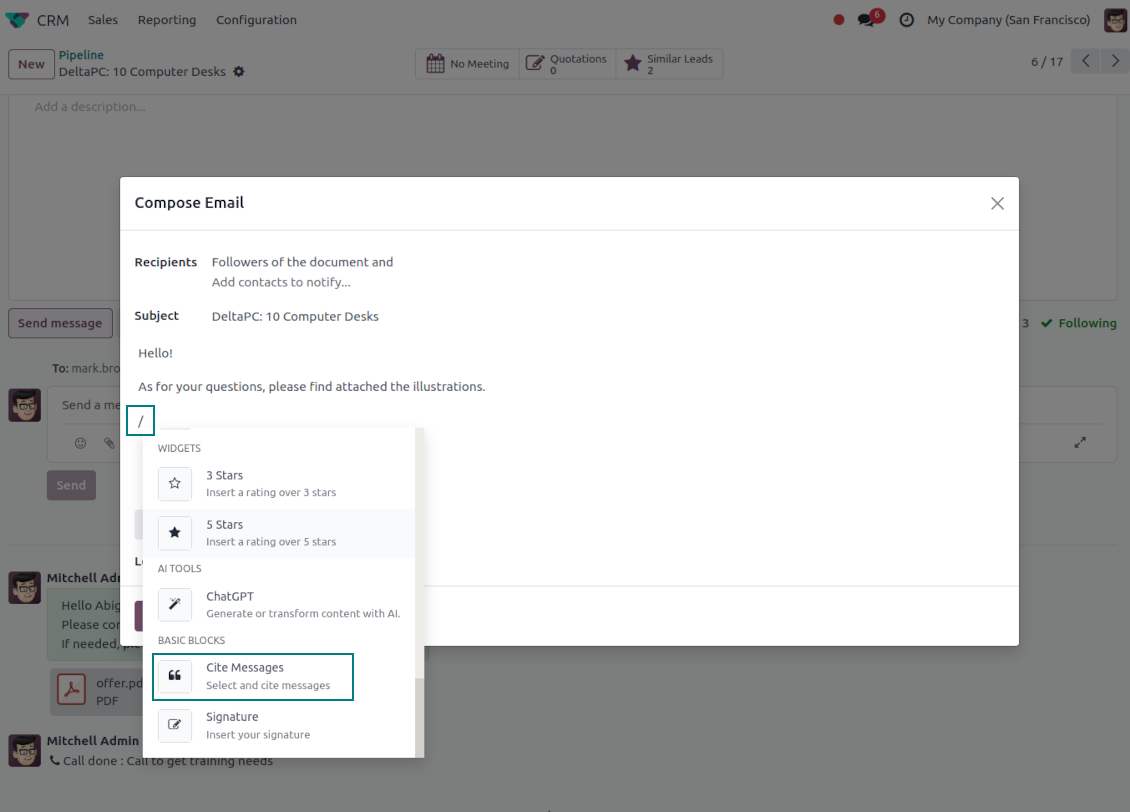
Cite while you compose
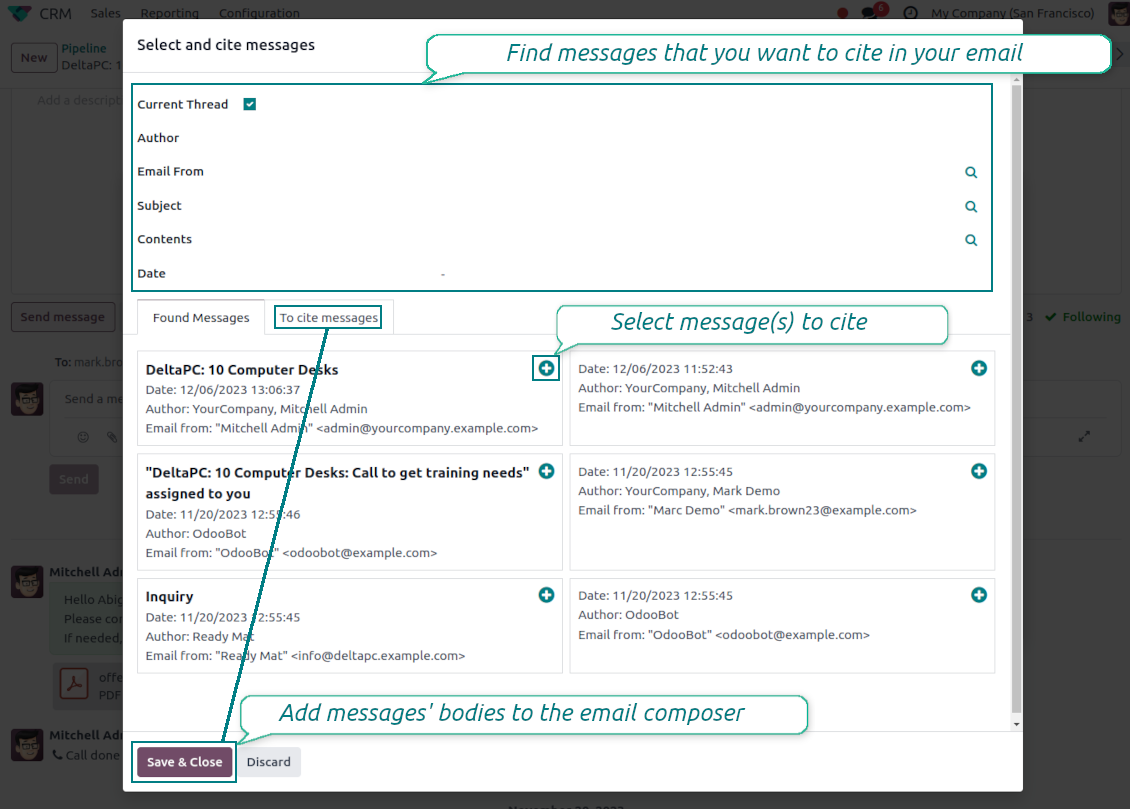
- Open Cite Message from the composer. Search earlier messages without leaving the email you are writing.
- Find the right message fast. Filter by author, content, date range, or limit results to the current thread.
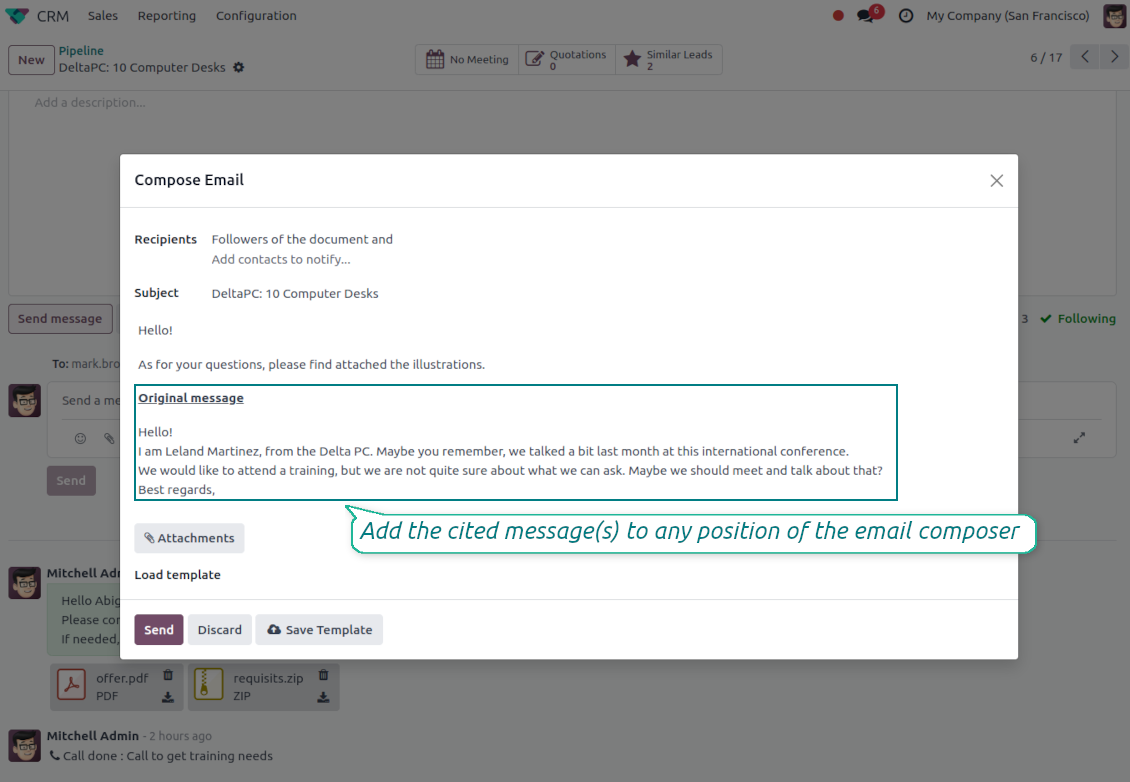
- Insert with one click. Add the selected message at the cursor position in the email body.
Readable quoted history
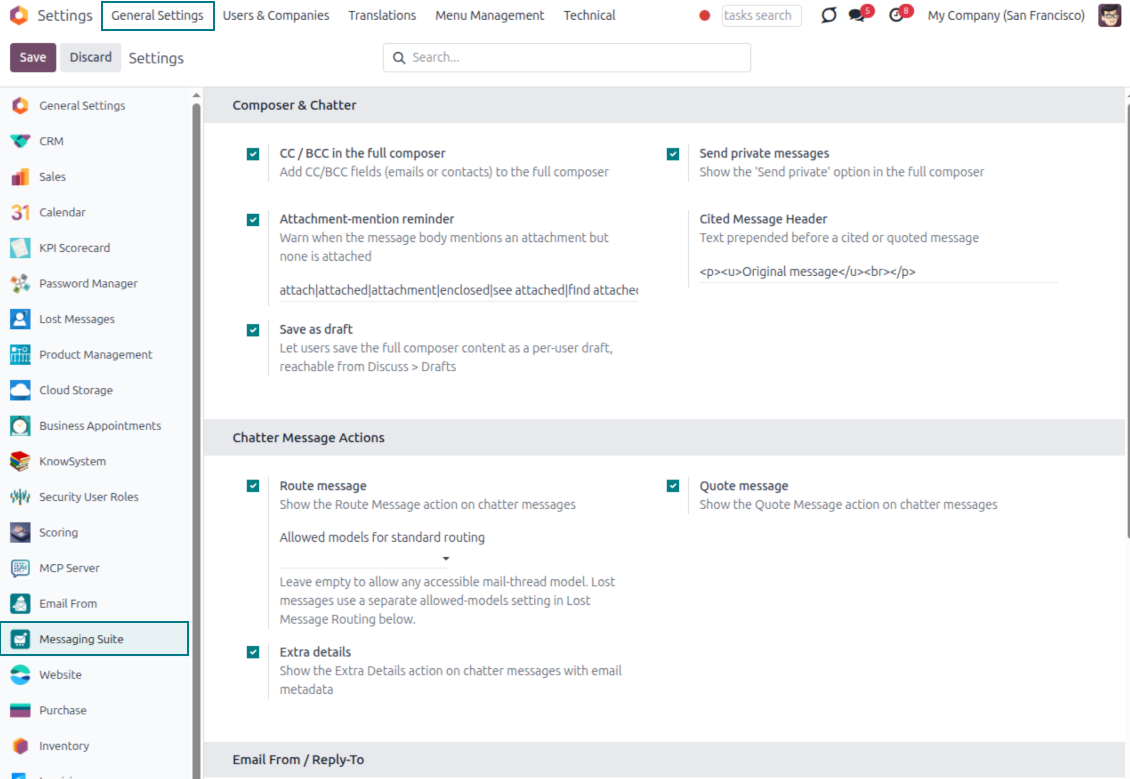
- Shape the quoted header. Define the text placed before every cited message.
- Reply with context. Help customers and colleagues see exactly which earlier message you refer to.
- Use across documents. Cite messages from any discussion while composing on another record.
Messaging Suite administration
One place to configure your messaging tools
One Messaging Suite settings page
- Turn features on or off. CC/BCC, drafts and attachment reminders are controlled from one place.
- Reach every related option. Open settings for routing, privacy, quoting, editing and sender addresses without leaving the suite.
- Set up once, use everywhere. Configure the whole messaging toolkit from a single administration screen.
Routing and access control
- Choose where messages may go. Define which documents can receive rerouted chatter messages.
- Keep lost emails separate. Unattached incoming mail keeps its own queue and routing rules.
- Decide who may reroute. Give routing rights only to the users who should move messages between documents.
Değerlendirmeye hazır mısınız?
Ücretsiz bir demo talebiyle başlayın veya Odoo Apps Store'dan satın alın.
Ücretsiz kişiselleştirilmiş demo veritabanı. Telefon veya kredi kartı gerekmez. Ana Odoo sürümü içinde ücretsiz ömür boyu güncellemeler ve uzman destek.
Hakkında sık sorulan sorular Odoo Messaging Suite Odoo v.17
Araclarinizin güncelleme politikalari nedir?
Güncel Odoo Apps Store politikalarina göre:
- 12.0 ve önceki sürüm için alinan her modül, 12.0'a kadar tum surumlere erişim verir.
- 13.0 surumunden itibaren her modül sürümü ayri satin alinmalidir.
- Surumden bagimsiz olarak satin alma, o ana sürüm içindeki tum güncelleme ve hata duzeltmelerine hak verir.
faOtools ekibi bu politikalari kontrol etmez. Sorulariniz için doğrudan Odoo Apps Store temsilcilerine ulasin.
Uygulamanizi Odoo.sh üzerine nasil kurarim?
En doğrudan yaklasim, Odoo magazasinin yerlesik is akisidir:
1. Modül sayfasini acin ve Deploy on odoo.sh düğmesine tiklayin
2. GitHub sayfasina yonlendirilirsiniz. Hesabiniza giriş yapin, ardindan Create a new repo'ya tiklayin veya mevcut birini kullanin. Depo özel olmalidir. OPL-1 lisansli uygulamalarin yayimlanmasi yasaktir. Gerekirse Odoo.sh projeniz için yeni bir depo oluşturun
3. Ardindan odoo.sh'e gidin, Deploy'a tiklayin, karari onaylayin ve Continue'ya tiklayin. Kurulum başlar.
Bu adimlar uygulamayi projenin production dalina kurar. Diğer dallar veya modül guncellemesi için:
1. Kaynak kodu Odoo magazasindan indirin
2. Modulu gerekli GitHub deposuna commit edin. Hiçbir uygulama klasörü/dosyasi .gitignore'da olmamalidir. odoo.sh'in oluşturduğu depolar varsayilan olarak önemli yollari (örneğin /lib) yok sayabilir. Tum modül dizinlerini ve dosyalarini istisnasiz yükleyin
3. odoo.sh projesinin hedef dalini deploy edin veya ayarlariniz otomatik derlemeyi ongoruyorsa bekleyin.
Uygulamayi kendi sunucuma nasil kurarim?
2. Odoo sunucusunu yeniden baslatin;
3. Gelistirici modunu acin (teknik ayarlar);
4. Uygulama listesini güncelleyin (Uygulamalar menusu);
5. Uygulamayi bulun ve Activate/Install düğmesine basin;
6. Varsa uygulama sayfasindaki yonergeyi izleyin.
Uygulamanizin ek eklentileri var. Sonradan alabilir miyim?
Evet. Odoo tum bagimliliklari sepete otomatik ekler: çift odemeyi onlemek için daha önce satin alinan araclari cikarin.
Uygulamayi Odoo.sh üzerine kurdum ve testlerde uyari/hata goruyorum
Kirmizi/turuncu uyari uygulamanin özelliklerini etkilemez. Bazen modüllerimiz standart otomatik testleri gecemez, çünkü bunlar uygulamamizin amaclarina aykiri davranis bekler. Örneğin fiyati farkli hesaplariz, Odoo testleri ise nihai fiyati standart algoritmayla karsilastirir.
Önce dagitilan veritabaninin özelliklerini kontrol edin. Her sey doğru calisiyor mu?
Uyarinin gerçek özellikleri etkiledigini dusunuyorsaniz bize yazin; tam kurulum günlüklerini ve dagitilan modüllerin tam listesini (çekirdek ve üçüncü taraf) gönderin.
Uygulamanizi doğrudan sizden satin alabilir miyim?
Hayir, araclari yalnizca resmi Odoo uygulama magazasi üzerinden dagitiyoruz.
Indirim almak istiyorum
Ne yazik ki bireysel fiyat sunacak teknik imkanimiz yok.
Uygulamayi Odoo Online (SaaS) veritabanima kurabilir miyim?
Hayir, üçüncü taraf uygulamalar Odoo Online'da kullanilamaz. Odoo SaaS bunu engeller.
Aracinizin başka uygulamalara bagimliligi var. Onlari da almali miyim?
Evet, aracimizin doğru calismasi için bagimliliklarda isaretlenen tum modullere ihtiyaci vardir. Uygulama sayfasindaki fiyat bu bagimliliklari zaten içerir.
Modulun ABD dolari fiyati nedir? Neden değişti?
Modullerimizin fiyati euro cinsinden belirlenir. Odoo magazasi fiyatlari kendi ic kuruna göre diğer para birimlerine çevirir. Bu yüzden ABD dolari fiyati kur guncellendiginde degisebilir.
İngilizce dışındaki dillerdeki uygulama ve web sitesi metinleri yapay zeka desteklidir ve resmi Odoo çevirileriyle hizalanır. Bir hata görürseniz, çeviri doğruluğu bileti gönderin ve düzeltiriz.
Odoo demo veritabanları (canlı önizlemeler)
Bu uygulama için ücretsiz kişiselleştirilmiş bir demo veritabanı sağlayabiliriz.
Bize yazmak için telefon veya kredi kartı gerekmez. Yalnızca 30 saniyeyi aşmayan kısa e-posta kaydı yeter.
İsteğiniz üzerine yaklaşık iki hafta boyunca test yapabileceğiniz ve varsayımları kontrol edebileceğiniz bireysel bir canlı önizleme veritabanı hazırlarız.
Hata bildirimi
Hata veya tutarsız davranış görürseniz bize yazın. Satın alımdan sonra 60 gün içinde düzeltme garantisi veririz; bu süreden sonra da araçları geliştirmeye devam ederiz.
Bize yazmak için telefon veya kredi kartı gerekmez. Yalnızca 30 saniyeyi aşmayan kısa e-posta kaydı yeter.
İstekte mümkün olduğunca ayrıntı verin: ekran görüntüleri, Odoo sunucu günlükleri, sorunu nasıl yeniden üreteceğinizin tam açıklaması. Genellikle birkaç iş günü içinde (hata doğrulanırsa) çalışma planı veya (değilse) yönergeler hazırlanır.
Genel özellik talepleri ve modül fikirleri (ücretsiz geliştirme)
Araçlarımızı geliştirmeye güçlü şekilde motiveyiz ve her geri bildirime minnettarız. Gereksinimleriniz kamuya yararlıysa ve verimli uygulanabilirse ekip bunları yapılacaklar listesine alır.
Böyle bir yapılacaklar listesi düzenli işlenir ve ek ücret varsaymaz. Son tarihler ve nihai tasarım sözü veremesek de istenen özellikleri yatırım ve risk olmadan almanın iyi bir yolu olabilir.
Bize yazmak için telefon veya kredi kartı gerekmez. Yalnızca 30 saniyeyi aşmayan kısa e-posta kaydı yeter.

The tool to flexibly structure Odoo attachments in folders and synchronize directories with cloud clients: Google Drive, OneDrive/SharePoint, Nextcloud/ownCloud, Dropbox, Amazon S3, Box, and NAS. DMS. File Manager. Document management system
398€

The tool to build a deep and structured knowledge base for internal and external use. Knowledge System. KMS. Wiki-like revisions.
398€
The tool to automatically synchronize Odoo attachments with OneDrive files in both ways
487€
The tool to set up KPI targets and control their fulfillment by periods. KPI dashboards. Dashboard designer. KPI charts

The tool for time-based service management from booking appointments to sales and reviews
398€
The tool to automatically synchronize Odoo attachments with Google Drive files in both ways
487€
