Kort
Odoo Messaging Suite er en Odoo 17 Beskeder-app. The tool to improve the Odoo messaging experience.
Odoo Messaging Suite brings lost-message recovery, private discussions, message citing, post-send editing, managed From/Reply-To addresses and a richer email composer together in one application. Compose with CC/BCC and per-user drafts, route emails to the right document, quote from the message toolbar, and catch forgotten attachments before they leave. Every message keeps its email headers behind a details icon, and administrators configure the whole toolkit from one Messaging Suite settings page.
Perfekt
Support and sales teams living in their inbox
Perfect for teams that answer customers by email all day and want CC/BCC, drafts and quoting available right inside the Odoo composer, without switching to an external mail client.
Companies needing confidentiality
Ideal when some conversations must stay private from portal users and other followers, while still being logged on the Odoo document for later reference.
Administrators who want oversight and control
Useful for admins who need routing rules, attachment reminders and one settings page to manage the whole messaging toolkit.
Klar til at evaluere?
Start med en gratis demoanmodning eller køb i Odoo Apps Store.
Gratis personlig demodatabase. Intet telefonnummer eller kreditkort kræves. Gratis livstidsopdateringer og ekspertstøtte inden for Odoos hovedversion.
Hvorfor teams vælger det
Nøglefordele, før du dykker ned i detaljerne
One settings page
Turn on CC/BCC, drafts, routing, attachment checks and the rest of the toolkit from a single Messaging Suite configuration screen, without hunting through scattered settings menus.
Full email composer
Compose with CC/BCC recipients, per-user drafts and managed From/Reply-To addresses directly inside the Odoo composer.
Managed sender addresses
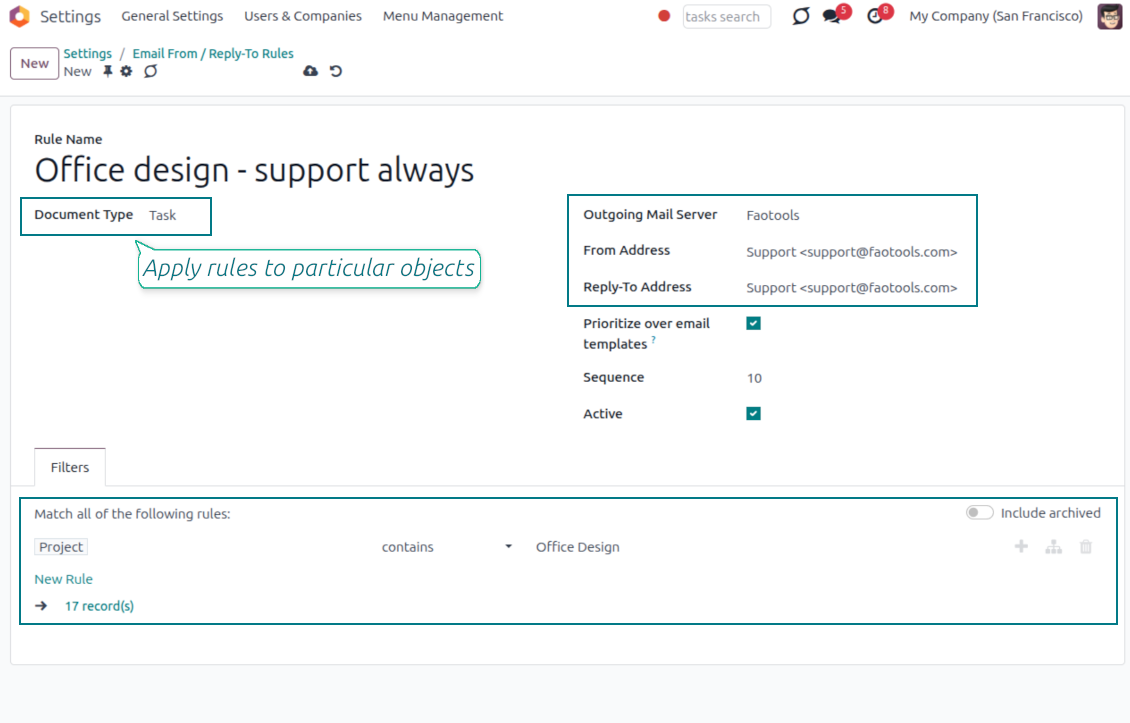
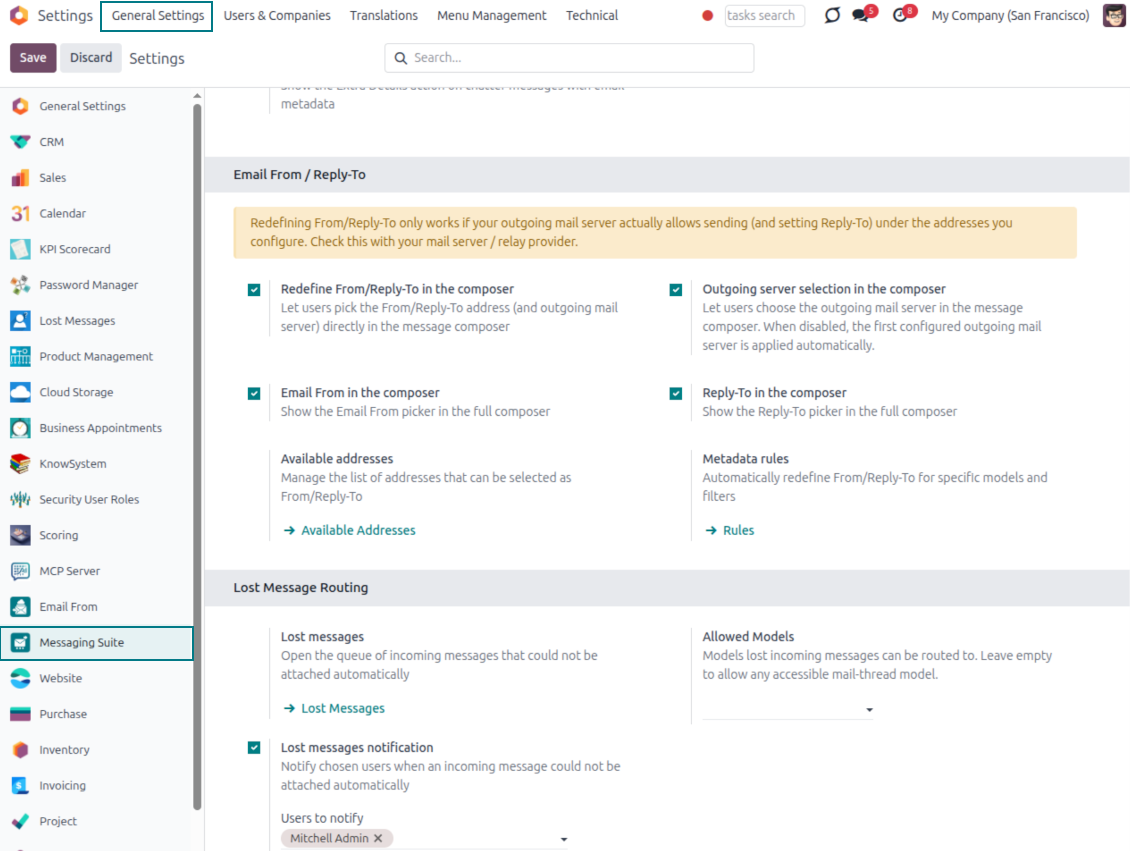
Stop typing sender emails by hand. Pick from an address book tied to the right outgoing mail server, with automatic rules by document type.
Message actions
Route and quote any message from quick actions, and inspect full email headers in a single click.
Lost message recovery
Never lose an incoming email again. Review unattached messages in a dedicated queue and route them to the correct Odoo document before customers wait.
Private threads
Keep sensitive conversations hidden from portal users and other followers, while staying logged on the Odoo document for later reference.
Message citing
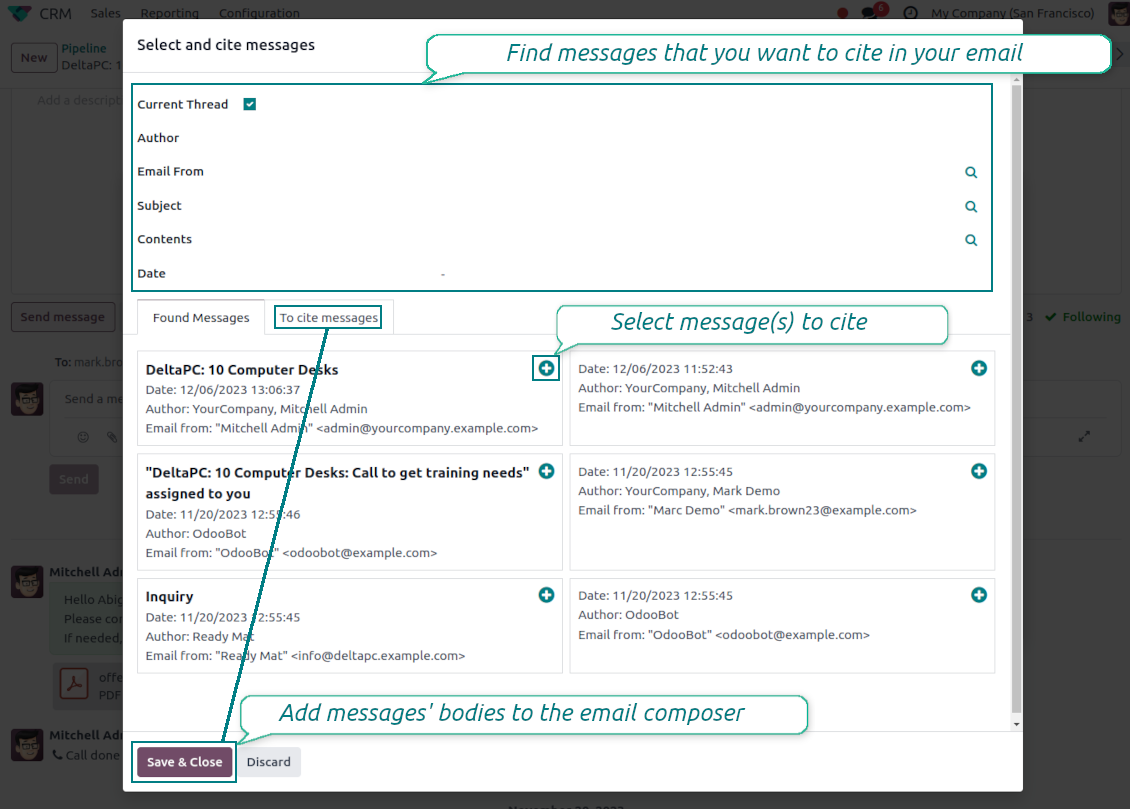
Search and cite any earlier Odoo message straight from the composer, so every reply carries the right context.
Message editing & history
Edit or delete your own messages, notes and activity feedback, with a full history of every change kept for admins.
Safer sending
Catch forgotten attachments before you hit send so customers receive complete messages.
Klar til at evaluere?
Start med en gratis demoanmodning eller køb i Odoo Apps Store.
Gratis personlig demodatabase. Intet telefonnummer eller kreditkort kræves. Gratis livstidsopdateringer og ekspertstøtte inden for Odoos hovedversion.
Compose like a real email client
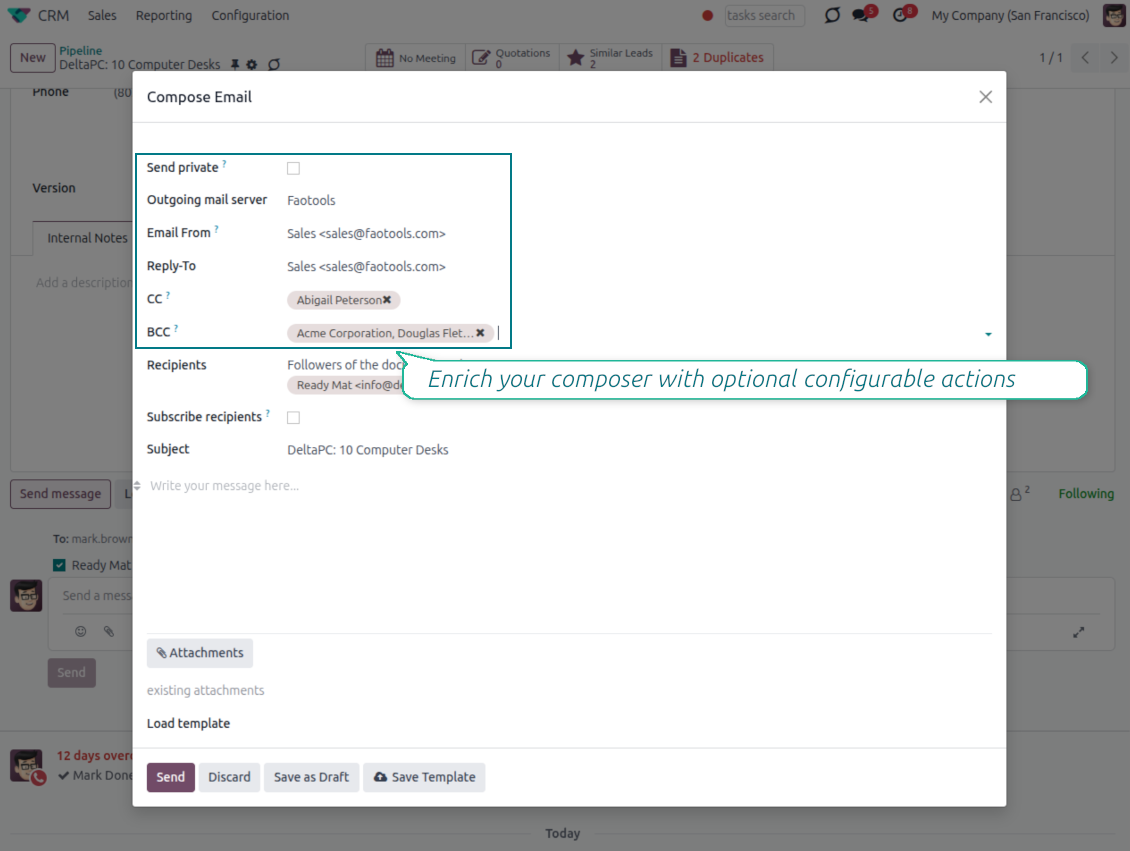
CC, BCC and per-user drafts in the full composer
Copy and blind copy
- Add CC and BCC in the full composer. Type email addresses or pick existing contacts.
- Keep recipients in the message history. Sent CC/BCC values stay visible on the message afterwards.
- Use only when you need them. Turn CC/BCC off in settings if your team does not use copy recipients.
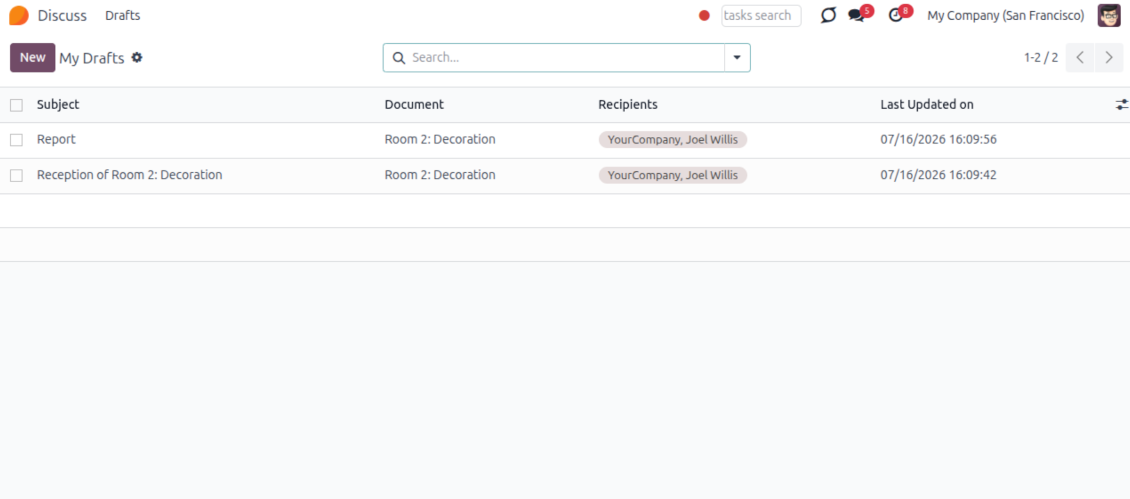
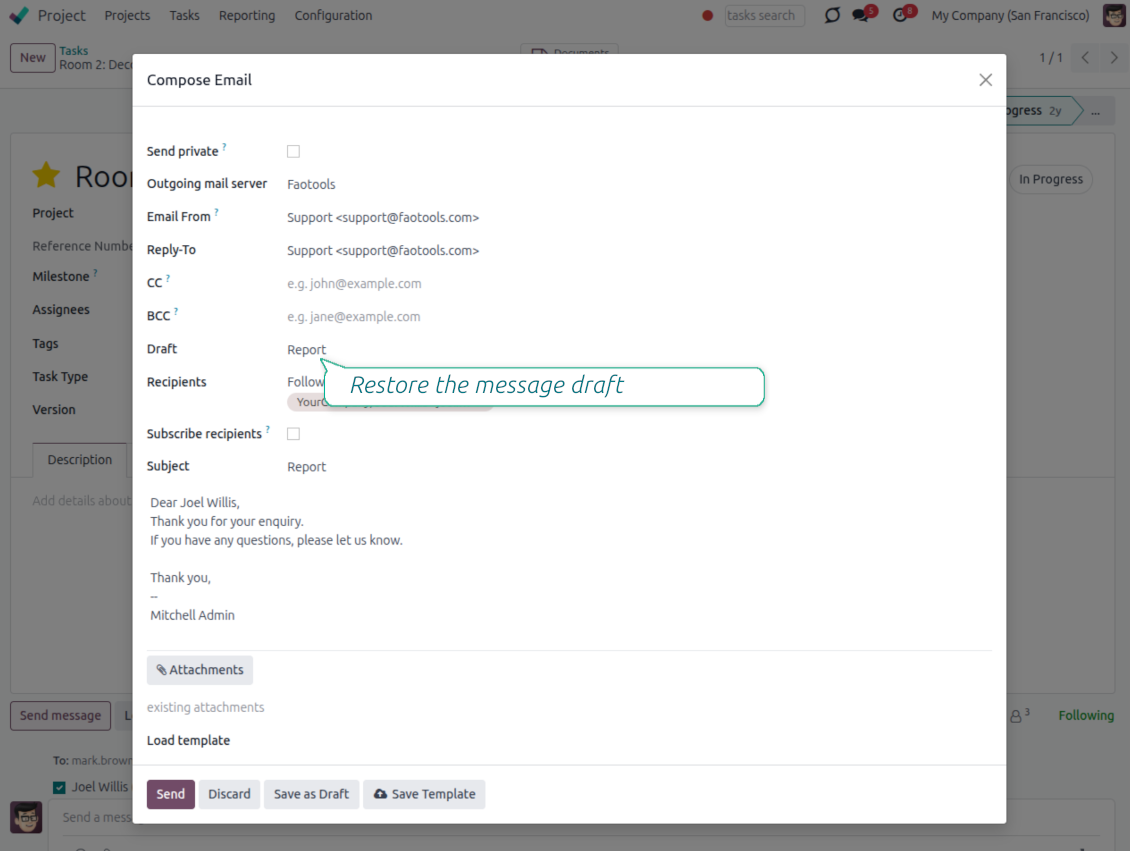
Save as draft
- Save the full message. Drafts keep subject, body, recipients and related fields for the current record.
- Resume where you stopped. Reopening the composer on the same document brings back your latest draft automatically.
- Pick up drafts from Discuss. Every internal user can open the drafts menu and finish unfinished messages.
Message actions and email metadata
Route, quote and inspect email details without leaving the chatter
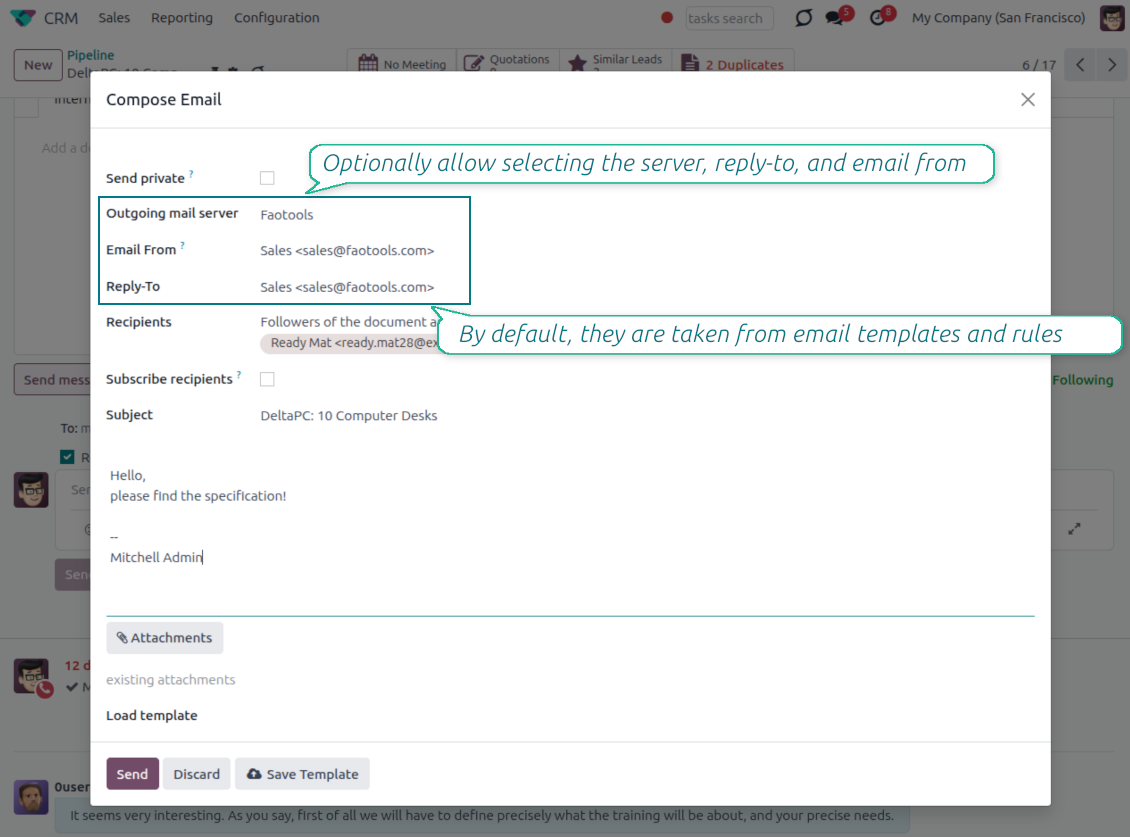
Actions on every message
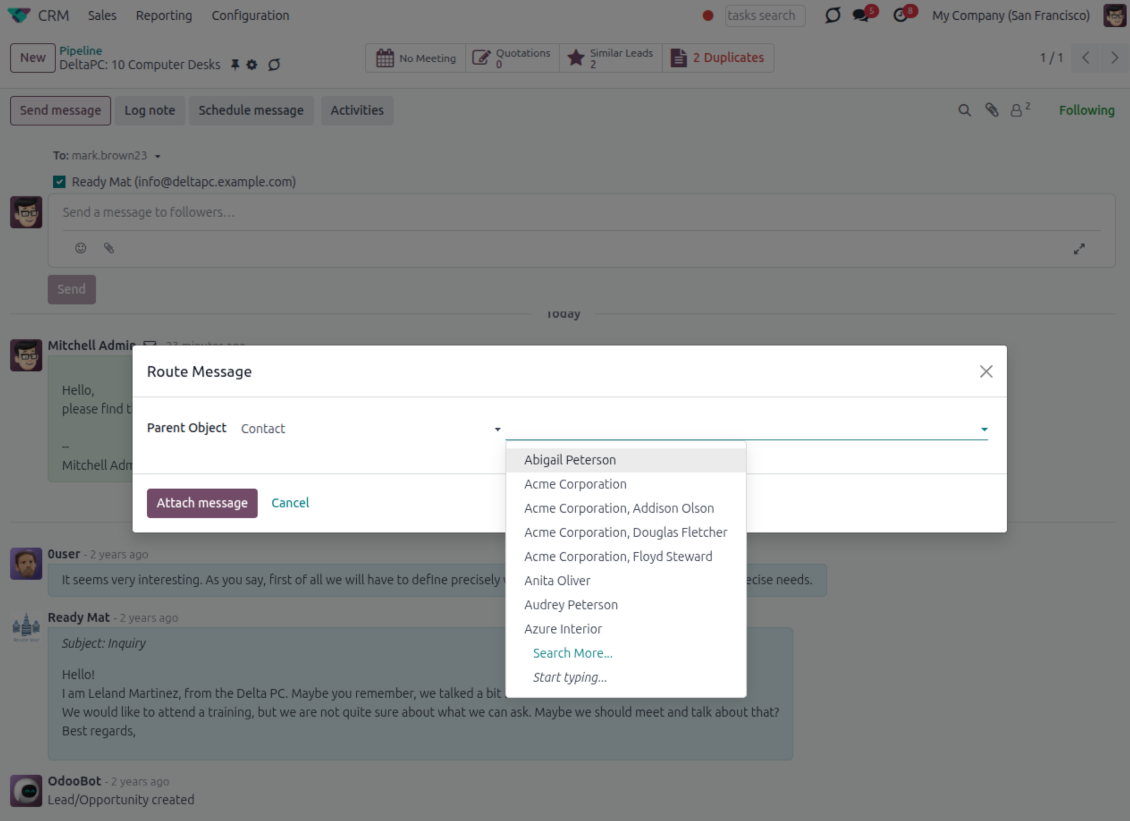
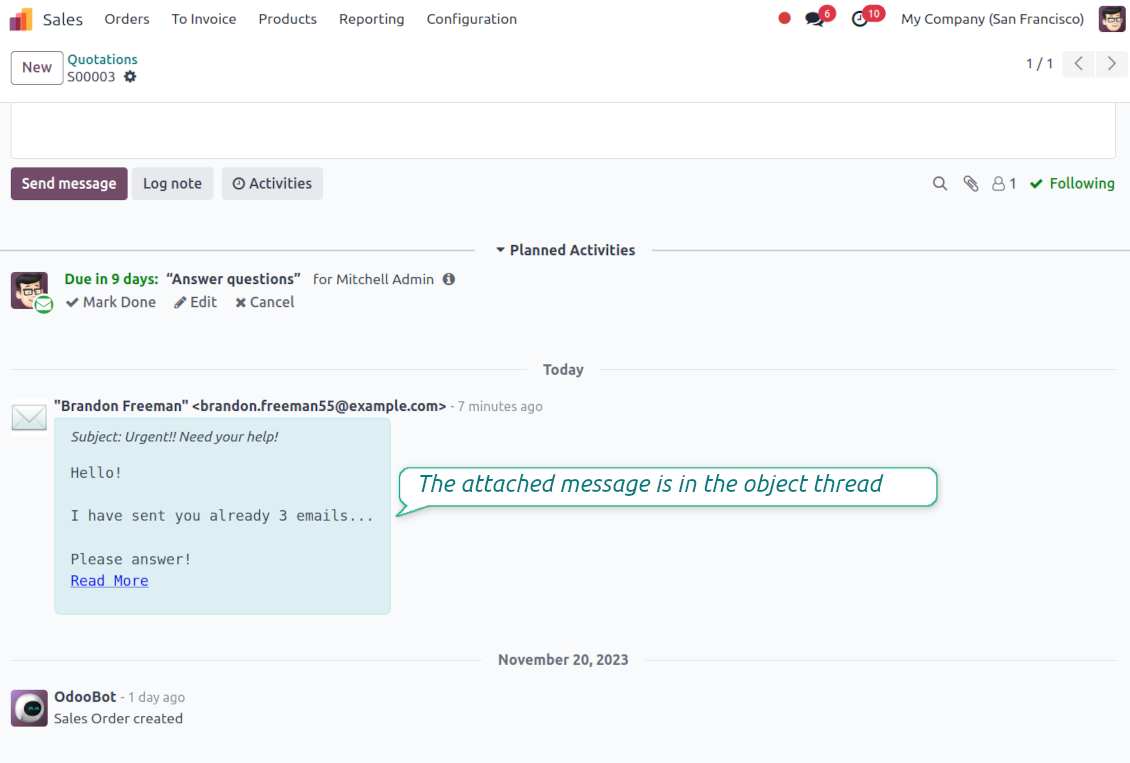
- Route from the thread. Move a message to another document when it landed on the wrong record.
- Quote in a new email. Start a reply with the original message included in the body.
- Keep the composer simple. Every action opens the standard Odoo composer already pre-filled, no separate tooling to learn.
Email details on every message
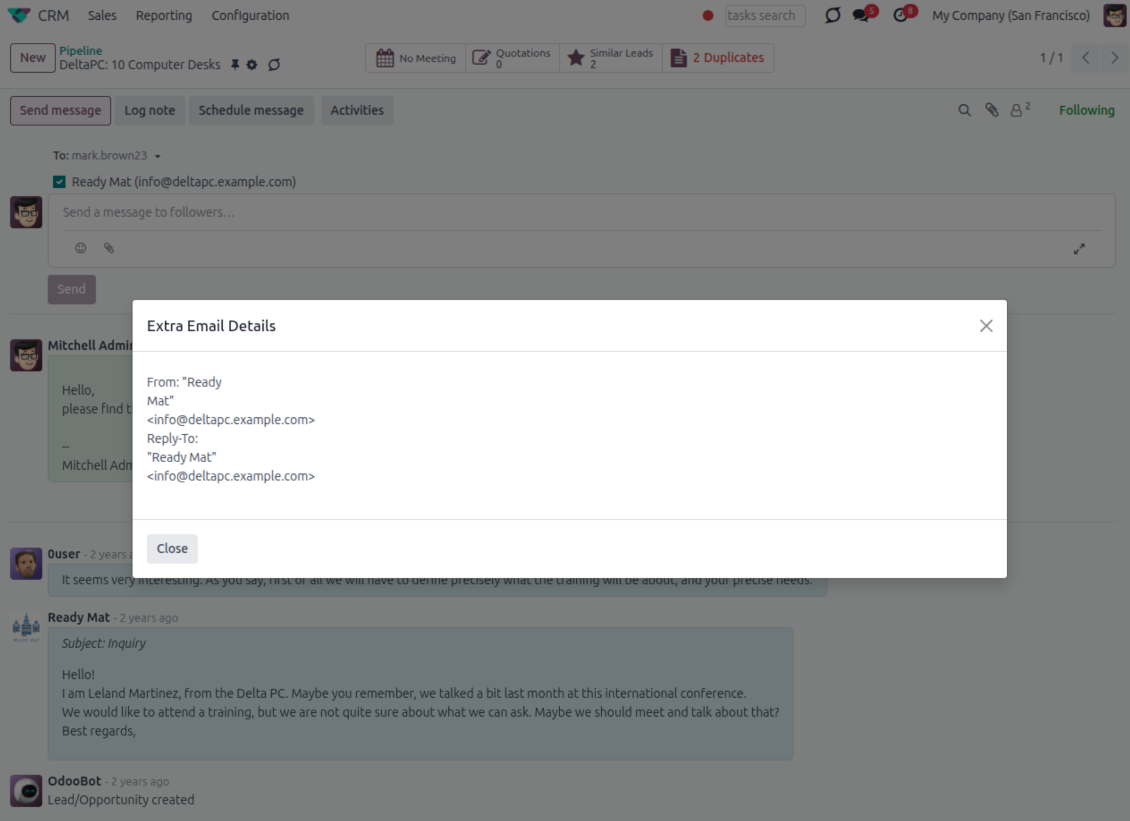
- See full headers. From, Reply-To, To and CC stay available on incoming and outgoing mail.
- Keep CC/BCC too. Copy recipients added in the composer are saved with the message.
- Open details in one click. A small icon on the message shows the complete email information.
Odoo Email From
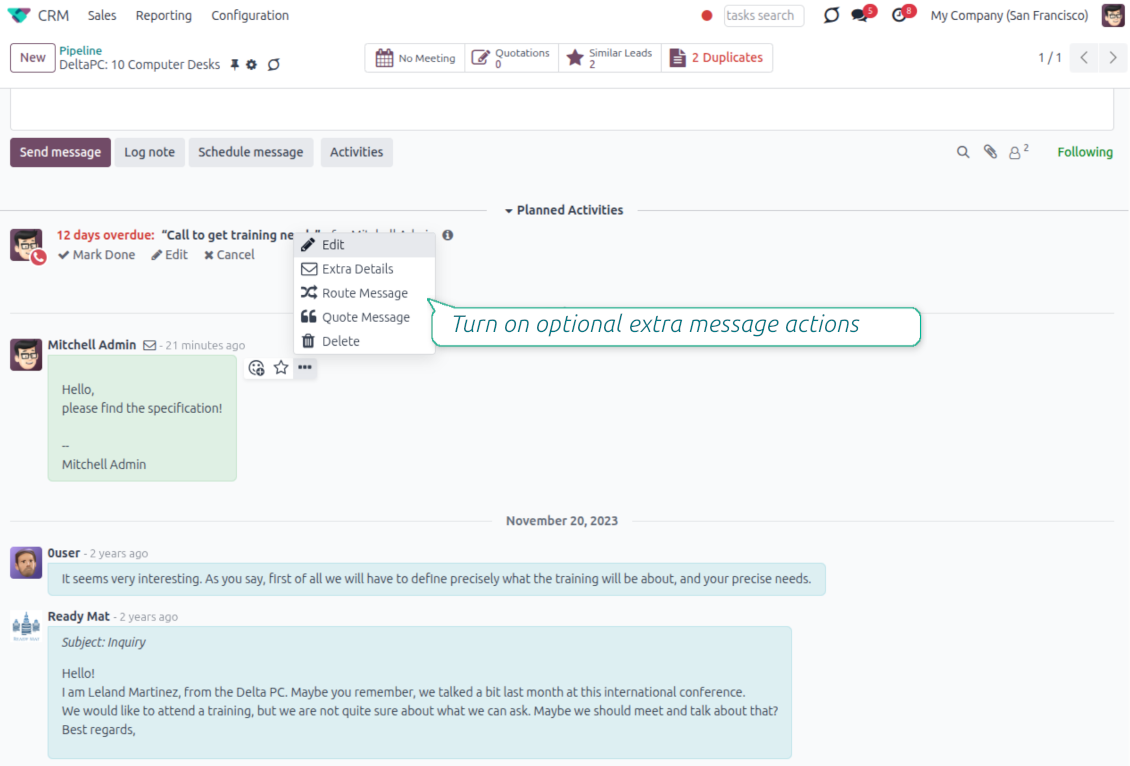
Choose the right From and Reply-To address for every email
Managed sender addresses
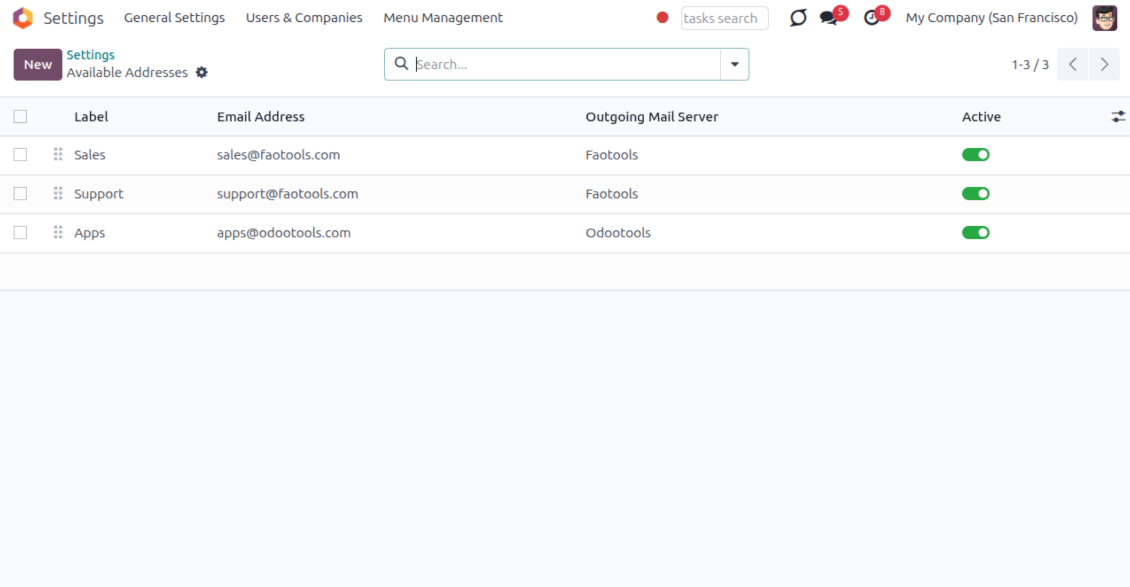
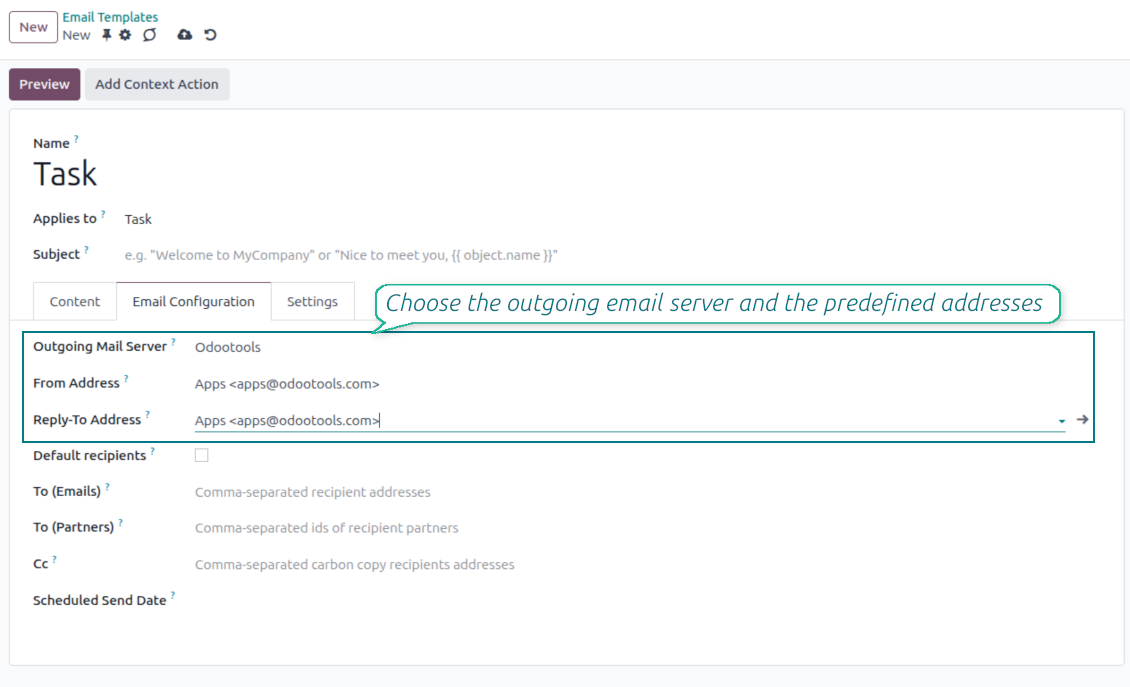
- Pick instead of typing. Users choose From and Reply-To from an address book linked to outgoing mail servers.
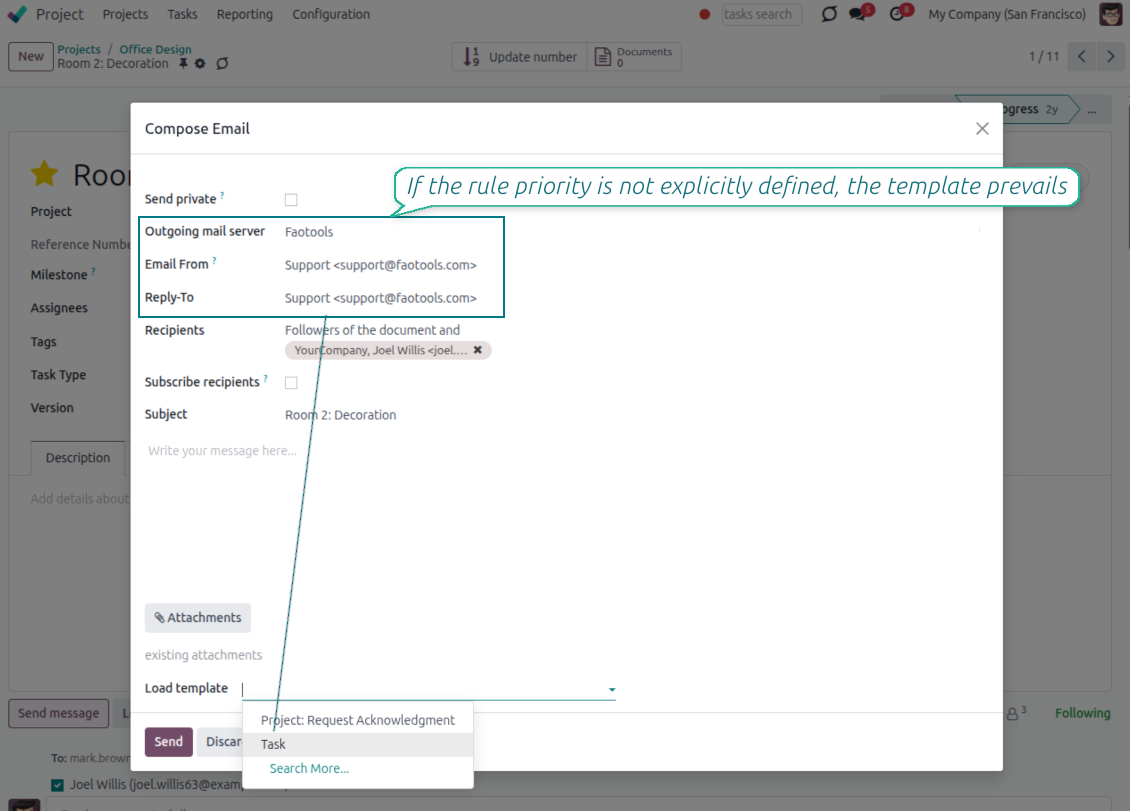
- Apply on templates too. Email templates can use the same managed sender addresses.
- Keep the screen simple. The outgoing mail server field is hidden when only one server is configured.
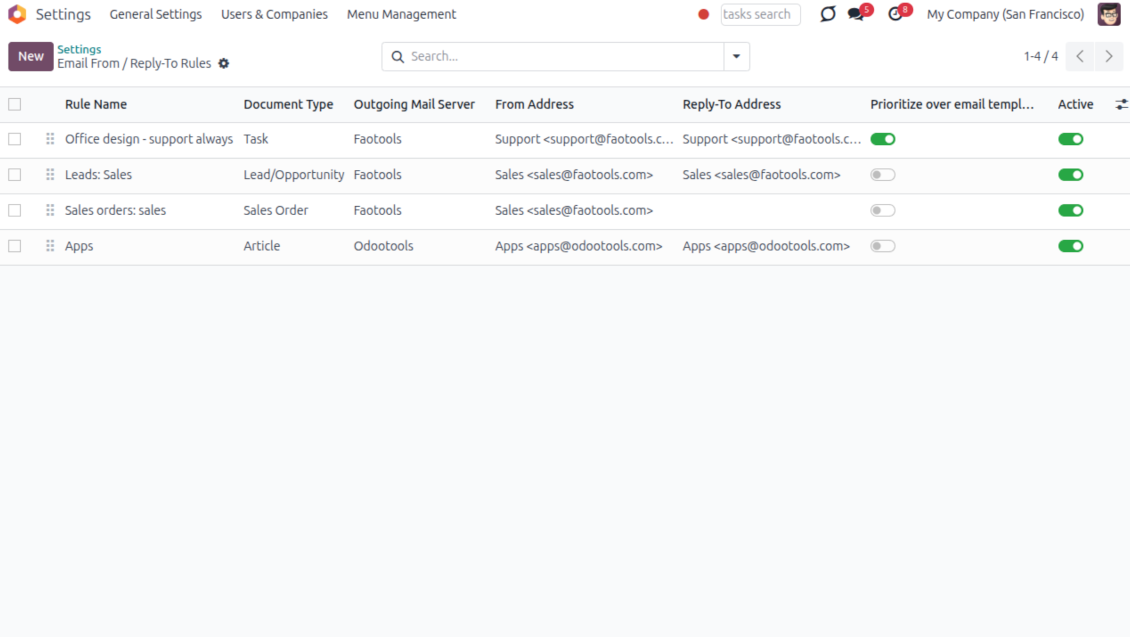
Automatic sender rules
- Set the sender by document type. Rules choose the right From and Reply-To for sales orders, tasks, invoices and other records.
- Prevent invalid combinations. Odoo blocks sender addresses that do not match the selected outgoing mail server.
- Start with working mail setup. Make sure each outgoing server can actually send from the addresses you add.
Klar til at evaluere?
Start med en gratis demoanmodning eller køb i Odoo Apps Store.
Gratis personlig demodatabase. Intet telefonnummer eller kreditkort kræves. Gratis livstidsopdateringer og ekspertstøtte inden for Odoos hovedversion.
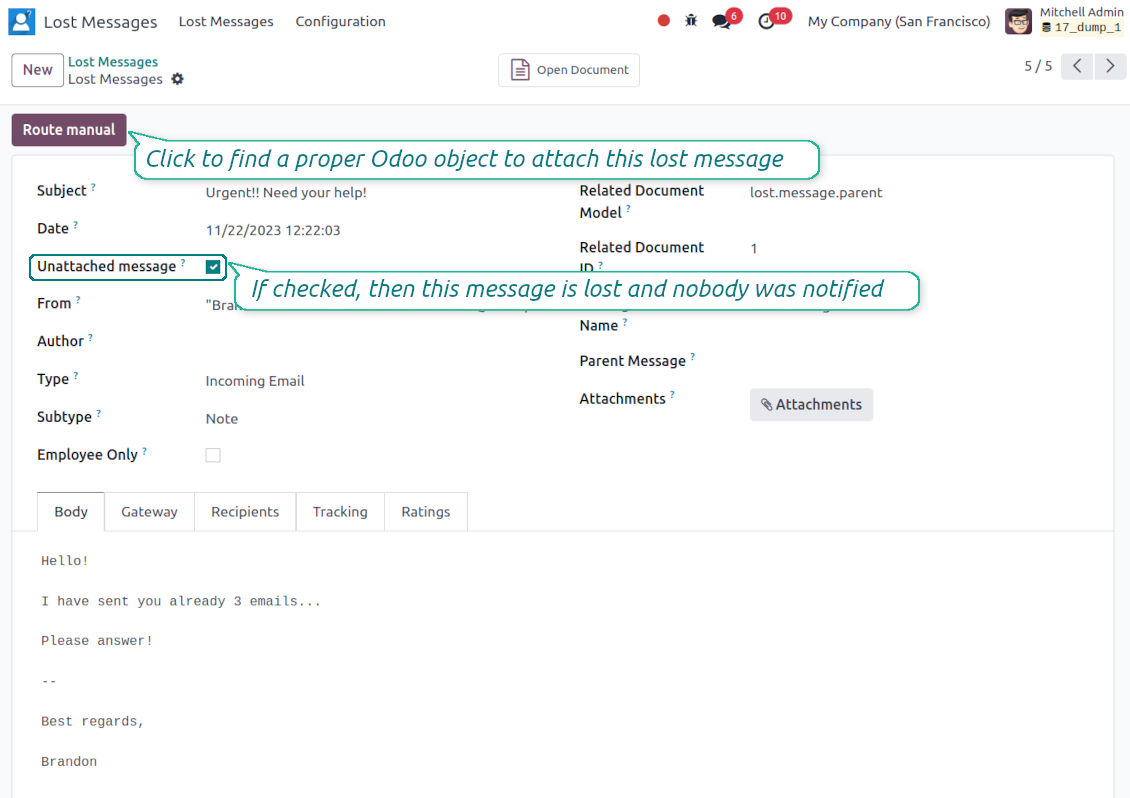
Lost Messages Routing
Recover incoming emails Odoo could not attach automatically
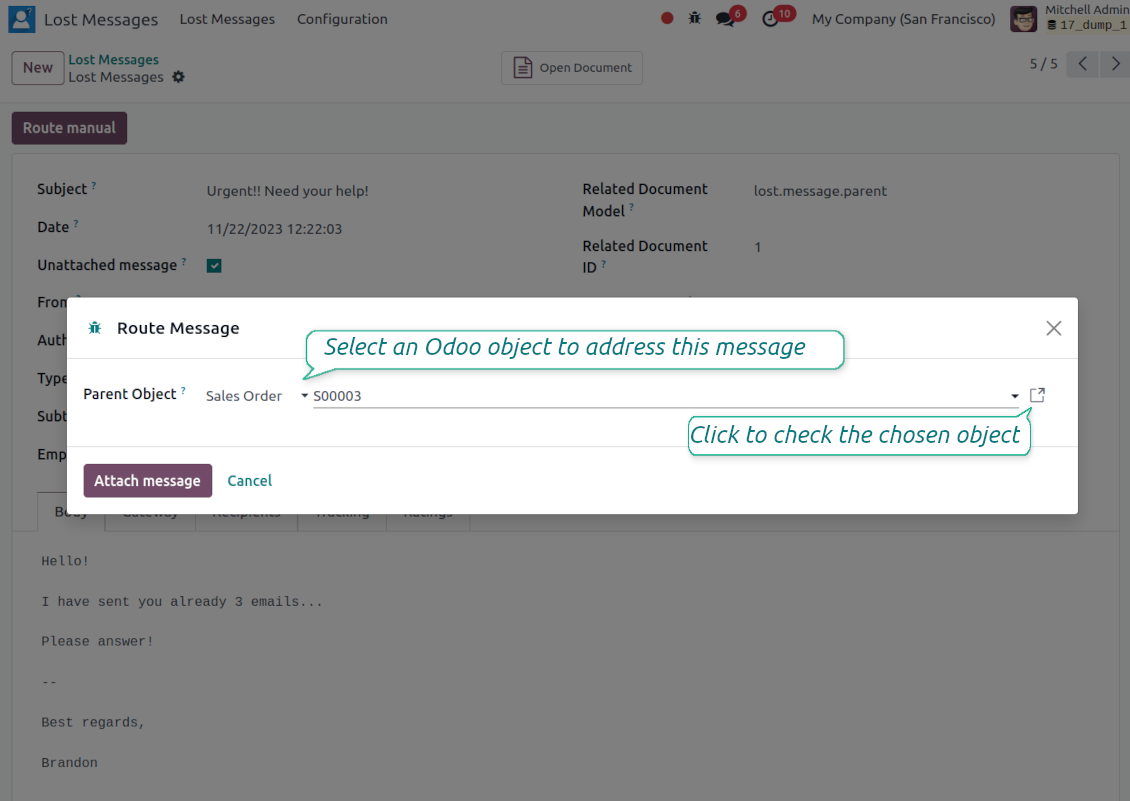
Lost message queue
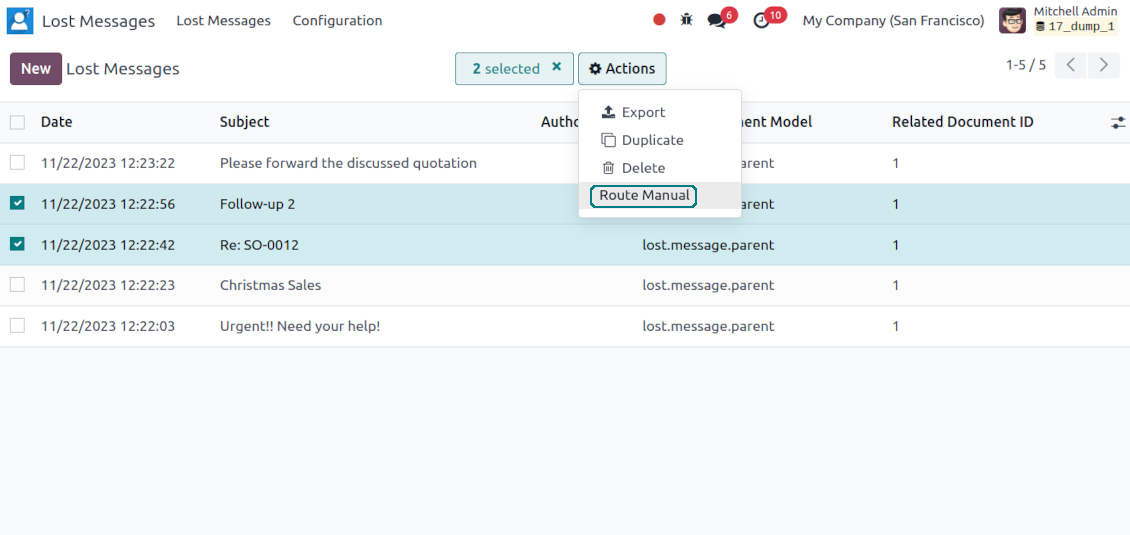
- Catch emails that did not attach. Incoming messages Odoo cannot place on a document are kept instead of disappearing.
- Review in one menu. Your team works from a dedicated queue with subject, sender, body and search tools.
- Keep routing clues. Recipients, To, CC and In Reply To stay available to help find the right document.
Route to the right document
- Attach in a few clicks. Pick the target document and attach one or several lost messages in a single action.
- Limit where messages may go. Restrict routing to selected document types or leave the list open for managers.
- Move attached messages too. Already linked chatter messages can be rerouted to another document when needed.
Private Thread
Confidential discussions that stay inside Odoo and off the portal
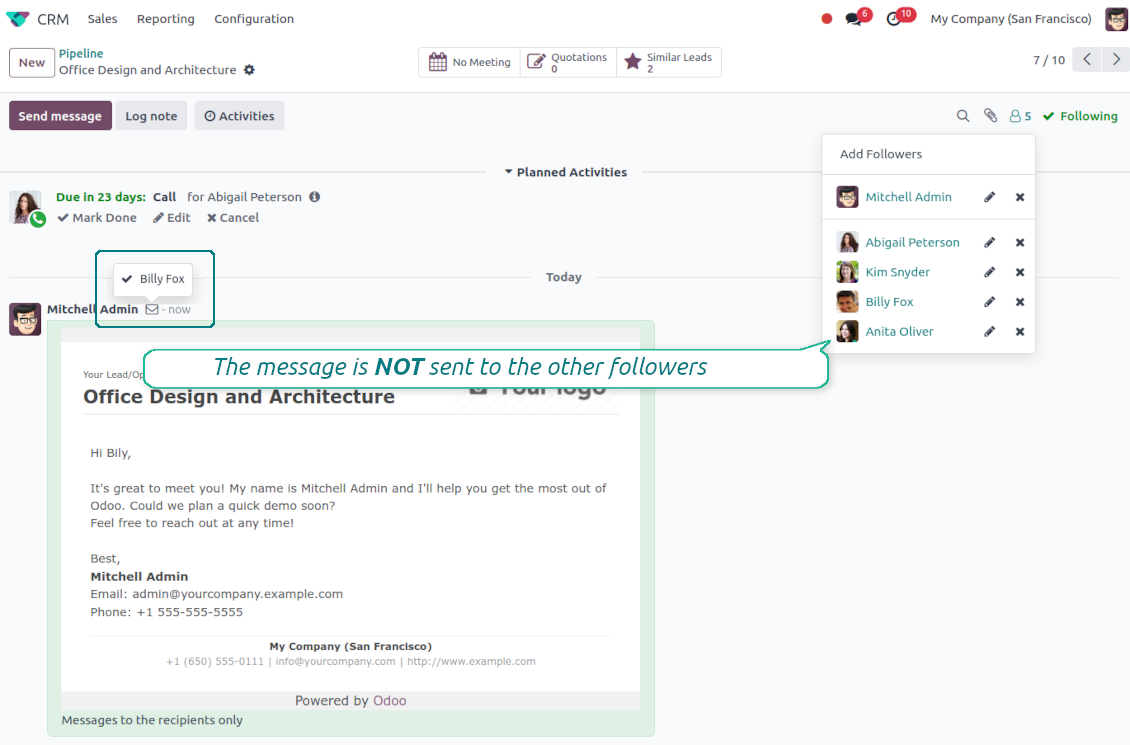
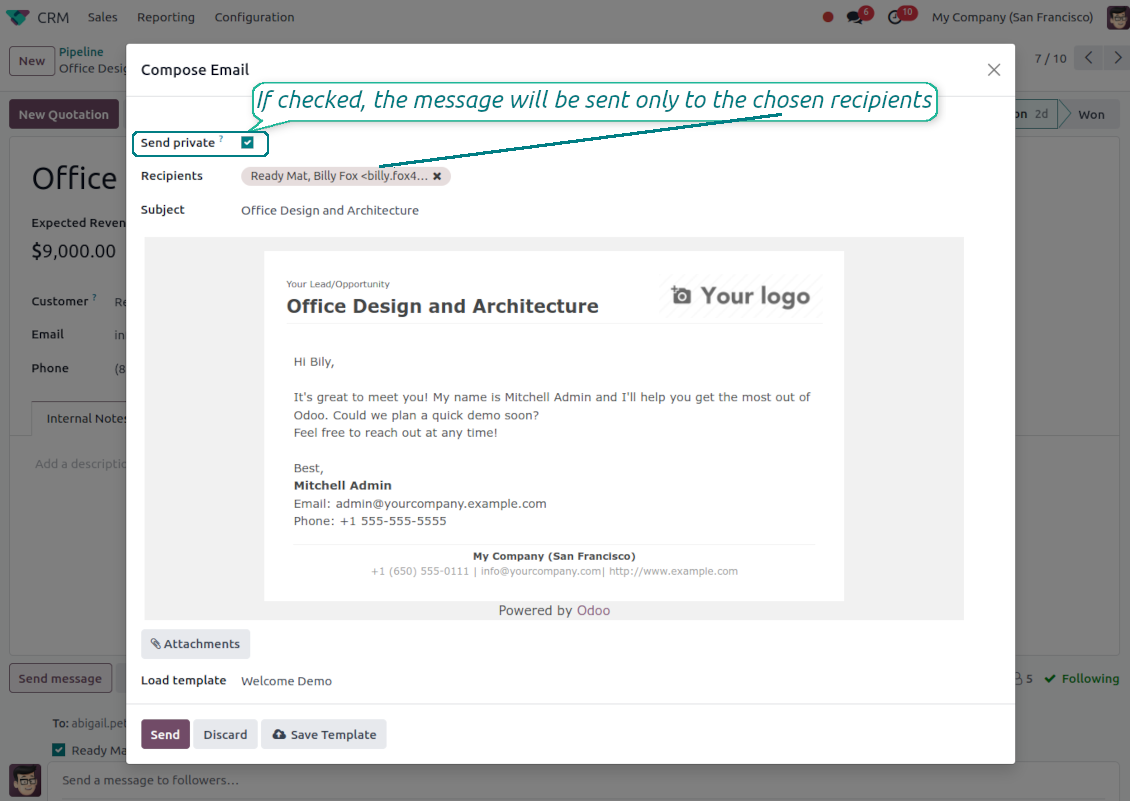
Send private from the composer
- Tick Send private. Compose a message that reaches only the selected recipients.
- Do not notify other followers. Portal users and regular followers stay out of the conversation.
- Works on any document. Use private sending on sales orders, tasks, invoices, leads and other records.
Confidential but traceable
- Keep history on the record. Private messages remain on the document for later reference.
- Hide from portal users. External contacts cannot read internal discussions on their documents.
- Choose privacy each time you send. Tick Send private again on a follow-up if that reply should stay confidential too.
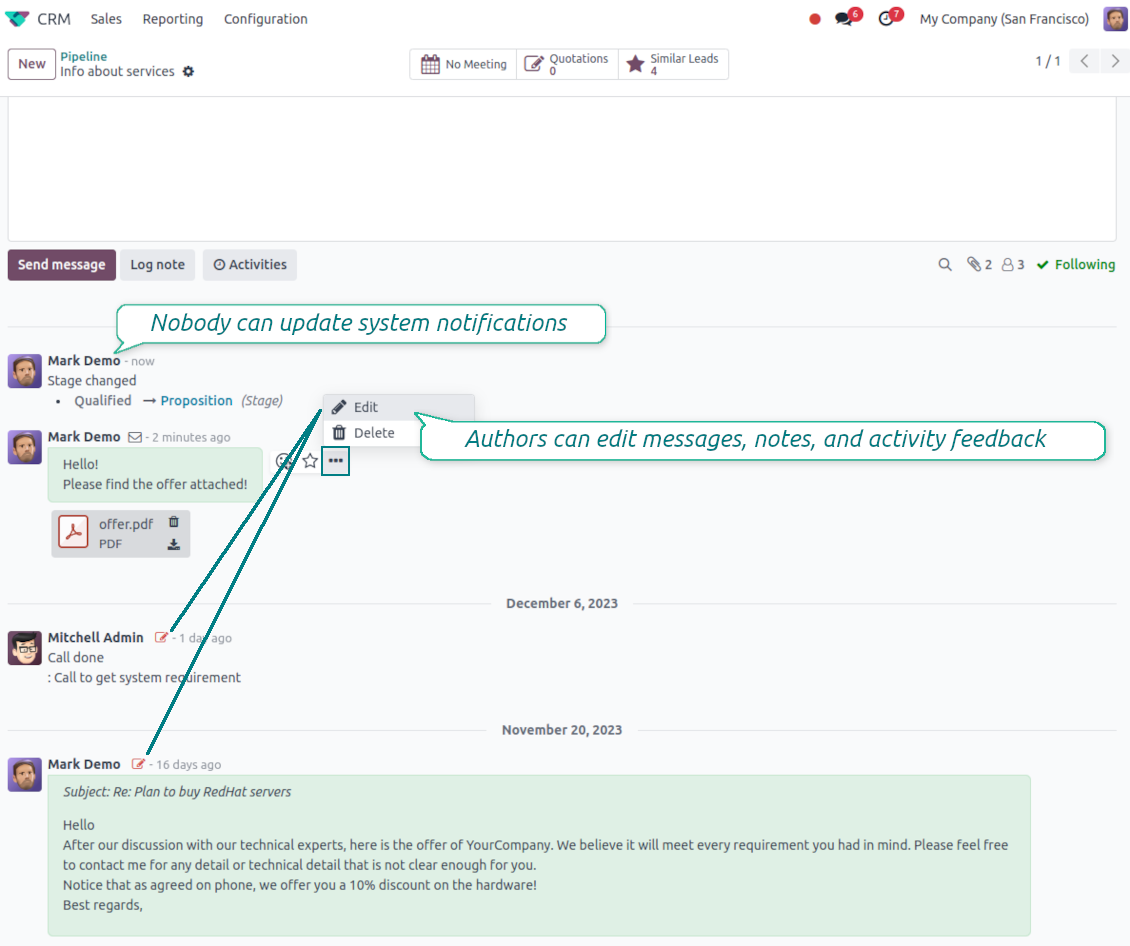
Message and Note Editing
Fix mistakes after sending while keeping a transparent history
Fix mistakes after sending
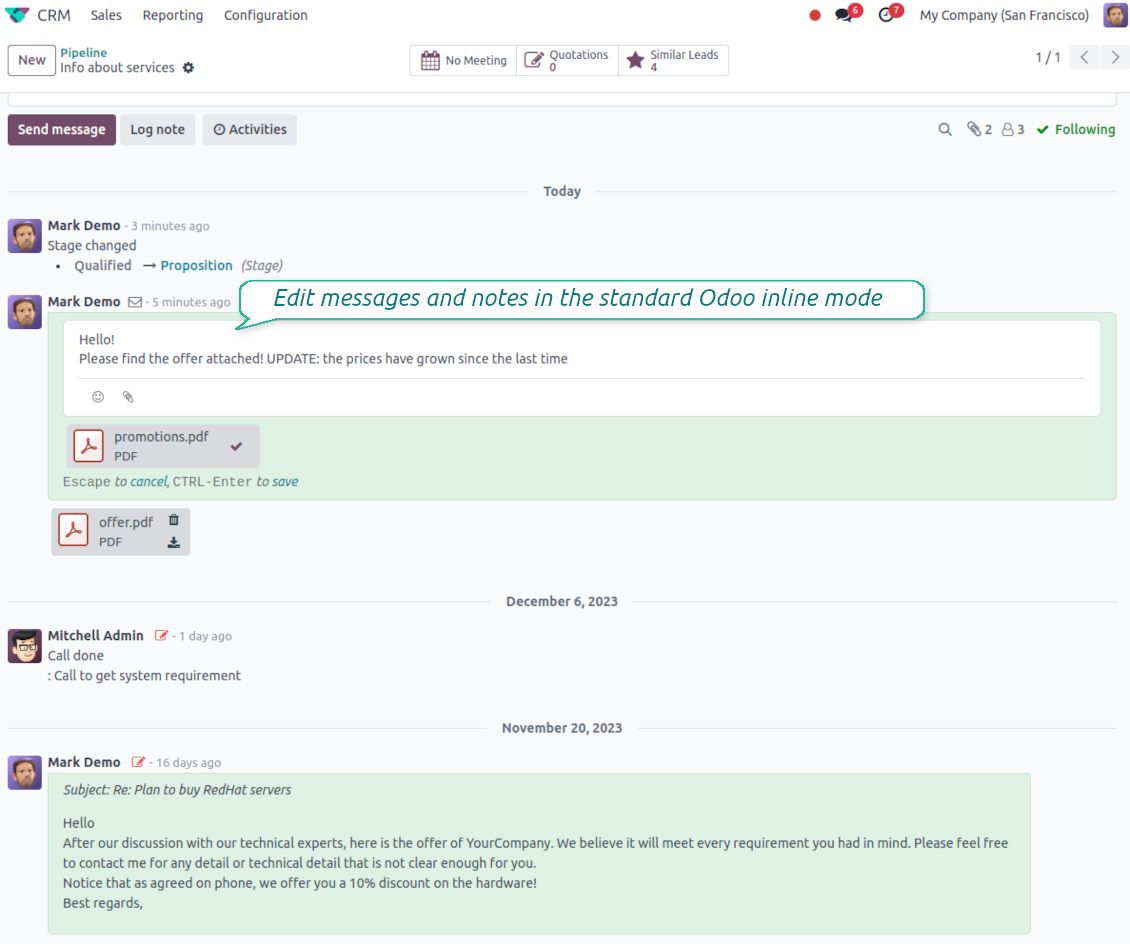
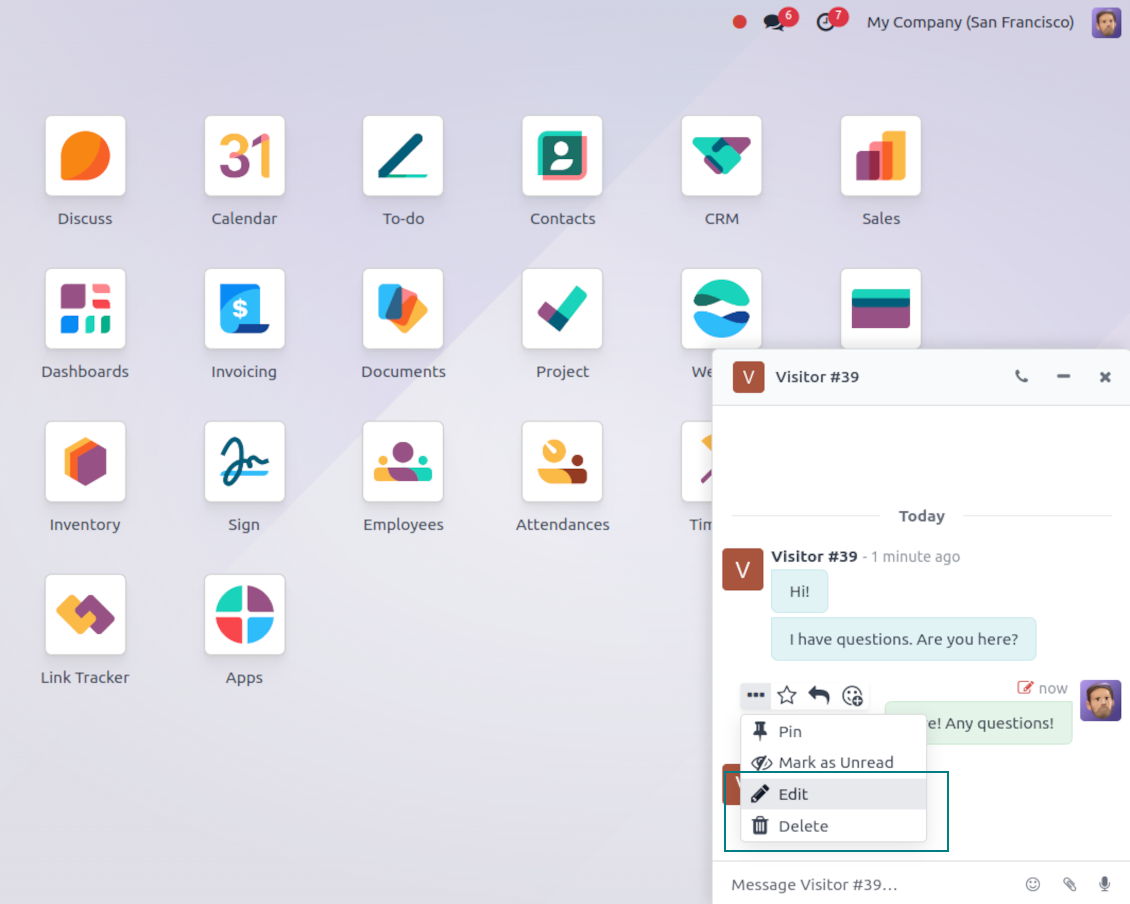
- Edit your own messages. Correct comments, notes and activity feedback after they were posted.
- Give admins broader control. Authorized users can manage messages posted by others when policy requires it.
- Edit body and attachments inline. Update the message content and files directly in the chatter when a correction is needed.
History for every change
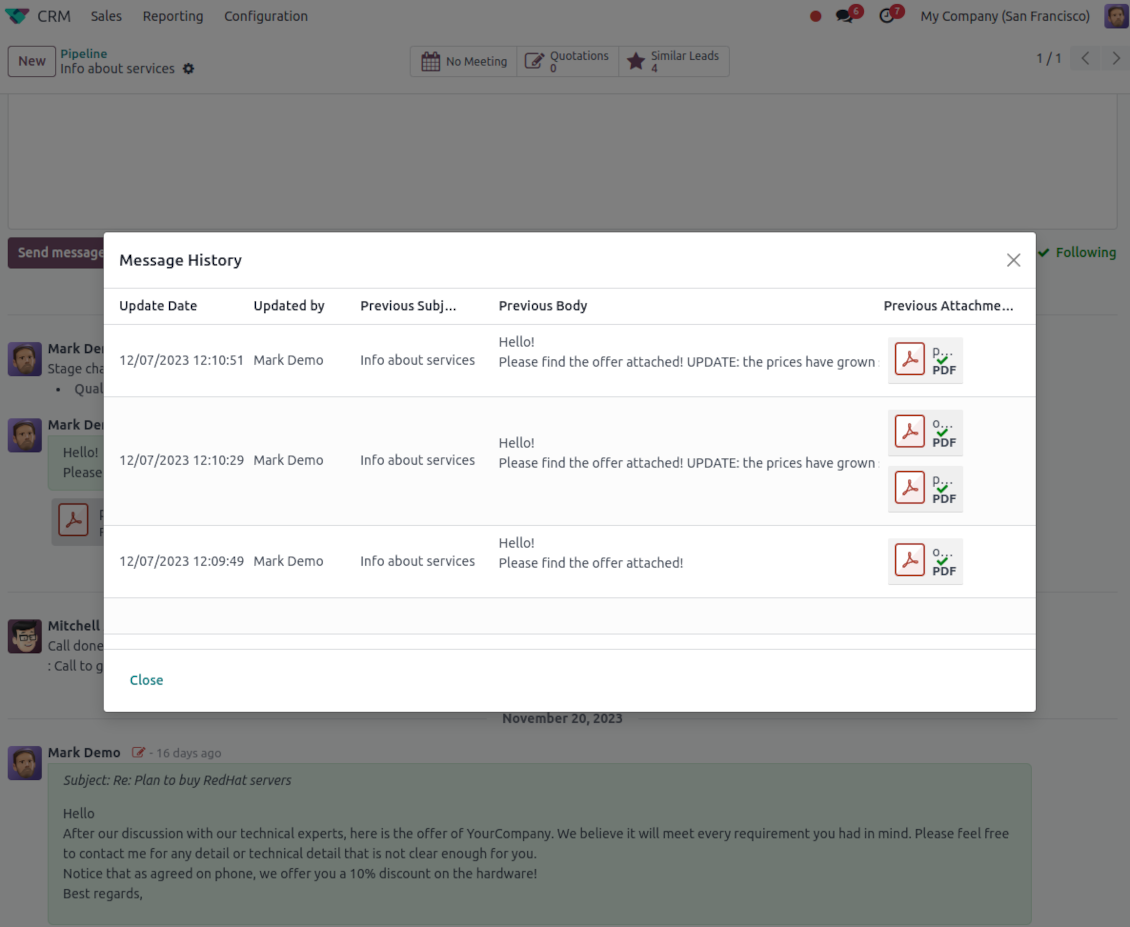
- Track what changed. Subject, body and attachment updates are stored with user and timestamp.
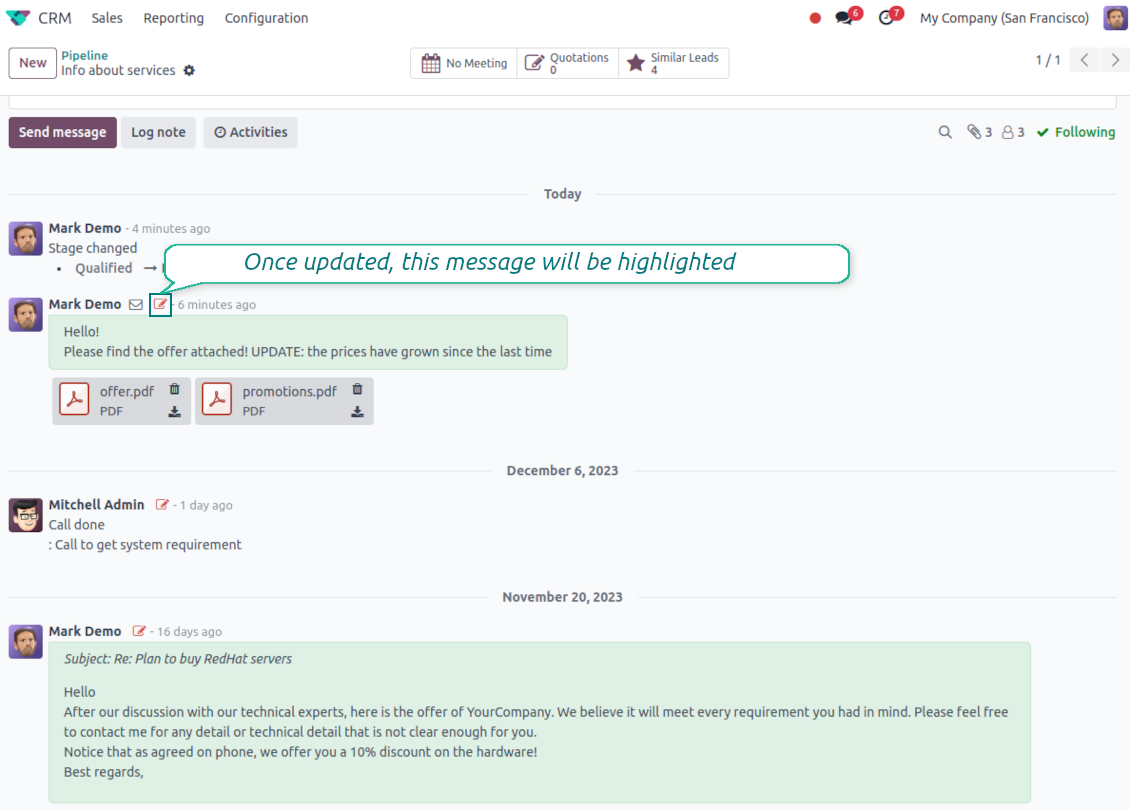
- Spot edited messages quickly. Modified entries show a history icon that opens the change log in one click.
Klar til at evaluere?
Start med en gratis demoanmodning eller køb i Odoo Apps Store.
Gratis personlig demodatabase. Intet telefonnummer eller kreditkort kræves. Gratis livstidsopdateringer og ekspertstøtte inden for Odoos hovedversion.
Catch missing attachments
Confirm forgotten attachments before they leave the composer
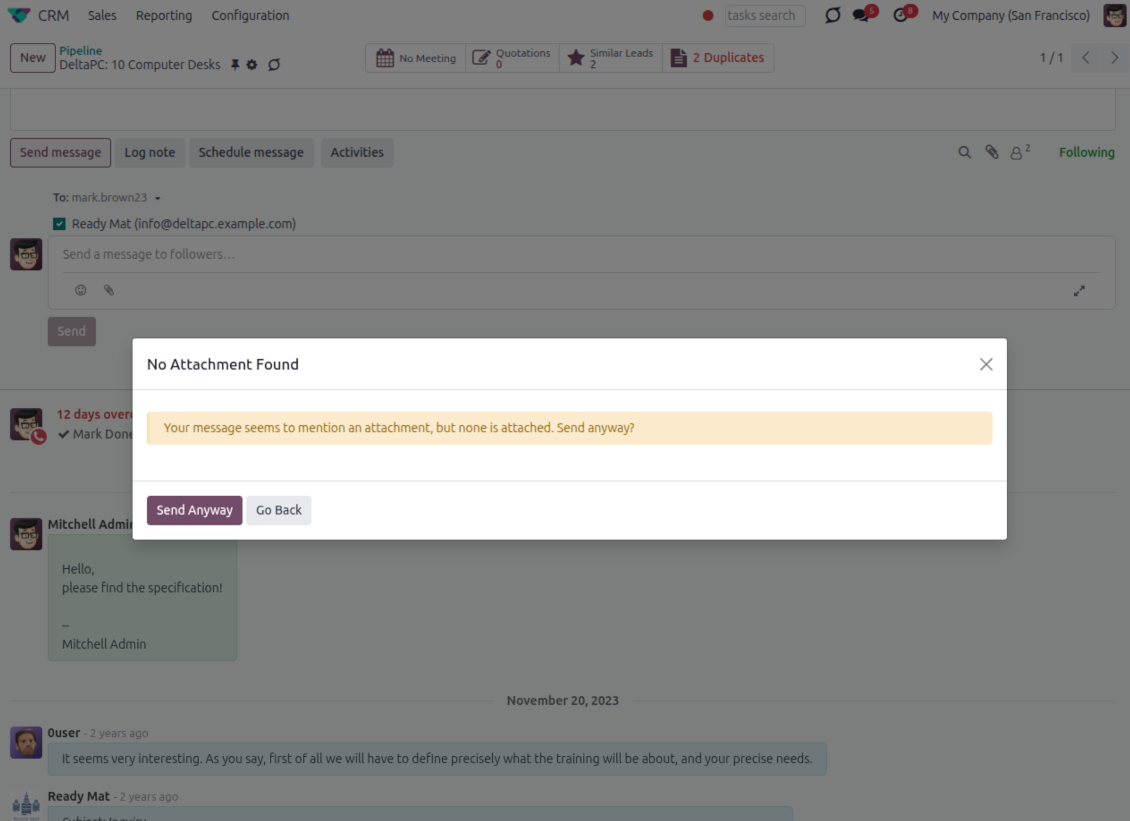
Attachment mention check
- Spot missing files before send. Odoo checks the message text when you mention an attachment.
- Works everywhere you write. The reminder appears in the full composer, quick reply and chat flows.
- Turn it off when not needed. Enable or disable the check from Messaging Suite settings.
Send-time confirmation
- Stop accidental sends. A dialog appears when the body mentions an attachment but none is attached.
- Let the user decide. Send Anyway and Go Back keep the flow moving without losing the draft.
- Adapt the wording. Adjust what counts as an attachment mention in settings when your team uses different phrases.
Message Citing
Quote earlier Odoo messages while you reply
Cite while you compose
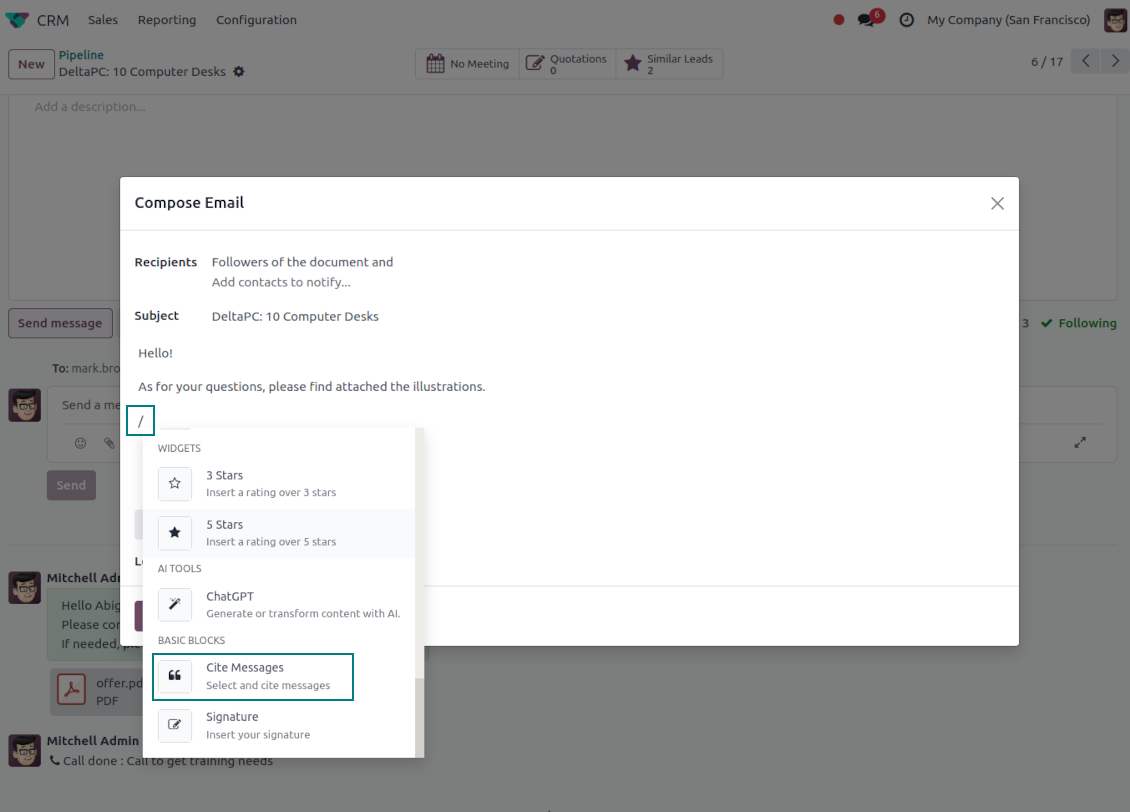
- Open Cite Message from the composer. Search earlier messages without leaving the email you are writing.
- Find the right message fast. Filter by author, content, date range, or limit results to the current thread.
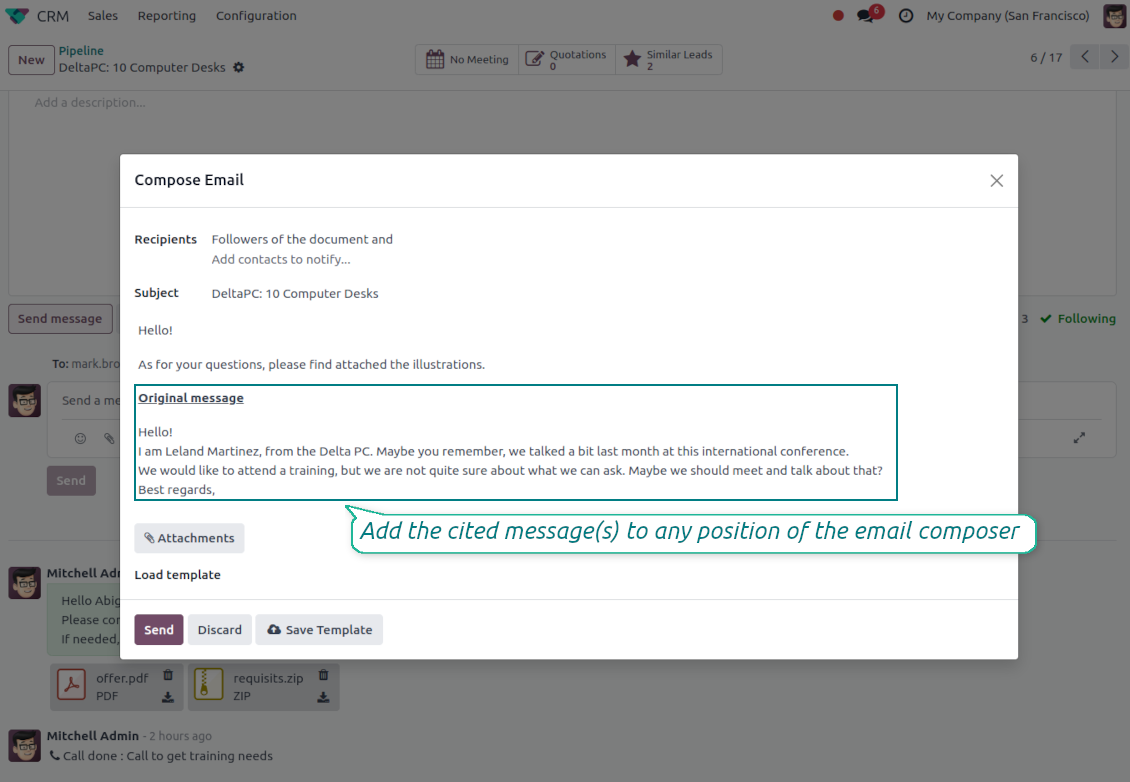
- Insert with one click. Add the selected message at the cursor position in the email body.
Readable quoted history
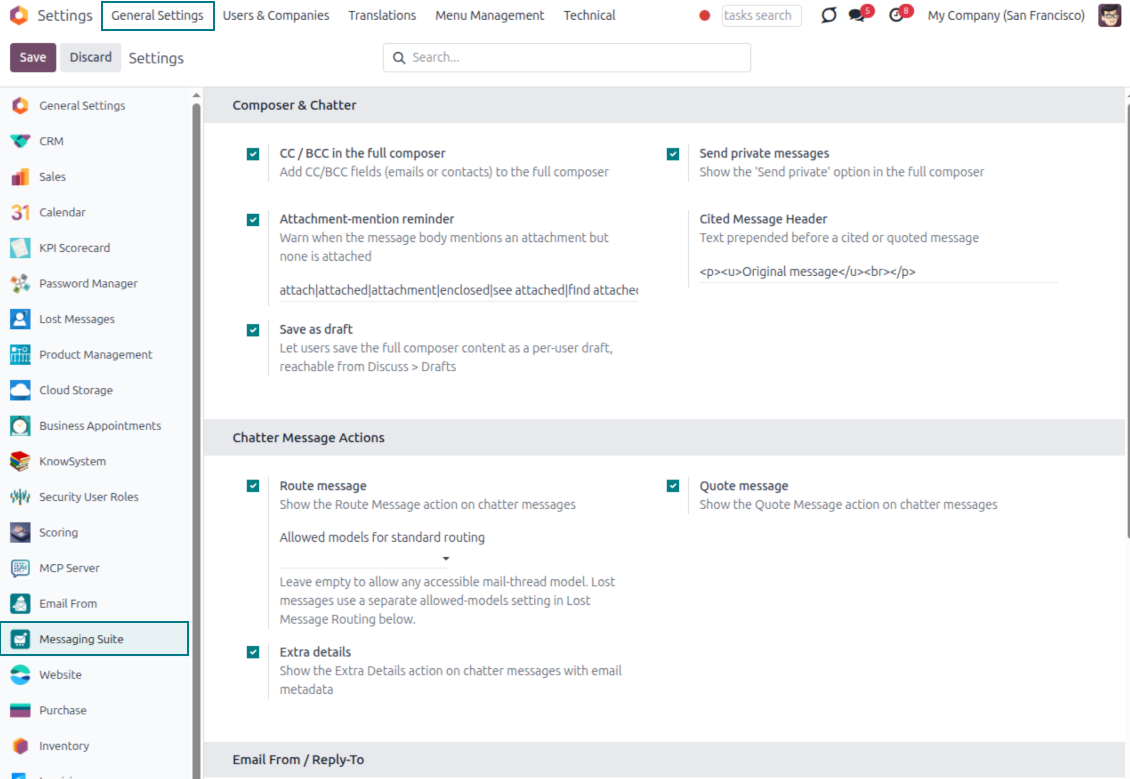
- Shape the quoted header. Define the text placed before every cited message.
- Reply with context. Help customers and colleagues see exactly which earlier message you refer to.
- Use across documents. Cite messages from any discussion while composing on another record.
Messaging Suite administration
One place to configure your messaging tools
One Messaging Suite settings page
- Turn features on or off. CC/BCC, drafts and attachment reminders are controlled from one place.
- Reach every related option. Open settings for routing, privacy, quoting, editing and sender addresses without leaving the suite.
- Set up once, use everywhere. Configure the whole messaging toolkit from a single administration screen.
Routing and access control
- Choose where messages may go. Define which documents can receive rerouted chatter messages.
- Keep lost emails separate. Unattached incoming mail keeps its own queue and routing rules.
- Decide who may reroute. Give routing rights only to the users who should move messages between documents.
Klar til at evaluere?
Start med en gratis demoanmodning eller køb i Odoo Apps Store.
Gratis personlig demodatabase. Intet telefonnummer eller kreditkort kræves. Gratis livstidsopdateringer og ekspertstøtte inden for Odoos hovedversion.
Ofte stillede spørgsmål om Odoo Messaging Suite Odoo v.17
Hvad er opdateringspolitikken for jeres vaerktojer?
Ifolge de gaeldende regler for Odoo Apps Store:
- Hvert modul kobt til version 12.0 eller tidligere giver adgang til alle versioner op til 12.0.
- Fra version 13.0 skal hver modulversion kobes separat.
- Uanset version giver kobet ret til alle opdateringer og fejlrettelser inden for en hovedversion.
faOtools-teamet styrer ikke disse regler. Ved sporgsmaal, kontakt Odoo Apps Store-representanterne direkte.
Hvordan installerer jeg jeres app pa Odoo.sh?
Den mest direkte tilgang er Odoo-butikkens indbyggede arbejdsgang:
1. Abn modulets side, og klik pa Deploy on odoo.sh
2. Du bliver omdirigeret til GitHub. Log ind, og klik pa Create a new repo, eller brug et eksisterende. Repot skal vaere privat. Apps under OPL-1 ma ikke offentliggores. Opret om nodvendigt et nyt repo til Odoo.sh-projektet
3. Ga derefter til odoo.sh, klik pa Deploy, bekraeft, og klik pa Continue. Installationen starter.
Disse trin installerer appen pa production-grenen. Til andre grene eller opdatering:
1. Download kildekoden fra Odoo-butikken
2. Commit modulet til GitHub-repot. Ingen app-mapper/filer ma sta i .gitignore. Repoer oprettet af odoo.sh kan ignorere vigtige stier (f.eks. /lib). Upload alle modulmapper og -filer
3. Deploy malgrenen i odoo.sh-projektet, eller vent pa det automatiske build, hvis indstillingerne angiver det.
Hvordan installerer jeg jeres app pa min egen server?
2. Genstart Odoo-serveren;
3. Sla udviklertilstand til (tekniske indstillinger);
4. Opdater applisten (Apps-menuen);
5. Find appen, og klik pa Activate/Install;
6. Folg retningslinjerne pa appsiden, hvis de findes.
Jeres app har ekstra tilfojelser. Kan jeg kobe dem senere?
Ja. Odoo laegger automatisk alle afhaengigheder i indkobskurven: udelad allerede kobte vaerktojer, sa du ikke betaler to gange.
Jeg deployede jeres app pa Odoo.sh og ser advarsel/fejl i testene
En rod/orange advarsel pavirker ikke appens funktioner. Nogle gange består vores moduler ikke de standard automatiske tests, fordi de forventer en adfaerd, der er i konflikt med appens mal. Vi aendrer f.eks. prisberegningen, mens Odoo-testene sammenligner slutprisen med standardalgoritmen.
Tjek forst funktionerne i den deployede database. Virker alt?
Hvis du stadig mener, at advarslen pavirker reelle funktioner, kontakt os, og send de fulde installationslogfiler og den fulde liste over deployede moduler (kerne og tredjepart).
Kan jeg kobe jeres app direkte hos jer?
Nej, vi distribuerer kun vaerktojerne via den officielle Odoo-appbutik.
Jeg vil gerne have rabat
Desvaerre har vi ikke tekniske midler til individuelle priser.
Kan jeg installere appen pa min Odoo Online (SaaS)-database?
Nej, tredjepartsapps kan ikke bruges pa Odoo Online. Odoo SaaS blokerer den mulighed.
Jeres vaerktoj afhaenger af andre apps. Skal jeg kobe dem?
Ja, vaerktojet kraver alle moduler markeret som afhaengigheder. Prisen pa appsiden inkluderer allerede disse afhaengigheder.
Hvad koster modulet i amerikanske dollar? Hvorfor aendrede den sig?
Prisen pa vores moduler er sat i euro. Odoo-butikken omregner til andre valutaer efter den interne valutakurs. Derfor kan prisen i amerikanske dollar aendre sig, nar kursen opdateres.
App- og webstedstekster på andre sprog end engelsk er AI-assisterede og afstemt med officielle Odoo-oversættelser. Hvis du opdager en fejl, send en sag om oversættelseskorrekthed så retter vi det.
Odoo-demodatabaser (livedemoer)
Til denne app kan vi tilbyde en gratis personlig demodatabase.
Du behøver hverken telefonnummer eller kreditkort for at kontakte os. Det er nok med en kort e-mailtilmelding, der tager under 30 sekunder.
På din anmodning forbereder vi en individuel live-forhåndsvisningsdatabase, hvor du i ca. to uger kan teste og tjekke antagelser.
Fejlrapportering
Hvis du støder på fejl eller inkonsistent adfærd, så kontakt os. Vi garanterer rettelser inden 60 dage efter køb og forbedrer værktøjerne også bagefter.
Du behøver hverken telefonnummer eller kreditkort for at kontakte os. Det er nok med en kort e-mailtilmelding, der tager under 30 sekunder.
Medtag så mange detaljer som muligt: skærmbilleder, Odoo-serverlogs og en fuld beskrivelse af, hvordan problemet genskabes. Det tager som regel nogle hverdage at lave en arbejdsplan (hvis fejlen bekræftes) eller retningslinjer (ellers).
Offentlige funktionsønsker og modulidéer (gratis udvikling)
Vi er stærkt motiverede til at forbedre vores værktøjer og taknemmelige for al feedback. Hvis kravene er til offentlig nytte og kan implementeres effektivt, tager teamet dem med på opgavelisten.
En sådan opgaveliste behandles regelmæssigt og indebærer ingen ekstra gebyrer. Selvom vi ikke kan love frister og endeligt design, kan det være en god måde at få ønskede funktioner uden investeringer og risici.
Du behøver hverken telefonnummer eller kreditkort for at kontakte os. Det er nok med en kort e-mailtilmelding, der tager under 30 sekunder.

The tool to flexibly structure Odoo attachments in folders and synchronize directories with cloud clients: Google Drive, OneDrive/SharePoint, Nextcloud/ownCloud, Dropbox, Amazon S3, Box, and NAS. DMS. File Manager. Document management system
398€

The tool to build a deep and structured knowledge base for internal and external use. Knowledge System. KMS. Wiki-like revisions.
398€
The tool to automatically synchronize Odoo attachments with OneDrive files in both ways
487€
The tool to set up KPI targets and control their fulfillment by periods. KPI dashboards. Dashboard designer. KPI charts

The tool for time-based service management from booking appointments to sales and reviews
398€
The tool to automatically synchronize Odoo attachments with Google Drive files in both ways
487€
