En resumen
Odoo Messaging Suite es una aplicación Odoo 17 de Conversaciones. The tool to improve the Odoo messaging experience.
Odoo Messaging Suite brings lost-message recovery, private discussions, message citing, post-send editing, managed From/Reply-To addresses and a richer email composer together in one application. Compose with CC/BCC and per-user drafts, route emails to the right document, quote from the message toolbar, and catch forgotten attachments before they leave. Every message keeps its email headers behind a details icon, and administrators configure the whole toolkit from one Messaging Suite settings page.
Ideal para
Support and sales teams living in their inbox
Perfect for teams that answer customers by email all day and want CC/BCC, drafts and quoting available right inside the Odoo composer, without switching to an external mail client.
Companies needing confidentiality
Ideal when some conversations must stay private from portal users and other followers, while still being logged on the Odoo document for later reference.
Administrators who want oversight and control
Useful for admins who need routing rules, attachment reminders and one settings page to manage the whole messaging toolkit.
Listo para evaluar?
Empiece con una solicitud de demo gratuita o compre en el Odoo Apps Store.
Base de demostración personalizada gratuita. No se requiere teléfono ni tarjeta. Actualizaciones gratuitas de por vida y soporte experto dentro de la versión mayor de Odoo.
Por qué los equipos lo eligen
Ventajas clave antes de entrar en detalle
One settings page
Turn on CC/BCC, drafts, routing, attachment checks and the rest of the toolkit from a single Messaging Suite configuration screen, without hunting through scattered settings menus.
Full email composer
Compose with CC/BCC recipients, per-user drafts and managed From/Reply-To addresses directly inside the Odoo composer.
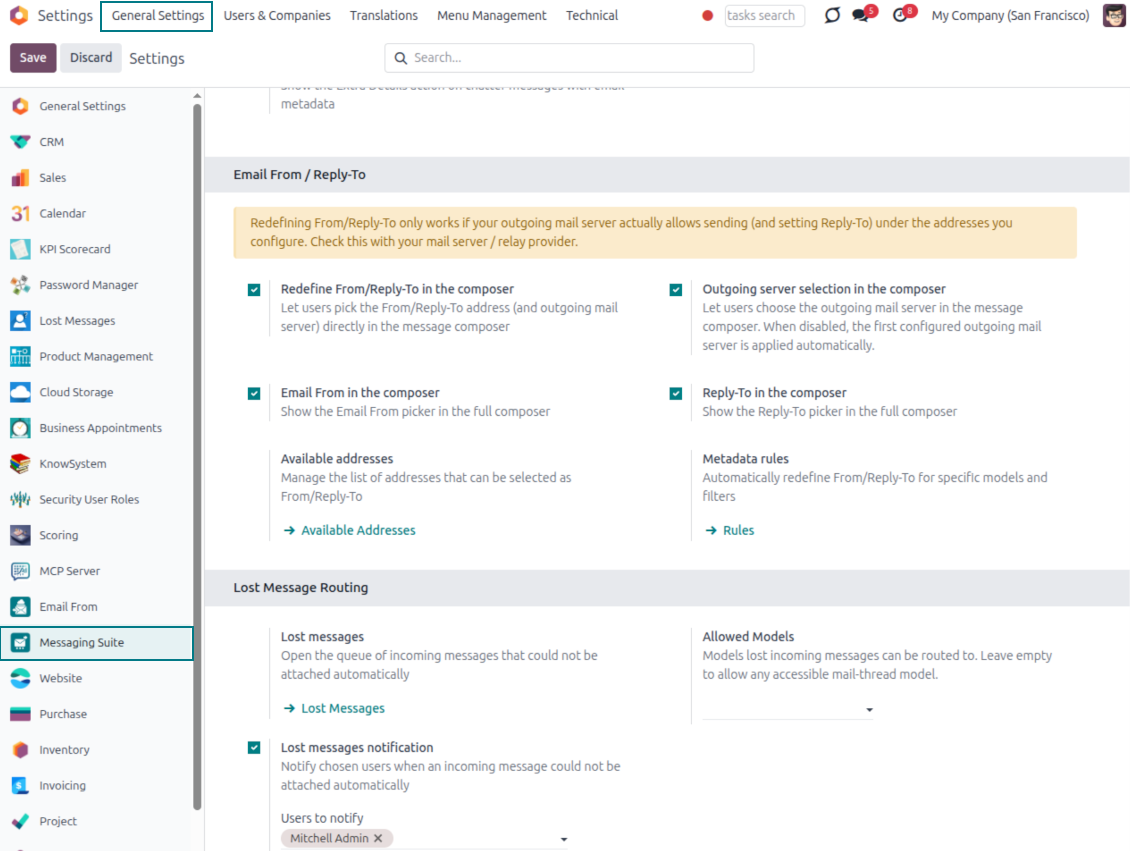
Managed sender addresses
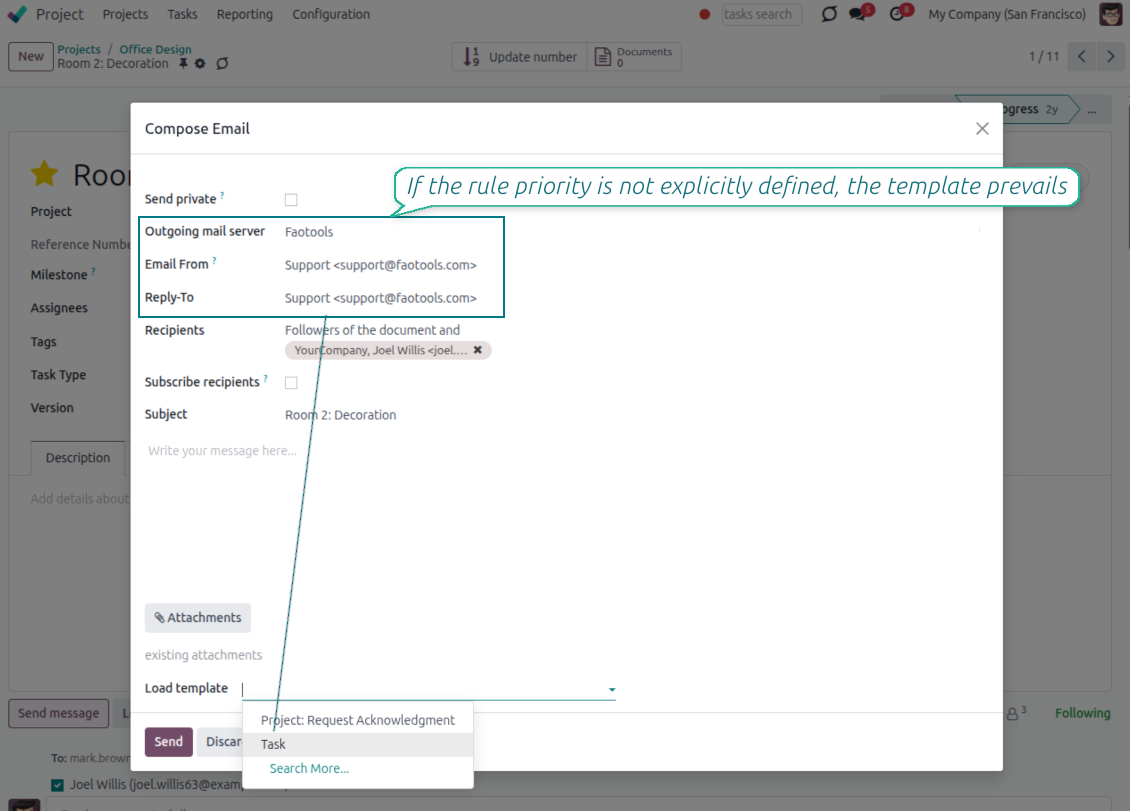
Stop typing sender emails by hand. Pick from an address book tied to the right outgoing mail server, with automatic rules by document type.
Message actions
Route and quote any message from quick actions, and inspect full email headers in a single click.
Lost message recovery
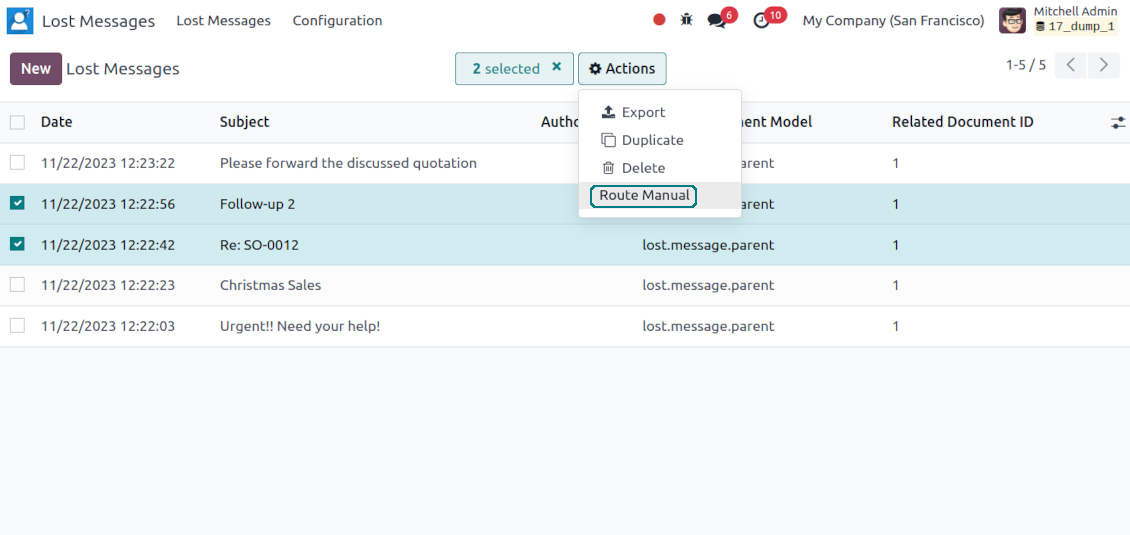
Never lose an incoming email again. Review unattached messages in a dedicated queue and route them to the correct Odoo document before customers wait.
Private threads
Keep sensitive conversations hidden from portal users and other followers, while staying logged on the Odoo document for later reference.
Message citing
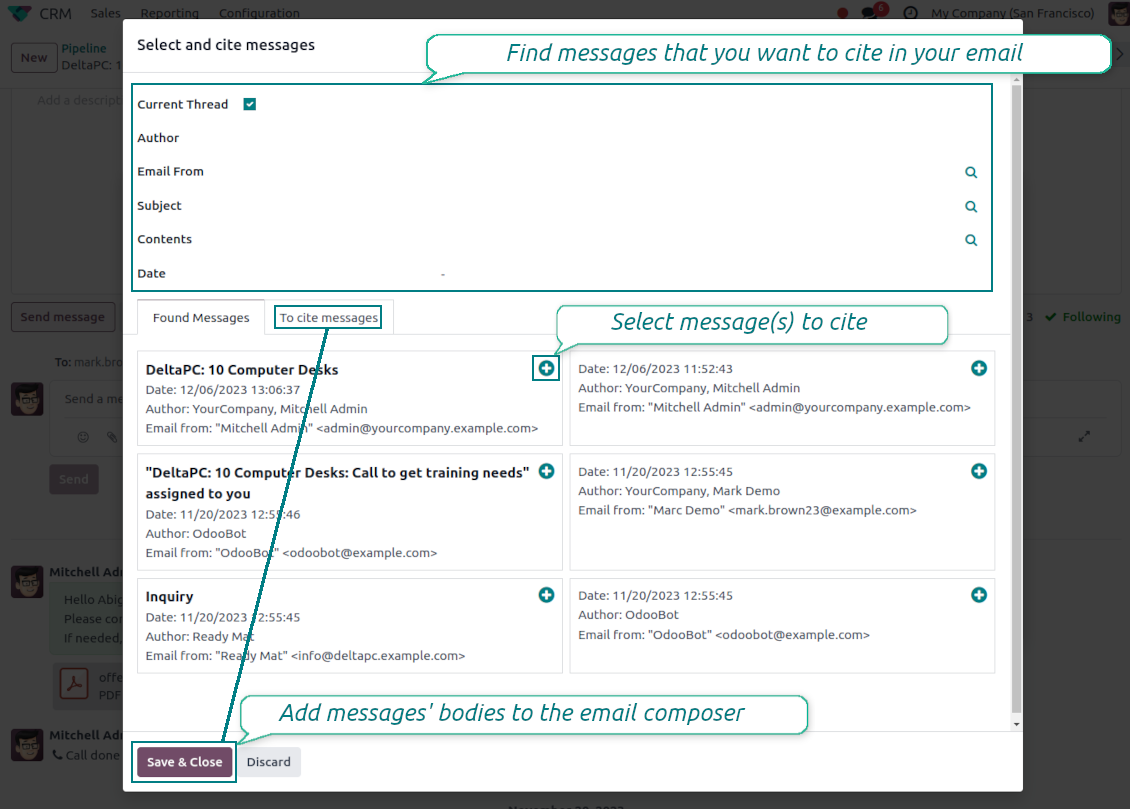
Search and cite any earlier Odoo message straight from the composer, so every reply carries the right context.
Message editing & history
Edit or delete your own messages, notes and activity feedback, with a full history of every change kept for admins.
Safer sending
Catch forgotten attachments before you hit send so customers receive complete messages.
Listo para evaluar?
Empiece con una solicitud de demo gratuita o compre en el Odoo Apps Store.
Base de demostración personalizada gratuita. No se requiere teléfono ni tarjeta. Actualizaciones gratuitas de por vida y soporte experto dentro de la versión mayor de Odoo.
Compose like a real email client
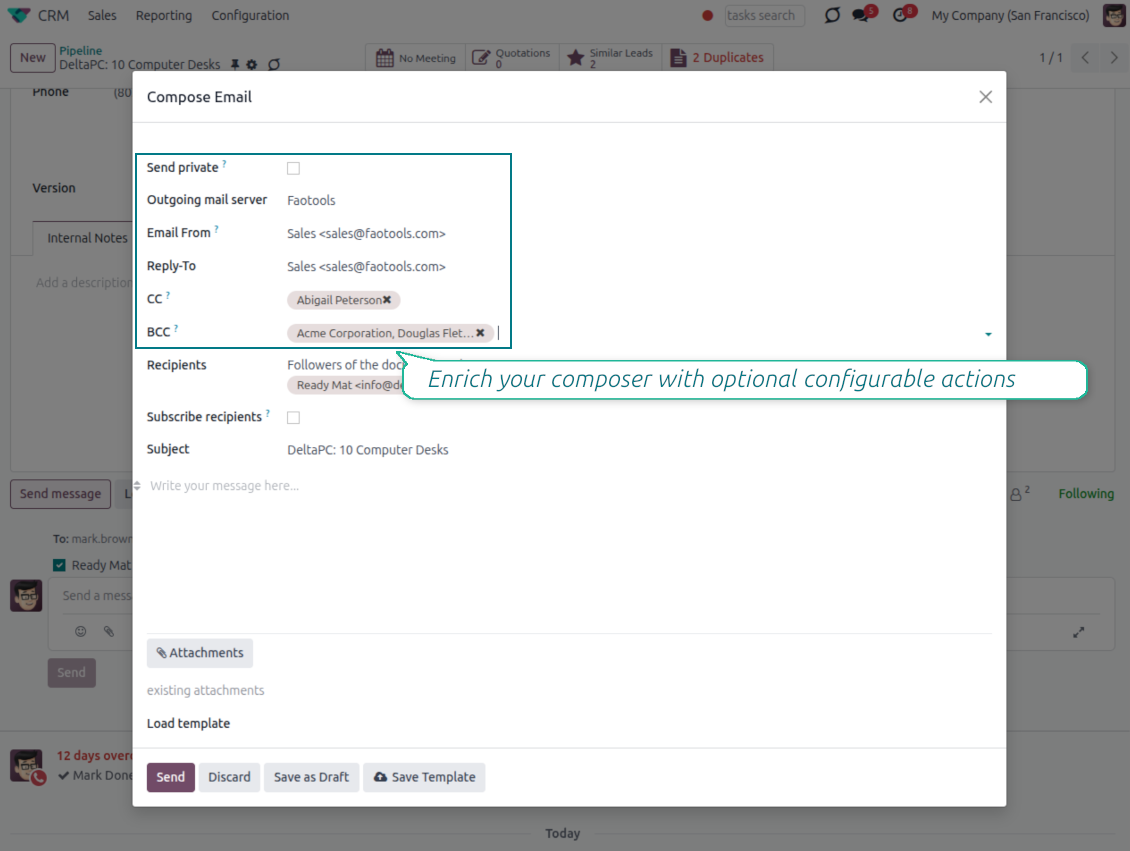
CC, BCC and per-user drafts in the full composer
Copy and blind copy
- Add CC and BCC in the full composer. Type email addresses or pick existing contacts.
- Keep recipients in the message history. Sent CC/BCC values stay visible on the message afterwards.
- Use only when you need them. Turn CC/BCC off in settings if your team does not use copy recipients.
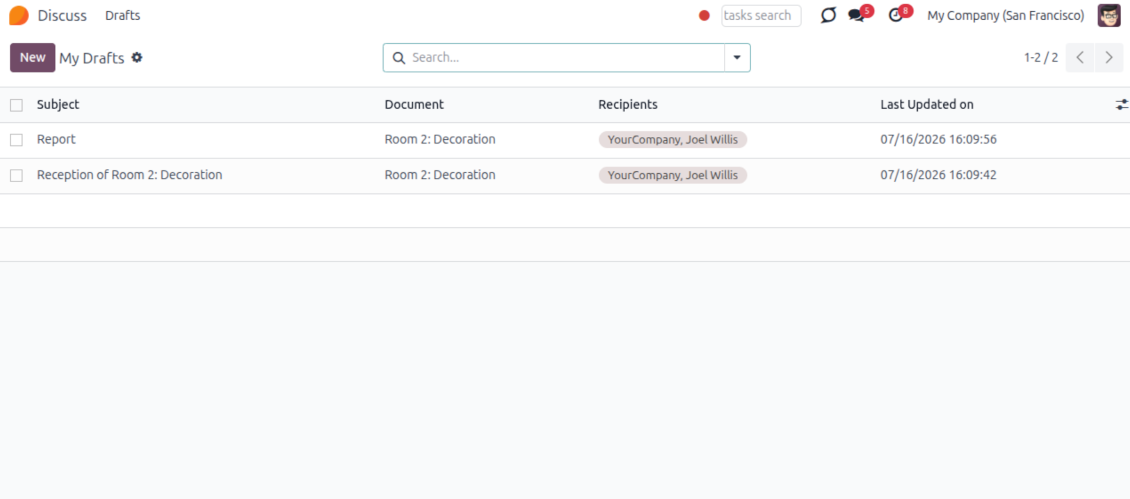
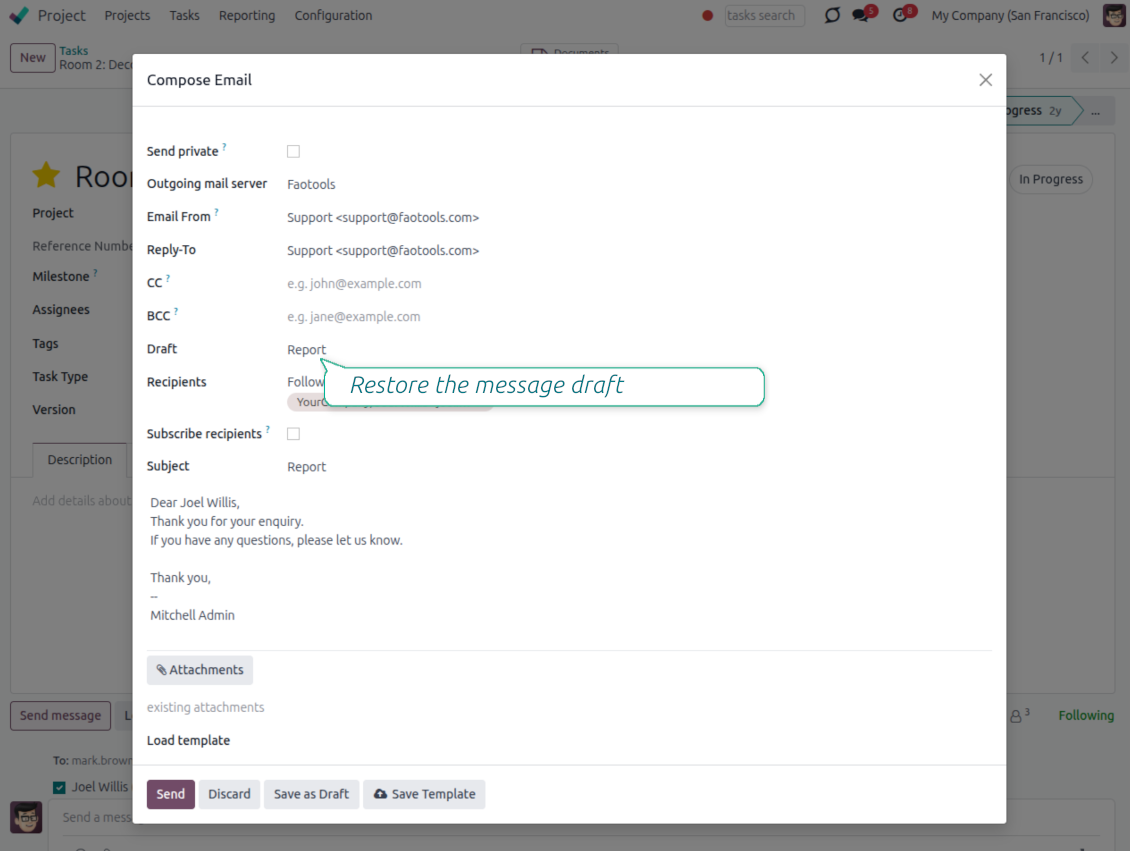
Save as draft
- Save the full message. Drafts keep subject, body, recipients and related fields for the current record.
- Resume where you stopped. Reopening the composer on the same document brings back your latest draft automatically.
- Pick up drafts from Discuss. Every internal user can open the drafts menu and finish unfinished messages.
Message actions and email metadata
Route, quote and inspect email details without leaving the chatter
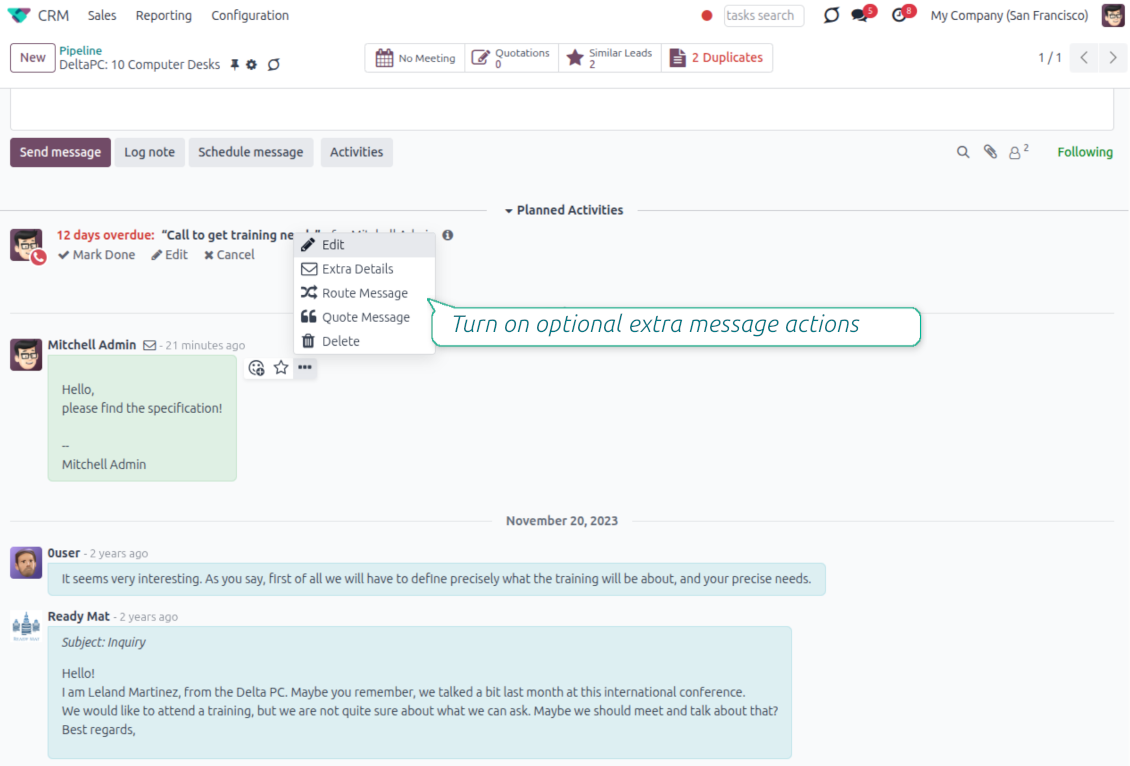
Actions on every message
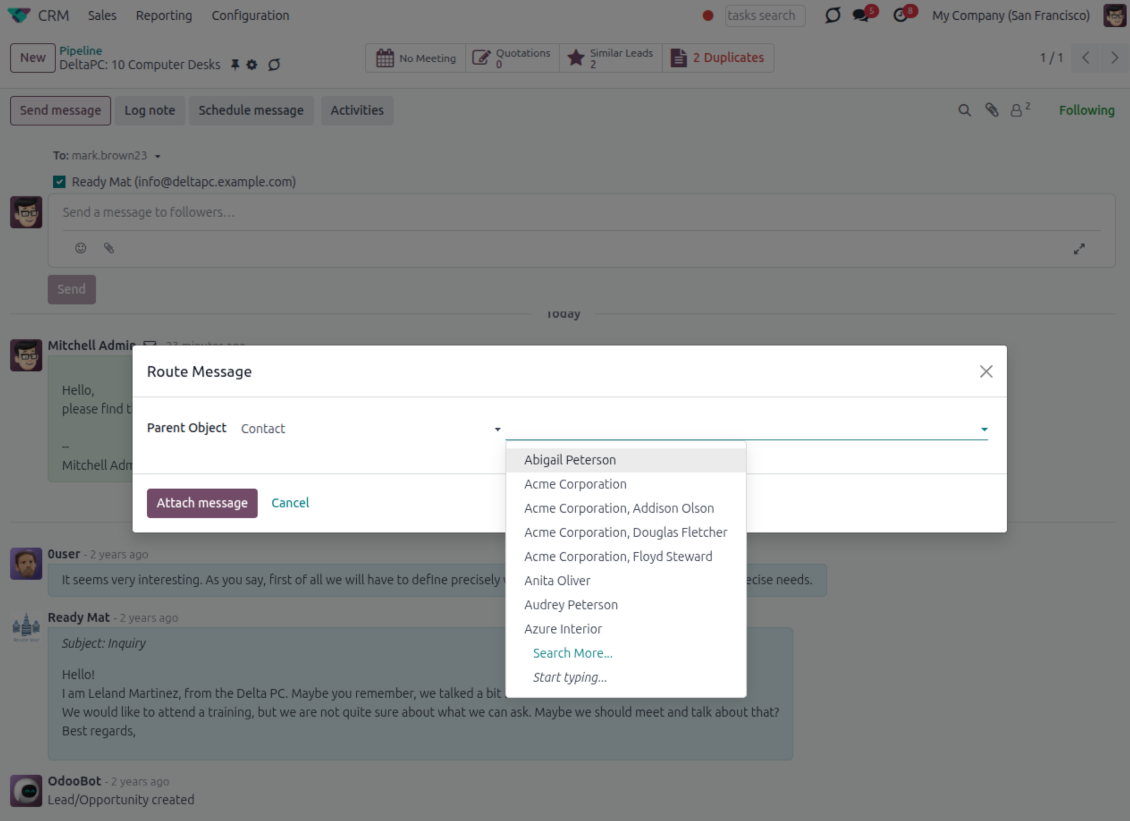
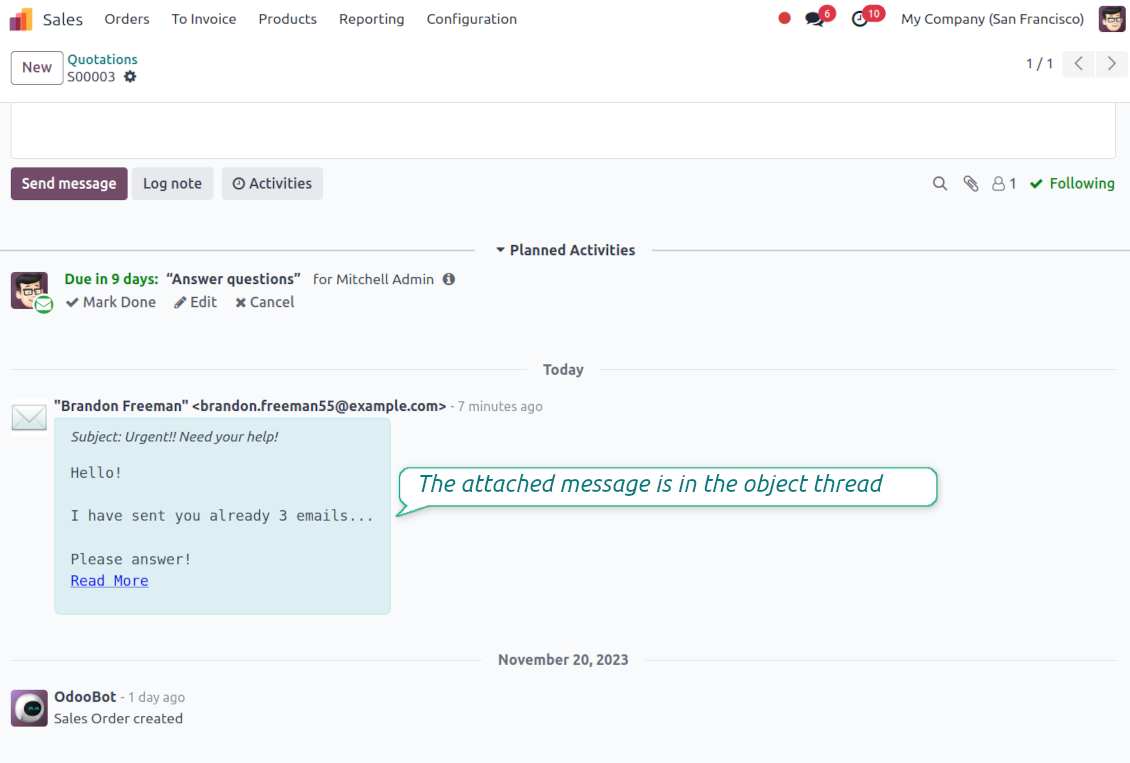
- Route from the thread. Move a message to another document when it landed on the wrong record.
- Quote in a new email. Start a reply with the original message included in the body.
- Keep the composer simple. Every action opens the standard Odoo composer already pre-filled, no separate tooling to learn.
Email details on every message
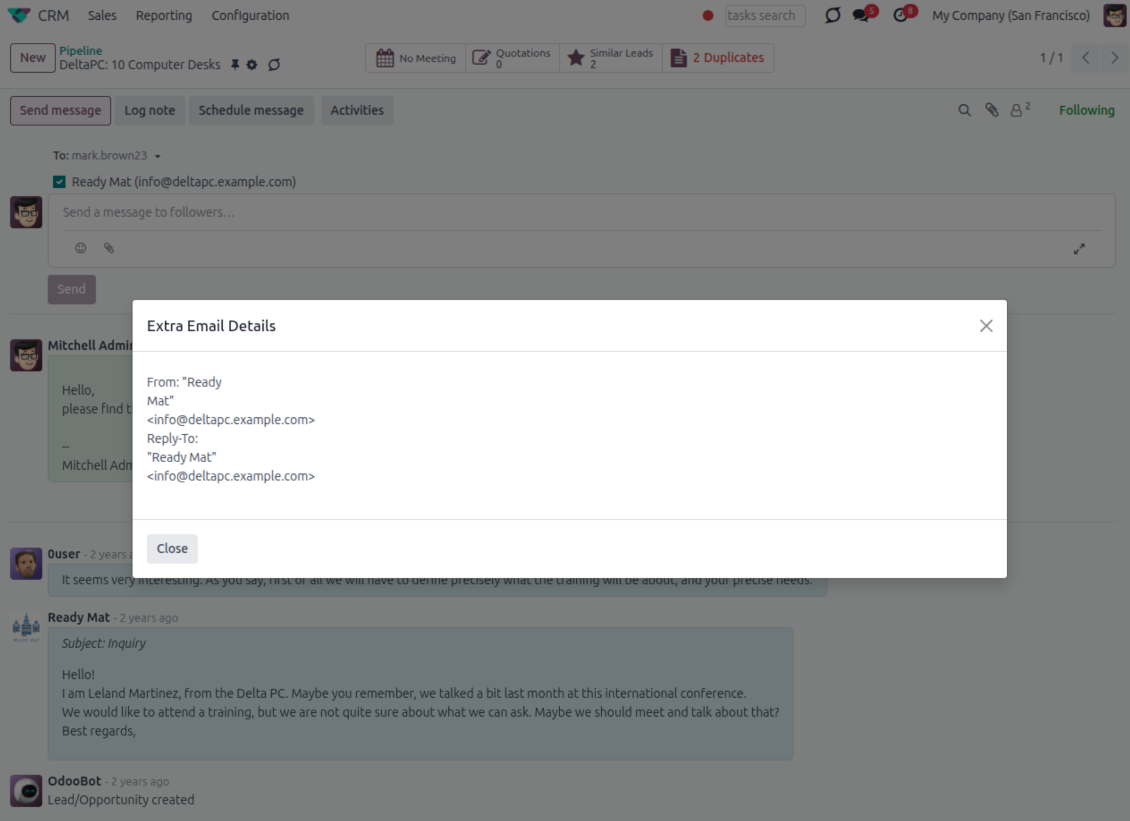
- See full headers. From, Reply-To, To and CC stay available on incoming and outgoing mail.
- Keep CC/BCC too. Copy recipients added in the composer are saved with the message.
- Open details in one click. A small icon on the message shows the complete email information.
Odoo Email From
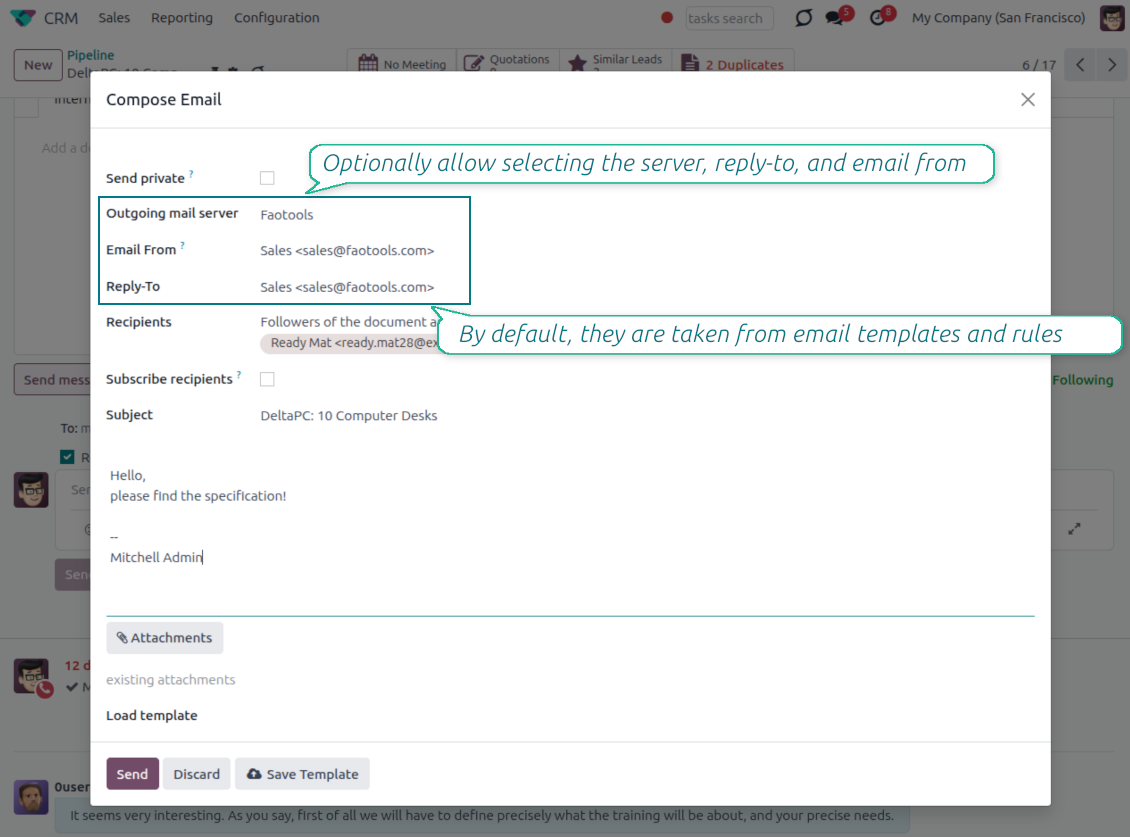
Choose the right From and Reply-To address for every email
Managed sender addresses
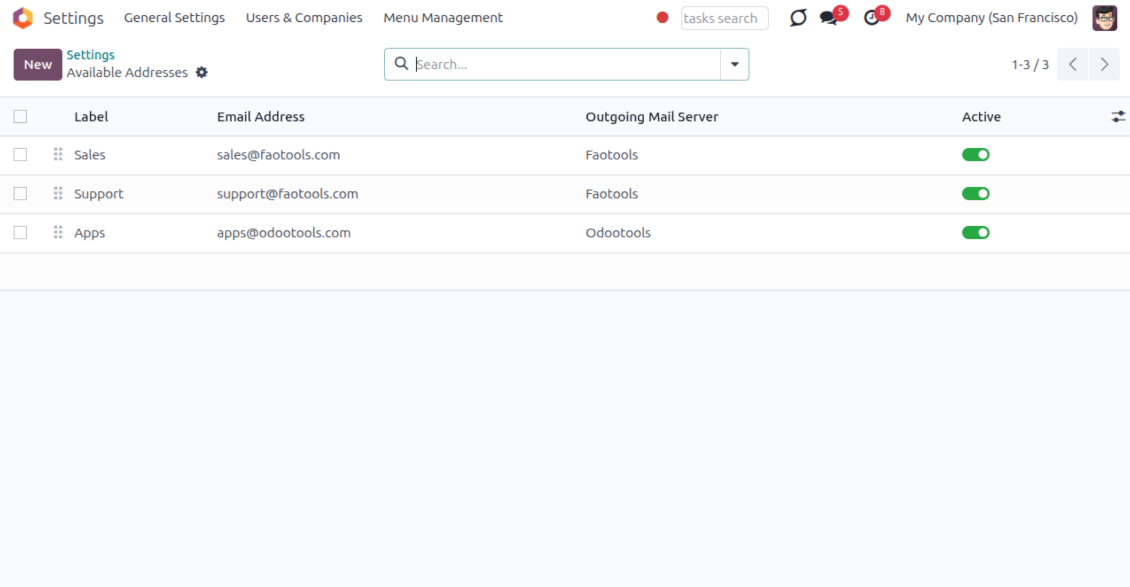
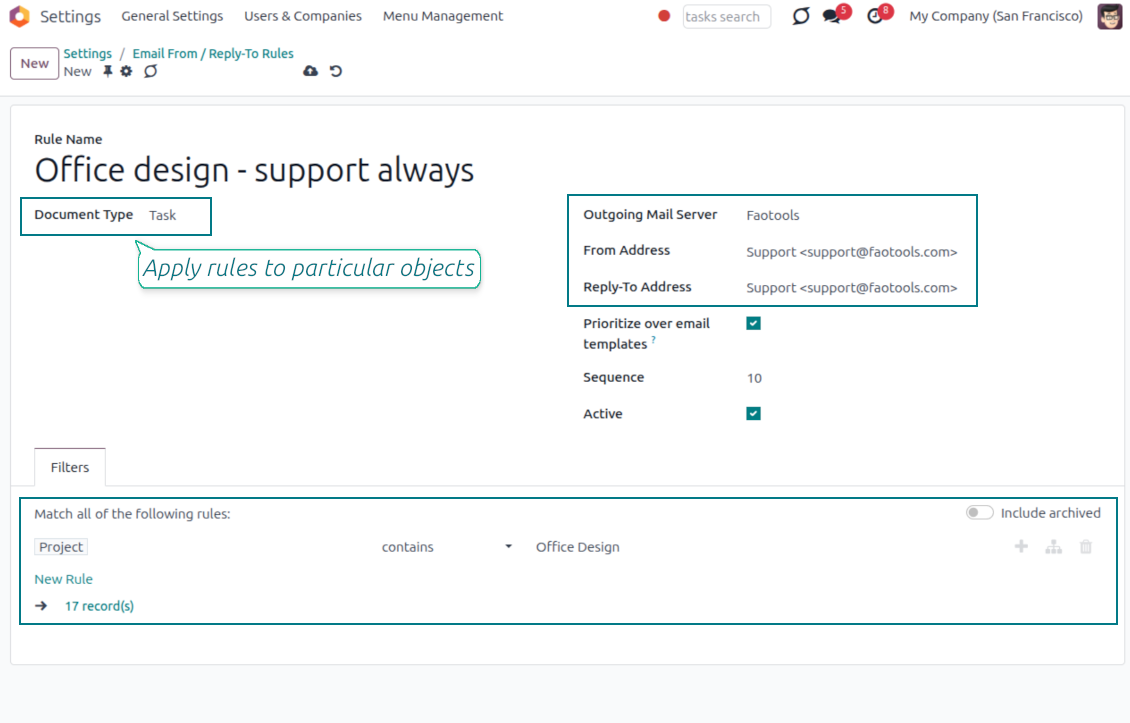
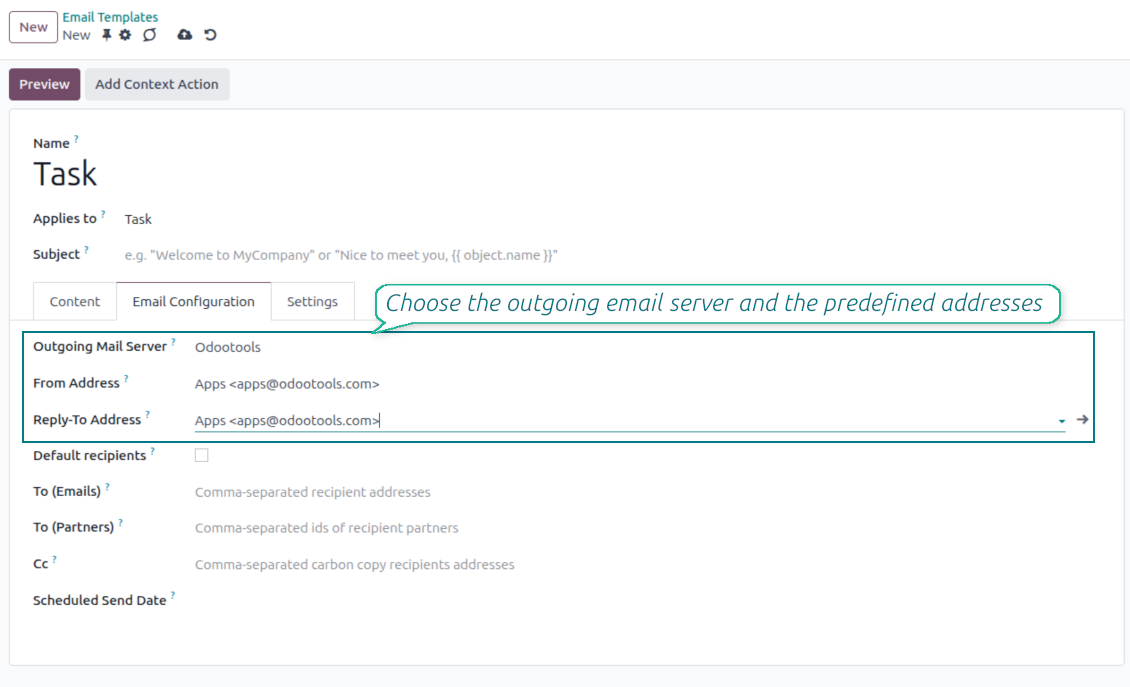
- Pick instead of typing. Users choose From and Reply-To from an address book linked to outgoing mail servers.
- Apply on templates too. Email templates can use the same managed sender addresses.
- Keep the screen simple. The outgoing mail server field is hidden when only one server is configured.
Automatic sender rules
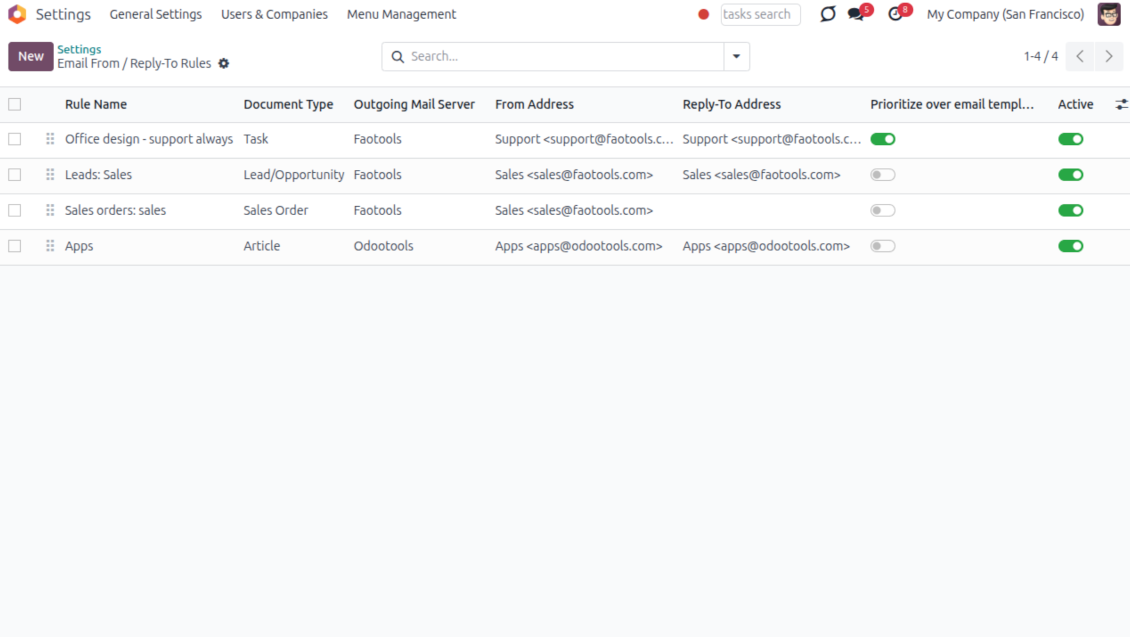
- Set the sender by document type. Rules choose the right From and Reply-To for sales orders, tasks, invoices and other records.
- Prevent invalid combinations. Odoo blocks sender addresses that do not match the selected outgoing mail server.
- Start with working mail setup. Make sure each outgoing server can actually send from the addresses you add.
Listo para evaluar?
Empiece con una solicitud de demo gratuita o compre en el Odoo Apps Store.
Base de demostración personalizada gratuita. No se requiere teléfono ni tarjeta. Actualizaciones gratuitas de por vida y soporte experto dentro de la versión mayor de Odoo.
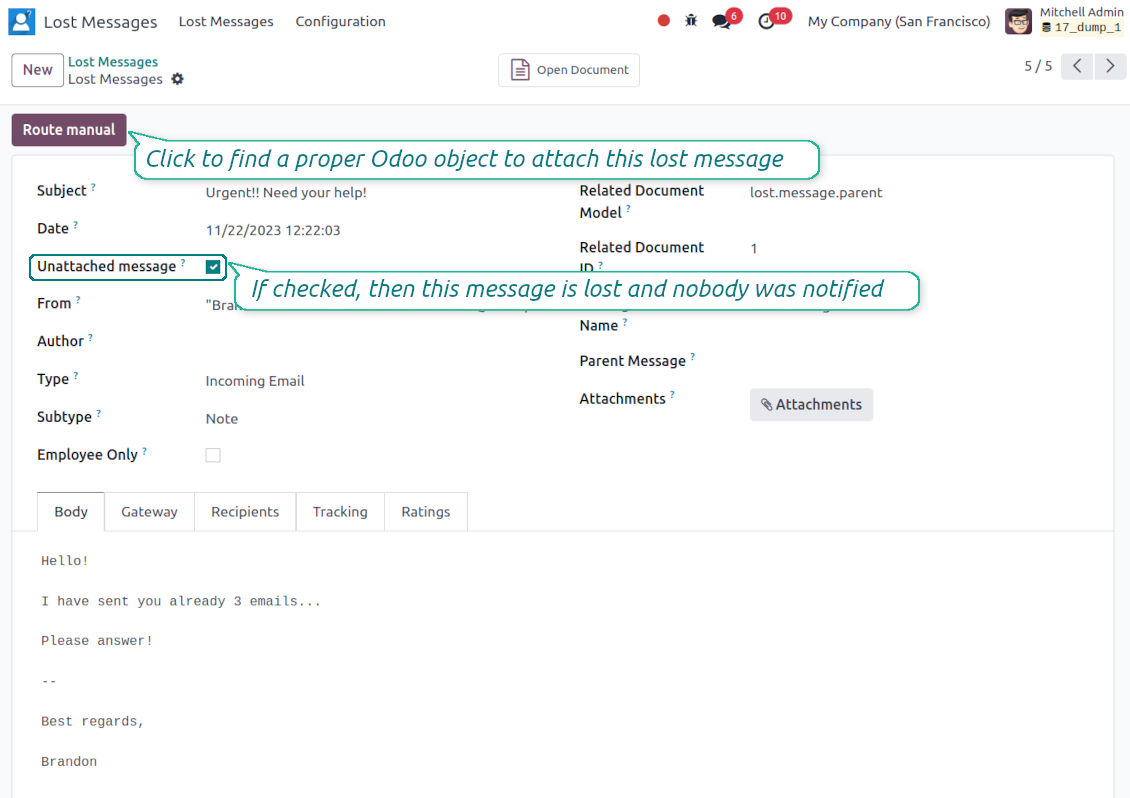
Lost Messages Routing
Recover incoming emails Odoo could not attach automatically
Lost message queue
- Catch emails that did not attach. Incoming messages Odoo cannot place on a document are kept instead of disappearing.
- Review in one menu. Your team works from a dedicated queue with subject, sender, body and search tools.
- Keep routing clues. Recipients, To, CC and In Reply To stay available to help find the right document.
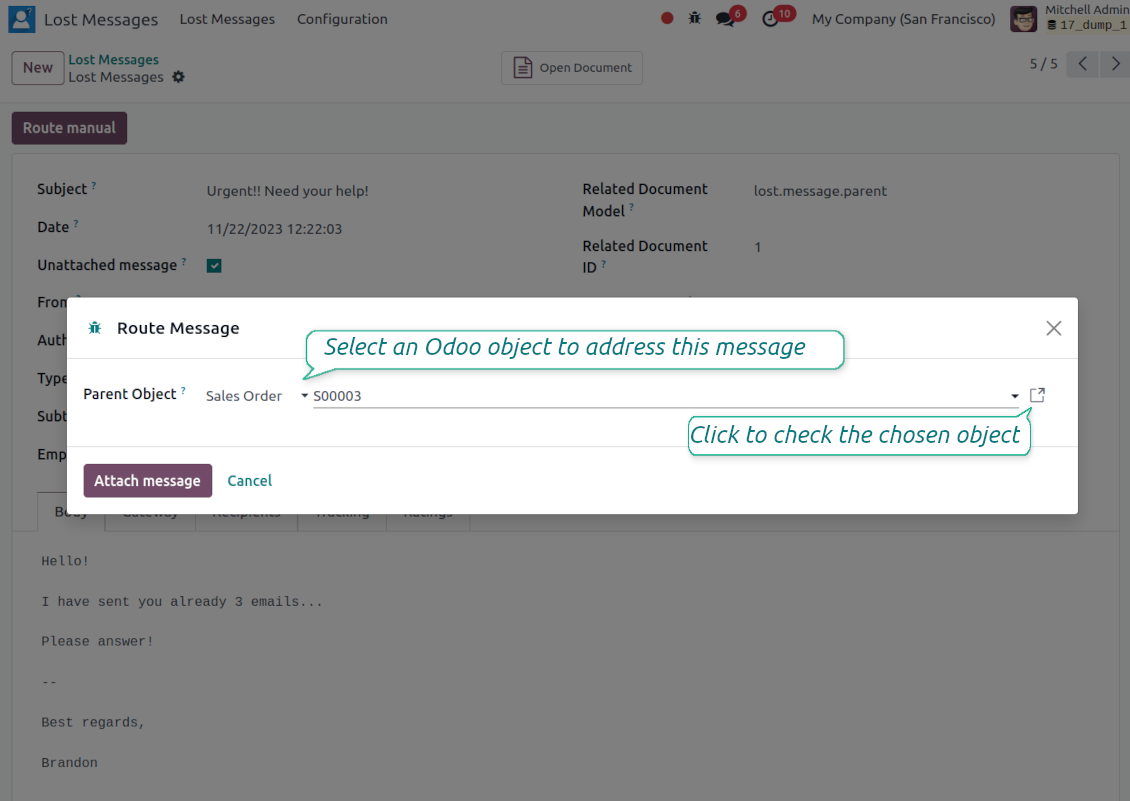
Route to the right document
- Attach in a few clicks. Pick the target document and attach one or several lost messages in a single action.
- Limit where messages may go. Restrict routing to selected document types or leave the list open for managers.
- Move attached messages too. Already linked chatter messages can be rerouted to another document when needed.
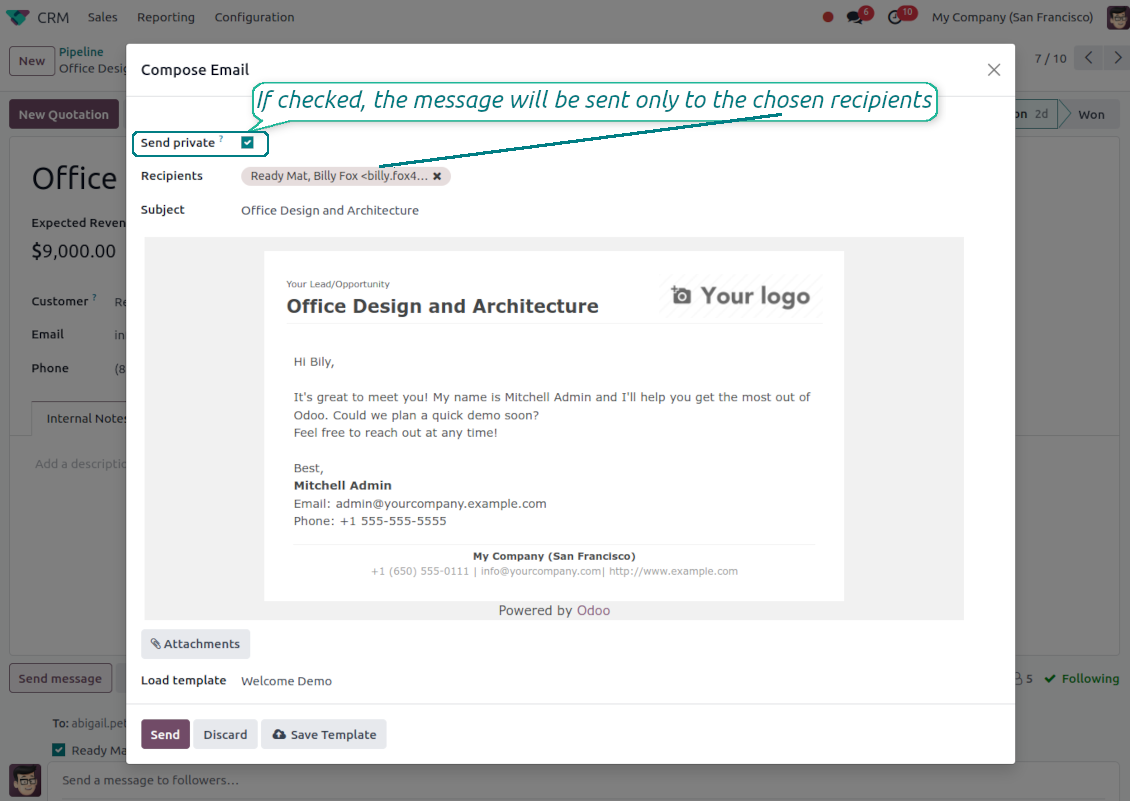
Private Thread
Confidential discussions that stay inside Odoo and off the portal
Send private from the composer
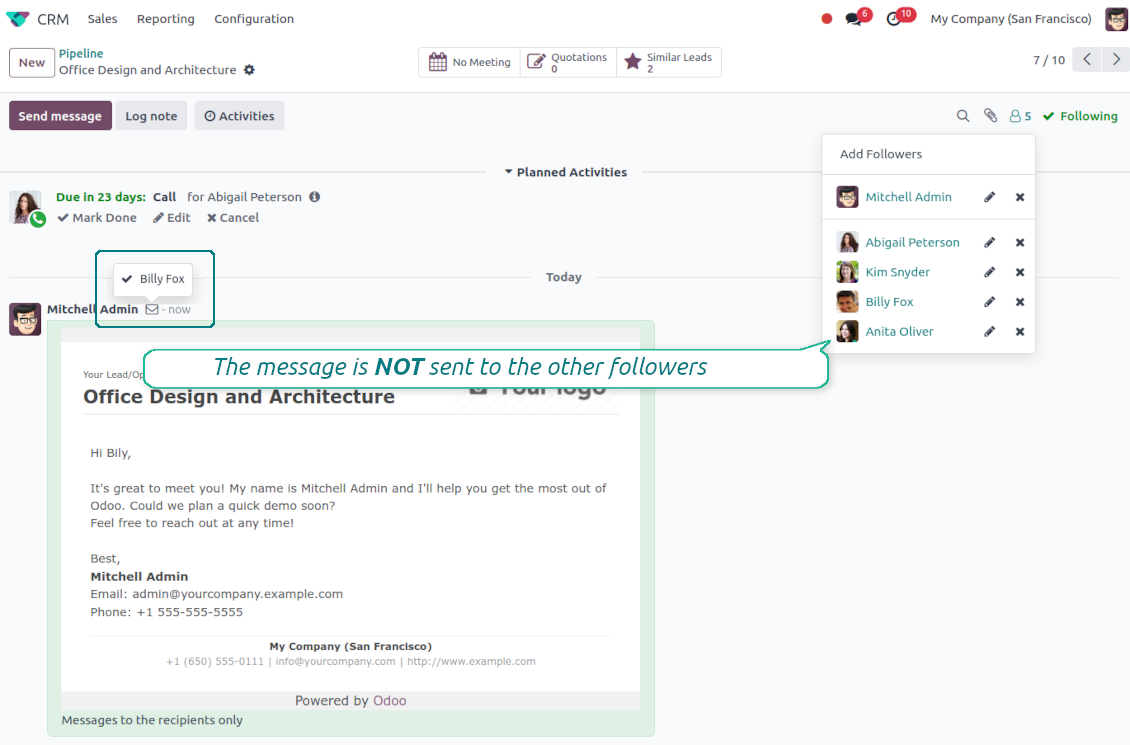
- Tick Send private. Compose a message that reaches only the selected recipients.
- Do not notify other followers. Portal users and regular followers stay out of the conversation.
- Works on any document. Use private sending on sales orders, tasks, invoices, leads and other records.
Confidential but traceable
- Keep history on the record. Private messages remain on the document for later reference.
- Hide from portal users. External contacts cannot read internal discussions on their documents.
- Choose privacy each time you send. Tick Send private again on a follow-up if that reply should stay confidential too.
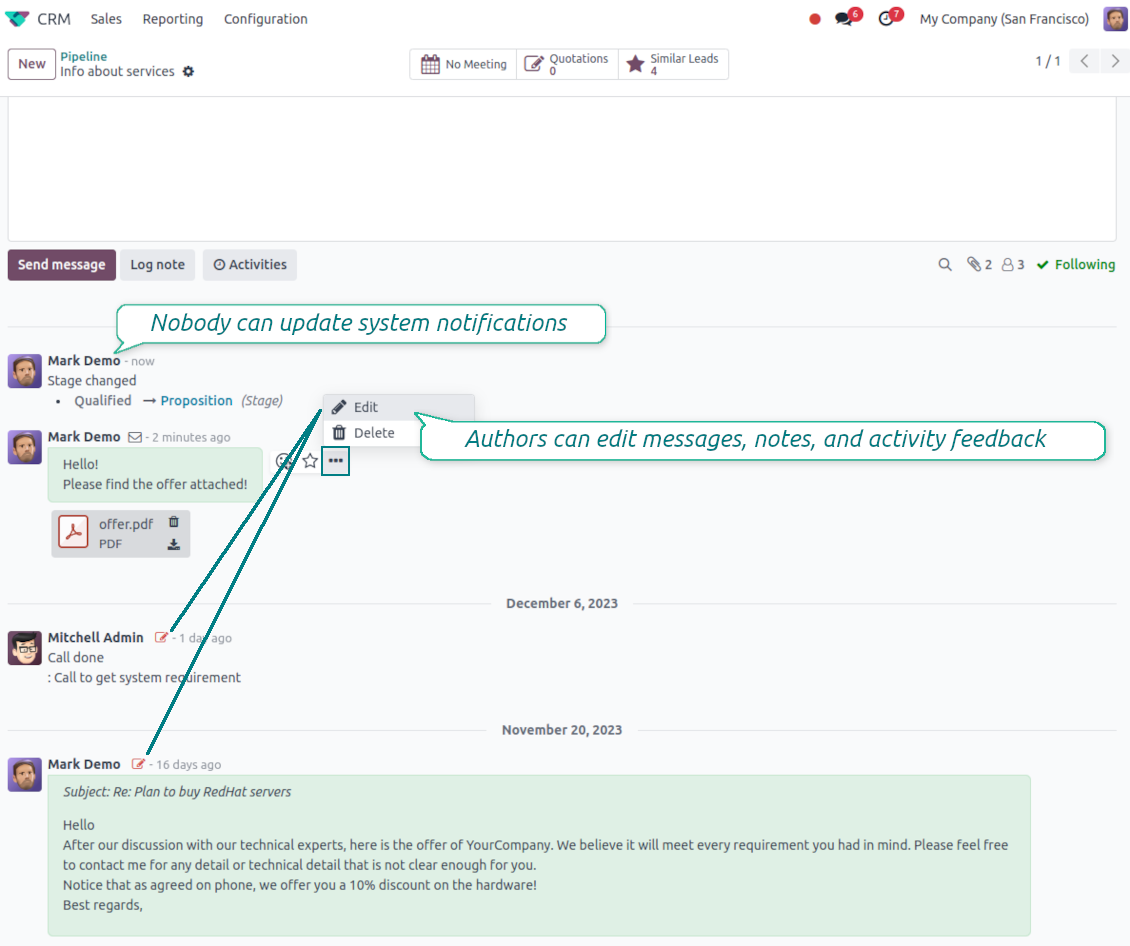
Message and Note Editing
Fix mistakes after sending while keeping a transparent history
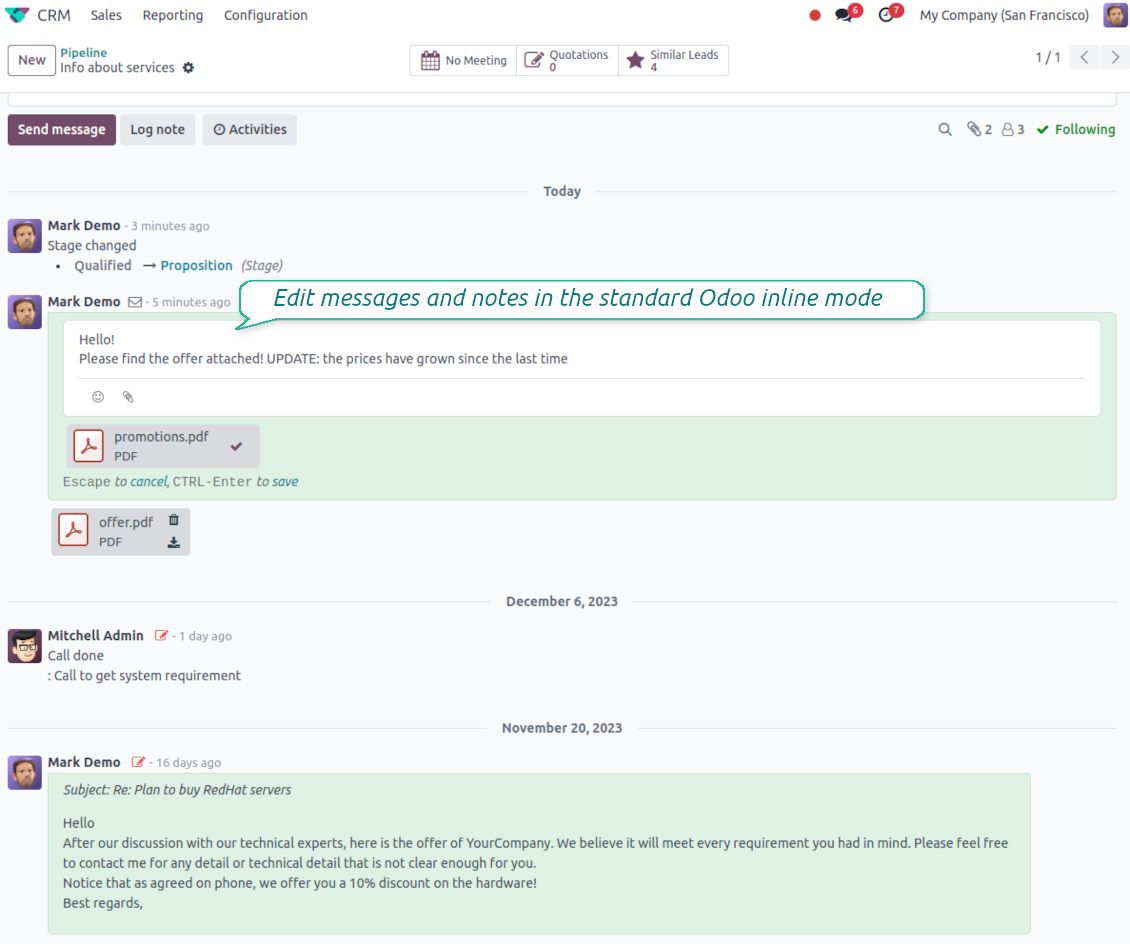
Fix mistakes after sending
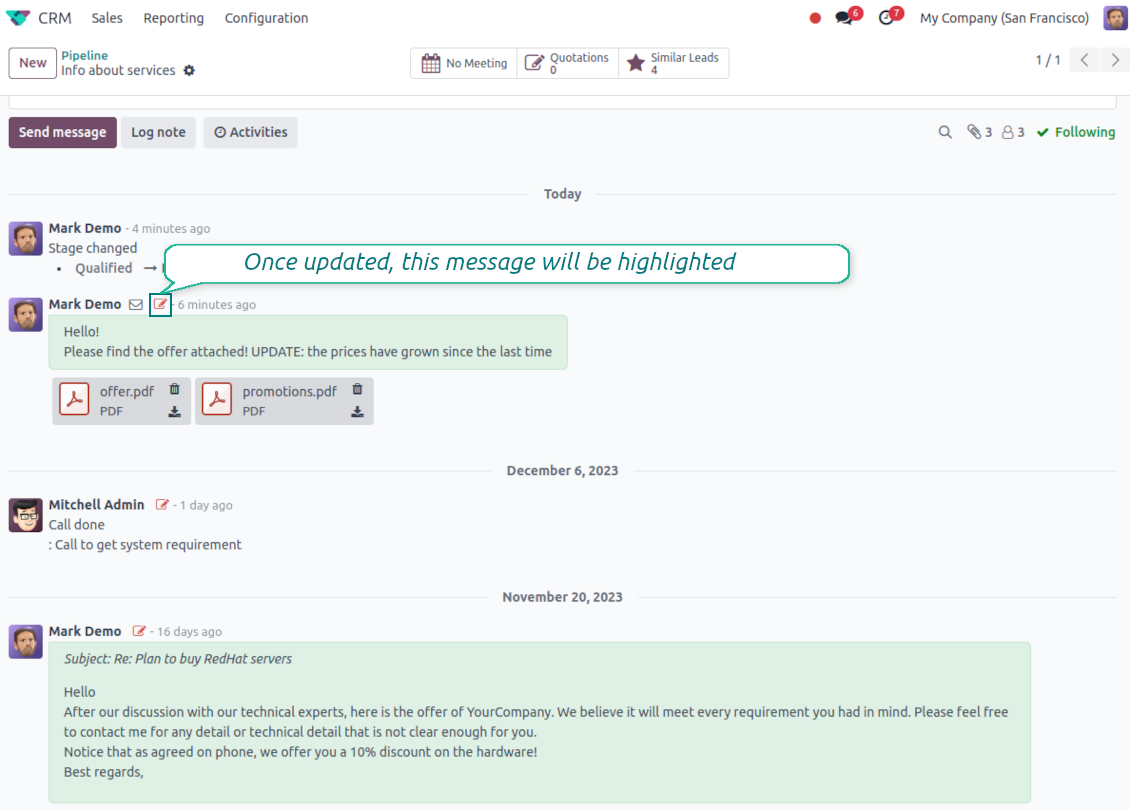
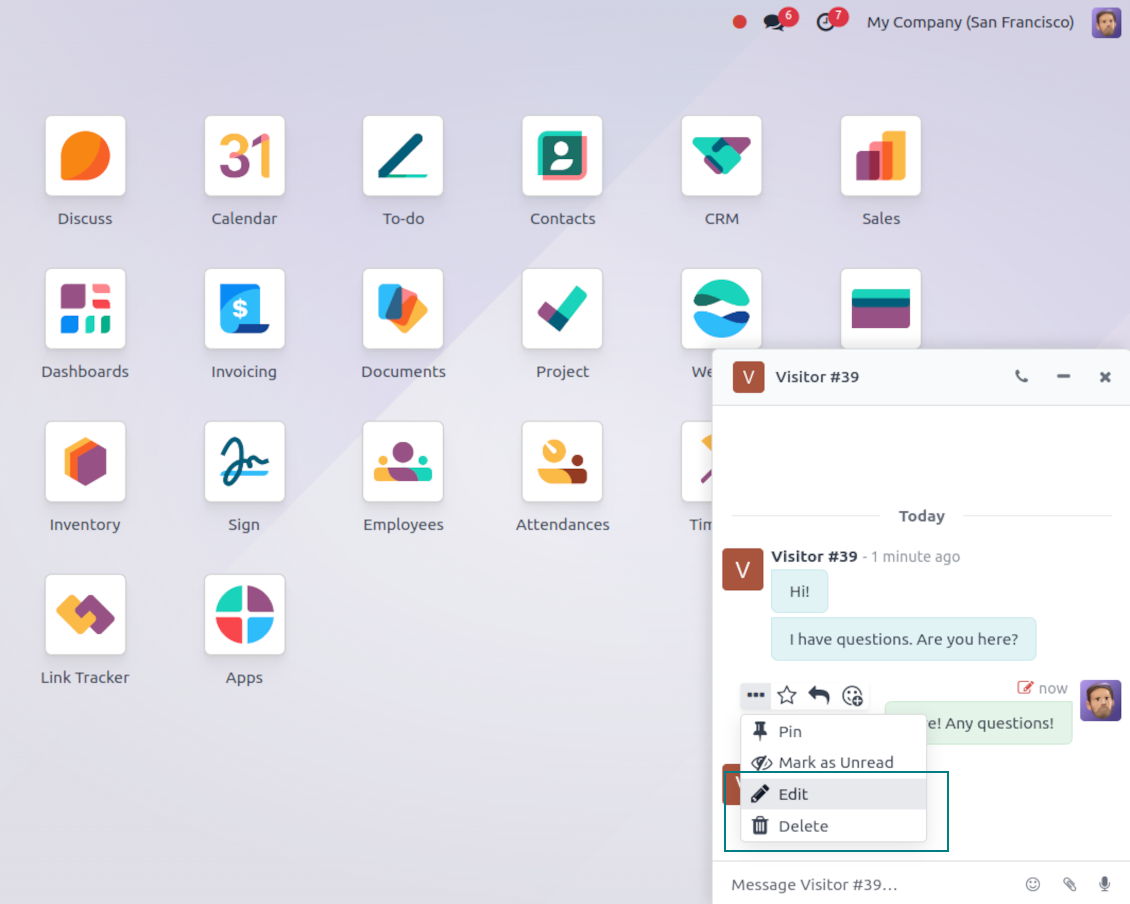
- Edit your own messages. Correct comments, notes and activity feedback after they were posted.
- Give admins broader control. Authorized users can manage messages posted by others when policy requires it.
- Edit body and attachments inline. Update the message content and files directly in the chatter when a correction is needed.
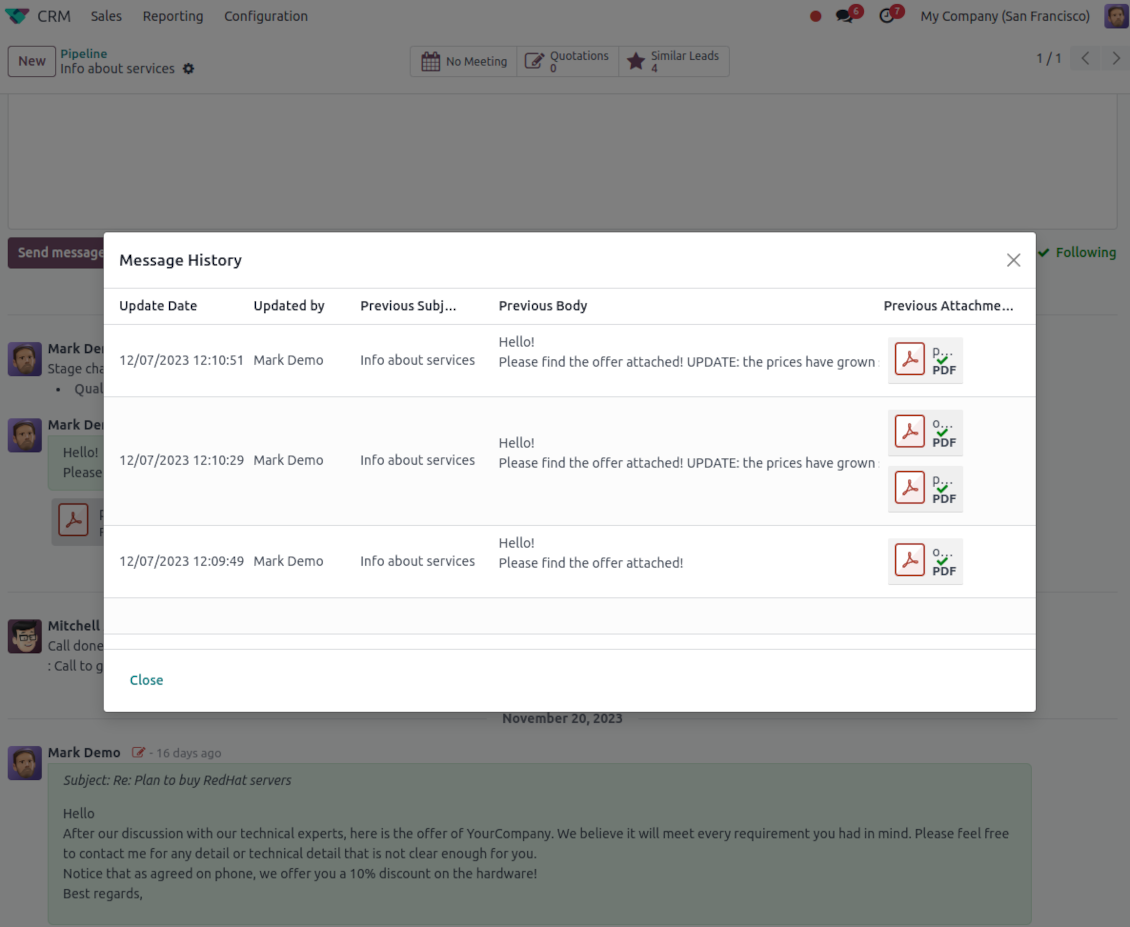
History for every change
- Track what changed. Subject, body and attachment updates are stored with user and timestamp.
- Spot edited messages quickly. Modified entries show a history icon that opens the change log in one click.
Listo para evaluar?
Empiece con una solicitud de demo gratuita o compre en el Odoo Apps Store.
Base de demostración personalizada gratuita. No se requiere teléfono ni tarjeta. Actualizaciones gratuitas de por vida y soporte experto dentro de la versión mayor de Odoo.
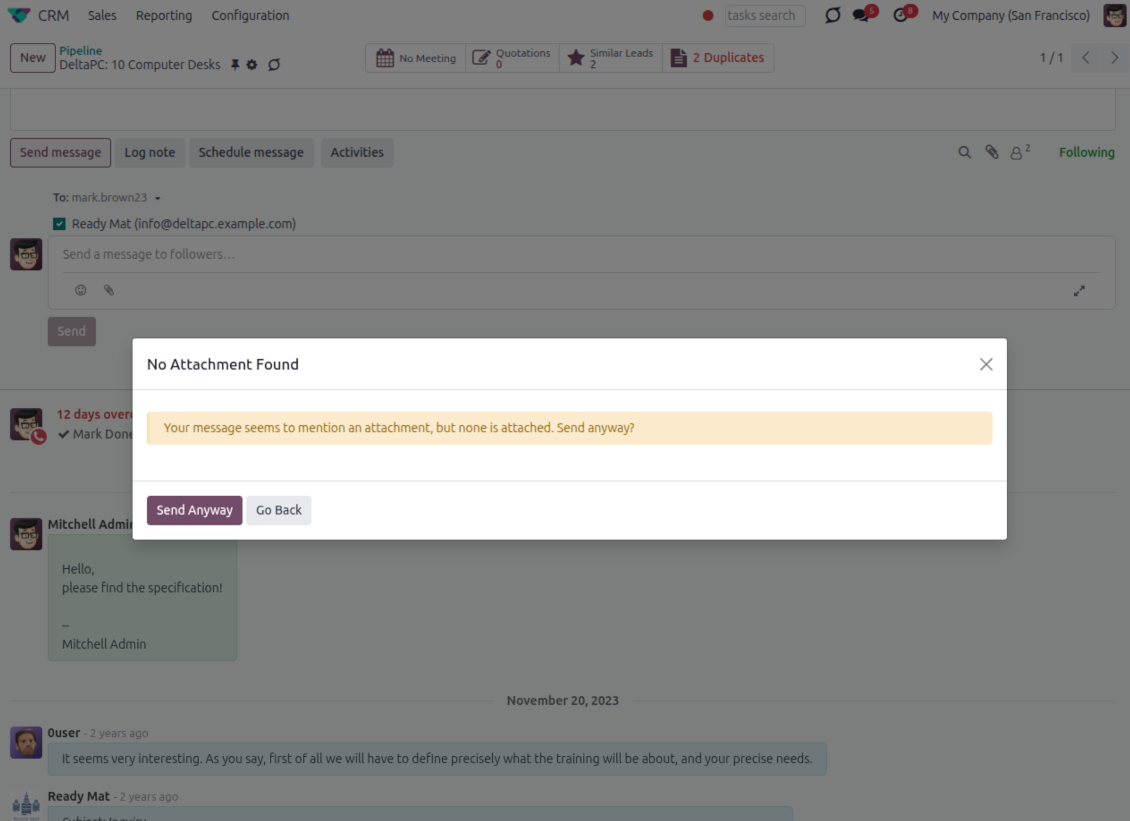
Catch missing attachments
Confirm forgotten attachments before they leave the composer
Attachment mention check
- Spot missing files before send. Odoo checks the message text when you mention an attachment.
- Works everywhere you write. The reminder appears in the full composer, quick reply and chat flows.
- Turn it off when not needed. Enable or disable the check from Messaging Suite settings.
Send-time confirmation
- Stop accidental sends. A dialog appears when the body mentions an attachment but none is attached.
- Let the user decide. Send Anyway and Go Back keep the flow moving without losing the draft.
- Adapt the wording. Adjust what counts as an attachment mention in settings when your team uses different phrases.
Message Citing
Quote earlier Odoo messages while you reply
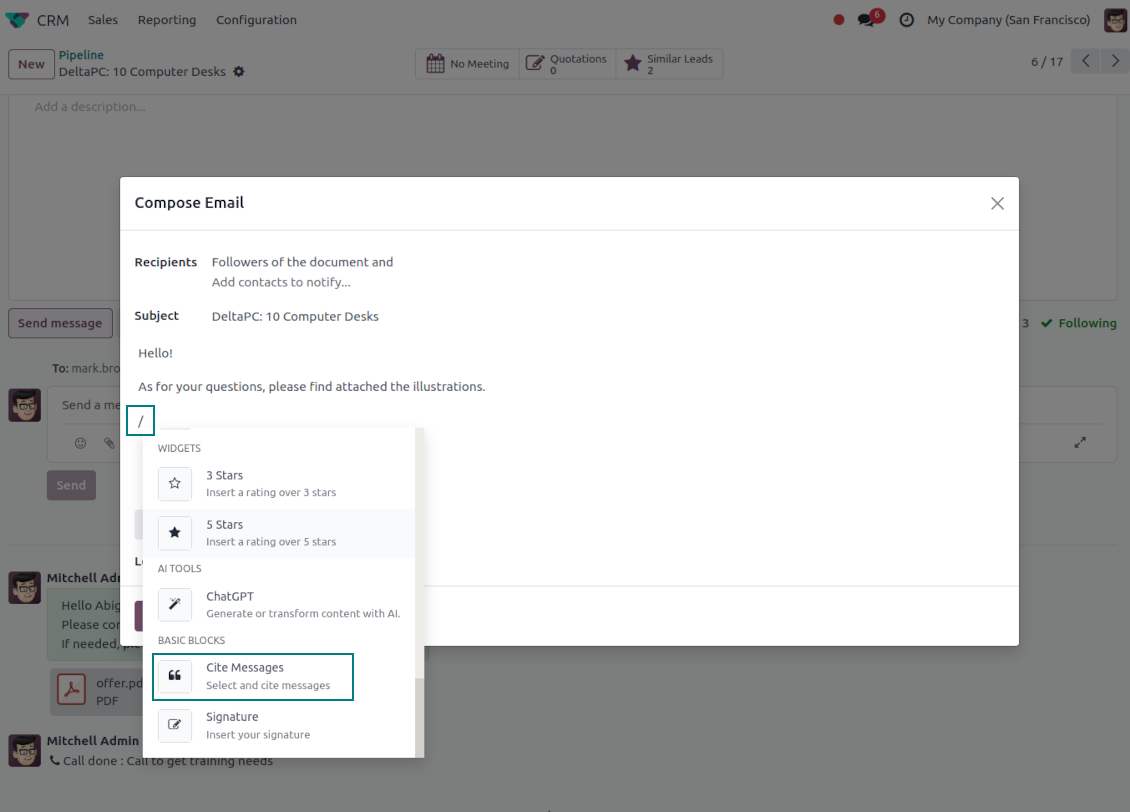
Cite while you compose
- Open Cite Message from the composer. Search earlier messages without leaving the email you are writing.
- Find the right message fast. Filter by author, content, date range, or limit results to the current thread.
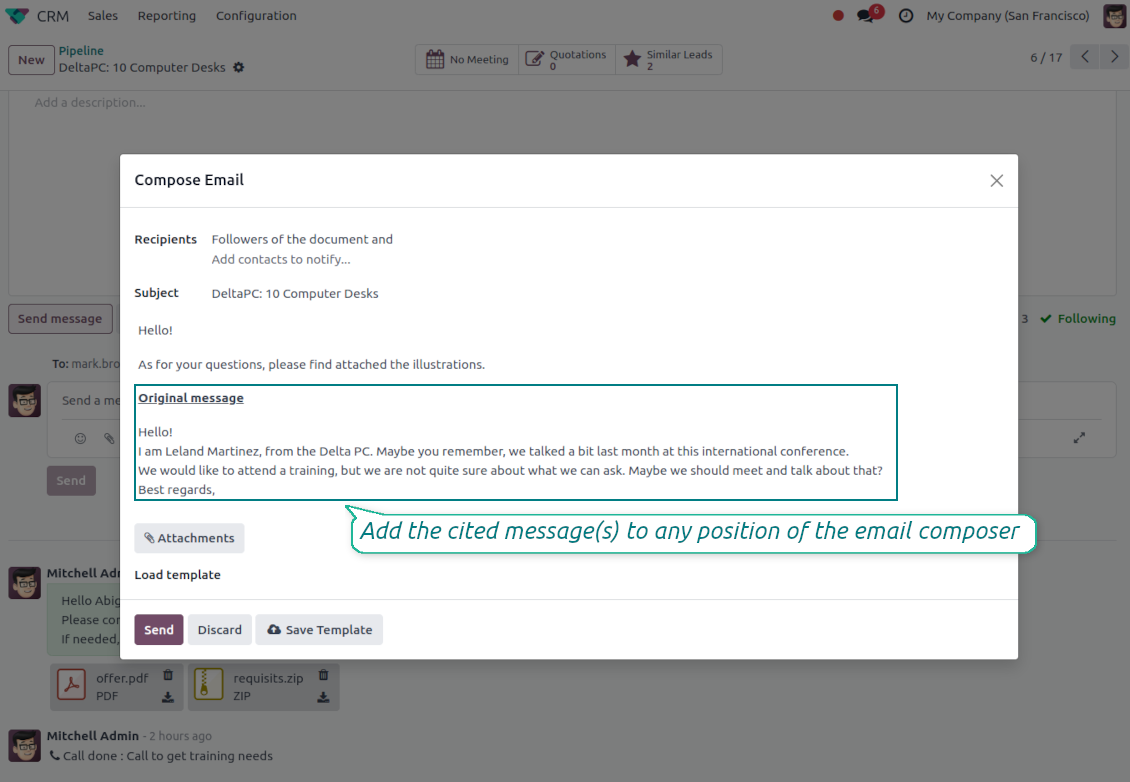
- Insert with one click. Add the selected message at the cursor position in the email body.
Readable quoted history
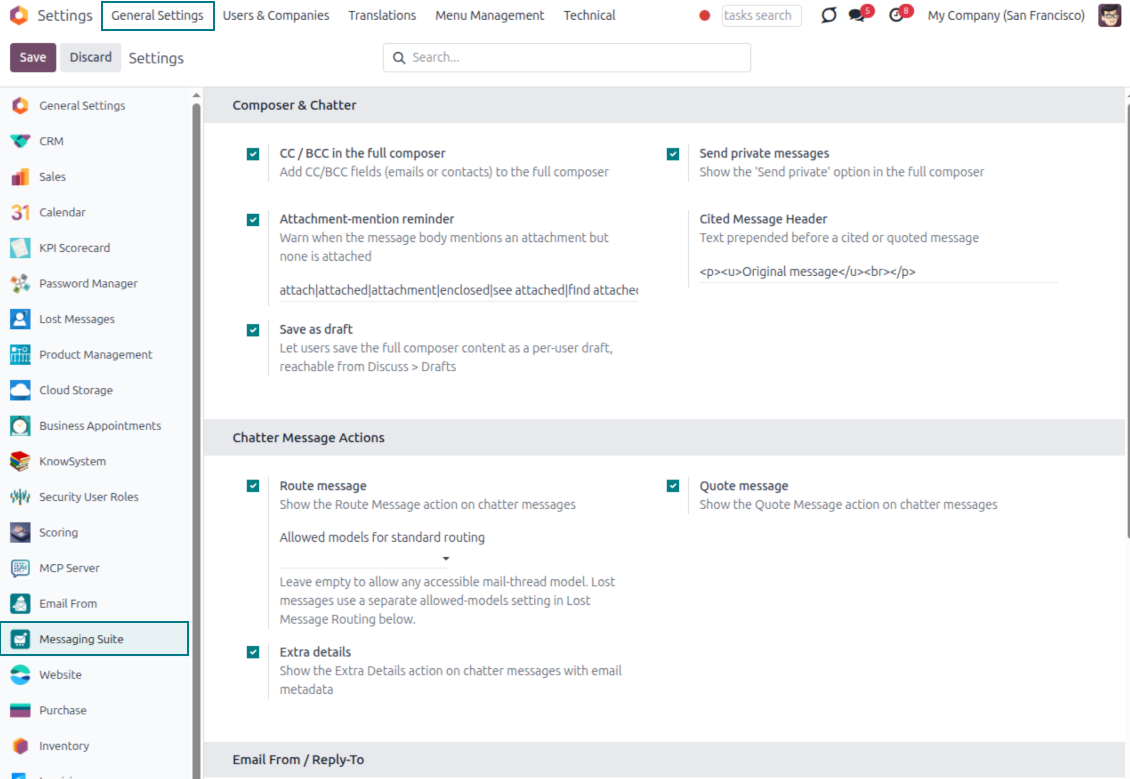
- Shape the quoted header. Define the text placed before every cited message.
- Reply with context. Help customers and colleagues see exactly which earlier message you refer to.
- Use across documents. Cite messages from any discussion while composing on another record.
Messaging Suite administration
One place to configure your messaging tools
One Messaging Suite settings page
- Turn features on or off. CC/BCC, drafts and attachment reminders are controlled from one place.
- Reach every related option. Open settings for routing, privacy, quoting, editing and sender addresses without leaving the suite.
- Set up once, use everywhere. Configure the whole messaging toolkit from a single administration screen.
Routing and access control
- Choose where messages may go. Define which documents can receive rerouted chatter messages.
- Keep lost emails separate. Unattached incoming mail keeps its own queue and routing rules.
- Decide who may reroute. Give routing rights only to the users who should move messages between documents.
Listo para evaluar?
Empiece con una solicitud de demo gratuita o compre en el Odoo Apps Store.
Base de demostración personalizada gratuita. No se requiere teléfono ni tarjeta. Actualizaciones gratuitas de por vida y soporte experto dentro de la versión mayor de Odoo.
Preguntas frecuentes sobre Odoo Messaging Suite Odoo v.17
Cuales son las políticas de actualización de sus herramientas?
Según las políticas actuales de Odoo Apps Store:
- Cada módulo comprado para la versión 12.0 o anterior da acceso a todas las versiones hasta 12.0.
- A partir de la version 13.0, cada version del módulo se compra por separado.
- Sea cual sea la version, la compra da derecho a todas las actualizaciones y correcciones dentro de una version mayor.
El equipo de faOtools no controla esas políticas. Para cualquier duda, contacte directamente con los representantes de Odoo Apps Store.
Cómo instalo su aplicación en Odoo.sh?
La via mas directa es el flujo integrado de la tienda Odoo:
1. Abra la página del módulo y pulse Deploy on odoo.sh
2. Será redirigido a GitHub. Inicie sesión y pulse Create a new repo o use uno existente. El repositorio debe ser privado. No esta permitido publicar las apps con licencia OPL-1. Cree un repo nuevo para el proyecto Odoo.sh si hace falta
3. Luego, en odoo.sh, pulse Deploy, confirme y pulse Continue. Se inicia la instalación.
Estos pasos instalan la app en la rama de producción. Para otras ramas o para actualizar:
1. Descargue el código fuente de la tienda Odoo
2. Haga commit del módulo en el repositorio GitHub. Ninguna carpeta/archivo de la app debe estar en .gitignore. Los repos creados por odoo.sh a veces ignoran rutas importantes (p. ej. /lib). Suba todos los directorios y archivos del módulo
3. Despliegue la rama destino del proyecto odoo.sh o espere la compilacion automática si asi esta configurado.
Cómo instalo su aplicación en mi propio servidor?
2. Reinicie el servidor Odoo;
3. Active el modo desarrollador (ajustes tecnicos);
4. Actualice la lista de aplicaciones (menú Aplicaciones);
5. Encuentre la app y pulse Activate/Install;
6. Siga las pautas de la página de la app si existen.
Su app tiene complementos extra. Puedo comprarlos después?
Si. Odoo anade automáticamente las dependencias al carrito: excluya las herramientas ya compradas para no pagar dos veces.
Desplegue su app en Odoo.sh y veo un aviso/error en las pruebas
Un aviso rojo/naranja no afecta a las funciones de la app. A veces nuestros módulos no pasan las pruebas automáticas estándar porque estas asumen un comportamiento que choca con los objetivos de la app. Por ejemplo, cambiamos el cálculo del precio y las pruebas de Odoo comparan el precio final con el algoritmo estándar.
Compruebe primero las funciones de la base desplegada. Funciona todo correctamente?
Si aun cree que el aviso afecta a funciones reales, contactenos y envíe los registros completos de instalación y la lista completa de módulos desplegados (nucleo y de terceros).
Puedo comprar su aplicación directamente a su empresa?
No, solo distribuimos las herramientas a través de la tienda oficial de aplicaciones Odoo.
Quiero un descuento
Lamentablemente, no tenemos medios tecnicos para ofrecer precios individuales.
Puedo instalar la app en mi base Odoo Online (SaaS)?
No, las apps de terceros no se pueden usar en Odoo Online. Odoo SaaS bloquea esa posibilidad.
Su herramienta depende de otras apps. Debo comprarlas?
Si, la herramienta necesita todos los módulos marcados como dependencias. El precio de la página de la app ya las incluye.
Cual es el precio del módulo en dolares estadounidenses? Por que cambio?
El precio de nuestros módulos esta en euros. La tienda Odoo convierte a otras monedas según su tipo de cambio interno. Por eso el precio en dolares estadounidenses puede cambiar cuando se actualiza el tipo.
La redacción de la aplicación y el sitio web en idiomas distintos del inglés cuenta con asistencia de IA y se ajusta a las traducciones oficiales de Odoo. Si detecta un error, enviar un ticket de traducción y lo corregiremos.
Bases de datos de demostración de Odoo (vistas previas)
Para esta aplicación, podemos proporcionar una base de datos de demostración personalizada gratuita.
No necesita un número de teléfono ni una tarjeta de crédito para contactarnos. Sólo debes pasar un breve registro por correo electrónico, que no lleva más de 30 segundos.
A petición suya, preparamos una base de datos de vista previa individual en la que puede realizar cualquier prueba y comprobar sus hipótesis durante unas dos semanas.
Notificación de errores
Si encuentra errores o comportamiento inconsistente, no dude en contactarnos. Garantizamos proporcionar correcciones dentro de los 60 días posteriores a la compra y estamos muy interesados en mejorar nuestras herramientas incluso después de este período.
No necesita un número de teléfono ni una tarjeta de crédito para contactarnos. Sólo debes pasar un breve registro por correo electrónico, que no lleva más de 30 segundos.
Incluya tantos detalles como sea posible en su solicitud: capturas de pantalla, registros del servidor Odoo, una descripción completa de como reproducir el problema, etc. Por lo general, se necesitan varios días laborables para preparar un plan de trabajo para un problema (si se confirma un error) o proporcionarle indicaciones sobre lo que se debe hacer (en caso contrario).
Solicitudes de funciones públicas e ideas de módulos (desarrollo gratuito)
Estamos muy motivados para mejorar nuestras herramientas y agradeceríamos cualquier comentario. Si sus requisitos son de uso público y podrían implementarse de manera eficiente, el equipo los incluirá en nuestra lista de tareas pendientes.
Esta lista de tareas pendientes se procesa periódicamente y no implica cargos adicionales. Aunque no podemos prometer plazos ni diseño final, podría ser una buena manera de conseguir las funciones deseadas sin inversiones ni riesgos.
No necesita un número de teléfono ni una tarjeta de crédito para contactarnos. Sólo debes pasar un breve registro por correo electrónico, que no lleva más de 30 segundos.

The tool to flexibly structure Odoo attachments in folders and synchronize directories with cloud clients: Google Drive, OneDrive/SharePoint, Nextcloud/ownCloud, Dropbox, Amazon S3, Box, and NAS. DMS. File Manager. Document management system
398€

The tool to build a deep and structured knowledge base for internal and external use. Knowledge System. KMS. Wiki-like revisions.
398€
The tool to automatically synchronize Odoo attachments with OneDrive files in both ways
487€
The tool to set up KPI targets and control their fulfillment by periods. KPI dashboards. Dashboard designer. KPI charts

The tool for time-based service management from booking appointments to sales and reviews
398€
The tool to automatically synchronize Odoo attachments with Google Drive files in both ways
487€
