Вкратце
Odoo Messaging Suite - приложение Odoo 17 (Обсуждения). The tool to improve the Odoo messaging experience.
Odoo Messaging Suite brings lost-message recovery, private discussions, message citing, post-send editing, managed From/Reply-To addresses and a richer email composer together in one application. Compose with CC/BCC and per-user drafts, route emails to the right document, quote from the message toolbar, and catch forgotten attachments before they leave. Every message keeps its email headers behind a details icon, and administrators configure the whole toolkit from one Messaging Suite settings page.
Идеально для
Support and sales teams living in their inbox
Perfect for teams that answer customers by email all day and want CC/BCC, drafts and quoting available right inside the Odoo composer, without switching to an external mail client.
Companies needing confidentiality
Ideal when some conversations must stay private from portal users and other followers, while still being logged on the Odoo document for later reference.
Administrators who want oversight and control
Useful for admins who need routing rules, attachment reminders and one settings page to manage the whole messaging toolkit.
Готовы оценить?
Начните с бесплатного запроса демо базы или купите в Odoo Apps Store.
Бесплатная персонализированная демонстрационная база. Номер телефона и банковская карта не требуются. Бесплатные обновления и экспертная поддержка в течение всего срока основной версии Odoo.
Почему команды выбирают его
Главные преимущества до подробностей
One settings page
Turn on CC/BCC, drafts, routing, attachment checks and the rest of the toolkit from a single Messaging Suite configuration screen, without hunting through scattered settings menus.
Full email composer
Compose with CC/BCC recipients, per-user drafts and managed From/Reply-To addresses directly inside the Odoo composer.
Managed sender addresses
Stop typing sender emails by hand. Pick from an address book tied to the right outgoing mail server, with automatic rules by document type.
Message actions
Route and quote any message from quick actions, and inspect full email headers in a single click.
Lost message recovery
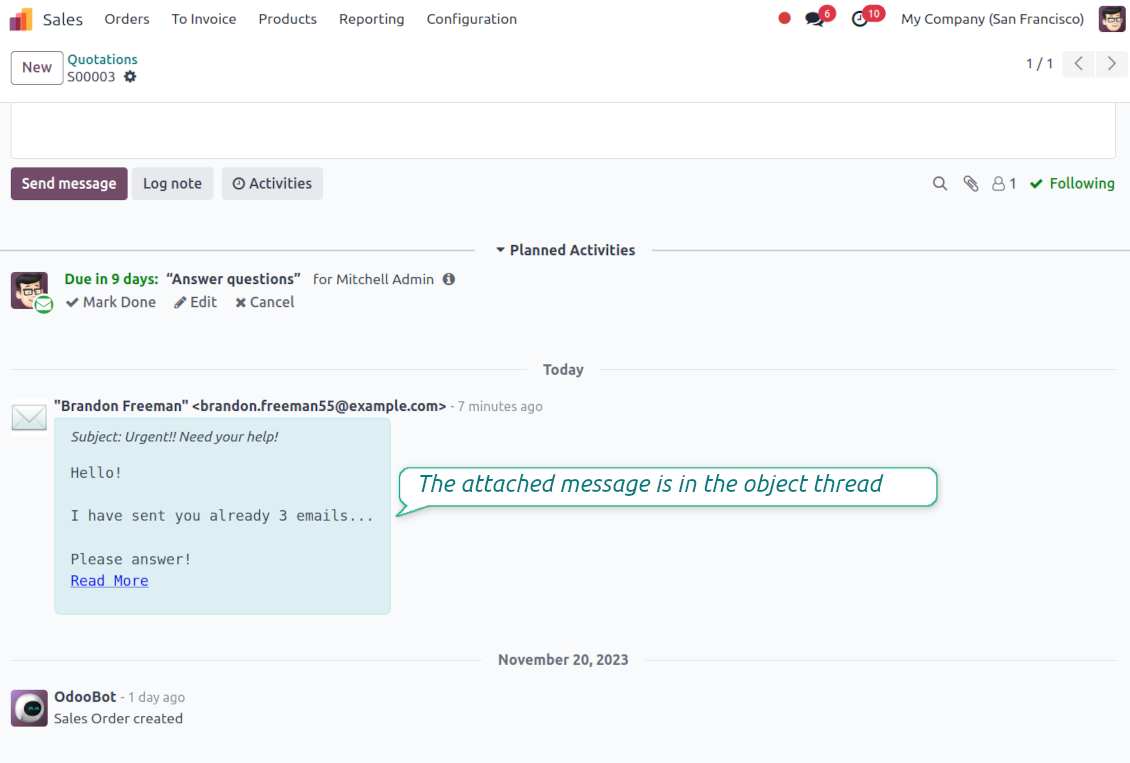
Never lose an incoming email again. Review unattached messages in a dedicated queue and route them to the correct Odoo document before customers wait.
Private threads
Keep sensitive conversations hidden from portal users and other followers, while staying logged on the Odoo document for later reference.
Message citing
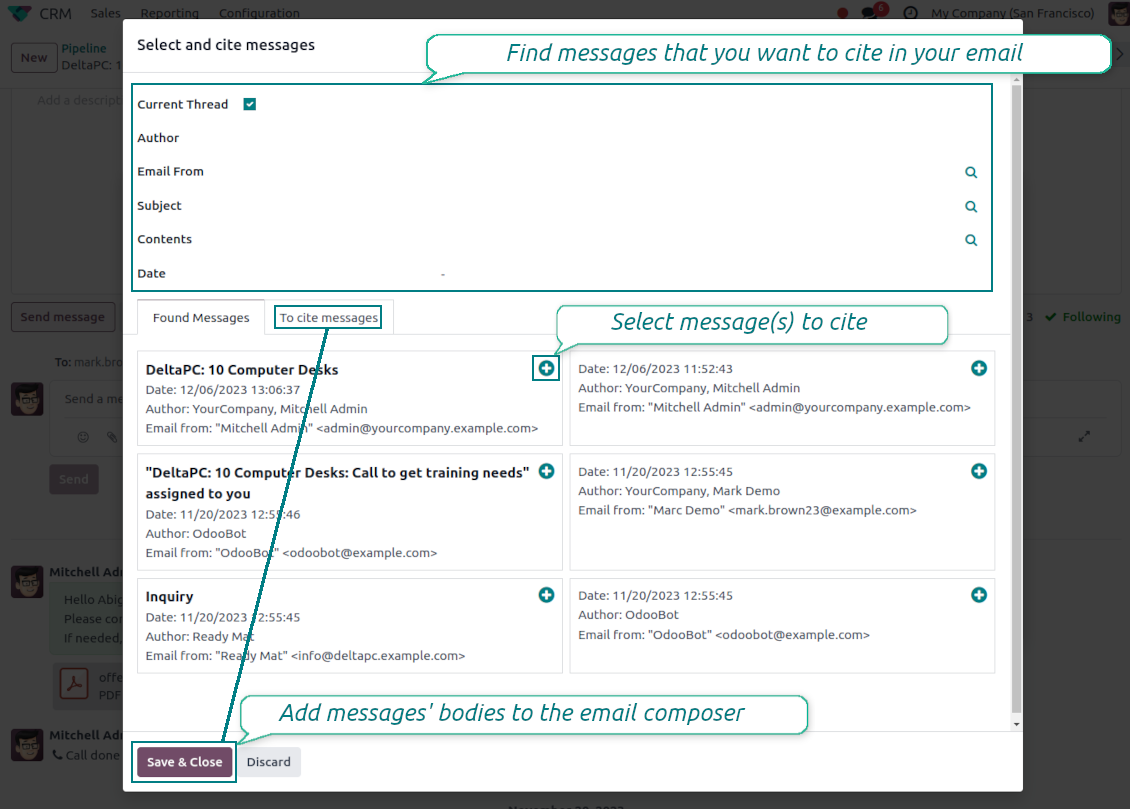
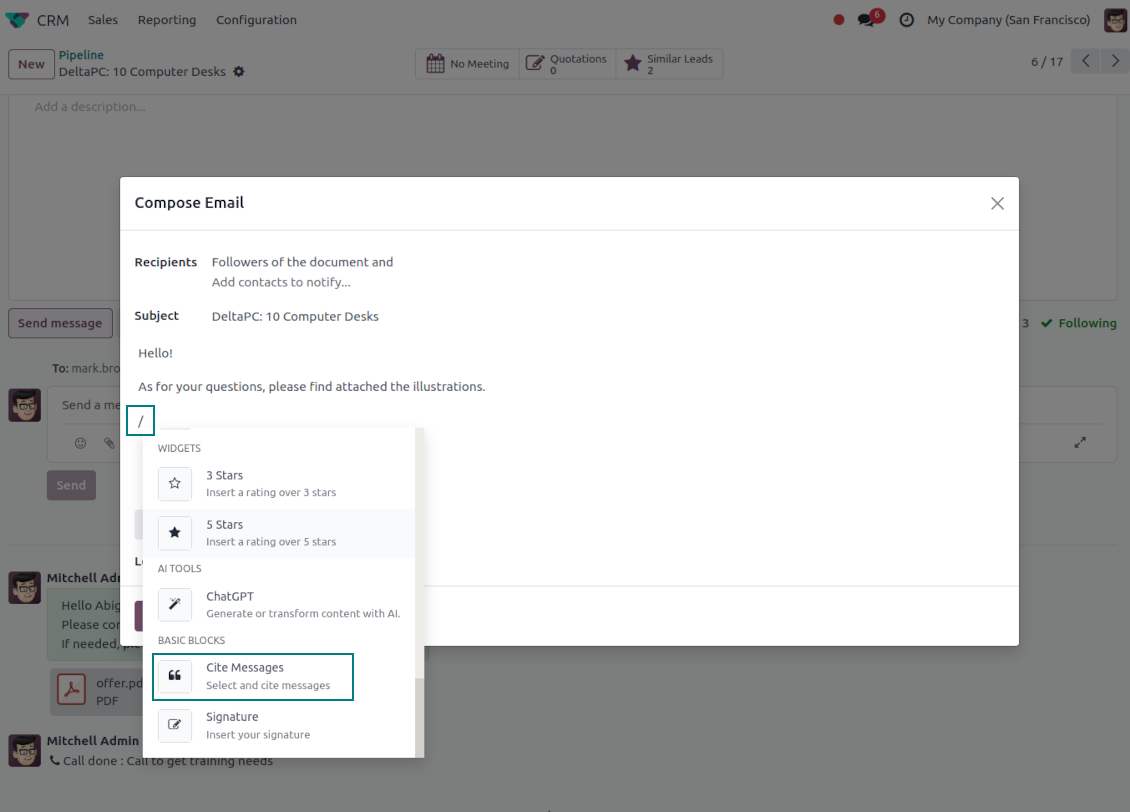
Search and cite any earlier Odoo message straight from the composer, so every reply carries the right context.
Message editing & history
Edit or delete your own messages, notes and activity feedback, with a full history of every change kept for admins.
Safer sending
Catch forgotten attachments before you hit send so customers receive complete messages.
Готовы оценить?
Начните с бесплатного запроса демо базы или купите в Odoo Apps Store.
Бесплатная персонализированная демонстрационная база. Номер телефона и банковская карта не требуются. Бесплатные обновления и экспертная поддержка в течение всего срока основной версии Odoo.
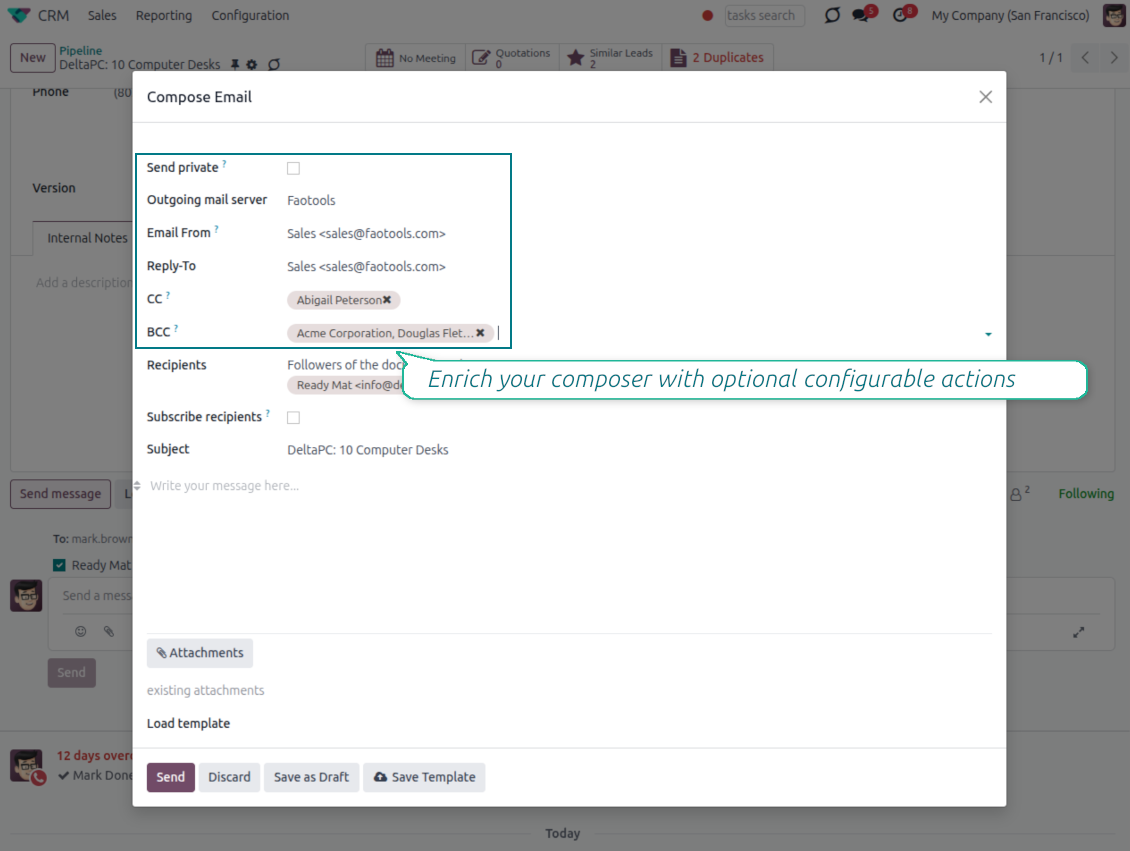
Compose like a real email client
CC, BCC and per-user drafts in the full composer
Copy and blind copy
- Add CC and BCC in the full composer. Type email addresses or pick existing contacts.
- Keep recipients in the message history. Sent CC/BCC values stay visible on the message afterwards.
- Use only when you need them. Turn CC/BCC off in settings if your team does not use copy recipients.
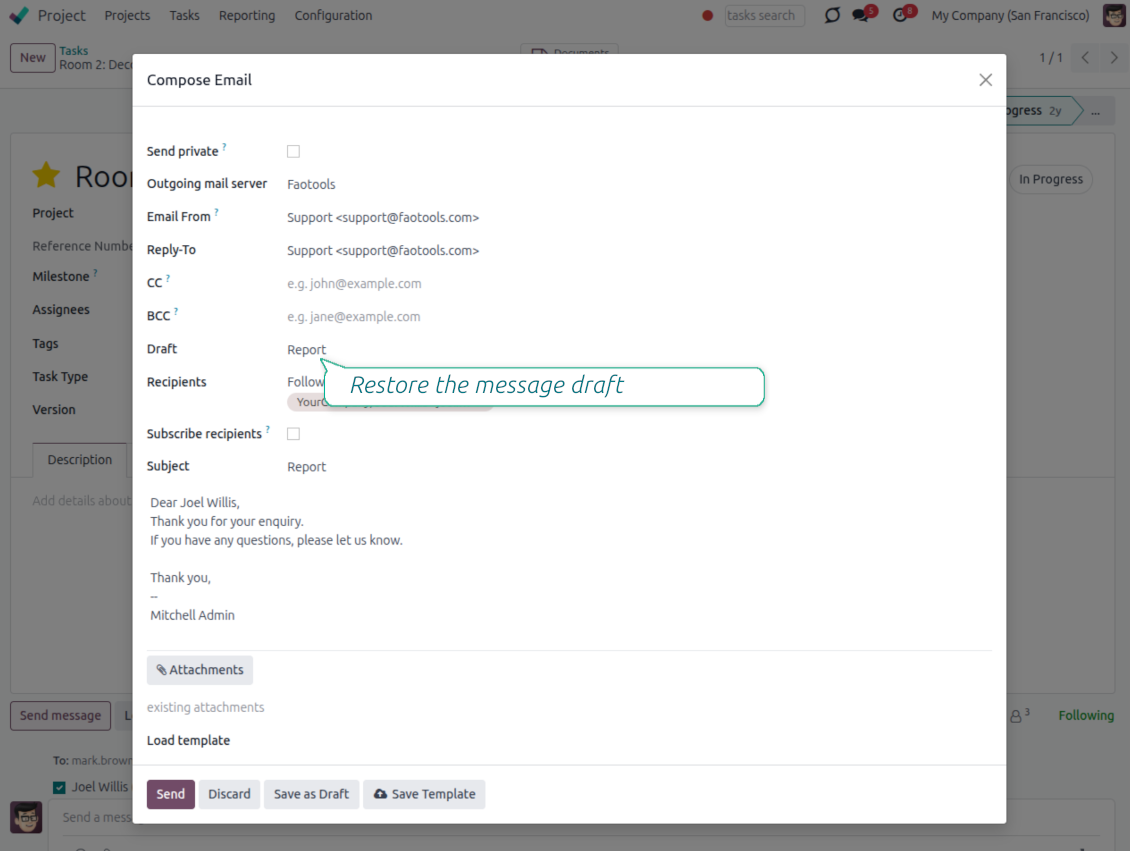
Save as draft
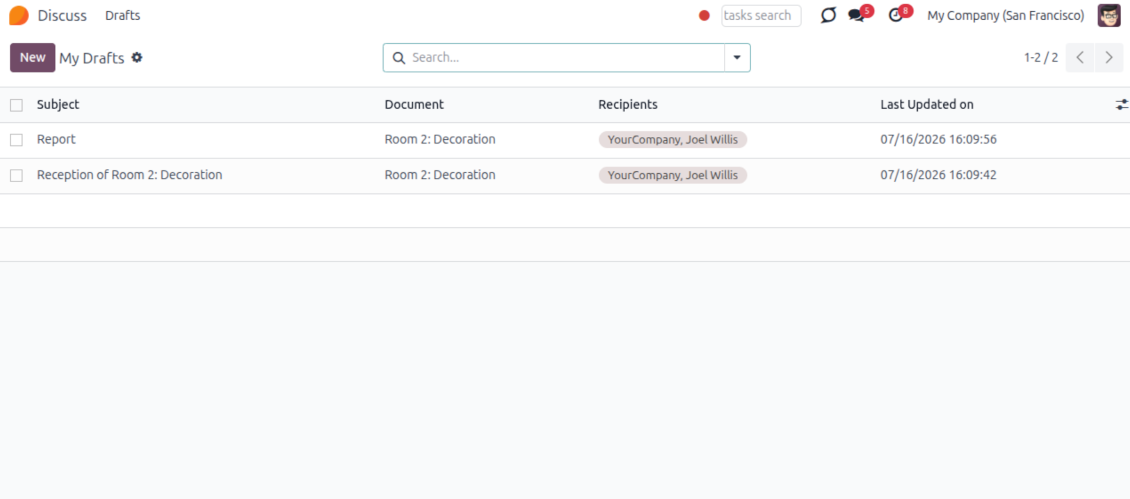
- Save the full message. Drafts keep subject, body, recipients and related fields for the current record.
- Resume where you stopped. Reopening the composer on the same document brings back your latest draft automatically.
- Pick up drafts from Discuss. Every internal user can open the drafts menu and finish unfinished messages.
Message actions and email metadata
Route, quote and inspect email details without leaving the chatter
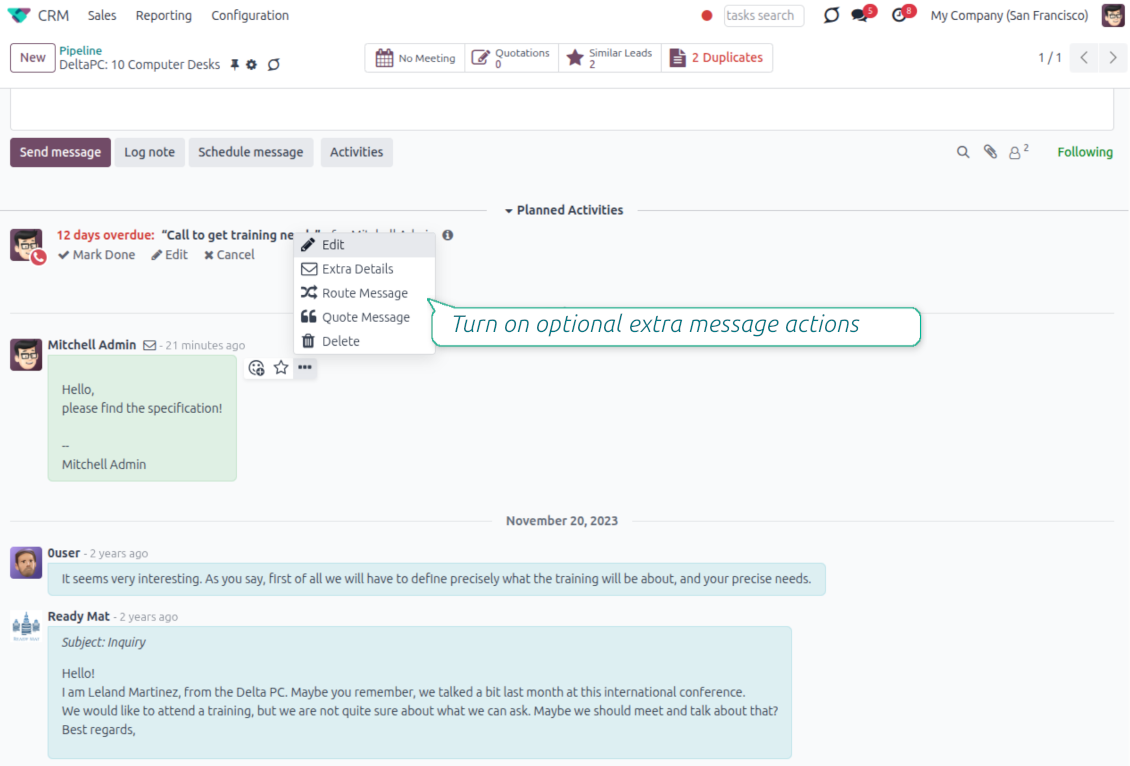
Actions on every message
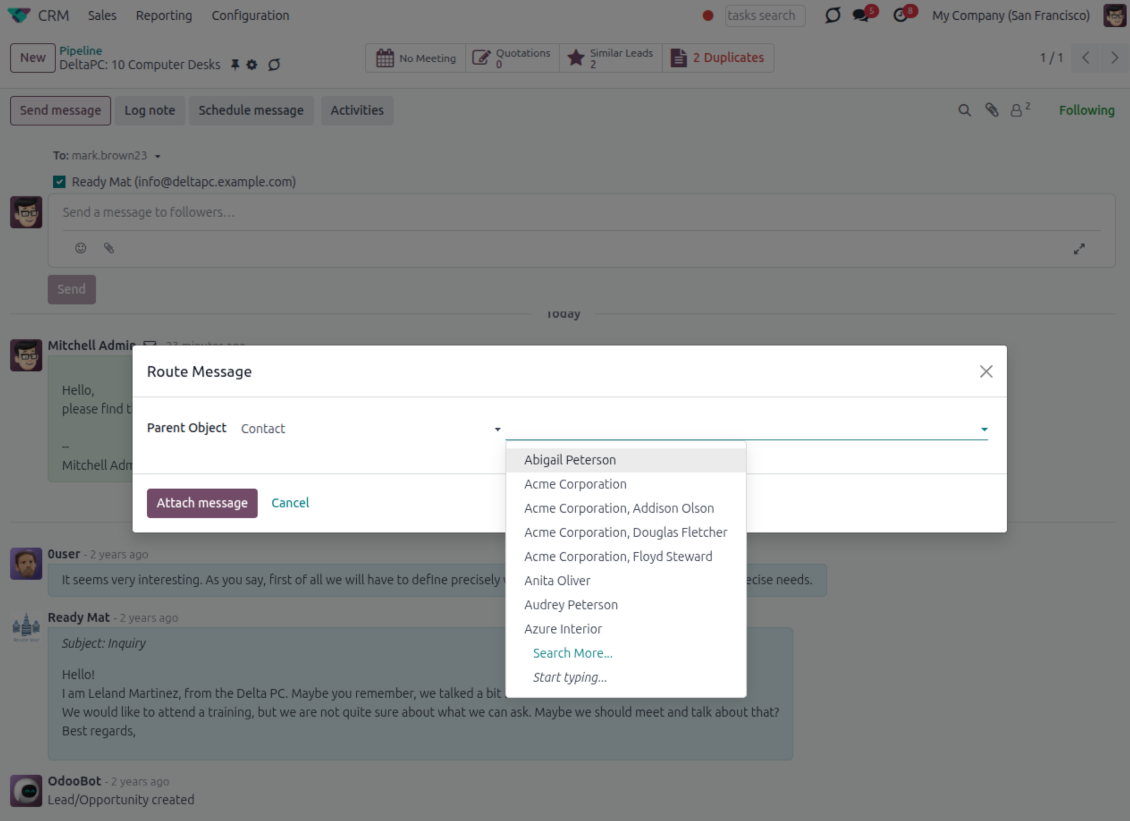
- Route from the thread. Move a message to another document when it landed on the wrong record.
- Quote in a new email. Start a reply with the original message included in the body.
- Keep the composer simple. Every action opens the standard Odoo composer already pre-filled, no separate tooling to learn.
Email details on every message
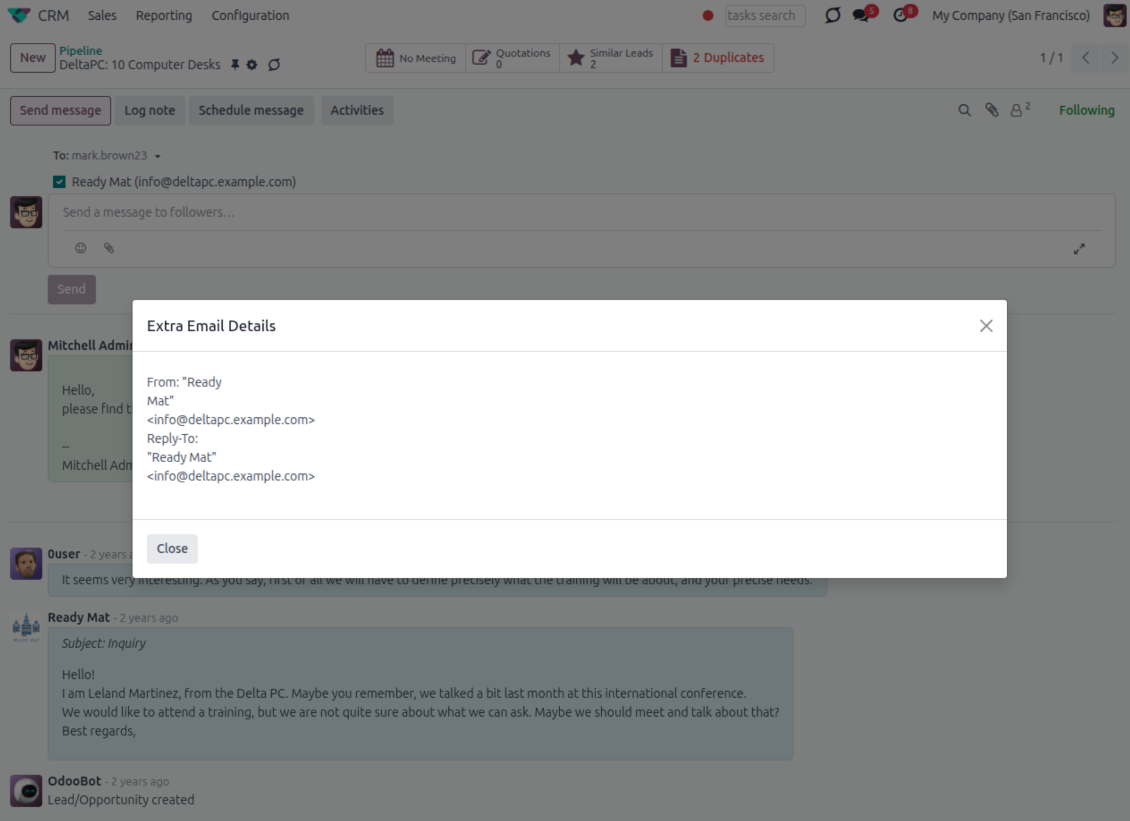
- See full headers. From, Reply-To, To and CC stay available on incoming and outgoing mail.
- Keep CC/BCC too. Copy recipients added in the composer are saved with the message.
- Open details in one click. A small icon on the message shows the complete email information.
Odoo Email From
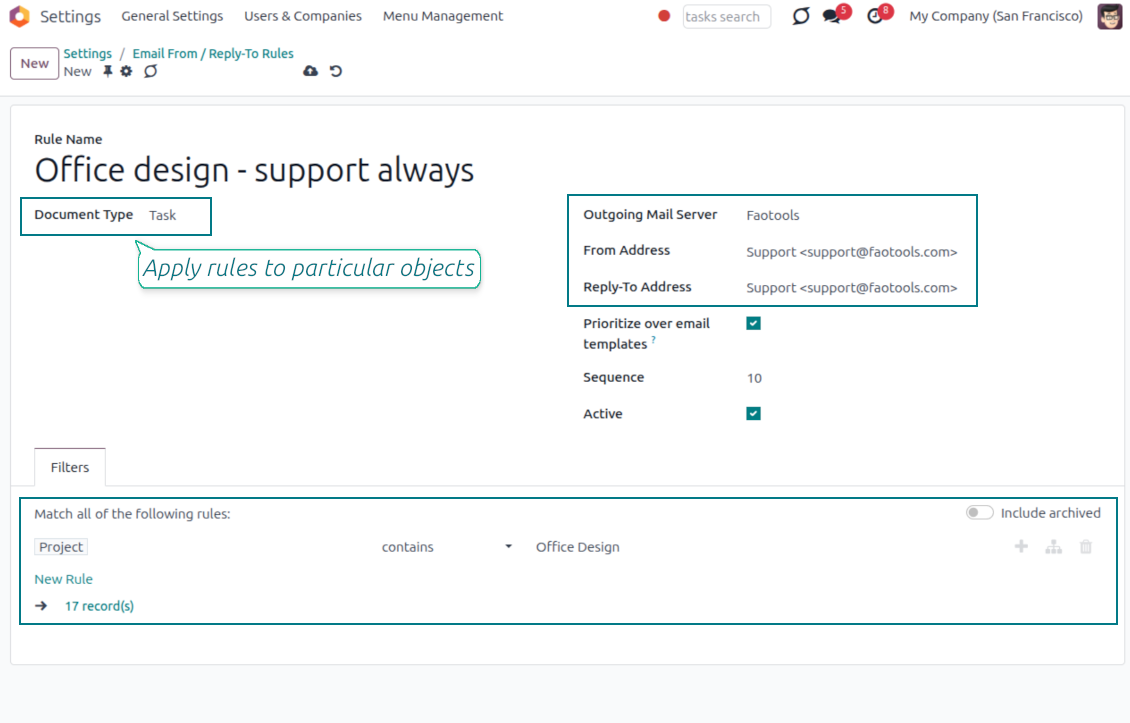
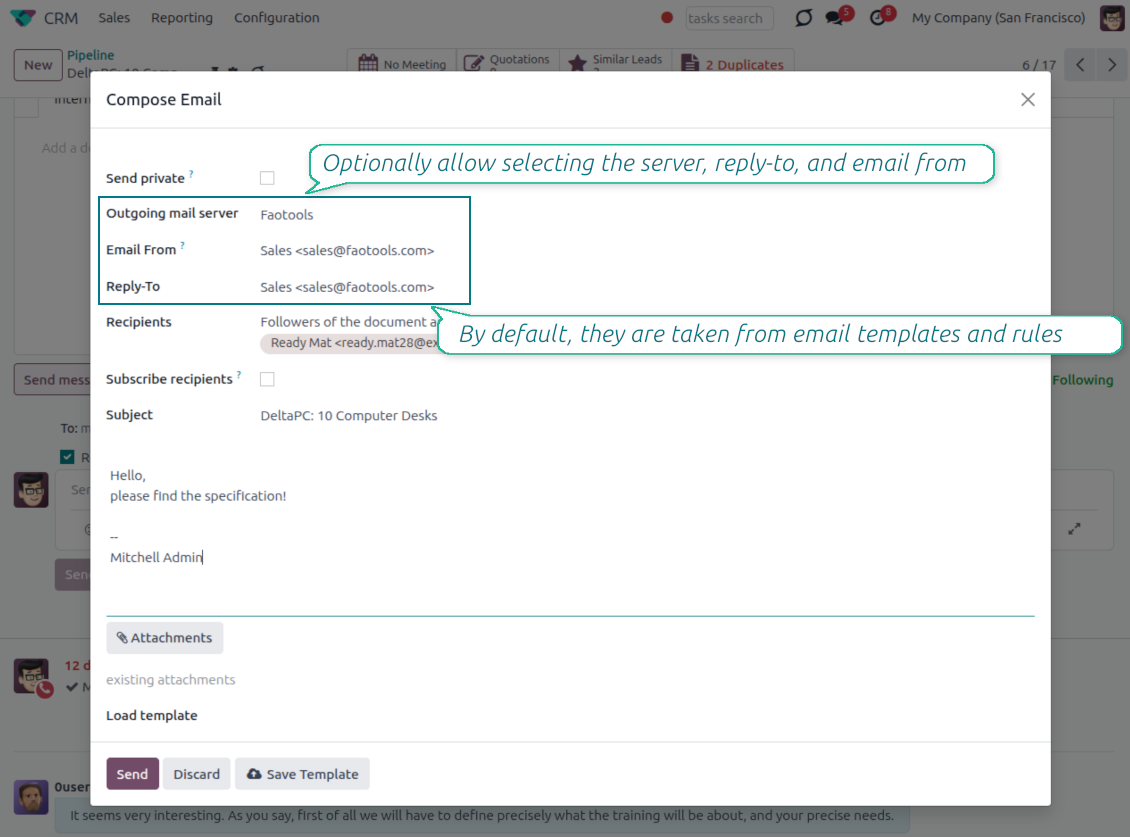
Choose the right From and Reply-To address for every email
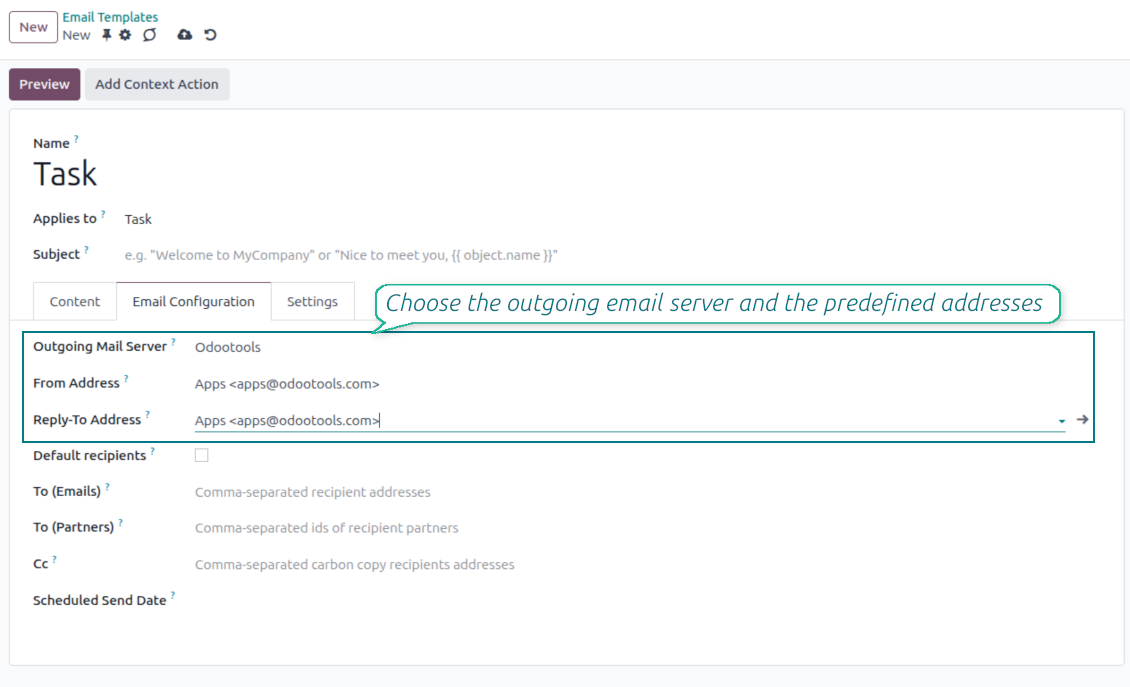
Managed sender addresses
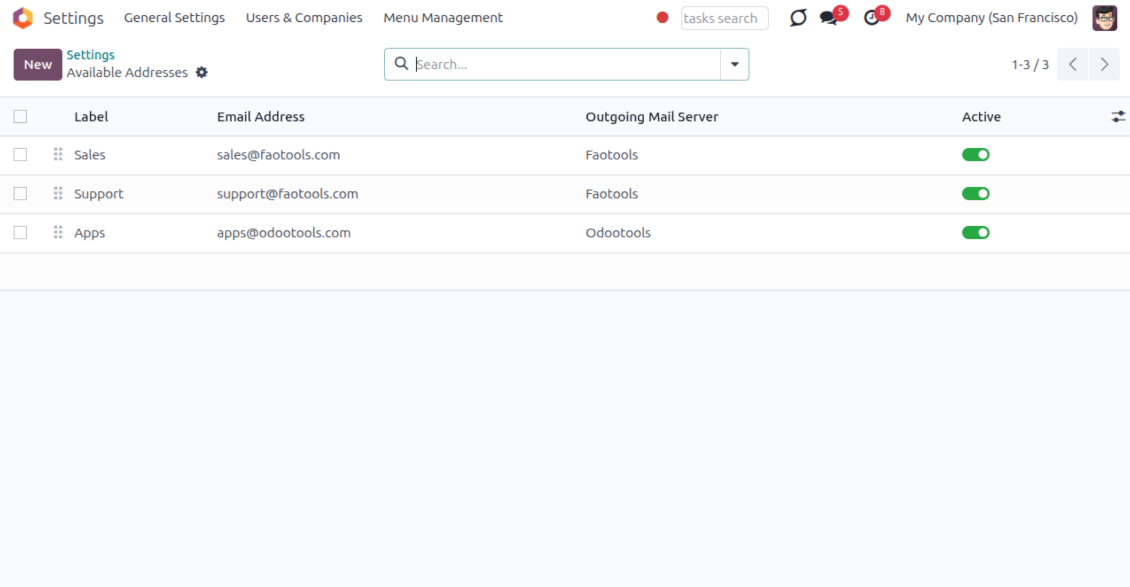
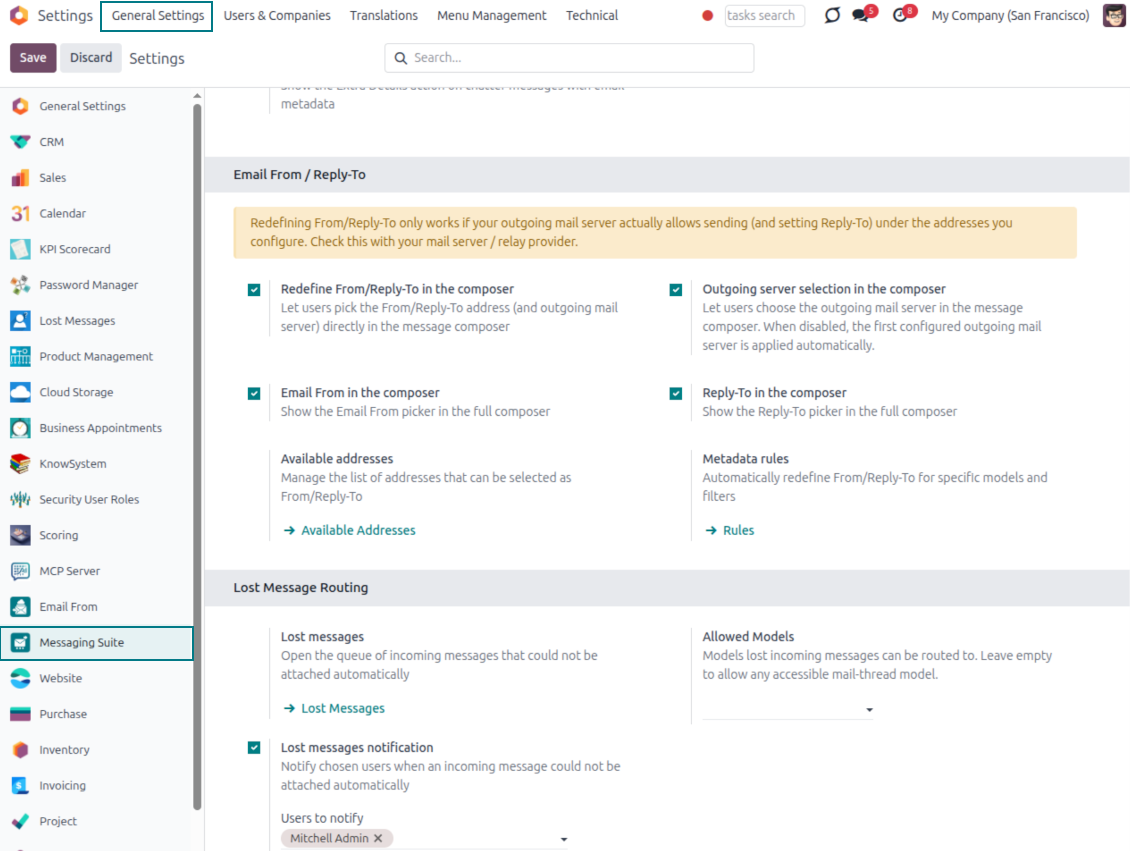
- Pick instead of typing. Users choose From and Reply-To from an address book linked to outgoing mail servers.
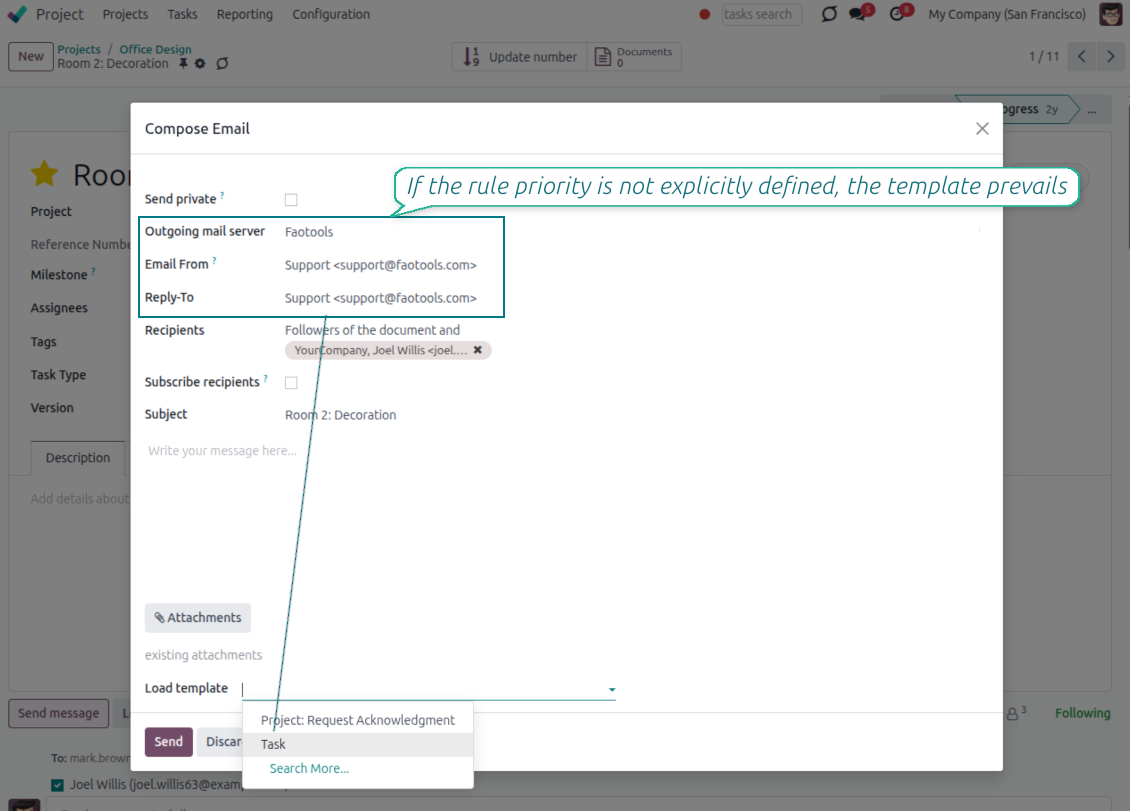
- Apply on templates too. Email templates can use the same managed sender addresses.
- Keep the screen simple. The outgoing mail server field is hidden when only one server is configured.
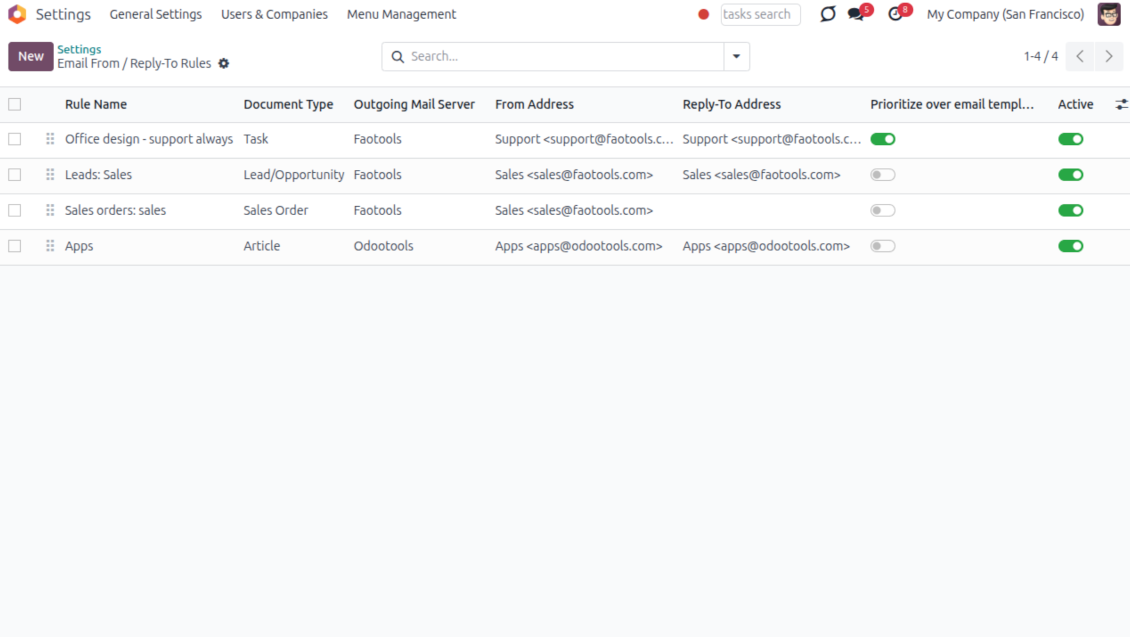
Automatic sender rules
- Set the sender by document type. Rules choose the right From and Reply-To for sales orders, tasks, invoices and other records.
- Prevent invalid combinations. Odoo blocks sender addresses that do not match the selected outgoing mail server.
- Start with working mail setup. Make sure each outgoing server can actually send from the addresses you add.
Готовы оценить?
Начните с бесплатного запроса демо базы или купите в Odoo Apps Store.
Бесплатная персонализированная демонстрационная база. Номер телефона и банковская карта не требуются. Бесплатные обновления и экспертная поддержка в течение всего срока основной версии Odoo.
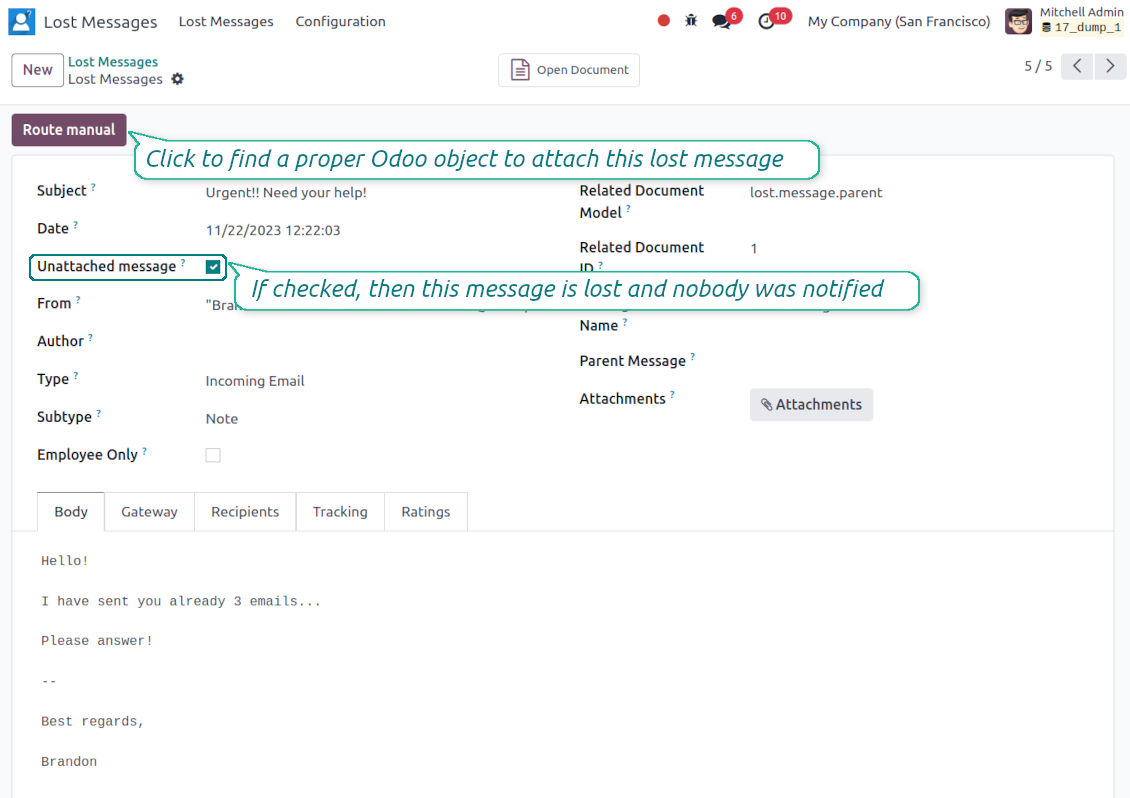
Lost Messages Routing
Recover incoming emails Odoo could not attach automatically
Lost message queue
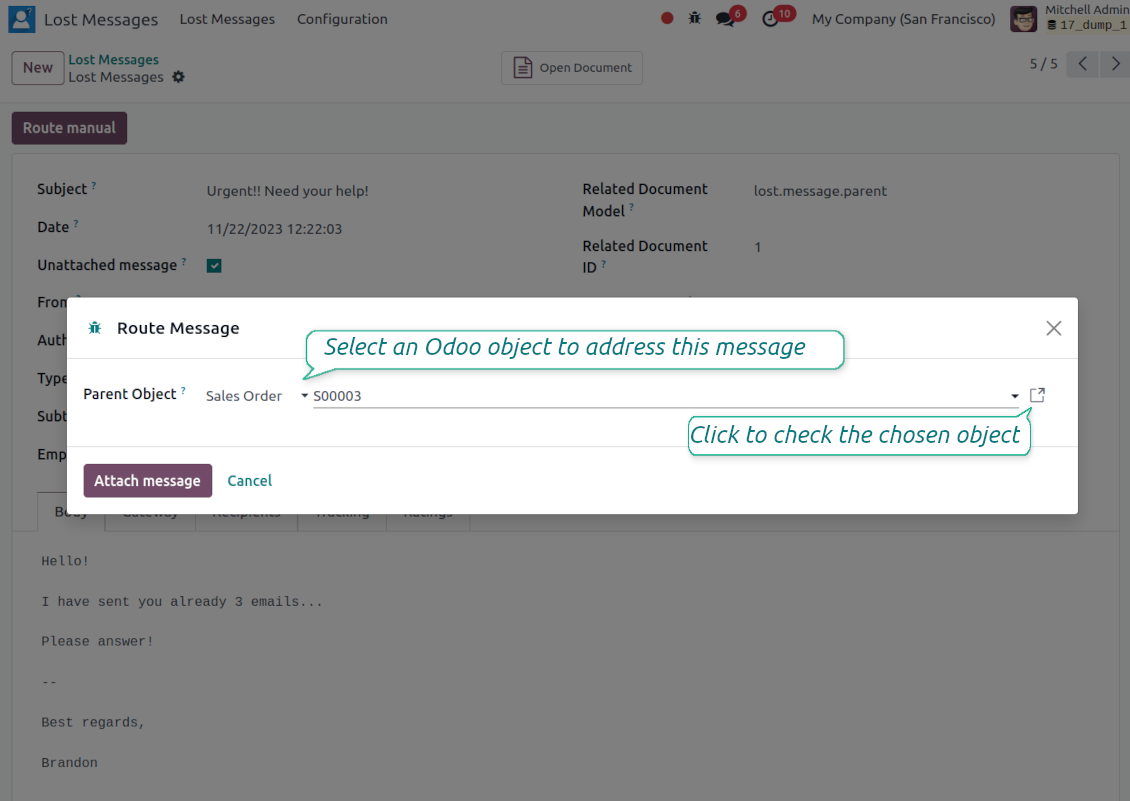
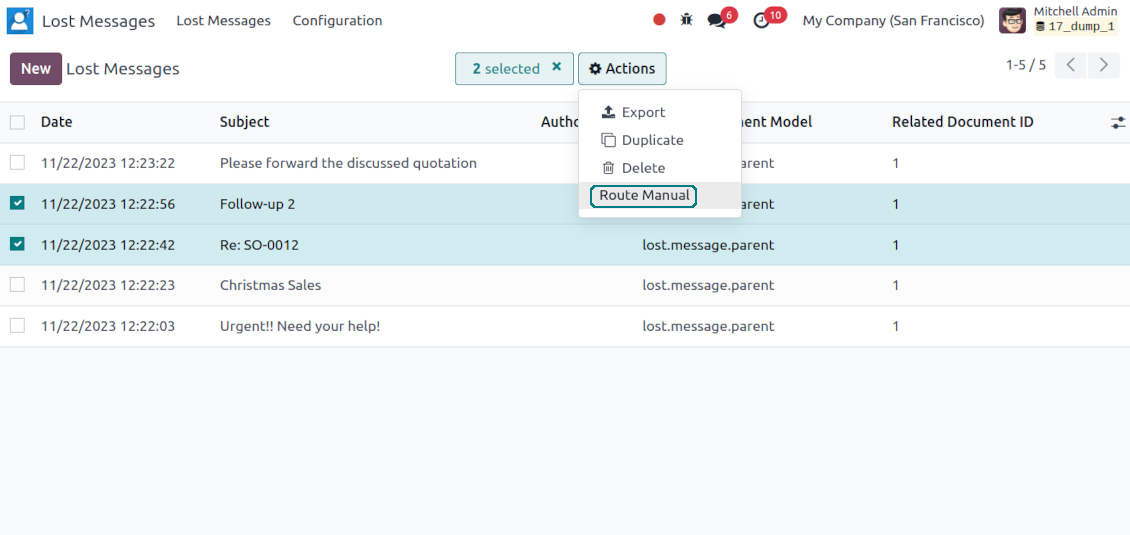
- Catch emails that did not attach. Incoming messages Odoo cannot place on a document are kept instead of disappearing.
- Review in one menu. Your team works from a dedicated queue with subject, sender, body and search tools.
- Keep routing clues. Recipients, To, CC and In Reply To stay available to help find the right document.
Route to the right document
- Attach in a few clicks. Pick the target document and attach one or several lost messages in a single action.
- Limit where messages may go. Restrict routing to selected document types or leave the list open for managers.
- Move attached messages too. Already linked chatter messages can be rerouted to another document when needed.
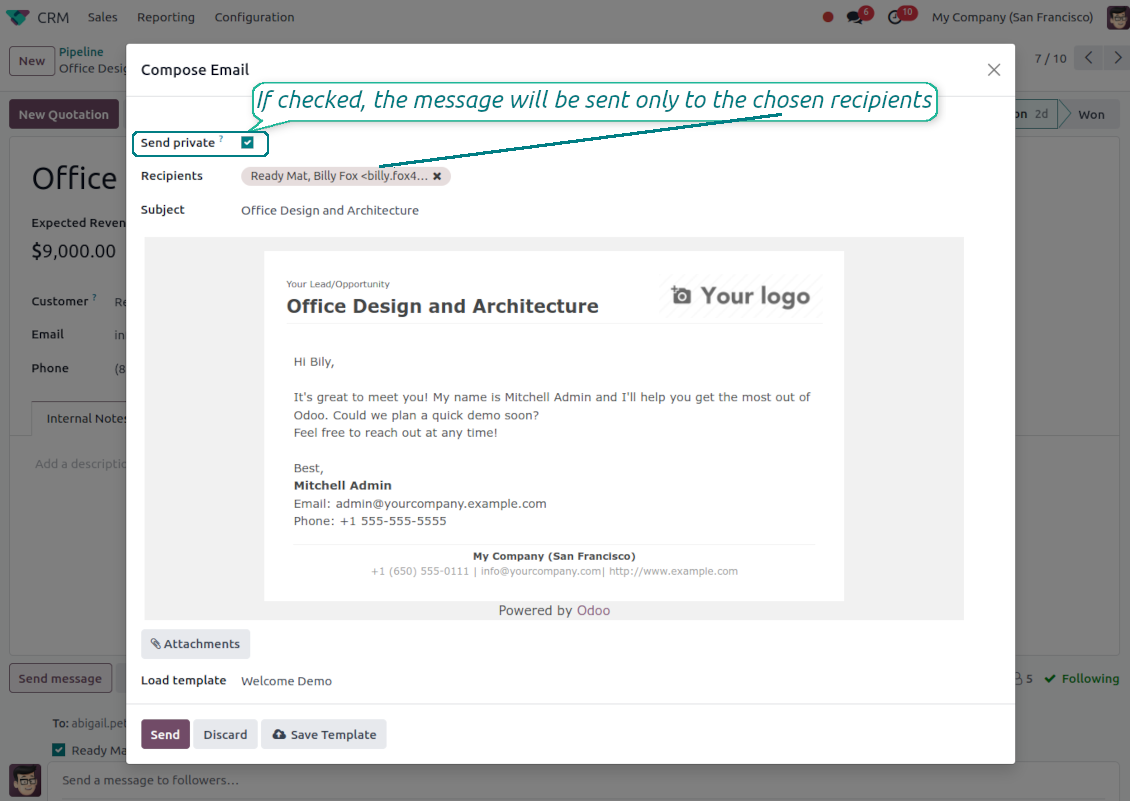
Private Thread
Confidential discussions that stay inside Odoo and off the portal
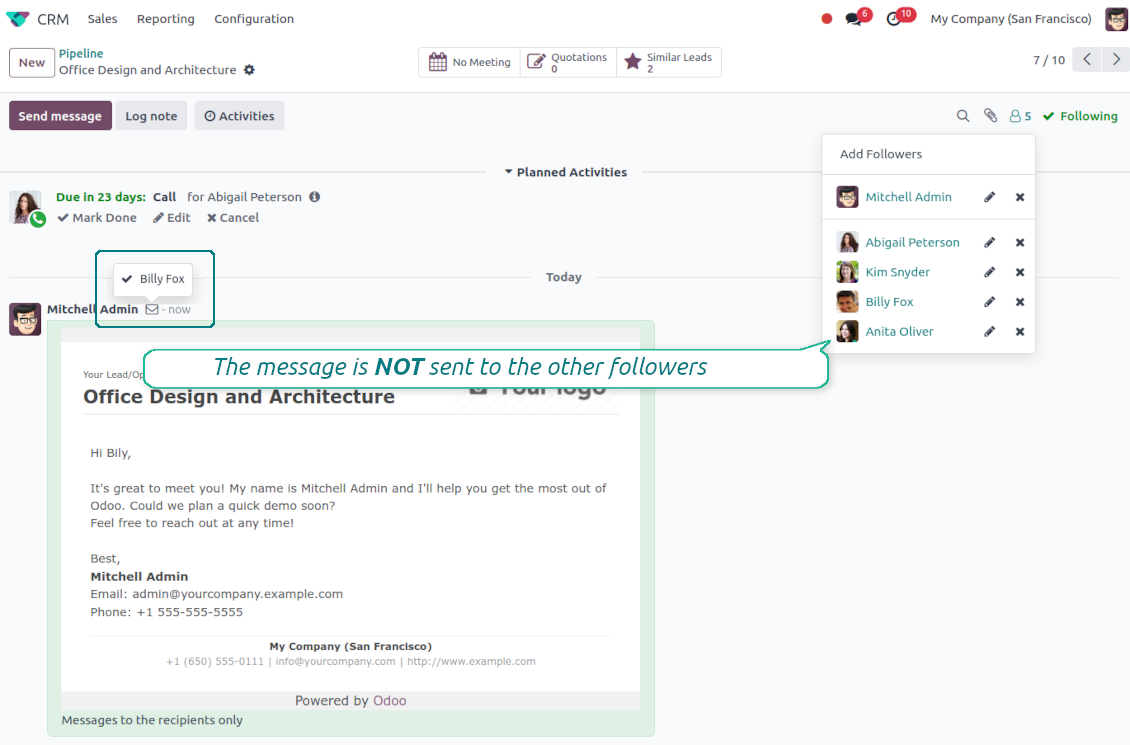
Send private from the composer
- Tick Send private. Compose a message that reaches only the selected recipients.
- Do not notify other followers. Portal users and regular followers stay out of the conversation.
- Works on any document. Use private sending on sales orders, tasks, invoices, leads and other records.
Confidential but traceable
- Keep history on the record. Private messages remain on the document for later reference.
- Hide from portal users. External contacts cannot read internal discussions on their documents.
- Choose privacy each time you send. Tick Send private again on a follow-up if that reply should stay confidential too.
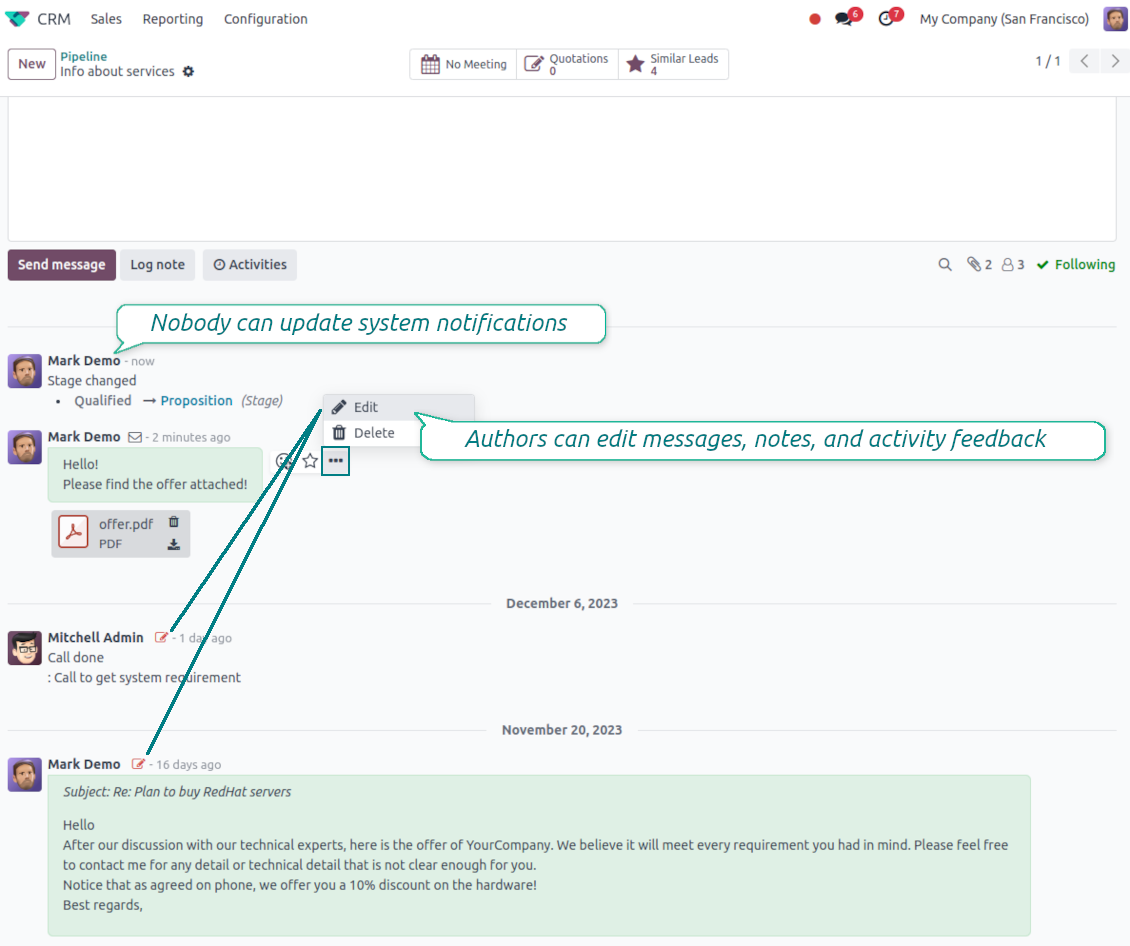
Message and Note Editing
Fix mistakes after sending while keeping a transparent history
Fix mistakes after sending
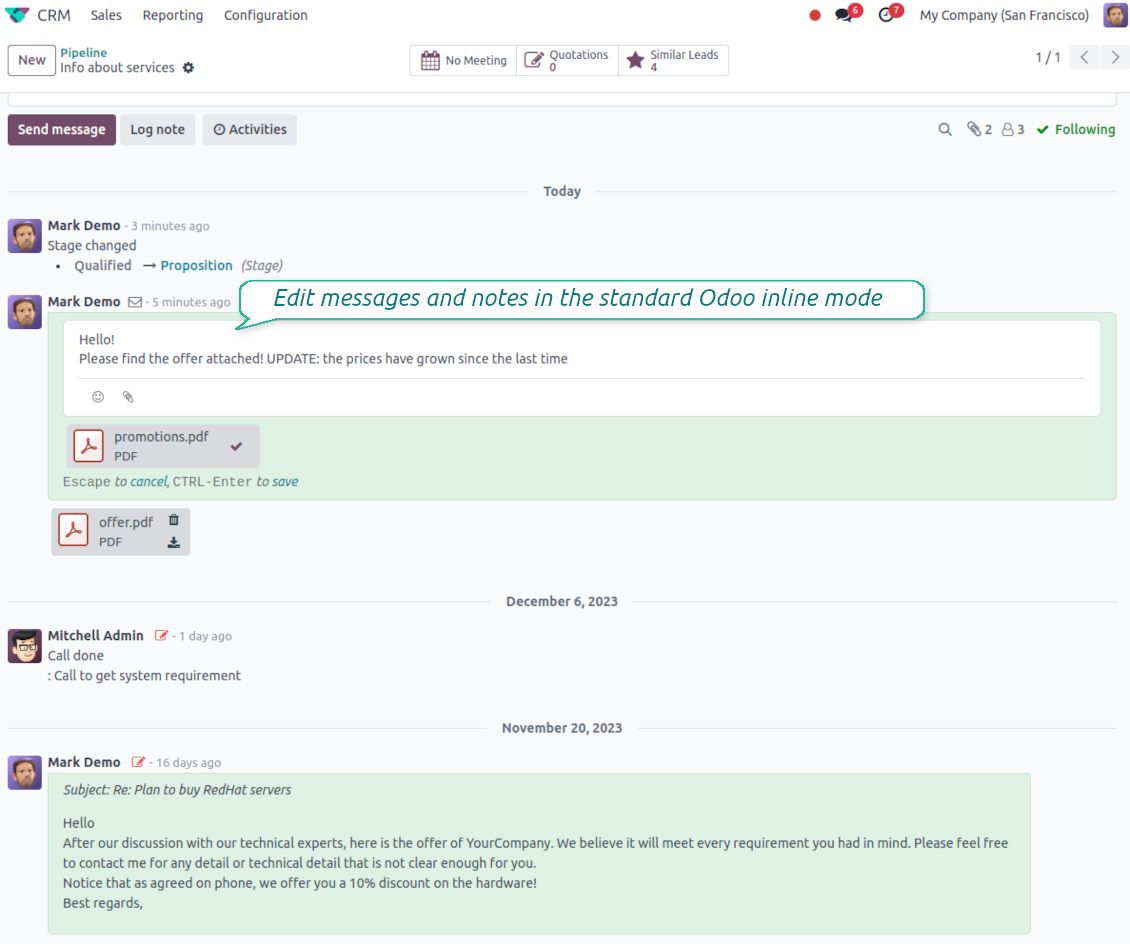
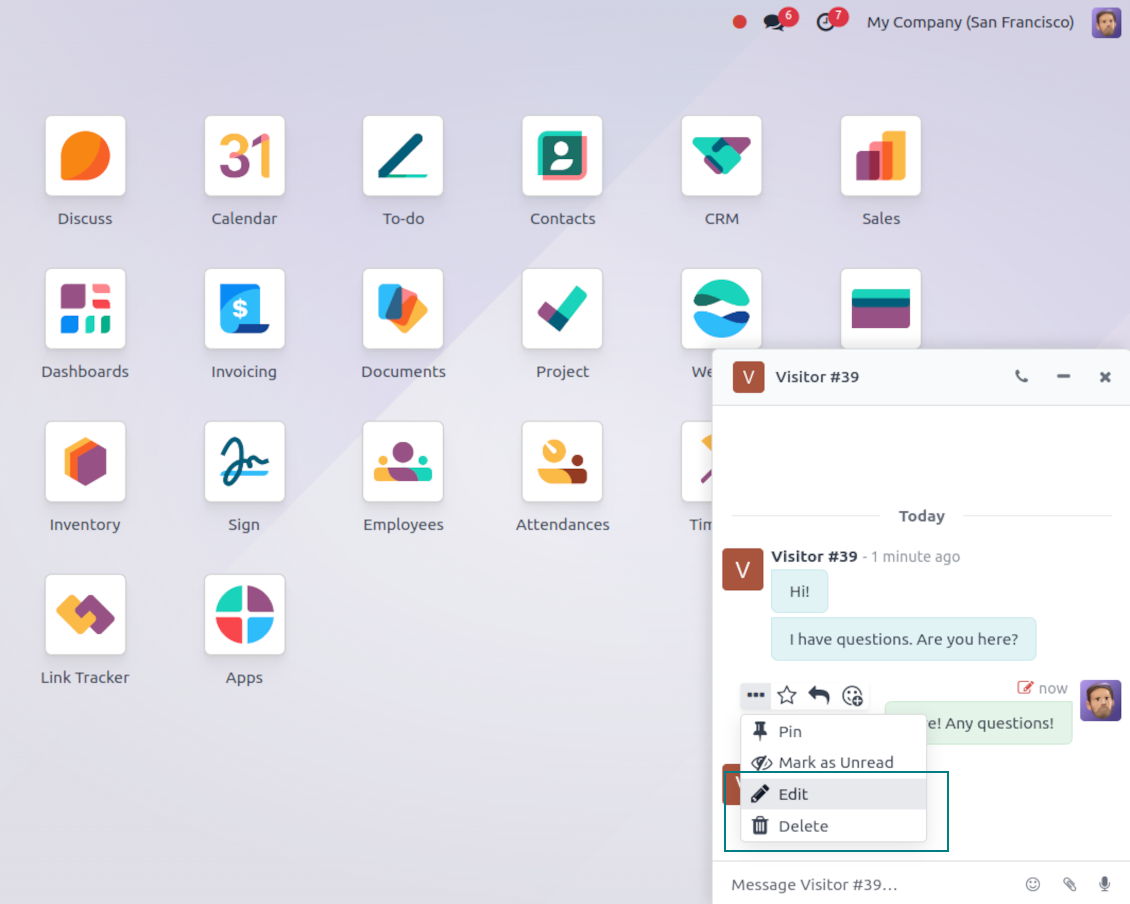
- Edit your own messages. Correct comments, notes and activity feedback after they were posted.
- Give admins broader control. Authorized users can manage messages posted by others when policy requires it.
- Edit body and attachments inline. Update the message content and files directly in the chatter when a correction is needed.
History for every change
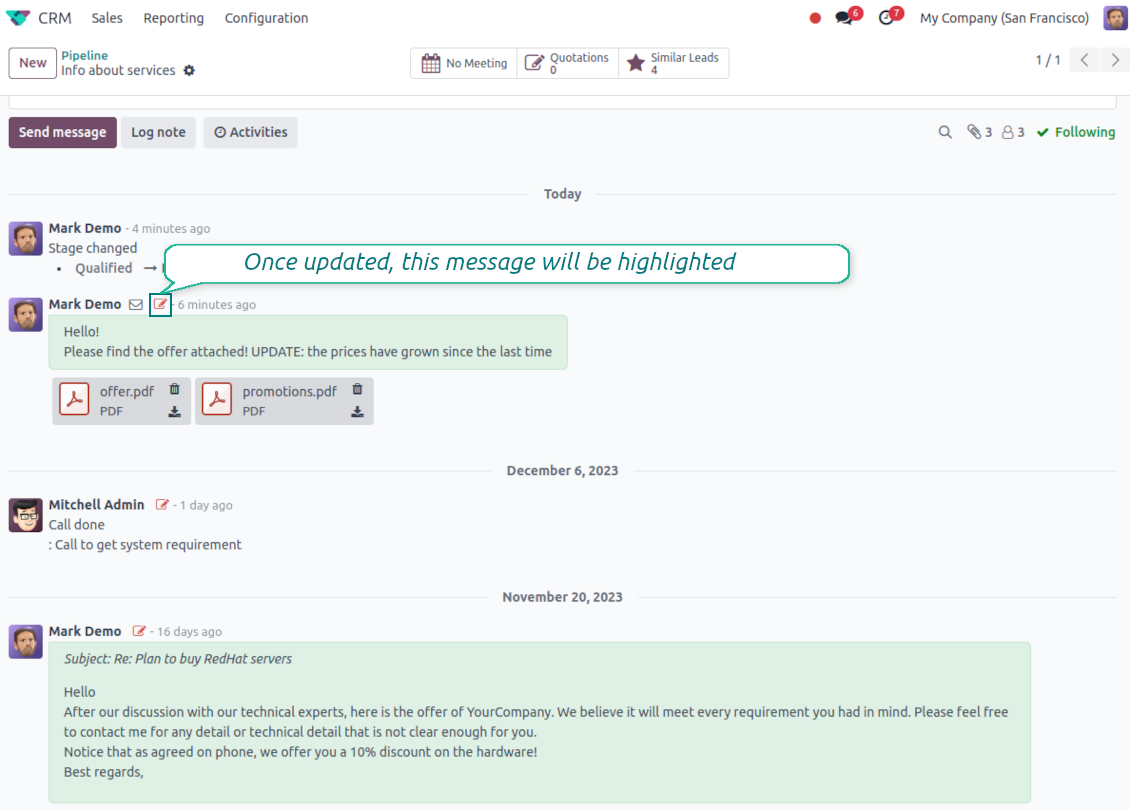
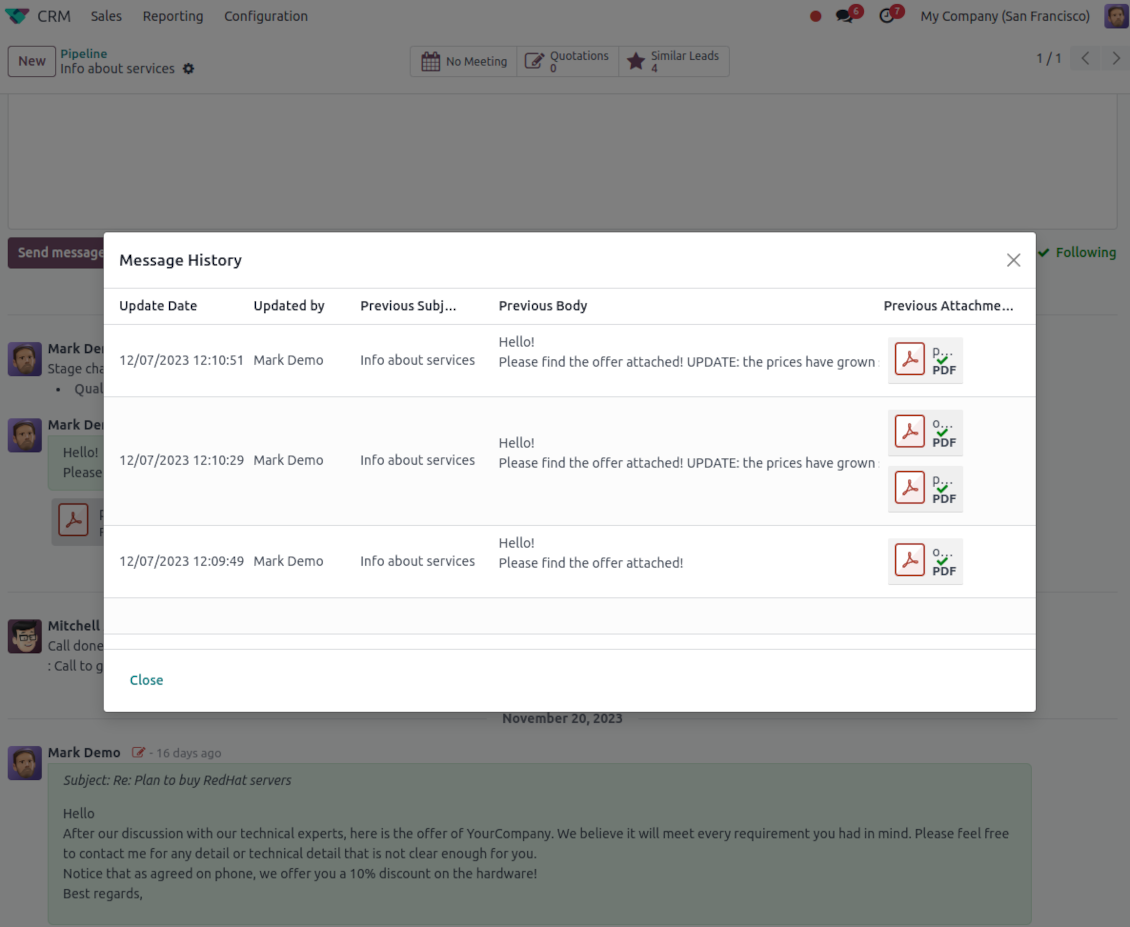
- Track what changed. Subject, body and attachment updates are stored with user and timestamp.
- Spot edited messages quickly. Modified entries show a history icon that opens the change log in one click.
Готовы оценить?
Начните с бесплатного запроса демо базы или купите в Odoo Apps Store.
Бесплатная персонализированная демонстрационная база. Номер телефона и банковская карта не требуются. Бесплатные обновления и экспертная поддержка в течение всего срока основной версии Odoo.
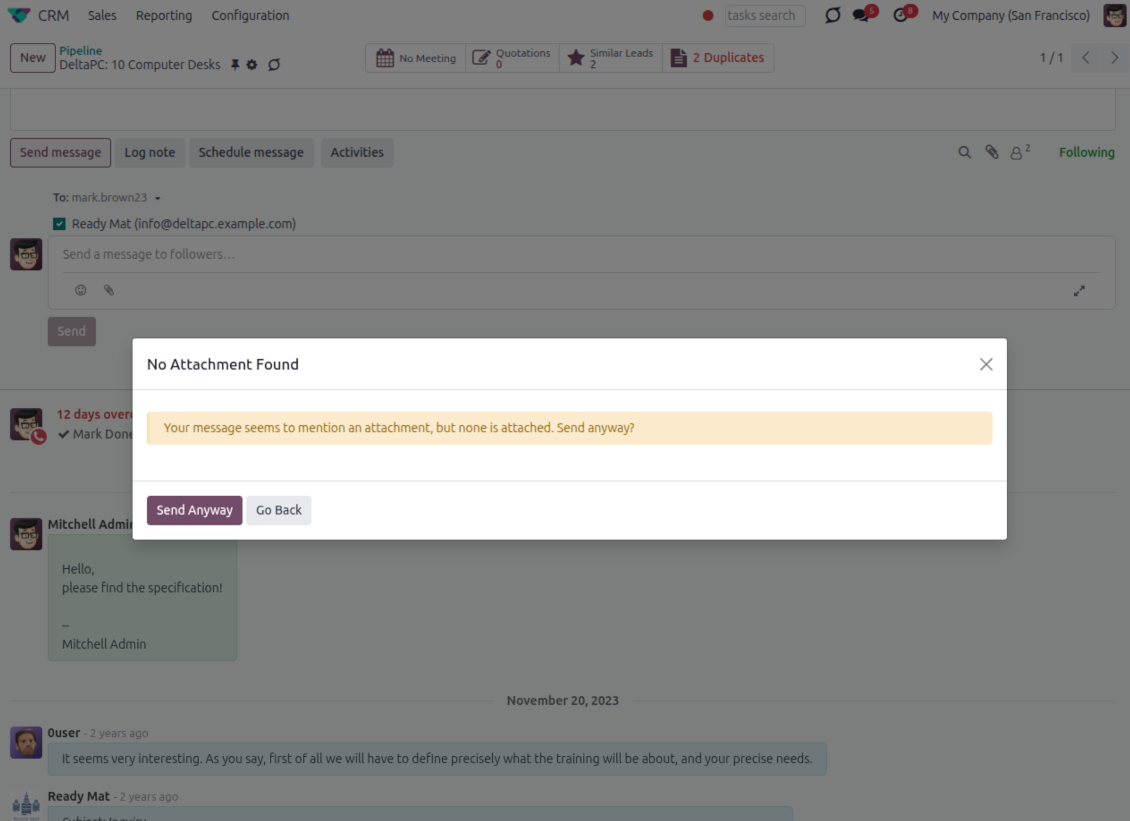
Catch missing attachments
Confirm forgotten attachments before they leave the composer
Attachment mention check
- Spot missing files before send. Odoo checks the message text when you mention an attachment.
- Works everywhere you write. The reminder appears in the full composer, quick reply and chat flows.
- Turn it off when not needed. Enable or disable the check from Messaging Suite settings.
Send-time confirmation
- Stop accidental sends. A dialog appears when the body mentions an attachment but none is attached.
- Let the user decide. Send Anyway and Go Back keep the flow moving without losing the draft.
- Adapt the wording. Adjust what counts as an attachment mention in settings when your team uses different phrases.
Message Citing
Quote earlier Odoo messages while you reply
Cite while you compose
- Open Cite Message from the composer. Search earlier messages without leaving the email you are writing.
- Find the right message fast. Filter by author, content, date range, or limit results to the current thread.
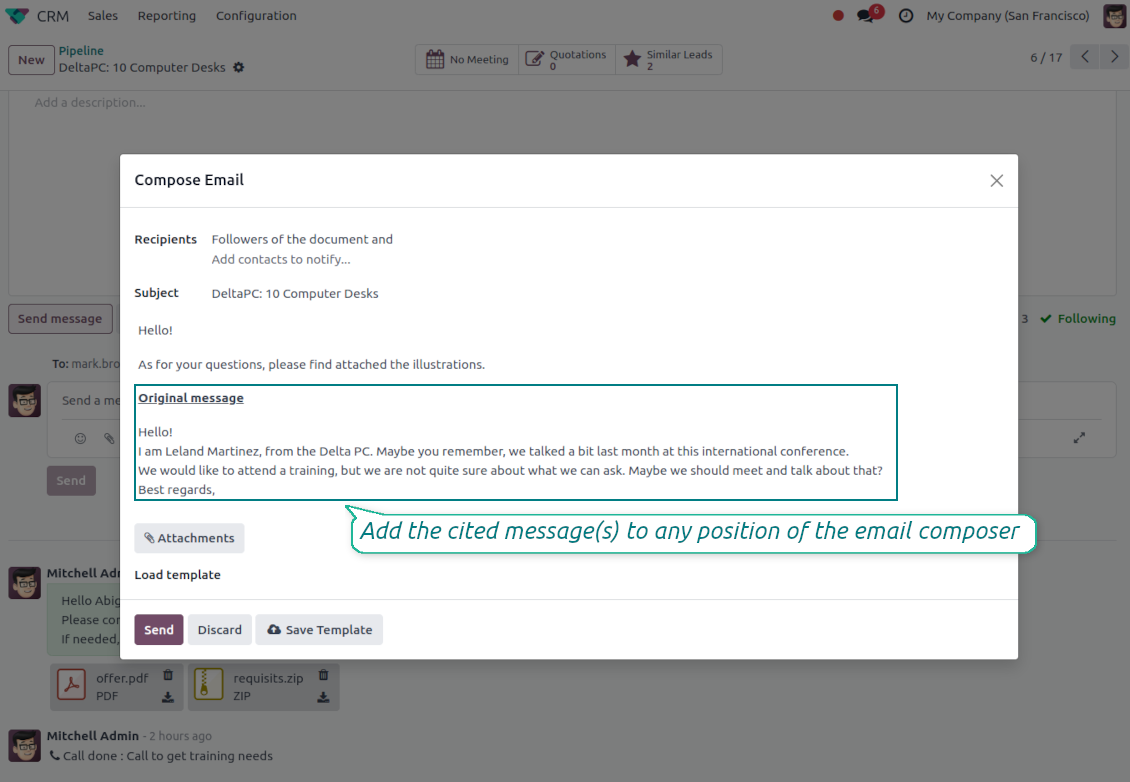
- Insert with one click. Add the selected message at the cursor position in the email body.
Readable quoted history
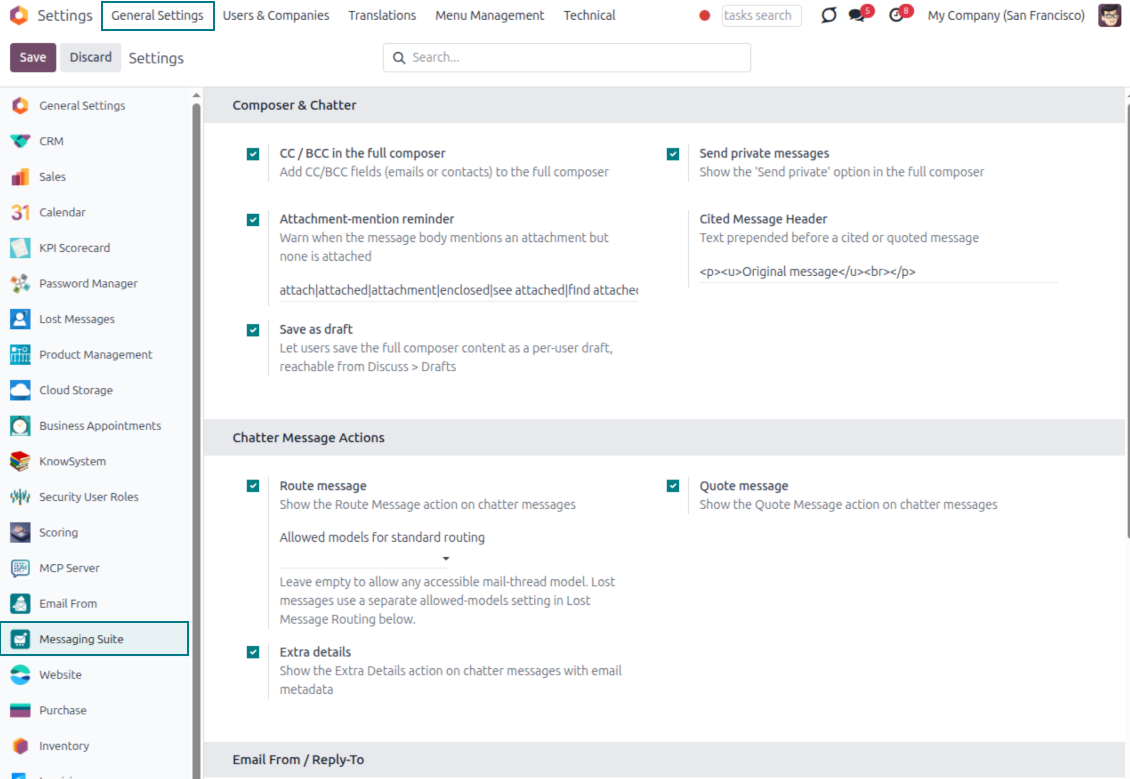
- Shape the quoted header. Define the text placed before every cited message.
- Reply with context. Help customers and colleagues see exactly which earlier message you refer to.
- Use across documents. Cite messages from any discussion while composing on another record.
Messaging Suite administration
One place to configure your messaging tools
One Messaging Suite settings page
- Turn features on or off. CC/BCC, drafts and attachment reminders are controlled from one place.
- Reach every related option. Open settings for routing, privacy, quoting, editing and sender addresses without leaving the suite.
- Set up once, use everywhere. Configure the whole messaging toolkit from a single administration screen.
Routing and access control
- Choose where messages may go. Define which documents can receive rerouted chatter messages.
- Keep lost emails separate. Unattached incoming mail keeps its own queue and routing rules.
- Decide who may reroute. Give routing rights only to the users who should move messages between documents.
Готовы оценить?
Начните с бесплатного запроса демо базы или купите в Odoo Apps Store.
Бесплатная персонализированная демонстрационная база. Номер телефона и банковская карта не требуются. Бесплатные обновления и экспертная поддержка в течение всего срока основной версии Odoo.
Часто задаваемые вопросы о Odoo Messaging Suite Odoo v.17
Какова политика обновлений ваших инструментов?
По текущим правилам Odoo Apps Store:
- Модуль, купленный для версии 12.0 и ниже, даёт доступ ко всем версиям до 12.0 включительно.
- С версии 13.0 каждую версию модуля нужно покупать отдельно.
- Независимо от версии покупка даёт право на все обновления и исправления в рамках этой мажорной версии.
Команда faOtools эти правила не задаёт. Вопросы направляйте напрямую представителям Odoo Apps Store.
Как установить приложение на Odoo.sh?
Самый прямой способ - встроенный сценарий магазина Odoo:
1. Откройте страницу модуля и нажмите Deploy on odoo.sh
2. Вас перенаправит на GitHub. Войдите в аккаунт и нажмите Create a new repo или выберите существующий. Репозиторий должен быть закрытым: публиковать приложения по лицензии OPL-1 нельзя. При необходимости создайте новый репозиторий для проекта Odoo.sh
3. Затем в odoo.sh нажмите Deploy, подтвердите решение и нажмите Continue. Так запустится установка.
Эти шаги ставят приложение на production-ветку проекта. Для других веток или обновления модуля:
1. Скачайте исходный код из магазина Odoo
2. Закоммитьте модуль в нужный репозиторий GitHub. Ни одна папка или файл приложения не должны попасть в .gitignore. Репозитории, которые создаёт odoo.sh, по умолчанию могут игнорировать важные пути (например /lib). Загрузите все каталоги и файлы модуля без исключений
3. Разверните целевую ветку проекта odoo.sh или дождитесь автоматической сборки, если так настроено.
Как установить приложение на свой сервер?
2. Перезапустите сервер Odoo;
3. Включите режим разработчика (технические настройки);
4. Обновите список приложений (меню приложений);
5. Найдите приложение и нажмите Activate/Install;
6. Следуйте рекомендациям на странице приложения, если они есть.
У приложения есть дополнительные модули. Можно купить их позже?
Да. При этом Odoo сам кладёт все зависимости в корзину: исключите уже купленные инструменты, чтобы не заплатить дважды.
Я развернул приложение на Odoo.sh и вижу предупреждение или ошибку в тестах
Odoo Красное или оранжевое предупреждение не влияет на функции приложения. Иногда наши модули не проходят стандартные автотесты, потому что те ждут поведение, которое противоречит целям приложения. Например, мы меняем расчёт цены, а тесты ядра сравнивают итог со стандартным алгоритмом.
Сначала проверьте саму развёрнутую базу: всё ли работает?
Если всё же считаете, что предупреждение ломает функции, напишите нам и пришлите полные логи установки и полный список установленных модулей (ядро и сторонние).
Можно ли купить приложение напрямую у вас?
Нет, мы распространяем инструменты только через официальный магазин приложений Odoo.
Я хочу получить скидку
К сожалению, у нас нет технической возможности давать индивидуальные цены.
Можно ли поставить приложение на базу Odoo Online (SaaS)?
Нет, сторонние приложения нельзя использовать на Odoo Online. Odoo SaaS это блокирует.
У инструмента есть зависимости. Нужно ли их покупать?
Да, для корректной работы нужны все модули из зависимостей. Цена на странице приложения уже включает необходимые зависимости.
Какова цена модуля в долларах США? Почему она меняется?
Цены на наши модули заданы в евро. Магазин Odoo пересчитывает их в другие валюты по своему внутреннему курсу. Поэтому цена в долларах США может меняться при обновлении курса.
Тексты приложения и веб-сайта на языках, отличных от английского, переведены с помощью ИИ и согласованы с официальными переводами Odoo. Если вы заметили ошибку, отправьте тикет о переводе и мы исправим его.
Демонстрационные базы данных Odoo (предпросмотр)
Для этого приложения мы можем предоставить бесплатную персонализированную демонстрационную базу данных.
Чтобы связаться с нами, вам не нужен номер телефона или кредитная карта. Вам нужно всего лишь пройти короткую регистрацию по электронной почте, которая займет не более 30 секунд.
По вашему запросу мы подготовим отдельную демо базу для предпросмотра, где примерно две недели вы сможете проводить любые тесты и проверять свои предположения.
Отправка отчетов об ошибках
Если вы столкнулись с ошибками или непоследовательным поведением, не стесняйтесь обращаться к нам. Мы гарантируем предоставление исправлений в течение 60 дней с момента покупки и очень заинтересованы в улучшении наших инструментов даже по истечении этого периода.
Чтобы связаться с нами, вам не нужен номер телефона или кредитная карта. Вам нужно всего лишь пройти короткую регистрацию по электронной почте, которая займет не более 30 секунд.
Укажите в запросе как можно больше сведений: снимки экрана, журналы сервера Odoo, полное описание воспроизведения проблемы и так далее. Обычно подготовка рабочего плана по проблеме (если ошибка подтверждена) или рекомендаций по необходимым действиям (в противном случае) занимает несколько рабочих дней.
Запросы на публичные функции и идей модулей (бесплатная разработка)
Мы очень заинтересованы в улучшении наших инструментов и будем благодарны за любые отзывы. Если ваши требования общедоступны и могут быть эффективно реализованы, команда включит их в наш список дел.
Такой список дел обрабатывается регулярно и не предполагает дополнительных комиссий. Хотя мы не можем обещать сроки и окончательный дизайн, это может быть хорошим способом получить желаемые функции без вложений и рисков.
Чтобы связаться с нами, вам не нужен номер телефона или кредитная карта. Вам нужно всего лишь пройти короткую регистрацию по электронной почте, которая займет не более 30 секунд.

The tool to flexibly structure Odoo attachments in folders and synchronize directories with cloud clients: Google Drive, OneDrive/SharePoint, Nextcloud/ownCloud, Dropbox, Amazon S3, Box, and NAS. DMS. File Manager. Document management system
398€

The tool to build a deep and structured knowledge base for internal and external use. Knowledge System. KMS. Wiki-like revisions.
398€
The tool to automatically synchronize Odoo attachments with OneDrive files in both ways
487€
The tool to set up KPI targets and control their fulfillment by periods. KPI dashboards. Dashboard designer. KPI charts

The tool for time-based service management from booking appointments to sales and reviews
398€
The tool to automatically synchronize Odoo attachments with Google Drive files in both ways
487€
