Укратко
Odoo Messaging Suite је Odoo 17 Discuss апликација. The tool to improve the Odoo messaging experience.
Odoo Messaging Suite brings lost-message recovery, private discussions, message citing, post-send editing, managed From/Reply-To addresses and a richer email composer together in one application. Compose with CC/BCC and per-user drafts, route emails to the right document, quote from the message toolbar, and catch forgotten attachments before they leave. Every message keeps its email headers behind a details icon, and administrators configure the whole toolkit from one Messaging Suite settings page.
Идеално за
Support and sales teams living in their inbox
Perfect for teams that answer customers by email all day and want CC/BCC, drafts and quoting available right inside the Odoo composer, without switching to an external mail client.
Companies needing confidentiality
Ideal when some conversations must stay private from portal users and other followers, while still being logged on the Odoo document for later reference.
Administrators who want oversight and control
Useful for admins who need routing rules, attachment reminders and one settings page to manage the whole messaging toolkit.
Спремни за процену?
Почните бесплатним захтевом за демо или куповином у Odoo Apps Store.
Бесплатна персонализована демо база. Број телефона или кредитна картица нису потребни. Бесплатна доживотна ажурирања и стручна подршка током главне верзије Odoo.
Зашто га тимови бирају
Кључне предности пре детаља
One settings page
Turn on CC/BCC, drafts, routing, attachment checks and the rest of the toolkit from a single Messaging Suite configuration screen, without hunting through scattered settings menus.
Full email composer
Compose with CC/BCC recipients, per-user drafts and managed From/Reply-To addresses directly inside the Odoo composer.
Managed sender addresses
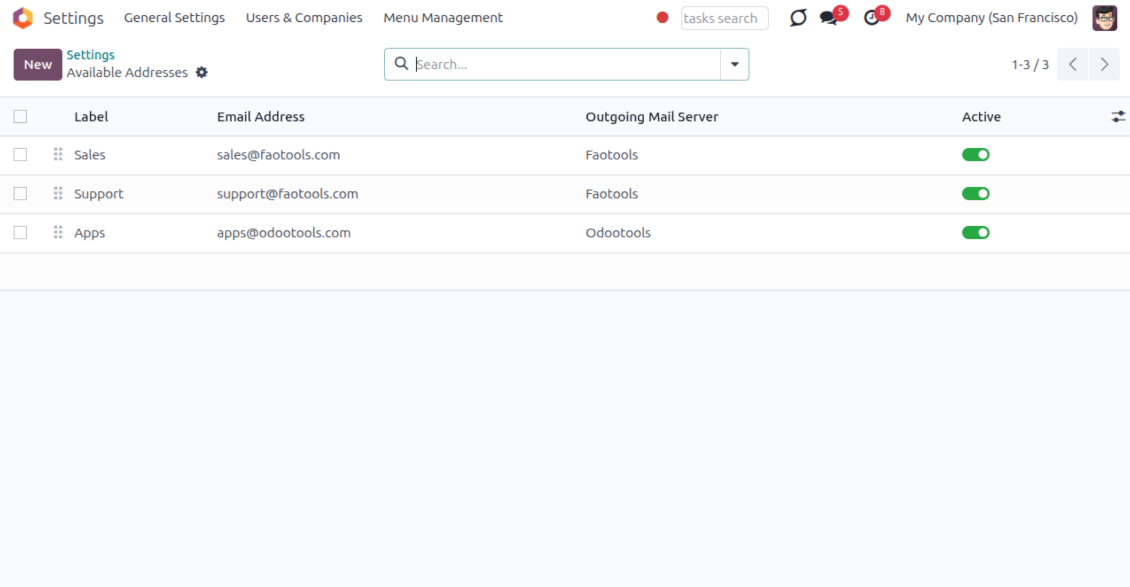
Stop typing sender emails by hand. Pick from an address book tied to the right outgoing mail server, with automatic rules by document type.
Message actions
Route and quote any message from quick actions, and inspect full email headers in a single click.
Lost message recovery
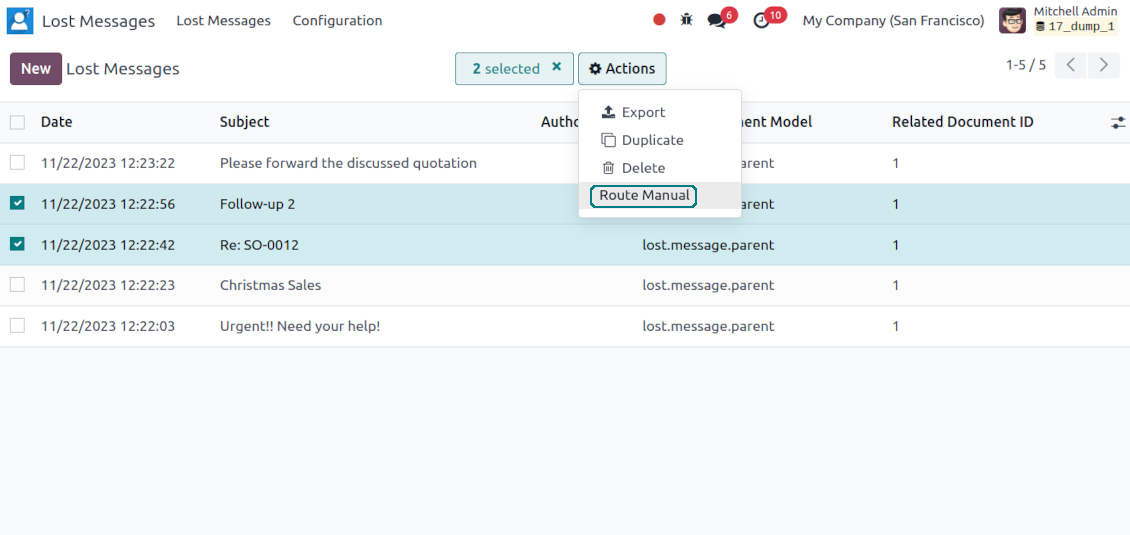
Never lose an incoming email again. Review unattached messages in a dedicated queue and route them to the correct Odoo document before customers wait.
Private threads
Keep sensitive conversations hidden from portal users and other followers, while staying logged on the Odoo document for later reference.
Message citing
Search and cite any earlier Odoo message straight from the composer, so every reply carries the right context.
Message editing & history
Edit or delete your own messages, notes and activity feedback, with a full history of every change kept for admins.
Safer sending
Catch forgotten attachments before you hit send so customers receive complete messages.
Спремни за процену?
Почните бесплатним захтевом за демо или куповином у Odoo Apps Store.
Бесплатна персонализована демо база. Број телефона или кредитна картица нису потребни. Бесплатна доживотна ажурирања и стручна подршка током главне верзије Odoo.
Compose like a real email client
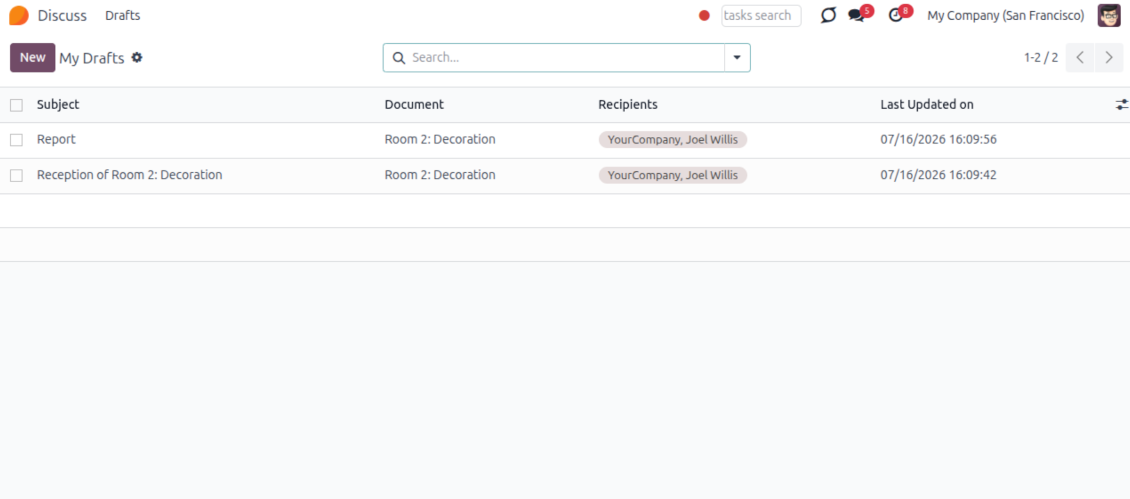
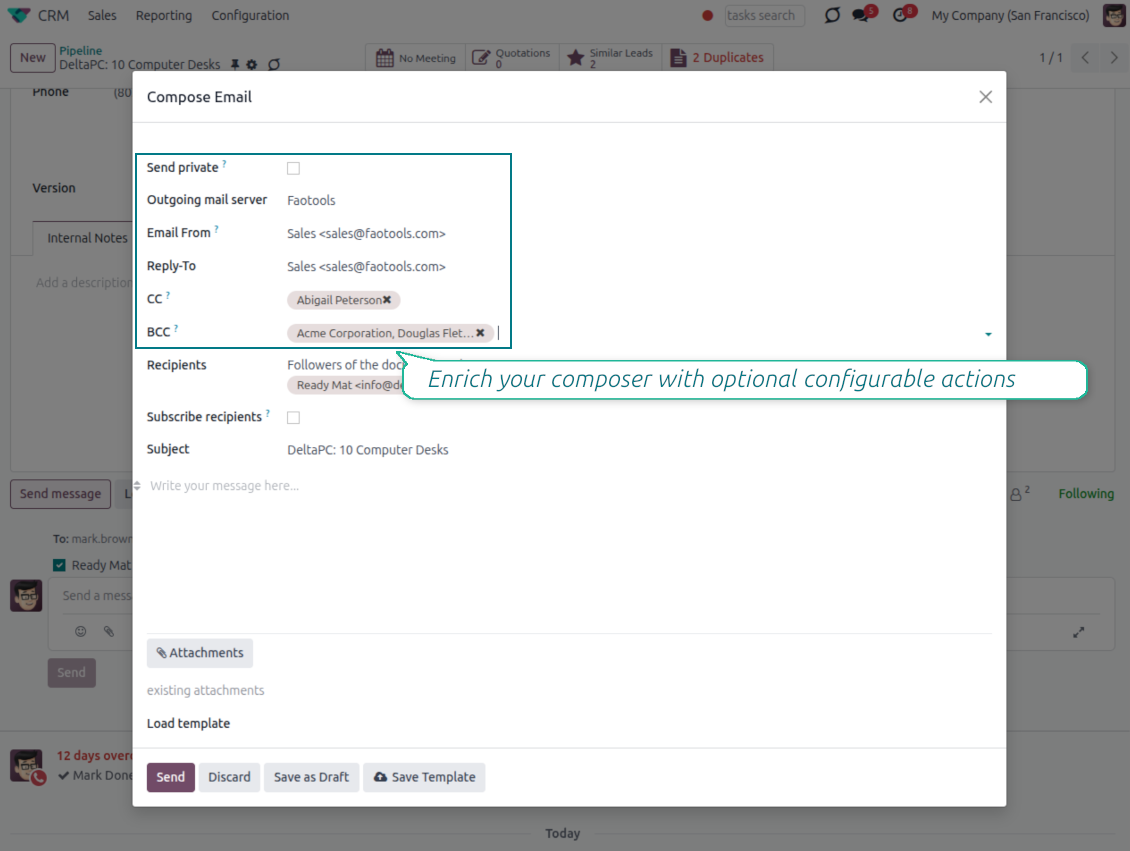
CC, BCC and per-user drafts in the full composer
Copy and blind copy
- Add CC and BCC in the full composer. Type email addresses or pick existing contacts.
- Keep recipients in the message history. Sent CC/BCC values stay visible on the message afterwards.
- Use only when you need them. Turn CC/BCC off in settings if your team does not use copy recipients.
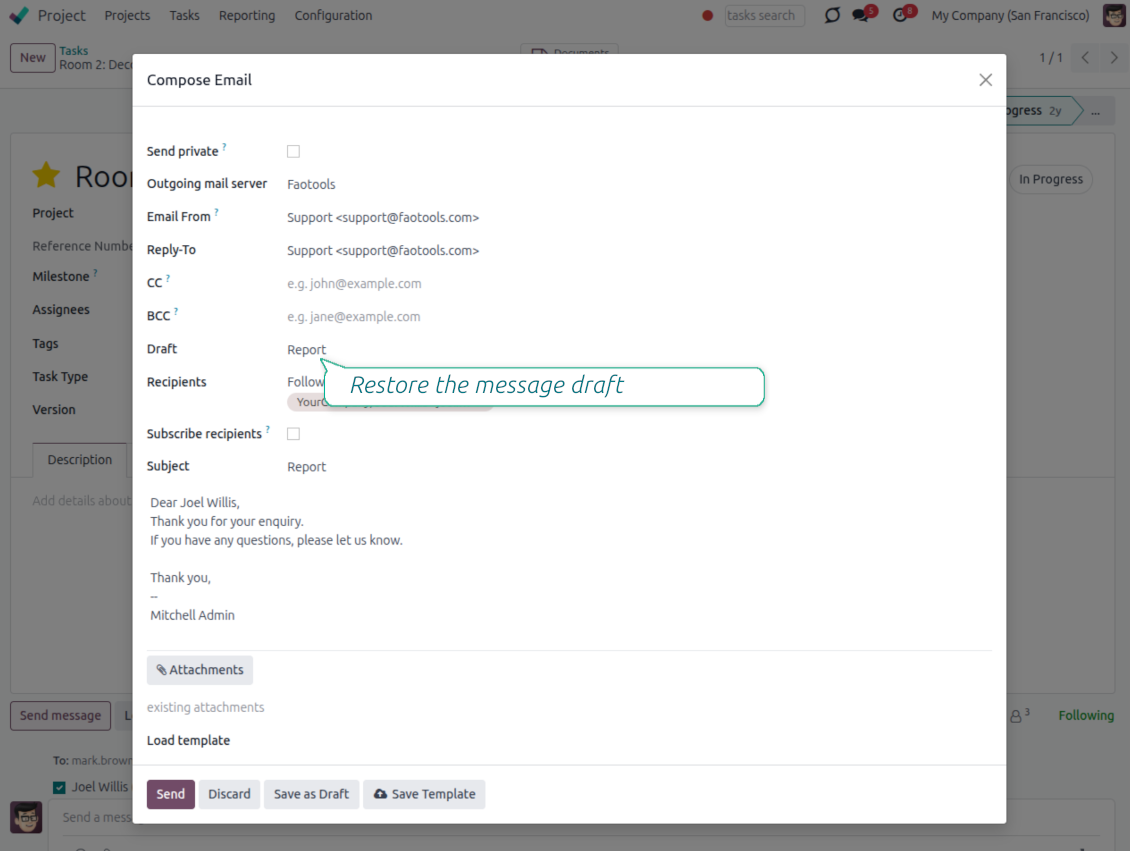
Save as draft
- Save the full message. Drafts keep subject, body, recipients and related fields for the current record.
- Resume where you stopped. Reopening the composer on the same document brings back your latest draft automatically.
- Pick up drafts from Discuss. Every internal user can open the drafts menu and finish unfinished messages.
Message actions and email metadata
Route, quote and inspect email details without leaving the chatter
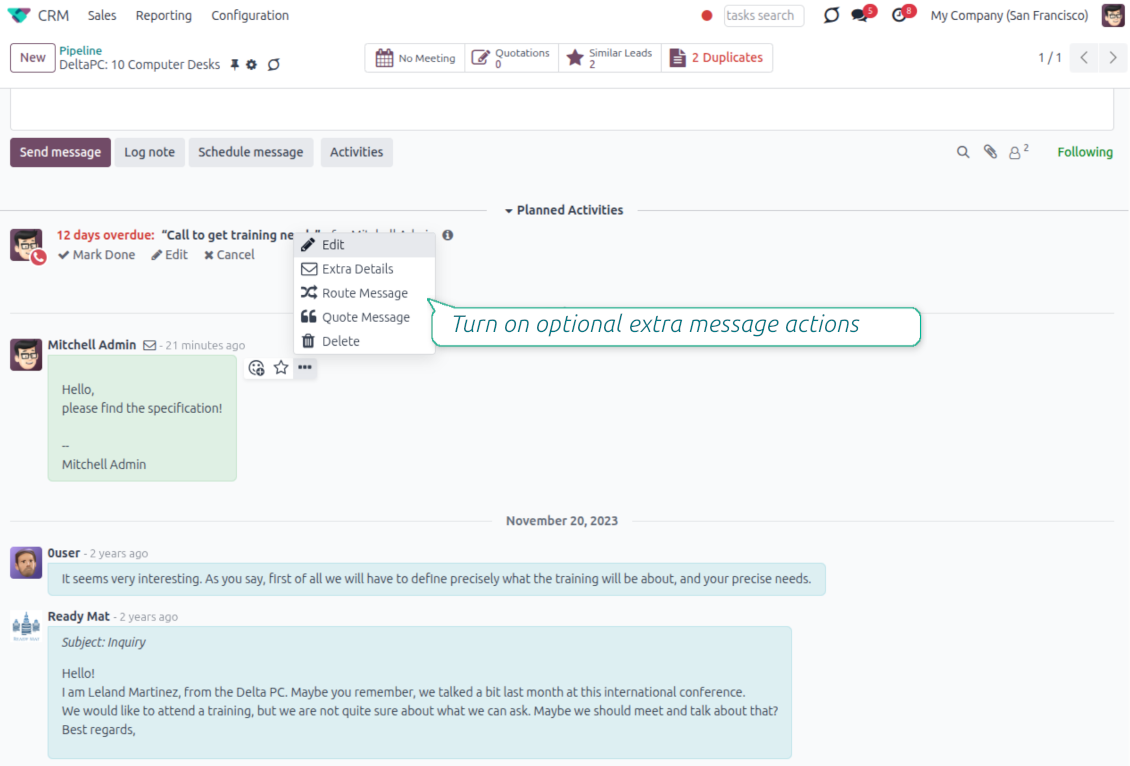
Actions on every message
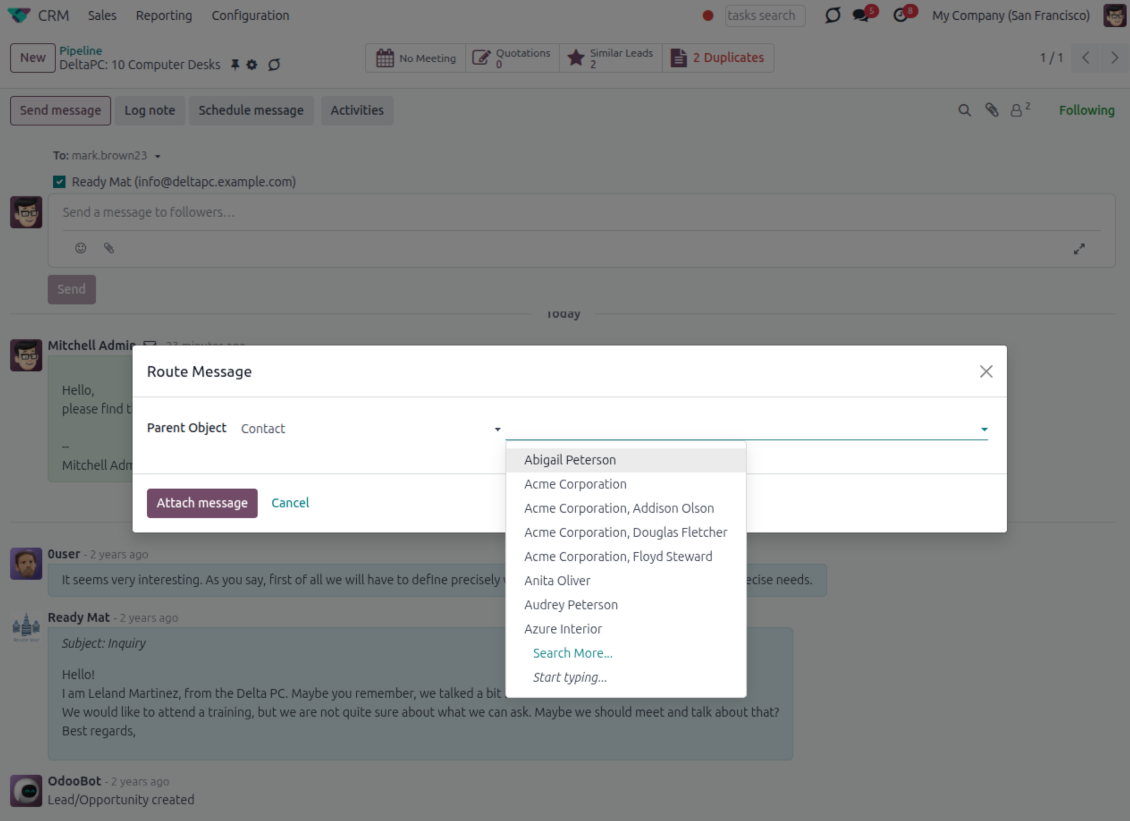
- Route from the thread. Move a message to another document when it landed on the wrong record.
- Quote in a new email. Start a reply with the original message included in the body.
- Keep the composer simple. Every action opens the standard Odoo composer already pre-filled, no separate tooling to learn.
Email details on every message
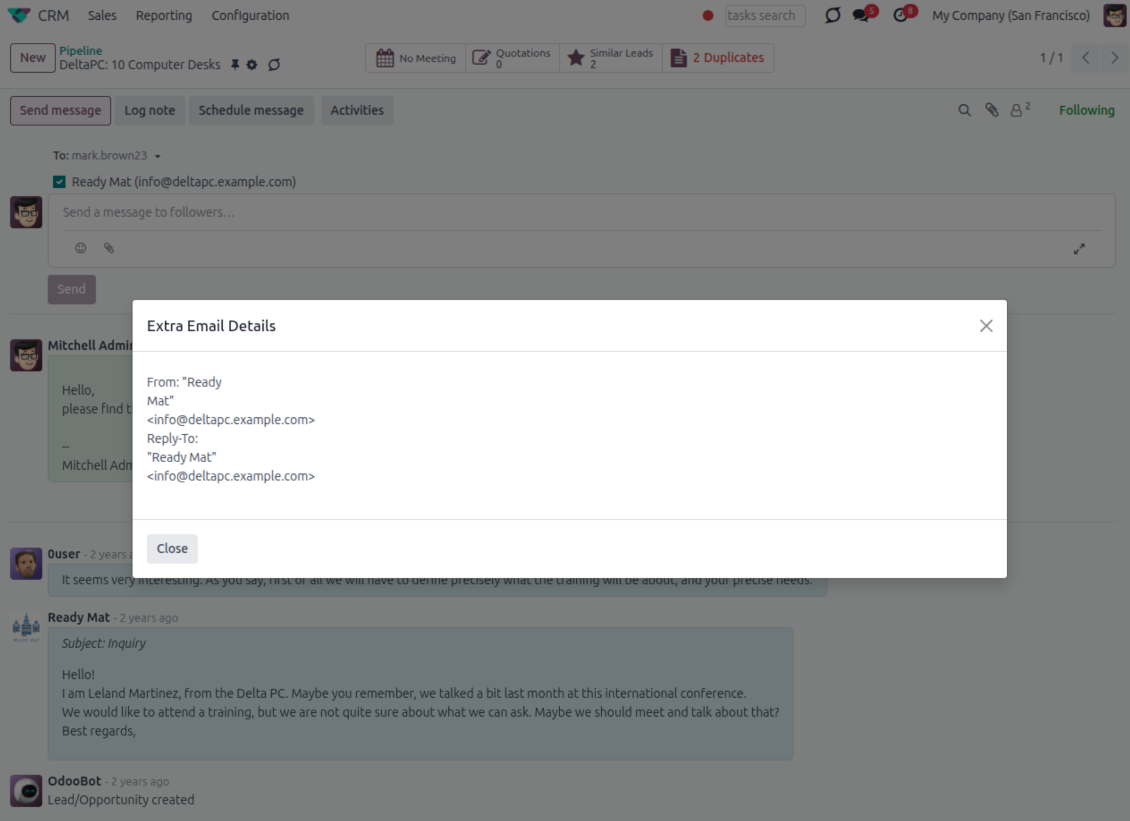
- See full headers. From, Reply-To, To and CC stay available on incoming and outgoing mail.
- Keep CC/BCC too. Copy recipients added in the composer are saved with the message.
- Open details in one click. A small icon on the message shows the complete email information.
Odoo Email From
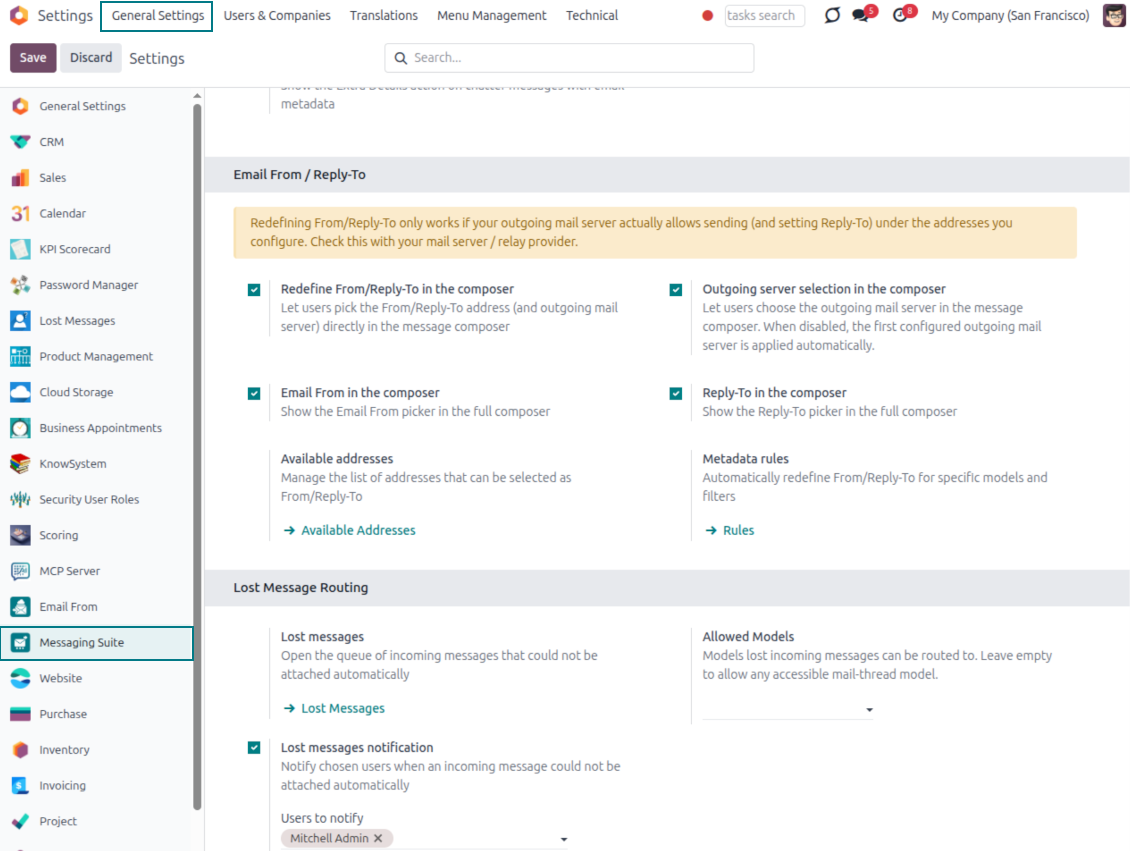
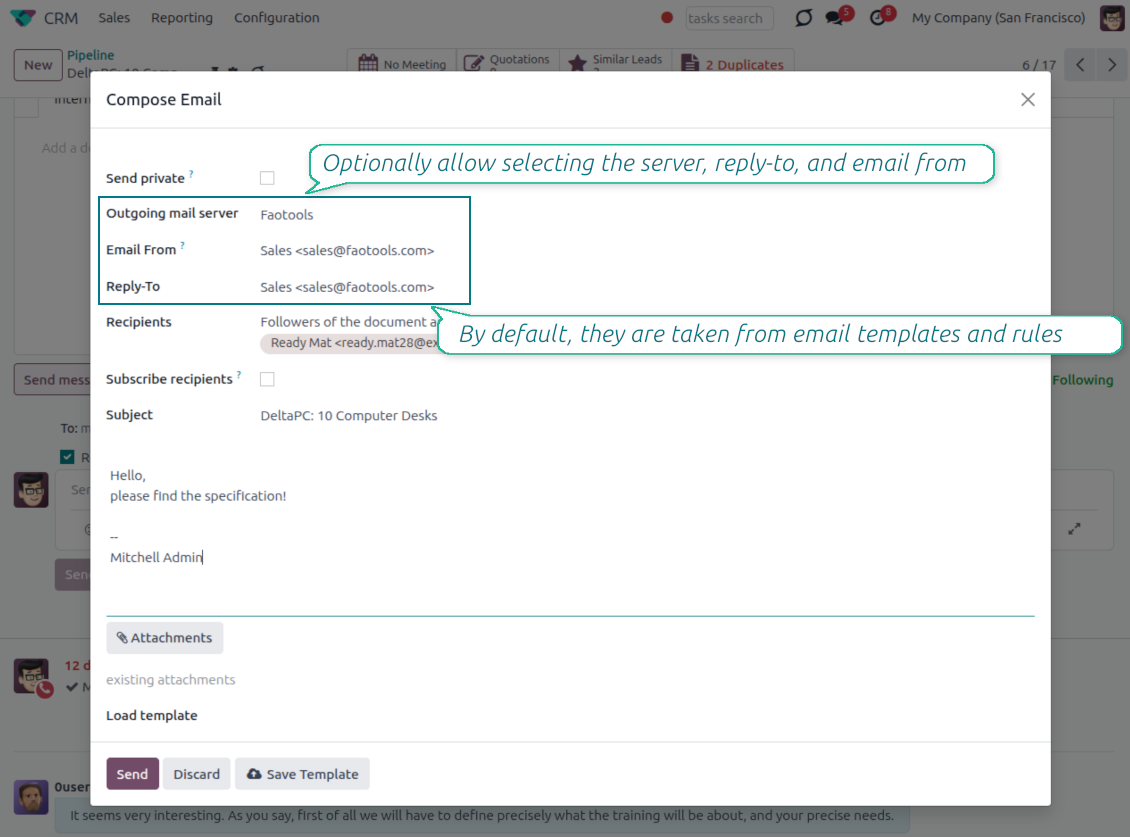
Choose the right From and Reply-To address for every email
Managed sender addresses
- Pick instead of typing. Users choose From and Reply-To from an address book linked to outgoing mail servers.
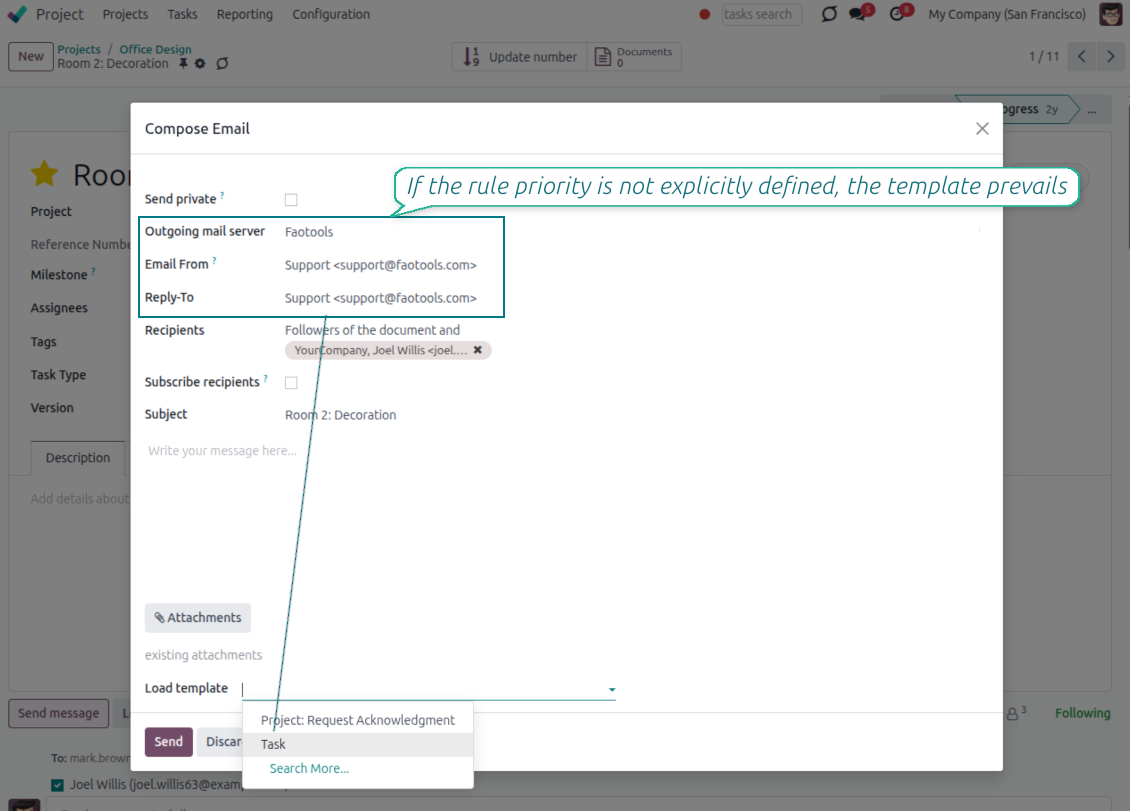
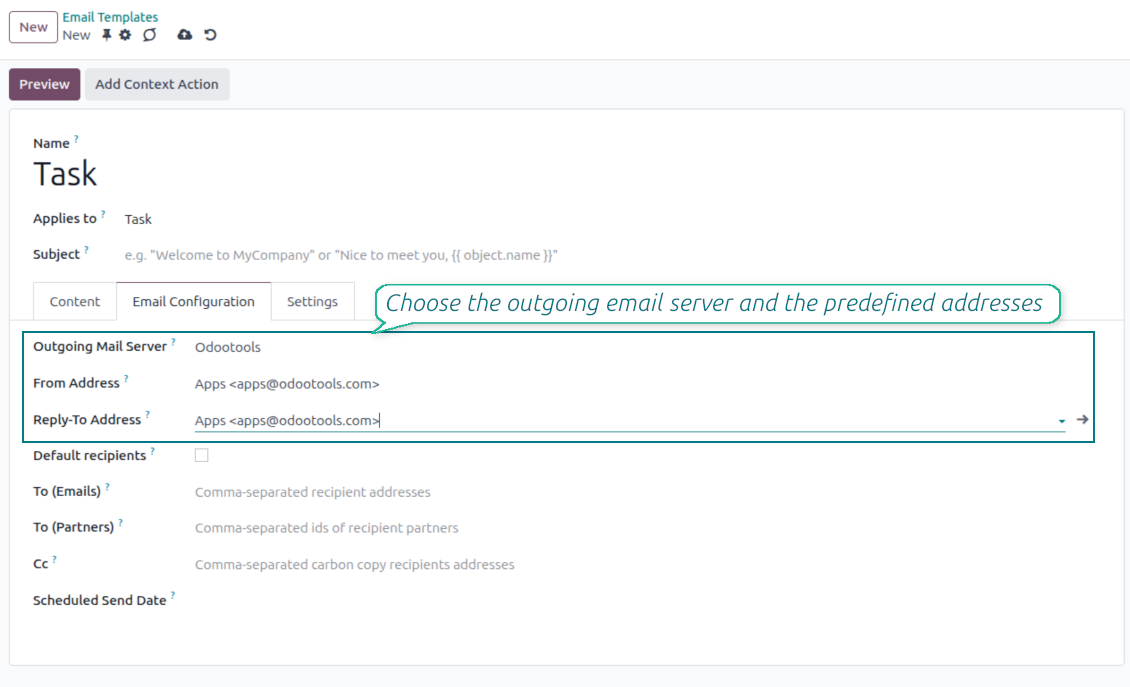
- Apply on templates too. Email templates can use the same managed sender addresses.
- Keep the screen simple. The outgoing mail server field is hidden when only one server is configured.
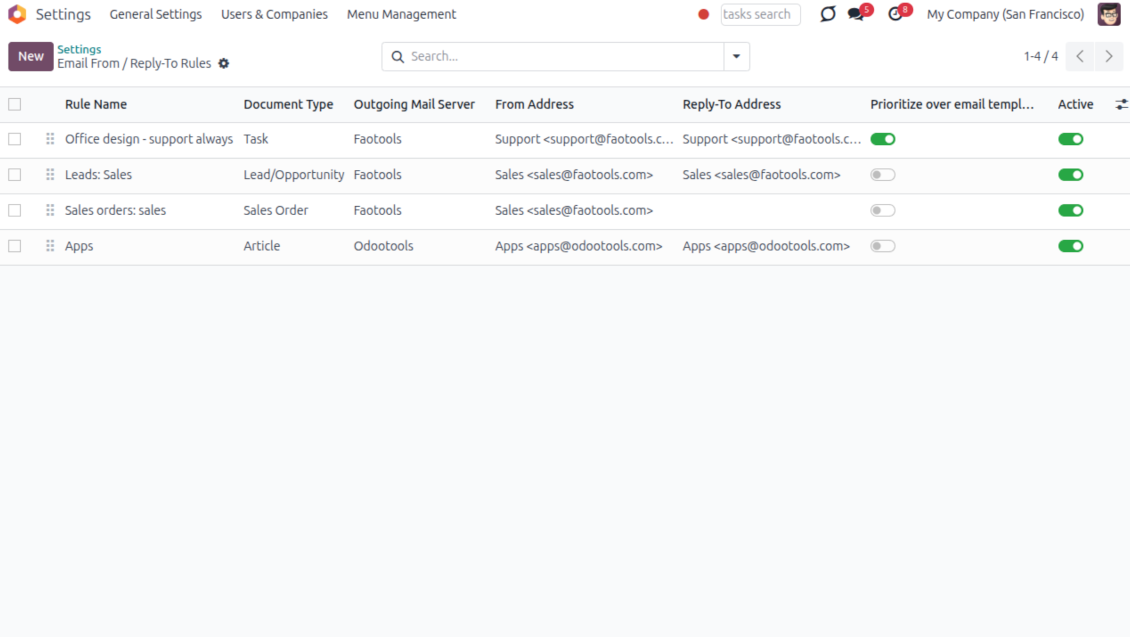
Automatic sender rules
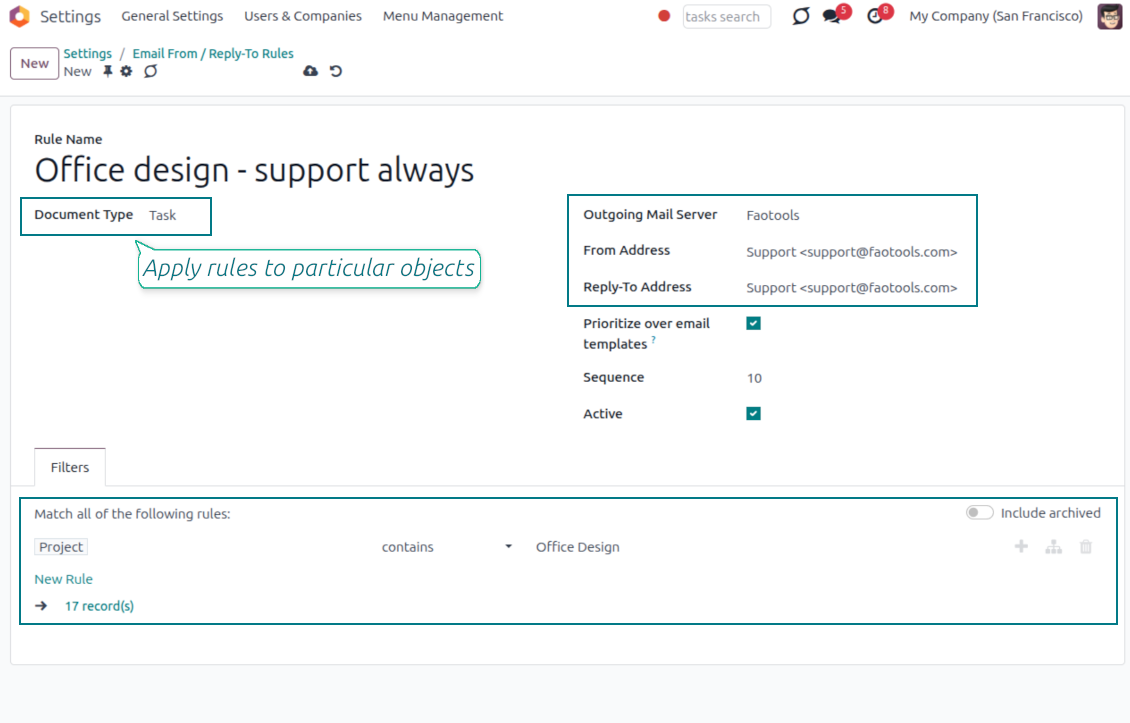
- Set the sender by document type. Rules choose the right From and Reply-To for sales orders, tasks, invoices and other records.
- Prevent invalid combinations. Odoo blocks sender addresses that do not match the selected outgoing mail server.
- Start with working mail setup. Make sure each outgoing server can actually send from the addresses you add.
Спремни за процену?
Почните бесплатним захтевом за демо или куповином у Odoo Apps Store.
Бесплатна персонализована демо база. Број телефона или кредитна картица нису потребни. Бесплатна доживотна ажурирања и стручна подршка током главне верзије Odoo.
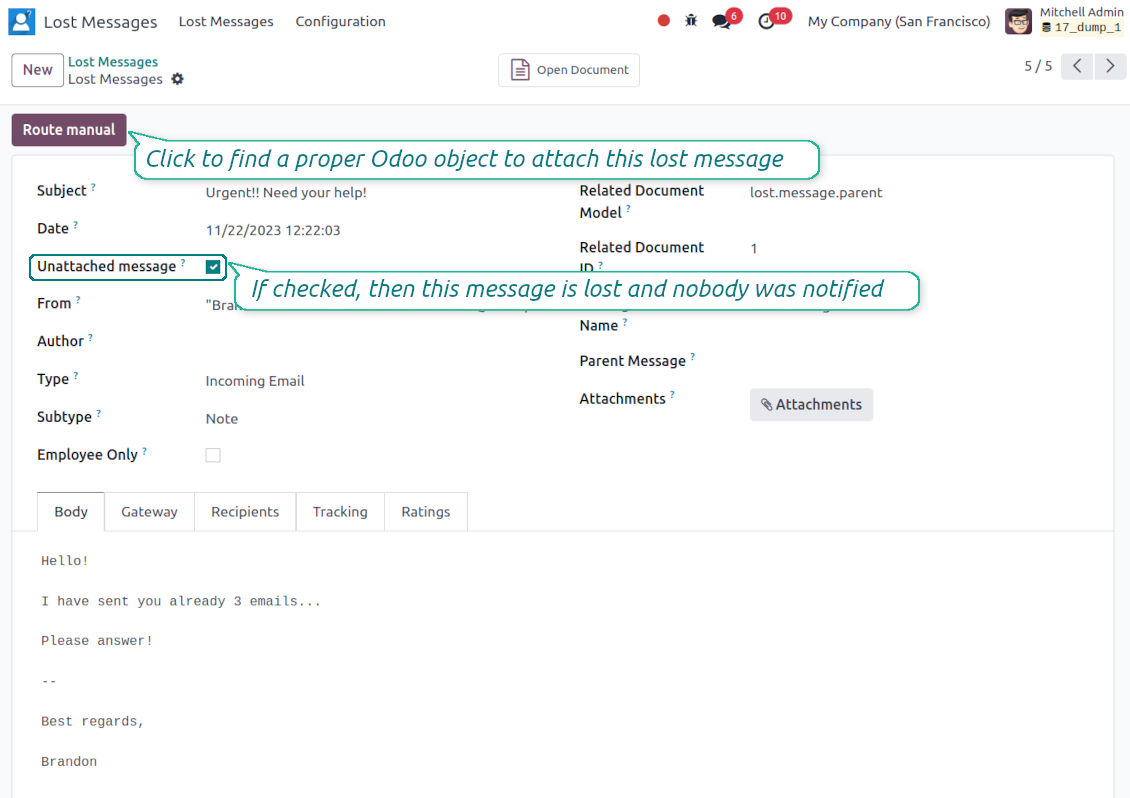
Lost Messages Routing
Recover incoming emails Odoo could not attach automatically
Lost message queue
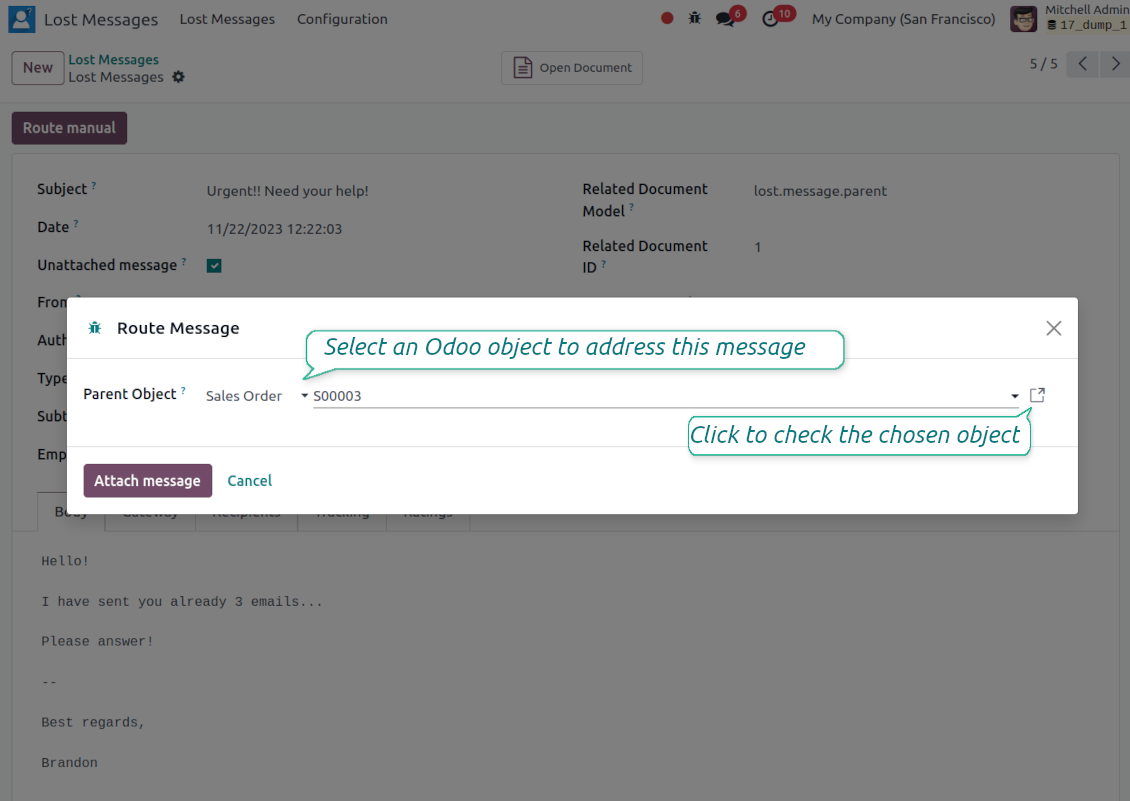
- Catch emails that did not attach. Incoming messages Odoo cannot place on a document are kept instead of disappearing.
- Review in one menu. Your team works from a dedicated queue with subject, sender, body and search tools.
- Keep routing clues. Recipients, To, CC and In Reply To stay available to help find the right document.
Route to the right document
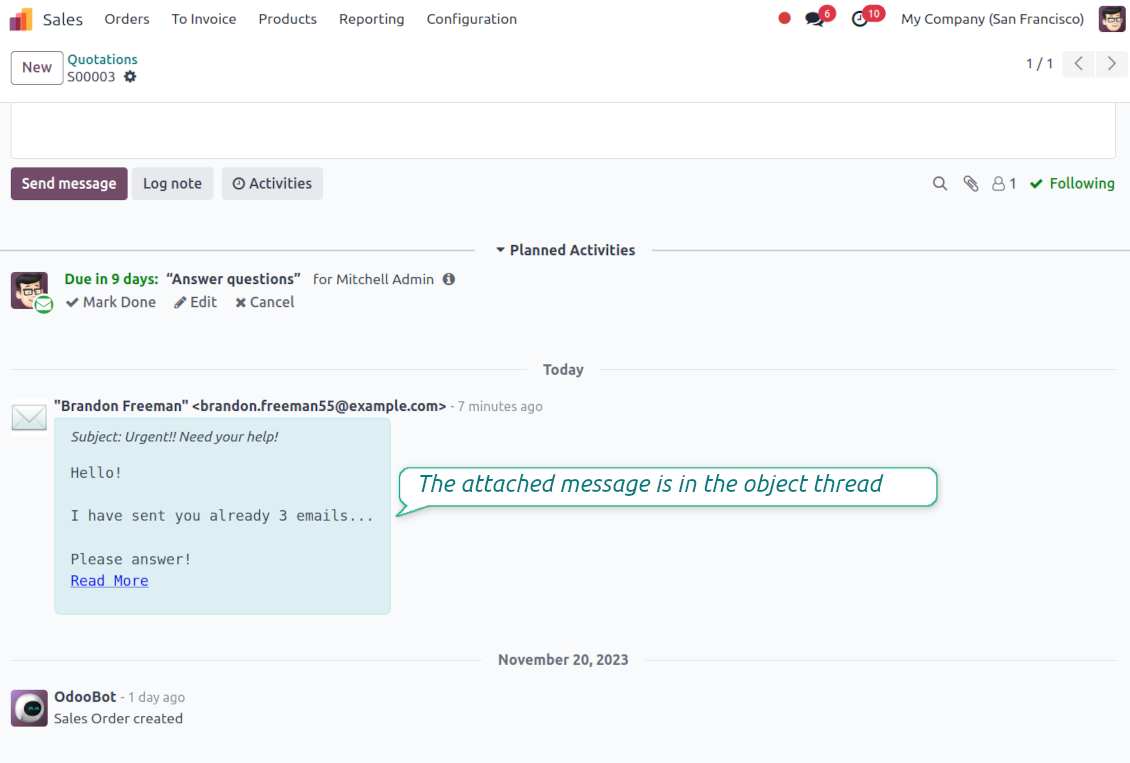
- Attach in a few clicks. Pick the target document and attach one or several lost messages in a single action.
- Limit where messages may go. Restrict routing to selected document types or leave the list open for managers.
- Move attached messages too. Already linked chatter messages can be rerouted to another document when needed.
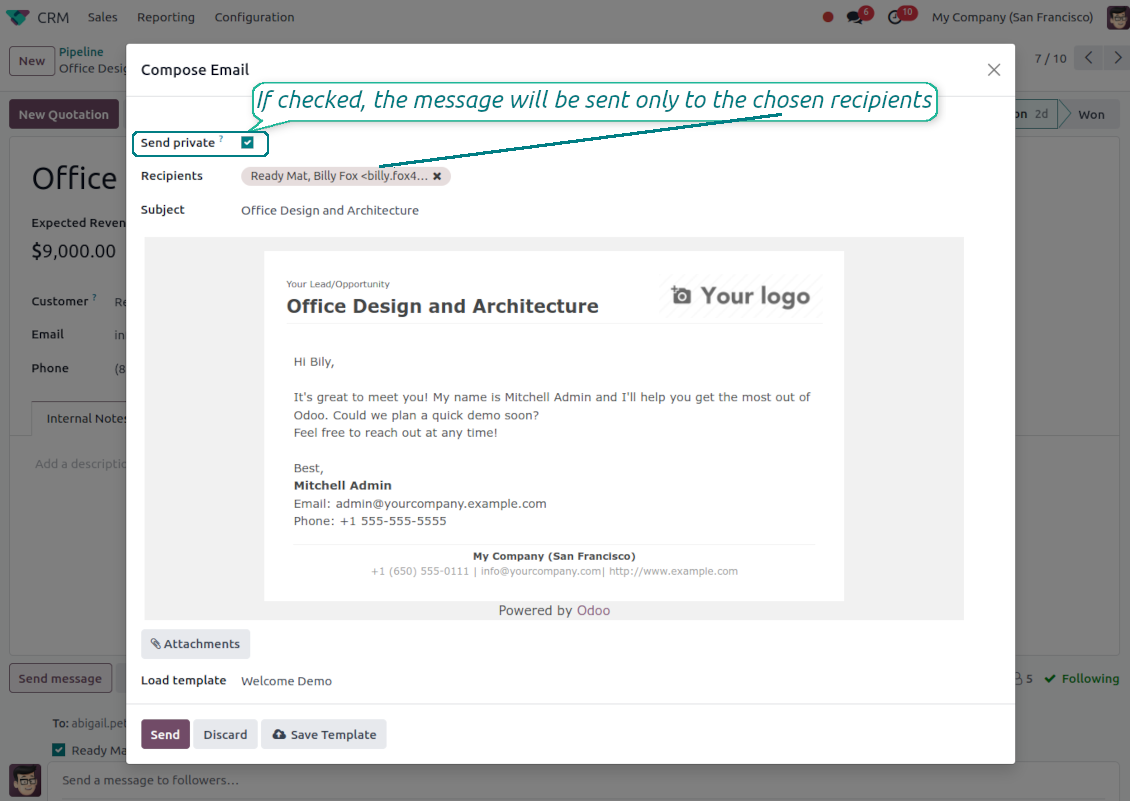
Private Thread
Confidential discussions that stay inside Odoo and off the portal
Send private from the composer
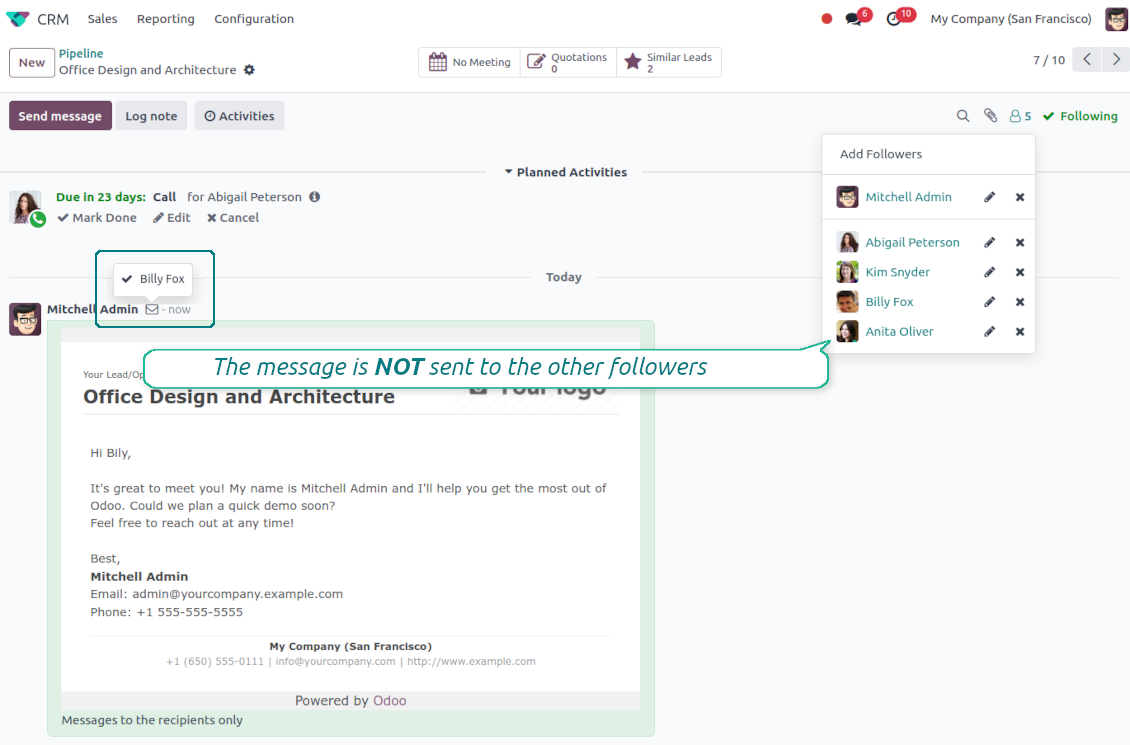
- Tick Send private. Compose a message that reaches only the selected recipients.
- Do not notify other followers. Portal users and regular followers stay out of the conversation.
- Works on any document. Use private sending on sales orders, tasks, invoices, leads and other records.
Confidential but traceable
- Keep history on the record. Private messages remain on the document for later reference.
- Hide from portal users. External contacts cannot read internal discussions on their documents.
- Choose privacy each time you send. Tick Send private again on a follow-up if that reply should stay confidential too.
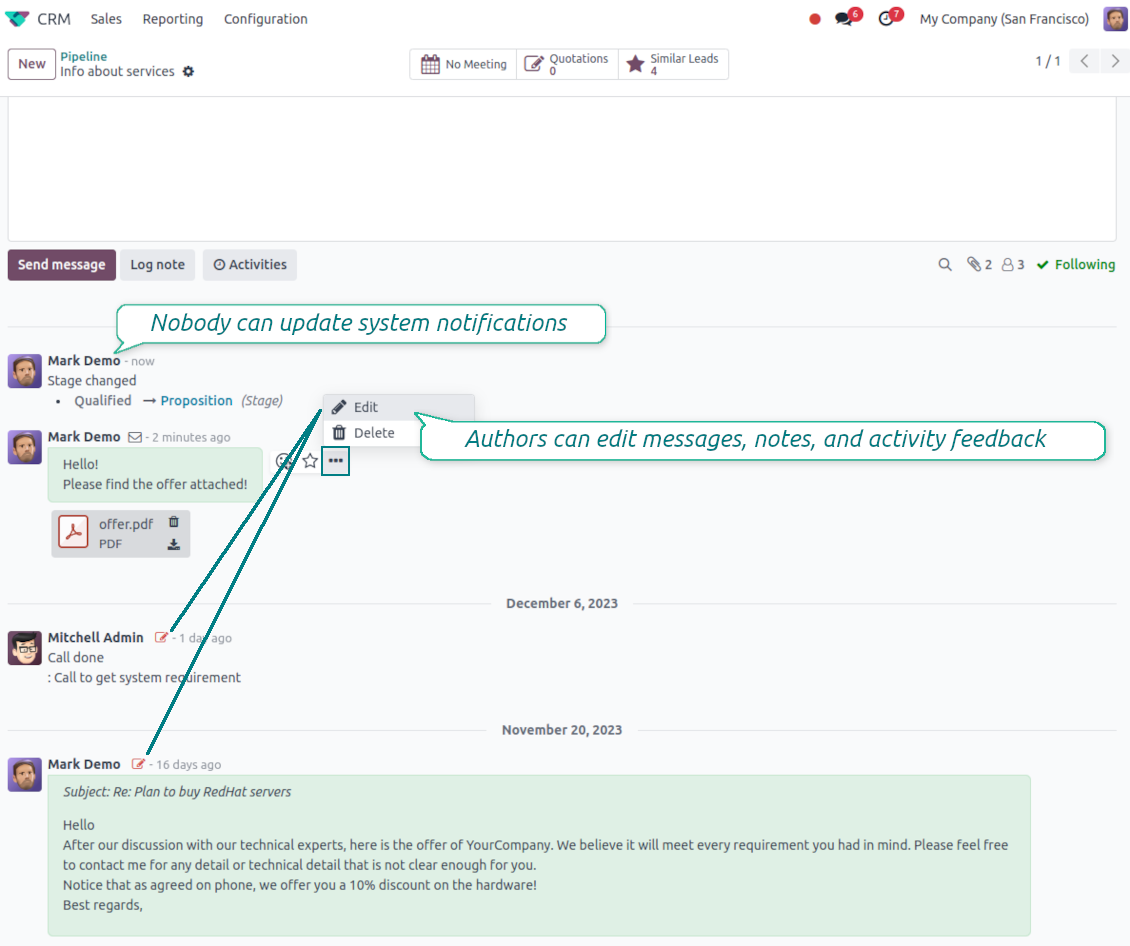
Message and Note Editing
Fix mistakes after sending while keeping a transparent history
Fix mistakes after sending
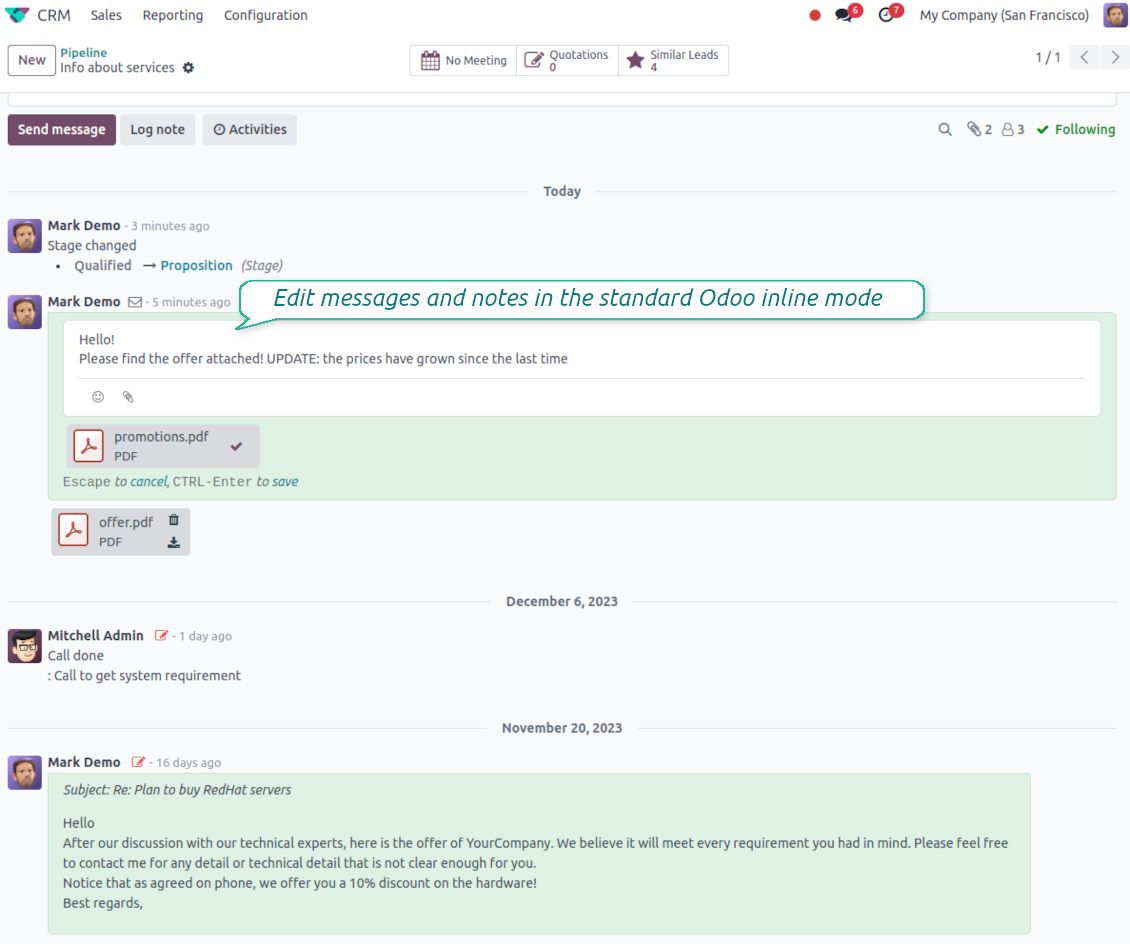
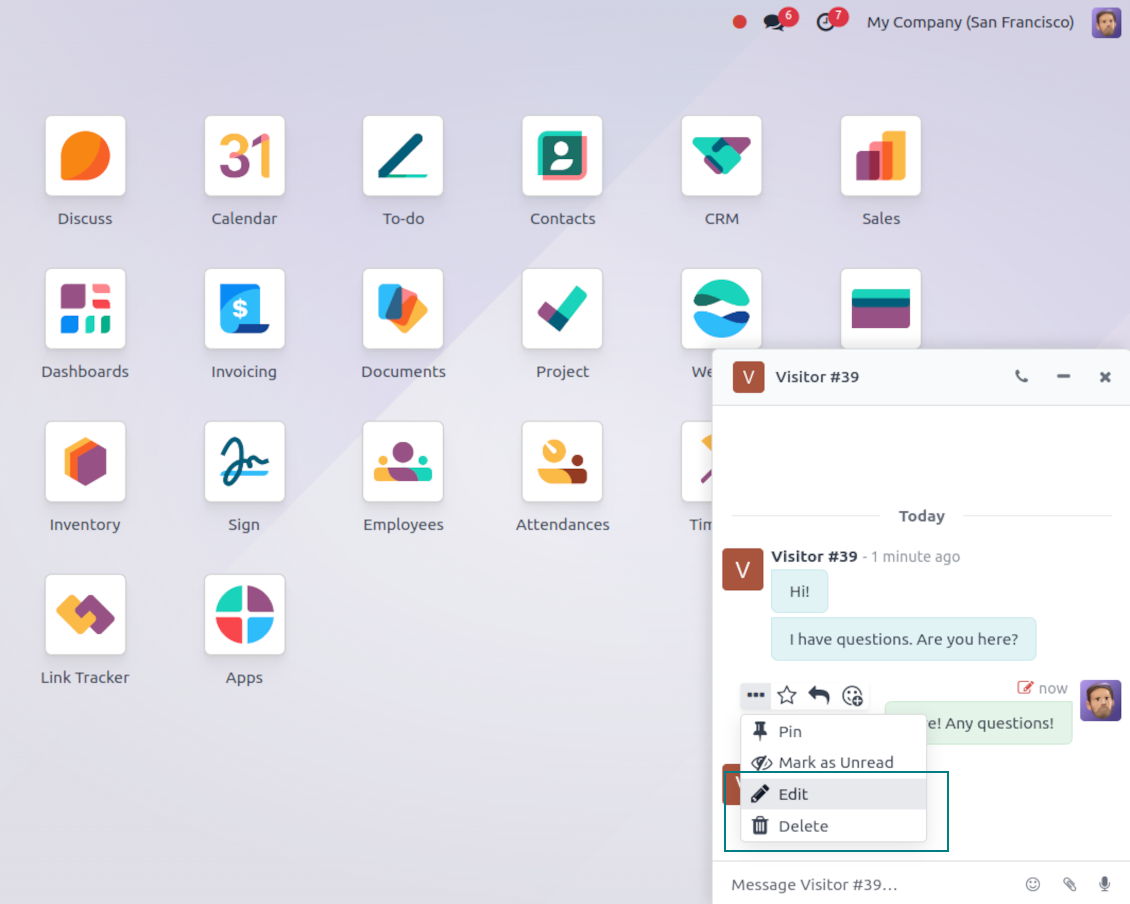
- Edit your own messages. Correct comments, notes and activity feedback after they were posted.
- Give admins broader control. Authorized users can manage messages posted by others when policy requires it.
- Edit body and attachments inline. Update the message content and files directly in the chatter when a correction is needed.
History for every change
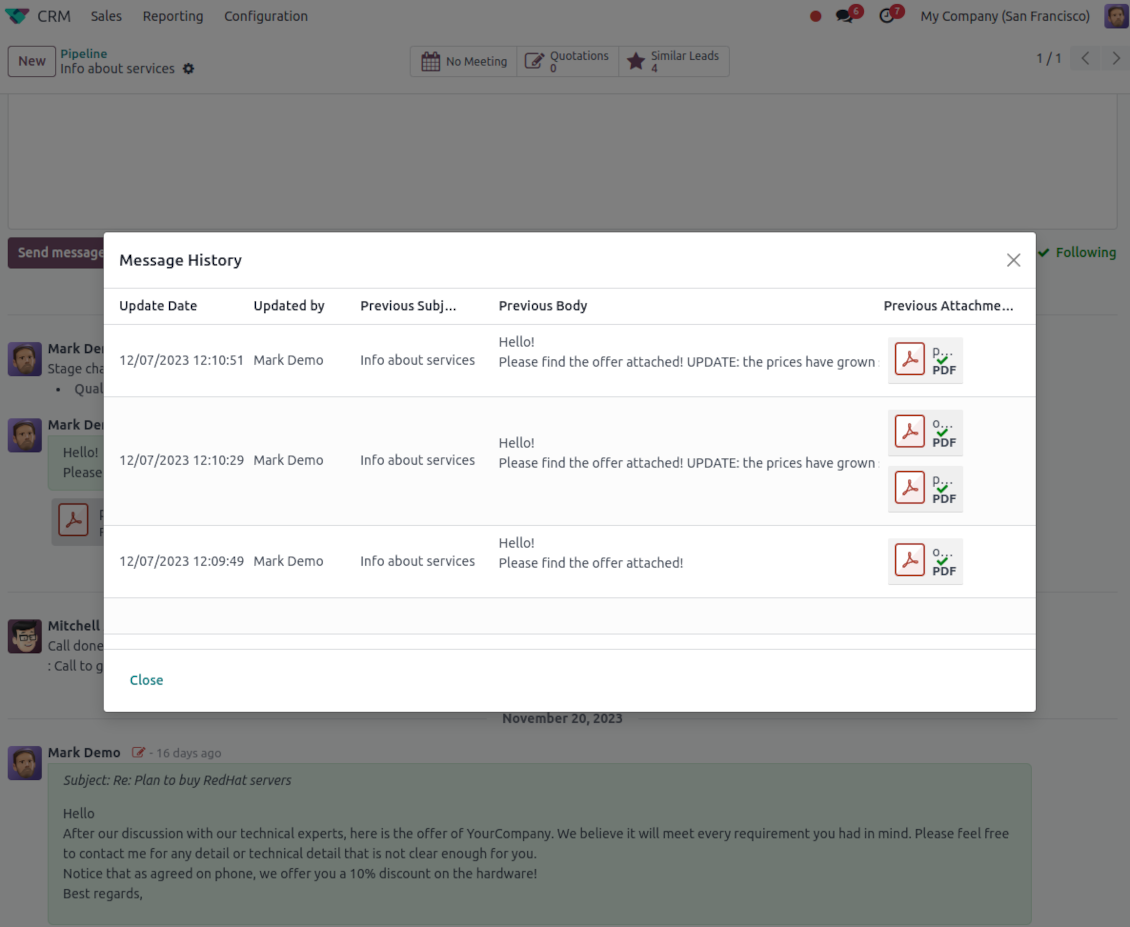
- Track what changed. Subject, body and attachment updates are stored with user and timestamp.
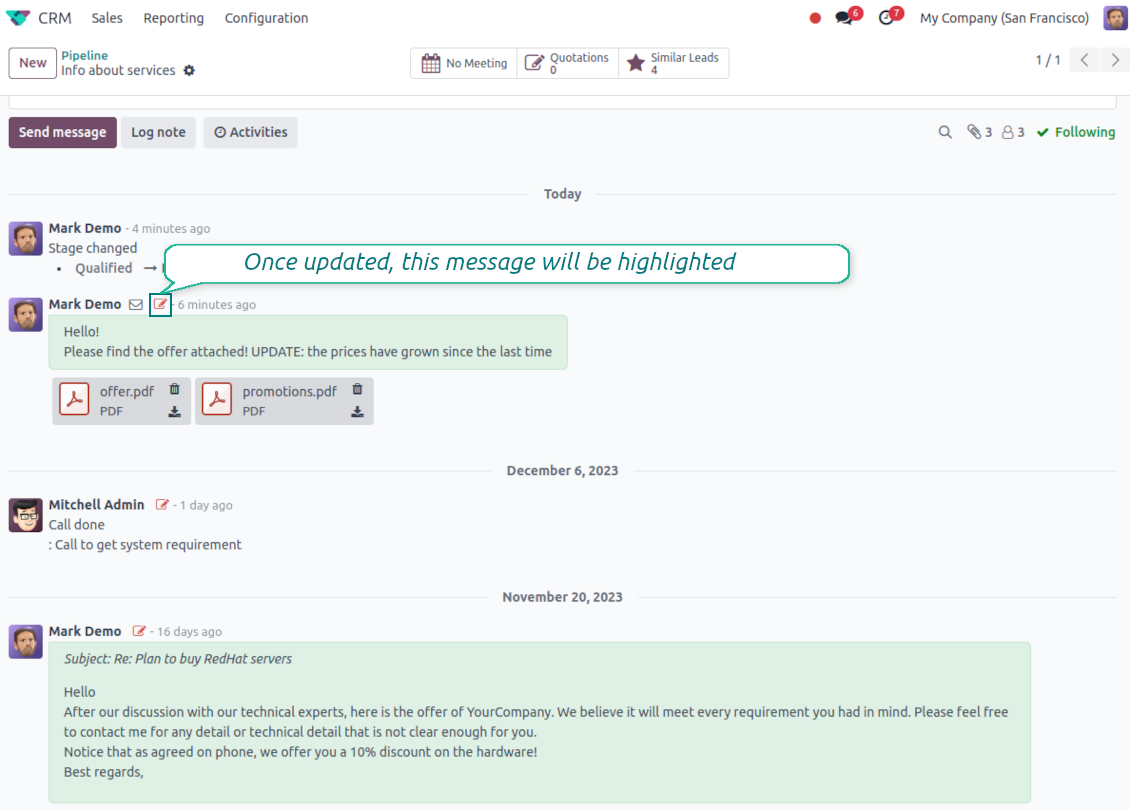
- Spot edited messages quickly. Modified entries show a history icon that opens the change log in one click.
Спремни за процену?
Почните бесплатним захтевом за демо или куповином у Odoo Apps Store.
Бесплатна персонализована демо база. Број телефона или кредитна картица нису потребни. Бесплатна доживотна ажурирања и стручна подршка током главне верзије Odoo.
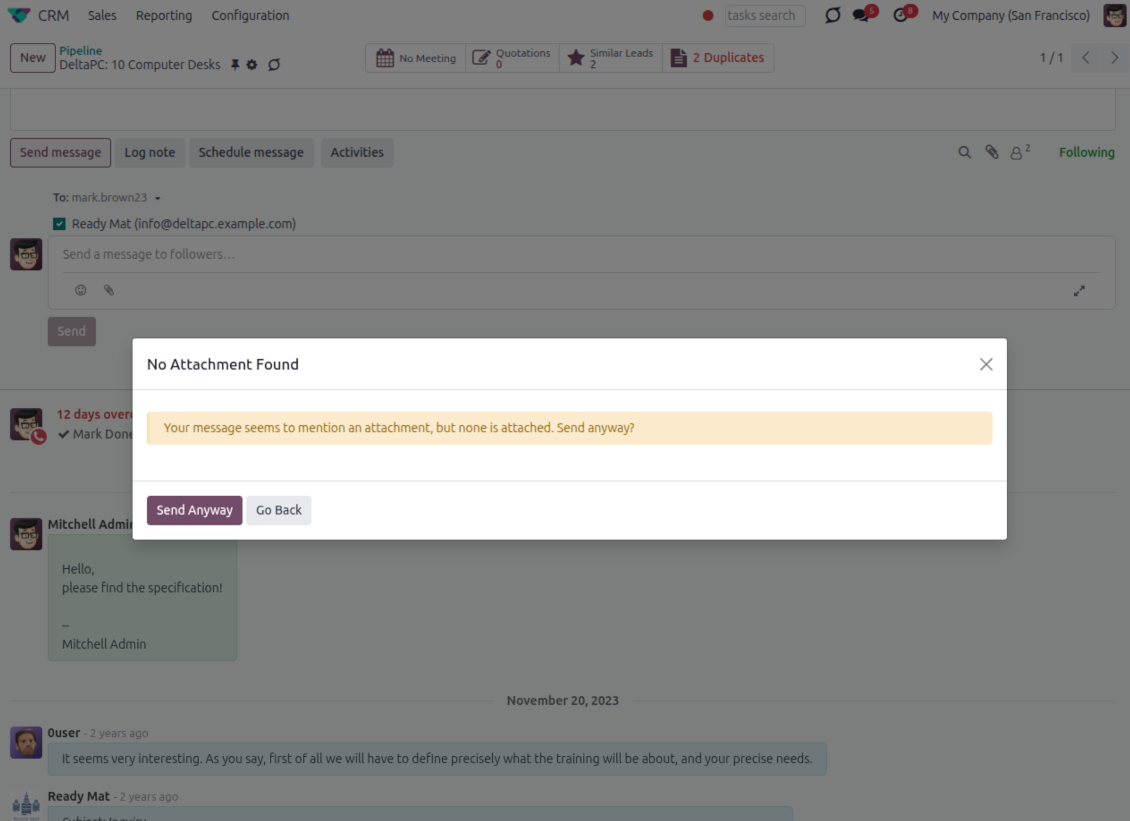
Catch missing attachments
Confirm forgotten attachments before they leave the composer
Attachment mention check
- Spot missing files before send. Odoo checks the message text when you mention an attachment.
- Works everywhere you write. The reminder appears in the full composer, quick reply and chat flows.
- Turn it off when not needed. Enable or disable the check from Messaging Suite settings.
Send-time confirmation
- Stop accidental sends. A dialog appears when the body mentions an attachment but none is attached.
- Let the user decide. Send Anyway and Go Back keep the flow moving without losing the draft.
- Adapt the wording. Adjust what counts as an attachment mention in settings when your team uses different phrases.
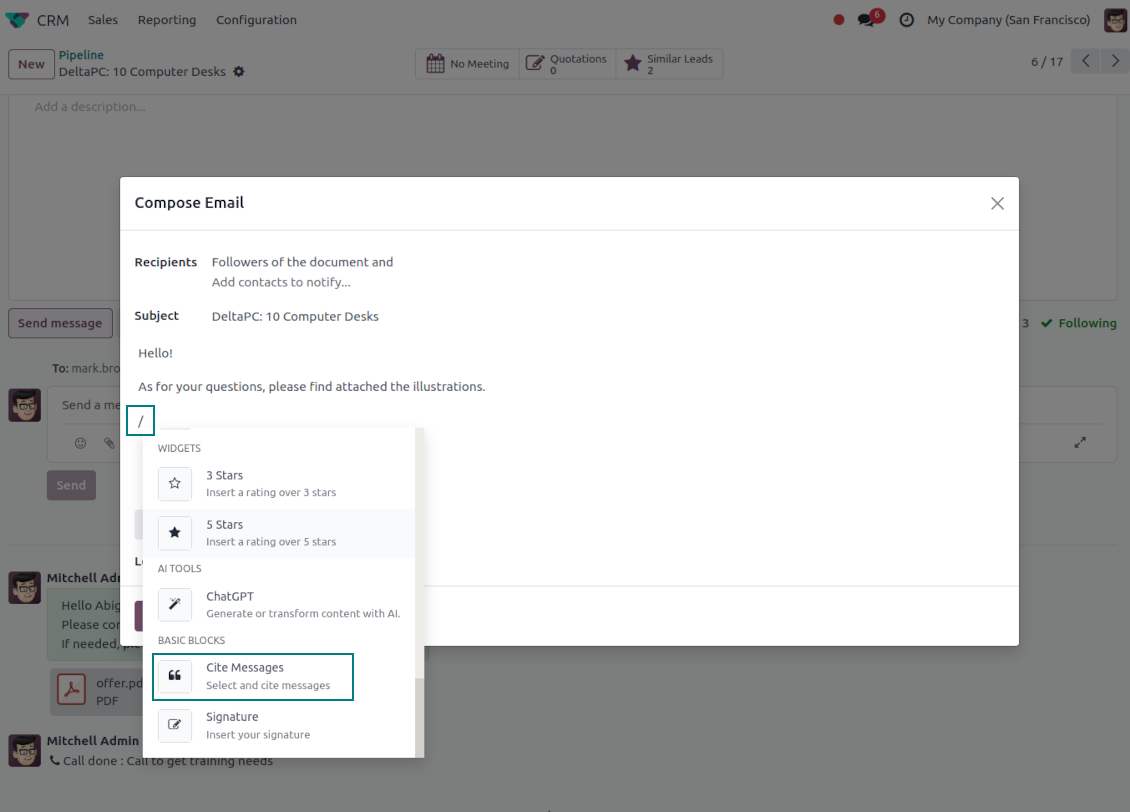
Message Citing
Quote earlier Odoo messages while you reply
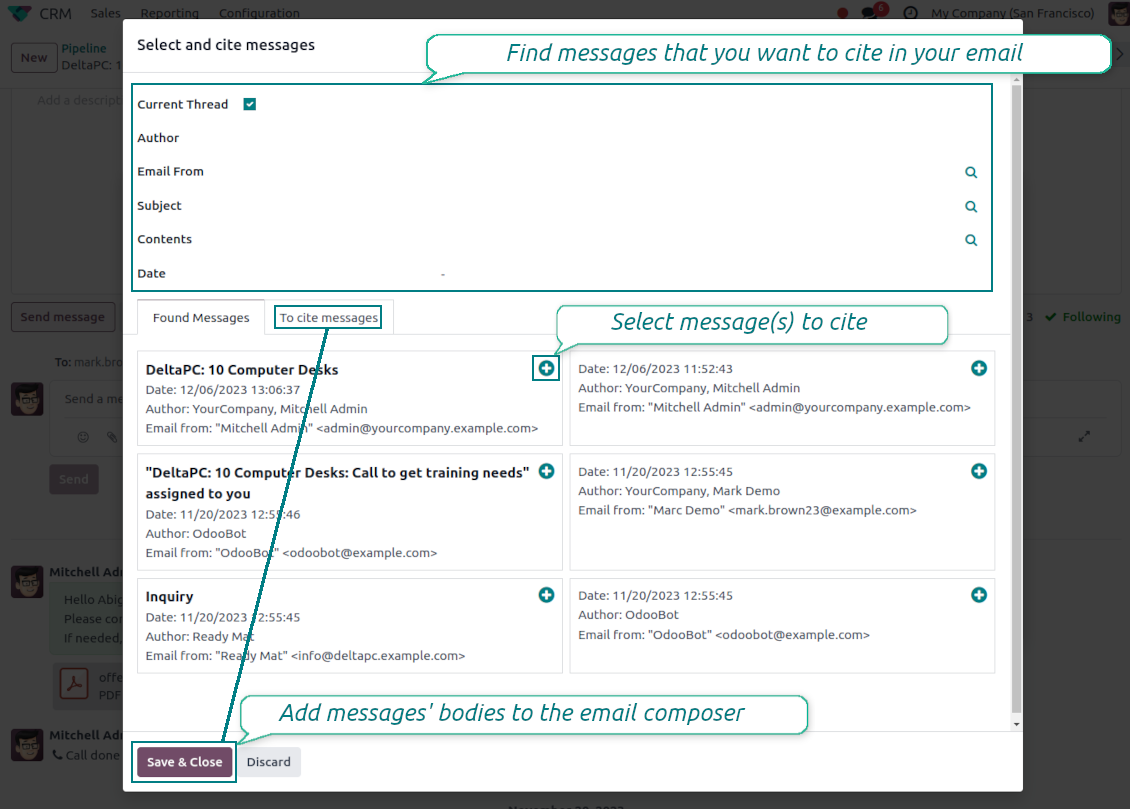
Cite while you compose
- Open Cite Message from the composer. Search earlier messages without leaving the email you are writing.
- Find the right message fast. Filter by author, content, date range, or limit results to the current thread.
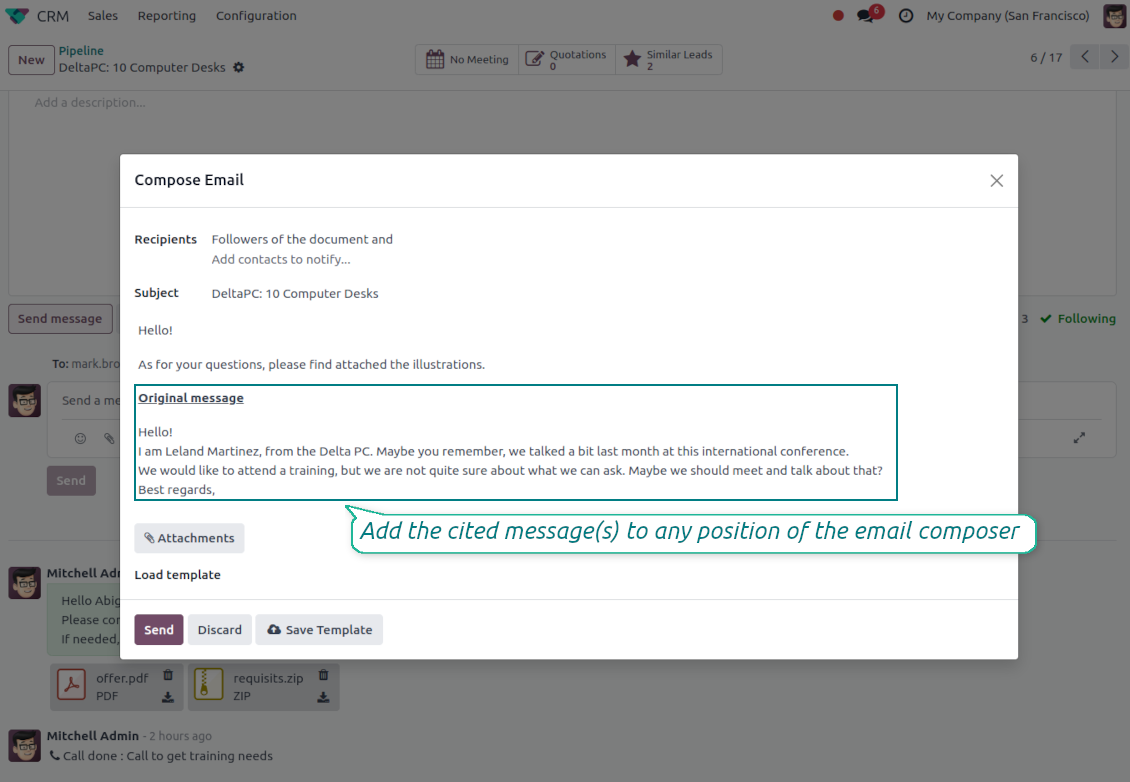
- Insert with one click. Add the selected message at the cursor position in the email body.
Readable quoted history
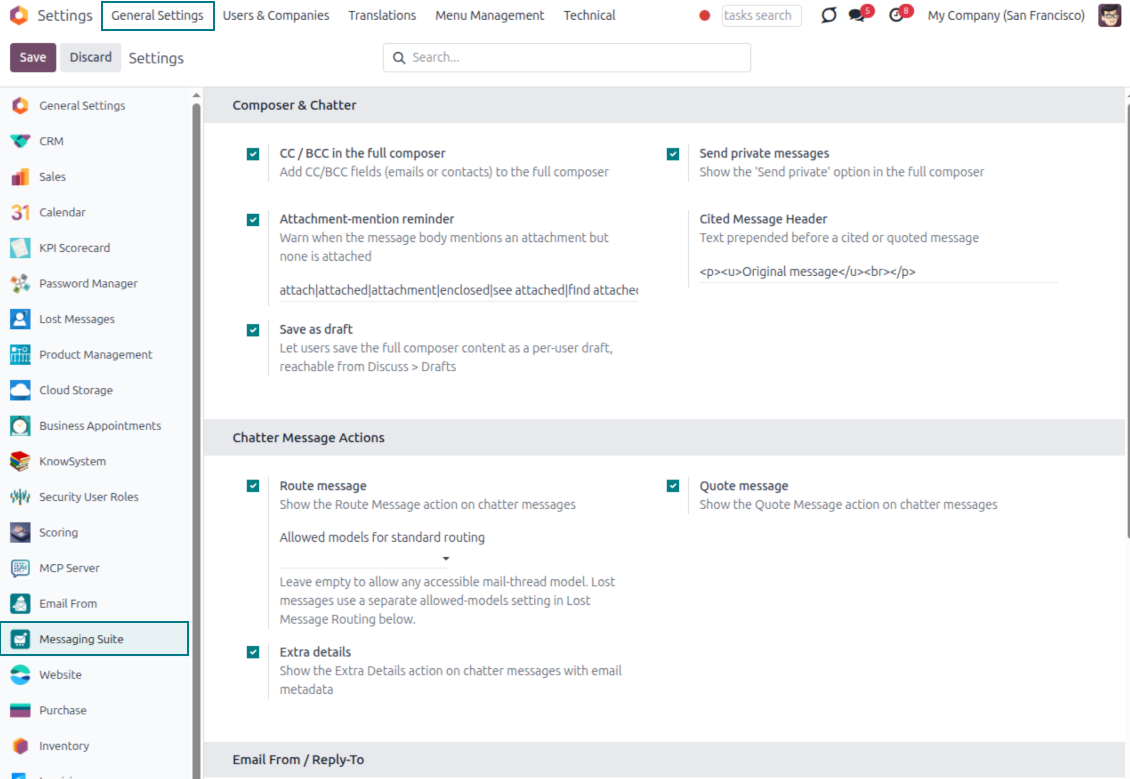
- Shape the quoted header. Define the text placed before every cited message.
- Reply with context. Help customers and colleagues see exactly which earlier message you refer to.
- Use across documents. Cite messages from any discussion while composing on another record.
Messaging Suite administration
One place to configure your messaging tools
One Messaging Suite settings page
- Turn features on or off. CC/BCC, drafts and attachment reminders are controlled from one place.
- Reach every related option. Open settings for routing, privacy, quoting, editing and sender addresses without leaving the suite.
- Set up once, use everywhere. Configure the whole messaging toolkit from a single administration screen.
Routing and access control
- Choose where messages may go. Define which documents can receive rerouted chatter messages.
- Keep lost emails separate. Unattached incoming mail keeps its own queue and routing rules.
- Decide who may reroute. Give routing rights only to the users who should move messages between documents.
Спремни за процену?
Почните бесплатним захтевом за демо или куповином у Odoo Apps Store.
Бесплатна персонализована демо база. Број телефона или кредитна картица нису потребни. Бесплатна доживотна ажурирања и стручна подршка током главне верзије Odoo.
Често постављана питања о Odoo Messaging Suite Odoo v.17
Које су политике ажурирања ваших алата?
Према важећим правилима Odoo Apps Store:
- Сваки модул купљен за верзију 12.0 и старију даје приступ свим верзијама до 12.0.
- Од верзије 13.0 свака верзија модула се купује засебно.
- Без обзира на верзију, куповина даје право на сва ажурирања и исправке у оквиру главне верзије.
Имајте у виду да тим faOtools не контролише та правила. За питања обратите се директно представницима Odoo Apps Store.
Како могу инсталирати вашу апликацију на Odoo.sh?
Најдиректнији приступ је да користите уграђени ток рада Odoo продавнице:
1. Отворите страницу модула и кликните дугме Deploy on odoo.sh
2. Након тога бићете преусмерени на GitHub страницу. Пријавите се на налог, затим кликните 'Create a new repo' или користите постојећи. Проверите да је спремиште приватно. Није дозвољено објављивати апликације под лиценцом OPL-1. Ако треба, направите нови repo за Odoo.sh пројекат
3. Затим идите на odoo.sh и кликните дугме Deploy. У искачућем прозору пошаљите одлуку и кликните 'Continue.' Ова радња покреће инсталацију.
Ови кораци ће инсталирати апликацију на продукциону грану пројекта. Ако желите да примените апликације на друге гране или да ажурирате модул, урадите следеће:
1. Отпремите изворни код апликације из Odoo продавнице
2. Урадите commit модула у потребно GitHub спремиште. Проверите да ниједна фасцикла/датотека апликације није игнорисана (тј. није у .gitignore репоа). Спремишта аутоматски прави odoo.sh и могу подразумевано садржати важне ставке (нпр. /lib). Отпремите све директоријуме, поддиректоријуме и датотеке модула без изузетака
3. Примените циљну грану odoo.sh пројекта или, ако то претпостављају подешавања, сачекајте да се аутоматски изгради.
Како да инсталирам вашу апликацију на сопствени сервер?
2. Поново покрените Odoo сервер;
3. Укључите режим програмера (техничка подешавања);
4. Ажурирајте листу апликација (мени апликација);
5. Пронађите апликацију и притисните „Activate“/„Install“;
6. Пратите смернице на страници апликације ако постоје.
Приметио сам да ваша апликација има додатне додатке. Могу ли их купити накнадно?
Да, наравно. Истовремено Odoo аутоматски додаје све зависности у корпу, па треба искључити већ купљене алате да не платите двапут.
Поставио сам вашу апликацију на Odoo.sh и у тестовима видим упозорење/грешку
Црвено/наранџасто упозорење не утиче на функције апликације. Нажалост, наши модули понекад не прођу стандардне аутоматске тестове јер они претпостављају понашање које је у сукобу са циљевима апликације. На пример, мењамо обрачун цене, а тестови стандардног Odoo модула упоређују коначну цену са стандардним алгоритмом.
Пре свега проверите функције постављене базе. Да ли све ради исправно?
Ако и даље сматрате да упозорење утиче на стварне функције, контактирајте нас и пошаљите потпуне дневнике инсталације и потпун списак постављених модула (укључујући језгро и треће стране).
Могу ли да купим апликацију директно од ваше компаније?
Не, алате дистрибуирамо само преко званичне продавнице апликација Odoo.
Желео бих да добијем попуст
Нажалост, немамо техничких средстава да понудимо појединачне цене.
Могу ли да инсталирам апликацију на своју Odoo Online (SaaS) базу?
Не, апликације трећих страна не могу се користити на Odoo Online. Нажалост Odoo SaaS то блокира.
Ваш алат зависи од других апликација. Треба ли да их купим?
Да, алату су потребни сви модули наведени у зависностима да би радио исправно. Цена на страници апликације већ укључује све потребне зависности.
Која је цена модула у америчким доларима? Зашто се променила?
Цена наших модула је у еврима. Odoo продавница прерачунава цене у друге валуте по свом интерном курсу. Зато се цена у америчким доларима може променити кад се курс ажурира.
Текстови апликације и сајта на језицима осим енглеског рађени су уз помоћ ВИ и усклађени са званичним Odoo преводима. Ако уочите грешку, пошаљите тикет о исправности превода и исправићемо.
Odoo демонстрационе базе (прегледи уживо)
За ову апликацију можемо обезбедити бесплатну персонализовану демо базу.
Да нас контактирате није потребан број телефона ни кредитна картица. Довољна је кратка регистрација е-поштом која не траје више од 30 секунди.
На ваш захтев припремићемо појединачну базу за преглед уживо, где можете око две недеље радити тестове и проверавати претпоставке.
Пријављивање грешака
Ако наиђете на грешке или недоследно понашање, слободно нас контактирајте. Гарантујемо исправке у року од 60 дана од куповине и веома смо заинтересовани да унапређујемо алате и после тог периода.
Да нас контактирате није потребан број телефона ни кредитна картица. Довољна је кратка регистрација е-поштом која не траје више од 30 секунди.
У захтев укључите што више детаља: снимке екрана, дневнике Odoo сервера, пун опис како поновити проблем и тако даље. Обично треба неколико радних дана да се припреми радни план (ако је грешка потврђена) или смернице шта треба урадити (у супротном).
Јавни захтеви за функције и идеје модула (бесплатан развој)
Снажно смо мотивисани да побољшамо своје алате и били бисмо захвални на свакој повратној информацији. Ако су ваши захтеви од јавне користи и могу се ефикасно спровести, тим ће их укључити у нашу листу задатака.
Таква листа задатака се обрађује редовно и не подразумева додатне накнаде. Иако не можемо обећати рокове и коначан дизајн, то може бити добар начин да добијете жељене функције без улагања и ризика.
Да нас контактирате није потребан број телефона ни кредитна картица. Довољна је кратка регистрација е-поштом која не траје више од 30 секунди.

The tool to flexibly structure Odoo attachments in folders and synchronize directories with cloud clients: Google Drive, OneDrive/SharePoint, Nextcloud/ownCloud, Dropbox, Amazon S3, Box, and NAS. DMS. File Manager. Document management system
398€

The tool to build a deep and structured knowledge base for internal and external use. Knowledge System. KMS. Wiki-like revisions.
398€
The tool to automatically synchronize Odoo attachments with OneDrive files in both ways
487€
The tool to set up KPI targets and control their fulfillment by periods. KPI dashboards. Dashboard designer. KPI charts

The tool to automatically synchronize Odoo attachments with Google Drive files in both ways
487€
The tool for time-based service management from booking appointments to sales and reviews
398€

The tool to design, generate, and periodically send reports and reminders. Report designer. List generator. Auto reminders