OneDrive / SharePoint Odoo Integration v.17
The tool to automatically synchronize Odoo attachments with OneDrive files in both ways
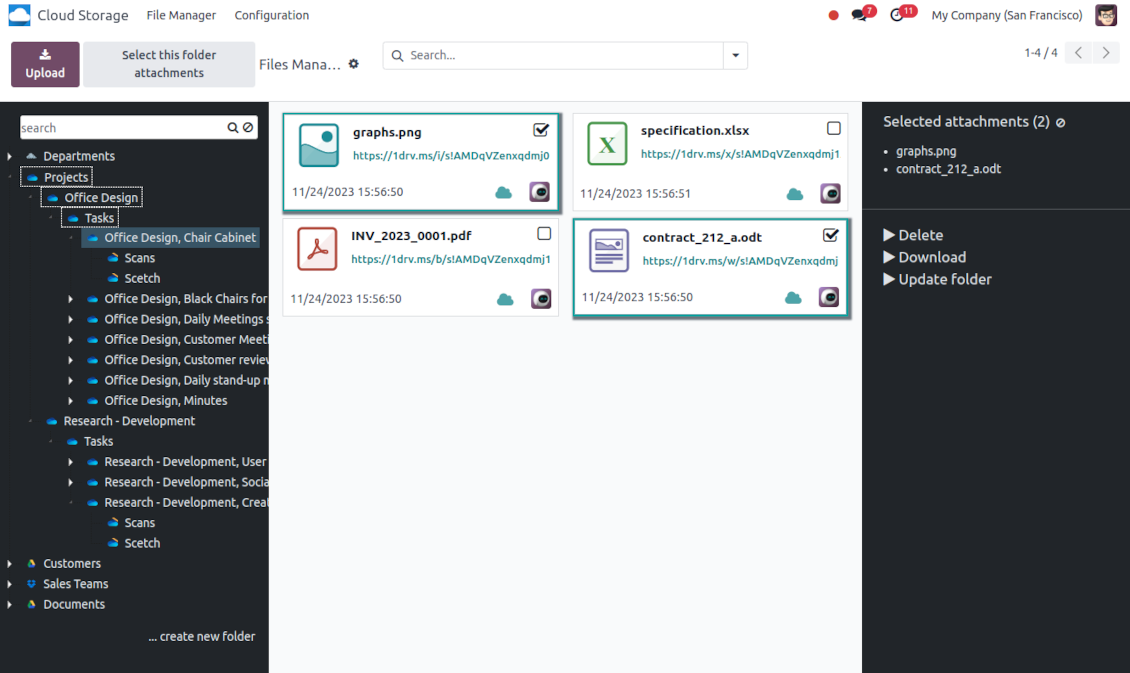
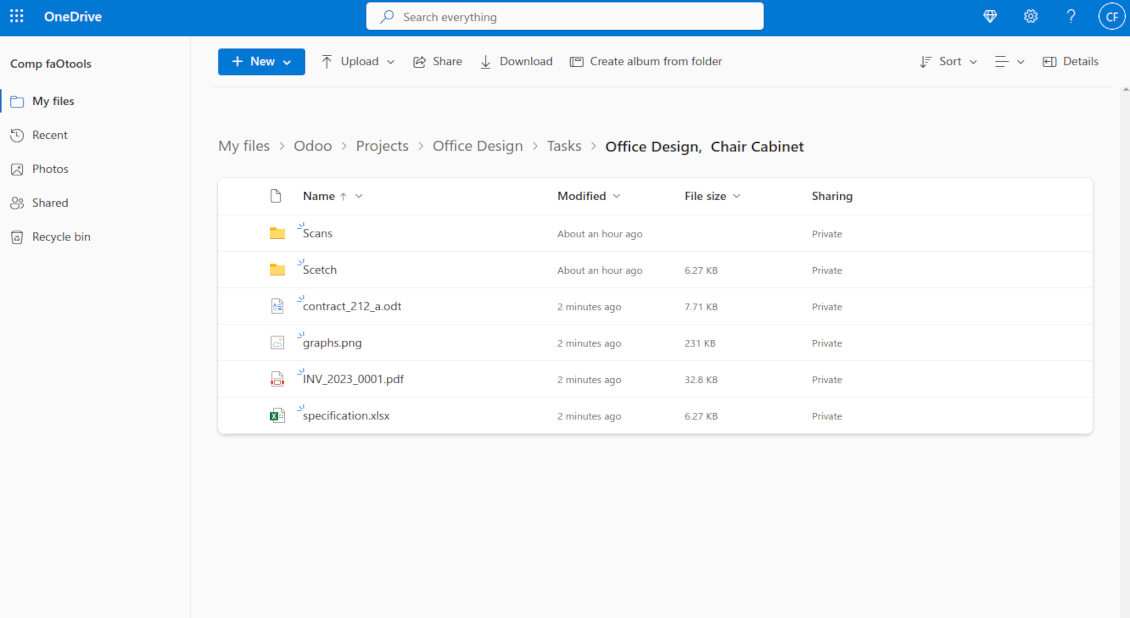
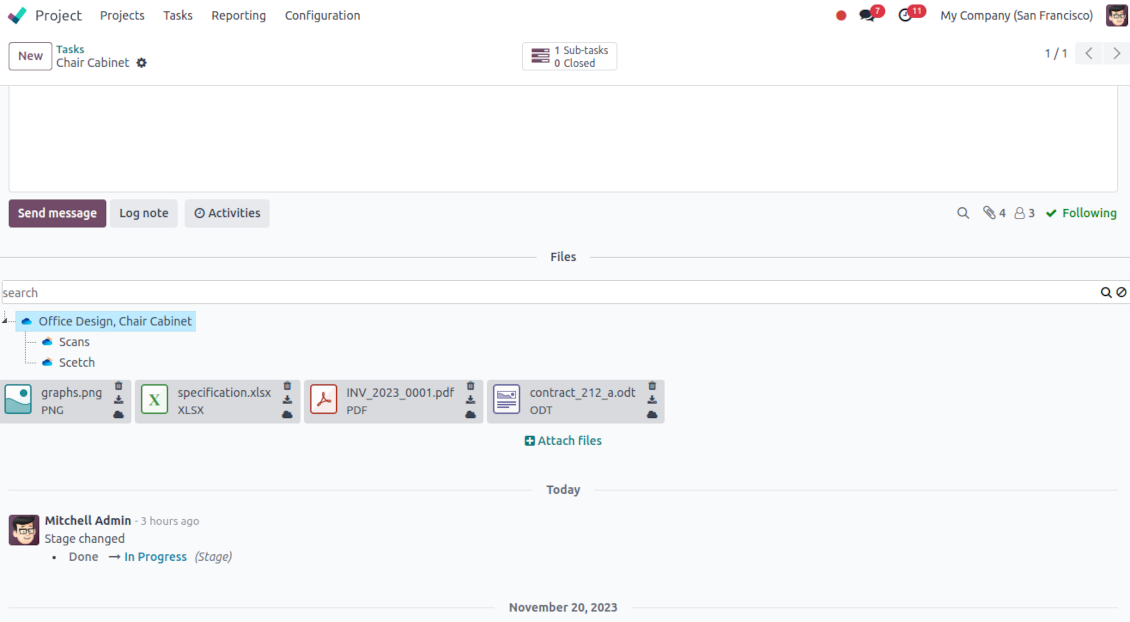
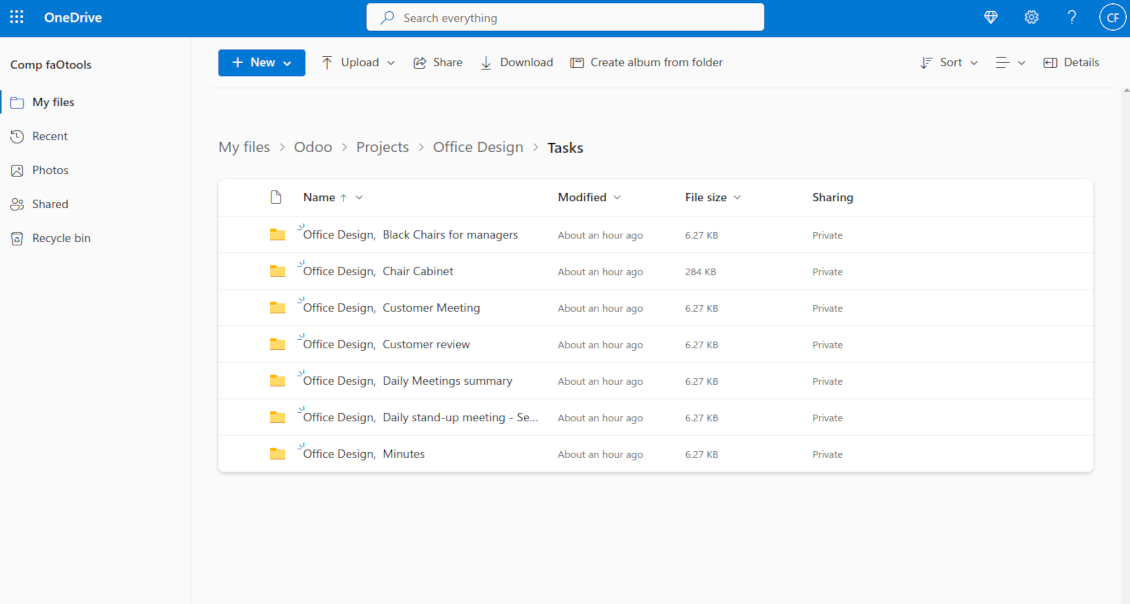
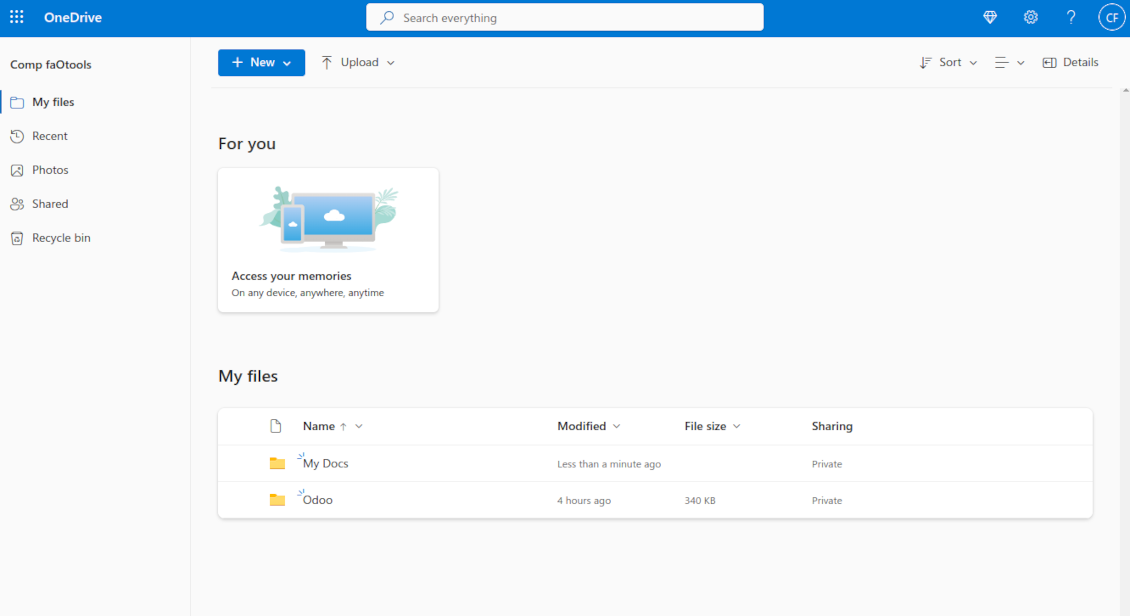
This is the tool to integrate OneDrive/SharePoint features with Odoo folders and files. The app automatically stores Odoo attachments and directories in SharePoint/OneDrive and provides instant access to them via web links.
Automatic folders' structure
Decide which Odoo document types should have their own folders trees and synchronize those to OneDrive/SharePoint
Automatic regular sync
Rely on auto-synchronization between Odoo and OneDrive/SharePoint based on scheduled jobs. No manual interaction is required
Bilateral sync
Odoo sends attachments to OneDrive/SharePoint and retrieves files from there. Binary content is kept in clouds, while Odoo provides direct access to synced items
Cloud synchronization history
Control OneDrive/SharePoint sync logs right in Odoo. Export and share those in case of any issues. Be notified of any client disconnections
File manager interface
Manage synced folders and attachments from a single Odoo view. Comfortably navigate by directories. Search and download files one by one or in batch. Upload and move attachments to folders
Attachment box
Organize files of any Odoo object in a set of subfolders. Instantly access folders and files in the attachment box and in OneDrive / SharePoint.
Works well with SharePoint. Supportive team
We've been using this with SharePoint and it's been working great. One of the best things is having everything, including logs right in Odoo's interface, so you can actually see what's going on. It's also super convenient that you can view or download synced files from the attachment box without having to leave the page or even log in to Sharepoint.
Setup was pretty smooth for us. When we had a few questions about setting up the folder hierarchy and priorities, the developer team got back to us in just a couple of hours and helped us figure it out. Great support and great extension!
Great support, assistance and very good connector!
We are very happy with the support we received when configuring the Sharepoint - Odoo connector. The connector has great functionalities.
All our questions were answered very fast (within one day).
FaOtools helped us optimising our connector and assisted us with future improvements.
We really recommend this connector.
very professional app, excellen t customer service
This app is very well programmed and does its job very well. But the best is the excellent customer service who also helps when the problem lies somewhere else. You receive a lot for your money.
An impressive app and world-class support
I have been very impressed by the way the OneDrive / SharePoint Odoo Integration module synchronises content in both directions and allows me to share documents in Odoo with my SharePoint site. Above all the technical support is top-notch, which greatly increases the value of this product. I highly recommend this product for anyone considering synchronising Odoo with SharePoint/OneDrive.
Works fine, good support
The first experience with the module is excellent. I had some trouble to configure things right on the Microsoft-side, but the team provided quick and good support.
How synchronization works
Automatic two-sided sync
-
Configure sync for one or multiple OneDrive / SharePoint instances
-
Integration is based on scheduled jobs and is fully automatized. The app regularly checks changes in systems and runs sync operations
-
Synchronization is bilateral. Updates in Odoo are reflected in OneDrive / SharePoint (direct sync); changes in OneDrive / SharePoint modify Odoo folders and attachments (backward sync)
-
Cloud connection with OneDrive / SharePoint might be reset. In this way, the app assumes getting back all items back to Odoo (reverse sync)
-
Odoo folders and attachments might be re-attached to a new cloud client from OneDrive / SharePoint. Hence, items will be first taken back to Odoo (reverse sync) and then will be put into the new cloud storage (direct sync)
Queue-based synchronization
-
Once in 15 minutes, the app examines updates in Odoo and OneDrive / SharePoint to prepare a synchronization queue
-
Folders' checks follow the First-In-First-Out (FIFO) principle. So, directories that have not been examined for the longest will be processed first
-
Once in 15 minutes, the sync queue is run by the special scheduled job. Firstly, the most important (blocking) tasks would be done
-
Control planned jobs and their fulfillment in the special Odoo logs interface (Cloud Storage > Configuration > Sync Logs). Subscribe for particular cloud clients notifications
-
If the app faces sync failures, it will re-try operations afterward. Sync queue processing would not be stopped if there are items not blocked by such failures
Odoo attachments for OneDrive / SharePoint: direct sync
-
Direct sync prepares the folders' hierarchy and uploads Odoo attachments for OneDrive / SharePoint
-
Direct sync checks whether attachments are added or deleted for synced directories. If so, they would be created or removed in OneDrive / SharePoint. In particular, it means that any file added to a folder-related Odoo object (e.g. Quotation), would be automatically moved to a linked cloud client
-
Direct sync makes all synced Odoo attachments change their type to a link (URL), while binary content is removed with one of the next Odoo cleaners. So, no actual files would be stored on your Odoo server
-
Direct sync checks whether a new folder is added. Disregarding whether it is done manually or automatically, the app would generate a peer directory in OneDrive / SharePoint
-
Direct sync checks whether there are any updates in folders. If so, such changes are reflected in OneDrive / SharePoint
OneDrive / SharePoint files and folders for Odoo: backward sync
-
Backward sync checks whether any files or subfolders are added to OneDrive / SharePoint folders. If so, the app would create URL attachments/subdirectories inside linked Odoo directories (and hence Odoo objects if any)
-
Backward sync checks whether there are any updates in folders or attachments. Such updates would be then reflected in Odoo
-
Backward sync checks whether any files are deleted/moved in a OneDrive / SharePoint document folder. If so, a linked Odoo attachment would be also unlinked or moved
-
If you deleted a OneDrive / SharePoint folder related to a folder rule / Odoo object, their child files would be deleted as well. Thus, Odoo would remove related attachments. The folders, however, will be recovered with a direct sync
-
In case of conflicts, direct sync changes are in general considered more important than backward updates.
Resetting or changing OneDrive / SharePoint: reverse sync
-
In case you decided to reset the connection with OneDrive / SharePoint, files would be moved back to Odoo
-
In case you decided to change the cloud client of a folder rule or a folder, files would be first taken back to Odoo, and then direct sync for a new client would be done
-
Reverse sync operations are prioritized to direct and backward sync operations
-
Not all items can be correctly reversed to Odoo due to cloud client peculiarities. For example, there are documents that may exist only in cloud storage environments. The app would try to convert such documents, but in some cases, it would require manual interactions.
Yapılandırma ve kurulum ipuçları: OneDrive / SharePoint Odoo Integration Odoo v.17
Python dependency
The tool depends on the external library 'microsoftgraph'. Install this library for your Odoo server through the command:
pip3 install microsoftgraph-pythonConfiguration and log in
- Turn on the option 'OneDrive / SharePoint Sync' (cloud Storage > Configuration > Configuration). The optional add-on OneDrive / SharePoint Odoo Integration is required
- Make sure your Microsoft user has full admin rights for OneDrive / SharePoint you want to connect to Odoo. This user is required only to grant permissions, the user data would not be kept in Odoo, and will not be used afterward. Besides, make sure the Microsoft email address you use does not have a redirection (usually happens when you configure your domain name, while the prime address is still one of Microsoft domains like @outlook.com, @office365, etc.)
- Go to your Azure Portal: https://portal.azure.com/#blade/Microsoft_AAD_RegisteredApps/ApplicationsListBlade
The app must be registered inside a directory (tenant). Microsoft no longer allows creating a new app outside one.
- If you already have a company Microsoft 365 / Azure directory, switch the portal (top right) to it and continue.
- If you only have a personal account (@outlook.com, @hotmail.com, @live.com) and see "these applications are associated with the account ... but are not contained within any directory", you do not have a directory yet. Sign up for a free Azure account with the same Microsoft account: https://azure.microsoft.com/free/ - Try Azure for free. This creates a Default Directory for you at no cost.
- Microsoft asks for a card for identity verification only; a temporary ~1 USD hold is placed and reversed. You are not charged for the directory or for the app registration.
- The directory (Microsoft Entra ID Free) and any app registered in it keep working independently of the 30-day / $200 Azure trial credit. That credit is for paid Azure resources you are not using here. No payment is required for our app.
- If the whole directory sits completely unused for a very long time (Microsoft's own threshold is around 200 days of no activity at all), Microsoft may email a warning and eventually retire it. Since Odoo calls this app every time it syncs, an active connection keeps the directory active - this only matters if you stop syncing entirely for months.
- Once you are in a real directory (not "Microsoft Services"), open App registrations there.
- Click 'New registration'
- Introduce a new name for the application and assign the redirect URI as [YOURODOOSITENAME]/one_drive_token (e.g. https://odootools.com/one_drive_token). As the supported account types choose 'Accounts in any organizational directory (Any Azure AD directory - Multitenant) and personal Microsoft accounts (e.g. Skype, Xbox)'.
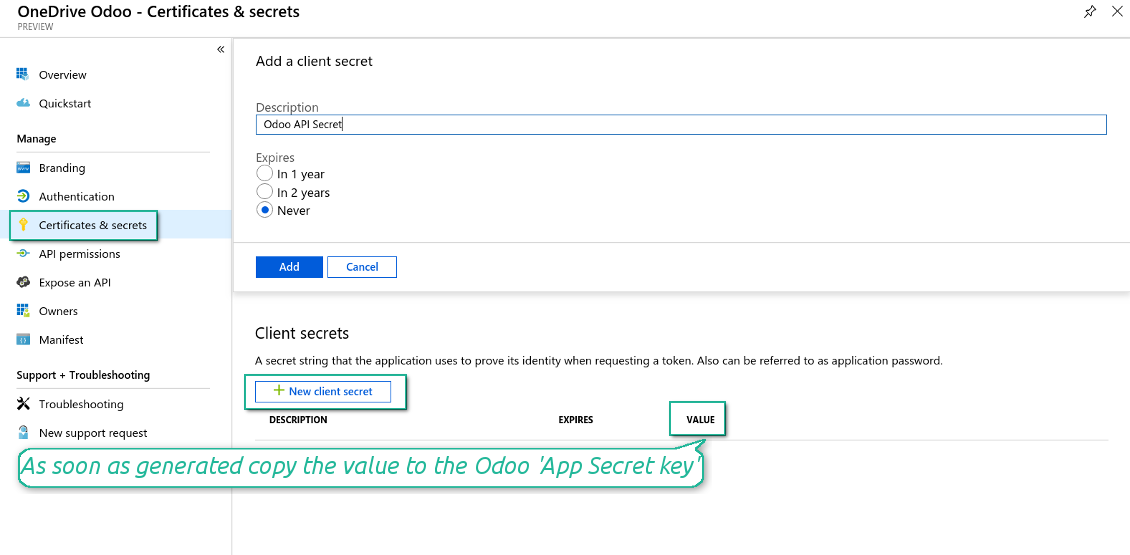
- Go to Certificates & secrets - Click 'New Client Secret'. Save somewhere the secret value
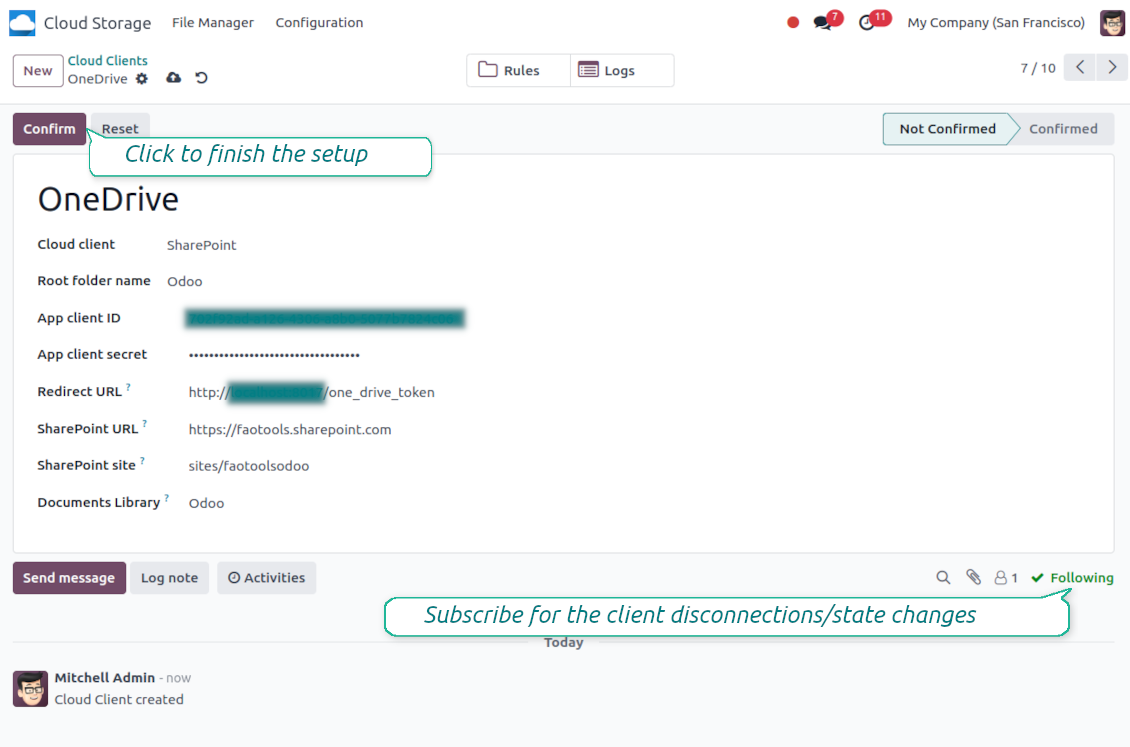
- Go to Odoo Cloud Storage > Configuration > Cloud Clients press 'Create'
- As a reference, introduce any name which would be clear to all users
- As a cloud client, choose 'OneDrive' or 'SharePoint' depending on the software you are using
- As a root folder name, enter a title that will be used as the parent OneDrive directory for all synced folders. For example, 'Odoo' or 'OdooERP'
- Copy 'Application Client ID' to the 'App client ID'
- Copy the secret value into the field 'App client secret'
- Insert previously generated redirect URL
- If you use SharePoint:
- Go to your SharePoint site and prepare a new documents library (drive). You might use one of the existing ones, e.g. 'Documents'. Odoo folder would be put there afterward, and it would be impossible to move it to another library
- The SharePoint URL should be of the type https://[URL]/. The last '/' is required - the site name should not be included. For example, https://odootools.sharepoint.com/
- SharePoint site should be either root (the very root SharePoint site), my_site_name (in that case it is considered as sites/my_site_name) or sites/my_site_name (instead of 'sites' it might be 'teams' and so on). There should be no '/' at the beginning or at the end. For example, sites/odootools
- As Documents Library use one created in SharePoint
- Press 'Confirm'. Odoo redirects you to the Microsoft login page. Check in the system, agree with all conditions, and grant all permissions asked. If Microsoft shows an account already signed in and says it does not exist in tenant 'Microsoft Services' (or any other unrelated tenant), do not click that row. Click 'Use another account' and sign in with the Microsoft account that owns the app's directory
- After login, OneDrive redirects you back to Odoo. OneDrive - Odoo synchronization is ready to be done
- Apply the newly created cloud client to folder rules and/or manual folders which should be synced to that OneDrive or SharePoint instance
- Await the sync scheduled job to be started. For testing purposes only: trigger integration manually from Cloud Storage > Configuration > Configuration > the button 'Launch sync'.
Watch also the configuration video
Register a new Azure application
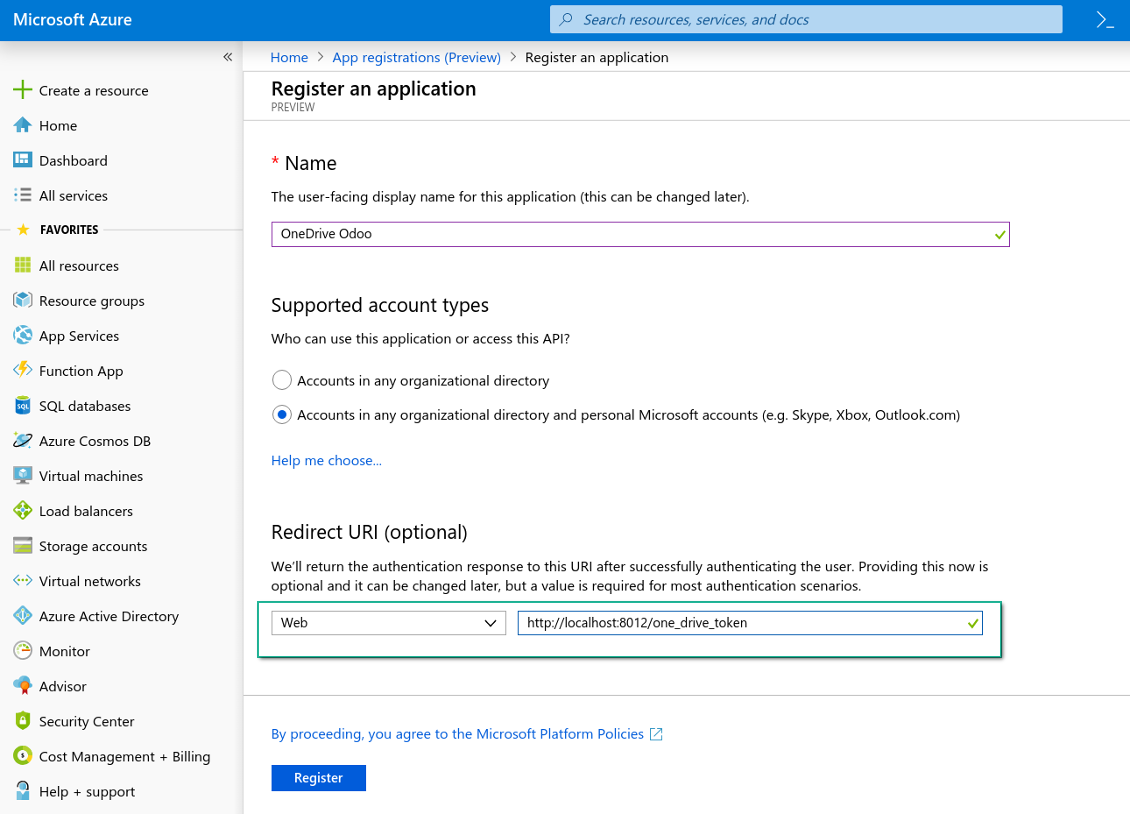
New OneDrive Web platform and the redirect URL
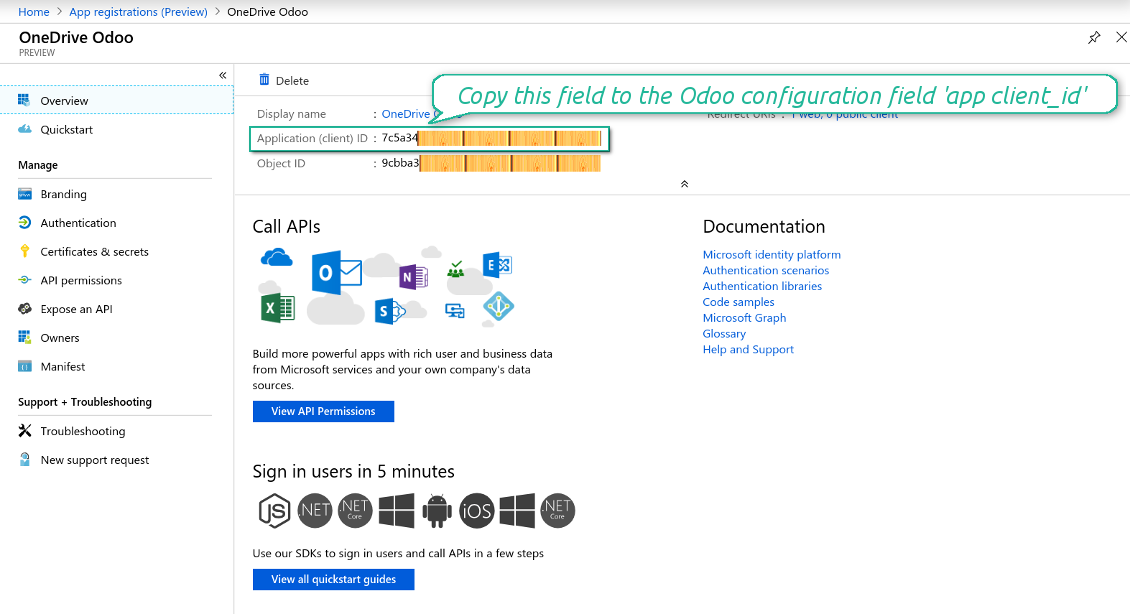
Generate a new secret for the Azure application
Enter the configuration keys in Odoo
Hakkında sık sorulan sorular OneDrive / SharePoint Odoo Integration Odoo v.17
Eşitlenen görselin bulut bağlantısına tıklayınca bir hata görüyorum
«This item might have been deleted, expired, or you might not have permission to access it. Contact the owner of this item for more information.» hatası, photos.onedrive.com hizmetine giriş yapmadığınızı gösterir.
Senkronize edilen dosyalar nerede saklanır? Odoo ve bulutlarda çoğaltılır mı?
Uygulama, eklerin ikili içeriğinin Odoo sunucusu yerine Cloud Client'te tutulduğunu varsayar. Bu yüzden Odoo'daki bu ekler URL tipine dönüşür ve onlara istediğiniz zaman ek kutusundan veya Cloud Client'ten erişebilirsiniz.
Kurulumdan sonra elle işlem gerekmez; senkronizasyon tamamen otomatiktir. Hangi Odoo belge tiplerinin senkronize edileceğine karar verin ve her biri için ilgili modeli ayarlayın (müşteriler, satış veya satın alma siparişleri, görevler, projeler vb.).
Aynı belge türü için birkaç klasörüm olabilir mi? Örneğin iç projeler ve müşteri projeleri?
Evet, yapabilirsiniz. Bunun için her biri için bir kural hazırlayın ve filtre uygulayın: örneğin proje türüne göre.
Bir belgenin kesin atanması için filtreleri birbirini dışlar hale getirin. Örneğin: «müşteri ama tedarikçi değil», «tedarikçi ama müşteri değil». Aksi halde belgenin klasörü bir modelden diğerine atlar.
Senkronizasyonu gerçek zamanlı yapmak mümkün mü?
Hayır. Gerçek zamanlı senkronizasyondan kaçınmamızın güçlü nedenleri var:
Performans. Senkron gerçek zamanlıysa her dosya yüklemesi yükleme ekranı gösterir.
Çakışmalar. 2 kullanıcı aynı anda bir öğeyi değiştirirse durum çözümsüz kalabilir. Düzenli işlerde sonra düzeltebiliriz; gerçek zamanda kuyruk gerekir ve bu daha kafa karıştırıcı olur.
İşlevsellik. Özellikle yeniden adlandırma ve yeniden yapılandırma. Geri senkron dizin mantığına sıkı bağlıdır ve her senkronde öğelerin %100'ü kontrol edilir. Her güncellemeden sonra saniyede binlerce istek olur. Yoksa değişiklikler kaybolur.
Bulutlardaki varsayılan klasör adlarını değiştirebilir miyim?
Her belge türü için model dizinlerine (satış siparişleri, fırsatlar, tedarikçiler vb.) kendi adınızı verebilirsiniz.
Nesne klasörleri (SO-001, John Smith vb.) için araç, Odoo'nun görünen ad yöntemine dayanır. Bunu bir ad ifadesi tanımlayarak değiştirebilirsiniz. Sözdizimi Odoo e-posta şablonlarıyla aynıdır.
Senkronizasyon işlerinin sıklığını değiştirebilir miyim?
Hayır, 15. sürümden itibaren zamanlanmış işleri değiştirmemelisiniz. En kararlı ve hızlı bağlantı için her 15 dakikada bir çalışacak şekilde eniyileştirilmişlerdir.
Odoo sunucusunun zaman aşımlarının en az 15 dakika (900 saniye) olduğundan emin olun.
Senkronizasyonu bir süre durdurmanız gerekirse, bunu ilgili bulut istemcisi formunda yapın.
Ekleri birkaç bulut istemcisine senkronize edebilir miyim
Evet, sürüm 15'ten itibaren birden fazla bağlantı kurabilirsiniz. Böylece bazı klasörler bir bulut istemcisine, diğerleri başka birine senkronize edilir.
Aynı klasörü aynı anda birkaç bulut deposuna senkronize etmek hiçbir şekilde mümkün değildir.
Bulutlarımızda özel bir düzenleyici kullanıyoruz (ör. OnlyOffice, Office 365 vb.). Dosyalar o düzenleyicide açılır mı?
Evet, bulut istemcinizin yapılandırmasına bağlı olarak.
Yalnızca Cloud Storage Solution uygulaması yeterli mi?
Sürüm 15'ten itibaren uygulama tek başına ekleri klasörlere yerleştirmek ve bir dosya yöneticisi arayüzü sunmak için kullanılabilir.
Hedef bulut istemcilerinden birine bağlantı kurmaksa, en az bir isteğe bağlı istemci uygulaması kurulmalıdır.
Bir klasör kuralını değiştirdiğimde ne olur?
Klasör kuralı değişince klasör listesi de değişir. Klasör kuralların koşullarına artık uymuyorsa kaldırılır. Dosyalar senkronize edildiyse ters senkron onları Odoo'ya döndürür ve Cloud Client'tan siler.
Belge nesnesi klasör kuralına uymuyorsa klasörü oluşturulmaz. Daha sonra uyarsa ilgili klasör oluşturulur.
Araclarinizin güncelleme politikalari nedir?
Güncel Odoo Apps Store politikalarina göre:
- 12.0 ve önceki sürüm için alinan her modül, 12.0'a kadar tum surumlere erişim verir.
- 13.0 surumunden itibaren her modül sürümü ayri satin alinmalidir.
- Surumden bagimsiz olarak satin alma, o ana sürüm içindeki tum güncelleme ve hata duzeltmelerine hak verir.
faOtools ekibi bu politikalari kontrol etmez. Sorulariniz için doğrudan Odoo Apps Store temsilcilerine ulasin.
Uygulamanizi Odoo.sh üzerine nasil kurarim?
En doğrudan yaklasim, Odoo magazasinin yerlesik is akisidir:
1. Modül sayfasini acin ve Deploy on odoo.sh düğmesine tiklayin
2. GitHub sayfasina yonlendirilirsiniz. Hesabiniza giriş yapin, ardindan Create a new repo'ya tiklayin veya mevcut birini kullanin. Depo özel olmalidir. OPL-1 lisansli uygulamalarin yayimlanmasi yasaktir. Gerekirse Odoo.sh projeniz için yeni bir depo oluşturun
3. Ardindan odoo.sh'e gidin, Deploy'a tiklayin, karari onaylayin ve Continue'ya tiklayin. Kurulum başlar.
Bu adimlar uygulamayi projenin production dalina kurar. Diğer dallar veya modül guncellemesi için:
1. Kaynak kodu Odoo magazasindan indirin
2. Modulu gerekli GitHub deposuna commit edin. Hiçbir uygulama klasörü/dosyasi .gitignore'da olmamalidir. odoo.sh'in oluşturduğu depolar varsayilan olarak önemli yollari (örneğin /lib) yok sayabilir. Tum modül dizinlerini ve dosyalarini istisnasiz yükleyin
3. odoo.sh projesinin hedef dalini deploy edin veya ayarlariniz otomatik derlemeyi ongoruyorsa bekleyin.
Uygulamayi kendi sunucuma nasil kurarim?
2. Odoo sunucusunu yeniden baslatin;
3. Gelistirici modunu acin (teknik ayarlar);
4. Uygulama listesini güncelleyin (Uygulamalar menusu);
5. Uygulamayi bulun ve Activate/Install düğmesine basin;
6. Varsa uygulama sayfasindaki yonergeyi izleyin.
Uygulamanizin ek eklentileri var. Sonradan alabilir miyim?
Evet. Odoo tum bagimliliklari sepete otomatik ekler: çift odemeyi onlemek için daha önce satin alinan araclari cikarin.
Uygulamayi Odoo.sh üzerine kurdum ve testlerde uyari/hata goruyorum
Kirmizi/turuncu uyari uygulamanin özelliklerini etkilemez. Bazen modüllerimiz standart otomatik testleri gecemez, çünkü bunlar uygulamamizin amaclarina aykiri davranis bekler. Örneğin fiyati farkli hesaplariz, Odoo testleri ise nihai fiyati standart algoritmayla karsilastirir.
Önce dagitilan veritabaninin özelliklerini kontrol edin. Her sey doğru calisiyor mu?
Uyarinin gerçek özellikleri etkiledigini dusunuyorsaniz bize yazin; tam kurulum günlüklerini ve dagitilan modüllerin tam listesini (çekirdek ve üçüncü taraf) gönderin.
Uygulamanizi doğrudan sizden satin alabilir miyim?
Hayir, araclari yalnizca resmi Odoo uygulama magazasi üzerinden dagitiyoruz.
Indirim almak istiyorum
Ne yazik ki bireysel fiyat sunacak teknik imkanimiz yok.
Uygulamayi Odoo Online (SaaS) veritabanima kurabilir miyim?
Hayir, üçüncü taraf uygulamalar Odoo Online'da kullanilamaz. Odoo SaaS bunu engeller.
Aracinizin başka uygulamalara bagimliligi var. Onlari da almali miyim?
Evet, aracimizin doğru calismasi için bagimliliklarda isaretlenen tum modullere ihtiyaci vardir. Uygulama sayfasindaki fiyat bu bagimliliklari zaten içerir.
Modulun ABD dolari fiyati nedir? Neden değişti?
Modullerimizin fiyati euro cinsinden belirlenir. Odoo magazasi fiyatlari kendi ic kuruna göre diğer para birimlerine çevirir. Bu yüzden ABD dolari fiyati kur guncellendiginde degisebilir.
İngilizce dışındaki dillerdeki uygulama ve web sitesi metinleri yapay zeka desteklidir ve resmi Odoo çevirileriyle hizalanır. Bir hata görürseniz, çeviri doğruluğu bileti gönderin ve düzeltiriz.
Odoo demo veritabanları (canlı önizlemeler)
Bu uygulama için ücretsiz kişiselleştirilmiş bir demo veritabanı sağlayabiliriz.
Bize yazmak için telefon veya kredi kartı gerekmez. Yalnızca 30 saniyeyi aşmayan kısa e-posta kaydı yeter.
İsteğiniz üzerine yaklaşık iki hafta boyunca test yapabileceğiniz ve varsayımları kontrol edebileceğiniz bireysel bir canlı önizleme veritabanı hazırlarız.
Hata bildirimi
Hata veya tutarsız davranış görürseniz bize yazın. Satın alımdan sonra 60 gün içinde düzeltme garantisi veririz; bu süreden sonra da araçları geliştirmeye devam ederiz.
Bize yazmak için telefon veya kredi kartı gerekmez. Yalnızca 30 saniyeyi aşmayan kısa e-posta kaydı yeter.
İstekte mümkün olduğunca ayrıntı verin: ekran görüntüleri, Odoo sunucu günlükleri, sorunu nasıl yeniden üreteceğinizin tam açıklaması. Genellikle birkaç iş günü içinde (hata doğrulanırsa) çalışma planı veya (değilse) yönergeler hazırlanır.
Genel özellik talepleri ve modül fikirleri (ücretsiz geliştirme)
Araçlarımızı geliştirmeye güçlü şekilde motiveyiz ve her geri bildirime minnettarız. Gereksinimleriniz kamuya yararlıysa ve verimli uygulanabilirse ekip bunları yapılacaklar listesine alır.
Böyle bir yapılacaklar listesi düzenli işlenir ve ek ücret varsaymaz. Son tarihler ve nihai tasarım sözü veremesek de istenen özellikleri yatırım ve risk olmadan almanın iyi bir yolu olabilir.
Bize yazmak için telefon veya kredi kartı gerekmez. Yalnızca 30 saniyeyi aşmayan kısa e-posta kaydı yeter.


The tool to build a deep and structured knowledge base for internal and external use. Knowledge System. KMS. Wiki-like revisions.
398€
The tool to set up KPI targets and control their fulfillment by periods. KPI dashboards. Dashboard designer. KPI charts

The tool for time-based service management from booking appointments to sales and reviews
398€
The tool to manage your Odoo from your favorite AI chats through MCP. Claude. Any MCP-supporting AI.

The tool to flexibly structure Odoo attachments in folders and synchronize directories with cloud clients: Google Drive, OneDrive/SharePoint, Nextcloud/ownCloud, Dropbox, Amazon S3, Box, and NAS. DMS. File Manager. Document management system
398€
The tool to automatically synchronize Odoo attachments with Google Drive files in both ways
487€
The tool to automatically synchronize Odoo attachments with ownCloud/Nextcloud files in both ways
487€
The tool to automatically synchronize Odoo attachments with NAS Solutions in both ways. Synology, QNAP, TrueNAS and any other WebDav-supporting NAS solutions
487€