NAS / Synology / QNAP / TrueNAS Odoo Integration v.17
The tool to automatically synchronize Odoo attachments with NAS Solutions in both ways. Synology, QNAP, TrueNAS and any other WebDav-supporting NAS solutions
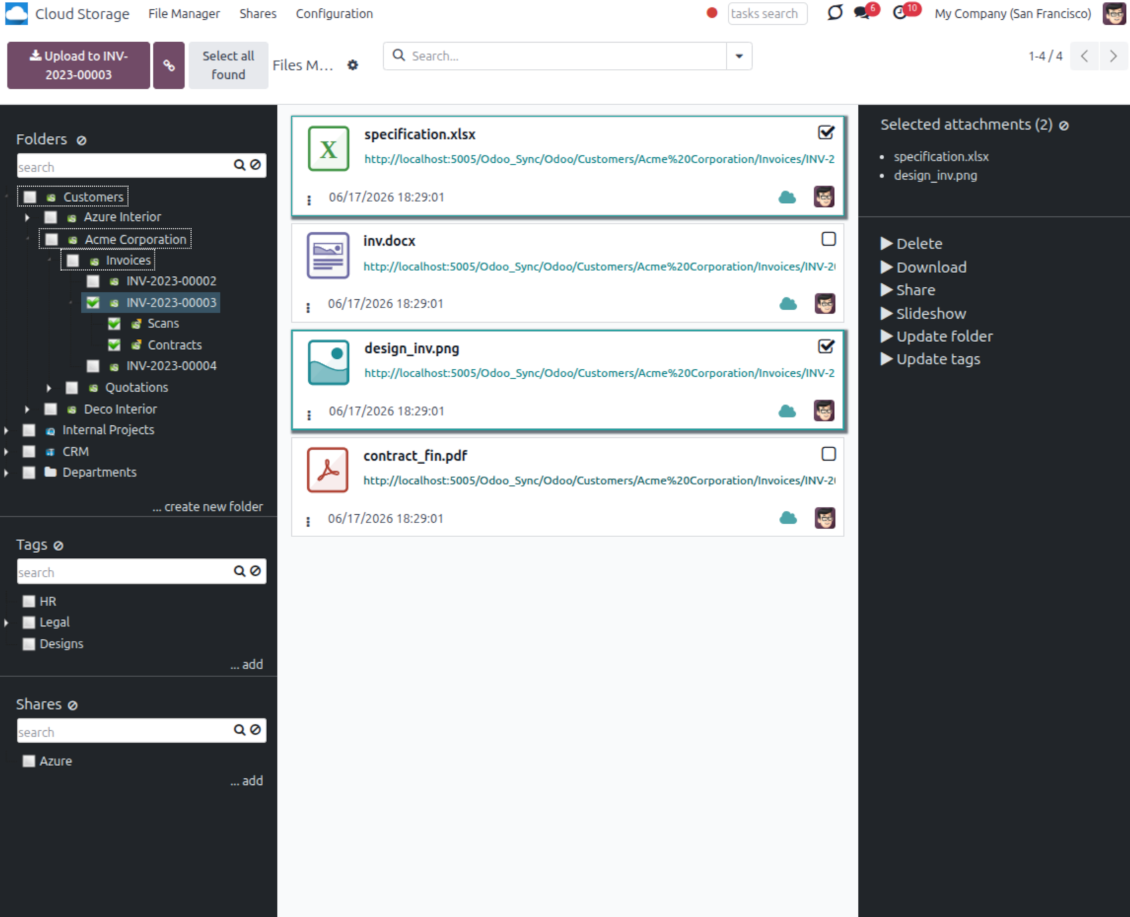
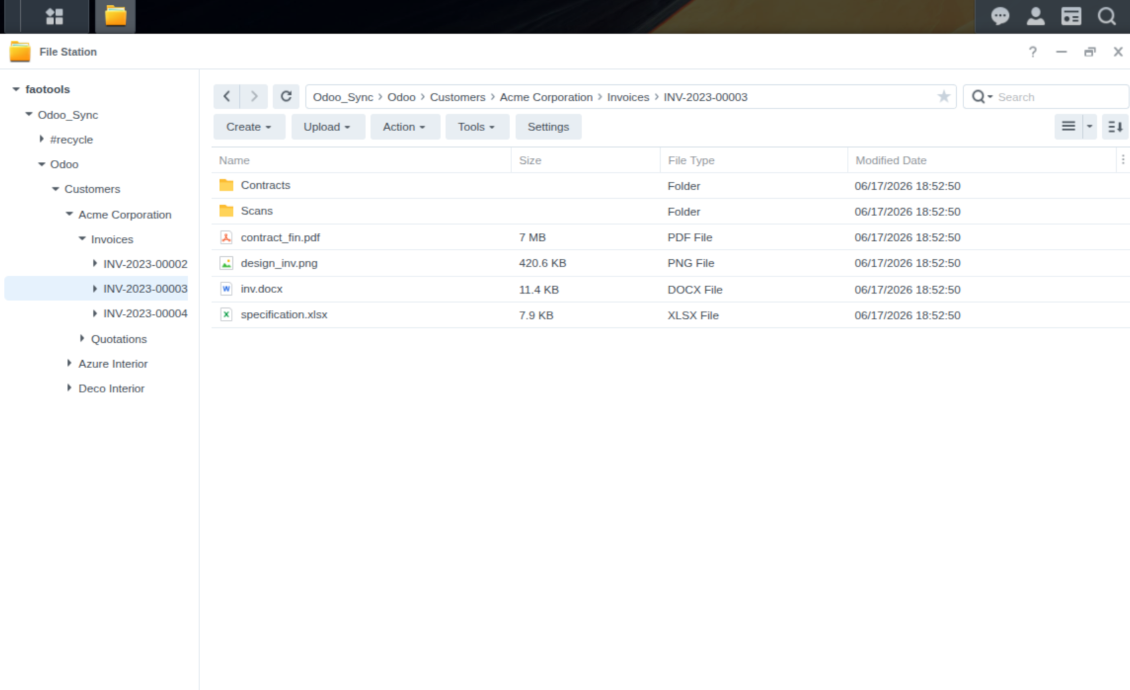
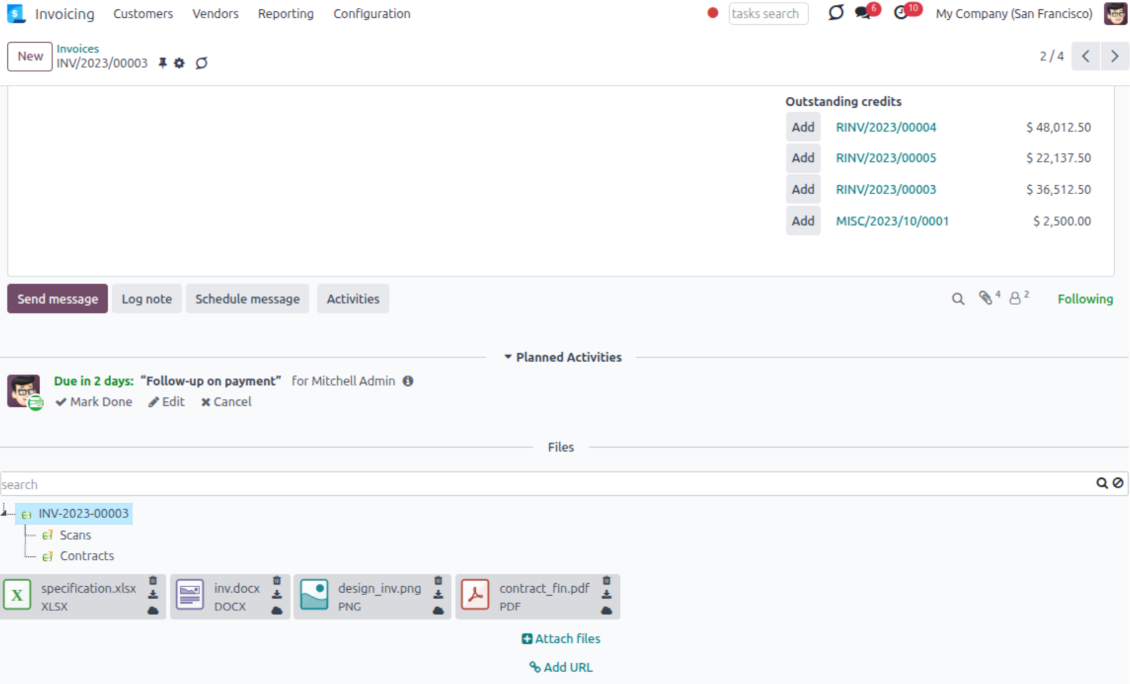
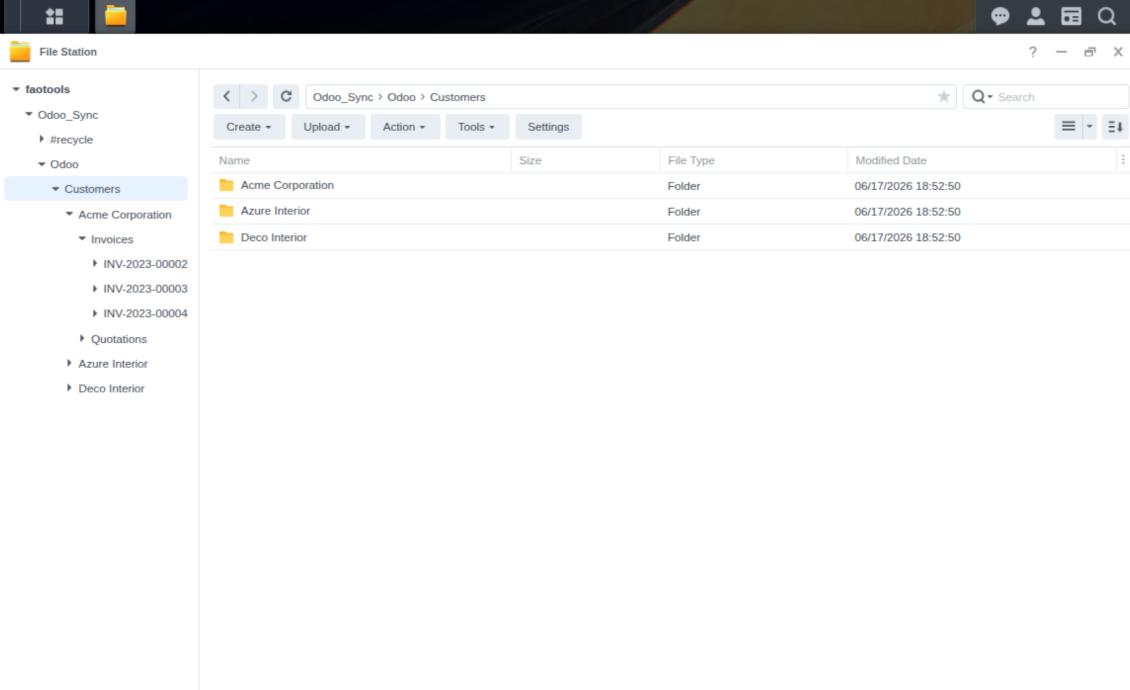
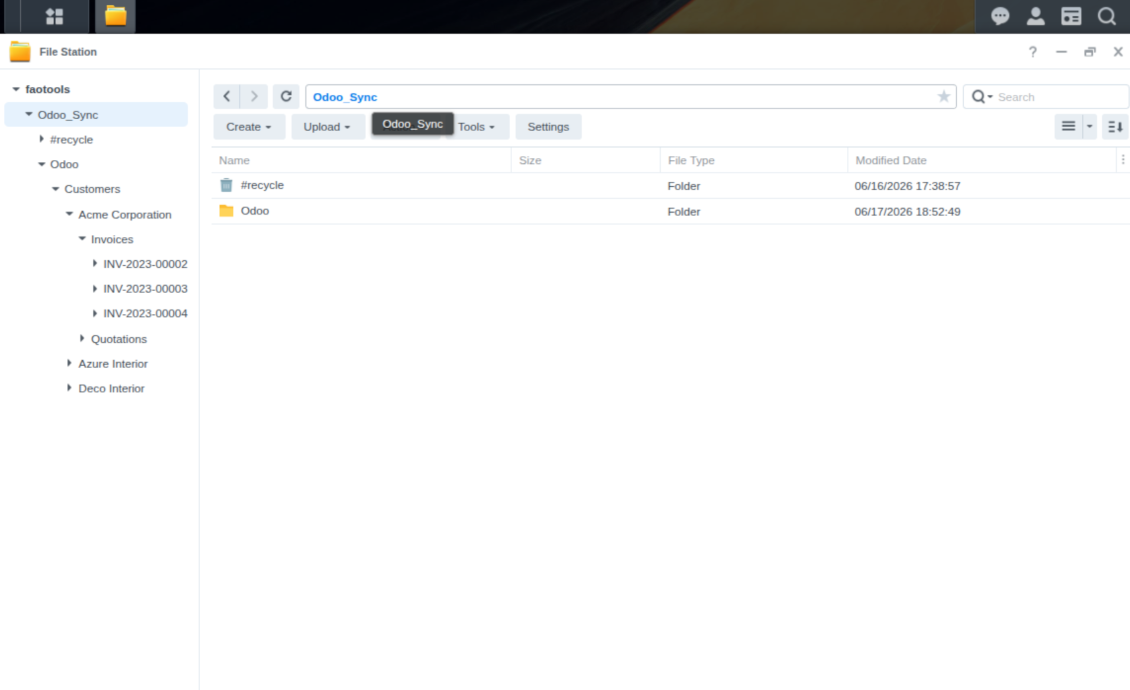
This is the tool to integrate NAS storage with Odoo folders and files through WebDAV. The app automatically stores Odoo attachments and directories in Synology, QNAP, TrueNAS (with WebDAV app), or any compatible NAS/WebDAV server and provides instant access to them via web links.
Automatic folders' structure
Decide which Odoo document types should have their own folders trees and synchronize those to NAS
Automatic regular sync
Rely on auto-synchronization between Odoo and Synology/QNAP/TrueNAS/other NAS based on scheduled jobs. No manual interaction is required
Bilateral sync
Odoo sends attachments to Synology/QNAP/TrueNAS/other NAS and retrieves files from there. Binary content is kept in clouds, while Odoo provides direct access to synced items
Cloud synchronization history
Control NAS Webdav sync logs right in Odoo. Export and share those in case of any issues. Be notified of any client disconnections
File manager interface
Manage synced folders and attachments from a single Odoo view. Comfortably navigate by directories. Search and download files one by one or in batch. Upload and move attachments to folders
Attachment box
Organize files of any Odoo object in a set of subfolders. Instantly access folders and files in the attachment box and in NAS solutions.
How synchronization works
Automatic two-sided sync
-
Configure sync for one or multiple Synology/QNAP/TrueNAS/other NAS instances
-
Integration is based on scheduled jobs and is fully automatized. The app regularly checks changes in systems and runs sync operations
-
Synchronization is bilateral. Updates in Odoo are reflected in Synology/QNAP/TrueNAS/other NAS (direct sync); changes in NAS solutions modify Odoo folders and attachments (backward sync)
-
Cloud connection with Synology/QNAP/TrueNAS/other NAS might be reset. In this way, the app assumes getting back all items back to Odoo (reverse sync)
-
Odoo folders and attachments might be re-attached to a new cloud client from Synology/QNAP/TrueNAS/other NAS. Hence, items will be first taken back to Odoo (reverse sync) and then will be put into the new cloud storage (direct sync)
Queue-based synchronization
-
Once in 15 minutes, the app examines updates in Odoo and Synology/QNAP/TrueNAS/other NAS to prepare a synchronization queue
-
Folders' checks follow the First-In-First-Out (FIFO) principle. So, directories that have not been examined for the longest will be processed first
-
Once in 15 minutes, the sync queue is run by the special scheduled job. Firstly, the most important (blocking) tasks would be done
-
Control planned jobs and their fulfillment in the special Odoo logs interface (Cloud Storage > Configuration > Sync Logs). Subscribe for particular cloud clients notifications
-
If the app faces sync failures, it will re-try operations afterward. Sync queue processing would not be stopped if there are items not blocked by such failures
Odoo attachments for NAS solutions: direct sync
-
Direct sync prepares the folders' hierarchy and uploads Odoo attachments for Synology/QNAP/TrueNAS/other NAS
-
Direct sync checks whether attachments are added or deleted for synced directories. If so, they would be created or removed in Synology/QNAP/TrueNAS/other NAS. In particular, it means that any file added to a folder-related Odoo object (e.g. Quotation), would be automatically moved to a linked cloud client
-
Direct sync makes all synced Odoo attachments change their type to a link (URL), while binary content is removed with one of the next Odoo cleaners. So, no actual files would be stored on your Odoo server
-
Direct sync checks whether a new folder is added. Disregarding whether it is done manually or automatically, the app would generate a peer directory in Synology/QNAP/TrueNAS/other NAS
-
Direct sync checks whether there are any updates in folders. If so, such changes are reflected in Synology/QNAP/TrueNAS/other NAS
WebDAV files and folders for Odoo: backward sync
-
Backward sync checks whether any files or subfolders are added to Synology/QNAP/TrueNAS/other NAS folders. If so, the app would create URL attachments/subdirectories inside linked Odoo directories (and hence Odoo objects if any)
-
Backward sync checks whether there are any updates in folders or attachments. Such updates would be then reflected in Odoo
-
Backward sync checks whether any files are deleted/moved in a Synology/QNAP/TrueNAS/other NAS document folder. If so, a linked Odoo attachment would be also unlinked or moved
-
If you deleted a Synology/QNAP/TrueNAS/other NAS folder related to a folder rule / Odoo object, their child files would be deleted as well. Thus, Odoo would remove related attachments. The folders, however, will be recovered with a direct sync
-
In case of conflicts, direct sync changes are in general considered more important than backward updates.
Resetting or changing Synology/QNAP/TrueNAS/other NAS: reverse sync
-
In case you decided to reset the connection with Synology/QNAP/TrueNAS/other NAS, files would be moved back to Odoo
-
In case you decided to change the cloud client of a folder rule or a folder, files would be first taken back to Odoo, and then direct sync for a new client would be done
-
Reverse sync operations are prioritized to direct and backward sync operations
-
Not all items can be correctly reversed to Odoo due to cloud client peculiarities. For example, there are documents that may exist only in cloud storage environments. The app would try to convert such documents, but in some cases, it would require manual interactions.
Συμβουλές διαμόρφωσης και εγκατάστασης για NAS / Synology / QNAP / TrueNAS Odoo Integration Odoo v.17
NAS preconfiguration notes
NAS systems usually expose files through a local network. If your Odoo server is hosted outside that network, the WebDAV endpoint should be reachable from Odoo through a secure channel. Recommended options are a reverse proxy with a valid HTTPS certificate, a VPN or secure tunnel such as WireGuard, Tailscale, or Cloudflare Tunnel, or a vendor relay such as Synology QuickConnect or QNAP myQNAPcloud. Plain port forwarding is possible but should be treated as the least preferred option.
Use a dedicated NAS user with the minimum required rights to one shared folder: read, create, update, move, and delete. Avoid administrator accounts. Publicly exposed endpoints should always use HTTPS and a valid TLS certificate. The connector has a "Verify SSL" option for trusted self-signed certificates, but it should normally remain enabled.
Configuration and log in
- Turn on the option 'NAS Sync' (Cloud Storage > Configuration > Configuration). The optional add-on NAS Odoo Integration is required
- Prepare your NAS WebDAV endpoint:
- Synology: install and enable WebDAV Server in DSM and choose HTTPS where possible
- QNAP: enable WebDAV for the target shared folder and use HTTPS where possible
- TrueNAS CORE: enable the WebDAV service; TrueNAS SCALE: install and configure the WebDAV app, since native WebDAV was removed in modern SCALE releases
- Generic WebDAV: make sure PROPFIND, MKCOL, PUT, GET, MOVE, and DELETE are available
- If Odoo is hosted outside the local NAS network, make the WebDAV endpoint reachable securely. Prefer a reverse proxy with a valid TLS certificate, a VPN/secure tunnel such as WireGuard, Tailscale, or Cloudflare Tunnel, or a vendor relay such as Synology QuickConnect or QNAP myQNAPcloud. Avoid exposing an administrator interface to the Internet
- Create a dedicated NAS user with full rights only inside the target shared folder: read, create, write, move, and delete. Do not use an administrator account
- Go to Odoo Cloud Storage > Configuration > Cloud Clients and press 'Create'
- As a reference, introduce any name which would be clear to all users
- As a Cloud client, choose 'Synology NAS', 'QNAP NAS', 'TrueNAS', or 'WebDAV NAS'
- As a Root folder name, enter a title that will be used as the parent NAS directory for all synced folders. For example, 'Odoo' or 'OdooERP'
- Enter the full WebDAV URL, login, and password. Optionally define a base path if Odoo should create the root folder inside an existing share or directory
- Keep 'Verify SSL' enabled for public HTTPS endpoints. Disable it only for a trusted private endpoint with a self-signed certificate
- Optionally define a browser base URL if NAS files should be opened through a vendor file station URL instead of the raw WebDAV URL
- Press 'Confirm'. Odoo checks the WebDAV connection and creates or finds the root directory. NAS - Odoo synchronization is ready to be done
- Apply the newly created cloud client to folder rules and/or manual folders which should be synced to that NAS storage
- Await the sync scheduled job to be started. For testing purposes only: trigger integration manually from Cloud Storage > Configuration > Configuration > the button 'Launch sync'.
Enter QNAP credentials

Enter Synology credentials

Enter TrueNAS credentials

Συχνές ερωτήσεις για NAS / Synology / QNAP / TrueNAS Odoo Integration Odoo v.17
Πού αποθηκεύονται τα συγχρονισμένα πεδία; Αντιγράφονται στο Odoo και στα clouds;
Η εφαρμογή υποθέτει ότι το δυαδικό περιεχόμενο των συνημμένων φυλάσσεται στο Cloud Client αντί στον διακομιστή Odoo. Έτσι, αυτά τα συνημμένα στο Odoo γίνονται τύπου URL και μπορείτε ανά πάσα στιγμή να τα ανοίξετε είτε από το πλαίσιο συνημμένων είτε από το Cloud Client.
Μετά τη ρύθμιση δεν απαιτούνται χειροκίνητες ενέργειες, καθώς ο συγχρονισμός είναι πλήρως αυτόματος. Αποφασίστε ποιοι τύποι εγγράφων Odoo θα συγχρονίζονται και ορίστε ένα σχετικό μοντέλο συγχρονισμού για καθέναν από αυτούς (Πελάτες, παραγγελίες πώλησης ή αγοράς, Εργασίες, Έργα κ.λπ.).
Μπορώ να έχω μερικούς φακέλους για τον ίδιο τύπο εγγράφου; Για παράδειγμα, εσωτερικά έργα και έργα πελατών;
Ναι, μπορείτε. Για αυτό ετοιμάστε έναν κανόνα για τον καθένα και μετά εφαρμόστε φίλτρα: π.χ. κατά τύπο έργου.
Προσπαθήστε τα φίλτρα να είναι αμοιβαία αποκλειόμενα ώστε ένα έγγραφο να αντιστοιχίζεται με βεβαιότητα. Π.χ. «πελάτης αλλά όχι προμηθευτής», «προμηθευτής αλλά όχι πελάτης». Διαφορετικά, ο φάκελος ενός εγγράφου θα μεταπηδά από μοντέλο σε μοντέλο.
Είναι δυνατόν ο συγχρονισμός να γίνεται σε πραγματικό χρόνο;
Όχι. Έχουμε σοβαρούς λόγους να αποφεύγουμε τον συγχρονισμό σε πραγματικό χρόνο:
Προβλήματα απόδοσης. Αν ο συγχρονισμός είναι σε πραγματικό χρόνο, κάθε μεταφόρτωση αρχείου θα εμφανίζει οθόνη φόρτωσης.
Προβλήματα συγκρούσεων. Αν 2 χρήστες αλλάξουν ταυτόχρονα ένα στοιχείο, μπορεί να προκύψουν άλυτες καταστάσεις. Με τακτικές εργασίες μπορούμε να το διορθώσουμε εκ των υστέρων, ενώ σε πραγματικό χρόνο θα έπρεπε να το σώσουμε ως ουρά, κάτι ακόμη πιο παραπλανητικό για τους χρήστες.
Προβλήματα λειτουργικότητας. Ιδιαίτερα η μετονομασία και η αναδιάρθρωση στοιχείων. Στον αντίστροφο συγχρονισμό το εργαλείο βασίζεται αυστηρά στη λογική των καταλόγων και σε κάθε συγχρονισμό ελέγχεται το 100% των στοιχείων. Αν γίνεται μετά από κάθε ενημέρωση, θα είναι χιλιάδες αιτήματα ανά δευτερόλεπτο. Αν όχι: οι αλλαγές θα χάνονταν.
Μπορώ να αλλάξω τα προεπιλεγμένα ονόματα φακέλων στα σύννεφα;
Μπορείτε να ορίσετε δικό σας όνομα για τους καταλόγους μοντέλων (παραγγελίες πώλησης, ευκαιρίες, προμηθευτές κ.λπ.) για οποιονδήποτε τύπο εγγράφου.
Για τους φακέλους αντικειμένων (SO-001, John Smith κ.λπ.), το εργαλείο βασίζεται στη μέθοδο Odoo για το όνομα εμφάνισης αυτού του τύπου εγγράφου. Μπορείτε όμως να το αλλάξετε ορίζοντας την έκφραση ονόματος. Χρησιμοποιείται ακριβώς η σύνταξη των προτύπων email του Odoo.
Μπορώ να αλλάξω τη συχνότητα των εργασιών συγχρονισμού;
Όχι, από την έκδοση 15 δεν πρέπει να αλλάζετε τις προγραμματισμένες εργασίες. Είναι βελτιστοποιημένες να τρέχουν κάθε 15 λεπτά ώστε να διασφαλίζεται η σταθερότερη και ταχύτερη σύνδεση.
Βεβαιωθείτε ότι τα χρονικά όρια του διακομιστή Odoo είναι τουλάχιστον 15 λεπτά (900 δευτερόλεπτα).
Αν χρειάζεται να σταματήσετε τον συγχρονισμό για λίγο, κάντε το στη φόρμα του συγκεκριμένου cloud client.
Μπορώ να συγχρονίσω συνημμένα σε λίγους πελάτες cloud
Ναι, από την έκδοση 15 μπορείτε να ρυθμίσετε πολλές συνδέσεις. Έτσι κάποιοι φάκελοι συγχρονίζονται με έναν cloud client και άλλοι με άλλον.
Λάβετε υπόψη ότι δεν είναι δυνατό να συγχρονιστεί ο ίδιος φάκελος ταυτόχρονα με πολλά cloud storages.
Στα clouds μας χρησιμοποιούμε ειδικό επεξεργαστή (π.χ. OnlyOffice, Office 365 κ.λπ.). Θα ανοίγουν τα αρχεία σε αυτόν τον επεξεργαστή;
Ναι, ανάλογα με τη διαμόρφωση του cloud client.
Χρειάζομαι μόνο την εφαρμογή Cloud Storage Solution;
Από την έκδοση 15 η εφαρμογή μπορεί να χρησιμοποιηθεί αυτόνομα για οργάνωση συνημμένων σε φακέλους και διεπαφή διαχειριστή αρχείων.
Ωστόσο, αν στόχος είναι σύνδεση με έναν από τους πελάτες νέφους, χρειάζεστε τουλάχιστον μία προαιρετική εφαρμογή πελάτη εγκατεστημένη.
Τι γίνεται όταν αλλάξω κανόνα φακέλου;
Όταν αλλάζει ένας κανόνας φακέλου, αλλάζει και η λίστα φακέλων. Αν ένας φάκελος δεν πληροί πλέον τις συνθήκες των κανόνων, αφαιρείται. Αν τα αρχεία έχουν συγχρονιστεί, ο αντίστροφος συγχρονισμός τα επιστρέφει στο Odoo και τα διαγράφει από το Cloud Client.
Αν το αντικείμενο ενός εγγράφου δεν πληροί τις συνθήκες κανόνα φακέλου, ο φάκελός του δεν δημιουργείται. Αν όμως αργότερα τις πληροί, θα δημιουργηθεί ο σχετικός φάκελος.
Το κείμενο εφαρμογής και ιστότοπου σε άλλες γλώσσες πλην των αγγλικών γίνεται με βοήθεια ΤΝ και ευθυγραμμίζεται με τις επίσημες μεταφράσεις Odoo. Αν εντοπίσετε λάθος, στείλτε αίτημα για ορθότητα μεταφράσεων και θα το διορθώσουμε.
Βάσεις επίδειξης Odoo (ζωντανές προεπισκοπήσεις)
Για αυτή την εφαρμογή ενδέχεται να παρέχουμε δωρεάν εξατομικευμένη βάση επίδειξης.
Δεν χρειάζεστε αριθμό τηλεφώνου ή πιστωτική κάρτα για να επικοινωνήσετε. Αρκεί μια σύντομη εγγραφή με e-mail που δεν διαρκεί πάνω από 30 δευτερόλεπτα.
Κατόπιν αιτήματός σας, θα προετοιμάσουμε μια ατομική βάση ζωντανής προεπισκόπησης, όπου μπορείτε να κάνετε δοκιμές και να ελέγξετε υποθέσεις για περίπου δύο εβδομάδες.
Αναφορά σφαλμάτων
Αν αντιμετωπίσετε σφάλματα ή ασυνεπή συμπεριφορά, μη διστάσετε να επικοινωνήσετε μαζί μας. Εγγυόμαστε διορθώσεις εντός 60 ημερών από την αγορά και ενδιαφερόμαστε έντονα να βελτιώνουμε τα εργαλεία μας και μετά από αυτή την περίοδο.
Δεν χρειάζεστε αριθμό τηλεφώνου ή πιστωτική κάρτα για να επικοινωνήσετε. Αρκεί μια σύντομη εγγραφή με e-mail που δεν διαρκεί πάνω από 30 δευτερόλεπτα.
Συμπεριλάβετε όσο το δυνατόν περισσότερες λεπτομέρειες στο αίτημά σας: στιγμιότυπα οθόνης, αρχεία καταγραφής διακομιστή Odoo, πλήρη περιγραφή αναπαραγωγής του προβλήματος κ.λπ. Συνήθως χρειάζονται μερικές εργάσιμες ημέρες για να ετοιμαστεί σχέδιο εργασίας για ένα ζήτημα (αν επιβεβαιωθεί σφάλμα) ή να σας δοθούν οδηγίες για το τι πρέπει να γίνει (διαφορετικά).
Δημόσια αιτήματα λειτουργιών και ιδέες μονάδων (δωρεάν ανάπτυξη)
Έχουμε ισχυρό κίνητρο να βελτιώνουμε τα εργαλεία μας και θα εκτιμούσαμε κάθε σχόλιο. Αν οι απαιτήσεις σας είναι κοινής ωφέλειας και μπορούν να υλοποιηθούν αποδοτικά, η ομάδα θα τις εντάξει στη λίστα εργασιών μας.
Τέτοια λίστα εργασιών επεξεργάζεται τακτικά και δεν συνεπάγεται επιπλέον χρεώσεις. Αν και δεν μπορούμε να υποσχεθούμε προθεσμίες και τελικό σχεδιασμό, μπορεί να είναι καλός τρόπος να αποκτήσετε τις επιθυμητές λειτουργίες χωρίς επενδύσεις και κινδύνους.
Δεν χρειάζεστε αριθμό τηλεφώνου ή πιστωτική κάρτα για να επικοινωνήσετε. Αρκεί μια σύντομη εγγραφή με e-mail που δεν διαρκεί πάνω από 30 δευτερόλεπτα.


The tool to build a deep and structured knowledge base for internal and external use. Knowledge System. KMS. Wiki-like revisions.
398€
The tool to set up KPI targets and control their fulfillment by periods. KPI dashboards. Dashboard designer. KPI charts

The tool for time-based service management from booking appointments to sales and reviews
398€
The tool to manage your Odoo from your favorite AI chats through MCP. Claude. Any MCP-supporting AI.

The tool to flexibly structure Odoo attachments in folders and synchronize directories with cloud clients: Google Drive, OneDrive/SharePoint, Nextcloud/ownCloud, Dropbox, Amazon S3, Box, and NAS. DMS. File Manager. Document management system
398€
The tool to automatically synchronize Odoo attachments with OneDrive files in both ways
487€
The tool to automatically synchronize Odoo attachments with Google Drive files in both ways
487€
The tool to automatically synchronize Odoo attachments with ownCloud/Nextcloud files in both ways
487€