Lost Messages Routing v.18
The tool to make sure you have not lost any incoming messages
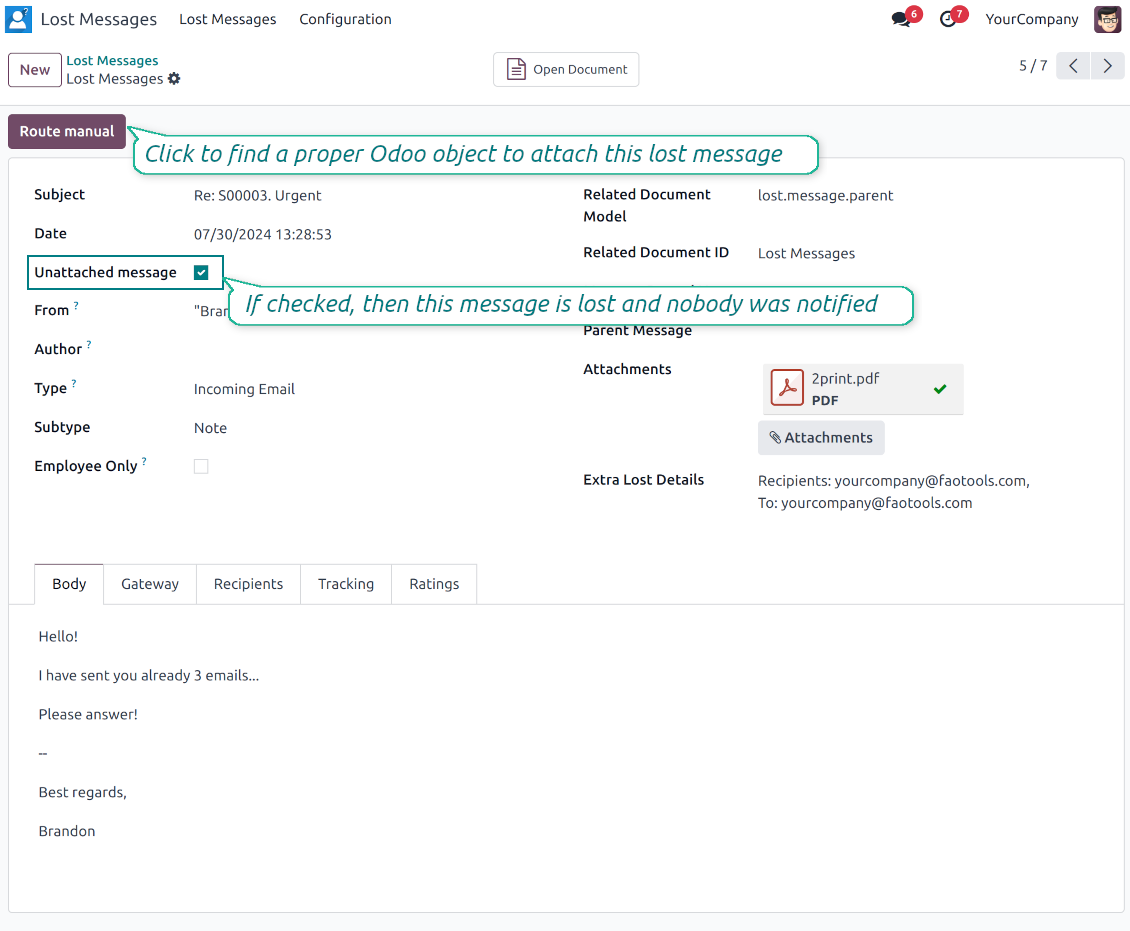
Sometimes, Odoo does not manage to address incoming messages. For example, it happens when your customer doesn't reply to a message but sends a direct email to your catchall address. In that case, such an email is completely lost, and clients become increasingly irritated. This tool solves the issue. With this app, you can control all lost messages and attach any Odoo message to a proper document thread.
No Odoo messages are lost
The app improves Odoo message routing. If any email can't be attached, it will be marked as 'lost' and will be added to the special view
All unattached messages in a single list
All messages that Odoo has not managed to route are kept under the special top entry menu 'Lost messages'
Simple addressing of lost messages
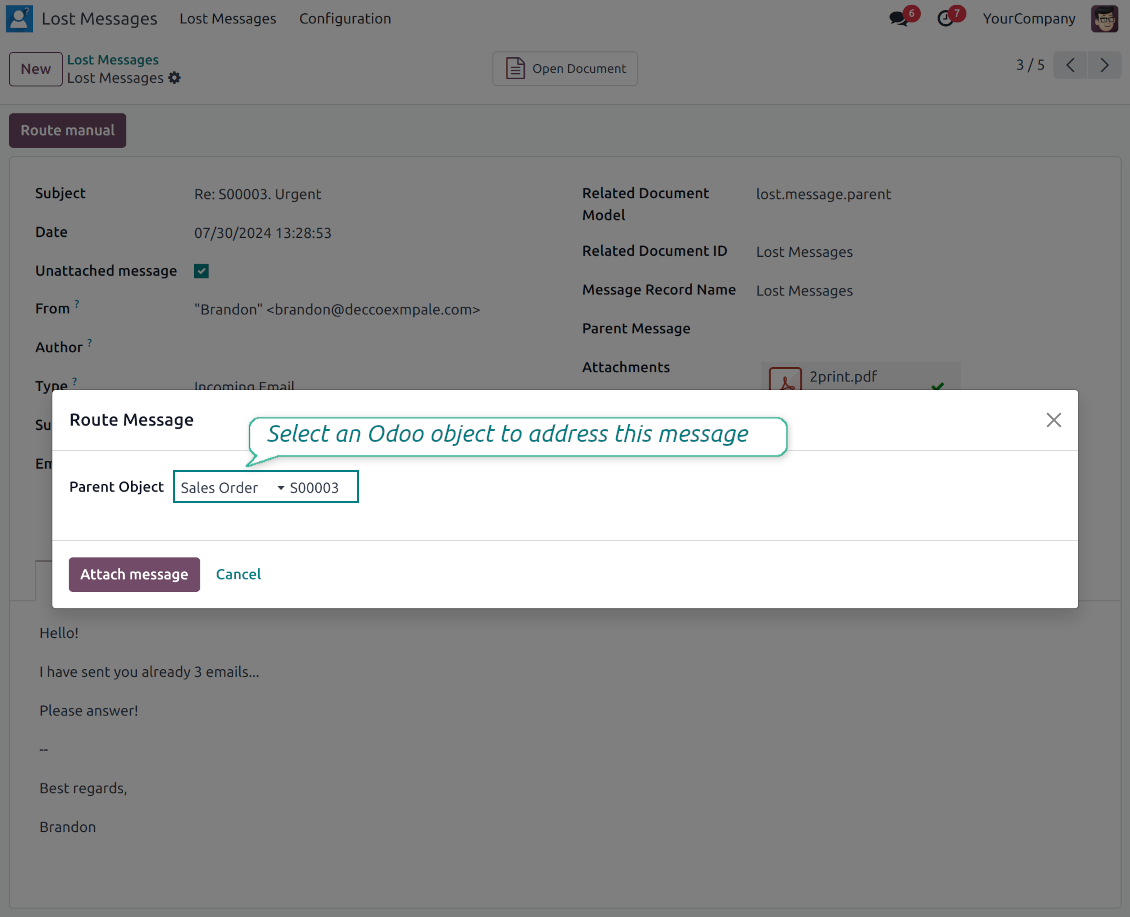
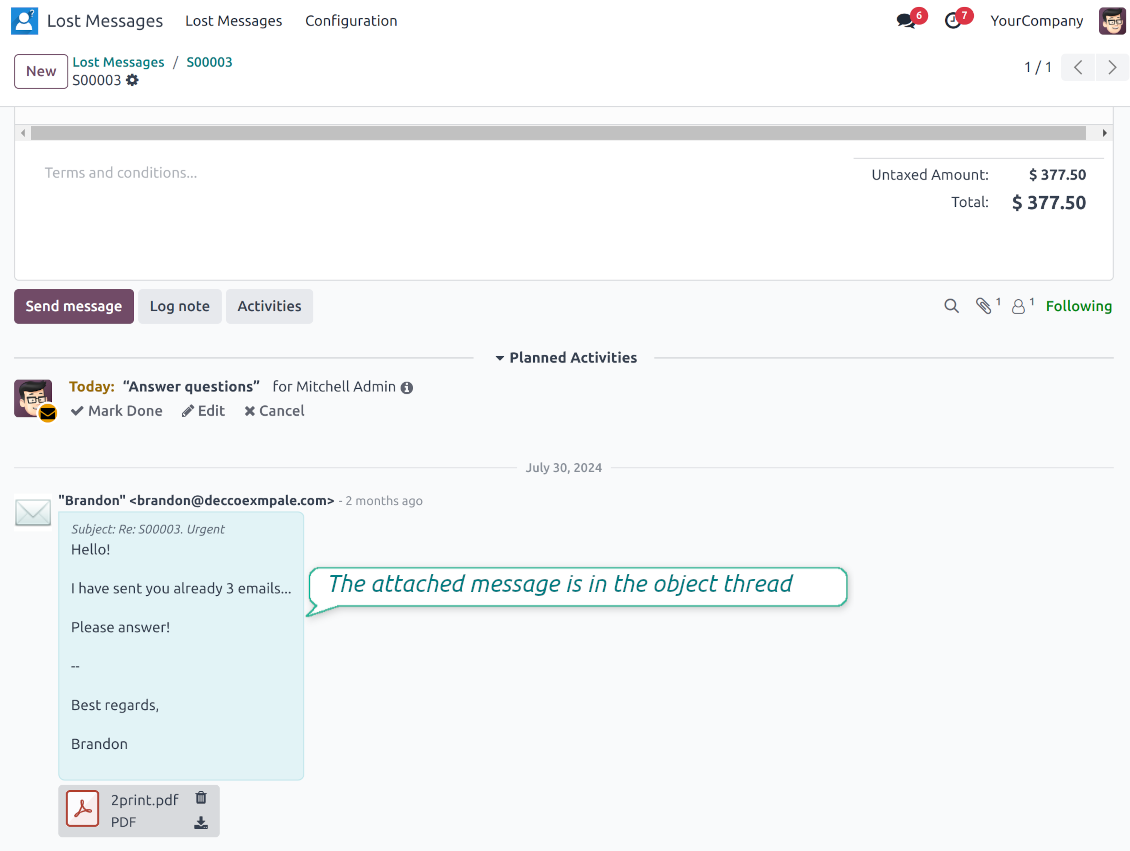
To route a lost message, push the 'Route manual' button and select a target document (for example, Contact > Agrolait). As the wizard is saved, a message is instantly added to that object
Mass processing
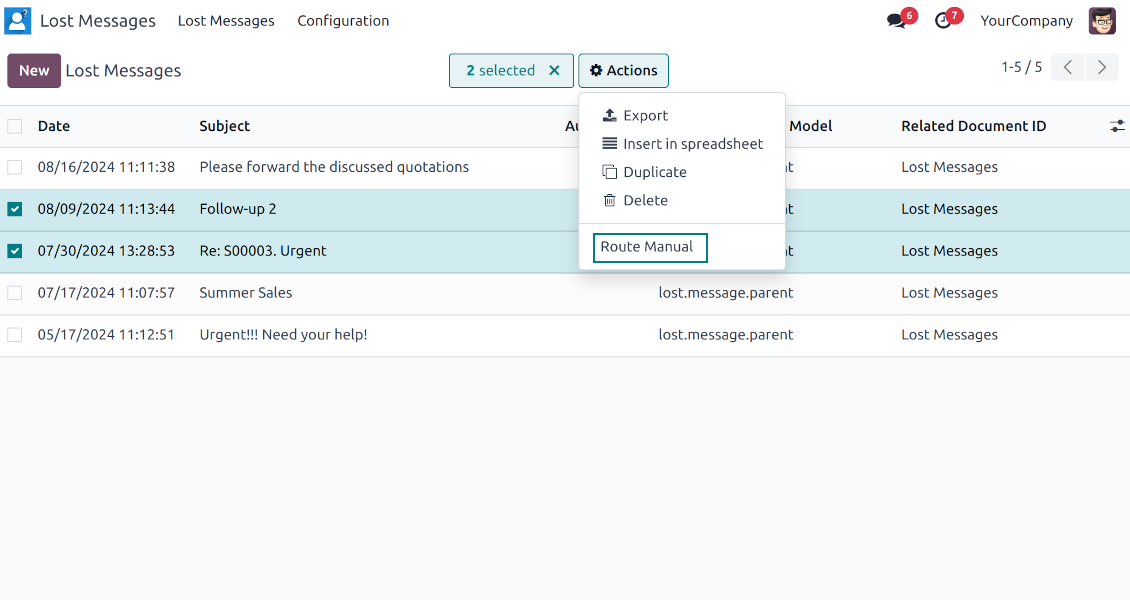
The app allows batch addressing through the tree mass action. In such a way, a few messages might be added to the same Odoo document
Notify routed followers
Optionally, notify the target object's followers. The app automatically suggests the relevant internal recipients (changeable) and sends them a clean notification: email or pop-up, based on the user's preferences
Odoo objects
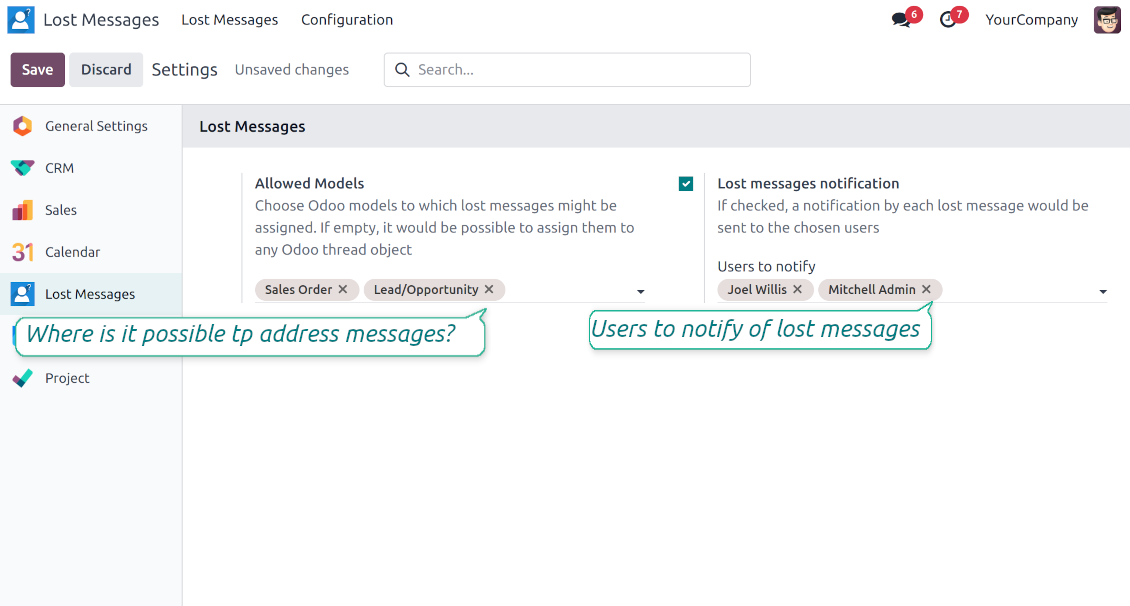
Restrict Odoo models to which messages might be routed: Lost Messages > Settings > the section 'Lost messages allowed models' (for example, to orders and opportunities only). If not selected, it would be possible to address a message to any object
Notification of unattached emails
Configure Odoo to send notifications by lost messages. Go to the Odoo general settings > Email Section and check the 'Lost messages notification' box. Then, choose users who should be warned
Secured administration
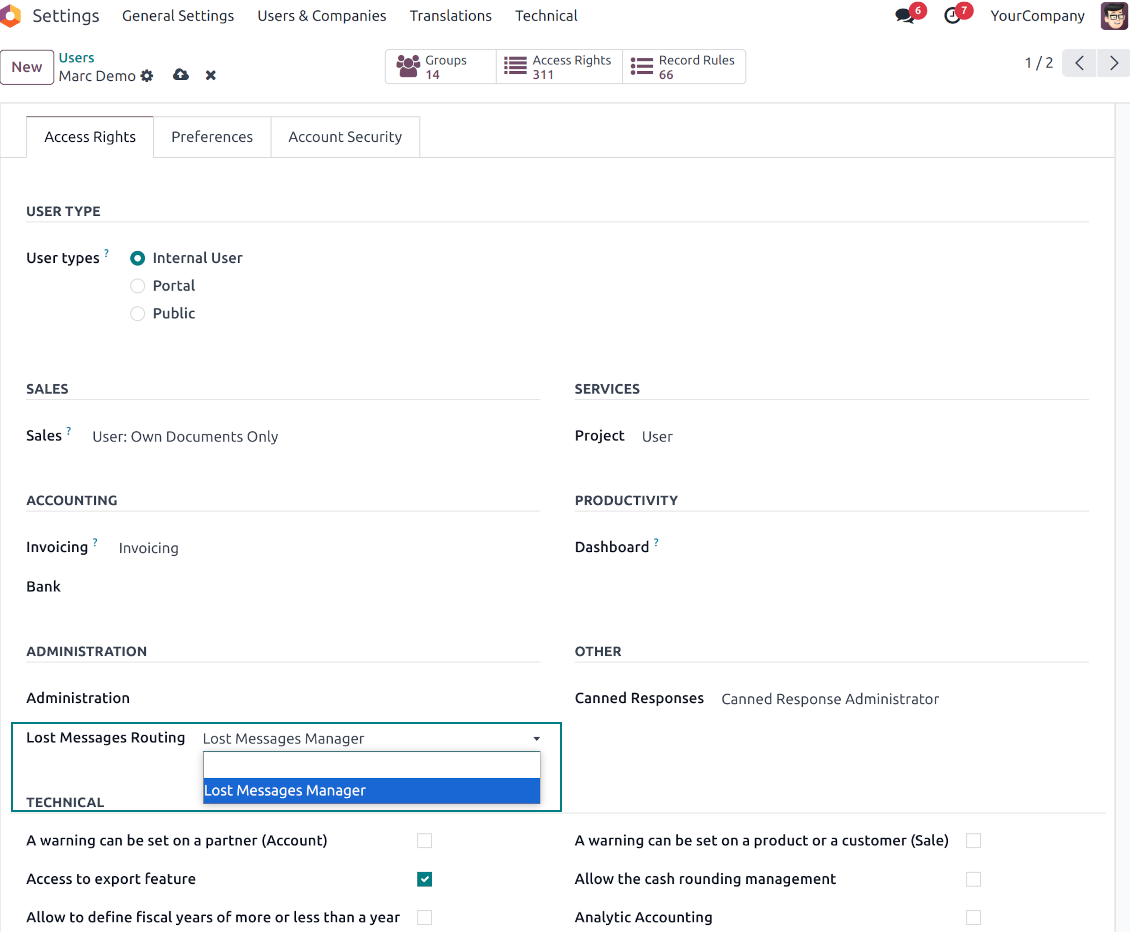
The features are available for users with the special "Lost Messages Manager" right. Note that the module makes all unattached messages available for that group
Not only lost messages
The tool also works with normal messages. Odoo admins might reattach messages to another object via the same button, 'Route manual'.
Amazing App and fantastic support
I bought the addon for v10. At the beginnig the addon did not work well. Then I requested an improvement feature, they did it in just A FEW HOURS. I am very happy, the addon is working perfectly, is just what I was looking for. Very excelent support Thanks a lot Odoo Tools Team
A must have
With the help of this app you will never lose any messages again. We are very happy with the functionality and also with the responsive and quick support! They take our ideas and wishes serious. This is the way it should! Thumbs up!
Awesome app! MUST BUY if you use Odoo!!!
The app helped us alot. Some our customers send us an email and got lost in the process. with Lost messages routing the messages got stored and we can place the mail into the correct corresponding process. plus excellent support from Odoo Tools with adding a new feature to send an e-mail to selected users whenever a lost message is found. 10/10!!
It does his job
All previously lost messages are monitored and a convenient notification is received.
It works very well
It is very useful, it helps us to efficiently serve our customers.
সম্পর্কে সাধারণ জিজ্ঞাসা Lost Messages Routing Odoo v.18
আমি ভুল অবজেক্টের থ্রেডে একটি বার্তা সংযুক্ত করেছি। সঠিকটিতে কীভাবে সরাতে পারি?
রাউটিংয়ের পর বার্তা অন্য বার্তাগুলোর মধ্যে চলে যায়। প্রযুক্তিগত মেনু "Messages"-এ খুঁজে সঠিক অবজেক্টের থ্রেডে আবার রাউট করতে পারেন।
রাউটিং মডেলের তালিকা খুব দীর্ঘ। শুধু যা দরকার সেগুলো রাখা যায়?
রাউটিংয়ের জন্য মডেল নির্ধারণ করতে পারেন। ট্যাব 'Configuration' থেকে মডিউল সেটিং খুলুন, বিভাগ 'Lost messages allowed models' খুঁজুন, যে মডেলে বার্তা রাউট করা যাবে সেগুলো নির্ধারণ করে 'Save' চাপুন। তারপর ব্যবহারকারী শুধু সেই মডেলে বার্তা সংযুক্ত করতে পারবেন।
আমি কি এমন বার্তা রাউট করতে পারি যা হারায়নি, কিন্তু ভুল অবজেক্টের থ্রেডে সংযুক্ত হয়েছে?
হ্যাঁ, যেকোনো Odoo বার্তা রাউট করা যায়। এজন্য ডেভেলপার মোডে অ্যাডমিন মেনু Settings > Technical > Discuss > Messages-এ যান; প্রয়োজনীয়গুলো বেছে Action > Route Manual চাপুন।
আপনার সরঞ্জামের হালনাগাদ নীতি কী?
বর্তমান Odoo Apps Store নীতি অনুসারে:
- সংস্করণ 12.0 ও তার আগের জন্য কেনা প্রতিটি মডিউল 12.0 পর্যন্ত সব সংস্করণে প্রবেশ দেয়।
- সংস্করণ 13.0 থেকে প্রতিটি মডিউল সংস্করণ আলাদা কিনতে হয়।
- সংস্করণ যাই হোক, কেনায় সেই প্রধান সংস্করণের সব হালনাগাদ ও বাগ সংশোধনের অধিকার মেলে।
মনে রাখুন, faOtools দল এই নীতি নিয়ন্ত্রণ করে না। সব প্রশ্নে সরাসরি Odoo Apps Store প্রতিনিধিদের সাথে যোগাযোগ করুন।
আপনার অ্যাপ Odoo.sh-এ কীভাবে ইনস্টল করব?
সবচেয়ে সোজা উপায় হল Odoo স্টোরের বিল্ট-ইন ওয়ার্কফ্লো ব্যবহার করা:
1. মডিউলের পৃষ্ঠা খুলুন এবং Deploy on odoo.sh বোতামে ক্লিক করুন
2. তারপর আপনাকে GitHub পৃষ্ঠায় পাঠানো হবে। অ্যাকাউন্টে লগ ইন করুন, তারপর 'Create a new repo' ক্লিক করুন বা বিদ্যমানটি ব্যবহার করুন। রিপোজিটরি যেন প্রাইভেট হয়। OPL-1 লাইসেন্সের অধীনে অ্যাপ প্রকাশ করা অনুমোদিত নয়। প্রয়োজনে Odoo.sh প্রকল্পের জন্য নতুন repo তৈরি করুন
3. তারপর odoo.sh-এ যান এবং Deploy বোতামে ক্লিক করুন। পপ-আপ উইন্ডোতে সিদ্ধান্ত জমা দিন এবং 'Continue.' ক্লিক করুন। এতে ইনস্টলেশন শুরু হবে।
এই ধাপগুলো প্রকল্পের প্রোডাকশন শাখায় অ্যাপ ইনস্টল করবে। অন্য শাখায় অ্যাপ ডিপ্লয় বা মডিউল আপডেট করতে নিচের কাজগুলো করুন:
1. Odoo স্টোর থেকে অ্যাপের সোর্স কোড আপলোড করুন
2. মডিউলটি প্রয়োজনীয় GitHub রিপোজিটরিতে commit করুন। নিশ্চিত করুন অ্যাপের কোনো ফোল্ডার/ফাইল উপেক্ষিত নয় (অর্থাৎ repo-এর .gitignore-এ নেই)। রিপোজিটরি odoo.sh স্বয়ংক্রিয়ভাবে তৈরি করে এবং ডিফল্টে কিছু গুরুত্বপূর্ণ আইটেম থাকতে পারে (যেমন /lib)। মডিউলের সব ডিরেক্টরি, সাবডিরেক্টরি ও ফাইল ব্যতিক্রম ছাড়া আপলোড করুন
3. odoo.sh প্রকল্পের লক্ষ্য শাখা Deploy করুন অথবা, সেটিংস যদি তা ধরে নেয়, স্বয়ংক্রিয়ভাবে তৈরি হওয়া পর্যন্ত অপেক্ষা করুন।
নিজের সার্ভারে আপনার অ্যাপ কীভাবে ইনস্টল করব?
2. Odoo সার্ভার রিস্টার্ট করুন;
3. ডেভেলপার মোড চালু করুন (টেকনিক্যাল সেটিংস);
4. অ্যাপ তালিকা আপডেট করুন (অ্যাপস মেনু);
5. অ্যাপ খুঁজে 'Activate'/'Install' চাপুন;
6. অ্যাপ পৃষ্ঠায় নির্দেশিকা থাকলে অনুসরণ করুন।
আপনার অ্যাপে অতিরিক্ত অ্যাড-অন আছে। পরে কিনতে পারি?
হ্যাঁ, অবশ্যই। একই সাথে Odoo সব নির্ভরতা কার্টে স্বয়ংক্রিয় যোগ করে, তাই দ্বিগুণ অর্থ এড়াতে আগে কেনা টুল বাদ দিন।
আমি আপনার অ্যাপ Odoo.sh-এ ডিপ্লয় করেছি এবং পরীক্ষায় সতর্কতা/ত্রুটি দেখছি
লাল/কমলা সতর্কতা অ্যাপের বৈশিষ্ট্যে প্রভাব ফেলে না। দুঃখজনকভাবে আমাদের মডিউল কখনো স্ট্যান্ডার্ড স্বয়ংক্রিয় পরীক্ষা পাস করে না, কারণ সেগুলো এমন আচরণ ধরে নেয় যা অ্যাপের লক্ষ্যের সাথে সাংঘর্ষিক। যেমন আমরা মূল্য হিসাব বদলাই, অথচ স্ট্যান্ডার্ড Odoo মডিউল পরীক্ষা চূড়ান্ত মূল্যকে স্ট্যান্ডার্ড অ্যালগরিদমের সাথে তুলনা করে।
প্রথমে ডিপ্লয় করা ডাটাবেসের বৈশিষ্ট্য দেখুন। সব ঠিকঠাক কাজ করছে?
যদি তবু মনে করেন সতর্কতা আসল বৈশিষ্ট্যে প্রভাব ফেলে, যোগাযোগ করুন এবং পূর্ণ ইনস্টলেশন লগ ও ডিপ্লয় করা মডিউলের সম্পূর্ণ তালিকা (কোর ও তৃতীয় পক্ষসহ) পাঠান।
আমি কি অ্যাপটি আপনার কোম্পানি থেকে সরাসরি কিনতে পারি?
না, আমরা টুল শুধু অফিসিয়াল Odoo অ্যাপ স্টোর.
আমি ছাড় পেতে চাই
দুঃখিত, ব্যক্তিগত মূল্য দেওয়ার কারিগরি উপায় আমাদের নেই।
আমি কি অ্যাপটি আমার Odoo Online (SaaS) ডাটাবেসে ইনস্টল করতে পারি?
না, তৃতীয় পক্ষের অ্যাপ Odoo Online-এ ব্যবহার করা যায় না। দুঃখজনকভাবে Odoo SaaS সেই সম্ভাবনা আটকে দেয়।
আপনার সরঞ্জাম অন্য অ্যাপের উপর নির্ভর করে। সেগুলো কি কিনতে হবে?
হ্যাঁ, সঠিকভাবে চলতে টুলের নির্ভরতায় চিহ্নিত সব মডিউল দরকার। অ্যাপ পাতার মূল্যে প্রয়োজনীয় নির্ভরতা ইতিমধ্যে অন্তর্ভুক্ত।
মডিউলের মূল্য মার্কিন ডলারে কত? কেন বদলেছে?
আমাদের মডিউলের মূল্য ইউরোতে নির্ধারিত। Odoo স্টোর অভ্যন্তরীণ বিনিময় হার অনুযায়ী অন্য মুদ্রায় রূপান্তর করে। তাই মার্কিন ডলারে মূল্য হার আপডেট হলে বদলাতে পারে।
ইংরেজি ছাড়া অন্য ভাষায় অ্যাপ ও ওয়েবসাইটের শব্দ AI-সহায়তায় এবং অফিসিয়াল Odoo অনুবাদের সাথে মিলিয়ে। ভুল দেখলে, অনুবাদ সঠিকতার টিকিট পাঠান আর আমরা ঠিক করব।
Odoo ডেমো ডেটাবেস (লাইভ প্রিভিউ)
এই অ্যাপের জন্য আমরা বিনামূল্যে ব্যক্তিগত ডেমো ডেটাবেস দিতে পারি।
যোগাযোগে ফোন নম্বর বা ক্রেডিট কার্ড লাগে না। শুধু একটি সংক্ষিপ্ত ইমেইল সাইন-আপ, ৩০ সেকেন্ডের বেশি লাগে না।
আপনার অনুরোধে আমরা একটি ব্যক্তিগত লাইভ প্রিভিউ ডেটাবেস তৈরি করব, যেখানে প্রায় দুই সপ্তাহ যেকোনো পরীক্ষা ও অনুমান যাচাই করতে পারবেন।
বাগ রিপোর্টিং
বাগ বা অসঙ্গত আচরণ দেখলে আমাদের সাথে যোগাযোগ করুন। কেনার ৬০ দিনের মধ্যে সংশোধনের নিশ্চয়তা দিই এবং এই সময়ের পরেও টুল উন্নত করতে আগ্রহী।
যোগাযোগে ফোন নম্বর বা ক্রেডিট কার্ড লাগে না। শুধু একটি সংক্ষিপ্ত ইমেইল সাইন-আপ, ৩০ সেকেন্ডের বেশি লাগে না।
অনুরোধে যতটা সম্ভব বিস্তারিত দিন: স্ক্রিনশট, Odoo সার্ভার লগ, সমস্যা পুনরুৎপাদনের পূর্ণ বিবরণ ইত্যাদি। সাধারণত কোনো সমস্যার কাজের পরিকল্পনা তৈরি (বাগ নিশ্চিত হলে) বা কী করতে হবে তার নির্দেশনা দিতে (অন্যথায়) কয়েক কর্মদিবস লাগে।
পাবলিক ফিচার অনুরোধ ও মডিউল আইডিয়া (বিনামূল্যে উন্নয়ন)
আমরা আমাদের টুল উন্নত করতে দৃঢ়ভাবে অনুপ্রাণিত এবং যেকোনো মতামতের জন্য কৃতজ্ঞ। আপনার প্রয়োজনীয়তা সবার কাজে লাগে এবং দক্ষতার সঙ্গে বাস্তবায়নযোগ্য হলে দল সেগুলো আমাদের টু-ডু তালিকায় রাখবে।
এমন টু-ডু তালিকা নিয়মিত প্রক্রিয়া হয় এবং অতিরিক্ত ফি ধরে না। যদিও আমরা সময়সীমা ও চূড়ান্ত ডিজাইনের প্রতিশ্রুতি দিতে পারি না, বিনিয়োগ ও ঝুঁকি ছাড়া কাঙ্ক্ষিত ফিচার পাওয়ার এটি ভালো উপায় হতে পারে।
যোগাযোগে ফোন নম্বর বা ক্রেডিট কার্ড লাগে না। শুধু একটি সংক্ষিপ্ত ইমেইল সাইন-আপ, ৩০ সেকেন্ডের বেশি লাগে না।
18.0.1.2.14
- The issue of missing catchall bounce notifications has been fixed.
18.0.1.2.13
- Fixed the scenario of the false-positive bounce emails.
18.0.1.2.12
- The module is optimized to select documents using advanced search rather than simple selection.
18.0.1.2.11
- The code has been refactored to distinguish between discarded and lost messages.
- The follow-ups for lost messages are also treated as lost messages.
18.0.1.2.10
- The feature to optionally allow notifying internal followers has been added.
18.0.1.2.9
- The issue with bounced messages, which cause lost messages to be created, has been fixed.
18.0.1.2.8
- The app is adapted to the newest "invisible" test requirements.
18.0.1.2.7
- active_id অনুসন্ধান থেকে সৃষ্ট অস্তিত্বহীন রেকর্ডের সমস্যাটি সমাধান করা হয়েছে।
18.0.1.2.6
- অ্যাপটি সংস্করণ 18-এ প্রকাশিত হয়েছে।
17.0.1.2.6
- বার্তার বিবরণ "Recipients", "To", "CC" এবং "In Reply To" (থাকলে) নতুন ক্ষেত্র "Extra Lost Details"-এ সংরক্ষিত হয়।

Odoo সংযুক্তি ফোল্ডারে নমনীয়ভাবে সাজানো এবং ডিরেক্টরি ক্লাউড ক্লায়েন্টের সাথে সিঙ্ক করার টুল: Google Drive, OneDrive/SharePoint, Nextcloud/ownCloud, Dropbox, Amazon S3, Box এবং NAS. DMS. ফাইল ম্যানেজার. ডকুমেন্ট ম্যানেজমেন্ট সিস্টেম
398€

The tool to build a deep and structured knowledge base for internal and external use. Knowledge System. KMS. Wiki-like revisions.
398€
The tool to automatically synchronize Odoo attachments with OneDrive files in both ways
487€
The tool to set up KPI targets and control their fulfillment by periods. KPI dashboards. Dashboard designer. KPI charts

The tool to automatically synchronize Odoo attachments with Google Drive files in both ways
487€
The tool for time-based service management from booking appointments to sales and reviews
398€

The tool to design, generate, and periodically send reports and reminders. Report designer. List generator. Auto reminders