Password Manager v.17
The tool to safely keep passwords in Odoo for shared use. Shared vaults
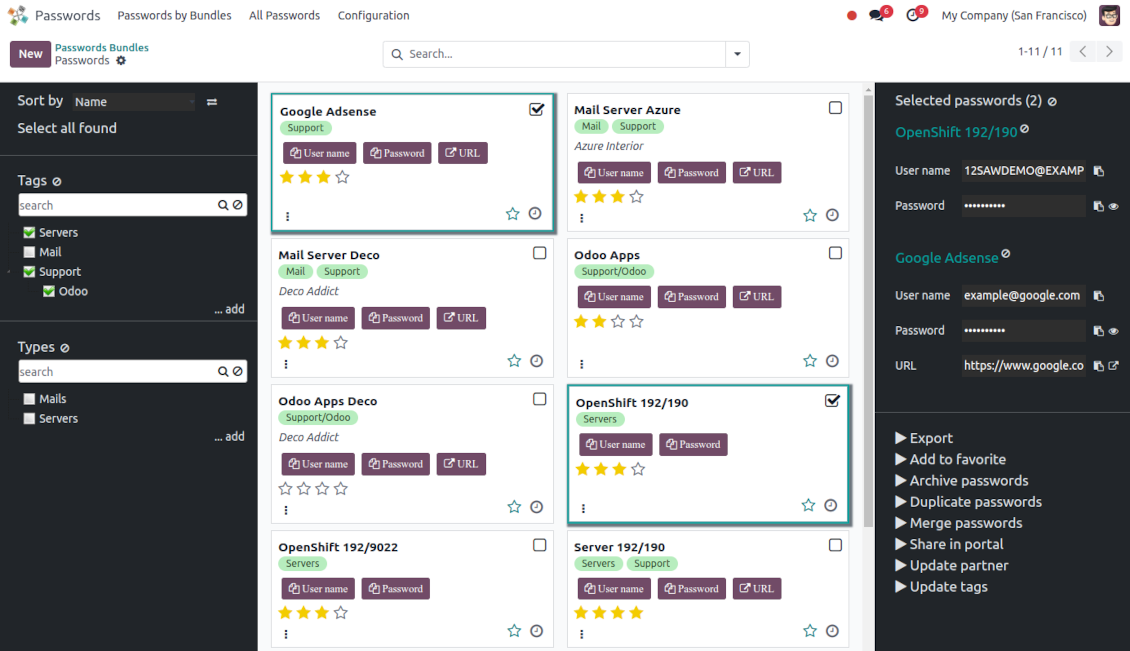
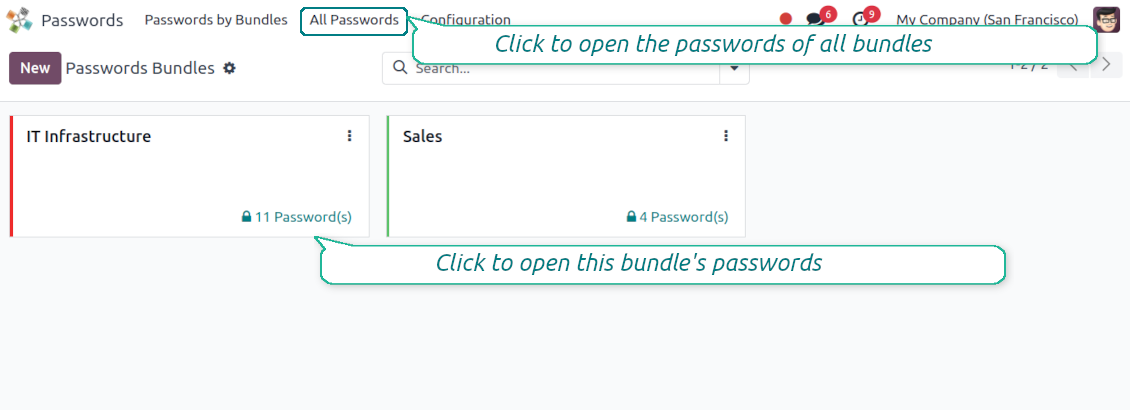
This app lets organize the safe passwords keeping system to structure, find and securely share password bundles.
- a core app to manage vaults and passwords.
Цената му е
198€
178€.
- an extension to add custom fields for password keys. Features assumed by this app are marked by the icon .
Цената му е
38€
37€.
Shared passwords vaults for team use
Passwords are combined in bundles: each might be shared with any user and any user group
Single view interface
Structure vault by tags and types, sort keys, proceed with mass actions, copy credentials to the clipboard from the same interface
Encrypted and protected password manager
The tool introduces a few security layers to minimize the possibility of data leaks
Portal sharing
Optionally share passwords with Odoo portal contacts
Auto generation
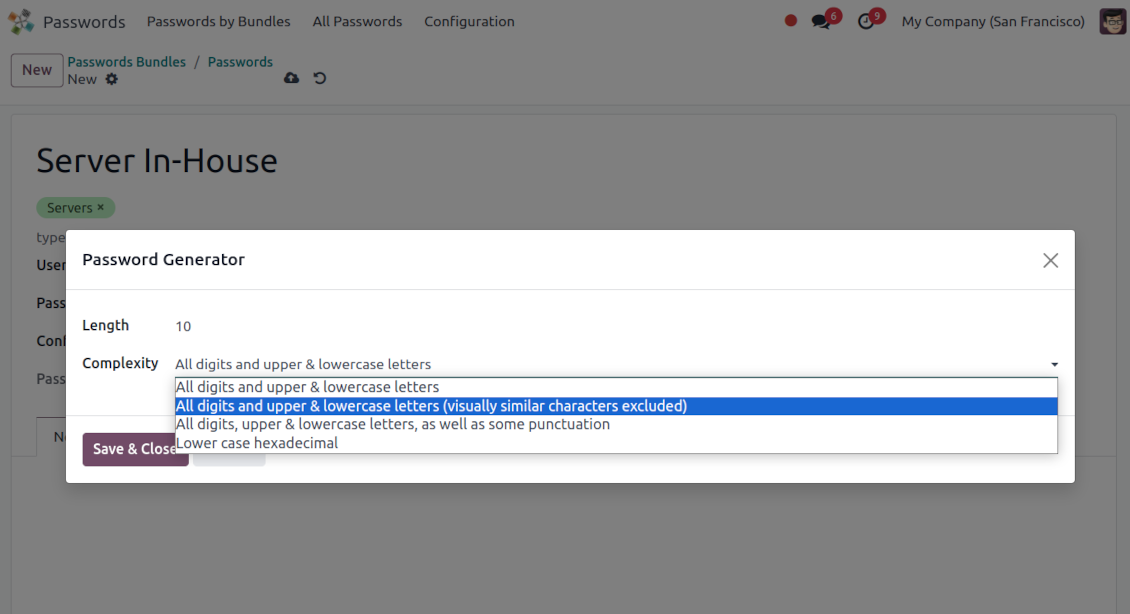
Force Odoo and let users create passwords based on chosen length and requirements
Passwords quality check
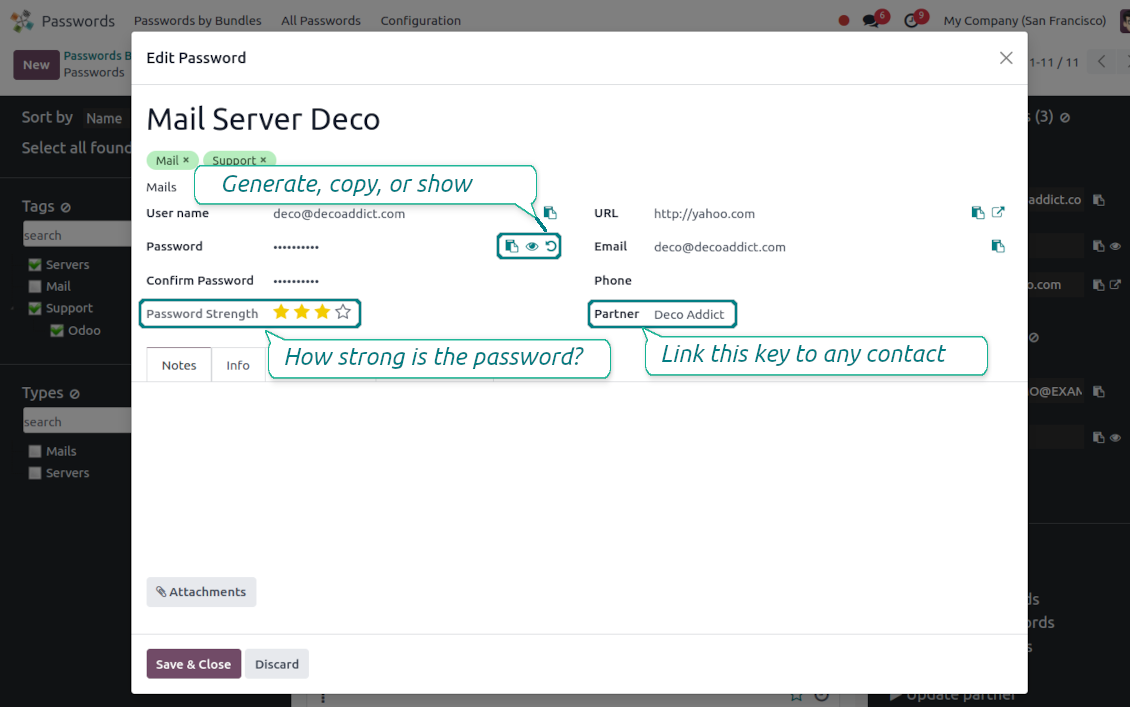
Password strength is estimated in real-time to make sure no weak passwords are introduced. Potential duplicates are easily detected
Batch update, export, and import
Configure the mass actions: export, update tags or linked partners, archive or restore, import vaults from an electronic table, etc.
Custom fields
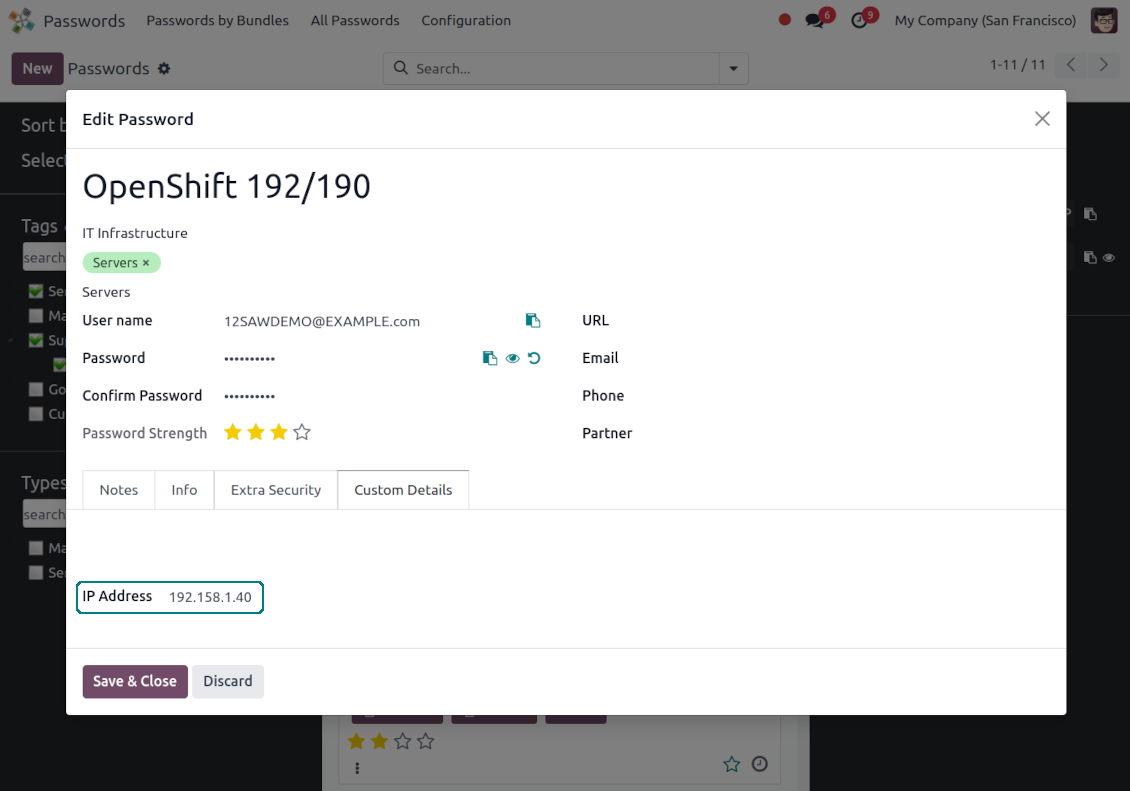
Define passwords' typology and add custom attributes.
Very good password management module
Easy installation and quick setup
Shared use, encryption, and protection of passwords
Sharing Policies
-
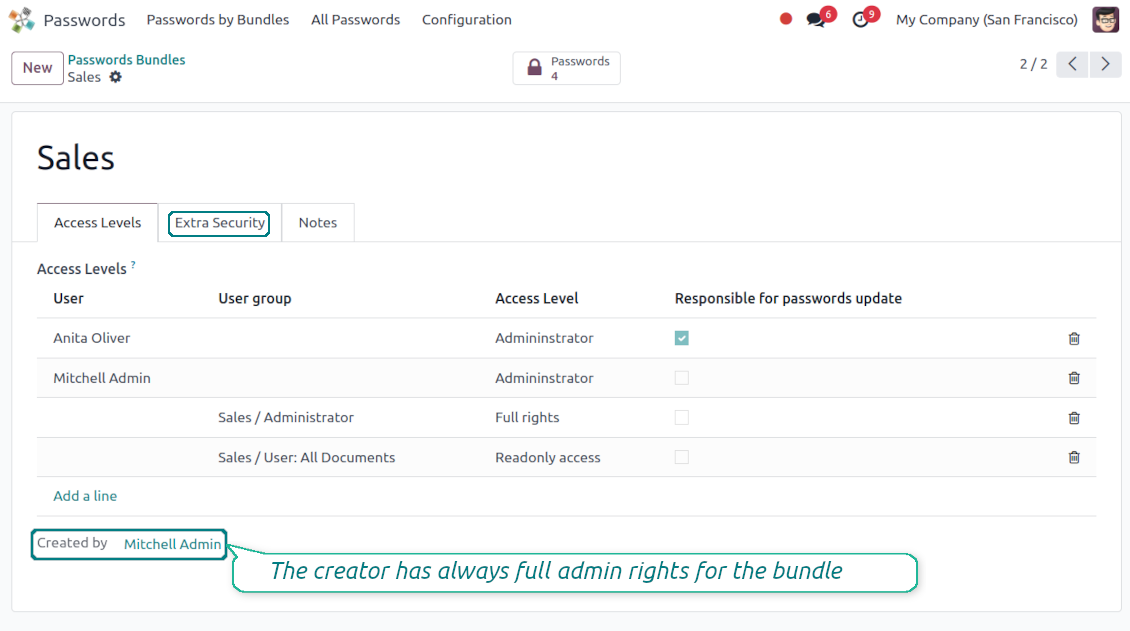
To grant access for a bundle just indicate a user or a user group in the table of access levels
-
Bundle administrators may access, update or delete the bundle, its passwords, and its tags. Admins are assumed to manage access levels, modify update policies, and set extra passwords
-
Full rights users may access, update or delete passwords and tags related to the bundle, but they can't change the vault itself, its access levels, or settings
-
Readonly access users may observe and address passwords and tags of the bundle. Such users can't modify any objects
-
The bundle creator is always its administrator. The Odoo super admin (with id 1) has full rights to all bundles and passwords
-
For bundle read-only users, it is possible to additionally restrict access to specific password keys. In particular, define the groups or/and users that may see a password. A read-only user should either have one of the mentioned groups or should be among the mentioned users. If none of the fields are defined, all bundle users can access a password
Security Layers
-
Have as many password vaults for any user group as you need
-
All passwords are symmetrically encrypted. It means that to decrypt a password, plotters should know the exact decryption algorithm and a bundle decryption key/bundle salt and password
-
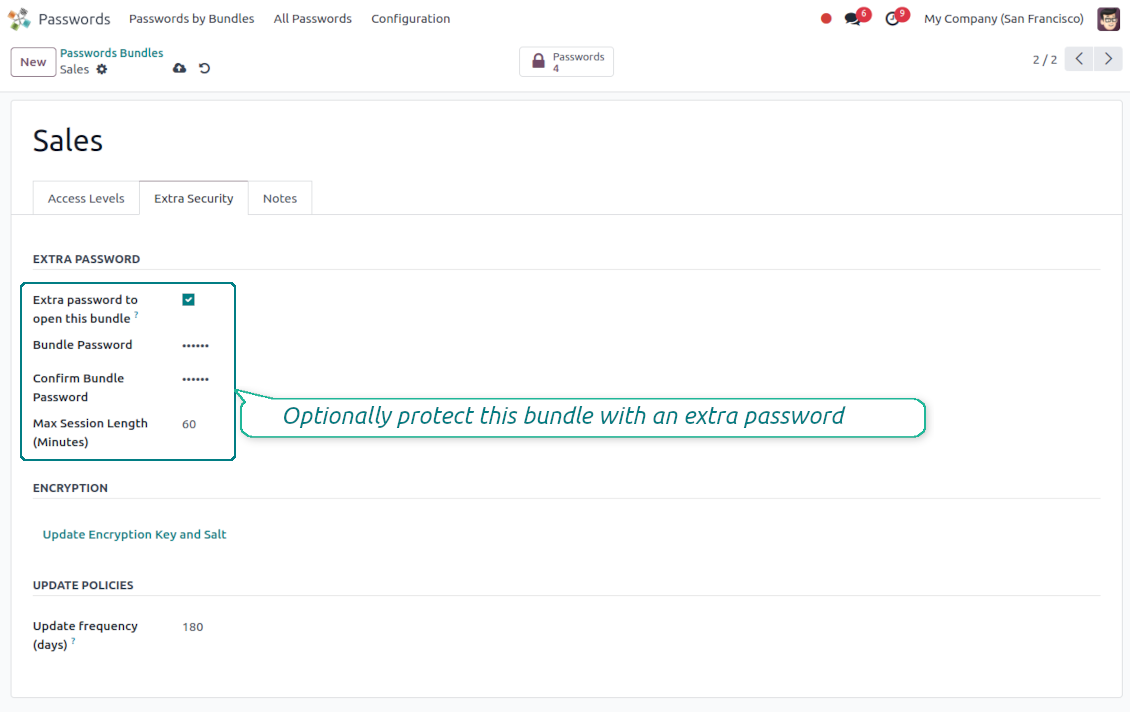
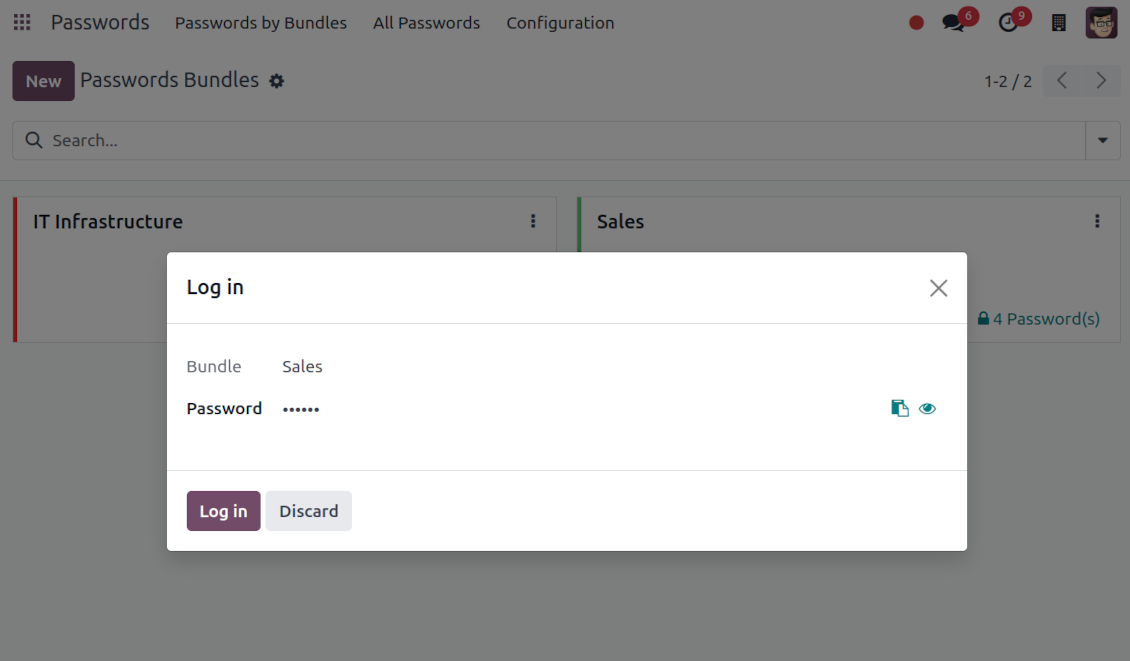
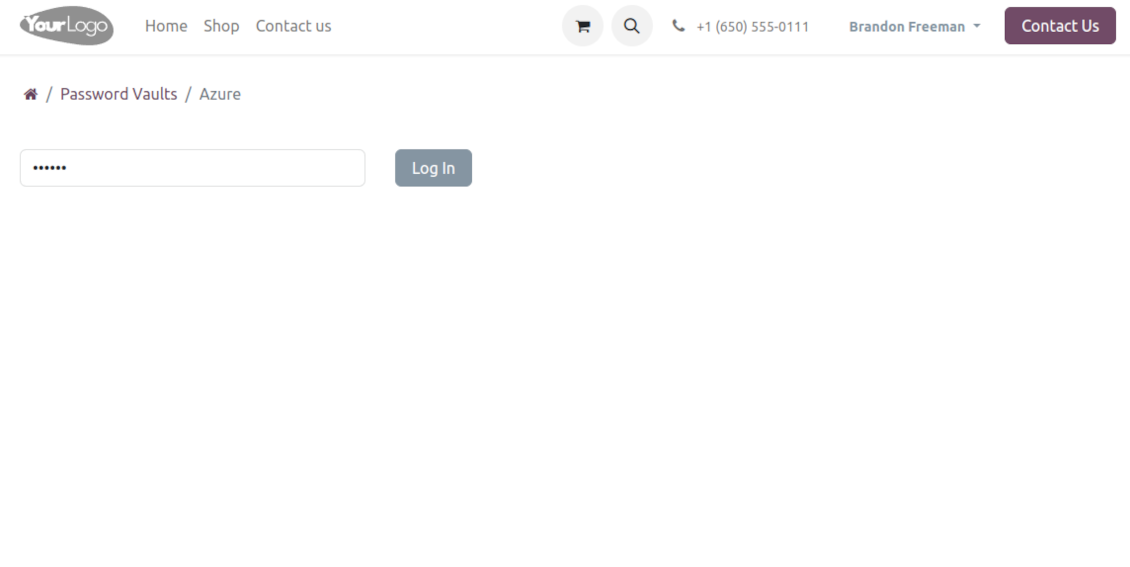
For each bundle, you can assign an extra password, which would be required to enter each time any user applies to that bundle or its passwords. The session period after successful login is set up in minutes
-
Vault extra password is also kept in the database decrypted, and might be changed by a bundle administrator (sure, if he/she enters a correct old paraphrase). If the bundle password is set, keys are encrypted by that password hashed by an auto-generated salt
-
For each bundle, it is possible to define password update policies in days. Then, the user who is set up as 'Responsible for password updates' would be assigned special activities to update keys.
Portal vaults
-
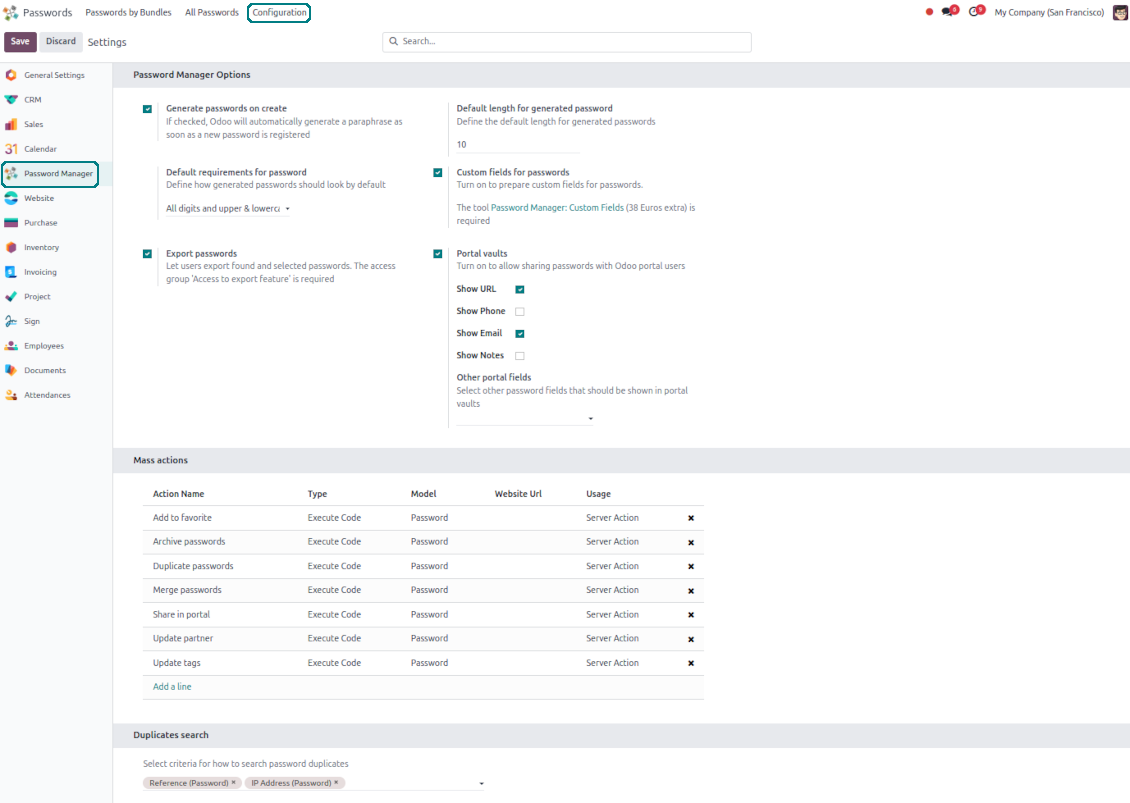
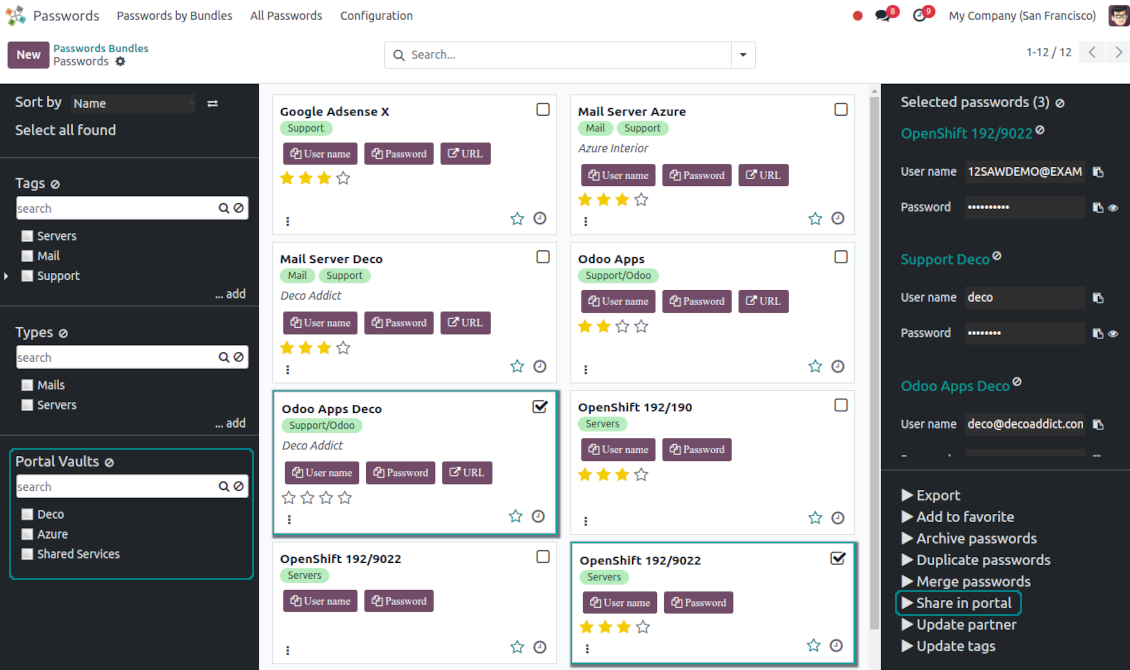
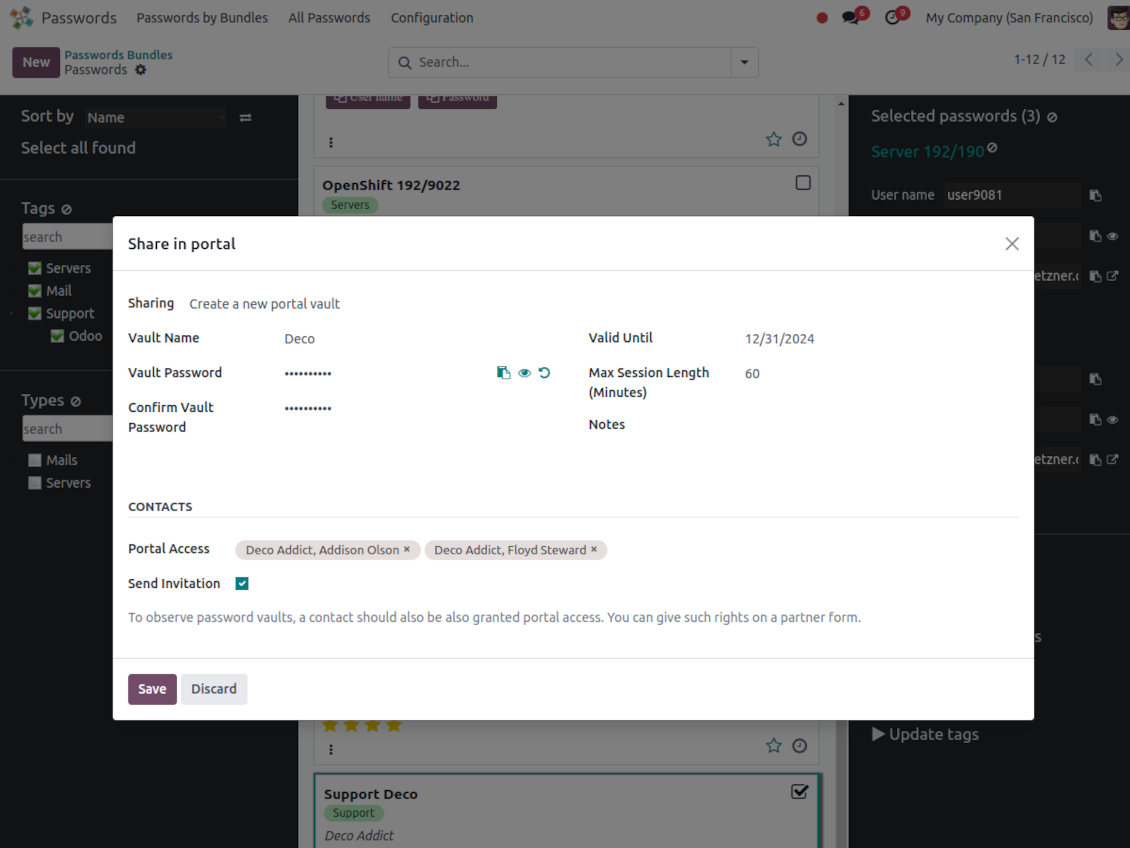
Optionally turn on password sharing with portal users. To that goal, on the configuration page tick the box "Portal vaults" and add the mass action "Share in portal"
-
Within a password bundle, create an unlimited number of portal password vaults shared with an unlimited number of Odoo partners
-
Each bundle internal user can create or update any portal vault linked to this bundle. To add a password for a vault, select the required keys and trigger the mass action "Share in portal". Optionally send an invitation during sharing
-
Navigate over and manage available vaults right from the backend navigation panel
-
Define a validity date to auto-archive password vaults for a temporary sharing
-
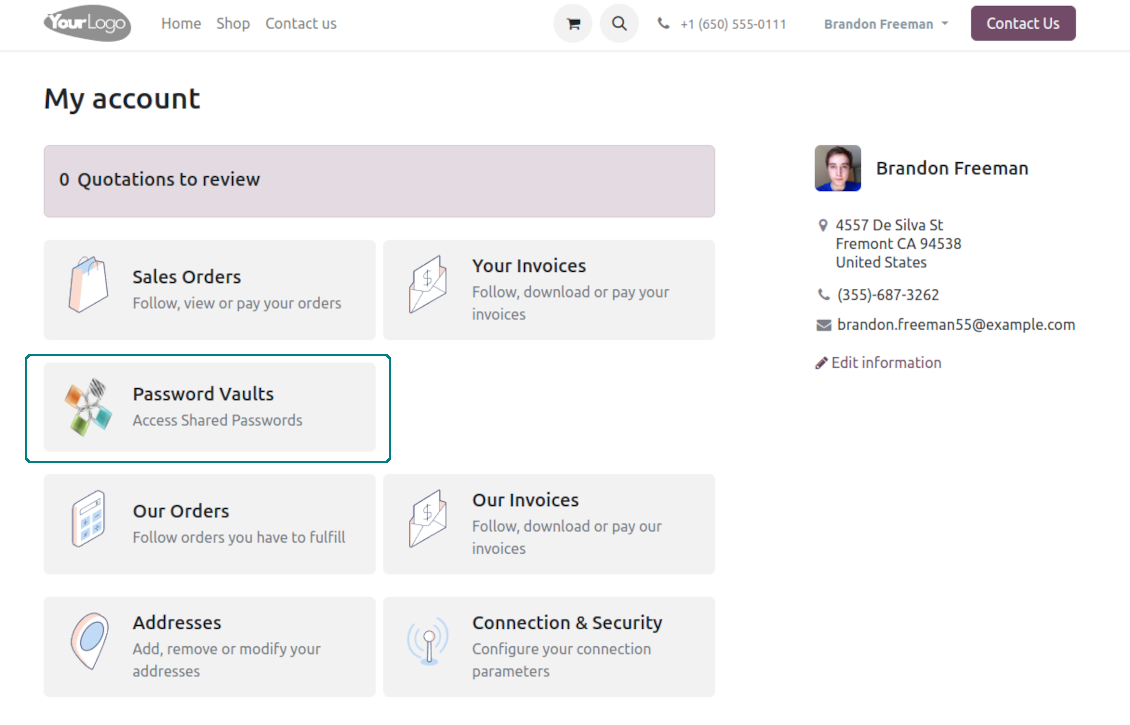
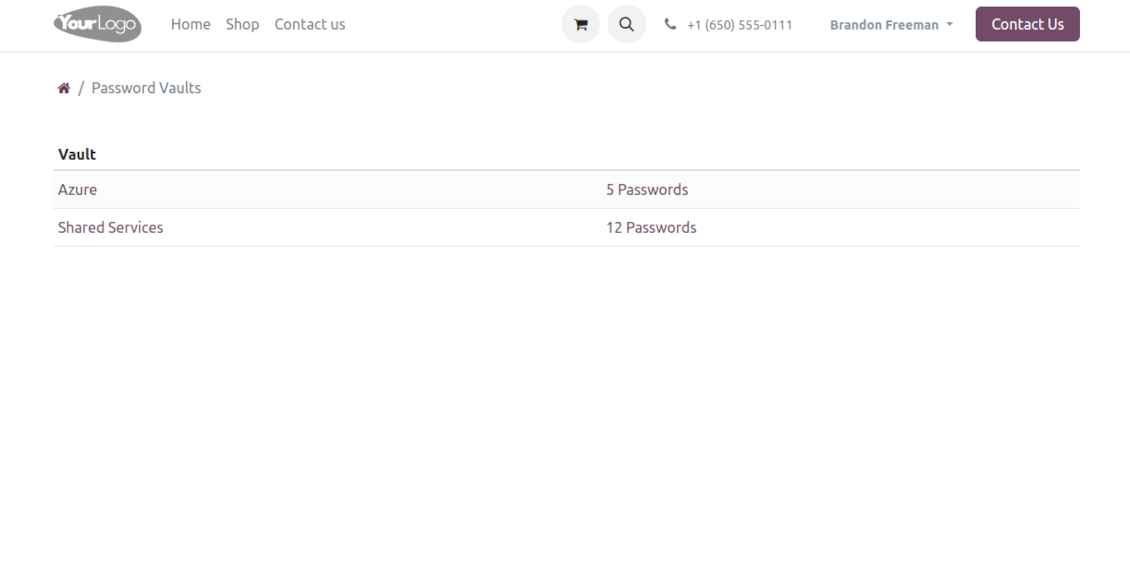
A contact may access all vaults where he/she or his/her company is indicated in the field "Portal Access". Take into account that a user should have portal rights that might be granted from a partner form view (Action > "Grant portal access")
-
Portal users can open password vaults from the specially introduced entry in the home portal page
-
Each portal vault is obligatorily secured with a password. All keys are kept encrypted and might be decrypted only after entering the vault password. The portal session length is defined per each vault
-
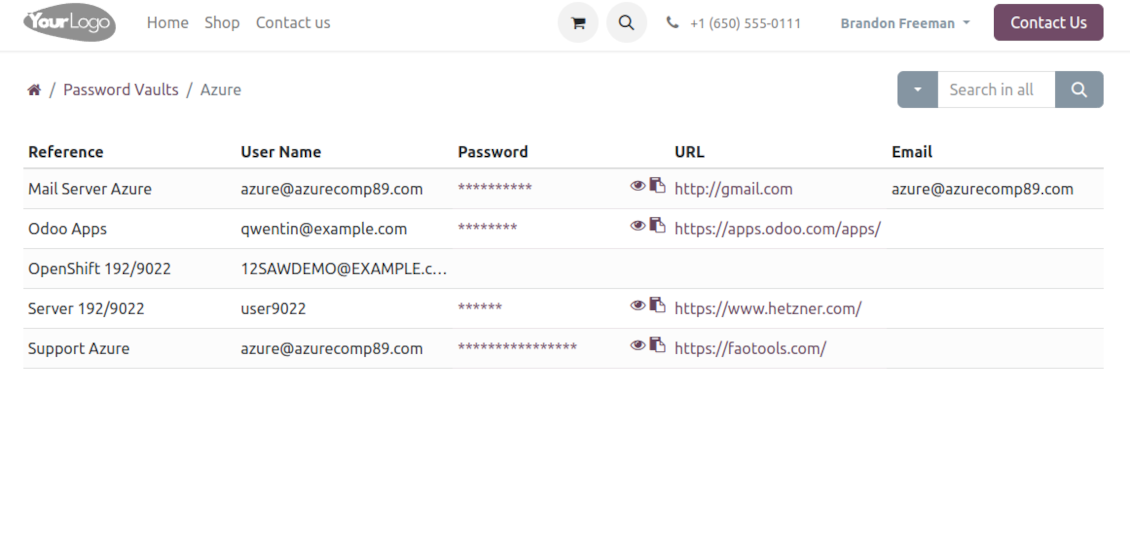
By default, only a password reference, user name, and password key are shown. Optionally show an URL, phone, email, and notes
-
The tool lets portal users show/hide password keys, navigate and search by shown columns.
Custom attributes for Odoo passwords
-
Custom attributes creation does not require any technical knowledge. In order to show a new property for passwords, just add a new field and enter the details
-
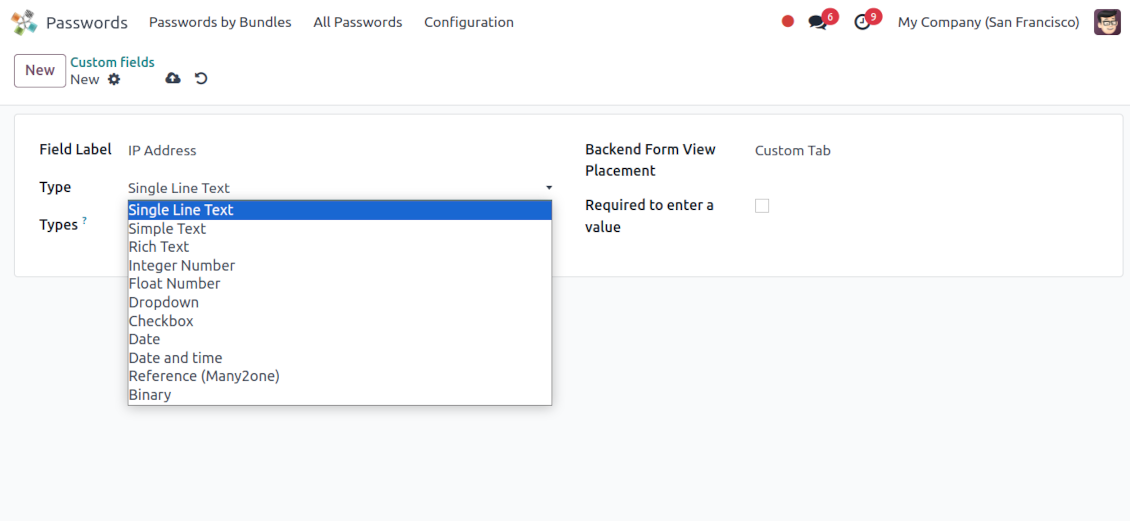
It is possible to add custom fields of the following types: single-line text (char), simple text without formatting (text), rich text (HTML-formatted text), integer or float numbers, drop-down choice with your own options (selection), checkbox (boolean), date or date and time, binary (a file to upload), reference to another Odoo document (e.g. for sale order, contact; many2one)
-
The tool lets you comfortably select an interface position of a custom field from a closed list of options
-
Distinguish passwords by type in order to show properties only for suitable ones. Thus, the set of columns for 'virtual servers' and 'email servers' might be different
-
Mark a custom field required to force users to enter values
-
Custom password fields might be imported and exported
-
The rights to create custom fields belong only to Odoo administrators.
Duplicates detection and passwords merging
-
The app introduces a configurable system to find passwords duplicates
-
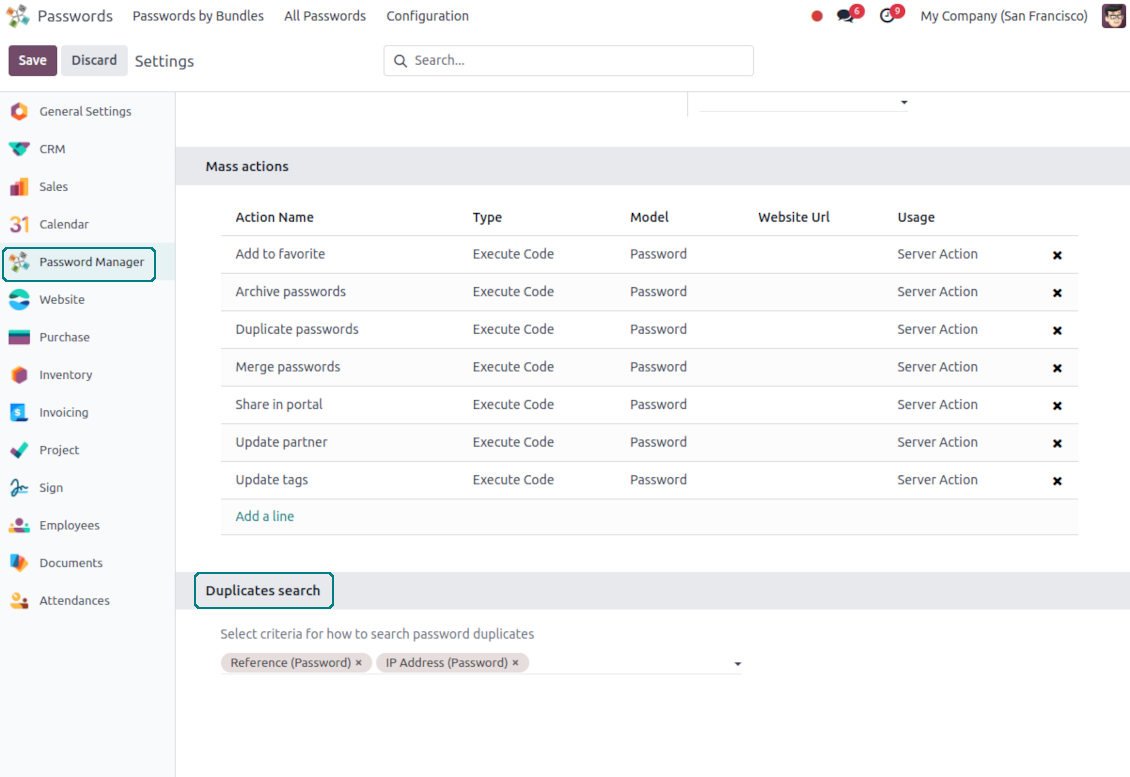
Define on your own which fields should be used to search for duplicates. Choose such fields on the app configuration page, the section 'Duplicates search'
-
As duplicate criteria use any stored field of the following types: char (reference, user name, email, phone, etc.), text (notes), many2one (linked partner, type, etc.), date and datetime, integer, and float. Duplicates detection is possible also based on custom fields of the same types
-
For all fields, a duplicate should have absolutely the same value. For example, '123' equals '123', but '123' is not equal to '1234'. Only in the case of char fields, it is a comparison without taking into account capital letters ('Server' equals 'serVER')
-
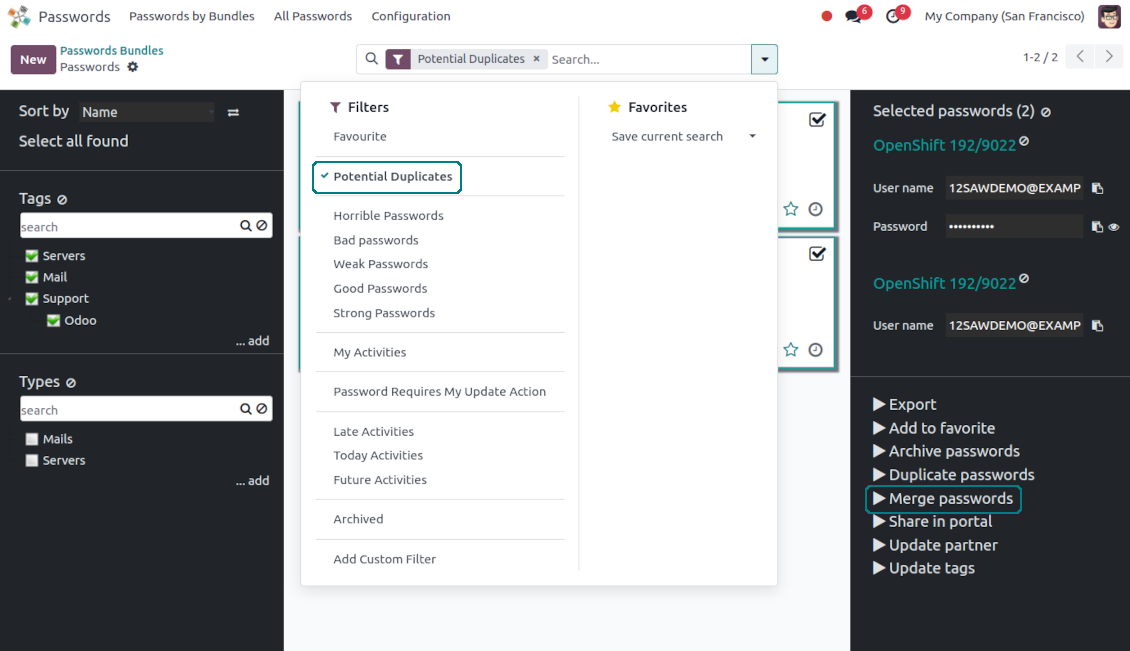
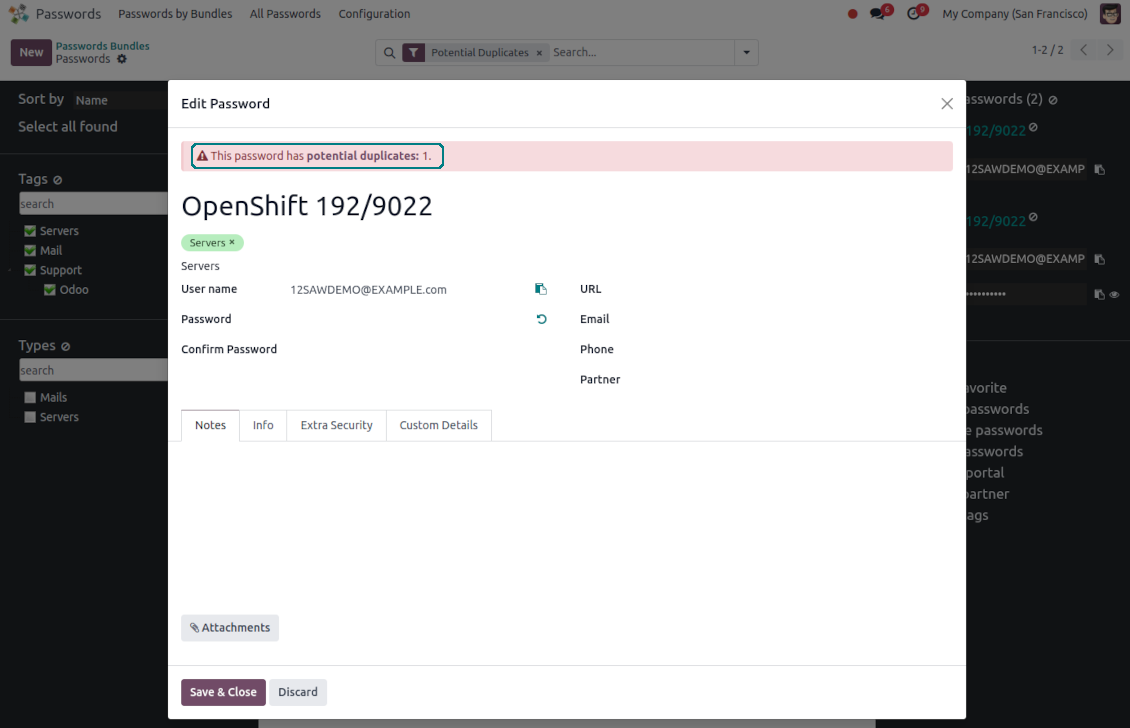
Apply the filter 'Potential duplicates' in the passwords interface to observe candidates. You may search within a particular bundle or in all passwords simultaneously
-
When you register a new password, check also the red button on the top right corner. If it is shown, make sure you do not create a potential copy of an existing key
-
Found duplicates or just any password keys might be merged into a single record. To that end, do not forget to add the mass action 'Merge passwords' on the configuration page
-
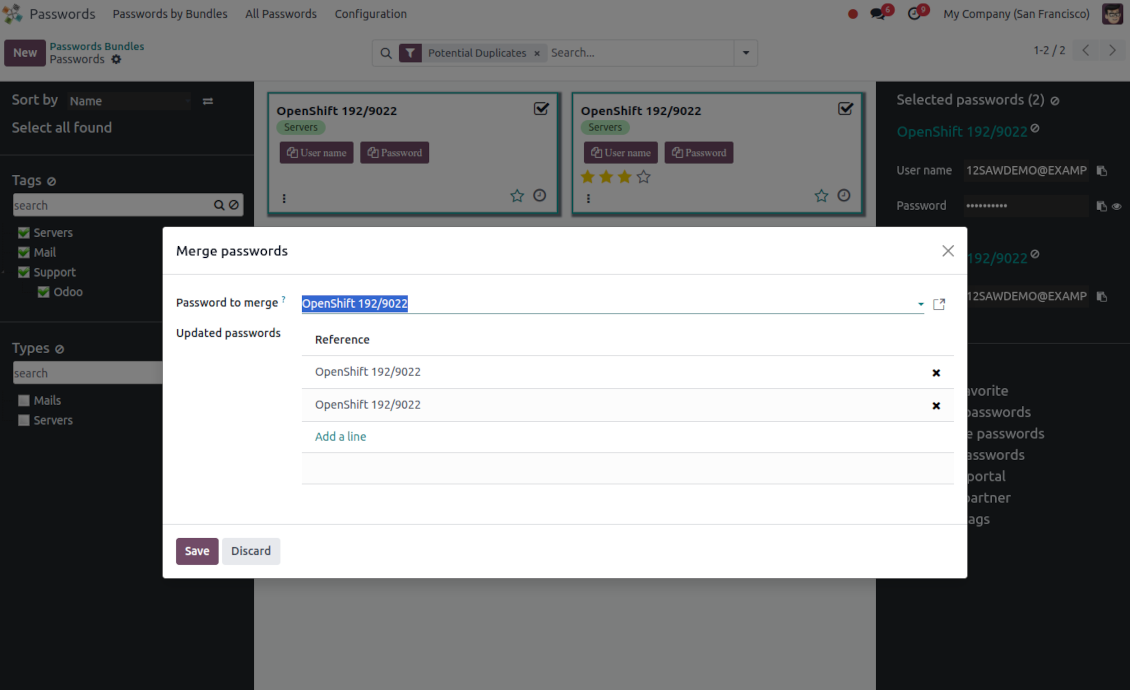
To merge passwords, select the required keys and push the mass action 'Merge passwords' on the right navigation panel
-
In the wizard, as the 'Password to merge', choose one that will be the prime source of the details. In case of conflicts, its value will be prioritized
-
In the wizard, as the 'Merged passwords', choose keys that will be used as a source of complementary details (for example, details that are missing in the main password)
-
Then, press the button 'Save'. As a result, the app will archive all the 'Merged passwords' and enrich the 'Password to merge'
-
Starting from the 'Password to merge' values, the tool will check the fields reference, bundle, user name, email, URL, phone, last password update date, and linked partner. The app will select the first found not null value
-
The app will also accumulate notes, attachments, and tags from all merged records
-
Values of custom fields will be chosen according to keys sequence starting from the 'Password to merge'. Take into account that tables (one2many and many2many fields) will be left as they are in the 'Password to merge'.
Съвети за конфигурация и инсталация за Password Manager Odoo v.17
Python dependencies
To guarantee tool correct work you would need a number of Python libraries: zxcvbn, cryptography:
pip3 install zxcvbn cryptography
Често задавани въпроси за Password Manager Odoo v.17
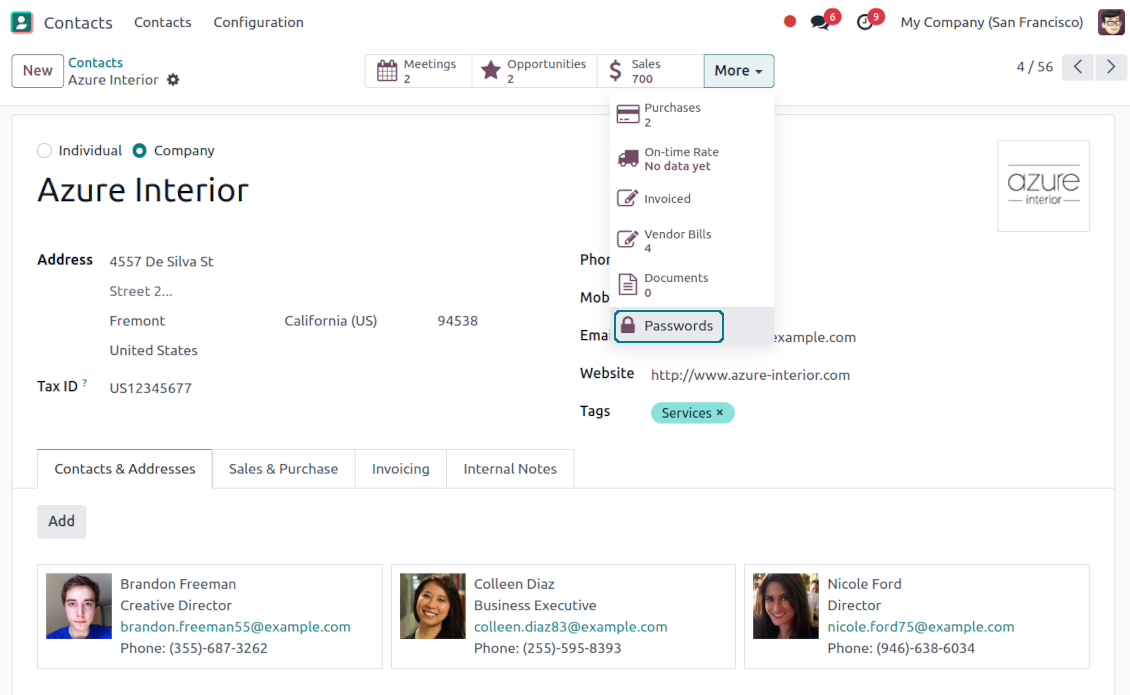
Как да видя всички пароли на партньор?
За да видите всички пароли на партньор, отидете в Contacts, отворете партньора и щракнете смарт бутона 'Passwords'. След това ще бъдете пренасочени към приложението Password manager и ще видите всички пароли на този партньор.
Как да изтрия пакет пароли (password manager)?
Бутонът 'Delete' е скрит от главното меню на пакетите от съображения за сигурност. За да изтриете пакет с пароли: 1. Щракнете бутона с три точки горе вдясно на пакета 2. Ще бъдете пренасочени към режим на редактиране; оттам щракнете 'Save' 3. Над пакета ще видите бутона 'Action'; щракнете и изберете 'Delete'.
Какви са политиките за обновяване на вашите инструменти?
Според действащите правила на Odoo Apps Store:
- Всеки модул, купен за версия 12.0 и по-стара, дава достъп до всички версии до 12.0.
- От версия 13.0 всяка версия на модула се купува отделно.
- Независимо от версията покупката дава право на всички обновления и поправки в рамките на основната версия.
Имайте предвид, че екипът на faOtools не контролира тези правила. За въпроси се обръщайте директно към представителите на Odoo Apps Store.
Как да инсталирам вашето приложение в Odoo.sh?
Най-прекият подход е да използвате вградения работен поток на магазина Odoo:
1. Отворете страницата на модула и щракнете бутона Deploy on odoo.sh
2. След това ще бъдете пренасочени към страницата на GitHub. Влезте в профила си, след което щракнете 'Create a new repo' или използвайте съществуващо. Уверете се, че хранилището е частно. Не е позволено публикуването на приложения под лиценз OPL-1. Ако е нужно, създайте ново repo за проекта Odoo.sh
3. След това отидете в odoo.sh и щракнете бутона Deploy. В изскачащия прозорец потвърдете решението и щракнете 'Continue.' Това стартира инсталацията.
Тези стъпки ще инсталират приложението в продукционния клон на проекта. Ако искате да разположите приложенията в други клонове или да обновите модула, направете следното:
1. Качете изходния код на приложението от магазина Odoo
2. Направете commit на модула в необходимото GitHub хранилище. Уверете се, че никой папки/файлове на приложението не се игнорират (т.е. не са в .gitignore на repo). Хранилищата се създават автоматично от odoo.sh и по подразбиране може да включват важни елементи (напр. /lib). Качете всички директории, поддиректории и файлове на модула без изключения
3. Разположете целевия клон на проекта odoo.sh или, ако настройките предполагат това, изчакайте да се изгради автоматично.
Как да инсталирам вашето приложение на собствен сървър?
2. Рестартирайте сървъра на Odoo;
3. Включете режим за разработчици (технически настройки);
4. Обновете списъка с приложения (менюто с приложения);
5. Намерете приложението и натиснете „Activate“/„Install“;
6. Следвайте указанията на страницата на приложението, ако има такива.
Забелязах, че приложението ви има допълнителни добавки. Мога ли да ги купя по-късно?
Да, разбира се. Едновременно Odoo автоматично добавя всички зависимости в количката, затова трябва да изключите вече купените инструменти, за да избегнете двойно плащане.
Инсталирах приложението ви в Odoo.sh и в тестовете виждам предупреждение/грешка
Червено/оранжево предупреждение не влияе на функциите на приложението. За съжаление понякога модулите ни не минават стандартните автоматични тестове, защото те очакват поведение в конфликт с целите на приложението. Например променяме изчислението на цената, а тестовете на стандартния модул Odoo сравняват крайната цена със стандартен алгоритъм.
Първо проверете функциите на разгънатата база. Всичко работи ли коректно?
Ако все пак смятате, че предупреждението влияе на реални функции, свържете се с нас и изпратете пълните регистрационни файлове от инсталацията и пълния списък на разгънатите модули (включително ядро и трети страни).
Мога ли да купя приложението директно от вашата фирма?
Не, разпространяваме инструментите само чрез официалния магазин за приложения Odoo.
Бих искал да получа отстъпка
За съжаление нямаме техническа възможност да предложим индивидуални цени.
Мога ли да инсталирам приложението в моята база Odoo Online (SaaS)?
Не, приложения на трети страни не могат да се ползват в Odoo Online. За съжаление Odoo SaaS блокира тази възможност.
Вашият инструмент зависи от други приложения. Трябва ли да ги купя?
Да, инструментът изисква всички модули, посочени в зависимостите, за да работи правилно. Цената на страницата на приложението вече включва всички необходими зависимости.
Каква е цената на модула в щатски долари? Защо се промени?
Цената на нашите модули е в евро. Магазинът Odoo превалутира цените по вътрешния си курс. Затова цената в щатски долари може да се промени при обновяване на курса.
Текстовете на приложението и уебсайта на езици, различни от английски, са с помощта на ИИ и са съгласувани с официалните преводи на Odoo. Ако забележите грешка, изпратете тикет за коректност на преводите и ще го поправим.
Демонстрационни бази Odoo (прегледи наживо)
За това приложение можем да предоставим безплатна персонализирана демо база.
За да се свържете с нас не са нужни телефонен номер или кредитна карта. Достатъчна е кратка регистрация по имейл, която не отнема повече от 30 секунди.
По ваше искане ще подготвим индивидуална база за преглед наживо, където около две седмици можете да правите тестове и да проверявате предположения.
Докладване на грешки
Ако срещнете грешки или непоследователно поведение, свържете се с нас. Гарантираме поправки до 60 дни от покупката и сме силно заинтересовани да подобряваме инструментите и след този срок.
За да се свържете с нас не са нужни телефонен номер или кредитна карта. Достатъчна е кратка регистрация по имейл, която не отнема повече от 30 секунди.
Включете възможно най-много подробности в заявката: екранни снимки, дневници на Odoo сървъра, пълно описание как да възпроизведете проблема и т.н. Обикновено са нужни няколко работни дни, за да се подготви работен план (ако грешката е потвърдена) или насоки какво да се направи (в противен случай).
Публични заявки за функции и идеи за модули (безплатна разработка)
Силно сме мотивирани да подобряваме инструментите си и ще сме благодарни за всяка обратна връзка. Ако изискванията ви са от обществена полза и могат да се реализират ефективно, екипът ще ги включи в нашия списък със задачи.
Такъв списък със задачи се обработва редовно и не предполага допълнителни такси. Макар да не можем да обещаем срокове и окончателен дизайн, това може да е добър начин да получите желаните функции без инвестиции и рискове.
За да се свържете с нас не са нужни телефонен номер или кредитна карта. Достатъчна е кратка регистрация по имейл, която не отнема повече от 30 секунди.
17.0.1.3.17
- The issue of read-only bundle users losing access to passwords after other users opened them has been fixed.
17.0.1.3.16
- The issue with the untranslated warnings has been fixed.
17.0.1.3.15
- The issue with creating keys when passwords are opened from a contact is fixed.
17.0.1.3.14
- The issue with password copying in the iOS environment has been fixed.
17.0.1.3.13
- The optional feature to log user access has been added.
17.0.1.3.12
- The archived ribbon for inactive records is added keys kanban and form views, bundles kanban and form views, and form views of tags and shares.
17.0.1.3.11
- Focus the bundle login wizard automatically.
17.0.1.3.10
- The issue with cut portal password fields is fixed.
17.0.1.3.8
- Опресняването на страницата запазва избрания пакет.
- Броят на дубликатите се изчислява в контекста на текущия пакет.
- Проблемът с липсващи ключове за пароли при първото зареждане е коригиран.
17.0.1.3.9
- Проблемът с реда на персонализираните полета в портала е коригиран.
17.0.1.3.7
- Изгледът за дейности по подразбиране за паролите вече е Kanban.
17.0.1.3.6
- Отстранена е невалидната escape последователност при актуализация на приложението.
16.0.1.2.11
- The issue of the invalid escape sequence during app update is fixed.
17.0.1.3.5
- Достъпът до конфигурацията на приложението е ограничен до групата Administration > Settings.
16.0.1.2.10
- Access to the app configuration is restricted to the group Administration > Settings.
17.0.1.3.4
- Формите за ключ за парола и портален пакет се пренареждат според това дали е избран свързан пакет.
16.0.1.2.9
- Password key and portal bundle forms are reorganized depending on whether a linked bundle is selected.
17.0.1.3.3
- Въведено е влачене и пускане за масово обновяване на пароли: добавяне на етикет, обновяване на тип и споделяне в порталния трезор на всички избрани ключове.
17.0.1.3.2
- Основните възможности drag&drop са оптимизирани.
17.0.1.3.1
- Въведени са основни възможности drag&drop.
- Избраният родител на навигационните дървета се осветява правилно.
17.0.1.2.9
- Kanban изгледът на ключовете за пароли е адаптиран към най-новите подходи на Odoo v.17.
17.0.1.2.8
- Порталните интерфейси за пароли и изчислението на порталните ключове са оптимизирани.
16.0.1.2.8
- Portal password interfaces and portal keys' computation are optimized.
17.0.1.2.7
- Поправена е видимостта на потребителските полета.
- Поправени са сортирането, експортът и изборът на архивирани записи в backend.
16.0.1.2.7
- Custom fields' visibility is fixed.
17.0.1.2.6
- Приложението е публикувано за версия 17.

The tool to flexibly structure Odoo attachments in folders and synchronize directories with cloud clients: Google Drive, OneDrive/SharePoint, Nextcloud/ownCloud, Dropbox, Amazon S3, Box, and NAS. DMS. File Manager. Document management system
398€
The tool to automatically synchronize Odoo attachments with OneDrive files in both ways
487€
The tool to automatically synchronize Odoo attachments with Google Drive files in both ways
487€
The tool to build a deep and structured knowledge base for internal and external use. Knowledge System. KMS. Wiki-like revisions.
398€
The tool to set up KPI targets and control their fulfillment by periods. KPI dashboards. Dashboard designer. KPI charts

The tool for time-based service management from booking appointments to sales and reviews
398€
The tool to manage your Odoo from your favorite AI chats through MCP. Claude. Any MCP-supporting AI.

The tool to translate URL addresses of Odoo website pages
38€
The tool to combine different Odoo events in a few configurable super calendars