Password Manager v.17
The tool to safely keep passwords in Odoo for shared use. Shared vaults
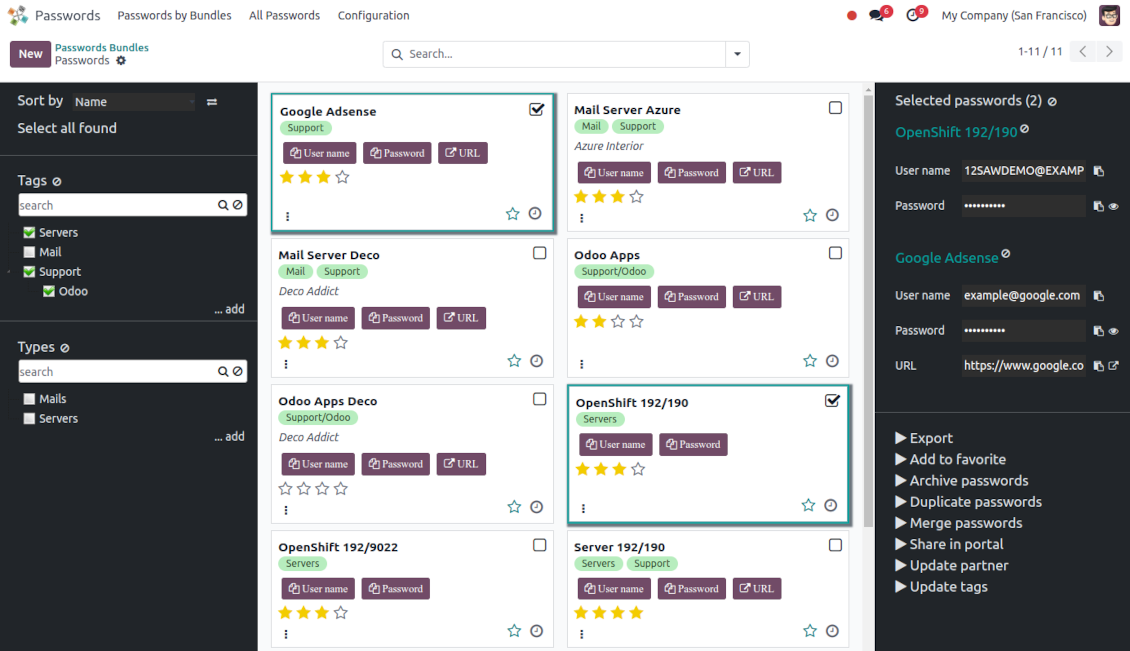
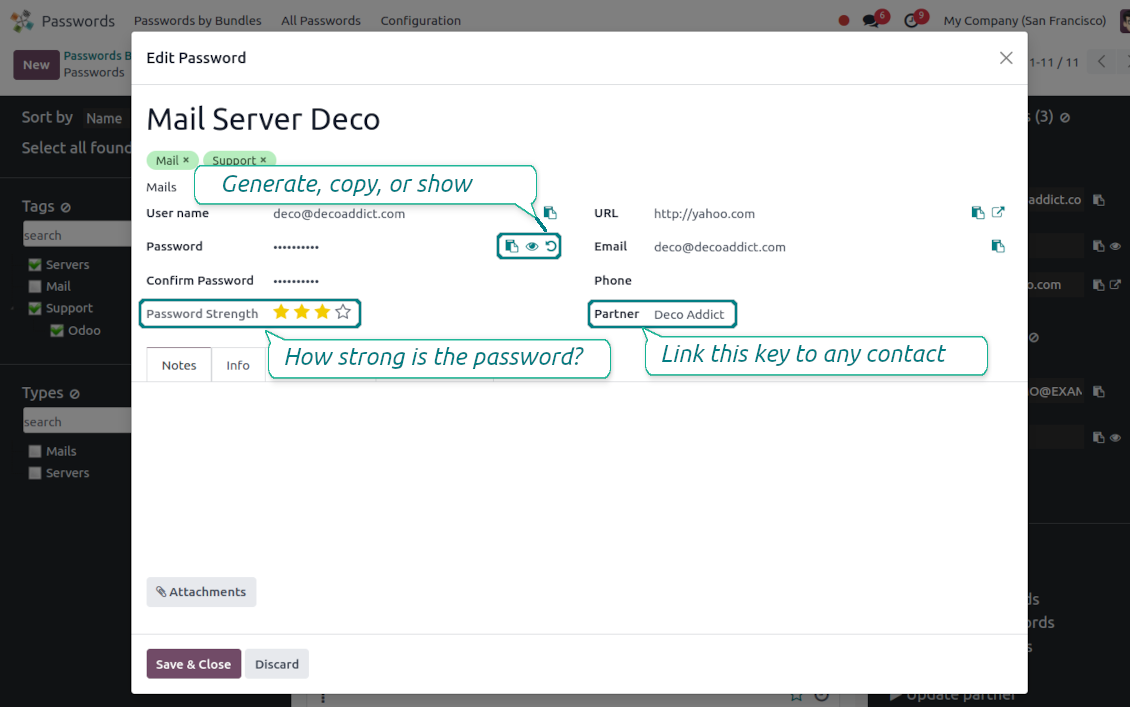
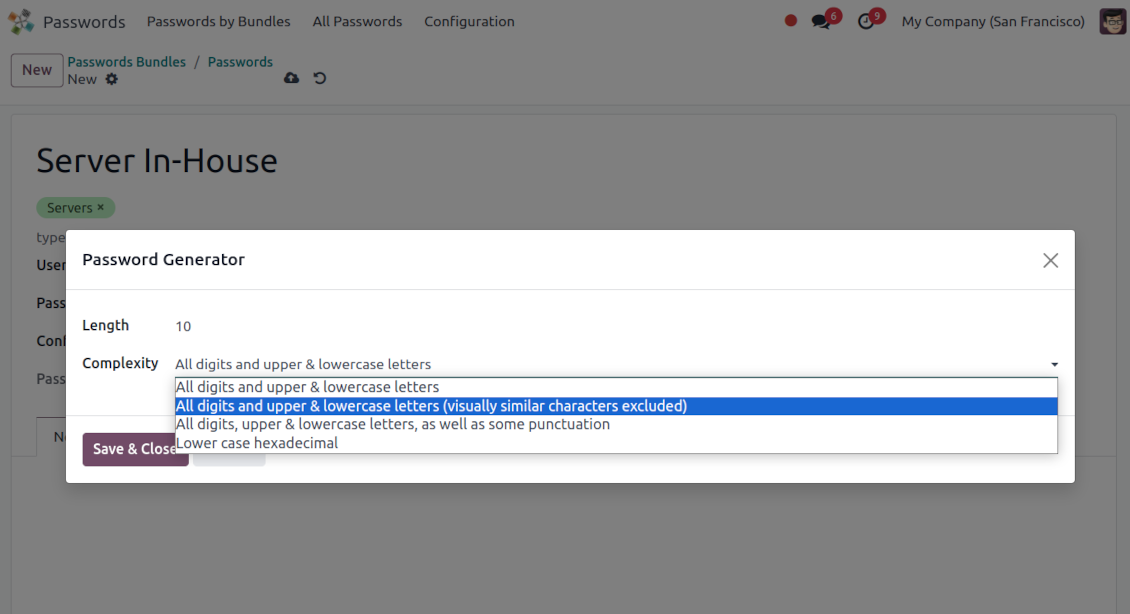
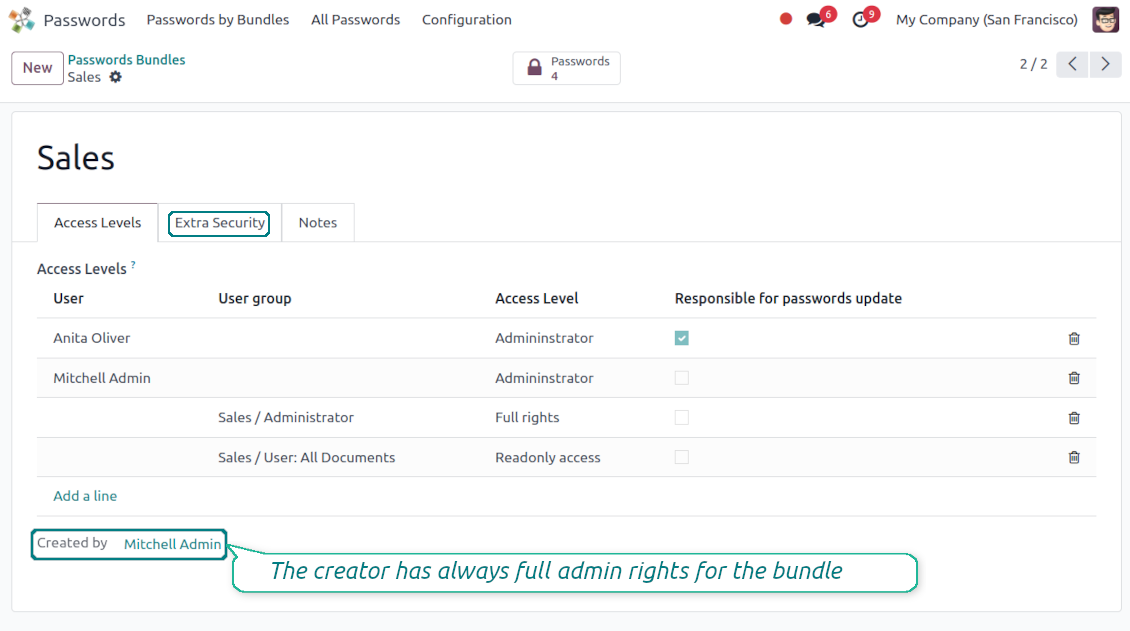
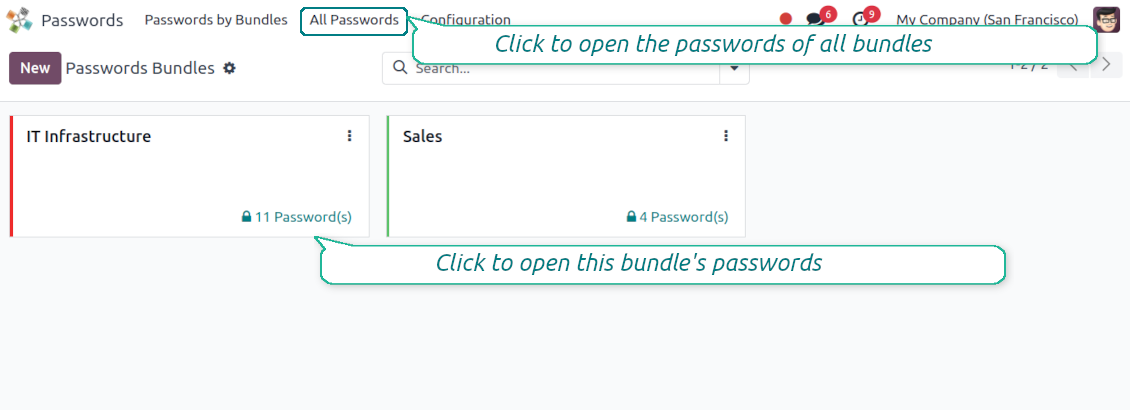
This app lets organize the safe passwords keeping system to structure, find and securely share password bundles.
- a core app to manage vaults and passwords.
Sen hinta on
198€
178€.
- an extension to add custom fields for password keys. Features assumed by this app are marked by the icon .
Sen hinta on
38€
37€.
Shared passwords vaults for team use
Passwords are combined in bundles: each might be shared with any user and any user group
Single view interface
Structure vault by tags and types, sort keys, proceed with mass actions, copy credentials to the clipboard from the same interface
Encrypted and protected password manager
The tool introduces a few security layers to minimize the possibility of data leaks
Portal sharing
Optionally share passwords with Odoo portal contacts
Auto generation
Force Odoo and let users create passwords based on chosen length and requirements
Passwords quality check
Password strength is estimated in real-time to make sure no weak passwords are introduced. Potential duplicates are easily detected
Batch update, export, and import
Configure the mass actions: export, update tags or linked partners, archive or restore, import vaults from an electronic table, etc.
Custom fields
Define passwords' typology and add custom attributes.
Very good password management module
Easy installation and quick setup
Shared use, encryption, and protection of passwords
Sharing Policies
-
To grant access for a bundle just indicate a user or a user group in the table of access levels
-
Bundle administrators may access, update or delete the bundle, its passwords, and its tags. Admins are assumed to manage access levels, modify update policies, and set extra passwords
-
Full rights users may access, update or delete passwords and tags related to the bundle, but they can't change the vault itself, its access levels, or settings
-
Readonly access users may observe and address passwords and tags of the bundle. Such users can't modify any objects
-
The bundle creator is always its administrator. The Odoo super admin (with id 1) has full rights to all bundles and passwords
-
For bundle read-only users, it is possible to additionally restrict access to specific password keys. In particular, define the groups or/and users that may see a password. A read-only user should either have one of the mentioned groups or should be among the mentioned users. If none of the fields are defined, all bundle users can access a password
Security Layers
-
Have as many password vaults for any user group as you need
-
All passwords are symmetrically encrypted. It means that to decrypt a password, plotters should know the exact decryption algorithm and a bundle decryption key/bundle salt and password
-
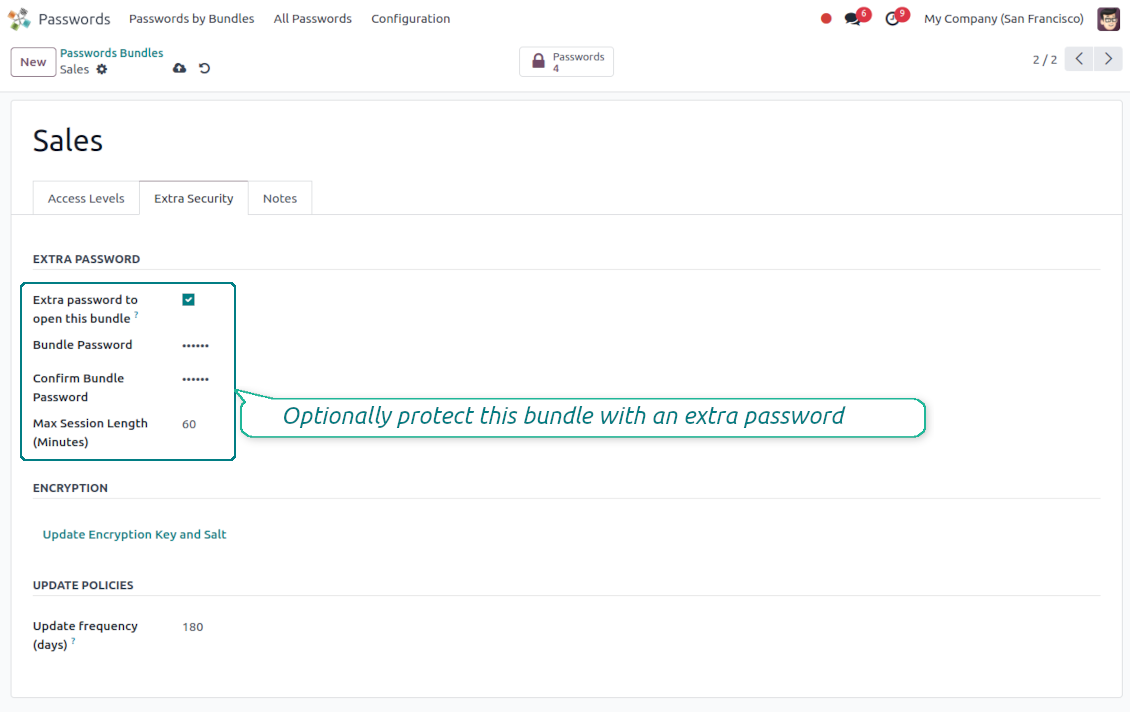
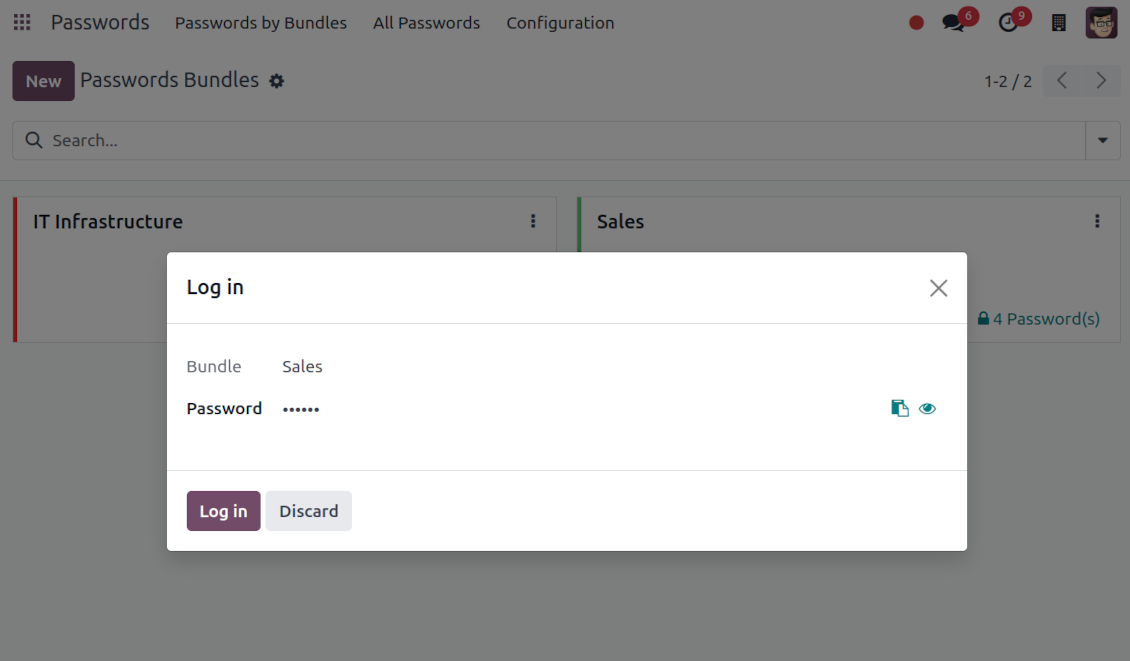
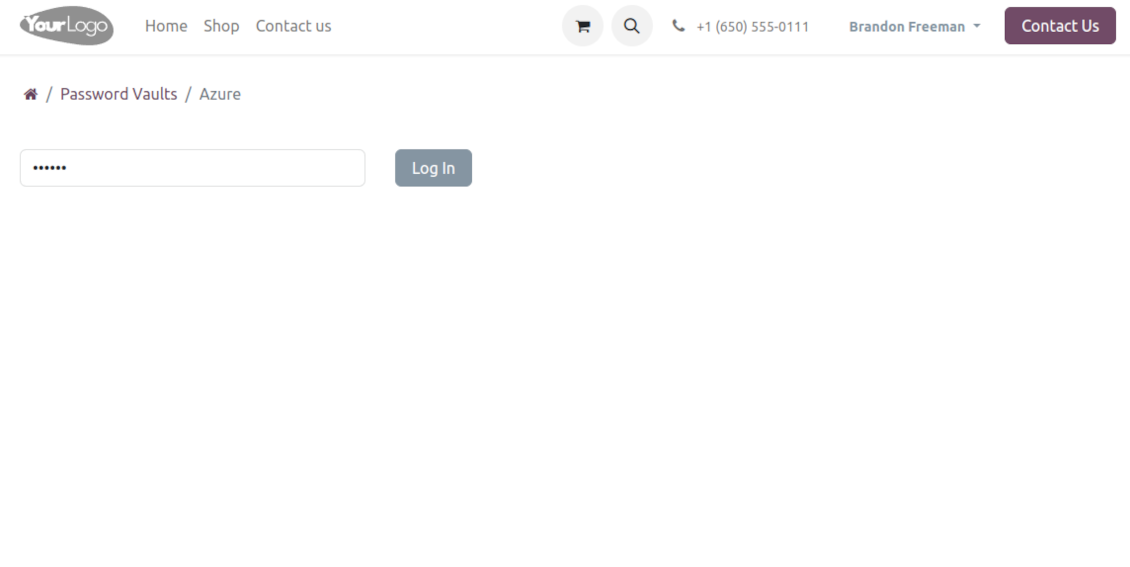
For each bundle, you can assign an extra password, which would be required to enter each time any user applies to that bundle or its passwords. The session period after successful login is set up in minutes
-
Vault extra password is also kept in the database decrypted, and might be changed by a bundle administrator (sure, if he/she enters a correct old paraphrase). If the bundle password is set, keys are encrypted by that password hashed by an auto-generated salt
-
For each bundle, it is possible to define password update policies in days. Then, the user who is set up as 'Responsible for password updates' would be assigned special activities to update keys.
Portal vaults
-
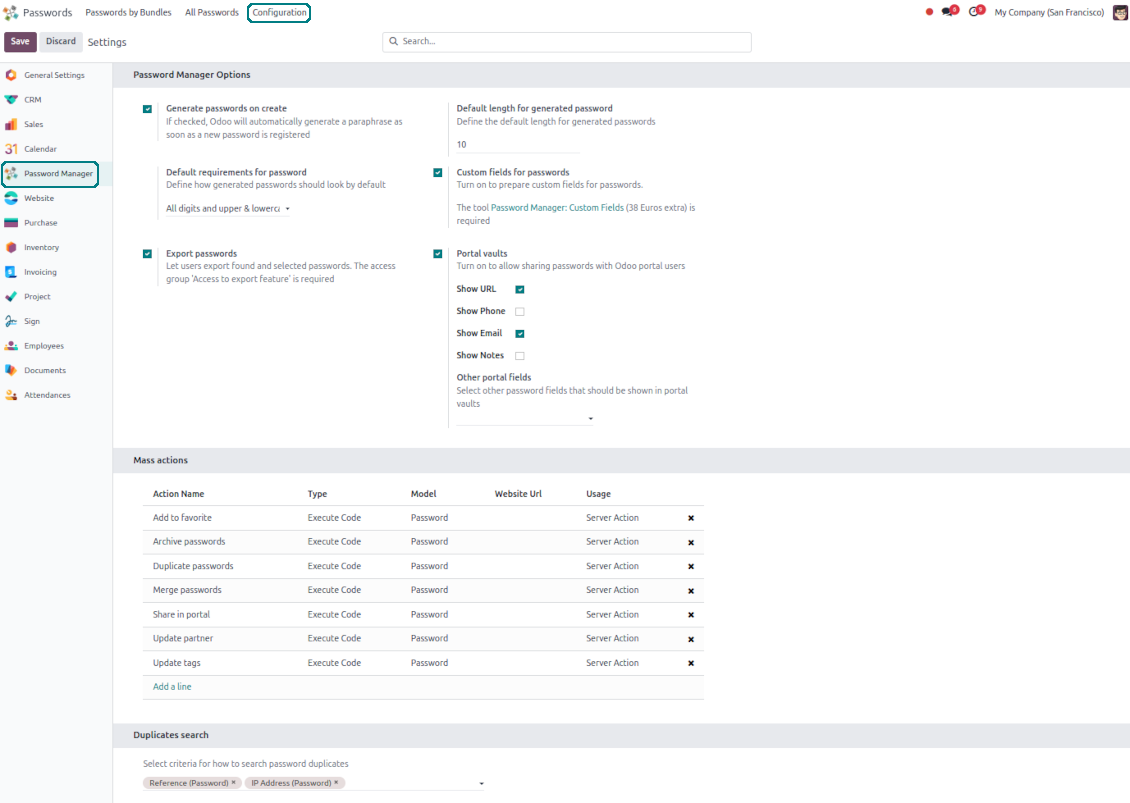
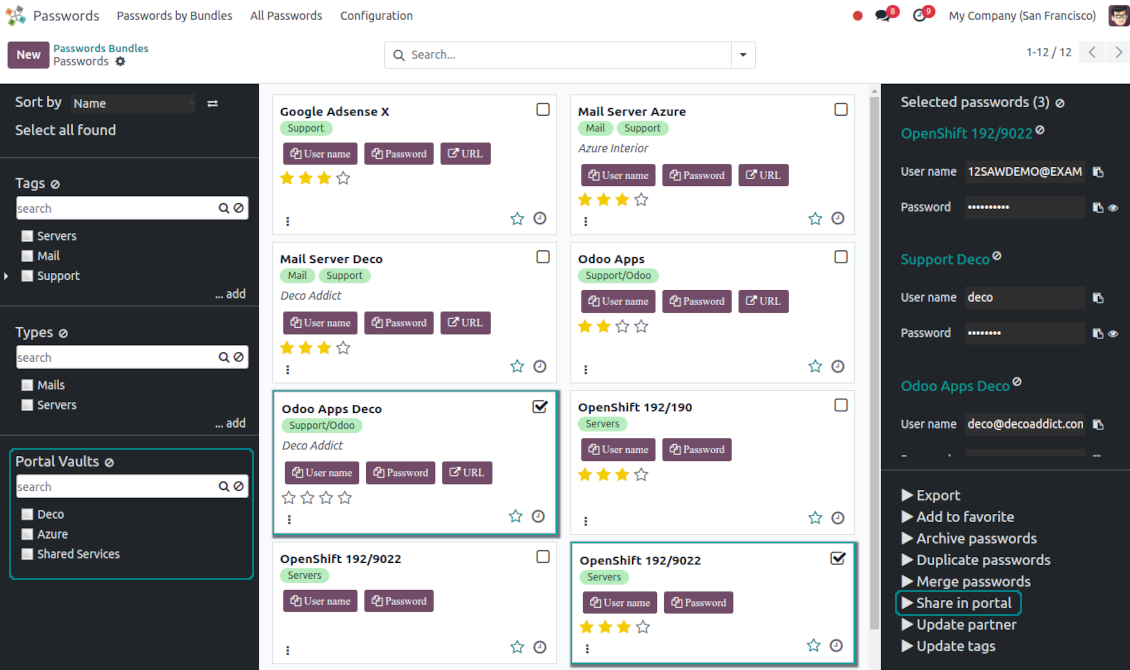
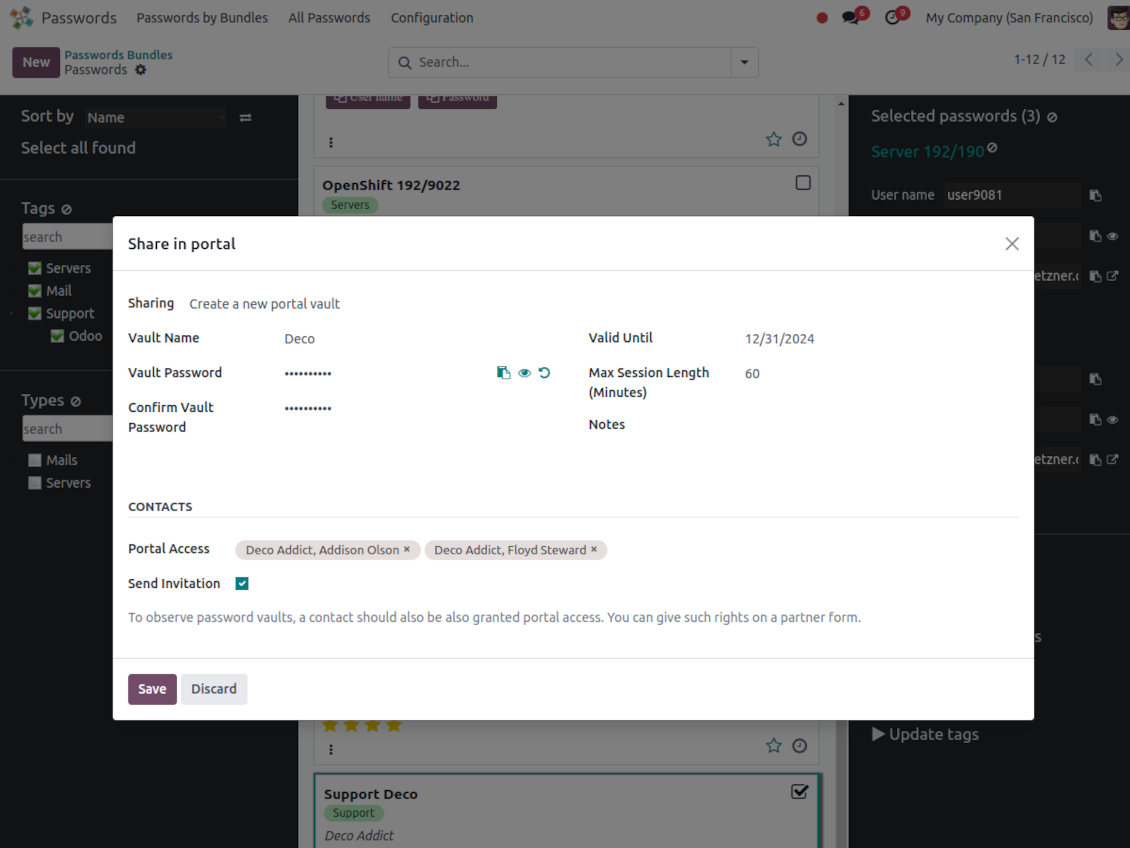
Optionally turn on password sharing with portal users. To that goal, on the configuration page tick the box "Portal vaults" and add the mass action "Share in portal"
-
Within a password bundle, create an unlimited number of portal password vaults shared with an unlimited number of Odoo partners
-
Each bundle internal user can create or update any portal vault linked to this bundle. To add a password for a vault, select the required keys and trigger the mass action "Share in portal". Optionally send an invitation during sharing
-
Navigate over and manage available vaults right from the backend navigation panel
-
Define a validity date to auto-archive password vaults for a temporary sharing
-
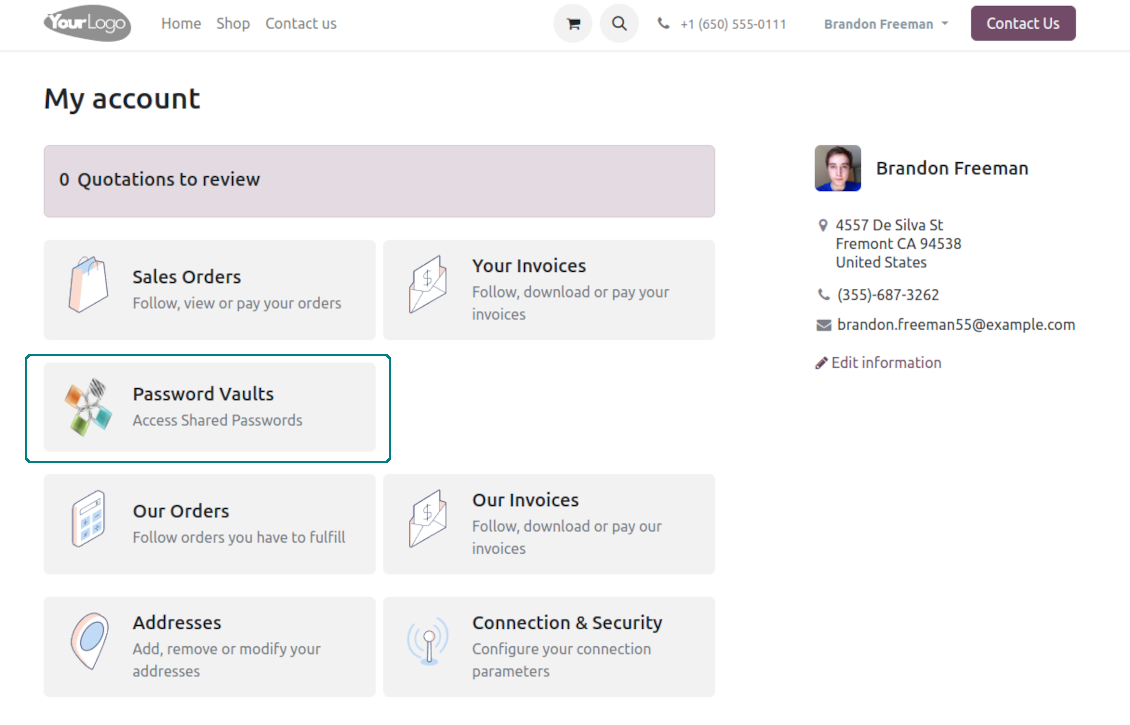
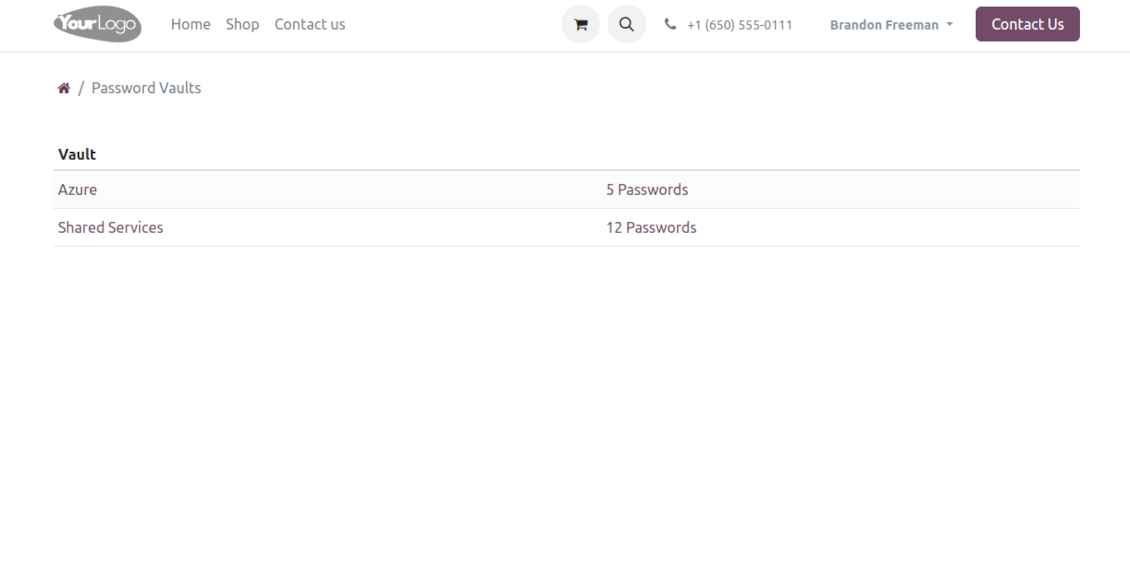
A contact may access all vaults where he/she or his/her company is indicated in the field "Portal Access". Take into account that a user should have portal rights that might be granted from a partner form view (Action > "Grant portal access")
-
Portal users can open password vaults from the specially introduced entry in the home portal page
-
Each portal vault is obligatorily secured with a password. All keys are kept encrypted and might be decrypted only after entering the vault password. The portal session length is defined per each vault
-
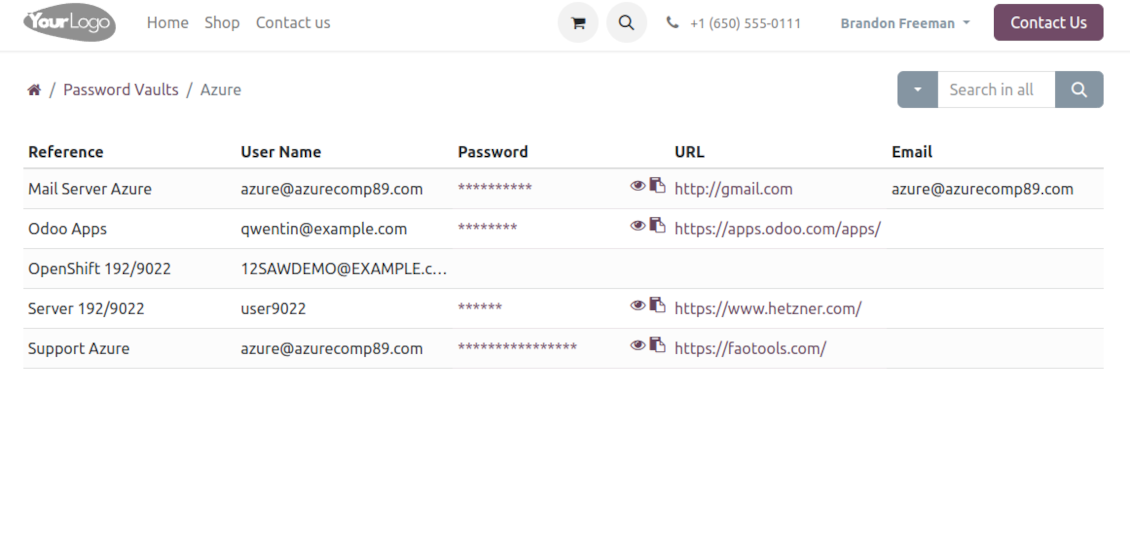
By default, only a password reference, user name, and password key are shown. Optionally show an URL, phone, email, and notes
-
The tool lets portal users show/hide password keys, navigate and search by shown columns.
Custom attributes for Odoo passwords
-
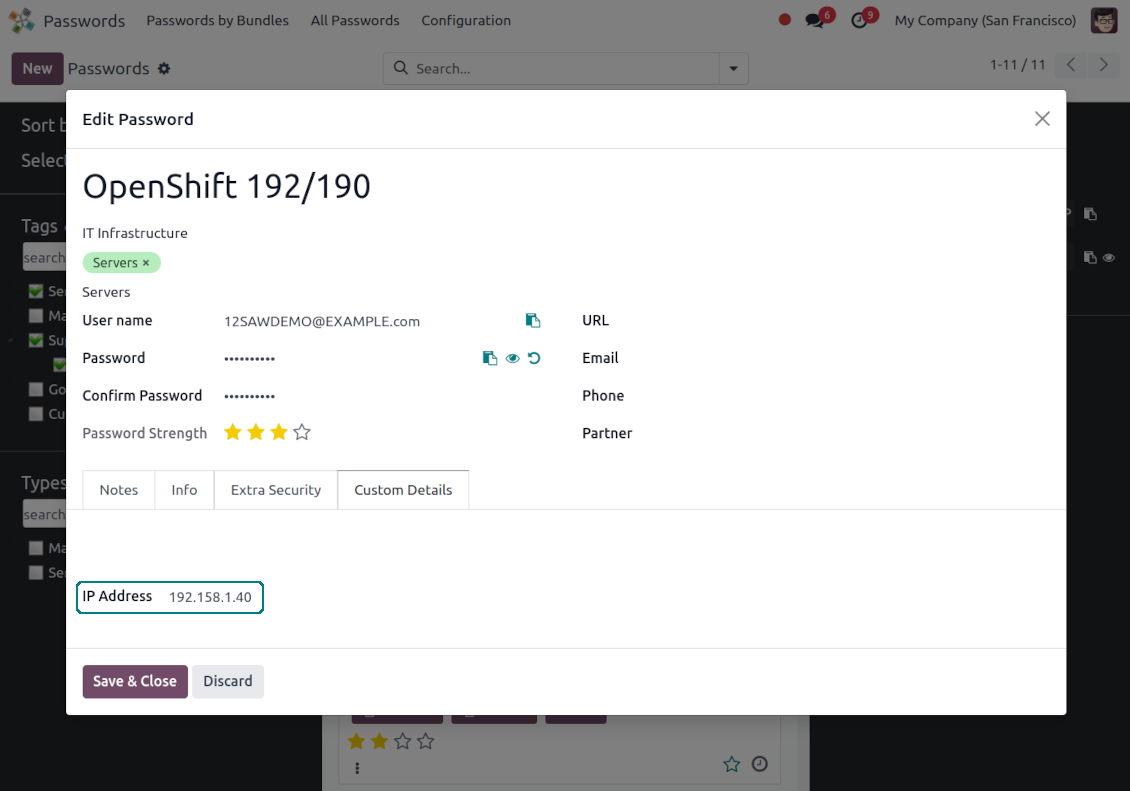
Custom attributes creation does not require any technical knowledge. In order to show a new property for passwords, just add a new field and enter the details
-
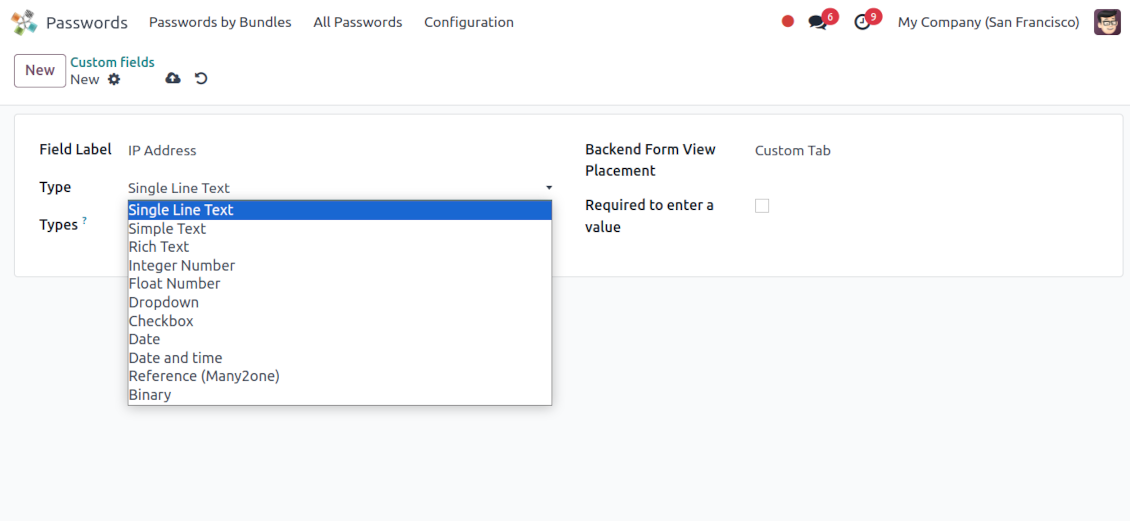
It is possible to add custom fields of the following types: single-line text (char), simple text without formatting (text), rich text (HTML-formatted text), integer or float numbers, drop-down choice with your own options (selection), checkbox (boolean), date or date and time, binary (a file to upload), reference to another Odoo document (e.g. for sale order, contact; many2one)
-
The tool lets you comfortably select an interface position of a custom field from a closed list of options
-
Distinguish passwords by type in order to show properties only for suitable ones. Thus, the set of columns for 'virtual servers' and 'email servers' might be different
-
Mark a custom field required to force users to enter values
-
Custom password fields might be imported and exported
-
The rights to create custom fields belong only to Odoo administrators.
Duplicates detection and passwords merging
-
The app introduces a configurable system to find passwords duplicates
-
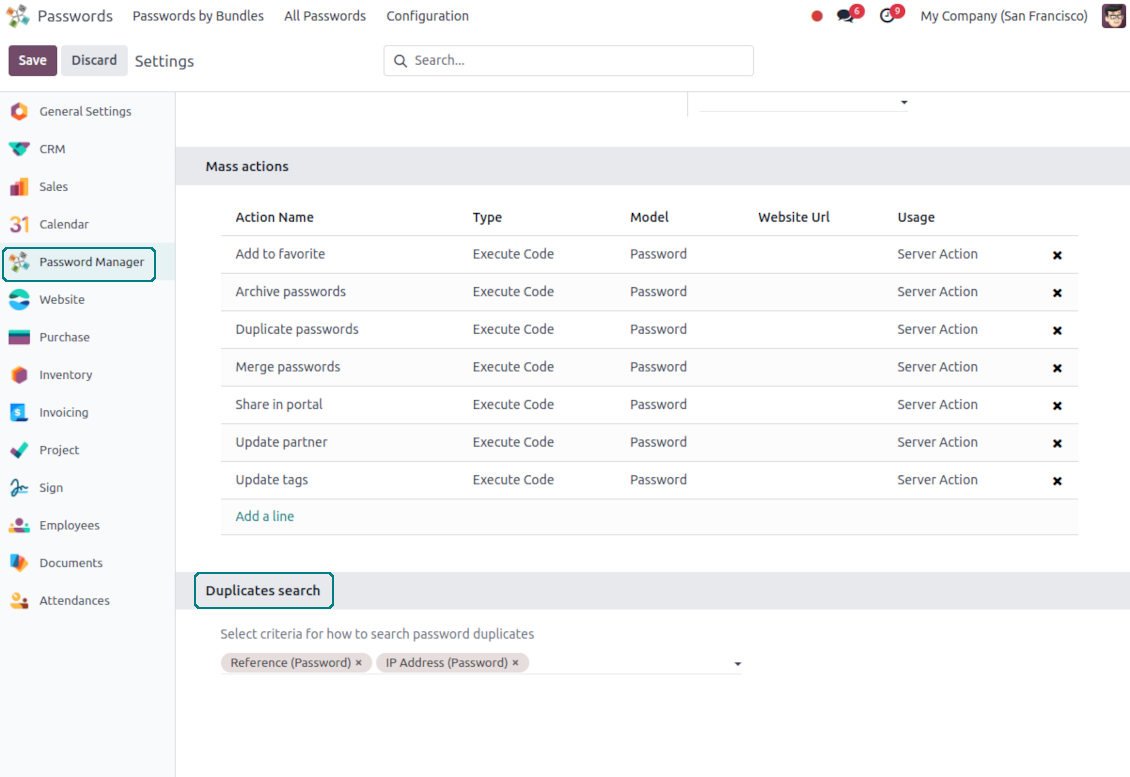
Define on your own which fields should be used to search for duplicates. Choose such fields on the app configuration page, the section 'Duplicates search'
-
As duplicate criteria use any stored field of the following types: char (reference, user name, email, phone, etc.), text (notes), many2one (linked partner, type, etc.), date and datetime, integer, and float. Duplicates detection is possible also based on custom fields of the same types
-
For all fields, a duplicate should have absolutely the same value. For example, '123' equals '123', but '123' is not equal to '1234'. Only in the case of char fields, it is a comparison without taking into account capital letters ('Server' equals 'serVER')
-
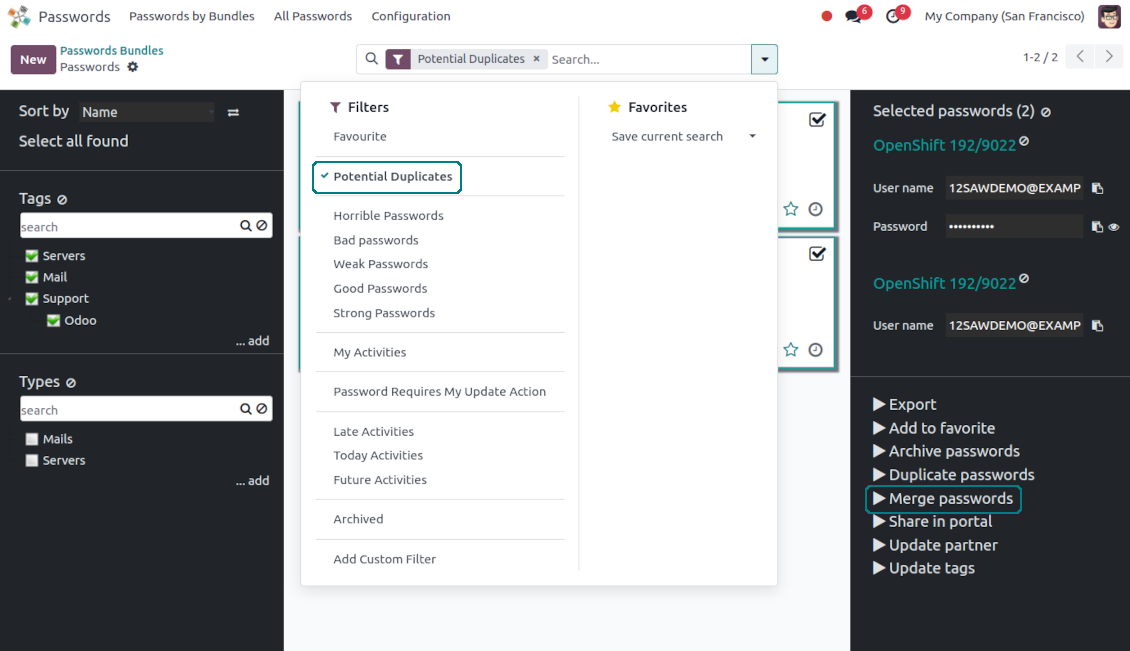
Apply the filter 'Potential duplicates' in the passwords interface to observe candidates. You may search within a particular bundle or in all passwords simultaneously
-
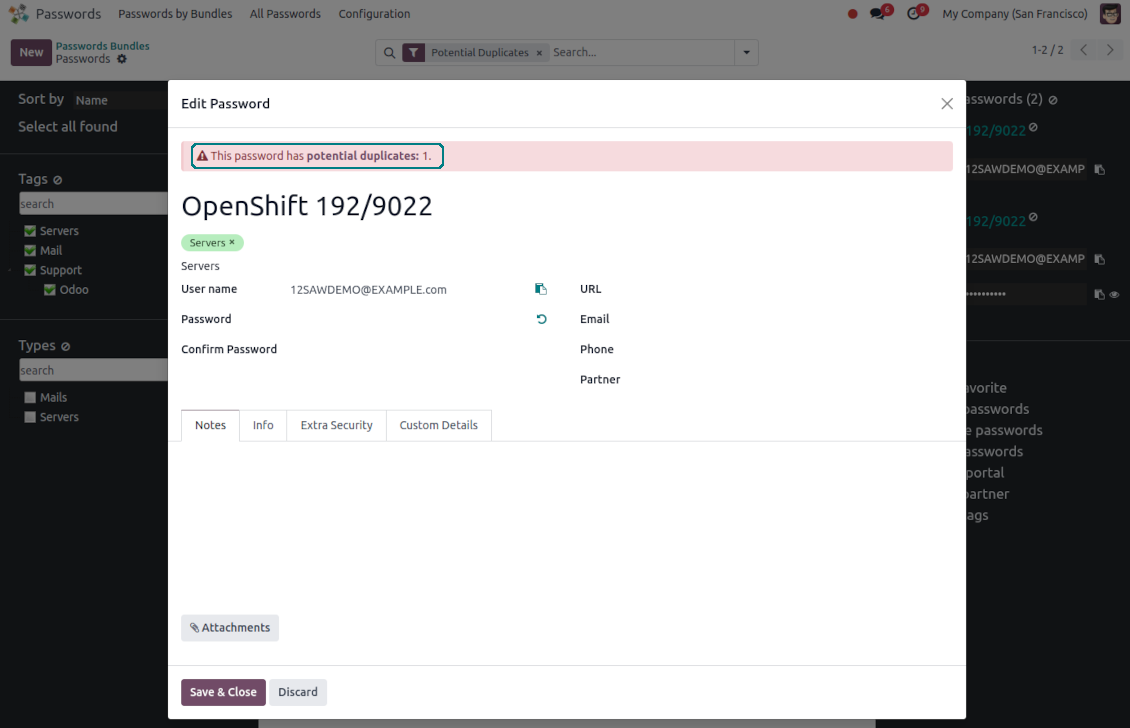
When you register a new password, check also the red button on the top right corner. If it is shown, make sure you do not create a potential copy of an existing key
-
Found duplicates or just any password keys might be merged into a single record. To that end, do not forget to add the mass action 'Merge passwords' on the configuration page
-
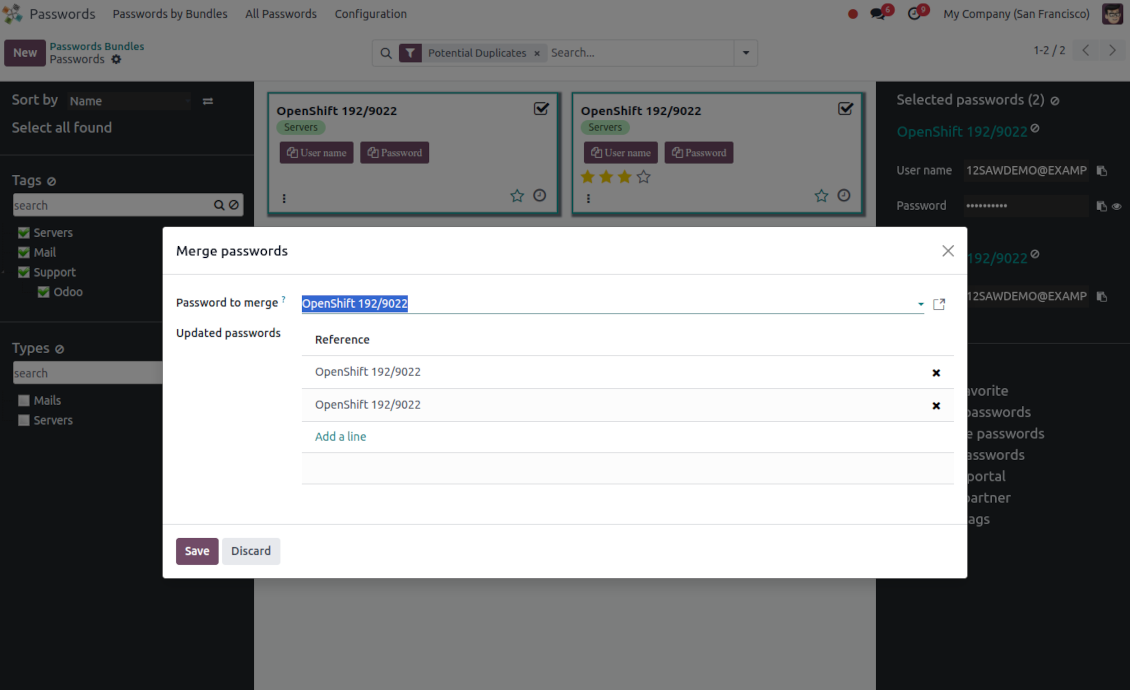
To merge passwords, select the required keys and push the mass action 'Merge passwords' on the right navigation panel
-
In the wizard, as the 'Password to merge', choose one that will be the prime source of the details. In case of conflicts, its value will be prioritized
-
In the wizard, as the 'Merged passwords', choose keys that will be used as a source of complementary details (for example, details that are missing in the main password)
-
Then, press the button 'Save'. As a result, the app will archive all the 'Merged passwords' and enrich the 'Password to merge'
-
Starting from the 'Password to merge' values, the tool will check the fields reference, bundle, user name, email, URL, phone, last password update date, and linked partner. The app will select the first found not null value
-
The app will also accumulate notes, attachments, and tags from all merged records
-
Values of custom fields will be chosen according to keys sequence starting from the 'Password to merge'. Take into account that tables (one2many and many2many fields) will be left as they are in the 'Password to merge'.
Määritys- ja asennusvinkkejä: Password Manager Odoo v.17
Python dependencies
To guarantee tool correct work you would need a number of Python libraries: zxcvbn, cryptography:
pip3 install zxcvbn cryptography
Usein kysytyt kysymykset aiheesta Password Manager Odoo v.17
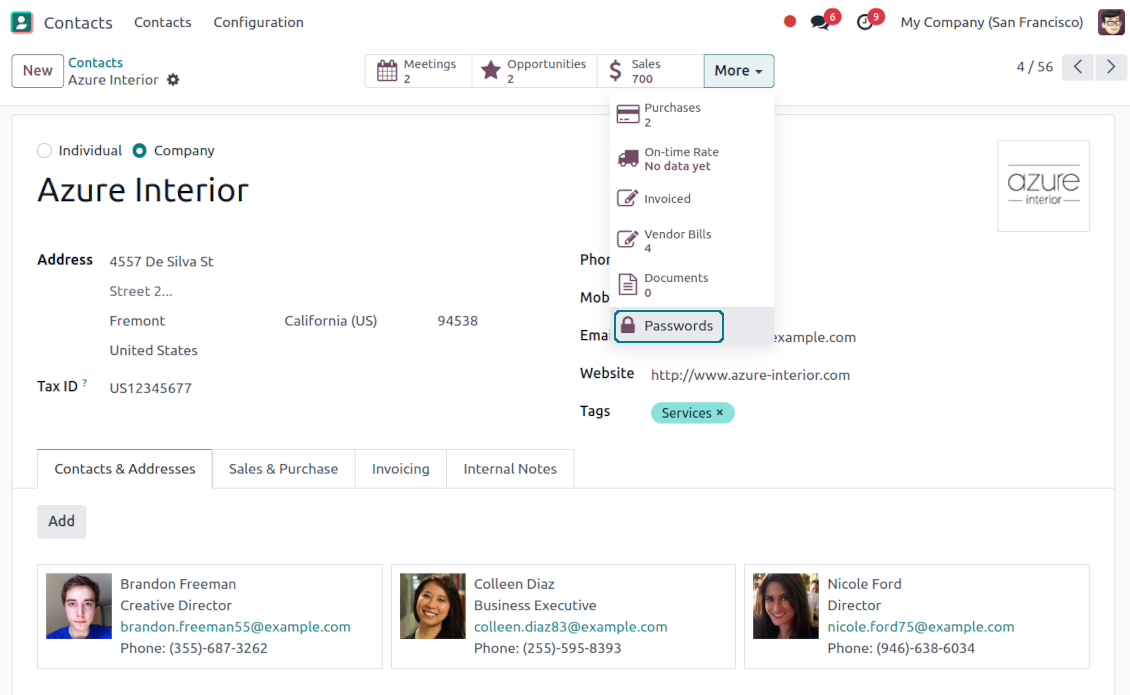
Miten näin partnerin kaikki salasanat?
Avaa Yhteystiedot, avaa partneri ja napsauta 'Passwords'-aly painiketta. Siirryt Password Manager -sovellukseen ja nait kaikki taman partnerin salasanat.
Miten poistan salasanapaketin (Password Manager)?
'Delete'-painike on piilotettu pakettien paavalikosta turvallisuussyista. Poisto: 1. Kolme pistetta paketin oikeassa ylakulmassa. 2. Muokkaustila, 'Save'. 3. Paketin yläpuolella 'Action' ja 'Delete'.
Mitkä ovat tyokalujenne paivityskaytannot?
Odoo Apps Storen nykyisten kaytantojen mukaan:
- Versiolle 12.0 tai aiemmalle ostettu moduuli antaa pääsy kaikkiin versioihin 12.0 asti.
- Versiosta 13.0 alkaen jokainen moduuliversio ostetaan erikseen.
- Versiosta riippumatta osto antaa oikeuden kaikkiin paivityksiin ja korjauksiin paaversiossa.
faOtools-tiimi ei hallitse näitä kaytantoja. Kysymykset osoitetaan suoraan Odoo Apps Storen edustajille.
Miten asennan sovelluksen Odoo.sh-palveluun?
Suorin tapa on Odoo-kaupan sisaanrakennettu työnkulku:
1. Avaa moduulin sivu ja napsauta Deploy on odoo.sh
2. Sinut ohjataan GitHubiin. Kirjaudu sisään ja napsauta Create a new repo tai käytä olemassa olevaa. Repositorion on oltava yksityinen. OPL-1-lisenssin sovelluksia ei saa julkaista. Luo tarvittaessa uusi repo Odoo.sh-projektia varten
3. Siirry sitten odoo.sh:iin, napsauta Deploy, vahvista ja napsauta Continue. Asennus kaynnistyy.
Nämä vaiheet asentavat sovelluksen production-haaraan. Muille haaroille tai paivitykseen:
1. Lataa lahdekoodi Odoo-kaupasta
2. Commitoi moduuli GitHub-repositorioon. Mikään sovelluskansio/-tiedosto ei saa olla .gitignore-tiedostossa. odoo.sh:n luomat repositoriot voivat oletuksena ohittaa tarkeita polkuja (esim. /lib). Lataa kaikki moduulin hakemistot ja tiedostot
3. Deployaa odoo.sh-projektin kohdehaara tai odota automaattista koontia, jos asetukset niin maarittavat.
Miten asennan sovelluksen omalle palvelimelleni?
2. Käynnistä Odoo-palvelin uudelleen;
3. Ota kehittajatila kayttoon (tekniset asetukset);
4. Päivitä sovellusluettelo (Sovellukset-valikko);
5. Etsi sovellus ja paina Activate/Install;
6. Noudata sovellussivun ohjeita, jos niitä on.
Sovelluksella on lisaosia. Voinko ostaa ne myöhemmin?
Kyllä. Odoo lisää kaikki riippuvuudet ostoskoriin automaattisesti: jätä pois jo ostetut työkalut, jottet maksa kahdesti.
Asensin sovelluksen Odoo.sh-palveluun ja näin varoituksen/virheen testeissa
Punainen/oranssi varoitus ei vaikuta sovelluksen ominaisuuksiin. Joskus moduulimme eivät lapaise vakioautomaattitesteja, koska ne olettavat kayttaytymisen, joka on ristiriidassa sovelluksen tavoitteiden kanssa. Muutamme esimerkiksi hinnanlaskentaa, kun Odoo-testit vertaavat loppuhintaa vakioalgoritmiin.
Tarkista ensin kayttoon otetun tietokannan ominaisuudet. Toimiiko kaikki?
Jos oletat silti, että varoitus vaikuttaa todellisiin ominaisuuksiin, ota yhteyttä ja lähetä täydet asennuslokit sekä täydellinen luettelo kayttoon otetuista moduuleista (ydin ja kolmannet osapuolet).
Voinko ostaa sovelluksen suoraan teilta?
Ei, jaamme työkalut vain virallisen Odoo-sovelluskaupan kautta.
Haluan alennuksen
Valitettavasti meillä ei ole teknisia keinoja tarjota yksilöllisiä hintoja.
Voinko asentaa sovelluksen Odoo Online (SaaS) -tietokantaani?
Ei, kolmannen osapuolen sovelluksia ei voi käyttää Odoo Online -palvelussa. Odoo SaaS estää sen.
Tyokalulla on riippuvuuksia. Pitääko ne ostaa?
Kyllä, työkalu tarvitsee kaikki riippuvuuksissa merkittyt moduulit. Sovellussivun hinta sisältää jo nämä riippuvuudet.
Mikä on moduulin hinta Yhdysvaltain dollareina? Miksi se muuttui?
Moduuliemme hinta on euroissa. Odoo-kauppa muuntaa hinnat muihin valuuttoihin sisaisen kurssinsa mukaan. Siksi Yhdysvaltain dollarin hinta voi muuttua, kun kurssi paivittyy.
Sovellus- ja sivustotekstit muilla kielillä kuin englanniksi on tehty tekoälyn tuella ja linjattu virallisiin Odoo-käännöksiin. Jos huomaat virheen, lähetä käännösten oikeellisuutta koskeva tiketti niin korjaamme sen.
Odoo-demotietokannat (live-esikatselut)
Tälle sovellukselle voimme tarjota ilmaisen henkilökohtaisen demotietokannan.
Yhteydenottoon ei tarvita puhelinnumeroa eikä luottokorttia. Riittää lyhyt sähköpostirekisteröinti, joka kestää alle 30 sekuntia.
Pyynnöstäsi valmistelemme yksilöllisen live-esikatselutietokannan, jossa voit testata ja tarkistaa oletuksia noin kahden viikon ajan.
Virheiden ilmoittaminen
Jos kohtaat virheitä tai epäjohdonmukaista toimintaa, ota yhteyttä. Korjaamme 60 päivän kuluessa ostosta ja kehitämme työkaluja sen jälkeenkin.
Yhteydenottoon ei tarvita puhelinnumeroa eikä luottokorttia. Riittää lyhyt sähköpostirekisteröinti, joka kestää alle 30 sekuntia.
Liitä pyyntöön mahdollisimman paljon tietoja: kuvakaappaukset, Odoo-palvelinlokit ja täysi kuvaus ongelman toistamisesta. Työsuunnitelma (jos virhe vahvistetaan) tai ohjeet (muuten) valmistuvat yleensä muutamassa arkipäivässä.
Julkiset ominaisuuspyynnöt ja moduliehdotukset (ilmainen kehitys)
Olemme vahvasti motivoituneita kehittämään työkalujamme ja kiitollisia kaikesta palautteesta. Jos vaatimuksesi palvelevat yleisesti ja ne voidaan toteuttaa tehokkaasti, tiimi lisää ne tehtävälistaan.
Tällainen tehtävälista käsitellään säännöllisesti eikä siihen sisälly lisämaksuja. Emme voi luvata määräaikoja ja lopullista suunnittelua, mutta se voi olla hyvä tapa saada toivottuja ominaisuuksia ilman investointeja ja riskejä.
Yhteydenottoon ei tarvita puhelinnumeroa eikä luottokorttia. Riittää lyhyt sähköpostirekisteröinti, joka kestää alle 30 sekuntia.
17.0.1.3.17
- The issue of read-only bundle users losing access to passwords after other users opened them has been fixed.
17.0.1.3.16
- The issue with the untranslated warnings has been fixed.
17.0.1.3.15
- The issue with creating keys when passwords are opened from a contact is fixed.
17.0.1.3.14
- The issue with password copying in the iOS environment has been fixed.
17.0.1.3.13
- The optional feature to log user access has been added.
17.0.1.3.12
- The archived ribbon for inactive records is added keys kanban and form views, bundles kanban and form views, and form views of tags and shares.
17.0.1.3.11
- Focus the bundle login wizard automatically.
17.0.1.3.10
- The issue with cut portal password fields is fixed.
17.0.1.3.8
- Sivun uudelleenlataus säilyttää tällä hetkellä valitun paketin.
- Kaksoiskappaleiden määrä lasketaan nykyisen paketin kontekstissa.
- Ensimmäisessä latauksessa puuttuneet salasana-avaimet on korjattu.
17.0.1.3.9
- Mukautettujen kenttien järjestys portaalissa on korjattu.
17.0.1.3.7
- Salasanojen oletustoimintanäkymä on nyt Kanban.
17.0.1.3.6
- Sovelluspäivityksen virheellinen escape-sekvenssi on korjattu.
16.0.1.2.11
- The issue of the invalid escape sequence during app update is fixed.
17.0.1.3.5
- Pääsy sovelluksen määritykseen on rajoitettu ryhmään Administration > Settings.
16.0.1.2.10
- Access to the app configuration is restricted to the group Administration > Settings.
17.0.1.3.4
- Salasana-avaimen ja portaalin paketin lomakkeet järjestetään uudelleen sen mukaan, onko linkitetty paketti valittu.
16.0.1.2.9
- Password key and portal bundle forms are reorganized depending on whether a linked bundle is selected.
17.0.1.3.3
- Salasanojen joukkopäivityksen vetäminen ja pudotus on otettu käyttöön: lisää tunniste, päivitä tyyppi ja jaa portaaliholviin kaikki tällä hetkellä valitut avaimet.
17.0.1.3.2
- Perustason drag&drop-ominaisuudet on optimoitu.
17.0.1.3.1
- Perustason drag&drop-ominaisuudet on otettu käyttöön.
- Navigointipuiden valittu vanhempi korostuu oikein.
17.0.1.2.9
- Salasana-avainten Kanban-näkymä on sovitettu Odoo v.17:n uusimpiin tapoihin.
17.0.1.2.8
- Portaalin salasanakäyttöliittymät ja portaaliavainten laskenta on optimoitu.
16.0.1.2.8
- Portal password interfaces and portal keys' computation are optimized.
17.0.1.2.7
- mukautetut kentät' näkyvyys lla korjattu.
- Taustajärjestelmän lajittelu, vienti ja arkistoitujen tietueiden valinta on korjattu.
16.0.1.2.7
- Custom fields' visibility is fixed.
17.0.1.2.6
- Sovellus on julkaistu versioon 17.

The tool to flexibly structure Odoo attachments in folders and synchronize directories with cloud clients: Google Drive, OneDrive/SharePoint, Nextcloud/ownCloud, Dropbox, Amazon S3, Box, and NAS. DMS. File Manager. Document management system
398€
The tool to automatically synchronize Odoo attachments with OneDrive files in both ways
487€
The tool to automatically synchronize Odoo attachments with Google Drive files in both ways
487€
The tool to build a deep and structured knowledge base for internal and external use. Knowledge System. KMS. Wiki-like revisions.
398€
The tool to set up KPI targets and control their fulfillment by periods. KPI dashboards. Dashboard designer. KPI charts

The tool for time-based service management from booking appointments to sales and reviews
398€
The tool to manage your Odoo from your favorite AI chats through MCP. Claude. Any MCP-supporting AI.

The tool to combine different Odoo events in a few configurable super calendars

The tool to translate URL addresses of Odoo website pages
38€