Password Manager v.17
The tool to safely keep passwords in Odoo for shared use. Shared vaults
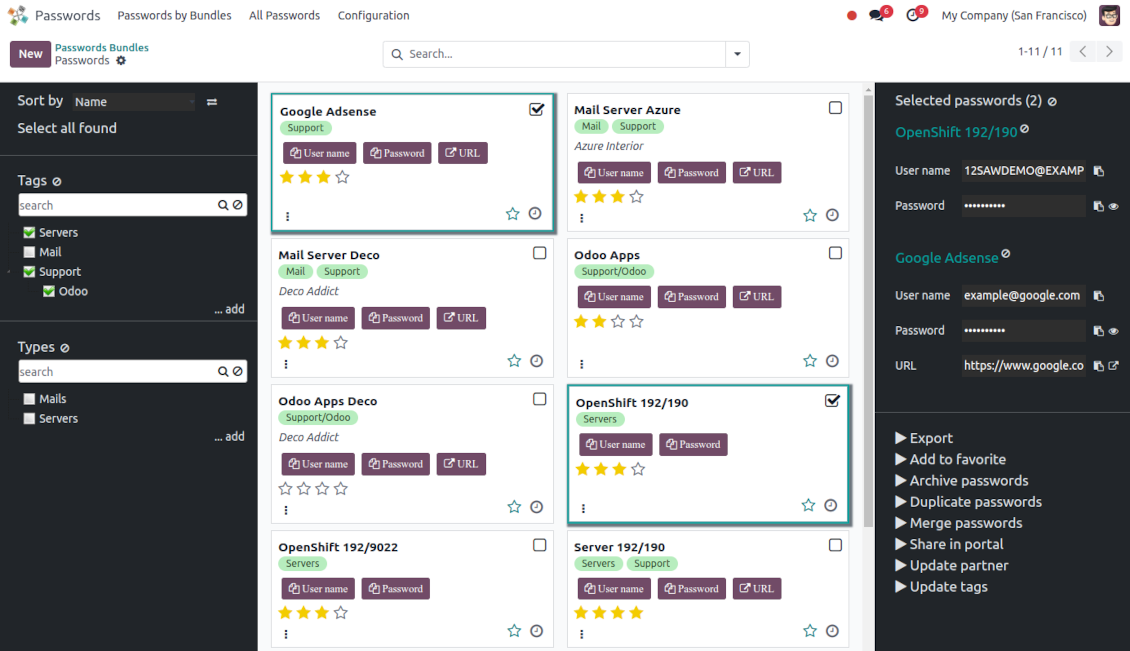
This app lets organize the safe passwords keeping system to structure, find and securely share password bundles.
- a core app to manage vaults and passwords.
Prețul este
198€
178€.
- an extension to add custom fields for password keys. Features assumed by this app are marked by the icon .
Prețul este
38€
37€.
Shared passwords vaults for team use
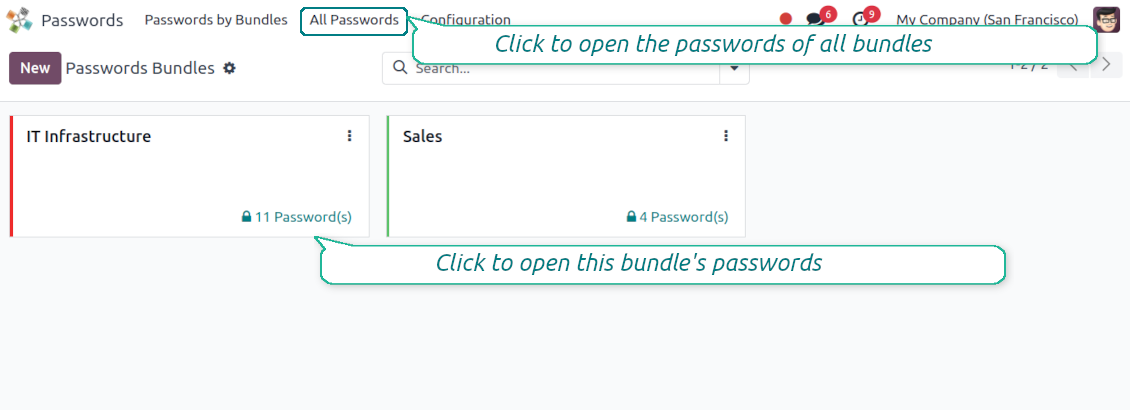
Passwords are combined in bundles: each might be shared with any user and any user group
Single view interface
Structure vault by tags and types, sort keys, proceed with mass actions, copy credentials to the clipboard from the same interface
Encrypted and protected password manager
The tool introduces a few security layers to minimize the possibility of data leaks
Portal sharing
Optionally share passwords with Odoo portal contacts
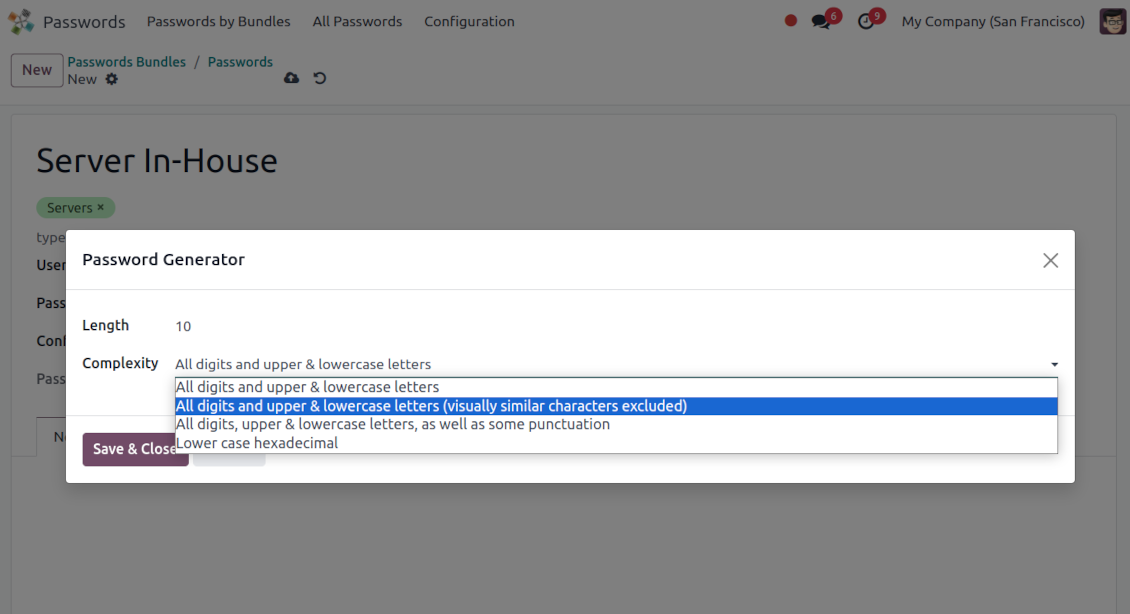
Auto generation
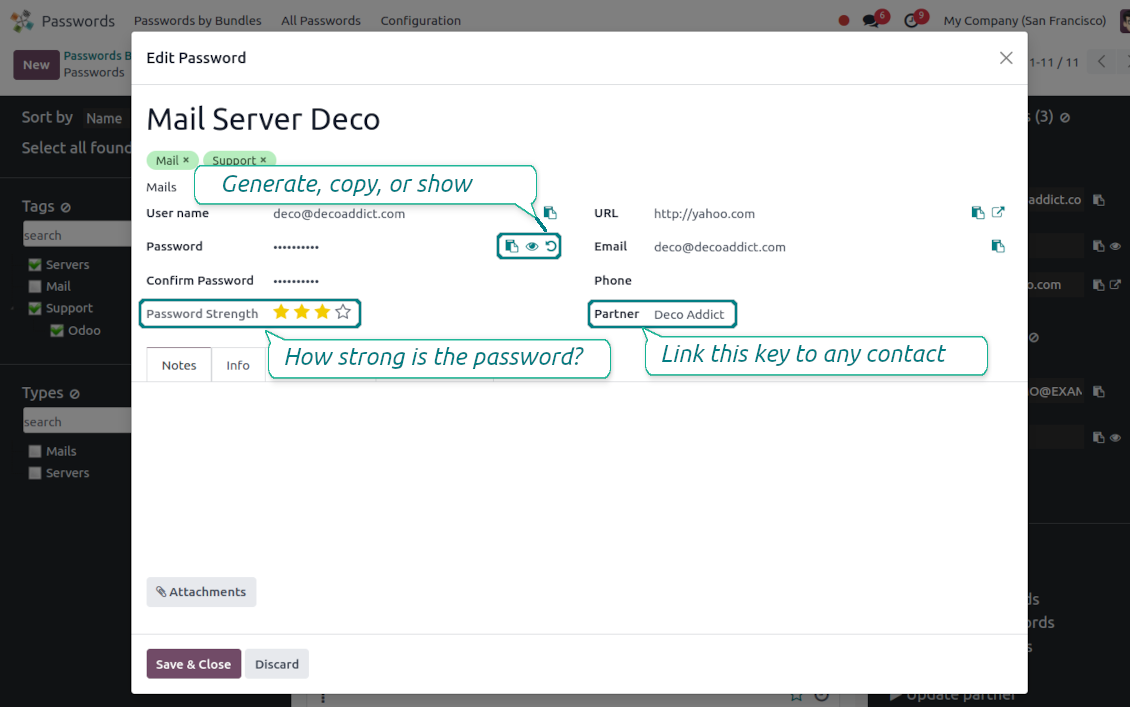
Force Odoo and let users create passwords based on chosen length and requirements
Passwords quality check
Password strength is estimated in real-time to make sure no weak passwords are introduced. Potential duplicates are easily detected
Batch update, export, and import
Configure the mass actions: export, update tags or linked partners, archive or restore, import vaults from an electronic table, etc.
Custom fields
Define passwords' typology and add custom attributes.
Very good password management module
Easy installation and quick setup
Shared use, encryption, and protection of passwords
Sharing Policies
-
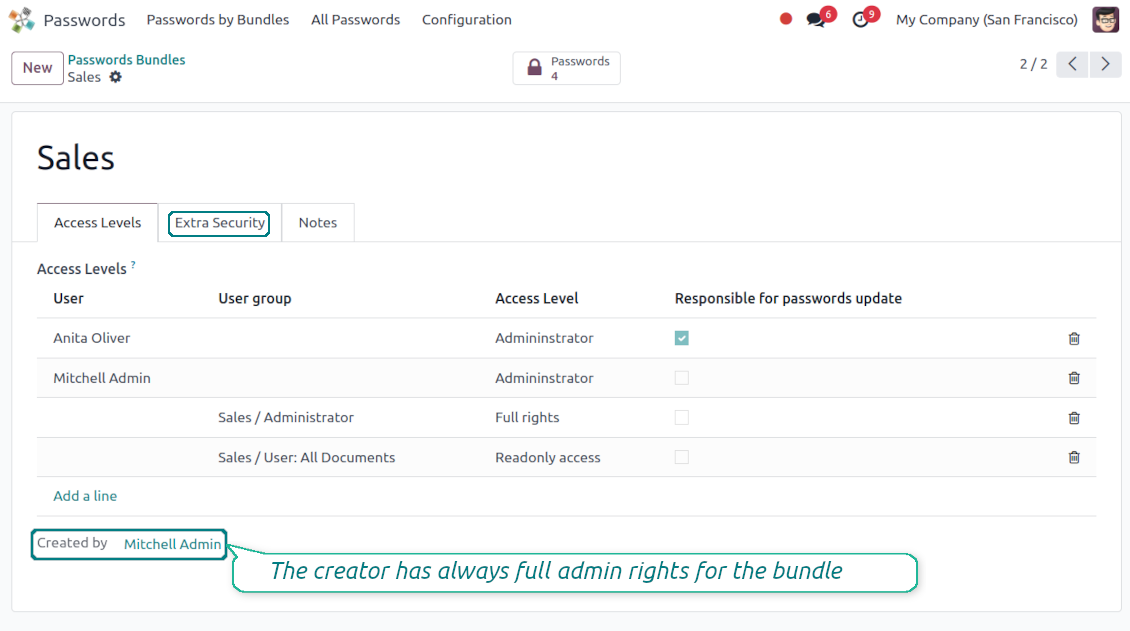
To grant access for a bundle just indicate a user or a user group in the table of access levels
-
Bundle administrators may access, update or delete the bundle, its passwords, and its tags. Admins are assumed to manage access levels, modify update policies, and set extra passwords
-
Full rights users may access, update or delete passwords and tags related to the bundle, but they can't change the vault itself, its access levels, or settings
-
Readonly access users may observe and address passwords and tags of the bundle. Such users can't modify any objects
-
The bundle creator is always its administrator. The Odoo super admin (with id 1) has full rights to all bundles and passwords
-
For bundle read-only users, it is possible to additionally restrict access to specific password keys. In particular, define the groups or/and users that may see a password. A read-only user should either have one of the mentioned groups or should be among the mentioned users. If none of the fields are defined, all bundle users can access a password
Security Layers
-
Have as many password vaults for any user group as you need
-
All passwords are symmetrically encrypted. It means that to decrypt a password, plotters should know the exact decryption algorithm and a bundle decryption key/bundle salt and password
-
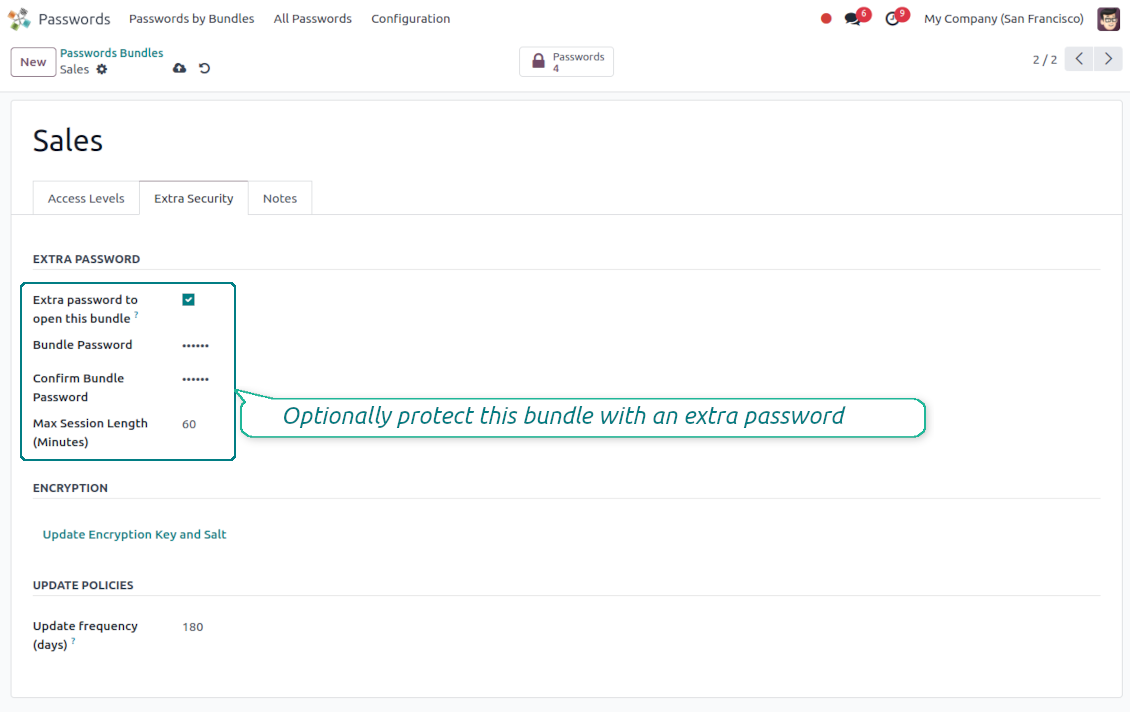
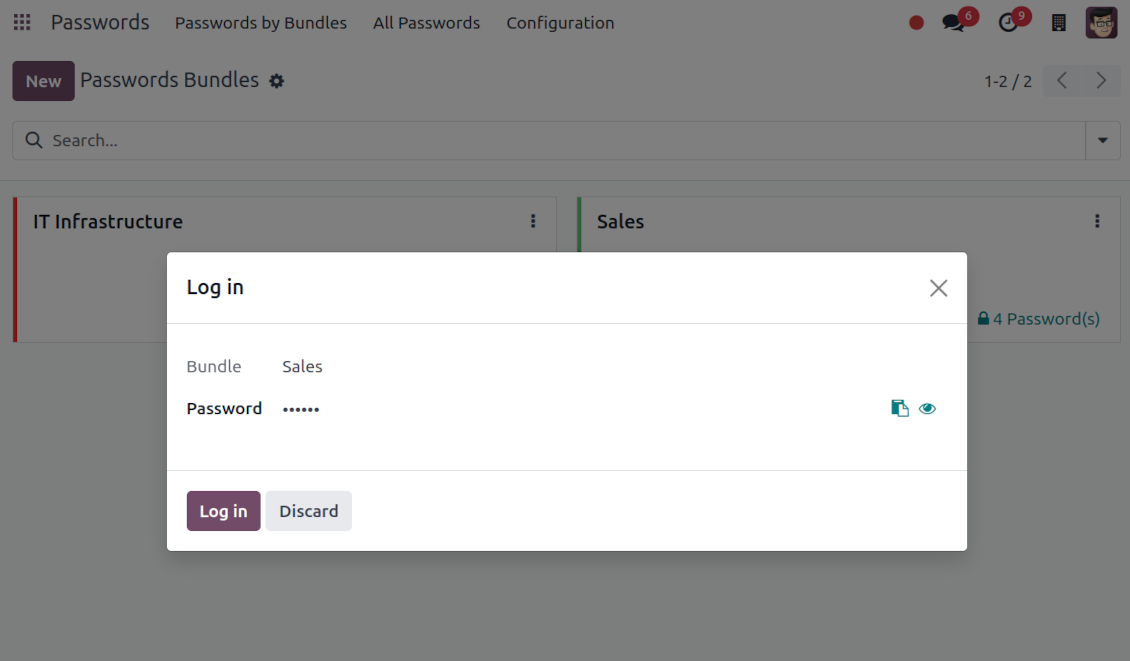
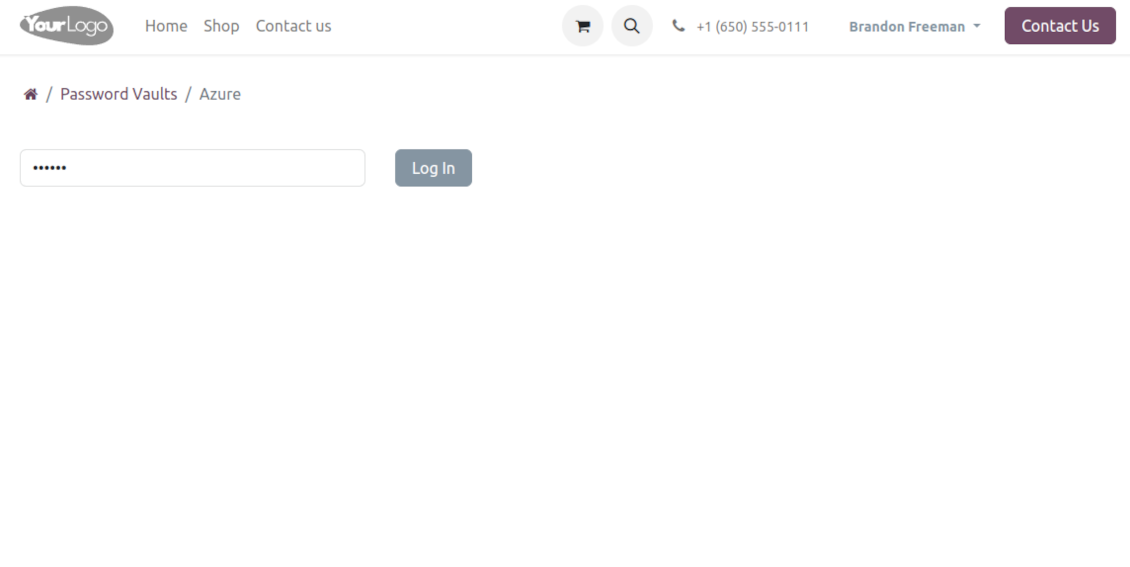
For each bundle, you can assign an extra password, which would be required to enter each time any user applies to that bundle or its passwords. The session period after successful login is set up in minutes
-
Vault extra password is also kept in the database decrypted, and might be changed by a bundle administrator (sure, if he/she enters a correct old paraphrase). If the bundle password is set, keys are encrypted by that password hashed by an auto-generated salt
-
For each bundle, it is possible to define password update policies in days. Then, the user who is set up as 'Responsible for password updates' would be assigned special activities to update keys.
Portal vaults
-
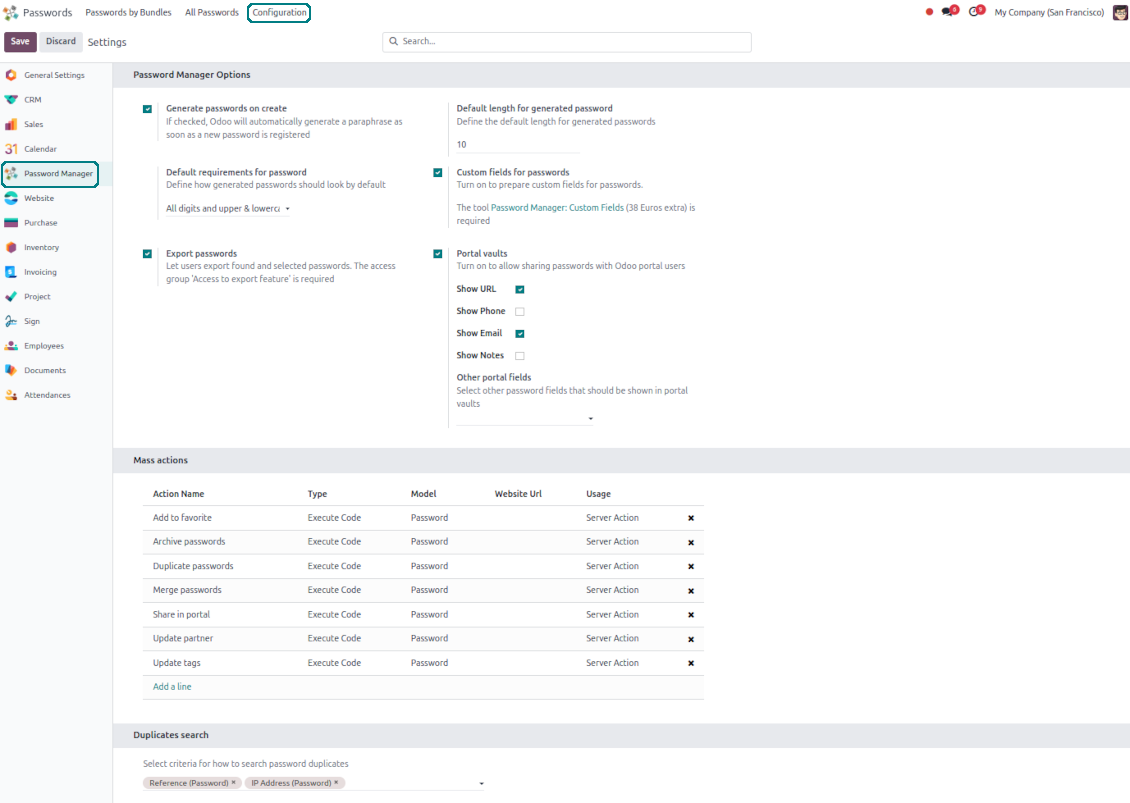
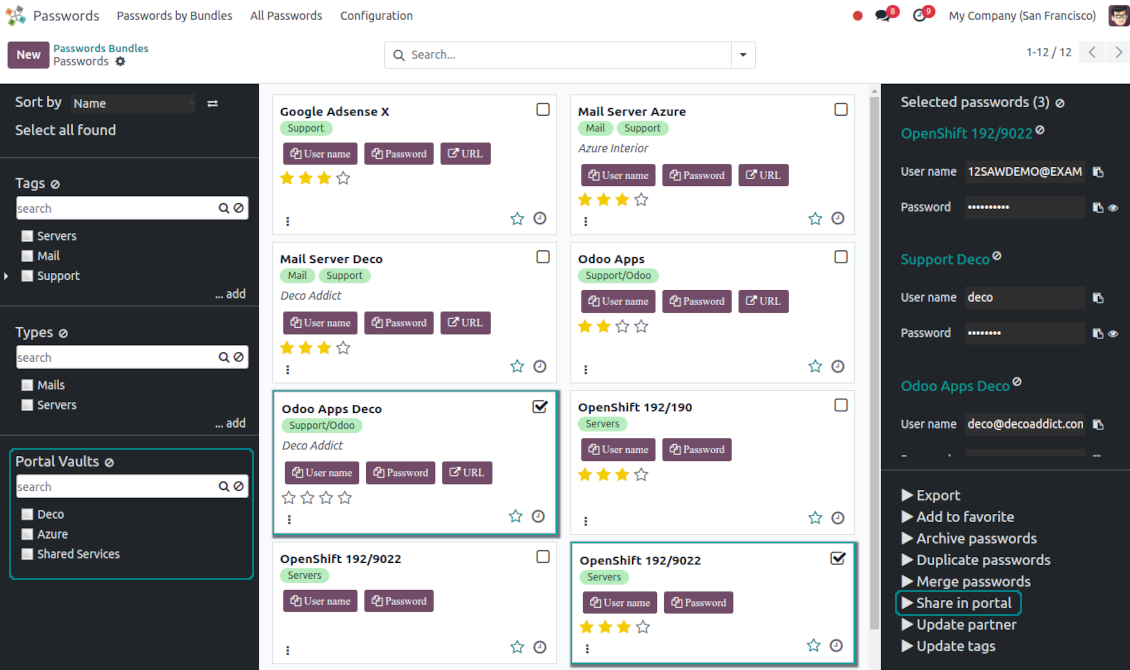
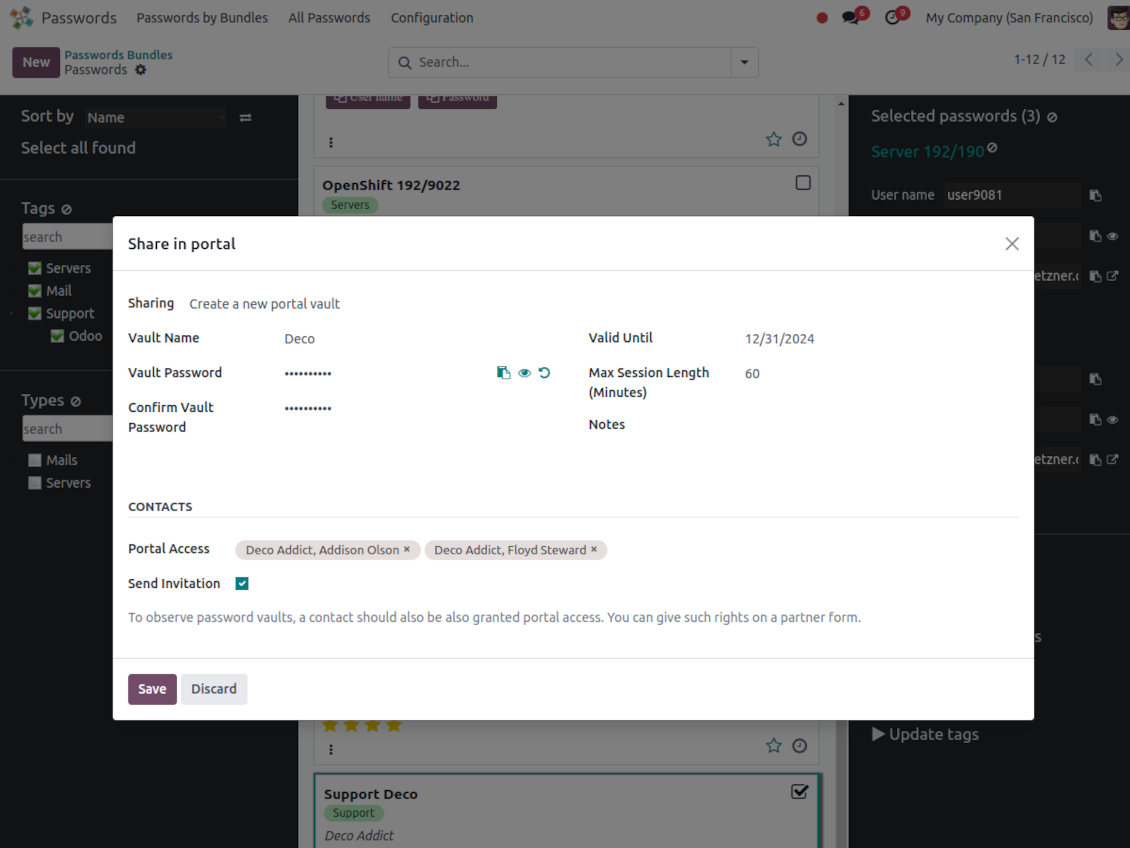
Optionally turn on password sharing with portal users. To that goal, on the configuration page tick the box "Portal vaults" and add the mass action "Share in portal"
-
Within a password bundle, create an unlimited number of portal password vaults shared with an unlimited number of Odoo partners
-
Each bundle internal user can create or update any portal vault linked to this bundle. To add a password for a vault, select the required keys and trigger the mass action "Share in portal". Optionally send an invitation during sharing
-
Navigate over and manage available vaults right from the backend navigation panel
-
Define a validity date to auto-archive password vaults for a temporary sharing
-
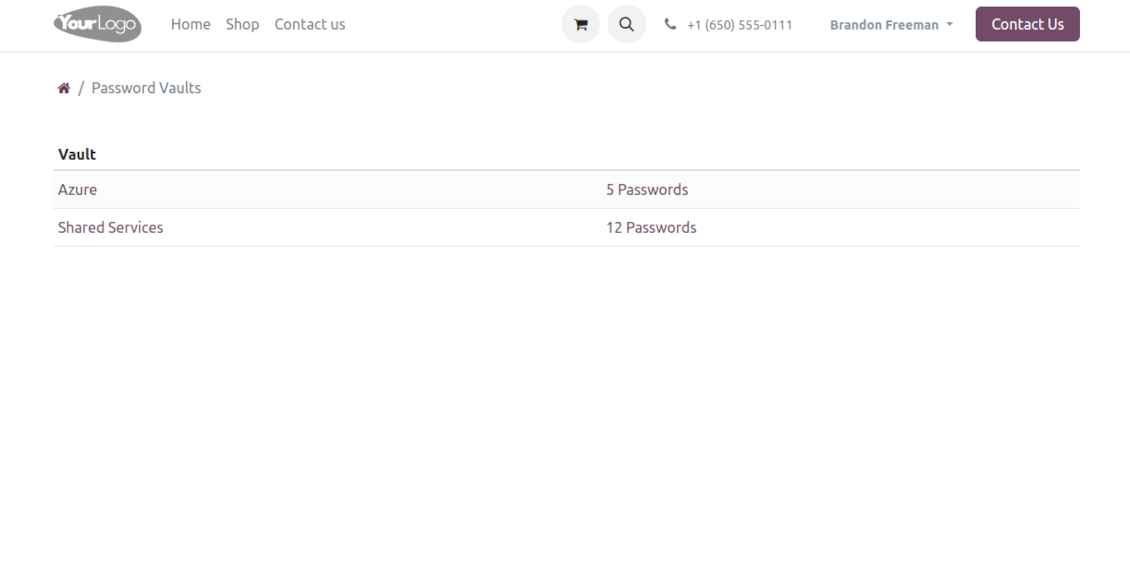
A contact may access all vaults where he/she or his/her company is indicated in the field "Portal Access". Take into account that a user should have portal rights that might be granted from a partner form view (Action > "Grant portal access")
-
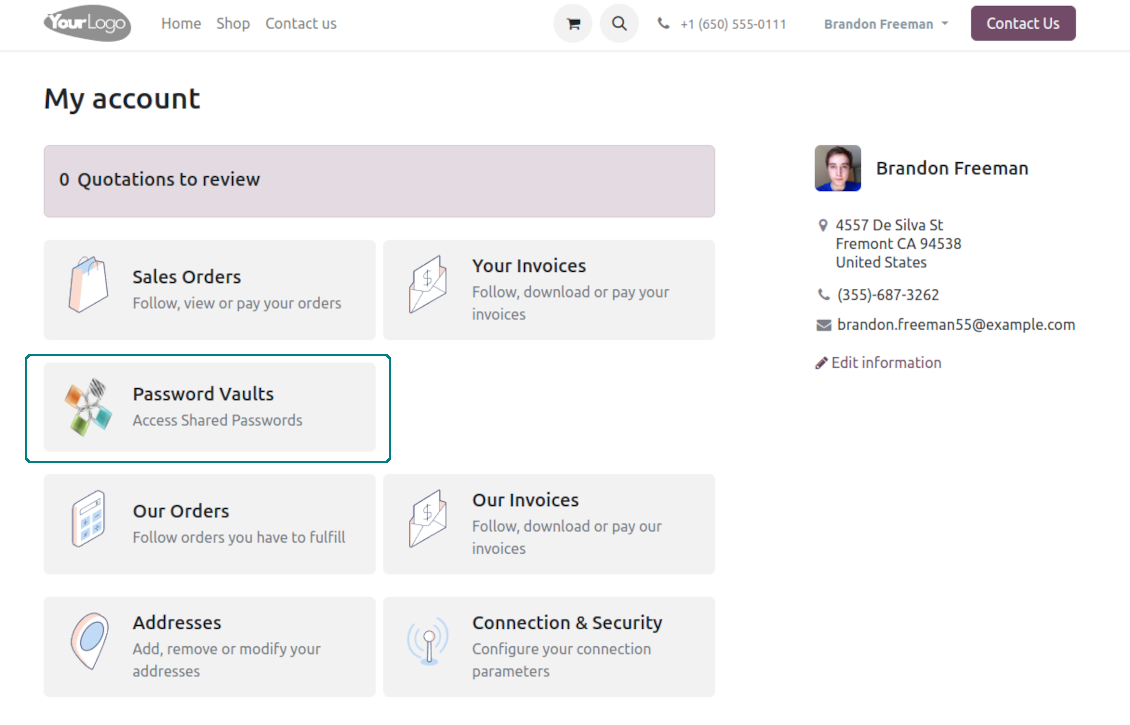
Portal users can open password vaults from the specially introduced entry in the home portal page
-
Each portal vault is obligatorily secured with a password. All keys are kept encrypted and might be decrypted only after entering the vault password. The portal session length is defined per each vault
-
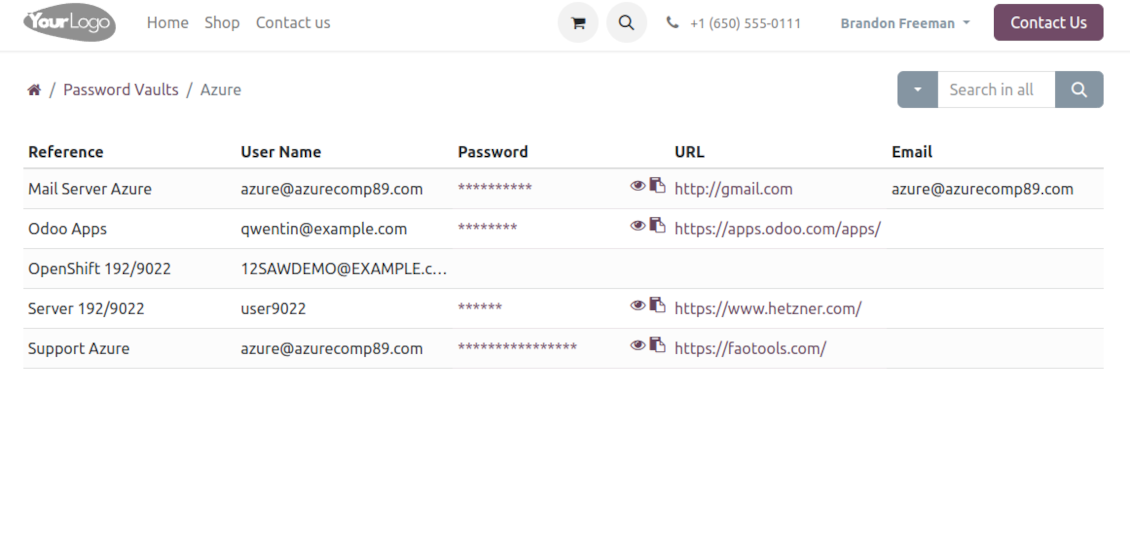
By default, only a password reference, user name, and password key are shown. Optionally show an URL, phone, email, and notes
-
The tool lets portal users show/hide password keys, navigate and search by shown columns.
Custom attributes for Odoo passwords
-
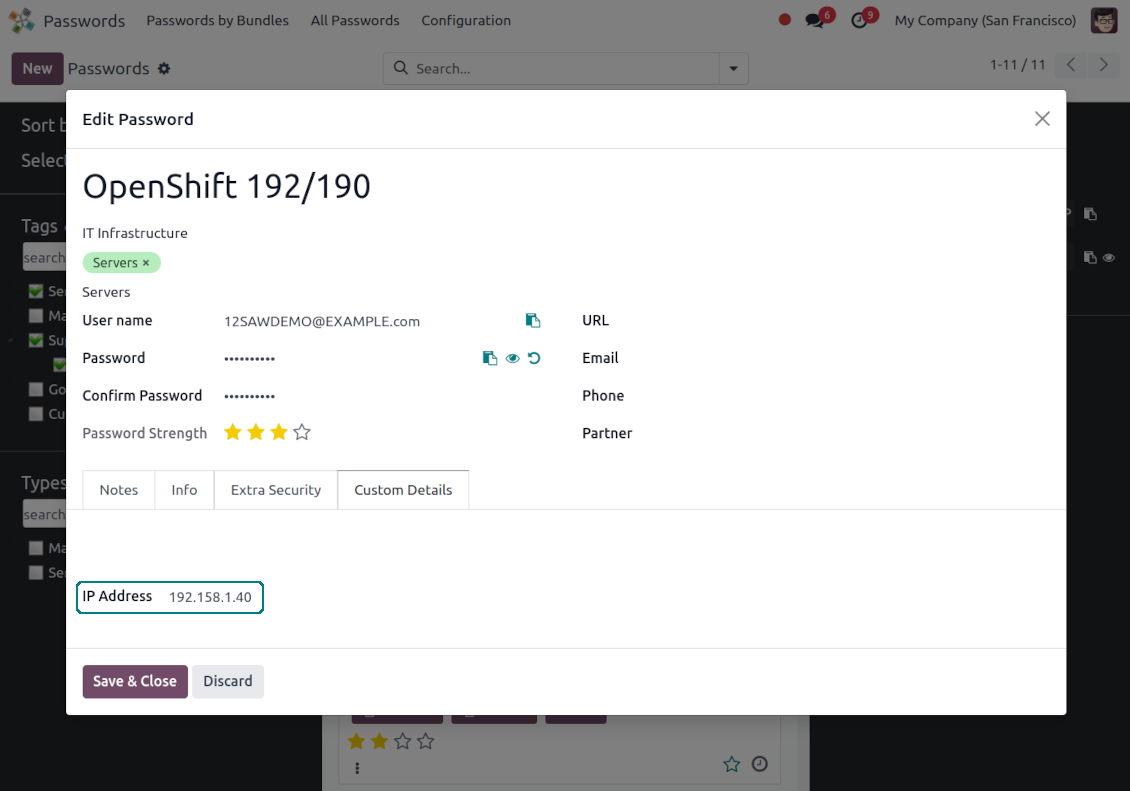
Custom attributes creation does not require any technical knowledge. In order to show a new property for passwords, just add a new field and enter the details
-
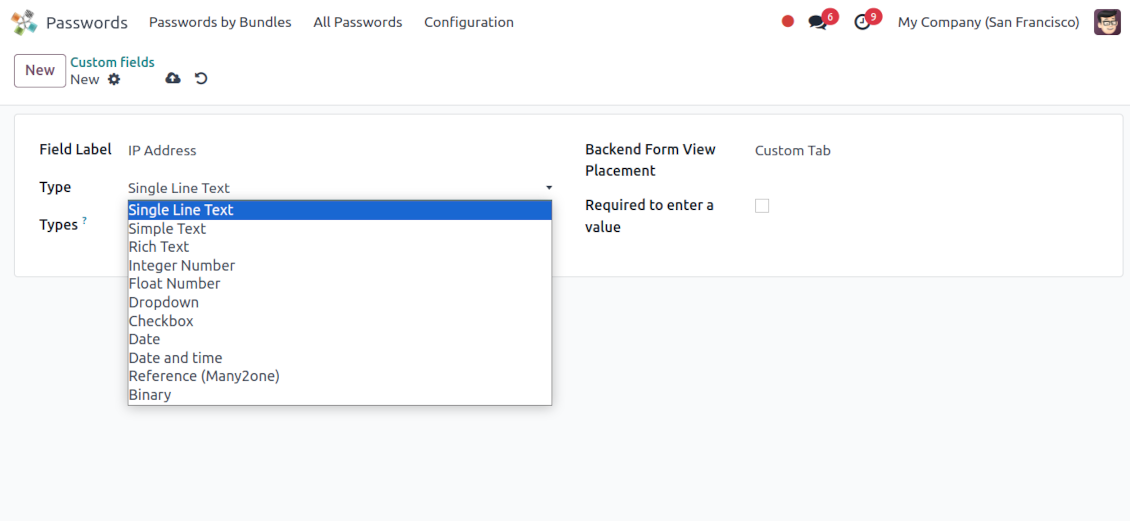
It is possible to add custom fields of the following types: single-line text (char), simple text without formatting (text), rich text (HTML-formatted text), integer or float numbers, drop-down choice with your own options (selection), checkbox (boolean), date or date and time, binary (a file to upload), reference to another Odoo document (e.g. for sale order, contact; many2one)
-
The tool lets you comfortably select an interface position of a custom field from a closed list of options
-
Distinguish passwords by type in order to show properties only for suitable ones. Thus, the set of columns for 'virtual servers' and 'email servers' might be different
-
Mark a custom field required to force users to enter values
-
Custom password fields might be imported and exported
-
The rights to create custom fields belong only to Odoo administrators.
Duplicates detection and passwords merging
-
The app introduces a configurable system to find passwords duplicates
-
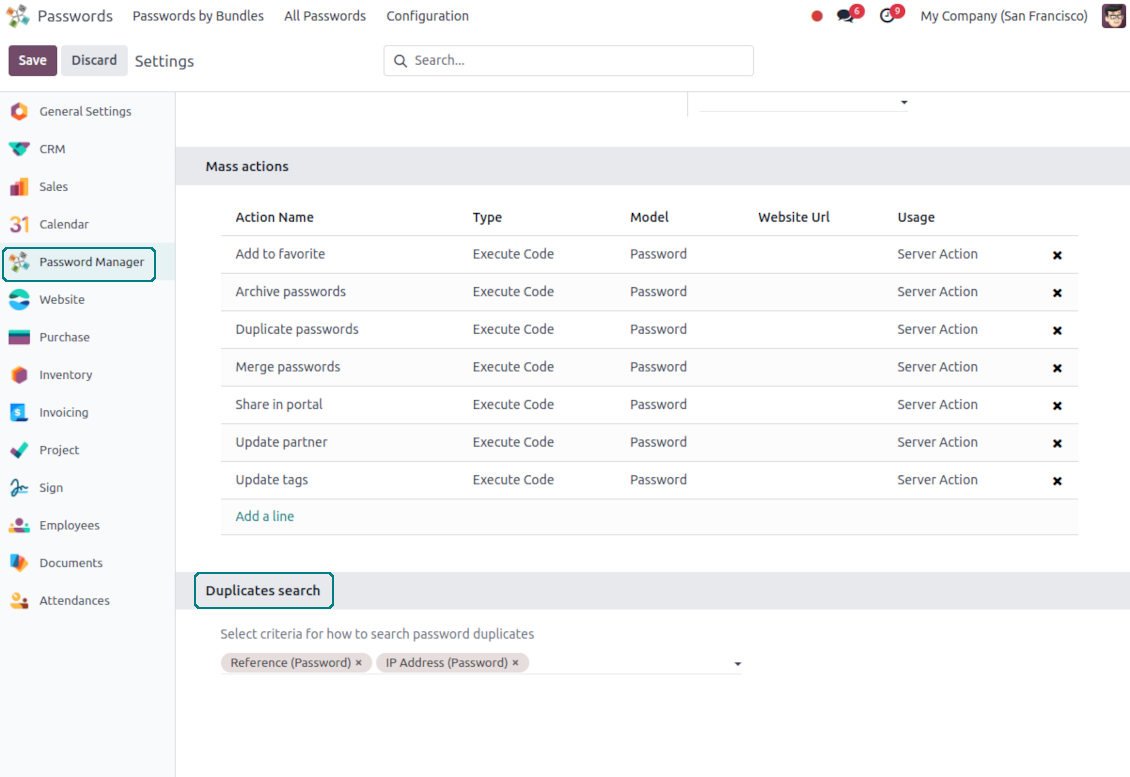
Define on your own which fields should be used to search for duplicates. Choose such fields on the app configuration page, the section 'Duplicates search'
-
As duplicate criteria use any stored field of the following types: char (reference, user name, email, phone, etc.), text (notes), many2one (linked partner, type, etc.), date and datetime, integer, and float. Duplicates detection is possible also based on custom fields of the same types
-
For all fields, a duplicate should have absolutely the same value. For example, '123' equals '123', but '123' is not equal to '1234'. Only in the case of char fields, it is a comparison without taking into account capital letters ('Server' equals 'serVER')
-
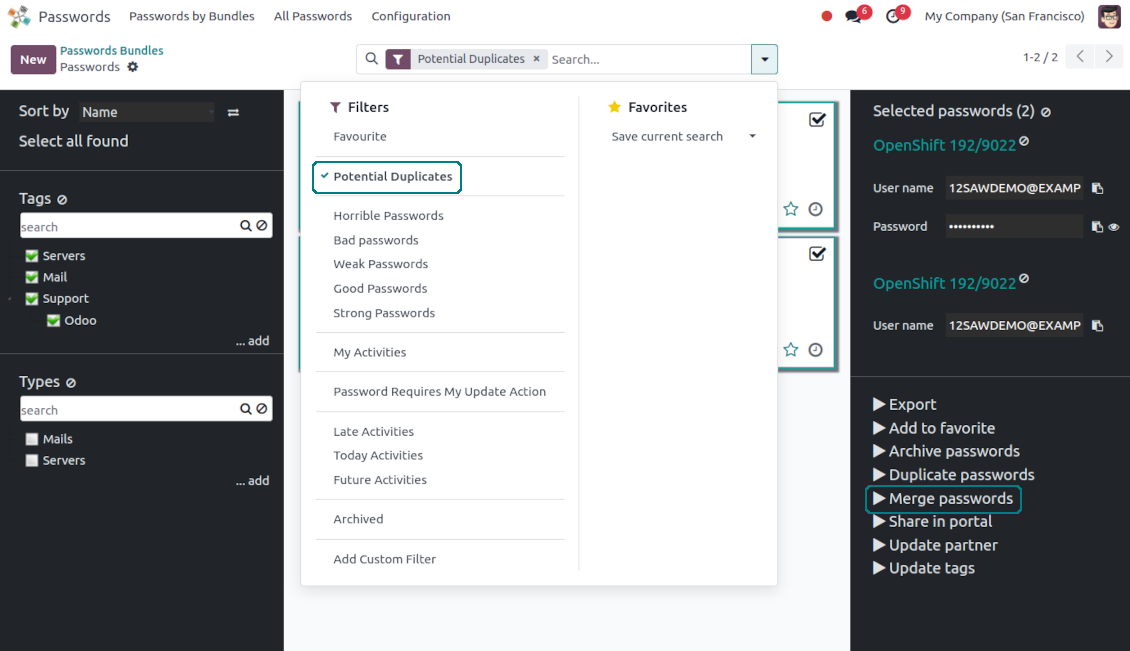
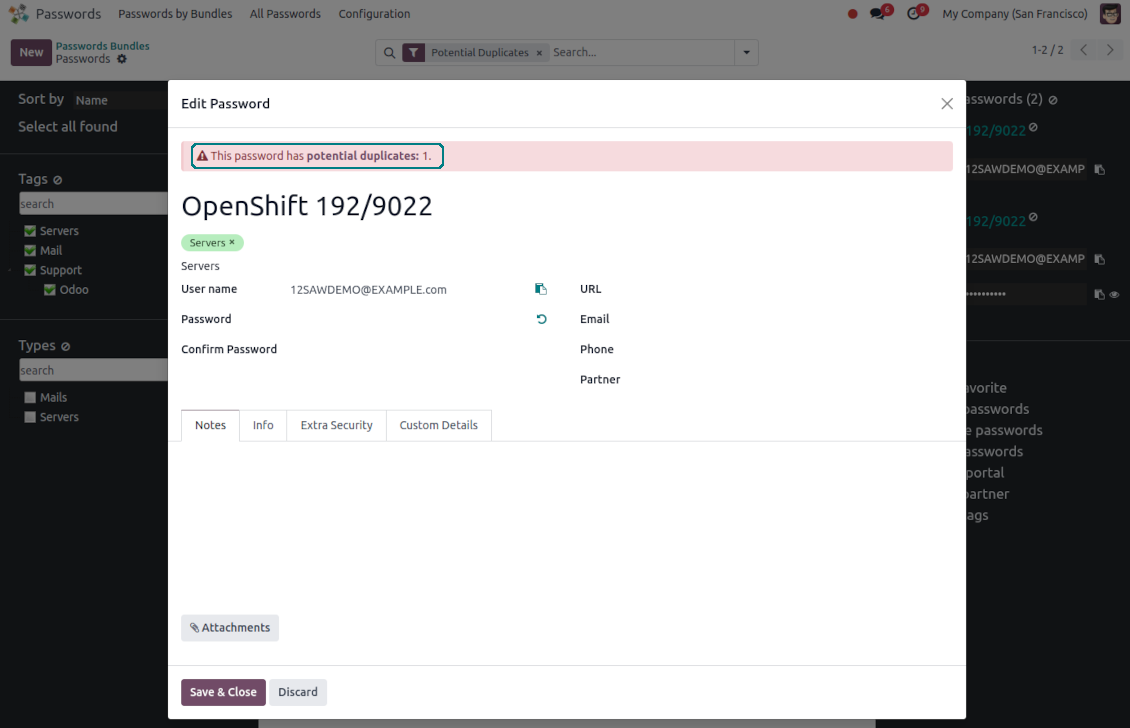
Apply the filter 'Potential duplicates' in the passwords interface to observe candidates. You may search within a particular bundle or in all passwords simultaneously
-
When you register a new password, check also the red button on the top right corner. If it is shown, make sure you do not create a potential copy of an existing key
-
Found duplicates or just any password keys might be merged into a single record. To that end, do not forget to add the mass action 'Merge passwords' on the configuration page
-
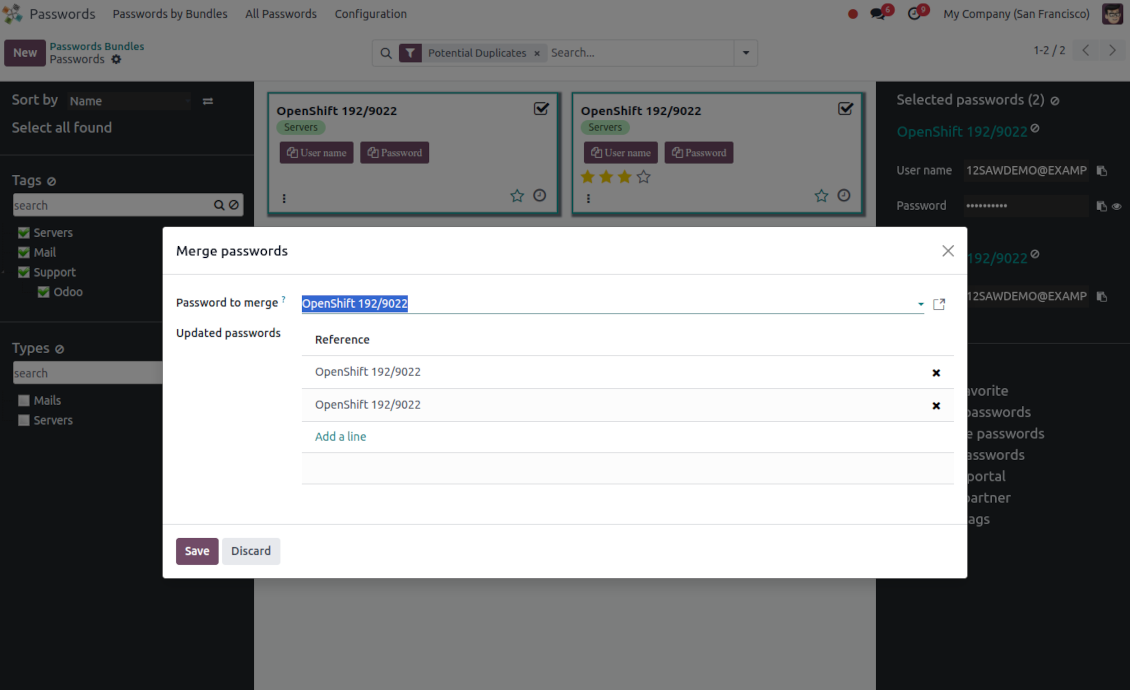
To merge passwords, select the required keys and push the mass action 'Merge passwords' on the right navigation panel
-
In the wizard, as the 'Password to merge', choose one that will be the prime source of the details. In case of conflicts, its value will be prioritized
-
In the wizard, as the 'Merged passwords', choose keys that will be used as a source of complementary details (for example, details that are missing in the main password)
-
Then, press the button 'Save'. As a result, the app will archive all the 'Merged passwords' and enrich the 'Password to merge'
-
Starting from the 'Password to merge' values, the tool will check the fields reference, bundle, user name, email, URL, phone, last password update date, and linked partner. The app will select the first found not null value
-
The app will also accumulate notes, attachments, and tags from all merged records
-
Values of custom fields will be chosen according to keys sequence starting from the 'Password to merge'. Take into account that tables (one2many and many2many fields) will be left as they are in the 'Password to merge'.
Sfaturi de configurare și instalare pentru Password Manager Odoo v.17
Python dependencies
To guarantee tool correct work you would need a number of Python libraries: zxcvbn, cryptography:
pip3 install zxcvbn cryptography
Întrebări frecvente despre Password Manager Odoo v.17
Cum văd toate parolele unui partener?
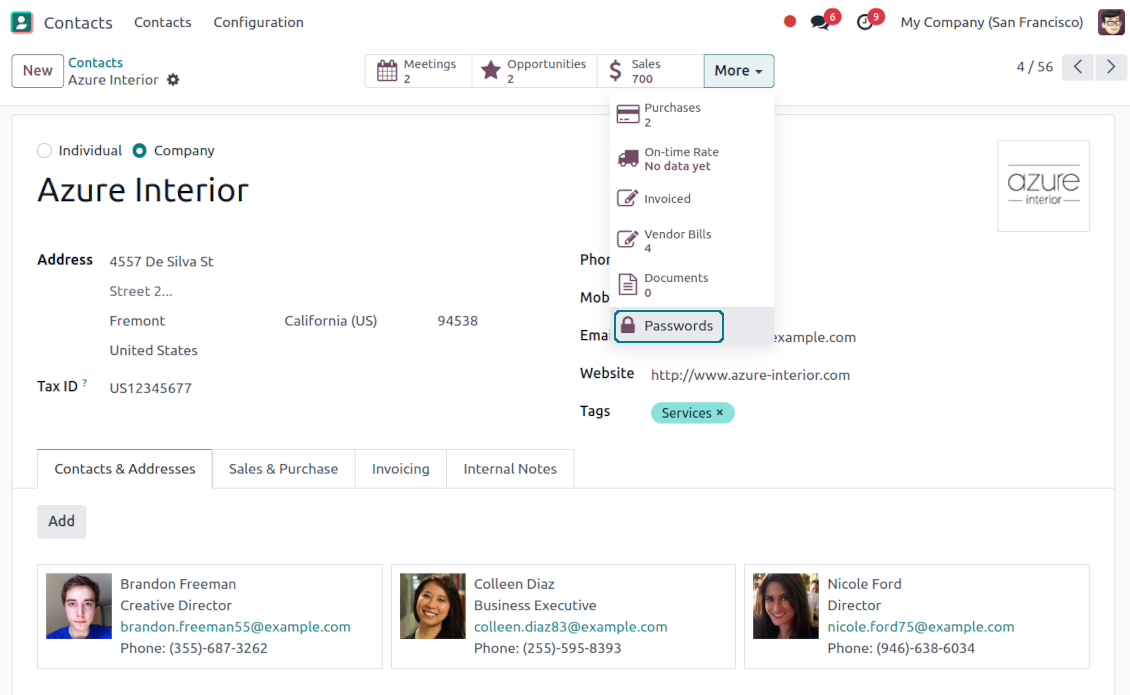
Pentru a vedea toate parolele unui partener, mergeți la Contacts, deschideți partenerul și faceți clic pe butonul inteligent 'Passwords'. După aceea veți fi redirecționat la aplicația Password manager și veți vedea toate parolele acestui partener.
Cum șterg un pachet de parole (password manager)?
Butonul 'Delete' a fost ascuns din meniul principal al pachetelor din motive de securitate. Pentru a șterge un pachet de parole: 1. Faceți clic pe butonul cu trei puncte din colțul dreapta sus al pachetului 2. Veți fi redirecționat în modul de editare; de acolo faceți clic pe 'Save' 3. Deasupra pachetului veți vedea butonul 'Action'; faceți clic și alegeți 'Delete'.
Care sunt politicile de actualizare ale instrumentelor dvs.?
Conform politicilor actuale Odoo Apps Store:
- Fiecare modul cumpărat pentru versiunea 12.0 și anterioară dă acces la toate versiunile până la 12.0.
- Începând cu versiunea 13.0, fiecare versiune de modul se cumpără separat.
- Indiferent de versiune, cumpărarea dă dreptul la toate actualizările și corecturile dintr-o versiune majoră.
Rețineți că echipa faOtools nu controlează aceste politici. Pentru întrebări contactați direct reprezentanții Odoo Apps Store.
Cum instalez aplicația dumneavoastră pe Odoo.sh?
Cea mai directă abordare este să folosiți fluxul încorporat al magazinului Odoo:
1. Deschideți pagina modulului și faceți clic pe butonul Deploy on odoo.sh
2. După aceea veți fi redirecționat la pagina GitHub. Conectați-vă la cont, apoi faceți clic pe 'Create a new repo' sau folosiți unul existent. Asigurați-vă că depozitul este privat. Nu este permisă publicarea aplicațiilor sub licența OPL-1. Dacă e necesar, creați un repo nou pentru proiectul Odoo.sh
3. Apoi mergeți la odoo.sh și faceți clic pe butonul Deploy. În fereastra pop-up trimiteți decizia și faceți clic pe 'Continue.' Această acțiune pornește instalarea.
Acești pași vor instala aplicația pe ramură de producție a proiectului. Dacă doriți să implementați aplicațiile pe alte ramuri sau să actualizați modulul, urmați acțiunile de mai jos:
1. Încărcați codul sursă al aplicației din magazinul Odoo
2. Faceți commit modulului în depozitul GitHub necesar. Asigurați-vă că niciun folder/fișier al aplicației nu este ignorat (adică nu este în .gitignore al repo-ului). Depozitele sunt create automat de odoo.sh și pot include implicit elemente esențiale (de ex. /lib). Încărcați toate directoarele, subdirectoarele și fișierele modulului, fără excepții
3. Implementați ramură țintă a proiectului odoo.sh sau, dacă setările presupun asta, așteptați până este construită automat.
Cum instalez aplicația dumneavoastră pe propriul server?
2. Reporniți serverul Odoo;
3. Activați modul dezvoltator (setări tehnice);
4. Actualizați lista de aplicații (meniul aplicațiilor);
5. Găsiți aplicația și apăsați „Activate”/„Install”;
6. Urmați ghidurile de pe pagina aplicației, dacă există.
Am observat că aplicația are extensii extra. Le pot cumpăra ulterior?
Da, desigur. Totodată Odoo adaugă automat toate dependențele în coș, deci trebuie să excludeți instrumentele deja cumpărate ca să evitați plată dublă.
Am implementat aplicația pe Odoo.sh și văd avertisment/eroare în teste
Un avertisment roșu/portocaliu nu influențează funcțiile aplicației. Din păcate, modulele noastre nu trec uneori testele automate standard, deoarece acestea presupun un comportament în conflict cu obiectivele aplicației. De exemplu, schimbăm calculul prețului, iar testele modulului Odoo standard compară prețul final cu un algoritm standard.
În primul rând, verificați funcțiile bazei implementate. Totul funcționează corect?
Dacă tot credeți că avertismentul afectează funcții reale, contactați-ne și trimiteți jurnalele complete de instalare și lista completă a modulelor implementate (inclusiv nucleu și terțe părți).
Pot cumpăra aplicația direct de la compania dvs.?
Nu, distribuim instrumentele doar prin magazinul oficial de aplicații Odoo.
Aș dori să primesc o reducere
Din păcate, nu avem mijloace tehnice pentru a oferi prețuri individuale.
Pot instala aplicația pe baza mea Odoo Online (SaaS)?
Nu, aplicațiile terțe nu pot fi folosite pe Odoo Online. Din păcate Odoo SaaS blochează această posibilitate.
Instrumentul dvs. are dependențe de alte aplicații. Trebuie să le cumpăr?
Da, instrumentul necesită toate modulele marcate în dependențe pentru a funcționa corect. Prețul de pe pagina aplicației include deja toate dependențele necesare.
Care este prețul modulului în dolari SUA? De ce s-a schimbat?
Prețul modulelor noastre este în euro. Magazinul Odoo convertește prețurile în alte monede după cursul intern. Astfel, prețul în dolari SUA se poate schimba când se actualizează cursul.
Textele aplicației și ale site-ului în alte limbi decât engleza sunt asistate de IA și aliniate cu traducerile oficiale Odoo. Dacă observați o greșeală, trimiteți un tichet de corectitudine a traducerilor și o vom corectă.
Baze de demonstrație Odoo (previzualizări live)
Pentru această aplicație putem oferi o bază demo personalizată gratuită.
Nu aveți nevoie de număr de telefon sau card de credit pentru a ne contacta. Este suficientă o înscriere scurtă prin e-mail, care nu durează mai mult de 30 de secunde.
La cererea dvs. pregătim o bază individuală de previzualizare live, unde puteți aplică teste și verifica ipoteze timp de aproximativ două săptămâni.
Raportarea erorilor
Dacă întâmpinați erori sau comportament inconsecvent, nu ezitați să ne contactați. Garantăm corecturi în 60 de zile de la cumpărare și suntem interesați să îmbunătățim instrumentele și după această perioadă.
Nu aveți nevoie de număr de telefon sau card de credit pentru a ne contacta. Este suficientă o înscriere scurtă prin e-mail, care nu durează mai mult de 30 de secunde.
Includeți cât mai multe detalii în cerere: capturi de ecran, jurnalele serverului Odoo, o descriere completă a reproducerii problemei și așa mai departe. De obicei, durează câteva zile lucrătoare pentru a pregăti un plan de lucru (dacă un defect este confirmat) sau pentru a vă oferi indicații despre ce trebuie făcut (în caz contrar).
Cereri publice de funcții și idei de module (dezvoltare gratuită)
Suntem puternic motivați să ne îmbunătățim instrumentele și am fi recunoscători pentru orice feedback. Dacă cerințele dvs. sunt de interes public și pot fi implementate eficient, echipa le va include în lista noastră de sarcini.
O astfel de listă de sarcini este prelucrată regulat și nu presupune taxe suplimentare. Deși nu putem promite termene și un design final, poate fi o cale bună de a obține funcțiile dorite fără investiții și riscuri.
Nu aveți nevoie de număr de telefon sau card de credit pentru a ne contacta. Este suficientă o înscriere scurtă prin e-mail, care nu durează mai mult de 30 de secunde.
17.0.1.3.17
- The issue of read-only bundle users losing access to passwords after other users opened them has been fixed.
17.0.1.3.16
- The issue with the untranslated warnings has been fixed.
17.0.1.3.15
- The issue with creating keys when passwords are opened from a contact is fixed.
17.0.1.3.14
- The issue with password copying in the iOS environment has been fixed.
17.0.1.3.13
- The optional feature to log user access has been added.
17.0.1.3.12
- The archived ribbon for inactive records is added keys kanban and form views, bundles kanban and form views, and form views of tags and shares.
17.0.1.3.11
- Focus the bundle login wizard automatically.
17.0.1.3.10
- The issue with cut portal password fields is fixed.
17.0.1.3.8
- Reîmprospătarea paginii păstrează lotul selectat.
- Numărul de duplicate se calculează în contextul lotului curent.
- Problema cheilor de parolă lipsă la prima încărcare a fost remediată.
17.0.1.3.9
- Problema ordinii câmpurilor personalizate din portal a fost remediată.
17.0.1.3.7
- Vizualizarea implicită de activitate pentru parole este acum Kanban.
17.0.1.3.6
- A fost corectată secvența de escape nevalidă în timpul actualizării aplicației.
16.0.1.2.11
- The issue of the invalid escape sequence during app update is fixed.
17.0.1.3.5
- Accesul la configurația aplicației este rezervat grupului Administration > Settings.
16.0.1.2.10
- Access to the app configuration is restricted to the group Administration > Settings.
17.0.1.3.4
- Formularele de cheie parolă și lot portal se reorganizează după cum este selectat un lot asociat.
16.0.1.2.9
- Password key and portal bundle forms are reorganized depending on whether a linked bundle is selected.
17.0.1.3.3
- Sunt introduse funcțiile de tragere și plasare pentru actualizarea în masă a parolelor: adăugare etichetă, actualizare tip și partajare în seiful portalului a tuturor cheilor selectate.
17.0.1.3.2
- Funcțiile de bază drag&drop sunt optimizate.
17.0.1.3.1
- Au fost introduse funcții de bază drag&drop.
- Părintele selectat al arborilor de navigare este evidențiat corect.
17.0.1.2.9
- Vizualizarea Kanban a cheilor de parolă este adaptată la cele mai noi abordări Odoo v.17.
17.0.1.2.8
- Interfețele de parolă ale portalului și calculul cheilor portal sunt optimizate.
16.0.1.2.8
- Portal password interfaces and portal keys' computation are optimized.
17.0.1.2.7
- Vizibilitatea câmpurilor personalizate a fost corectată.
- S-au corectat sortarea, exportul și selectarea înregistrărilor arhivate în backend.
16.0.1.2.7
- Custom fields' visibility is fixed.
17.0.1.2.6
- Aplicația este publicată pentru versiunea 17.

The tool to flexibly structure Odoo attachments in folders and synchronize directories with cloud clients: Google Drive, OneDrive/SharePoint, Nextcloud/ownCloud, Dropbox, Amazon S3, Box, and NAS. DMS. File Manager. Document management system
398€
The tool to automatically synchronize Odoo attachments with OneDrive files in both ways
487€
The tool to automatically synchronize Odoo attachments with Google Drive files in both ways
487€
The tool to build a deep and structured knowledge base for internal and external use. Knowledge System. KMS. Wiki-like revisions.
398€
The tool to set up KPI targets and control their fulfillment by periods. KPI dashboards. Dashboard designer. KPI charts

The tool for time-based service management from booking appointments to sales and reviews
398€
The tool to manage your Odoo from your favorite AI chats through MCP. Claude. Any MCP-supporting AI.

The tool to translate URL addresses of Odoo website pages
38€
The tool to combine different Odoo events in a few configurable super calendars