Joint Calendar v.16
The tool to combine different Odoo events in a few configurable super calendars
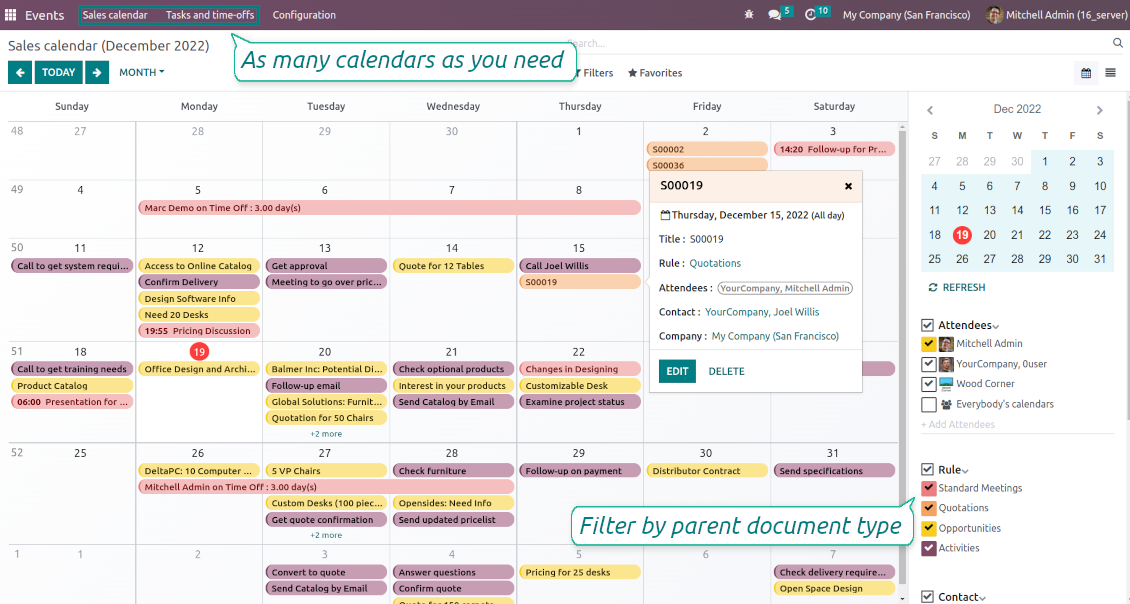
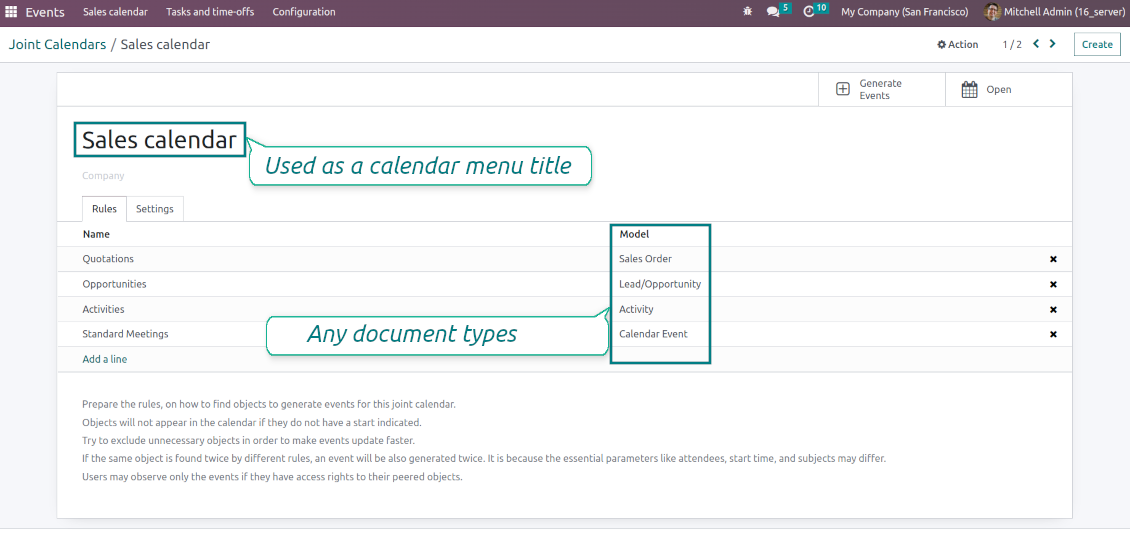
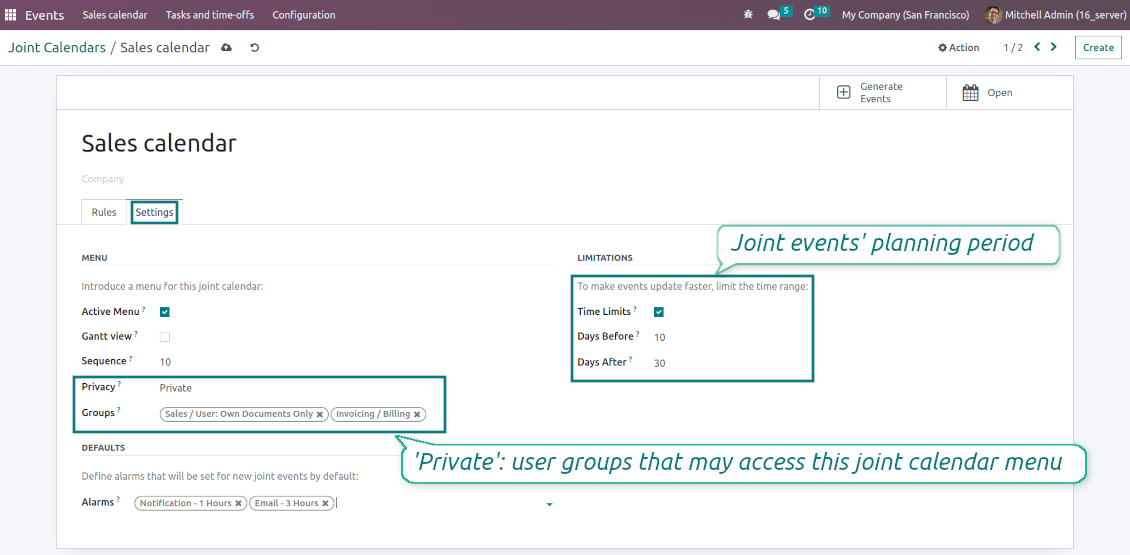
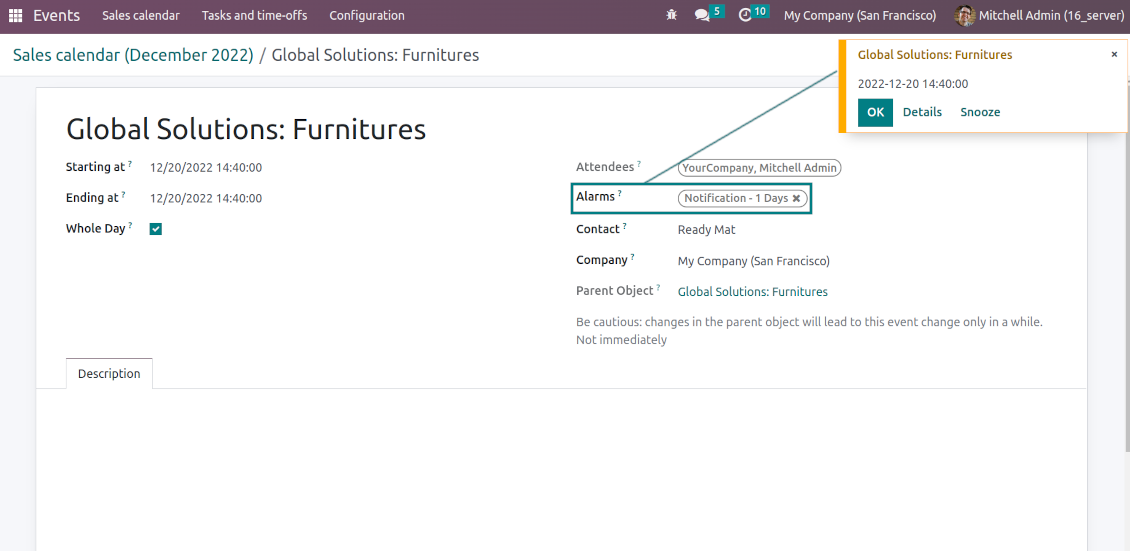
Odoo users often need to keep in mind a lot of details spread out among numerous interfaces. Switching between those is not comfortable and error-prone for planning. This tool solves the problem. The app lets configure rules to join and share various document types on a single super calendar(s) view but with easy-reachable source objects.
- the core app to merge Odoo documents in super calendars.
Giá là
98€
88€.
- the optional free extension that introduces the Odoo Enterprise Gantt view joint events. The features assumed by this add-on are marked by the icon
Any Odoo documents on the same calendar
The tool might merge any Odoo document types on the same view: opportunities, meetings, phone calls, activities, sale or purchase orders, shipments and deliveries, tasks and tickets, time offs, ...
Flexible merging rules
Define on your own what to consider a joint event title, start or stop date, who are target attendees, etc. Have even the same document twice on the same calendar just with a different start
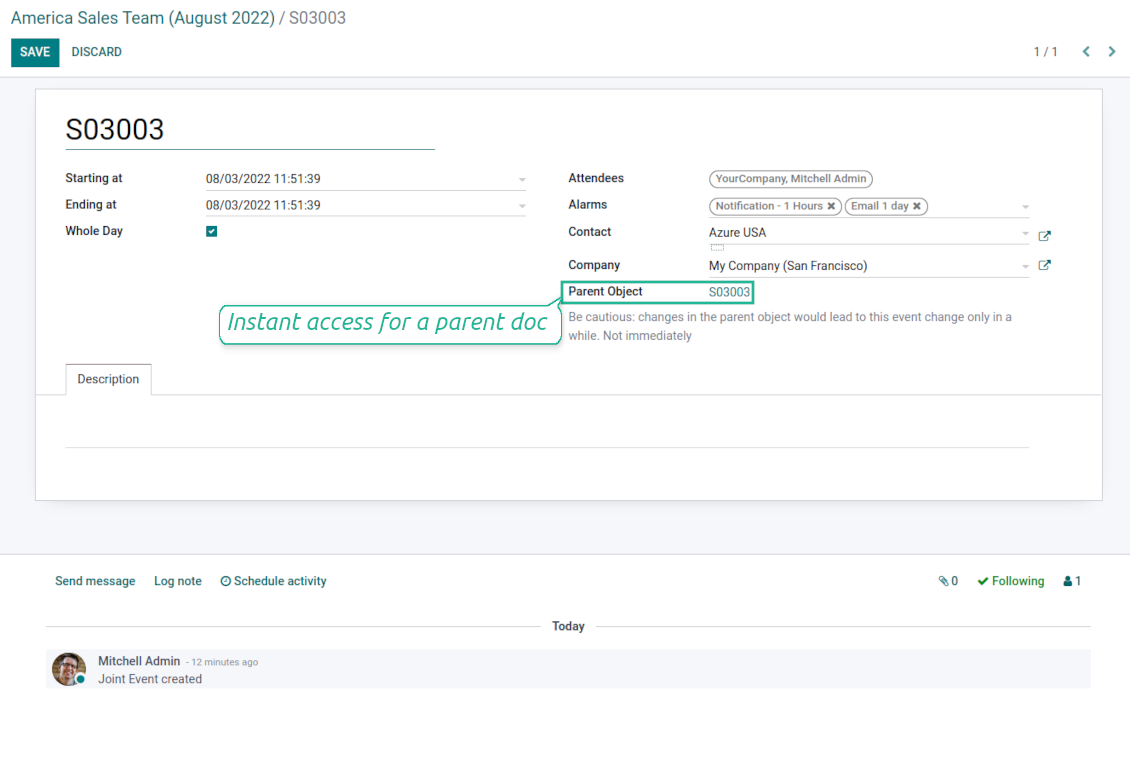
Instant access to source details
Joint events and their source documents are interrelated. Update the former, and the latter would be changed immediately. A reverse operation would be applied with the next cron job (the frequency is configurable)
Comfortable navigation
Shared calendars are especially suitable for team interactions. Users might switch between document types, participants, linked contacts, and companies in a single click. Optionally turn on the Odoo Enterprise Gantt view
Unlimited number of super calendars
Configure as many calendars as you need: for various functional areas or for different user groups. Each joint calendar has its own menu item
Reminders for any Odoo documents
Calendar configuration lets assign default popups and email alarms. Thus, it is possible to have notification of any Odoo event or activity
Simple user rights administration
Regulate joint calendar accesses right on its form. Make it public or share it only for chosen user groups. The app fully supports multi-companies environment
Automatic shared calendar updates
Joint events are updated regularly by the cron job. It is fast, especially if you apply time frames. Refreshing is also available from the calendar interface
Better then expected
The app does exactly what was needed. Combine all tasks from all calendars to one. And allows to manages all activities from all modules in one place.
This makes the Event Calendar so much more useful !
We bought this to combine certain project tasks with the schedules of our maintenance engineers. We now have a better overview which moments are overlapping the schedules of other events. The joining of multiple events in 1 event calendar is super easy, it should be a standard option in ODOO.
Excellent responsive team of programmers
Joint Calendar is the perfect addition to the standard Calendaring system that Odoo offers. It makes the job of setting up specific departmental calendars filled with any objects you wish very easy and Alex and the team provides fantastic after-sales support, responding in most cases within 24 hours to requests for help. Thanks for a great module.
Essential to have Activities, Tasks, Meetings etc all in one calendar and shared.
Great service support very quick and were right on with fixing the issue... I think the ability to see everything on one shared calendar is such an essential part of coordination and time management. Great product once you sort out the rules you need!
Super calendars for any business area
Use joint calendars for any functional area: CRM, project management, sales, HRM, MRP, inventory management, so and so on. Find just a few examples of rules below
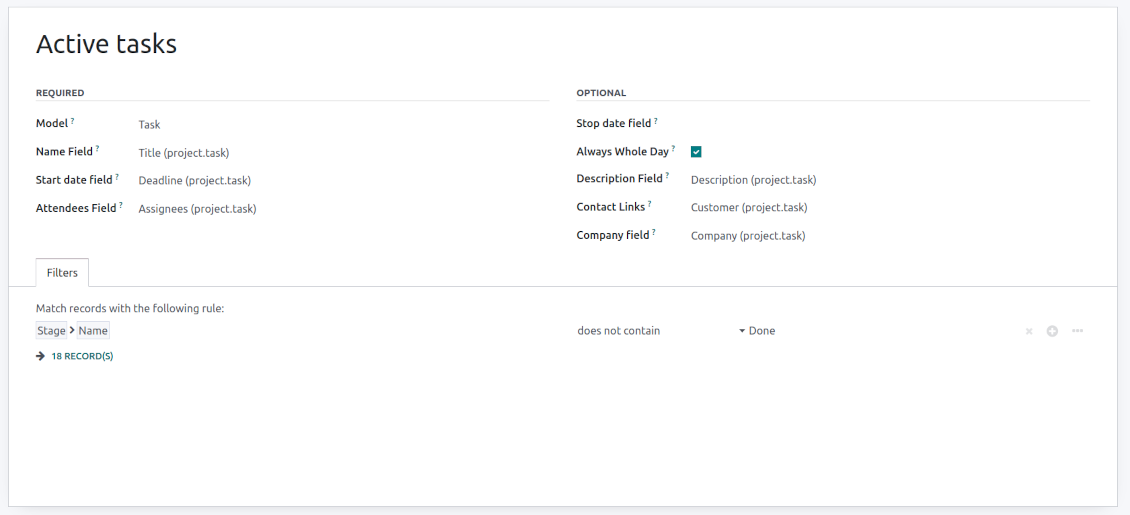
Tasks on a joint calendar
-
As a model use 'Task'
-
As a name use 'Title'
-
As a start date field use 'Deadline'
-
As attendees' field use 'Assignees'
-
As a domain optionally you can set definite projects
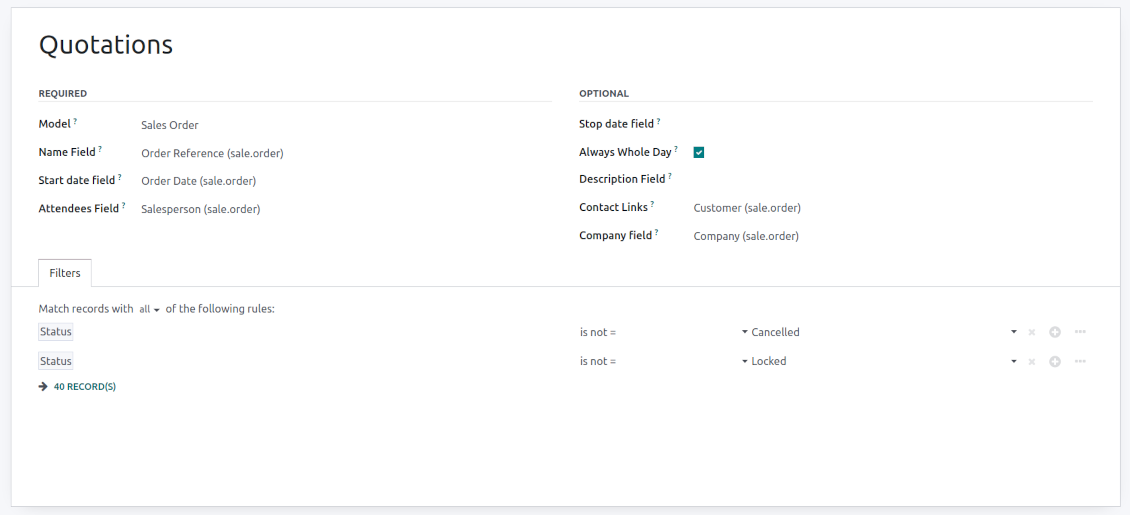
Sale orders on a shared calendar
-
As a model use 'Sales order'
-
As a name use 'Order Reference'
-
As a start date field use 'Order Date'
-
As attendees' field use 'Salesperson'
-
As a contact link use 'Customer'
-
As a domain optionally restrict quotations by sales teams.
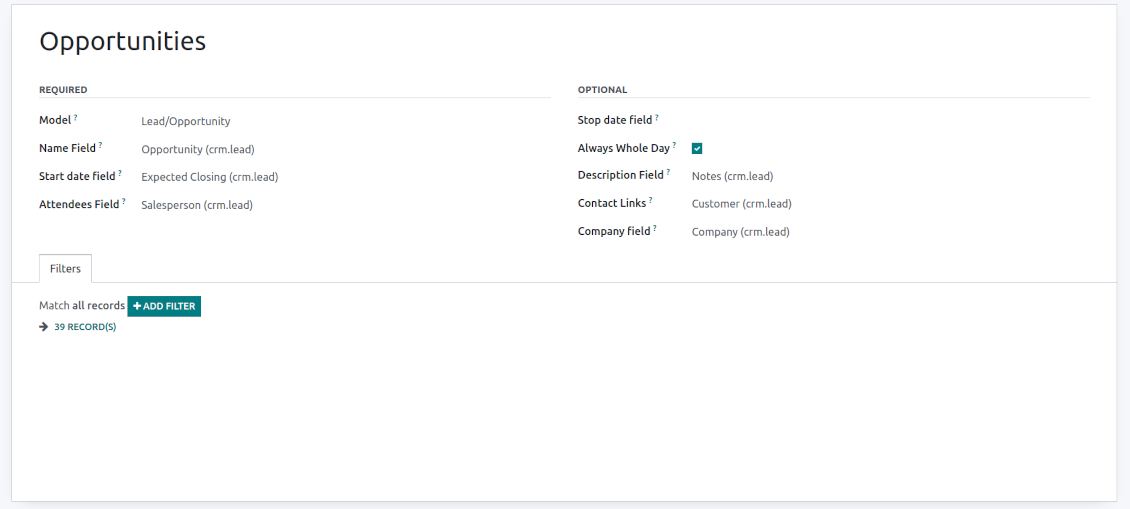
Opportunities on a super calendar
-
As a model use 'Lead/Opportunity'
-
As a name use 'Opportunity'
-
As a start date field use 'Expecting Closing'
-
As attendees' field use 'Salesperson'
-
As a contact link use 'Customer'
-
As a domain optionally restrict opportunities by sales teams.
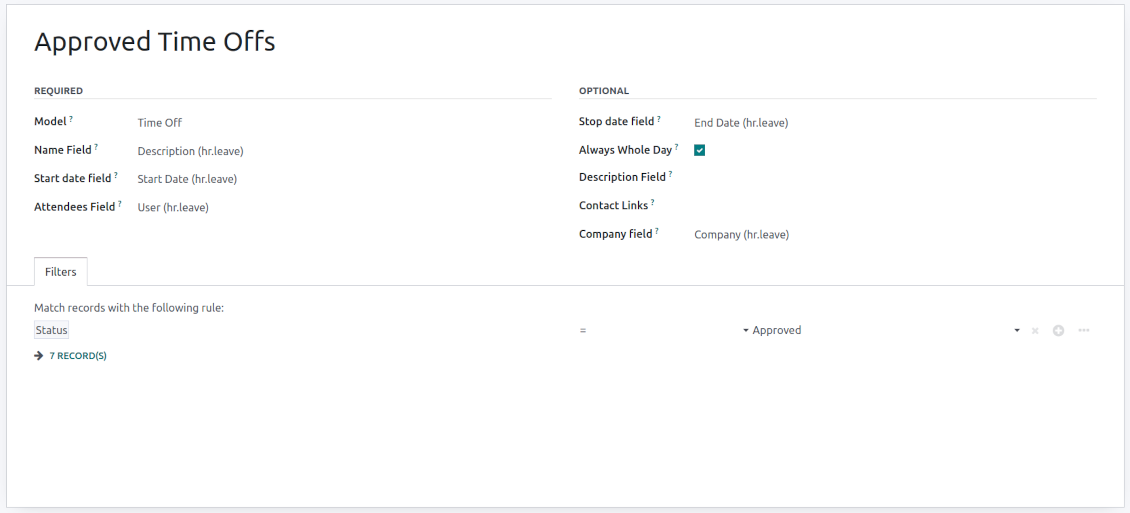
Share employees' time offs and leaves
-
As a model use 'Time Off'
-
As a name use 'Description'
-
As a start date field use 'Start Date'
-
As attendees' field use 'User'
-
As a stop date field use 'End Date'
-
As a domain filter by status: show only approved leaves.
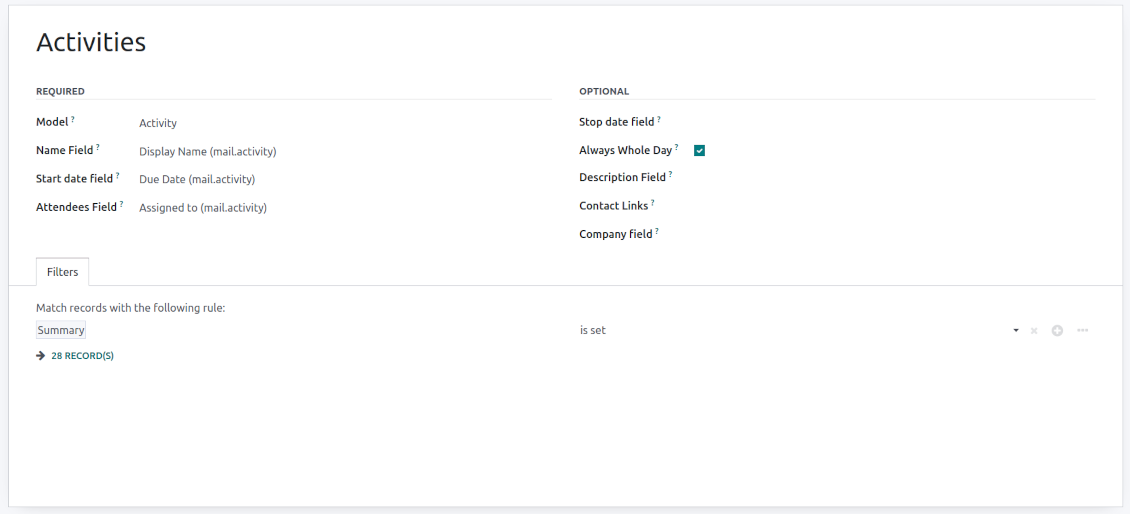
Activities by all objects
-
As a model use 'Activity'
-
As a name use 'Display Name'
-
As a start date field use 'Due Date'
-
As attendees' field use 'Assigned to'
-
As a domain apply 'Summary is set'
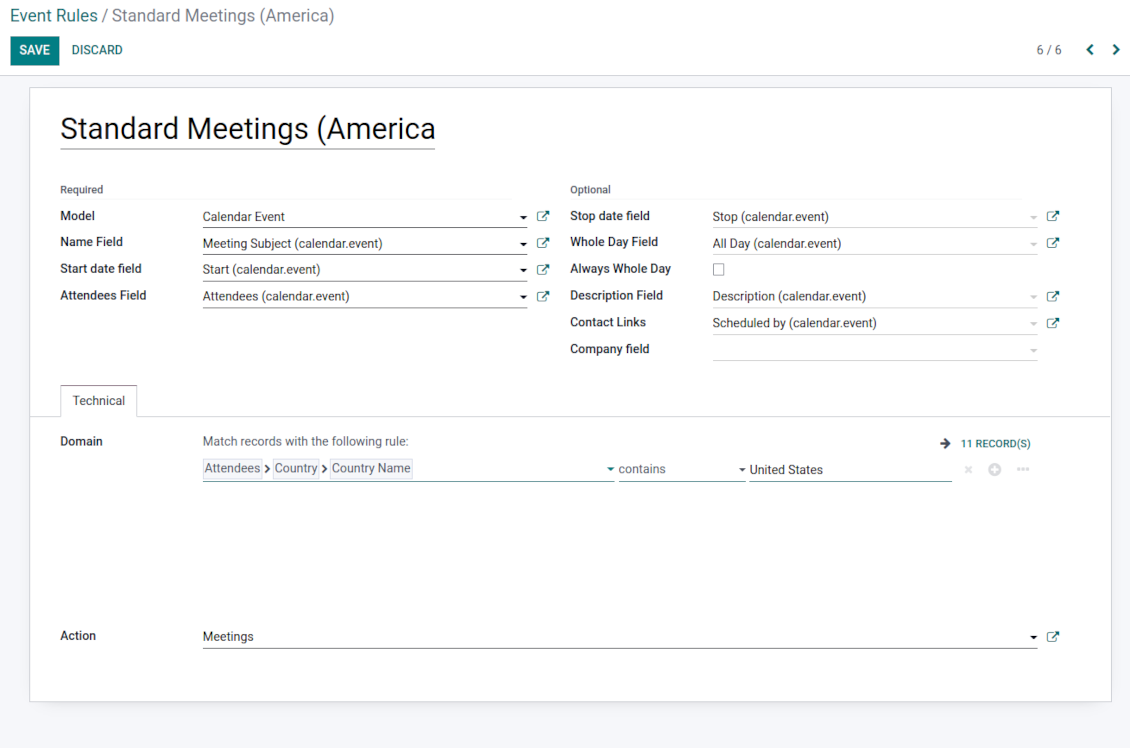
Odoo meetings to the joint calendar
-
As a model use 'Calendar Event'
-
As a name use 'Meeting Subject'
-
As a start date field use 'Start'
-
As a stop date field use 'Stop'
-
As attendees' field use 'Attendees'
-
As a whole day field 'All Day'
Flexible rules to merge Odoo documents
To add a new document type for a shared interface you should set up a joint calendar rule. This rule defines which Odoo objects should create events, which fields of that object should be shown, and whether any filtering should take place
-
Model - which objects to scan: opportunities, tasks, orders, meetings, activities, and so on. You can choose your custom document type (including created in Odoo Studio) as well
-
Name - what to use as a joint event name (also used as calendar event title). Usually, it is 'name', 'subject' or 'reference'
-
Start date - when an event starts. For example, 'expecting closing' for opportunities or 'order date' for quotations. It may be any date or date with time field of a source Odoo object
-
Stop date - when an event is shown as finished on a calendar
-
Attendees - who are participants (responsible persons, event owners). Usually, it is a field 'assigned to', 'a sales person' or 'attendees'. You may use even document 'followers' since it's possible to apply both users and partners
-
Description - are there any notes important for joint events? Usually, the fields like 'internal notes' or 'comments' are used
-
Always Whole Day - means that all generated events would last the whole day disregarding whether start or stop are defined with hours and minutes. Such an event would be shown at a special place on a calendar (above the timeline)
-
Whole Day - a special boolean field of the source object which indicates that a related joint event may last the whole day. This setting is usually applied to standard Odoo calendar events which both might have a definite time indicated or might be planned for a whole day
-
Contact Link - is this event linked to a specific partner? Usually, the fields like 'customer' or 'vendor' are used
-
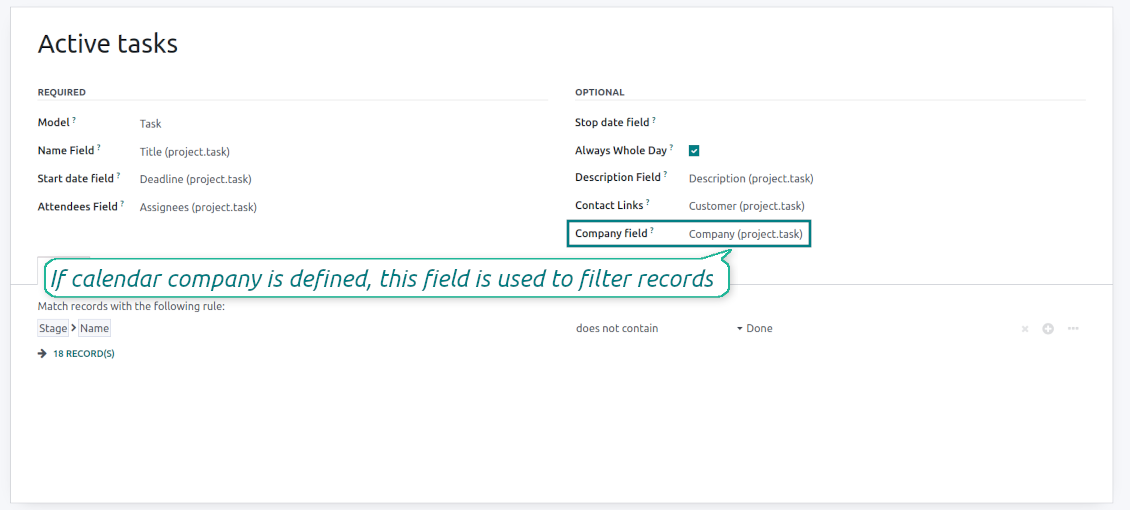
Company field - optionally define the parent document field where its company is kept. In this way, joint events would get the source company that might be used for filtering or just for information
-
Domain - the Odoo filters' constructor to include only topical documents into a joint calendar. You might apply any storable attribute. For example, show only quotations without sales orders, or show opportunities only for this sales team.
Multi companies compatibility
-
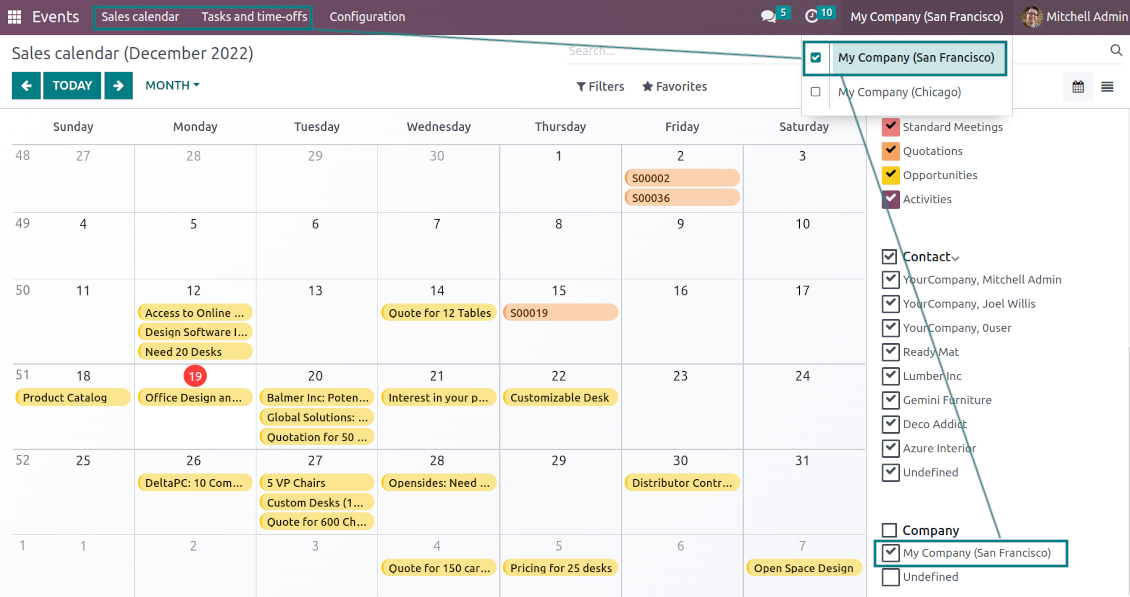
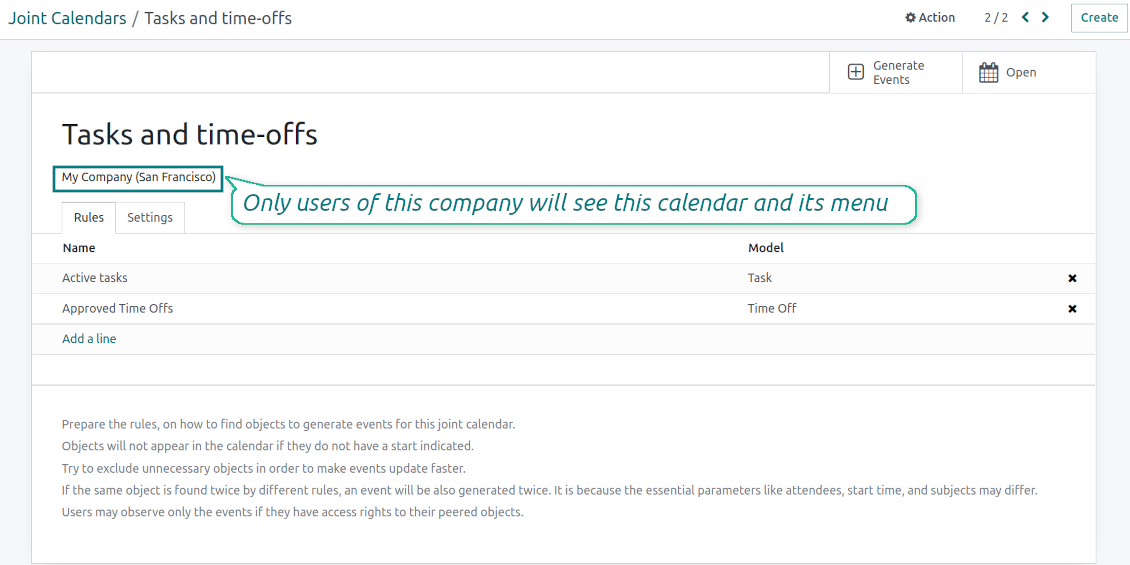
The app fully supports the multi-companies environment: each joint calendar might be linked to a specific Odoo company. If a company is not defined, it is considered as 'global', so available for all Odoo companies
-
Users access only those joint menus, which super calendars do not have a company or have one of those users available companies
-
Each joint rule might have the "Company field" defined. If that setting is configured, records will be filtered in a joint calendar company. For example, if you stated 'Company' as the 'Company field' for the tasks' rule, and the joint calendar is linked to 'San Fransisco' company, then users will see only San Fransisco or global tasks only
-
Joint events would also get the company based on the 'Company field' of the parent document. You can comfortably switch between objects of different companies using the right navigation filters
-
In addition to the 'Company field', you may also restrict records in a rule domain. For instance, to include records of a few companies but not to include others.
Combine events on Odoo Enterprise Gantt view
-
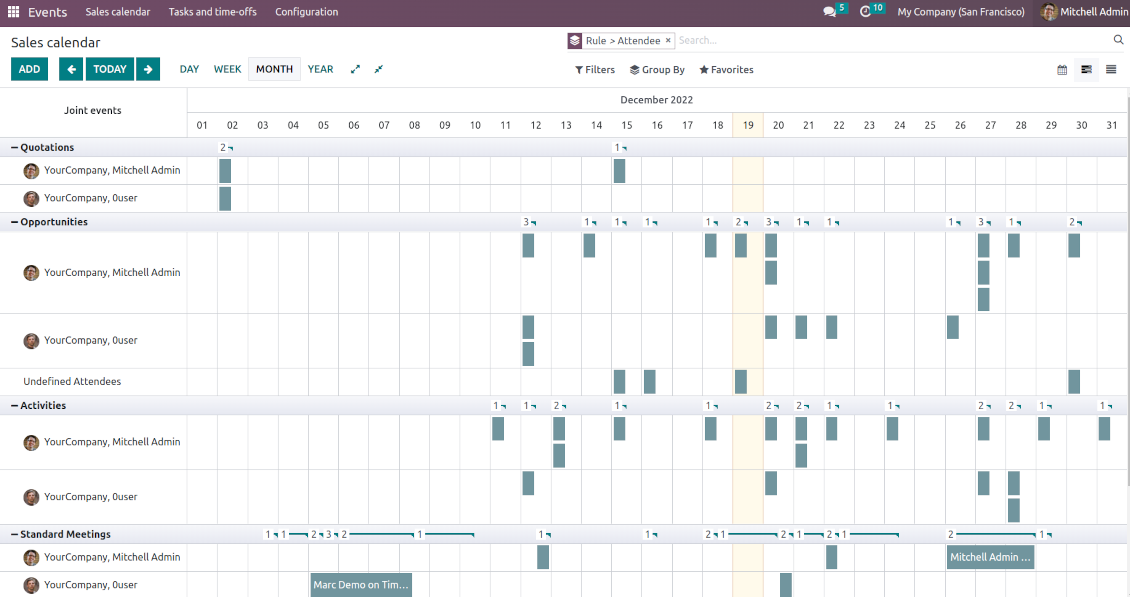
For any joint calendar, optionally add the Odoo Enterprise edition Gantt view
-
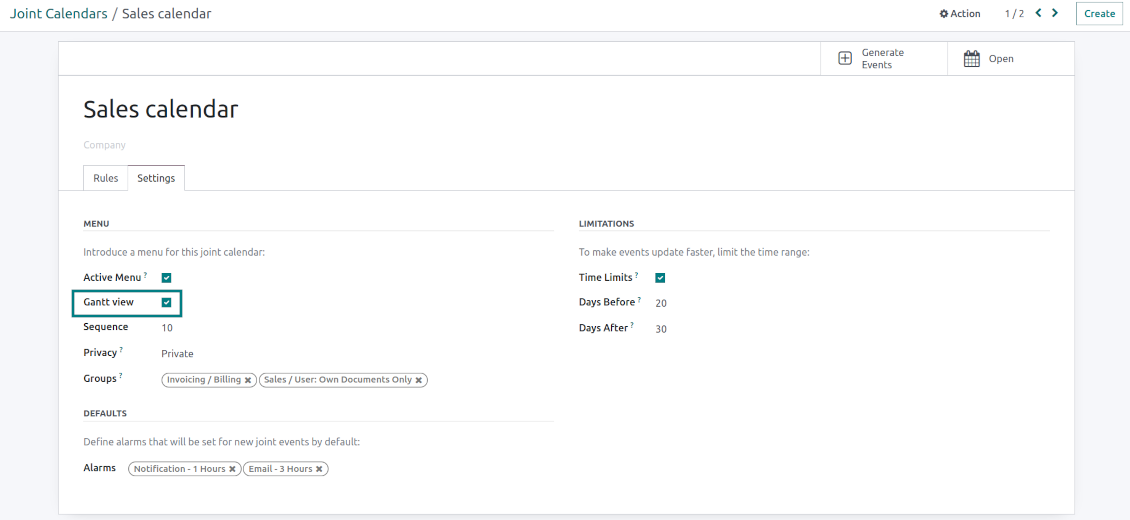
To that goal, just tick the box 'Gantt view' on the supper calendar settings
-
The app would automatically extend a target joint calendar action after you saved the changes
-
In this way, you can have a single super Gantt view for various Odoo documents
-
Manage those events in a comfortable manner: reassign responsible users, drag and drop those to change periods, etc.
Mẹo cấu hình và cài đặt cho Joint Calendar Odoo v.16
Joint calendar scheduled jobs
The tool lets you change the frequency of joint calendar refreshing and emails reminders' checks:
- Turn on the debug mode
- Go to technical settings > Automation > Scheduled jobs
- Find the job 'Refresh Joint Events' to change the frequency of super calendars' update
- Find the job 'Notify About Joint Event' to change the frequency of email alarms.
Câu hỏi thường gặp về Joint Calendar Odoo v.16
Điều gì xảy ra khi tùy chọn "Always Whole Day" bật/tắt?
Khi tùy chọn "Always Whole Day" bật, mọi sự kiện do quy tắc tạo sẽ kéo dài cả ngày, bất kể bắt đầu hay kết thúc có giờ và phút. Sự kiện đó hiện ở vị trí đặc biệt trên lịch.
Ví dụ, nếu tạo quy tắc cho mô hình "Sale Order" và bật "Always Whole Day", sự kiện sẽ nằm trên siêu lịch ngày và tuần, phía trên dòng thời gian.
Nếu tắt tùy chọn và bắt đầu hoặc kết thúc có giờ/phút, sự kiện sẽ nằm ở một giờ cụ thể trong ngày và bạn sẽ thấy giờ trước tiêu đề.
Tôi không thấy menu lịch trong Odoo. Tôi nên làm gì?
Hãy chắc:
1. Có ít nhất một lịch chung đã tạo, cấu hình và làm mới. Sau khi thiết lập lịch chung, hãy làm mới trang trình duyệt
2. Bạn có quyền truy cập ít nhất một lịch
Tôi đã tạo một số lịch có quy tắc nhưng không thấy chúng trong menu.
Có thể có vài lý do. Có thể tác vụ đã lên lịch liên quan chưa chạy. Khi đó, hãy chạy cron thủ công bằng nút làm mới ở cột phải của giao diện lịch chung.
Cũng kiểm tra xem lịch có Time Limits không, nếu không chỉ hiện sự kiện trong một khoảng. Ví dụ lịch 'Sale Orders' với giới hạn 10 ngày trước và 30 ngày sau. Nếu một Sale Order được tạo, chẳng hạn, 12 ngày trước thì sẽ không hiện trên lịch.
Đảm bảo quy tắc không có bộ lọc không khớp bản ghi nào. Ví dụ quy tắc 'Sale Order' với bộ lọc 'Customer = Deco Addict' chỉ hiện đơn của khách này trên lịch liên quan.
Tôi có thể gộp bao nhiêu tài liệu Odoo (ví dụ đơn bán, dự án, hoạt động) vào một lịch chung?
Bạn có thể gộp bao nhiêu chứng từ Odoo tùy ý vào một lịch. Hoặc chia chúng ra nhiều lịch (ví dụ Sales Calendar và Projects, Tasks and Activities Calendar) rồi chuyển trong systray.
Quy tắc lịch chung là gì?
Quy tắc xác định đối tượng Odoo nào tạo sự kiện, trường nào của đối tượng được dùng và hiện, và có lọc hay không.
Khi tạo quy tắc, bạn tự định nghĩa tiêu đề sự kiện chung, ngày bắt đầu hoặc kết thúc, ai là người tham dự, v.v.
Trường "Stop date" để làm gì? Tôi có thể để trống không?
Stop date — trường của mô hình Odoo đích, xác định khi nào sự kiện hiện là đã kết thúc trên lịch. Ví dụ, quy tắc cho mô hình "Sale Order" và chọn "Delivery Date" cho Stop date thì sự kiện hiện trong menu sự kiện từ ngày báo giá được lên kế hoạch (trường Start Date - Order Date) đến ngày giao sản phẩm.
Đây là trường tùy chọn, có thể để trống. Khi đó sự kiện chỉ nằm vào ngày của trường Start Date.
Trong lịch có loại sự kiện "Undefined". Nghĩa là gì?
Nghĩa là sự kiện này được tạo thủ công. Không có đối tượng cha và không bị quy tắc điều chỉnh. Các sự kiện chung như vậy nằm dưới bộ lọc "Undefined", không màu.
Mọi người có quyền xem lịch đều có thể tạo và xem các sự kiện chưa xác định của lịch.
Chính sách cập nhật của các công cụ của bạn là gì?
Theo chính sách hiện tại của Odoo Apps Store:
- Mọi mô-đun mua cho phiên bản 12.0 trở về trước cho phép truy cập mọi phiên bản đến 12.0.
- Từ phiên bản 13.0, mỗi phiên bản mô-đun phải mua riêng.
- Bất kể phiên bản, mua công cụ cho quyền mọi cập nhật và sửa lỗi trong một phiên bản chính.
Lưu ý rằng nhóm faOtools không kiểm soát các chính sách đó. Mọi câu hỏi xin liên hệ trực tiếp đại diện Odoo Apps Store.
Làm sao cài ứng dụng của bạn trên Odoo.sh?
Cách thẳng nhất là dùng quy trình có sẵn của cửa hàng Odoo:
1. Mở trang phân hệ và bấm nút Deploy on odoo.sh
2. Sau đó bạn sẽ được chuyển tới trang GitHub. Đăng nhập tài khoản, rồi bấm 'Create a new repo' hoặc dùng repo có sẵn. Hãy đảm bảo kho là riêng tư. Không được phép công bố ứng dụng theo giấy phép OPL-1. Nếu cần, tạo repo mới cho dự án Odoo.sh
3. Rồi vào odoo.sh và bấm nút Deploy. Trong cửa sổ pop-up, gửi quyết định và bấm 'Continue.' Thao tác này sẽ kích hoạt cài đặt.
Các bước này sẽ cài ứng dụng cho nhánh production của dự án. Nếu muốn triển khai ứng dụng cho nhánh khác hoặc cập nhật phân hệ, hãy làm các bước sau:
1. Tải mã nguồn ứng dụng từ cửa hàng Odoo
2. Commit phân hệ vào kho GitHub cần thiết. Đảm bảo không thư mục/tệp ứng dụng nào bị bỏ qua (tức không nằm trong .gitignore của repo). Kho được odoo.sh tạo tự động và mặc định có thể gồm mục quan trọng (vd. /lib). Hãy tải lên mọi thư mục, thư mục con và tệp của phân hệ, không ngoại lệ
3. Triển khai nhánh đích của dự án odoo.sh hoặc, nếu thiết lập của bạn giả định vậy, đợi đến khi được xây tự động.
Tôi nên cài ứng dụng của bạn trên máy chủ riêng thế nào?
2. Khởi động lại máy chủ Odoo;
3. Bật chế độ nhà phát triển (cài đặt kỹ thuật);
4. Cập nhật danh sách ứng dụng (menu ứng dụng);
5. Tìm ứng dụng và bấm 'Activate'/'Install';
6. Làm theo hướng dẫn trên trang ứng dụng nếu có.
Tôi thấy ứng dụng có tiện ích thêm. Có thể mua sau không?
Có, chắc chắn. Đồng thời Odoo tự thêm mọi phụ thuộc vào giỏ, nên bạn nên loại các công cụ đã mua để tránh trả hai lần.
Tôi triển khai ứng dụng trên Odoo.sh và thấy cảnh báo/lỗi trong kiểm thử
Cảnh báo đỏ/cam không ảnh hưởng đến tính năng của ứng dụng. Đáng tiếc, đôi khi phân hệ của chúng tôi không qua được các kiểm thử tự động chuẩn vì chúng giả định hành vi xung đột với mục tiêu ứng dụng. Ví dụ chúng tôi đổi cách tính giá, trong khi kiểm thử phân hệ Odoo chuẩn so giá cuối với thuật toán chuẩn.
Trước hết, hãy kiểm tra tính năng của cơ sở dữ liệu đã triển khai. Mọi thứ có chạy đúng không?
Nếu vẫn cho rằng cảnh báo ảnh hưởng tính năng thật, hãy liên hệ chúng tôi và gửi nhật ký cài đặt đầy đủ cùng danh sách đầy đủ phân hệ đã triển khai (gồm lõi và bên thứ ba).
Tôi có thể mua ứng dụng trực tiếp từ công ty bạn không?
Không, chúng tôi chỉ phân phối công cụ qua cửa hàng ứng dụng Odoo chính thức.
Tôi muốn được giảm giá
Rất tiếc, chúng tôi không có phương tiện kỹ thuật để cung cấp giá riêng.
Tôi có thể cài ứng dụng trên cơ sở dữ liệu Odoo Online (SaaS) không?
Không, ứng dụng bên thứ ba không dùng được trên Odoo Online. Rất tiếc Odoo SaaS chặn khả năng đó.
Công cụ của bạn phụ thuộc ứng dụng khác. Tôi có cần mua chúng không?
Có, công cụ cần tất cả phân hệ ghi trong phụ thuộc để chạy đúng. Giá trên trang ứng dụng đã gồm mọi phụ thuộc cần thiết.
Giá mô-đun bằng đô la Mỹ là bao nhiêu? Sao lại đổi?
Giá phân hệ của chúng tôi tính bằng euro. Cửa hàng Odoo đổi sang các tiền tệ khác theo tỷ giá nội bộ. Vì vậy giá bằng đô la Mỹ có thể đổi khi tỷ giá được cập nhật.
Lời ứng dụng và trang web ở ngôn ngữ khác tiếng Anh được hỗ trợ bởi AI và khớp với bản dịch Odoo chính thức. Nếu bạn thấy sai, gửi phiếu hỗ trợ về đúng bản dịch và chúng tôi sẽ sửa.
Cơ sở trình diễn Odoo (xem trước trực tiếp)
Với ứng dụng này, chúng tôi có thể cung cấp cơ sở demo cá nhân miễn phí.
Bạn không cần số điện thoại hay thẻ tín dụng để liên hệ. Chỉ cần đăng ký email ngắn, không quá 30 giây.
Theo yêu cầu, chúng tôi sẽ chuẩn bị cơ sở xem trước trực tiếp riêng, nơi bạn có thể thử nghiệm và kiểm tra giả định khoảng hai tuần.
Báo lỗi
Nếu gặp lỗi hoặc hành vi không nhất quán, hãy liên hệ. Chúng tôi cam kết sửa trong 60 ngày kể từ khi mua và vẫn muốn cải thiện công cụ sau giai đoạn đó.
Bạn không cần số điện thoại hay thẻ tín dụng để liên hệ. Chỉ cần đăng ký email ngắn, không quá 30 giây.
Hãy nêu càng nhiều chi tiết càng tốt trong yêu cầu: ảnh chụp màn hình, nhật ký máy chủ Odoo, mô tả đầy đủ cách tái hiện sự cố, v.v. Thường mất vài ngày làm việc để chuẩn bị kế hoạch xử lý (nếu xác nhận lỗi) hoặc hướng dẫn việc cần làm (nếu không).
Yêu cầu tính năng công khai và ý tưởng module (phát triển miễn phí)
Chúng tôi rất muốn cải thiện công cụ và biết ơn mọi phản hồi. Nếu yêu cầu của bạn hữu ích cho mọi người và có thể triển khai hiệu quả, nhóm sẽ đưa vào danh sách việc cần làm.
Danh sách việc cần làm như vậy được xử lý đều đặn và không phát sinh phí thêm. Dù chúng tôi không hứa hạn chót và thiết kế cuối, đây có thể là cách tốt để có tính năng mong muốn mà không đầu tư và rủi ro.
Bạn không cần số điện thoại hay thẻ tín dụng để liên hệ. Chỉ cần đăng ký email ngắn, không quá 30 giây.

The tool to flexibly structure Odoo attachments in folders and synchronize directories with cloud clients: Google Drive, OneDrive/SharePoint, Nextcloud/ownCloud, and Dropbox. DMS. File Manager. Document management system
398€
The tool to automatically synchronize Odoo attachments with OneDrive files in both ways
487€
The tool to automatically synchronize Odoo attachments with Google Drive files in both ways
487€

The tool to build a deep and structured knowledge base for internal and external use. Knowledge System. KMS. Wiki-like revisions.
398€
The tool to set up KPI targets and control their fulfillment by periods. KPI dashboards. Dashboard designer. KPI charts

The tool for time-based service management from booking appointments to sales and reviews
398€
Công cụ quản lý Odoo từ các chat AI yêu thích qua MCP. Claude. Mọi AI hỗ trợ MCP.

The tool to translate URL addresses of Odoo website pages
38€