Joint Calendar v.16
The tool to combine different Odoo events in a few configurable super calendars
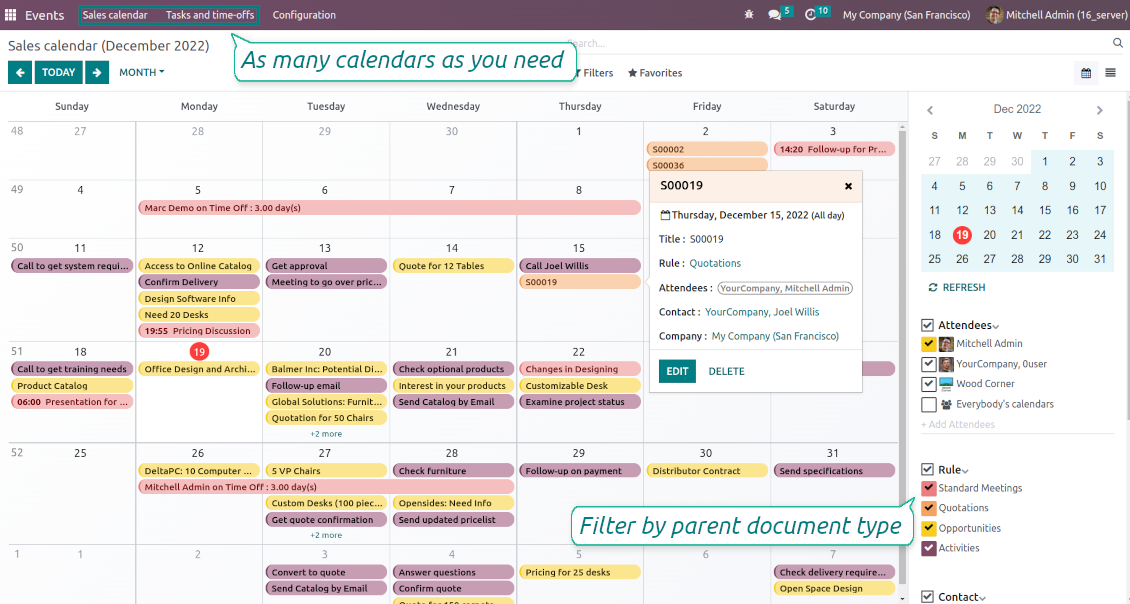
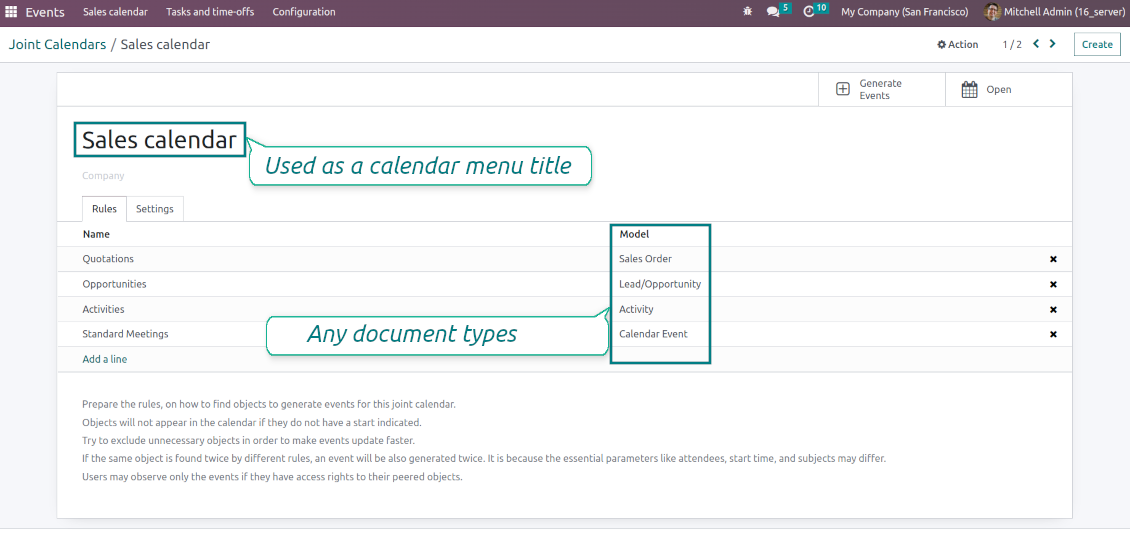
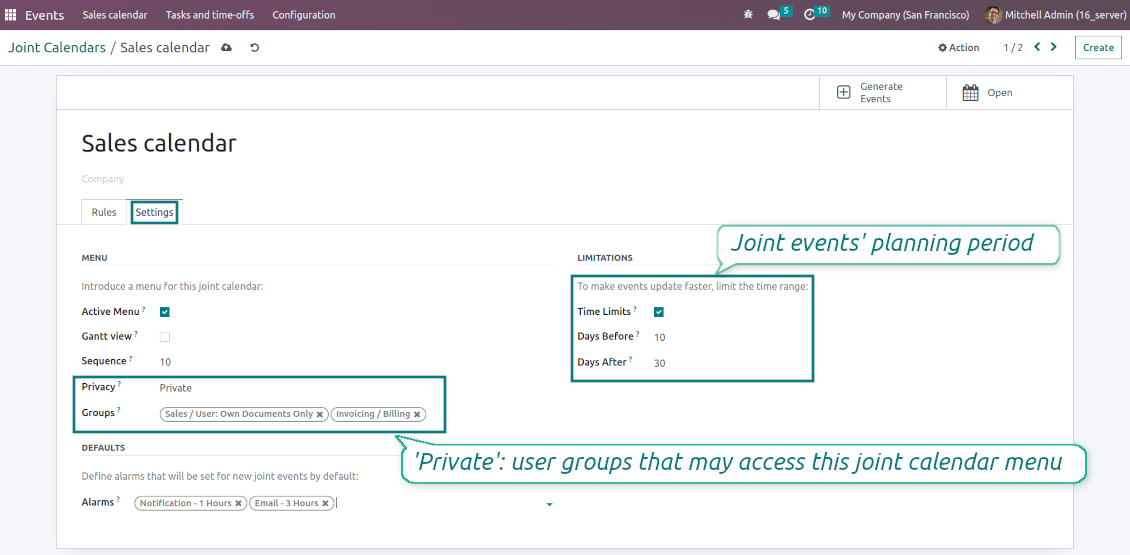
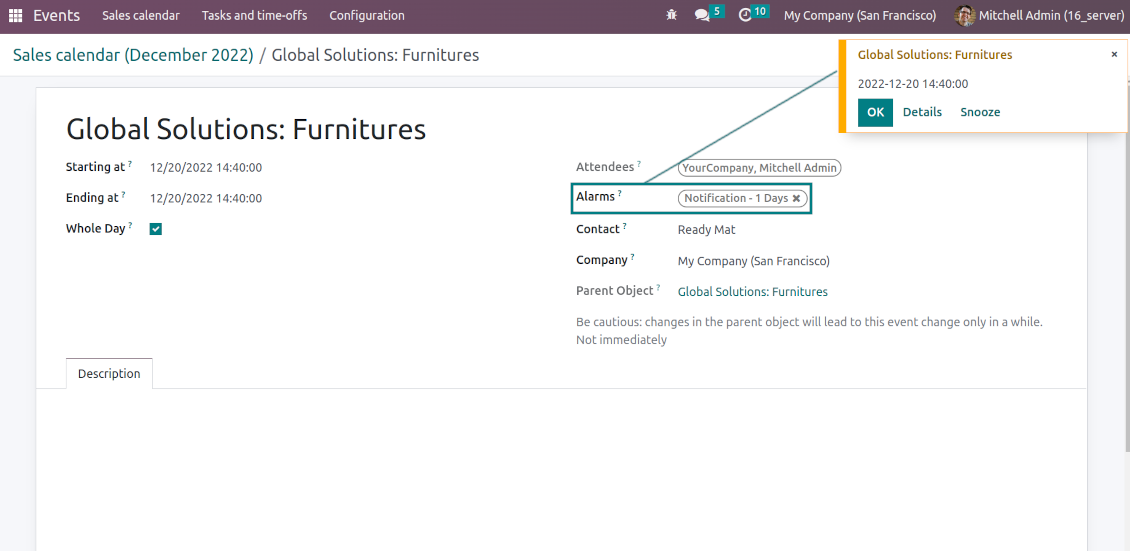
Odoo users often need to keep in mind a lot of details spread out among numerous interfaces. Switching between those is not comfortable and error-prone for planning. This tool solves the problem. The app lets configure rules to join and share various document types on a single super calendar(s) view but with easy-reachable source objects.
- the core app to merge Odoo documents in super calendars.
Il suo prezzo è
98€
88€.
- the optional free extension that introduces the Odoo Enterprise Gantt view joint events. The features assumed by this add-on are marked by the icon
Any Odoo documents on the same calendar
The tool might merge any Odoo document types on the same view: opportunities, meetings, phone calls, activities, sale or purchase orders, shipments and deliveries, tasks and tickets, time offs, ...
Flexible merging rules
Define on your own what to consider a joint event title, start or stop date, who are target attendees, etc. Have even the same document twice on the same calendar just with a different start
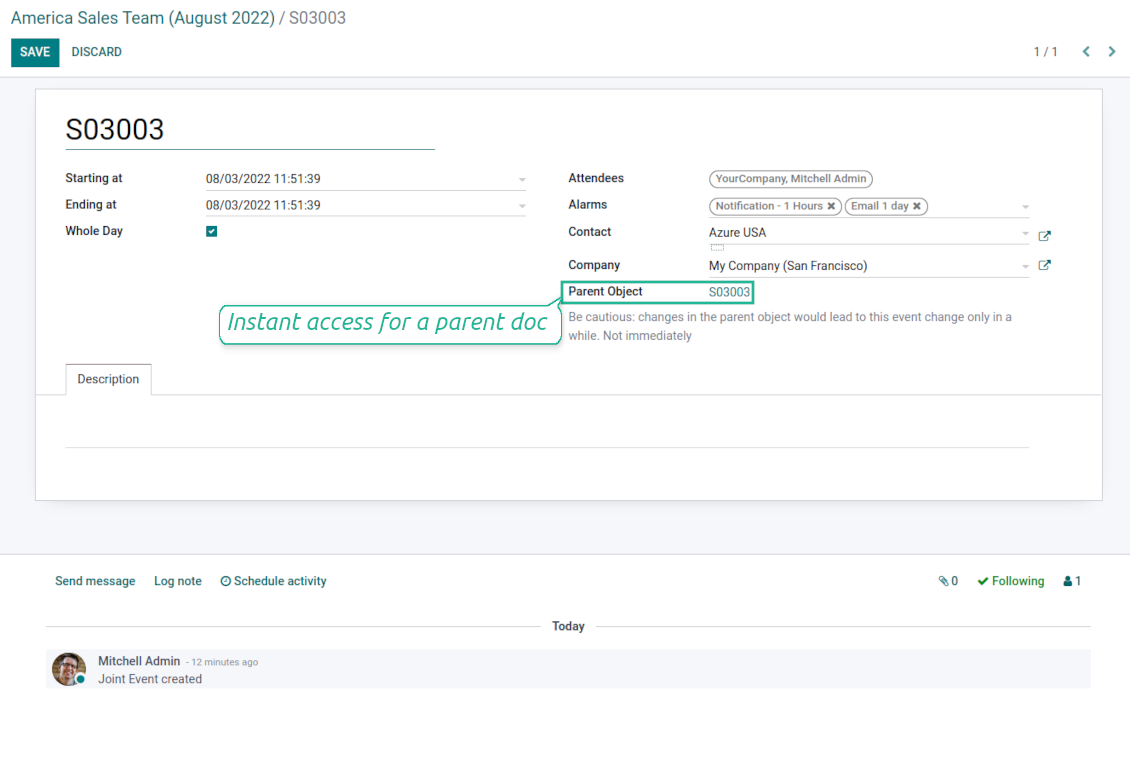
Instant access to source details
Joint events and their source documents are interrelated. Update the former, and the latter would be changed immediately. A reverse operation would be applied with the next cron job (the frequency is configurable)
Comfortable navigation
Shared calendars are especially suitable for team interactions. Users might switch between document types, participants, linked contacts, and companies in a single click. Optionally turn on the Odoo Enterprise Gantt view
Unlimited number of super calendars
Configure as many calendars as you need: for various functional areas or for different user groups. Each joint calendar has its own menu item
Reminders for any Odoo documents
Calendar configuration lets assign default popups and email alarms. Thus, it is possible to have notification of any Odoo event or activity
Simple user rights administration
Regulate joint calendar accesses right on its form. Make it public or share it only for chosen user groups. The app fully supports multi-companies environment
Automatic shared calendar updates
Joint events are updated regularly by the cron job. It is fast, especially if you apply time frames. Refreshing is also available from the calendar interface
Better then expected
The app does exactly what was needed. Combine all tasks from all calendars to one. And allows to manages all activities from all modules in one place.
This makes the Event Calendar so much more useful !
We bought this to combine certain project tasks with the schedules of our maintenance engineers. We now have a better overview which moments are overlapping the schedules of other events. The joining of multiple events in 1 event calendar is super easy, it should be a standard option in ODOO.
Excellent responsive team of programmers
Joint Calendar is the perfect addition to the standard Calendaring system that Odoo offers. It makes the job of setting up specific departmental calendars filled with any objects you wish very easy and Alex and the team provides fantastic after-sales support, responding in most cases within 24 hours to requests for help. Thanks for a great module.
Essential to have Activities, Tasks, Meetings etc all in one calendar and shared.
Great service support very quick and were right on with fixing the issue... I think the ability to see everything on one shared calendar is such an essential part of coordination and time management. Great product once you sort out the rules you need!
Super calendars for any business area
Use joint calendars for any functional area: CRM, project management, sales, HRM, MRP, inventory management, so and so on. Find just a few examples of rules below
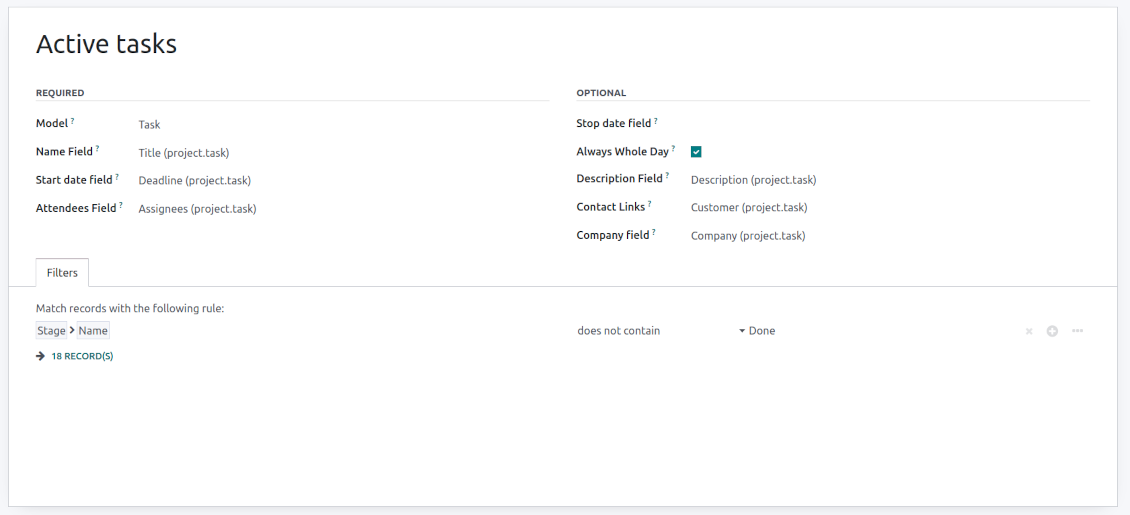
Tasks on a joint calendar
-
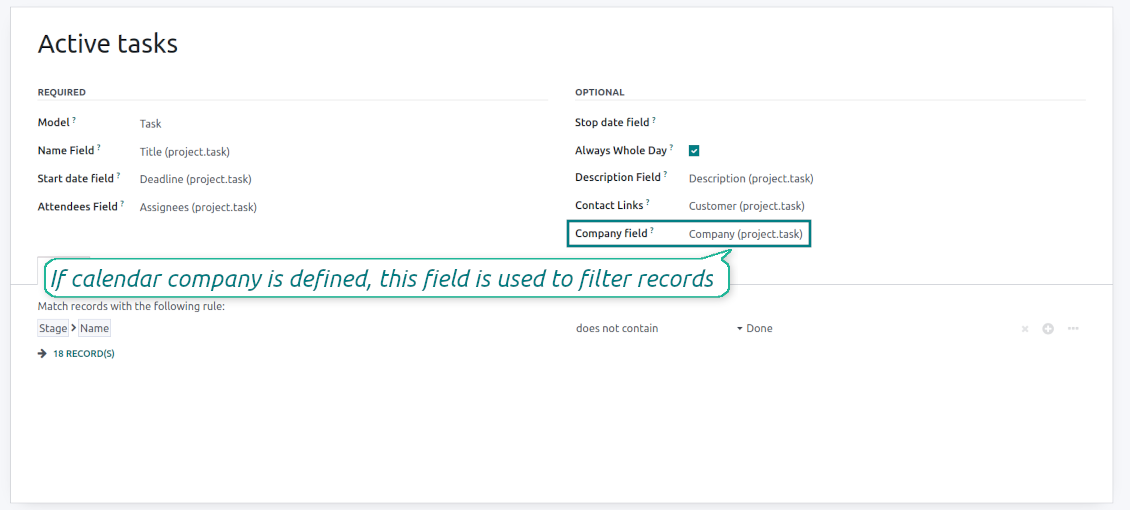
As a model use 'Task'
-
As a name use 'Title'
-
As a start date field use 'Deadline'
-
As attendees' field use 'Assignees'
-
As a domain optionally you can set definite projects
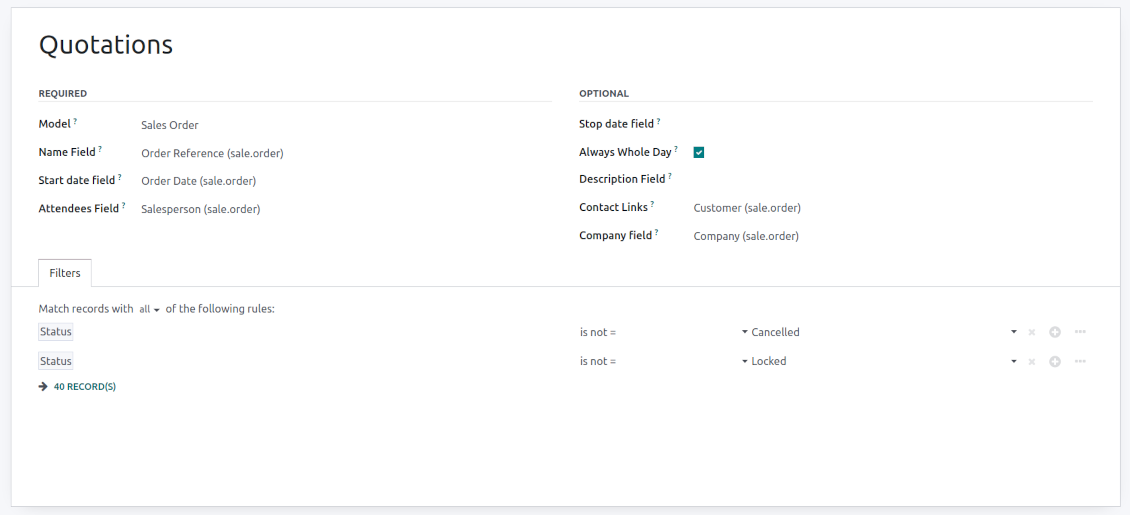
Sale orders on a shared calendar
-
As a model use 'Sales order'
-
As a name use 'Order Reference'
-
As a start date field use 'Order Date'
-
As attendees' field use 'Salesperson'
-
As a contact link use 'Customer'
-
As a domain optionally restrict quotations by sales teams.
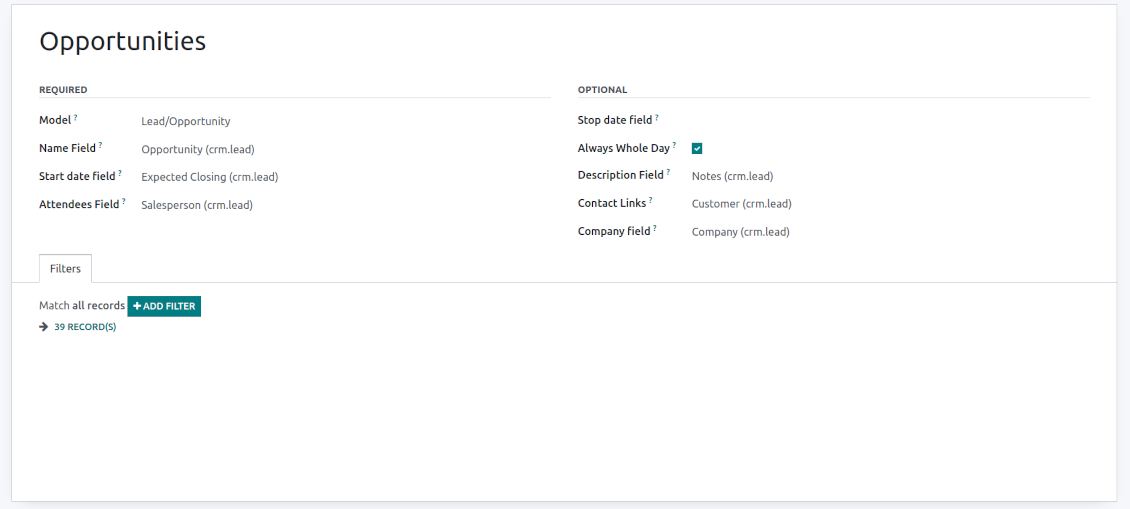
Opportunities on a super calendar
-
As a model use 'Lead/Opportunity'
-
As a name use 'Opportunity'
-
As a start date field use 'Expecting Closing'
-
As attendees' field use 'Salesperson'
-
As a contact link use 'Customer'
-
As a domain optionally restrict opportunities by sales teams.
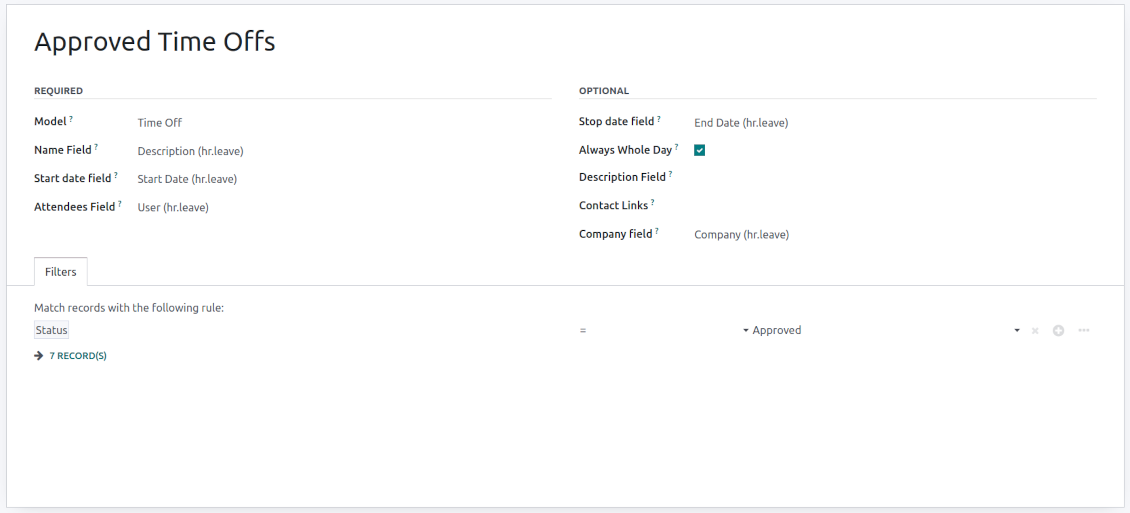
Share employees' time offs and leaves
-
As a model use 'Time Off'
-
As a name use 'Description'
-
As a start date field use 'Start Date'
-
As attendees' field use 'User'
-
As a stop date field use 'End Date'
-
As a domain filter by status: show only approved leaves.
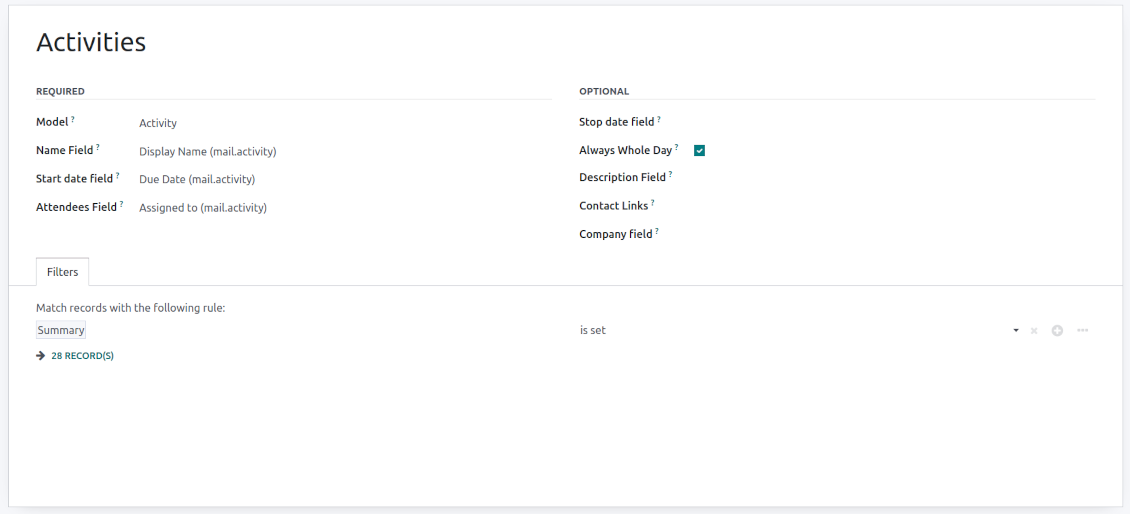
Activities by all objects
-
As a model use 'Activity'
-
As a name use 'Display Name'
-
As a start date field use 'Due Date'
-
As attendees' field use 'Assigned to'
-
As a domain apply 'Summary is set'
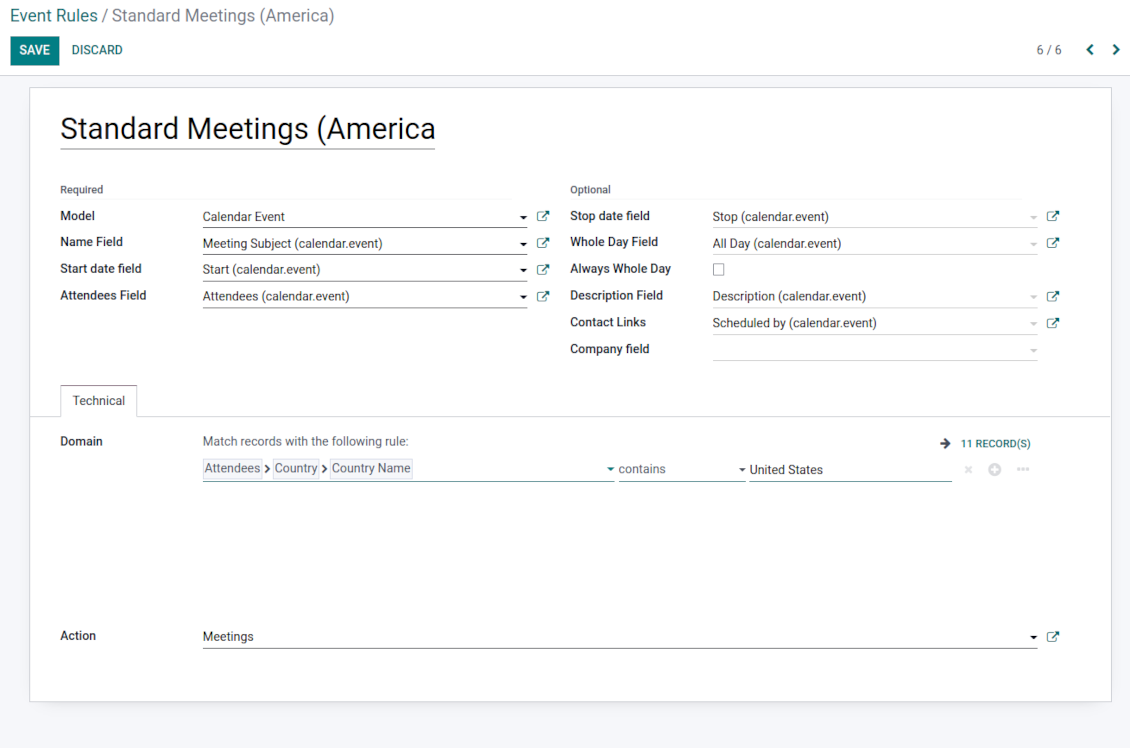
Odoo meetings to the joint calendar
-
As a model use 'Calendar Event'
-
As a name use 'Meeting Subject'
-
As a start date field use 'Start'
-
As a stop date field use 'Stop'
-
As attendees' field use 'Attendees'
-
As a whole day field 'All Day'
Flexible rules to merge Odoo documents
To add a new document type for a shared interface you should set up a joint calendar rule. This rule defines which Odoo objects should create events, which fields of that object should be shown, and whether any filtering should take place
-
Model - which objects to scan: opportunities, tasks, orders, meetings, activities, and so on. You can choose your custom document type (including created in Odoo Studio) as well
-
Name - what to use as a joint event name (also used as calendar event title). Usually, it is 'name', 'subject' or 'reference'
-
Start date - when an event starts. For example, 'expecting closing' for opportunities or 'order date' for quotations. It may be any date or date with time field of a source Odoo object
-
Stop date - when an event is shown as finished on a calendar
-
Attendees - who are participants (responsible persons, event owners). Usually, it is a field 'assigned to', 'a sales person' or 'attendees'. You may use even document 'followers' since it's possible to apply both users and partners
-
Description - are there any notes important for joint events? Usually, the fields like 'internal notes' or 'comments' are used
-
Always Whole Day - means that all generated events would last the whole day disregarding whether start or stop are defined with hours and minutes. Such an event would be shown at a special place on a calendar (above the timeline)
-
Whole Day - a special boolean field of the source object which indicates that a related joint event may last the whole day. This setting is usually applied to standard Odoo calendar events which both might have a definite time indicated or might be planned for a whole day
-
Contact Link - is this event linked to a specific partner? Usually, the fields like 'customer' or 'vendor' are used
-
Company field - optionally define the parent document field where its company is kept. In this way, joint events would get the source company that might be used for filtering or just for information
-
Domain - the Odoo filters' constructor to include only topical documents into a joint calendar. You might apply any storable attribute. For example, show only quotations without sales orders, or show opportunities only for this sales team.
Multi companies compatibility
-
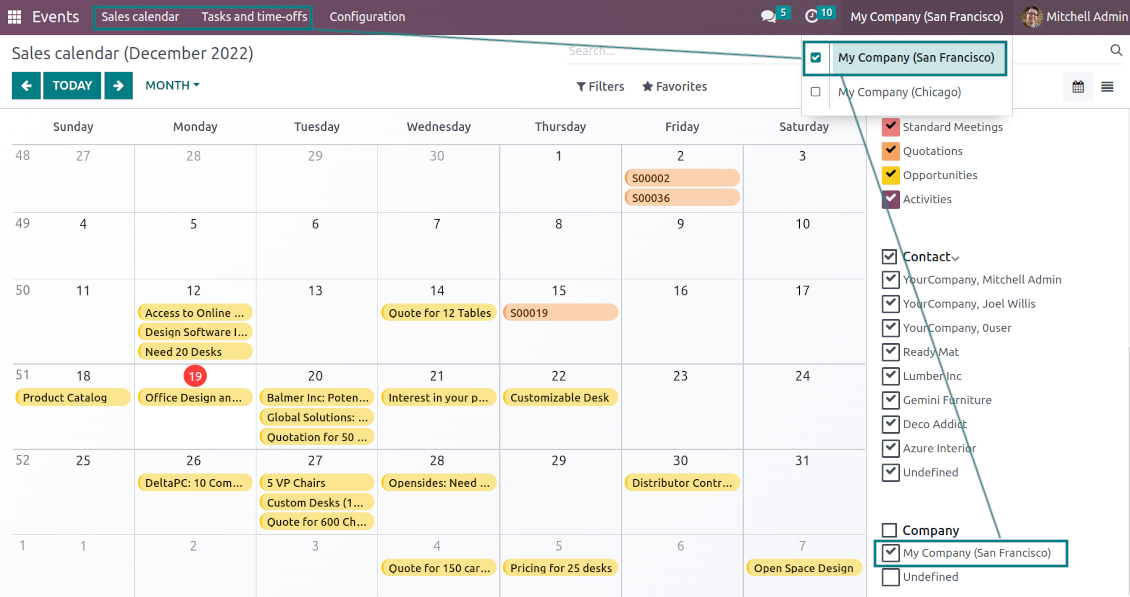
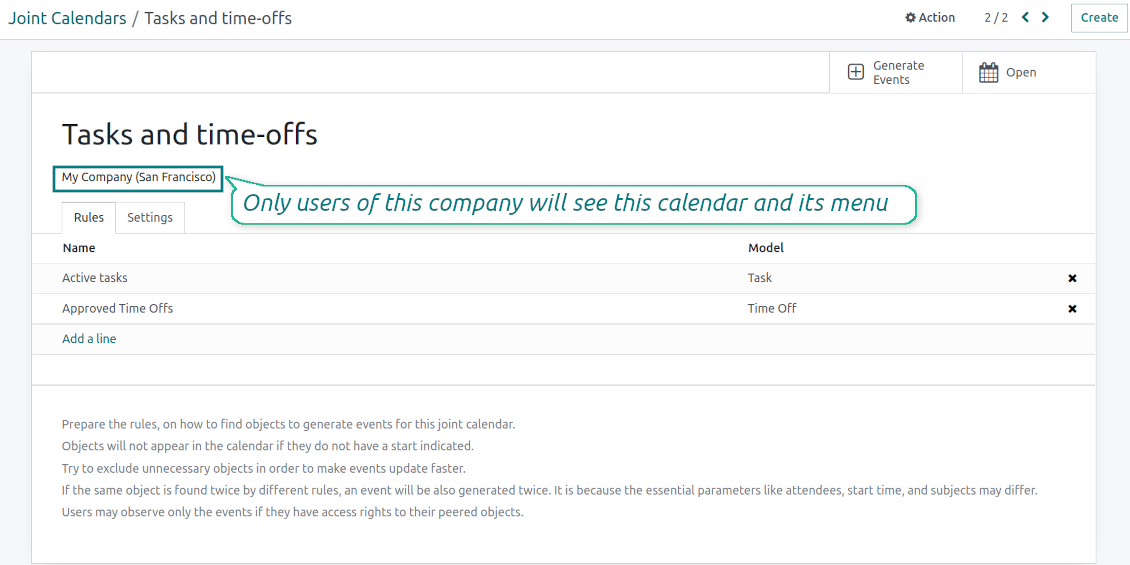
The app fully supports the multi-companies environment: each joint calendar might be linked to a specific Odoo company. If a company is not defined, it is considered as 'global', so available for all Odoo companies
-
Users access only those joint menus, which super calendars do not have a company or have one of those users available companies
-
Each joint rule might have the "Company field" defined. If that setting is configured, records will be filtered in a joint calendar company. For example, if you stated 'Company' as the 'Company field' for the tasks' rule, and the joint calendar is linked to 'San Fransisco' company, then users will see only San Fransisco or global tasks only
-
Joint events would also get the company based on the 'Company field' of the parent document. You can comfortably switch between objects of different companies using the right navigation filters
-
In addition to the 'Company field', you may also restrict records in a rule domain. For instance, to include records of a few companies but not to include others.
Combine events on Odoo Enterprise Gantt view
-
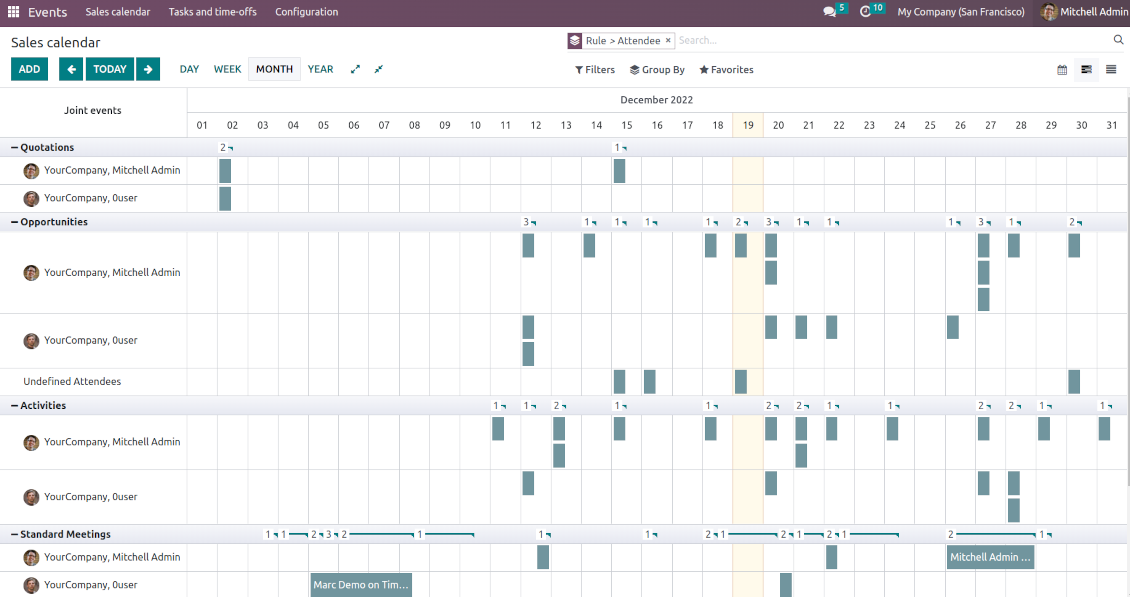
For any joint calendar, optionally add the Odoo Enterprise edition Gantt view
-
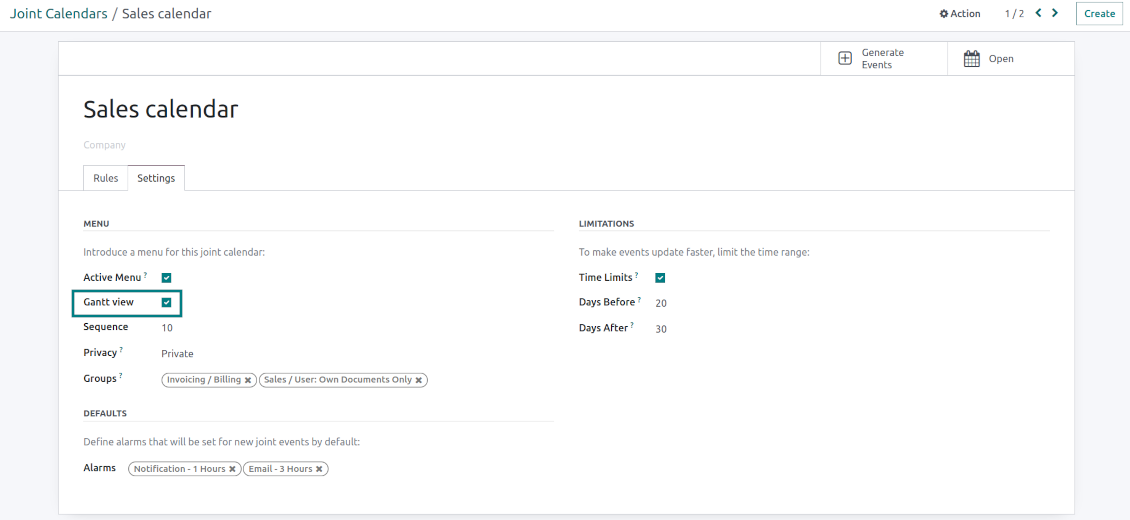
To that goal, just tick the box 'Gantt view' on the supper calendar settings
-
The app would automatically extend a target joint calendar action after you saved the changes
-
In this way, you can have a single super Gantt view for various Odoo documents
-
Manage those events in a comfortable manner: reassign responsible users, drag and drop those to change periods, etc.
Suggerimenti di configurazione e installazione per Joint Calendar Odoo v.16
Joint calendar scheduled jobs
The tool lets you change the frequency of joint calendar refreshing and emails reminders' checks:
- Turn on the debug mode
- Go to technical settings > Automation > Scheduled jobs
- Find the job 'Refresh Joint Events' to change the frequency of super calendars' update
- Find the job 'Notify About Joint Event' to change the frequency of email alarms.
Domande frequenti su Joint Calendar Odoo v.16
Cosa succede se "Always Whole Day" e attiva/disattiva?
Se "Always Whole Day" e attiva, tutti gli eventi della regola durano tutto il giorno anche se inizio e fine hanno ore. L'evento compare in un punto speciale del calendario.
Esempio: una regola per "Sale Order" con "Always Whole Day" mette l'evento sopra la sequenza temporale dei super calendari giornaliero e settimanale.
Se disattivi l'opzione e inizio o fine hanno ore/minuti, l'evento sta a un orario preciso e l'ora precede il titolo.
Non vedo il menu del calendario in Odoo. Cosa faccio?
Controlla:
1. C'e almeno un calendario congiunto configurato e aggiornato. Ricarica la pagina dopo la configurazione.
2. Hai accesso ad almeno un calendario.
Ho creato calendari con regole, ma non li vedo nel menu.
Puo esserci piu di una causa. Il cron collegato forse non e ancora partito: avvialo a mano dal pulsante di aggiornamento nella colonna destra dell'interfaccia.
Controlla anche Time Limits: altrimenti vedi solo eventi in un intervallo. Esempio: calendario 'Sale Orders' con 10 giorni prima e 30 dopo: un ordine di 12 giorni fa non compare.
Assicurati che le regole non abbiano filtri senza corrispondenze. Esempio: regola 'Sale Order' con 'Customer = Deco Addict' mostra solo gli ordini di quel cliente.
Quanti documenti Odoo (es. ordini di vendita, progetti, attività) posso unire in un calendario congiunto?
Puoi unire quanti documenti Odoo vuoi in un solo calendario. Oppure dividerli tra piu calendari (es. Vendite e Progetti, lavori e attività) e passare dal systray.
Cos'e una regola del calendario congiunto?
Le regole dicono quali oggetti Odoo creano eventi, quali campi usare e se filtrare.
Nella regola definisci tu titolo, inizio o Stop date, partecipanti ecc.
A cosa serve il campo "Stop date"? Posso lasciarlo vuoto?
Stop date e un campo del modello Odoo di destinazione che indica quando l'evento e finito nel calendario. Esempio: regola per "Sale Order" con "Delivery Date" come Stop date mostra l'evento dal giorno previsto del preventivo (Start Date - Order Date) fino alla consegna.
Il campo e facoltativo, puoi lasciarlo vuoto. Allora l'evento sta solo nel giorno dello Start Date.
Ho un tipo di eventi "Undefined" nel calendario. Cosa significa?
L'evento e stato creato a mano: nessun oggetto padre ne regola. Compare sotto il filtro "Undefined", senza colore.
Chi ha accesso al calendario puo creare e vedere gli eventi Undefined.
Quali sono le politiche di aggiornamento dei vostri strumenti?
Secondo le politiche attuali dell'Odoo Apps Store:
- Ogni modulo acquistato per la versione 12.0 o precedente da accesso a tutte le versioni fino alla 12.0.
- Dalla versione 13.0 ogni versione del modulo va acquistata separatamente.
- Indipendentemente dalla versione, l'acquisto da diritto a tutti gli aggiornamenti e le correzioni entro una major version.
Il team faOtools non controlla queste politiche. Per qualsiasi domanda, contattate direttamente i rappresentanti dell'Odoo Apps Store.
Come installo l'app su Odoo.sh?
L'approccio piu diretto e il flusso integrato dello store Odoo:
1. Apri la pagina del modulo e fai clic su Deploy on odoo.sh
2. Verrai reindirizzato a GitHub. Accedi e fai clic su Create a new repo o usa uno esistente. Il repository deve essere privato. Non e consentito pubblicare le app con licenza OPL-1. Se serve, crea un nuovo repo per il progetto Odoo.sh
3. Poi, in odoo.sh, fai clic su Deploy, conferma e fai clic su Continue. Parte l'installazione.
Questi passaggi installano l'app sul branch di produzione. Per altri branch o per aggiornare:
1. Scarica il codice sorgente dallo store Odoo
2. Esegui il commit del modulo nel repository GitHub. Nessuna cartella/file dell'app deve essere in .gitignore. I repo creati da odoo.sh a volte ignorano percorsi importanti (es. /lib). Carica tutte le directory e i file del modulo
3. Esegui il deploy del branch di destinazione del progetto odoo.sh oppure attendi la build automatica se previsto.
Come installo l'app sul mio server?
2. Riavvia il server Odoo;
3. Attiva la modalità sviluppatore (impostazioni tecniche);
4. Aggiorna l'elenco delle app (menu Applicazioni);
5. Trova l'app e premi Activate/Install;
6. Segui le linee guida nella pagina dell'app, se ci sono.
L'app ha componenti extra. Posso acquistarli dopo?
Si. Odoo aggiunge automaticamente le dipendenze al carrello: escludi gli strumenti gia acquistati per non pagare due volte.
Ho distribuito l'app su Odoo.sh e vedo un avviso/errore nei test
Un avviso rosso/arancione non influisce sulle funzioni dell'app. A volte i nostri moduli non superano i test automatici standard perché questi assumono un comportamento in conflitto con gli obiettivi dell'app. Ad esempio cambiamo il calcolo del prezzo, mentre i test Odoo confrontano il prezzo finale con l'algoritmo standard.
Controllate prima le funzioni del database distribuito. Funziona tutto?
Se pensate ancora che l'avviso influisca sulle funzioni reali, contattateci e inviate i log di installazione completi e l'elenco completo dei moduli distribuiti (core e di terze parti).
Posso acquistare l'app direttamente da voi?
No, distribuiamo gli strumenti solo tramite lo store ufficiale delle app Odoo.
Vorrei uno sconto
Purtroppo non abbiamo i mezzi tecnici per prezzi individuali.
Posso installare l'app sul database Odoo Online (SaaS)?
No, le app di terze parti non si possono usare su Odoo Online. Odoo SaaS blocca questa possibilità.
Lo strumento dipende da altre app. Devo acquistarle?
Si, lo strumento richiede tutti i moduli indicati nelle dipendenze. Il prezzo sulla pagina dell'app le include gia.
Qual e il prezzo del modulo in dollari USA? Perché e cambiato?
Il prezzo dei nostri moduli e in euro. Lo store Odoo converte le valute secondo il proprio tasso interno. Quindi il prezzo in dollari USA puo cambiare quando il tasso viene aggiornato.
I testi dell'app e del sito web in lingue diverse dall'inglese sono realizzati con l'assistenza dell'IA e allineati alle traduzioni ufficiali di Odoo. Se noti un errore, invia un ticket di traduzione e lo correggeremo.
Database dimostrativi Odoo (anteprime)
Per questa app potremmo fornire un database demo personalizzato gratuito.
Non hai bisogno di un numero di telefono o di una carta di credito per contattarci. Dovresti solo effettuare una breve registrazione via e-mail, che non richiede più di 30 secondi.
Su richiesta prepariamo un database di anteprima dedicato, in cui puoi eseguire qualsiasi test e verificare le tue ipotesi per circa due settimane.
Segnalazione degli errori
Se riscontri bug o comportamenti incoerenti, non esitare a contattarci. Garantiamo di fornire soluzioni entro 60 giorni dall'acquisto e siamo fortemente interessati a migliorare i nostri strumenti anche dopo questo periodo.
Non hai bisogno di un numero di telefono o di una carta di credito per contattarci. Dovresti solo effettuare una breve registrazione via e-mail, che non richiede più di 30 secondi.
Includi nella richiesta il maggior numero possibile di dettagli: schermate, registri del server Odoo, una descrizione completa di come riprodurre il problema e così via. In genere sono necessari alcuni giorni lavorativi per preparare un piano operativo relativo a un problema (se viene confermato un bug) o fornire indicazioni su cosa fare (in caso contrario).
Richieste di funzionalità pubbliche e idee per moduli (sviluppo gratuito)
Siamo fortemente motivati a migliorare i nostri strumenti e saremmo grati per qualsiasi feedback. Se le tue esigenze sono di uso pubblico e possono essere implementate in modo efficiente, il team le includerà nella nostra lista di cose da fare.
Tale elenco di cose da fare viene elaborato regolarmente e non prevede costi aggiuntivi. Sebbene non possiamo garantire scadenze e progettazione finale, potrebbe essere un buon modo per ottenere le funzionalità desiderate senza investimenti e rischi.
Non hai bisogno di un numero di telefono o di una carta di credito per contattarci. Dovresti solo effettuare una breve registrazione via e-mail, che non richiede più di 30 secondi.

The tool to flexibly structure Odoo attachments in folders and synchronize directories with cloud clients: Google Drive, OneDrive/SharePoint, Nextcloud/ownCloud, and Dropbox. DMS. File Manager. Document management system
398€
The tool to automatically synchronize Odoo attachments with OneDrive files in both ways
487€
The tool to automatically synchronize Odoo attachments with Google Drive files in both ways
487€

The tool to build a deep and structured knowledge base for internal and external use. Knowledge System. KMS. Wiki-like revisions.
398€
The tool to set up KPI targets and control their fulfillment by periods. KPI dashboards. Dashboard designer. KPI charts

The tool for time-based service management from booking appointments to sales and reviews
398€
Lo strumento per gestire Odoo dalle chat IA tramite MCP. Claude. Qualsiasi IA con MCP.

The tool to translate URL addresses of Odoo website pages
38€