Joint Calendar v.11
The tool to combine different Odoo events in a few configurable super calendars. Shared calendar. Common calendar.
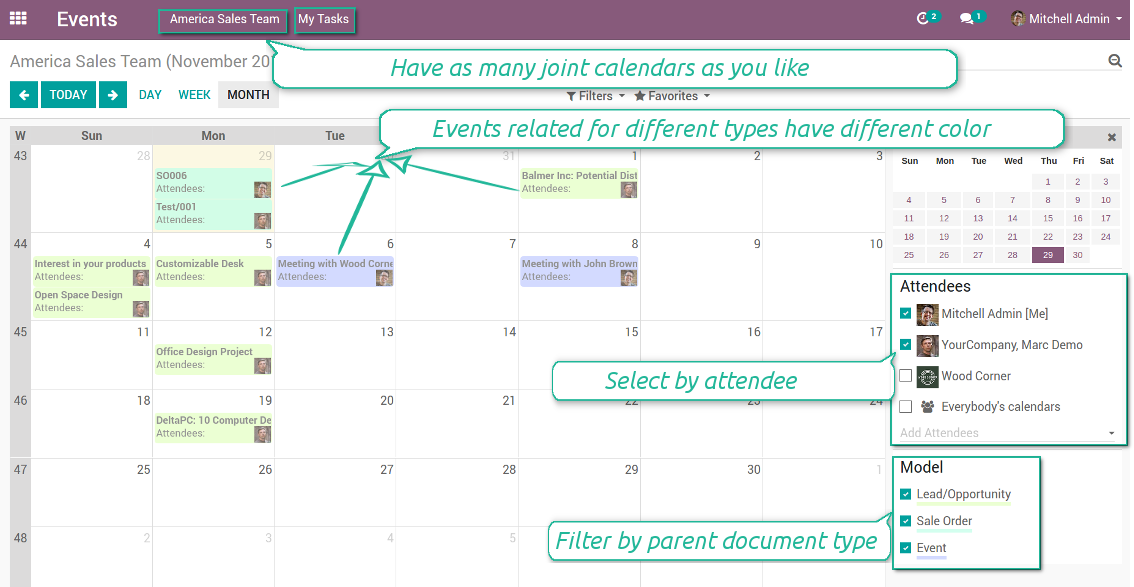
Multifarious events on a single calendar
Besides, you may have an unlimited number of joint calendars with various events, configurations and user groups included, divided by teams or functional areas. Each joint calendar has an own menu item.
Super calendars are updated automatically according to the scheduled jobs. It is fast, especially if you applied time frames.
Capturi Ecran
Joint document types on a single calendar
Fast switching between functional areas
Topical and relevant information
You may also define which documents to show by setting up special filters. Show opportunities but not leads. Work with orders of this sales team but not of others. Merge only overdue activities but not future ones.
How to add a new document type for a joint calendar
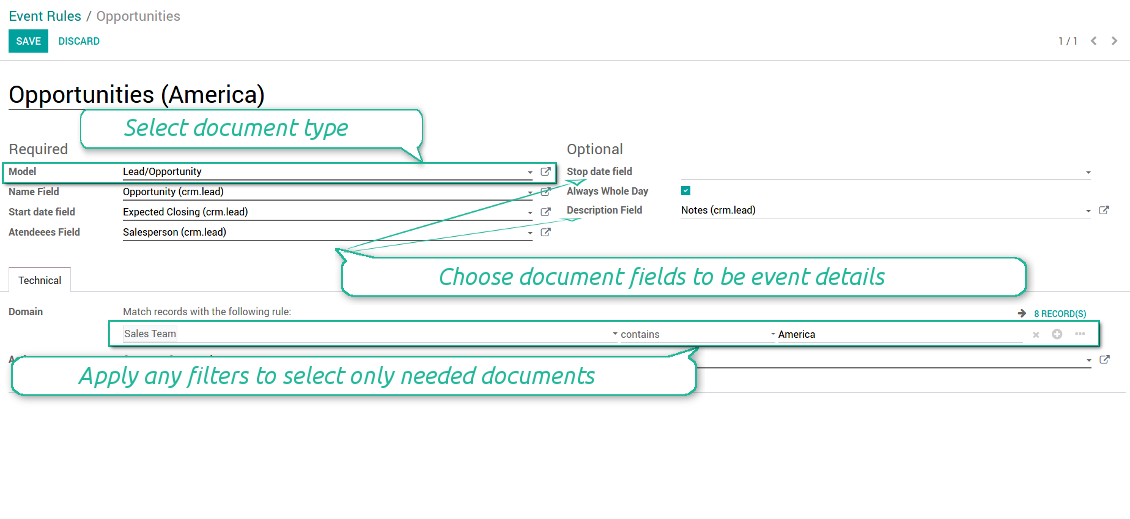
To add a new document type for a joint calendar you should set up a joint calendar rule. This rule defines which Odoo objects should create events, which fields of that object should be shown, and whether any filtering should take place. The app will try to add the most typical values by default, but you should think which data is required in your exact case.
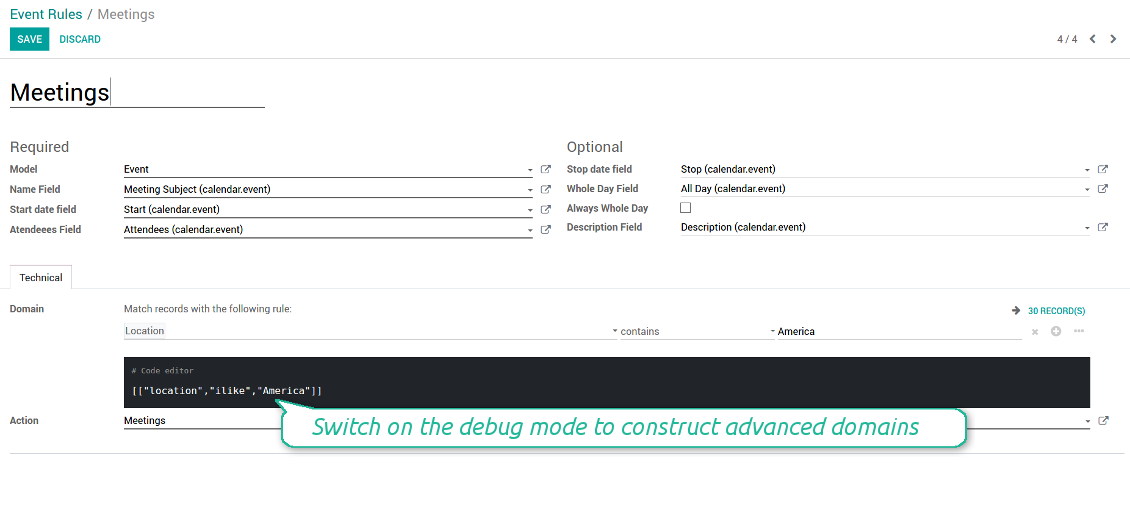
- Model - which objects to scan: opportunities, tasks, orders, meetings, activities, and so on. You can choose your custom document type as well!
- Name - what to use as a joint event name (also used as calendar event title). Usually it is 'name', 'subject' or 'reference'.
- Start date - when an event starts. For example, 'expecting closing' for opportunities or 'order date' for quotations. It may be any date or date with time field of a source Odoo object.
- Attendees - who are participants (responsible persons, event owners). Usually, it is a field 'assigned to', 'a sales person' or 'attendees'. You may use even document 'followers'. It is possible to apply both users and partners as attendees
- Stop date - when an even is shown as finished on a calendar.
- Always Whole Day - means that all generated events would last the whole day disregarding whether start or stop are defined with hours and minutes. Such an event would be shown at a special place on a calendar (above the time line)
- Whole Day - a special boolean field of source object which indicates that a related joint event may lasts the whole day. This setting is usually applied to standard Odoo calendar events which both might have definite time indicated or might be planned for a whole day.
- Description - are there any notes important for joint events? Usually the fields like 'internal notes' or 'comments' are used
- Domain - the special filters' constructor to include only topical documents into a joint calendar. You might search almost by any criteria. For example, show only quotations without sales orders, or show opportunities only of this sales team or of this customer. If you are confident to make Reverse Polish Notations you may also turn on the debug mode to construct advanced filters.
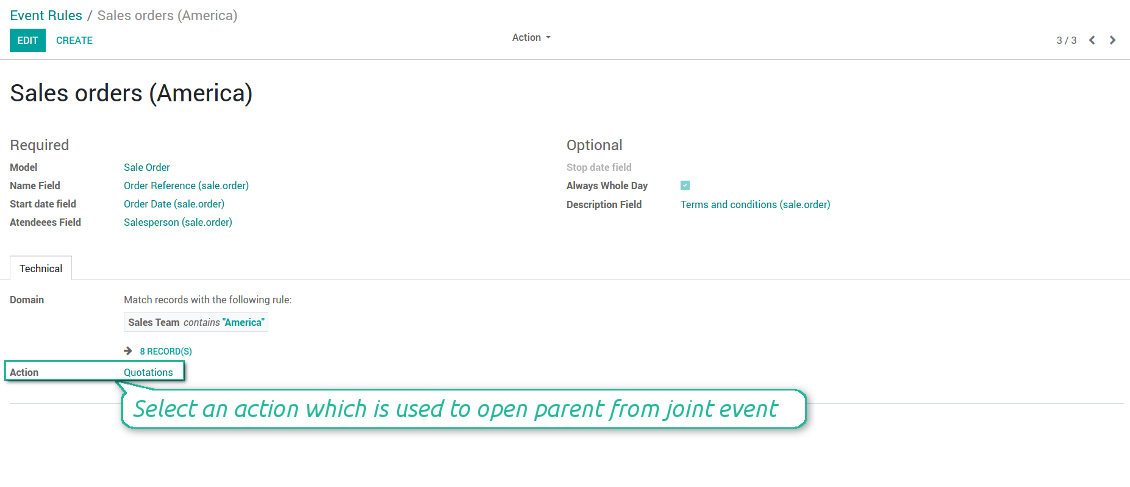
- Action - defines which form view should be shown when you open a source document from a joint event. It is a technical field which in the most cases should not be changed in comparison to a default value.
How to configure a new joint calendar based on rules
As soon as you prepare a few joint event rules, you are ready to configure a new joint calendar.
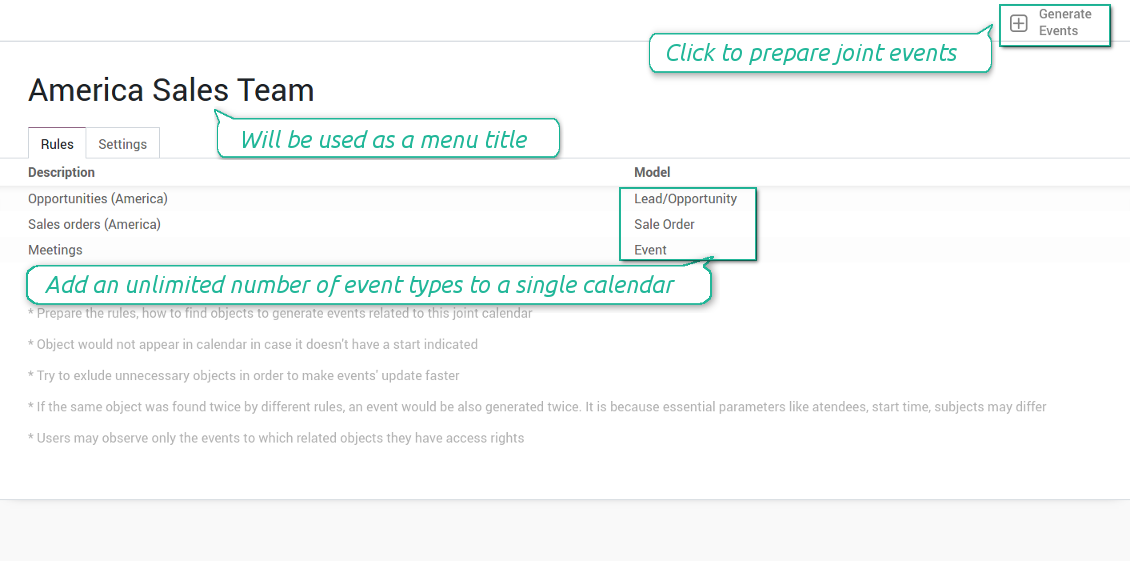
First of all, define a title. It would be used as a menu entry for all joint calendar users.
Second of all, choose document types (rules) which should be merged on this shared calendar.
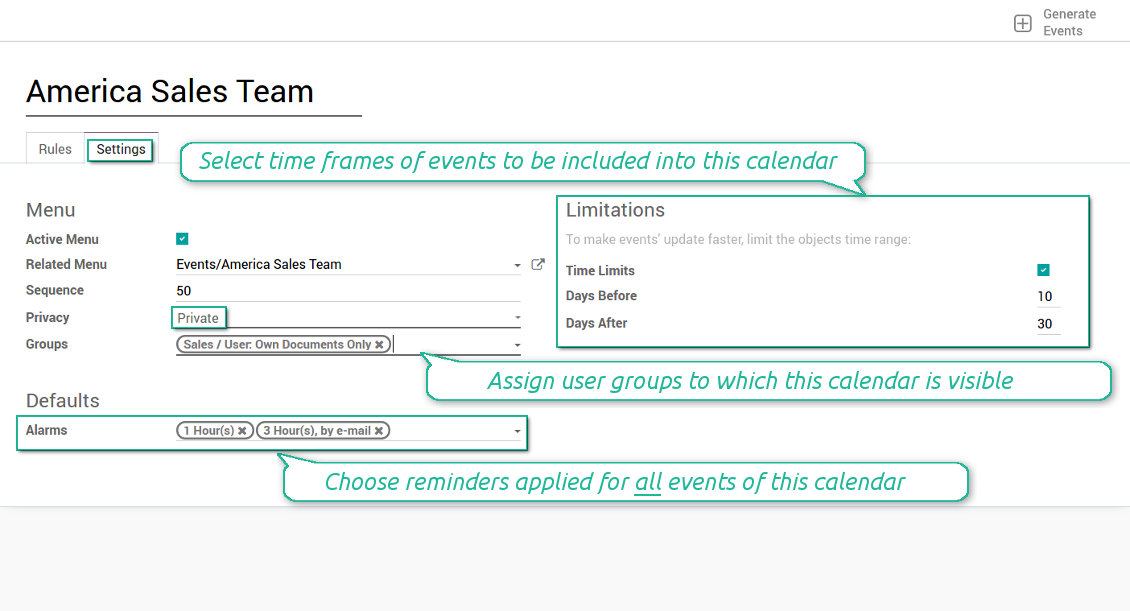
Then, switch to the advanced settings. Some of those might be useful:
- Sequence - in which order various joint calendars' entries are shown. Should it be before the previous super calendar? Then, make a sequence smaller.
- Privacy - let you make a calendar public or private (for predefined user groups only).
- Time limits - allow you optimizing performance of joint events' interfaces. Often there is no need to show the documents of the last year on a calendar.
Is this joint calendar is not any more of use, but it might be needed in the Future? Fine, just archive this calendar: you can activate it at any moment afterwards.
Capturi Ecran
Multiple rules to search documents by types
Joint calendar settings
Joint event rule (example of opportunities)
Joint event rule (example of sale orders)
Joint event rule (example of meetings)
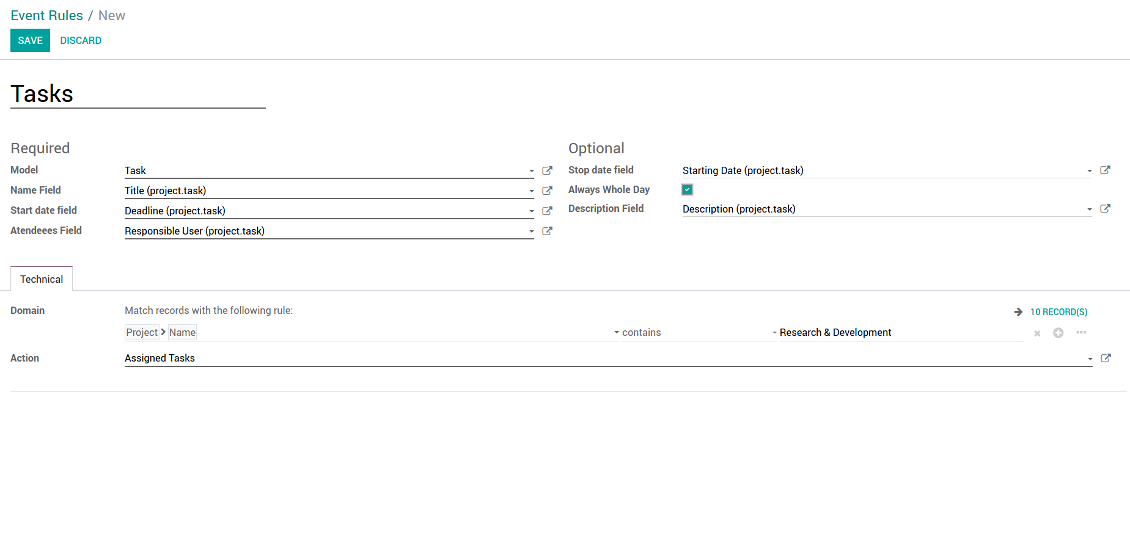
Joint event rule (example of tasks)
Automatic reminders for any Odoo document
How to introduce a warning system
All you need is to prepare a few reminders and indicate those as default on a shared calendar form. Once joint events are generated, each of those would have the same alarms. Afterwards, you may update the these alarms for certain items if you want.
Thus, you can make reminders for any Odoo document automatically. Remind sales persons about next actions in opportunities and calls. Warn workers about a new manufacturing order. Notify programmers about deadlines. So on and so on.
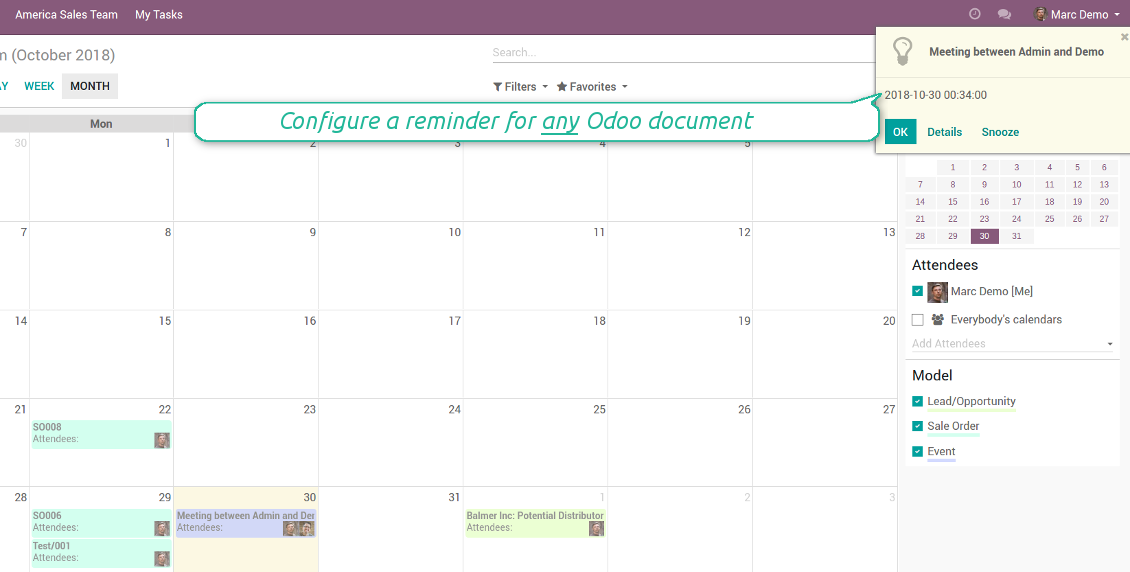
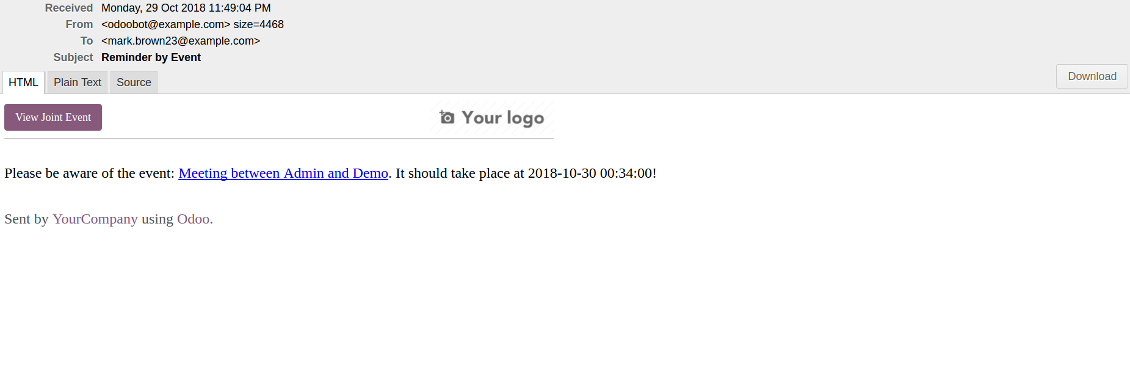
Use both email notifications or pop-up warnings. Warn attendees and responsible users at the moment you like to: from 5 minutes to hundreds of days before.
Capturi Ecran
Configure pop-up alarm for any Odoo event
Email reminder by any Odoo object
Quick access to source details
How are source documents and joint events interrelated
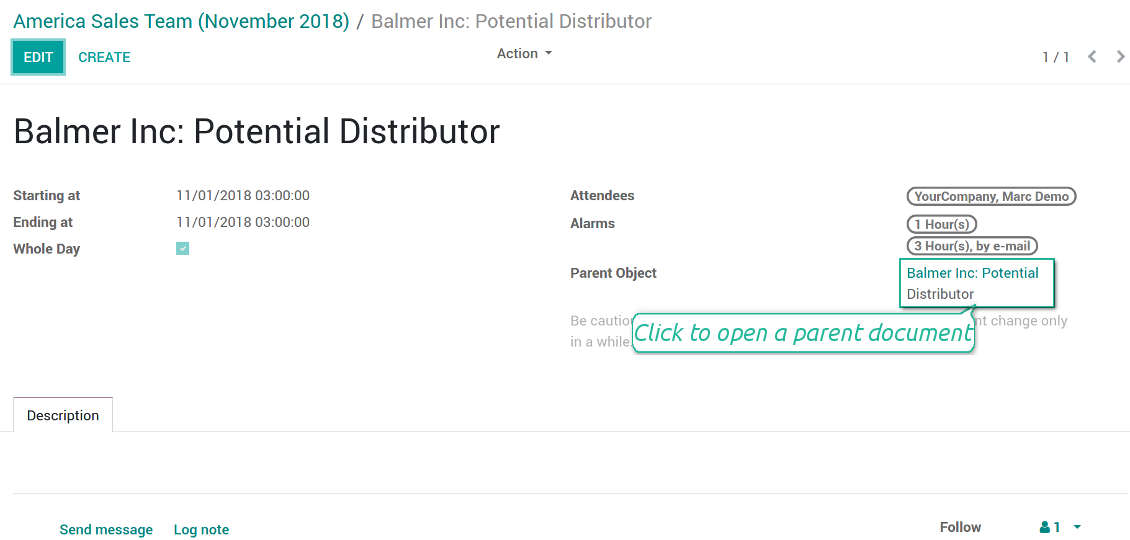
Users observes a link for a source document right on an event form. Thus, it is always possible to expand miscellaneous details.
If you changed a joint event, its parent object would be updated correspondingly in real time. For example, you drag a record and drop it to another date, then a source document would be also moved. Be cautious: it does not work for computed and readonly fields (e.g. a create date can not be modified logically).
If you changed a source object, a joint event would be updated with a next super calendar scheduled job.
Capturi Ecran
Joint event form with simple access to parent document
Simple user rights administration
More details about joint calendar security
The right to create and configure joint calendars belongs only to Odoo administrators (users with the rights 'Administration - Access Rights').
Users may open joint events related to public joint calendars or private joint calendar with one of her/his group indicated. Configure private groups on a joint calendar form, the tab 'Settings', the fields 'Privacy' and 'Groups'. In such a way it is possible to make a joint calendar only for sales managers or only for accountants.
Take into account that in order a user may observe or update a joint event, she/he should have the same rights for a source document. For example, if a sales person doesn't have a right to observe an opportunity, she/he would not see a related joint event as well.
Manually created joint events (without a parent object) may be either public (for all employees) or private (visible for attendees only).
Used in any functional area
Have a look at typical use cases
Activities by all objects and responsibles on a single calendar
Activities are a great Odoo invention, which helps you organize daily routine as a set of well-reached and structured tasks. They are quite comfortable for use, but for team collaboration and efficient management, sometimes you want to have a calendar overview of planned and overdue activities.
Joint Calendar let you achieve that goal. Just add an activity rule as joint calendar rule:
- As a model use 'Activity'
- As a name use 'Display Name'
- As a start date field use 'Due Date'
- As attendees fields use 'Assigned to'
- As a domain apply 'Summary is set'
- For the action field create a new one: go to the Settings > Technical > Actions > Window Action. As an object use 'mail.activity', as a view mode - 'form', as a name - any suitable
Opportunities on a super calendar
- As a model use 'Lead / Opportunity'
- As a name use 'Opportunity'
- As a start date field use 'Expecting Closing'
- As attendees fields use 'Salesperson'
- As a domain optionally restrict opportunities by sales teams.
Tasks on a joint calendar
- As a model use 'Task'
- As a name use 'Title'
- As a start date field use 'Deadline'
- As attendees fields use 'Assigned to'
- As a domain optionally you can set definite projects
Better then expected
The app does exactly what was needed. Combine all tasks from all calendars to one. And allows to manages all activities from all modules in one place.
This makes the Event Calendar so much more useful !
We bought this to combine certain project tasks with the schedules of our maintenance engineers. We now have a better overview which moments are overlapping the schedules of other events. The joining of multiple events in 1 event calendar is super easy, it should be a standard option in ODOO.
Excellent responsive team of programmers
Joint Calendar is the perfect addition to the standard Calendaring system that Odoo offers. It makes the job of setting up specific departmental calendars filled with any objects you wish very easy and Alex and the team provides fantastic after-sales support, responding in most cases within 24 hours to requests for help. Thanks for a great module.
Essential to have Activities, Tasks, Meetings etc all in one calendar and shared.
Great service support very quick and were right on with fixing the issue... I think the ability to see everything on one shared calendar is such an essential part of coordination and time management. Great product once you sort out the rules you need!
Sfaturi de configurare și instalare pentru Joint Calendar Odoo v.11
Scheduled jobs
- Turn on the debug mode
- Go to technical settings > Automation > Scheduled jobs
- Find the job 'Refresh Joint Events' to change the frequency of calendars' update
- Find the job 'Notify About Joint Event' to change the frequency of email alarms.
Email alarm style
- Activate the developer mode
- Go to technical settings > Email > Templates
- Find the template 'Joint Event Notification'
- You are welcome to change here message body
- Email subject might be changed through the translated term 'Reminder by Event'.
Întrebări frecvente despre Joint Calendar Odoo v.11
Ce se întâmplă când opțiunea „Always Whole Day” este activată/dezactivată?
Când opțiunea "Always Whole Day" este activă, toate evenimentele generate de regulă durează toată ziua, indiferent dacă începutul sau sfârșitul au ore și minute. Un astfel de eveniment apare într-un loc special din calendar.
De exemplu, dacă creați o regulă pentru modelul "Sale Order" și activați "Always Whole Day", evenimentul este pus pe super-calendarele zilnic și săptămânal deasupra liniei de timp.
Dacă dezactivați opțiunea și începutul sau sfârșitul au ore/minute, evenimentul este pus la o oră anume a zilei, iar ora apare înaintea titlului.
Nu văd meniul calendarului în Odoo. Ce trebuie să fac?
Asigurați-vă:
1. Există cel puțin un calendar comun creat, configurat și reîmprospătat. După configurarea oricărui calendar comun reîmprospătați pagina browserului
2. Aveți acces la cel puțin unul dintre calendare
Am creat câteva calendare cu reguli, dar nu le văd în meniu.
Pot există mai multe motive. Este posibil ca jobul planificat asociat să nu fi rulat încă. În acest caz, lansați cron manual apăsând butonul de reîmprospătare din coloana dreaptă a interfeței calendarului comun.
Verificați și dacă aveți Time Limits pe calendar, altfel apar doar evenimentele dintr-un interval. De exemplu, calendarul 'Sale Orders' cu limite 10 zile înainte și 30 după. Dacă un Sale Order a fost creat, de exemplu, acum 12 zile, nu va apărea în calendar.
Asigurați-vă că regulile nu au filtre fără potriviri. De exemplu, regula 'Sale Order' cu filtrul 'Customer = Deco Addict' afișează în calendarul asociat doar comenzile acestui client.
Câte documente Odoo (de ex. comenzi de vânzare, proiecte, activități) pot combină într-un calendar comun?
Puteți combină oricâte documente Odoo doriți într-un singur calendar. Sau le puteți împărți între mai multe calendare (de exemplu Sales Calendar și Projects, Tasks and Activities Calendar) și comuta din systray.
Ce este o regulă de calendar comun?
Regulile definesc ce obiecte Odoo trebuie să creeze evenimente, ce câmpuri ale acelui obiect se folosesc și se afișează și dacă trebuie aplicată o filtrare.
La crearea unei reguli puteți defini singur ce se consideră titlu al evenimentului comun, dată de început sau de sfârșit, cine sunt participanții etc.
Pentru ce este câmpul „Stop date”? Pot să-l las gol?
Stop date — un câmp al modelului Odoo țintă care definește când un eveniment apare ca încheiat în calendar. De exemplu, o regulă pentru modelul "Sale Order" cu "Delivery Date" în Stop date afișează evenimentul din ziua planificată a ofertei (câmpul Start Date - Order Date) până în ziua livrării produsului.
Este un câmp opțional, îl puteți lăsa gol. Atunci evenimentul este doar în ziua câmpului Start Date.
Am în calendar un tip de evenimente „Undefined”. Ce înseamnă?
Înseamnă că evenimentul a fost creat manual. Nu are obiect părinte și nu e reglementat de o regulă. Astfel de evenimente comune apar sub filtrul "Undefined", fără culoare.
Toți cei care au acces să vadă calendarul pot crea și vedea evenimentele lui nedefinite.
Care sunt politicile de actualizare ale instrumentelor dvs.?
Conform politicilor actuale Odoo Apps Store:
- Fiecare modul cumpărat pentru versiunea 12.0 și anterioară dă acces la toate versiunile până la 12.0.
- Începând cu versiunea 13.0, fiecare versiune de modul se cumpără separat.
- Indiferent de versiune, cumpărarea dă dreptul la toate actualizările și corecturile dintr-o versiune majoră.
Rețineți că echipa faOtools nu controlează aceste politici. Pentru întrebări contactați direct reprezentanții Odoo Apps Store.
Cum instalez aplicația dumneavoastră pe Odoo.sh?
Cea mai directă abordare este să folosiți fluxul încorporat al magazinului Odoo:
1. Deschideți pagina modulului și faceți clic pe butonul Deploy on odoo.sh
2. După aceea veți fi redirecționat la pagina GitHub. Conectați-vă la cont, apoi faceți clic pe 'Create a new repo' sau folosiți unul existent. Asigurați-vă că depozitul este privat. Nu este permisă publicarea aplicațiilor sub licența OPL-1. Dacă e necesar, creați un repo nou pentru proiectul Odoo.sh
3. Apoi mergeți la odoo.sh și faceți clic pe butonul Deploy. În fereastra pop-up trimiteți decizia și faceți clic pe 'Continue.' Această acțiune pornește instalarea.
Acești pași vor instala aplicația pe ramură de producție a proiectului. Dacă doriți să implementați aplicațiile pe alte ramuri sau să actualizați modulul, urmați acțiunile de mai jos:
1. Încărcați codul sursă al aplicației din magazinul Odoo
2. Faceți commit modulului în depozitul GitHub necesar. Asigurați-vă că niciun folder/fișier al aplicației nu este ignorat (adică nu este în .gitignore al repo-ului). Depozitele sunt create automat de odoo.sh și pot include implicit elemente esențiale (de ex. /lib). Încărcați toate directoarele, subdirectoarele și fișierele modulului, fără excepții
3. Implementați ramură țintă a proiectului odoo.sh sau, dacă setările presupun asta, așteptați până este construită automat.
Cum instalez aplicația dumneavoastră pe propriul server?
2. Reporniți serverul Odoo;
3. Activați modul dezvoltator (setări tehnice);
4. Actualizați lista de aplicații (meniul aplicațiilor);
5. Găsiți aplicația și apăsați „Activate”/„Install”;
6. Urmați ghidurile de pe pagina aplicației, dacă există.
Am observat că aplicația are extensii extra. Le pot cumpăra ulterior?
Da, desigur. Totodată Odoo adaugă automat toate dependențele în coș, deci trebuie să excludeți instrumentele deja cumpărate ca să evitați plată dublă.
Am implementat aplicația pe Odoo.sh și văd avertisment/eroare în teste
Un avertisment roșu/portocaliu nu influențează funcțiile aplicației. Din păcate, modulele noastre nu trec uneori testele automate standard, deoarece acestea presupun un comportament în conflict cu obiectivele aplicației. De exemplu, schimbăm calculul prețului, iar testele modulului Odoo standard compară prețul final cu un algoritm standard.
În primul rând, verificați funcțiile bazei implementate. Totul funcționează corect?
Dacă tot credeți că avertismentul afectează funcții reale, contactați-ne și trimiteți jurnalele complete de instalare și lista completă a modulelor implementate (inclusiv nucleu și terțe părți).
Pot cumpăra aplicația direct de la compania dvs.?
Nu, distribuim instrumentele doar prin magazinul oficial de aplicații Odoo.
Aș dori să primesc o reducere
Din păcate, nu avem mijloace tehnice pentru a oferi prețuri individuale.
Pot instala aplicația pe baza mea Odoo Online (SaaS)?
Nu, aplicațiile terțe nu pot fi folosite pe Odoo Online. Din păcate Odoo SaaS blochează această posibilitate.
Instrumentul dvs. are dependențe de alte aplicații. Trebuie să le cumpăr?
Da, instrumentul necesită toate modulele marcate în dependențe pentru a funcționa corect. Prețul de pe pagina aplicației include deja toate dependențele necesare.
Care este prețul modulului în dolari SUA? De ce s-a schimbat?
Prețul modulelor noastre este în euro. Magazinul Odoo convertește prețurile în alte monede după cursul intern. Astfel, prețul în dolari SUA se poate schimba când se actualizează cursul.
Textele aplicației și ale site-ului în alte limbi decât engleza sunt asistate de IA și aliniate cu traducerile oficiale Odoo. Dacă observați o greșeală, trimiteți un tichet de corectitudine a traducerilor și o vom corectă.
Raportarea erorilor
Dacă întâmpinați erori sau comportament inconsecvent, nu ezitați să ne contactați. Garantăm corecturi în 60 de zile de la cumpărare și suntem interesați să îmbunătățim instrumentele și după această perioadă.
Nu aveți nevoie de număr de telefon sau card de credit pentru a ne contacta. Este suficientă o înscriere scurtă prin e-mail, care nu durează mai mult de 30 de secunde.
Includeți cât mai multe detalii în cerere: capturi de ecran, jurnalele serverului Odoo, o descriere completă a reproducerii problemei și așa mai departe. De obicei, durează câteva zile lucrătoare pentru a pregăti un plan de lucru (dacă un defect este confirmat) sau pentru a vă oferi indicații despre ce trebuie făcut (în caz contrar).
Cereri publice de funcții și idei de module (dezvoltare gratuită)
Suntem puternic motivați să ne îmbunătățim instrumentele și am fi recunoscători pentru orice feedback. Dacă cerințele dvs. sunt de interes public și pot fi implementate eficient, echipa le va include în lista noastră de sarcini.
O astfel de listă de sarcini este prelucrată regulat și nu presupune taxe suplimentare. Deși nu putem promite termene și un design final, poate fi o cale bună de a obține funcțiile dorite fără investiții și riscuri.
Nu aveți nevoie de număr de telefon sau card de credit pentru a ne contacta. Este suficientă o înscriere scurtă prin e-mail, care nu durează mai mult de 30 de secunde.

Instrumentul pentru a structura flexibil atașamentele Odoo în foldere și a sincroniza directoarele cu clienți cloud: Google Drive, OneDrive/SharePoint, Nextcloud/ownCloud, Dropbox, Amazon S3, Box și NAS. DMS. Manager de fișiere. Sistem de gestiune a documentelor
398€
Instrumentul pentru sincronizarea automată bidirecțională a atașamentelor Odoo cu fișierele OneDrive
487€
Instrumentul pentru sincronizarea automată bidirecțională a atașamentelor Odoo cu fișierele Google Drive
487€
Instrumentul pentru păstrarea în siguranță a parolelor în Odoo pentru utilizare partajată. Seifuri partajate

Instrumentul pentru a construi o bază de cunoștințe profundă și structurată pentru uz intern și extern. Knowledge System. KMS. Revizii de tip wiki.
398€
Instrumentul pentru a seta ținte KPI și a controla îndeplinirea lor pe perioade. Tablouri de bord KPI. Designer de tablouri. Grafice KPI

Instrumentul pentru gestiunea serviciilor pe bază de timp, de la rezervarea programărilor până la vânzări și recenzii
398€
Instrumentul pentru a gestiona Odoo din chat-urile AI preferate prin MCP. Claude. Orice AI care suportă MCP.

Instrumentul pentru traducerea adreselor URL ale paginilor de site Odoo
38€