Box Odoo Integration v.18
The tool to automatically synchronize Odoo attachments with Box files in both ways
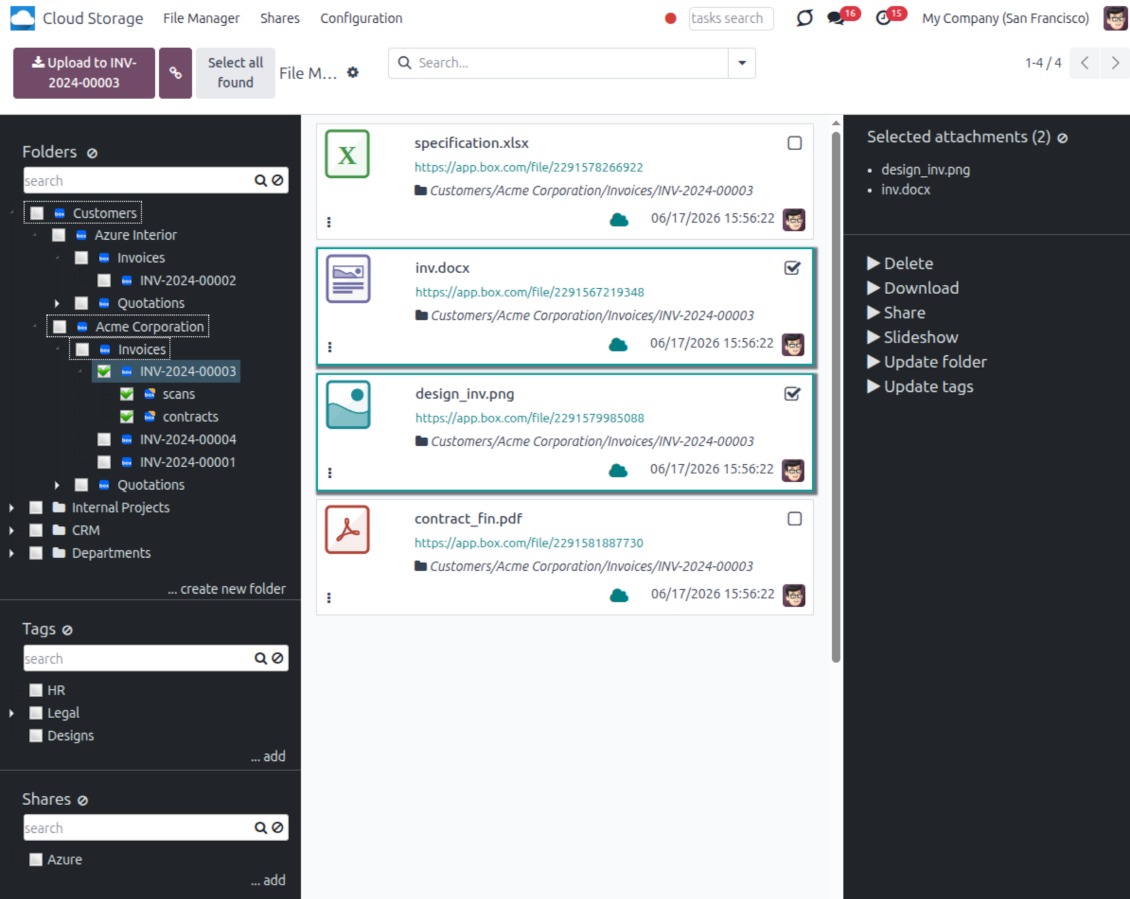
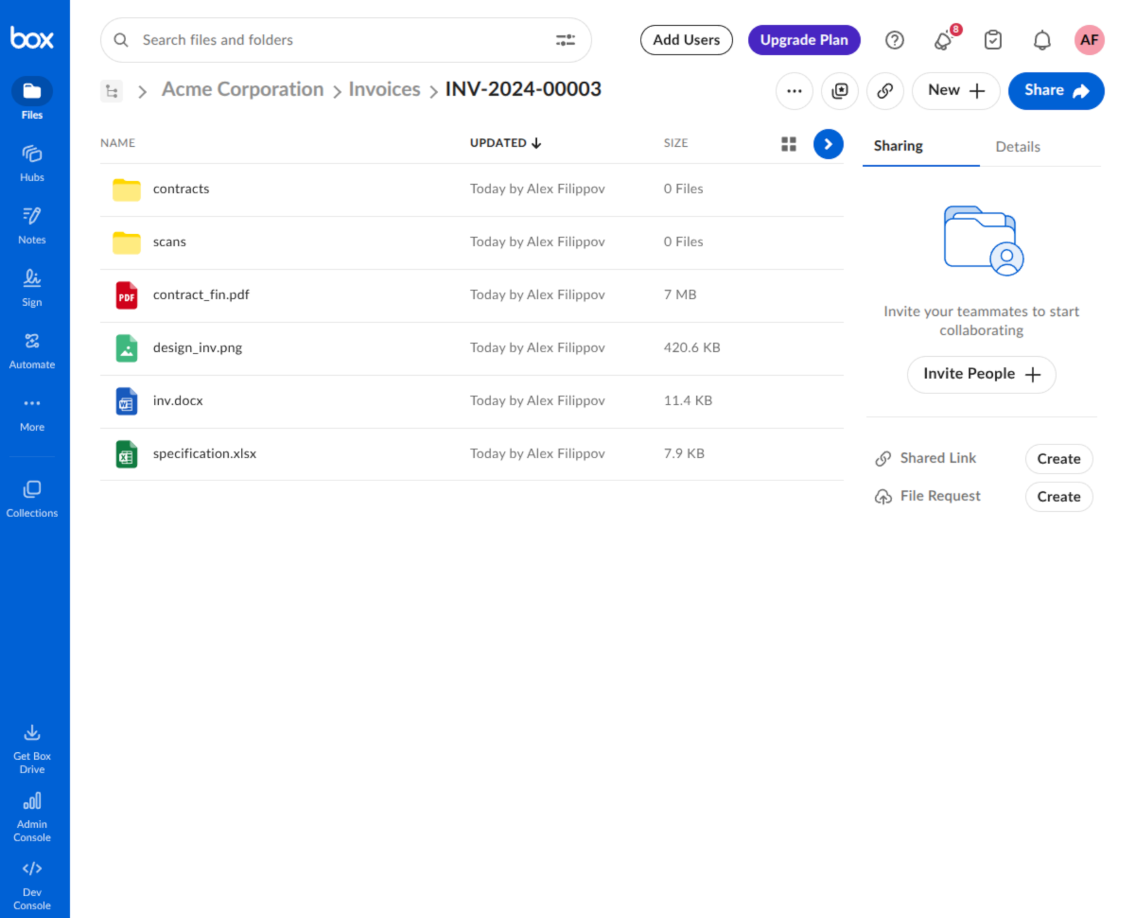
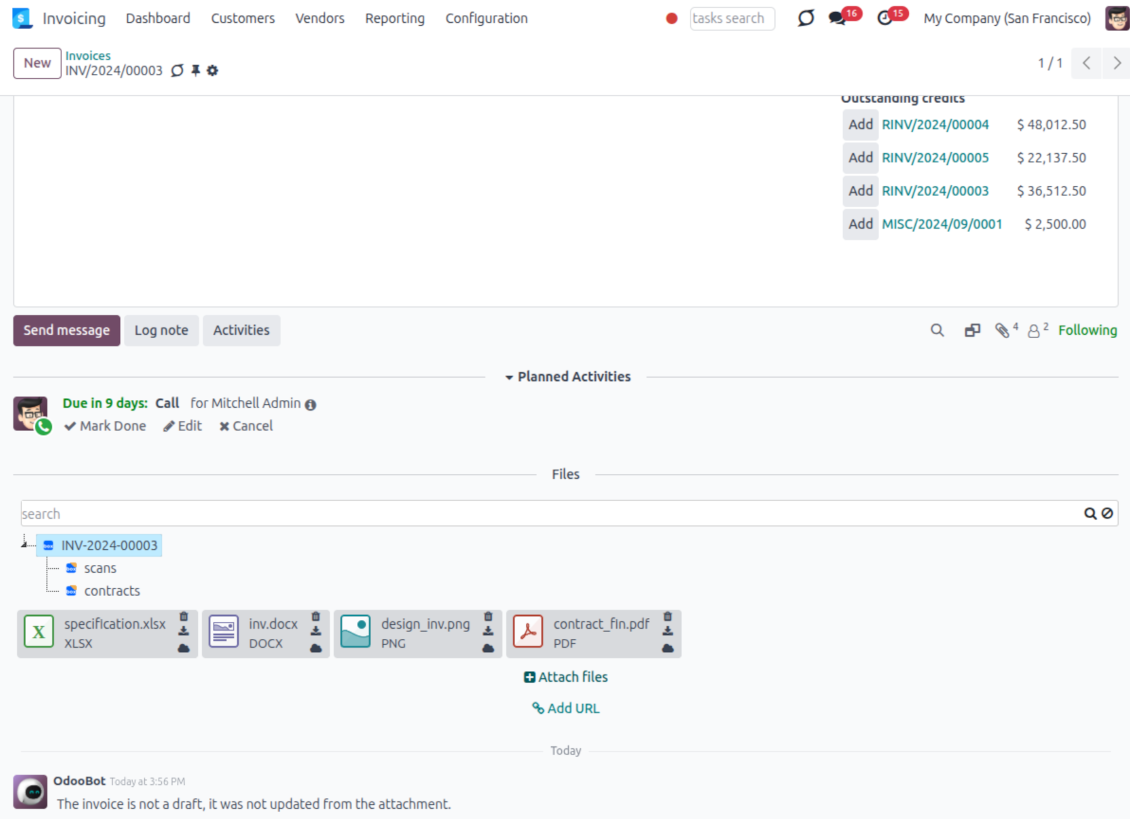
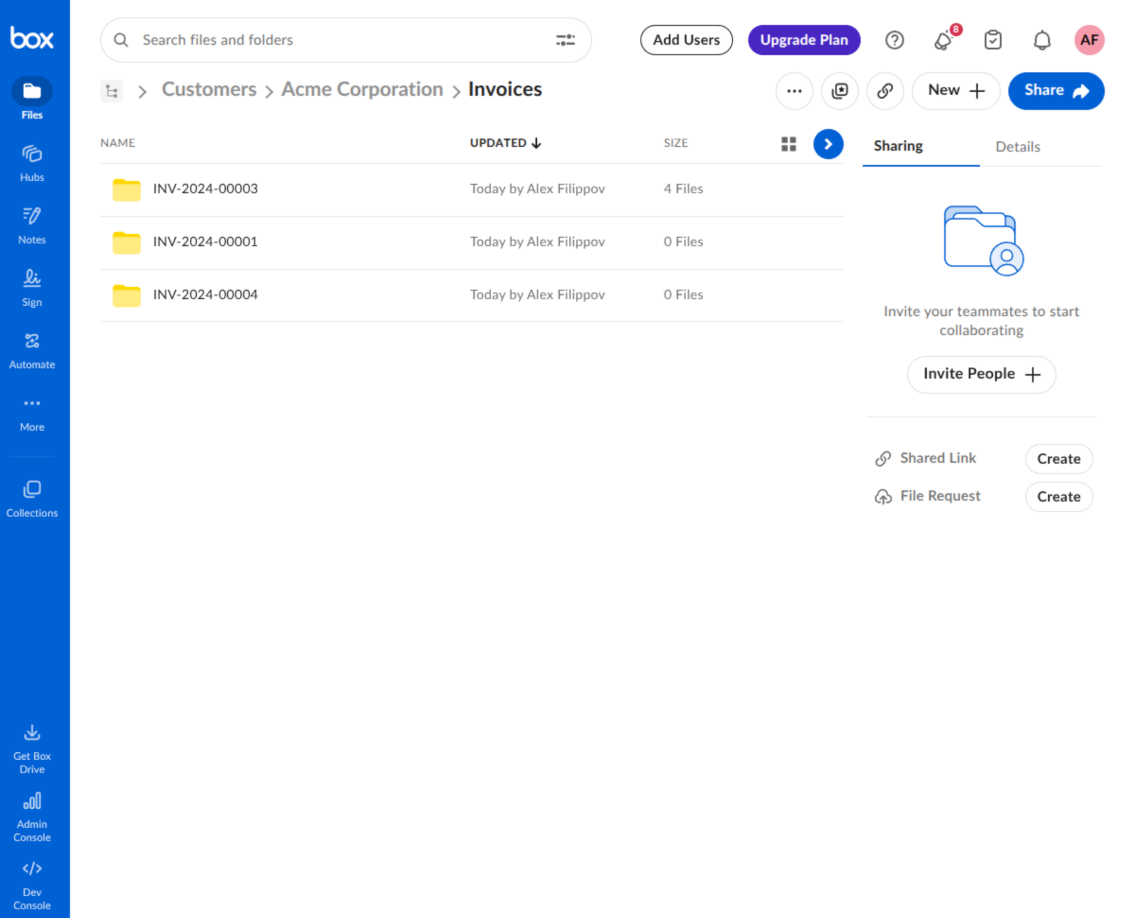
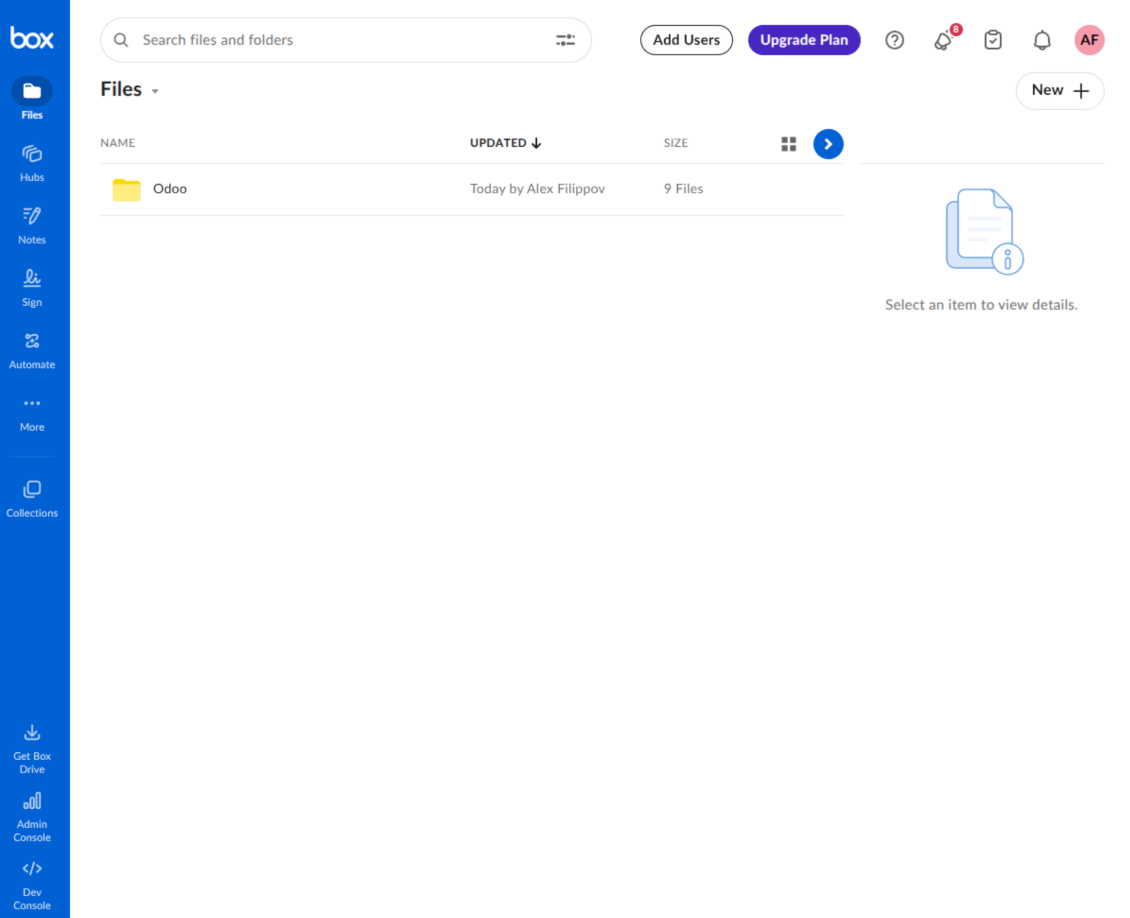
This is the tool to integrate Box features with Odoo folders and files. The app automatically stores Odoo attachments and directories in Box and provides instant access to them through Box web links.
Automatic folders' structure
Decide which Odoo document types should have their own folders trees and synchronize those to Box
Automatic regular sync
Rely on auto-synchronization between Odoo and Box based on scheduled jobs. No manual interaction is required
Bilateral sync
Odoo sends attachments to Box and retrieves files from there. Binary content is kept in clouds, while Odoo provides direct access to synced items
Cloud synchronization history
Control Box sync logs right in Odoo. Export and share those in case of any issues. Be notified of any client disconnections
File manager interface
Manage synced folders and attachments from a single Odoo view. Comfortably navigate by directories. Search, download, upload, and move files
Attachment box
Organize files of any Odoo object in a set of subfolders. Instantly access folders and files in the attachment box and in Box
How synchronization works
Automatic two-sided sync
- Configure sync for one or multiple Box accounts
- Integration is based on scheduled jobs and is fully automatized. The app regularly checks changes in Odoo and Box and runs sync operations
- Synchronization is bilateral. Updates in Odoo are reflected in Box (direct sync); changes in Box modify Odoo folders and attachments (backward sync)
- Cloud connection with Box might be reset. In this way, the app assumes getting all items back to Odoo (reverse sync)
Queue-based synchronization
- Once in 15 minutes, the app examines updates in Odoo and Box to prepare a synchronization queue
- Folders' checks follow the First-In-First-Out (FIFO) principle. Directories that have not been examined for the longest are processed first
- If the app faces sync failures, it will retry operations afterward. Sync queue processing is not stopped by non-blocking failures
Odoo attachments for Box: direct sync
- Direct sync prepares the folders' hierarchy and uploads Odoo attachments to Box
- Folder and file renames or moves keep stable Box IDs, so synced Odoo records stay linked to the same cloud item
- Uploaded attachments become URL records in Odoo, while binary content is stored in Box
Box files and folders for Odoo: backward sync
- Backward sync checks whether files or subfolders are added to Box folders. If so, the app creates URL attachments/subdirectories inside linked Odoo directories
- Updates in Box are reflected in Odoo, including moves and renames based on stable Box item IDs
- In case of conflicts, direct sync changes are in general considered more important than backward updates
Box URLs
Box provides internal web links for files and folders, for example links of the type https://app.box.com/file/[ID] and https://app.box.com/folder/[ID]. Such links are stable, but only Box users with access rights to the related item can open them.
By default, the connector uses those internal Box links. It is the safest and fastest option, since the synchronization does not have to create shared links for every synced item.
If shared links are enabled, Odoo will try to generate Box shared URLs for files and folders. Be cautious with this option: although the links are hardly known by external users, they might become available as a result of some user actions. Besides, shared link generation is slower and might make the synchronization process longer.
Petua konfigurasi dan pemasangan untuk Box Odoo Integration Odoo v.18
Python dependency
The tool depends on the external library 'box_sdk_gen'. Install this library for your Odoo server through the command:
pip3 install boxsdkConfiguration and log in
- Turn on the option 'Box Sync' (cloud Storage > Configuration > Configuration). The optional add-on Box Odoo Integration is required
- Create or open a Box developer account and go to the Box Developer Console: https://app.box.com/developers/console
- Create a Custom App and choose OAuth 2.0 (Authorization Code Grant) as the authentication method
- Add the redirect URI as [YOURODOOSITENAME]/box_token (e.g. https://faotools.com/box_token). A valid SSL certificate (https) is required
- Grant the app access to read and write files and folders. Avoid assigning unrelated permissions
- Go to Odoo Cloud Storage > Configuration > Cloud Clients and press 'Create'
- As a reference, introduce any name which would be clear to all users
- As a Cloud client, choose 'Box'
- As a Root folder name, enter a title that will be used as the parent Box directory for all synced folders. For example, 'Odoo' or 'OdooERP'
- Copy Box Client ID to the field 'Client ID'
- Copy Box Client Secret to the field 'Client Secret'
- Insert previously generated redirect URL
- Press 'Confirm'. Odoo redirects you to the Box login page. Check in the system, agree with all conditions, and grant all permissions asked
- After login, Box redirects you back to Odoo. Box - Odoo synchronization is ready to be done
- Apply the newly created cloud client to folder rules and/or manual folders which should be synced to that Box account
- Await the sync scheduled job to be started. For testing purposes only: trigger integration manually from Cloud Storage > Configuration > Configuration > the button 'Launch sync'.
Create a new Box developer app

Copy Box OAuth credentials

Configure the Box cloud client in Odoo

Grant Odoo access to Box

Soalan lazim tentang Box Odoo Integration Odoo v.18
Medan disegerak disimpan di mana? Adakah ia diduplikasikan ke Odoo dan clouds?
Aplikasi mengandaikan kandungan binari lampiran disimpan dalam Cloud Client, bukan pada pelayan Odoo. Lampiran sedemikian dalam Odoo menjadi jenis URL, dan anda boleh membukanya pada bila-bila masa dari kotak lampiran atau dari Cloud Client.
Selepas persediaan, tiada tindakan manual diperlukan kerana penyegerakan sepenuhnya automatik. Tentukan jenis dokumen Odoo yang perlu disegerakkan dan sediakan model berkaitan untuk setiap satunya (Pelanggan, pesanan jualan atau belian, Tugasan, Projek, dll.).
Bolehkah saya mempunyai beberapa folder untuk jenis dokumen yang sama? Contohnya, projek dalaman dan projek pelanggan?
Ya, anda boleh. Untuk itu sediakan peraturan untuk setiap satu, kemudian gunakan penapis: contohnya mengikut jenis projek.
Cuba jadikan penapis saling eksklusif supaya dokumen dapat ditetapkan dengan pasti. Contohnya 'pelanggan tetapi bukan pembekal', 'pembekal tetapi bukan pelanggan'. Jika tidak, folder dokumen tertentu akan meloncat dari satu model ke model lain.
Bolehkah penyegerakan dibuat masa nyata?
Tidak. Kami mempunyai alasan kukuh untuk mengelak penyegerakan masa nyata:
Isu prestasi. Jika penyegerakan masa nyata, setiap muat naik fail akan memaparkan skrin muat.
Isu konflik. Jika 2 pengguna menukar item secara serentak, situasi yang tidak selesai mungkin timbul. Dengan kerja berkala kami boleh membetulkannya kemudian; pada masa nyata ia perlu disimpan sebagai baris gilir, yang lebih mengelirukan pengguna.
Isu fungsi. Khususnya menamakan semula dan menyusun semula item. Dalam penyegerakan undur, alat bergantung ketat pada logik direktori, dan setiap penyegerakan 100% item diperiksa. Jika dilakukan selepas setiap kemas kini, akan ada beribu permintaan sesaat. Jika tidak: perubahan akan hilang.
Bolehkah saya menukar nama folder lalai dalam awan?
Anda boleh menetapkan nama sendiri untuk direktori model (pesanan jualan, peluang, pembekal, dll.) bagi mana-mana jenis dokumen.
Untuk folder objek (SO-001, John Smith, dll.), alat bergantung pada kaedah Odoo untuk membina nama paparan jenis dokumen ini. Walau bagaimanapun anda boleh menukarnya dengan mentakrif ungkapan nama. Sintaks yang digunakan sama seperti templat e-mel Odoo.
Bolehkah saya menukar kekerapan kerja penyegerakan?
Tidak, mulai versi 15 anda tidak patut menukar kerja berjadual. Ia dioptimumkan untuk berjalan setiap 15 minit bagi menjamin sambungan paling stabil dan pantas.
Pastikan had masa pelayan Odoo sekurang-kurangnya 15 minit (900 saat).
Jika perlu hentikan penyegerakan seketika, lakukan pada borang cloud client tertentu.
Bolehkah saya segerakkan lampiran ke beberapa klien awan
Ya, mulai versi 15 anda boleh sediakan berbilang sambungan. Dengan itu sesetengah folder disegerakkan ke satu cloud client, yang lain ke yang lain.
Ambil perhatian bahawa folder yang sama tidak boleh disegerakkan ke beberapa cloud storages pada masa yang sama.
Kami menggunakan editor khas dalam awan kami (cth. OnlyOffice, Office 365, dll.). Adakah fail dibuka dalam editor itu?
Ya, bergantung pada konfigurasi cloud client anda.
Adakah saya hanya memerlukan aplikasi Cloud Storage Solution?
Bermula versi 15, aplikasi boleh digunakan bersendirian untuk menyusun lampiran dalam folder dan menyediakan antara muka pengurus fail.
Walau bagaimanapun, jika matlamatnya sambungan dengan salah satu klien awan, anda perlu memasang sekurang-kurangnya satu aplikasi pilihan berkaitan klien.
Apa yang berlaku apabila saya menukar peraturan folder?
Apabila peraturan folder berubah, senarai folder juga berubah. Jika folder tidak lagi memenuhi syarat peraturan, ia dialih keluar. Jika fail telah disegerakkan, segerak terbalik mengembalikannya ke Odoo dan memadamnya daripada Cloud Client.
Jika objek dokumen tidak memenuhi syarat peraturan folder, foldernya tidak akan dicipta. Jika kemudiannya memenuhi, folder berkaitan akan dijana.
Bolehkah saya kekalkan segerak terus sahaja, atau matikan penyegerakan dari awan?
Ya. Pada klien awan, buka halaman Tetapan dan hidupkan Matikan penyegerakan dari awan.
Segerak kekal sehala. Perubahan yang dibuat dalam Odoo masih dihantar ke storan awan. Fail dan folder yang dibuat, dinamakan semula atau dipadam dalam storan awan tidak dipaparkan dalam Odoo, dan folder yang dipadam di sana tidak dipulihkan.
Matikan pilihan itu semula untuk memakai perubahan terkumpul, termasuk pemadaman, pada segerak seterusnya.
Tetapan ini tersedia mulai versi 18. Menyahpaut, menetapkan semula atau menyahaktifkan klien masih menjalankan penyegerakan songsang, melainkan anda matikan juga penyegerakan itu.
Teks aplikasi dan laman web dalam bahasa selain Inggeris dibantu AI dan diselaraskan dengan terjemahan rasmi Odoo. Jika anda nampak kesilapan, hantar tiket ketepatan terjemahan dan kami akan membetulkannya.
Pangkalan data demonstrasi Odoo (pratonton langsung)
Untuk aplikasi ini, kami mungkin sediakan pangkalan data demo peribadi percuma.
Anda tidak memerlukan nombor telefon atau kad kredit untuk menghubungi kami. Hanya pendaftaran e-mel ringkas yang tidak mengambil lebih daripada 30 saat.
Atas permintaan anda, kami sediakan pangkalan data pratonton langsung individu, di mana anda boleh menguji dan semak andaian selama kira-kira dua minggu.
Pelaporan pepijat
Jika anda menemui pepijat atau tingkah laku tidak konsisten, sila hubungi kami. Kami jamin pembetulan dalam 60 hari selepas belian dan masih berminat menambah baik alat selepas tempoh itu.
Anda tidak memerlukan nombor telefon atau kad kredit untuk menghubungi kami. Hanya pendaftaran e-mel ringkas yang tidak mengambil lebih daripada 30 saat.
Sertakan sebanyak mungkin butiran dalam permintaan: tangkapan skrin, log pelayan Odoo, penerangan penuh cara menghasilkan semula masalah, dan sebagainya. Biasanya mengambil beberapa hari bekerja untuk menyediakan pelan kerja (jika pepijat disahkan) atau memberi garis panduan apa yang perlu dilakukan (jika tidak).
Permintaan ciri awam dan idea modul (pembangunan percuma)
Kami sangat bermotivasi untuk menambah baik alat kami dan berterima kasih atas sebarang maklum balas. Jika keperluan anda berguna secara awam dan boleh dilaksanakan dengan cekap, pasukan akan memasukkannya ke senarai tugasan kami.
Senarai tugasan sebegini diproses secara berkala dan tidak melibatkan yuran tambahan. Walaupun kami tidak dapat menjanjikan tarikh akhir dan reka bentuk muktamad, ini mungkin cara baik untuk mendapat ciri yang diingini tanpa pelaburan dan risiko.
Anda tidak memerlukan nombor telefon atau kad kredit untuk menghubungi kami. Hanya pendaftaran e-mel ringkas yang tidak mengambil lebih daripada 30 saat.


The tool to build a deep and structured knowledge base for internal and external use. Knowledge System. KMS. Wiki-like revisions.
398€
The tool to set up KPI targets and control their fulfillment by periods. KPI dashboards. Dashboard designer. KPI charts

The tool for time-based service management from booking appointments to sales and reviews
398€
The tool to manage your Odoo from your favorite AI chats through MCP. Claude. Any MCP-supporting AI.

Alat untuk menyusun lampiran Odoo secara fleksibel dalam folder dan menyegerakkan direktori dengan klien awan: Google Drive, OneDrive/SharePoint, Nextcloud/ownCloud, Dropbox, Amazon S3, Box dan NAS. DMS. Pengurus Fail. Sistem pengurusan dokumen
398€
The tool to automatically synchronize Odoo attachments with OneDrive files in both ways
487€
The tool to automatically synchronize Odoo attachments with Google Drive files in both ways
487€
The tool to automatically synchronize Odoo attachments with ownCloud/Nextcloud files in both ways
487€