Box Odoo Integration v.18
The tool to automatically synchronize Odoo attachments with Box files in both ways
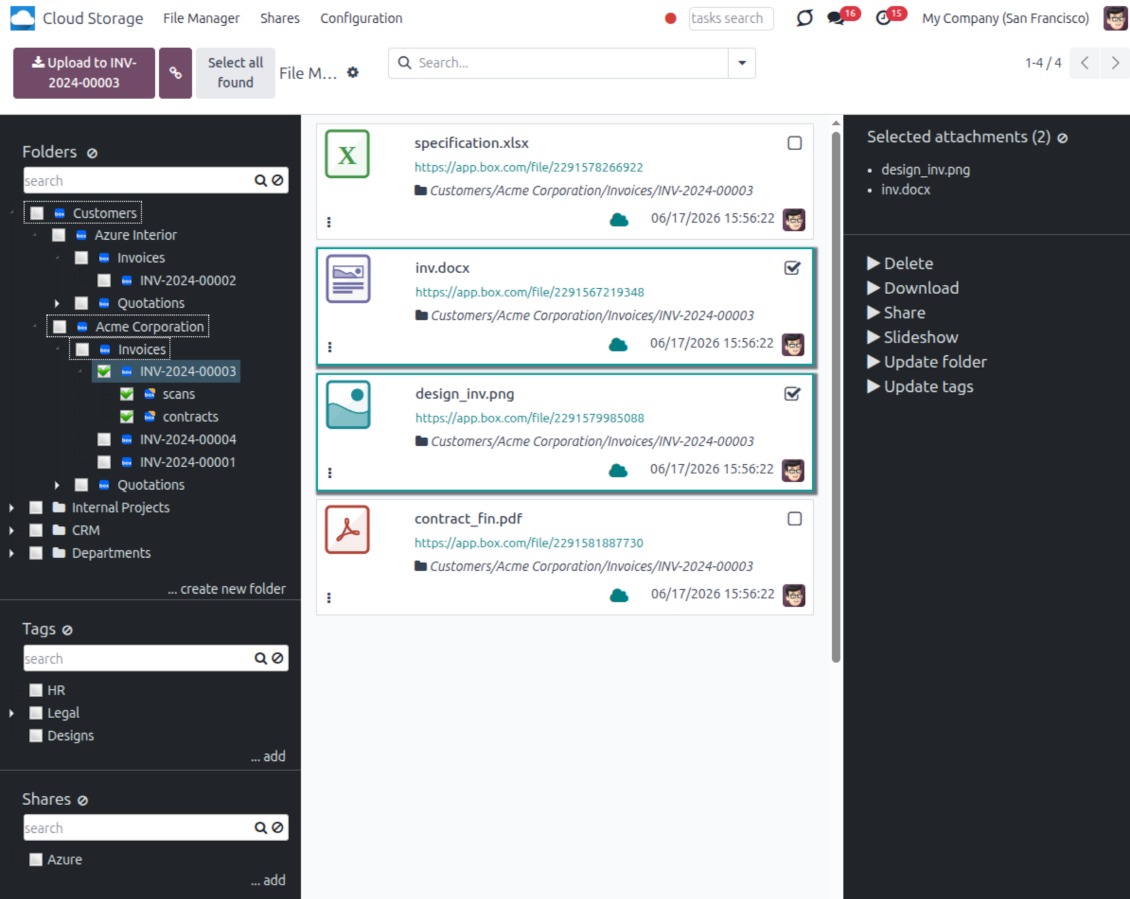
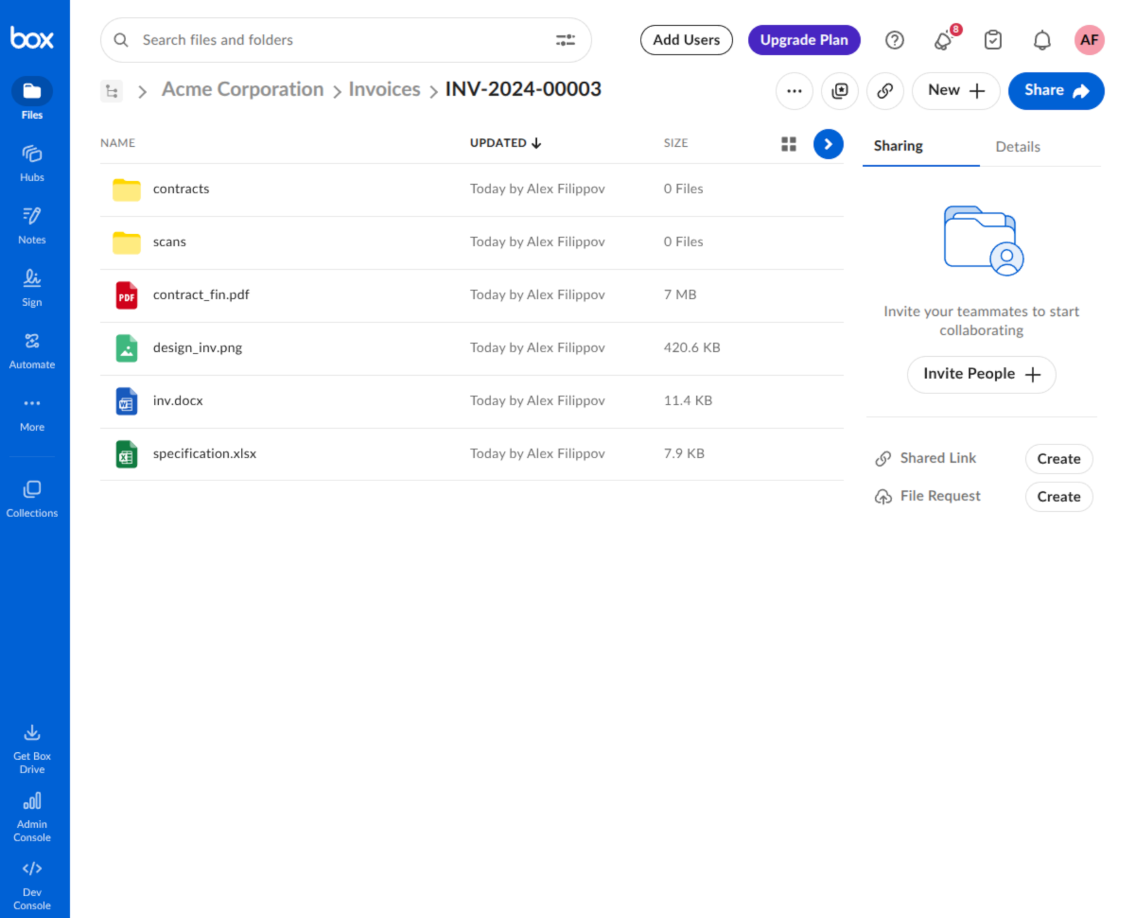
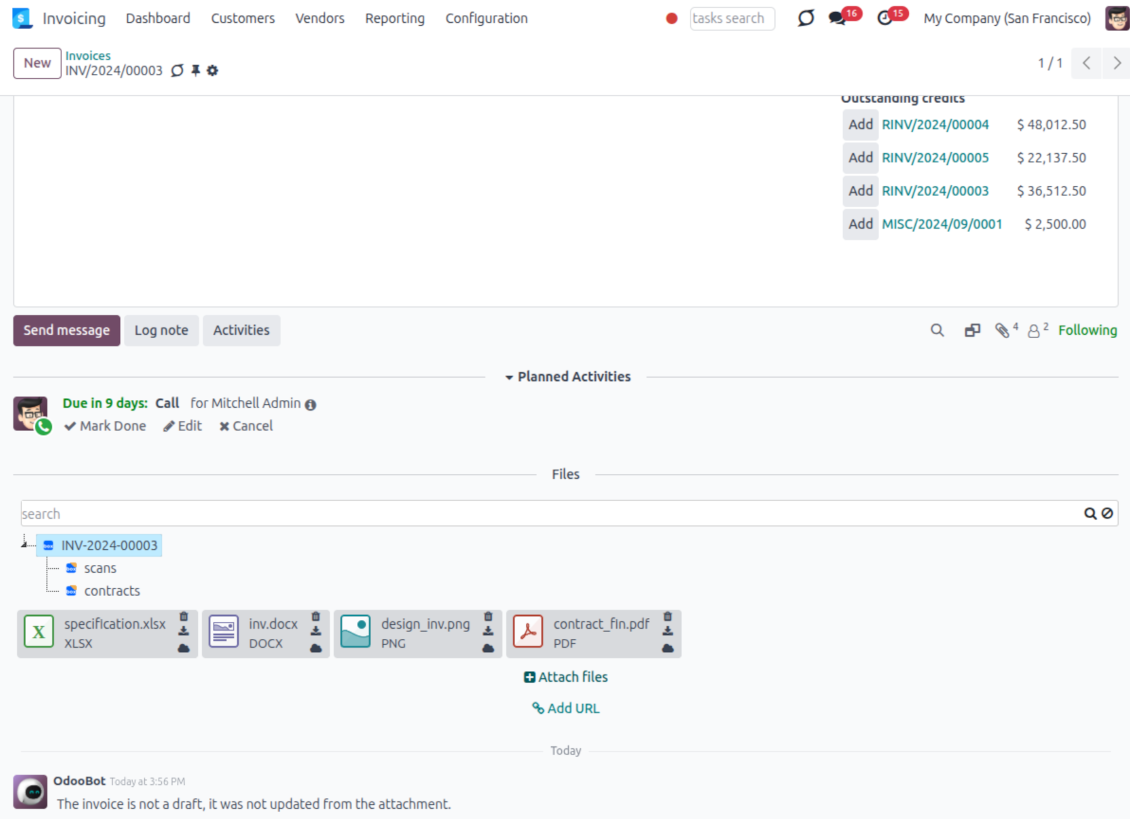
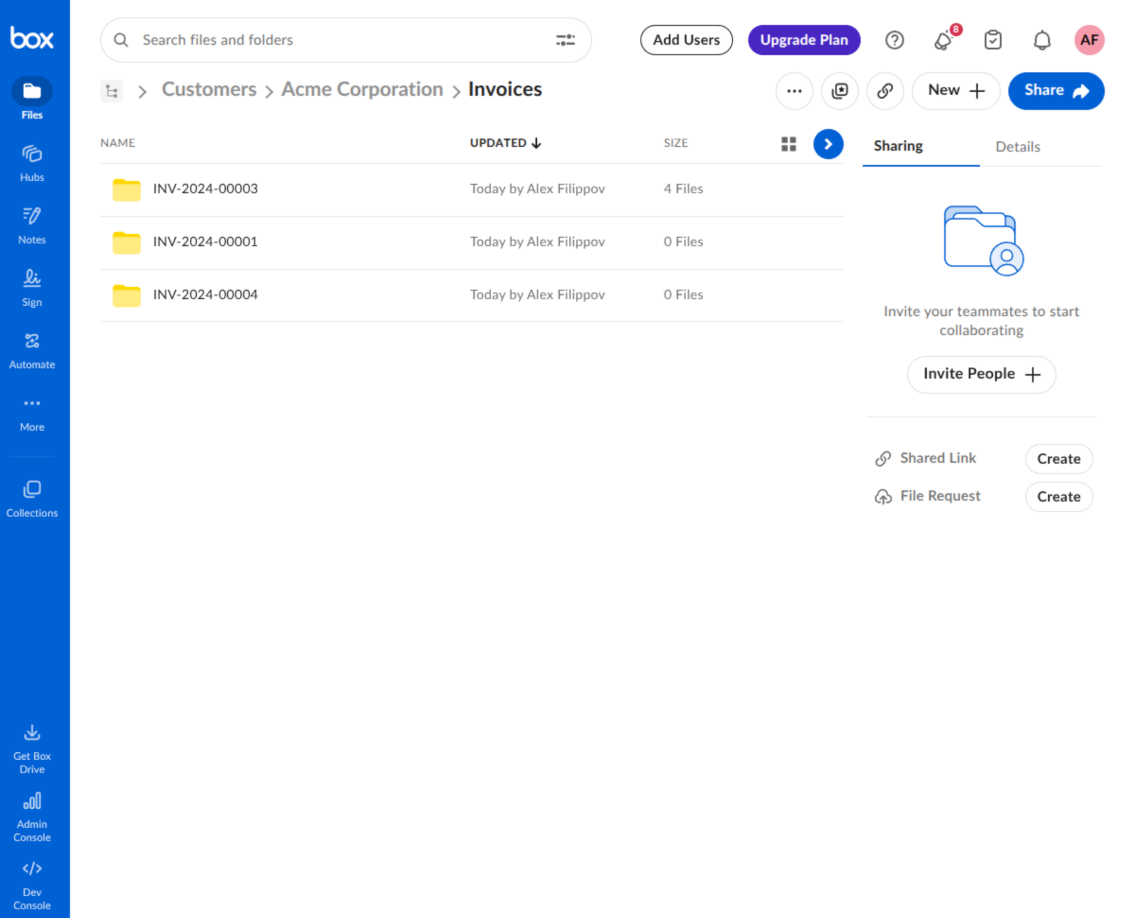
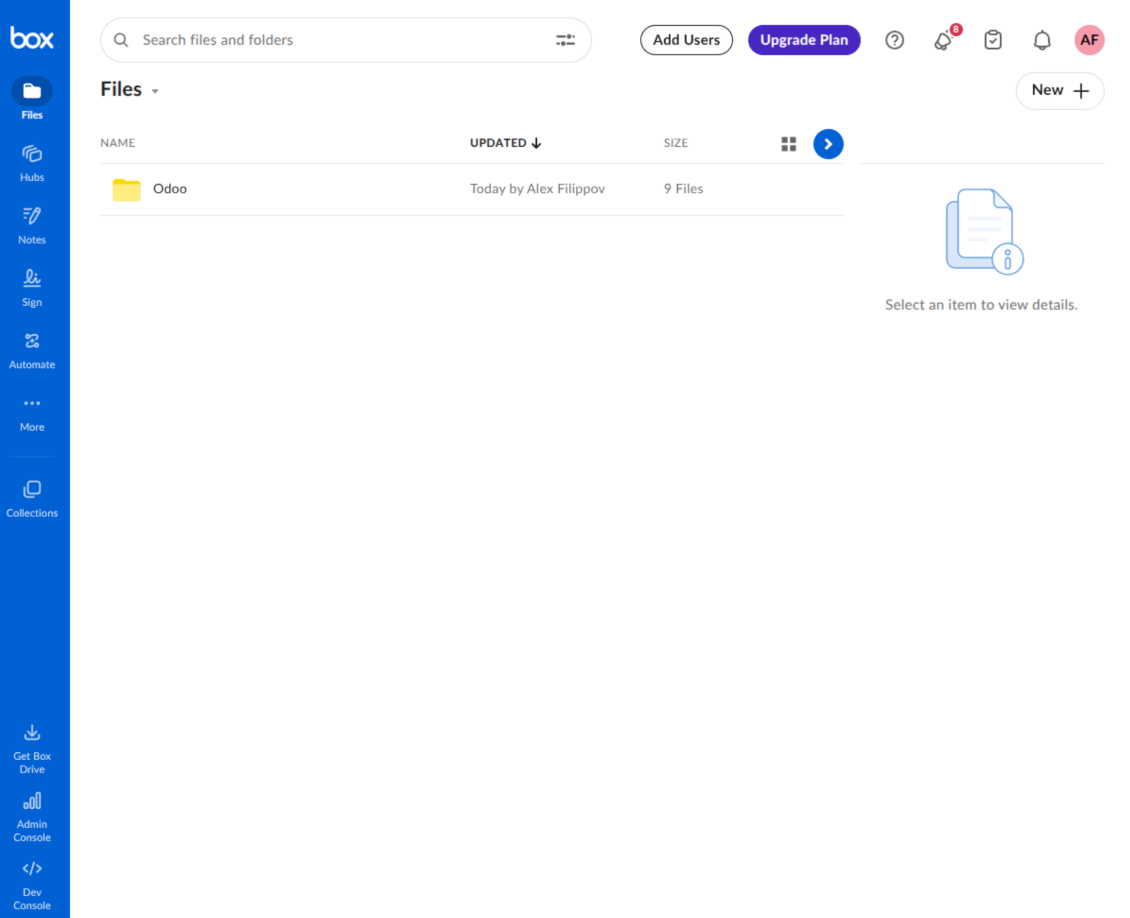
This is the tool to integrate Box features with Odoo folders and files. The app automatically stores Odoo attachments and directories in Box and provides instant access to them through Box web links.
Automatic folders' structure
Decide which Odoo document types should have their own folders trees and synchronize those to Box
Automatic regular sync
Rely on auto-synchronization between Odoo and Box based on scheduled jobs. No manual interaction is required
Bilateral sync
Odoo sends attachments to Box and retrieves files from there. Binary content is kept in clouds, while Odoo provides direct access to synced items
Cloud synchronization history
Control Box sync logs right in Odoo. Export and share those in case of any issues. Be notified of any client disconnections
File manager interface
Manage synced folders and attachments from a single Odoo view. Comfortably navigate by directories. Search, download, upload, and move files
Attachment box
Organize files of any Odoo object in a set of subfolders. Instantly access folders and files in the attachment box and in Box
How synchronization works
Automatic two-sided sync
- Configure sync for one or multiple Box accounts
- Integration is based on scheduled jobs and is fully automatized. The app regularly checks changes in Odoo and Box and runs sync operations
- Synchronization is bilateral. Updates in Odoo are reflected in Box (direct sync); changes in Box modify Odoo folders and attachments (backward sync)
- Cloud connection with Box might be reset. In this way, the app assumes getting all items back to Odoo (reverse sync)
Queue-based synchronization
- Once in 15 minutes, the app examines updates in Odoo and Box to prepare a synchronization queue
- Folders' checks follow the First-In-First-Out (FIFO) principle. Directories that have not been examined for the longest are processed first
- If the app faces sync failures, it will retry operations afterward. Sync queue processing is not stopped by non-blocking failures
Odoo attachments for Box: direct sync
- Direct sync prepares the folders' hierarchy and uploads Odoo attachments to Box
- Folder and file renames or moves keep stable Box IDs, so synced Odoo records stay linked to the same cloud item
- Uploaded attachments become URL records in Odoo, while binary content is stored in Box
Box files and folders for Odoo: backward sync
- Backward sync checks whether files or subfolders are added to Box folders. If so, the app creates URL attachments/subdirectories inside linked Odoo directories
- Updates in Box are reflected in Odoo, including moves and renames based on stable Box item IDs
- In case of conflicts, direct sync changes are in general considered more important than backward updates
Box URLs
Box provides internal web links for files and folders, for example links of the type https://app.box.com/file/[ID] and https://app.box.com/folder/[ID]. Such links are stable, but only Box users with access rights to the related item can open them.
By default, the connector uses those internal Box links. It is the safest and fastest option, since the synchronization does not have to create shared links for every synced item.
If shared links are enabled, Odoo will try to generate Box shared URLs for files and folders. Be cautious with this option: although the links are hardly known by external users, they might become available as a result of some user actions. Besides, shared link generation is slower and might make the synchronization process longer.
कॉन्फ़िगरेशन और इंस्टॉलेशन सुझाव: Box Odoo Integration Odoo v.18
Python dependency
The tool depends on the external library 'box_sdk_gen'. Install this library for your Odoo server through the command:
pip3 install boxsdkConfiguration and log in
- Turn on the option 'Box Sync' (cloud Storage > Configuration > Configuration). The optional add-on Box Odoo Integration is required
- Create or open a Box developer account and go to the Box Developer Console: https://app.box.com/developers/console
- Create a Custom App and choose OAuth 2.0 (Authorization Code Grant) as the authentication method
- Add the redirect URI as [YOURODOOSITENAME]/box_token (e.g. https://faotools.com/box_token). A valid SSL certificate (https) is required
- Grant the app access to read and write files and folders. Avoid assigning unrelated permissions
- Go to Odoo Cloud Storage > Configuration > Cloud Clients and press 'Create'
- As a reference, introduce any name which would be clear to all users
- As a Cloud client, choose 'Box'
- As a Root folder name, enter a title that will be used as the parent Box directory for all synced folders. For example, 'Odoo' or 'OdooERP'
- Copy Box Client ID to the field 'Client ID'
- Copy Box Client Secret to the field 'Client Secret'
- Insert previously generated redirect URL
- Press 'Confirm'. Odoo redirects you to the Box login page. Check in the system, agree with all conditions, and grant all permissions asked
- After login, Box redirects you back to Odoo. Box - Odoo synchronization is ready to be done
- Apply the newly created cloud client to folder rules and/or manual folders which should be synced to that Box account
- Await the sync scheduled job to be started. For testing purposes only: trigger integration manually from Cloud Storage > Configuration > Configuration > the button 'Launch sync'.
Create a new Box developer app

Copy Box OAuth credentials

Configure the Box cloud client in Odoo

Grant Odoo access to Box

के बारे में अक्सर पूछे जाने वाले प्रश्न Box Odoo Integration Odoo v.18
सिंक किए गए फ़ील्ड कहाँ संग्रहीत होते हैं? क्या वे Odoo और क्लाउड में डुप्लिकेट होते हैं?
ऐप मानता है कि अटैचमेंट की बाइनरी सामग्री Odoo सर्वर के बजाय Cloud Client में रखी जाती है। इसलिए Odoo में ऐसे अटैचमेंट URL प्रकार के हो जाते हैं, और आप उन्हें किसी भी समय अटैचमेंट बॉक्स या Cloud Client से खोल सकते हैं।
सेटअप के बाद कोई मैन्युअल कार्रवाई नहीं चाहिए, क्योंकि सिंक पूरी तरह स्वचालित है। तय करें कि कौन से Odoo दस्तावेज़ प्रकार सिंक हों और प्रत्येक के लिए संबंधित मॉडल सेट करें (ग्राहक, विक्रय या खरीद आदेश, टास्क, प्रोजेक्ट आदि)।
क्या मैं एक ही दस्तावेज़ प्रकार के लिए कुछ फ़ोल्डर रख सकता हूँ? उदाहरण के लिए, आंतरिक प्रोजेक्ट और ग्राहक प्रोजेक्ट?
हाँ, आप कर सकते हैं। इसके लिए प्रत्येक के लिए नियम बनाएँ, फिर फ़िल्टर लागू करें: उदाहरण के लिए प्रोजेक्ट के प्रकार से।
फ़िल्टर परस्पर-अनन्य रखें ताकि दस्तावेज़ निश्चित रूप से असाइन हो। उदाहरण: 'ग्राहक पर आपूर्तिकर्ता नहीं', 'आपूर्तिकर्ता पर ग्राहक नहीं'। वरना किसी खास दस्तावेज़ का फ़ोल्डर एक मॉडल से दूसरे पर कूदेगा।
क्या सिंक को रीयल-टाइम बनाना संभव है?
नहीं। रीयल-टाइम सिंक से बचने के हमारे ठोस कारण हैं:
प्रदर्शन संबंधी समस्याएँ। यदि सिंक रीयल-टाइम हो, तो हर फ़ाइल अपलोड पर लोडिंग स्क्रीन आएगी।
संघर्ष संबंधी समस्याएँ। यदि 2 उपयोगकर्ता एक साथ किसी आइटम को बदलें, तो अनसुलझी स्थितियाँ हो सकती हैं। नियमित जॉब में हम बाद में ठीक कर सकते हैं; रीयल-टाइम में इसे कतार के रूप में सहेजना पड़ेगा, जो उपयोगकर्ताओं के लिए और भ्रमित करने वाला होगा।
कार्यक्षमता संबंधी समस्याएँ। खासकर आइटम का नाम बदलना और पुनर्गठन। बैकवर्ड सिंक में टूल निर्देशिका तर्क पर सख्ती से निर्भर करता है, और हर सिंक में 100% आइटम जाँचे जाते हैं। यदि हर अपडेट के बाद हो, तो प्रति सेकंड हज़ारों अनुरोध होंगे। नहीं तो: बदलाव खो जाएँगे।
क्या मैं क्लाउड में डिफ़ॉल्ट फ़ोल्डर के नाम बदल सकता हूँ?
किसी भी दस्तावेज़ प्रकार के लिए मॉडलों की निर्देशिकाओं (बिक्री आदेश, अवसर, आपूर्तिकर्ता आदि) को अपना नाम दे सकते हैं।
ऑब्जेक्ट फ़ोल्डरों (SO-001, John Smith आदि) के लिए टूल इस दस्तावेज़ प्रकार का प्रदर्शन नाम बनाने की Odoo विधि पर निर्भर करता है। फिर भी नाम अभिव्यक्ति परिभाषित करके बदल सकते हैं। Odoo ईमेल टेम्पलेट वाली ही वाक्य रचना उपयोग होती है।
क्या मैं सिंक जॉब की आवृत्ति बदल सकता हूँ?
नहीं, संस्करण 15 से निर्धारित जॉब नहीं बदलने चाहिए। सबसे स्थिर और तेज़ कनेक्शन के लिए वे हर 15 मिनट चलने हेतु अनुकूलित हैं।
सुनिश्चित करें कि आपके Odoo सर्वर टाइमआउट कम से कम 15 मिनट (900 सेकंड) हों।
यदि कुछ समय के लिए सिंक रोकना हो, तो किसी खास cloud client फ़ॉर्म पर करें।
क्या मैं अटैचमेंट कुछ क्लाउड क्लाइंट से सिंक कर सकता हूँ
हाँ, संस्करण 15 से कई कनेक्शन सेट किए जा सकते हैं। इस तरह कुछ फ़ोल्डर एक cloud client से और कुछ दूसरे से सिंक होते हैं।
ध्यान दें कि एक ही फ़ोल्डर को एक साथ कई cloud storages से सिंक नहीं किया जा सकता।
हम अपने क्लाउड में विशेष संपादक उपयोग करते हैं (जैसे OnlyOffice, Office 365 आदि)। क्या फ़ाइलें उसी संपादक में खुलेंगी?
हाँ, आपके cloud client कॉन्फ़िगरेशन पर निर्भर करता है।
क्या मुझे केवल Cloud Storage Solution ऐप चाहिए?
संस्करण 15 से ऐप अकेले चलकर अटैचमेंट को फ़ोल्डर में व्यवस्थित कर फ़ाइल मैनेजर इंटरफ़ेस दे सकता है।
लेकिन यदि लक्ष्य किसी क्लाउड क्लाइंट से कनेक्शन है, तो कम से कम एक वैकल्पिक क्लाइंट ऐप इंस्टॉल करना होगा।
फ़ोल्डर नियम बदलने पर क्या होता है?
फ़ोल्डर नियम बदलने पर फ़ोल्डरों की सूची भी बदलती है। यदि फ़ोल्डर नियमों की शर्तों से मेल नहीं खाता, उसे हटा दिया जाता है। यदि फ़ाइलें सिंक हो चुकी हैं, उलटा सिंक उन्हें Odoo में लौटाता है और Cloud Client से हटाता है।
यदि दस्तावेज़ का ऑब्जेक्ट फ़ोल्डर नियम की शर्तों से मेल नहीं खाता, उसका फ़ोल्डर नहीं बनेगा। बाद में मेल खाए तो संबंधित फ़ोल्डर बनेगा।
क्या मैं केवल सीधा सिंक रख सकता हूँ, या क्लाउड से सिंक बंद कर सकता हूँ?
हाँ। क्लाउड क्लाइंट पर सेटिंग पृष्ठ खोलें और क्लाउड से सिंक बंद करें चालू करें।
सिंक एक तरफ़ा रहता है। Odoo में किए बदलाव फिर भी क्लाउड स्टोरेज पर भेजे जाते हैं। क्लाउड स्टोरेज में बनाई, नाम बदली या हटाई गई फ़ाइलें और फ़ोल्डर Odoo में नहीं दिखते, और वहाँ हटाए फ़ोल्डर वापस नहीं आते।
जमा बदलाव, मिटाने सहित, अगले सिंक पर लागू करने के लिए विकल्प को फिर से बंद करें।
यह सेटिंग संस्करण 18 से उपलब्ध है। क्लाइंट को अलग करने, रीसेट करने या निष्क्रिय करने पर रिवर्स सिंक तब भी चलता है, जब तक आप उसे भी बंद न करें।
अंग्रेज़ी के अलावा अन्य भाषाओं में ऐप और वेबसाइट का शब्द AI-सहायता से है और आधिकारिक Odoo अनुवादों से मेल खाता है। यदि आपको कोई गलती दिखे, अनुवाद शुद्धता का टिकट भेजें और हम इसे ठीक करेंगे।
Odoo डेमो डेटाबेस (लाइव पूर्वावलोकन)
इस ऐप के लिए हम मुफ़्त व्यक्तिगत डेमो डेटाबेस दे सकते हैं।
हमसे संपर्क करने के लिए फ़ोन नंबर या क्रेडिट कार्ड की आवश्यकता नहीं है। केवल एक छोटी ईमेल साइन-अप करनी है, जिसमें 30 सेकंड से अधिक नहीं लगता।
आपके अनुरोध पर हम एक व्यक्तिगत लाइव पूर्वावलोकन डेटाबेस तैयार करेंगे, जहाँ आप लगभग दो सप्ताह परीक्षण और धारणाएँ जाँच सकते हैं।
बग रिपोर्टिंग
यदि आपको बग या असंगत व्यवहार मिले तो हमसे संपर्क करें। हम खरीद के 60 दिनों के भीतर सुधार देने की गारंटी देते हैं और इस अवधि के बाद भी टूल सुधारने में रुचि रखते हैं।
हमसे संपर्क करने के लिए फ़ोन नंबर या क्रेडिट कार्ड की आवश्यकता नहीं है। केवल एक छोटी ईमेल साइन-अप करनी है, जिसमें 30 सेकंड से अधिक नहीं लगता।
अपने अनुरोध में जितना संभव हो उतना विवरण शामिल करें: स्क्रीनशॉट, Odoo सर्वर लॉग, समस्या को दोहराने का पूरा वर्णन आदि। आमतौर पर किसी मुद्दे की कार्य योजना तैयार करने (यदि बग पुष्टि हो) या आगे क्या करना है इसके दिशानिर्देश देने (अन्यथा) में कुछ कार्यदिवस लगते हैं।
सार्वजनिक सुविधा अनुरोध और मॉड्यूल विचार (निःशुल्क विकास)
हम अपने टूल सुधारने के लिए दृढ़ता से प्रेरित हैं और किसी भी प्रतिक्रिया के आभारी होंगे। यदि आपकी आवश्यकताएँ सार्वजनिक उपयोग की हैं और कुशलता से लागू की जा सकती हैं, तो टीम उन्हें हमारी कार्य सूची में शामिल करेगी।
ऐसी कार्य सूची नियमित रूप से संसाधित होती है और अतिरिक्त शुल्क नहीं लगती। यद्यपि हम समय सीमा और अंतिम डिज़ाइन का वादा नहीं कर सकते, यह बिना निवेश और जोखिम के वांछित सुविधाएँ पाने का अच्छा तरीका हो सकता है।
हमसे संपर्क करने के लिए फ़ोन नंबर या क्रेडिट कार्ड की आवश्यकता नहीं है। केवल एक छोटी ईमेल साइन-अप करनी है, जिसमें 30 सेकंड से अधिक नहीं लगता।


The tool to build a deep and structured knowledge base for internal and external use. Knowledge System. KMS. Wiki-like revisions.
398€
The tool to set up KPI targets and control their fulfillment by periods. KPI dashboards. Dashboard designer. KPI charts

The tool for time-based service management from booking appointments to sales and reviews
398€
The tool to manage your Odoo from your favorite AI chats through MCP. Claude. Any MCP-supporting AI.

Odoo अनुलग्नकों को फ़ोल्डरों में लचीले ढंग से व्यवस्थित करने और निर्देशिकाओं को क्लाउड क्लाइंट से सिंक करने का उपकरण: Google Drive, OneDrive/SharePoint, Nextcloud/ownCloud, Dropbox, Amazon S3, Box और NAS. DMS. फ़ाइल प्रबंधक. दस्तावेज़ प्रबंधन प्रणाली
398€
The tool to automatically synchronize Odoo attachments with OneDrive files in both ways
487€
The tool to automatically synchronize Odoo attachments with Google Drive files in both ways
487€
The tool to automatically synchronize Odoo attachments with ownCloud/Nextcloud files in both ways
487€