Stock Demand Trends and Forecast v.14
The tool to calculate stock demand trends and make prediction for future demand statistically. Stock Forecast




If you knew stock demand trends per warehouses, you would have a clue to decrease keeping costs and to have a flawless supply chain. Regretfully, you can't know the future. However, you can predict it with a certain reliability. This is an Odoo tool for that goal. The app let you construct stock demand per periods and forecast further demand.
Scientific approach for forecasting
The app assumes applying statistical methods to calculate historical trends and make a forecast. Make a few experiments with suggested solutions and coefficients to achieve the most accurate prediction
Focused analysis
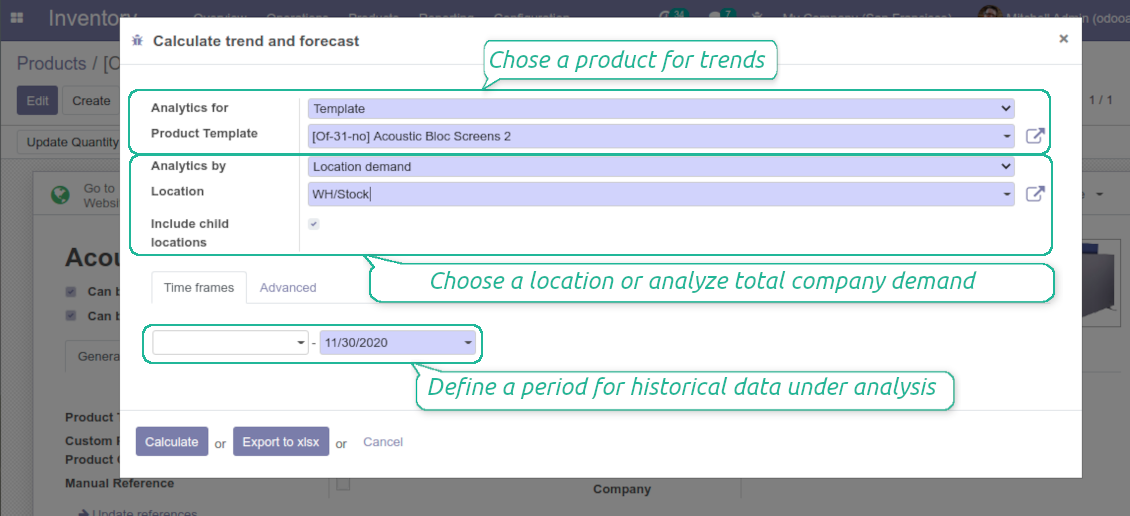
Shrink considered stock operations for a definite warehouse location (with or without child locations) or analyze global company stocks demand
Topical data
Apply time frames for historical data to check statistical reliability through 'predicting' actually passed intervals. Stock demand is calculated as all done stock moves for this period which source location is one of internal locations under consideration and which destination location is not of this range
Trends interfaces
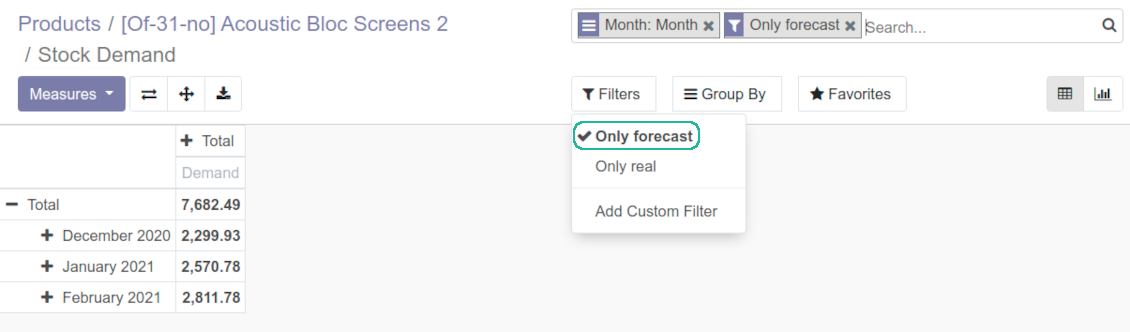
Work with stock demands forecasts in a way you like: as an Odoo chart, as an Odoo report (pivot), as an Excel table
Widely applicable solutions
Analyze trends for both a product template in general (e.g. all iPads) or a specific product variant (iPad 32Gb). The app might be of especial use for markets experiencing seasonal changes: try to define statistical factors in your industry to make reliable forecasts
Inventory trends analysts
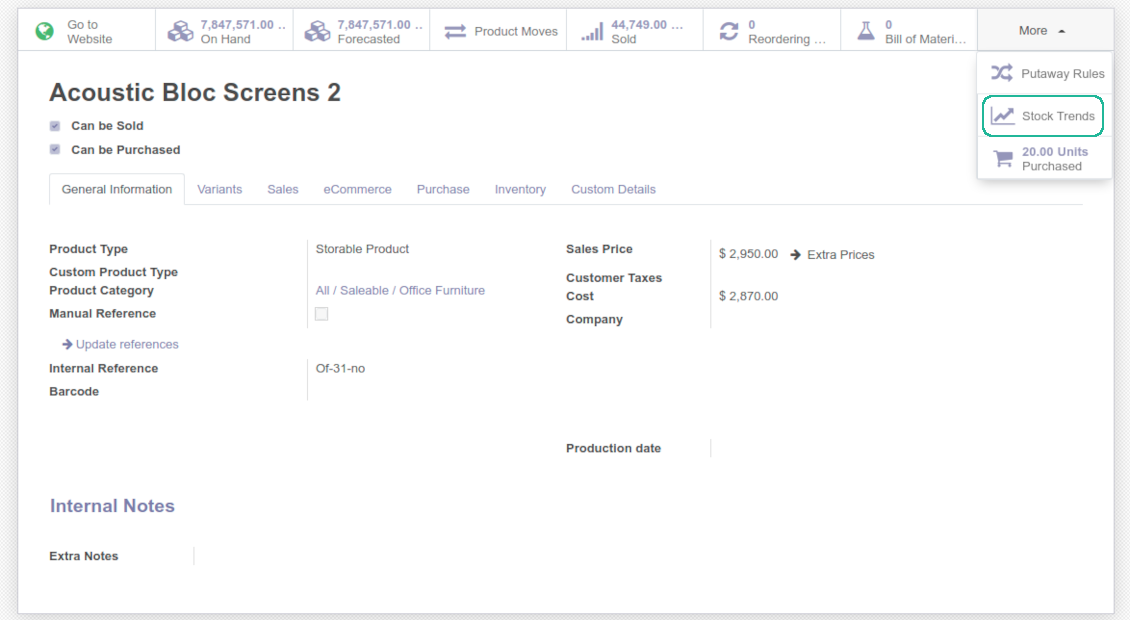
Grant the right for forecast tools for any WMS user (the group Other > Stock Demand Forecast). To start analysis it is needed to push the button 'Stock Trends' on a product template, variant, or stock location form. Be cautious: all stock operations of a current company would be under consideration.
Statistical methods to forecast stock demand
-
The tool allows to calculate inventory demand trends based on a number of statistical methods. They have different complexity and might be suitable for a definite market or a specific business. The final choice of the method and related statistical parameters is up to end users
-
Autoregression (AutoReg) is the simplest but still widely used statistical method for time series forecast
-
Autoregressive Distributed Lag (ARDR) takes into account 'errors' in previous observations
-
Autoregressive Moving Average (ARMA) is a combination of both AR and MA methods. To apply the ARMA method use the MA method with auto regression coefficient (P coefficient) as 2
-
Autoregressive Integrated Moving Average (ARIMA) combines the methods AR and MA, but beside that it tries to make data stationary. It is appropriate to use for historical data with pure trend but without seasonal changes
-
Seasonal Autoregressive Integrated Moving-Average (SARIMA) enriches the ARIMA method with considering seasonal changes. It is one of the most complex and wide spread methods utilized for forecasting time series now
-
Simple Exponential Smoothing (SES) is similar to the AR method, but instead of relying upon linear function, it exploits exponential one
-
Holt Winter's Exponential Smoothing (HWES) enriches the SES method to work with time series trends and seasonal effects
-
For more technical details have a look at the page: https://www.statsmodels.org/stable/api.html
Usage requirements
-
You have enough historical stock moves data (per location or a company), since it is senseless to make forecast based on last 5 days of operations
-
Stock demand is regular and is not chaotic, meaning that your decisions do not have 100% impact and there is at least some correlation between market demand and your WMS operations.
-
You consider seasonal changes and/or trends, which you noticed but can't fully analyze. You understand which assumptions you try to check.
-
You have clear understanding of how statistics works.
Tipy k konfiguraci a instalaci pro Stock Demand Trends and Forecast Odoo v.14
Python dependencies
To guarantee tool correct work you would need a number of Python libraries: pandas, numpy, statsmodels, scipy, xlsxwriter. To install those packages execute the command:
pip3 install pandas numpy statsmodels scipy xlsxwriter
If you run Odoo on Python prior or equal to version 3.7, please install the following versions of the packages pandas==1.3.5, statsmodels==0.13.1
Často kladené otázky o Stock Demand Trends and Forecast Odoo v.14
Jaka jsou pravidla aktualizaci vašich nástrojů?
Podle aktuálních pravidel Odoo Apps Store:
- Modul koupeny pro verzi 12.0 nebo starší dává přístup ke všem verzim az do 12.0.
- Od verze 13.0 se každá verze modulu kupuje samostatné.
- Bez ohledu na verzi da nákup právo na všechny aktualizace a opravy v rámci hlavní verze.
Tym faOtools tato pravidla neridi. S otazkami se obratte přímo na zastupce Odoo Apps Store.
Jak nainstaluji aplikaci na Odoo.sh?
Nejprimejsi postup je vestaveny tok obchodu Odoo:
1. Otevřete stránku modulu a klikněte na Deploy on odoo.sh
2. Budete přesměrování na GitHub. Přihlaste se a klikněte na Create a new repo nebo použijte existující. Repozitar musí byt soukromý. Aplikace pod licenci OPL-1 nesmí byt veřejné. V případě potřeby vytvořte nové repo pro projekt Odoo.sh
3. Poté v odoo.sh klikněte na Deploy, potvrďte a klikněte na Continue. Instalace se spustí.
Tyto kroky nainstaluji aplikaci na production větev. Pro jiné vetve nebo aktualizaci:
1. Stáhněte zdrojový kod z obchodu Odoo
2. Commitnete modul do GitHub repozitare. Žádná složka/soubor aplikace nesmí byt v .gitignore. Repa vytvorena odoo.sh mohou ignorovat důležité cesty (např. /lib). Nahrajte všechny adresáře a soubory modulu
3. Deployujte cílovou větev projektu odoo.sh, nebo počkejte na automaticky build, pokud to nastavení předpokládá.
Jak nainstaluji aplikaci na vlastní server?
2. Restartujte server Odoo;
3. Zapněte vyvojovsky režim (technická nastavení);
4. Aktualizujte seznam aplikaci (nabídka Aplikace);
5. Najdete aplikaci a klikněte na Activate/Install;
6. Postupujte podle pokynů na stránce aplikace, pokud existují.
Aplikace ma další rozšíření. Mohu je koupit později?
Ano. Odoo automaticky přidá závislosti do kosiku: vylučte jiz zakoupene nástroje, abyste neplatili dvakrát.
Nasadil jsem aplikaci na Odoo.sh a v testech vidim varování/chybu
Červené/oranzove varování neovlivnuje funkce aplikace. Naše moduly obcas neprojdou standardními automatickými testy, protože ty predpokladaji chování, které je v rozporu s cíli aplikace. Například menime výpočet ceny, zatímco testy Odoo porovnavaji konecnou cenu se standardním algoritmem.
Nejprve zkontrolujte funkce nasazene databáze. Funguje vse?
Pokud se stále domnivate, ze varování ovlivnuje skutečné funkce, kontaktujte nas a pošlete kompletní instalacni protokoly a úplný seznam nasazenych modulu (jádro a třetí strany).
Mohu si aplikaci koupit přímo u vas?
Ne, nástroje siritime pouze přes oficialni obchod aplikaci Odoo.
Chtel bych slevu
Bohuzel nemáme technické prostredky na individualni ceny.
Mohu aplikaci nainstalovat na databázi Odoo Online (SaaS)?
Ne, aplikace třetích stran nelze použít na Odoo Online. Odoo SaaS tuto možnost blokuje.
Nástroj závisí na jiných aplikacich. Mam je koupit?
Ano, nástroj vyžaduje všechny moduly označené v zavislostech. Cena na stránce aplikace je jiz zahrnuje.
Jaka je cena modulu v americkych dolarech? Proč se zmenila?
Ceny našich modulu jsou v eurech. Obchod Odoo převádí ceny do jiných men podle vnitrniho kurzu. Proto se cena v americkych dolarech může změnit pri aktualizaci kurzu.
Znění aplikace a webu v jiných jazycích než angličtině je s pomocí AI a sladěné s oficiálními překlady Odoo. Pokud si všimnete chyby, odešlete tiket o správnosti překladů a opravíme to.
Hlášení chyb
Pokud narazíte na chyby nebo nekonzistentní chování, ozvěte se. Opravy do 60 dnů od nákupu garantujeme a nástroje vylepšujeme i poté.
Ke kontaktu nepotřebujete telefon ani kreditní kartu. Stačí krátká e-mailová registrace, která netrvá déle než 30 sekund.
Přiložte co nejvíc podrobností: snímky obrazovky, protokoly serveru Odoo a úplný popis reprodukce. Pracovní plán (je-li chyba potvrzena) nebo pokyny (jinak) obvykle trvají několik pracovních dní.
Veřejné požadavky na funkce a nápady na moduly (bezplatný vývoj)
Jsme silně motivováni zlepšovat nástroje a vděční za každou zpětnou vazbu. Pokud jsou požadavky veřejně užitečné a dají se efektivně implementovat, tým je zařadí na seznam úkolů.
Takový seznam úkolů se zpracovává pravidelně a nepředpokládá příplatky. I když nemůžeme slíbit termíny a finální návrh, může to být dobrý způsob, jak získat požadované funkce bez investic a rizik.
Ke kontaktu nepotřebujete telefon ani kreditní kartu. Stačí krátká e-mailová registrace, která netrvá déle než 30 sekund.

Nástroj pro flexibilní strukturu příloh Odoo ve složkách a synchronizaci adresářů s cloudovými klienty: Google Drive, OneDrive/SharePoint, Nextcloud/ownCloud, Dropbox, Amazon S3, Box a NAS. DMS. Správce souborů. Systém správy dokumentů
398€
Nástroj pro bezpečné uložení hesel v Odoo ke sdílenému použití. Sdílené trezory

Nástroj pro vybudování hluboké a strukturované znalostní báze pro interní i externí použití. Knowledge Systém. KMS. Revize ve stylu wiki.
398€
Nástroj pro automatickou obousměrnou synchronizaci příloh Odoo se soubory OneDrive
487€
Nástroj pro nastavení cílů KPI a kontrolu jejich plnění po obdobích. Přehledy KPI. Návrhář dashboardů. Grafy KPI

Nástroj pro časově vázané řízení služeb od rezervace schůzek po prodej a recenze
398€
Nástroj pro automatickou obousměrnou synchronizaci příloh Odoo se soubory Google Drive
487€
