Universal Appointments: Sales v.17
The extension to the Universal Appointments app to link appointments and sale orders
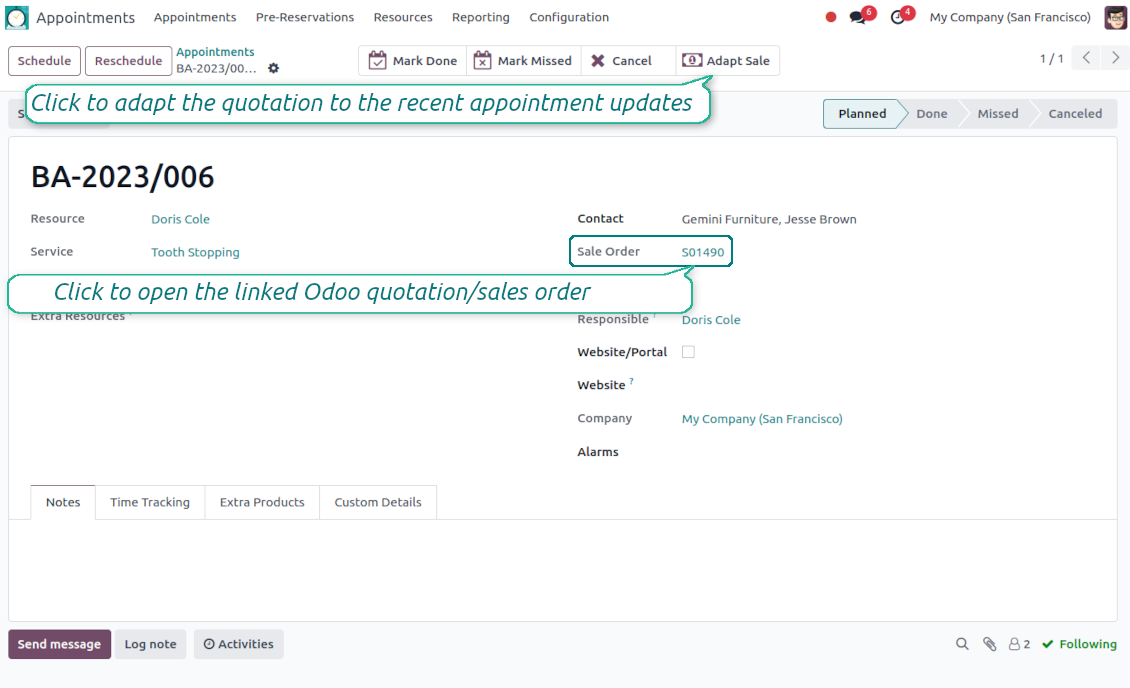
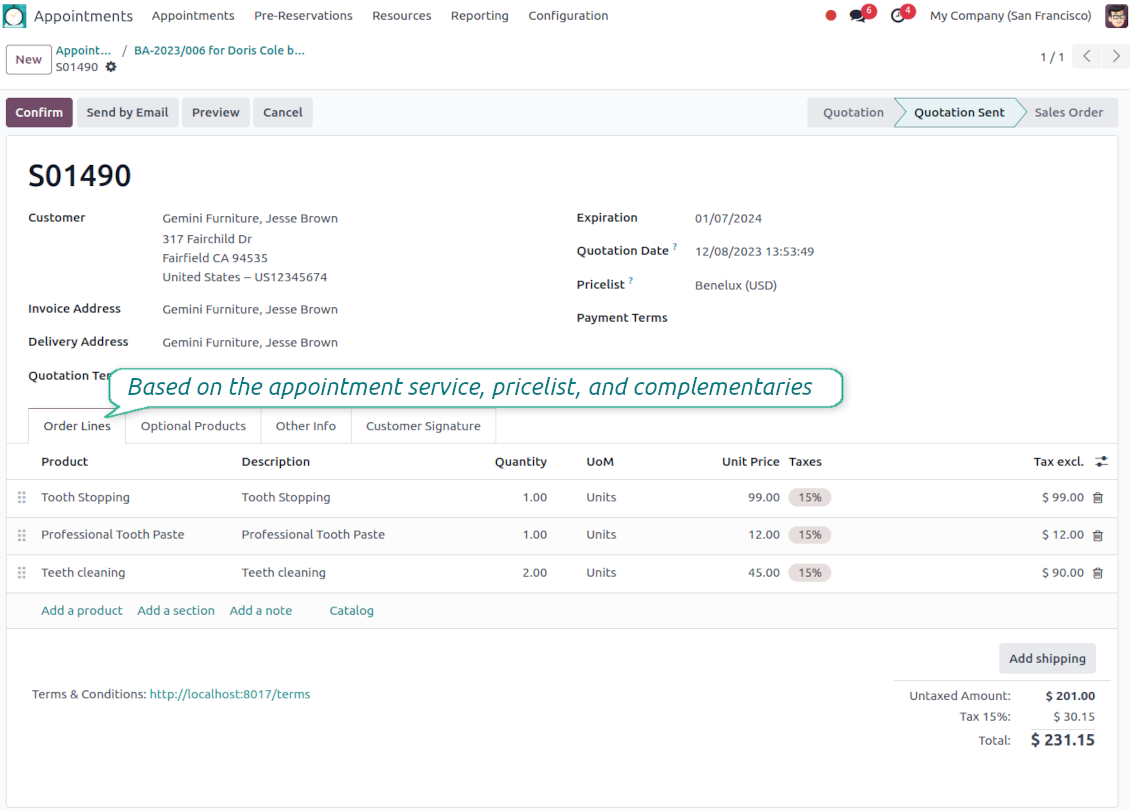
Sale orders and appointments
-
The app lets you link appointments and sale orders. There are 4 configuration options
-
Sent sale orders: if chosen, a sent quotation would be prepared based on the reservation
-
Confirmed sale orders: if chosen, an Odoo sale order would be created as soon as a reservation is scheduled. The method is suitable if your service is standard, while final sale positions and details would hardly be modified after the appointment. For example, fixed-price hair cutting
-
Draft quotations: if chosen, only a quotation in the state 'Draft' would be prepared. In this way, you have more flexibility in updating an order during service provision or beforehand. For example, if you wanted to add extra complementaries or provide individual discounts
-
Manual orders: if chosen, managers have to create quotations while providing service. The method might be applicable when actual sale lines become clear only during the visit itself. For example, a mobile phone repair business assumes initial diagnostics and only after the price is offered
-
Until an appointment sale order is not confirmed, you can update that from a reservation form. Both service, quantity, and complementary products are re-calculated in this case
Service pricing
-
The tool allows configuring the pricing method per each resource type
-
Per planned duration: Odoo quotations are created based on initial reservation plans. For example, it might be suitable for car rental or massage
-
Per units: sale orders consider appointments for the same price disregarding their duration. For example, standard haircutting or tire mounting is invoiced the same disregarding how much time they actually take
-
Per tracked (real) duration (the extension Universal Appointments: Time Tracking is required): invoice actual time spent on service. For example, the approach is suitable for consultation or legal services
-
Prices are price list dependent. Thus, an Odoo manager might select individual conditions during scheduling. In this way, it is possible to apply various currencies, discounts, promos
Complementaries and upselling
-
When a customer finishes scheduling, it is a good moment to increase a bill by offering complementary products. The tool has built-in features for that
-
Odoo may show the popup wist suggested products for backend managers immediately after reserving a time slot
-
The popup allows both adding one or a few complementaries or merely missing the step if suggested products are not required
-
The feature might be turned on/off on the configuration page. The popup would be shown only in case there are complementaries defined for a booked service
-
Chosen complementaries would be added to a quotation/sales order during its automatic creation or adaptation from the reservation page.
Текстовете на приложението и уебсайта на езици, различни от английски, са с помощта на ИИ и са съгласувани с официалните преводи на Odoo. Ако забележите грешка, изпратете тикет за коректност на преводите и ще го поправим.
Демонстрационни бази Odoo (прегледи наживо)
За това приложение можем да предоставим безплатна персонализирана демо база.
За да се свържете с нас не са нужни телефонен номер или кредитна карта. Достатъчна е кратка регистрация по имейл, която не отнема повече от 30 секунди.
По ваше искане ще подготвим индивидуална база за преглед наживо, където около две седмици можете да правите тестове и да проверявате предположения.
Докладване на грешки
Ако срещнете грешки или непоследователно поведение, свържете се с нас. Гарантираме поправки до 60 дни от покупката и сме силно заинтересовани да подобряваме инструментите и след този срок.
За да се свържете с нас не са нужни телефонен номер или кредитна карта. Достатъчна е кратка регистрация по имейл, която не отнема повече от 30 секунди.
Включете възможно най-много подробности в заявката: екранни снимки, дневници на Odoo сървъра, пълно описание как да възпроизведете проблема и т.н. Обикновено са нужни няколко работни дни, за да се подготви работен план (ако грешката е потвърдена) или насоки какво да се направи (в противен случай).
Публични заявки за функции и идеи за модули (безплатна разработка)
Силно сме мотивирани да подобряваме инструментите си и ще сме благодарни за всяка обратна връзка. Ако изискванията ви са от обществена полза и могат да се реализират ефективно, екипът ще ги включи в нашия списък със задачи.
Такъв списък със задачи се обработва редовно и не предполага допълнителни такси. Макар да не можем да обещаем срокове и окончателен дизайн, това може да е добър начин да получите желаните функции без инвестиции и рискове.
За да се свържете с нас не са нужни телефонен номер или кредитна карта. Достатъчна е кратка регистрация по имейл, която не отнема повече от 30 секунди.

The tool to flexibly structure Odoo attachments in folders and synchronize directories with cloud clients: Google Drive, OneDrive/SharePoint, Nextcloud/ownCloud, Dropbox, Amazon S3, Box, and NAS. DMS. File Manager. Document management system
398€
The tool to automatically synchronize Odoo attachments with OneDrive files in both ways
487€
The tool to automatically synchronize Odoo attachments with Google Drive files in both ways
487€

The tool to build a deep and structured knowledge base for internal and external use. Knowledge System. KMS. Wiki-like revisions.
398€
The tool to set up KPI targets and control their fulfillment by periods. KPI dashboards. Dashboard designer. KPI charts

The tool for time-based service management from booking appointments to sales and reviews
398€
The tool to manage your Odoo from your favorite AI chats through MCP. Claude. Any MCP-supporting AI.

The tool to translate URL addresses of Odoo website pages
38€