Universal Appointments: Sales v.17
The extension to the Universal Appointments app to link appointments and sale orders
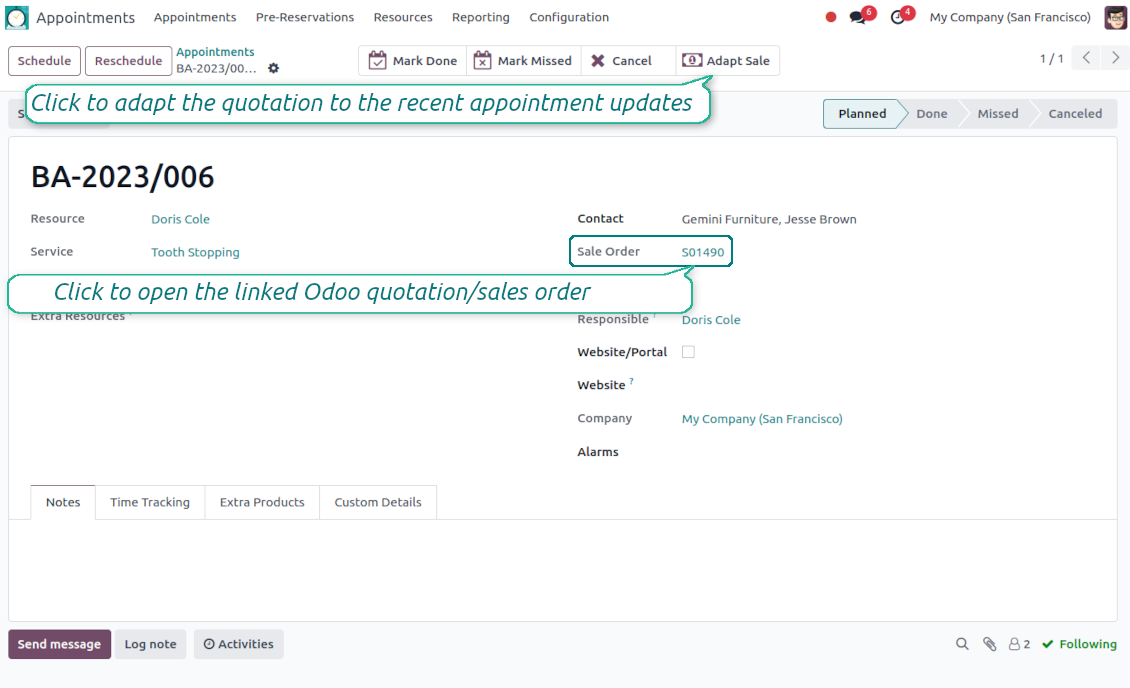
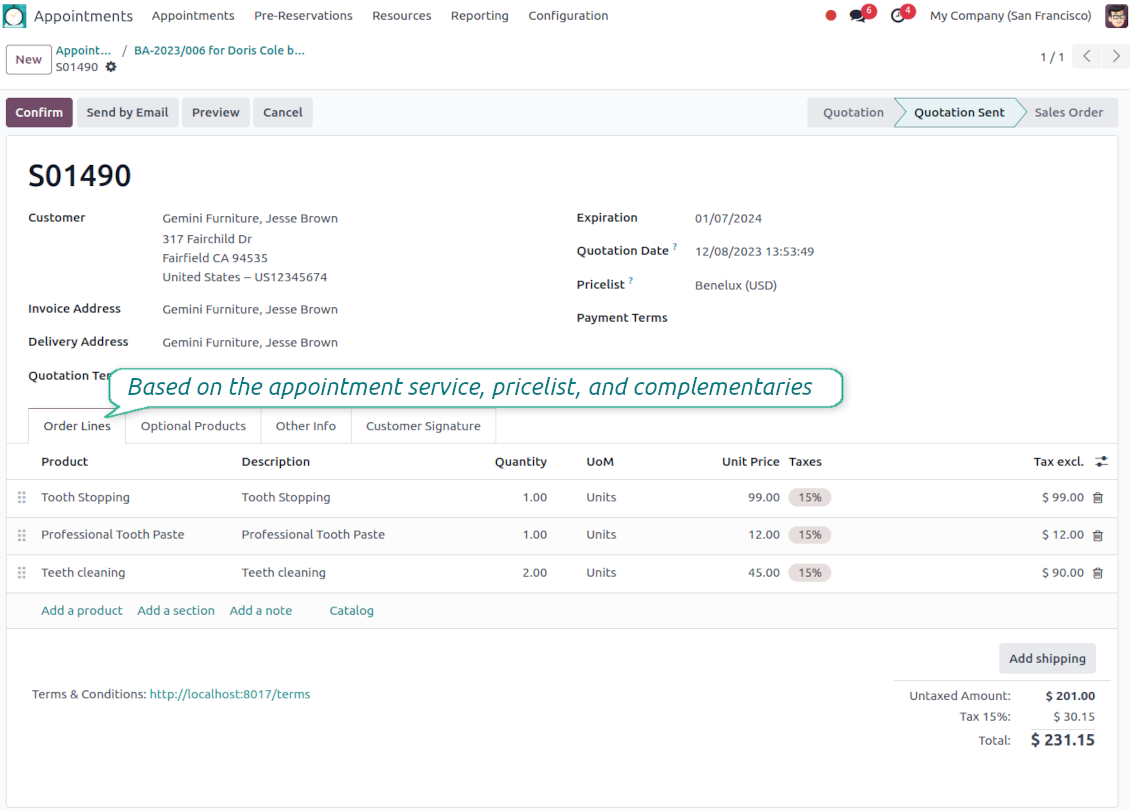
Sale orders and appointments
-
The app lets you link appointments and sale orders. There are 4 configuration options
-
Sent sale orders: if chosen, a sent quotation would be prepared based on the reservation
-
Confirmed sale orders: if chosen, an Odoo sale order would be created as soon as a reservation is scheduled. The method is suitable if your service is standard, while final sale positions and details would hardly be modified after the appointment. For example, fixed-price hair cutting
-
Draft quotations: if chosen, only a quotation in the state 'Draft' would be prepared. In this way, you have more flexibility in updating an order during service provision or beforehand. For example, if you wanted to add extra complementaries or provide individual discounts
-
Manual orders: if chosen, managers have to create quotations while providing service. The method might be applicable when actual sale lines become clear only during the visit itself. For example, a mobile phone repair business assumes initial diagnostics and only after the price is offered
-
Until an appointment sale order is not confirmed, you can update that from a reservation form. Both service, quantity, and complementary products are re-calculated in this case
Service pricing
-
The tool allows configuring the pricing method per each resource type
-
Per planned duration: Odoo quotations are created based on initial reservation plans. For example, it might be suitable for car rental or massage
-
Per units: sale orders consider appointments for the same price disregarding their duration. For example, standard haircutting or tire mounting is invoiced the same disregarding how much time they actually take
-
Per tracked (real) duration (the extension Universal Appointments: Time Tracking is required): invoice actual time spent on service. For example, the approach is suitable for consultation or legal services
-
Prices are price list dependent. Thus, an Odoo manager might select individual conditions during scheduling. In this way, it is possible to apply various currencies, discounts, promos
Complementaries and upselling
-
When a customer finishes scheduling, it is a good moment to increase a bill by offering complementary products. The tool has built-in features for that
-
Odoo may show the popup wist suggested products for backend managers immediately after reserving a time slot
-
The popup allows both adding one or a few complementaries or merely missing the step if suggested products are not required
-
The feature might be turned on/off on the configuration page. The popup would be shown only in case there are complementaries defined for a booked service
-
Chosen complementaries would be added to a quotation/sales order during its automatic creation or adaptation from the reservation page.
La redacción de la aplicación y el sitio web en idiomas distintos del inglés cuenta con asistencia de IA y se ajusta a las traducciones oficiales de Odoo. Si detecta un error, enviar un ticket de traducción y lo corregiremos.
Bases de datos de demostración de Odoo (vistas previas)
Para esta aplicación, podemos proporcionar una base de datos de demostración personalizada gratuita.
No necesita un número de teléfono ni una tarjeta de crédito para contactarnos. Sólo debes pasar un breve registro por correo electrónico, que no lleva más de 30 segundos.
A petición suya, preparamos una base de datos de vista previa individual en la que puede realizar cualquier prueba y comprobar sus hipótesis durante unas dos semanas.
Notificación de errores
Si encuentra errores o comportamiento inconsistente, no dude en contactarnos. Garantizamos proporcionar correcciones dentro de los 60 días posteriores a la compra y estamos muy interesados en mejorar nuestras herramientas incluso después de este período.
No necesita un número de teléfono ni una tarjeta de crédito para contactarnos. Sólo debes pasar un breve registro por correo electrónico, que no lleva más de 30 segundos.
Incluya tantos detalles como sea posible en su solicitud: capturas de pantalla, registros del servidor Odoo, una descripción completa de como reproducir el problema, etc. Por lo general, se necesitan varios días laborables para preparar un plan de trabajo para un problema (si se confirma un error) o proporcionarle indicaciones sobre lo que se debe hacer (en caso contrario).
Solicitudes de funciones públicas e ideas de módulos (desarrollo gratuito)
Estamos muy motivados para mejorar nuestras herramientas y agradeceríamos cualquier comentario. Si sus requisitos son de uso público y podrían implementarse de manera eficiente, el equipo los incluirá en nuestra lista de tareas pendientes.
Esta lista de tareas pendientes se procesa periódicamente y no implica cargos adicionales. Aunque no podemos prometer plazos ni diseño final, podría ser una buena manera de conseguir las funciones deseadas sin inversiones ni riesgos.
No necesita un número de teléfono ni una tarjeta de crédito para contactarnos. Sólo debes pasar un breve registro por correo electrónico, que no lleva más de 30 segundos.

The tool to flexibly structure Odoo attachments in folders and synchronize directories with cloud clients: Google Drive, OneDrive/SharePoint, Nextcloud/ownCloud, Dropbox, Amazon S3, Box, and NAS. DMS. File Manager. Document management system
398€
The tool to automatically synchronize Odoo attachments with OneDrive files in both ways
487€
The tool to automatically synchronize Odoo attachments with Google Drive files in both ways
487€

The tool to build a deep and structured knowledge base for internal and external use. Knowledge System. KMS. Wiki-like revisions.
398€
The tool to set up KPI targets and control their fulfillment by periods. KPI dashboards. Dashboard designer. KPI charts

The tool for time-based service management from booking appointments to sales and reviews
398€
The tool to manage your Odoo from your favorite AI chats through MCP. Claude. Any MCP-supporting AI.

The tool to combine different Odoo events in a few configurable super calendars