OwnCloud / NextCloud Odoo Integration v.10
The tool to automatically synchronize Odoo attachments with OwnCloud / NextCloud files in both ways

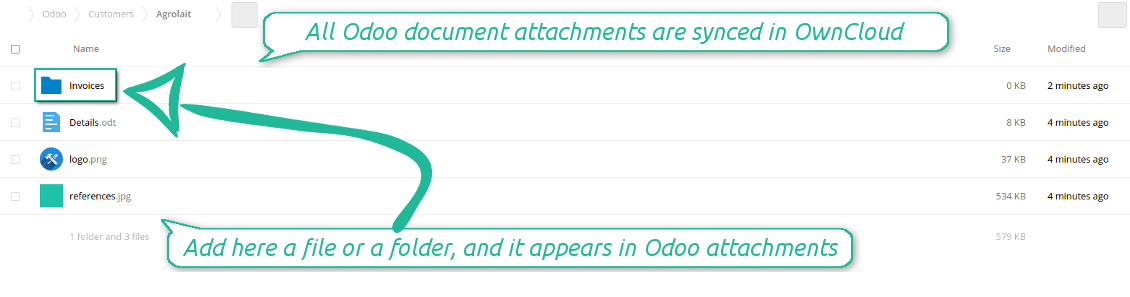
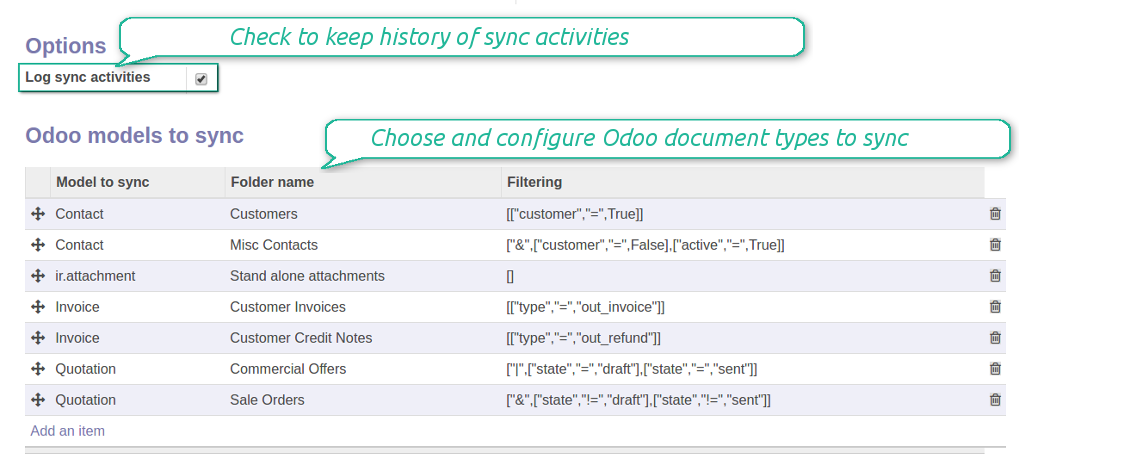
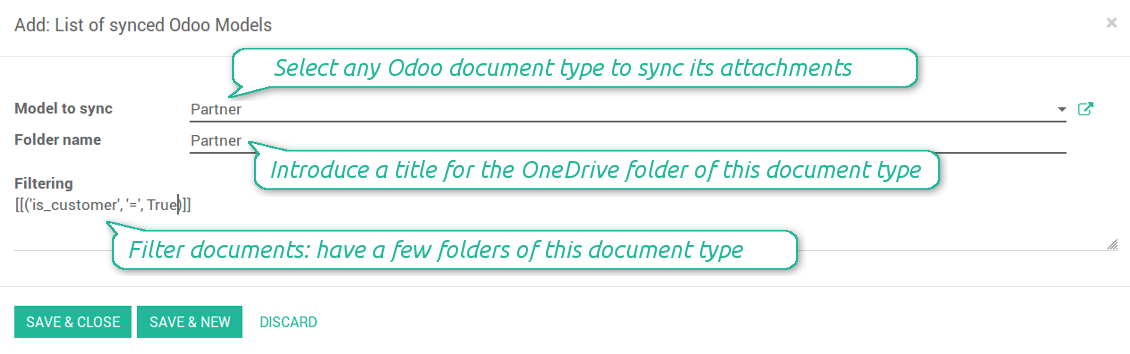
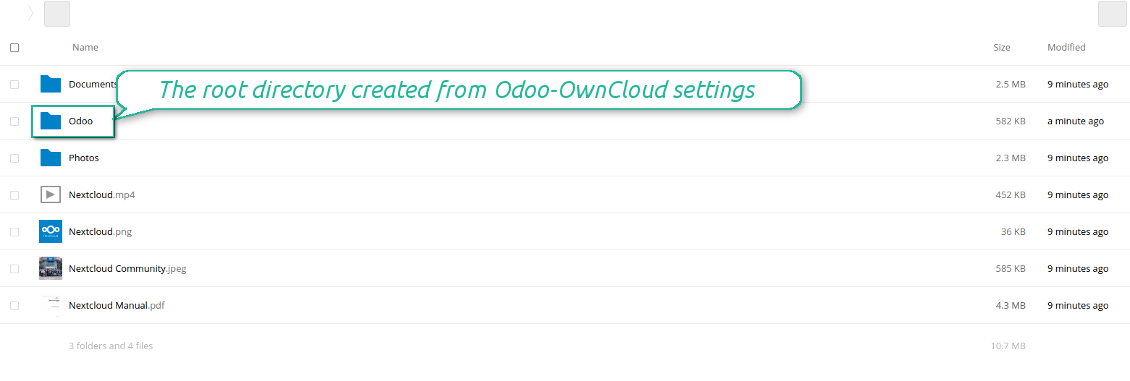
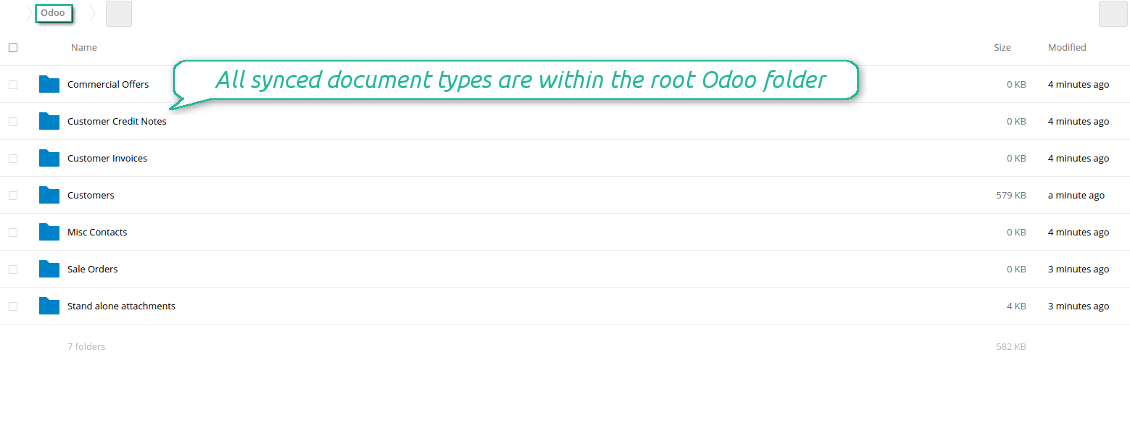
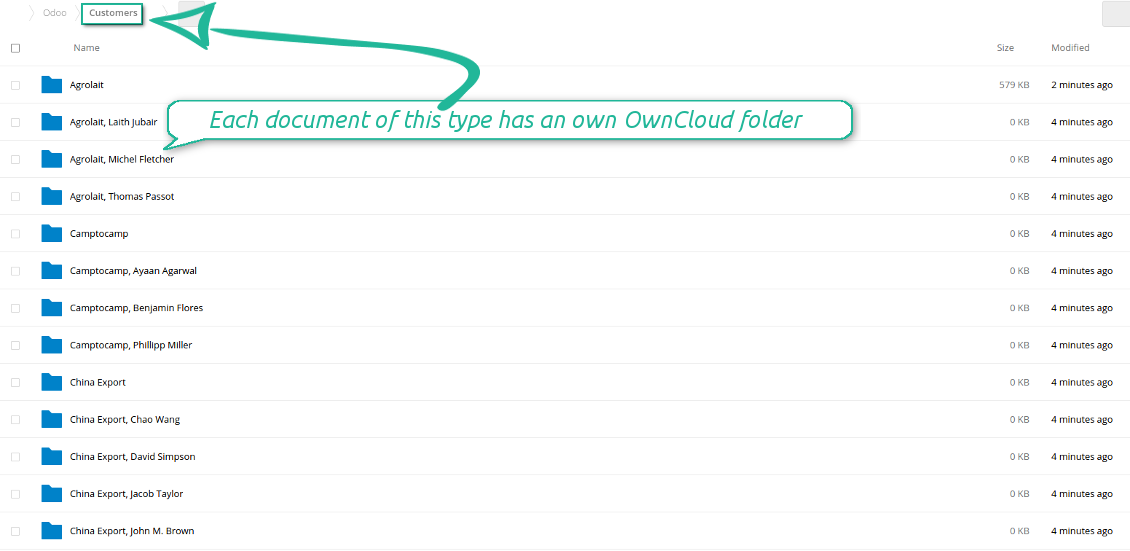
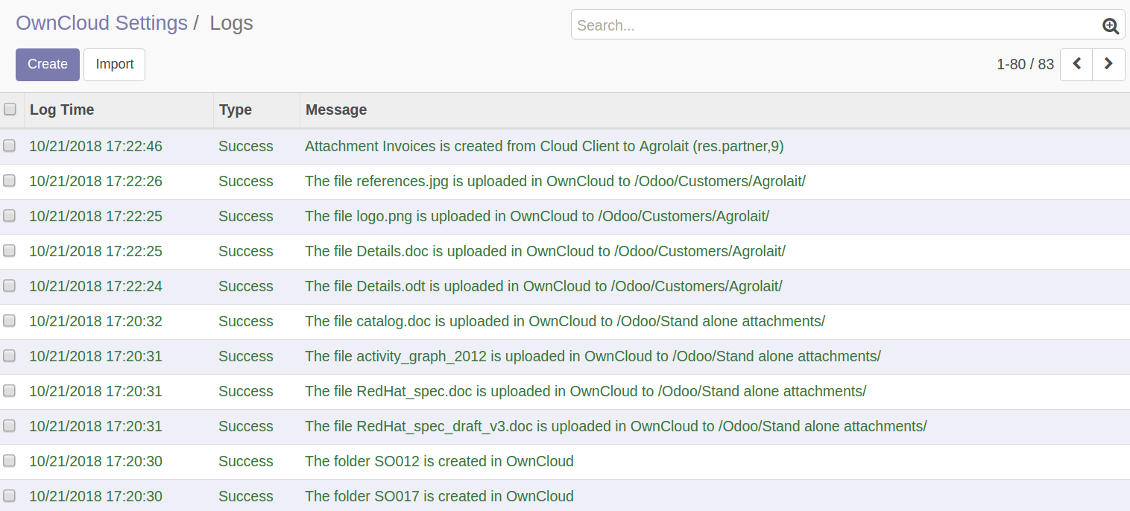
Synchronization is bilateral. All Odoo attachments are put in OwnCloud / NextCloud regularly. OwnCloud / NextCloud files create attachments in Odoo in case they are placed in a correct folder. Look at the sections From Odoo to OwnCloud / NextCloud and From OwnCloud / NextCloud to Odoo
Integration is automatic in both ways. Based on scheduled jobs, Odoo send attachments to OwnCloud / NextCloud and retrieve files from there
Any Odoo document might be synced: customers, opportunities, sale or purchase orders, tasks or issues, employees or users, etc. You decide by your own which records should be in OwnCloud / NextCloud, and which should be left in Odoo
Synchronization equally works for OwnCloud and NextCloud
All synced files are easily accessible though clicking on an attachment. You might also open a whole document folder by clicking on 'Open folder' on the attachment widget
All sync activities might be logged. Control over files and folders creations, moves, name changes and removals. Just turn on the option 'Log sync activities' and access history through the button 'Sync logs'
The tool is compatible with Odoo reporting and mailing apps. If such an app faces a synced file, it retrieves a real content from OwnCloud / NextCloud. In particular, the reports 'always reload' feature and messages & mass mailing attachments work properly
Integration is based on a single user endpoint. It means that a single user login/password of OwnCloud / NextCloud is used. Afterwards for integrations Odoo would use that credentials disregarding an actual Odoo user. Make sure, however, that real Odoo users have an access to OwnCloud / NextCloud to open URLs linked to their attachments
- Prepare and keep updated folders' structure in OwnCloud / NextCloud
- Upload new attachments to a correct folder
Odoo creates a convenient directory structure in OwnCloud / NextCloud: Odoo / Document type name / Document name / Files, where:
- Odoo is a central directory for Odoo Sync in your cloud storage.
- Document type is a synced Odoo model, for example, 'Sale orders', 'Opportunities', 'Customers'
- You select document types by yourself. It might be any document type
- Moreover, you might have a few folders for a single document type. Use Odoo domains to have not global 'Partners, but 'Customers' and 'Suppliers', not just 'Sale orders' but 'Commercial offers', 'To deliver', and 'Done orders'
- With each sync Odoo would try to update document types' folders. Add a new document type at any moment. It will appear in OwnCloud / NextCloud with a next sync
- You are welcome to introduce or change document types folder names at any moment in Odoo. Take into account: renaming in OwnCloud / NextCloud will be recovered to Odoo names
- If you remove a model from integration, it will not be deleted from OwnCloud / NextCloud to keep already synced files safe. However, new documents of this type would not be synced
- In case you removed a directory in OwnCloud / NextCloud, but it is still configured in Odoo, with a next sync a folder structure is going to be recovered (not files, surely).
- Document is an exact object to sync. For instance, 'Agrolait' or 'SO019'
- Documents are synced in case they relate to a synced document type and satisfy its filters. For example, you are not obliged to sync all partners, you may integrate only 'Customers' and 'Vendors' or only 'Companies', not 'Contacts'
- Odoo would generate a folder in OwnCloud / NextCloud for each suitable document even for documents without attachments. It is needed for a backward sync to easily add new files
- OwnCloud / NextCloud folder name equals a real document name. It relies upon Odoo name_get method. Thus, Odoo 'Michael Fletcher' (a contact of 'Agrolait') would be OwnCloud / NextCloud 'Agrolait, Michael Fletcher'
- If an exact document changes its document type (e.g. a quotation is now confirmed), Odoo will automatically relocate its related folder to a proper parent directory (in the example: from 'Commercial offers' to 'To deliver')
- In case a document relates to a few types (for instance, you have 'Vendors' and 'Customers', while Agrolait is both), this document folder would be put into the most prioritized document type. A document type priority is higher as closer to the top in Odoo interfaces it is
- If an Odoo document is removed, the next sync will remove a corresponding OwnCloud / NextCloud directory
- In case you remove a directory in OwnCloud / NextCloud, but it still exists in Odoo, OwnCloud / NextCloud folder structure would be recovered (while files would be unlinked in both Odoo and OwnCloud / NextCloud)
- Folders renaming in OwnCloud / NextCloud will be replaced with Odoo names, Odoo document names are more important
- Files are real files taken from Odoo attachments
The resulted path would be, for example, 'Odoo / Quotations / SO019 / commercial offer.png'.
The only exclusion of the rule are stand alone attachments which do not relate to any Odoo documents (their document type is 'ir.attachment'). Such attachments' path is 'Odoo / Stand Alone Attachments / image.png'.
The direct sync might take quite a long, since a lot of folders should be created. It is not recommended to make sync too frequent: once an hour or two hours is fine.
FilesWith each direct sync, Odoo tries to find not yet synced attachments. If such attachments suit any document type to sync, a file will be uploaded to OwnCloud / NextCloud to a proper folder. In Odoo such attachments will become of 'url' type. It means that a file is not any more kept in Odoo server space, but now it is in OwnCloud / NextCloud. Until sync is done, Odoo attachment remains binary and stores an actual file. Such approach helps Odoo to work faster.
If you unlinked an attachment from Odoo, it would be deleted in OwnCloud / NextCloud as well.
Take into account that file names should be managed in OwnCloud / NextCloud: each backward sync would recover OwnCloud / NextCloud names, Odoo is here less important.
- If a new file is added to a proper document folder (e.g. to 'Odoo / Customers / Agrolait'), the same attachment will be added to Odoo document (in the example - to 'Agrolait')
- In document folders you can put not only files but also child folders. In that case a link for this folder (not its content) is kept in attachments
- In case you rename a file in OwnCloud / NextCloud, it will be renamed in Odoo as well
- Files' removal from OwnCloud / NextCloud leads to related Odoo attachments' removal
- If you move a file to another document folder, in Odoo a related attachment would be re-attached to this new document. Take into account: if you move a file for a not document folder, in Odoo attachment will be deleted as it has been removed from OwnCloud / NextCloud
- If you deleted a document type or document folder, their child files are deleted as well. Thus, Odoo would remove related attachments. The folders, however, will be recovered with a next direct sync. Folders' move to another directory is also considered as a removal. Avoid such situations by following the simple rule: folders are managed mostly by Odoo, files - mostly by OwnCloud / NextCloud.
Backward OwnCloud / NextCloud might take quite much time, since each folder should be checked (the more folders, the more time the backward sync requires). It is recommended to make frequency oftener than once an hour or two hours.
- Do not add folders inside root or document types' folders. If they have the same name as newly synced folders, the latter would not be uploaded
- Make sure your database has a proper SSL certificate required to use OwnCloud API
- Try to avoid the following symbols in folders' and files' names: *, ?, ", ', :, <, >, |, +, %, !, @, \, /,. Direct sync will replace such symbols with '-'. It is done to avoid conflicts with file systems.
Log in
- Enter your cloud storage full url
- Select an OwnCloud / NextCloud, which has full rights to read, create, write and delete files and folders within a root directory
- Enter login and password of this user
- Introduce the title for OwnCloud / NextCloud folder, e.g. Odoo
- Push the button 'Login and Confirm'
- If everything is fine, push the button 'Sync'
- Make sure that the root directory or its children are shared with your colleagues
Enter OwnCloud / NextCloud credentials
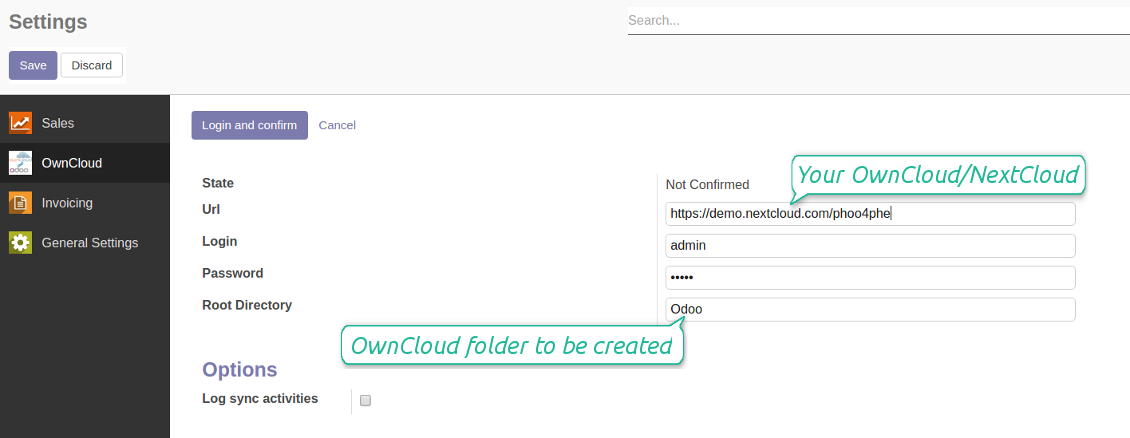
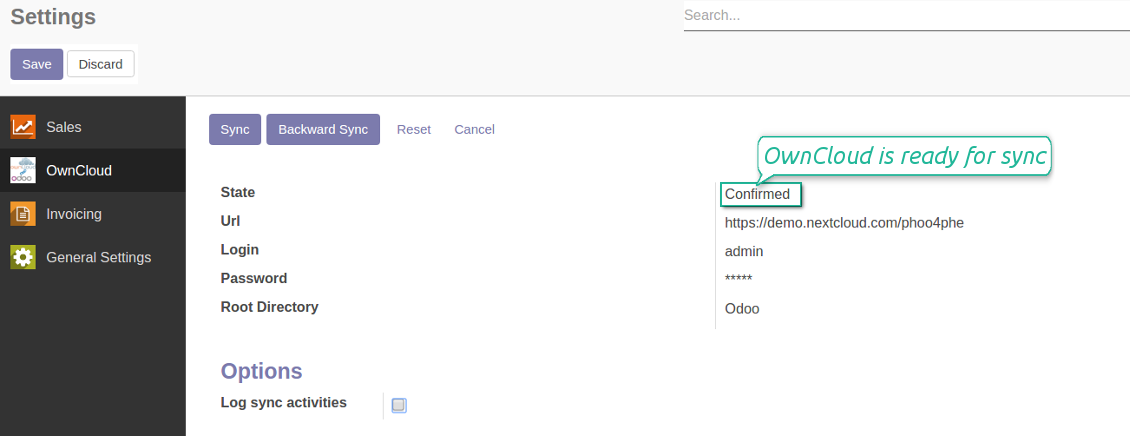
Confirmed credentials to start sync
Migration from the versions prior to the version 1.3.0
- Push the button 'Backward sync' (to make sure recent OwnCloud / NextCloud changes are synced)
- Push the button 'Migrate from the version under 3.0'
- Check / update synced models
- Push the button 'Sync' to apply changes
Pertanyaan umum tentang OwnCloud / NextCloud Odoo Integration Odoo v.10
Bolehkah saya mengubah frekuensi pekerjaan sinkronisasi?
Ya, Anda bisa. Untuk itu:
Aktifkan mode debug
Buka pengaturan teknis > Otomatisasi > Pekerjaan terjadwal
Temukan pekerjaan 'Synchronize attachments with cloud' dan 'Update attachments from cloud'.
Jangan menjadikannya terlalu sering. Sebaiknya pekerjaan selesai sebelum yang berikutnya dimulai. Konfigurasi bergantung pada berapa banyak item yang harus disinkronkan. Biasanya frekuensinya antara 15 menit hingga 4 jam.
Pastikan juga Anda mengatur batas waktu yang cukup di berkas konfigurasi Odoo. Parameter LIMIT_TIME_CPU dan LIMIT_TIME_REAL harus sama atau lebih besar dari waktu pekerjaan cron yang direncanakan. Mulai versi 13 pertimbangkan juga parameter LIMIT_TIME_REAL_CRON.
Catatan penting untuk klien Odoo.sh: waktu maksimum pekerjaan cron mungkin hanya 15 menit.
Bolehkah saya mengonfigurasi struktur direktori tersinkron yang berbeda dari yang diasumsikan sinkronisasi?
Tidak, fitur ini hanya tersedia mulai versi 15. Sebelum versi itu, modul bekerja dengan struktur folder yang sudah ditentukan:
Odoo - folder inti untuk sinkronisasi
Models - folder untuk setiap jenis dokumen Odoo. Misalnya, 'Projects', 'Partners'. Dibedakan menurut domain, mungkin ada folder yang lebih spesifik: mis., 'Customer 1 Projects', 'Projects of the Customer 2', 'Internal Projects', dll.
Objects - folder untuk setiap dokumen, mis. 'Project 1' atau 'Customer 1'
File dan folder terkait dokumen Odoo ini yang akan disinkronkan.
Hasilnya, Anda bisa memiliki misalnya:
Odoo / Projects / Project 1 / file dan folder terkait project 1
Odoo / Customer 1 Projects / Project 1; Odoo / Customer 2 Projects / Project 3, ...
Odoo / Customers / Customer 1 / file dan folder terkait customer 1
Struktur ini selalu datar, artinya hanya ada tingkat hierarki tersebut. Jadi benar bahwa berbagai jenis dokumen tidak dapat berada dalam struktur yang sama. Di dalam folder 'Customer 1' kita tidak dapat menyimpan file yang terkait sekaligus dengan sale order, faktur, dan proyek. Setiap jenis dokumen itu punya folder sendiri (atau beberapa folder sendiri). Jika tidak, kita tidak bisa melakukan sinkronisasi mundur karena tidak ada kriteria yang bisa diandalkan.
Haruskah saya mengatur akses pengguna tertentu di Odoo?
Tidak, alat mengandalkan satu titik akhir pengguna. Semua proses sinkronisasi dilakukan di bawah satu admin cloud (aplikasi). Hak akses folder / berkas yang dibuat tidak diotomatiskan. Anda harus mengelola hak itu di solusi penyimpanan cloud.
Kolom tersinkron disimpan di mana? Apakah diduplikasi ke Odoo dan clouds?
Aplikasi mengasumsikan konten biner lampiran disimpan di Cloud Client, bukan di server Odoo. Lampiran semacam itu di Odoo menjadi tipe URL, dan Anda dapat membukanya kapan saja dari kotak lampiran atau dari Cloud Client.
Setelah penyiapan, tidak perlu tindakan manual karena sinkronisasi sepenuhnya otomatis. Tentukan jenis dokumen Odoo yang harus disinkronkan dan siapkan model terkait untuk masing-masing (Pelanggan, pesanan penjualan atau pembelian, Tugas, Project, dll.).
Bisakah saya punya beberapa folder untuk jenis dokumen yang sama? Misalnya, proyek internal dan proyek pelanggan?
Ya, Anda bisa. Untuk itu siapkan aturan untuk masing-masing, lalu terapkan filter: misalnya menurut jenis project.
Usahakan filter saling eksklusif agar dokumen dapat ditetapkan dengan pasti. Misalnya 'pelanggan tetapi bukan pemasok', 'pemasok tetapi bukan pelanggan'. Jika tidak, folder dokumen tertentu akan meloncat dari satu model ke model lain.
Apakah saya hanya perlu aplikasi Cloud Storage Solution?
Tidak, alat ini hanya inti teknis. Anda juga memerlukan konektor untuk cloud client Anda.
Apa tidak apa-apa jika ada banyak objek untuk disinkronkan, misalnya 10000?
Ya, meski jika banyak folder/lampiran yang perlu disinkronkan prosesnya bisa lambat. Pada saat yang sama, klien melaporkan lingkungan dengan >10k rekanan dan ~5k varian produk untuk disinkronkan, dan prosesnya tetap diterima.
Beberapa poin yang perlu ditekankan:
- Sinkronisasi dibangun agar setiap item disinkronkan dan tidak hilang, meski mungkin tidak cepat. Hal ini dijamin oleh antrean first-in-first-out dan setiap job yang dikomit.
- Jumlah objek dapat dibatasi secara logis. Konfigurasi model memungkinkan membatasi sinkronisasi item usang (misalnya tidak ada gunanya menyinkronkan rekanan yang diarsipkan atau pesanan 2 tahun lalu).
Apakah sinkronisasi dapat dibuat real-time?
Tidak. Kami punya alasan kuat untuk menghindari sinkronisasi waktu nyata:
Masalah kinerja. Jika sinkronisasi waktu nyata, setiap unggah berkas akan menampilkan layar pemuatan.
Masalah konflik. Jika 2 pengguna mengubah item secara bersamaan, dapat timbul situasi yang tak terselesaikan. Pada job berkala kami dapat memperbaikinya kemudian; pada waktu nyata harus disimpan sebagai antrean, yang lebih membingungkan pengguna.
Masalah fungsionalitas. Khususnya penggantian nama dan penataan ulang item. Pada sinkronisasi balik, alat sangat mengandalkan logika direktori, dan setiap sinkronisasi 100% item diperiksa. Jika dilakukan setelah setiap pembaruan, akan ada ribuan permintaan per detik. Jika tidak: perubahan akan hilang.
Bolehkah saya menyinkronkan lampiran ke beberapa klien cloud
Tidak, fitur ini baru tersedia mulai versi 15.
Kami memakai editor khusus di cloud kami (mis. OnlyOffice, Office 365, dll.). Apakah file akan dibuka di editor itu?
Ya, tergantung konfigurasi cloud client Anda.
Bolehkah saya memperbarui tag OwnCloud menggunakan konektor?
Tidak, tag tidak disinkronkan. Kami sempat mempertimbangkan fitur ini, tetapi memutuskan tidak memperkenalkannya karena beberapa alasan:
Pustaka konektor tidak mendukung pengambilan atau pembaruan tag ownCloud
Lampiran Odoo tidak memiliki atribut 'tags' dan belum jelas kapan tag itu akan ditetapkan ke pengguna.
Karena aplikasi menyediakan sinkronisasi dua arah, dapat terjadi konflik kritis saat sinkronisasi yang sulit diselesaikan.
Apa kebijakan pembaruan alat Anda?
Menurut kebijakan Odoo Apps Store saat ini:
- Setiap modul yang dibeli untuk versi 12.0 dan sebelumnya memberi akses ke semua versi hingga 12.0.
- Mulai versi 13.0, setiap versi modul harus dibeli terpisah.
- Terlepas dari versi, pembelian memberi hak atas semua pembaruan dan perbaikan bug dalam versi mayor.
Perhatikan bahwa tim faOtools tidak mengontrol kebijakan tersebut. Untuk pertanyaan, hubungi langsung perwakilan Odoo Apps Store.
Bagaimana memasang aplikasi Anda di Odoo.sh?
Pendekatan paling langsung adalah memakai alur bawaan toko Odoo:
1. Buka halaman modul dan klik tombol Deploy on odoo.sh
2. Setelah itu Anda akan diarahkan ke halaman GitHub. Masuk ke akun, lalu klik 'Create a new repo' atau pakai yang sudah ada. Pastikan repositori bersifat privat. Tidak diizinkan memublikasikan aplikasi di bawah lisensi OPL-1. Jika perlu, buat repo baru untuk proyek Odoo.sh
3. Lalu buka odoo.sh dan klik tombol Deploy. Di jendela pop-up, kirim keputusan dan klik 'Continue.' Tindakan ini memicu proses pemasangan.
Langkah ini akan memasang aplikasi di cabang produksi proyek. Jika ingin men-deploy aplikasi ke cabang lain atau memperbarui modul, lakukan tindakan berikut:
1. Unggah kode sumber aplikasi dari toko Odoo
2. Commit modul ke repositori GitHub yang diperlukan. Pastikan tidak ada folder/file aplikasi yang diabaikan (yaitu tidak ada di .gitignore repo). Repositori dibuat otomatis oleh odoo.sh dan secara default dapat berisi item penting (mis., /lib). Unggah semua direktori, subdirektori, dan file modul tanpa kecuali
3. Deploy cabang target proyek odoo.sh atau, jika pengaturan Anda mengasumsikan itu, tunggu hingga dibangun otomatis.
Bagaimana memasang aplikasi Anda di server saya sendiri?
2. Mulai ulang server Odoo;
3. Aktifkan mode pengembang (pengaturan teknis);
4. Perbarui daftar aplikasi (menu aplikasi);
5. Temukan aplikasi dan tekan 'Activate'/'Install';
6. Ikuti panduan di halaman aplikasi jika ada.
Saya melihat aplikasi Anda punya add-on tambahan. Boleh beli belakangan?
Ya, tentu. Pada saat yang sama Odoo otomatis menambahkan semua dependensi ke keranjang, jadi Anda harus mengecualikan alat yang sudah dibeli agar tidak membayar dua kali.
Saya men-deploy aplikasi Anda di Odoo.sh dan melihat peringatan/kesalahan di tes
Peringatan merah/oranye tidak memengaruhi fitur aplikasi. Sayangnya, modul kami kadang tidak lulus uji otomatis standar karena uji itu mengasumsikan perilaku yang bertentangan dengan tujuan aplikasi. Misalnya kami mengubah penghitungan harga, sementara uji modul Odoo standar membandingkan harga akhir dengan algoritma standar.
Pertama-tama, periksa fitur basis data yang diterapkan. Apakah semuanya berjalan benar?
Jika Anda masih menganggap peringatan memengaruhi fitur nyata, hubungi kami dan kirim log instalasi lengkap serta daftar lengkap modul yang diterapkan (termasuk inti dan pihak ketiga).
Bolehkah saya membeli aplikasi langsung dari perusahaan Anda?
Tidak, kami hanya mendistribusikan alat melalui toko aplikasi Odoo resmi.
Saya ingin mendapat diskon
Sayangnya, kami tidak punya sarana teknis untuk memberi harga individual.
Bolehkah saya memasang aplikasi di database Odoo Online (SaaS) saya?
Tidak, aplikasi pihak ketiga tidak dapat dipakai di Odoo Online. Sayangnya Odoo SaaS memblokir kemungkinan itu.
Alat Anda bergantung pada aplikasi lain. Haruskah saya membelinya?
Ya, alat memerlukan semua modul yang ditandai di dependensi agar bekerja dengan benar. Harga di halaman aplikasi sudah mencakup semua dependensi yang diperlukan.
Berapa harga modul dalam dolar AS? Mengapa berubah?
Harga modul kami ditetapkan dalam euro. Toko Odoo mengonversi harga ke mata uang lain menurut kurs internalnya. Jadi harga dalam dolar AS dapat berubah saat kurs diperbarui.
Teks aplikasi dan situs dalam bahasa selain Inggris dibantu AI dan diselaraskan dengan terjemahan resmi Odoo. Jika Anda melihat kesalahan, kirim tiket kebenaran terjemahan dan kami akan memperbaikinya.
Pelaporan bug
Jika Anda menemukan bug atau perilaku tidak konsisten, jangan ragu menghubungi kami. Kami jamin perbaikan dalam 60 hari setelah pembelian dan tetap ingin meningkatkan alat setelah periode itu.
Anda tidak perlu nomor telepon atau kartu kredit untuk menghubungi kami. Cukup pendaftaran email singkat yang tidak lebih dari 30 detik.
Sertakan sebanyak mungkin detail dalam permintaan: tangkapan layar, log server Odoo, deskripsi lengkap cara mereproduksi masalah, dan sebagainya. Biasanya butuh beberapa hari kerja untuk menyiapkan rencana kerja (jika bug dikonfirmasi) atau memberi panduan apa yang harus dilakukan (jika tidak).
Permintaan fitur publik dan ide modul (pengembangan gratis)
Kami sangat termotivasi untuk meningkatkan alat kami dan berterima kasih atas masukan apa pun. Jika kebutuhan Anda bermanfaat bagi publik dan dapat diimplementasikan secara efisien, tim akan memasukkannya ke daftar tugas kami.
Daftar tugas semacam ini diproses secara berkala dan tidak dikenai biaya tambahan. Meski kami tidak dapat menjanjikan tenggat dan desain akhir, ini bisa jadi cara baik untuk mendapatkan fitur yang diinginkan tanpa investasi dan risiko.
Anda tidak perlu nomor telepon atau kartu kredit untuk menghubungi kami. Cukup pendaftaran email singkat yang tidak lebih dari 30 detik.

Alat untuk menyimpan kata sandi dengan aman di Odoo untuk penggunaan bersama. Brankas bersama

Alat untuk membangun basis pengetahuan yang dalam dan terstruktur untuk penggunaan internal dan eksternal. Knowledge System. KMS. Revisi seperti wiki.
398€
Alat untuk menetapkan target KPI dan mengontrol pemenuhannya per periode. Dasbor KPI. Perancang dasbor. Grafik KPI

Alat manajemen layanan berbasis waktu dari pemesanan janji hingga penjualan dan ulasan
398€
Alat untuk mengelola Odoo dari chat AI favorit melalui MCP. Claude. AI apa pun yang mendukung MCP.

Alat untuk menata lampiran Odoo secara fleksibel dalam folder dan menyinkronkan direktori dengan klien cloud: Google Drive, OneDrive/SharePoint, Nextcloud/ownCloud, Dropbox, Amazon S3, Box, dan NAS. DMS. Manajer Berkas. Sistem manajemen dokumen
398€
Alat untuk menyinkronkan lampiran Odoo secara otomatis dengan file OneDrive secara dua arah
487€
Alat untuk menyinkronkan lampiran Odoo secara otomatis dengan file Google Drive secara dua arah
487€
Alat untuk menyinkronkan lampiran Odoo secara otomatis dengan solusi NAS secara dua arah. Synology, QNAP, TrueNAS, dan NAS lain yang mendukung WebDav
487€