About URL Transliterations for Website Pages
URL Transliterations for Website Pages is an Odoo app that helps transliterate the URLs of Odoo website pages. The app enhances the website visitor experience in their native languages, and transliteration helps improve efficiency for language-specific SEO.
Transliterate URLs right from the Odoo website page form view. To that end, add a new translation for a required language to the list of addresses at the bottom of the form.
The tool enables address transliteration into any installed Odoo language. Simultaneously, you are not obliged to do so for all languages. If no transliteration is available for a particular one, a default URL will be applied.
The page address is adapted each time a user opens that page or selects the desired language.
Configuring URL Transliterations
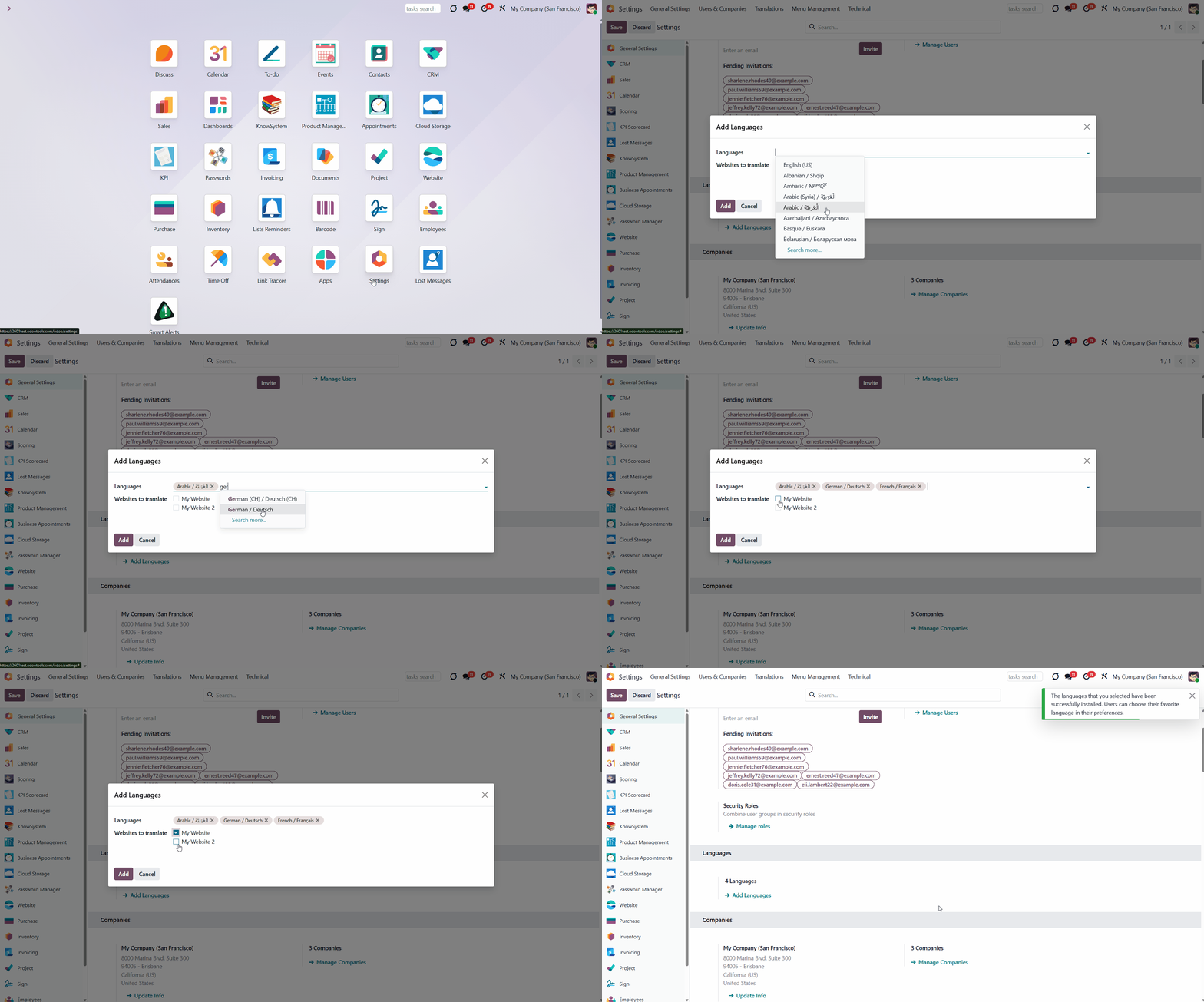
Before configuring the URL Transliterations, ensure that all required languages are installed in your Odoo instance. For that:
1. Go to General Settings
2. Find the section 'Languages'
3. Click 'Add Language'
4. Choose a language
5. Choose the sites where you want to show the language, so that the transliterations will be available
6. Click 'Add'
7. Optionally add some more languages
After that, the chosen languages will be installed in Odoo, and users will be able to select their preferred language in their preferences.
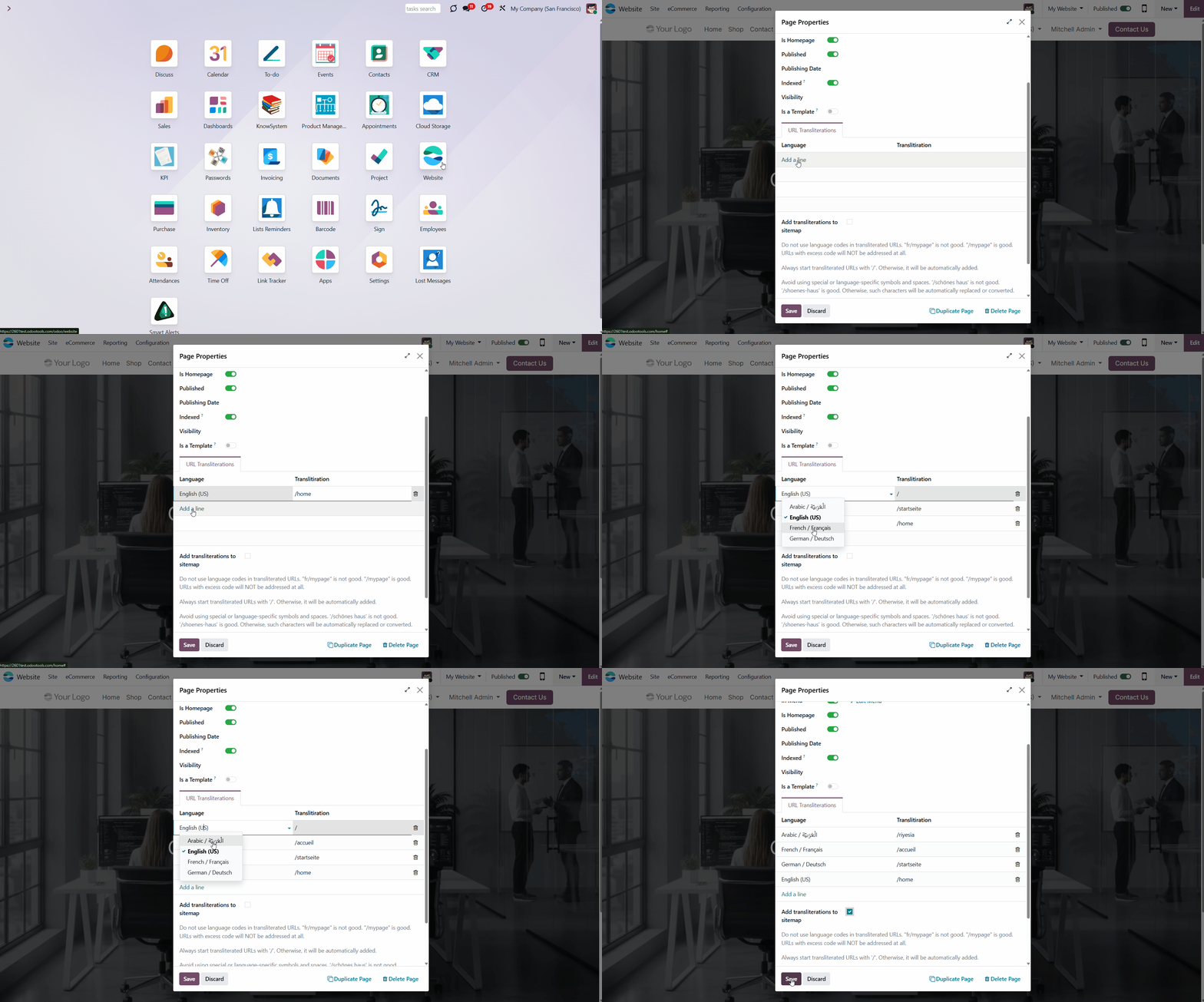
Transliterate URL to any installed language. For that, you need to add translations for each language that you want to use on your website. For the best results, ensure you follow the requirements (see URL Transliteration Requirements).
To add URL transliteration to your pages:
1. Open the website page that you want to add the transliterations to, for example, home or contact us
2. Click the button 'Site' in the systray and under the section 'This page', click on the option 'Properties'
3. In the tab 'URL Transliterations', click 'Add a line' to choose the language and introduce the URL in the column 'URL' after the slash sign '/'
4. Optionally introduce URL transliterations for some more languages by repeating steps 5 and 6
5. Optionally tick the box 'Add transliterations to sitemap' (to add the transliteration to the sitemap and make it easier for search engines to understand and index your content)
6. Click 'Save'.
For example, let's transliterate the 'Home' page into German and French. In German, let's write '/startseite', and in French, let's write '/accueil'.
If the language uses an alphabet that cannot be used in a URL (for example, Arabic), the word should be written using English letters (the Latin alphabet).
URLs might be defined only for custom pages. All pages available for transliteration can be found under the menu Website > Site > Pages.
End Users Interface
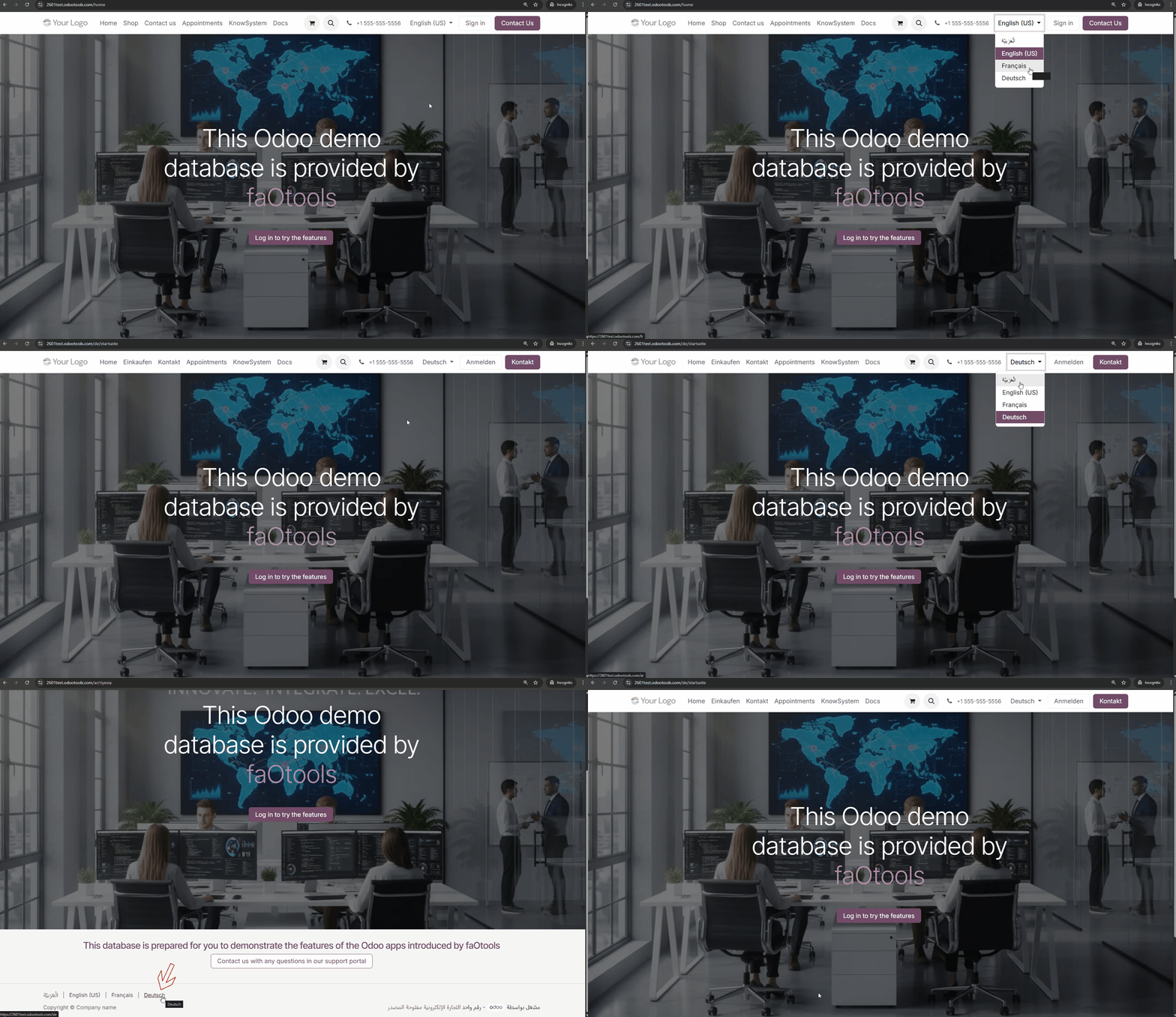
The page address is adapted each time a user opens that page or selects the desired language. For example, the default language link is '/beautiful house'. For French, it might be 'fr/olie-maison', while for German, it might be 'de/shoenes-haus'.
Everything depends on existing URL transliterations. If the user's language isn't available, the page will open in English. In this way, custom website pages always look comfortable for end-users and are efficient for language-specific SEO.
If a user opens the page in the wrong language or wants to switch to another one, they can do so at the bottom of the page. To do that, click on the desired language. The URL transliteration will be adjusted based on the chosen site.
URLs Transliteration Requirements
Page URL serves as a precise page address. It enables Odoo and the user's browser to determine which information and views to display. This is why it is essential to ensure that URLs are always correct and unique. Part of this job is done by this tool, but you should also be cautious:
1. Always start transliterated URLs with '/'. Otherwise, the app would do it after you inserted a new value.
2. Avoid using special or language-specific symbols and spaces. For example, '/schönes haus' is not good: apply '/shoenes-haus' instead. If you add some of these symbols, the tool will replace or convert them. So, always check the result afterward.
3. Do not use language codes as transliterated URL parts (/fr_FR/, /de_DE/, etc). Those keys are reserved to distinguish the user's language and make proper redirection. Odoo would add those automatically, while two language codes would break addressing. So, "fr_FR/mapage/olie-maison" is not good; use "/mapage/olie-maison" instead.
4. The tool would warn about critical cases: when the exact URL translation is applied for various website pages, and when a few web addresses' transliterations for the same language and the same page exist. Be, however, cautious with unique page URLs: there should be no case when the transliteration of a page equals the default URL of another page.
5. Page URL serves as a precise page address. It enables Odoo and the user's browser to determine which information and views to display. This is why it is essential to ensure that URLs are always correct and unique.
About URL Transliterations for Website Pages
URL Transliterations for Website Pages is an Odoo app that helps transliterate the URLs of Odoo website pages. The app enhances the website visitor experience in their native languages, and transliteration helps improve efficiency for language-specific SEO.
Transliterate URLs right from the Odoo website page form view. To that end, add a new translation for a required language to the list of addresses at the bottom of the form.
The tool enables address transliteration into any installed Odoo language. Simultaneously, you are not obliged to do so for all languages. If no transliteration is available for a particular one, a default URL will be applied.
The page address is adapted each time a user opens that page or selects the desired language.
Configuring URL Transliterations
Before configuring the URL Transliterations, ensure that all required languages are installed in your Odoo instance. For that:
1. Go to General Settings
2. Find the section 'Languages'
3. Click 'Add Language'
4. Choose a language
5. Choose the sites where you want to show the language, so that the transliterations will be available
6. Click 'Add'
7. Optionally add some more languages
After that, the chosen languages will be installed in Odoo, and users will be able to select their preferred language in their preferences.
Transliterate URL to any installed language. For that, you need to add translations for each language that you want to use on your website. For the best results, ensure you follow the requirements (see URL Transliteration Requirements).
To add URL transliteration to your pages:
1. Open the website page that you want to add the transliterations to, for example, home or contact us
2. Click the button 'Site' in the systray and under the section 'This page', click on the option 'Properties'
3. In the tab 'URL Transliterations', click 'Add a line' to choose the language and introduce the URL in the column 'URL' after the slash sign '/'
4. Optionally introduce URL transliterations for some more languages by repeating steps 5 and 6
5. Optionally tick the box 'Add transliterations to sitemap' (to add the transliteration to the sitemap and make it easier for search engines to understand and index your content)
6. Click 'Save'.
For example, let's transliterate the 'Home' page into German and French. In German, let's write '/startseite', and in French, let's write '/accueil'.
If the language uses an alphabet that cannot be used in a URL (for example, Arabic), the word should be written using English letters (the Latin alphabet).
URLs might be defined only for custom pages. All pages available for transliteration can be found under the menu Website > Site > Pages.
End Users Interface
The page address is adapted each time a user opens that page or selects the desired language. For example, the default language link is '/beautiful house'. For French, it might be 'fr/olie-maison', while for German, it might be 'de/shoenes-haus'.
Everything depends on existing URL transliterations. If the user's language isn't available, the page will open in English. In this way, custom website pages always look comfortable for end-users and are efficient for language-specific SEO.
If a user opens the page in the wrong language or wants to switch to another one, they can do so at the bottom of the page. To do that, click on the desired language. The URL transliteration will be adjusted based on the chosen site.
URLs Transliteration Requirements
Page URL serves as a precise page address. It enables Odoo and the user's browser to determine which information and views to display. This is why it is essential to ensure that URLs are always correct and unique. Part of this job is done by this tool, but you should also be cautious:
1. Always start transliterated URLs with '/'. Otherwise, the app would do it after you inserted a new value.
2. Avoid using special or language-specific symbols and spaces. For example, '/schönes haus' is not good: apply '/shoenes-haus' instead. If you add some of these symbols, the tool will replace or convert them. So, always check the result afterward.
3. Do not use language codes as transliterated URL parts (/fr_FR/, /de_DE/, etc). Those keys are reserved to distinguish the user's language and make proper redirection. Odoo would add those automatically, while two language codes would break addressing. So, "fr_FR/mapage/olie-maison" is not good; use "/mapage/olie-maison" instead.
4. The tool would warn about critical cases: when the exact URL translation is applied for various website pages, and when a few web addresses' transliterations for the same language and the same page exist. Be, however, cautious with unique page URLs: there should be no case when the transliteration of a page equals the default URL of another page.
5. Page URL serves as a precise page address. It enables Odoo and the user's browser to determine which information and views to display. This is why it is essential to ensure that URLs are always correct and unique.