Vendor Product Management v.13
The tool to administrate vendor data about products, prices and available stocks
Vendor products catalog
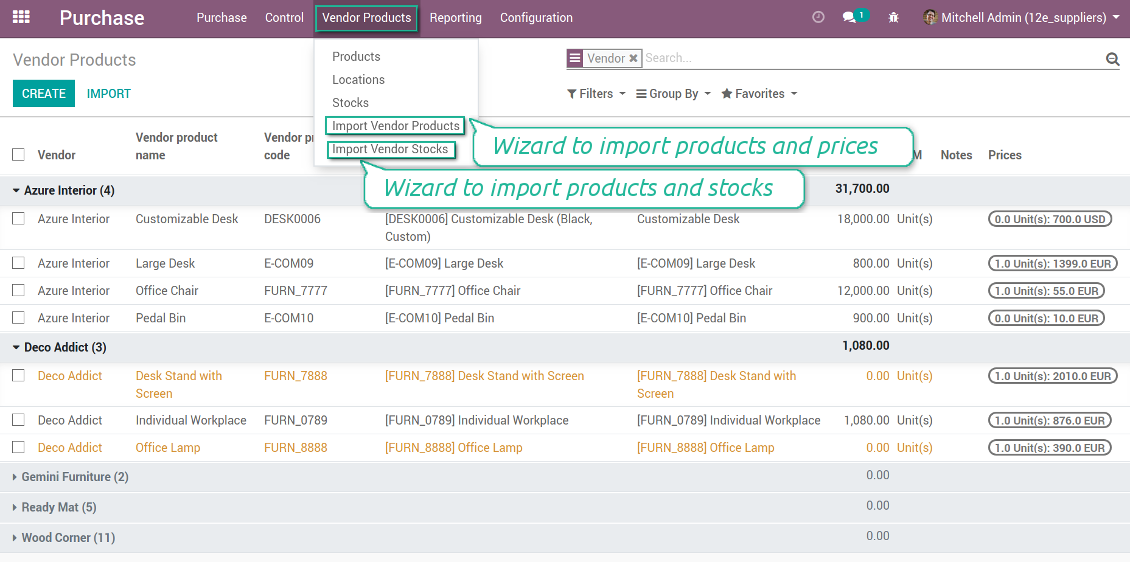
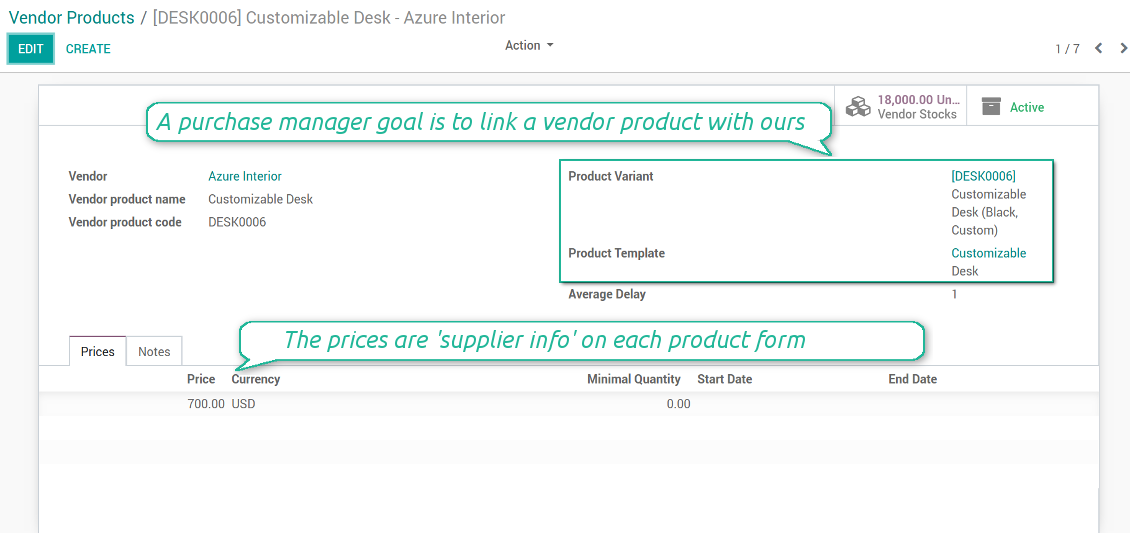
Any vendor product might be linked to your own product. In such a way a purchase manager goal becomes to match 'their' products with 'ours'. Each of our product variants might have a few related vendor products.
Any purchase manager may create, update, and archive vendor-related objects. Any Odoo user with an access to products might rely upon vendor data for informational purposes.
As soon as you installed the module, Odoo would automatically create vendor products based on existing products' supplier infos.
Ảnh chụp màn hình
Vendor products interface
Vendor product form
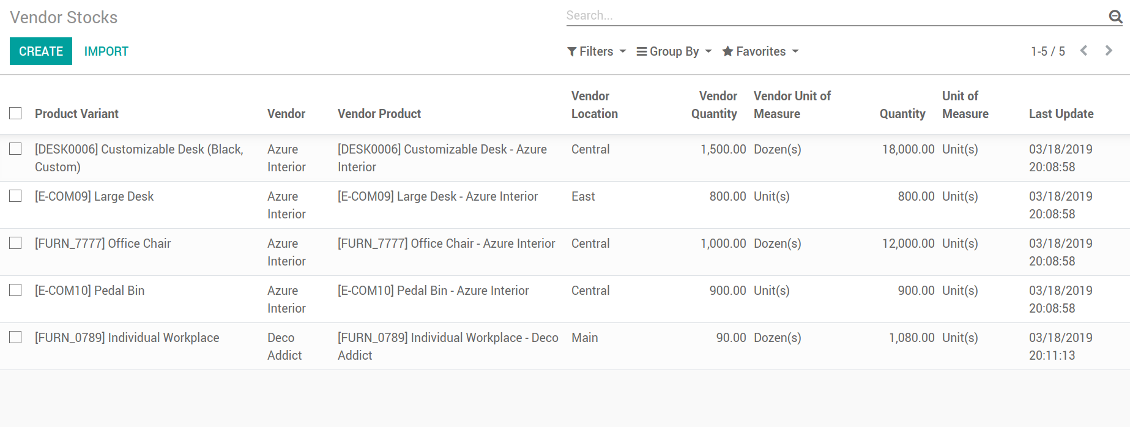
Vendor stocks control
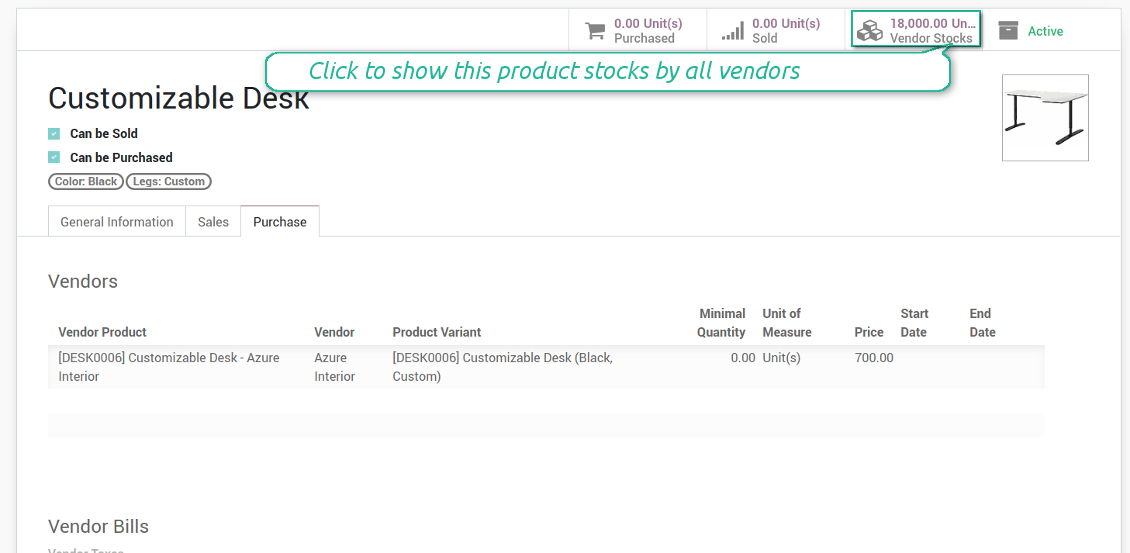
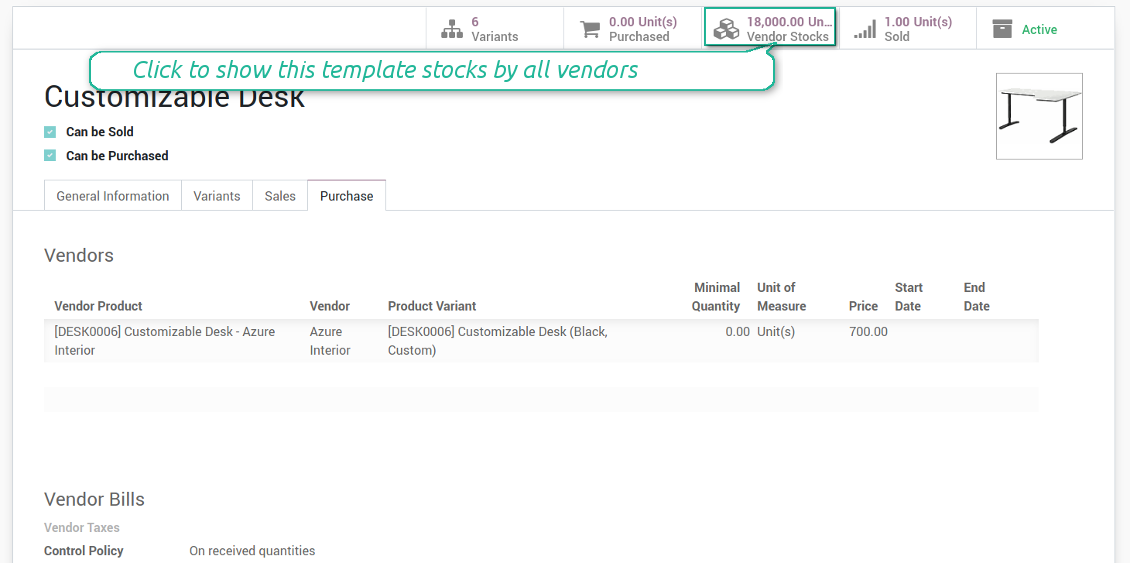
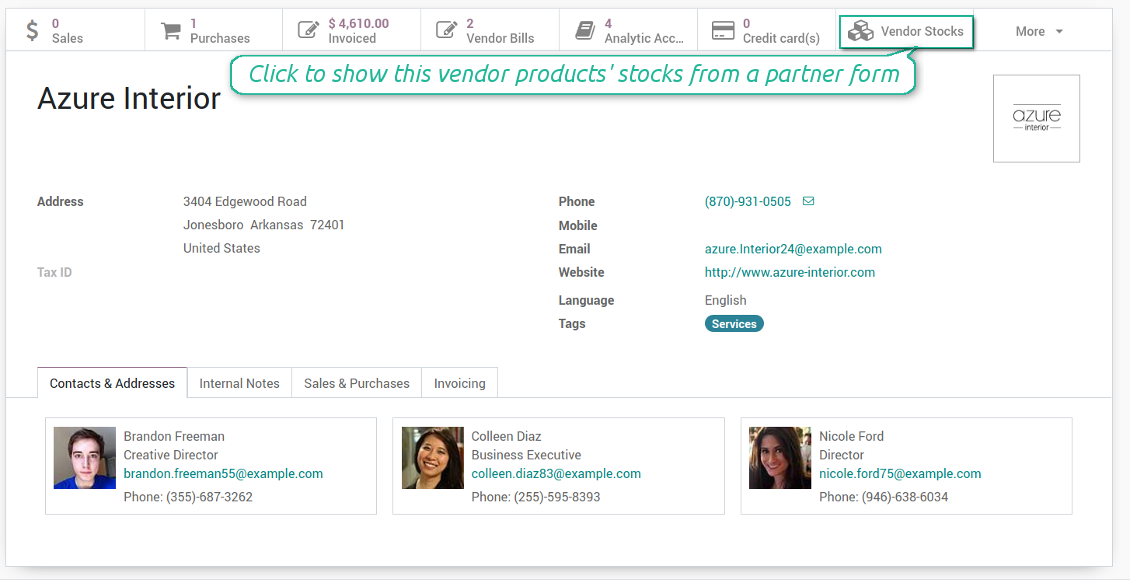
You may access info of vendor products' stocks right from product variant, product template, and supplier form views. You should just click a related button to get an overview.
How vendor stocks work
- Each stock level is provided per definite vendor location (warehouse)
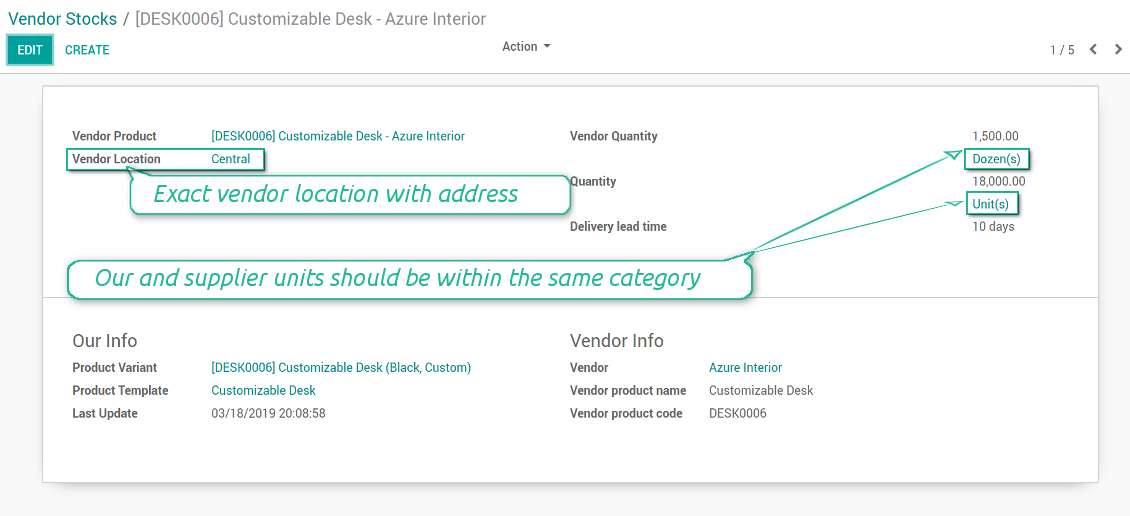
- Assign an unlimited number of vendor locations per each supplier. Locations are distinguished by name, address, and average delivery time
- Keep stock levels in vendor units of measure, but make sure it has the same category as our linked product. The idea is to support conversion in order internal users work with habitual figures. For example, dozens and units are fine, while dozens and hours might lead to mistakes
- Stock levels are not used in our moves, but they are provided for general information. Stock levels are updated either manually by purchase managers or through the import process
Ảnh chụp màn hình
Control vendor inventories per each product
Vendor stocks on a product form
Vendor stock level form per each product
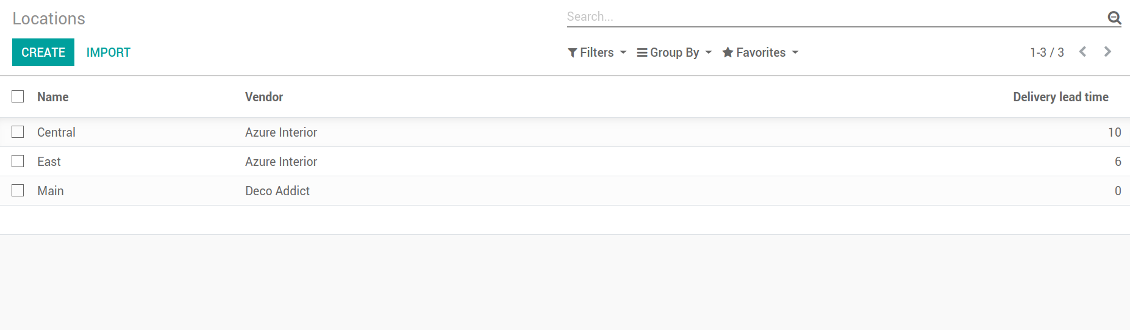
Vendor locations list (not linked to our locations!)
Vendor stocks by product templates
Access stocks of this supplier from a partner form
Supplier prices management
Those prices are considered as standard Odoo 'supplier info' which correspondingly are used in purchase orders.
Comfortable importing of vendor product data
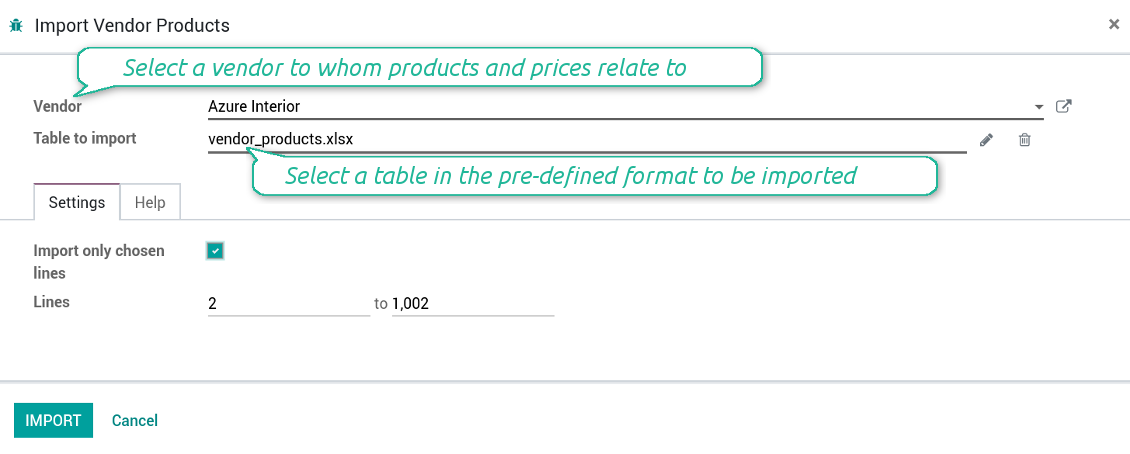
How to import vendor product and prices
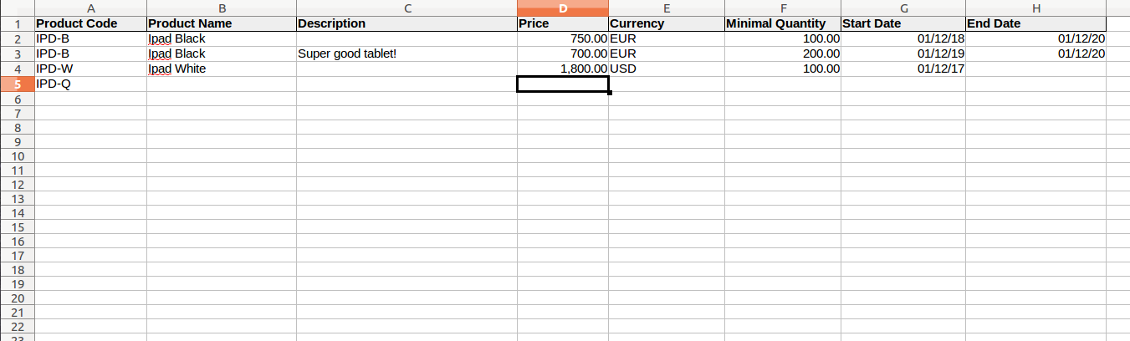
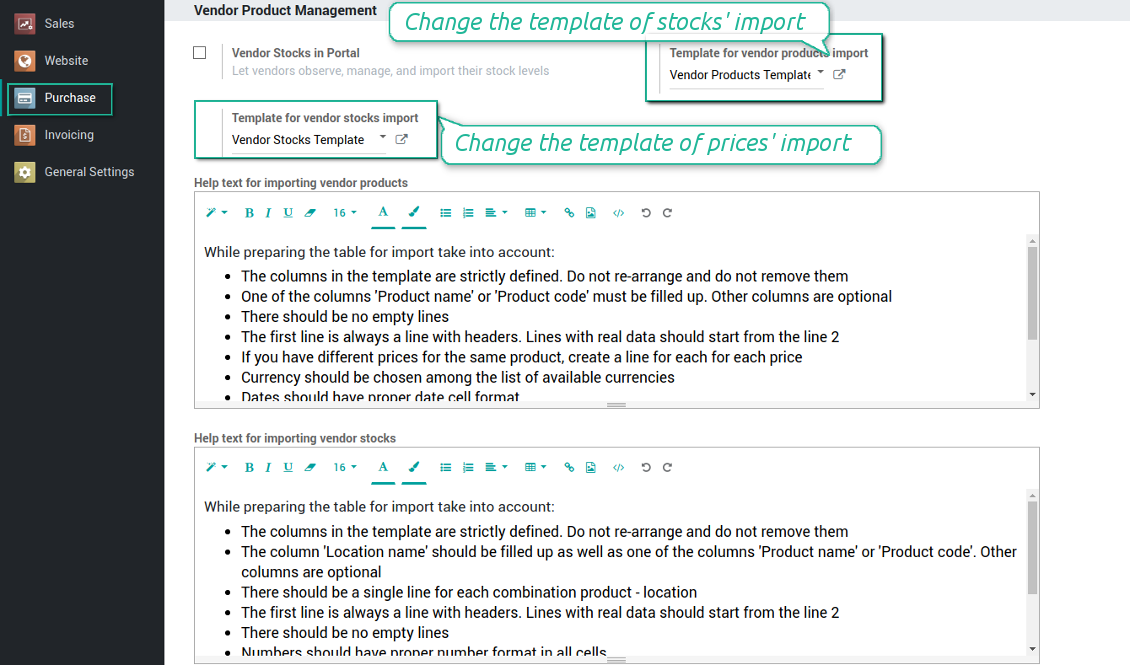
- The table format is supplied with this tool source code and would be available for you on the configuration page as the 'Template for vendor products import' and in the import wizard on the tab 'Help'
- You may change the table content to provide users with more specific examples and labels. However do no not change columns' order and do not remove those: it would lead to inevitable mistakes
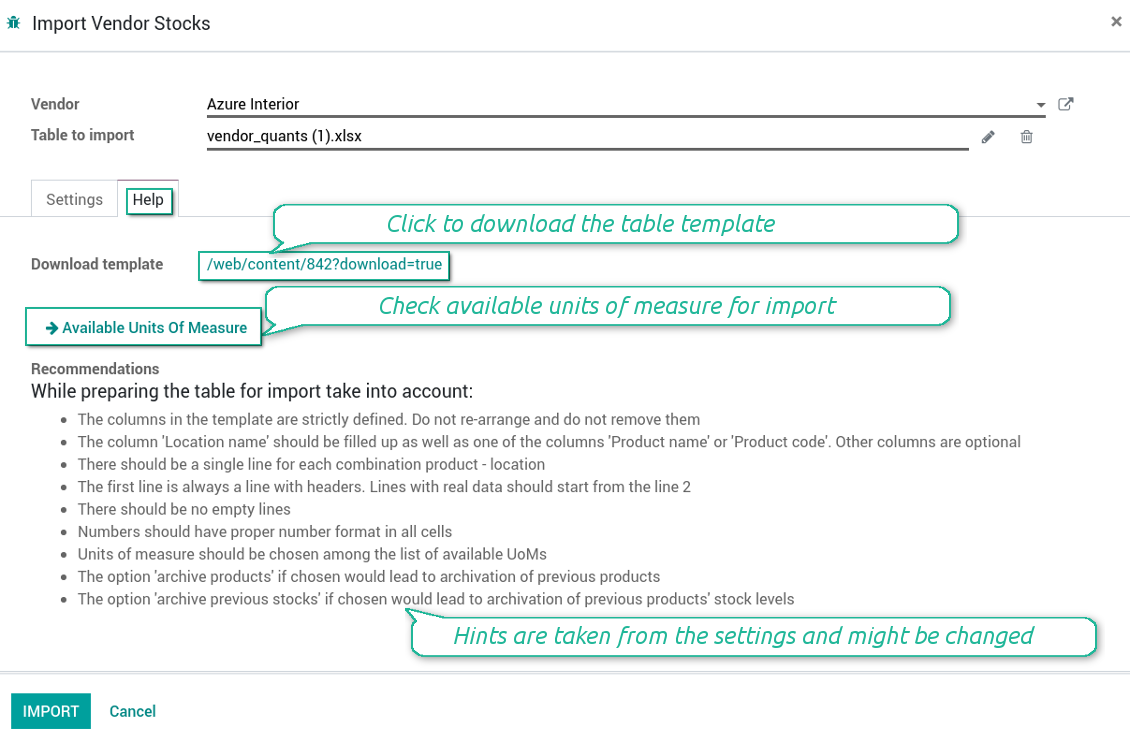
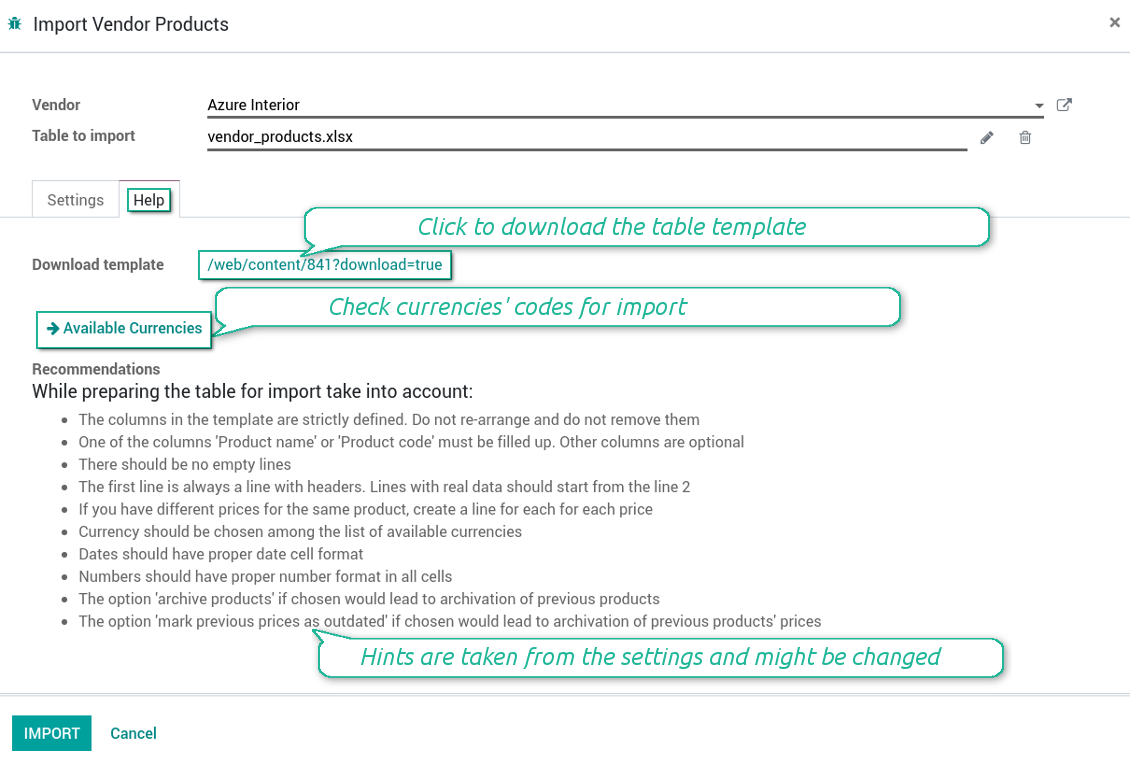
- The wizard offers useful tips to make a correct import. You may edit those recommendations on the configuration page, but make sure you do not remove critical advice
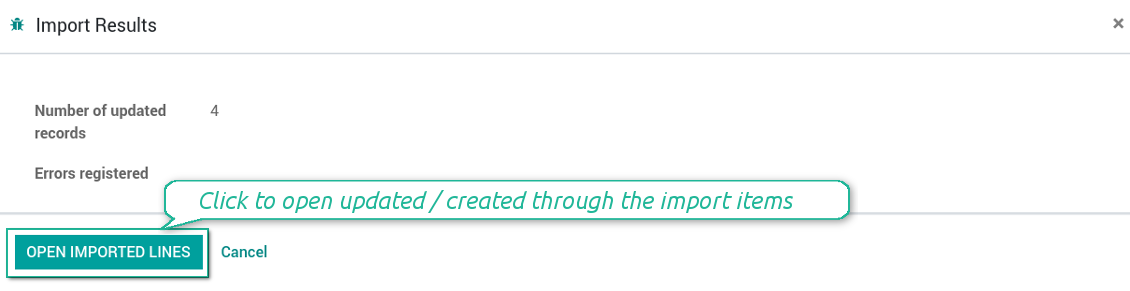
- Each import finishes with the special results' and errors' pop-up. It let you control of what has been actually done
- In the wizard you can select which table lines should be imported. It is useful in case the number of lines is too big to import them all
- In the wizard you can select whether previous products of this vendor should be archived. It let you fully replace this supplier product catalogue with a new one
- In the wizard you can select whether previous prices should be marked as outdated. It let you remove misleading data
- While preparing the table for import be cautious with cell formats. Dates should be dates, numbers should be numbers, currency should be chosen among active ones
- In case import can't be fully finished until Odoo stops it, contact your system administrator to increase configured time-outs
How to import vendor products and stocks
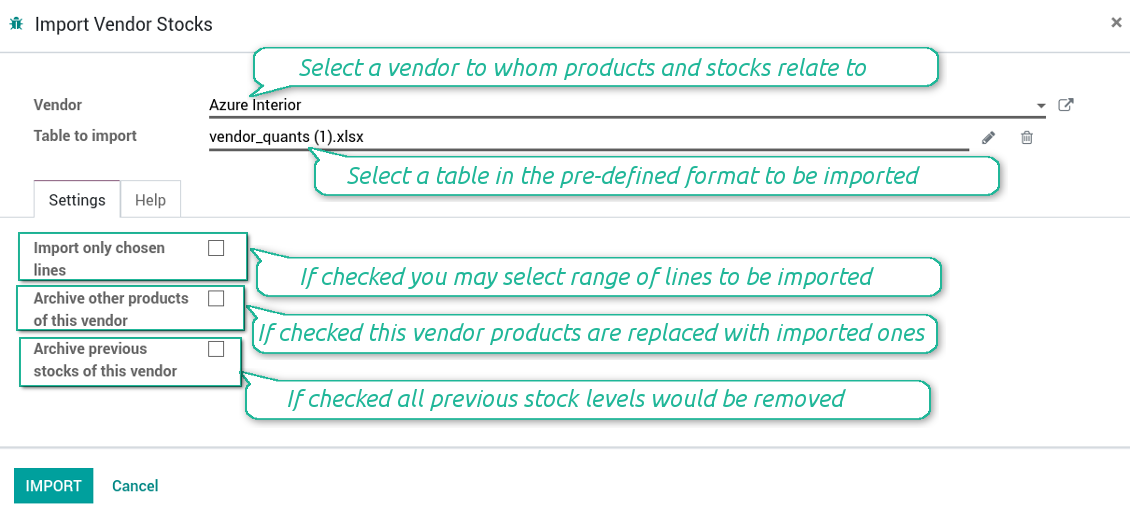
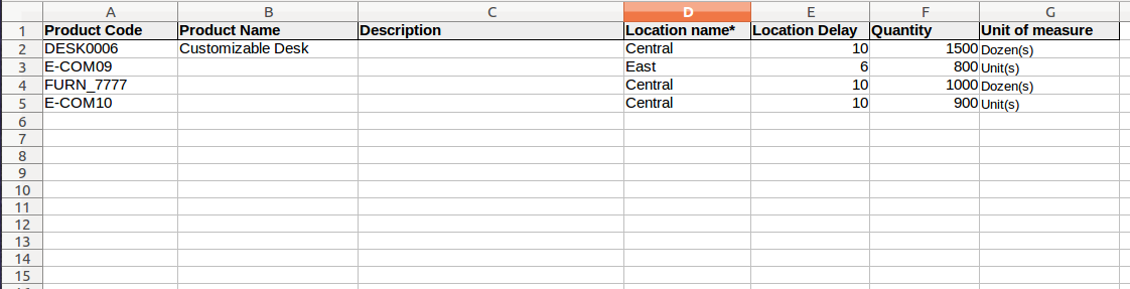
- The table format is supplied with this tool source code and would be available for you on the configuration page as the 'Template for vendor stocks import' and in the import wizard on the tab 'Help'
- You may change the table content to provide users with more specific examples and labels. However do no not change columns' order and do not remove those: it would lead to inevitable mistakes
- The wizard offers useful tips to make a correct import. You may edit those recommendations on the configuration page, but make sure you do not remove critical advice
- Each import finishes with the special results' and errors' pop-up. It let you control of what has been actually done
- In the wizard you can select which table lines should be imported. It is useful in case the number of lines is too big to import them all
- In the wizard you can select whether previous products of this vendor should be archived. It let you fully replace this supplier product catalogue with a new one
- In the wizard you can select whether previous stocks are not any more correct. It let you have fully topical data after each import
- While preparing the table for import be cautious with cell formats. Numbers should be numbers, units of measure should be chosen among existing ones
- In case import can't be fully finished until Odoo stops it, contact your system administrator to increase configured time-outs
Ảnh chụp màn hình
Import of vendor products and stocks
The template for vendor stock levels table
Stocks import wizard' recommendations
Import of vendor products and prices
The template for vendor products' table
Prices import wizard goes with detailed recommendations
Configure your own configurations for import
Check results and errors of import
Câu hỏi thường gặp về Vendor Product Management Odoo v.13
Chính sách cập nhật của các công cụ của bạn là gì?
Theo chính sách hiện tại của Odoo Apps Store:
- Mọi mô-đun mua cho phiên bản 12.0 trở về trước cho phép truy cập mọi phiên bản đến 12.0.
- Từ phiên bản 13.0, mỗi phiên bản mô-đun phải mua riêng.
- Bất kể phiên bản, mua công cụ cho quyền mọi cập nhật và sửa lỗi trong một phiên bản chính.
Lưu ý rằng nhóm faOtools không kiểm soát các chính sách đó. Mọi câu hỏi xin liên hệ trực tiếp đại diện Odoo Apps Store.
Làm sao cài ứng dụng của bạn trên Odoo.sh?
Cách thẳng nhất là dùng quy trình có sẵn của cửa hàng Odoo:
1. Mở trang phân hệ và bấm nút Deploy on odoo.sh
2. Sau đó bạn sẽ được chuyển tới trang GitHub. Đăng nhập tài khoản, rồi bấm 'Create a new repo' hoặc dùng repo có sẵn. Hãy đảm bảo kho là riêng tư. Không được phép công bố ứng dụng theo giấy phép OPL-1. Nếu cần, tạo repo mới cho dự án Odoo.sh
3. Rồi vào odoo.sh và bấm nút Deploy. Trong cửa sổ pop-up, gửi quyết định và bấm 'Continue.' Thao tác này sẽ kích hoạt cài đặt.
Các bước này sẽ cài ứng dụng cho nhánh production của dự án. Nếu muốn triển khai ứng dụng cho nhánh khác hoặc cập nhật phân hệ, hãy làm các bước sau:
1. Tải mã nguồn ứng dụng từ cửa hàng Odoo
2. Commit phân hệ vào kho GitHub cần thiết. Đảm bảo không thư mục/tệp ứng dụng nào bị bỏ qua (tức không nằm trong .gitignore của repo). Kho được odoo.sh tạo tự động và mặc định có thể gồm mục quan trọng (vd. /lib). Hãy tải lên mọi thư mục, thư mục con và tệp của phân hệ, không ngoại lệ
3. Triển khai nhánh đích của dự án odoo.sh hoặc, nếu thiết lập của bạn giả định vậy, đợi đến khi được xây tự động.
Tôi nên cài ứng dụng của bạn trên máy chủ riêng thế nào?
2. Khởi động lại máy chủ Odoo;
3. Bật chế độ nhà phát triển (cài đặt kỹ thuật);
4. Cập nhật danh sách ứng dụng (menu ứng dụng);
5. Tìm ứng dụng và bấm 'Activate'/'Install';
6. Làm theo hướng dẫn trên trang ứng dụng nếu có.
Tôi thấy ứng dụng có tiện ích thêm. Có thể mua sau không?
Có, chắc chắn. Đồng thời Odoo tự thêm mọi phụ thuộc vào giỏ, nên bạn nên loại các công cụ đã mua để tránh trả hai lần.
Tôi triển khai ứng dụng trên Odoo.sh và thấy cảnh báo/lỗi trong kiểm thử
Cảnh báo đỏ/cam không ảnh hưởng đến tính năng của ứng dụng. Đáng tiếc, đôi khi phân hệ của chúng tôi không qua được các kiểm thử tự động chuẩn vì chúng giả định hành vi xung đột với mục tiêu ứng dụng. Ví dụ chúng tôi đổi cách tính giá, trong khi kiểm thử phân hệ Odoo chuẩn so giá cuối với thuật toán chuẩn.
Trước hết, hãy kiểm tra tính năng của cơ sở dữ liệu đã triển khai. Mọi thứ có chạy đúng không?
Nếu vẫn cho rằng cảnh báo ảnh hưởng tính năng thật, hãy liên hệ chúng tôi và gửi nhật ký cài đặt đầy đủ cùng danh sách đầy đủ phân hệ đã triển khai (gồm lõi và bên thứ ba).
Tôi có thể mua ứng dụng trực tiếp từ công ty bạn không?
Không, chúng tôi chỉ phân phối công cụ qua cửa hàng ứng dụng Odoo chính thức.
Tôi muốn được giảm giá
Rất tiếc, chúng tôi không có phương tiện kỹ thuật để cung cấp giá riêng.
Tôi có thể cài ứng dụng trên cơ sở dữ liệu Odoo Online (SaaS) không?
Không, ứng dụng bên thứ ba không dùng được trên Odoo Online. Rất tiếc Odoo SaaS chặn khả năng đó.
Công cụ của bạn phụ thuộc ứng dụng khác. Tôi có cần mua chúng không?
Có, công cụ cần tất cả phân hệ ghi trong phụ thuộc để chạy đúng. Giá trên trang ứng dụng đã gồm mọi phụ thuộc cần thiết.
Giá mô-đun bằng đô la Mỹ là bao nhiêu? Sao lại đổi?
Giá phân hệ của chúng tôi tính bằng euro. Cửa hàng Odoo đổi sang các tiền tệ khác theo tỷ giá nội bộ. Vì vậy giá bằng đô la Mỹ có thể đổi khi tỷ giá được cập nhật.
Lời ứng dụng và trang web ở ngôn ngữ khác tiếng Anh được hỗ trợ bởi AI và khớp với bản dịch Odoo chính thức. Nếu bạn thấy sai, gửi phiếu hỗ trợ về đúng bản dịch và chúng tôi sẽ sửa.
Báo lỗi
Nếu gặp lỗi hoặc hành vi không nhất quán, hãy liên hệ. Chúng tôi cam kết sửa trong 60 ngày kể từ khi mua và vẫn muốn cải thiện công cụ sau giai đoạn đó.
Bạn không cần số điện thoại hay thẻ tín dụng để liên hệ. Chỉ cần đăng ký email ngắn, không quá 30 giây.
Hãy nêu càng nhiều chi tiết càng tốt trong yêu cầu: ảnh chụp màn hình, nhật ký máy chủ Odoo, mô tả đầy đủ cách tái hiện sự cố, v.v. Thường mất vài ngày làm việc để chuẩn bị kế hoạch xử lý (nếu xác nhận lỗi) hoặc hướng dẫn việc cần làm (nếu không).
Yêu cầu tính năng công khai và ý tưởng module (phát triển miễn phí)
Chúng tôi rất muốn cải thiện công cụ và biết ơn mọi phản hồi. Nếu yêu cầu của bạn hữu ích cho mọi người và có thể triển khai hiệu quả, nhóm sẽ đưa vào danh sách việc cần làm.
Danh sách việc cần làm như vậy được xử lý đều đặn và không phát sinh phí thêm. Dù chúng tôi không hứa hạn chót và thiết kế cuối, đây có thể là cách tốt để có tính năng mong muốn mà không đầu tư và rủi ro.
Bạn không cần số điện thoại hay thẻ tín dụng để liên hệ. Chỉ cần đăng ký email ngắn, không quá 30 giây.

Công cụ sắp xếp linh hoạt tệp đính kèm Odoo vào thư mục và đồng bộ thư mục với máy khách đám mây: Google Drive, OneDrive/SharePoint, Nextcloud/ownCloud, Dropbox, Amazon S3, Box và NAS. DMS. Trình quản lý tệp. Hệ thống quản lý tài liệu
398€
Công cụ để lưu mật khẩu an toàn trong Odoo cho dùng chung. Kho dùng chung

Công cụ xây dựng cơ sở tri thức sâu và có cấu trúc cho nội bộ và bên ngoài. Knowledge System. KMS. Bản sửa kiểu wiki.
398€
Công cụ đồng bộ hai chiều tự động tệp đính kèm Odoo với tệp OneDrive
487€
Công cụ đặt mục tiêu KPI và kiểm soát hoàn thành theo kỳ. Bảng điều khiển KPI. Trình thiết kế bảng. Biểu đồ KPI

Công cụ đồng bộ hai chiều tự động tệp đính kèm Odoo với tệp Google Drive
487€
Công cụ quản lý dịch vụ theo thời gian, từ đặt lịch đến bán hàng và đánh giá
398€
