Vendor Products Portal v.16
The tool to motivate vendors to prepare product catalogs in Odoo






This Odoo tool aims to force suppliers to administrate their products in the Odoo portal. The app lets vendor contacts create, update, and import products they sell, related prices, and stock levels by their locations. Purchase managers might do the same and use that information for administrating procurement.
Vendor products catalog
The tool introduces a new stand-alone classifier of vendor products which is manageable either internally by purchase managers or in the Odoo portal by supplier representatives. As installed the app automatically creates vendor products based on existing Odoo products' supplier prices
Odoo sales based on supplies
Any vendor product might be linked to any Odoo product. In such a way, a purchase manager's goal becomes to match 'their' products with 'ours'. Each of our product variants might have a few linked vendor products
Supplier prices management
Portal users manage their company prices in the Odoo portal, while purchase managers might update them in the Odoo backend interface. Those prices are considered as standard Odoo 'supplier info' which correspondingly are used in purchase orders
Vendor stocks control
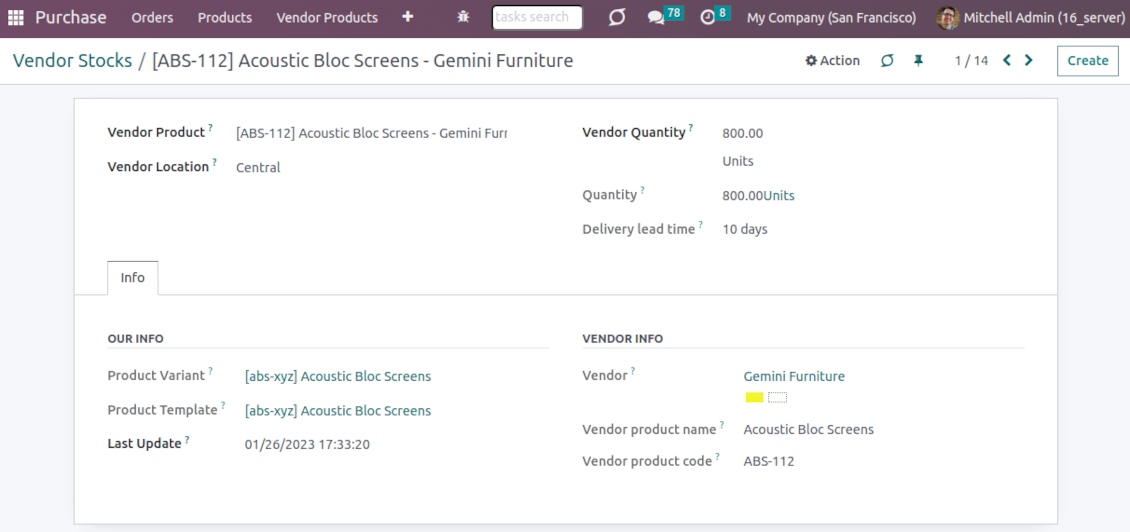
Both vendor representatives and purchase users register and update inventory levels for supplier locations. Vendor products' stocks data is available both in the Odoo portal and from the product variant, product template, and supplier backend form views
Vendor data import
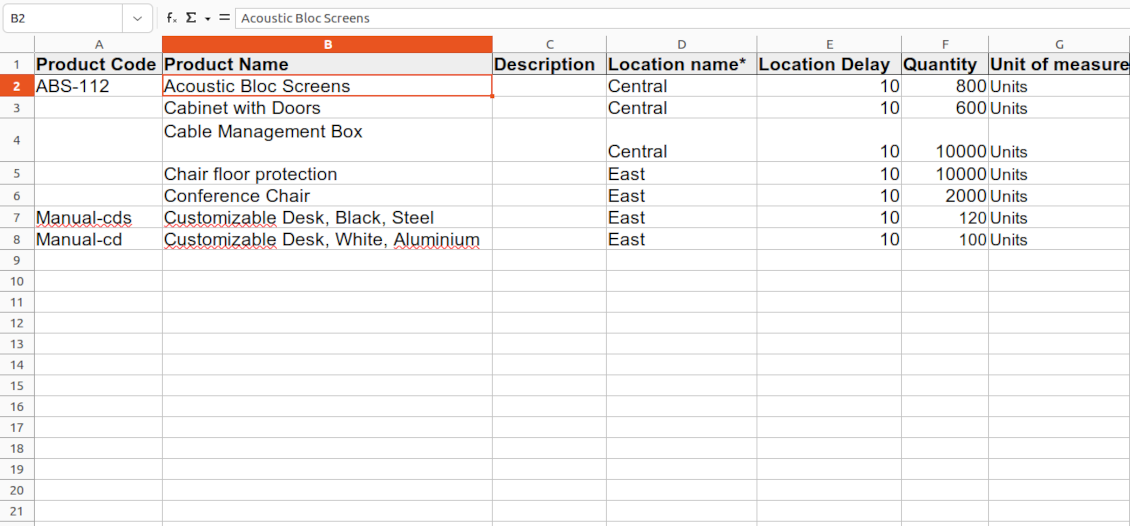
The tool lets import vendor products, prices, and stock levels as Excel tables of predefined formats. In such a way, suppliers may quickly prepare commercial offers in the Odoo portal, while purchase managers - import those in the Odoo backend
Secured access and shared use
Any portal user may create, update, and archive products related to their company. Any Odoo user with access to products might rely upon vendor data for informational purposes. Any purchase manager may create, update, and archive vendor-related objects. Such managers might also get notifications of newly registered vendor products, their price changes, and inventory updates.
Odoo supplier portal
-
The Odoo portal allows searching and managing vendor products, locations, and stocks
-
Portal users may register, update, and import new items for their product catalog at any moment
-
Vendor representatives might manage their price lists, including registering new offers; modifying their validity period and minimum rules; deleting prices
-
Vendor users may import products and prices in a form of the predefined Excel table
-
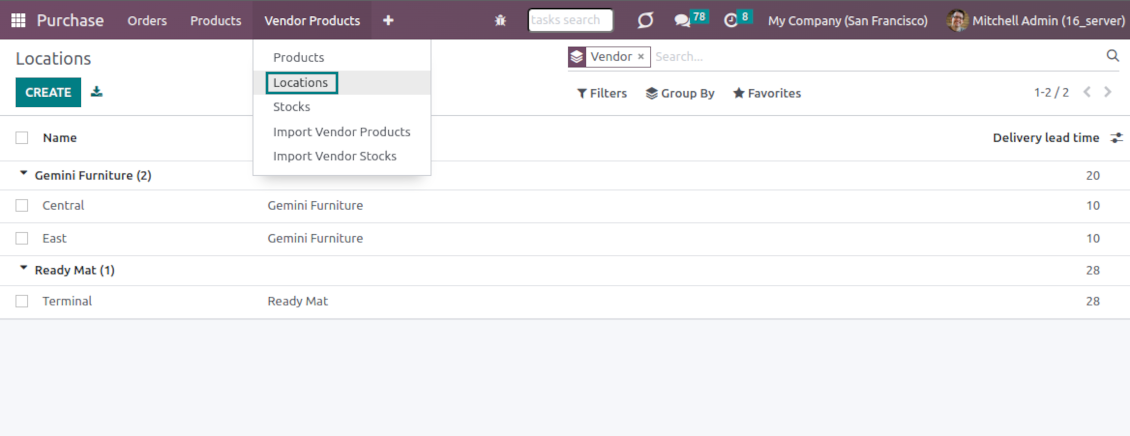
Vendor representatives might manage their warehouses, including registering new locations; modifying their titles, descriptions, addresses, and delivery time; deleting warehouses
-
Suppliers can update inventory data, in particular register new and change stock levels per each location
-
Vendor users may import inventory levels in a form of the predefined Excel table
-
Suppliers can archive and restore products, prices, warehouses, and stocks.
Vendor inventories control
-
Each vendor stock level is provided per definite vendor location (warehouse). Vendors might create, edit, and archive their own warehouses
-
The tool allows an unlimited number of vendor locations per supplier. Locations are distinguished by name, address, and average delivery time
-
Keep stock levels in vendor units of measure, but purchase managers should make sure it has the same category as a linked Odoo product. The idea is to support conversion in order for internal users to work with habitual figures. For example, dozens and units are fine, while dozens and hours might lead to inconsistent procurement
-
Vendor stocks and locations might be switched off for portal users on the app configuration page
-
Stock levels are not used in Odoo operations, but they are provided for general information. Inventory levels are updated either manually by purchase managers/vendor representatives or through the import
-
Odoo warehouses' stocks are not linked to vendor stocks. Vendor stocks are absolutely independent since it is not possible to control supplier moves, and, hence, to support the double-entry system
-
Vendor inventories might be of special importance in the case of make-to-order logistics or drop shipping.
Vendor data import
Vendor products and prices
-
The tool lets vendor representatives and purchase users import vendor products and supplier prices as an Excel table in the predefined format. The table format is supplied with this tool source code and would be available on the configuration page as the 'Template for vendor products import' and in the import wizard under the section 'Help'
-
In the wizard, users can select whether previous products of this vendor should be archived. It lets fully replace this supplier product catalog with a new one
-
In the wizard, users can select whether previous prices should be marked as outdated. It lets remove misleading data.
Vendor products and stocks
-
The tool lets vendor representatives and purchase users import vendor products and stock levels as an Excel table in the predefined format. The table format is supplied with this tool source code and would be available on the configuration page as the 'Template for vendor stocks import' and in the import wizard under the section 'Help'
-
In the wizard, users can select whether previous products of this vendor should be archived. It lets fully replace this supplier product catalog with a new one
-
In the wizard, users can select whether previous stocks are not correct. It lets you have fully topical data after each import.
General import rules
-
Change the tables' content to provide more specific examples and labels. However, do not modify the columns' order and do not remove those: it will lead to inevitable mistakes
-
The import wizards offer useful tips to make a correct import. You may edit those recommendations on the configuration page, but make sure you do not remove critical advice
-
Each import finishes with a special popup of the results and the errors. It lets control of what has been actually done
-
In the wizards select which table lines should be imported. It is useful in case the number of lines is too big to import them all
-
While preparing the table for import be cautious with cell formats and make sure portal users know that. Dates should be dates, numbers should be numbers, currencies, and units of measure should be chosen among active in Odoo
-
In case import can't be fully finished until Odoo stops it, contact your system administrator to increase configured time-outs or split an imported table into a few ones.
Vanliga frågor om Vendor Products Portal Odoo v.16
Vad ar skillnaden mellan Vendor Products Management och Vendors Product Portal?
Vendor Products Portal ar ett tillägg till Vendor Products Management. Det senare hanterar leverantorsprodukter, priser och lager bara i Odoo-backend (interna användare). Det förra later portalanvändare (leverantörer) själva lägga in katalogen och uppdatera/importera priser, lager och nivåer. Vendor Product Management ar ett obligatoriskt beroende for Vendor Products Portal.
Vilka uppdateringsregler gäller for era verktyg?
Enligt de aktuella reglerna for Odoo Apps Store:
- Varje modul kop for version 12.0 eller tidigare ger tillgang till alla versioner upp till 12.0.
- Från och med version 13.0 måste varje modulversion kopas separat.
- Oavsett version ger kopet rätt till alla uppdateringar och felrättningar inom en huvudversion.
faOtools-teamet styr inte dessa regler. Vid frågor, kontakta representanterna for Odoo Apps Store direkt.
Hur installerar jag er app pa Odoo.sh?
Det mest direkta sättet ar Odoo-butikens inbyggda flöde:
1. Öppna modulens sida och klicka pa Deploy on odoo.sh
2. Du omdirigeras till GitHub. Logga in och klicka pa Create a new repo eller använd ett befintligt. Repot måste vara privat. Appar under OPL-1 far inte publiceras. Skapa vid behov ett nytt repo for Odoo.sh-projektet
3. Ga sedan till odoo.sh, klicka pa Deploy, bekräfta och klicka pa Continue. Installationen startar.
Stegen installerar appen pa production-grenen. For andra grenar eller uppdatering:
1. Ladda ner kallkoden från Odoo-butiken
2. Committa modulen till GitHub-repot. Ingen app-mapp/fil far sta i .gitignore. Repon som odoo.sh skapar kan ignorera viktiga sokvagar (t.ex. /lib). Ladda upp alla modulmappar och filer
3. Deploya malgrenen i odoo.sh-projektet eller vänta pa den automatiska builden om inställningarna anger det.
Hur installerar jag er app pa min egen server?
2. Starta om Odoo-servern;
3. Sla pa utvecklarlaget (tekniska inställningar);
4. Uppdatera applistan (Appar-menyn);
5. Hitta appen och klicka pa Activate/Install;
6. Följ anvisningarna pa appsidan om det finns någon.
Er app har extra tillägg. Kan jag kopa dem senare?
Ja. Odoo lägger automatiskt alla beroenden i varukorgen: uteslut redan kopta verktyg sa att du inte betalar tva gånger.
Jag deployade er app pa Odoo.sh och ser en varning/ett fel i testerna
En rod/orange varning påverkar inte appens funktioner. Ibland klarar vara moduler inte de vanliga automatiska testerna, eftersom de förväntar ett beteende som strider mot appens mal. Vi ändrar till exempel prisberakningen, medan Odoo-testerna jämför slutpriset med standardalgoritmen.
Kontrollera först funktionerna i den deployade databasen. Fungerar allt?
Om du ändå tror att varningen påverkar verkliga funktioner, kontakta oss och skicka de fullständiga installationsloggarna och den fullständiga listan över deployade moduler (karn och tredje part).
Kan jag kopa er app direkt av er?
Nej, vi distribuerar verktygen endast via den officiella Odoo-appbutiken.
Jag vill ha rabatt
Tyvärr har vi inte tekniska möjligheter att erbjuda individuella priser.
Kan jag installera appen pa min Odoo Online (SaaS)-databas?
Nej, tredjepartsappar kan inte användas pa Odoo Online. Odoo SaaS blockerar den möjligheten.
Ert verktyg beror pa andra appar. Behöver jag kopa dem?
Ja, verktyget behöver alla moduler som anges som beroenden. Priset pa appsidan inkluderar redan dessa beroenden.
Vad kostar modulen i amerikanska dollar? Varför andrades det?
Priset for vara moduler anges i euro. Odoo-butiken konverterar till andra valutor enligt sin interna vaxelkurs. Därför kan priset i amerikanska dollar andras nar kursen uppdateras.
App- och webbplatsformuleringar på andra språk än engelska är AI-assisterade och anpassade till officiella Odoo-översättningar. Om du upptäcker ett fel, skicka ett ärende om översättningskorrekthet så åtgärdar vi det.
Odoo-demodatabaser (liveförhandsvisningar)
För den här appen kan vi erbjuda en gratis personlig demodatabas.
Du behöver varken telefonnummer eller kreditkort för att kontakta oss. Det räcker med en kort e-postregistrering som tar högst 30 sekunder.
På din begäran förbereder vi en individuell liveförhandsvisningsdatabas där du kan göra tester och kontrollera antaganden i cirka två veckor.
Felrapportering
Om du stöter på fel eller inkonsekvent beteende, kontakta oss. Vi garanterar rättningar inom 60 dagar efter köpet och vill förbättra verktygen även efter det.
Du behöver varken telefonnummer eller kreditkort för att kontakta oss. Det räcker med en kort e-postregistrering som tar högst 30 sekunder.
Ta med så många detaljer som möjligt: skärmbilder, Odoo-serverloggar och en fullständig beskrivning av hur problemet återskapas. Det tar vanligtvis några arbetsdagar att ta fram en arbetsplan (om felet bekräftas) eller riktlinjer (annars).
Offentliga funktionsönskemål och modulidéer (gratis utveckling)
Vi är starkt motiverade att förbättra våra verktyg och tackar för all feedback. Om kraven är av allmänt intresse och kan implementeras effektivt tar teamet med dem i att-göra-listan.
En sådan att göra-lista behandlas regelbundet och innebär inga extraavgifter. Även om vi inte kan lova tidsfrister och slutlig design kan det vara ett bra sätt att få önskade funktioner utan investeringar och risker.
Du behöver varken telefonnummer eller kreditkort för att kontakta oss. Det räcker med en kort e-postregistrering som tar högst 30 sekunder.

The tool to flexibly structure Odoo attachments in folders and synchronize directories with cloud clients: Google Drive, OneDrive/SharePoint, Nextcloud/ownCloud, and Dropbox. DMS. File Manager. Document management system
398€

The tool to build a deep and structured knowledge base for internal and external use. Knowledge System. KMS. Wiki-like revisions.
398€
The tool to automatically synchronize Odoo attachments with OneDrive files in both ways
487€
The tool to set up KPI targets and control their fulfillment by periods. KPI dashboards. Dashboard designer. KPI charts

The tool for time-based service management from booking appointments to sales and reviews
398€
The tool to automatically synchronize Odoo attachments with Google Drive files in both ways
487€
The tool to configure variant prices based on attributes coefficients and surpluses
98€